remote control FORD ESCAPE 2013 3.G User Guide
[x] Cancel search | Manufacturer: FORD, Model Year: 2013, Model line: ESCAPE, Model: FORD ESCAPE 2013 3.GPages: 423, PDF Size: 4.59 MB
Page 54 of 423

LOCKING AND UNLOCKING
You can use the power door lock control
or the remote control to lock and unlock
the vehicle.
Power Door Locks
Unlock
A
Lock
B
Remote Control
The remote control can be used any time
the vehicle is not running.
Unlocking the Doors (Two-Stage
Unlock)
Press the button to unlock the
driver ’s door.
Press the button again within
three seconds to unlock all doors. The turn
signals will flash.
Press and hold both the lock and unlock
buttons on the remote control for four
seconds to disable or enable two-stage
unlocking. Disabling two-stage unlocking
allows all vehicle doors to unlock with one
press of the button. The turn signals will
flash twice to indicate the unlocking mode
was changed. The unlocking mode will be
applied to the remote control, keyless entry
keypad and intelligent access. Intelligent access at the driver
’s door will
unlock all doors when two-stage unlocking
is disabled.
Locking the Doors
Press the button to lock all the
doors. The turn signals will
illuminate.
Press the button again within three
seconds to confirm that all the doors are
closed. The doors will lock again, the horn
will chirp and the turn signals will
illuminate if all the doors and the luggage
compartment are closed.
Note: If locking was not successful or any
door or the liftgate is not closed, or if the
hood is not closed on vehicles equipped
with a perimeter alarm or remote start, the
horn will chirp twice and the lamps will not
flash.
Power Liftgate (if equipped)
WARNINGS
Make sure all persons are clear of the
liftgate area before using power
liftgate control.
Make sure the liftgate is closed to
prevent exhaust fumes from being
drawn into the vehicle. This will also
prevent passengers and cargo from falling
out. If you must drive with the liftgate open,
keep the vents open so outside air comes
into the vehicle.
Note: Be careful when opening or closing
the liftgate in a garage or other enclosed
area to avoid damaging the liftgate.
Press twice within three seconds
to open or close the liftgate, or
to reverse the movement. See
Power Liftgate (page 57).
54
Locks
E138628
E138629
E138623
E138630
Page 56 of 423
Autolock and Autounlock (If Equipped)
The autolock feature will lock all the doors
when:
•all doors are closed
• the ignition is on
• you shift into any gear putting the
vehicle in motion, and
• the vehicle attains a speed greater than
4 mph (7 km/h).
When autounlock is enabled, all doors will
unlock when the driver door is opened.
Enabling or Disabling Autolock and
Autounlock
Note: Your authorized dealer can perform
this procedure, or you can do the procedure
yourself.
To enable or disable these features, do the
following:
Note: You will have 30 seconds to
complete the procedure.
1. Switch the ignition on.
2. Press the power door lock button three
times.
3. Switch the ignition off.
4. Press the power door lock button three
times.
5. Switch the ignition on. The horn will chirp indicating the programming mode
has been entered.
Autolock: Once in programming mode,
each subsequent short press (less than 1
second) of the power door lock button will
toggle autolock between on and off.
Autounlock: Each subsequent long press
(more than 2 seconds) of the power door
lock button will toggle autounlock between
on and off.
Note: The autounlock feature can be
enabled or disabled independently of the
autolock feature. Illuminated Entry
The interior lamps and select exterior
lamps will illuminate when the remote
entry system is used to unlock the door(s).
The illuminated entry system will turn off
the lights if:
•
the ignition is on
• the remote transmitter lock control is
pressed, or
• after 25 seconds of illumination.
The lights will not turn off if:
• they have been turned on with the
dimmer control, or
• any door is open.
Illuminated Exit
The interior lamps and select exterior
lamps will illuminate when all doors are
closed, the ignition is turned off and the
key is removed from the ignition
(integrated keyhead transmitter only).
The lamps will turn off if all the doors
remain closed and:
• 25 seconds elapse
• the key is inserted in the ignition
(integrated keyhead transmitter only)
• the START/STOP button is pressed
(intelligent access key only).
Battery Saver
If the courtesy lamps, dome lamps or
headlamps are left on, the battery saver
will shut them off 10 minutes after the
ignition has been turned off.
Accessory Mode Battery Saver for
Intelligent Access Keys (If Equipped)
If you shut off the engine and leave the
ignition in the on or accessory mode, the
ignition will shut off after 30 minutes.
56
Locks
Page 58 of 423
Three warning chimes will sound once as
the liftgate begins to power close. Five
short chimes indicate a problem with the
open or close request, caused by:
•the ignition is on and the transmission
is not in P (Park);
• or the battery voltage is below the
minimum operating voltage;
• or the vehicle speed is at or above 3
mph (5 km/h).
If the liftgate falls to the closed direction
after the liftgate has stopped in the open
position, four short warning chimes
indicate excessive weight on the gate or a
possible gas strut failure. See your
authorized dealer if you still have the issue
after the load is removed.
Opening and Closing the Liftgate
WARNING
Make sure all persons are clear of the
power liftgate area before using the
power liftgate control.
Note: Be careful when opening or closing
the liftgate in a garage or other enclosed
area to avoid damaging the liftgate.
Note: Do not leave the liftgate open while
driving. This could damage the liftgate and
its components.
To open or close from the
instrument panel: Press the
instrument panel button.
To open or close with the
remote control: Press the
remote control button twice
within three seconds.
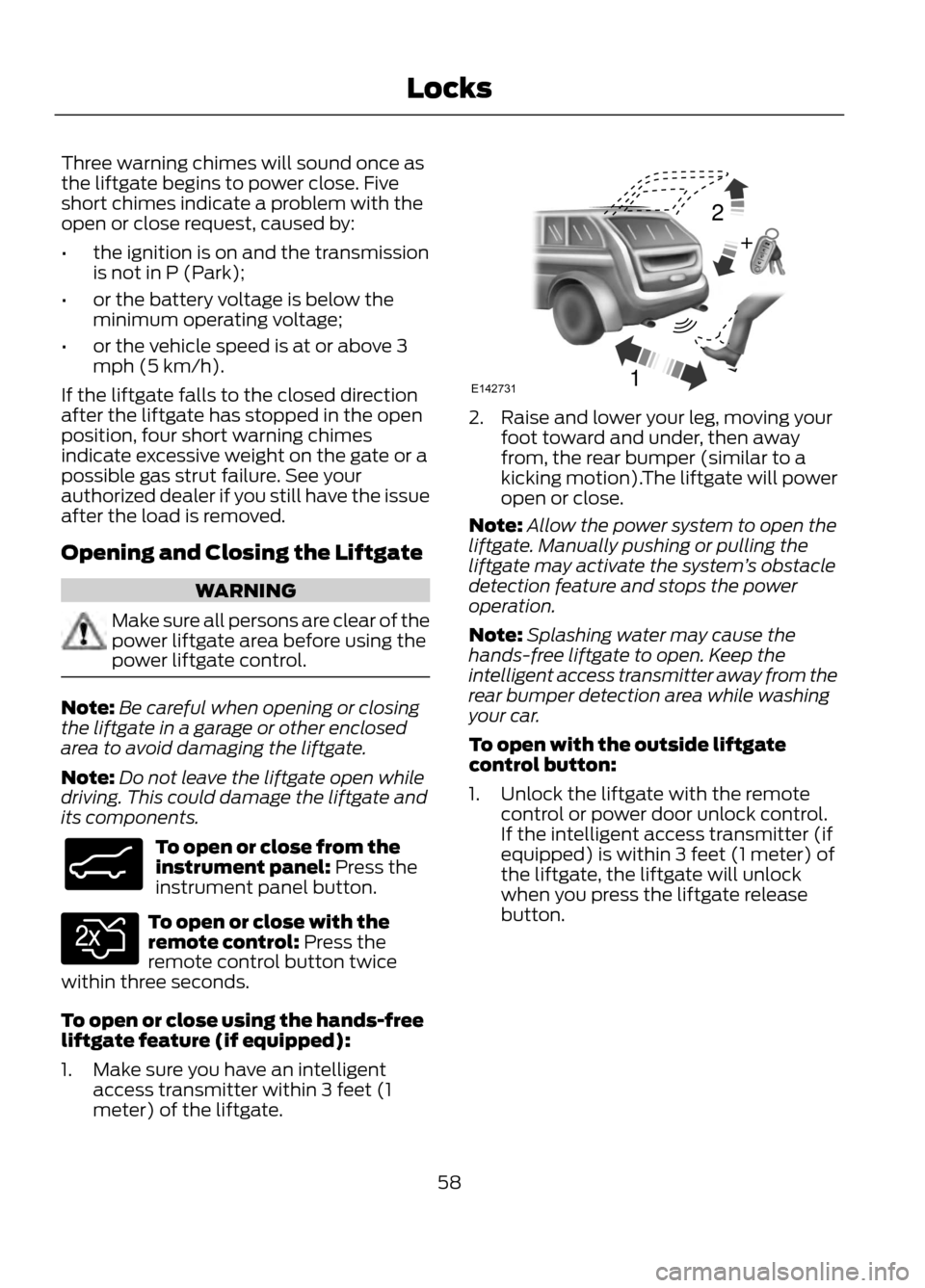
To open or close using the hands-free
liftgate feature (if equipped):
1. Make sure you have an intelligent access transmitter within 3 feet (1
meter) of the liftgate.
2. Raise and lower your leg, moving yourfoot toward and under, then away
from, the rear bumper (similar to a
kicking motion).The liftgate will power
open or close.
Note: Allow the power system to open the
liftgate. Manually pushing or pulling the
liftgate may activate the system ’s obstacle
detection feature and stops the power
operation.
Note: Splashing water may cause the
hands-free liftgate to open. Keep the
intelligent access transmitter away from the
rear bumper detection area while washing
your car.
To open with the outside liftgate
control button:
1. Unlock the liftgate with the remote control or power door unlock control.
If the intelligent access transmitter (if
equipped) is within 3 feet (1 meter) of
the liftgate, the liftgate will unlock
when you press the liftgate release
button.
58
Locks
E138633
E138630
12
+E142731
Page 61 of 423
The anti-scan feature will turn off after:
•one minute of keypad inactivity
• pressing the unlock button on the
remote control
• the ignition is turned on
• unlocking the vehicle using intelligent
access (if equipped)
Unlocking and Locking the Doors
To Unlock the Driver ’s Door
Enter the factory set 5-digit code or your
personal code. Each number must be
pressed within five seconds of each other.
The interior lamps will illuminate.
Note: All doors will unlock if the two-stage
unlocking feature is disabled. See Locking
and Unlocking (page 54).
To Unlock All Doors
Enter the factory set code or your personal
code, then press the 3·4 control within five
seconds.
To Lock All Doors
Press and hold 7·8 and 9·0 at the same
time (with the driver ’s door closed). You
do not need to enter the keypad code first.
61
Locks
Page 62 of 423
PASSIVE ANTI-THEFT
SYSTEM
Note:The system is not compatible with
non-Ford aftermarket remote start systems.
Use of these systems may result in vehicle
starting problems and a loss of security
protection.
Note: Metallic objects, electronic devices
or a second coded key on the same key
chain may cause vehicle starting problems
if they are too close to the key when starting
the engine. Prevent these objects from
touching the coded key while starting the
engine. Switch the ignition off, move all
objects on the key chain away from the
coded key and restart the engine if a
problem occurs.
Note: Do not leave a duplicate coded key
in the vehicle. Always take your keys and
lock all doors when leaving the vehicle.
SecuriLock®
The system is an engine immobilization
system. It is designed to help prevent the
engine from being started unless a coded
key programmed to your vehicle is used.
Using the wrong key may prevent the
engine from starting. A message may
appear in the information display.
If you are unable to start the engine with a
correctly coded key, a malfunction has
happened and a message may appear in
the information display.
Automatic Arming
The vehicle is armed immediately after
switching the ignition off.
Automatic Disarming
Switching the ignition on with a coded key
disarms the vehicle. Replacement Keys
Note:
Your vehicle comes equipped with
two integrated keyhead transmitters or two
intelligent access keys.
The integrated keyhead transmitter
functions as a programmed ignition key
that operates all the locks and starts the
vehicle, as well as a remote control.
The intelligent access key functions as a
programmed key that operates the driver's
door lock and activates the intelligent
access with push button start systems, as
well as a remote control.
If your programmed transmitters or
standard SecuriLock coded keys
(integrated keyhead transmitters only) are
lost or stolen and you don ’t have an extra
coded key, you will need to have your
vehicle towed to an authorized dealer. The
key codes need to be erased from your
vehicle and new coded keys will need to
be programmed.
Store an extra programmed key away from
the vehicle in a safe place to help prevent
any inconveniences. See your authorized
dealer to purchase additional spare or
replacement keys.
Programming a Spare Integrated
Keyhead Transmitter
Note: A maximum of eight coded keys can
be programmed to your vehicle. All eight
can be integrated keyhead transmitters.
You can program your own integrated
keyhead transmitter or standard
SecuriLock coded keys to your vehicle. This
procedure will program both the engine
immobilizer keycode and the remote entry
portion of the remote control to your
vehicle
Only use integrated keyhead transmitters
or standard SecuriLock keys.
62
Security
Page 63 of 423
You must have two previously
programmed coded keys and the new
unprogrammed key readily accessible. See
your authorized dealer to have the spare
key programmed if two previously
programmed coded keys are not available.
Read and understand the entire procedure
before you begin.
1.Insert the first previously programmed
coded key into the ignition.
2. Switch the ignition from off to on. Keep
the ignition on for at least three
seconds, but no more than 10 seconds.
3. Switch the ignition off and remove the
first coded key from the ignition.
4. After three seconds but within 10 seconds of switching the ignition off,
insert the second previously coded key
into the ignition.
5. Switch the ignition from off to on. Keep
the ignition on for at least three
seconds, but no more than 10 seconds.
6. Switch the ignition off and remove the
second previously programmed coded
key from the ignition.
7. After three seconds but within 10 seconds of switching the ignition off
and removing the previously
programmed coded key, insert the new
unprogrammed key into the ignition.
8. Switch the ignition from off to on. Keep
the ignition on for at least six seconds.
9. Remove the newly programmed coded
key from the ignition.
If the key has been successfully
programmed it will start the engine and
operate the remote entry system (if the
new key is an integrated keyhead
transmitter).
If it was not programmed successfully,
wait 10 seconds and repeat Steps 1 through
8. If you are still unsuccessful, take your
vehicle to your authorized dealer. Programming a Spare Intelligent
Access Key
See your authorized dealer to have
additional keys programmed to your
vehicle.
ANTI-THEFT ALARM (IF EQUIPPED)
The system will warn you of an
unauthorized entry to your vehicle. It will
be triggered if any door, the luggage
compartment or the hood is opened
without using the key or the remote
control.
The park and turn lamps will flash and the
horn will sound if unauthorized entry is
attempted while the alarm is armed.
Take all remote controls to an authorized
dealer if there is any potential alarm
problem with your vehicle.
Arming the Alarm
The alarm is ready to arm when there is
not a key in the ignition. Lock the vehicle
to arm the alarm.
Disarming the Alarm
Disarm the alarm by any of the following
actions:
•
Unlock the doors or luggage
compartment with the remote control
or keyless entry keypad.
• Switch the ignition on or start the
vehicle.
• Use a key in the driver ’s door to unlock
the vehicle, then switch the ignition on
within 12 seconds.
63
Security
Page 72 of 423
If equipped with halogen headlamps, the
system switches the low beam headlamps
on at a reduced intensity in day light
conditions.
If equipped with high intensity discharge
(HID) headlamps, the system switches the
fog lamps on in day light conditions.
To switch the system on, switch the
ignition on, and switch the lighting control
to the off, autolamp, or parking lamp
position.
FRONT FOG LAMPS
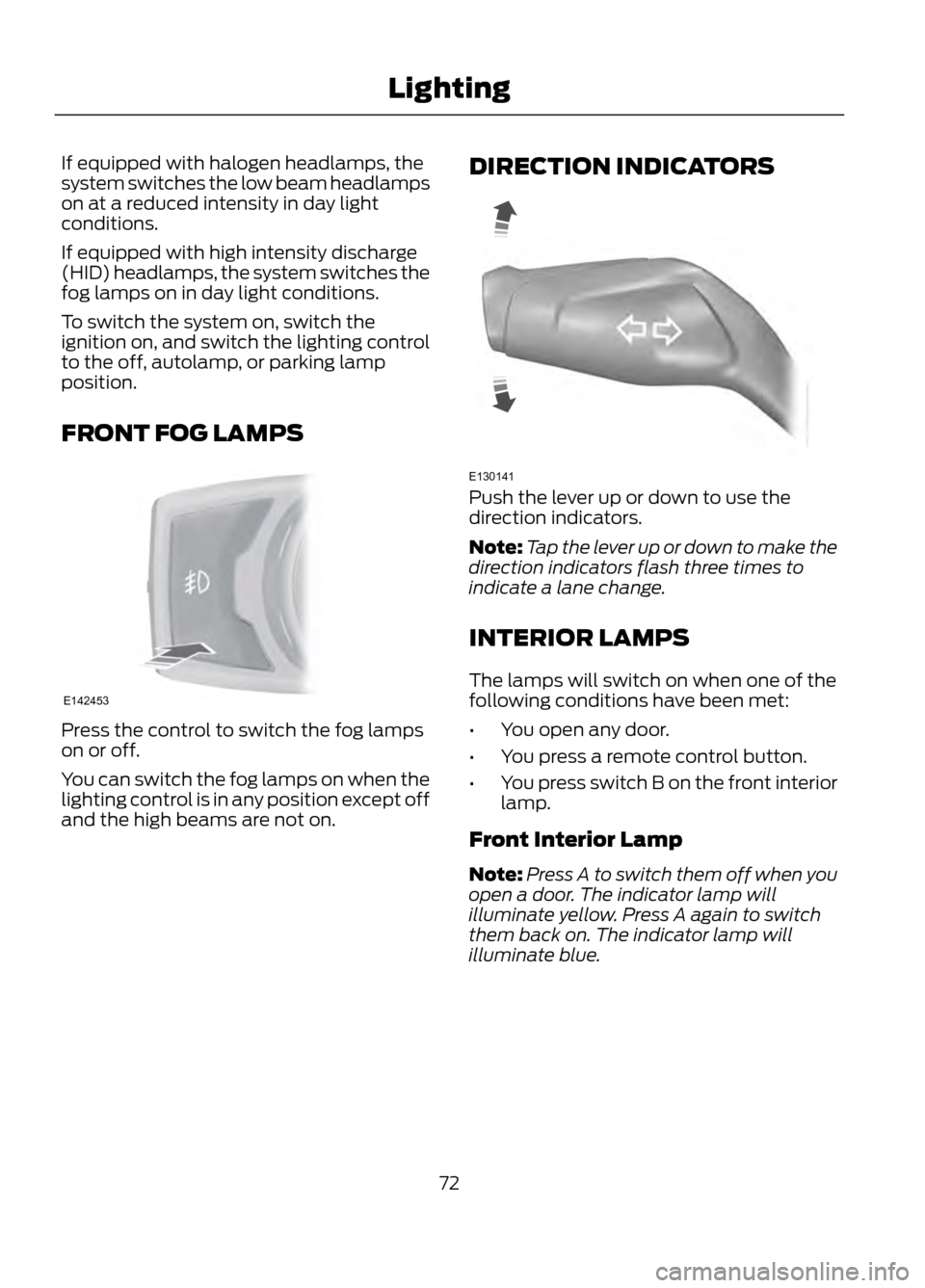
Press the control to switch the fog lamps
on or off.
You can switch the fog lamps on when the
lighting control is in any position except off
and the high beams are not on.DIRECTION INDICATORS
Push the lever up or down to use the
direction indicators.
Note:
Tap the lever up or down to make the
direction indicators flash three times to
indicate a lane change.
INTERIOR LAMPS
The lamps will switch on when one of the
following conditions have been met:
• You open any door.
• You press a remote control button.
• You press switch B on the front interior
lamp.
Front Interior Lamp
Note: Press A to switch them off when you
open a door. The indicator lamp will
illuminate yellow. Press A again to switch
them back on. The indicator lamp will
illuminate blue.
72
Lighting
E142453
E130141
Page 86 of 423
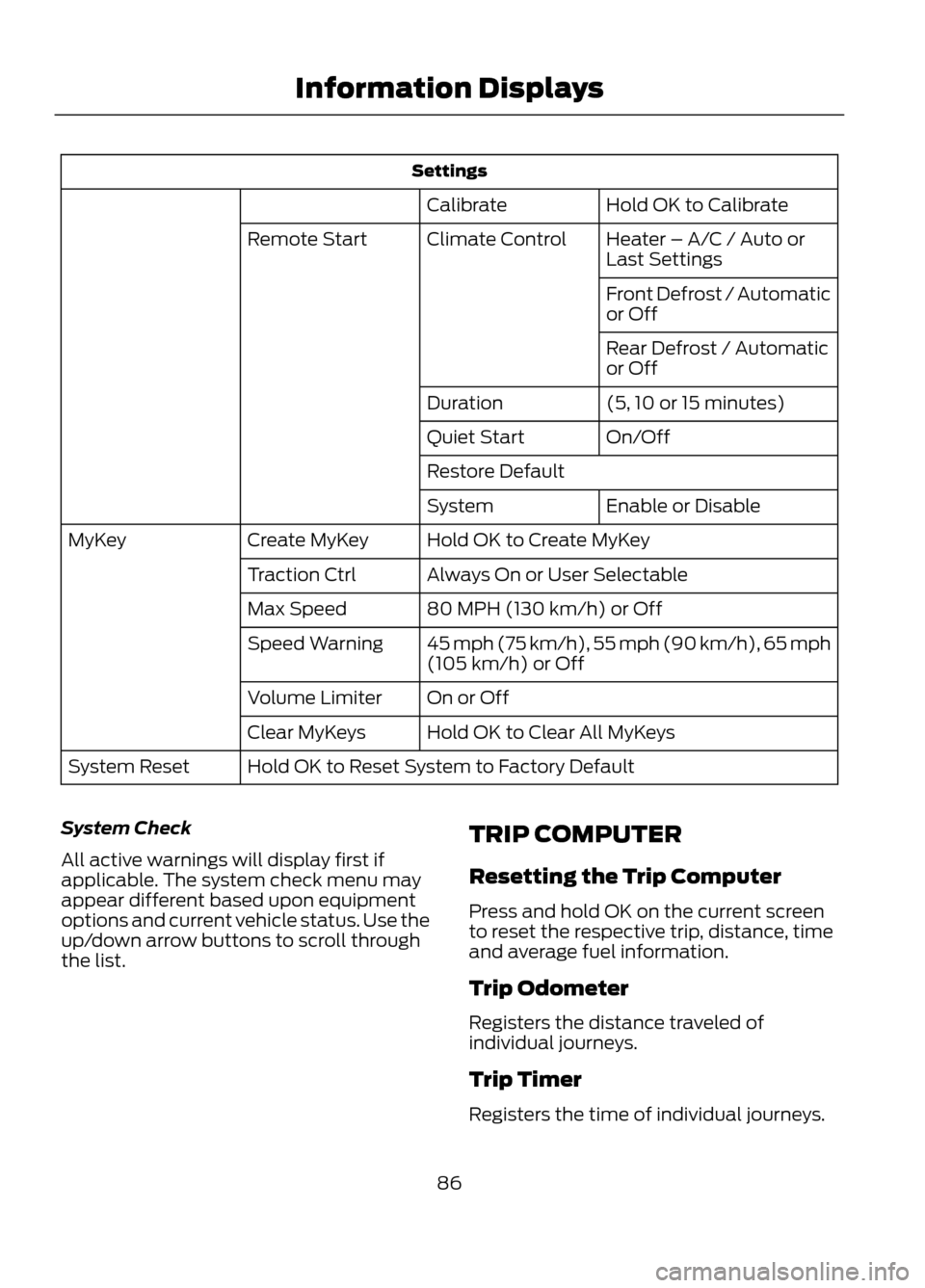
SettingsHold OK to Calibrate
Calibrate
Heater – A/C / Auto or
Last Settings
Climate Control
Remote Start
Front Defrost / Automatic
or Off
Rear Defrost / Automatic
or Off
(5, 10 or 15 minutes)
Duration
On/Off
Quiet Start
Restore Default
Enable or Disable
System
Hold OK to Create MyKey
Create MyKey
MyKey
Always On or User Selectable
Traction Ctrl
80 MPH (130 km/h) or Off
Max Speed
45 mph (75 km/h), 55 mph (90 km/h), 65 mph
(105 km/h) or Off
Speed Warning
On or Off
Volume Limiter
Hold OK to Clear All MyKeys
Clear MyKeys
Hold OK to Reset System to Factory Default
System Reset
System Check
All active warnings will display first if
applicable. The system check menu may
appear different based upon equipment
options and current vehicle status. Use the
up/down arrow buttons to scroll through
the list. TRIP COMPUTER
Resetting the Trip Computer
Press and hold OK on the current screen
to reset the respective trip, distance, time
and average fuel information.
Trip Odometer
Registers the distance traveled of
individual journeys.
Trip Timer
Registers the time of individual journeys.
86
Information Displays
Page 91 of 423
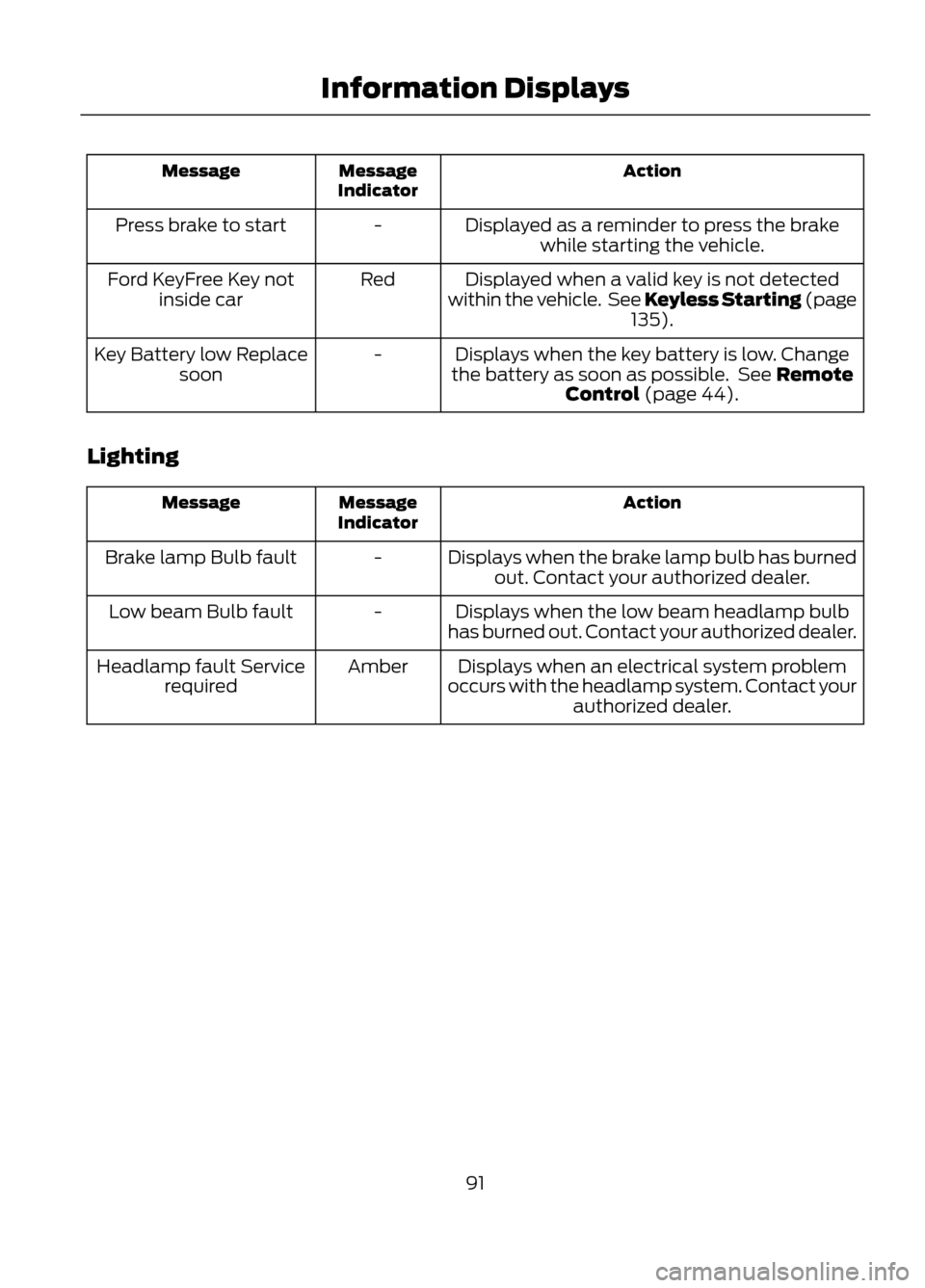
Action
Message
Indicator
Message
Displayed as a reminder to press the brakewhile starting the vehicle.
-
Press brake to start
Displayed when a valid key is not detected
within the vehicle. See Keyless Starting (page 135).
Red
Ford KeyFree Key not
inside car
Displays when the key battery is low. Change
the battery as soon as possible. See Remote Control (page 44).
-
Key Battery low Replace
soon
Lighting
Action
Message
Indicator
Message
Displays when the brake lamp bulb has burnedout. Contact your authorized dealer.
-
Brake lamp Bulb fault
Displays when the low beam headlamp bulb
has burned out. Contact your authorized dealer.
-
Low beam Bulb fault
Displays when an electrical system problem
occurs with the headlamp system. Contact your authorized dealer.
Amber
Headlamp fault Service
required
91
Information Displays
Page 119 of 423
Maximum Cooling Performance in
Instrument Panel or Instrument
Panel and Footwell Positions
1. Adjust the temperature control to thelowest setting.
2. Press the A/C and recirculated air buttons.
3. Adjust the fan speed to the highest setting initially and then adjust it to suit
the desired comfort level.
HEATED WINDOWS AND
MIRRORS
Heated Rear Window
Note: The ignition must be switched on to
use this feature.
Press the button to clear the rear window
of thin ice and fog. Press the button again
within 10 minutes to switch it off. It
switches off automatically after 10
minutes, or when you switch the ignition
off.
Do not use razor blades or other sharp
objects to clean the inside of the rear
window or to remove decals from the
inside of the rear window. This may
cause damage to the heated grid lines
and will not be covered by your
warranty.
Heated Exterior Mirror (If Equipped)
Note: Do not remove ice from the mirrors
with a scraper or attempt to readjust the
mirror glass if it is frozen in place. These
actions could cause damage to the glass
and mirrors.
Note: Do not clean the housing or glass of
any mirror with harsh abrasives, fuel or other
petroleum-based cleaning products. Both mirrors are heated to remove ice, mist
and fog when the heated rear window is
switched on.
CABIN AIR FILTER
Your vehicle is equipped with a cabin air
filter. It is located just in front of the
windshield under the cowl panel grille on
the passenger's side of your vehicle.
The particulate filtration system is
designed to reduce the concentration of
airborne particles such as dust, spores and
pollen in the air being supplied to the
interior of your vehicle.
Note:
A cabin air filter must be installed at
all times to prevent foreign objects from
entering the system. Running the system
without a filter in place could result in
degradation or damage to the system.
The particulate filtration system gives you
and your passengers the following
benefits:
• It improves your driving comfort by
reducing particle concentration.
• It improves the interior compartment
cleanliness.
• It protects the climate control
components from particle deposits.
The filter should be replaced at regular
intervals. See the Scheduled
Maintenance chapter.
For additional cabin air filter information,
or to replace the filter, see an authorized
dealer.
REMOTE START (IF EQUIPPED)
The climate control system adjusts the
cabin temperature during remote start.
119
Climate Control