remote control FORD ESCAPE 2013 3.G Owners Manual
[x] Cancel search | Manufacturer: FORD, Model Year: 2013, Model line: ESCAPE, Model: FORD ESCAPE 2013 3.GPages: 423, PDF Size: 4.59 MB
Page 1 of 423
Introduction
About This Manual...........................................7
Symbols Glossary.............................................7
Data Recording..................................................9
California Proposition 65.............................10
Perchlorate........................................................10
Ford Credit..........................................................11
Replacement PartsRecommendation........................................11
Special Notices.................................................11
Mobile Communications Equipment.....................................................12
Export Unique Options..................................13
Child Safety
General Information.......................................14
Child Seats.........................................................16
Child Seat Positioning...................................16
Booster Seats....................................................17
Installing Child Seats.....................................19
Child Safety Locks.........................................24
Safety Belts
Principle of Operation..................................26
Fastening the Safety Belts..........................27
Safety Belt Height Adjustment................30
Safety Belt Warning Lamp and Indicator Chime.............................................................30
Safety Belt Minder..........................................31
Child Restraint and Safety Belt Maintenance................................................33
Personal Safety System ™
Personal Safety System ™..........................34
Supplementary Restraints System
Principle of Operation..................................35
Driver and Passenger Airbags...................36
Knee Airbag.......................................................37 Front Passenger Sensing System.............37
Side Airbags.....................................................40
Safety Canopy®..............................................41
Crash Sensors and Airbag Indicator........42
Airbag Disposal...............................................43
Keys and Remote Controls
Principle of Operation..................................44
General Information on Radio
Frequencies..................................................44
Remote Control..............................................44
Replacing a Lost Key or Remote Control...........................................................48
MyKey®
Principle of Operation..................................49
Creating a MyKey...........................................49
Clearing All MyKeys.......................................50
Checking MyKey System Status..............50
Using MyKey With Remote Start Systems.........................................................50
MyKey Troubleshooting................................51
Locks
Locking and Unlocking.................................54
Manual Liftgate...............................................57
Power Liftgate..................................................57
Keyless Entry...................................................60
Security
Passive Anti-Theft System.........................62
Anti-Theft Alarm............................................63
Steering Wheel
Adjusting the Steering Wheel...................64
Audio Control..................................................64
Voice Control...................................................66
Cruise Control.................................................66
Information Display Control......................66
1
Table of Contents
Page 2 of 423
Wipers and Washers
Windshield Wipers.........................................67
Autowipers........................................................67
Windshield Washers.....................................68
Rear Window Wiper and Washers..........69
Lighting
Lighting Control..............................................70
Autolamps........................................................70
Instrument Lighting Dimmer.......................71
Headlamp Exit Delay......................................71
Daytime Running Lamps..............................71
Front Fog Lamps.............................................72
Direction Indicators........................................72
Interior Lamps..................................................72
Ambient Lighting............................................73
Windows and Mirrors
Power Windows..............................................74
Exterior Mirrors.................................................75
Interior Mirror....................................................76
Sun Visors..........................................................77
Moonroof............................................................77
Instrument Cluster
Gauges................................................................79
Warning Lamps and Indicators................80
Audible Warnings and Indicators.............83
Information Displays
General Information.....................................84
Trip Computer.................................................86
Information Messages..................................87
Audio System
General Information......................................97
Audio unit - Vehicles With:AM/FM/CD...................................................98
Audio unit - Vehicles With: AM/FM/CD/SYNC...................................100 Audio unit - Vehicles With:
AM/FM/CD/Satellite
Radio/SYNC...............................................102
Audio unit - Vehicles With: Premium AM/FM/CD.................................................105
Audio unit - Vehicles With: Sony AM/FM/CD.................................................106
Auxiliary Input Jack......................................109
USB Port...........................................................110
Media Hub........................................................110
Satellite Radio................................................110
Climate Control
Manual Climate Control..............................113
Automatic Climate Control........................114
Hints on Controlling the Interior Climate..........................................................115
Heated Windows and Mirrors...................119
Cabin Air Filter................................................119
Remote Start..................................................119
Seats
Sitting in the Correct Position...................121
Head Restraints..............................................121
Manual Seats.................................................123
Power Seats....................................................124
Memory Function..........................................125
Rear Seats.......................................................126
Heated Seats..................................................127
Rear Seat Armrest........................................127
Universal Garage Door Opener
Universal Garage Door Opener...............128
Auxiliary Power Points
Auxiliary Power Points................................132
Storage Compartments
Center Console..............................................134
Overhead Console........................................134
2
Table of Contents
Page 10 of 423
To read data recorded by an event data
recorder, special equipment is required,
and access to the vehicle or the event
data recorder is needed. In addition to
the vehicle manufacturer, other
parties, such as law enforcement, that
have such special equipment, can read
the information if they have access to
the vehicle or the event data recorder.
Ford Motor Company and Ford of
Canada do not access event data
recorder information without obtaining
consent, unless pursuant to court order
or where required by law enforcement,
other government authorities or other
third parties acting with lawful
authority. Other parties may seek to
access the information independently
of Ford Motor Company and Ford of
Canada.
Note:Including to the extent that any
law pertaining to Event Data Recorders
applies to SYNC or its features, please
note the following: Once 911 Assist (if
equipped) is enabled (set ON), 911 Assist
may, through any paired and connected
cell phone, disclose to emergency
services that the vehicle has been in a
crash involving the deployment of an
airbag or, in certain vehicles, the
activation of the fuel pump shut-off.
Certain versions or updates to 911 Assist
may also be capable of being used to
electronically or verbally provide to 911
operators the vehicle location (such as
latitude and longitude), and/or other
details about the vehicle or crash or
personal information about the
occupants to assist 911 operators to
provide the most appropriate emergency
services. If you do not want to disclose
this information, do not activate the 911
Assist feature. See SYNC® (page 279). Additionally, when you connect to
Traffic, Directions and Information (if
equipped, U.S. only), the service uses
GPS technology and advanced vehicle
sensors to collect the vehicle
’s current
location, travel direction, and speed
(“ vehicle travel information ”), only to
help provide you with the directions,
traffic reports, or business searches
that you request. If you do not want
Ford or its vendors to receive this
information, do not activate the
service. Ford Motor Company and the
vendors it uses to provide you with this
information do not store your vehicle
travel information. For more
information, see Traffic, Directions and
Information, Terms and Conditions.
See SYNC® (page 279).
CALIFORNIA PROPOSITION 65
WARNING
Some constituents of engine
exhaust, certain vehicle components,
certain fluids contained in vehicles
and certain products of component wear
contain or emit chemicals known to the
State of California to cause cancer and
birth defects or other reproductive harm.
PERCHLORATE
Certain components in your vehicle such
as airbag modules, safety belt
pretensioners and remote control batteries
may contain perchlorate material. Special
handling may apply for service or vehicle
end of life disposal. See
www.dtsc.ca.gov/hazardouswaste/perchlorate
for more information.
10
Introduction
Page 36 of 423
SOS POST-CRASH ALERT
SYSTEM
The system flashes the turn signal lamps
and sounds the horn (intermittently) in the
event of a serious impact that deploys an
airbag (front, side, side curtain or Safety
Canopy) or the safety belt pretensioners.
The horn and lamps will turn off when:
•the hazard control button is pressed
• the panic button is pressed on the
remote entry transmitter, or
• the vehicle runs out of power.
DRIVER AND PASSENGER
AIRBAGS
WARNINGS
Never place your arm or any objects
over an airbag module. Placing your
arm over a deploying airbag can
result in serious arm fractures or other
injuries. Objects placed on or over the
airbag inflation area may cause those
objects to be propelled by the airbag into
your face and torso causing serious injury.
Airbags can kill or injure a child in a
child seat. Never place a rear-facing
child seat in front of an active airbag.
If you must use a forward-facing child seat
in the front seat, move the seat all the way
back.
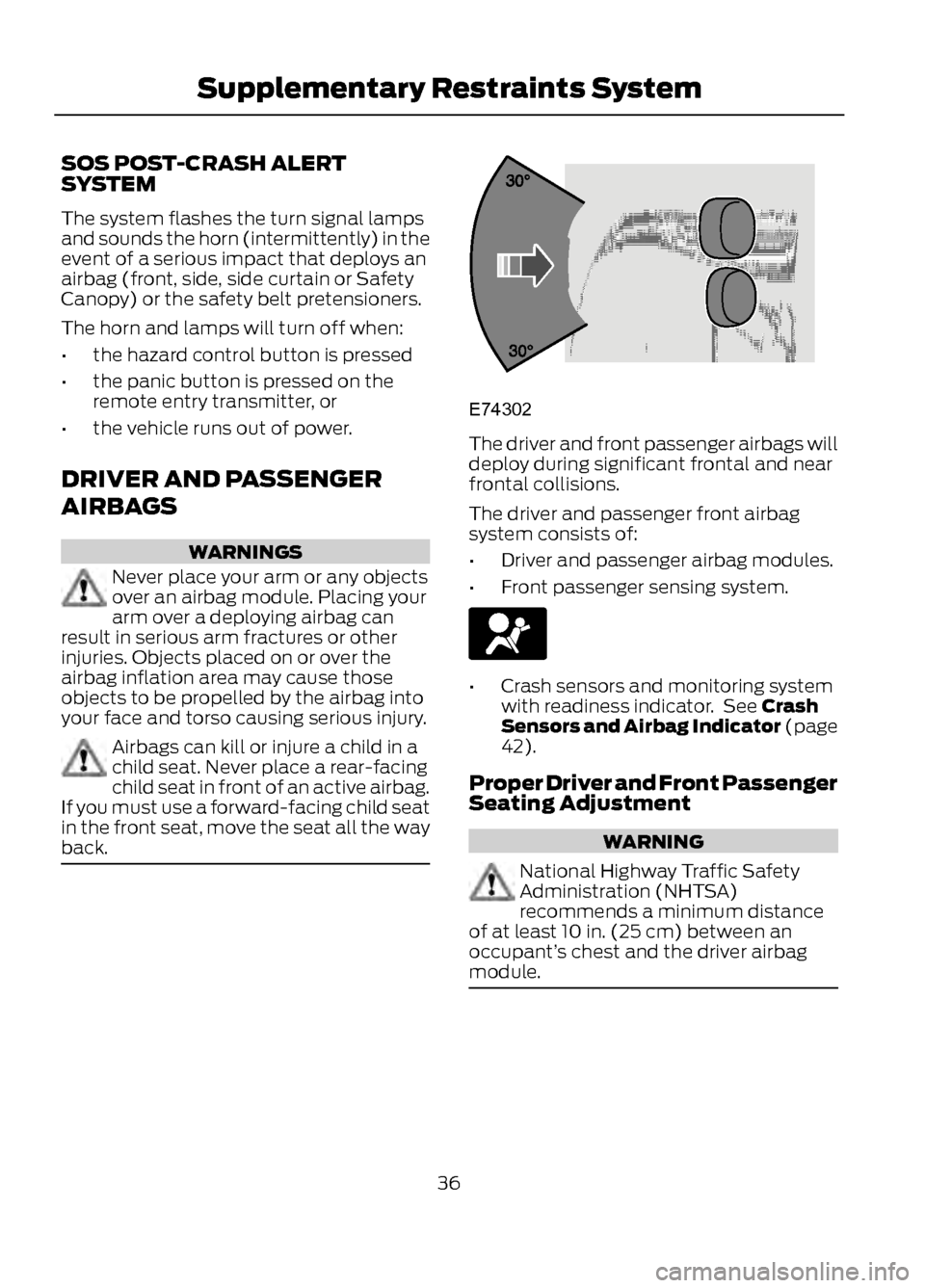
The driver and front passenger airbags will
deploy during significant frontal and near
frontal collisions.
The driver and passenger front airbag
system consists of:
• Driver and passenger airbag modules.
• Front passenger sensing system.
•Crash sensors and monitoring system
with readiness indicator. See Crash
Sensors and Airbag Indicator (page
42).
Proper Driver and Front Passenger
Seating Adjustment
WARNING
National Highway Traffic Safety
Administration (NHTSA)
recommends a minimum distance
of at least 10 in. (25 cm) between an
occupant’ s chest and the driver airbag
module.
36
Supplementary Restraints System
E74302
Page 44 of 423
PRINCIPLE OF OPERATION
The remote control allows you to:
•remotely lock or unlock the vehicle
doors
• unlock the doors without actively using
a key or remote control (intelligent
access only)
• remotely open the power liftgate (if
equipped)
• remotely start or stop the engine (if
equipped)
• arm and disarm the anti-theft system
• activate the panic alarm.
GENERAL INFORMATION ON
RADIO FREQUENCIES
The remote control complies with part 15
of the FCC rules and with RSS-210 of
Industry Canada. Operation is subject to
the following two conditions: (1) This
device may not cause harmful interference,
and (2) This device must accept any
interference received, including
interference that may cause undesired
operation.
Note: Changes or modifications not
expressly approved by the party responsible
for compliance could void the user ’s
authority to operate the equipment.
The typical operating range for your
transmitter is approximately 33 feet (10
meters). Vehicles with the remote start
feature will have a greater range. A
decrease in operating range could be
caused by:
• weather conditions
• nearby radio towers
• structures around the vehicle
• other vehicles parked next to your
vehicle. Intelligent Access (If Equipped)
The system uses a radio frequency signal
to communicate with your vehicle and
authorize your vehicle to unlock when
commanded (either by touching the inside
of the front exterior door handle, by
activating the exterior luggage
compartment button, or a button on the
transmitter itself). If excessive radio
frequency interface is present in the area,
or if the transmitter battery is low, it may
be necessary to mechanically unlock your
door. The mechanical key blade in your
intelligent access key can be used to open
the driver
’s door in this situation. See
Remote Control (page 44).
REMOTE CONTROL
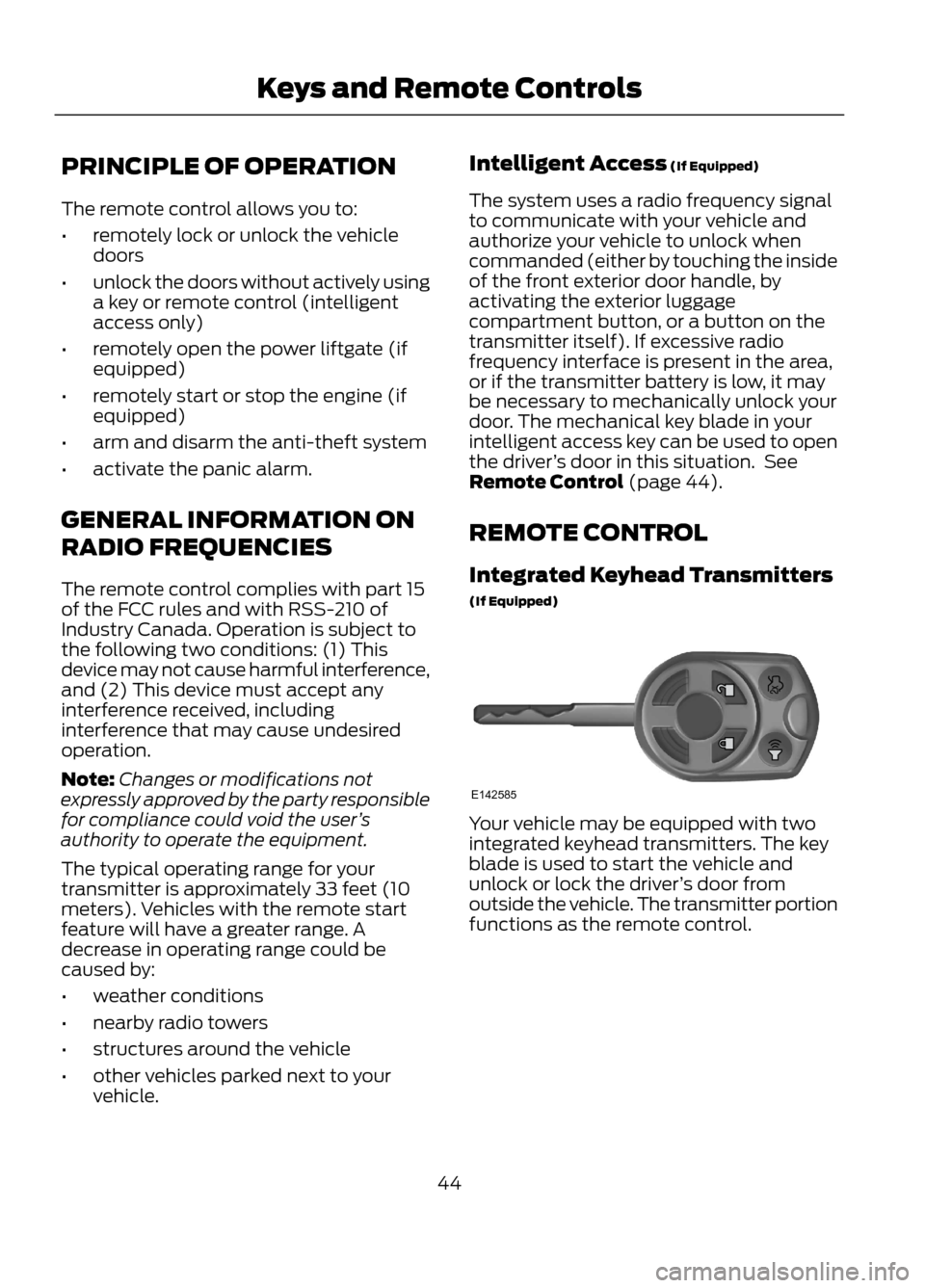
Integrated Keyhead Transmitters
(If Equipped)
Your vehicle may be equipped with two
integrated keyhead transmitters. The key
blade is used to start the vehicle and
unlock or lock the driver ’s door from
outside the vehicle. The transmitter portion
functions as the remote control.
44
Keys and Remote Controls
E142585
Page 45 of 423
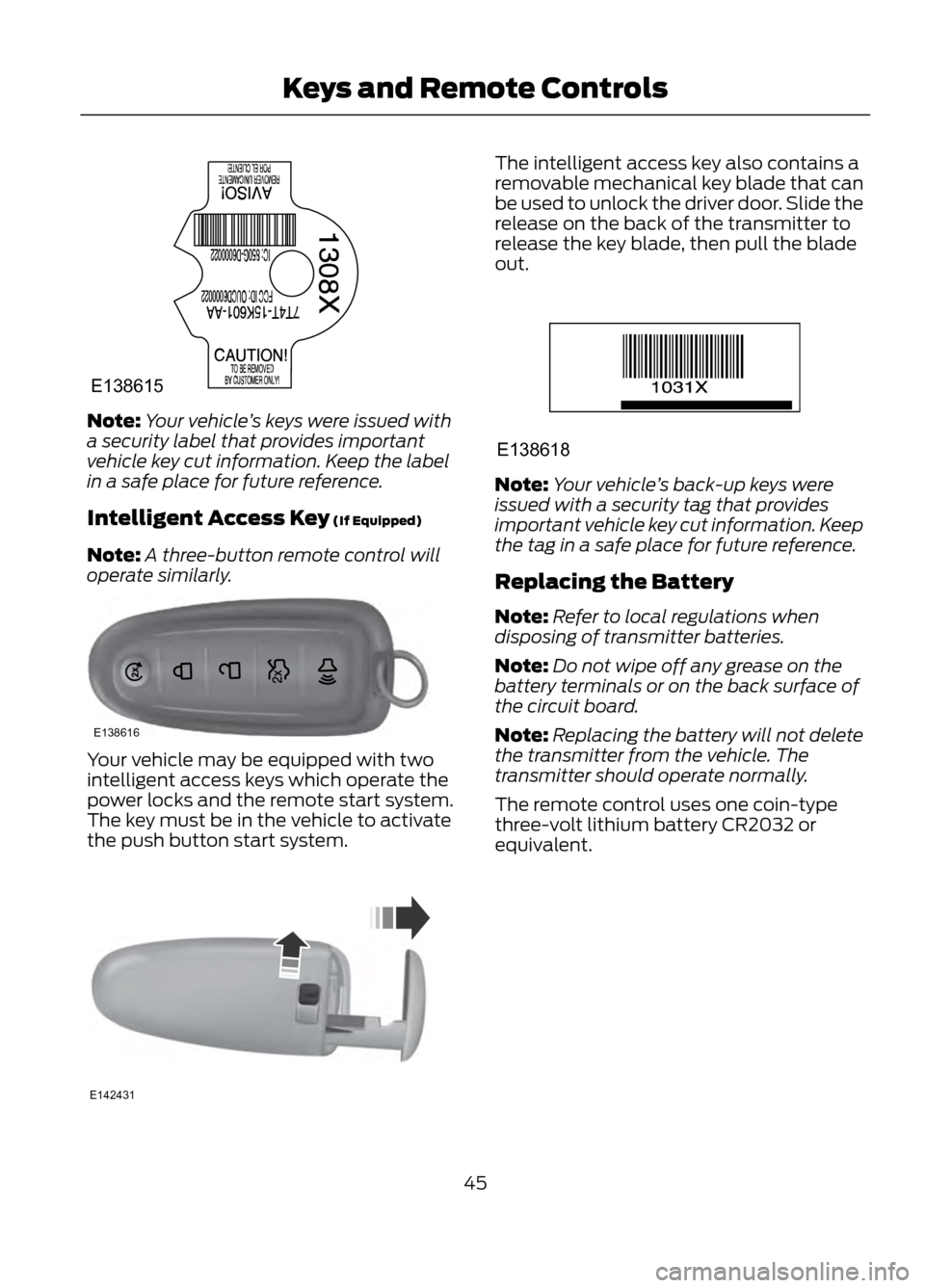
Note:Your vehicle ’s keys were issued with
a security label that provides important
vehicle key cut information. Keep the label
in a safe place for future reference.
Intelligent Access Key (If Equipped)
Note: A three-button remote control will
operate similarly.
Your vehicle may be equipped with two
intelligent access keys which operate the
power locks and the remote start system.
The key must be in the vehicle to activate
the push button start system.
The intelligent access key also contains a
removable mechanical key blade that can
be used to unlock the driver door. Slide the
release on the back of the transmitter to
release the key blade, then pull the blade
out.
Note: Your vehicle ’s back-up keys were
issued with a security tag that provides
important vehicle key cut information. Keep
the tag in a safe place for future reference.
Replacing the Battery
Note: Refer to local regulations when
disposing of transmitter batteries.
Note: Do not wipe off any grease on the
battery terminals or on the back surface of
the circuit board.
Note: Replacing the battery will not delete
the transmitter from the vehicle. The
transmitter should operate normally.
The remote control uses one coin-type
three-volt lithium battery CR2032 or
equivalent.
45
Keys and Remote Controls
E138615
E138616
E142431
E138618
Page 46 of 423
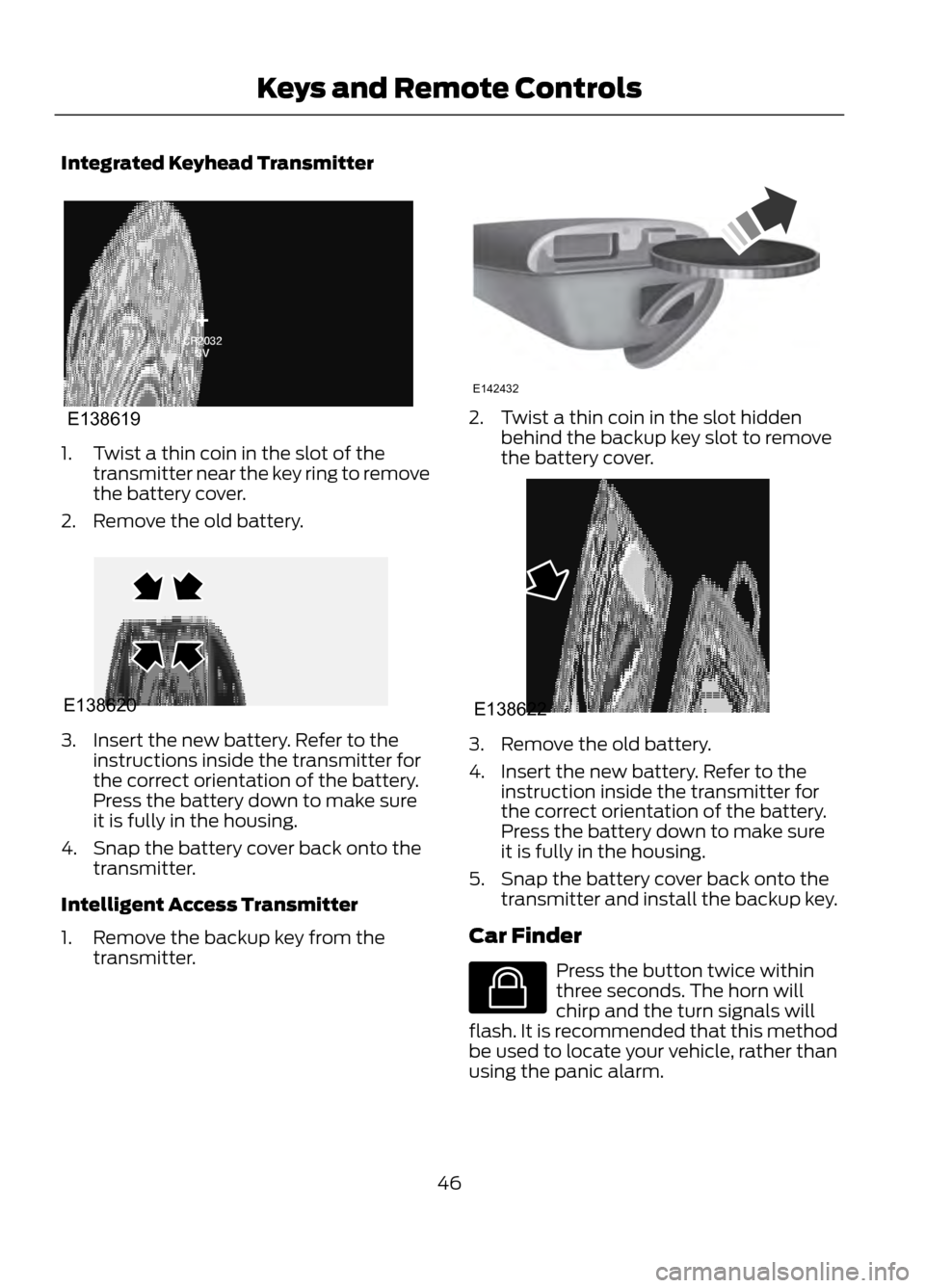
Integrated Keyhead Transmitter
1. Twist a thin coin in the slot of thetransmitter near the key ring to remove
the battery cover.
2. Remove the old battery.
3. Insert the new battery. Refer to the instructions inside the transmitter for
the correct orientation of the battery.
Press the battery down to make sure
it is fully in the housing.
4. Snap the battery cover back onto the transmitter.
Intelligent Access Transmitter
1. Remove the backup key from the transmitter.
2. Twist a thin coin in the slot hiddenbehind the backup key slot to remove
the battery cover.
3. Remove the old battery.
4. Insert the new battery. Refer to theinstruction inside the transmitter for
the correct orientation of the battery.
Press the battery down to make sure
it is fully in the housing.
5. Snap the battery cover back onto the transmitter and install the backup key.
Car Finder
Press the button twice within
three seconds. The horn will
chirp and the turn signals will
flash. It is recommended that this method
be used to locate your vehicle, rather than
using the panic alarm.
46
Keys and Remote Controls
E138619
E138620
E142432
E138622
E138623
Page 47 of 423
Note:If locking was not successful or any
door or the liftgate is not closed, or if the
hood is not closed on vehicles equipped
with a perimeter alarm or remote start, the
horn will chirp twice and the lamps will not
flash.
Sounding a Panic Alarm
Note: The panic alarm will only operate
when the ignition is off.
Press the button to activate the
alarm. Press the button again or
turn the ignition on to deactivate.
Remote Start (If Equipped)
WARNING
To avoid exhaust fumes, do not use
remote start if your vehicle is parked
indoors or areas that are not well
ventilated.
Note: Do not use remote start if your vehicle
is low on fuel.
Your vehicle has remote start if
the transmitter has this button.
The remote start feature allows you to
start the engine from outside the vehicle.
The transmitter has an extended operating
range.
Vehicles with automatic climate control
can be configured to operate when the
vehicle is remote started. See Automatic
Climate Control (page 114).
Many states and provinces have
restrictions for the use of remote start.
Check your local and state or provincial
laws for specific requirements regarding
remote start systems.
The remote start system will not work if:
• the ignition is on
• the alarm system is triggered •
the feature has been disabled
• the hood is not closed
• two remote vehicle starts have already
been attempted within the last hour
• the vehicle is not in P (Park)
• the vehicle battery voltage is too low
• the service engine soon indicator was
on the last time the vehicle was driven.
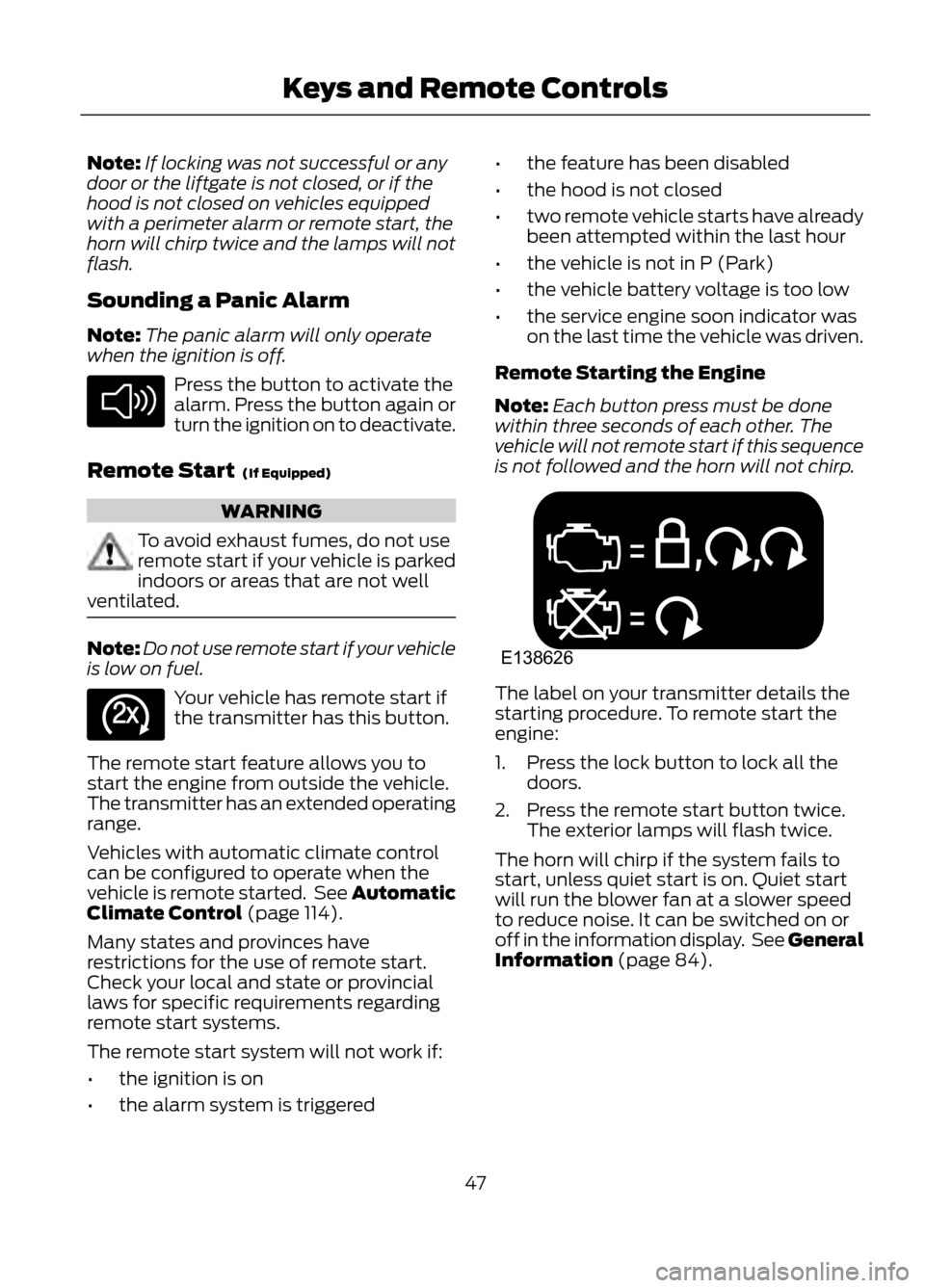
Remote Starting the Engine
Note: Each button press must be done
within three seconds of each other. The
vehicle will not remote start if this sequence
is not followed and the horn will not chirp.The label on your transmitter details the
starting procedure. To remote start the
engine:
1. Press the lock button to lock all the doors.
2. Press the remote start button twice. The exterior lamps will flash twice.
The horn will chirp if the system fails to
start, unless quiet start is on. Quiet start
will run the blower fan at a slower speed
to reduce noise. It can be switched on or
off in the information display. See General
Information (page 84).
47
Keys and Remote Controls
E138624
E138625
E138626
Page 48 of 423
Note:If the vehicle has been remote started
and is equipped with an integrated keyhead
transmitter, you must turn the ignition on
before driving the vehicle. If equipped with
an intelligent access transmitter, you must
press the START/STOP button on the
instrument panel once while applying the
brake pedal before driving the vehicle.
The power windows will be inhibited during
the remote start and the radio will not turn
on automatically.
The parking lamps will remain on and the
engine will run for 5, 10, or 15 minutes,
depending on the setting.
Extending the Engine Run Time
Repeat Steps 1 and 2 with the engine still
running to extend the run time for another
remote start duration. If you programmed
the duration to last 10 minutes, the second
10 minutes will be added. For example, if
the vehicle had been running from the first
remote start for five minutes, the engine
will continue to run now for a total of 20
minutes. You can only extend the remote
start once.
Wait at least five seconds before remote
starting after an engine shutdown. Only
two remote starts are allowed.
The vehicle must be started without
remote start then switched off or allow
one hour to pass before using remote start
again if additional remote starts are
desired.
Turning the Engine Off After Remote
Starting
Press the button once. The
parking lamps will turn off.
You may have to be closer to the
vehicle than when starting due to ground
reflection and the added noise of the
running engine. You can disable or enable the remote start
system through the information display.
See General Information (page 84).
REPLACING A LOST KEY OR
REMOTE CONTROL
Replacement or additional keys or remote
controls can be purchased from your
authorized dealer. Your dealer can program
the transmitters to your vehicle or you may
be able to program them yourself. See
Passive Anti-Theft System (page 62).
48
Keys and Remote Controls
E138625
Page 50 of 423
The key is successfully programmed. Make
sure you label it so you can distinguish it
from the admin keys.
You can program optional settings for the
key(s). Refer to Programming/Changing
optional settings.
Vehicles equipped with remote start need
to follow a separate procedure. See Using
MyKey With Remote Start Systems
(page 50).
Programming/Changing Optional
Settings
All programmed keys can be cleared within
the same key cycle in which a key was
programmed, otherwise an admin key is
required to clear the keys. See Clearing
All MyKeys (page 50).
You can access the optional settings
through the information display control.
1.Turn the ignition on using an admin key.
2. Access the main menu and select Settings, then MyKey.
3. Use the arrow buttons to get to an optional feature.
4. Press OK or > to scroll through settings.
5. Press OK or > to make a selection.
CLEARING ALL MYKEYS
All programmed MyKeys can be cleared
within the same key cycle in which a MyKey
was created, otherwise an admin key is
required to clear the keys.
To clear all MyKeys (which removes all
restrictions and returns them to admin key
status), use the information display control
to do the following:
1. Access the main menu and select Settings, then MyKey.
2. Scroll to Clear All and press the OK button. 3.
Hold the OK button until ALL MYKEYS
CLEARED is displayed.
CHECKING MYKEY SYSTEM
STATUS
The information display control displays
information about keys programmed to
the vehicle:
• MYKEY MILES: Tracks mileage when
a restricted key is used. If mileage does
not accumulate as expected, then the
key is not being used by the intended
user. The only way to reset this to zero
is by resetting the keys. If the mileage
is lower than the last time you checked,
then the key system has been recently
reset.
• #MYKEY(S): Indicates how many
restricted keys are programmed to the
vehicle. Can also be used to detect
deletion of a restricted key.
• #ADMIN KEY(S): Indicates how
many admin keys are programmed to
the vehicle. Can also be used to detect
if an additional key has been
programmed to the vehicle.
USING MYKEY WITH REMOTE
START SYSTEMS
MyKey is NOT compatible with
non-Ford-approved aftermarket remote
start systems. If you choose to install a
remote start system please see your Ford
authorized dealer for a Ford-approved
remote start system.
The following information MAY help
customers who choose to use a
non-Ford-approved remote start system.
The actions provided below do NOT make
MyKey compatible with
non-Ford-approved remote start system,
but it MAY help you to retain some MyKey
functions.
50
MyKey®