ECO mode FORD ESCAPE 2014 3.G User Guide
[x] Cancel search | Manufacturer: FORD, Model Year: 2014, Model line: ESCAPE, Model: FORD ESCAPE 2014 3.GPages: 428, PDF Size: 16.6 MB
Page 92 of 428
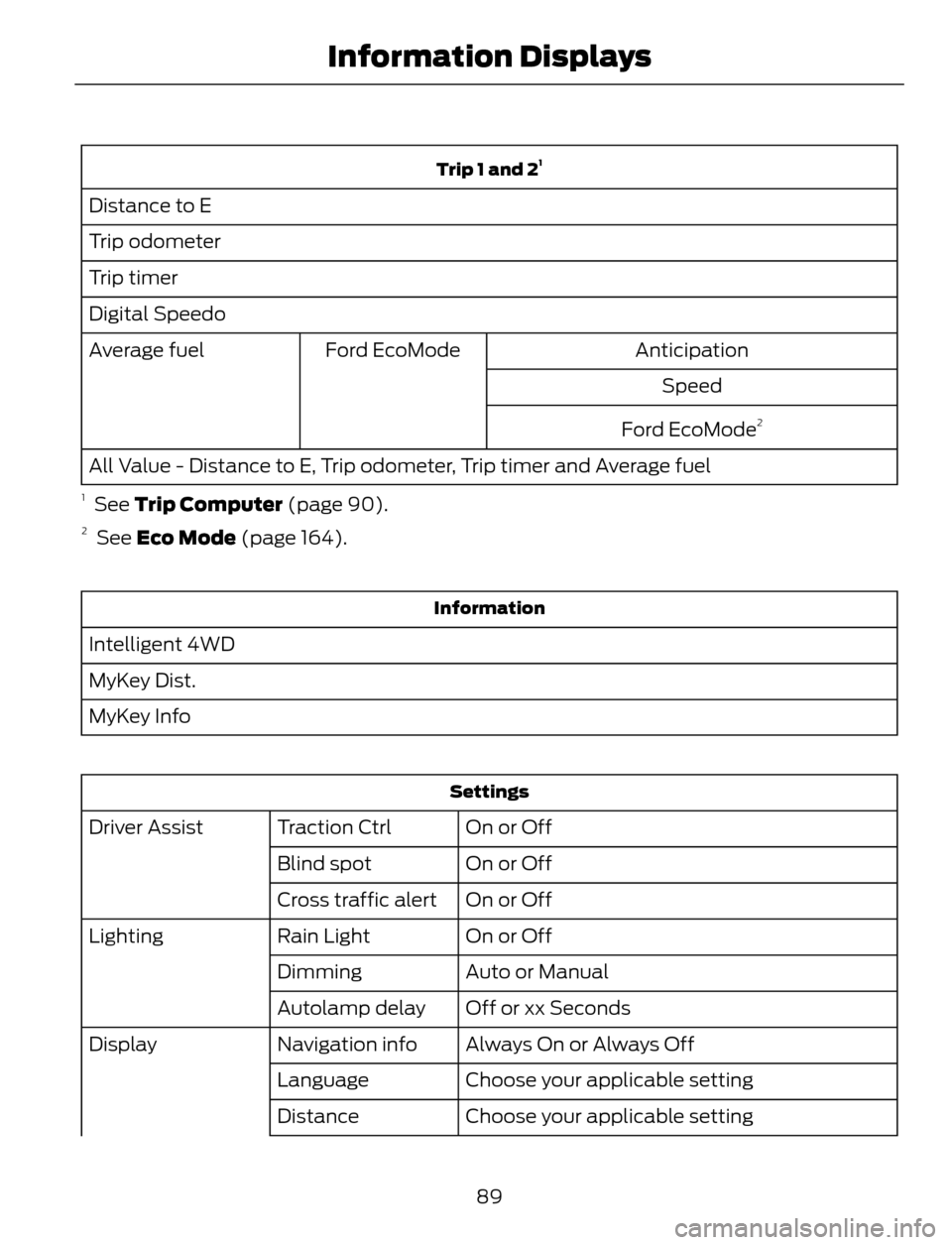
Trip 1 and 21
Distance to E
Trip odometer
Trip timer
Digital Speedo
Anticipation Ford EcoMode Average fuel
Speed
Ford EcoMode
2
All Value - Distance to E, Trip odometer, Trip timer and Average fuel
1 See Trip Computer (page 90).2 See Eco Mode (page 164).
Information
Intelligent 4WD
MyKey Dist.
MyKey Info
Settings
On or Off Traction Ctrl Driver Assist
On or Off Blind spot
On or Off Cross traffic alert
On or Off Rain Light Lighting
Auto or Manual Dimming
Off or xx Seconds Autolamp delay
Always On or Always Off Navigation info Display
Choose your applicable setting Language
Choose your applicable setting Distance
89
Information Displays
Page 104 of 428
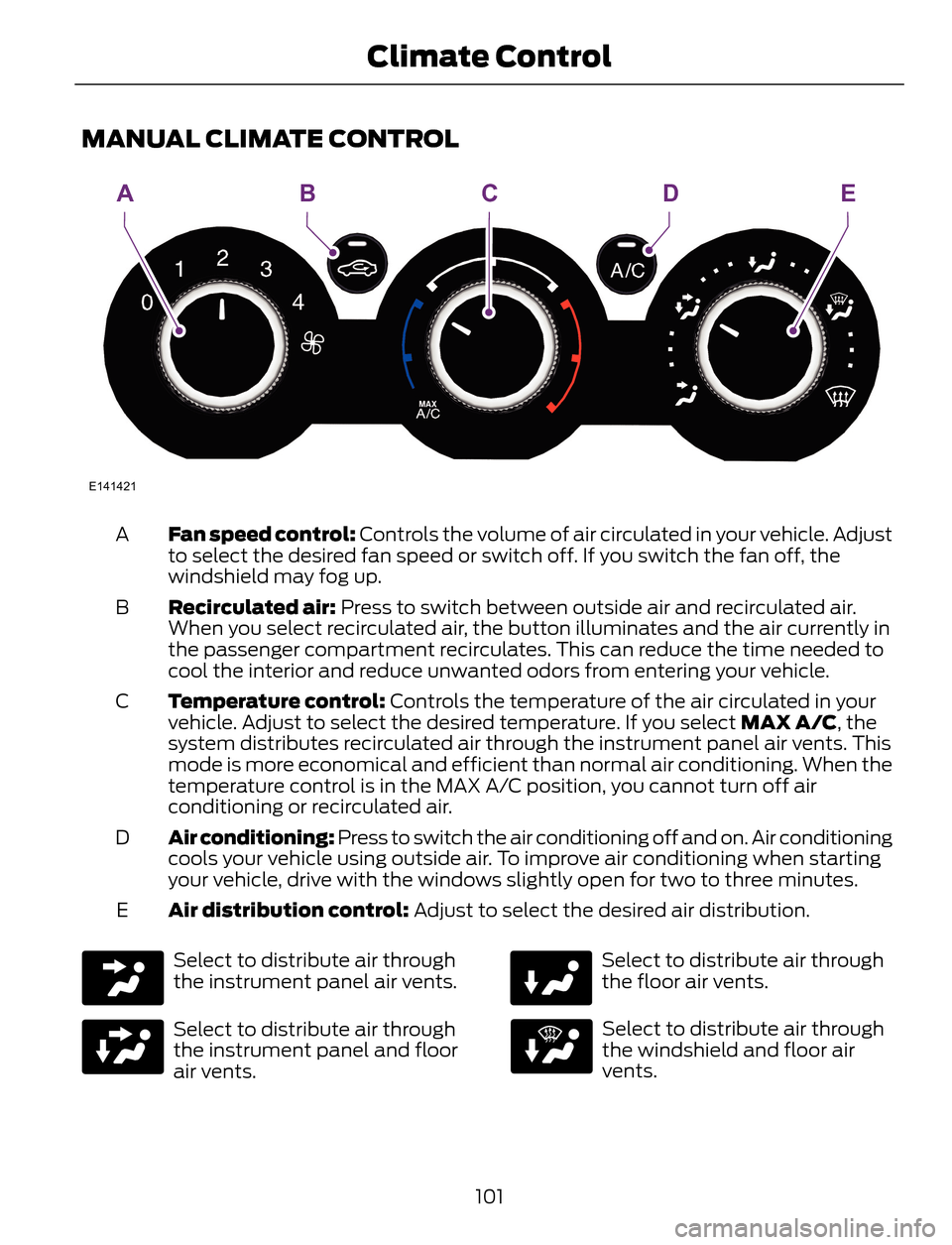
MANUAL CLIMATE CONTROL
E141421
AEBDC
Fan speed control: Controls the volume of air circulated in your vehicle. Adjust
to select the desired fan speed or switch off. If you switch the fan off, the
windshield may fog up. A
Recirculated air: Press to switch between outside air and recirculated air.
When you select recirculated air, the button illuminates and the air currently in
the passenger compartment recirculates. This can reduce the time needed to
cool the interior and reduce unwanted odors from entering your vehicle. B
Temperature control: Controls the temperature of the air circulated in your
vehicle. Adjust to select the desired temperature. If you select MAX A/C, the
system distributes recirculated air through the instrument panel air vents. This
mode is more economical and efficient than normal air conditioning. When the
temperature control is in the MAX A/C position, you cannot turn off air
conditioning or recirculated air. C
Air conditioning: Press to switch the air conditioning off and on. Air conditioning
cools your vehicle using outside air. To improve air conditioning when starting
your vehicle, drive with the windows slightly open for two to three minutes. D
Air distribution control: Adjust to select the desired air distribution. E
Select to distribute air through
the instrument panel air vents.
Select to distribute air through
the instrument panel and floor
air vents.
Select to distribute air through
the floor air vents.
Select to distribute air through
the windshield and floor air
vents.
101
Climate Control
Page 105 of 428
Select to distribute air through
the windshield air vents. You can
also use this setting to defog andclear the windshield of a thin covering of
ice. You can also increase the temperature
and fan speed to improve clearing.
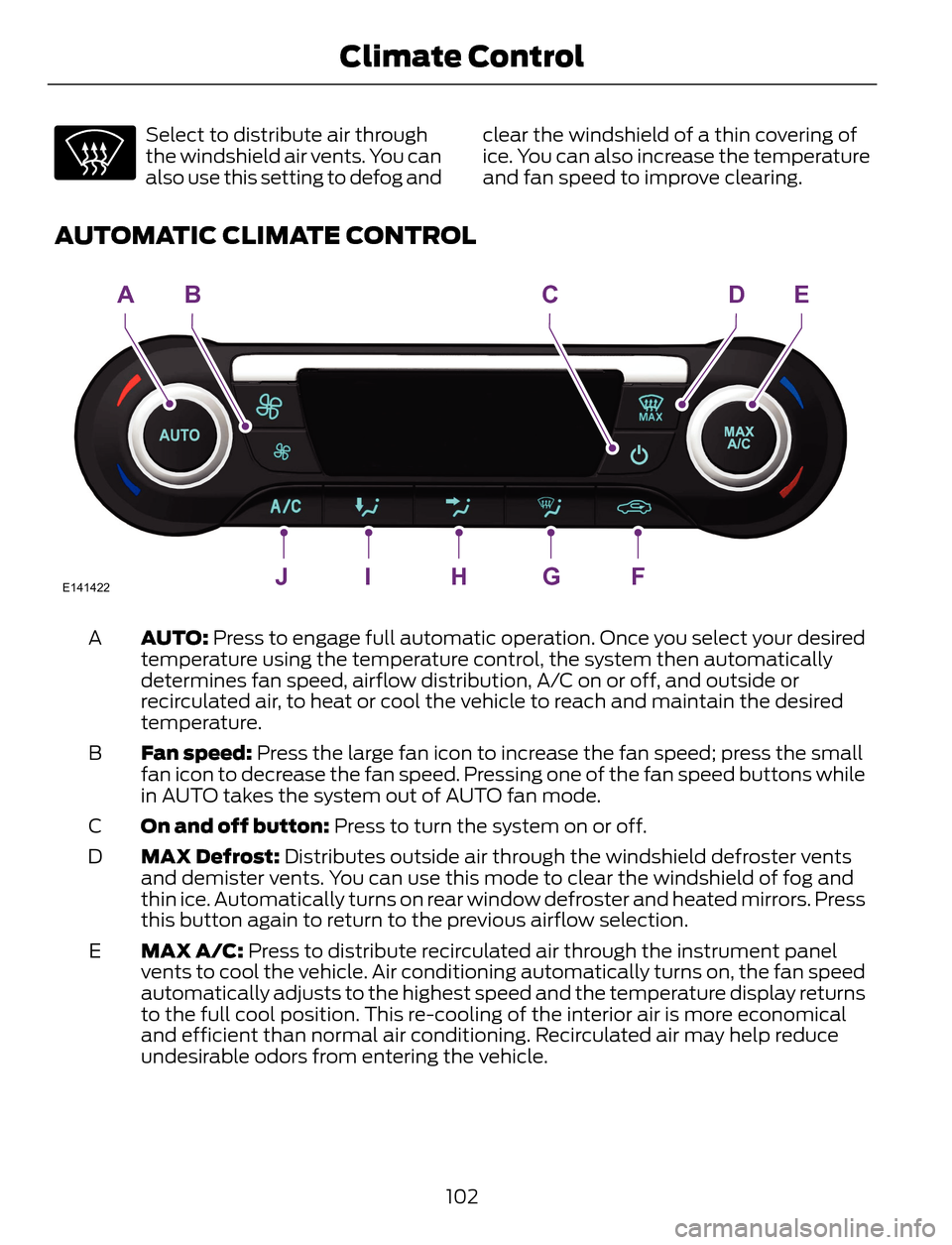
AUTOMATIC CLIMATE CONTROL
E141422JIHGF
ABCDE
AUTO: Press to engage full automatic operation. Once you select your desired
temperature using the temperature control, the system then automatically
determines fan speed, airflow distribution, A/C on or off, and outside or
recirculated air, to heat or cool the vehicle to reach and maintain the desired
temperature. A
Fan speed: Press the large fan icon to increase the fan speed; press the small
fan icon to decrease the fan speed. Pressing one of the fan speed buttons while
in AUTO takes the system out of AUTO fan mode. B
On and off button: Press to turn the system on or off. C
MAX Defrost: Distributes outside air through the windshield defroster vents
and demister vents. You can use this mode to clear the windshield of fog and
thin ice. Automatically turns on rear window defroster and heated mirrors. Press
this button again to return to the previous airflow selection. D
MAX A/C: Press to distribute recirculated air through the instrument panel
vents to cool the vehicle. Air conditioning automatically turns on, the fan speed
automatically adjusts to the highest speed and the temperature display returns
to the full cool position. This re-cooling of the interior air is more economical
and efficient than normal air conditioning. Recirculated air may help reduce
undesirable odors from entering the vehicle. E
102
Climate Control
Page 106 of 428
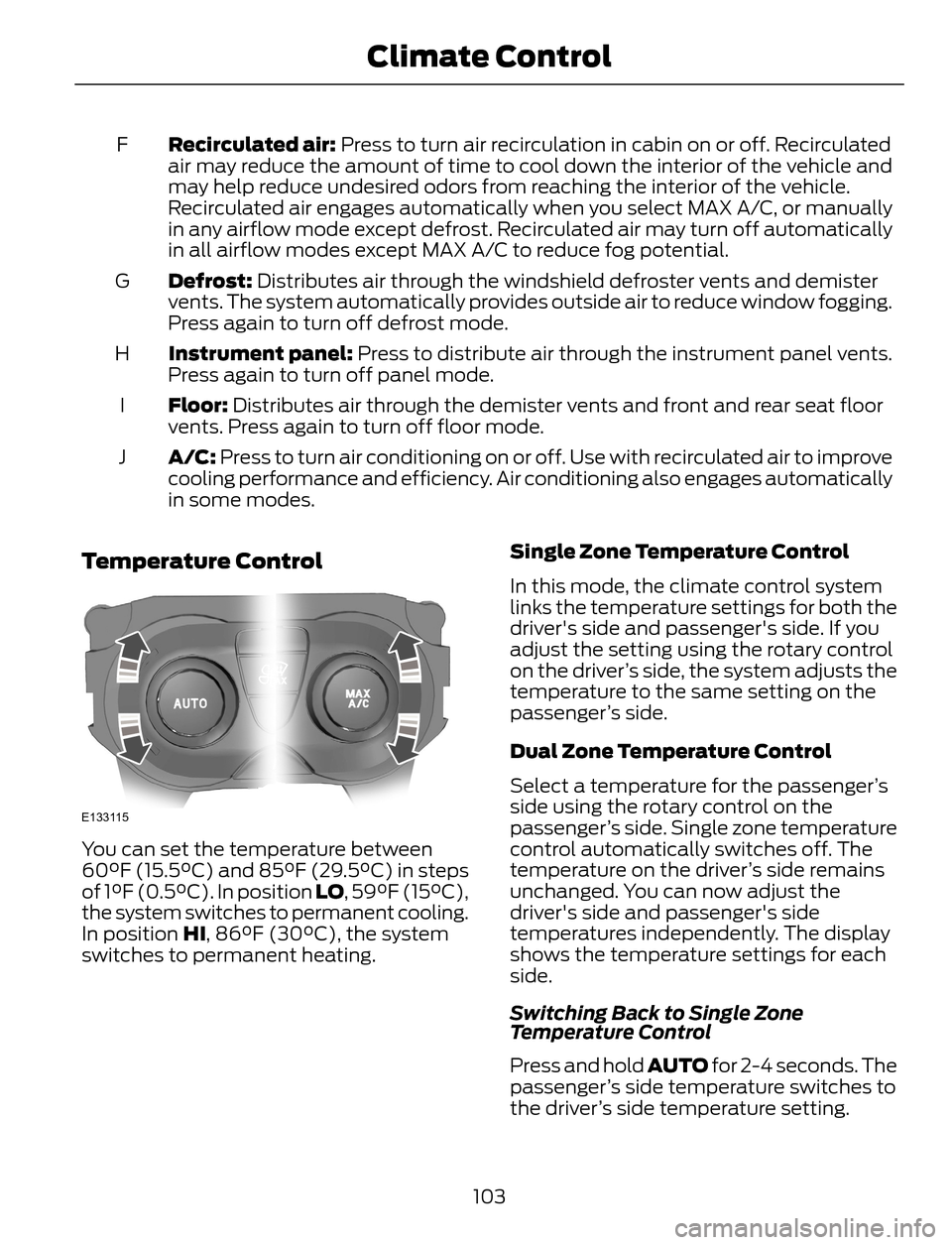
Recirculated air: Press to turn air recirculation in cabin on or off. Recirculated
air may reduce the amount of time to cool down the interior of the vehicle and
may help reduce undesired odors from reaching the interior of the vehicle.
Recirculated air engages automatically when you select MAX A/C, or manually
in any airflow mode except defrost. Recirculated air may turn off automatically
in all airflow modes except MAX A/C to reduce fog potential. F
Defrost: Distributes air through the windshield defroster vents and demister
vents. The system automatically provides outside air to reduce window fogging.
Press again to turn off defrost mode. G
Instrument panel: Press to distribute air through the instrument panel vents.
Press again to turn off panel mode. H
Floor: Distributes air through the demister vents and front and rear seat floor
vents. Press again to turn off floor mode. I
A/C: Press to turn air conditioning on or off. Use with recirculated air to improve
cooling performance and efficiency. Air conditioning also engages automatically
in some modes. J
Temperature Control
E133115
You can set the temperature between
60°F (15.5°C) and 85°F (29.5°C) in steps
of 1°F (0.5°C). In position LO, 59°F (15°C),
the system switches to permanent cooling.
In position HI, 86°F (30°C), the system
switches to permanent heating.Single Zone Temperature Control
In this mode, the climate control system
links the temperature settings for both the
driver's side and passenger's side. If you
adjust the setting using the rotary control
on the driver’s side, the system adjusts the
temperature to the same setting on the
passenger’s side.
Dual Zone Temperature Control
Select a temperature for the passenger’s
side using the rotary control on the
passenger’s side. Single zone temperature
control automatically switches off. The
temperature on the driver’s side remains
unchanged. You can now adjust the
driver's side and passenger's side
temperatures independently. The display
shows the temperature settings for each
side.
Switching Back to Single Zone
Temperature Control
Press and hold AUTO for 2-4 seconds. The
passenger’s side temperature switches to
the driver’s side temperature setting.
103
Climate Control
Page 121 of 428
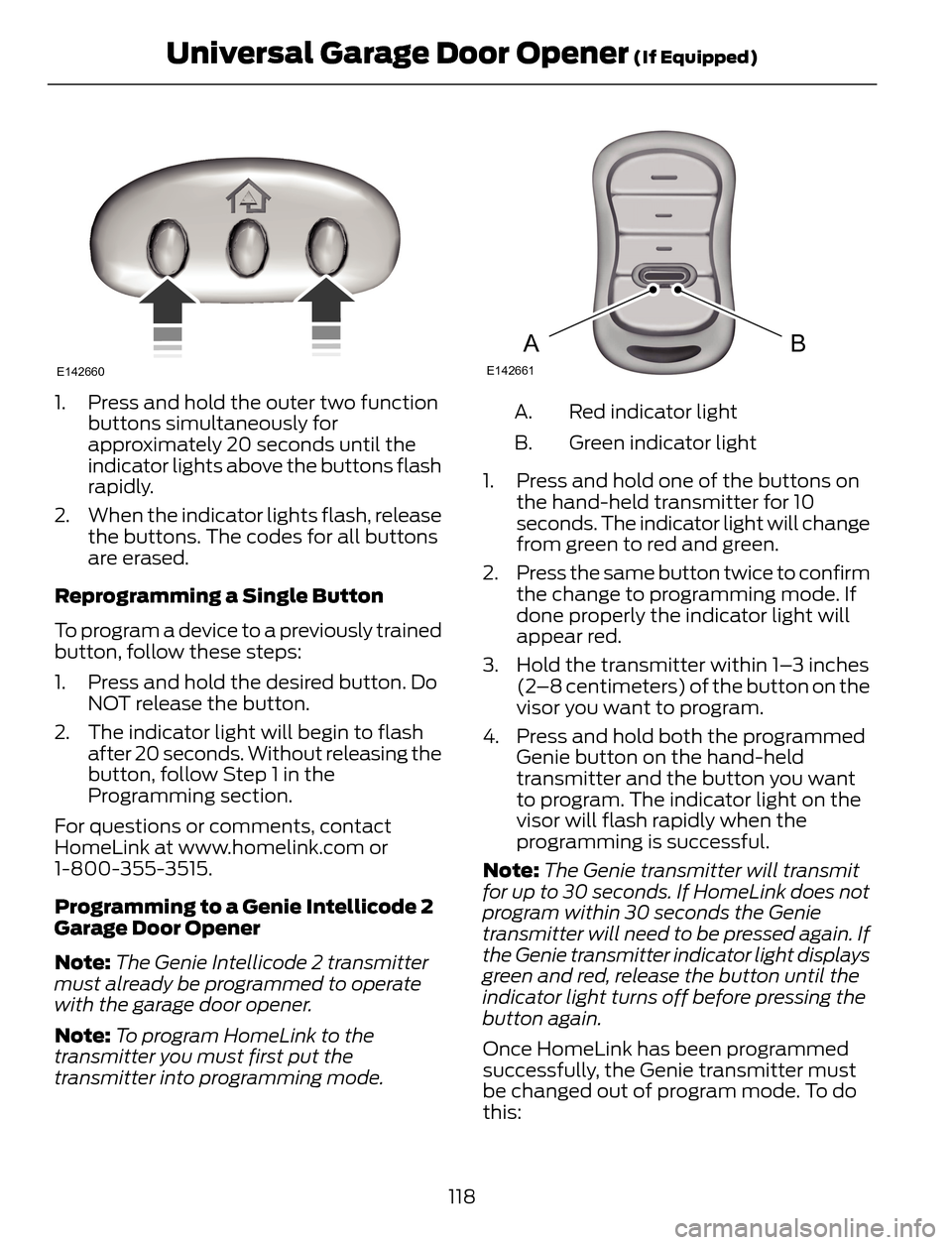
E142660
1. Press and hold the outer two function
buttons simultaneously for
approximately 20 seconds until the
indicator lights above the buttons flash
rapidly.
2. When the indicator lights flash, release
the buttons. The codes for all buttons
are erased.
Reprogramming a Single Button
To program a device to a previously trained
button, follow these steps:
1. Press and hold the desired button. Do
NOT release the button.
2. The indicator light will begin to flash
after 20 seconds. Without releasing the
button, follow Step 1 in the
Programming section.
For questions or comments, contact
HomeLink at www.homelink.com or
1-800-355-3515.
Programming to a Genie Intellicode 2
Garage Door Opener
Note:The Genie Intellicode 2 transmitter
must already be programmed to operate
with the garage door opener.
Note:To program HomeLink to the
transmitter you must first put the
transmitter into programming mode.
BAE142661
Red indicator light A.
Green indicator light B.
1. Press and hold one of the buttons on
the hand-held transmitter for 10
seconds. The indicator light will change
from green to red and green.
2. Press the same button twice to confirm
the change to programming mode. If
done properly the indicator light will
appear red.
3. Hold the transmitter within 1–3 inches
(2–8 centimeters) of the button on the
visor you want to program.
4. Press and hold both the programmed
Genie button on the hand-held
transmitter and the button you want
to program. The indicator light on the
visor will flash rapidly when the
programming is successful.
Note:The Genie transmitter will transmit
for up to 30 seconds. If HomeLink does not
program within 30 seconds the Genie
transmitter will need to be pressed again. If
the Genie transmitter indicator light displays
green and red, release the button until the
indicator light turns off before pressing the
button again.
Once HomeLink has been programmed
successfully, the Genie transmitter must
be changed out of program mode. To do
this:
118
Universal Garage Door Opener (If Equipped)
Page 122 of 428
1. Press and hold the previously
programmed Genie button on the
hand-held transmitter for 10 seconds.
The indicator light will change from red
to red and green.
2. Press the same button twice to confirm
the change. If done correctly the
indicator light will turn green.
Programming HomeLink to the Genie
Intellicode Garage Door Opener Motor
Note:You may need a ladder to access the
garage door opener motor.
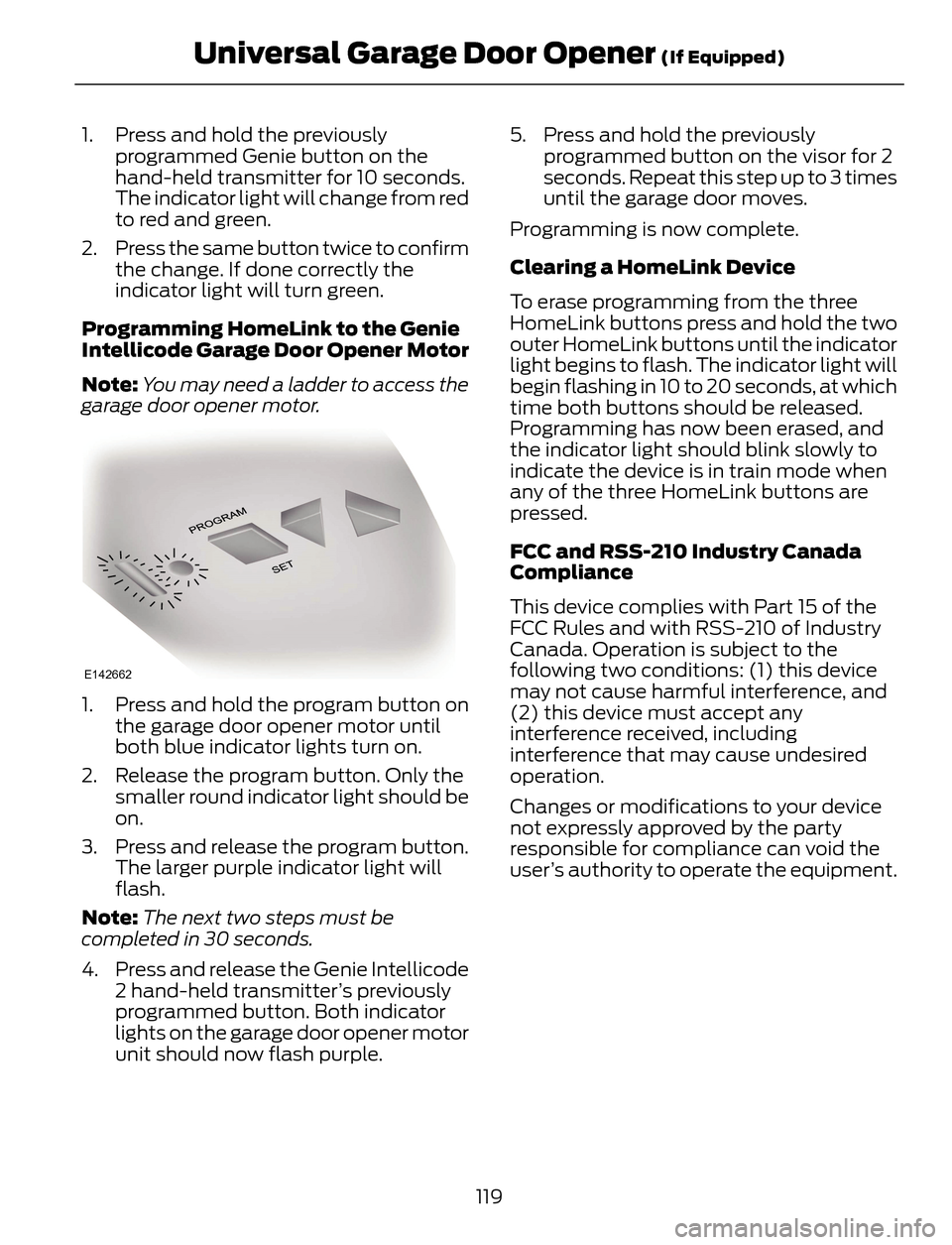
E142662
1. Press and hold the program button on
the garage door opener motor until
both blue indicator lights turn on.
2. Release the program button. Only the
smaller round indicator light should be
on.
3. Press and release the program button.
The larger purple indicator light will
flash.
Note:The next two steps must be
completed in 30 seconds.
4. Press and release the Genie Intellicode
2 hand-held transmitter’s previously
programmed button. Both indicator
lights on the garage door opener motor
unit should now flash purple.5. Press and hold the previously
programmed button on the visor for 2
seconds. Repeat this step up to 3 times
until the garage door moves.
Programming is now complete.
Clearing a HomeLink Device
To erase programming from the three
HomeLink buttons press and hold the two
outer HomeLink buttons until the indicator
light begins to flash. The indicator light will
begin flashing in 10 to 20 seconds, at which
time both buttons should be released.
Programming has now been erased, and
the indicator light should blink slowly to
indicate the device is in train mode when
any of the three HomeLink buttons are
pressed.
FCC and RSS-210 Industry Canada
Compliance
This device complies with Part 15 of the
FCC Rules and with RSS-210 of Industry
Canada. Operation is subject to the
following two conditions: (1) this device
may not cause harmful interference, and
(2) this device must accept any
interference received, including
interference that may cause undesired
operation.
Changes or modifications to your device
not expressly approved by the party
responsible for compliance can void the
user’s authority to operate the equipment.
119
Universal Garage Door Opener (If Equipped)
Page 127 of 428
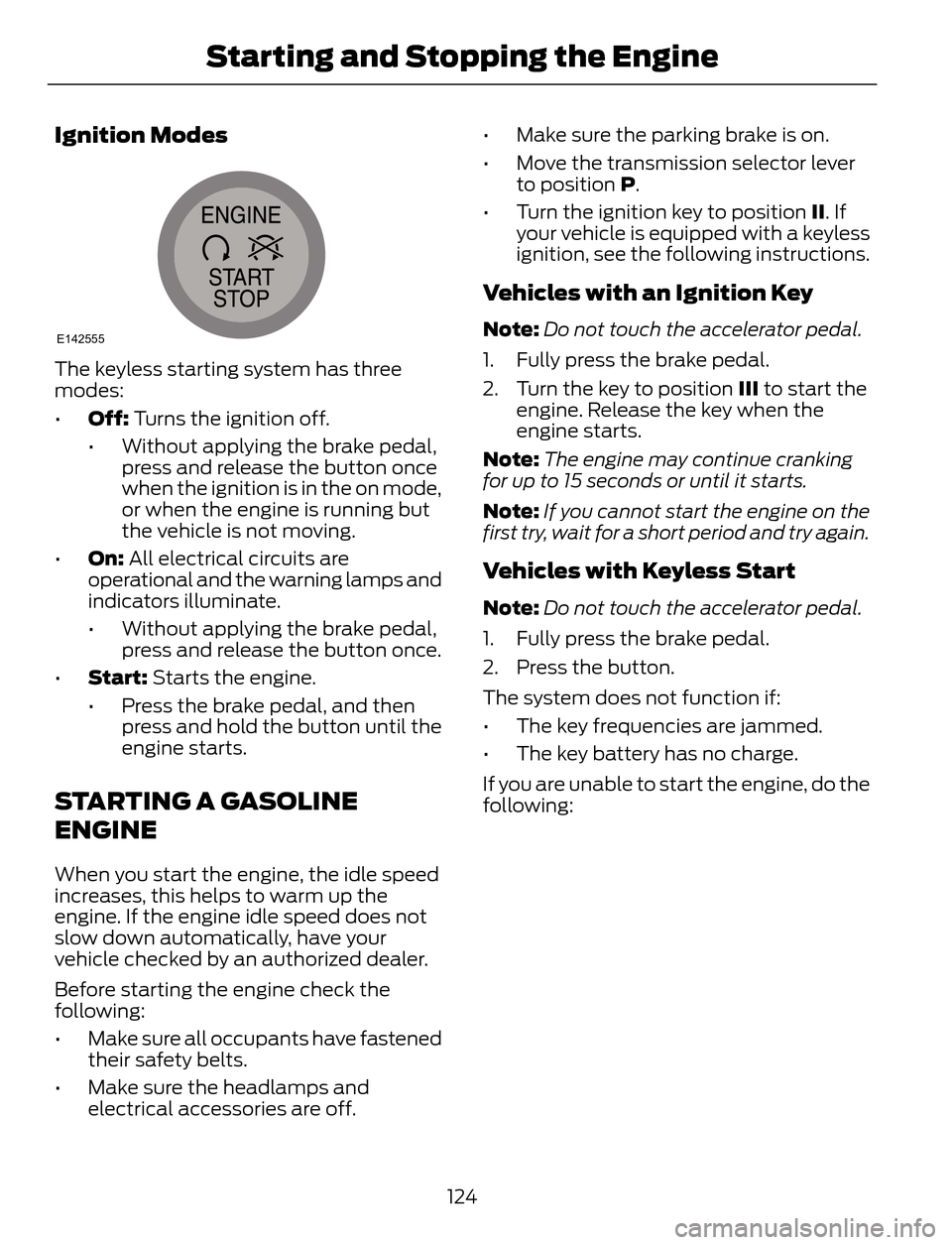
Ignition Modes
E142555
The keyless starting system has three
modes:
•Off: Turns the ignition off.
• Without applying the brake pedal,
press and release the button once
when the ignition is in the on mode,
or when the engine is running but
the vehicle is not moving.
•On: All electrical circuits are
operational and the warning lamps and
indicators illuminate.
• Without applying the brake pedal,
press and release the button once.
•Start: Starts the engine.
• Press the brake pedal, and then
press and hold the button until the
engine starts.
STARTING A GASOLINE
ENGINE
When you start the engine, the idle speed
increases, this helps to warm up the
engine. If the engine idle speed does not
slow down automatically, have your
vehicle checked by an authorized dealer.
Before starting the engine check the
following:
• Make sure all occupants have fastened
their safety belts.
• Make sure the headlamps and
electrical accessories are off.• Make sure the parking brake is on.
• Move the transmission selector lever
to position P.
• Turn the ignition key to position II. If
your vehicle is equipped with a keyless
ignition, see the following instructions.
Vehicles with an Ignition Key
Note:Do not touch the accelerator pedal.
1. Fully press the brake pedal.
2. Turn the key to position III to start the
engine. Release the key when the
engine starts.
Note:The engine may continue cranking
for up to 15 seconds or until it starts.
Note:If you cannot start the engine on the
first try, wait for a short period and try again.
Vehicles with Keyless Start
Note:Do not touch the accelerator pedal.
1. Fully press the brake pedal.
2. Press the button.
The system does not function if:
• The key frequencies are jammed.
• The key battery has no charge.
If you are unable to start the engine, do the
following:
124
Starting and Stopping the Engine
Page 140 of 428
To use SelectShift, move the gearshift
lever into S (Sport). Use the +/- buttons
on the side of your gearshift lever to
manually change gears.
• Press the (+) button to upshift.
• Press the (-) button to downshift.
Note:After you have assumed manual
control with SelectShift your vehicle will
remain in this mode until you return the
gearshift lever from (S) Sport, back to (D)
Drive.
Upshift to the recommended shift speeds
according to the following chart:
Upshifts when accelerating (recom-
mended for best fuel economy)
Shift from:
15 mph (24 km/h) 1 - 2
25 mph (40 km/h) 2 - 3
40 mph (64 km/h) 3 - 4
45 mph (72 km/h) 4 - 5
50 mph (80 km/h) 5 - 6
The instrument cluster will display the
selected gear that you are currently in and
a shift indicator arrow to assist in
optimizing shifting.
SelectShift will automatically make some
shifts for you in the event that your engine
speed is running at too high, or to low an
RPM.
Note:Engine damage may occur if
excessive engine revving is held without
shifting.Manual Shifting in D (Drive) (If
Equipped)
The transmission can be manually
controlled temporarily when in D (Drive)
by using the +/- buttons on the gearshift
lever. The system will determine when
temporary manual control is no longer
desired and will revert back to automatic
control. Move the shifter to the S (sport)
position for extensive manual control.
Brake-Shift Interlock
WARNINGS
Do not drive your vehicle until you
verify that the brake lamps are
working.
When doing this procedure, you will
be taking the vehicle out of park
which means the vehicle can roll
freely. To avoid unwanted vehicle
movement, always fully set the parking
brake prior to doing this procedure. Use
wheel chocks if appropriate.
If the parking brake is fully released,
but the brake warning lamp remains
illuminated, the brakes may not be
working properly. See your authorized
dealer.
Use the brake shift interlock lever to move
the gearshift lever from the park position
in the event of an electrical malfunction or
if your vehicle has a dead battery.
Apply the parking brake and turn the
ignition off before performing this
procedure.
1. Insert a screwdriver (or similar tool)
between the shifter bezel and the top
finish panel.
2. Use the tool to unsnap the shifter bezel
from the finish panel.
137
Transmission
Page 143 of 428
PRINCIPLE OF OPERATION
This system is a proactive system. It has
the ability to anticipate wheel slip and
transfer torque to the rear wheels before
slip occurs. Even when wheel slip is not
present, the system is continuously making
adjustments to the torque distribution, in
an attempt to improve straight line and
cornering behavior, both on and off road.
The system automatically turns on every
time you switch the ignition on.
All components of the system are sealed
and do not require maintenance.
USING FOUR-WHEEL DRIVE
Note:When a system malfunction is
present, a warning message will be
displayed in the information display. See
Information Messages (page 91). This
means the system is not functioning
correctly and has defaulted to front-wheel
drive only. Have your vehicle checked by an
authorized dealer.
Note:A message will be displayed in the
information display when the system
overheats and switches to front-wheel drive.
This condition may occur if you operate your
vehicle in extreme high load conditions or
with excessive wheel slip, (i.e. deep sand).
To resume four-wheel drive function as soon
as possible, stop your vehicle in a safe
location and switch the ignition off. After
the system cools and normal four-wheel
drive functionality resumes, a message will
be displayed for approximately five seconds.
Note:If a warning message appears in the
information display when using the spare
tire, it should turn off after reinstalling the
repaired or replaced road tire and you switch
the ignition on.Note:It is recommended that you reinstall
the repaired tire or replace the tire as soon
as possible. Major dissimilar tire sizes
between the front and rear axles could
cause system damage or default the system
to front-wheel drive.
The system gives your vehicle some limited
off-road capabilities. Operating your
vehicle in conditions other than moderate
sand, snow, mud or rough roads could
subject it to excessive stress and heat
which could result in system damage. This
will not be covered by your vehicle
warranty.
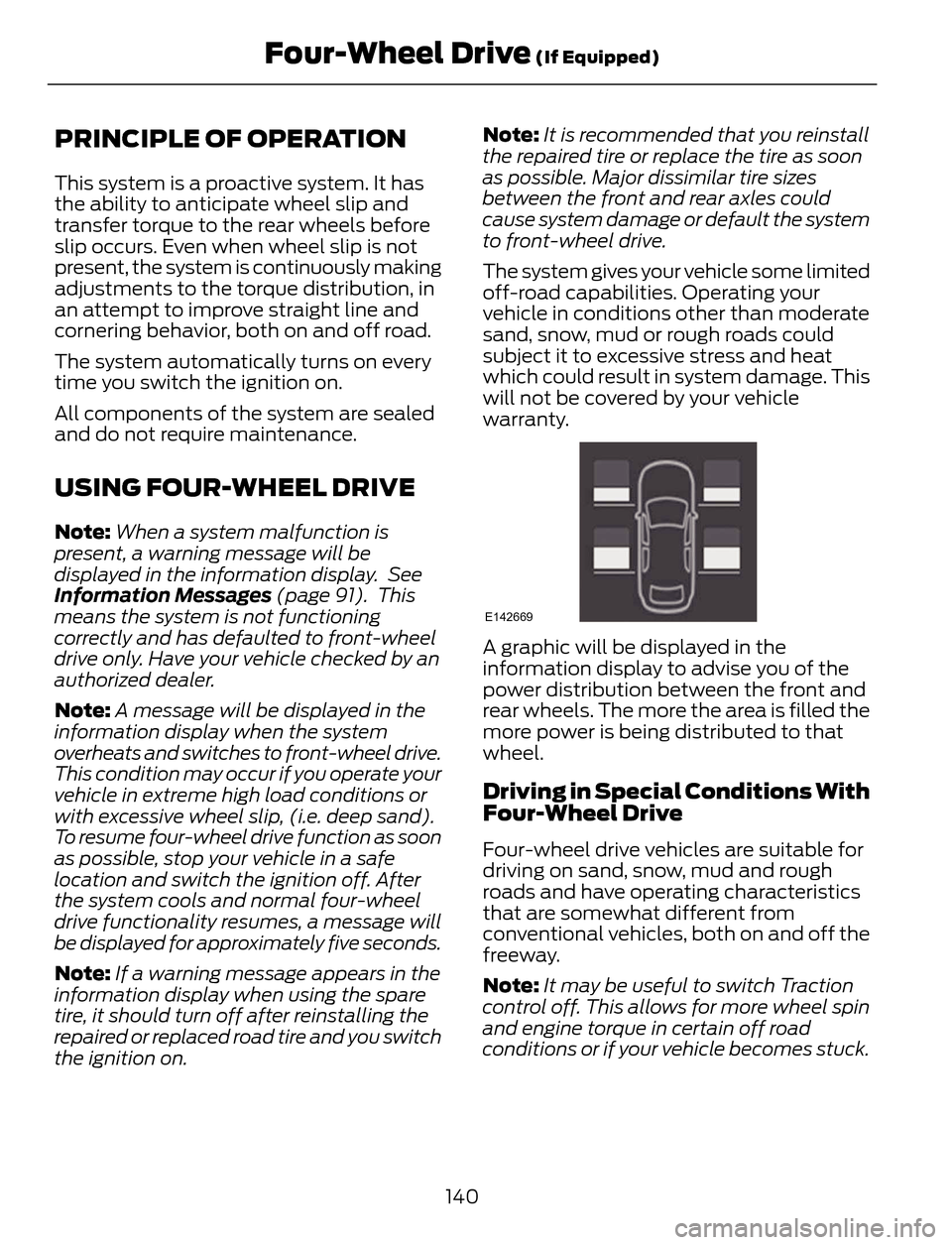
E142669
A graphic will be displayed in the
information display to advise you of the
power distribution between the front and
rear wheels. The more the area is filled the
more power is being distributed to that
wheel.
Driving in Special Conditions With
Four-Wheel Drive
Four-wheel drive vehicles are suitable for
driving on sand, snow, mud and rough
roads and have operating characteristics
that are somewhat different from
conventional vehicles, both on and off the
freeway.
Note:It may be useful to switch Traction
control off. This allows for more wheel spin
and engine torque in certain off road
conditions or if your vehicle becomes stuck.
140
Four-Wheel Drive (If Equipped)
Page 163 of 428
BLIND SPOT MONITOR
Blind Spot Information System
(BLIS®) with Cross Traffic Alert (If
Equipped)
WARNING
To help avoid injuries, NEVER use the
BLIS as a replacement for using the
interior and exterior mirrors and
looking over your shoulder before changing
lanes. BLIS is not a replacement for careful
driving and only an assist.
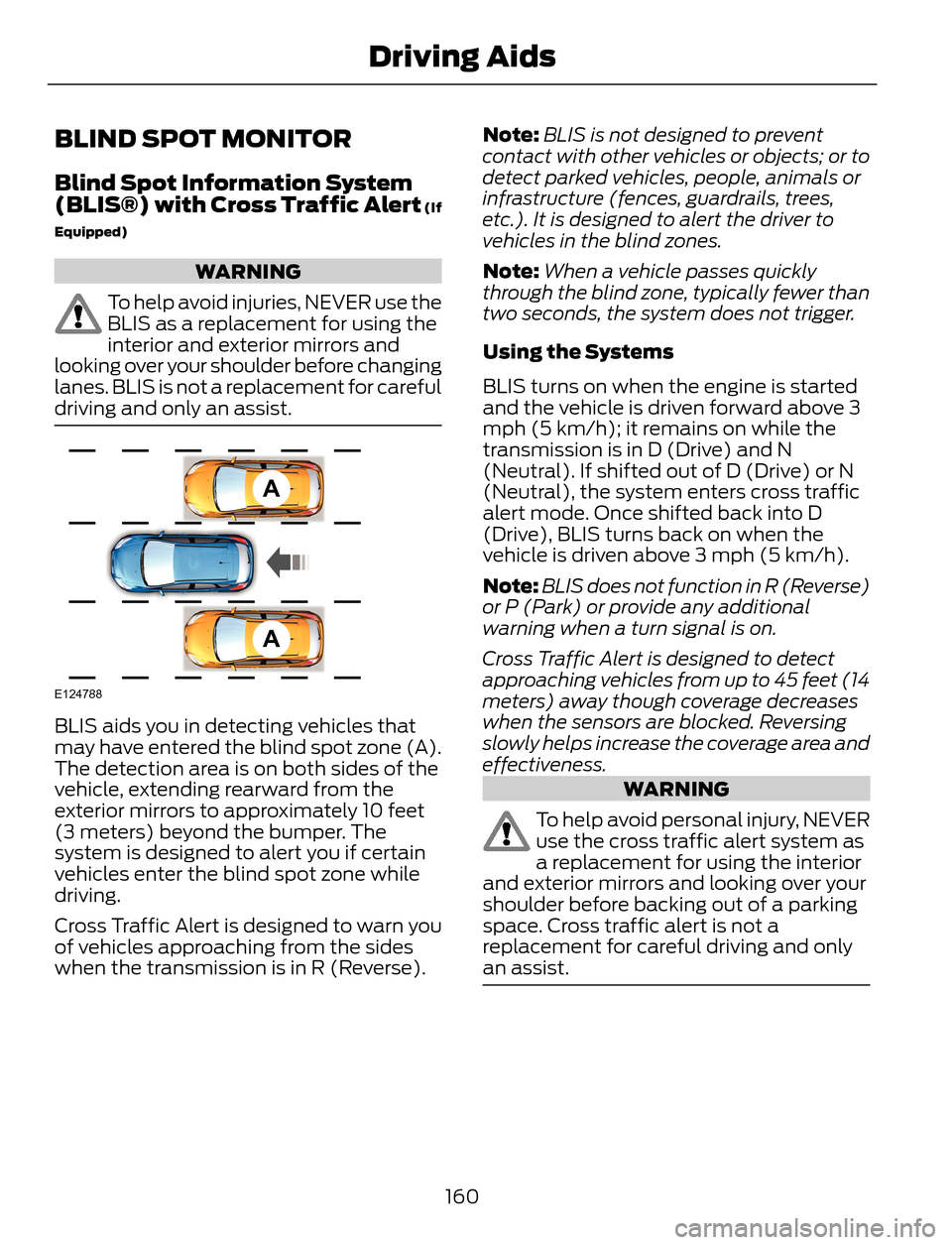
A
A
E124788
BLIS aids you in detecting vehicles that
may have entered the blind spot zone (A).
The detection area is on both sides of the
vehicle, extending rearward from the
exterior mirrors to approximately 10 feet
(3 meters) beyond the bumper. The
system is designed to alert you if certain
vehicles enter the blind spot zone while
driving.
Cross Traffic Alert is designed to warn you
of vehicles approaching from the sides
when the transmission is in R (Reverse).Note:BLIS is not designed to prevent
contact with other vehicles or objects; or to
detect parked vehicles, people, animals or
infrastructure (fences, guardrails, trees,
etc.). It is designed to alert the driver to
vehicles in the blind zones.
Note:When a vehicle passes quickly
through the blind zone, typically fewer than
two seconds, the system does not trigger.
Using the Systems
BLIS turns on when the engine is started
and the vehicle is driven forward above 3
mph (5 km/h); it remains on while the
transmission is in D (Drive) and N
(Neutral). If shifted out of D (Drive) or N
(Neutral), the system enters cross traffic
alert mode. Once shifted back into D
(Drive), BLIS turns back on when the
vehicle is driven above 3 mph (5 km/h).
Note:BLIS does not function in R (Reverse)
or P (Park) or provide any additional
warning when a turn signal is on.
Cross Traffic Alert is designed to detect
approaching vehicles from up to 45 feet (14
meters) away though coverage decreases
when the sensors are blocked. Reversing
slowly helps increase the coverage area and
effectiveness.
WARNING
To help avoid personal injury, NEVER
use the cross traffic alert system as
a replacement for using the interior
and exterior mirrors and looking over your
shoulder before backing out of a parking
space. Cross traffic alert is not a
replacement for careful driving and only
an assist.
160
Driving Aids