stop start FORD ESCAPE 2015 3.G Owner's Guide
[x] Cancel search | Manufacturer: FORD, Model Year: 2015, Model line: ESCAPE, Model: FORD ESCAPE 2015 3.GPages: 449, PDF Size: 5.36 MB
Page 258 of 449
•
When driving with tire cables do not
exceed 30 mph (48 km/h) or the
maximum speed recommended by the
chain manufacturer, whichever is less.
• Drive cautiously. If you hear the cables
rub or bang against the vehicle, stop
and retighten them. If this does not
work, remove the cables to prevent
vehicle damage.
• Remove the cables when they are no
longer needed. Do not use cables on
dry roads.
If you have any questions regarding snow
chains or cables, please contact your
authorized dealer.
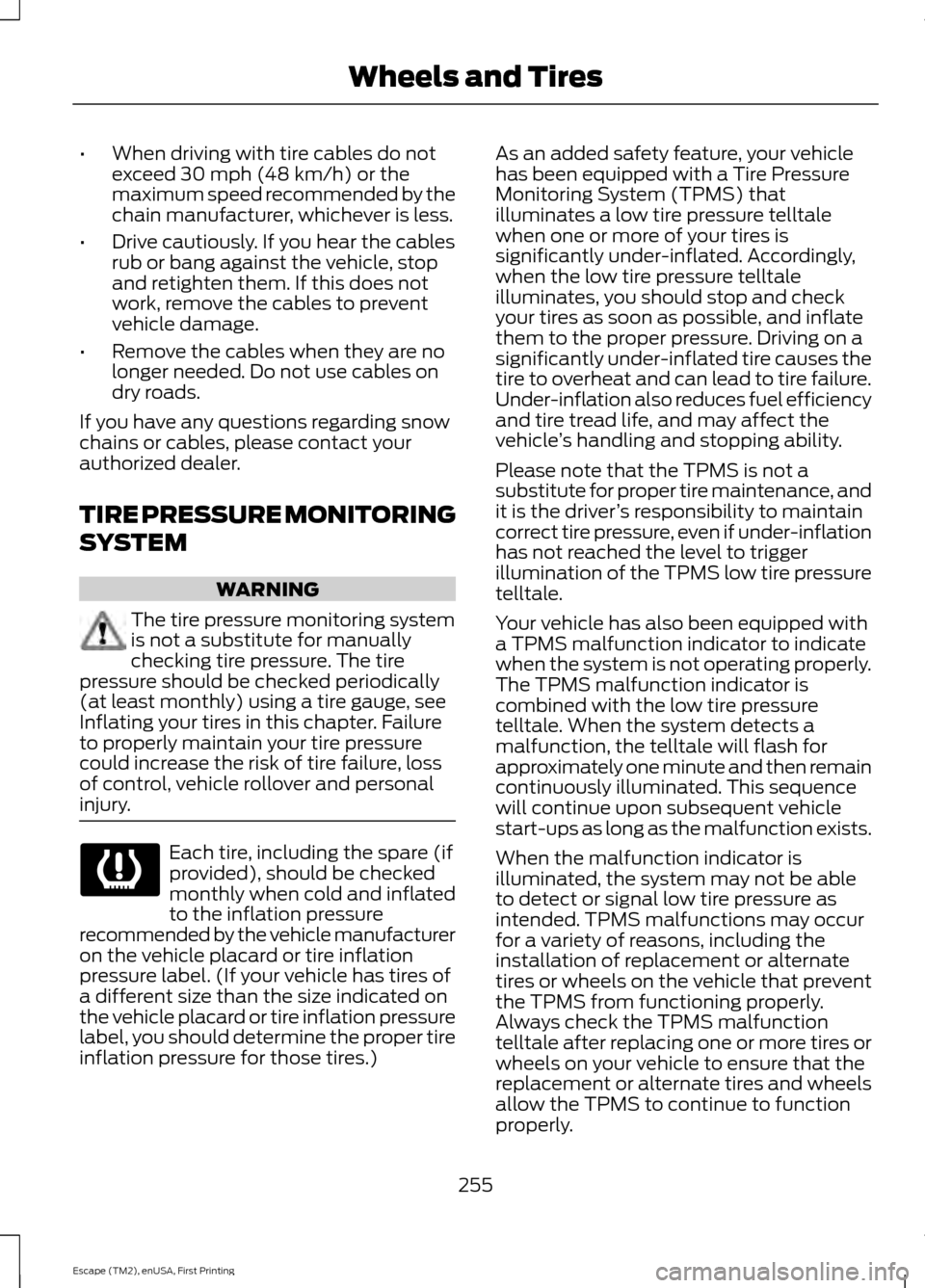
TIRE PRESSURE MONITORING
SYSTEM WARNING
The tire pressure monitoring system
is not a substitute for manually
checking tire pressure. The tire
pressure should be checked periodically
(at least monthly) using a tire gauge, see
Inflating your tires in this chapter. Failure
to properly maintain your tire pressure
could increase the risk of tire failure, loss
of control, vehicle rollover and personal
injury. Each tire, including the spare (if
provided), should be checked
monthly when cold and inflated
to the inflation pressure
recommended by the vehicle manufacturer
on the vehicle placard or tire inflation
pressure label. (If your vehicle has tires of
a different size than the size indicated on
the vehicle placard or tire inflation pressure
label, you should determine the proper tire
inflation pressure for those tires.) As an added safety feature, your vehicle
has been equipped with a Tire Pressure
Monitoring System (TPMS) that
illuminates a low tire pressure telltale
when one or more of your tires is
significantly under-inflated. Accordingly,
when the low tire pressure telltale
illuminates, you should stop and check
your tires as soon as possible, and inflate
them to the proper pressure. Driving on a
significantly under-inflated tire causes the
tire to overheat and can lead to tire failure.
Under-inflation also reduces fuel efficiency
and tire tread life, and may affect the
vehicle
’s handling and stopping ability.
Please note that the TPMS is not a
substitute for proper tire maintenance, and
it is the driver ’s responsibility to maintain
correct tire pressure, even if under-inflation
has not reached the level to trigger
illumination of the TPMS low tire pressure
telltale.
Your vehicle has also been equipped with
a TPMS malfunction indicator to indicate
when the system is not operating properly.
The TPMS malfunction indicator is
combined with the low tire pressure
telltale. When the system detects a
malfunction, the telltale will flash for
approximately one minute and then remain
continuously illuminated. This sequence
will continue upon subsequent vehicle
start-ups as long as the malfunction exists.
When the malfunction indicator is
illuminated, the system may not be able
to detect or signal low tire pressure as
intended. TPMS malfunctions may occur
for a variety of reasons, including the
installation of replacement or alternate
tires or wheels on the vehicle that prevent
the TPMS from functioning properly.
Always check the TPMS malfunction
telltale after replacing one or more tires or
wheels on your vehicle to ensure that the
replacement or alternate tires and wheels
allow the TPMS to continue to function
properly.
255
Escape (TM2), enUSA, First Printing Wheels and Tires
Page 330 of 449
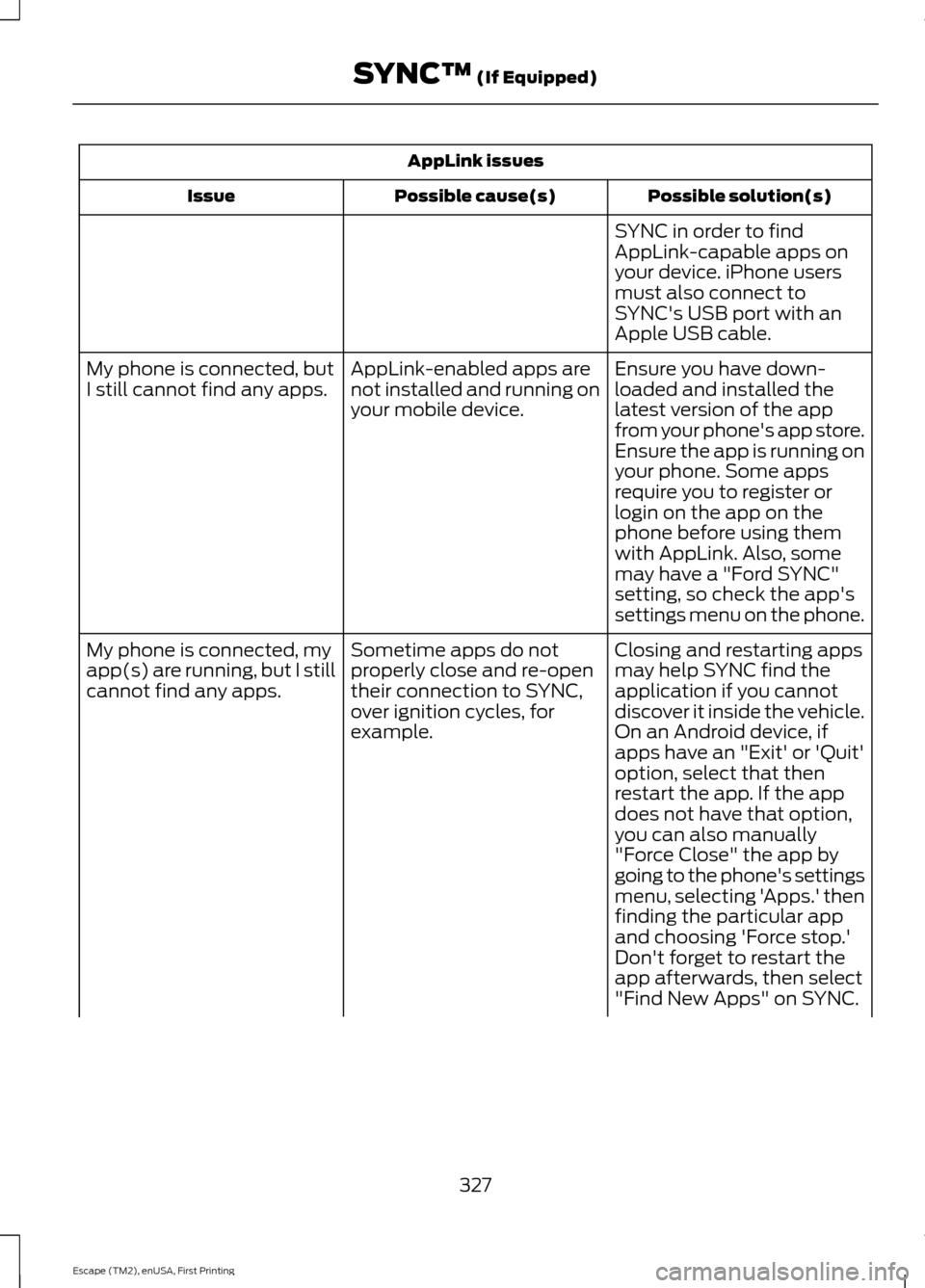
AppLink issues
Possible solution(s)
Possible cause(s)
Issue
SYNC in order to find
AppLink-capable apps on
your device. iPhone users
must also connect to
SYNC's USB port with an
Apple USB cable.
Ensure you have down-
loaded and installed the
latest version of the app
from your phone's app store.
Ensure the app is running on
your phone. Some apps
AppLink-enabled apps are
not installed and running on
your mobile device.
My phone is connected, but
I still cannot find any apps.
require you to register or
login on the app on the
phone before using them
with AppLink. Also, some
may have a "Ford SYNC"
setting, so check the app's
settings menu on the phone.
Closing and restarting apps
may help SYNC find the
application if you cannot
discover it inside the vehicle.
On an Android device, if
apps have an "Exit' or 'Quit'
Sometime apps do not
properly close and re-open
their connection to SYNC,
over ignition cycles, for
example.
My phone is connected, my
app(s) are running, but I still
cannot find any apps.
option, select that then
restart the app. If the app
does not have that option,
you can also manually
"Force Close" the app by
going to the phone's settings
menu, selecting 'Apps.' then
finding the particular app
and choosing 'Force stop.'
Don't forget to restart the
app afterwards, then select
"Find New Apps" on SYNC.
327
Escape (TM2), enUSA, First Printing SYNC™ (If Equipped)
Page 364 of 449
Playing Video from Your Device
To access and play video from your device,
your vehicle's transmission must be in
position P with the ignition in accessory
mode. See Starting and Stopping the
Engine (page 125).
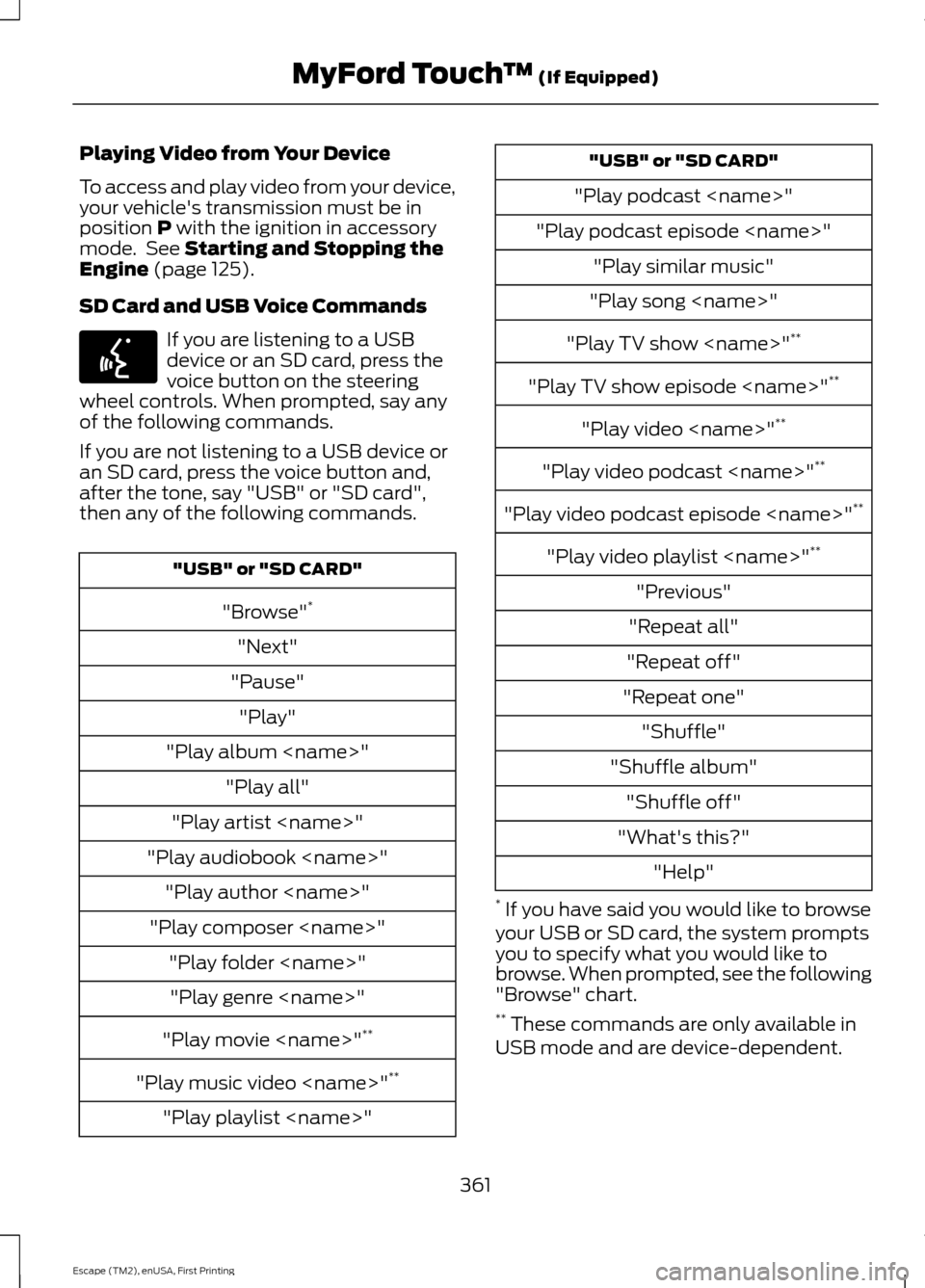
SD Card and USB Voice Commands If you are listening to a USB
device or an SD card, press the
voice button on the steering
wheel controls. When prompted, say any
of the following commands.
If you are not listening to a USB device or
an SD card, press the voice button and,
after the tone, say "USB" or "SD card",
then any of the following commands. "USB" or "SD CARD"
"Browse" *
"Next"
"Pause" "Play"
"Play album
"Play artist
"Play audiobook
"Play composer
"Play movie
"Play music video
"Play playlist
"Play podcast
"Play podcast episode
"Play song
"Play TV show
"Play TV show episode
"Play video
"Play video podcast
"Play video podcast episode
"Play video playlist
"Previous"
"Repeat all"
"Repeat off"
"Repeat one" "Shuffle"
"Shuffle album" "Shuffle off"
"What's this?" "Help"
* If you have said you would like to browse
your USB or SD card, the system prompts
you to specify what you would like to
browse. When prompted, see the following
"Browse" chart.
** These commands are only available in
USB mode and are device-dependent.
361
Escape (TM2), enUSA, First Printing MyFord Touch
™
(If Equipped)E142599
Page 447 of 449
Safety Belts.......................................................31
Principle of Operation.......................................... 31
Safety Belt Warning Lamp and Indicator Chime...............................................................35
Conditions of operation..................................... 35
Safety Canopy ™
............................................44
Safety Precautions........................................131
Satellite Radio..............................................286
Satellite Radio Electronic Serial Number
(ESN)................................................................. 287
Satellite Radio Reception Factors...............287
SIRIUS® Satellite Radio Service.................. 287
Troubleshooting................................................. 288
Scheduled Maintenance Record...........429
Scheduled Maintenance
..........................420
Seats....................................................................111
Security..............................................................67
Settings............................................................337 Clock....................................................................... 338
Display................................................................... 338
Settings................................................................. 340
Sound..................................................................... 339
Vehicle................................................................... 339
Side Airbags
.....................................................43
Sitting in the Correct Position....................111
Snow Chains See: Using Snow Chains................................. 254
Special Notices................................................12 New Vehicle Limited Warranty......................... 12
Notice to Owners of Pickup Trucks and Utility Type Vehicles........................................ 12
Special Instructions.............................................. 12
Using Your Vehicle as an Ambulance............12
Using Your Vehicle With a Snowplow............12
Special Operating Conditions Scheduled Maintenance..............................................426
Exceptions............................................................ 427
Speed Control See: Cruise Control............................................. 161
Stability Control
............................................150
Principle of Operation...................................... 150
Starter Switch See: Ignition Switch........................................... 125Starting a Gasoline Engine
.......................126
Automatic Engine Shutdown......................... 127
Failure to Start...................................................... 127
Guarding Against Exhaust Fumes................129
Important Ventilating Information...............129
Stopping the Engine When Your Vehicle is Moving............................................................... 128
Stopping the Engine When Your Vehicle is Stationary......................................................... 128
Vehicles with an Ignition Key.......................... 126
Vehicles with Keyless Start............................. 126
Starting and Stopping the Engine
..........125
General Information.......................................... 125
Steering............................................................166 Electric Power Steering.................................... 166
Steering Wheel
...............................................69
Storage Compartments.............................124
Sunroof See: Moonroof....................................................... 83
Sun Visors
.........................................................82
Illuminated Vanity Mirror................................... 82
Supplementary Restraints System
.........39
Principle of Operation........................................ 39
Symbols Glossary
.............................................7
SYNC™ Applications and Services........................................................306
911 Assist.............................................................. 306
SYNC AppLink...................................................... 312
SYNC Services: Traffic, Directions & Information (TDI) (If Equipped, Unites
States Only)................................................... 309
Vehicle Health Report..................................... 308
SYNC™.............................................................291 General Information.......................................... 291
SYNC™ Troubleshooting
...........................321
T
Tailgate See: Manual Liftgate........................................... 62
See: Power Liftgate............................................. 63
Technical Specifications See: Capacities and Specifications............264
The Better Business Bureau (BBB) Auto Line Program (U.S. Only).......................196
444
Escape (TM2), enUSA, First Printing Index