height FORD ESCAPE 2022 User Guide
[x] Cancel search | Manufacturer: FORD, Model Year: 2022, Model line: ESCAPE, Model: FORD ESCAPE 2022Pages: 585, PDF Size: 6.15 MB
Page 47 of 585
When the initial warning expires for the
driver, more warnings are provided for the
driver and front passenger. This warning
tone sounds if you or your front passenger
do not fasten the seatbelt buckle and the
vehicle speed exceeds 6 mph (10 km/h).
This tone also sounds if an occupant
unfastens the rear seatbelt buckle or it
becomes unfastened.
SWITCHING THE SEATBELT
REMINDER ON AND OFF
WARNING: While the system
allows you to deactivate it, this system
is designed to improve your chances of
being safely belted and surviving an
accident. We recommend you leave the
system activated for yourself and others
who may use the vehicle.
Note: The driver and front passenger
warnings switch off independently. When
you perform this procedure for one seating
position, do not buckle the other position as
this cancels the process.
Read Steps 1 - 4 before proceeding with
the programming procedure.
Make sure that:
• You set the parking brake.
• The transmission is in park (P).
• The ignition is off.
• You close all vehicle doors.
• You unfasten the driver and front passenger seatbelts.
1. Switch the ignition on. Do not start the engine. 2. Wait about one minute until the
seatbelt warning light switches off.
After Step 2, wait an additional five
seconds before proceeding with Step
3. Once you start Step 3, you must
complete the procedure within 30
seconds.
3. For the seating position you are switching off, fasten then unfasten the
seatbelt three times at a moderate
speed, ending in the unfastened state.
After Step 3, the seatbelt warning light
switches on.
4. When the seatbelt warning light is on, fasten then unfasten the seatbelt. After
Step 4, the seatbelt warning light
flashes for confirmation.
This switches the feature off for that
seating position if it is currently on.
This switches the feature on for that
seating position if it is currently off.
CHECKING THE SEATBELTS
Check the seatbelts and child restraints
periodically to make sure they work
properly and are not damaged. Make sure
there are no nicks, tears or cuts. Replace if
necessary.
Check the following seatbelt assemblies
after a crash.
• Retractors.
• Buckles.
• Front seatbelt buckle assemblies.
• Shoulder belt height adjusters.
• Shoulder belt guide on seat backrest.
• Child restraint LATCH and tether anchors.
• Attaching hardware.
44
Seatbelts
Page 85 of 585
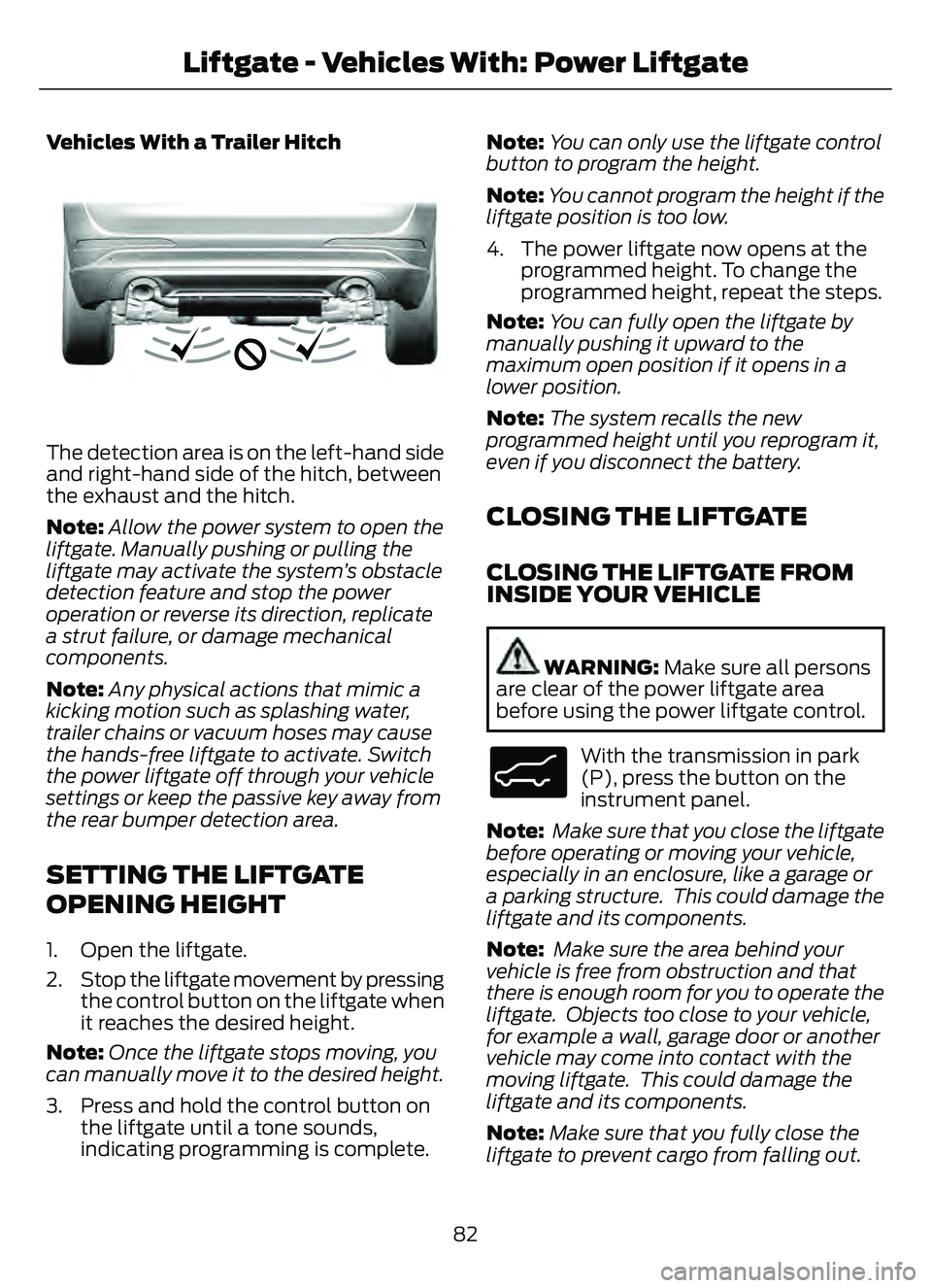
Vehicles With a Trailer Hitch
E310718E310718
The detection area is on the left-hand side
and right-hand side of the hitch, between
the exhaust and the hitch.
Note:Allow the power system to open the
liftgate. Manually pushing or pulling the
liftgate may activate the system’s obstacle
detection feature and stop the power
operation or reverse its direction, replicate
a strut failure, or damage mechanical
components.
Note: Any physical actions that mimic a
kicking motion such as splashing water,
trailer chains or vacuum hoses may cause
the hands-free liftgate to activate. Switch
the power liftgate off through your vehicle
settings or keep the passive key away from
the rear bumper detection area.
SETTING THE LIFTGATE
OPENING HEIGHT
1. Open the liftgate.
2. Stop the liftgate movement by pressing the control button on the liftgate when
it reaches the desired height.
Note: Once the liftgate stops moving, you
can manually move it to the desired height.
3. Press and hold the control button on the liftgate until a tone sounds,
indicating programming is complete. Note:
You can only use the liftgate control
button to program the height.
Note: You cannot program the height if the
liftgate position is too low.
4. The power liftgate now opens at the programmed height. To change the
programmed height, repeat the steps.
Note: You can fully open the liftgate by
manually pushing it upward to the
maximum open position if it opens in a
lower position.
Note: The system recalls the new
programmed height until you reprogram it,
even if you disconnect the battery.
CLOSING THE LIFTGATE
CLOSING THE LIFTGATE FROM
INSIDE YOUR VEHICLE
WARNING: Make sure all persons
are clear of the power liftgate area
before using the power liftgate control.
E138633
With the transmission in park
(P), press the button on the
instrument panel.
Note: Make sure that you close the liftgate
before operating or moving your vehicle,
especially in an enclosure, like a garage or
a parking structure. This could damage the
liftgate and its components.
Note: Make sure the area behind your
vehicle is free from obstruction and that
there is enough room for you to operate the
liftgate. Objects too close to your vehicle,
for example a wall, garage door or another
vehicle may come into contact with the
moving liftgate. This could damage the
liftgate and its components.
Note: Make sure that you fully close the
liftgate to prevent cargo from falling out.
82
Liftgate - Vehicles With: Power Liftgate
Page 154 of 585
E293558
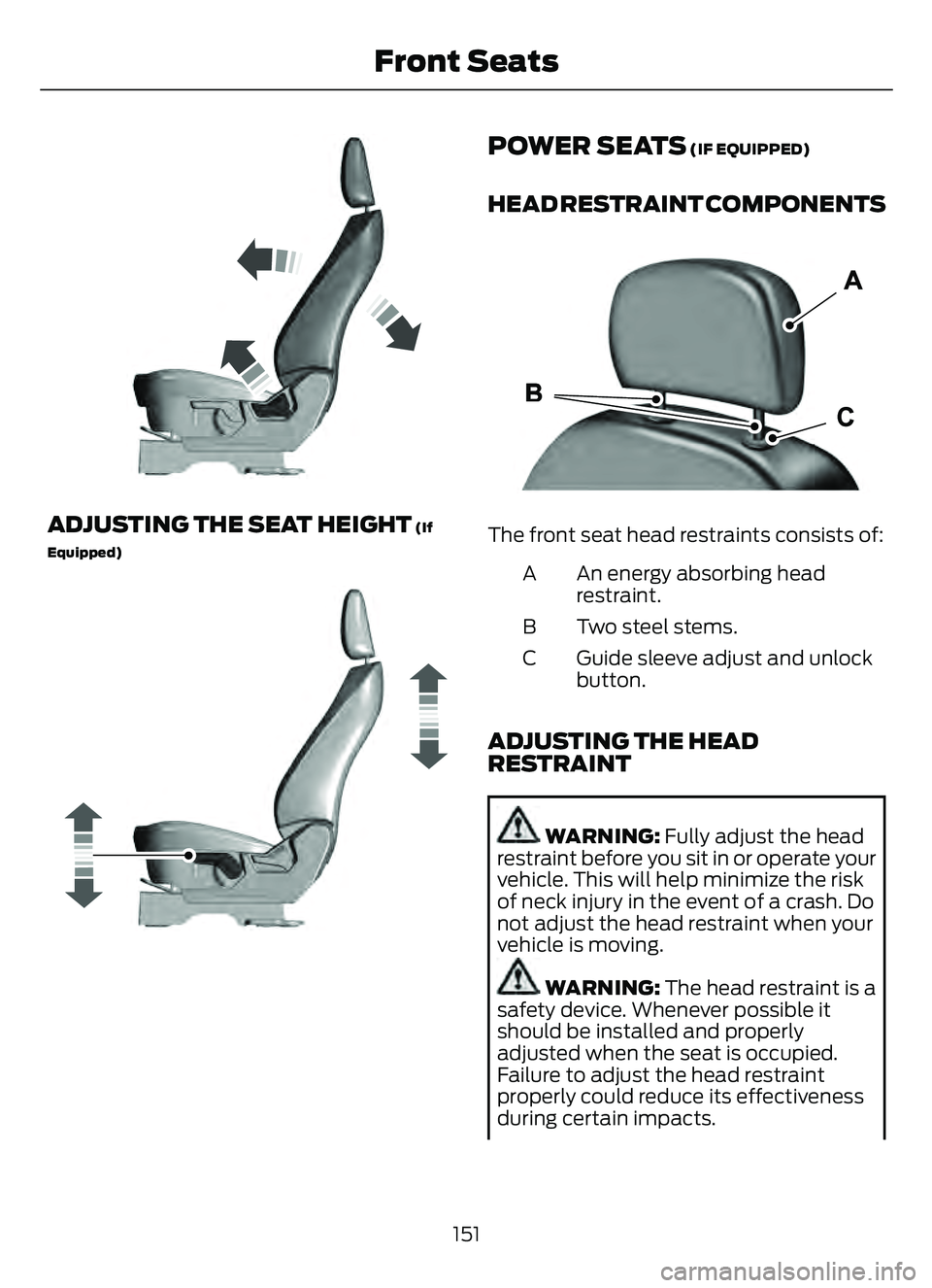
ADJUSTING THE SEAT HEIGHT (If
Equipped)
E293554
POWER SEATS (IF EQUIPPED)
HEAD RESTRAINT COMPONENTS
E291E29139139
The front seat head restraints consists of:
An energy absorbing head
restraint.
A
Two steel stems.
B
Guide sleeve adjust and unlock
button.
C
ADJUSTING THE HEAD
RESTRAINT
WARNING: Fully adjust the head
restraint before you sit in or operate your
vehicle. This will help minimize the risk
of neck injury in the event of a crash. Do
not adjust the head restraint when your
vehicle is moving.
WARNING: The head restraint is a
safety device. Whenever possible it
should be installed and properly
adjusted when the seat is occupied.
Failure to adjust the head restraint
properly could reduce its effectiveness
during certain impacts.
151
Front Seats
Page 156 of 585
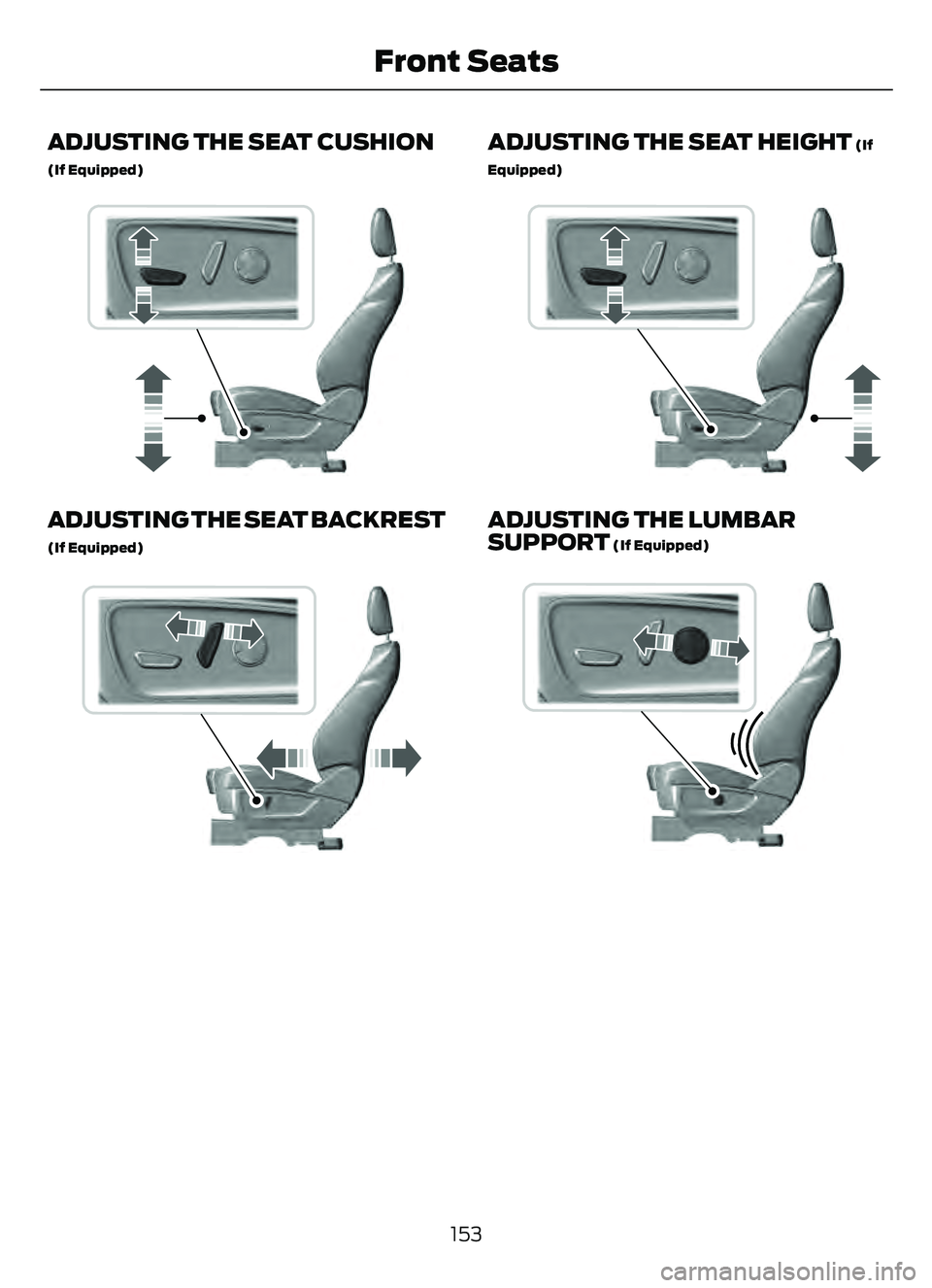
ADJUSTING THE SEAT CUSHION
(If Equipped)
E298771E298771
ADJUSTING THE SEAT BACKREST
(If Equipped)
E298773E298773
ADJUSTING THE SEAT HEIGHT (If
Equipped)
E298772E298772
ADJUSTING THE LUMBAR
SUPPORT (If Equipped)
E298774E298774
153
Front Seats
Page 347 of 585
If you disconnect or replace the vehicle
battery, you must reset the following
features:
• Window bounce-back. See Windows(page 105).
• Clock settings.
• Pre-set radio stations.
• Steering angle sensor.
Note: To calibrate the steering angle
sensor, drive the vehicle above 30 mph
(50 km/h) for a minimum of 1.2 mi (2 km).
Make sure to drive straight ahead for a
minimum of 30 seconds. Several vehicle
functions are disabled and a warning light
could appear until the sensor is calibrated.
ADJUSTING THE HEADLAMPS
Vertical Aim Adjustment
The headlamps on your vehicle are
properly aimed at the assembly plant. If
your vehicle has been in an accident, the
alignment of your headlamps should be
checked by your authorized dealer.
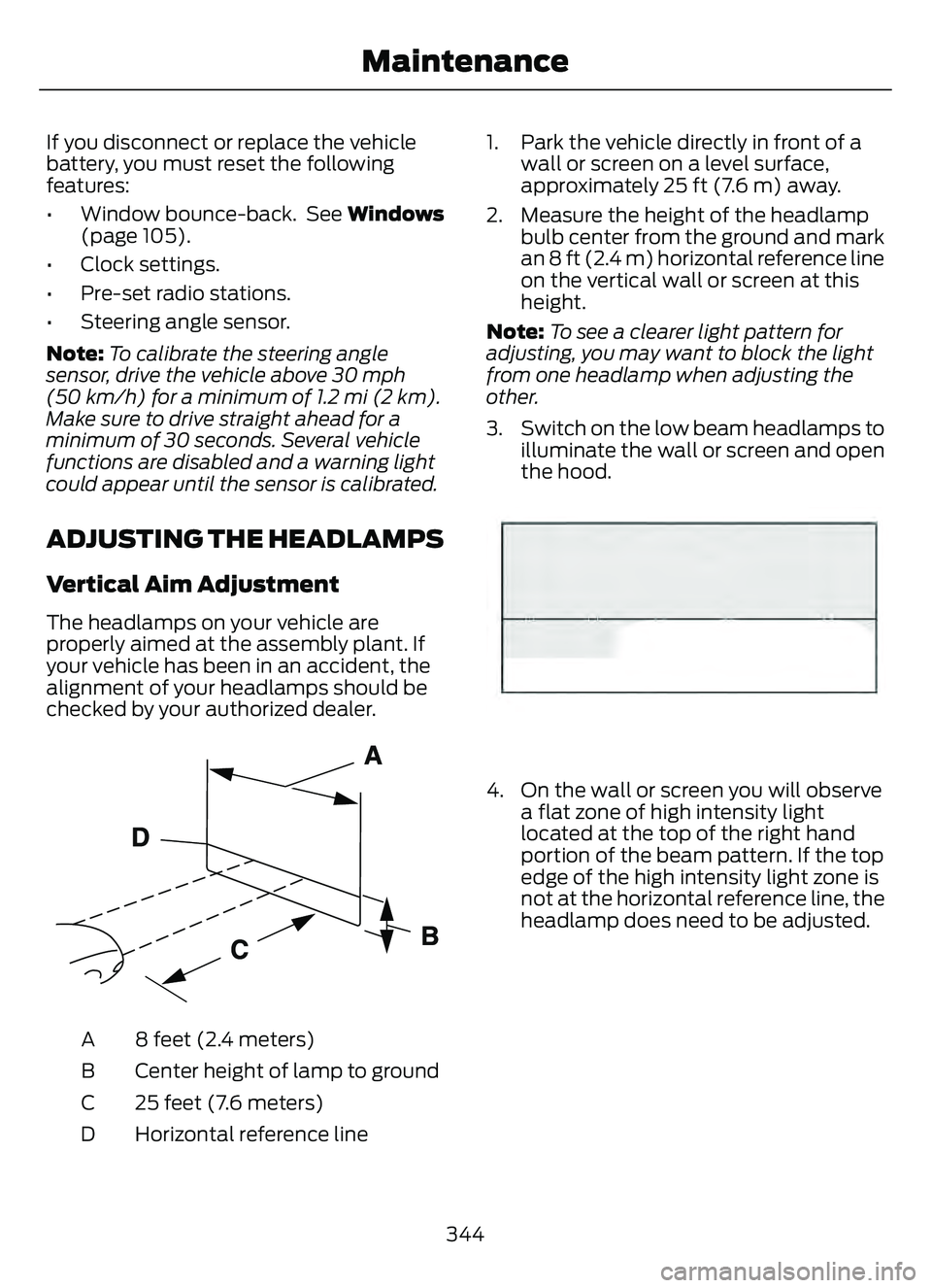
E142592
8 feet (2.4 meters)
A
Center height of lamp to ground
B
25 feet (7.6 meters)
C
Horizontal reference line
D 1. Park the vehicle directly in front of a
wall or screen on a level surface,
approximately 25 ft (7.6 m) away.
2. Measure the height of the headlamp bulb center from the ground and mark
an 8 ft (2.4 m) horizontal reference line
on the vertical wall or screen at this
height.
Note: To see a clearer light pattern for
adjusting, you may want to block the light
from one headlamp when adjusting the
other.
3. Switch on the low beam headlamps to illuminate the wall or screen and open
the hood.
E142465
4. On the wall or screen you will observea flat zone of high intensity light
located at the top of the right hand
portion of the beam pattern. If the top
edge of the high intensity light zone is
not at the horizontal reference line, the
headlamp does need to be adjusted.
344
Maintenance
Page 362 of 585
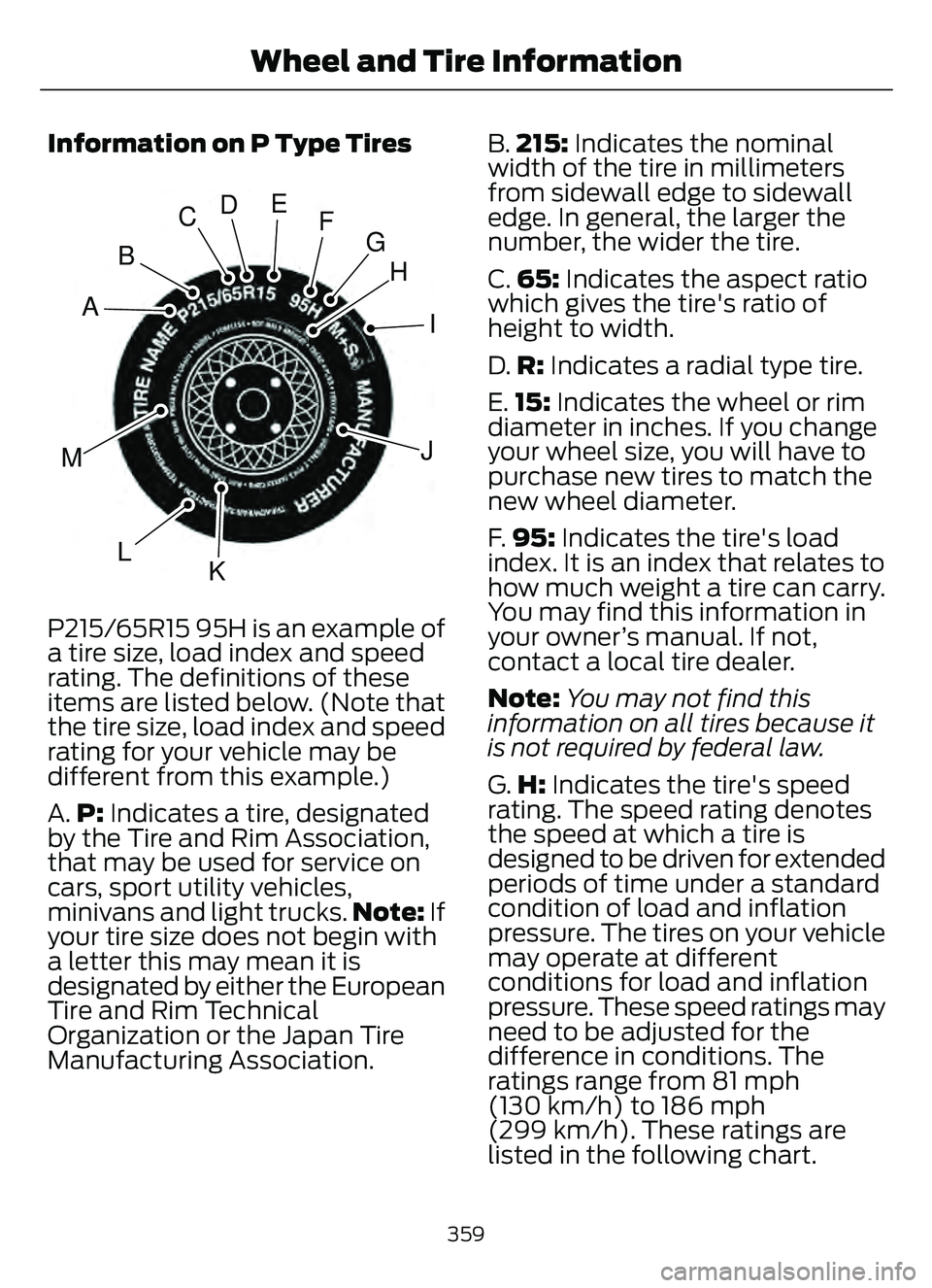
Information on P Type Tires
H
I
J
KL
M
A
B
CDEFG
E142543
P215/65R15 95H is an example of
a tire size, load index and speed
rating. The definitions of these
items are listed below. (Note that
the tire size, load index and speed
rating for your vehicle may be
different from this example.)
A.P: Indicates a tire, designated
by the Tire and Rim Association,
that may be used for service on
cars, sport utility vehicles,
minivans and light trucks. Note: If
your tire size does not begin with
a letter this may mean it is
designated by either the European
Tire and Rim Technical
Organization or the Japan Tire
Manufacturing Association. B.
215: Indicates the nominal
width of the tire in millimeters
from sidewall edge to sidewall
edge. In general, the larger the
number, the wider the tire.
C. 65: Indicates the aspect ratio
which gives the tire's ratio of
height to width.
D. R: Indicates a radial type tire.
E. 15: Indicates the wheel or rim
diameter in inches. If you change
your wheel size, you will have to
purchase new tires to match the
new wheel diameter.
F. 95: Indicates the tire's load
index. It is an index that relates to
how much weight a tire can carry.
You may find this information in
your owner’s manual. If not,
contact a local tire dealer.
Note: You may not find this
information on all tires because it
is not required by federal law.
G. H: Indicates the tire's speed
rating. The speed rating denotes
the speed at which a tire is
designed to be driven for extended
periods of time under a standard
condition of load and inflation
pressure. The tires on your vehicle
may operate at different
conditions for load and inflation
pressure. These speed ratings may
need to be adjusted for the
difference in conditions. The
ratings range from 81 mph
(130 km/h) to 186 mph
(299 km/h). These ratings are
listed in the following chart.
359
Wheel and Tire Information
Page 366 of 585
C.80: Indicates the aspect ratio
which gives the tire's ratio of
height to width. Numbers of 70 or
lower indicate a short sidewall.
D. D: Indicates a diagonal type tire.
R: Indicates a radial type tire.
E. 16: Indicates the wheel or rim
diameter in inches. If you change
your wheel size, you will have to
purchase new tires to match the
new wheel diameter.
GLOSSARY OF TIRE
TERMINOLOGY
*Tire label: A label showing the
original equipment tire sizes,
recommended inflation pressure
and the maximum weight the
vehicle can carry.
*Tire Identification Number
(TIN): A number on the sidewall
of each tire providing information
about the tire brand and
manufacturing plant, tire size and
date of manufacture. Also referred
to as DOT code.
*Inflation pressure: A measure
of the amount of air in a tire.
*Standard load: A class of
P-metric or Metric tires designed
to carry a maximum load at set
pressure. For example: For
P-metric tires 35 psi (2.4 bar) and
for Metric tires 36 psi (2.5 bar).
Increasing the inflation pressure
beyond this pressure will not
increase the tire’s load carrying
capability. *Extra load:
A class of P-metric
or Metric tires designed to carry a
heavier maximum load at 42 psi
(2.9 bar). Increasing the inflation
pressure beyond this pressure will
not increase the tire’s load
carrying capability.
*kPa: Kilopascal, a metric unit of
air pressure.
*PSI: Pounds per square inch, a
standard unit of air pressure.
*Cold tire pressure: The tire
pressure when the vehicle has
been stationary and out of direct
sunlight for an hour or more and
prior to the vehicle being driven for
1 mi (1.6 km).
*Recommended inflation
pressure: The cold inflation
pressure found on the Safety
Compliance Certification Label
(affixed to either the door hinge
pillar, door-latch post, or the door
edge that meets the door-latch
post, next to the driver's seating
position), or Tire Label located on
the B-Pillar or the edge of the
driver door.
* B-pillar: The structural member
at the side of the vehicle behind
the front door.
*Bead area of the tire: Area of
the tire next to the rim.
* Sidewall of the tire: Area
between the bead area and the
tread.
363
Wheel and Tire Information
Page 372 of 585
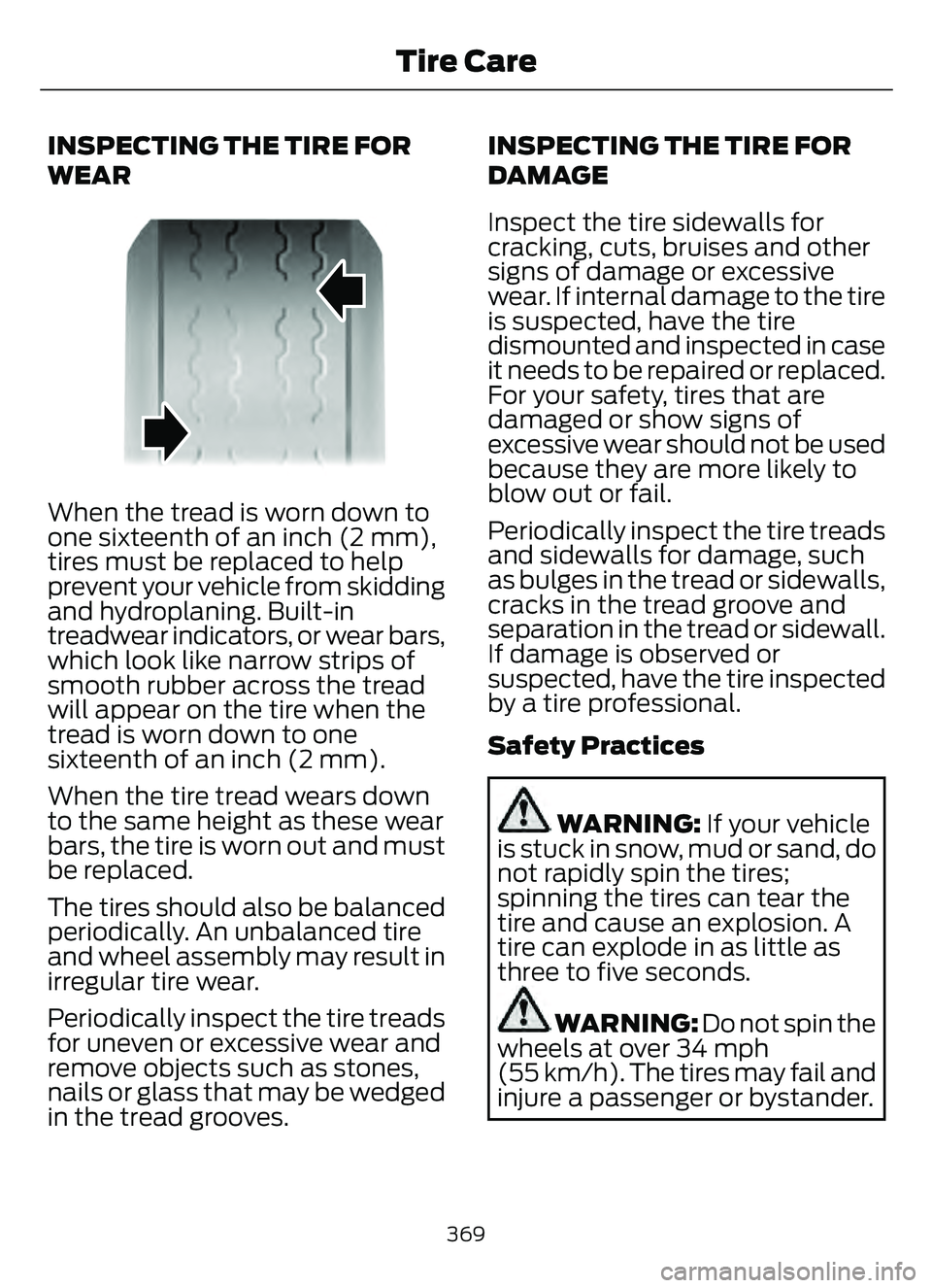
INSPECTING THE TIRE FOR
WEAR
When the tread is worn down to
one sixteenth of an inch (2 mm),
tires must be replaced to help
prevent your vehicle from skidding
and hydroplaning. Built-in
treadwear indicators, or wear bars,
which look like narrow strips of
smooth rubber across the tread
will appear on the tire when the
tread is worn down to one
sixteenth of an inch (2 mm).
When the tire tread wears down
to the same height as these wear
bars, the tire is worn out and must
be replaced.
The tires should also be balanced
periodically. An unbalanced tire
and wheel assembly may result in
irregular tire wear.
Periodically inspect the tire treads
for uneven or excessive wear and
remove objects such as stones,
nails or glass that may be wedged
in the tread grooves.INSPECTING THE TIRE FOR
DAMAGE
Inspect the tire sidewalls for
cracking, cuts, bruises and other
signs of damage or excessive
wear. If internal damage to the tire
is suspected, have the tire
dismounted and inspected in case
it needs to be repaired or replaced.
For your safety, tires that are
damaged or show signs of
excessive wear should not be used
because they are more likely to
blow out or fail.
Periodically inspect the tire treads
and sidewalls for damage, such
as bulges in the tread or sidewalls,
cracks in the tread groove and
separation in the tread or sidewall.
If damage is observed or
suspected, have the tire inspected
by a tire professional.
Safety Practices
WARNING: If your vehicle
is stuck in snow, mud or sand, do
not rapidly spin the tires;
spinning the tires can tear the
tire and cause an explosion. A
tire can explode in as little as
three to five seconds.
WARNING: Do not spin the
wheels at over 34 mph
(55 km/h). The tires may fail and
injure a passenger or bystander.
369
Tire Care
Page 387 of 585
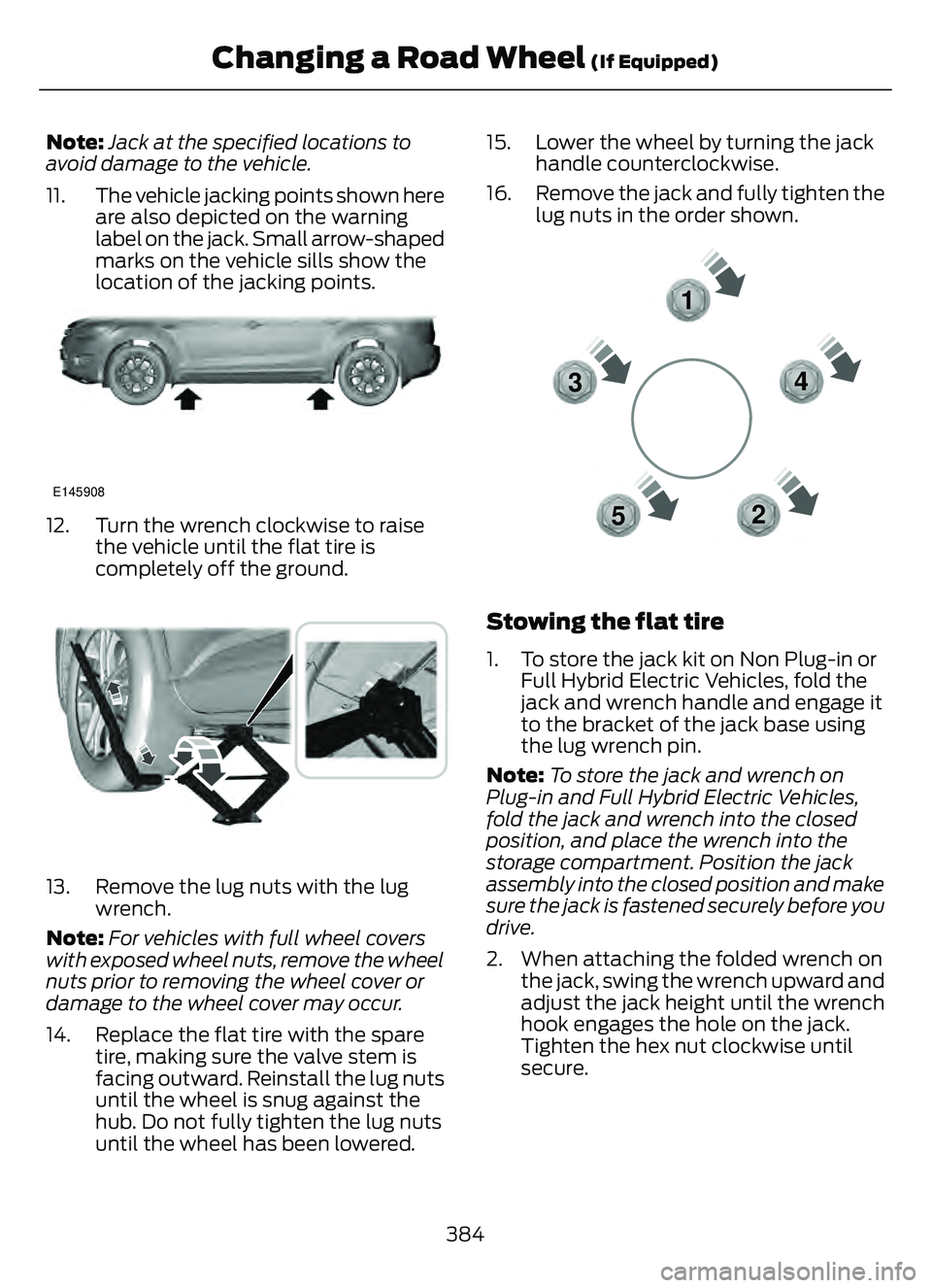
Note:Jack at the specified locations to
avoid damage to the vehicle.
11. The vehicle jacking points shown here are also depicted on the warning
label on the jack. Small arrow-shaped
marks on the vehicle sills show the
location of the jacking points.
E145908
12. Turn the wrench clockwise to raisethe vehicle until the flat tire is
completely off the ground.
E338668E338668
13. Remove the lug nuts with the lugwrench.
Note: For vehicles with full wheel covers
with exposed wheel nuts, remove the wheel
nuts prior to removing the wheel cover or
damage to the wheel cover may occur.
14. Replace the flat tire with the spare tire, making sure the valve stem is
facing outward. Reinstall the lug nuts
until the wheel is snug against the
hub. Do not fully tighten the lug nuts
until the wheel has been lowered. 15. Lower the wheel by turning the jack
handle counterclockwise.
16. Remove the jack and fully tighten the lug nuts in the order shown.
1
2
3
4
5
E306781
Stowing the flat tire
1. To store the jack kit on Non Plug-in or Full Hybrid Electric Vehicles, fold the
jack and wrench handle and engage it
to the bracket of the jack base using
the lug wrench pin.
Note: To store the jack and wrench on
Plug-in and Full Hybrid Electric Vehicles,
fold the jack and wrench into the closed
position, and place the wrench into the
storage compartment. Position the jack
assembly into the closed position and make
sure the jack is fastened securely before you
drive.
2. When attaching the folded wrench on the jack, swing the wrench upward and
adjust the jack height until the wrench
hook engages the hole on the jack.
Tighten the hex nut clockwise until
secure.
384
Changing a Road Wheel (If Equipped)
Page 566 of 585
1
12V Battery......................................................34112V Battery Precautions...................................341
Battery Management SystemLimitations.......................................................342
How Does the Battery Management System Work..................................................342
Recycling and Disposing of the 12V Battery..............................................................342
Resetting the Battery Sensor........................342
What Is the Battery Management System..............................................................342
9
911 Assist............................................................57
A
A/CSee: Climate Control..........................................137About This Publication..................................17
ABS
See: Brakes............................................................217Accessing the Trip Computer - VehiclesWith: 4.2 Inch Instrument Cluster
Display Screen............................................129
Accessing the Trip Computer - Vehicles With: 6.5 Inch Instrument Cluster
Display Screen/ 12.3 Inch Instrument
Cluster Display Screen.............................129
Accessories....................................................479
AC Charging...................................................205
Connecting the Charger..................................205
Stopping Charging............................................206
Active Park Assist........................................238Active Park Assist –
Trouble shooting............................................240
Active Park Assist Precautions...............238
Active Park Assist –
Troubleshooting........................................240
Active Park Assist – Frequently Asked
Questions ........................................................240
Active Park Assist – Information Messages.........................................................240
Adaptive Cruise Control............................244Adaptive Cruise Control –Troubleshooting............................................ 254
Intelligent Adaptive Cruise Control.............253
Lane Centering...................................................250
Adaptive Cruise Control Automatic Cancellation................................................247
Adaptive Cruise Control Indicators.......250
Adaptive Cruise Control Limitations..................................................245
Adaptive Cruise Control Precautions.................................................244
Adaptive Cruise Control – Troubleshooting........................................254
Adaptive Cruise Control – Information
Messages.........................................................254
Adjusting the Exterior Mirrors..................108
Adjusting the Headlamps........................344
Adjusting the Instrument Panel LightingBrightness....................................................103
Adjusting the Seatbelt Height...................42
Adjusting the Seatbelts During Pregnancy......................................................42
Adjusting the Sound Settings...................411
Adjusting the Steering Wheel....................91
Adjusting the Volume.................................410
Aid Mode.........................................................263
How Does Aid Mode Work.............................263
What Is Aid Mode..............................................263
Airbag Precautions........................................49
Airbags................................................................47
Front Passenger Sensing System...................51Air ConditioningSee: Climate Control..........................................137Air Conditioning System Capacity and Specification - 1.5L EcoBoost™.........400
Air Conditioning System Capacity and Specification - 2.0L EcoBoost™.........401
Air Conditioning System Capacity and Specification - 2.5L, Hybrid Electric
Vehicle (HEV)/Plug-In Hybrid Electric
Vehicle (PHEV).........................................402
Air Filter
See: Changing the Engine Air Filter - 1.5L
EcoBoost™/2.0L EcoBoost™.................338
See: Changing the Engine Air Filter - 2.5L, Hybrid Electric Vehicle (HEV)/Plug-In
Hybrid Electric Vehicle (PHEV)...............339
563
Index