cruise control FORD ESCAPE 2022 Owner's Manual
[x] Cancel search | Manufacturer: FORD, Model Year: 2022, Model line: ESCAPE, Model: FORD ESCAPE 2022Pages: 585, PDF Size: 6.15 MB
Page 259 of 585
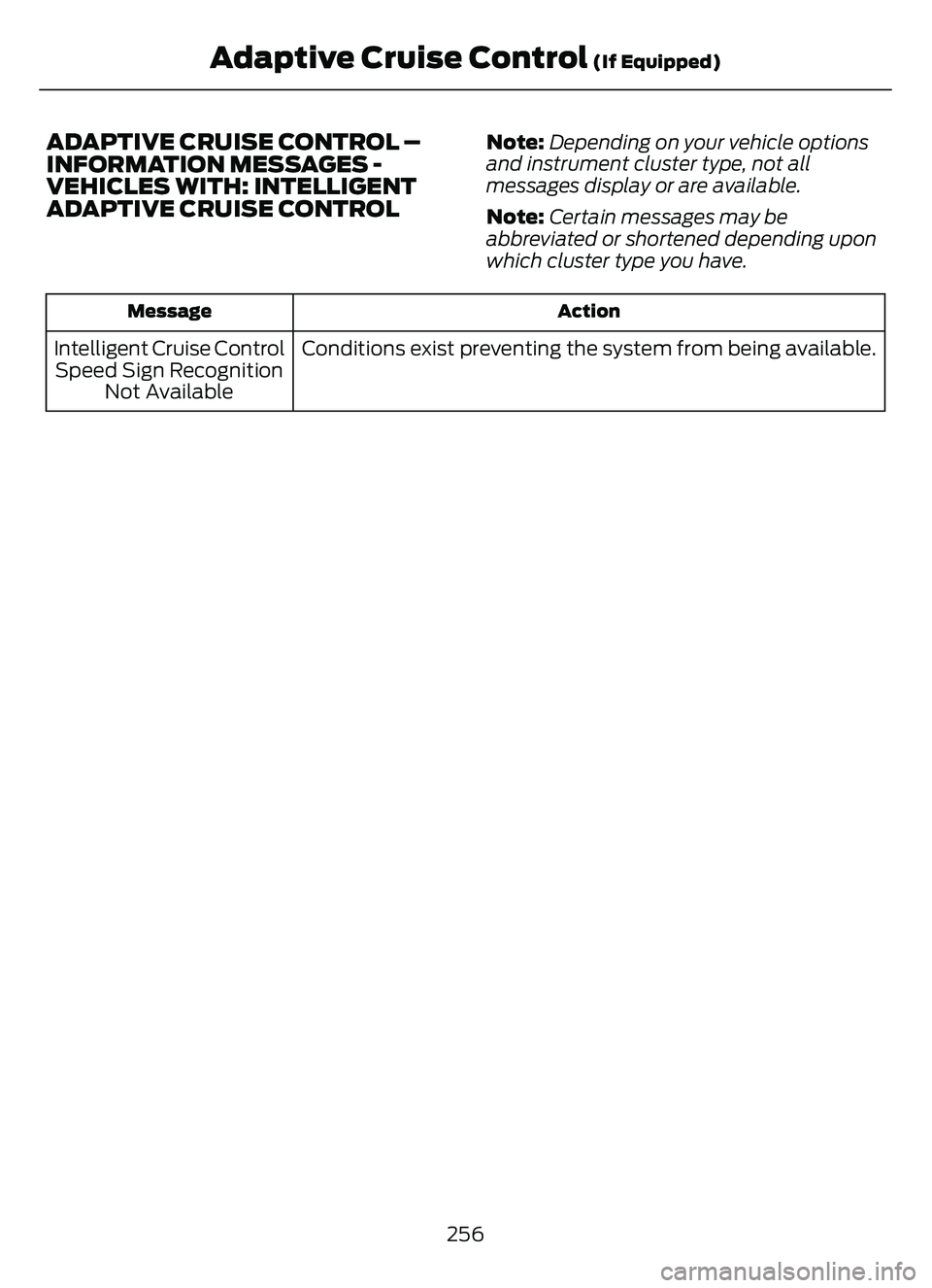
ADAPTIVE CRUISE CONTROL –
INFORMATION MESSAGES -
VEHICLES WITH: INTELLIGENT
ADAPTIVE CRUISE CONTROLNote:Depending on your vehicle options
and instrument cluster type, not all
messages display or are available.
Note: Certain messages may be
abbreviated or shortened depending upon
which cluster type you have.
Action
Message
Conditions exist preventing the system from being available.
Intelligent Cruise Control
Speed Sign Recognition Not Available
256
Adaptive Cruise Control (If Equipped)
Page 267 of 585
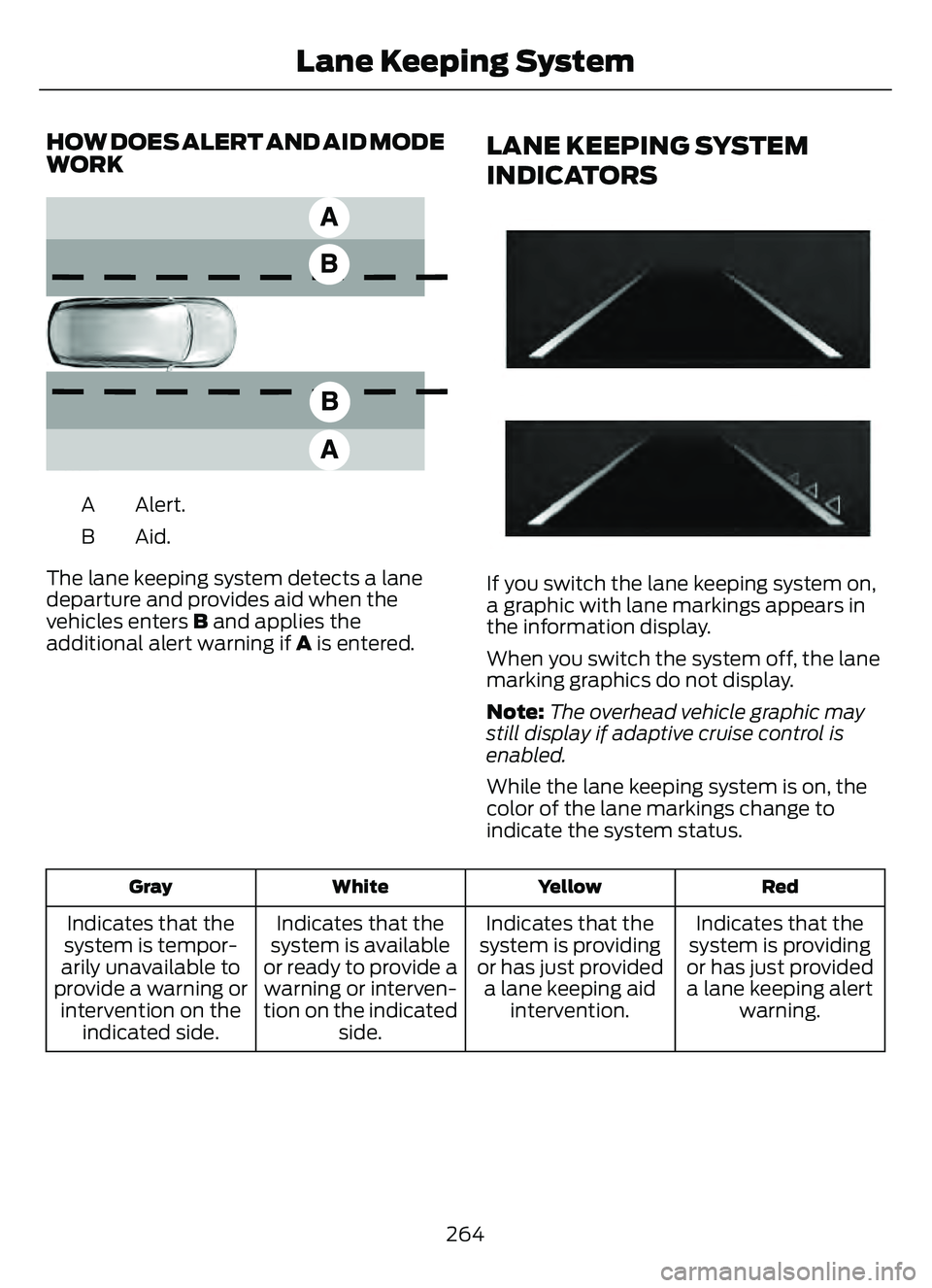
HOW DOES ALERT AND AID MODE
WORK
E165517
Alert.
A
Aid.B
The lane keeping system detects a lane
departure and provides aid when the
vehicles enters B and applies the
additional alert warning if A is entered.
LANE KEEPING SYSTEM
INDICATORS
E294544
If you switch the lane keeping system on,
a graphic with lane markings appears in
the information display.
When you switch the system off, the lane
marking graphics do not display.
Note: The overhead vehicle graphic may
still display if adaptive cruise control is
enabled.
While the lane keeping system is on, the
color of the lane markings change to
indicate the system status.
Red
Yellow
White
Gray
Indicates that the
system is providing
or has just provided a lane keeping alert warning.
Indicates that the
system is providing
or has just provided a lane keeping aid intervention.
Indicates that the
system is available
or ready to provide a warning or interven-
tion on the indicated side.
Indicates that the
system is tempor-
arily unavailable to
provide a warning or intervention on the indicated side.
264
Lane Keeping System
Page 278 of 585
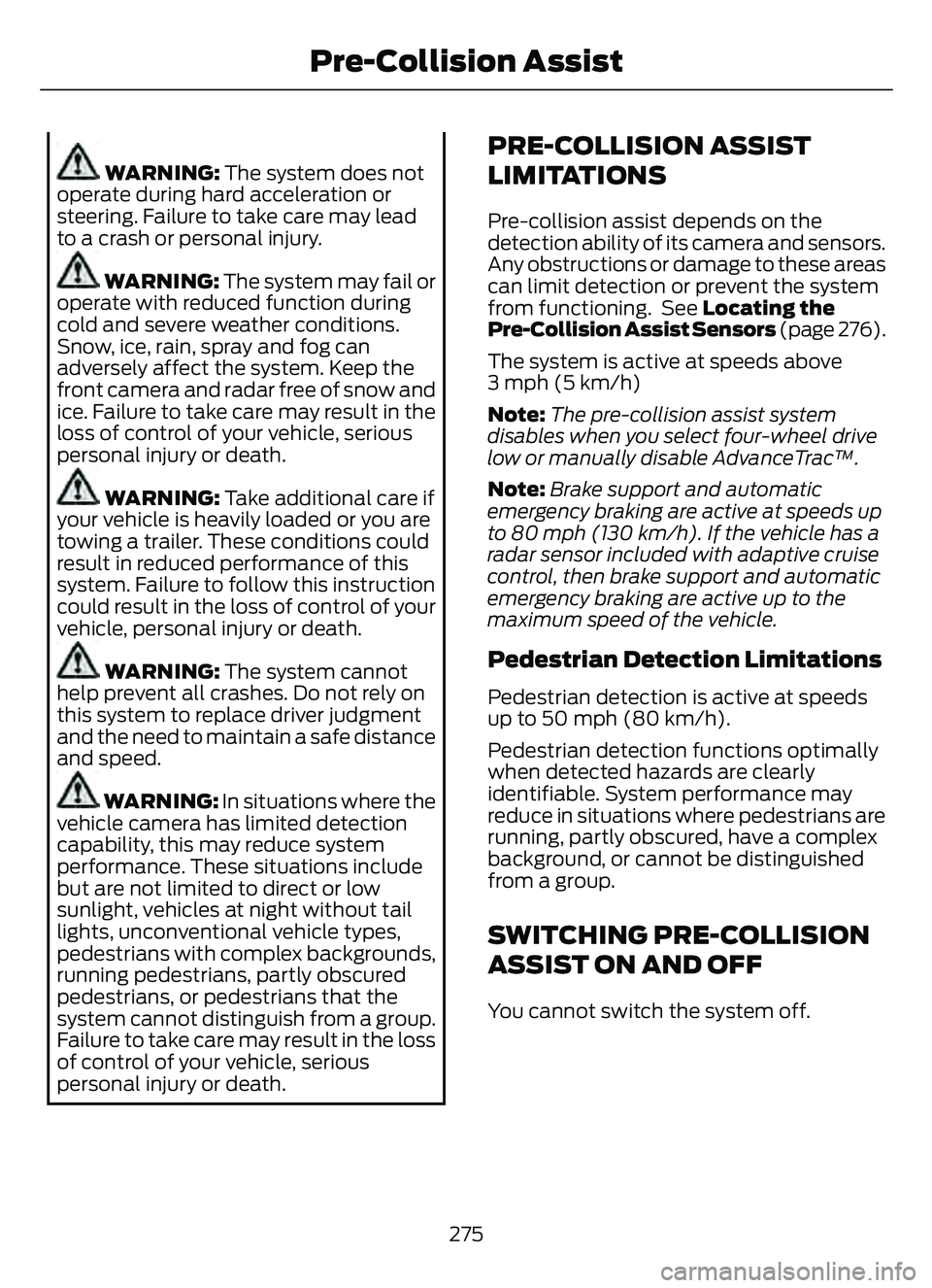
WARNING: The system does not
operate during hard acceleration or
steering. Failure to take care may lead
to a crash or personal injury.
WARNING: The system may fail or
operate with reduced function during
cold and severe weather conditions.
Snow, ice, rain, spray and fog can
adversely affect the system. Keep the
front camera and radar free of snow and
ice. Failure to take care may result in the
loss of control of your vehicle, serious
personal injury or death.
WARNING: Take additional care if
your vehicle is heavily loaded or you are
towing a trailer. These conditions could
result in reduced performance of this
system. Failure to follow this instruction
could result in the loss of control of your
vehicle, personal injury or death.
WARNING: The system cannot
help prevent all crashes. Do not rely on
this system to replace driver judgment
and the need to maintain a safe distance
and speed.
WARNING: In situations where the
vehicle camera has limited detection
capability, this may reduce system
performance. These situations include
but are not limited to direct or low
sunlight, vehicles at night without tail
lights, unconventional vehicle types,
pedestrians with complex backgrounds,
running pedestrians, partly obscured
pedestrians, or pedestrians that the
system cannot distinguish from a group.
Failure to take care may result in the loss
of control of your vehicle, serious
personal injury or death.
PRE-COLLISION ASSIST
LIMITATIONS
Pre-collision assist depends on the
detection ability of its camera and sensors.
Any obstructions or damage to these areas
can limit detection or prevent the system
from functioning. See Locating the
Pre-Collision Assist Sensors (page 276).
The system is active at speeds above
3 mph (5 km/h)
Note: The pre-collision assist system
disables when you select four-wheel drive
low or manually disable AdvanceTrac™.
Note: Brake support and automatic
emergency braking are active at speeds up
to 80 mph (130 km/h). If the vehicle has a
radar sensor included with adaptive cruise
control, then brake support and automatic
emergency braking are active up to the
maximum speed of the vehicle.
Pedestrian Detection Limitations
Pedestrian detection is active at speeds
up to 50 mph (80 km/h).
Pedestrian detection functions optimally
when detected hazards are clearly
identifiable. System performance may
reduce in situations where pedestrians are
running, partly obscured, have a complex
background, or cannot be distinguished
from a group.
SWITCHING PRE-COLLISION
ASSIST ON AND OFF
You cannot switch the system off.
275
Pre-Collision Assist
Page 279 of 585
Adjusting the Pre-Collision Assist
Settings
You can adjust the following settings by
using the touchscreen controls in the
pre-collision assist menu:
• Change alert and distance alertsensitivity to one of three possible
settings.
• Switch distance indication and alert on or off.
• If required, switch automatic emergency braking on or off.
• If required, switch evasive steering assist on or off.
Note: Automatic emergency braking and
evasive steering automatically turns on
every time you switch the ignition on.
Note: If you switch automatic emergency
braking off, evasive steering assist switches
off.
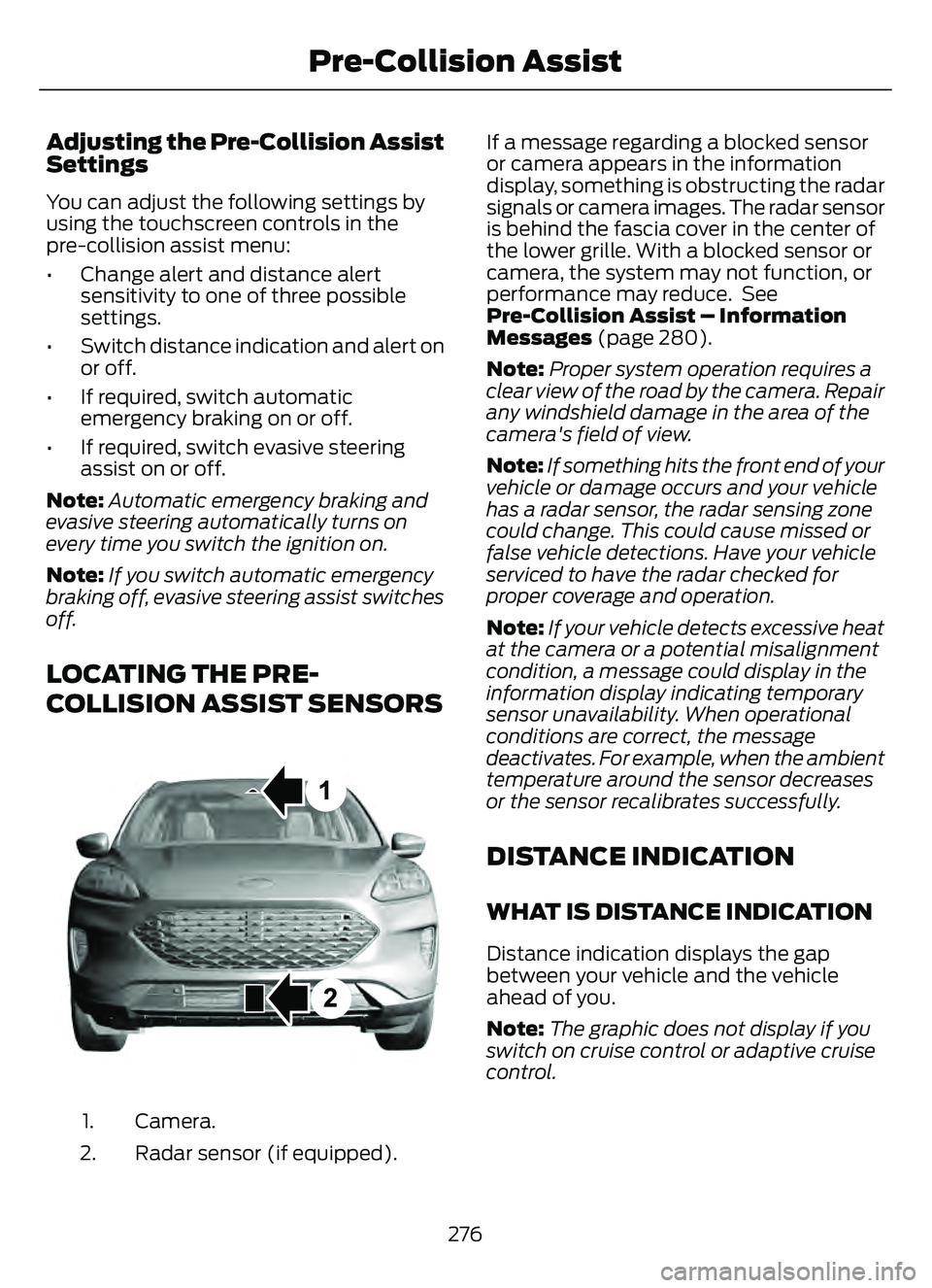
LOCATING THE PRE-
COLLISION ASSIST SENSORS
E307090E307090
Camera.
1.
Radar sensor (if equipped).
2. If a message regarding a blocked sensor
or camera appears in the information
display, something is obstructing the radar
signals or camera images. The radar sensor
is behind the fascia cover in the center of
the lower grille. With a blocked sensor or
camera, the system may not function, or
performance may reduce. See
Pre-Collision Assist – Information
Messages (page 280).
Note:
Proper system operation requires a
clear view of the road by the camera. Repair
any windshield damage in the area of the
camera's field of view.
Note: If something hits the front end of your
vehicle or damage occurs and your vehicle
has a radar sensor, the radar sensing zone
could change. This could cause missed or
false vehicle detections. Have your vehicle
serviced to have the radar checked for
proper coverage and operation.
Note: If your vehicle detects excessive heat
at the camera or a potential misalignment
condition, a message could display in the
information display indicating temporary
sensor unavailability. When operational
conditions are correct, the message
deactivates. For example, when the ambient
temperature around the sensor decreases
or the sensor recalibrates successfully.
DISTANCE INDICATION
WHAT IS DISTANCE INDICATION
Distance indication displays the gap
between your vehicle and the vehicle
ahead of you.
Note: The graphic does not display if you
switch on cruise control or adaptive cruise
control.
276
Pre-Collision Assist
Page 281 of 585
SWITCHING DISTANCE
INDICATION ON AND OFF
To switch the system on or off, use the
touchscreen:
1. Press Settings on the touchscreen.
2. Press Driver Assistance.
3. Press Pre-Collision Assist.
4. Press Distance Indication .
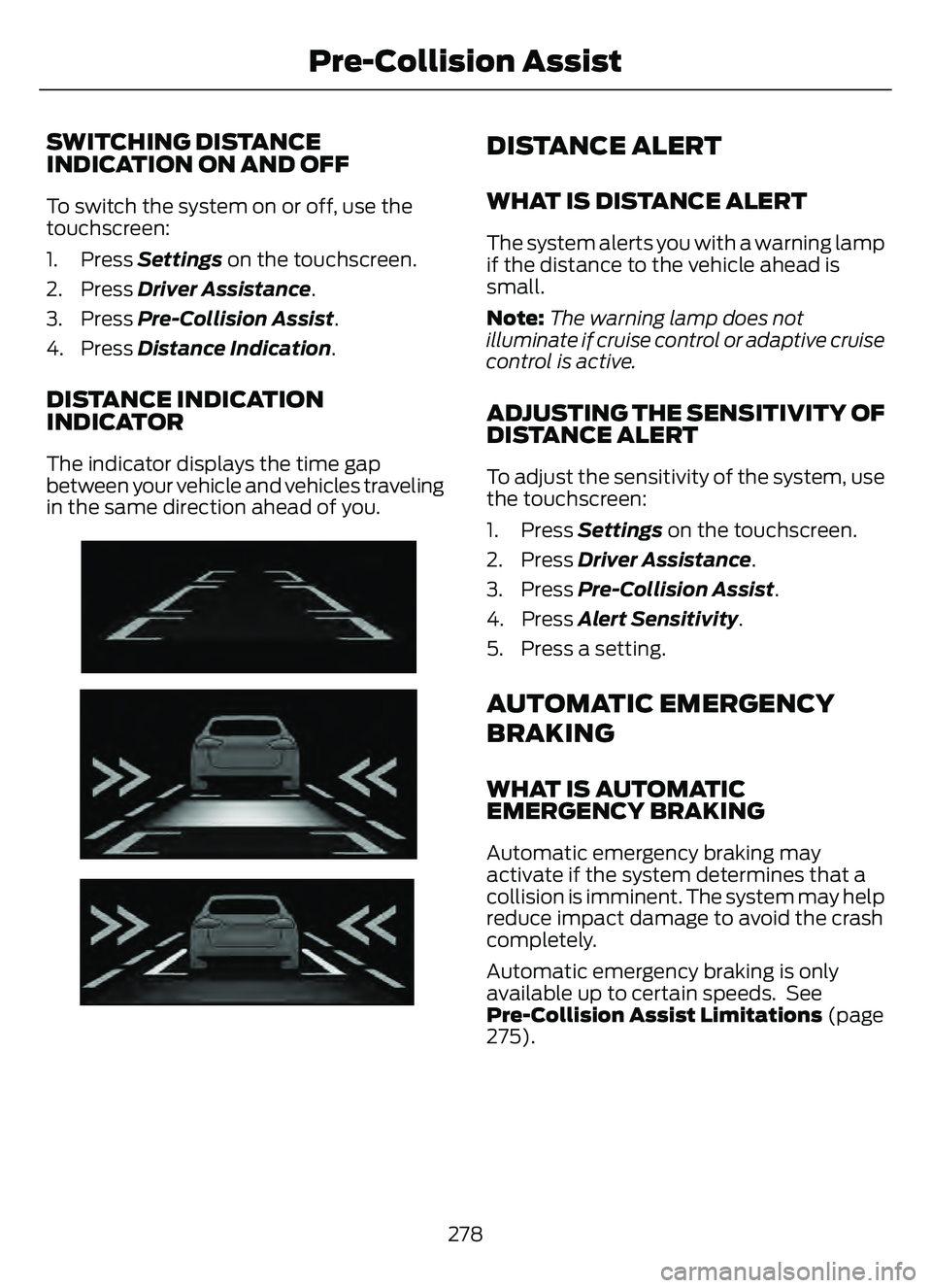
DISTANCE INDICATION
INDICATOR
The indicator displays the time gap
between your vehicle and vehicles traveling
in the same direction ahead of you.
E254791E254791
DISTANCE ALERT
WHAT IS DISTANCE ALERT
The system alerts you with a warning lamp
if the distance to the vehicle ahead is
small.
Note:The warning lamp does not
illuminate if cruise control or adaptive cruise
control is active.
ADJUSTING THE SENSITIVITY OF
DISTANCE ALERT
To adjust the sensitivity of the system, use
the touchscreen:
1. Press Settings on the touchscreen.
2. Press Driver Assistance.
3. Press Pre-Collision Assist.
4. Press Alert Sensitivity.
5. Press a setting.
AUTOMATIC EMERGENCY
BRAKING
WHAT IS AUTOMATIC
EMERGENCY BRAKING
Automatic emergency braking may
activate if the system determines that a
collision is imminent. The system may help
reduce impact damage to avoid the crash
completely.
Automatic emergency braking is only
available up to certain speeds. See
Pre-Collision Assist Limitations (page
275).
278
Pre-Collision Assist
Page 325 of 585
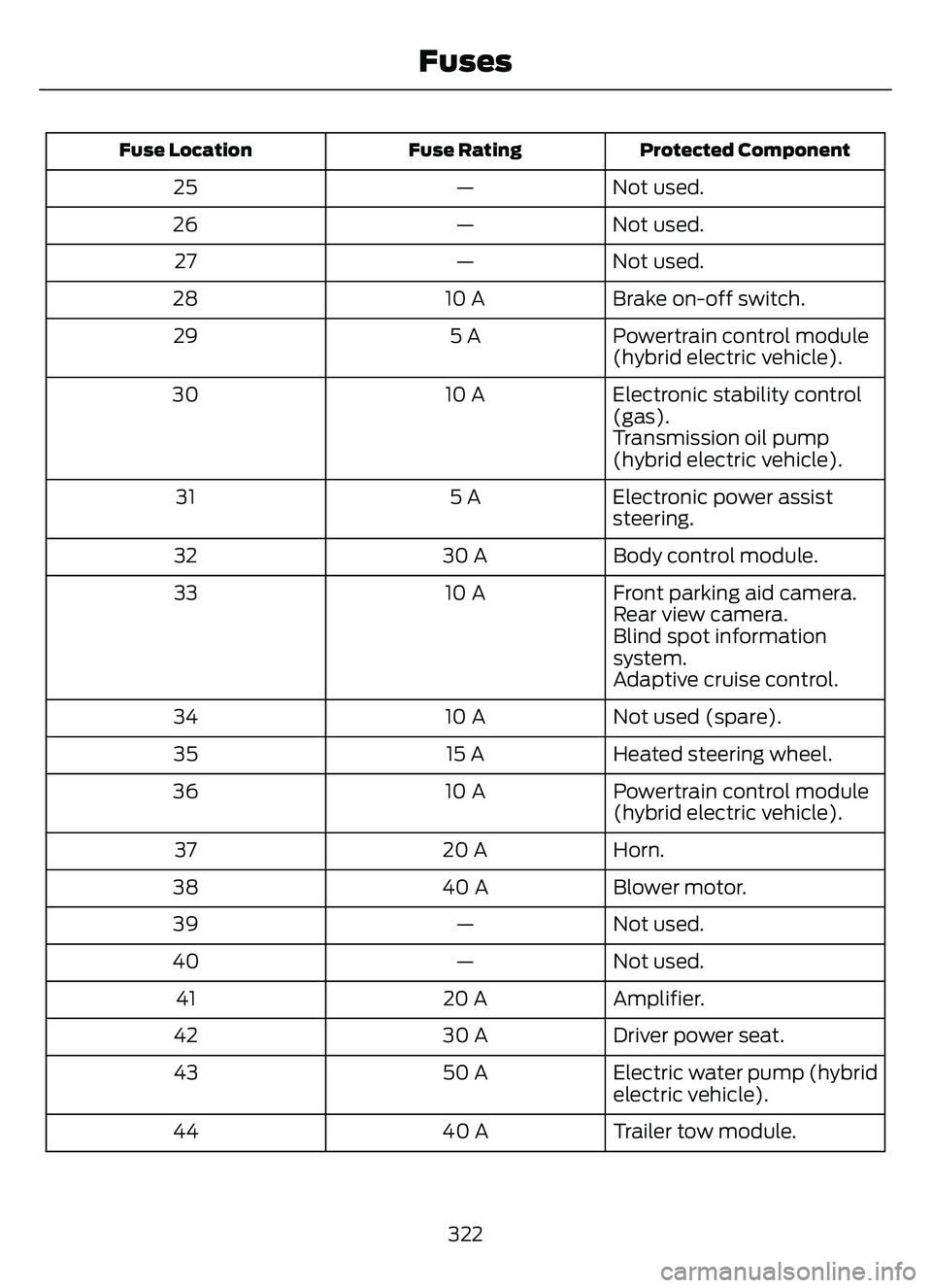
Protected Component
Fuse Rating
Fuse Location
Not used.
—
25
Not used.
—
26
Not used.
—
27
Brake on-off switch.
10 A
28
Powertrain control module
(hybrid electric vehicle).
5 A
29
Electronic stability control
(gas).
10 A
30
Transmission oil pump
(hybrid electric vehicle).
Electronic power assist
steering.
5 A
31
Body control module.
30 A
32
Front parking aid camera.
10 A
33
Rear view camera.
Blind spot information
system.
Adaptive cruise control.
Not used (spare).
10 A
34
Heated steering wheel.
15 A
35
Powertrain control module
(hybrid electric vehicle).
10 A
36
Horn.
20 A
37
Blower motor.
40 A
38
Not used.
—
39
Not used.
—
40
Amplifier.
20 A
41
Driver power seat.
30 A
42
Electric water pump (hybrid
electric vehicle).
50 A
43
Trailer tow module.
40 A
44
322
Fuses
Page 506 of 585
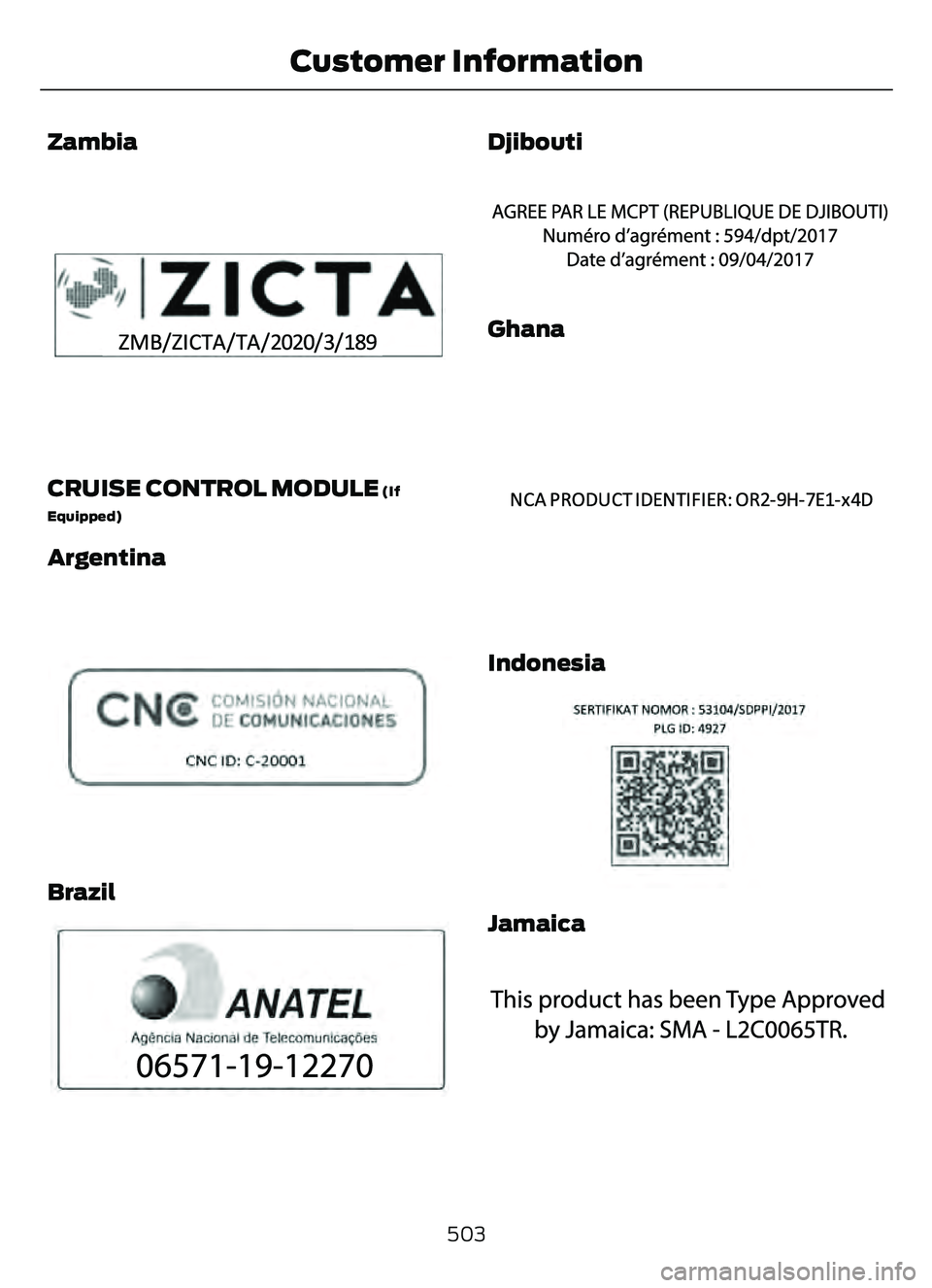
Zambia
E345310
CRUISE CONTROL MODULE (If
Equipped)
Argentina
308030E308030
Brazil
E3401E34011818
Djibouti
E342394E342394
Ghana
E340191E340191
Indonesia
E342395E342395
Jamaica
E340518E340518
503
Customer Information
Page 566 of 585
1
12V Battery......................................................34112V Battery Precautions...................................341
Battery Management SystemLimitations.......................................................342
How Does the Battery Management System Work..................................................342
Recycling and Disposing of the 12V Battery..............................................................342
Resetting the Battery Sensor........................342
What Is the Battery Management System..............................................................342
9
911 Assist............................................................57
A
A/CSee: Climate Control..........................................137About This Publication..................................17
ABS
See: Brakes............................................................217Accessing the Trip Computer - VehiclesWith: 4.2 Inch Instrument Cluster
Display Screen............................................129
Accessing the Trip Computer - Vehicles With: 6.5 Inch Instrument Cluster
Display Screen/ 12.3 Inch Instrument
Cluster Display Screen.............................129
Accessories....................................................479
AC Charging...................................................205
Connecting the Charger..................................205
Stopping Charging............................................206
Active Park Assist........................................238Active Park Assist –
Trouble shooting............................................240
Active Park Assist Precautions...............238
Active Park Assist –
Troubleshooting........................................240
Active Park Assist – Frequently Asked
Questions ........................................................240
Active Park Assist – Information Messages.........................................................240
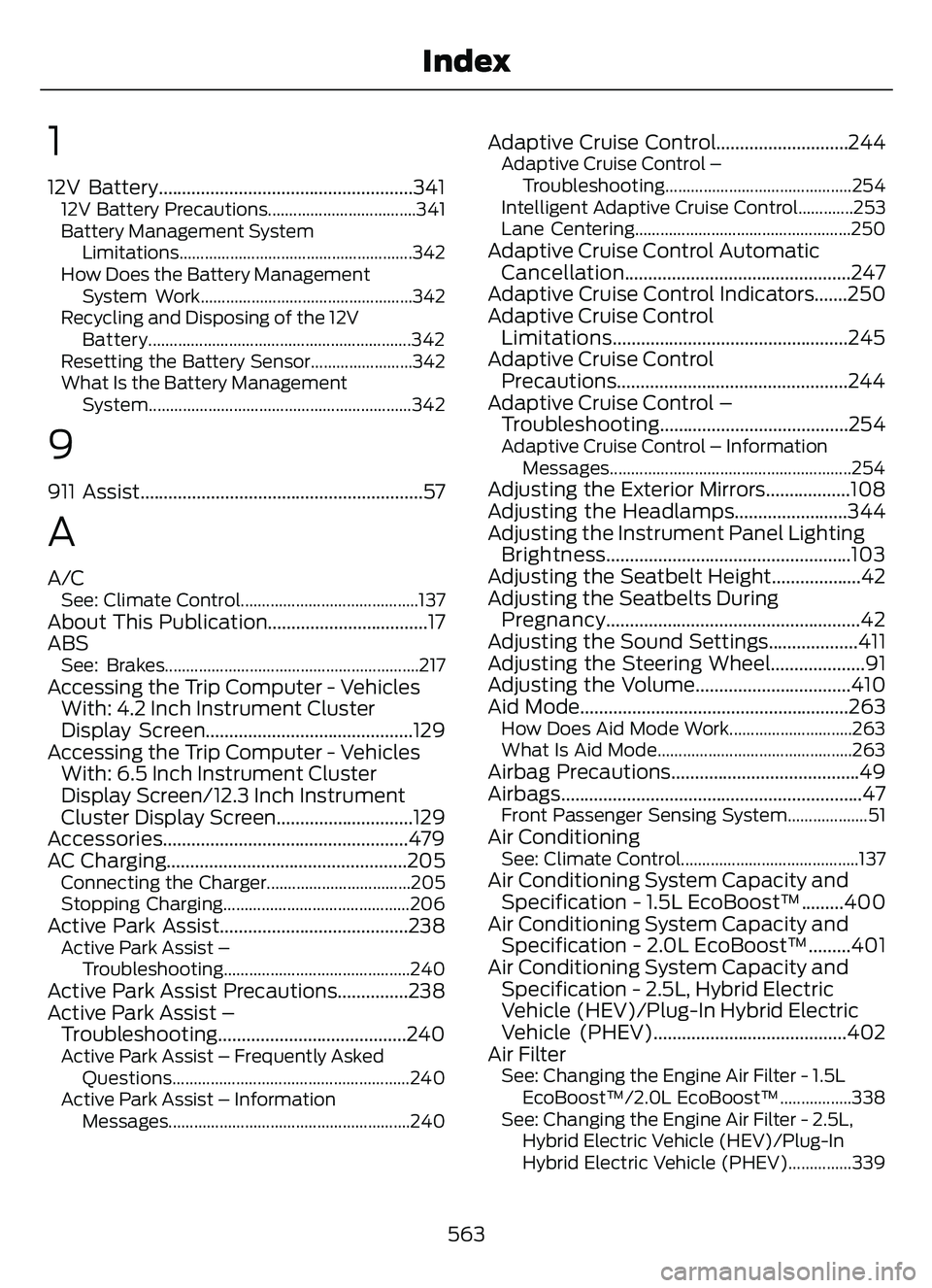
Adaptive Cruise Control............................244Adaptive Cruise Control –Troubleshooting............................................ 254
Intelligent Adaptive Cruise Control.............253
Lane Centering...................................................250
Adaptive Cruise Control Automatic Cancellation................................................247
Adaptive Cruise Control Indicators.......250
Adaptive Cruise Control Limitations..................................................245
Adaptive Cruise Control Precautions.................................................244
Adaptive Cruise Control – Troubleshooting........................................254
Adaptive Cruise Control – Information
Messages.........................................................254
Adjusting the Exterior Mirrors..................108
Adjusting the Headlamps........................344
Adjusting the Instrument Panel LightingBrightness....................................................103
Adjusting the Seatbelt Height...................42
Adjusting the Seatbelts During Pregnancy......................................................42
Adjusting the Sound Settings...................411
Adjusting the Steering Wheel....................91
Adjusting the Volume.................................410
Aid Mode.........................................................263
How Does Aid Mode Work.............................263
What Is Aid Mode..............................................263
Airbag Precautions........................................49
Airbags................................................................47
Front Passenger Sensing System...................51Air ConditioningSee: Climate Control..........................................137Air Conditioning System Capacity and Specification - 1.5L EcoBoost™.........400
Air Conditioning System Capacity and Specification - 2.0L EcoBoost™.........401
Air Conditioning System Capacity and Specification - 2.5L, Hybrid Electric
Vehicle (HEV)/Plug-In Hybrid Electric
Vehicle (PHEV).........................................402
Air Filter
See: Changing the Engine Air Filter - 1.5L
EcoBoost™/2.0L EcoBoost™.................338
See: Changing the Engine Air Filter - 2.5L, Hybrid Electric Vehicle (HEV)/Plug-In
Hybrid Electric Vehicle (PHEV)...............339
563
Index
Page 570 of 585
Cleaning Chrome, Aluminium or StainlessSteel..................................................................350
Cleaning Headlamps and Rear Lamps...............................................................349
Cleaning Stripes or Graphics..........................351
Cleaning the Engine Compartment...........350
Cleaning the Exterior Precautions...............349
Cleaning the Underbody..................................351
Cleaning Wheels................................................350
Cleaning Windows and Wiper Blades...............................................................350
Cleaning the Interior....................................351Cleaning Carpets and Floor Mats................352
Cleaning Displays and Screens....................352
Cleaning Fabric Seats andHeadliners........................................................352
Cleaning Leather and Vinyl............................352
Cleaning Moonroof Tracks.............................353
Cleaning Plastic...................................................351
Cleaning Seatbelts............................................353
Cleaning Storage Compartments...............353
Cleaning the Instrument Panel.....................351
Clearing All MyKeys.......................................66
Clearing the Garage Door Opener.........164
Climate Control..............................................137
Closing the Liftgate.......................................78
Closing the Hands-Free Liftgate....................83
Closing the Liftgate From Inside Your Vehicle.................................................................82
Closing the Liftgate From Outside Your Vehicle.................................................................78
Closing the Liftgate Using the Remote Control.................................................................83
Cold Weather Precautions......................304
Configuring the Trip Computer - VehiclesWith: 4.2 Inch Instrument Cluster
Display Screen............................................129
Connected Vehicle.....................................405
Connecting the Vehicle to a Mobile
Network...........................................................405
Connected Vehicle Data..............................24
Connected Vehicle Limitations..............405
Connected Vehicle Requirements........405
Connected Vehicle – Troubleshooting -Vehicles With: Modem...........................406
Connected Vehicle – Troubleshooting - Vehicles With: SYNC 3............................407
Connecting a Trailer...................................296 Connecting a Trailer Precautions..........296
Connecting the Vehicle to a Mobile
Network.......................................................405
Connecting FordPass to the Modem.........405
Enabling and Disabling the Modem..........405
What Is the Modem.........................................405
Connecting the Vehicle to a Wi-FiNetwork.......................................................405
Contacting Us...................................................15
Cooling System Capacity and Specification - 1.5L EcoBoost™.........396
Cooling System Capacity and Specification - 2.0L EcoBoost™.........397
Cooling System Capacity and Specification - 2.5L, Hybrid Electric
Vehicle (HEV)/Plug-In Hybrid Electric
Vehicle (PHEV)..........................................397
Crash and Breakdown Information.................................................308
Automatic Crash Shutoff.................................314
Jump Starting the Vehicle...............................310
Post-Crash Alert System.................................313
Crash Sensors and Airbag Indicator.......54
Creating a MyKey - Vehicles With: FlipKey....................................................................65
Creating a MyKey - Vehicles With: Push Button Start..................................................65
Creating a Vehicle Wi-Fi Hotspot.........409
Cross Traffic Alert..........................................271
Cross Traffic Alert –
Troubleshooting.............................................273
Cross Traffic Alert Indicators....................272
Cross Traffic Alert Limitations..................271
Cross Traffic Alert Precautions................271
Cross Traffic Alert –Troubleshooting.........................................273
Cross Traffic Alert – Information
Messages..........................................................273
Cruise Control................................................242
Cruise Control Indicators..........................243
Cup Holders....................................................170
Cup Holder Precautions...................................170Customer Information..............................490Radio Frequency CertificationLabels...............................................................493
567
Index
Page 574 of 585
Head Up Display –Troubleshooting.........................................133
Head Up Display – Information
Messages..........................................................133
Heated Exterior Mirrors..............................146
Heated Rear Window..................................146
Heated Seats.................................................154
Heated Seat Precautions................................154
Switching the Heated Seats On andOff.......................................................................1\
54
Heated Windshield......................................146
Heating
See: Climate Control..........................................137High Voltage Battery Gauge - Plug-InHybrid Electric Vehicle (PHEV).............119
High Voltage Battery...................................199
High Voltage Battery Precautions..........199
High Voltage Battery Vehicle Precautions - Hybrid Electric Vehicle
(HEV)............................................................309
Hill Start Assist.............................................223
Hill Start Assist – Troubleshooting.............223Hill Start Assist Precautions....................223
Hill Start Assist – Troubleshooting.......223
Hill Start Assist – Information
Messages.........................................................223
Hints on Controlling the Interior Climate- Vehicles With: Automatic
Temperature Control................................144
Hints on Controlling the Interior Climate - Vehicles With: Manual Temperature
Control...........................................................145
Hood Lock
See: Opening and Closing the Hood..........328Horn....................................................................\
..91
How Does Active Park Assist Work..............................................................238
How Does Adaptive Cruise Control With Stop and Go Work....................................244
How Does a Hybrid Electric Vehicle Work................................................................179
How Does All-Wheel Drive Work............216
How Does Auto Hold Work......................224
How Does Blind Spot Information System Work..............................................268
How Does Cross Traffic Alert Work........271
How Does Driver Alert Work....................282
How Does Easy Entry and Exit Work.......77 How Does Hill Start Assist Work............223
How Does Pre-Collision Assist
Work...............................................................274
How Does Speed Sign Recognition Work..............................................................284
How Does Stability Control Work..........227
How Does the Garage Door Opener Work...............................................................162
How Does the Lane Keeping System Work...............................................................261
How Does the Memory Function Work...............................................................160
How Does the Personal Safety System Work.................................................................46
How Does the Rear Occupant Alert System Work...............................................158
How Does the Safety Canopy™ Work.................................................................48
How Does Traction Control Work..........225
How Does Trailer Sway Control Work..............................................................303
How Do the Front Airbags Work...............47
How Do the Knee Airbags Work...............48
How Do the Side Airbags Work.................47
Hybrid Electric Vehicle Driving Characteristic s............................................179
Hybrid Electric Vehicle Indicators...........179
Hybrid Electric Vehicle Information.......179
Hybrid Electric Vehicle Information –
Troubleshooting............................................180
Plug-In Hybrid Electric Vehicle Information.......................................................181
Plug-In Hybrid Electric Vehicle Information
– Troubleshooting.........................................182
Hybrid Electric Vehicle Information –Troubleshooting........................................180
Hybrid Electric Vehicle Information –
Frequently Asked Questions.....................180
Hybrid Electric Vehicle Information – Information Messages.................................180
Hybrid Electric Vehicle Information – Warning Lamps..............................................180
I
Identifying Fuse Types...............................327
Ignition Switch.................................................171
Inflating the Tires........................................368
571
Index