touch screen FORD ESCAPE 2022 Repair Manual
[x] Cancel search | Manufacturer: FORD, Model Year: 2022, Model line: ESCAPE, Model: FORD ESCAPE 2022Pages: 585, PDF Size: 6.15 MB
Page 469 of 585
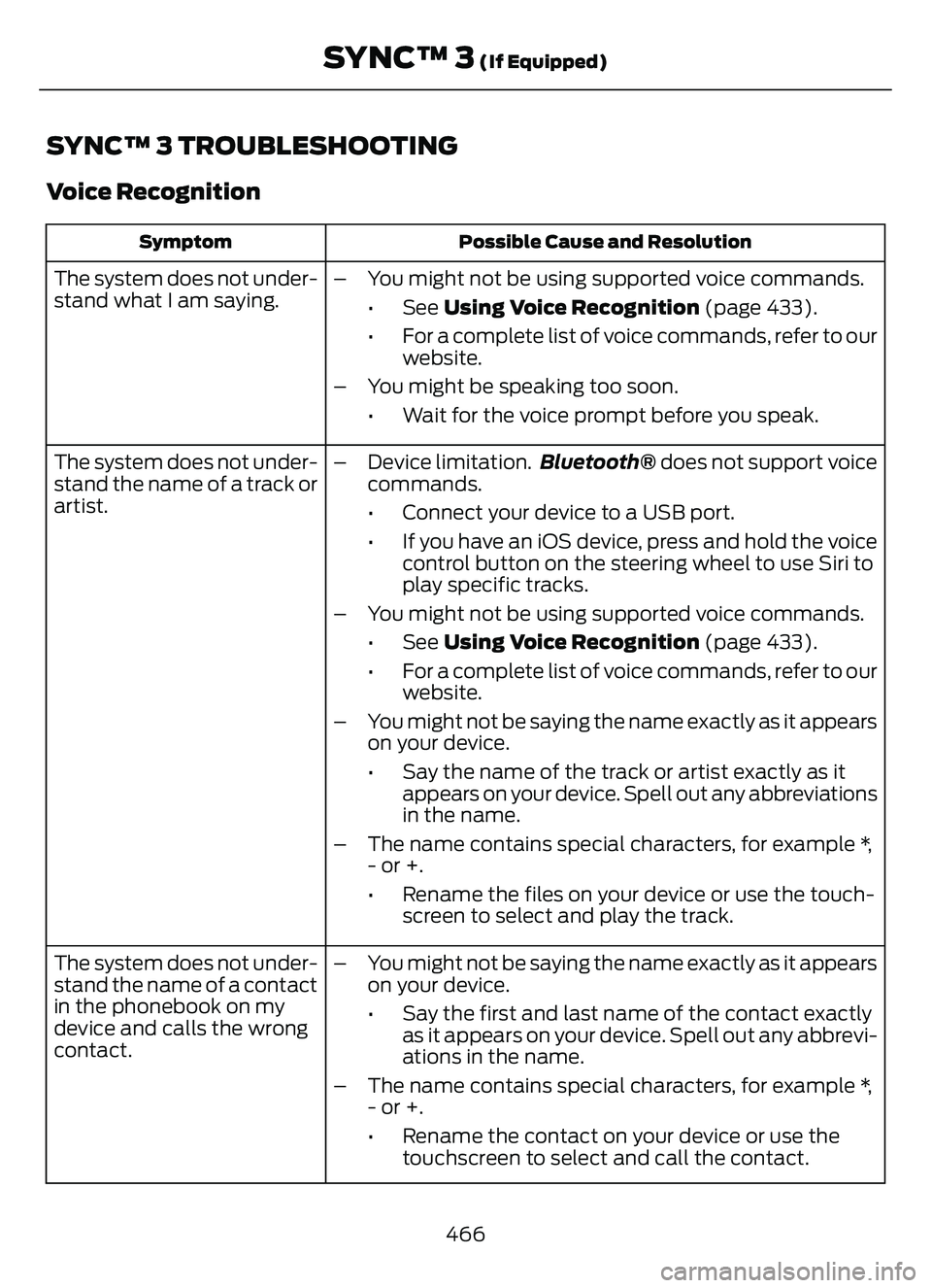
SYNC™ 3 TROUBLESHOOTING
Voice Recognition
Possible Cause and Resolution
Symptom
The system does not under-
stand what I am saying. – You might not be using supported voice commands.
•See Using Voice Recognition (page 433).
• For a complete list of voice commands, refer to our website.
– You might be speaking too soon. • Wait for the voice prompt before you speak.
The system does not under-
stand the name of a track or
artist. – Device limitation.
Bluetooth® does not support voice
commands.
• Connect your device to a USB port.
• If you have an iOS device, press and hold the voice control button on the steering wheel to use Siri to
play specific tracks.
– You might not be using supported voice commands. •See Using Voice Recognition (page 433).
• For a complete list of voice commands, refer to our website.
– You might not be saying the name exactly as it appears on your device.
• Say the name of the track or artist exactly as itappears on your device. Spell out any abbreviations
in the name.
– The name contains special characters, for example *, - or +.
• Rename the files on your device or use the touch-screen to select and play the track.
The system does not under-
stand the name of a contact
in the phonebook on my
device and calls the wrong
contact. – You might not be saying the name exactly as it appears
on your device.
• Say the first and last name of the contact exactlyas it appears on your device. Spell out any abbrevi-
ations in the name.
– The name contains special characters, for example *, - or +.
• Rename the contact on your device or use thetouchscreen to select and call the contact.
466
SYNC™ 3 (If Equipped)
Page 470 of 585
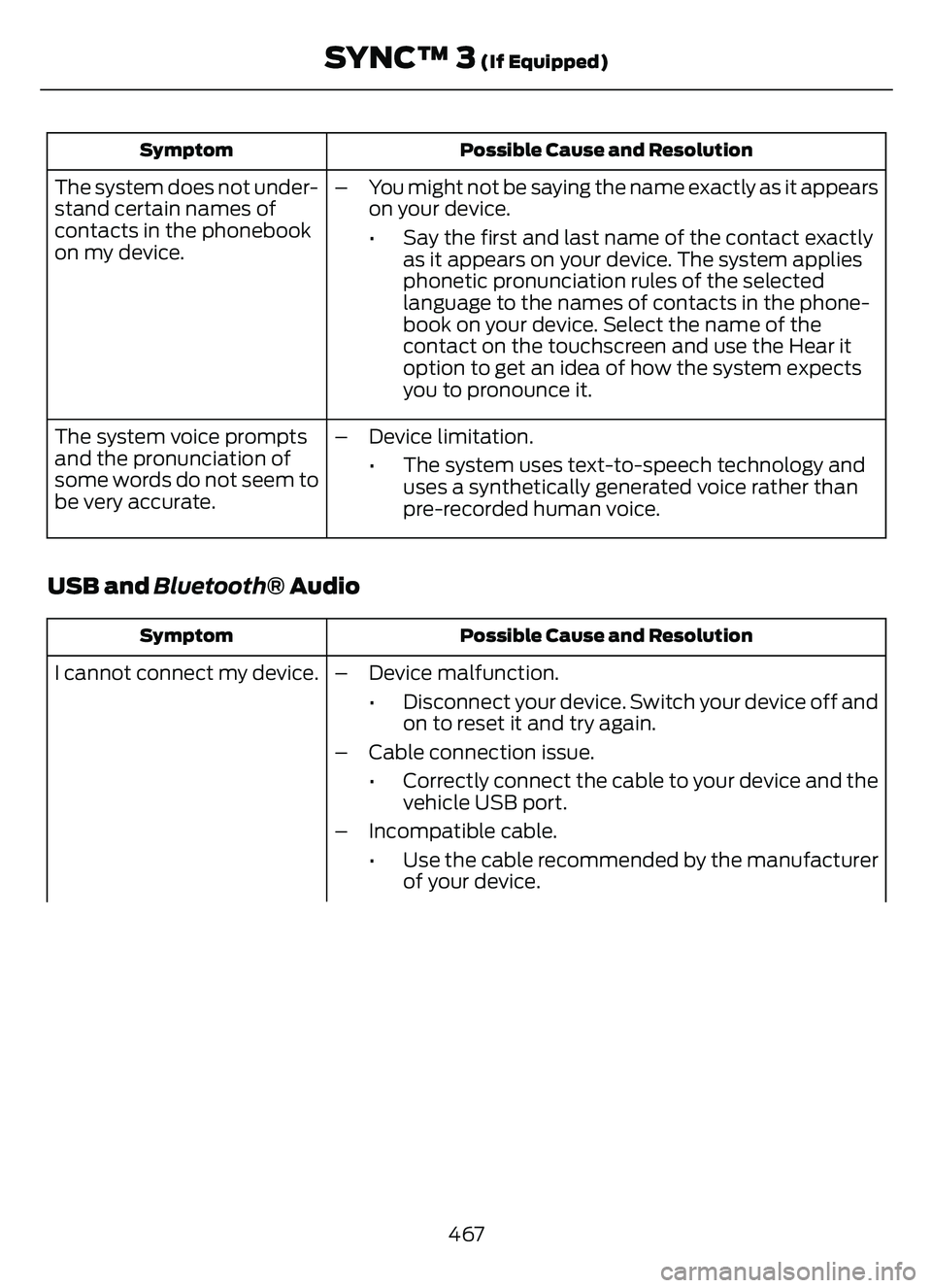
Possible Cause and Resolution
Symptom
– You might not be saying the name exactly as it appears
on your device.
• Say the first and last name of the contact exactlyas it appears on your device. The system applies
phonetic pronunciation rules of the selected
language to the names of contacts in the phone-
book on your device. Select the name of the
contact on the touchscreen and use the Hear it
option to get an idea of how the system expects
you to pronounce it.
The system does not under-
stand certain names of
contacts in the phonebook
on my device.
– Device limitation.• The system uses text-to-speech technology anduses a synthetically generated voice rather than
pre-recorded human voice.
The system voice prompts
and the pronunciation of
some words do not seem to
be very accurate.
USB and Bluetooth® Audio
Possible Cause and Resolution
Symptom
I cannot connect my device. – Device malfunction.
• Disconnect your device. Switch your device off andon to reset it and try again.
– Cable connection issue. • Correctly connect the cable to your device and thevehicle USB port.
– Incompatible cable. • Use the cable recommended by the manufacturerof your device.
467
SYNC™ 3 (If Equipped)
Page 473 of 585
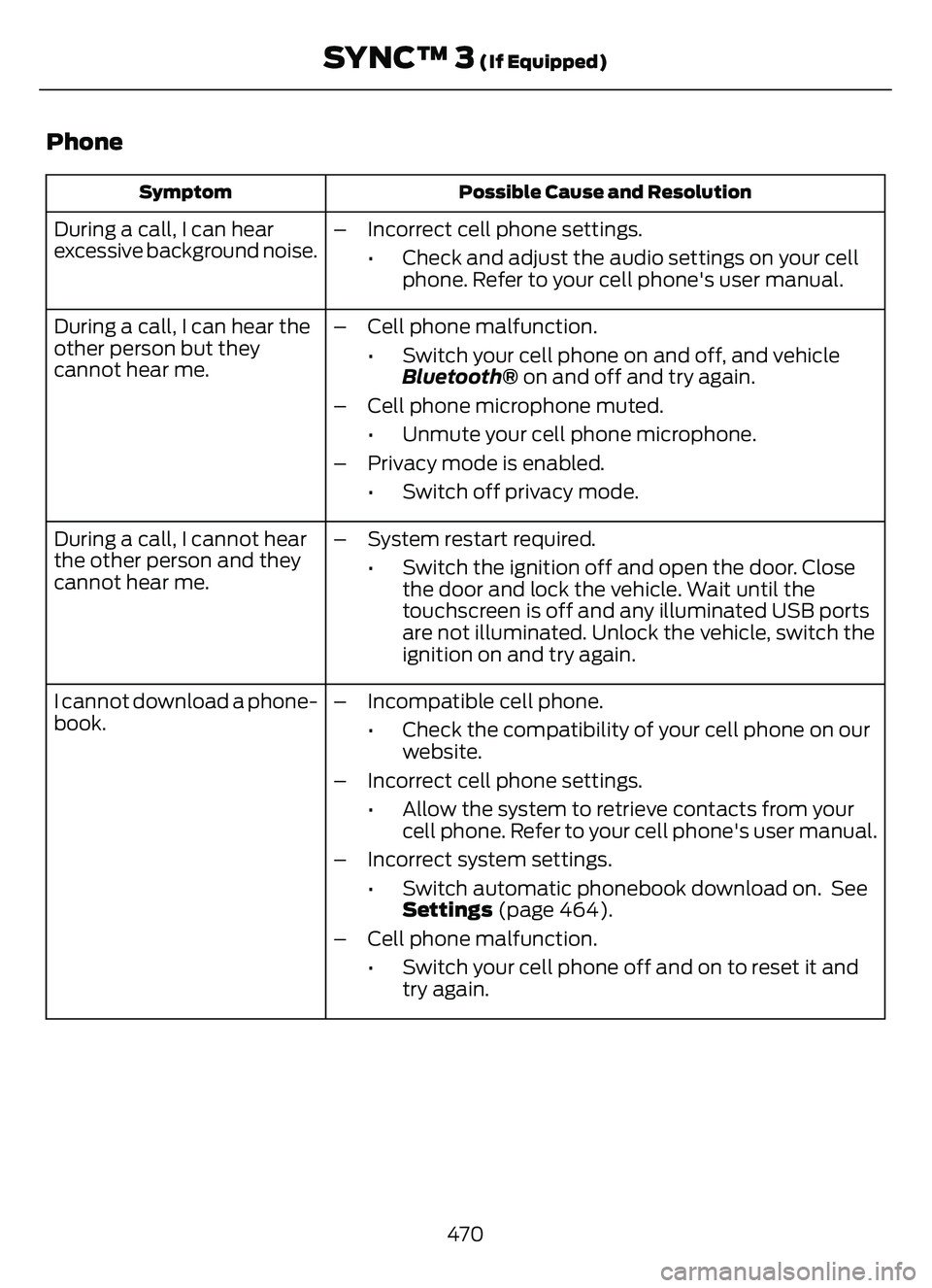
Phone
Possible Cause and Resolution
Symptom
During a call, I can hear
excessive background noise. – Incorrect cell phone settings.
• Check and adjust the audio settings on your cellphone. Refer to your cell phone's user manual.
During a call, I can hear the
other person but they
cannot hear me. – Cell phone malfunction.
• Switch your cell phone on and off, and vehicleBluetooth® on and off and try again.
– Cell phone microphone muted. • Unmute your cell phone microphone.
– Privacy mode is enabled. • Switch off privacy mode.
During a call, I cannot hear
the other person and they
cannot hear me. – System restart required.
• Switch the ignition off and open the door. Closethe door and lock the vehicle. Wait until the
touchscreen is off and any illuminated USB ports
are not illuminated. Unlock the vehicle, switch the
ignition on and try again.
I cannot download a phone-
book. – Incompatible cell phone.
• Check the compatibility of your cell phone on ourwebsite.
– Incorrect cell phone settings. • Allow the system to retrieve contacts from yourcell phone. Refer to your cell phone's user manual.
– Incorrect system settings. • Switch automatic phonebook download on. SeeSettings (page 464).
– Cell phone malfunction. • Switch your cell phone off and on to reset it andtry again.
470
SYNC™ 3 (If Equipped)