park assist FORD ESCAPE 2022 Owners Manual
[x] Cancel search | Manufacturer: FORD, Model Year: 2022, Model line: ESCAPE, Model: FORD ESCAPE 2022Pages: 585, PDF Size: 6.15 MB
Page 10 of 585
Catalytic Converter
What Is the Catalytic Converter ............198
Catalytic Converter Precautions ...........198
Catalytic Converter – Troubleshooting........................................................................\
1 9 8
High Voltage Battery
What Is the High Voltage Battery ..........199
High Voltage Battery Precautions .........199
Charging Your Vehicle - Plug-In Hybrid Electric Vehicle
(PHEV)
What is AC Charging .................................200
Charging Your Vehicle Precautions ......200
Charging Equipment .................................200
Locating the Charge Port ........................203
Charge Port Indicators .............................204
AC Charging ..................................................205
Setting the Charging Schedule andPreferences ..............................................206
Charging Your Vehicle – Troubleshooting ........................................................................\
207
Automatic Transmission
Automatic Transmission Precautions.......................................................................2\
0 9
Automatic Transmission Positions ......209
Shifting Your Vehicle Into Gear ..............210
Automatic Transmission Position Indicators ....................................................210
Temporary Neutral Mode ...........................211
Automatic Return to Park (P) ..................211
Grade Assist - Hybrid Electric Vehicle (HEV) ...........................................................212
Manual Park Release - Gasoline ............212
Automatic Transmission Audible Warnings .....................................................214
Automatic Transmission – Troubleshooting .......................................214
All-Wheel Drive
How Does All-Wheel Drive Work ...........216
All-Wheel Drive Precautions ...................216
All-Wheel Drive Limitations ....................216
All-Wheel Drive – Troubleshooting ......216
Brakes
Brake Precautions ........................................217
Anti-Lock Braking System ........................217
Brake Over Accelerator ..............................217
Locating the Brake Fluid Reservoir ........218
Checking the Brake Fluid ..........................218
Brake Fluid Specification ..........................218
Brakes – Troubleshooting ........................219
Electric Parking Brake
What Is the Electric Parking Brake .......220
Applying the Electric Parking Brake ......220
Applying the Electric Parking Brake in anEmergency ................................................220
Manually Releasing the Electric Parking Brake ...........................................................220
Automatically Releasing the Electric Parking Brake .............................................221
Electric Parking Brake Audible Warning ........................................................................\
.2 2 1
Releasing the Electric Parking Brake if the Vehicle Battery Has Run Out of
Charge ..........................................................221
Electric Parking Brake – Troubleshooting ........................................................................\
.2 2 1
Hill Start Assist
What Is Hill Start Assist ............................223
How Does Hill Start Assist Work ...........223
Hill Start Assist Precautions ...................223
Hill Start Assist – Troubleshooting ......223
Auto Hold
How Does Auto Hold Work .....................224
Switching Auto Hold On and Off ..........224
7
Table of Contents
Page 11 of 585
Using Auto Hold ..........................................224
Auto Hold Indicators ..................................224
Traction Control
How Does Traction Control Work .........225
Switching Traction Control On and Off........................................................................\
2 2 5
Traction Control Indicator ........................225
Traction Control – Troubleshooting .....225
Stability Control
How Does Stability Control Work .........227
Switching Stability Control On and Off ........................................................................\
228
Stability Control Indicator .......................228
Stability Control – Troubleshooting .....228
Steering
Electric Power Steering ............................229
Steering – Troubleshooting ....................229
Parking Aids
Parking Aid Precautions ...........................230
Rear Parking Aid ..........................................230
Front Parking Aid ..........................................231
Side Parking Aid - Vehicles With: Active Park Assist .................................................232
Parking Aid Indicators ...............................233
Parking Aids – Troubleshooting ............234
Rear View Camera
What Is the Rear View Camera .............235
Rear View Camera Precautions ............235
Locating the Rear View Camera ...........235
Rear View Camera Guide Lines .............235
Rear View Camera Object Distance Indicators ...................................................236
Rear View Camera Settings ....................236
Active Park Assist
What Is Active Park Assist .......................238
How Does Active Park Assist Work ......238
Active Park Assist Precautions ..............238
Switching Active Park Assist On and Off ........................................................................\
238
Entering a Parallel Parking Space ........238
Entering a Perpendicular Parking Space ........................................................................\
239
Exiting a Parking Space ............................239
Active Park Assist – Troubleshooting ........................................................................\
240
Cruise Control
What Is Cruise Control ..............................242
Switching Cruise Control On and Off........................................................................\
242
Setting the Cruise Control Speed .........242
Canceling the Set Speed .........................243
Resuming the Set Speed .........................243
Cruise Control Indicators .........................243
Adaptive Cruise Control
How Does Adaptive Cruise Control With Stop and Go Work ..................................244
Adaptive Cruise Control Precautions ........................................................................\
244
Adaptive Cruise Control Limitations ........................................................................\
245
Switching Adaptive Cruise Control On and Off ........................................................247
Adaptive Cruise Control Automatic Cancellation ..............................................247
Setting the Adaptive Cruise Control Speed ..........................................................247
Setting the Adaptive Cruise Control Gap ........................................................................\
248
Canceling the Set Speed .........................249
Resuming the Set Speed .........................249
Overriding the Set Speed ........................249
Adaptive Cruise Control Indicators ......250
8
Table of Contents
Page 18 of 585
If you require assistance or clarification on
policies or procedures, please contact the
customer relationship center.
United States
Ford Motor Company
Customer Relationship Center
PO Box 6248
Dearborn, MI 48126
1-800-392-3673 (FORD)
TDD for the hearing impaired:
7-1-1 (where offered by your telephone
service provider)
www.ford.com/help/contact/
Ford Credit - US Only
Ford Credit offers a full range of financing
and lease plans to help you acquire your
vehicle. If you have financed or leased your
vehicle through Ford Credit, thank you for
your business.
For assistance call 1-800-727-7000, or for
more information about Ford Credit and
access to an account manager, visit
www.ford.com/finance.
Canada
Customer Relationship Center
Ford Motor Company of Canada Limited
P.O. Box 2000
Oakville, Ontario L6J 5E4
1-800-565-3673 (FORD)
TDD for the hearing impaired:
7-1-1 (where offered by your telephone
service provider)
www.ford.ca
Facebook: FordServiceCA (English),
FordServiceQC (Francais)
Australia
Ford Motor Company
Attention: Customer Relationship Centre
Private Mail Bag 5
Fairlane Business Park #3
Campbellfield, Victoria, 3061
Telephone: 13 3673 (FORD)
E-mail: [email protected]
New Zealand
Ford Motor Company
Attention: Customer Relationship Centre
Private Bag 76912
Manukau City 2241
Telephone: 0800 367 369 (FORDNZ)
E-mail: [email protected]
China - Imported Vehicle
Customer Relationship Center
Telephone: 400-690-1886
Website: https://www.for d.com.cn/
China - Chang’An Ford
Customer Relationship Center
Telephone: 800-810-8168
Mobile: 400-887-7766
Website: https://www.ford.com.cn/
Asia Pacific
E-mail: [email protected]
Caribbean, Central America and
Israel
Ford Motor Company
Ford Export Operations
Attention: Owner Relations
1555 Fairlane Drive
Fairlane Business Park #3
Allen Park, MI 48101
Fax: (313) 390-0804
Telephone: (313) 594-4857
E-mail: [email protected]
15
Contacting Us
Page 67 of 585
WHAT IS MYKEY
MyKey allows you to program keys with
restricted driving modes to promote good
driving habits.
MYKEY SETTINGS
NON-CONFIGURABLE MYKEY
SETTINGS
Seatbelt Reminder or Belt-
Minder™
MyKey mutes the audio system until the
front seat passengers buckle the front seat
belts.
Note:If your vehicle includes an AM/FM
radio or a very basic audio system, then the
radio may not mute.
Satellite Radio (If Equipped)
Some Satellite radio channels have
restricted access to adult radio content.
Early Low Fuel
The low fuel level warning lamp turns on
earlier.
Driving and Parking Aids
You cannot configure settings for parking
aids, blind spot information system, and
cross traffic alert. These systems turn on
when the vehicle turns on, and you cannot
switch them off with a MyKey.
You cannot configure settings for
pre-collision assist and lane keeping. These
systems turn on when the vehicle turns on,
but you can switch them off with a MyKey.
A new destination in the navigation system
can only be set using voice commands
when using a MyKey, and with your vehicle
moving. Note:
MyKey drivers may be able to switch
the lane departure warning feature off, but
this feature turns back on automatically
with every new key cycle.
CONFIGURABLE MYKEY
SETTINGS
You can configure the following settings
after creating a MyKey. See Creating a
MyKey (page 65).
Speed Limit
WARNING: Do not set MyKey
maximum speed limit to a limit that will
prevent the driver from maintaining a
safe speed considering posted speed
limits and prevailing road conditions. The
driver is always responsible to drive in
accordance with local laws and
prevailing conditions. Failure to do so
could result in accident or injury.
You can set a speed limit for your vehicle.
Warning messages appear in the
information display and a tone sounds if
your vehicle reaches the set speed. You
cannot override the set speed when using
a MyKey.
Speed Minder
You can set a speed reminder for your
vehicle. Warning messages appear in the
information display and a tone sounds if
your vehicle exceeds the set speed.
Audio System Volume Limit
The audio system maximum volume
reduces. A message appears in the
information display if you attempt to
exceed the volume limit. Automatic
volume control turns off.
64
MyKey™
Page 178 of 585
The heater uses 0.4 to 1.0 kilowatt-hours
of energy per hour of use. The system does
not have a thermostat. It achieves
maximum temperature after
approximately three hours of operation.
Using the engine block heater longer than
three hours does not improve system
performance and unnecessarily uses
electricity.
STOPPING THE ENGINE
STOPPING THE ENGINE WHEN
YOUR VEHICLE IS STATIONARY
Vehicles Without Push Button
Start
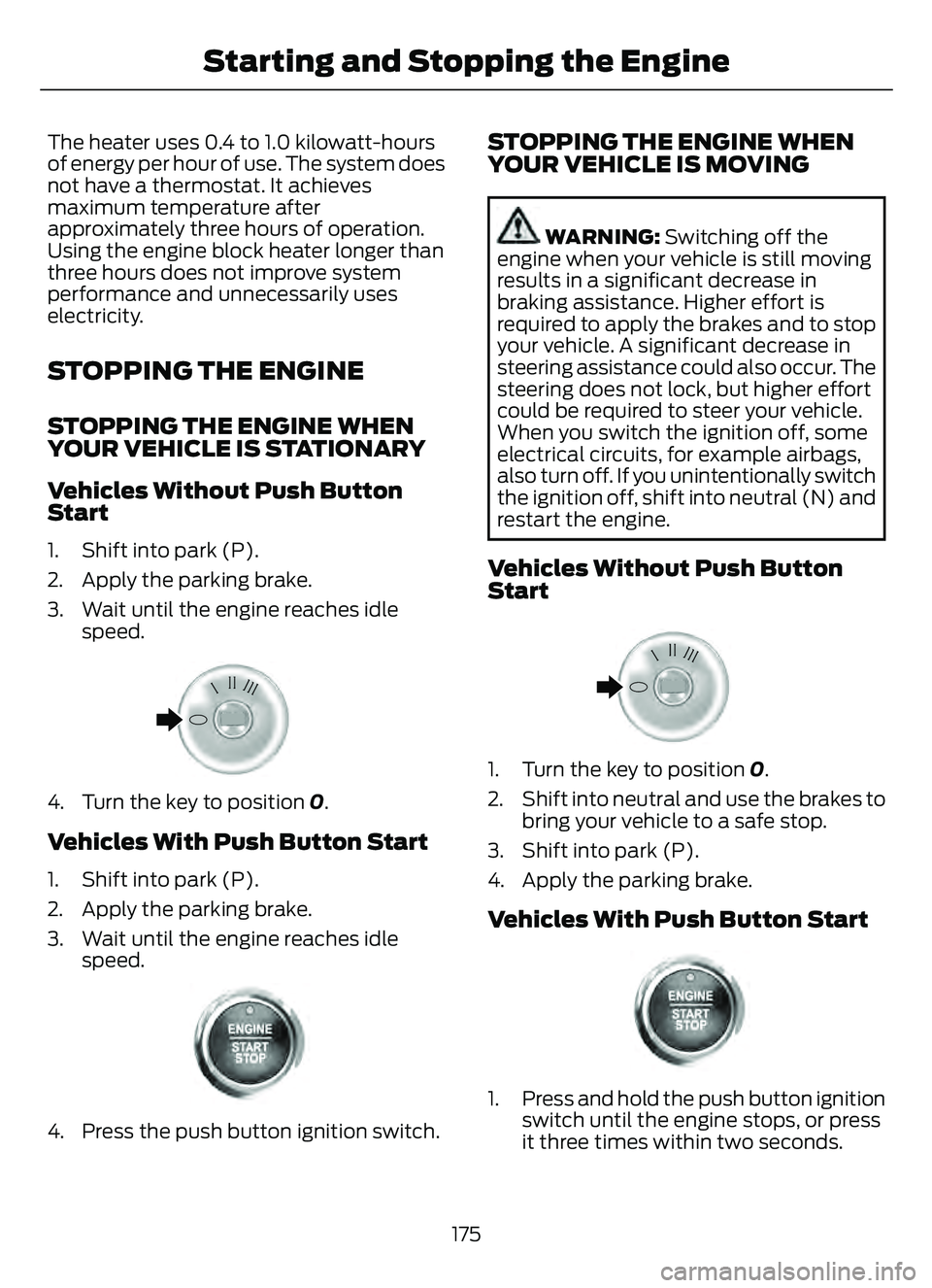
1. Shift into park (P).
2. Apply the parking brake.
3. Wait until the engine reaches idlespeed.
E322405E322405
4. Turn the key to position 0.
Vehicles With Push Button Start
1. Shift into park (P).
2. Apply the parking brake.
3. Wait until the engine reaches idle
speed.
E321258E321258
4. Press the push button ignition switch.
STOPPING THE ENGINE WHEN
YOUR VEHICLE IS MOVING
WARNING: Switching off the
engine when your vehicle is still moving
results in a significant decrease in
braking assistance. Higher effort is
required to apply the brakes and to stop
your vehicle. A significant decrease in
steering assistance could also occur. The
steering does not lock, but higher effort
could be required to steer your vehicle.
When you switch the ignition off, some
electrical circuits, for example airbags,
also turn off. If you unintentionally switch
the ignition off, shift into neutral (N) and
restart the engine.
Vehicles Without Push Button
Start
E322405E322405
1. Turn the key to position 0.
2. Shift into neutral and use the brakes to bring your vehicle to a safe stop.
3. Shift into park (P).
4. Apply the parking brake.
Vehicles With Push Button Start
E321258E321258
1. Press and hold the push button ignition switch until the engine stops, or press
it three times within two seconds.
175
Starting and Stopping the Engine
Page 187 of 585
WHAT IS AUTO-START-STOP
The system helps reduce fuel consumption
by stopping and restarting the engine when
your vehicle has stopped. The engine
restarts when you release the brake pedal.
In some situations, your vehicle could
restart before you release the brake pedal,
for example:
• To maintain interior comfort.
• To recharge the battery.
AUTO-START-STOP
PRECAUTIONS
WARNING: Apply the parking
brake, shift into park (P), switch the
ignition off and remove the key before
you leave your vehicle. Failure to follow
this instruction could result in personal
injury or death.
WARNING: Apply the parking
brake, shift into park (P), switch the
ignition off and remove the key before
you open the hood or have any service
or repair work completed. If you do not
switch the ignition off, the engine could
restart at any time. Failure to follow this
instruction could result in personal injury
or death.
SWITCHING AUTO-START-
STOP ON AND OFF
The system turns on when you switch the
ignition on.
Press the button to switch the
system off.
Note: OFF illuminates in the switch. Note:
Deactivating the system using the
button lasts only one key cycle.
Press the button again to switch the
system back on.
Note: The system turns off if it detects a
malfunction. If the system malfunctions,
have your vehicle checked as soon as
possible.
STOPPING THE ENGINE
Stop your vehicle, keep your foot on the
brake pedal and the transmission in drive
(D).
Note: Power assist steering turns off when
the engine stops.
RESTARTING THE ENGINE
Release the brake pedal or press the
accelerator pedal.
A message appears in the information
display if the system requires you to take
action.
AUTO-START-STOP
INDICATORS
WARNING: The system may
require the engine to automatically
restart when the auto-start-stop
indicator illuminates green or flashes
amber. Failure to follow this instruction
could result in personal injury.
The Auto-Start-Stop indicator
illuminates green when the
engine stops. It flashes amber
and a message appears when you need to
take action.
184
Auto-Start-Stop
Page 215 of 585
HOW DOES AUTOMATIC RETURN
TO PARK (P) WORK
Your vehicle shifts into park (P) when your
vehicle is stationary and any of the
following occur:
• You switch the vehicle off.
• You open the driver door with yourseatbelt unlatched.
• You unlatch the driver seatbelt when the driver door is open.
Note: Do not use automatic return to park
(P) when your vehicle is moving, except in
an emergency. See Stopping the Engine
When Your Vehicle is Moving (page 175).
AUTOMATIC RETURN TO PARK
(P) LIMITATIONS
Automatic return to park may not work if
the door ajar switch is malfunctioning.
See an authorized dealer if any of the
following occur:
• Door ajar indicator does not illuminate with the driver door open.
• Door ajar indicator illuminates with the driver door closed.
• Transmission not in park message appears with the driver door closed,
after you shift out of park (P).
GRADE ASSIST - HYBRID
ELECTRIC VEHICLE (HEV)
WHAT IS GRADE ASSIST
Provides additional grade braking with a
combination of engine motoring and
high-voltage battery charging to help
maintain vehicle speed when descending
a grade.
SWITCHING GRADE ASSIST ON
AND OFF
1. Press Settings on the touchscreen.
2. Select Driver Assistance Settings .
3. Select Grade Assist.
The grade assist lamp appears in the
instrument cluster.
Your vehicle determines the amount of
engine motoring and high-voltage battery
charging. You could notice the engine
speed increasing and decreasing to help
maintain your vehicle speed when
descending a slope.
GRADE ASSIST INDICATORS
E345122E345122
MANUAL PARK RELEASE -
GASOLINE
WHAT IS MANUAL PARK RELEASE
Manual park release is used to move your
transmission from the park (P) position in
the event of an electrical malfunction or
emergency.
MANUAL PARK RELEASE
PRECAUTIONS
WARNING: When doing this
procedure, you need to take the
transmission out of park (P) which
means your vehicle can roll freely. To
avoid unwanted vehicle movement,
always fully apply the parking brake prior
to doing this procedure. Use wheel
chocks if appropriate.
212
Automatic Transmission
Page 226 of 585
WHAT IS HILL START ASSIST
Hill Start Assist makes it easier for you to
pull away when your vehicle is on a slope
without using the parking brake.
HOW DOES HILL START
ASSIST WORK
When the system activates, your vehicle
remains stationary for a few seconds after
you release the brake pedal. This gives you
time to move your foot from the brake
pedal to the accelerator pedal. The brakes
release when the engine has developed
sufficient torque to prevent your vehicle
from rolling down the slope.
HILL START ASSIST
PRECAUTIONS
WARNING: The system does not
replace the parking brake. When you
leave your vehicle, always apply the
parking brake.
WARNING: You must remain in
your vehicle when the system turns on.
At all times, you are responsible for
controlling your vehicle, supervising the
system and intervening, if required.
Failure to take care may result in the loss
of control of your vehicle, serious
personal injury or death.
WARNING: The system will turn
off if a malfunction is apparent. Failure
to take care may result in the loss of
control of your vehicle, serious personal
injury or death.
HILL START ASSIST –
TROUBLESHOOTING
HILL START ASSIST –
INFORMATION MESSAGES
Action
Message
Displays when
system is not avail- able. Have your
vehicle checked as soon as possible.
Hill Start Assist Not
Available
223
Hill Start Assist
Page 227 of 585
HOW DOES AUTO HOLD WORK
Auto Hold applies the brakes to hold your
vehicle after you stop it and release the
brake pedal. This can help when waiting
on a hill or in traffic.
SWITCHING AUTO HOLD ON
AND OFF
WARNING: The system does not
replace the parking brake. When you
leave your vehicle, always apply the
parking brake.
WARNING: You must remain in
your vehicle when the system turns on.
At all times, you are responsible for
controlling your vehicle, supervising the
system and intervening, if required.
Failure to take care may result in the loss
of control of your vehicle, serious
personal injury or death.
You can switch the system on or off by
accessing the menu in the SYNC display
screen.
1. Press Features on the touchscreen.
2. Press Driver Assistance.
Note: You can only switch the system on
after you close the driver door, and fasten
your seatbelt.
Note: The system remembers the last
setting when you start your vehicle.
Note: Make sure you switch the system off
before using an automatic car wash.
USING AUTO HOLD
1. Bring your vehicle to a complete stop. The auto hold active indicator
illuminates in the information display. 2. Release the brake pedal. The system
holds your vehicle at a standstill. The
auto hold active indicator remains
illuminated in the information display.
3. Pull away in the normal manner. The system releases the brakes and the
auto hold active indicator switches off.
Note: The system only activates if you
apply enough brake pressure on the brake
pedal.
Note: Under certain conditions, the system
could apply the electric parking brake. The
brake system warning lamp illuminates. The
electric parking brake releases when you
press the accelerator pedal. See
Automatically Releasing the Electric
Parking Brake (page 221).
Note: The system switches off if you shift
into reverse (R) and press the brake pedal.
There could be actions that can cause the
auto hold system not to work when the
following occur:
• When you use active park assist.
• Your vehicle is in stay in neutral mode.
• The driver door is open.
• You have not fastened your seatbelt.
• You shift into reverse (R) before the system is active.
AUTO HOLD INDICATORS
E323448Illuminates when the system is
active.
E323449Illuminates when the system is
on but cannot hold your vehicle
at a standstill at this particular
time.
224
Auto Hold
Page 233 of 585
PARKING AID PRECAUTIONS
WARNING: To help avoid personal
injury, always use caution when in
reverse (R) and when using the sensing
system.
WARNING: The system may not
detect objects with surfaces that absorb
reflection. Always drive with due care
and attention. Failure to take care may
result in a crash.
WARNING: Traffic control systems,
fluorescent lamps, inclement weather,
air brakes, external motors and fans may
affect the correct operation of the
sensing system. This may cause reduced
performance or false alerts.
WARNING: The system may not
detect small or moving objects,
particularly those close to the ground.
WARNING: The parking aid system
can only assist you to detect objects
when your vehicle is moving at parking
speeds. To help avoid personal injury you
must take care when using the parking
aid system.
WARNING: The system may not
function if the sensor is blocked.
WARNING: In cold and severe
weather conditions the system may not
function. Rain, snow and spray can all
limit sensor performance.
WARNING: If damage occurs in the
immediate area surrounding the sensor,
have your vehicle checked as soon as
possible. Note:
If your vehicle sustains damage
leaving the sensors misaligned, this will
cause inaccurate measurements or false
alerts.
When you connect a trailer to your vehicle,
the rear parking aid detects the trailer and
provides an alert. Disable the parking aid
when you connect a trailer to prevent the
alert.
Note: Certain add-on devices installed
around the bumper or fascia may create
false alerts, for example, large trailer
hitches, bike or surfboard racks, license plate
brackets, bumper covers or any other device
that could block the normal detection zone
of the parking aid system. Aftermarket spare
tires or spare tire covers mounted to the rear
tailgate could cause false alerts from the
park aid system. Remove the add-on device
to prevent false alerts.
Note: Keep the sensors free from snow, ice
and large accumulations of dirt. If the
sensors are covered, the system's accuracy
can be affected.
Do not clean the sensors with sharp
objects.
Note: When using a programmed MyKey,
you cannot switch the parking aids off. See
MyKey™ (page 64).
REAR PARKING AID (IF EQUIPPED)
WHAT IS THE REAR PARKING AID
Rear parking sensors detect objects behind
your vehicle when in reverse (R).
REAR PARKING AID LIMITATIONS
There is a decreased coverage area at the
outer corners.
When using a programmed MyKey, you
cannot switch the rear parking aid off.
230
Parking Aids