engine FORD EXPEDITION 2015 3.G User Guide
[x] Cancel search | Manufacturer: FORD, Model Year: 2015, Model line: EXPEDITION, Model: FORD EXPEDITION 2015 3.GPages: 564, PDF Size: 6.71 MB
Page 81 of 564
Replacement Keys
Note:Your vehicle may come with two integrated keyhead transmitters.
The integrated keyhead transmitter functions as a programmed ignition
key that operates all the locks and starts the vehicle, as well as a remote
control.
If your programmed transmitters or standard SecuriLock coded keys are
lost or stolen and you do not have an extra coded key, you will need to
have your vehicle towed to an authorized dealer. The key codes need to
be erased from your vehicle and new coded keys will need to be
programmed.
Store an extra programmed key away from the vehicle in a safe place to
help prevent any inconveniences. See an authorized dealer to purchase
additional spare or replacement keys.
Programming a Spare Key
Note:A maximum of eight coded keys can be programmed to your
vehicle. Only four of these eight can be integrated keyhead transmitters.
You can program your own integrated keyhead transmitters or standard
SecuriLock coded keys to your vehicle. This procedure will program both
the engine immobilizer key code and the remote entry portion of the
remote control to your vehicle.
Only use integrated keyhead transmitters or standard SecuriLock keys.
You must have two previously programmed coded keys and the new
unprogrammed key readily accessible. See your authorized dealer to have
the spare key programmed if two previously programmed coded keys are
not available.
Read and understand the entire procedure before you begin.
1. Insert the first previously programmed coded key into the ignition.
2. Turn the ignition from off to on. Keep the ignition on for at least three
seconds, but no more than 10 seconds.
3. Turn the ignition off and remove the first coded key from the ignition.
4. After three seconds but within 10 seconds of turning the ignition off,
insert the second previously coded key into the ignition.
5. Turn the ignition from off to on. Keep the ignition on for at least three
seconds, but no more than 10 seconds.
80Security
2015 Expedition(exd)
Owners Guide gf, 1st Printing, July 2014
USA(fus)
Page 82 of 564
6. Turn the ignition off and remove the second previously programmed
coded key from the ignition.
7. After three seconds but within 20 seconds of turning the ignition off
and removing the previously programmed coded key, insert the new
unprogrammed key into the ignition.
8. Turn the ignition from off to on. Keep the ignition on for at least six
seconds.
9. Remove the newly programmed coded key from the ignition.
The key will start the vehicle’s engine and will operate the remote entry
system (if the new key is an integrated keyhead transmitter) if it has
been successfully programmed. The theft indicator light will illuminate
for three seconds and then go out to indicate successful programming.
If the key was not successfully programmed, the theft indicator light may
flash on and off. Wait 20 seconds and repeat Steps 1 through 8. Take
your vehicle to your authorized dealer to have the new key programmed
if you are still unsuccessful.
Wait 20 seconds and then repeat this procedure from Step 1 to program
an additional key.
Intelligent Access Key (if equipped)
Your intelligent access key functions as a programmed key that operates
the driver door lock and activates intelligent access with the push button
start system, or the remote start system. If your programmed intelligent
access transmitters are lost or stolen, and you do not have an extra
coded key, you will need to have your vehicle towed to an authorized
dealer. Your dealer will erase the key codes from your vehicle and
program new coded keys. Store an extra programmed key away from the
vehicle in a safe place to help prevent any inconvenience. See your
authorized dealer to purchase additional spare or replacement keys.
Programming a Spare Intelligent Access Key
See an authorized dealer to have additional keys programmed to your
vehicle.
Security81
2015 Expedition(exd)
Owners Guide gf, 1st Printing, July 2014
USA(fus)
Page 105 of 564
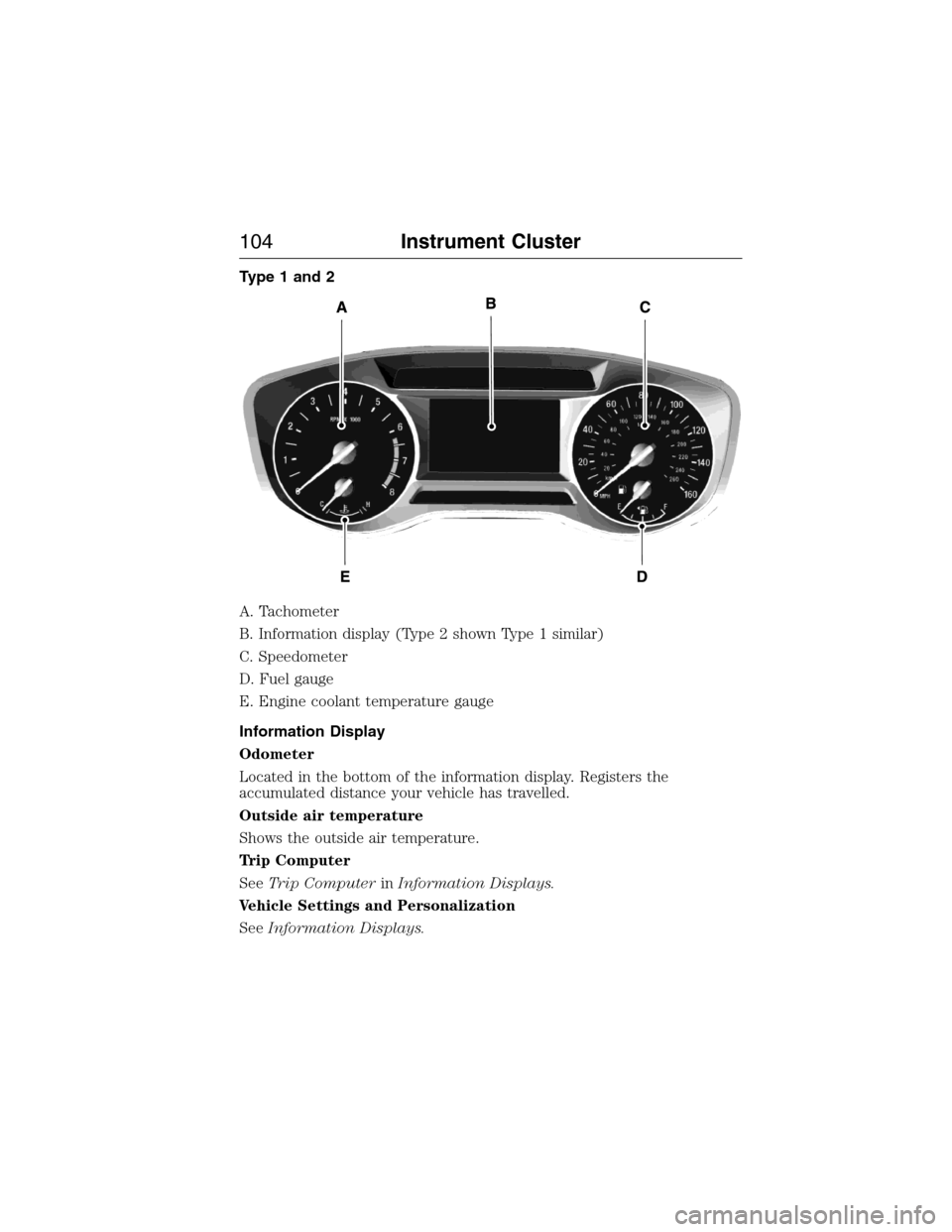
Type 1 and 2
A. Tachometer
B. Information display (Type 2 shown Type 1 similar)
C. Speedometer
D. Fuel gauge
E. Engine coolant temperature gauge
Information Display
Odometer
Located in the bottom of the information display. Registers the
accumulated distance your vehicle has travelled.
Outside air temperature
Shows the outside air temperature.
Trip Computer
SeeTrip ComputerinInformation Displays.
Vehicle Settings and Personalization
SeeInformation Displays.
104Instrument Cluster
2015 Expedition(exd)
Owners Guide gf, 1st Printing, July 2014
USA(fus)
Page 106 of 564
Fuel Gauge
Note:The fuel gauge may vary slightly when your vehicle is moving or
on a gradient.
Switch the ignition on. The fuel gauge will indicate approximately how much
fuel is left in the fuel tank. The arrow adjacent to the fuel pump symbol
indicates on which side of your vehicle the fuel filler door is located.
The needle should move toward F when you refuel your vehicle. If the
needle points to E after adding fuel, this indicates your vehicle needs
service soon.
After refueling some variability in needle position is normal:
•It may take a short time for the needle to reach F after leaving the gas
station. This is normal and depends upon the slope of pavement at the
gas station.
•The fuel amount dispensed into the tank is a little less or more than
the gauge indicated. This is normal and depends upon the slope of
pavement at the gas station.
•If the gas station nozzle shuts off before the tank is full, try a different
gas pump nozzle.
Low Fuel Reminder
A low fuel reminder triggers when the fuel gauge needle is at 1/16th.
Variations:
Driving type (fuel
economy conditions)Fuel gauge position Distance-to-empty
Highway driving 1/16th35 miles to 80 miles
(56 km to 129 km)
Severe duty driving (trailer
towing, extended idle)1/16th 35 miles (56km)
Engine Coolant Temperature Gauge
Shows the temperature of the engine coolant. At normal operating
temperature, the needle will remain in the center section. If the needle
enters the red section, the engine is overheating. Stop the engine, switch
the ignition off and determine the cause once the engine has cooled down.
Note:Do not restart the engine until the cause of overheating has been
resolved.
Instrument Cluster105
2015 Expedition(exd)
Owners Guide gf, 1st Printing, July 2014
USA(fus)
Page 107 of 564
WARNING:Never remove the coolant reservoir cap while the
engine is running or hot. The hot coolant is under pressure and
may cause serious burns.
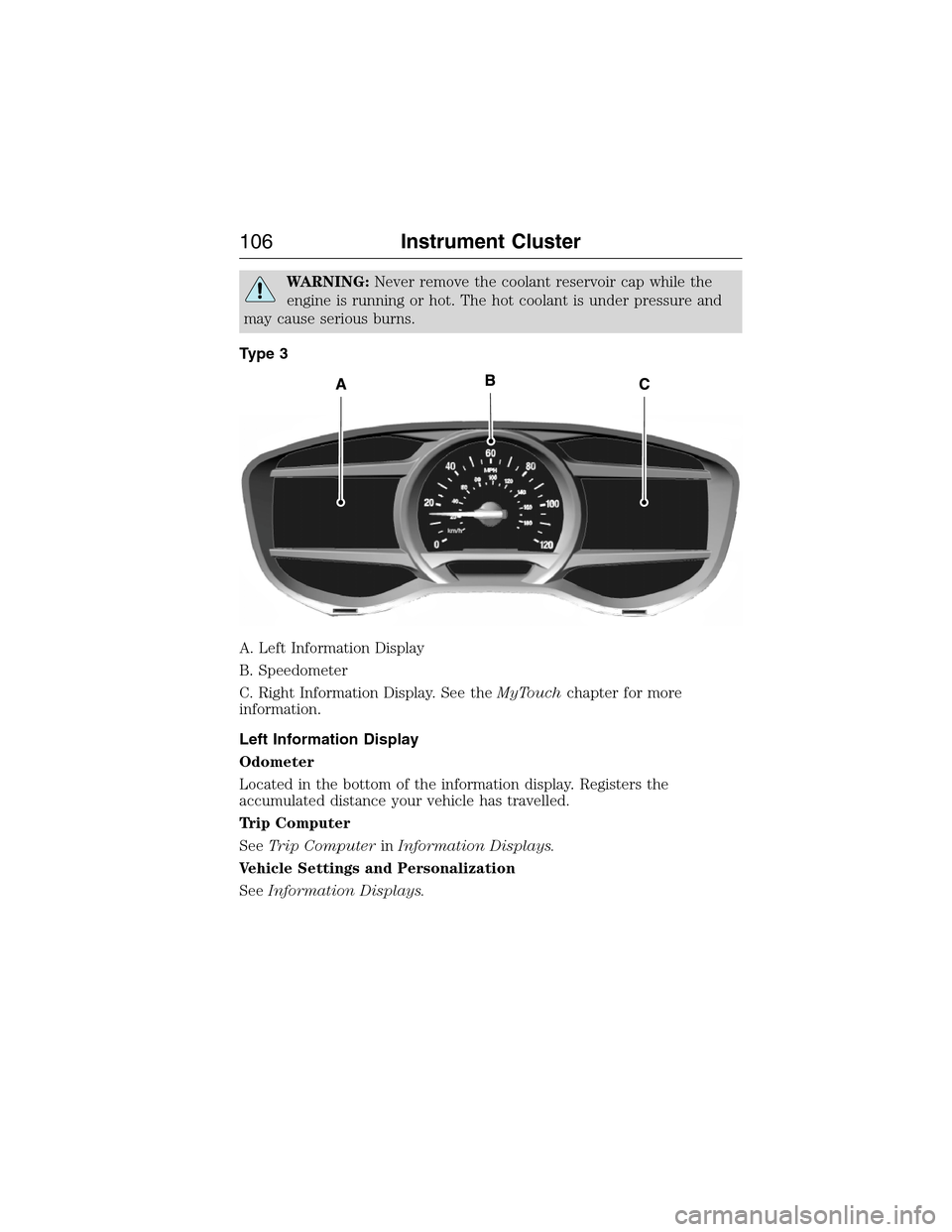
Type 3
A. Left Information Display
B. Speedometer
C. Right Information Display. See theMyTouchchapter for more
information.
Left Information Display
Odometer
Located in the bottom of the information display. Registers the
accumulated distance your vehicle has travelled.
Trip Computer
SeeTrip ComputerinInformation Displays.
Vehicle Settings and Personalization
SeeInformation Displays.
106Instrument Cluster
2015 Expedition(exd)
Owners Guide gf, 1st Printing, July 2014
USA(fus)
Page 109 of 564
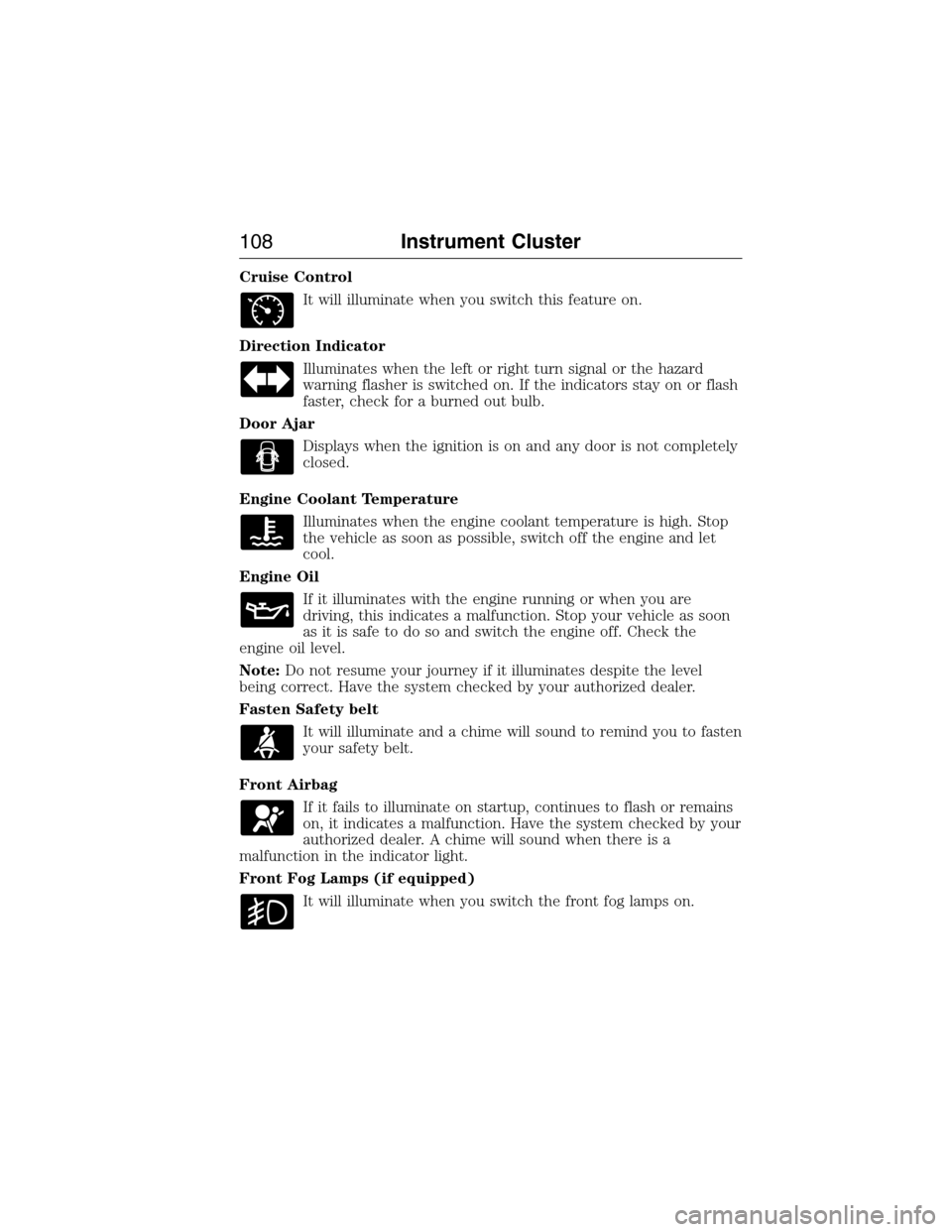
Cruise Control
It will illuminate when you switch this feature on.
Direction Indicator
Illuminates when the left or right turn signal or the hazard
warning flasher is switched on. If the indicators stay on or flash
faster, check for a burned out bulb.
Door Ajar
Displays when the ignition is on and any door is not completely
closed.
Engine Coolant Temperature
Illuminates when the engine coolant temperature is high. Stop
the vehicle as soon as possible, switch off the engine and let
cool.
Engine Oil
If it illuminates with the engine running or when you are
driving, this indicates a malfunction. Stop your vehicle as soon
as it is safe to do so and switch the engine off. Check the
engine oil level.
Note:Do not resume your journey if it illuminates despite the level
being correct. Have the system checked by your authorized dealer.
Fasten Safety belt
It will illuminate and a chime will sound to remind you to fasten
your safety belt.
Front Airbag
If it fails to illuminate on startup, continues to flash or remains
on, it indicates a malfunction. Have the system checked by your
authorized dealer. A chime will sound when there is a
malfunction in the indicator light.
Front Fog Lamps (if equipped)
It will illuminate when you switch the front fog lamps on.
108Instrument Cluster
2015 Expedition(exd)
Owners Guide gf, 1st Printing, July 2014
USA(fus)
Page 110 of 564
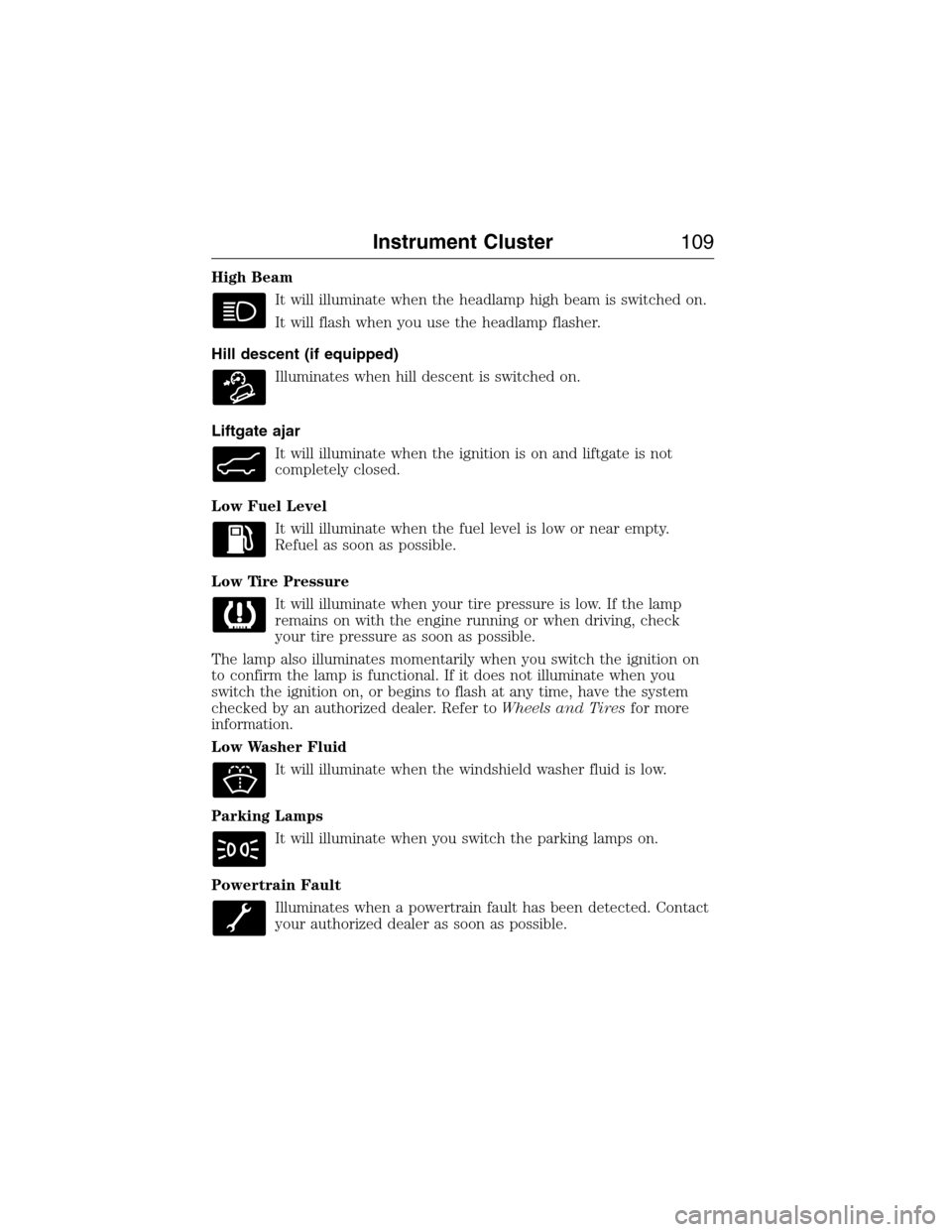
High Beam
It will illuminate when the headlamp high beam is switched on.
It will flash when you use the headlamp flasher.
Hill descent (if equipped)
Illuminates when hill descent is switched on.
Liftgate ajar
It will illuminate when the ignition is on and liftgate is not
completely closed.
Low Fuel Level
It will illuminate when the fuel level is low or near empty.
Refuel as soon as possible.
Low Tire Pressure
It will illuminate when your tire pressure is low. If the lamp
remains on with the engine running or when driving, check
your tire pressure as soon as possible.
The lamp also illuminates momentarily when you switch the ignition on
to confirm the lamp is functional. If it does not illuminate when you
switch the ignition on, or begins to flash at any time, have the system
checked by an authorized dealer. Refer toWheels and Tiresfor more
information.
Low Washer Fluid
It will illuminate when the windshield washer fluid is low.
Parking Lamps
It will illuminate when you switch the parking lamps on.
Powertrain Fault
Illuminates when a powertrain fault has been detected. Contact
your authorized dealer as soon as possible.
Instrument Cluster109
2015 Expedition(exd)
Owners Guide gf, 1st Printing, July 2014
USA(fus)
Page 111 of 564
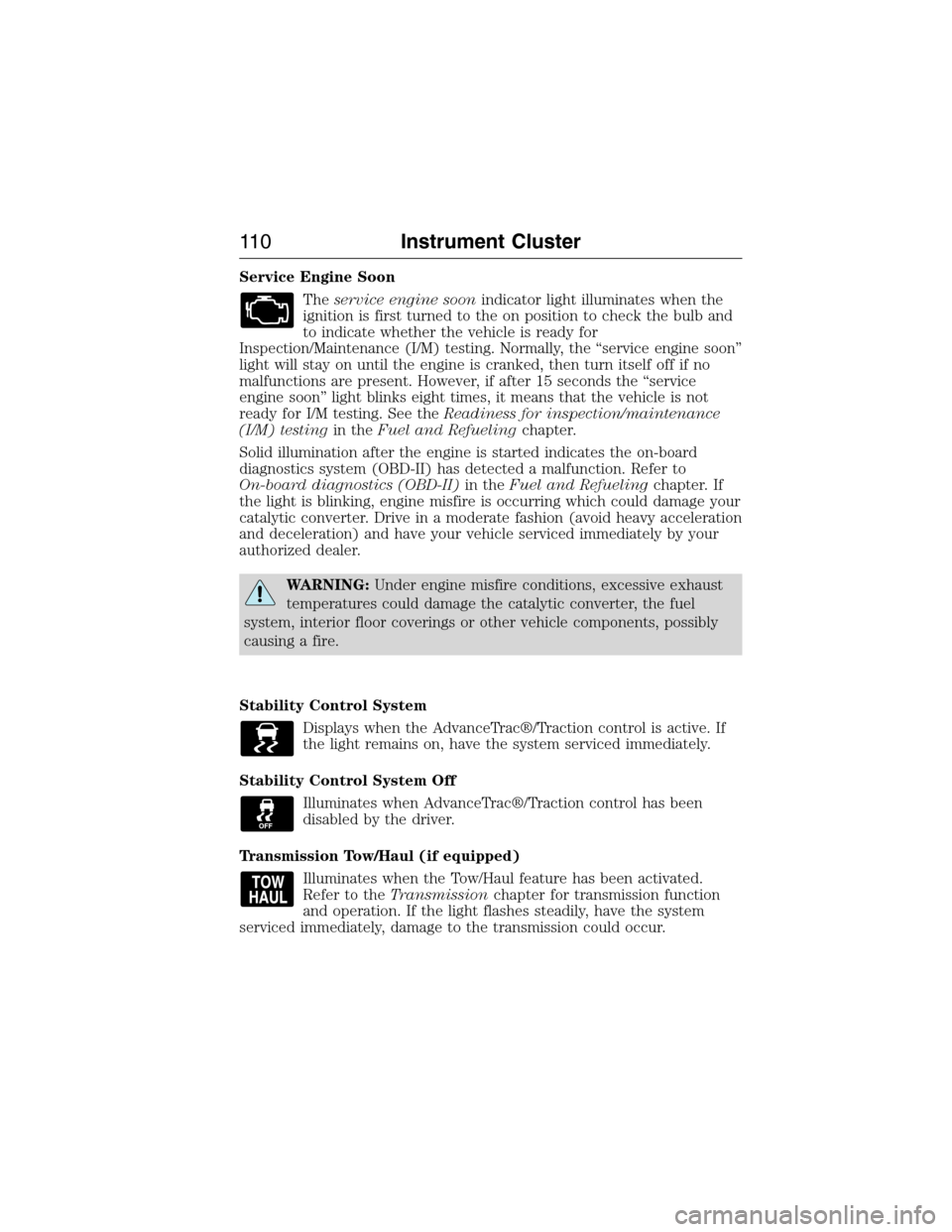
Service Engine Soon
Theservice engine soonindicator light illuminates when the
ignition is first turned to the on position to check the bulb and
to indicate whether the vehicle is ready for
Inspection/Maintenance (I/M) testing. Normally, the “service engine soon”
light will stay on until the engine is cranked, then turn itself off if no
malfunctions are present. However, if after 15 seconds the “service
engine soon” light blinks eight times, it means that the vehicle is not
ready for I/M testing. See theReadiness for inspection/maintenance
(I/M) testingin theFuel and Refuelingchapter.
Solid illumination after the engine is started indicates the on-board
diagnostics system (OBD-II) has detected a malfunction. Refer to
On-board diagnostics (OBD-II)in theFuel and Refuelingchapter. If
the light is blinking, engine misfire is occurring which could damage your
catalytic converter. Drive in a moderate fashion (avoid heavy acceleration
and deceleration) and have your vehicle serviced immediately by your
authorized dealer.
WARNING:Under engine misfire conditions, excessive exhaust
temperatures could damage the catalytic converter, the fuel
system, interior floor coverings or other vehicle components, possibly
causing a fire.
Stability Control System
Displays when the AdvanceTrac®/Traction control is active. If
the light remains on, have the system serviced immediately.
Stability Control System Off
Illuminates when AdvanceTrac®/Traction control has been
disabled by the driver.
Transmission Tow/Haul (if equipped)
Illuminates when the Tow/Haul feature has been activated.
Refer to theTransmissionchapter for transmission function
and operation. If the light flashes steadily, have the system
serviced immediately, damage to the transmission could occur.
11 0Instrument Cluster
2015 Expedition(exd)
Owners Guide gf, 1st Printing, July 2014
USA(fus)
Page 115 of 564
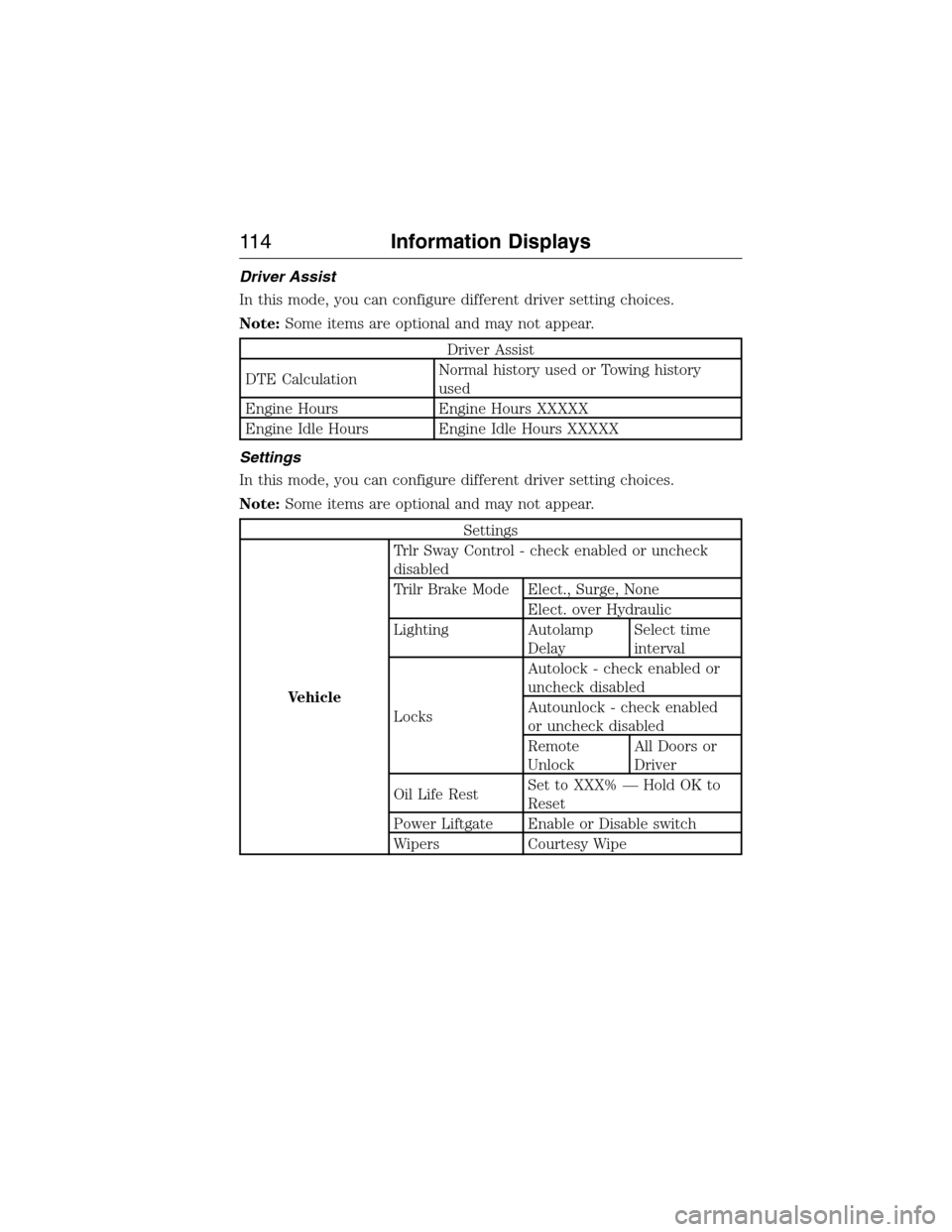
Driver Assist
In this mode, you can configure different driver setting choices.
Note:Some items are optional and may not appear.
Driver Assist
DTE CalculationNormal history used or Towing history
used
Engine Hours Engine Hours XXXXX
Engine Idle Hours Engine Idle Hours XXXXX
Settings
In this mode, you can configure different driver setting choices.
Note:Some items are optional and may not appear.
Settings
VehicleTrlr Sway Control - check enabled or uncheck
disabled
Trilr Brake Mode Elect., Surge, None
Elect. over Hydraulic
Lighting Autolamp
DelaySelect time
interval
LocksAutolock - check enabled or
uncheck disabled
Autounlock - check enabled
or uncheck disabled
Remote
UnlockAll Doors or
Driver
Oil Life RestSet to XXX% — Hold OK to
Reset
Power Liftgate Enable or Disable switch
Wipers Courtesy Wipe
11 4Information Displays
2015 Expedition(exd)
Owners Guide gf, 1st Printing, July 2014
USA(fus)
Page 117 of 564
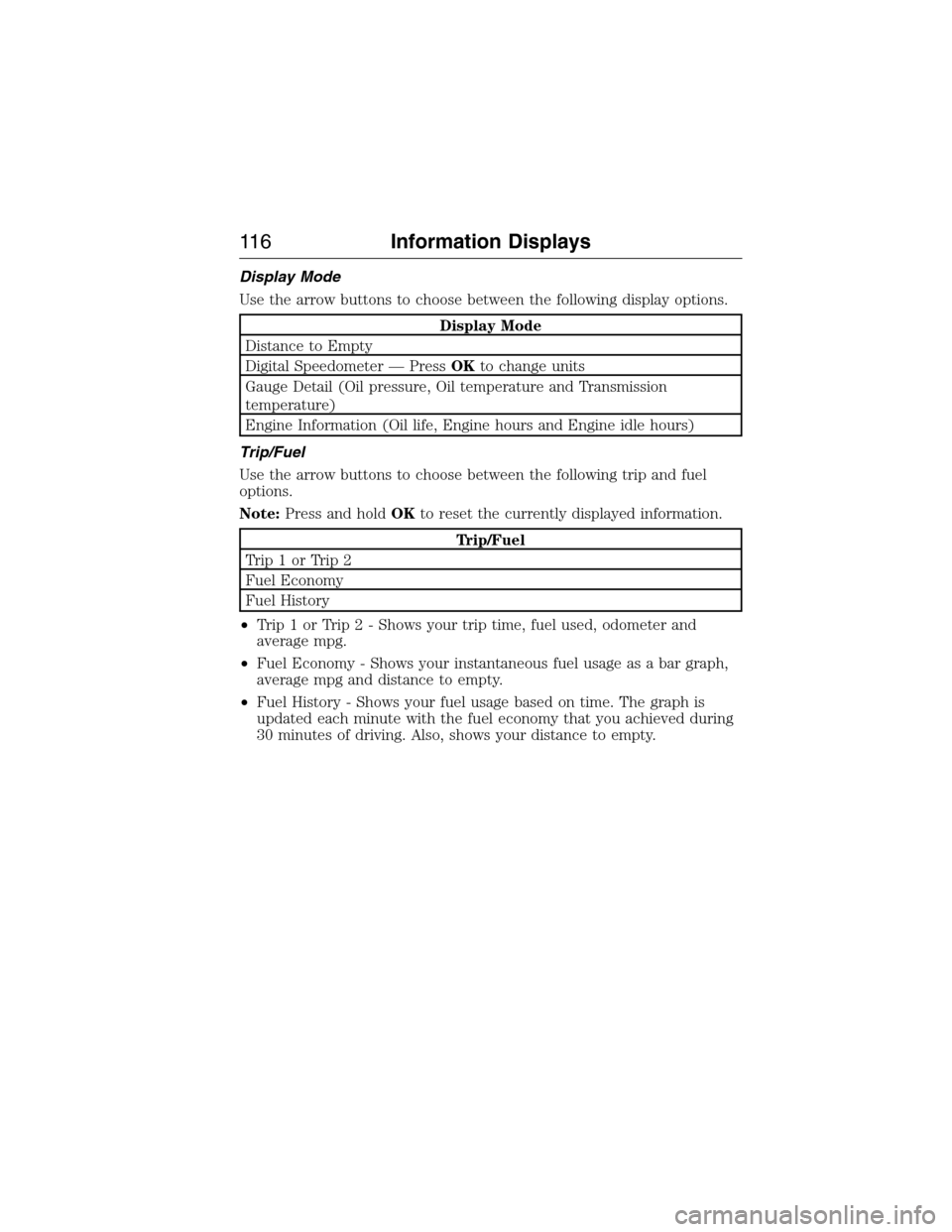
Display Mode
Use the arrow buttons to choose between the following display options.
Display Mode
Distance to Empty
Digital Speedometer — PressOKto change units
Gauge Detail (Oil pressure, Oil temperature and Transmission
temperature)
Engine Information (Oil life, Engine hours and Engine idle hours)
Trip/Fuel
Use the arrow buttons to choose between the following trip and fuel
options.
Note:Press and holdOKto reset the currently displayed information.
Trip/Fuel
Trip1orTrip2
Fuel Economy
Fuel History
•Trip 1 or Trip 2 - Shows your trip time, fuel used, odometer and
average mpg.
•Fuel Economy - Shows your instantaneous fuel usage as a bar graph,
average mpg and distance to empty.
•Fuel History - Shows your fuel usage based on time. The graph is
updated each minute with the fuel economy that you achieved during
30 minutes of driving. Also, shows your distance to empty.
11 6Information Displays
2015 Expedition(exd)
Owners Guide gf, 1st Printing, July 2014
USA(fus)