warning FORD EXPEDITION 2015 3.G Workshop Manual
[x] Cancel search | Manufacturer: FORD, Model Year: 2015, Model line: EXPEDITION, Model: FORD EXPEDITION 2015 3.GPages: 564, PDF Size: 6.71 MB
Page 111 of 564
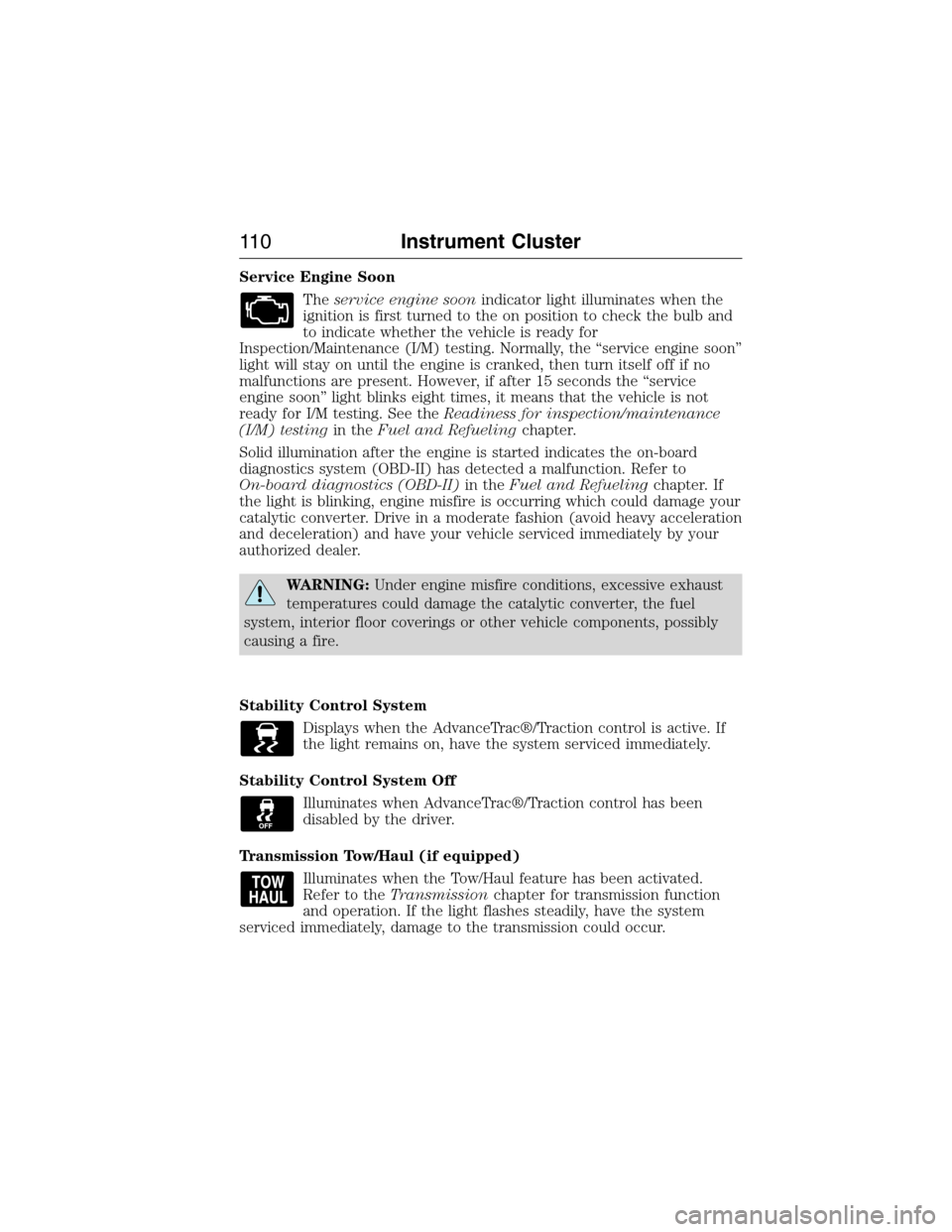
Service Engine Soon
Theservice engine soonindicator light illuminates when the
ignition is first turned to the on position to check the bulb and
to indicate whether the vehicle is ready for
Inspection/Maintenance (I/M) testing. Normally, the “service engine soon”
light will stay on until the engine is cranked, then turn itself off if no
malfunctions are present. However, if after 15 seconds the “service
engine soon” light blinks eight times, it means that the vehicle is not
ready for I/M testing. See theReadiness for inspection/maintenance
(I/M) testingin theFuel and Refuelingchapter.
Solid illumination after the engine is started indicates the on-board
diagnostics system (OBD-II) has detected a malfunction. Refer to
On-board diagnostics (OBD-II)in theFuel and Refuelingchapter. If
the light is blinking, engine misfire is occurring which could damage your
catalytic converter. Drive in a moderate fashion (avoid heavy acceleration
and deceleration) and have your vehicle serviced immediately by your
authorized dealer.
WARNING:Under engine misfire conditions, excessive exhaust
temperatures could damage the catalytic converter, the fuel
system, interior floor coverings or other vehicle components, possibly
causing a fire.
Stability Control System
Displays when the AdvanceTrac®/Traction control is active. If
the light remains on, have the system serviced immediately.
Stability Control System Off
Illuminates when AdvanceTrac®/Traction control has been
disabled by the driver.
Transmission Tow/Haul (if equipped)
Illuminates when the Tow/Haul feature has been activated.
Refer to theTransmissionchapter for transmission function
and operation. If the light flashes steadily, have the system
serviced immediately, damage to the transmission could occur.
11 0Instrument Cluster
2015 Expedition(exd)
Owners Guide gf, 1st Printing, July 2014
USA(fus)
Page 112 of 564
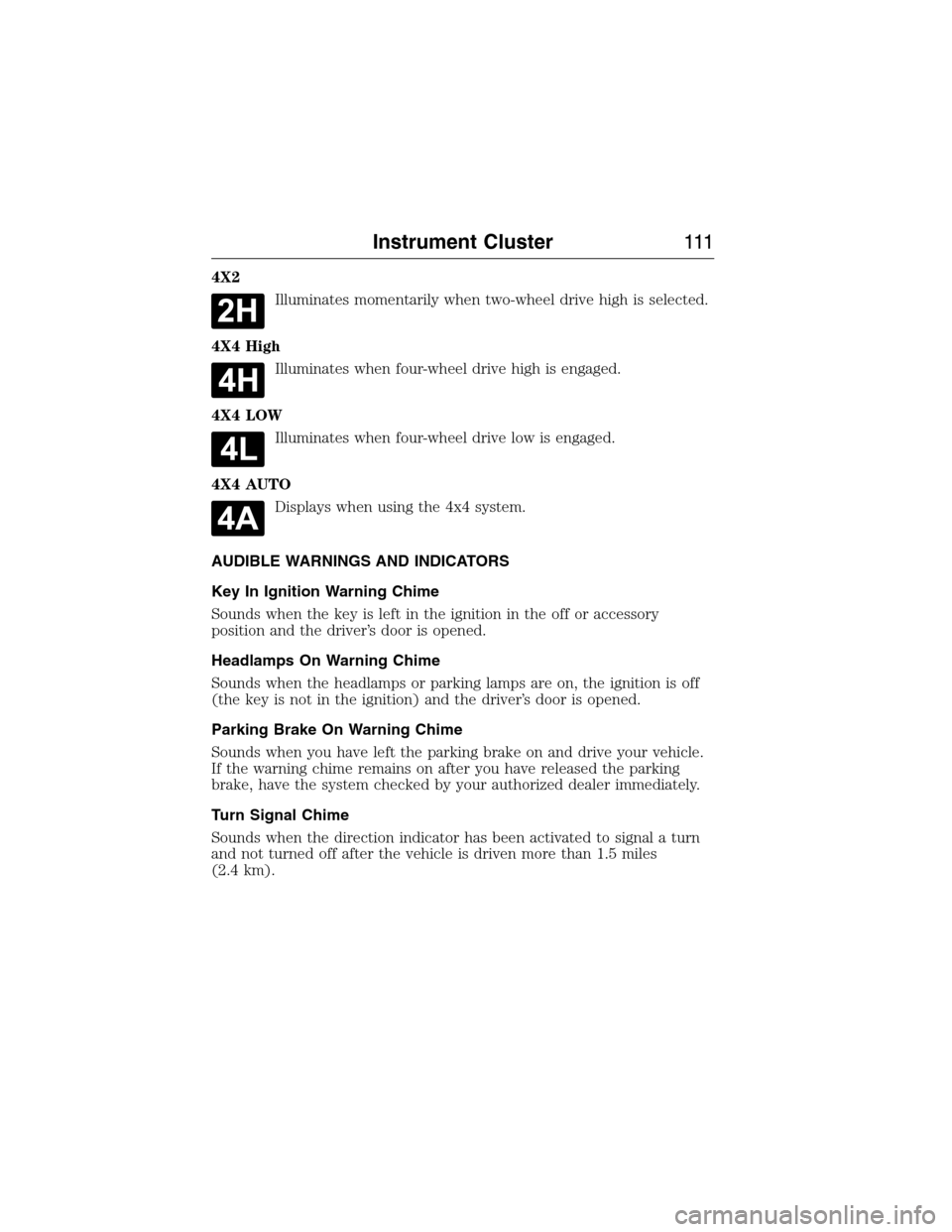
4X2
Illuminates momentarily when two-wheel drive high is selected.
4X4 High
Illuminates when four-wheel drive high is engaged.
4X4 LOW
Illuminates when four-wheel drive low is engaged.
4X4 AUTO
Displays when using the 4x4 system.
AUDIBLE WARNINGS AND INDICATORS
Key In Ignition Warning Chime
Sounds when the key is left in the ignition in the off or accessory
position and the driver’s door is opened.
Headlamps On Warning Chime
Sounds when the headlamps or parking lamps are on, the ignition is off
(the key is not in the ignition) and the driver’s door is opened.
Parking Brake On Warning Chime
Sounds when you have left the parking brake on and drive your vehicle.
If the warning chime remains on after you have released the parking
brake, have the system checked by your authorized dealer immediately.
Turn Signal Chime
Sounds when the direction indicator has been activated to signal a turn
and not turned off after the vehicle is driven more than 1.5 miles
(2.4 km).
Instrument Cluster111
2015 Expedition(exd)
Owners Guide gf, 1st Printing, July 2014
USA(fus)
Page 113 of 564
GENERAL INFORMATION
WARNING:Driving while distracted can result in loss of vehicle
control, crash and injury. We strongly recommend that you use
extreme caution when using any device that may take your focus off
the road. Your primary responsibility is the safe operation of your
vehicle. We recommend against the use of any handheld device while
driving and encourage the use of voice-operated systems when possible.
Make sure you are aware of all applicable local laws that may affect the
use of electronic devices while driving.
Various systems on your vehicle can be controlled using the information
display controls on the steering wheel. Corresponding information is
displayed in the information display.
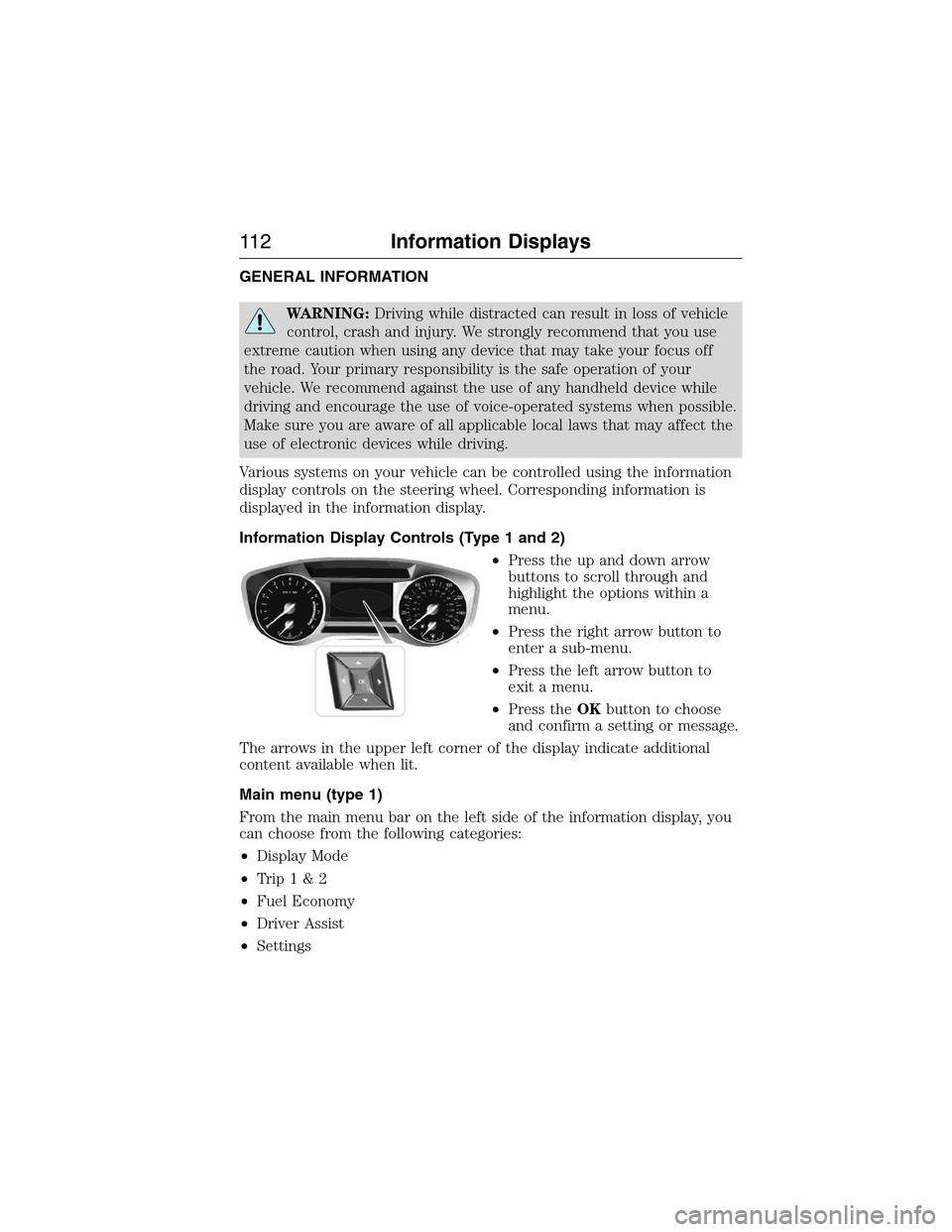
Information Display Controls (Type 1 and 2)
•Press the up and down arrow
buttons to scroll through and
highlight the options within a
menu.
•Press the right arrow button to
enter a sub-menu.
•Press the left arrow button to
exit a menu.
•Press theOKbutton to choose
and confirm a setting or message.
The arrows in the upper left corner of the display indicate additional
content available when lit.
Main menu (type 1)
From the main menu bar on the left side of the information display, you
can choose from the following categories:
•Display Mode
•Trip1&2
•Fuel Economy
•Driver Assist
•Settings
11 2Information Displays
2015 Expedition(exd)
Owners Guide gf, 1st Printing, July 2014
USA(fus)
Page 128 of 564
Blind Spot Information System
MessagesAction / Description
Vehicle Coming From X Displayed when the blind spot
information system with cross
traffic alert (CTA) system is
operating and senses a vehicle.
Brake System Messages Action / Description
Brake Fluid Level Low Indicates the brake fluid level is low
and the brake system should be
inspected immediately.
Check Brake System Displays when the brake system
needs servicing. If the warning stays
on or continues to come on, contact
your authorized dealer as soon as
possible.
Park Brake Engaged Displays when the parking brake is
set, the vehicle is in ready to drive
and the vehicle is driven more than
3 mph (5 km/h). If the warning stays
on after the parking brake is
released, contact your authorized
dealer as soon as possible.
Door Messages Action / Description
X Door Ajar Displays when the door listed is
not completely closed.
Liftgate Ajar Displays when the liftgate or
liftglass is not completely closed.
Factory Keypad Code XXXXX Displays the factory keypad code
after the keypad has been reset.
Engine Messages Action / Description
Power Reduced To Lower Engine
TempDisplays when the engine has
reduced power to help reduce high
engine temperature.
Engine On Informs you that you are exiting
your vehicle and the engine is on.
Information Displays127
2015 Expedition(exd)
Owners Guide gf, 1st Printing, July 2014
USA(fus)
Page 130 of 564
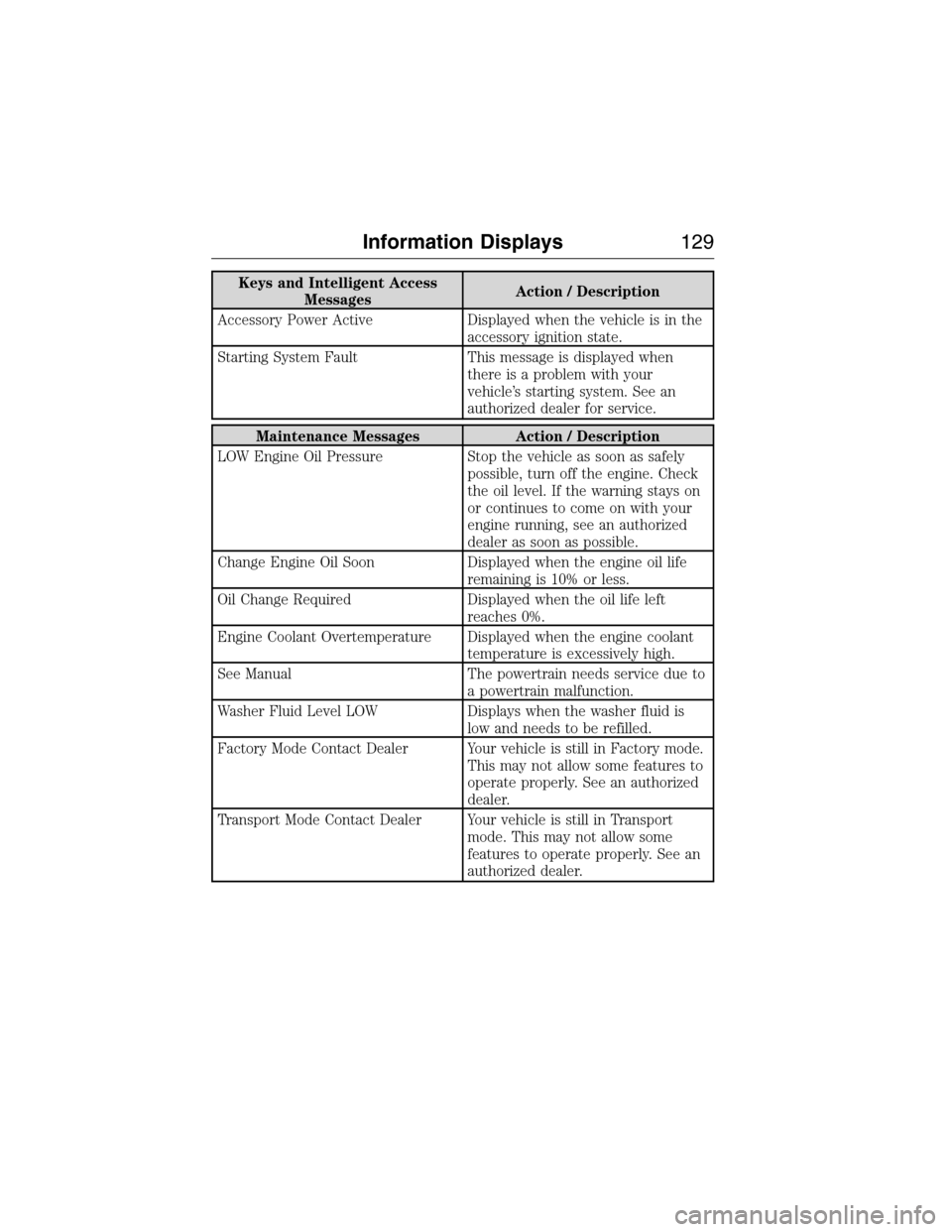
Keys and Intelligent Access
MessagesAction / Description
Accessory Power Active Displayed when the vehicle is in the
accessory ignition state.
Starting System Fault This message is displayed when
there is a problem with your
vehicle’s starting system. See an
authorized dealer for service.
Maintenance Messages Action / Description
LOW Engine Oil Pressure Stop the vehicle as soon as safely
possible, turn off the engine. Check
the oil level. If the warning stays on
or continues to come on with your
engine running, see an authorized
dealer as soon as possible.
Change Engine Oil Soon Displayed when the engine oil life
remaining is 10% or less.
Oil Change Required Displayed when the oil life left
reaches 0%.
Engine Coolant Overtemperature Displayed when the engine coolant
temperature is excessively high.
See Manual The powertrain needs service due to
a powertrain malfunction.
Washer Fluid Level LOW Displays when the washer fluid is
low and needs to be refilled.
Factory Mode Contact Dealer Your vehicle is still in Factory mode.
This may not allow some features to
operate properly. See an authorized
dealer.
Transport Mode Contact Dealer Your vehicle is still in Transport
mode. This may not allow some
features to operate properly. See an
authorized dealer.
Information Displays129
2015 Expedition(exd)
Owners Guide gf, 1st Printing, July 2014
USA(fus)
Page 133 of 564
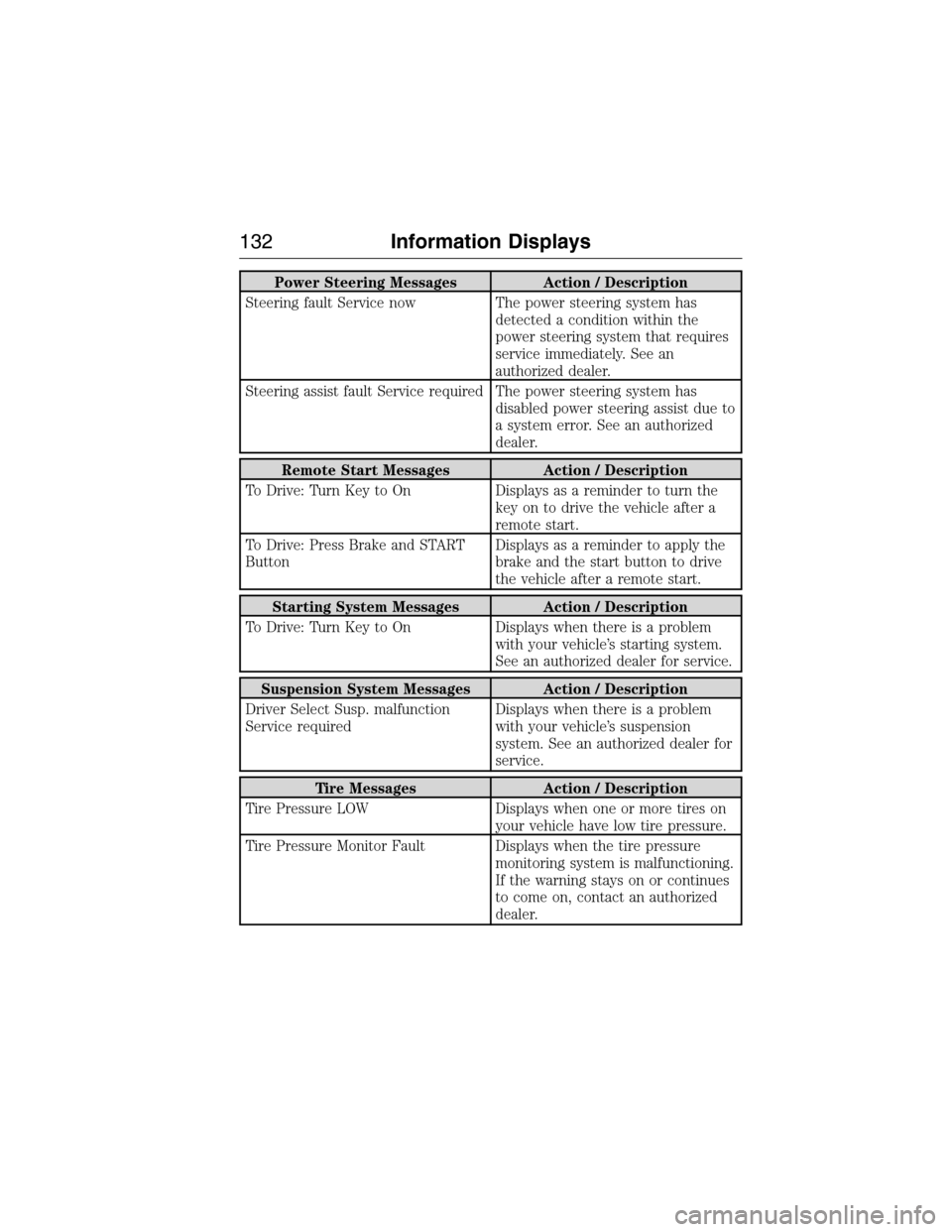
Power Steering Messages Action / Description
Steering fault Service now The power steering system has
detected a condition within the
power steering system that requires
service immediately. See an
authorized dealer.
Steering assist fault Service required The power steering system has
disabled power steering assist due to
a system error. See an authorized
dealer.
Remote Start Messages Action / Description
To Drive: Turn Key to On Displays as a reminder to turn the
key on to drive the vehicle after a
remote start.
To Drive: Press Brake and START
ButtonDisplays as a reminder to apply the
brake and the start button to drive
the vehicle after a remote start.
Starting System Messages Action / Description
To Drive: Turn Key to On Displays when there is a problem
with your vehicle’s starting system.
See an authorized dealer for service.
Suspension System Messages Action / Description
Driver Select Susp. malfunction
Service requiredDisplays when there is a problem
with your vehicle’s suspension
system. See an authorized dealer for
service.
Tire Messages Action / Description
Tire Pressure LOW Displays when one or more tires on
your vehicle have low tire pressure.
Tire Pressure Monitor Fault Displays when the tire pressure
monitoring system is malfunctioning.
If the warning stays on or continues
to come on, contact an authorized
dealer.
132Information Displays
2015 Expedition(exd)
Owners Guide gf, 1st Printing, July 2014
USA(fus)
Page 134 of 564
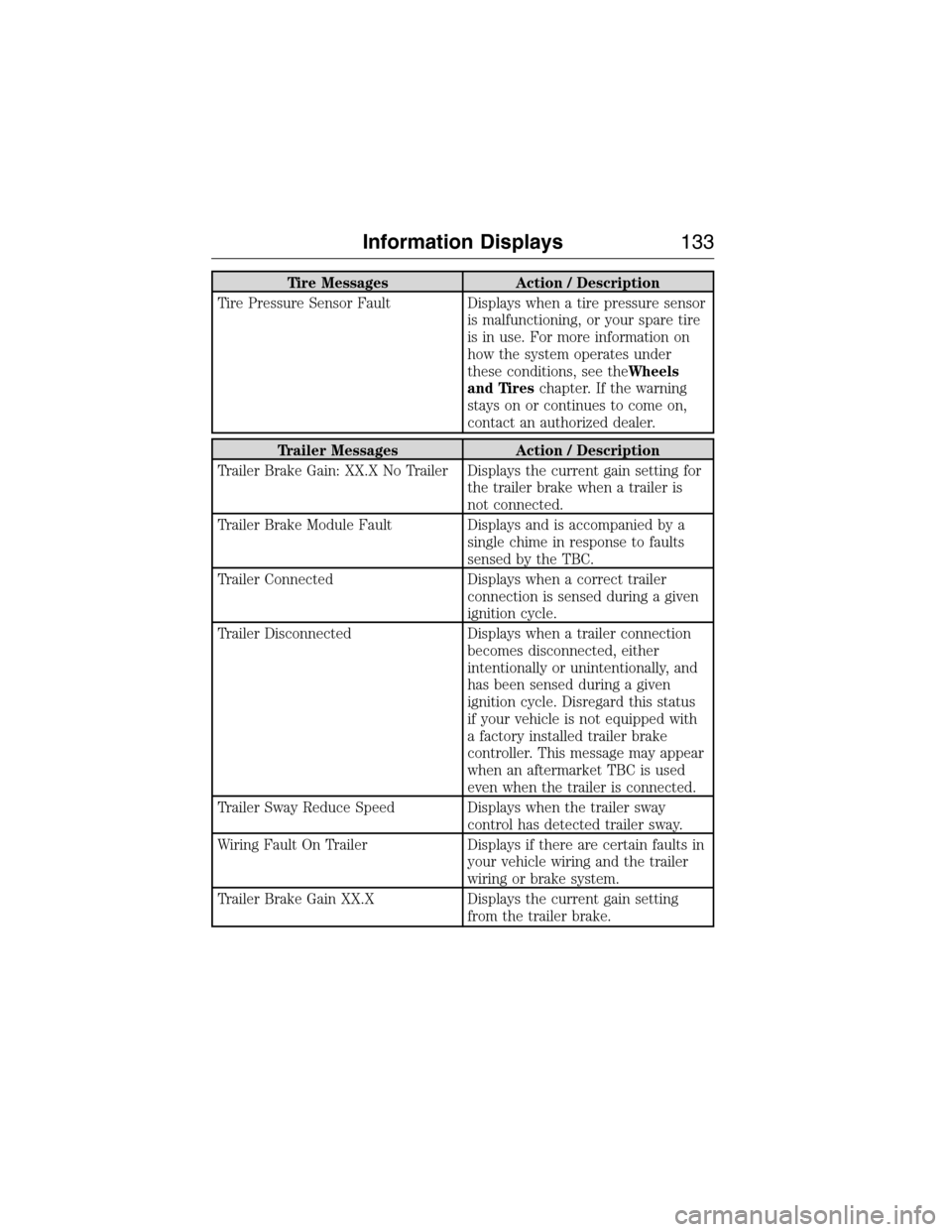
Tire Messages Action / Description
Tire Pressure Sensor Fault Displays when a tire pressure sensor
is malfunctioning, or your spare tire
is in use. For more information on
how the system operates under
these conditions, see theWheels
and Tireschapter. If the warning
stays on or continues to come on,
contact an authorized dealer.
Trailer Messages Action / Description
Trailer Brake Gain: XX.X No Trailer Displays the current gain setting for
the trailer brake when a trailer is
not connected.
Trailer Brake Module Fault Displays and is accompanied by a
single chime in response to faults
sensed by the TBC.
Trailer Connected Displays when a correct trailer
connection is sensed during a given
ignition cycle.
Trailer Disconnected Displays when a trailer connection
becomes disconnected, either
intentionally or unintentionally, and
has been sensed during a given
ignition cycle. Disregard this status
if your vehicle is not equipped with
a factory installed trailer brake
controller. This message may appear
when an aftermarket TBC is used
even when the trailer is connected.
Trailer Sway Reduce Speed Displays when the trailer sway
control has detected trailer sway.
Wiring Fault On Trailer Displays if there are certain faults in
your vehicle wiring and the trailer
wiring or brake system.
Trailer Brake Gain XX.X Displays the current gain setting
from the trailer brake.
Information Displays133
2015 Expedition(exd)
Owners Guide gf, 1st Printing, July 2014
USA(fus)
Page 149 of 564
SITTING IN THE CORRECT POSITION
WARNING:Sitting improperly out of position or with the
seatback reclined too far can take off weight from the seat
cushion and affect the passenger sensing system, resulting in serious
injury or death in a crash. Always sit upright against your seatback,
with your feet on the floor.
WARNING:Do not recline the seatback as this can cause the
occupant to slide under the seat’s safety belt, resulting in severe
personal injury in the event of a crash.
WARNING:Do not place objects higher than the seatbacks to
reduce the risk of injury in a crash or during heavy braking or
when stopping suddenly.
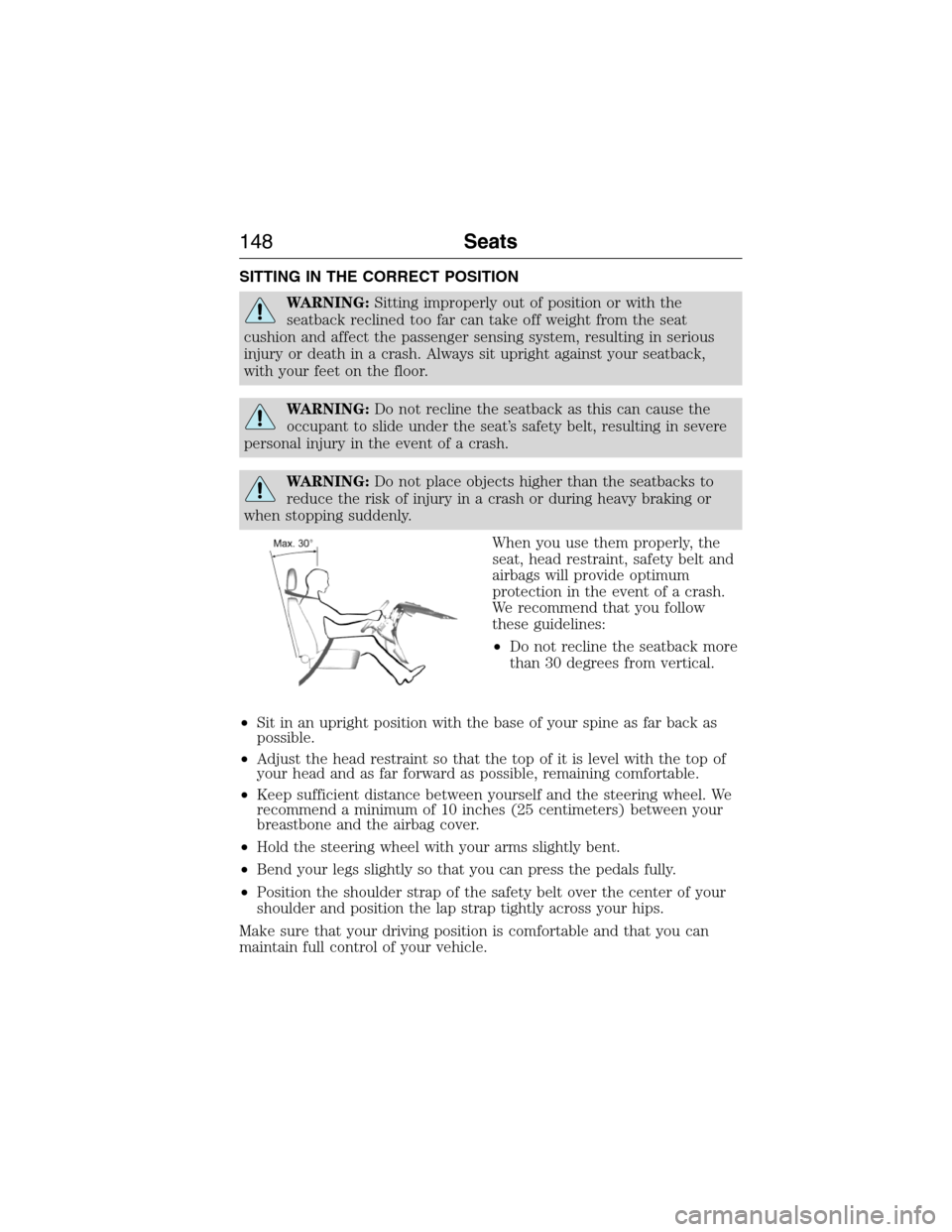
When you use them properly, the
seat, head restraint, safety belt and
airbags will provide optimum
protection in the event of a crash.
We recommend that you follow
these guidelines:
•Do not recline the seatback more
than 30 degrees from vertical.
•Sit in an upright position with the base of your spine as far back as
possible.
•Adjust the head restraint so that the top of it is level with the top of
your head and as far forward as possible, remaining comfortable.
•Keep sufficient distance between yourself and the steering wheel. We
recommend a minimum of 10 inches (25 centimeters) between your
breastbone and the airbag cover.
•Hold the steering wheel with your arms slightly bent.
•Bend your legs slightly so that you can press the pedals fully.
•Position the shoulder strap of the safety belt over the center of your
shoulder and position the lap strap tightly across your hips.
Make sure that your driving position is comfortable and that you can
maintain full control of your vehicle.
148Seats
2015 Expedition(exd)
Owners Guide gf, 1st Printing, July 2014
USA(fus)
Page 150 of 564
HEAD RESTRAINTS
WARNING:Fully adjust the head restraint before you sit in or
operate your vehicle. This will help minimize the risk of neck
injury in the event of a crash. Do not adjust the head restraint when
your vehicle is moving.
WARNING:The adjustable head restraint is a safety device.
Whenever possible, it should be installed and properly adjusted
when the seat is occupied. Failure to adjust the head restraint properly
could reduce its effectiveness during certain impacts.
WARNING:Install the head restraint properly to minimize the
risk of neck injury in the event of a crash.
Note:Adjust the seatback to an upright driving position before adjusting
any head restraint. Properly adjust the head restraint so that the top of
the head restraint is even with the top of your head and positioned as
close as possible to the back of your head. For occupants of extremely
tall stature, adjust the head restraint to its full up position.
Seats149
2015 Expedition(exd)
Owners Guide gf, 1st Printing, July 2014
USA(fus)
Page 153 of 564
MANUAL SEATS
WARNING:Do not adjust the driver seat or seatback while your
vehicle is moving. This may result in sudden seat movement,
causing loss of control of your vehicle.
WARNING:Rock the seat backward and forward after releasing
the lever to make sure that it is fully engaged.
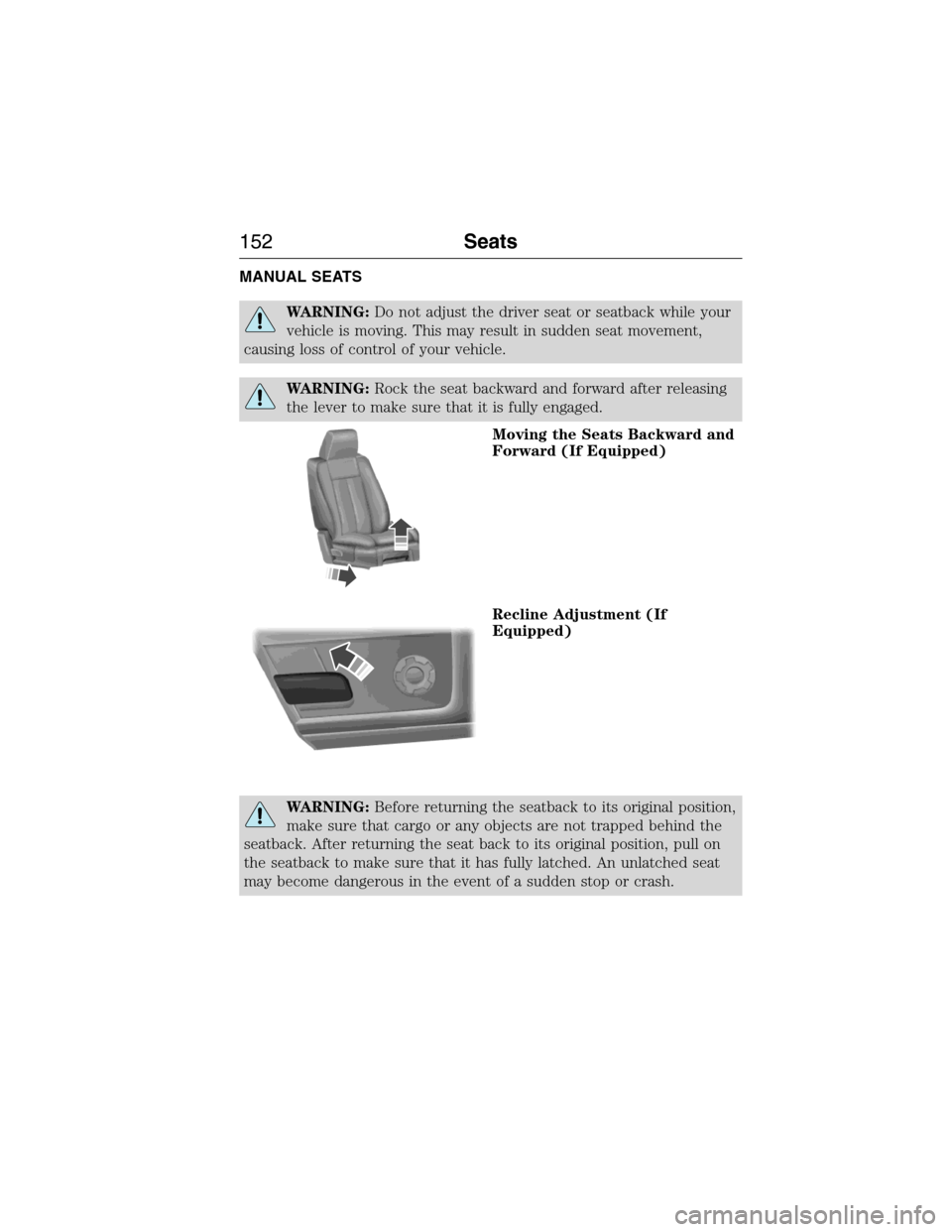
Moving the Seats Backward and
Forward (If Equipped)
Recline Adjustment (If
Equipped)
WARNING:Before returning the seatback to its original position,
make sure that cargo or any objects are not trapped behind the
seatback. After returning the seat back to its original position, pull on
the seatback to make sure that it has fully latched. An unlatched seat
may become dangerous in the event of a sudden stop or crash.
152Seats
2015 Expedition(exd)
Owners Guide gf, 1st Printing, July 2014
USA(fus)