key FORD EXPEDITION 2016 3.G User Guide
[x] Cancel search | Manufacturer: FORD, Model Year: 2016, Model line: EXPEDITION, Model: FORD EXPEDITION 2016 3.GPages: 421, PDF Size: 6.3 MB
Page 52 of 421
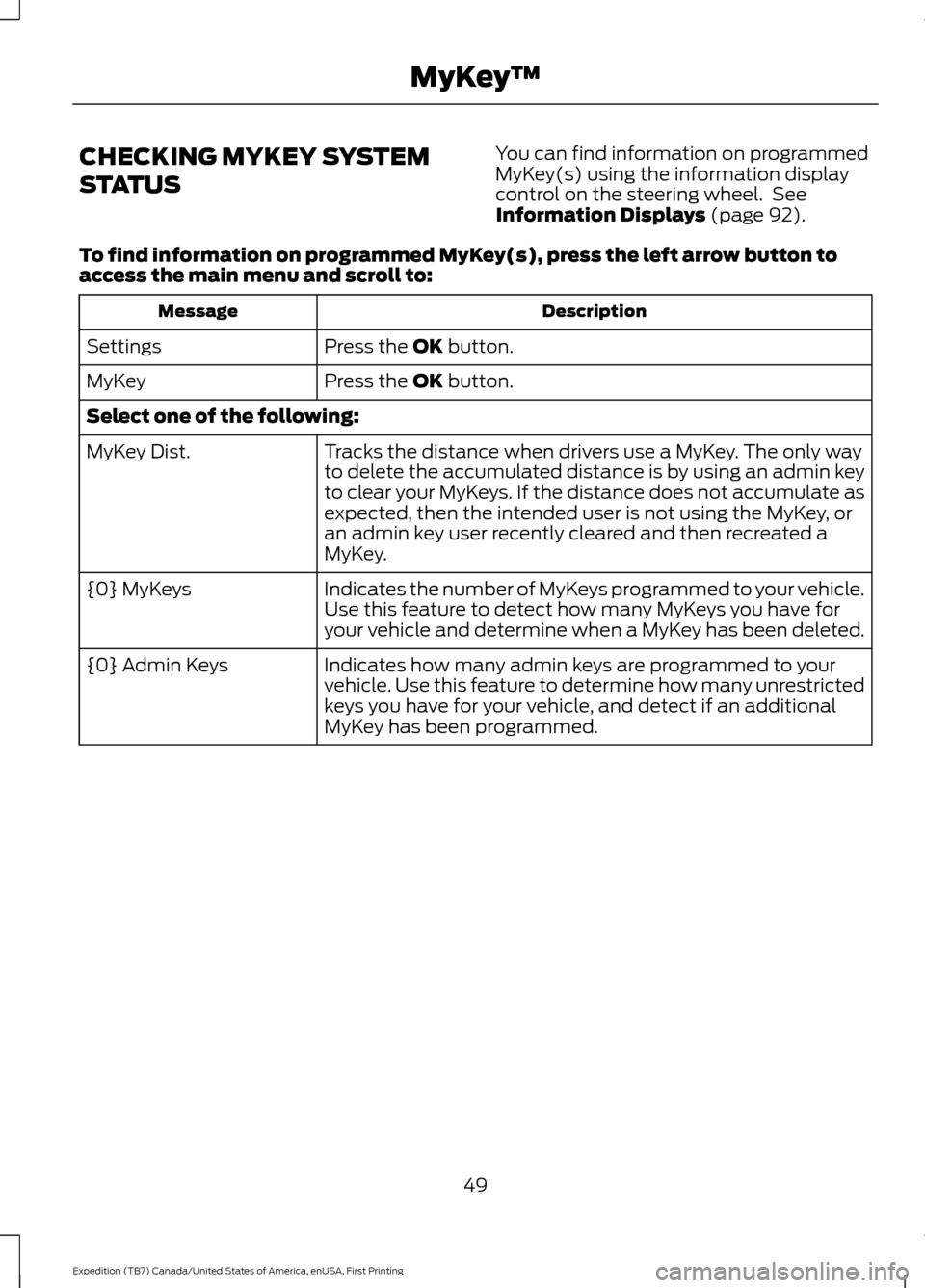
CHECKING MYKEY SYSTEM
STATUS
You can find information on programmed
MyKey(s) using the information display
control on the steering wheel. See
Information Displays (page 92).
To find information on programmed MyKey(s), press the left arrow button to
access the main menu and scroll to: Description
Message
Press the
OK button.
Settings
Press the
OK button.
MyKey
Select one of the following:
Tracks the distance when drivers use a MyKey. The only way
to delete the accumulated distance is by using an admin key
to clear your MyKeys. If the distance does not accumulate as
expected, then the intended user is not using the MyKey, or
an admin key user recently cleared and then recreated a
MyKey.
MyKey Dist.
Indicates the number of MyKeys programmed to your vehicle.
Use this feature to detect how many MyKeys you have for
your vehicle and determine when a MyKey has been deleted.
{0} MyKeys
Indicates how many admin keys are programmed to your
vehicle. Use this feature to determine how many unrestricted
keys you have for your vehicle, and detect if an additional
MyKey has been programmed.
{0} Admin Keys
49
Expedition (TB7) Canada/United States of America, enUSA, First Printing MyKey
™
Page 53 of 421
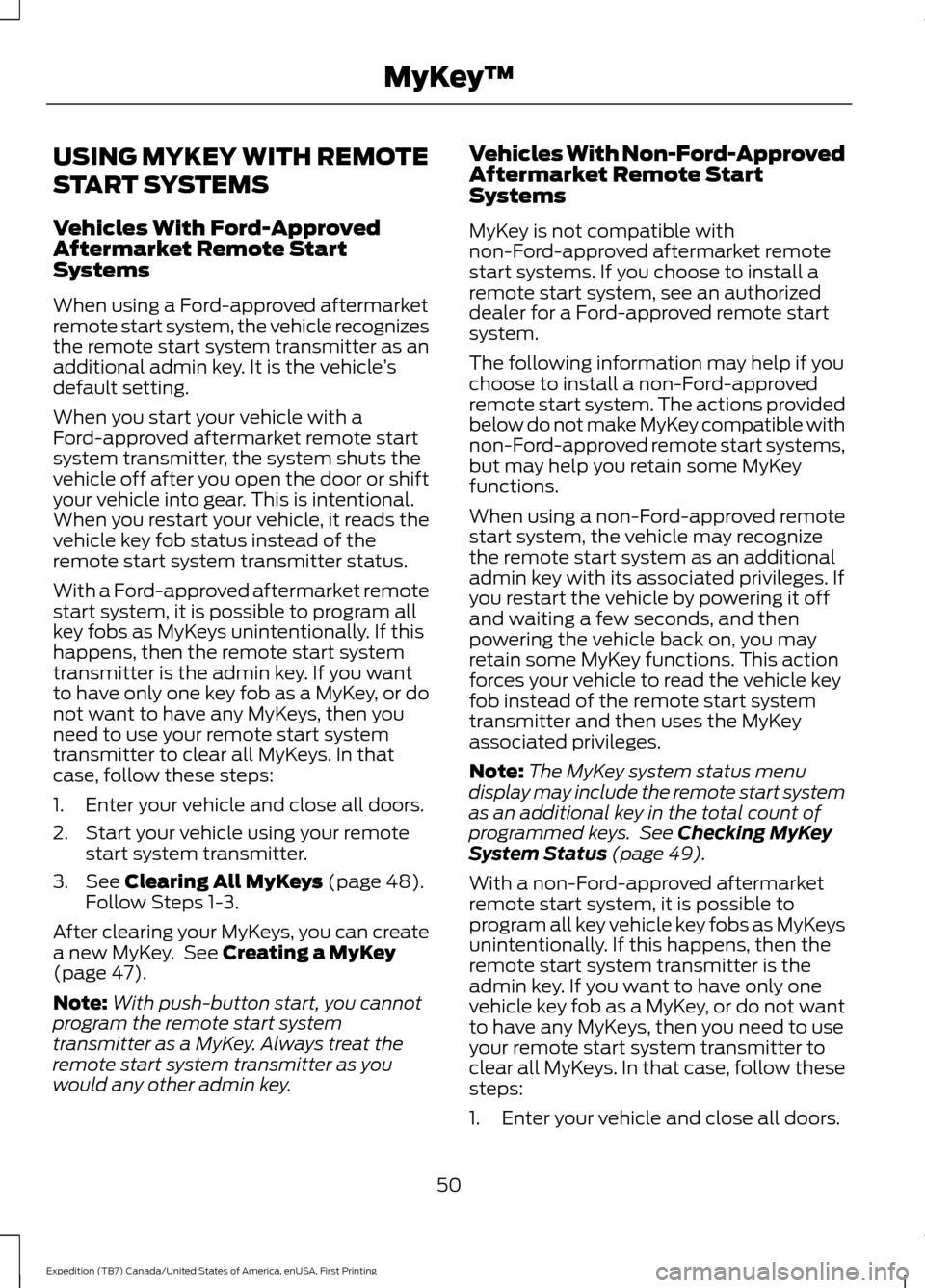
USING MYKEY WITH REMOTE
START SYSTEMS
Vehicles With Ford-Approved
Aftermarket Remote Start
Systems
When using a Ford-approved aftermarket
remote start system, the vehicle recognizes
the remote start system transmitter as an
additional admin key. It is the vehicle
’s
default setting.
When you start your vehicle with a
Ford-approved aftermarket remote start
system transmitter, the system shuts the
vehicle off after you open the door or shift
your vehicle into gear. This is intentional.
When you restart your vehicle, it reads the
vehicle key fob status instead of the
remote start system transmitter status.
With a Ford-approved aftermarket remote
start system, it is possible to program all
key fobs as MyKeys unintentionally. If this
happens, then the remote start system
transmitter is the admin key. If you want
to have only one key fob as a MyKey, or do
not want to have any MyKeys, then you
need to use your remote start system
transmitter to clear all MyKeys. In that
case, follow these steps:
1. Enter your vehicle and close all doors.
2. Start your vehicle using your remote start system transmitter.
3. See Clearing All MyKeys (page 48).
Follow Steps 1-3.
After clearing your MyKeys, you can create
a new MyKey. See
Creating a MyKey
(page 47).
Note: With push-button start, you cannot
program the remote start system
transmitter as a MyKey. Always treat the
remote start system transmitter as you
would any other admin key. Vehicles With Non-Ford-Approved
Aftermarket Remote Start
Systems
MyKey is not compatible with
non-Ford-approved aftermarket remote
start systems. If you choose to install a
remote start system, see an authorized
dealer for a Ford-approved remote start
system.
The following information may help if you
choose to install a non-Ford-approved
remote start system. The actions provided
below do not make MyKey compatible with
non-Ford-approved remote start systems,
but may help you retain some MyKey
functions.
When using a non-Ford-approved remote
start system, the vehicle may recognize
the remote start system as an additional
admin key with its associated privileges. If
you restart the vehicle by powering it off
and waiting a few seconds, and then
powering the vehicle back on, you may
retain some MyKey functions. This action
forces your vehicle to read the vehicle key
fob instead of the remote start system
transmitter and then uses the MyKey
associated privileges.
Note:
The MyKey system status menu
display may include the remote start system
as an additional key in the total count of
programmed keys. See
Checking MyKey
System Status (page 49).
With a non-Ford-approved aftermarket
remote start system, it is possible to
program all key vehicle key fobs as MyKeys
unintentionally. If this happens, then the
remote start system transmitter is the
admin key. If you want to have only one
vehicle key fob as a MyKey, or do not want
to have any MyKeys, then you need to use
your remote start system transmitter to
clear all MyKeys. In that case, follow these
steps:
1. Enter your vehicle and close all doors.
50
Expedition (TB7) Canada/United States of America, enUSA, First Printing MyKey
™
Page 54 of 421
2. Start your vehicle using your
non-Ford-approved remote start
system transmitter.
3. See Clearing All MyKeys (page 48).
Follow Steps 1-3. After clearing your MyKeys, you can create
a new MyKey. See
Creating a MyKey
(page 47).
Note: With push-button start, you cannot
program the remote start system
transmitter as a MyKey. Always treat the
remote start system transmitter as you
would any other admin key.
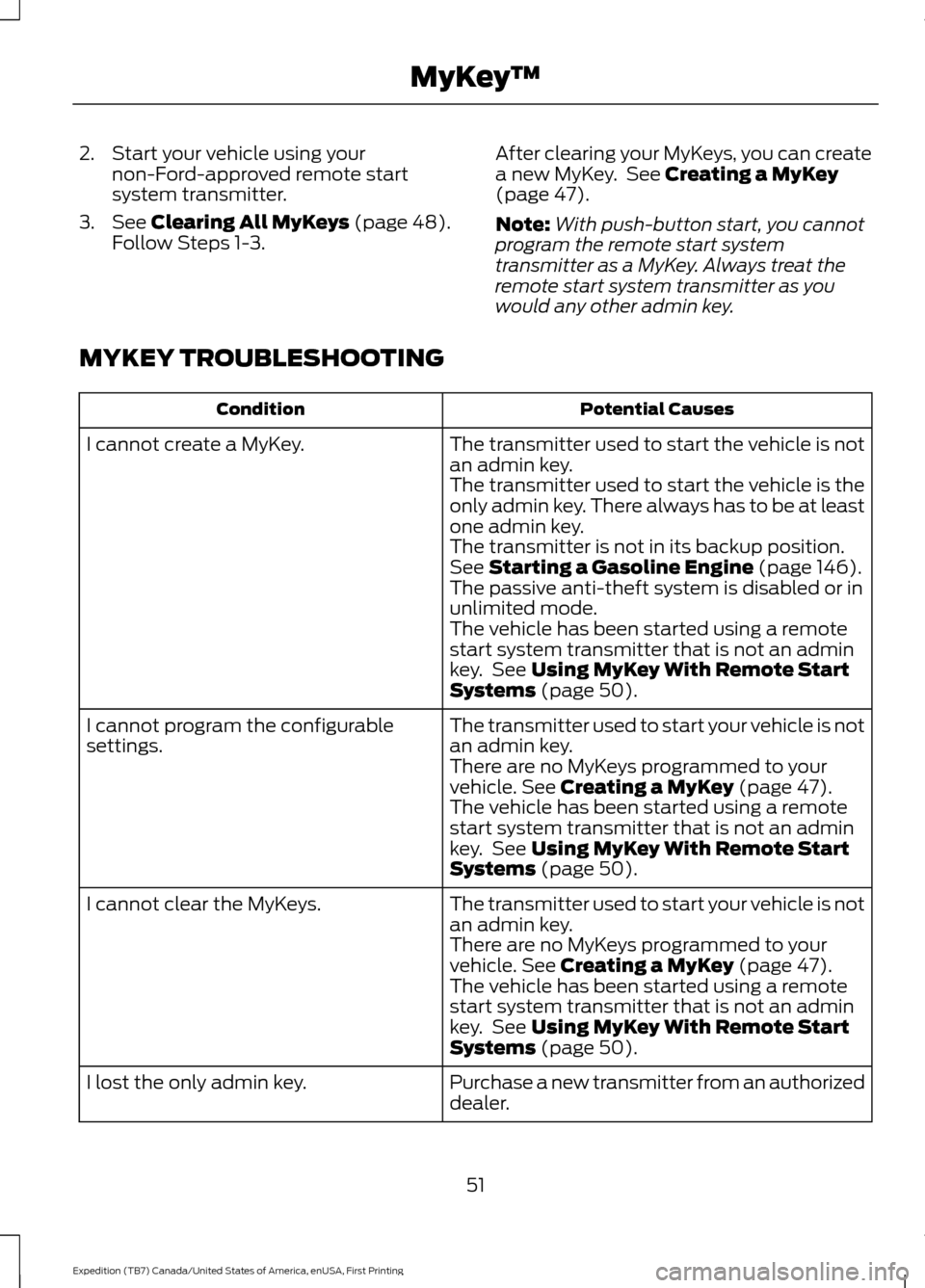
MYKEY TROUBLESHOOTING Potential Causes
Condition
The transmitter used to start the vehicle is not
an admin key.
I cannot create a MyKey.
The transmitter used to start the vehicle is the
only admin key. There always has to be at least
one admin key.
The transmitter is not in its backup position.
See
Starting a Gasoline Engine (page 146).
The passive anti-theft system is disabled or in
unlimited mode.
The vehicle has been started using a remote
start system transmitter that is not an admin
key. See
Using MyKey With Remote Start
Systems (page 50).
The transmitter used to start your vehicle is not
an admin key.
I cannot program the configurable
settings.
There are no MyKeys programmed to your
vehicle.
See Creating a MyKey (page 47).
The vehicle has been started using a remote
start system transmitter that is not an admin
key. See
Using MyKey With Remote Start
Systems (page 50).
The transmitter used to start your vehicle is not
an admin key.
I cannot clear the MyKeys.
There are no MyKeys programmed to your
vehicle.
See Creating a MyKey (page 47).
The vehicle has been started using a remote
start system transmitter that is not an admin
key. See
Using MyKey With Remote Start
Systems (page 50).
Purchase a new transmitter from an authorized
dealer.
I lost the only admin key.
51
Expedition (TB7) Canada/United States of America, enUSA, First Printing MyKey
™
Page 55 of 421
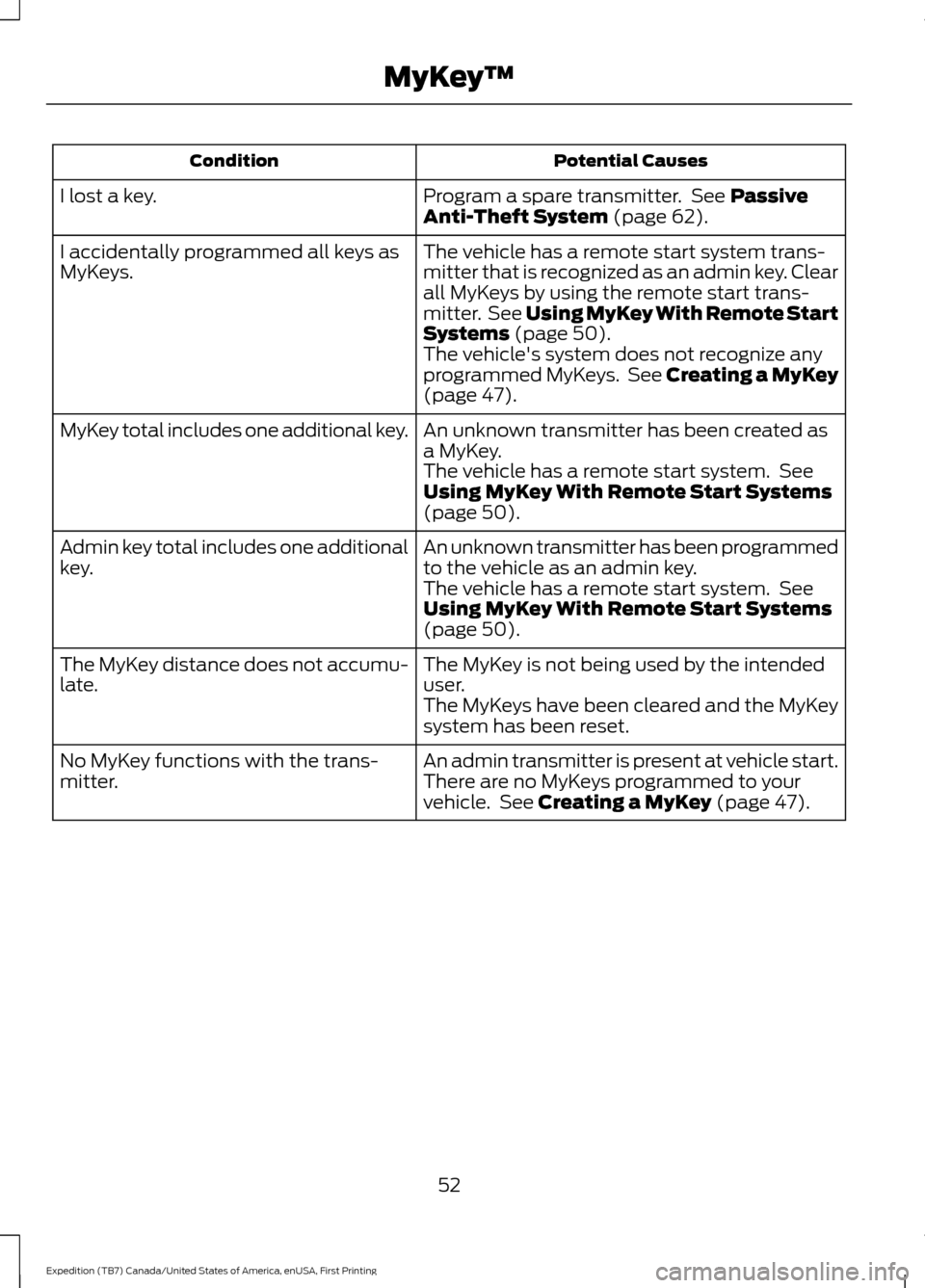
Potential Causes
Condition
Program a spare transmitter. See Passive
Anti-Theft System (page 62).
I lost a key.
The vehicle has a remote start system trans-
mitter that is recognized as an admin key. Clear
all MyKeys by using the remote start trans-
mitter. See
Using MyKey With Remote Start
Systems (page 50).
I accidentally programmed all keys as
MyKeys.
The vehicle's system does not recognize any
programmed MyKeys. See Creating a MyKey
(page
47).
An unknown transmitter has been created as
a MyKey.
MyKey total includes one additional key.
The vehicle has a remote start system. See
Using MyKey With Remote Start Systems
(page
50).
An unknown transmitter has been programmed
to the vehicle as an admin key.
Admin key total includes one additional
key.
The vehicle has a remote start system. See
Using MyKey With Remote Start Systems
(page
50).
The MyKey is not being used by the intended
user.
The MyKey distance does not accumu-
late.
The MyKeys have been cleared and the MyKey
system has been reset.
An admin transmitter is present at vehicle start.
No MyKey functions with the trans-
mitter. There are no MyKeys programmed to your
vehicle. See
Creating a MyKey (page 47).
52
Expedition (TB7) Canada/United States of America, enUSA, First Printing MyKey
™
Page 56 of 421
LOCKING AND UNLOCKING
You can use the power door lock control
or the remote control to lock and unlock
your vehicle.
Power Door Locks
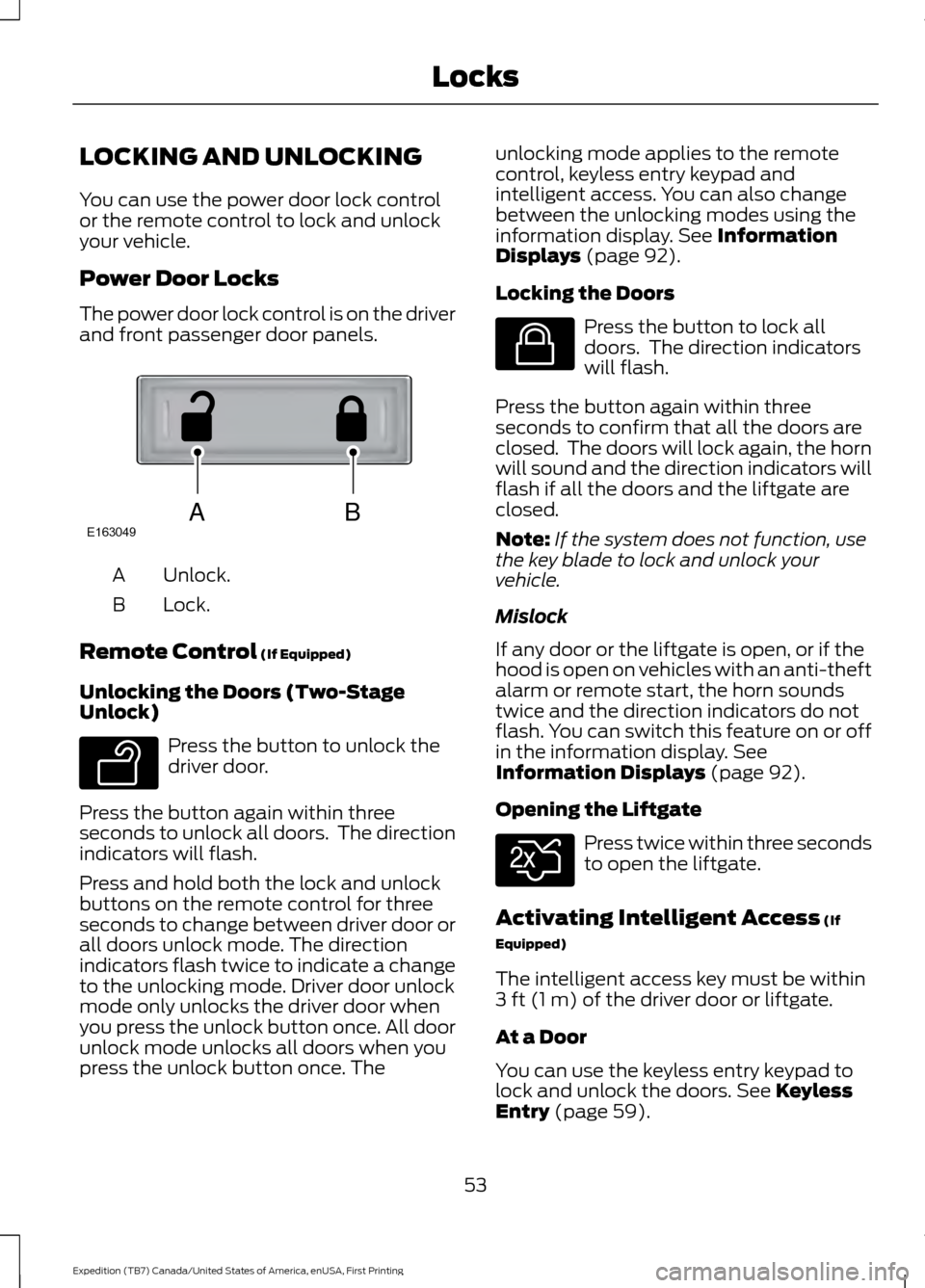
The power door lock control is on the driver
and front passenger door panels.
Unlock.
A
Lock.
B
Remote Control (If Equipped)
Unlocking the Doors (Two-Stage
Unlock) Press the button to unlock the
driver door.
Press the button again within three
seconds to unlock all doors. The direction
indicators will flash.
Press and hold both the lock and unlock
buttons on the remote control for three
seconds to change between driver door or
all doors unlock mode. The direction
indicators flash twice to indicate a change
to the unlocking mode. Driver door unlock
mode only unlocks the driver door when
you press the unlock button once. All door
unlock mode unlocks all doors when you
press the unlock button once. The unlocking mode applies to the remote
control, keyless entry keypad and
intelligent access. You can also change
between the unlocking modes using the
information display.
See Information
Displays (page 92).
Locking the Doors Press the button to lock all
doors. The direction indicators
will flash.
Press the button again within three
seconds to confirm that all the doors are
closed. The doors will lock again, the horn
will sound and the direction indicators will
flash if all the doors and the liftgate are
closed.
Note: If the system does not function, use
the key blade to lock and unlock your
vehicle.
Mislock
If any door or the liftgate is open, or if the
hood is open on vehicles with an anti-theft
alarm or remote start, the horn sounds
twice and the direction indicators do not
flash. You can switch this feature on or off
in the information display.
See
Information Displays (page 92).
Opening the Liftgate Press twice within three seconds
to open the liftgate.
Activating Intelligent Access
(If
Equipped)
The intelligent access key must be within
3 ft (1 m)
of the driver door or liftgate.
At a Door
You can use the keyless entry keypad to
lock and unlock the doors.
See Keyless
Entry (page 59).
53
Expedition (TB7) Canada/United States of America, enUSA, First Printing LocksABE163049 E138629 E138623 E138630
Page 57 of 421
At the Liftgate
The liftgate unlocks and opens
automatically when you press the liftgate
release button.
Smart Unlocks for Integrated
Keyhead Transmitter (If Equipped)
This helps to prevent you from locking
yourself out of your vehicle if the key is still
in the ignition.
When you open one of the front doors and
lock your vehicle with the power door lock
control, all the doors will lock then unlock
and the horn will sound twice if the key is
still in the ignition.
Your can still lock your vehicle with the key
in the ignition by:
• Using the manual lock on the door.
• Locking the driver door with a key.
• Using the keyless entry keypad.
• Pressing the lock button on another
remote control.
Smart Unlocks for Intelligent
Access Keys
(If Equipped)
This helps to prevent you from locking your
key inside the passenger compartment or
rear cargo area.
When you electronically lock your vehicle
with any door open, the transmission is in
park (P) and the ignition is off, the system
searches for an intelligent access key
inside your vehicle after you close the last
door. If the system finds a key, all of the
doors will immediately unlock and the horn
will sound twice, indicating that a key is
inside.
You can override the smart unlock feature
and intentionally lock the intelligent access
key inside your vehicle. To do this, lock your vehicle after you have
closed all the doors by:
•
Using the keyless entry keypad.
• Pressing the lock button on another
intelligent access key.
When you open one of the front doors and
lock your vehicle using the power door lock
control, all doors will lock then unlock if:
• The ignition is on.
• The ignition is off and the transmission
is not in park (P).
Auto Relock
If you press the unlock button on the
remote control and do not open a door
within 45 seconds, your vehicle will lock
and the alarm will arm. You can switch this
feature on or off in the information display.
See
Information Displays (page 92).
Autolock
Autolock locks all the doors when all of the
following occur:
• All doors are closed.
• The ignition is on.
• You shift into any gear putting your
vehicle in motion.
• Your vehicle's speed is greater than
12 mph (20 km/h)
.
Autolock repeats when:
• You open then close any door while the
ignition is on and your vehicle's speed
is less than
9 mph (15 km/h).
• Your vehicle's speed is greater than
12 mph (20 km/h)
.
Enabling or Disabling
To enable or disable the autolock feature,
contact an authorized dealer.
54
Expedition (TB7) Canada/United States of America, enUSA, First Printing Locks
Page 58 of 421
Autounlock
Autounlock unlocks all the doors when all
of the following occur:
•
The ignition is on, all the doors are
closed, and your vehicle has been
moving at a speed greater than 12 mph
(20 km/h).
• You stop your vehicle and switch the
ignition off or to accessory.
• You open the driver door within 10
minutes of switching the ignition off or
to accessory.
Note: The doors do not autounlock if you
electronically lock your vehicle after you
switch the ignition off and before you open
the driver door.
Enabling or Disabling
You can enable or disable the autounlock
feature in the information display or an
authorized dealer can do it for you.
See
General Information (page 92).
Illuminated Entry
The interior lamps and some exterior
lamps illuminate when you unlock the
doors with the remote control.
The lamps turn off if:
• The ignition is on.
• You press the remote control lock
button.
• 25 seconds have elapsed.
The lamps do not turn off if:
• You turn them on with the lamp
control.
• Any door is open.
Illuminated Exit
The interior lamps and some exterior
lamps illuminate when all doors are closed
and you switch the ignition off. The lamps will turn off if all the doors
remain closed and:
•
25 seconds have elapsed.
• You press the push button ignition
switch.
Battery Saver
If you leave the courtesy lamps, interior
lamps or headlamps on, the battery saver
shuts them off 10 minutes after you switch
the ignition off.
Battery Saver for Intelligent Access
Keys (If Equipped)
If you leave the ignition switched on, it
shuts off when it detects a certain amount
of battery drain, or after 45 minutes.
MANUAL LIFTGATE
(If Equipped) WARNINGS
It is extremely dangerous to ride in a
cargo area, inside or outside of your
vehicle. In a crash, people riding in
these areas are more likely to be seriously
injured or killed. Do not allow people to ride
in any area of your vehicle that is not
equipped with seats and safety belts. Make
sure everyone in your vehicle is in a seat
and properly using a safety belt. Failure to
follow this warning could result in serious
personal injury or death. Make sure to close and latch the
liftgate to prevent drawing exhaust
fumes into your vehicle. This will also
prevent passengers and cargo from falling
out. If you must drive with the liftgate open,
keep the vents or windows open so outside
air comes into your vehicle. Failure to
follow this warning could result in serious
personal injury. 55
Expedition (TB7) Canada/United States of America, enUSA, First Printing Locks
Page 60 of 421
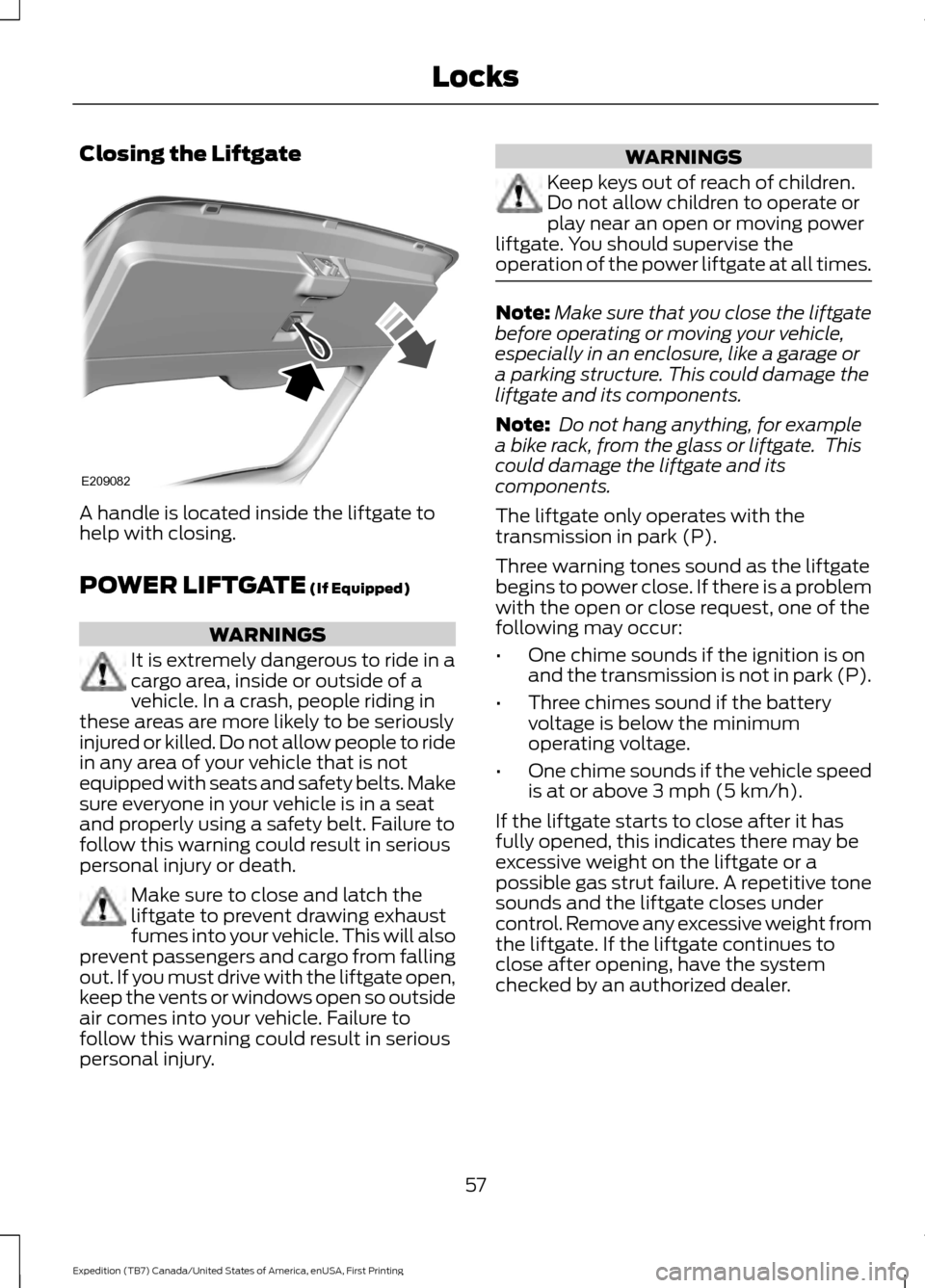
Closing the Liftgate
A handle is located inside the liftgate to
help with closing.
POWER LIFTGATE (If Equipped)
WARNINGS
It is extremely dangerous to ride in a
cargo area, inside or outside of a
vehicle. In a crash, people riding in
these areas are more likely to be seriously
injured or killed. Do not allow people to ride
in any area of your vehicle that is not
equipped with seats and safety belts. Make
sure everyone in your vehicle is in a seat
and properly using a safety belt. Failure to
follow this warning could result in serious
personal injury or death. Make sure to close and latch the
liftgate to prevent drawing exhaust
fumes into your vehicle. This will also
prevent passengers and cargo from falling
out. If you must drive with the liftgate open,
keep the vents or windows open so outside
air comes into your vehicle. Failure to
follow this warning could result in serious
personal injury. WARNINGS
Keep keys out of reach of children.
Do not allow children to operate or
play near an open or moving power
liftgate. You should supervise the
operation of the power liftgate at all times. Note:
Make sure that you close the liftgate
before operating or moving your vehicle,
especially in an enclosure, like a garage or
a parking structure. This could damage the
liftgate and its components.
Note: Do not hang anything, for example
a bike rack, from the glass or liftgate. This
could damage the liftgate and its
components.
The liftgate only operates with the
transmission in park (P).
Three warning tones sound as the liftgate
begins to power close. If there is a problem
with the open or close request, one of the
following may occur:
• One chime sounds if the ignition is on
and the transmission is not in park (P).
• Three chimes sound if the battery
voltage is below the minimum
operating voltage.
• One chime sounds if the vehicle speed
is at or above
3 mph (5 km/h).
If the liftgate starts to close after it has
fully opened, this indicates there may be
excessive weight on the liftgate or a
possible gas strut failure. A repetitive tone
sounds and the liftgate closes under
control. Remove any excessive weight from
the liftgate. If the liftgate continues to
close after opening, have the system
checked by an authorized dealer.
57
Expedition (TB7) Canada/United States of America, enUSA, First Printing LocksE209082
Page 61 of 421
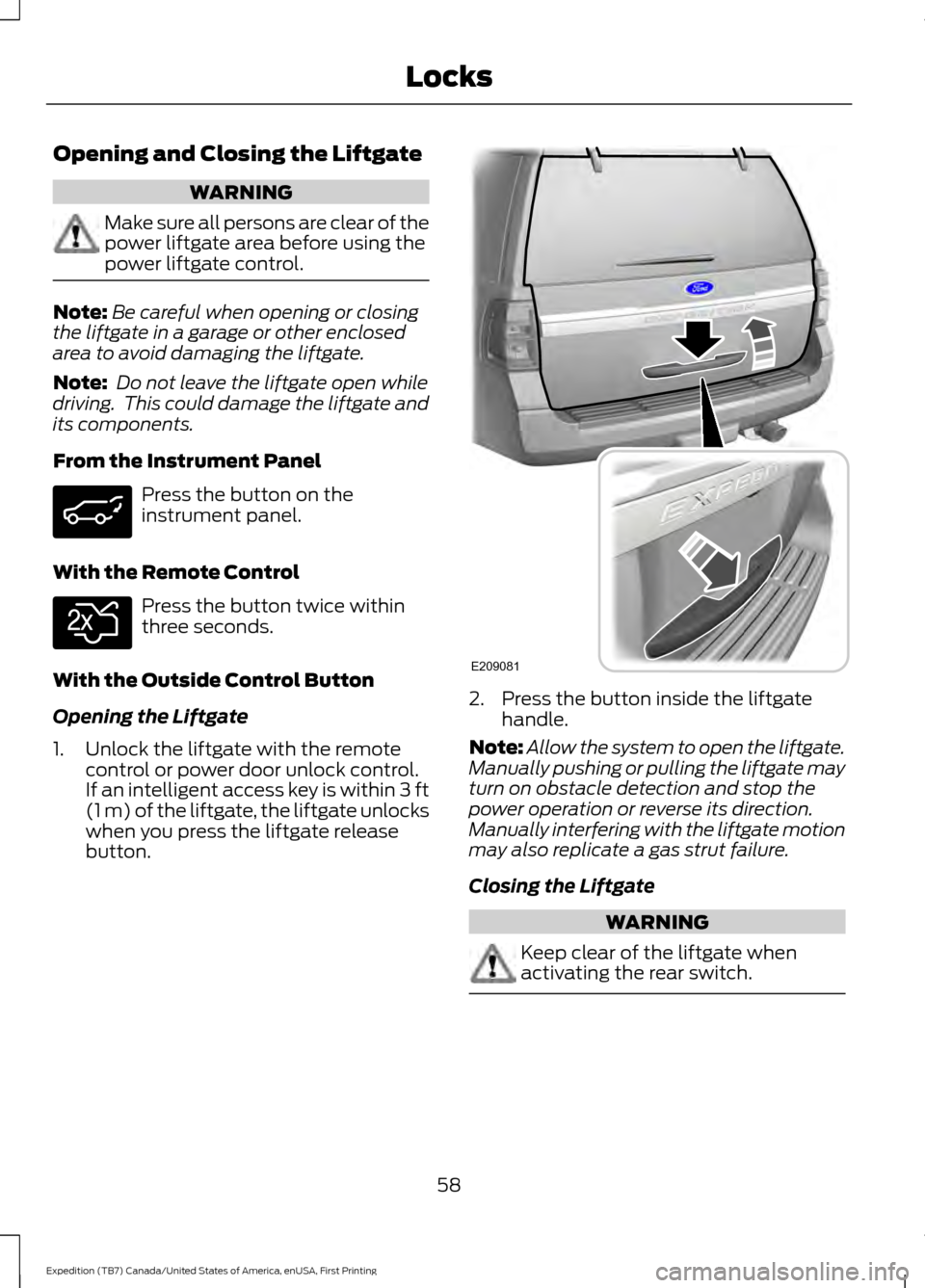
Opening and Closing the Liftgate
WARNING
Make sure all persons are clear of the
power liftgate area before using the
power liftgate control.
Note:
Be careful when opening or closing
the liftgate in a garage or other enclosed
area to avoid damaging the liftgate.
Note: Do not leave the liftgate open while
driving. This could damage the liftgate and
its components.
From the Instrument Panel Press the button on the
instrument panel.
With the Remote Control Press the button twice within
three seconds.
With the Outside Control Button
Opening the Liftgate
1. Unlock the liftgate with the remote control or power door unlock control.
If an intelligent access key is within 3 ft
(1 m) of the liftgate, the liftgate unlocks
when you press the liftgate release
button. 2. Press the button inside the liftgate
handle.
Note: Allow the system to open the liftgate.
Manually pushing or pulling the liftgate may
turn on obstacle detection and stop the
power operation or reverse its direction.
Manually interfering with the liftgate motion
may also replicate a gas strut failure.
Closing the Liftgate WARNING
Keep clear of the liftgate when
activating the rear switch.
58
Expedition (TB7) Canada/United States of America, enUSA, First Printing Locks E138630 E209081
Page 62 of 421
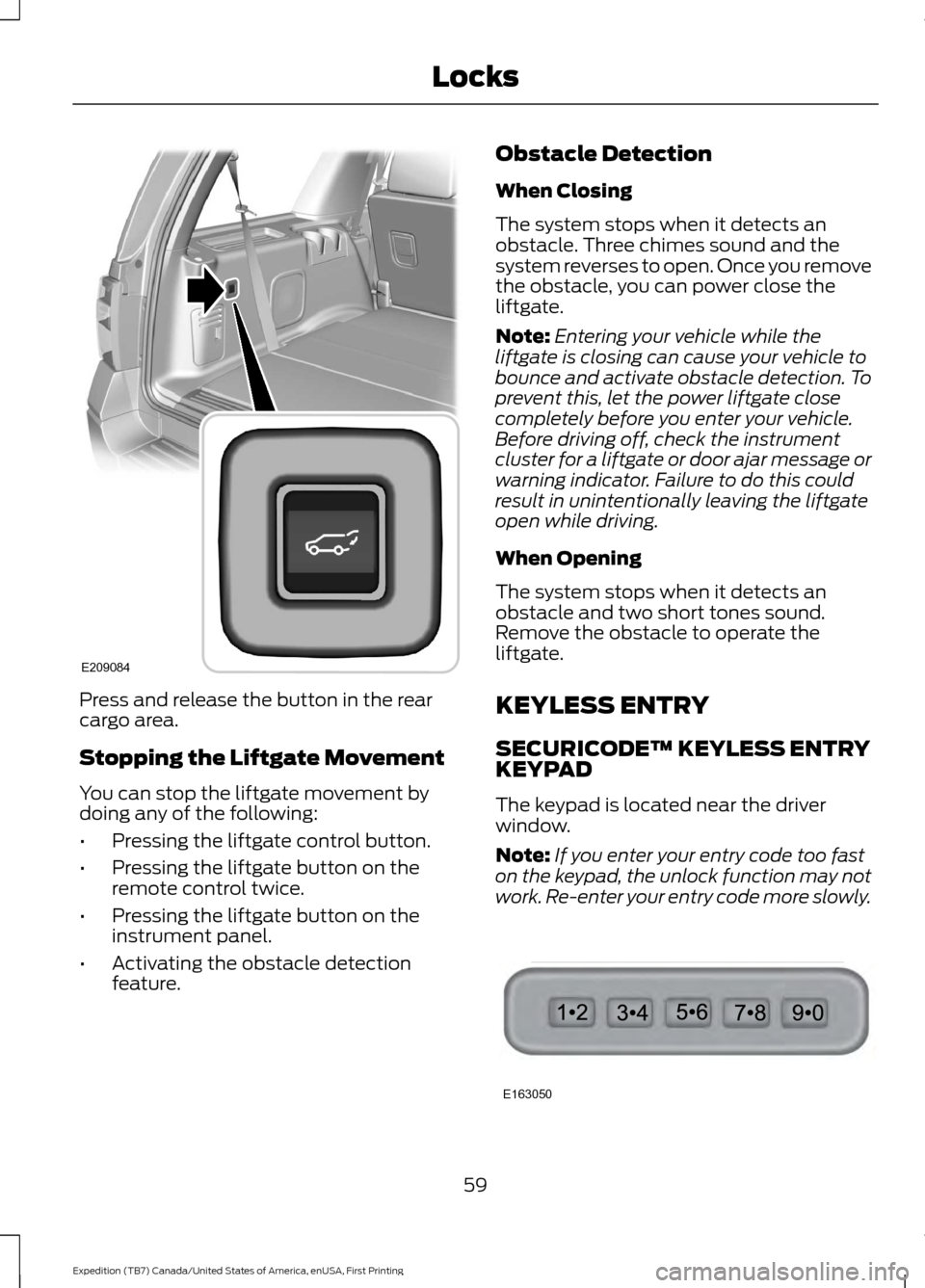
Press and release the button in the rear
cargo area.
Stopping the Liftgate Movement
You can stop the liftgate movement by
doing any of the following:
•
Pressing the liftgate control button.
• Pressing the liftgate button on the
remote control twice.
• Pressing the liftgate button on the
instrument panel.
• Activating the obstacle detection
feature. Obstacle Detection
When Closing
The system stops when it detects an
obstacle. Three chimes sound and the
system reverses to open. Once you remove
the obstacle, you can power close the
liftgate.
Note:
Entering your vehicle while the
liftgate is closing can cause your vehicle to
bounce and activate obstacle detection. To
prevent this, let the power liftgate close
completely before you enter your vehicle.
Before driving off, check the instrument
cluster for a liftgate or door ajar message or
warning indicator. Failure to do this could
result in unintentionally leaving the liftgate
open while driving.
When Opening
The system stops when it detects an
obstacle and two short tones sound.
Remove the obstacle to operate the
liftgate.
KEYLESS ENTRY
SECURICODE™ KEYLESS ENTRY
KEYPAD
The keypad is located near the driver
window.
Note: If you enter your entry code too fast
on the keypad, the unlock function may not
work. Re-enter your entry code more slowly. 59
Expedition (TB7) Canada/United States of America, enUSA, First Printing LocksE209084 E163050