display FORD EXPEDITION 2023 Owners Manual
[x] Cancel search | Manufacturer: FORD, Model Year: 2023, Model line: EXPEDITION, Model: FORD EXPEDITION 2023Pages: 658, PDF Size: 16.16 MB
Page 388 of 658
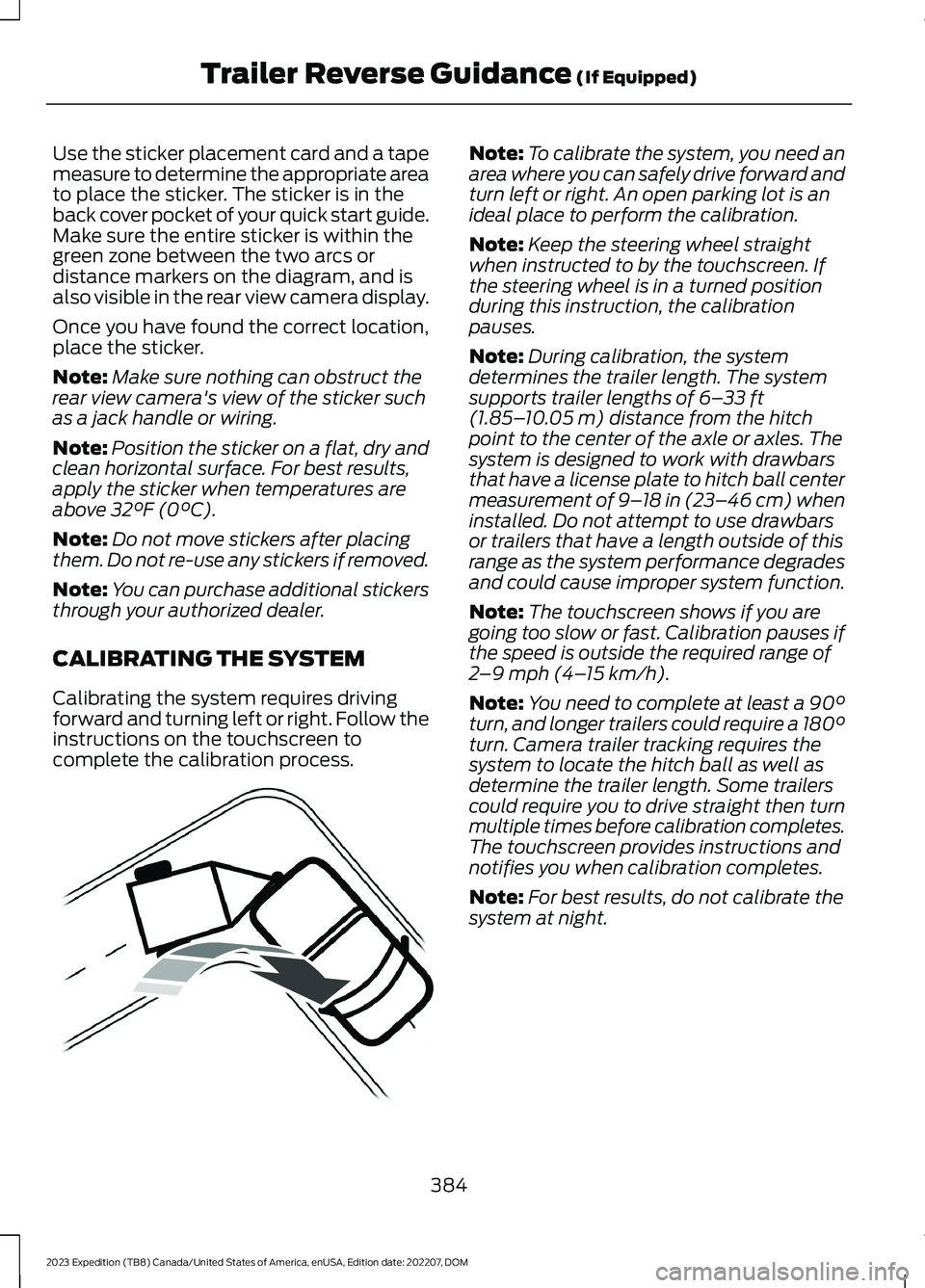
Use the sticker placement card and a tapemeasure to determine the appropriate areato place the sticker. The sticker is in theback cover pocket of your quick start guide.Make sure the entire sticker is within thegreen zone between the two arcs ordistance markers on the diagram, and isalso visible in the rear view camera display.
Once you have found the correct location,place the sticker.
Note:Make sure nothing can obstruct therear view camera's view of the sticker suchas a jack handle or wiring.
Note:Position the sticker on a flat, dry andclean horizontal surface. For best results,apply the sticker when temperatures areabove 32°F (0°C).
Note:Do not move stickers after placingthem. Do not re-use any stickers if removed.
Note:You can purchase additional stickersthrough your authorized dealer.
CALIBRATING THE SYSTEM
Calibrating the system requires drivingforward and turning left or right. Follow theinstructions on the touchscreen tocomplete the calibration process.
Note:To calibrate the system, you need anarea where you can safely drive forward andturn left or right. An open parking lot is anideal place to perform the calibration.
Note:Keep the steering wheel straightwhen instructed to by the touchscreen. Ifthe steering wheel is in a turned positionduring this instruction, the calibrationpauses.
Note:During calibration, the systemdetermines the trailer length. The systemsupports trailer lengths of 6–33 ft(1.85–10.05 m) distance from the hitchpoint to the center of the axle or axles. Thesystem is designed to work with drawbarsthat have a license plate to hitch ball centermeasurement of 9–18 in (23–46 cm) wheninstalled. Do not attempt to use drawbarsor trailers that have a length outside of thisrange as the system performance degradesand could cause improper system function.
Note:The touchscreen shows if you aregoing too slow or fast. Calibration pauses ifthe speed is outside the required range of2–9 mph (4–15 km/h).
Note:You need to complete at least a 90°turn, and longer trailers could require a 180°turn. Camera trailer tracking requires thesystem to locate the hitch ball as well asdetermine the trailer length. Some trailerscould require you to drive straight then turnmultiple times before calibration completes.The touchscreen provides instructions andnotifies you when calibration completes.
Note:For best results, do not calibrate thesystem at night.
384
2023 Expedition (TB8) Canada/United States of America, enUSA, Edition date: 202207, DOMTrailer Reverse Guidance (If Equipped)E352329
Page 390 of 658
TRAILER REVERSE GUIDANCE – TROUBLESHOOTING
TRAILER REVERSE GUIDANCE – INFORMATION MESSAGES
DescriptionMessage
Displays when the system turns on and isinitializing.Detecting Trailer Please Wait…
A condition exists that prevents the systemfrom turning on. If the message continuesto display, visit your authorized dealer tohave your vehicle checked.
Trailer Reverse Guidance System is NotAvailable
The steering system needs to learn internalparameters to fully enable the feature.Drive your vehicle straight forward above25 mph (40 km/h) for approximately 5minutes.
Trailer Reverse Guidance Driving Requiredto Initialize Steering Press OK to Exit
Displays when you exceed the maximumcontrollable trailer angle for the system.Place your vehicle in drive (D) and pullforward to get your vehicle and trailer backto an in-line position, then activate thesystem by selecting the connected trailerand following the instructions on thetouchscreen.
Stop now. Deactivated by trailer angle.
If this message consistently displays, youmay need to repeat the trailer setup andcalibration. Delete the trailer from thesystem and repeat the setup and calibra-tion process.
Displays when the system does not detectthe trailer. Check that the sticker is correctlyapplied and the trailer length is within theallowed range. You can also move thetrailer forward or backward to change thetrailer position and lighting conditions.
Trailer Reverse Guidance Trailer NotDetected. Refer to Owner's Manual. PressOK to Exit
If these messages continue to display, visityour authorized dealer to have your vehiclechecked.
386
2023 Expedition (TB8) Canada/United States of America, enUSA, Edition date: 202207, DOMTrailer Reverse Guidance (If Equipped)
Page 391 of 658
DescriptionMessage
Displays when your vehicle has not movedafter switching on the system or extendedoperation below 1 mph (1 km/h). Driveforward above 2 mph (3 km/h) to initializethe system.
Trailer Reverse Guidance Trailer NotDetected Pull Forward to Initialize PressOK to Exit
387
2023 Expedition (TB8) Canada/United States of America, enUSA, Edition date: 202207, DOMTrailer Reverse Guidance (If Equipped)
Page 392 of 658
TRAILER REVERSE GUIDANCE –FREQUENTLY ASKED QUESTIONS
What does it mean if the systemremains on one message for anextended time during calibration?
The camera could need to be cleaned,the sticker could be blocked, thedrawbar could be outside the allowedrange of 9–18 in (23–46 cm) or youcould need to move to a different areato change the lighting and background.Verify the sticker is in the properlocation. See Applying the TrailerReverse Aid Sticker (page 383). Youcan move to a different area or changethe direction you are driving or setupthe system at a different time of day.Some trailers are not compatible withthe sticker and camera system.
What does it mean if the system pausesduring calibration?
There could be steering input or trailermovement during the straight driveportion of the calibration process.
What does it mean if the systemdisplays hold steering steady duringturn?
Part of the calibration process for thesticker setup requires a steady turn. Ifyou are continually moving thesteering wheel during the turn, thisdelays the calibration process. Toenable the calibration process, holdthe steering wheel at the sameposition when turning.
What does it mean if the systemdisplays that it is not available?
There could be a sub-system that thesystem uses that is not correctlyoperating or there could be a batteryvoltage issue. If the system continuesto display it is not available, visit yourauthorized dealer to have your vehiclechecked.
What does it mean if the systemdisplays that driving is required toinitialize steering?
The steering system needs to learninternal parameters to fully turn on thefeature. Drive your vehicle straightforward above 25 mph (40 km/h) forapproximately 5 minutes. This couldalso occur when your vehicle is new,there is a battery voltage issue or if thesteering system has been serviced.
What does it mean if the system doesnot detect a trailer?
The system requires a clear view of thesticker placed on the trailer. You mustkeep the camera lens and sticker cleanfor the system to correctly operate. Ifthe system cannot initially detect thetrailer, it could be necessary for you tochange the lighting conditions bymoving your vehicle and trailer orwaiting until the conditions change.See Applying the Trailer ReverseAid Sticker (page 383). Some trailersare not compatible with the stickerand camera system.
Note:The system is designed to be usedwith the same trailer connection every timeyou choose the trailer from the touchscreen.When using a different drawbar or adifferent pin hole on drawbars with morethan one, connecting the drawbar to yourvehicle affects the trailer position and youmay need to repeat the trailer setup andcalibration process.
388
2023 Expedition (TB8) Canada/United States of America, enUSA, Edition date: 202207, DOMTrailer Reverse Guidance (If Equipped)
Page 395 of 658
Note:If your vehicle gets stuck driving onhilly or sloping terrain, it could be rocked outby shifting between forward and reversegears, stopping between shifts in a steadypattern. Press lightly on the accelerator ineach gear.
Note:Do not rock your vehicle if the engineis not at normal operating temperature, asdamage to the transmission could occur.
Note:Do not rock your vehicle for morethan a minute, as damage to thetransmission and tires could occur or theengine could overheat.
DRIVING IN SAND
When driving over sand, try to keep all fourwheels on the most solid area of the trail.Steadily drive through the terrain. Applythe accelerator slowly and avoid excessivewheel slip. Do not drive your vehicle indeep sand for an extended period of time.This could overheat the system. Amessage appears in the instrument clusterdisplay.
Note:If your vehicle gets stuck driving onhilly or sloping terrain, it could be rocked outby shifting between forward and reversegears, stopping between shifts in a steadypattern. Press lightly on the accelerator ineach gear.
Note:Do not rock your vehicle if the engineis not at normal operating temperature, asdamage to the transmission could occur.
Note:Do not rock your vehicle for morethan a minute, as damage to thetransmission and tires could occur or theengine could overheat
DRIVING THROUGH SHALLOW
WATER
WARNING: Do not attempt tocross a deep or flowing body of water.Failure to follow this instruction couldresult in the loss of control of yourvehicle, personal injury or death.
Note:Driving through standing water cancause vehicle damage.
Note:Engine damage can occur if waterenters the air filter.
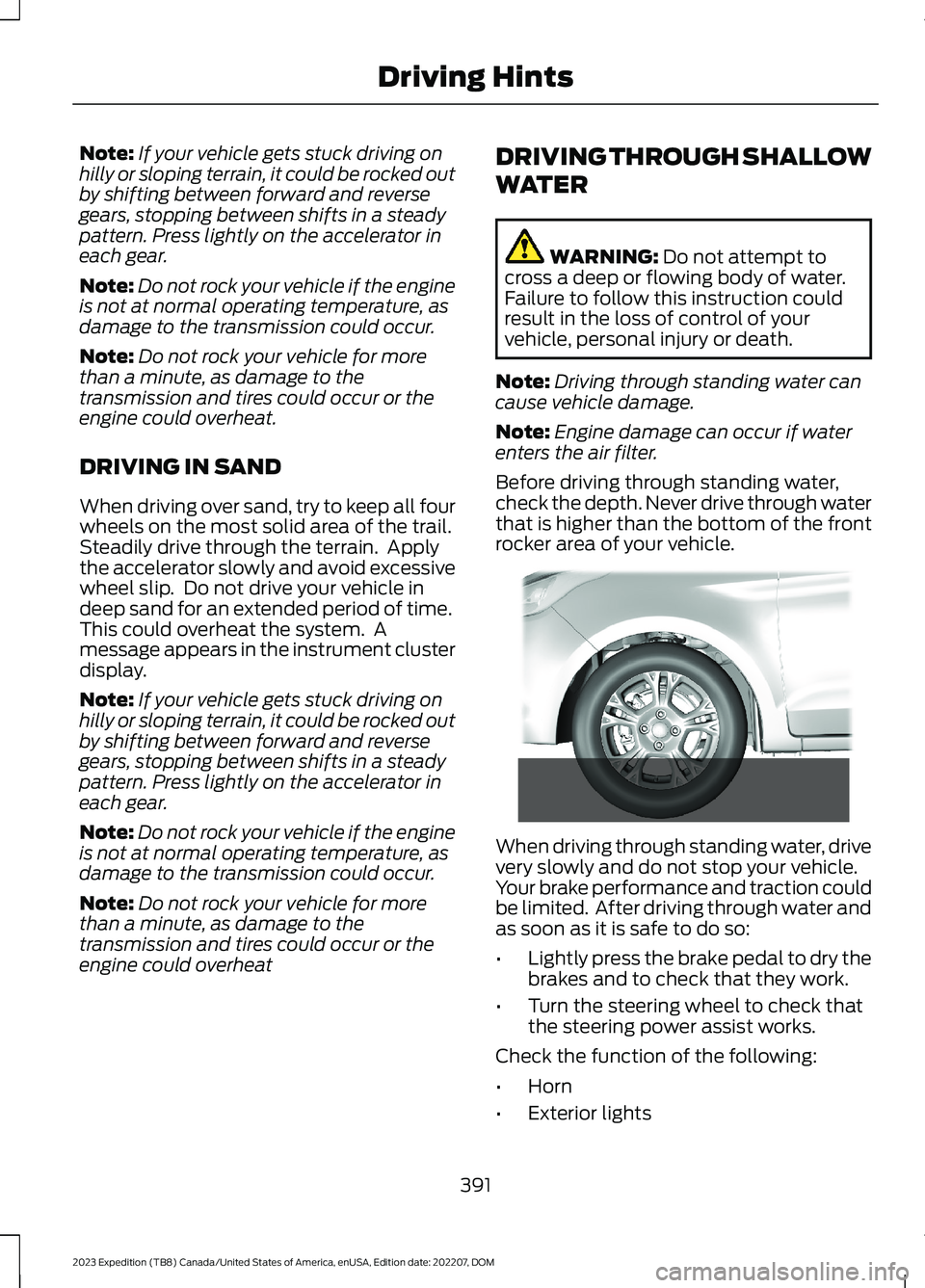
Before driving through standing water,check the depth. Never drive through waterthat is higher than the bottom of the frontrocker area of your vehicle.
When driving through standing water, drivevery slowly and do not stop your vehicle.Your brake performance and traction couldbe limited. After driving through water andas soon as it is safe to do so:
•Lightly press the brake pedal to dry thebrakes and to check that they work.
•Turn the steering wheel to check thatthe steering power assist works.
Check the function of the following:
•Horn
•Exterior lights
391
2023 Expedition (TB8) Canada/United States of America, enUSA, Edition date: 202207, DOMDriving Hints E266447
Page 404 of 658
TOWING YOUR VEHICLE
PRECAUTIONS
Use the following guidelines when towingyour vehicle. Failure to follow thisinstruction could result in vehicle damagenot covered by the vehicle warranty.
Note:Make sure you properly secure yourvehicle to the tow vehicle.
Note:If you are unsure of the vehicle’sconfiguration, contact an authorized dealer.
RECREATIONALLY TOWING
YOUR VEHICLE - 4X4
WARNING: Do not disconnect thebattery when recreationally towing yourvehicle. This prevents the transfer casefrom shifting properly and could causethe vehicle to roll, even if thetransmission is in park (P).
WARNING: Placing the transfercase in its neutral position could causeyour vehicle to freely roll. Make sure youpress and hold the brake pedal and thevehicle is in a secure, safe position whenyou place the transfer case in its neutralposition.
Follow these guidelines if you have a needfor recreational towing. An example ofrecreational towing would be towing yourvehicle behind a motorhome. Theseguidelines are to make sure that you donot damage the transmission.
You can only tow your vehicle with allwheels on the ground by placing thetransfer case in its neutral position andengaging the recreational tow feature.Perform the following steps afterpositioning your vehicle behind the towvehicle and properly securing themtogether.
Note:Put your climate control system inrecirculated air mode to prevent exhaustfumes from entering your vehicle.
Note:Failure to put the transfer case in itsneutral position can damage vehiclecomponents.
Note: You can check the towing status atany time by opening the driver door orturning the ignition to the accessory or onposition.Neutral Tow Enabled LeaveTransmission in Neutral appears in theinstrument cluster display to confirm youcan recreationally tow your vehicle.
Note:If your vehicle has an anti-theftalarm, make sure you switch perimetersensing on when towing. See Setting theAlarm Security Level (page 101).
Switching Neutral Tow On
1.Start your vehicle.
2.Press the 2H button on the four-wheeldrive mode control.
3.Place your vehicle in temporary neutralmode. See Entering TemporaryNeutral Mode (page 217).
4.Switch your vehicle off by pressing thepush button ignition switch once orturning the key as far toward the offposition as possible. A messageappears in the instrument clusterdisplay.
5.Switch your vehicle to accessory modeby pressing the push button ignitionswitch once without pressing the brakepedal or by turning the key to the onposition.
400
2023 Expedition (TB8) Canada/United States of America, enUSA, Edition date: 202207, DOMTowing Your Vehicle
Page 405 of 658
6.Press and hold the brake pedal.
7.Using the instrument cluster controlson the steering wheel, select Settings.
8.Select Neutral Tow.
9.Press and hold the OK button until aconfirmation message appears in theinformation display.
Note: If completed successfully, theinformation display shows Neutral TowEnabled Leave Transmission in Neutral.This indicates that your vehicle is safe totow with all wheels on the ground.
Note:If you do not see a confirmationmessage in the instrument cluster display,you must perform the procedure again fromthe beginning.
Note:You may hear noise as the transfercase shifts into its neutral position. This isnormal.
10.Release the brake pedal.
11.Leave the transmission in neutral (N)and switch your vehicle off bypressing the push button ignitionswitch once without pressing thebrake pedal or turning the key as fartoward the off position.
Note:Vehicles with keys do not turn to theoff position when the transmission is inneutral (N). You must leave the key in theignition when towing. Use the keyless entrykeypad or an extra set of keys to lock andunlock your vehicle.
Switching Neutral Tow Off
1.With your vehicle properly secured tothe tow vehicle, press and hold thebrake pedal and start the engine.
2.Switch your vehicle off by pressing thepush button ignition switch once orturning the key as far towards the offposition and release the brake pedal.
3.Place your vehicle in accessory modeby pressing the push button ignitionswitch once without pressing the brakepedal or by turning the ignition key tothe on position.
4.Press and hold the brake pedal.
5.Shift into park (P).
6.Release the brake pedal.
Note:If completed successfully, theinstrument cluster displays 2H and NeutralTow Disabled.
Note:You must perform the switchingneutral tow on and switching neutral towoff procedures again from the beginning ifthe indicator light and message do notdisplay.
Note:You may hear a noise as the transfercase shifts out of its neutral position. Thisis normal.
7.Apply the parking brake, thendisconnect your vehicle from the towvehicle.
8.Release the parking brake, start theengine, and shift into drive (D) to makesure the transfer case is out of theneutral tow position.
9.If the transfer case does notsuccessfully shift out of its neutralposition, set the parking brake. Haveyour vehicle checked as soon aspossible.
Resolving the Shift Delayed DriveForward Message
1.Press and hold the brake pedal.
2.Start your vehicle.
3.Shift into neutral (N).
4.With the vehicle running, shift into drive(D) and let the vehicle roll forward upto 3 ft (1 m).
401
2023 Expedition (TB8) Canada/United States of America, enUSA, Edition date: 202207, DOMTowing Your Vehicle
Page 406 of 658
Note:You may hear a noise as the transfercase shifts out of its neutral position. Thisis normal.
5.Make sure the instrument clusterdisplays Neutral Tow Disabled.
RECREATIONALLY TOWING
YOUR VEHICLE - 4X2
You cannot recreational tow your vehiclewith all wheels on the ground becausevehicle or transmission damage couldoccur. You must recreational tow yourvehicle with all four wheels off the ground,such as when using a car-hauling trailer.Otherwise, you cannot recreational towyour vehicle.
EMERGENCY TOWING
If your vehicle becomes inoperable withoutaccess to wheel dollies or a vehicletransport trailer, it can be flat-towed withall wheels on the ground, regardless of thepowertrain and transmission configuration,under the following conditions:
•Your vehicle is facing forward fortowing in a forward direction.
•Use the manual park releaseprocedure. See Manually Releasingthe Electric Parking Brake (page 232).Failure to do so may result in damageto the transmission.
•Maximum speed is 35 mph (56 km/h).
•Maximum distance is 50 mi (80 km).
TOWING YOUR VEHICLE – TROUBLESHOOTING
TOWING YOUR VEHICLE – INFORMATION MESSAGES
DescriptionMessage
The transfer case is in the neutral position and your vehicleis safe to tow with all four wheels on the ground.Neutral Tow EnabledLeave Transmission inNeutral
There is a transfer case gear tooth blockage present. Withyour vehicle on, shift the transmission into drive (D) and letthe vehicle roll forward, up to 3 ft (1 m).
Shift Delayed DriveForward
The transfer case is not in the neutral position and your vehicleis not safe to tow with all four wheels on the ground.Neutral Tow Disabled
402
2023 Expedition (TB8) Canada/United States of America, enUSA, Edition date: 202207, DOMTowing Your Vehicle
Page 419 of 658
RESETTING THE INTELLIGENT OILLIFE MONITOR
Depending on your cluster, there are twopaths to reset the engine oil changereminder.
Path 1
1.Press the Menu button on the steeringwheel to enter the information displaymain menu.
2.Select Settings.
3.Select Vehicle Maintenance.
4.Select Oil Life.
5.Press and hold the OK button until thesystem reset confirmation appears.
Path 2
1.Press the Menu button on the steeringwheel to enter the information displaymain menu.
2.Select Truck Info.
3.Select Engine Information.
4.Press and hold the OK button until thesystem reset confirmation appears.
ENGINE OIL CAPACITY ANDSPECIFICATION
For filling information, please refer to theCapacities and Specifications section ofyour owner's manual. See Engine OilCapacity and Specification (page 465).
CHECKING THE COOLANT
When the engine is cold, check theconcentration and level of the coolant atthe intervals listed in the scheduledmaintenance information. See ScheduledMaintenance (page 539).
Note:Make sure that the coolant level isbetween the minimum and maximum markson the coolant reservoir.
Note: Coolant expands when it is hot. Thelevel may extend beyond the MAX mark.
If the coolant level is at or below theminimum mark, add prediluted coolantimmediately.
Maintain coolant concentration within48% to 50%, which equates to a freezepoint between -29°F (-34°C) and -35°F(-37°C). Coolant concentration should bechecked using a refractometer. We do notrecommend the use of hydrometers orcoolant test strips for measuring coolantconcentration.
Adding Coolant
WARNING: Keep your hands andclothing clear of the cooling fan.
WARNING: Do not remove thecoolant reservoir cap when the engine ison or the cooling system is hot. Wait 10minutes for the cooling system to cooldown. Cover the coolant reservoir capwith a thick cloth to prevent thepossibility of scalding and slowly removethe cap. Failure to follow this instructioncould result in personal injury.
WARNING: Do not add coolantwhen the vehicle is on or the coolingsystem is hot. Failure to follow thisinstruction could result in personal injury.
WARNING: Do not add coolantfurther than the MAX mark.
WARNING: Do not put coolant inthe windshield washer reservoir. Ifsprayed on the windshield, coolant couldmake it difficult to see through thewindshield.
415
2023 Expedition (TB8) Canada/United States of America, enUSA, Edition date: 202207, DOMMaintenance
Page 421 of 658
If you drive in extremely hot climates, youmay need to decrease the coolantconcentration to 40%.
Note:A coolant concentration of 40%provides improved overheat protection.Coolant concentrations below 40%decrease the overheat and corrosionprotection characteristics of the coolant andcould cause engine damage.
Coolant Change
WARNING: Do not dispose ofcoolant in the household refuse or thepublic sewage system. Use an authorizedwaste disposal facility.
Change the coolant at specific mileageintervals. Refer to the scheduledmaintenance information. See NormalScheduled Maintenance (page 542).
Note:Dispose of used coolant in theappropriate manner.
Follow your community's regulations andstandards for recycling and disposing ofautomotive fluids.
Fail-Safe Cooling
Fail-safe cooling allows you to temporarilydrive your vehicle before any incrementalcomponent damage occurs. The fail-safedistance depends on ambienttemperature, vehicle load and terrain.
How Fail-Safe Cooling Works
WARNING: If you continue to driveyour vehicle when the engine isoverheating, the engine could stopwithout warning. Failure to follow thisinstruction could result in the loss ofcontrol of your vehicle.
If the engine begins to overheat,the coolant temperature gaugemoves toward the red zone:
A warning lamp illuminates anda message may appear in theinformation display.
If the engine reaches a presetover-temperature condition, the engineautomatically switches to alternatingcylinder operation. Each disabled cylinderacts as an air pump and cools the engine.
When this occurs, your vehicle stilloperates, however:
•Engine power is limited.
•The air conditioning system turns off.
Continued operation increases the enginetemperature, causing the engine tocompletely shut down. Your steering andbraking effort increases in this situation.
When the engine temperature cools, youcan re-start the engine. Have your vehiclechecked as soon as possible to minimizeengine damage.
When Fail-Safe Mode Is Activated
WARNING: Fail-safe mode is foruse during emergencies only. Operateyour vehicle in fail-safe mode only aslong as necessary to bring your vehicleto rest in a safe location and seekimmediate repairs. When in fail-safemode, your vehicle will have limitedpower, will not be able to maintainhigh-speed operation, and maycompletely shut down without warning,potentially losing engine power, powersteering assist, and power brake assist,which may increase the possibility of acrash resulting in serious injury.
417
2023 Expedition (TB8) Canada/United States of America, enUSA, Edition date: 202207, DOMMaintenanceE103308 E67028