ESP FORD EXPEDITION 2023 User Guide
[x] Cancel search | Manufacturer: FORD, Model Year: 2023, Model line: EXPEDITION, Model: FORD EXPEDITION 2023Pages: 658, PDF Size: 16.16 MB
Page 79 of 658
WHAT IS MYKEY
MyKey allows you to program keys withrestricted driving modes to promote gooddriving habits.
You can program the restrictions to all keysexcept one. Any keys that you did notprogram are administrator keys or adminkeys.
Note:Every MyKey receives the samerestrictions and settings. You cannotprogram them individually.
MYKEY SETTINGS
NON-CONFIGURABLE MYKEYSETTINGS
Seatbelt Reminder or Belt-Minder™
MyKey mutes the audio system until thefront seat passengers buckle the front seatbelts.
Note:If your vehicle includes an AM/FMradio or a very basic audio system, the radiomay not mute.
Satellite Radio (If Equipped)
Some satellite radio channels haverestricted access to adult radio content.
Early Low Fuel
The low fuel level warning lamp turns onearlier.
Driving and Parking Aids
You cannot configure settings for parkingaids, blind spot information system, andcross traffic alert. These systems turn onwhen the vehicle turns on, and you cannotswitch them off with a MyKey.
You cannot configure settings forpre-collision assist and lane keeping. Thesesystems turn on when the vehicle turns on.
A new destination in the navigation systemcan only be set using voice commandswhen using a MyKey, and with your vehiclemoving.
Note:MyKey drivers may be able to switchthe lane keeping assist off, but this featureturns back on automatically with every newkey cycle.
CONFIGURABLE MYKEYSETTINGS
You can configure the following settingsafter creating a MyKey. See Creating aMyKey (page 76).
Speed Limit
WARNING: Do not set MyKeymaximum speed limit to a limit that willprevent the driver from maintaining asafe speed considering posted speedlimits and prevailing road conditions. Thedriver is always responsible to drive inaccordance with local laws andprevailing conditions. Failure to do socould result in accident or injury.
You can set a speed limit for your vehicle.Warning messages appear on thetouchscreen and a tone sounds if yourvehicle reaches the set speed. You cannotoverride the set speed when using a MyKey.
Speed Minder
You can set a speed reminder for yourvehicle. Warning messages appear on thetouchscreen and a tone sounds if yourvehicle exceeds the set speed.
75
2023 Expedition (TB8) Canada/United States of America, enUSA, Edition date: 202207, DOMMyKey™
Page 97 of 658
Note:Allow the power system to open theliftgate. Manually pushing or pulling theliftgate may activate the system’s obstacledetection feature and stop the poweroperation or reverse its direction, replicatea strut failure, or damage mechanicalcomponents.
Note:Any physical actions that mimic akicking motion such as splashing water,trailer chains or vacuum hoses may causethe hands-free liftgate to activate. Switchthe power liftgate off through your vehiclesettings or keep the passive key away fromthe rear bumper detection area.
SETTING THE LIFTGATE
OPENING HEIGHT
1.Open the liftgate.
2.Stop the liftgate movement by pressingthe control button on the liftgate whenit reaches the desired height.
Note:Once the liftgate stops moving, youcan manually move it to the desired height.
3.Press and hold the control button onthe liftgate until a tone sounds,indicating programming is complete.
Note:You can only use the liftgate controlbutton to program the height.
Note:You cannot program the height if theliftgate position is too low.
4.The power liftgate now opens at theprogrammed height. To change theprogrammed height, repeat the steps.
Note:You can fully open the liftgate bymanually pushing it upward to themaximum open position if it opens in alower position.
Note:The system recalls the newprogrammed height until you reprogram it,even if you disconnect the battery.
CLOSING THE LIFTGATE
CLOSING THE LIFTGATE FROMINSIDE YOUR VEHICLE
WARNING: Make sure all personsare clear of the power liftgate areabefore using the power liftgate control.
With the transmission in park(P), press the button on theinstrument panel.
Note: Make sure that you close the liftgatebefore operating or moving your vehicle,especially in an enclosure, like a garage ora parking structure. This could damage theliftgate and its components.
Note: Make sure the area behind yourvehicle is free from obstruction and thatthere is enough room for you to operate theliftgate. Objects too close to your vehicle,for example a wall, garage door or anothervehicle may come into contact with themoving liftgate. This could damage theliftgate and its components.
Note:Make sure that you fully close theliftgate to prevent cargo from falling out.
CLOSING THE LIFTGATE FROMOUTSIDE YOUR VEHICLE
WARNING: Make sure all personsare clear of the power liftgate areabefore using the power liftgate control.
93
2023 Expedition (TB8) Canada/United States of America, enUSA, Edition date: 202207, DOMLiftgate - Vehicles With: Power LiftgateE138633
Page 98 of 658
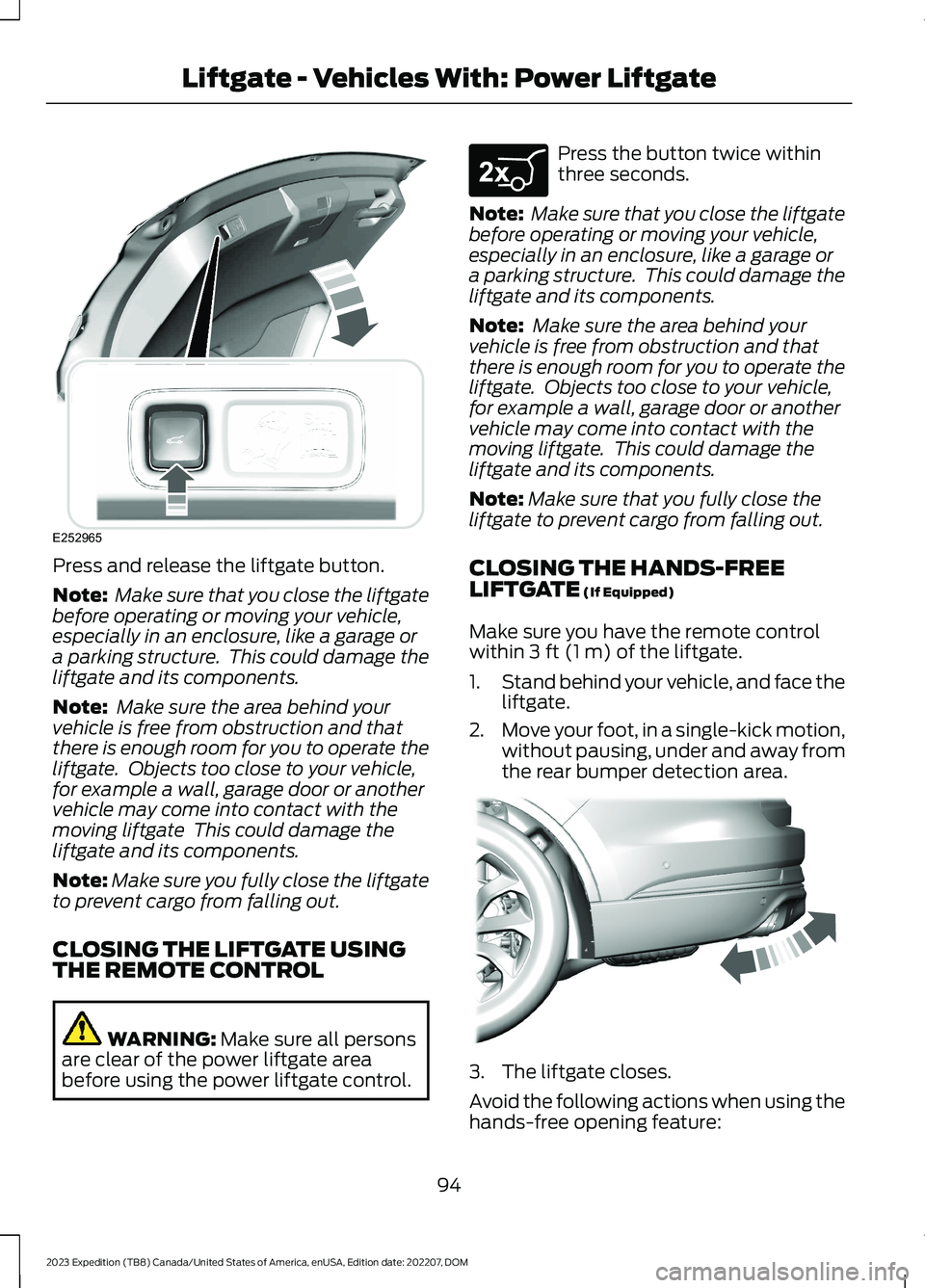
Press and release the liftgate button.
Note: Make sure that you close the liftgatebefore operating or moving your vehicle,especially in an enclosure, like a garage ora parking structure. This could damage theliftgate and its components.
Note: Make sure the area behind yourvehicle is free from obstruction and thatthere is enough room for you to operate theliftgate. Objects too close to your vehicle,for example a wall, garage door or anothervehicle may come into contact with themoving liftgate This could damage theliftgate and its components.
Note:Make sure you fully close the liftgateto prevent cargo from falling out.
CLOSING THE LIFTGATE USINGTHE REMOTE CONTROL
WARNING: Make sure all personsare clear of the power liftgate areabefore using the power liftgate control.
Press the button twice withinthree seconds.
Note: Make sure that you close the liftgatebefore operating or moving your vehicle,especially in an enclosure, like a garage ora parking structure. This could damage theliftgate and its components.
Note: Make sure the area behind yourvehicle is free from obstruction and thatthere is enough room for you to operate theliftgate. Objects too close to your vehicle,for example a wall, garage door or anothervehicle may come into contact with themoving liftgate. This could damage theliftgate and its components.
Note:Make sure that you fully close theliftgate to prevent cargo from falling out.
CLOSING THE HANDS-FREELIFTGATE (If Equipped)
Make sure you have the remote controlwithin 3 ft (1 m) of the liftgate.
1.Stand behind your vehicle, and face theliftgate.
2.Move your foot, in a single-kick motion,without pausing, under and away fromthe rear bumper detection area.
3.The liftgate closes.
Avoid the following actions when using thehands-free opening feature:
94
2023 Expedition (TB8) Canada/United States of America, enUSA, Edition date: 202207, DOMLiftgate - Vehicles With: Power LiftgateE252965 E267940 E300799
Page 113 of 658
WIPERS
WIPER PRECAUTIONS
Do not operate the wipers on a drywindshield. This could scratch the glass ordamage the wiper blades. Use thewindshield washers before wiping a drywindshield.
Fully defrost the windshield before youswitch the windshield wipers on.
Switch the windshield wipers off beforeentering a car wash.
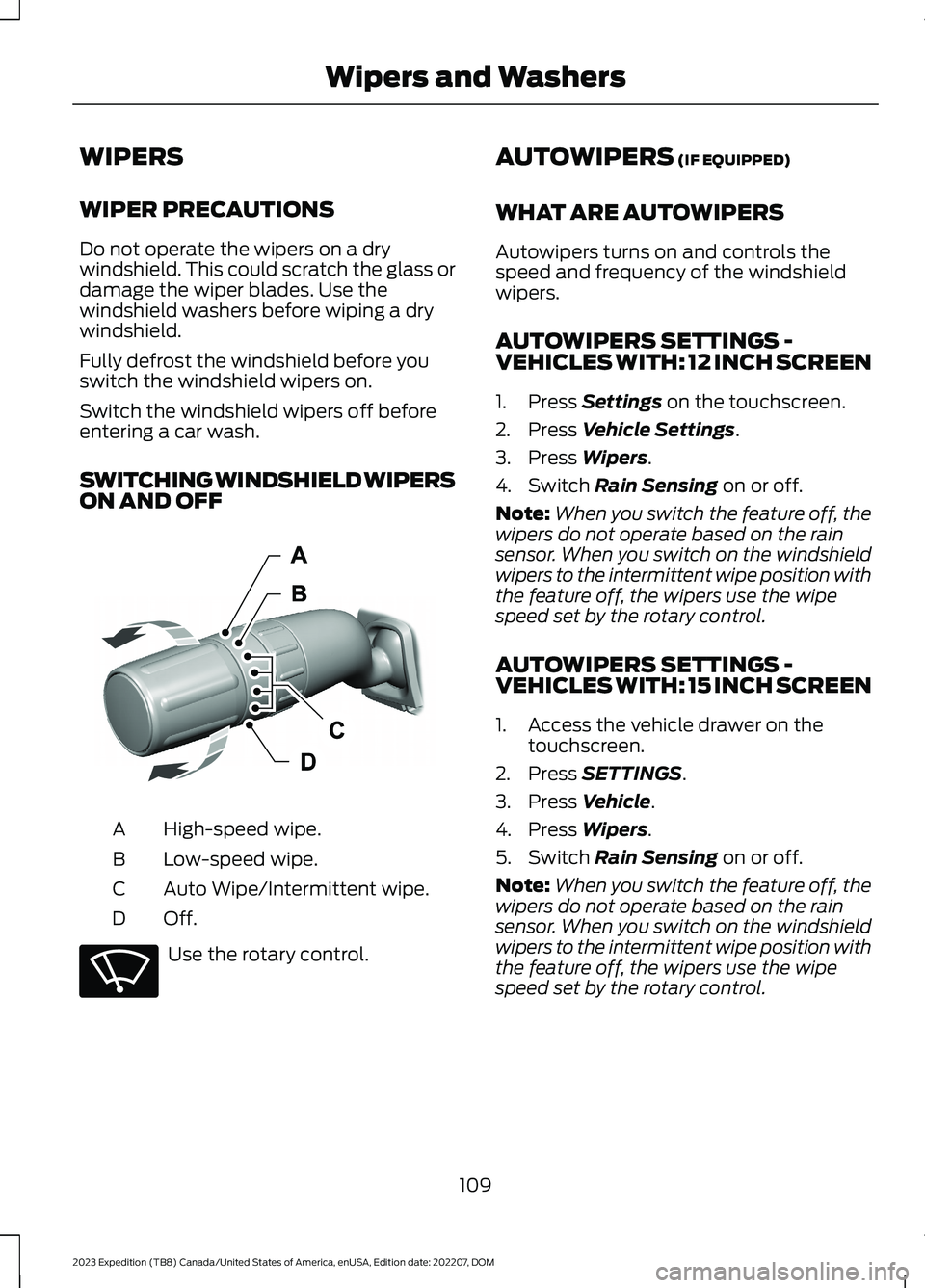
SWITCHING WINDSHIELD WIPERSON AND OFF
High-speed wipe.A
Low-speed wipe.B
Auto Wipe/Intermittent wipe.C
Off.D
Use the rotary control.
AUTOWIPERS (IF EQUIPPED)
WHAT ARE AUTOWIPERS
Autowipers turns on and controls thespeed and frequency of the windshieldwipers.
AUTOWIPERS SETTINGS -VEHICLES WITH: 12 INCH SCREEN
1.Press Settings on the touchscreen.
2.Press Vehicle Settings.
3.Press Wipers.
4.Switch Rain Sensing on or off.
Note:When you switch the feature off, thewipers do not operate based on the rainsensor. When you switch on the windshieldwipers to the intermittent wipe position withthe feature off, the wipers use the wipespeed set by the rotary control.
AUTOWIPERS SETTINGS -VEHICLES WITH: 15 INCH SCREEN
1.Access the vehicle drawer on thetouchscreen.
2.Press SETTINGS.
3.Press Vehicle.
4.Press Wipers.
5.Switch Rain Sensing on or off.
Note:When you switch the feature off, thewipers do not operate based on the rainsensor. When you switch on the windshieldwipers to the intermittent wipe position withthe feature off, the wipers use the wipespeed set by the rotary control.
109
2023 Expedition (TB8) Canada/United States of America, enUSA, Edition date: 202207, DOMWipers and WashersE383137 E270969
Page 120 of 658
when the temperature is cold. Whennormal condensation occurs, a finemist can form on the interior of thelens. The fine mist eventually clearsand exits through the vents duringnormal operation.
How much condensation isacceptable?
•The presence of a fine mist, forexample no streaks, drip marks or largedroplets. A fine mist covers less than50% of the lens.
How long may it take for theacceptable condensation to becleared?
•Clearing time may take as long as 48hours under dry weather conditions.
How much condensation isunacceptable?
•A water puddle inside the lamp.Streaks, drip marks or large dropletspresent on the interior of the lens.
What should I do if unacceptablecondensation is present?
•Have your vehicle checked as soon aspossible.
Why do my headlamps turn offwhen I have them switched onwhen I switch my vehicle off?
•The battery saver turns the headlampsoff after a short period of time after youswitch your vehicle off.
AUTOLAMPS
WHAT ARE AUTOLAMPS
WARNING: The system does notrelieve you of your responsibility to drivewith due care and attention. You mayneed to override the system if it does notturn the headlamps on in low visibilityconditions, for example daytime fog.
Autolamps turn the headlamps on in lowlight situations or when the windshieldwipers operate.
AUTOLAMP SETTINGS - VEHICLESWITH: 12 INCH SCREEN
1.Press Settings on the touchscreen.
2.Press Vehicle Settings.
3.Press Lighting.
4.Press Autolamp Delay.
5.Press a setting.
AUTOLAMP SETTINGS - VEHICLESWITH: 15 INCH SCREEN
1.Access the vehicle drawer on thetouchscreen.
2.Press SETTINGS.
3.Press Vehicle.
4.Press Lighting.
5.Press Autolamp Delay.
6.Press a setting.
116
2023 Expedition (TB8) Canada/United States of America, enUSA, Edition date: 202207, DOMExterior Lighting
Page 126 of 658
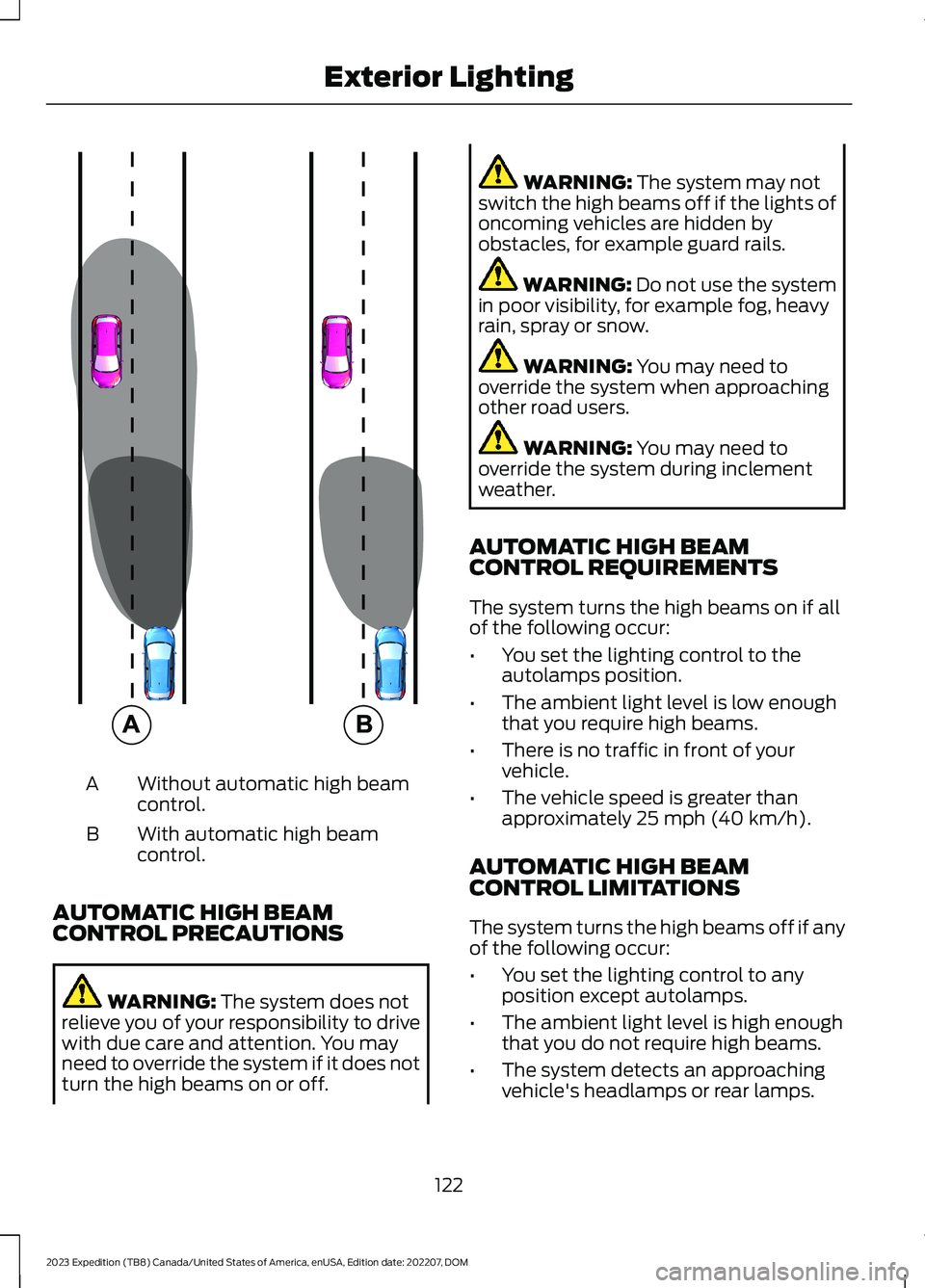
Without automatic high beamcontrol.A
With automatic high beamcontrol.B
AUTOMATIC HIGH BEAMCONTROL PRECAUTIONS
WARNING: The system does notrelieve you of your responsibility to drivewith due care and attention. You mayneed to override the system if it does notturn the high beams on or off.
WARNING: The system may notswitch the high beams off if the lights ofoncoming vehicles are hidden byobstacles, for example guard rails.
WARNING: Do not use the systemin poor visibility, for example fog, heavyrain, spray or snow.
WARNING: You may need tooverride the system when approachingother road users.
WARNING: You may need tooverride the system during inclementweather.
AUTOMATIC HIGH BEAMCONTROL REQUIREMENTS
The system turns the high beams on if allof the following occur:
•You set the lighting control to theautolamps position.
•The ambient light level is low enoughthat you require high beams.
•There is no traffic in front of yourvehicle.
•The vehicle speed is greater thanapproximately 25 mph (40 km/h).
AUTOMATIC HIGH BEAMCONTROL LIMITATIONS
The system turns the high beams off if anyof the following occur:
•You set the lighting control to anyposition except autolamps.
•The ambient light level is high enoughthat you do not require high beams.
•The system detects an approachingvehicle's headlamps or rear lamps.
122
2023 Expedition (TB8) Canada/United States of America, enUSA, Edition date: 202207, DOMExterior Lighting E327596
Page 140 of 658
FUEL GAUGE LIMITATIONS
The fuel gauge may not provide anaccurate reading when your vehicle is onan incline.
LOCATING THE FUEL FILLERDOOR
The arrow adjacent to the fuel pumpsymbol indicates on which side of yourvehicle the fuel filler door is located.
WHAT IS THE LOW FUELREMINDER
A low fuel level reminder displays andsounds when the distance to emptyreaches 75 mi (120 km) to empty forMyKey, and at 50 mi (80 km),25 mi(40 km),12 mi (20 km) and 0 mi (0 km)for all vehicle keys.
Note:The low fuel reminder can appear atdifferent fuel gauge positions depending onfuel economy conditions. This variation isnormal.
WHAT IS DISTANCE TO EMPTY
Indicates the approximate distance yourvehicle can travel on the fuel remaining inthe tank. Changes in driving pattern cancause the value to not only decrease butalso increase or stay constant for periodsof time.
ENGINE COOLANT
TEMPERATURE GAUGE
Indicates the engine coolant temperature.
ENGINE OIL PRESSURE GAUGE
Indicates the engine oil pressure.
Note:This is a configurable gauge.
TRANSMISSION FLUID
TEMPERATURE GAUGE
Indicates the transmission fluidtemperature.
Special operating conditions can causehigher than normal operatingtemperatures. See Special OperatingConditions Scheduled Maintenance(page 545).
Note:This is a configurable gauge.
TURBO BOOST GAUGE -
VEHICLES WITH: 12 INCH
SCREEN
Indicates the amount of manifold airpressure in the engine.
Note:This is a configurable gauge.
WHAT ARE THE INSTRUMENT
CLUSTER WARNING LAMPS
Warning lamps alert you to a vehiclecondition that could become serious.Some lamps illuminate when you startyour vehicle to make sure they work. If anylamps remain on after starting your vehicle,refer to the respective system warninglamp for further information.
INSTRUMENT CLUSTER
WARNING LAMPS
Anti-Lock Brake System
If it illuminates when you aredriving, this indicates amalfunction. Your vehiclecontinues to have normal braking withoutthe anti-lock brake system function. Haveyour vehicle checked as soon as possible.
136
2023 Expedition (TB8) Canada/United States of America, enUSA, Edition date: 202207, DOMInstrument ClusterE67020
Page 144 of 658
USING THE INSTRUMENT
CLUSTER DISPLAY CONTROLS
WARNING: Driving while distractedcan result in loss of vehicle control, crashand injury. We strongly recommend thatyou use extreme caution when using anydevice that may take your focus off theroad. Your primary responsibility is thesafe operation of your vehicle. Werecommend against the use of anyhand-held device while driving andencourage the use of voice-operatedsystems when possible. Make sure youare aware of all applicable local lawsthat may affect the use of electronicdevices while driving.
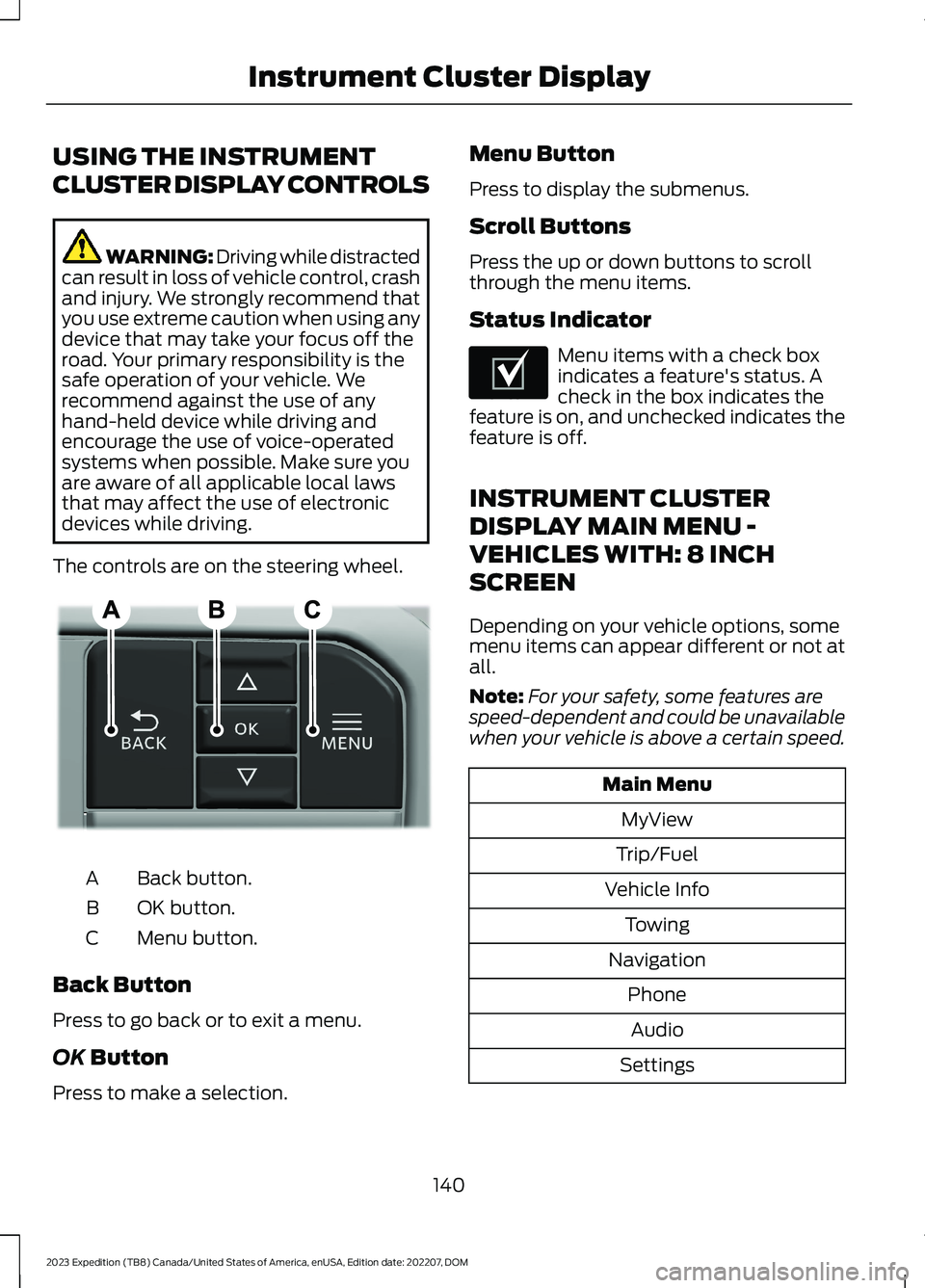
The controls are on the steering wheel.
Back button.A
OK button.B
Menu button.C
Back Button
Press to go back or to exit a menu.
OK Button
Press to make a selection.
Menu Button
Press to display the submenus.
Scroll Buttons
Press the up or down buttons to scrollthrough the menu items.
Status Indicator
Menu items with a check boxindicates a feature's status. Acheck in the box indicates thefeature is on, and unchecked indicates thefeature is off.
INSTRUMENT CLUSTER
DISPLAY MAIN MENU -
VEHICLES WITH: 8 INCH
SCREEN
Depending on your vehicle options, somemenu items can appear different or not atall.
Note:For your safety, some features arespeed-dependent and could be unavailablewhen your vehicle is above a certain speed.
Main Menu
MyView
Trip/Fuel
Vehicle Info
Towing
Navigation
Phone
Audio
Settings
140
2023 Expedition (TB8) Canada/United States of America, enUSA, Edition date: 202207, DOMInstrument Cluster DisplayE309379 E204495
Page 145 of 658
INSTRUMENT CLUSTER
DISPLAY MAIN MENU -
VEHICLES WITH: 12 INCH
SCREEN
Depending on your vehicle options, somemenu items can appear different or not atall.
Note:For your safety, some features arespeed-dependent and could be unavailablewhen your vehicle is above a certain speed.
Main Menu
MyView
Trip/Fuel
Vehicle Information
Towing
Navigation
Phone
Audio
Settings
TRIP COMPUTER - VEHICLES
WITH: 8 INCH SCREEN/12 INCH
SCREEN
ACCESSING THE TRIP COMPUTER
1.Select Trip/Fuel.
2.Select This Trip,Trip 1 or Trip 2.
RESETTING THE TRIP COMPUTER
1.Select Trip/Fuel.
2.Select Trip 1 or Trip 2.
3.Press and hold the OK button for a fewseconds.
Note:This Trip resets every time you startyour vehicle.
CUSTOMIZING THE
INSTRUMENT CLUSTER
DISPLAY
Adding Screens Using MyView
1.Using the information display controlson the steering wheel, select MyView.
2.Select Configure MyView.
3.Select a screen.
4.Press the OK button.
Note:The number of screens you can addis limited. If the selected screen does notappear you must deselect screens from theMyView menu.
Configuring Gauges
1.Select Settings.
2.Select Configure Gauges.
3.Select to swap or change left-handside and right-hand side gauges.
141
2023 Expedition (TB8) Canada/United States of America, enUSA, Edition date: 202207, DOMInstrument Cluster Display
Page 171 of 658
Allow a few seconds for any selection toactivate. Selecting a different adjustmentcancels the current one in progress. Whenthe seat backrest and cushion are bothactive, the massage alternates betweenzones.
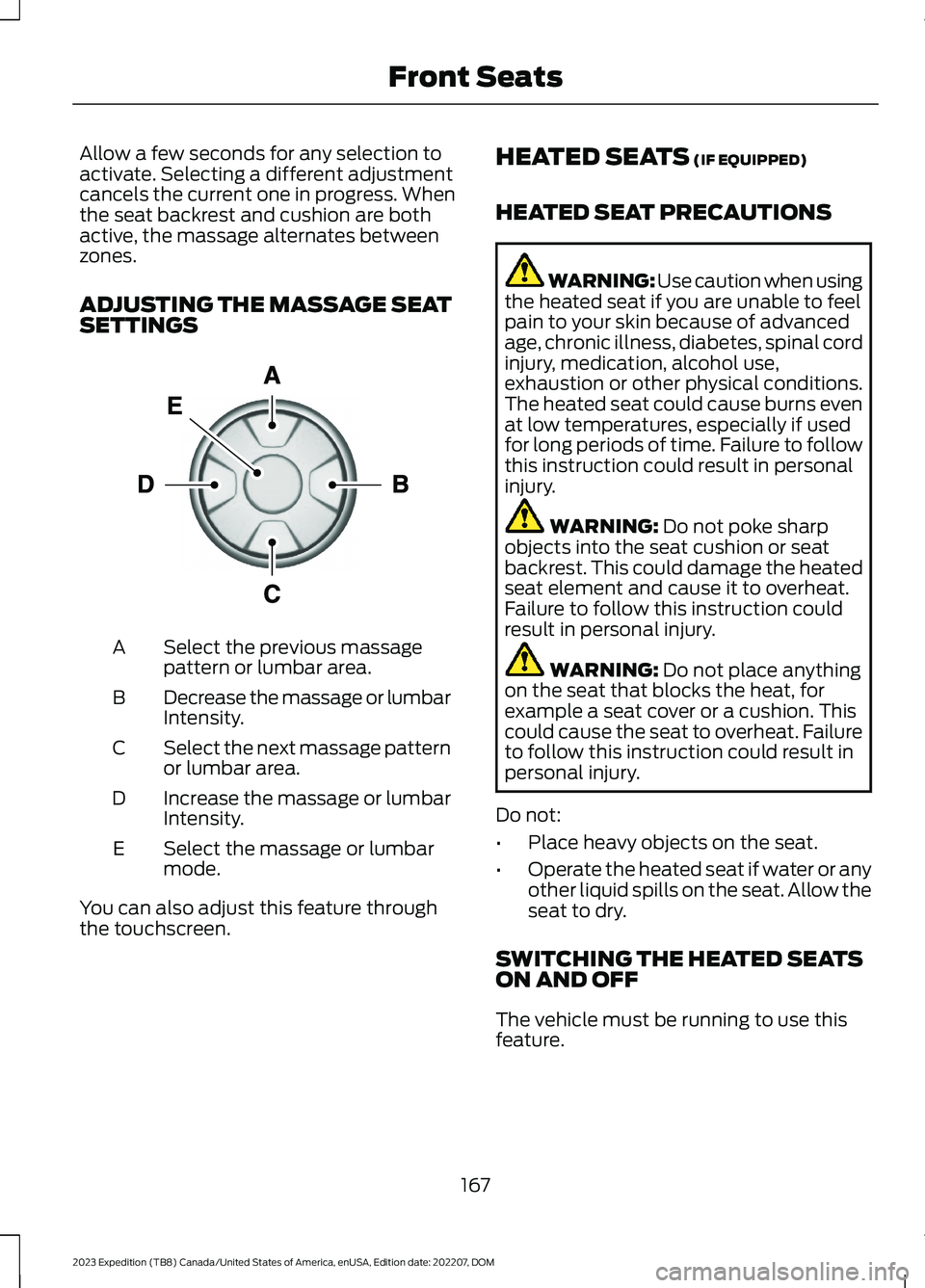
ADJUSTING THE MASSAGE SEATSETTINGS
Select the previous massagepattern or lumbar area.A
Decrease the massage or lumbarIntensity.B
Select the next massage patternor lumbar area.C
Increase the massage or lumbarIntensity.D
Select the massage or lumbarmode.E
You can also adjust this feature throughthe touchscreen.
HEATED SEATS (IF EQUIPPED)
HEATED SEAT PRECAUTIONS
WARNING: Use caution when usingthe heated seat if you are unable to feelpain to your skin because of advancedage, chronic illness, diabetes, spinal cordinjury, medication, alcohol use,exhaustion or other physical conditions.The heated seat could cause burns evenat low temperatures, especially if usedfor long periods of time. Failure to followthis instruction could result in personalinjury.
WARNING: Do not poke sharpobjects into the seat cushion or seatbackrest. This could damage the heatedseat element and cause it to overheat.Failure to follow this instruction couldresult in personal injury.
WARNING: Do not place anythingon the seat that blocks the heat, forexample a seat cover or a cushion. Thiscould cause the seat to overheat. Failureto follow this instruction could result inpersonal injury.
Do not:
•Place heavy objects on the seat.
•Operate the heated seat if water or anyother liquid spills on the seat. Allow theseat to dry.
SWITCHING THE HEATED SEATSON AND OFF
The vehicle must be running to use thisfeature.
167
2023 Expedition (TB8) Canada/United States of America, enUSA, Edition date: 202207, DOMFront SeatsE156301