battery FORD EXPEDITION 2023 User Guide
[x] Cancel search | Manufacturer: FORD, Model Year: 2023, Model line: EXPEDITION, Model: FORD EXPEDITION 2023Pages: 658, PDF Size: 16.16 MB
Page 75 of 658
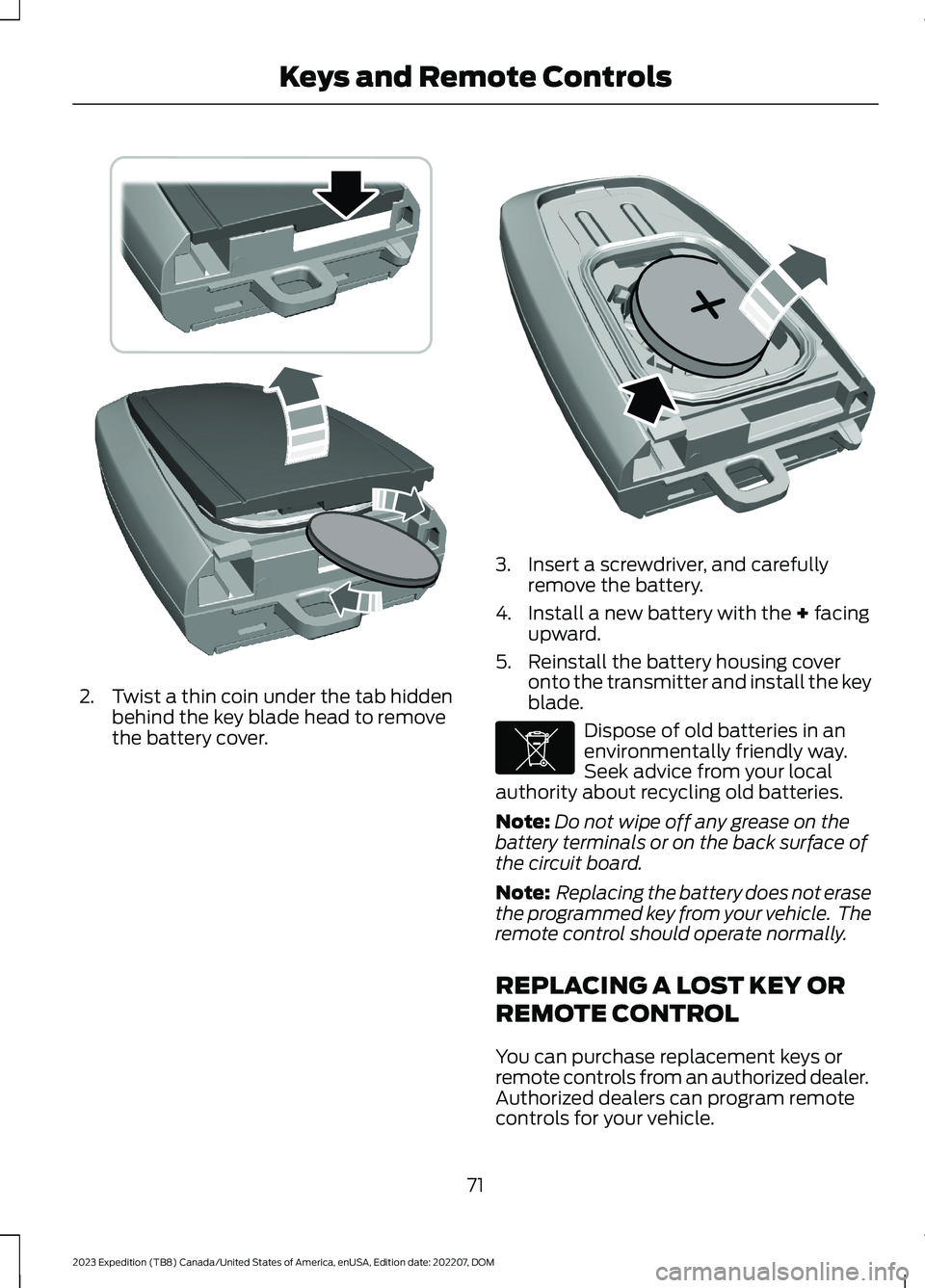
2.Twist a thin coin under the tab hiddenbehind the key blade head to removethe battery cover.
3.Insert a screwdriver, and carefullyremove the battery.
4.Install a new battery with the + facingupward.
5.Reinstall the battery housing coveronto the transmitter and install the keyblade.
Dispose of old batteries in anenvironmentally friendly way.Seek advice from your localauthority about recycling old batteries.
Note:Do not wipe off any grease on thebattery terminals or on the back surface ofthe circuit board.
Note: Replacing the battery does not erasethe programmed key from your vehicle. Theremote control should operate normally.
REPLACING A LOST KEY OR
REMOTE CONTROL
You can purchase replacement keys orremote controls from an authorized dealer.Authorized dealers can program remotecontrols for your vehicle.
71
2023 Expedition (TB8) Canada/United States of America, enUSA, Edition date: 202207, DOMKeys and Remote ControlsE303824 E218402 E107998
Page 78 of 658
6.Wait five seconds and then press andrelease the push button ignition switchagain. Keep the ignition on for at leastthree seconds, but no more than 10seconds.
7.Remove the remote control.
8.Place the unprogrammed remotecontrol in the backup slot and pressand release the push button ignitionswitch.
Programming is now complete. With yourfoot on the brake pedal, press the pushbutton ignition switch to verify the remotecontrol functions operate and your vehiclestarts with the new remote control.
If programming was not successful, wait10 seconds and repeat Steps 1 through 8.If you are still unsuccessful, take yourvehicle to an authorized dealer.
KEYS AND REMOTE CONTROLS – TROUBLESHOOTING
KEYS AND REMOTE CONTROLS – INFORMATION MESSAGES
ActionMessage
Replace remote control battery.Key Battery Low ReplaceSoon
74
2023 Expedition (TB8) Canada/United States of America, enUSA, Edition date: 202207, DOMKeys and Remote Controls
Page 89 of 658

WHAT IS KEYLESS ENTRY
The system allows you to lock and unlockyour vehicle without taking the passive keyout of your pocket or purse.
KEYLESS ENTRY LIMITATIONS
Make sure your remote control is within 3 ft(1 m) from the front door handles and thetailgate.
The system could not function if:
•The remote control remains stationaryfor about a minute.
•The vehicle battery has no charge.
•The remote control battery has nocharge.
•There is interference causing issueswith the remote control frequencies.
•The remote control is too close tometal objects or electronic devices, forexample keys or a cell phone.
KEYLESS ENTRY SETTINGS
Switching Keyless Entry On andOff
1.Switch the ignition on using an originalkey that has not been created as aMyKey.
2.Press Settings on the touchscreen.
3.Press Vehicle Settings.
4.Press Locks.
Reprogramming the UnlockingFunction
You can enable two-stage unlockingfunction allowing you to unlock only thedriver door when you touch the unlocksensor.
Press and hold both the lock and unlockbuttons on the remote control for fourseconds to disable or enable two-stageunlocking.
If you program the unlocking function sothat only the driver door unlocks, you canunlock all of the other doors from insideyour vehicle using the power door lockcontrol. You can unlock individual doorsby pulling the interior door handles onthose doors.
USING KEYLESS ENTRY
Unlocking the Doors
With your passive key within 3 ft (1 m) ofyour vehicle, touch the unlock sensor onthe back of the door handle for a briefperiod and then pull on the door handle tounlock, being careful not to touch the locksensor at the same time or pull on the doorhandle too quickly. The intelligent accesssystem requires a brief delay toauthenticate your intelligent access key.
85
2023 Expedition (TB8) Canada/United States of America, enUSA, Edition date: 202207, DOMKeyless Entry (If Equipped)E248553
Page 91 of 658
WHAT IS THE KEYLESS ENTRY
KEYPAD
The keyless entry keypad allows you tolock and unlock your vehicle using thekeypad on the window trim.
KEYLESS ENTRY KEYPAD
LIMITATIONS
The system may not function if:
•The vehicle battery has no charge.
LOCATING THE KEYLESS
ENTRY KEYPAD
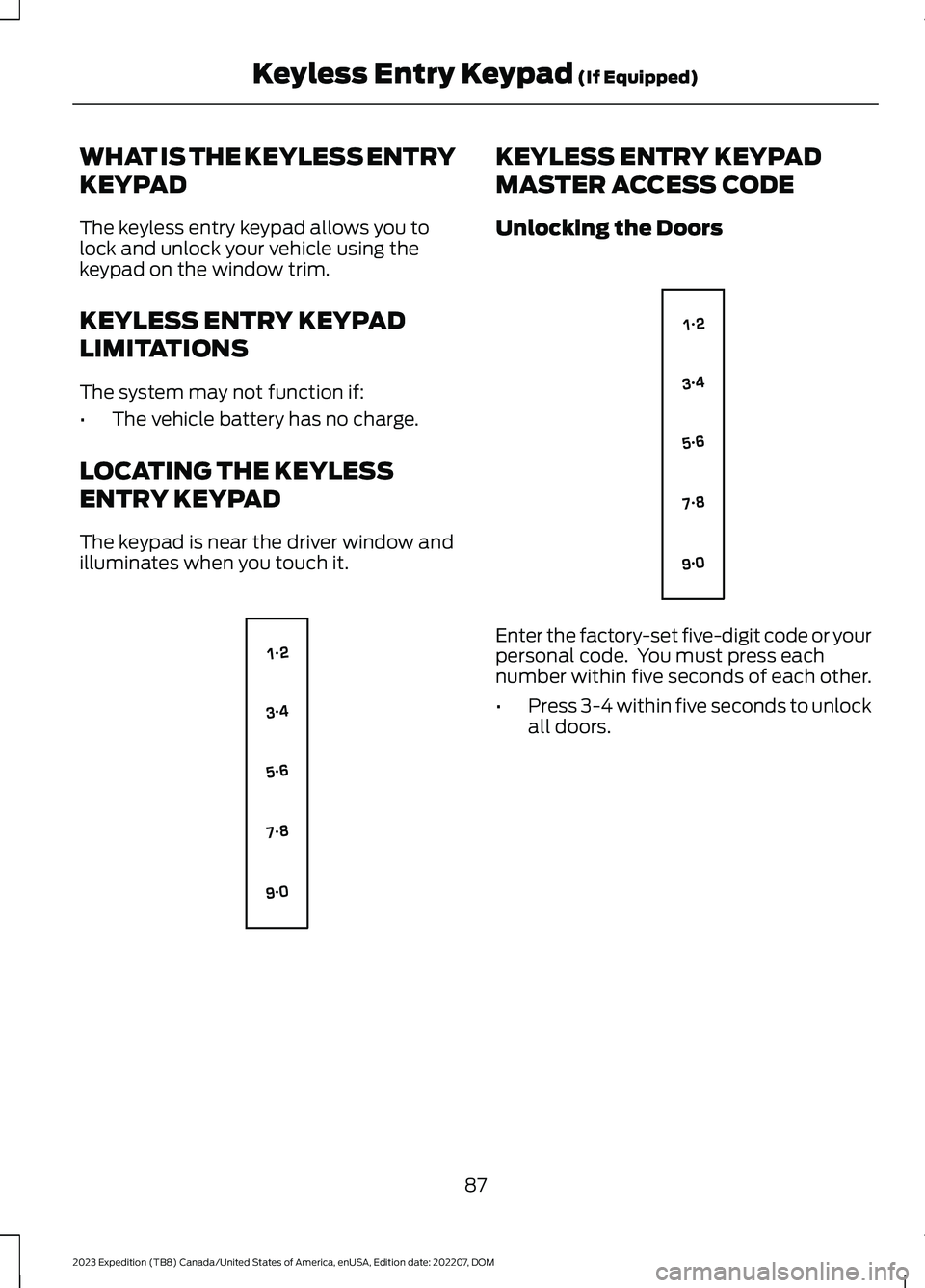
The keypad is near the driver window andilluminates when you touch it.
KEYLESS ENTRY KEYPAD
MASTER ACCESS CODE
Unlocking the Doors
Enter the factory-set five-digit code or yourpersonal code. You must press eachnumber within five seconds of each other.
•Press 3-4 within five seconds to unlockall doors.
87
2023 Expedition (TB8) Canada/United States of America, enUSA, Edition date: 202207, DOMKeyless Entry Keypad (If Equipped)E138637 E138637
Page 97 of 658
Note:Allow the power system to open theliftgate. Manually pushing or pulling theliftgate may activate the system’s obstacledetection feature and stop the poweroperation or reverse its direction, replicatea strut failure, or damage mechanicalcomponents.
Note:Any physical actions that mimic akicking motion such as splashing water,trailer chains or vacuum hoses may causethe hands-free liftgate to activate. Switchthe power liftgate off through your vehiclesettings or keep the passive key away fromthe rear bumper detection area.
SETTING THE LIFTGATE
OPENING HEIGHT
1.Open the liftgate.
2.Stop the liftgate movement by pressingthe control button on the liftgate whenit reaches the desired height.
Note:Once the liftgate stops moving, youcan manually move it to the desired height.
3.Press and hold the control button onthe liftgate until a tone sounds,indicating programming is complete.
Note:You can only use the liftgate controlbutton to program the height.
Note:You cannot program the height if theliftgate position is too low.
4.The power liftgate now opens at theprogrammed height. To change theprogrammed height, repeat the steps.
Note:You can fully open the liftgate bymanually pushing it upward to themaximum open position if it opens in alower position.
Note:The system recalls the newprogrammed height until you reprogram it,even if you disconnect the battery.
CLOSING THE LIFTGATE
CLOSING THE LIFTGATE FROMINSIDE YOUR VEHICLE
WARNING: Make sure all personsare clear of the power liftgate areabefore using the power liftgate control.
With the transmission in park(P), press the button on theinstrument panel.
Note: Make sure that you close the liftgatebefore operating or moving your vehicle,especially in an enclosure, like a garage ora parking structure. This could damage theliftgate and its components.
Note: Make sure the area behind yourvehicle is free from obstruction and thatthere is enough room for you to operate theliftgate. Objects too close to your vehicle,for example a wall, garage door or anothervehicle may come into contact with themoving liftgate. This could damage theliftgate and its components.
Note:Make sure that you fully close theliftgate to prevent cargo from falling out.
CLOSING THE LIFTGATE FROMOUTSIDE YOUR VEHICLE
WARNING: Make sure all personsare clear of the power liftgate areabefore using the power liftgate control.
93
2023 Expedition (TB8) Canada/United States of America, enUSA, Edition date: 202207, DOMLiftgate - Vehicles With: Power LiftgateE138633
Page 101 of 658
LIFTGATE – FREQUENTLY ASKEDQUESTIONS
Why won't my power liftgate function?
It can happen in freezing conditions orwhen parking on downhill slopes. Makesure the power liftgate is enabled.Make sure the transmission is in park(P), ensure nothing is obstructing theliftgate path and there is not excessiveweight on the liftgate. If there arecontinued issues, the battery voltagemay be low or there may be othersystem issues. See an authorizeddealer.
97
2023 Expedition (TB8) Canada/United States of America, enUSA, Edition date: 202207, DOMLiftgate - Vehicles With: Power Liftgate
Page 104 of 658
PASSIVE ANTI-THEFT
SYSTEM
WHAT IS THE PASSIVE ANTI-THEFT SYSTEM
The passive anti-theft system preventssomeone from starting the vehicle with anincorrectly coded key.
Note:Do not leave a duplicate coded keyin your vehicle. Always take the keys andlock all the doors when leaving your vehicle.
HOW DOES THE PASSIVE ANTI-THEFT SYSTEM WORK
The passive anti-theft system arms whenyou switch the ignition off.
It disarms when the ignition is switched onwith a correctly coded key.
Note:The system is not compatible withnon-Ford aftermarket remote start systems.
Note:Do not leave a duplicate coded keyin your vehicle. Always take the keys andlock all doors when leaving your vehicle.
ANTI-THEFT ALARM SYSTEM
WHAT IS THE ANTI-THEFT ALARMSYSTEM
The anti-theft alarm system warns you ofan unauthorized entry to your vehicle.
HOW DOES THE ANTI-THEFTALARM SYSTEM WORK
When armed, the anti-theft alarm istriggered in any of the following ways:
•If someone opens a door, the tailgateor the hood without a correctly codedkey or remote control.
•If you turn the power on without acorrectly coded key.
•If the interior sensors detect movementinside your vehicle.
•If the inclination sensors detect anattempt to raise your vehicle.
•If someone disconnects the vehiclebattery or the battery backup alarm.
•If someone disconnects the trailer. SeeConnecting a Trailer (page 354).
Any further attempts to carry out one ofthe above, sounds the alarm again.
If the anti-theft alarm is triggered, thealarm horn sounds for 30 seconds and theturn signals flash for five minutes.
WHAT IS THE PERIMETER ALARM
The perimeter alarm is designed to detectunauthorized access to your vehicle.
WHAT ARE THE INTERIORSENSORS
The interior sensors are designed to detectany movement inside your vehicle.
The interior sensors are in the overheadconsole.
Note:Do not cover the interior sensors.
100
2023 Expedition (TB8) Canada/United States of America, enUSA, Edition date: 202207, DOMSecurity
Page 120 of 658
when the temperature is cold. Whennormal condensation occurs, a finemist can form on the interior of thelens. The fine mist eventually clearsand exits through the vents duringnormal operation.
How much condensation isacceptable?
•The presence of a fine mist, forexample no streaks, drip marks or largedroplets. A fine mist covers less than50% of the lens.
How long may it take for theacceptable condensation to becleared?
•Clearing time may take as long as 48hours under dry weather conditions.
How much condensation isunacceptable?
•A water puddle inside the lamp.Streaks, drip marks or large dropletspresent on the interior of the lens.
What should I do if unacceptablecondensation is present?
•Have your vehicle checked as soon aspossible.
Why do my headlamps turn offwhen I have them switched onwhen I switch my vehicle off?
•The battery saver turns the headlampsoff after a short period of time after youswitch your vehicle off.
AUTOLAMPS
WHAT ARE AUTOLAMPS
WARNING: The system does notrelieve you of your responsibility to drivewith due care and attention. You mayneed to override the system if it does notturn the headlamps on in low visibilityconditions, for example daytime fog.
Autolamps turn the headlamps on in lowlight situations or when the windshieldwipers operate.
AUTOLAMP SETTINGS - VEHICLESWITH: 12 INCH SCREEN
1.Press Settings on the touchscreen.
2.Press Vehicle Settings.
3.Press Lighting.
4.Press Autolamp Delay.
5.Press a setting.
AUTOLAMP SETTINGS - VEHICLESWITH: 15 INCH SCREEN
1.Access the vehicle drawer on thetouchscreen.
2.Press SETTINGS.
3.Press Vehicle.
4.Press Lighting.
5.Press Autolamp Delay.
6.Press a setting.
116
2023 Expedition (TB8) Canada/United States of America, enUSA, Edition date: 202207, DOMExterior Lighting
Page 130 of 658
ADJUSTING THE INSTRUMENT
PANEL LIGHTING
BRIGHTNESS
The instrument lighting dimmer buttonsare on the lighting control.
Repeatedly press one of thebuttons to adjust the brightness.
AMBIENT LIGHTING (IF EQUIPPED)
SWITCHING AMBIENT LIGHTINGON AND OFF - VEHICLES WITH: 12INCH SCREEN
1.Press Settings on the touchscreen.
2.Press Vehicle Settings.
3.Press Ambient Light.
4.Switch Ambient Light on or off.
SWITCHING AMBIENT LIGHTINGON AND OFF - VEHICLES WITH: 15INCH SCREEN
1.Access the vehicle drawer on thetouchscreen.
2.Press SETTINGS.
3.Press Ambient Light.
4.Switch Ambient Light on or off.
ADJUSTING AMBIENT LIGHTING
Drag the slider left or right.
INTERIOR LIGHTING –
TROUBLESHOOTING
INTERIOR LIGHTING –FREQUENTLY ASKED QUESTIONS
Why do my courtesy lamps or interiorlamps turn off when I have themswitched on when I switch my vehicleoff?
The battery saver turns the courtesylamps and interior lamps off after ashort period of time after you switchyour vehicle off.
126
2023 Expedition (TB8) Canada/United States of America, enUSA, Edition date: 202207, DOMInterior LightingE291299 E296433
Page 139 of 658
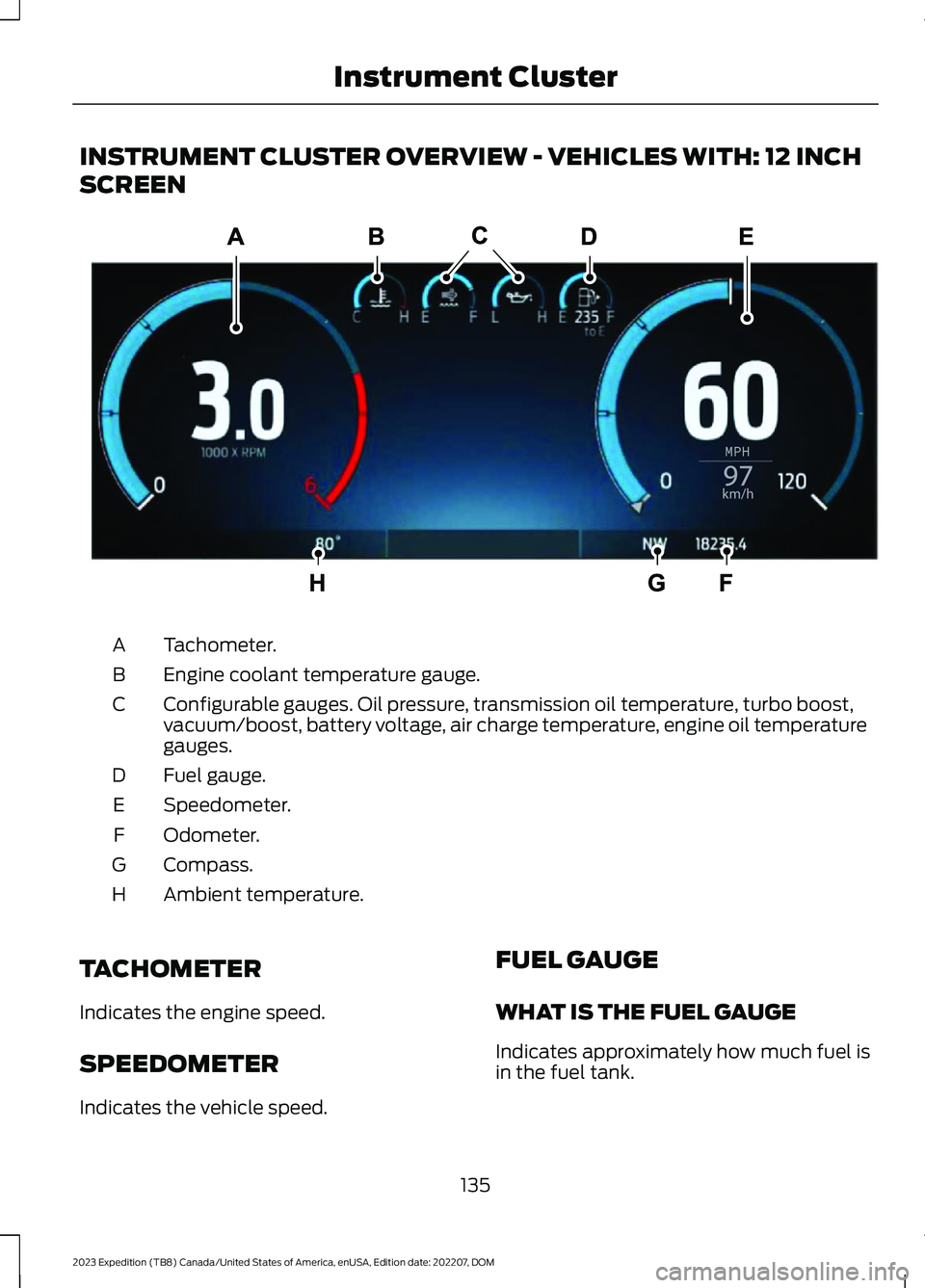
INSTRUMENT CLUSTER OVERVIEW - VEHICLES WITH: 12 INCH
SCREEN
Tachometer.A
Engine coolant temperature gauge.B
Configurable gauges. Oil pressure, transmission oil temperature, turbo boost,vacuum/boost, battery voltage, air charge temperature, engine oil temperaturegauges.
C
Fuel gauge.D
Speedometer.E
Odometer.F
Compass.G
Ambient temperature.H
TACHOMETER
Indicates the engine speed.
SPEEDOMETER
Indicates the vehicle speed.
FUEL GAUGE
WHAT IS THE FUEL GAUGE
Indicates approximately how much fuel isin the fuel tank.
135
2023 Expedition (TB8) Canada/United States of America, enUSA, Edition date: 202207, DOMInstrument ClusterE310245