lane assist FORD EXPEDITION 2023 User Guide
[x] Cancel search | Manufacturer: FORD, Model Year: 2023, Model line: EXPEDITION, Model: FORD EXPEDITION 2023Pages: 658, PDF Size: 16.16 MB
Page 303 of 658
The driver-facing camera may not operatecorrectly due to any of the following:
•You have a pre-existing eye condition,such as an eye misalignment, or havehad eye surgery.
•You cover your facial features by amask, hat or other items.
•The lighting conditions changesignificantly.
•You are not in the field of view of thecamera.
•You position or tilt yourself to one side.
•You are moving around extensively.
•You are wearing glasses or sunglassesthat are too dark or reflective.
Note:The system has limited steeringassistance and may not be sufficient for alldriving situations.
Note:In exceptional conditions, such asinclement weather or direct sunlight, thesystem could deviate from the center line.
Note:The information provided by thenavigation map data could be inaccurate orout of date.
BLUECRUISE SETTINGS
Enabling BlueCruise
1.Access the vehicle drawer on thetouchscreen.
2.Press SETTINGS.
3.Press Driver Assistance.
4.Press Cruise Control.
5.Press Lane Centering withHands-Free.
Enabling Activation Prompts
1.Access the vehicle drawer on thetouchscreen.
2.Press SETTINGS.
3.Press Driver Assistance.
4.Press Cruise Control.
5.Press Activation Prompts.
SWITCHING BLUECRUISE ON
AND OFF
Switching BlueCruise On
The controls are on the steering wheel.
Using Activation Prompts
When the prompt appears, pressthe button to switch BlueCruiseon.
The indicator appears in the instrumentcluster. When the system is on, the colorof the indicator changes to indicate thesystem status.
Note:You must enable activation promptsin the touchscreen.
Using Steering Wheel Controls
Using the adaptive cruise controland lateral support buttons,make sure both systems areactive. BlueCruise activates.
Switching BlueCruise Off
Press either the lateral supportor adaptive cruise control buttonwhen system is active or instandby mode.
BlueCruise turns off througheach ignition cycle.
299
2023 Expedition (TB8) Canada/United States of America, enUSA, Edition date: 202207, DOMBlueCruise (If Equipped)E144529 E308131 E144529 E308131 E144529
Page 313 of 658
WHAT IS THE LANE KEEPING
SYSTEM
The lane keeping system alerts you byproviding temporary steering assistanceor steering wheel vibration when it detectsan unintended lane departure.
HOW DOES THE LANE
KEEPING SYSTEM WORK
The lane keeping system uses a forwardlooking camera mounted on the windshieldto monitor vehicle movement within thetravel lane.
When the camera detects a drift out of thetravel lane, the lane keeping system alertsthe driver by vibrating the steering wheel,or aids the driver by providing a smallsteering input to move the vehicle backinto the travel lane.
The driver can select one of three modes:
•Alert (If Equipped)
•Aid
•Alert + Aid
LANE KEEPING SYSTEM
PRECAUTIONS
WARNING: You are responsible forcontrolling your vehicle at all times. Thesystem is designed to be an aid and doesnot relieve you of your responsibility todrive with due care and attention. Failureto follow this instruction could result inthe loss of control of your vehicle,personal injury or death.
WARNING: The system will notoperate if the sensor cannot track theroad lane markings.
WARNING: The sensor mayincorrectly track lane markings as otherstructures or objects. This can result ina false or missed warning.
WARNING: In cold and severeweather conditions the system may notfunction. Rain, snow and spray can alllimit sensor performance.
WARNING: The system may notoperate properly if the sensor is blocked.Keep the windshield free fromobstruction.
WARNING: If damage occurs in theimmediate area surrounding the sensor,have your vehicle checked as soon aspossible.
WARNING: The system may notcorrectly operate if your vehicle is fittedwith a suspension kit not approved byus.
WARNING: Large contrasts inoutside lighting can limit sensorperformance.
LANE KEEPING SYSTEM
LIMITATIONS
The lane keeping system only operateswhen the vehicle speed is greater than40 mph (64 km/h).
The system works when the camera candetect at least one lane marking.
Note:When you select Aid or Alert and Aidmode and the system detects no steeringactivity for a short period of time, the systemalerts you to put your hands on the steeringwheel. The system may detect a light gripor touch on the steering wheel as hands-offdriving.
309
2023 Expedition (TB8) Canada/United States of America, enUSA, Edition date: 202207, DOMLane Keeping System
Page 314 of 658
The lane keeping system may not correctlyoperate in any of the following conditions:
•The lane keeping system does notdetect at least one lane marking.
•You switch the turn signal on.
•You apply direct steering, acceleratefast or brake hard.
•The vehicle speed is less than 40 mph(64 km/h).
•The anti-lock brake, stability control ortraction control system activates.
•The lane is too narrow.
•Something is obscuring the camera orit is unable to detect the lane markingsdue to environment, traffic or vehicleconditions.
•Entering or exiting a tight curve whendriving at high speeds.
The lane keeping system may not correctlane positioning in any of the followingconditions:
•High winds.
•Uneven road surfaces.
•Heavy or uneven loads.
•Incorrect tire pressure.
SWITCHING THE LANE
KEEPING SYSTEM ON AND
OFF
To activate the lane keepingsystem, press the button on thesteering wheel.
To deactivate the lane keeping system,press the button again.
Note:When switching the system on or offa message appears in the information andentertainment display to show the status.
Note:The system stores the on or offsetting until manually changed, unless itdetects a MyKey™. If the system detects aMyKey™, it defaults to the last setting forthat MyKey™.
Note: If the system detects a MyKey™,pressing the button does not affect the onor off status of the system. You can onlychange the mode and intensity settings.
SWITCHING THE LANE
KEEPING SYSTEM MODE -
VEHICLES WITH: 12 INCH
SCREEN
The lane keeping system has differentsettings that you can view or adjust usingthe information display.
The system stores the last known selectionfor each of these settings. You do not needto readjust your settings each time youswitch on the system.
To change the lane keeping system mode,use the touchscreen:
1.Press Features on the touchscreen.
2.Press Driver Assistance.
3.Press Lane-Keeping System.
4.Press Lane-Keeping Mode.
5.Select a mode.
Note:The system remembers the lastsetting when you start your vehicle. If thesystem detects a MyKey™, it defaults to thelast setting for that MyKey™.
310
2023 Expedition (TB8) Canada/United States of America, enUSA, Edition date: 202207, DOMLane Keeping SystemE334922
Page 315 of 658
SWITCHING THE LANE
KEEPING SYSTEM MODE -
VEHICLES WITH: 15 INCH
SCREEN
The lane keeping system has differentsettings that you can view or adjust usingthe information display.
•Alert (If Equipped)
•Aid
•Alert and Aid
The system permanently stores the lastknown selection for each setting.
To change the lane keeping system mode,access the vehicle drawer on thetouchscreen:
1.Press SETTINGS.
2.Press Driver Assistance.
3.Press Lane-Keeping System.
4.Press Lane-Keeping Mode.
5.Select a setting.
Note:The system remembers the lastsetting when you start your vehicle.
ALERT MODE
WHAT IS ALERT MODE
Alert mode vibrates the steering wheelwhen it detects an unintended lanedeparture.
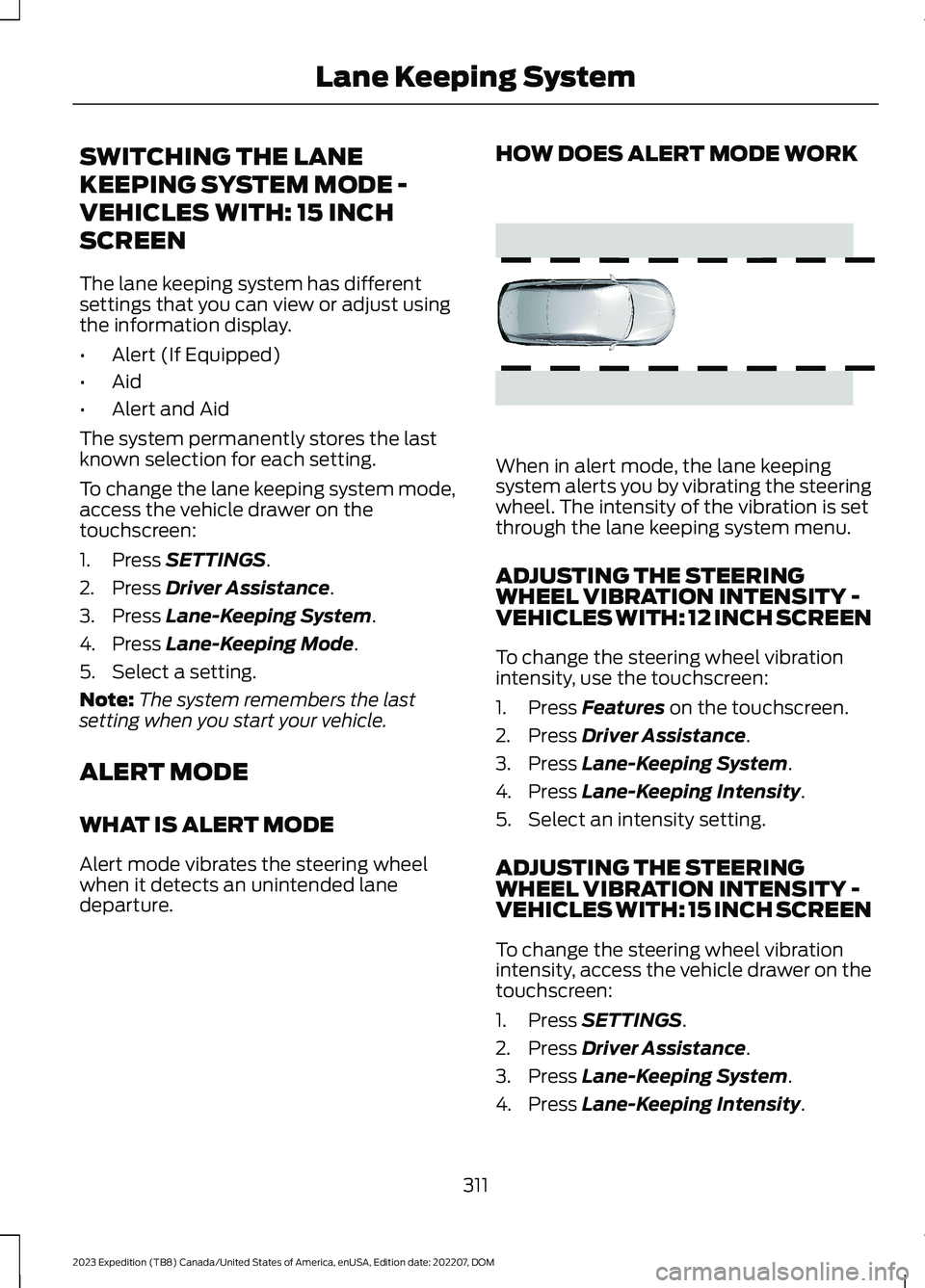
HOW DOES ALERT MODE WORK
When in alert mode, the lane keepingsystem alerts you by vibrating the steeringwheel. The intensity of the vibration is setthrough the lane keeping system menu.
ADJUSTING THE STEERINGWHEEL VIBRATION INTENSITY -VEHICLES WITH: 12 INCH SCREEN
To change the steering wheel vibrationintensity, use the touchscreen:
1.Press Features on the touchscreen.
2.Press Driver Assistance.
3.Press Lane-Keeping System.
4.Press Lane-Keeping Intensity.
5.Select an intensity setting.
ADJUSTING THE STEERINGWHEEL VIBRATION INTENSITY -VEHICLES WITH: 15 INCH SCREEN
To change the steering wheel vibrationintensity, access the vehicle drawer on thetouchscreen:
1.Press SETTINGS.
2.Press Driver Assistance.
3.Press Lane-Keeping System.
4.Press Lane-Keeping Intensity.
311
2023 Expedition (TB8) Canada/United States of America, enUSA, Edition date: 202207, DOMLane Keeping SystemE165515
Page 316 of 658
5.Select an intensity setting.
AID MODE
WHAT IS AID MODE
Aid mode provides temporary steeringassistance toward the center of the lane.
HOW DOES AID MODE WORK
The lane keeping system aids you whenan unintentional lane departure occurs.The system provides a small steering inputto move the vehicle towards the center ofthe lane.
ALERT AND AID MODE
WHAT IS ALERT AND AID MODE
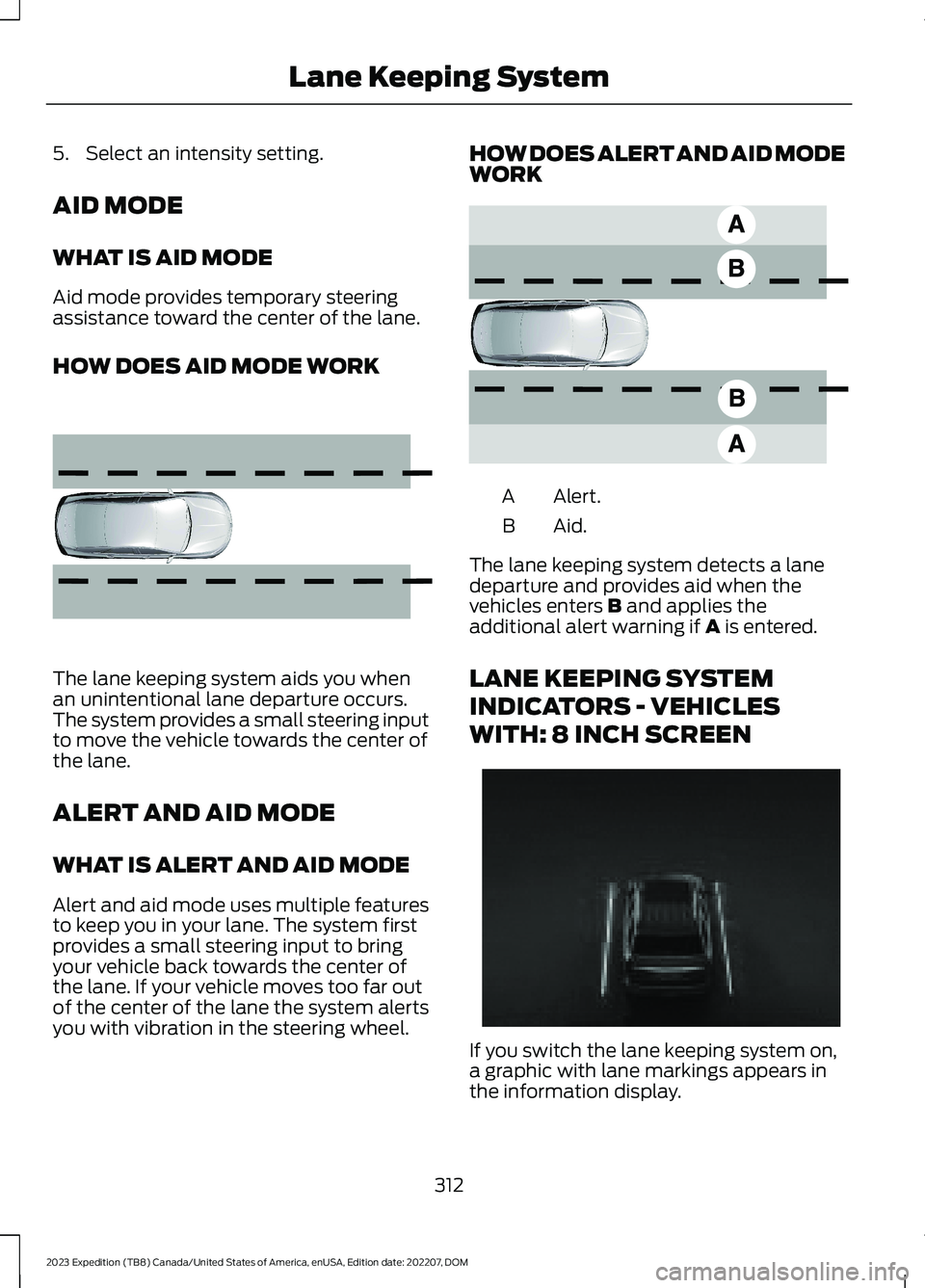
Alert and aid mode uses multiple featuresto keep you in your lane. The system firstprovides a small steering input to bringyour vehicle back towards the center ofthe lane. If your vehicle moves too far outof the center of the lane the system alertsyou with vibration in the steering wheel.
HOW DOES ALERT AND AID MODEWORK
Alert.A
Aid.B
The lane keeping system detects a lanedeparture and provides aid when thevehicles enters B and applies theadditional alert warning if A is entered.
LANE KEEPING SYSTEM
INDICATORS - VEHICLES
WITH: 8 INCH SCREEN
If you switch the lane keeping system on,a graphic with lane markings appears inthe information display.
312
2023 Expedition (TB8) Canada/United States of America, enUSA, Edition date: 202207, DOMLane Keeping System E165516 E165517 E355748
Page 318 of 658
LANE KEEPING SYSTEM
INDICATORS - VEHICLES
WITH: 12 INCH SCREEN
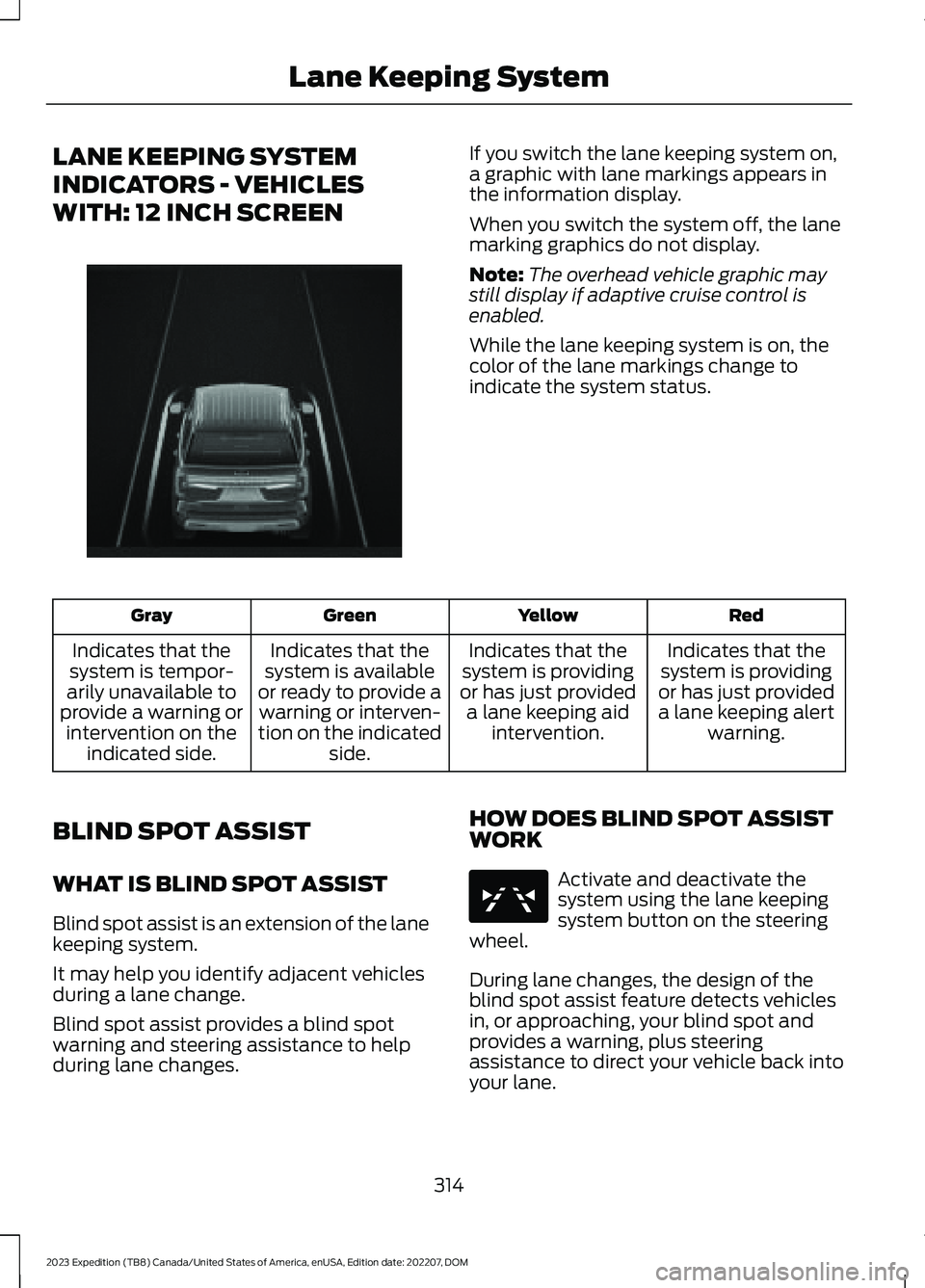
If you switch the lane keeping system on,a graphic with lane markings appears inthe information display.
When you switch the system off, the lanemarking graphics do not display.
Note:The overhead vehicle graphic maystill display if adaptive cruise control isenabled.
While the lane keeping system is on, thecolor of the lane markings change toindicate the system status.
RedYellowGreenGray
Indicates that thesystem is providingor has just provideda lane keeping alertwarning.
Indicates that thesystem is providingor has just provideda lane keeping aidintervention.
Indicates that thesystem is availableor ready to provide awarning or interven-tion on the indicatedside.
Indicates that thesystem is tempor-arily unavailable toprovide a warning orintervention on theindicated side.
BLIND SPOT ASSIST
WHAT IS BLIND SPOT ASSIST
Blind spot assist is an extension of the lanekeeping system.
It may help you identify adjacent vehiclesduring a lane change.
Blind spot assist provides a blind spotwarning and steering assistance to helpduring lane changes.
HOW DOES BLIND SPOT ASSISTWORK
Activate and deactivate thesystem using the lane keepingsystem button on the steeringwheel.
During lane changes, the design of theblind spot assist feature detects vehiclesin, or approaching, your blind spot andprovides a warning, plus steeringassistance to direct your vehicle back intoyour lane.
314
2023 Expedition (TB8) Canada/United States of America, enUSA, Edition date: 202207, DOMLane Keeping SystemE356730 E334922
Page 319 of 658
When active, this system functions with orwithout the use of direction indicators andhazard flashers.
You must keep your hands on the steeringwheel at all times.
BLIND SPOT ASSIST LIMITATIONS
All system limitations present in the basiclane keeping system also apply to blindspot assist.
Blind spot assist does not function underthe following conditions:
•No lane markings are detected.
•One or both rear radar sensors becomeblocked or faulty.
•Attaching bike or cargo racks couldcause false alerts due to obstructionof the sensor.
Blind spot assist may have difficultydetecting hazards under the followingconditions:
•If a vehicle is approaching in anadjacent lane at a speed higher thanyour vehicle.
•Bad weather obstructing the sensors.
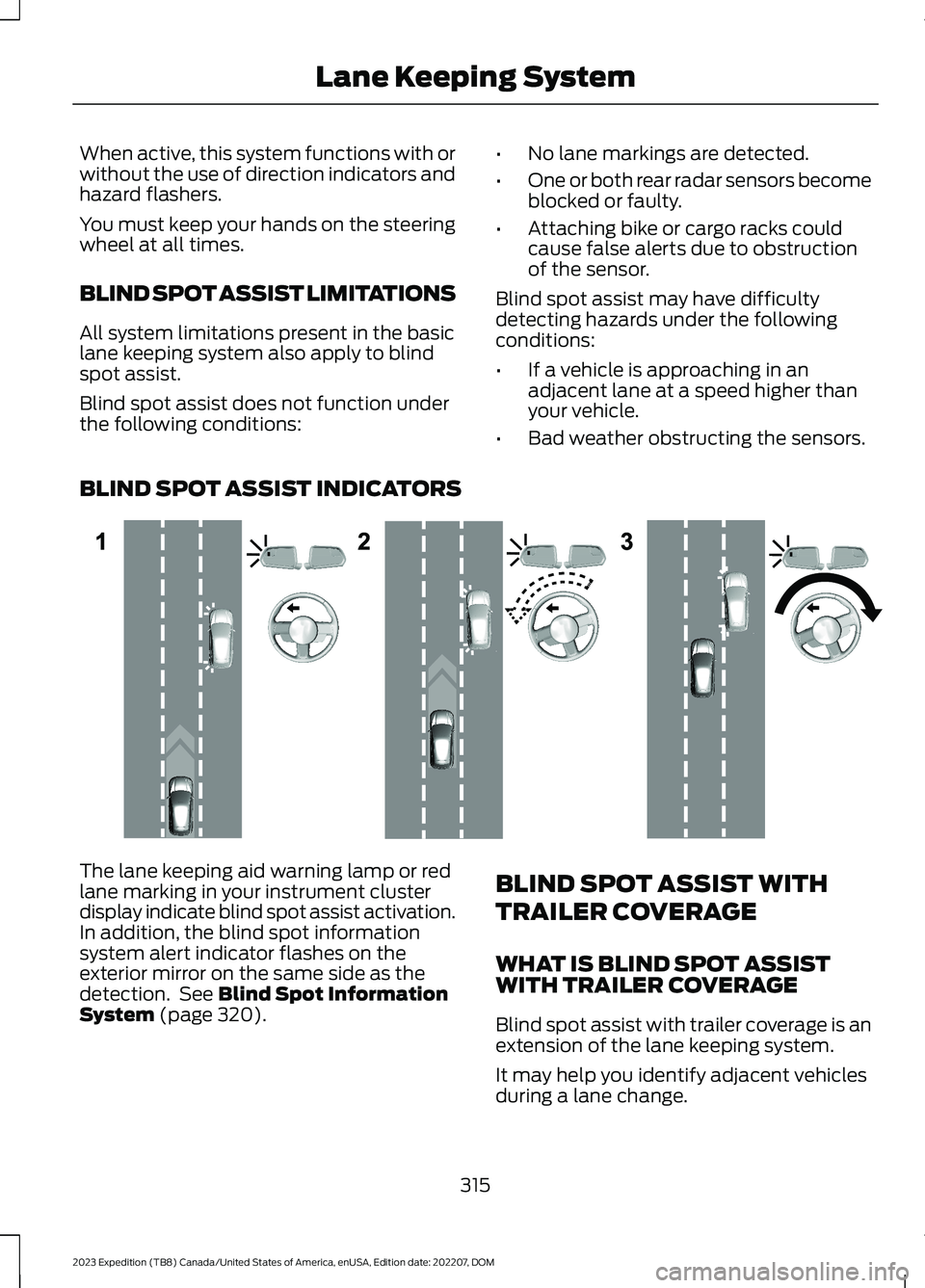
BLIND SPOT ASSIST INDICATORS
The lane keeping aid warning lamp or redlane marking in your instrument clusterdisplay indicate blind spot assist activation.In addition, the blind spot informationsystem alert indicator flashes on theexterior mirror on the same side as thedetection. See Blind Spot InformationSystem (page 320).
BLIND SPOT ASSIST WITH
TRAILER COVERAGE
WHAT IS BLIND SPOT ASSISTWITH TRAILER COVERAGE
Blind spot assist with trailer coverage is anextension of the lane keeping system.
It may help you identify adjacent vehiclesduring a lane change.
315
2023 Expedition (TB8) Canada/United States of America, enUSA, Edition date: 202207, DOMLane Keeping SystemE310089
Page 320 of 658
Blind spot assist provides a blind spotwarning and steering assistance to helpduring lane changes.
When attaching a trailer, ensure you haveproperly set up the trailer coveragesettings. See Blind Spot InformationSystem With Trailer Coverage (page322).
HOW DOES BLIND SPOT ASSISTWITH TRAILER COVERAGE WORK
Activate and deactivate thesystem using the lane keepingsystem button on the steeringwheel.
During lane changes, the design of theblind spot assist feature detects vehiclesin, or approaching, your blind spot andprovides a warning, plus steeringassistance to direct your vehicle back intoyour lane.
If a supported trailer is connected, thefunction is reduced to only detectingvehicles on both sides of your vehicle andtrailer, extending rearward from theexterior mirrors to the end of your trailer.See Blind Spot Information SystemWith Trailer Coverage (page 322).
When active, this system functions with orwithout the use of direction indicators andhazard flashers.
You must keep your hands on the steeringwheel at all times.
BLIND SPOT ASSIST WITHTRAILER COVERAGELIMITATIONS
All system limitations present in the basiclane keeping system also apply to blindspot assist.
Blind spot assist does not function underthe following conditions:
•The system does not detect lanemarkings.
•One or both rear radar sensors becomeblocked or faulty.
•You have not configured the attachedtrailer correctly in the trailer tow menusor you attached an unsupported trailer.The system only supports certain trailershapes and dimensions.
Note:Blind spot assist with trailer coveragecould have reduced performance if any ofthe above limitations are present.
Blind spot assist may have difficultydetecting hazards under the followingconditions:
•If a vehicle is approaching in anadjacent lane at a relative speed muchhigher than your vehicle.
•Bad weather conditions are presentthat obstruct the sensors.
•Attaching bike or cargo racks couldcause false alerts due to obstructionof the sensor.
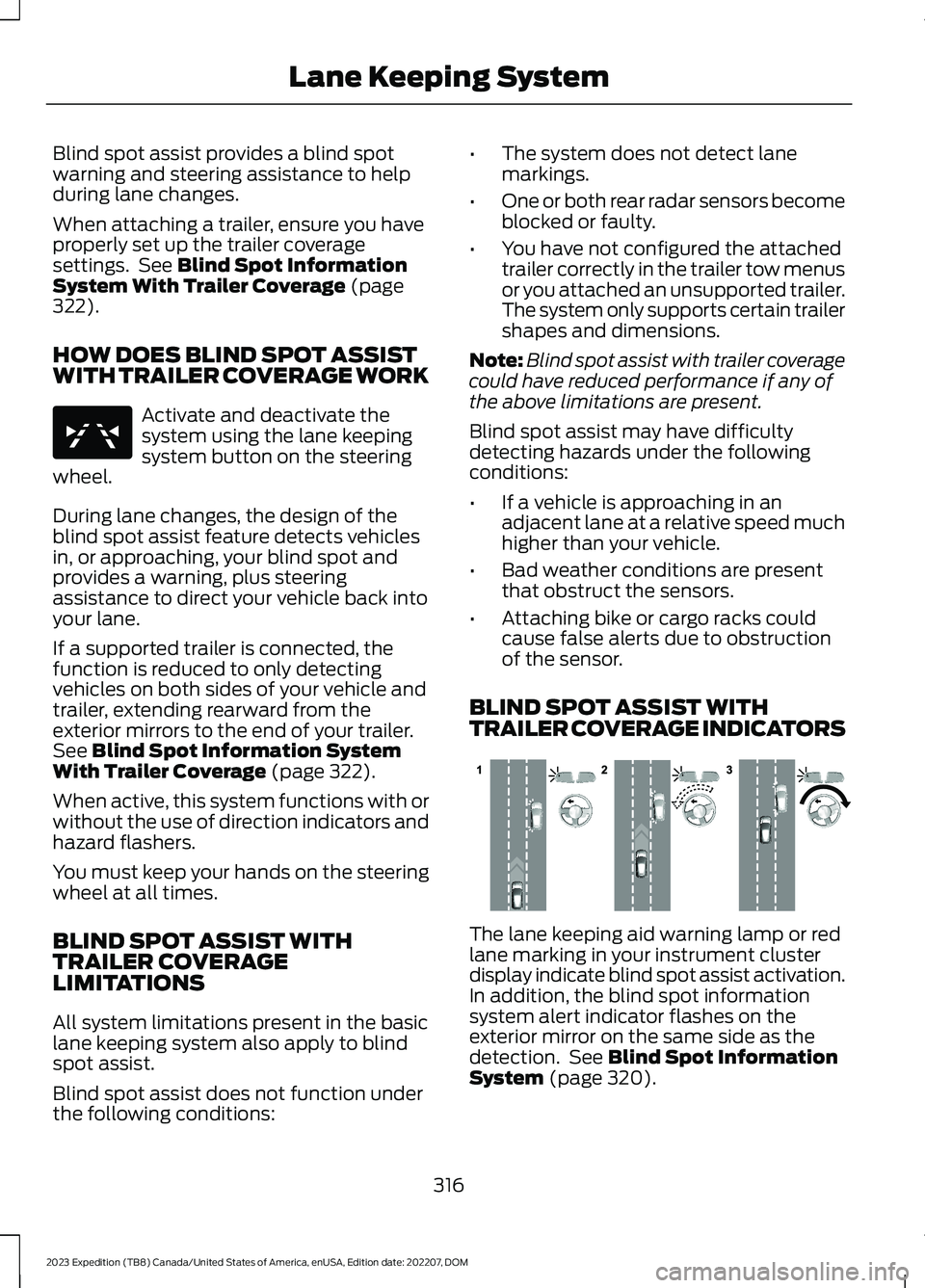
BLIND SPOT ASSIST WITHTRAILER COVERAGE INDICATORS
The lane keeping aid warning lamp or redlane marking in your instrument clusterdisplay indicate blind spot assist activation.In addition, the blind spot informationsystem alert indicator flashes on theexterior mirror on the same side as thedetection. See Blind Spot InformationSystem (page 320).
316
2023 Expedition (TB8) Canada/United States of America, enUSA, Edition date: 202207, DOMLane Keeping SystemE334922 E310089
Page 321 of 658
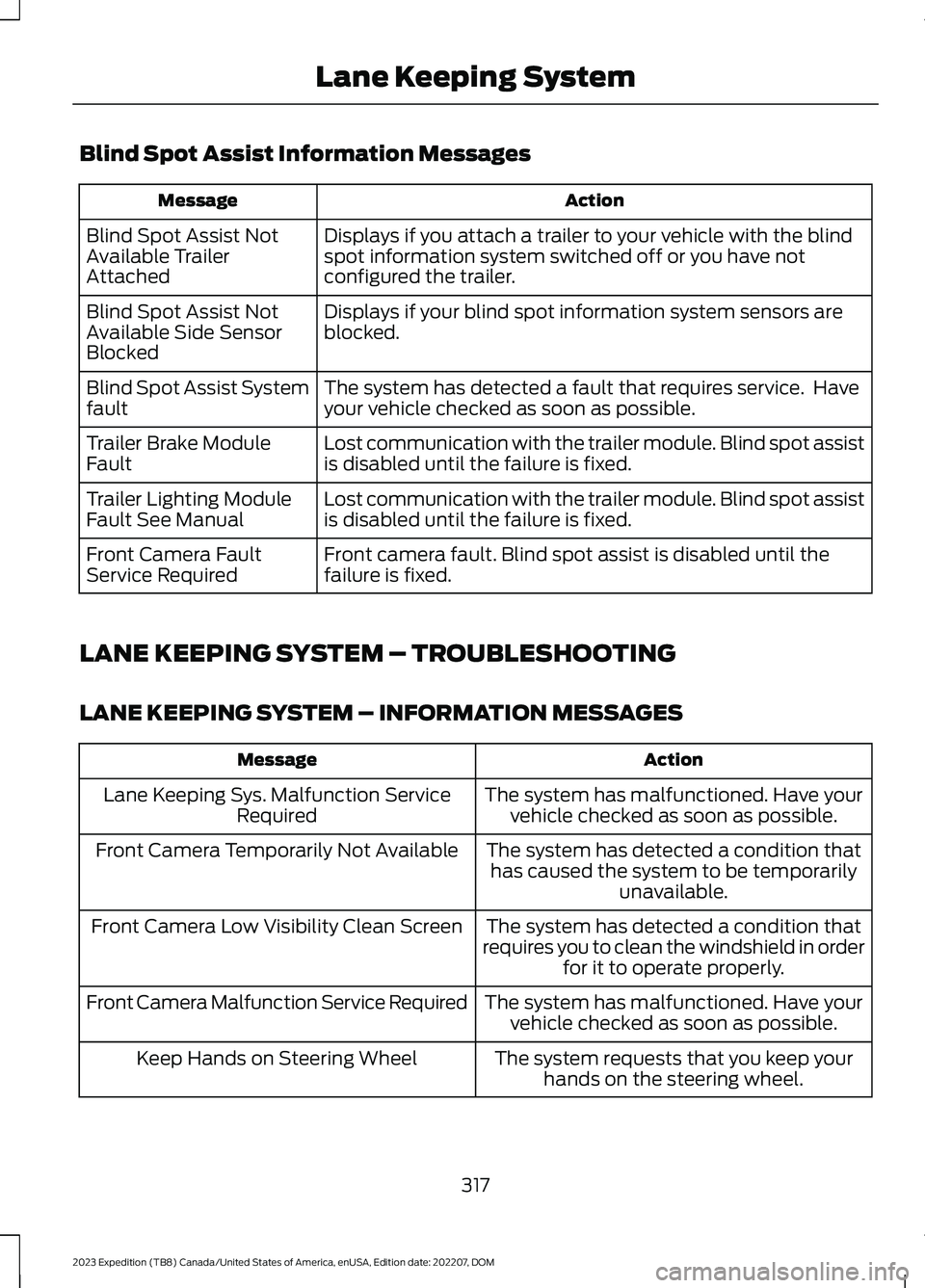
Blind Spot Assist Information Messages
ActionMessage
Displays if you attach a trailer to your vehicle with the blindspot information system switched off or you have notconfigured the trailer.
Blind Spot Assist NotAvailable TrailerAttached
Displays if your blind spot information system sensors areblocked.Blind Spot Assist NotAvailable Side SensorBlocked
The system has detected a fault that requires service. Haveyour vehicle checked as soon as possible.Blind Spot Assist Systemfault
Lost communication with the trailer module. Blind spot assistis disabled until the failure is fixed.Trailer Brake ModuleFault
Lost communication with the trailer module. Blind spot assistis disabled until the failure is fixed.Trailer Lighting ModuleFault See Manual
Front camera fault. Blind spot assist is disabled until thefailure is fixed.Front Camera FaultService Required
LANE KEEPING SYSTEM – TROUBLESHOOTING
LANE KEEPING SYSTEM – INFORMATION MESSAGES
ActionMessage
The system has malfunctioned. Have yourvehicle checked as soon as possible.Lane Keeping Sys. Malfunction ServiceRequired
The system has detected a condition thathas caused the system to be temporarilyunavailable.
Front Camera Temporarily Not Available
The system has detected a condition thatrequires you to clean the windshield in orderfor it to operate properly.
Front Camera Low Visibility Clean Screen
The system has malfunctioned. Have yourvehicle checked as soon as possible.Front Camera Malfunction Service Required
The system requests that you keep yourhands on the steering wheel.Keep Hands on Steering Wheel
317
2023 Expedition (TB8) Canada/United States of America, enUSA, Edition date: 202207, DOMLane Keeping System
Page 340 of 658
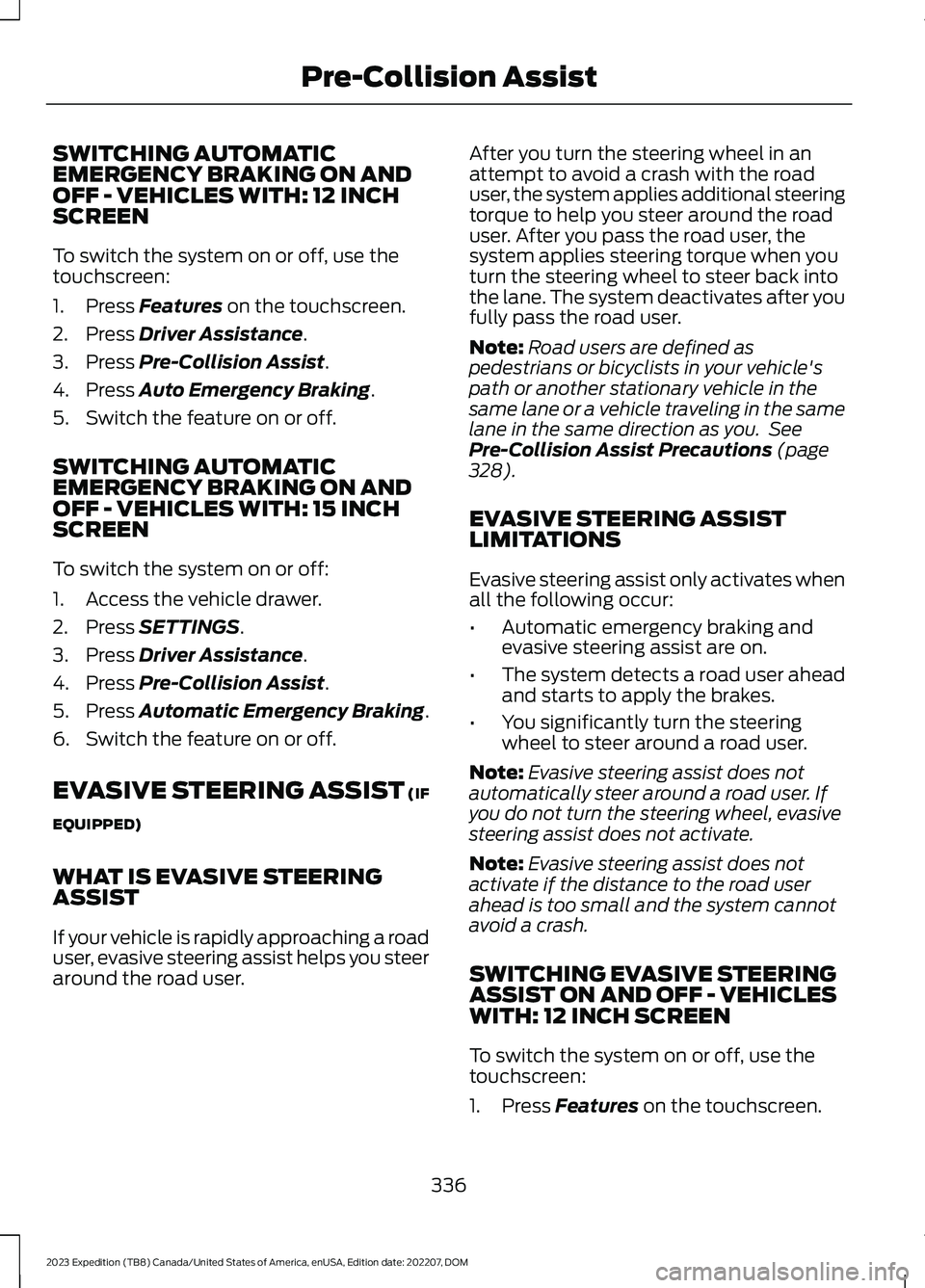
SWITCHING AUTOMATICEMERGENCY BRAKING ON ANDOFF - VEHICLES WITH: 12 INCHSCREEN
To switch the system on or off, use thetouchscreen:
1.Press Features on the touchscreen.
2.Press Driver Assistance.
3.Press Pre-Collision Assist.
4.Press Auto Emergency Braking.
5.Switch the feature on or off.
SWITCHING AUTOMATICEMERGENCY BRAKING ON ANDOFF - VEHICLES WITH: 15 INCHSCREEN
To switch the system on or off:
1.Access the vehicle drawer.
2.Press SETTINGS.
3.Press Driver Assistance.
4.Press Pre-Collision Assist.
5.Press Automatic Emergency Braking.
6.Switch the feature on or off.
EVASIVE STEERING ASSIST (IF
EQUIPPED)
WHAT IS EVASIVE STEERINGASSIST
If your vehicle is rapidly approaching a roaduser, evasive steering assist helps you steeraround the road user.
After you turn the steering wheel in anattempt to avoid a crash with the roaduser, the system applies additional steeringtorque to help you steer around the roaduser. After you pass the road user, thesystem applies steering torque when youturn the steering wheel to steer back intothe lane. The system deactivates after youfully pass the road user.
Note:Road users are defined aspedestrians or bicyclists in your vehicle'spath or another stationary vehicle in thesame lane or a vehicle traveling in the samelane in the same direction as you. SeePre-Collision Assist Precautions (page328).
EVASIVE STEERING ASSISTLIMITATIONS
Evasive steering assist only activates whenall the following occur:
•Automatic emergency braking andevasive steering assist are on.
•The system detects a road user aheadand starts to apply the brakes.
•You significantly turn the steeringwheel to steer around a road user.
Note:Evasive steering assist does notautomatically steer around a road user. Ifyou do not turn the steering wheel, evasivesteering assist does not activate.
Note:Evasive steering assist does notactivate if the distance to the road userahead is too small and the system cannotavoid a crash.
SWITCHING EVASIVE STEERINGASSIST ON AND OFF - VEHICLESWITH: 12 INCH SCREEN
To switch the system on or off, use thetouchscreen:
1.Press Features on the touchscreen.
336
2023 Expedition (TB8) Canada/United States of America, enUSA, Edition date: 202207, DOMPre-Collision Assist