cooling FORD EXPEDITION 2023 Owners Manual
[x] Cancel search | Manufacturer: FORD, Model Year: 2023, Model line: EXPEDITION, Model: FORD EXPEDITION 2023Pages: 658, PDF Size: 16.16 MB
Page 9 of 658
Remote Start Remote Control Indicators.........................................................................145
Remote Start Settings - Vehicles With:12 Inch Screen...........................................145
Remote Start Settings - Vehicles With:15 Inch Screen...........................................146
Climate Control - VehiclesWith: 12 Inch Screen
Identifying the Climate Control Unit.....148
Switching Climate Control On and Off.........................................................................148
Switching Recirculated Air On and Off.........................................................................148
Switching Air Conditioning On and Off.........................................................................148
Switching Defrost On and Off................148
Switching Maximum Defrost On and Off.........................................................................148
Switching Maximum Cooling On and Off.........................................................................149
Switching the Heated Rear Window Onand Off........................................................149
Setting the Blower Motor Speed...........149
Switching the Heated Mirrors On and Off.........................................................................149
Setting the Temperature..........................149
Directing the Flow of Air...........................150
Auto Mode.....................................................150
Climate Control Hints.................................151
Climate Control - VehiclesWith: 15 Inch Screen
Identifying the Climate Control Unit.....153
Switching Climate Control On and Off.........................................................................153
Switching Recirculated Air On and Off.........................................................................153
Switching Air Conditioning On and Off.........................................................................153
Switching Defrost On and Off................153
Switching Maximum Defrost On and Off.........................................................................153
Switching Maximum Cooling On and Off.........................................................................154
Switching the Heated Rear Window Onand Off........................................................154
Setting the Blower Motor Speed...........154
Switching the Heated Mirrors On and Off.........................................................................154
Setting the Temperature..........................154
Directing the Flow of Air............................154
Auto Mode......................................................155
Climate Control Hints................................156
Rear Passenger ClimateControl
Identifying the Rear Passenger ClimateControl Unit - Vehicles With: ManualTemperature Control.............................158
Identifying the Rear Passenger ClimateControl Unit - Vehicles With:Automatic Temperature Control.......158
Switching the Rear Passenger ClimateControls On and Off...............................158
Setting the Blower Motor Speed...........158
Setting the Temperature..........................159
Directing the Flow of Air...........................159
Rear Auto Mode...........................................159
Rear Passenger Climate ControlIndicators....................................................159
Interior Air Quality
What Is the Cabin Air Filter......................160
Replacing the Cabin Air Filter.................160
Front Seats
Front Seat Precautions..............................161
Sitting in the Correct Position..................161
Manual Seats................................................162
Power Seats..................................................164
Massage Seats.............................................166
Heated Seats.................................................167
Ventilated Seats..........................................168
5
2023 Expedition (TB8) Canada/United States of America, enUSA, Edition date: 202207, DOMTable of Contents
Page 18 of 658
Cleaning the Interior...................................431
Repairing Minor Paint Damage.............433
Waxing Your Vehicle..................................434
Storing Your Vehicle
Preparing Your Vehicle for Storage......435
Removing Your Vehicle From Storage........................................................................436
Wheel and Tire Information
Locating the Tire label..............................437
Department of Transportation UniformTire Quality Grades................................437
Information on the Tire Sidewall.........438
Glossary of Tire Terminology.................443
Tire Replacement Requirements.........444
Using Snow Chains...................................446
Tire Care
Checking the Tire Pressures...................448
Inflating the Tires.......................................448
Inspecting the Tire for Wear...................449
Inspecting the Tire for Damage............449
Inspecting the Wheel Valve Stems......450
Tire Rotation................................................450
Tire Pressure MonitoringSystem
What Is the Tire Pressure MonitoringSystem........................................................452
Tire Pressure Monitoring SystemOverview....................................................452
Tire Pressure Monitoring SystemPrecautions...............................................453
Tire Pressure Monitoring SystemLimitations................................................453
Viewing the Tire Pressures.....................454
Tire Pressure Monitoring System –Troubleshooting.....................................454
Changing a Road Wheel
Changing a Flat Tire..................................456
Wheel Nuts...................................................462
Capacities and Specifications
Engine Specifications...............................463
Motorcraft Parts.........................................464
Engine Oil Capacity and Specification.......................................................................465
Cooling System Capacity andSpecification............................................466
Fuel Tank Capacity....................................467
Air Conditioning System Capacity andSpecification............................................468
Washer Fluid Specification....................468
Brake Fluid Specification........................469
Transfer Case Fluid Capacity andSpecification............................................470
Front Axle Fluid Capacity andSpecification............................................470
Rear Axle Fluid Capacity andSpecification..............................................471
Vehicle Identification
Vehicle Identification Number...............474
Connected Vehicle
What Is a Connected Vehicle.................475
Connected Vehicle Requirements........475
Connected Vehicle Limitations.............475
Connecting the Vehicle to a MobileNetwork......................................................475
Connecting the Vehicle to a Wi-FiNetwork - Vehicles With: 12 InchScreen.........................................................476
Connecting the Vehicle to a Wi-FiNetwork - Vehicles With: 15 InchScreen.........................................................476
Connected Vehicle – Troubleshooting........................................................................476
14
2023 Expedition (TB8) Canada/United States of America, enUSA, Edition date: 202207, DOMTable of Contents
Page 152 of 658
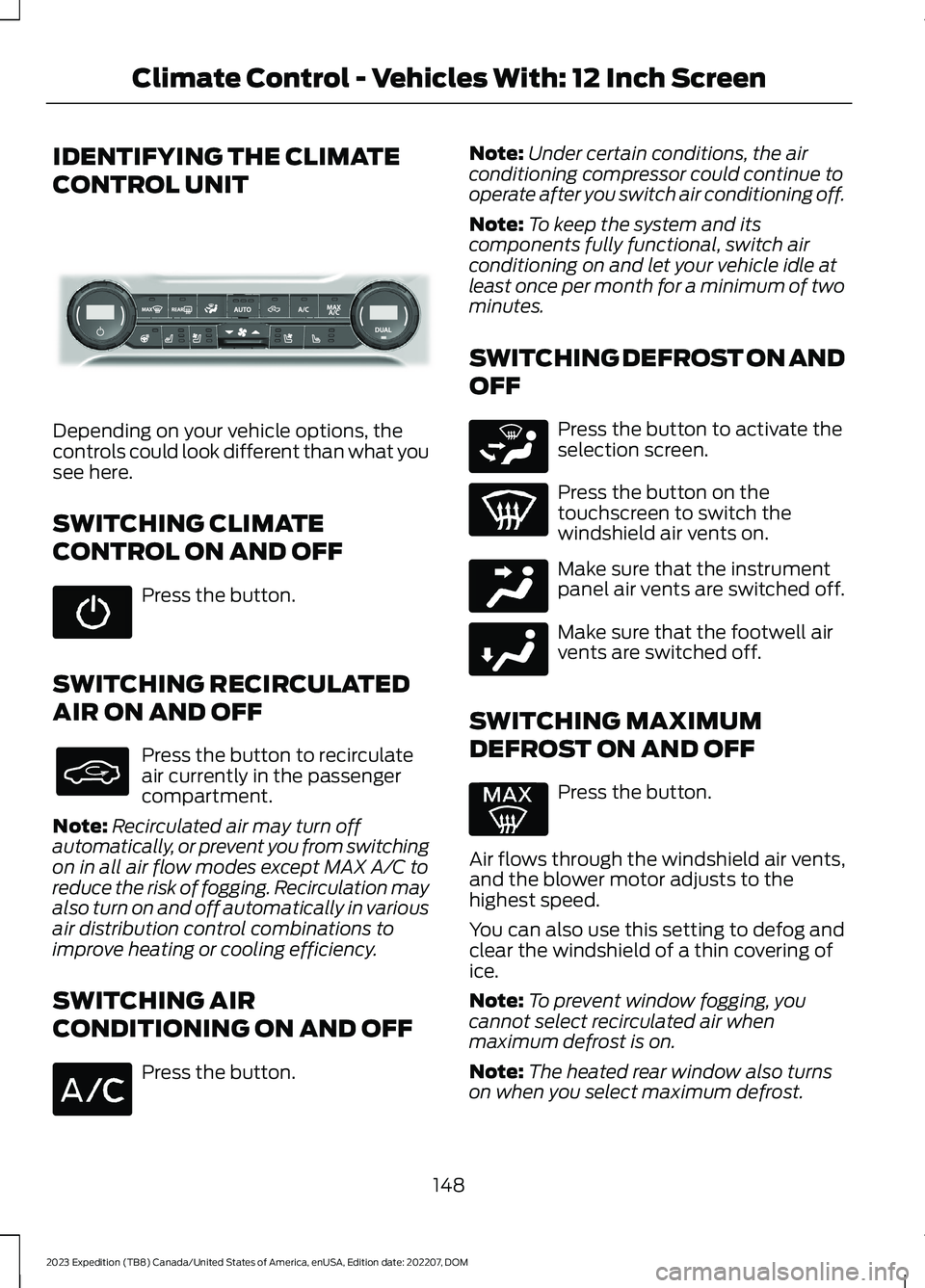
IDENTIFYING THE CLIMATE
CONTROL UNIT
Depending on your vehicle options, thecontrols could look different than what yousee here.
SWITCHING CLIMATE
CONTROL ON AND OFF
Press the button.
SWITCHING RECIRCULATED
AIR ON AND OFF
Press the button to recirculateair currently in the passengercompartment.
Note:Recirculated air may turn offautomatically, or prevent you from switchingon in all air flow modes except MAX A/C toreduce the risk of fogging. Recirculation mayalso turn on and off automatically in variousair distribution control combinations toimprove heating or cooling efficiency.
SWITCHING AIR
CONDITIONING ON AND OFF
Press the button.
Note:Under certain conditions, the airconditioning compressor could continue tooperate after you switch air conditioning off.
Note:To keep the system and itscomponents fully functional, switch airconditioning on and let your vehicle idle atleast once per month for a minimum of twominutes.
SWITCHING DEFROST ON AND
OFF
Press the button to activate theselection screen.
Press the button on thetouchscreen to switch thewindshield air vents on.
Make sure that the instrumentpanel air vents are switched off.
Make sure that the footwell airvents are switched off.
SWITCHING MAXIMUM
DEFROST ON AND OFF
Press the button.
Air flows through the windshield air vents,and the blower motor adjusts to thehighest speed.
You can also use this setting to defog andclear the windshield of a thin covering ofice.
Note:To prevent window fogging, youcannot select recirculated air whenmaximum defrost is on.
Note:The heated rear window also turnson when you select maximum defrost.
148
2023 Expedition (TB8) Canada/United States of America, enUSA, Edition date: 202207, DOMClimate Control - Vehicles With: 12 Inch ScreenE339318 E265283 E244097 E244098
Page 153 of 658
Note:When maximum defrost is on, the airconditioning compressor may continue tooperate even though you switch off the airconditioning.
SWITCHING MAXIMUM
COOLING ON AND OFF
Press the button.
Note:When you switch maximum coolingoff, air conditioning remains on.
SWITCHING THE HEATED
REAR WINDOW ON AND OFF
Press the button to clear the rearwindow of thin ice and fog. Theheated rear window turns offafter a short period of time.
Note:Do not use harsh chemicals, razorblades or other sharp objects to clean orremove decals from the inside of the heatedrear window as this could cause damage tothe heated rear window grid lines notcovered by the vehicle Warranty.
SETTING THE BLOWER MOTOR
SPEED
Press up or down on the controlto select the blower motorspeed.
Note:For Hybrid Electric Vehicle (HEV) andPlug-In Hybrid Electric Vehicle (PHEV)vehicles, the blower motor may run, and youmay feel airflow when the climate controlis off, to provide cooling to the battery.
SWITCHING THE HEATED
MIRRORS ON AND OFF
When you switch the heated rear windowon, the heated exterior mirrors turn on.
Note:Do not remove ice from the mirrorswith a scraper or adjust the mirror glasswhen it is frozen in place.
Note:Do not clean the mirror housing orglass with harsh abrasives, fuel or otherpetroleum-based cleaning products. Thevehicle warranty may not cover damagecaused to the mirror housing or glass.
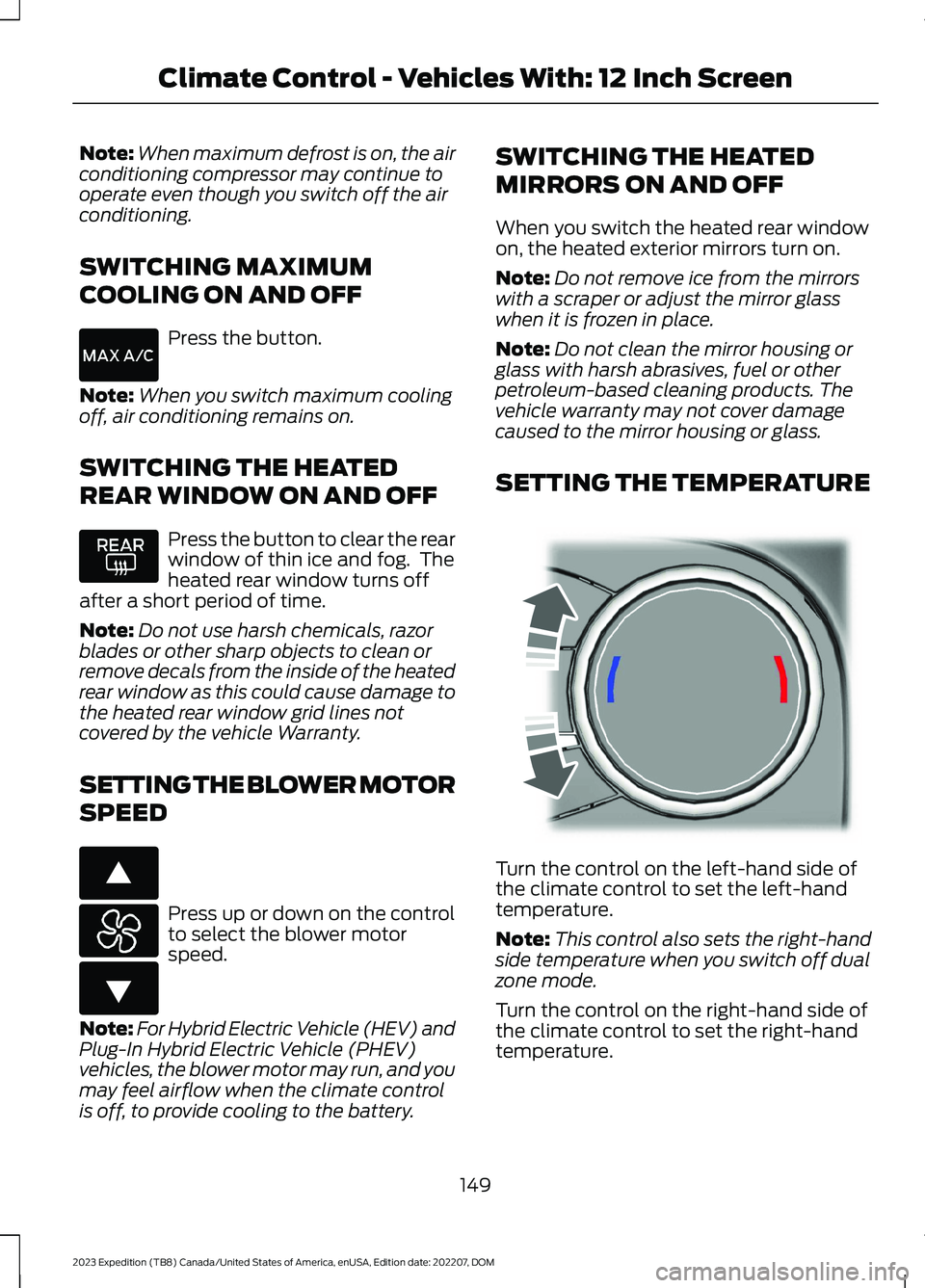
SETTING THE TEMPERATURE
Turn the control on the left-hand side ofthe climate control to set the left-handtemperature.
Note:This control also sets the right-handside temperature when you switch off dualzone mode.
Turn the control on the right-hand side ofthe climate control to set the right-handtemperature.
149
2023 Expedition (TB8) Canada/United States of America, enUSA, Edition date: 202207, DOMClimate Control - Vehicles With: 12 Inch Screen E266187 E266186 E244115
Page 155 of 658

SWITCHING DUAL MODE ON ANDOFF
Press the button.
CLIMATE CONTROL HINTS
General Hints
•Prolonged use of recirculated air maycause the windows to fog up.
•You may feel a small amount of airfrom the footwell air vents regardlessof the air distribution setting.
•To reduce humidity build-up inside yourvehicle, do not drive with the systemswitched off or with recirculated airalways switched on.
•Do not place objects under the frontseats as this may interfere with theairflow to the rear seats.
•Remove any snow, ice or leaves fromthe air intake area at the base of thewindshield.
•To improve the time to reach acomfortable temperature in hotweather, drive with the windows openuntil you feel cold air through the airvents.
Automatic Climate Control
•Adjusting the settings when yourvehicle interior is extremely hot or coldis not necessary. Automatic mode isbest recommended to maintain settemperature.
•The system adjusts to heat or cool theinterior to the temperature you selectas quickly as possible.
•For the system to function efficiently,the instrument panel and side air ventsshould be fully open.
•If you press AUTO during cold outsidetemperatures, the system directs airflow to the windshield and side windowair vents.In addition, the blower motormay run at a slower speed until theengine warms up.
•If you press AUTO during hottemperatures and the inside of thevehicle is hot, the system usesrecirculated air to maximize interiorcooling. Blower motor speed may alsoreduce until the air cools.
Quickly Heating the Interior
1.Press AUTO.
2.Adjust the temperature function to thesetting you prefer.
Recommended Settings forHeating
1.Press AUTO.
2.Adjust the temperature function to thesetting you prefer. Use 72°F (22°C) asa starting point, then adjust the settingas necessary.
Quickly Cooling the Interior
1.Press MAX A/C.
2.Drive with the windows open for a shortperiod of time.
Recommended Settings forCooling
1.Press AUTO.
2.Adjust the temperature function to thesetting you prefer. Use 72°F (22°C) asa starting point, then adjust the settingas necessary.
Defogging the Side Windows inCold Weather
1.Press and release defrost or maximumdefrost.
151
2023 Expedition (TB8) Canada/United States of America, enUSA, Edition date: 202207, DOMClimate Control - Vehicles With: 12 Inch ScreenE265280
Page 157 of 658
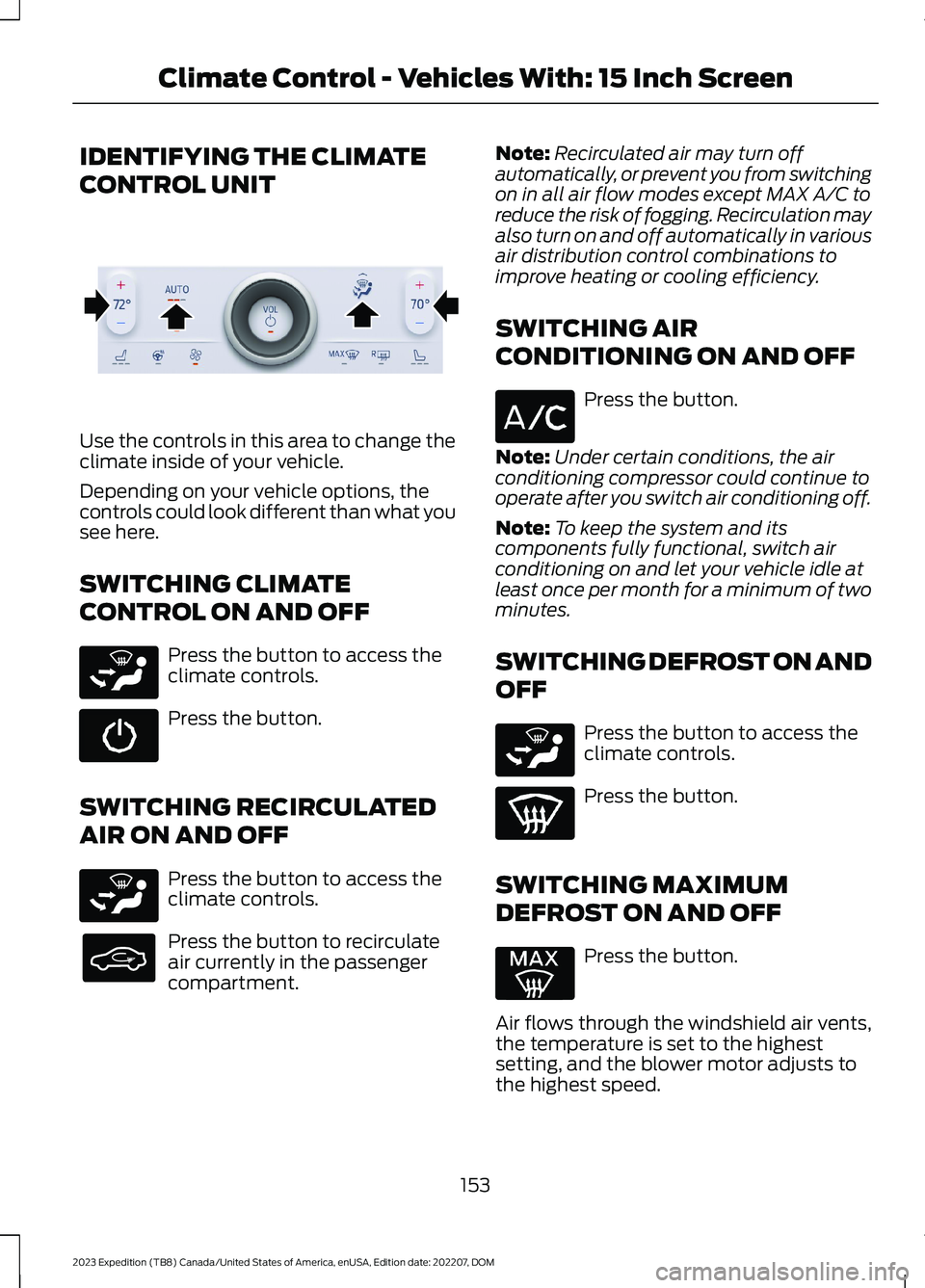
IDENTIFYING THE CLIMATE
CONTROL UNIT
Use the controls in this area to change theclimate inside of your vehicle.
Depending on your vehicle options, thecontrols could look different than what yousee here.
SWITCHING CLIMATE
CONTROL ON AND OFF
Press the button to access theclimate controls.
Press the button.
SWITCHING RECIRCULATED
AIR ON AND OFF
Press the button to access theclimate controls.
Press the button to recirculateair currently in the passengercompartment.
Note:Recirculated air may turn offautomatically, or prevent you from switchingon in all air flow modes except MAX A/C toreduce the risk of fogging. Recirculation mayalso turn on and off automatically in variousair distribution control combinations toimprove heating or cooling efficiency.
SWITCHING AIR
CONDITIONING ON AND OFF
Press the button.
Note:Under certain conditions, the airconditioning compressor could continue tooperate after you switch air conditioning off.
Note:To keep the system and itscomponents fully functional, switch airconditioning on and let your vehicle idle atleast once per month for a minimum of twominutes.
SWITCHING DEFROST ON AND
OFF
Press the button to access theclimate controls.
Press the button.
SWITCHING MAXIMUM
DEFROST ON AND OFF
Press the button.
Air flows through the windshield air vents,the temperature is set to the highestsetting, and the blower motor adjusts tothe highest speed.
153
2023 Expedition (TB8) Canada/United States of America, enUSA, Edition date: 202207, DOMClimate Control - Vehicles With: 15 Inch ScreenE373427 E265283 E265283 E265283
Page 158 of 658
You can also use this setting to defog andclear the windshield of a thin covering ofice.
Note:To prevent window fogging, youcannot select recirculated air whenmaximum defrost is on.
Note:The heated rear window and heatedmirrors also turn on when you selectmaximum defrost.
Note:When maximum defrost is on, the airconditioning compressor may continue tooperate even though you switch off the A/C.
SWITCHING MAXIMUM
COOLING ON AND OFF
Press the button to access theclimate controls.
Press the button.
Note:When you switch maximum coolingoff, air conditioning remains on.
Note:In certain conditions, for example,cold weather, maximum cooling may notactivate or could run slow when switchedon. This helps reduce power consumptionfrom the battery.
SWITCHING THE HEATED
REAR WINDOW ON AND OFF
Press the button to clear the rearwindow of thin ice and fog. Theheated rear window turns offafter a short period of time.
Note:Do not use harsh chemicals, razorblades or other sharp objects to clean orremove decals from the inside of the heatedrear window as this could cause damage tothe heated rear window grid lines notcovered by the vehicle Warranty.
SETTING THE BLOWER MOTOR
SPEED
Press the button to switch theblower motor on.
Slide the control to set theblower motor speed.
SWITCHING THE HEATED
MIRRORS ON AND OFF
When you switch the heated rear windowon, the heated exterior mirrors turn on.
Note:Do not remove ice from the mirrorswith a scraper or adjust the mirror glasswhen it is frozen in place.
Note:Do not clean the mirror housing orglass with harsh abrasives, fuel or otherpetroleum-based cleaning products. Thevehicle warranty may not cover damagecaused to the mirror housing or glass.
SETTING THE TEMPERATURE
Press the temperature controls on eitherside of the climate control to set thetemperature for that side.
Slide the control to set thetemperature.
Note: You can press + or - to set thetemperature.
DIRECTING THE FLOW OF AIR
Directing Air to the Windshield AirVents
Press the button on thetouchscreen to access theclimate controls.
154
2023 Expedition (TB8) Canada/United States of America, enUSA, Edition date: 202207, DOMClimate Control - Vehicles With: 15 Inch ScreenE265283 E328451 E328451 E265283
Page 160 of 658
SWITCHING DUAL MODE ON ANDOFF
Press the button to access theclimate controls.
Press the button.
Note:When dual mode is off, setting thetemperature using the driver side controls,sets the temperature for both sides.
Note:Setting the temperature using thepassenger side controls, sets the passengertemperature and switches dual mode on.
CLIMATE CONTROL HINTS
General Hints
•Use of the climate system will reduceyour vehicles driving range. Conservebattery charge by using climate controlfeatures when necessary.
•Prolonged use of recirculated air maycause the windows to fog up.
•You may feel a small amount of airfrom the footwell air vents regardlessof the air distribution setting.
•To reduce humidity build-up inside yourvehicle, do not drive with the systemswitched off or with recirculated airalways switched on.
•Remove any snow, ice or leaves fromthe air intake area at the base of thewindshield.
•To improve the time to reach acomfortable temperature in hotweather, drive with the windows openuntil you feel cold air through the airvents.
Automatic Climate Control
•Adjusting the settings when yourvehicle interior is extremely hot or coldis not necessary. Automatic mode isbest recommended to maintain settemperature.
•The system adjusts to heat or cool theinterior to the temperature you selectas quickly as possible.
•For the system to function efficiently,the instrument panel and side air ventsshould be fully open.
•If you press AUTO during cold outsidetemperatures, the system directs airflow to the windshield and side windowair vents. The blower motor speed mayreduce until the air warms.
•If you press AUTO during hottemperatures and the inside of thevehicle is hot, the system usesrecirculated air to maximize interiorcooling. Blower motor speed may alsoreduce until the air cools.
Quickly Heating the Interior
1.Press AUTO.
2.Adjust the temperature function to thesetting you prefer.
Recommended Settings forHeating
1.Press AUTO.
2.Adjust the temperature function to thesetting you prefer. Use 72°F (22°C) asa starting point, then adjust the settingas necessary.
Quickly Cooling the Interior
Press MAX A/C.
Recommended Settings forCooling
1.Press AUTO.
156
2023 Expedition (TB8) Canada/United States of America, enUSA, Edition date: 202207, DOMClimate Control - Vehicles With: 15 Inch ScreenE265283 E265280
Page 172 of 658
Press the heated seat symbol to cyclethrough the various heat settings and off.More indicator lights indicate warmersettings.
Note:The heated seats may remain onafter you remote start your vehicle, basedon your remote start settings. The heatedseats may also turn on when you start yourvehicle if they were on when you switchedyour vehicle off.
Automatic Climate ControlledSeats (If Equipped)
When you switch the auto setting on, theclimate controlled seats switch betweenthe heated seats and ventilated seats tomatch your climate control setting.
VENTILATED SEATS (IF EQUIPPED)
VENTILATED SEAT PRECAUTIONS
Do not:
•Spill liquid on the front seats. This maycause the air vent holes to becomeblocked and not work properly.
•Place cargo or objects under the seats.They may block the air intake causingthe air vents to not work properly.
SWITCHING THE VENTILATEDSEATS ON AND OFF
The vehicle must be running to use thisfeature.
Press this symbol on the climate controlsor the touchscreen to cycle through thevarious ventilation settings and off. Moreindicator lights indicate higher fan speeds.
Note:When you switch the climate controlfan speed and the ventilated seats to theirmaximum settings, the ventilated seatsprovide increased cooling.
If the engine falls below 350 RPM whilethe ventilated seats are on, the featureturns itself off unless the vehicle is inAuto-Start-Stop mode. You may need toreactivate the ventilated seats.
Note:The ventilated seats may remain onafter you remote start your vehicle, basedon your remote start settings. The ventilatedseats may also turn on when you start yourvehicle if they were on when you switchedyour vehicle off.
168
2023 Expedition (TB8) Canada/United States of America, enUSA, Edition date: 202207, DOMFront SeatsE146322 E224689
Page 226 of 658
FOUR-WHEEL DRIVE AUTO
Four-wheel drive auto provideselectronically controlled four-wheel drivepower to both the front and rear wheels,as required, for increased traction in varyingon-road conditions. The four-wheel driveauto tuning varies based on selected DriveMode. See Selecting a Drive Mode (page303).
Note:Four-wheel drive auto can turn on oroff automatically based on Drive Modeselection. See Selecting a Drive Mode(page 303).
FOUR-WHEEL DRIVE HIGH (If Equipped)
Four-wheel drive high provideselectronically locked four-wheel drivepower to both the front and rear wheelsfor use in off-road or winter conditionssuch as deep snow, sand or mud. Thismode is not for use on dry pavement.
Note:Four-wheel drive high can turn on oroff automatically based on Drive Modeselection. See Selecting a Drive Mode(page 303).
FOUR-WHEEL DRIVE LOW (If Equipped)
Four-wheel drive low provideselectronically locked four-wheel drivepower to both the front and rear wheelsfor use on low traction surfaces, but doesso with additional gearing for increasedtorque multiplication. This mode is only foroff-road conditions such as deep sand,steep slopes, or pulling heavy objects.
Note:Four-wheel drive low can turn on oroff automatically based on drive modeselection. See Selecting a Drive Mode(page 303).
FOUR-WHEEL DRIVE
INDICATORS
Two-wheel Drive High
Momentarily illuminates whenyou select two-wheel drive high.
Four-wheel Drive Auto
Continuously illuminates whenyou select four-wheel drive auto.
Four-wheel Drive High (If Equipped)
Continuously illuminates whenyou select four-wheel drive high.
Four-wheel Drive Low (If Equipped)
Continuously illuminates whenyou select four-wheel drive low.
FOUR-WHEEL DRIVE DRIVING
HINTS
DRIVING IN SAND
When driving over sand, try to keep all fourwheels on the most solid area of the trail.Avoid reducing the tire pressures but shiftto a lower gear and drive steadily throughthe terrain. Apply the accelerator slowlyand avoid excessive wheel slip.
When driving at slow speeds in deep sandunder high outside temperatures, use a lowgear when possible. Low gear operationcan maximize the engine and transmissioncooling capability.
222
2023 Expedition (TB8) Canada/United States of America, enUSA, Edition date: 202207, DOMFour-Wheel Drive (If Equipped)E181778 E181781 E181779 E181780