instrument panel FORD EXPEDITION 2023 Owner's Manual
[x] Cancel search | Manufacturer: FORD, Model Year: 2023, Model line: EXPEDITION, Model: FORD EXPEDITION 2023Pages: 658, PDF Size: 16.16 MB
Page 236 of 658
WHAT IS THE ELECTRIC
PARKING BRAKE
The electric parking brake is used to holdyour vehicle on slopes and flat roads.
APPLYING THE ELECTRIC
PARKING BRAKE
WARNING: Apply the parkingbrake, shift into park (P), switch theignition off and remove the key beforeyou leave your vehicle. Failure to followthis instruction could result in personalinjury or death.
WARNING: If you drive extendeddistances with the parking brake applied,you could cause damage to the brakesystem.
WARNING: The electric parkingbrake does not operate if the vehiclebattery has run out of charge.
The switch is on the lower partof the instrument panel.
Pull the switch up to apply the electricparking brake. The red warning lampflashes, then steadily illuminates when theparking brake is applied.
Note:You can apply the electric parkingbrake when the ignition is off.
Note:The electric parking brake couldautomatically apply when park (P) isselected. See Park (P) (page 213).
APPLYING THE ELECTRIC
PARKING BRAKE IN AN
EMERGENCY
You can use the electric parking brake toslow or stop your vehicle in an emergency.
Pull the switch up and hold it.
The red warning lamp illuminates, a tonesounds and the stoplamps turn on whenyou use the electric parking brake in anemergency.
The electric parking brake continues toslow your vehicle down unless you releasethe switch.
Note:Do not apply the electric parkingbrake when your vehicle is moving, exceptin an emergency. If you repeatedly use theelectric parking brake to slow or stop yourvehicle, you could cause damage to thebrake system.
MANUALLY RELEASING THE
ELECTRIC PARKING BRAKE
1.Switch the ignition on.
2.Press and hold the brake pedal.
3.Push the switch down.
The red warning lamp turns off.
Pulling Away on a Hill When Towing aTrailer
1.Press and hold the brake pedal.
2.Pull the switch upward and hold it.
3.Shift into gear.
4.Press the accelerator pedal until enginehas developed sufficient torque toprevent your vehicle from rolling downthe hill.
5.Release the switch and pull away in anormal manner.
232
2023 Expedition (TB8) Canada/United States of America, enUSA, Edition date: 202207, DOMElectric Parking BrakeE267156
Page 249 of 658
WHAT IS TRACTION CONTROL
The traction control system helps to avoiddrive wheel spin and loss of traction.
HOW DOES TRACTION
CONTROL WORK
If your wheels begin to spin, the loss oftraction can compromise steering controland stability of the vehicle. The tractioncontrol system applies the brakes toindividual wheels and when needed,reduces engine power at the same time toincrease traction.
SWITCHING TRACTION
CONTROL ON AND OFF
WARNING: Operating your vehiclewith the traction control disabled couldlead to an increased risk of loss of vehiclecontrol, vehicle rollover, personal injuryand death.
The traction control system turns on eachtime you switch the ignition on.
The button for the stability and tractioncontrol system is on the instrument panel.
Press and release the button to switchtraction control off. The stability controlsystem remains fully active, to switch it off,press and hold the button for a fewseconds, then release.
When you switch traction control off, amessage and an illuminated icon appearon the instrument cluster.
Press the switch again to turn the tractioncontrol system back on to normaloperation.
If your vehicle is stuck in mud or snow,switching traction control off may bebeneficial as this allows the wheels to spin.
TRACTION CONTROL
INDICATOR
Stability and Traction ControlIndicator
If the indicator does notilluminate when you switch theignition on, or remains on whenthe engine is running, this indicates amalfunction. Have your vehicle checkedby an authorized dealer as soon aspossible.
The traction control off indicatorilluminates when you switch thetraction control system off, orwhen an alternative stability control modeis selected that requires the tractioncontrol off depending on the drive modeselected.
245
2023 Expedition (TB8) Canada/United States of America, enUSA, Edition date: 202207, DOMTraction ControlE327252 E138639 E130458
Page 260 of 658
WHAT IS HILL DESCENT
CONTROL
Hill descent control allows the driver to setand maintain vehicle speed whiledescending steep slopes in various surfaceconditions.
HOW DOES HILL DESCENT
CONTROL WORK
Hill descent control can maintain vehiclespeeds on downhill slopes between2–20 mph (3–32 km/h). Above 20 mph(32 km/h), the system remains on but thedescent speed cannot be set ormaintained.
Note:The system does not function below2 mph (3 km/h).
The system requires a cool down intervalafter a period of sustained use. Hill descentcontrol provides a warning in the messagecenter and a tone sounds when the systemis about to disengage for cooling. At thistime, manually apply the brakes as neededto maintain descent speed.
Note:The amount of time that the systemcan remain active before cooling varies withconditions.
HILL DESCENT CONTROL
PRECAUTIONS
WARNING: The system does notcontrol speed in low traction conditionsor extremely steep slopes. The systemis designed to be an aid and does notrelieve you of your responsibility to drivewith due care and attention. Failure tofollow this instruction could result inpersonal injury.
WARNING: Hill descent controlcannot control descent in all surfaceconditions and circumstances, such asice or extremely steep grades. Hilldescent control is a driver assist systemand cannot substitute for good judgmentby the driver. Failure to do so may resultin loss of vehicle control, crash or seriousinjury.
WARNING: The system does notreplace the parking brake. When youleave your vehicle, always apply theparking brake and shift the transmissioninto park (P) for automatic transmissionor first gear for manual transmission.
SWITCHING HILL DESCENT
CONTROL ON AND OFF
Press the button on theinstrument panel or the centerconsole. A light illuminates anda tone sounds when the system is active.
SETTING THE HILL DESCENT
SPEED
To increase or decrease the descent speed,press the accelerator or brake pedal, or usethe SET + and SET - buttons on thesteering wheel. Once you reach thepreferred speed remove your feet from thepedals.
HILL DESCENT CONTROL
INDICATOR
Illuminates when you switch hilldescent control on.
256
2023 Expedition (TB8) Canada/United States of America, enUSA, Edition date: 202207, DOMHill Descent Control (If Equipped)E163171
Page 275 of 658
360 DEGREE CAMERA
SETTINGS
SWITCHING THE 360 DEGREECAMERA ON AND OFF - VEHICLESWITH: 12 INCH SCREEN
The 360 degree camera systembutton is on the instrumentpanel and allows you to togglethe front camera on or off. The front andrear cameras have multiple screens whichconsist of:
•Normal view.
•Normal view with 360.
•Split view.
Note:The rear view camera activates whenyou switch into reverse (R). Additional viewsare then accessible on the touchscreen.
When in park (P), neutral (N) or drive (D),only the front images display when youpress the button. When in reverse (R), onlythe rear images display when you press thebutton.
Note:The 360 degree camera system turnsoff when your vehicle is in motion at lowspeed, except when in reverse (R).
SWITCHING THE 360 DEGREECAMERA ON AND OFF - VEHICLESWITH: 15 INCH SCREEN
To access the 360 degree camera shiftinto reverse (R) gear or access the cameravia the touchscreen:
1.Access the vehicle drawer.
2.Press CONTROLS.
3.Press Camera.
Note:The rear view camera activates whenyou switch into reverse (R). Additional viewsare then accessible on the touchscreen.
When in park (P), neutral (N) or drive (D),the front images display when the buttonis pressed. When in reverse (R), only therear images display when the button ispressed.
Note:Not all cameras are available.
Note:The 360 degree camera system turnsoff when your vehicle is in motion at lowspeed, except when in reverse (R).
SWITCHING THE 360 DEGREECAMERA VIEW
Press to access the differentcamera views.
Front normal view provides animage of what is directly in frontof your vehicle.
Front split view provides anextended view of what is in frontof your vehicle.
Normal + 360 degree viewcontains the normal cameraview next to a 360 degreecamera view.
Rear normal view provides animage of what is directly behindyour vehicle.
Rear split view provides anextended view of what is behindyour vehicle.
The hitch view provides animage of the area around thetow hitch.
Trailer reverse guidance showsthe sides of your truck and trailer.See Trailer Reverse Guidance(page 382).
Zooms in on the image and parkhold is activated. SeeConnecting a Trailer (page 354).
271
2023 Expedition (TB8) Canada/United States of America, enUSA, Edition date: 202207, DOM360 Degree Camera (If Equipped)E332186 E337002 E336516 E336517 E310996 E310967 E310974 E350276 E310965 E224485
Page 374 of 658
WHAT IS TRAILER BACKUP
ASSISTANCE
Trailer backup assistance utilizes thecontrol knob on the instrument panel tohelp you steer a trailer. Turn the controlknob in the direction you want the trailerto go and the system steers the vehicle.
HOW DOES TRAILER BACKUP
ASSISTANCE WORK
Trailer backup assistance uses a sticker todetect the trailer angle relative to thetowing vehicle and provides instructions,graphics and camera views on thetouchscreen.
TRAILER BACKUP
ASSISTANCE PRECAUTIONS
WARNING: Driving while distractedcan result in loss of vehicle control, crashand injury. We strongly recommend thatyou use extreme caution when using anydevice that may take your focus off theroad. Your primary responsibility is thesafe operation of your vehicle. Werecommend against the use of anyhand-held device while driving andencourage the use of voice-operatedsystems when possible. Make sure youare aware of all applicable local lawsthat may affect the use of electronicdevices while driving.
WARNING: This system is an extradriving aid. It does not replace yourattention and judgment, or the need toapply the brakes. This system does NOTautomatically brake your vehicle. If youfail to press the brake pedal whennecessary, you may collide with anothervehicle.
Note:The system is not a substitute forsafe driving practices. Always be aware ofyour vehicle and trailer combination, andthe surrounding environment.
Note:The system does not detect orprevent your vehicle or trailer from makingcontact with obstacles in the surroundingenvironment.
Note:The front end of your vehicle swingsout when changing the direction of thetrailer.
Note:In certain conditions, the trailer couldturn faster or the trailer angle could increasemore than anticipated. Always monitor theclearance between the trailer and vehicleand the surroundings.
SETTING UP THE TRAILER
BACKUP ASSISTANCE FOR A
CONVENTIONAL TRAILER
CONFIGURING THE TRAILER
You must configure a trailer in the systemto use the trailer reversing aids. This is aone-time setup process per trailer and thetrailer information is saved in the systemfor the next time you use that trailer.
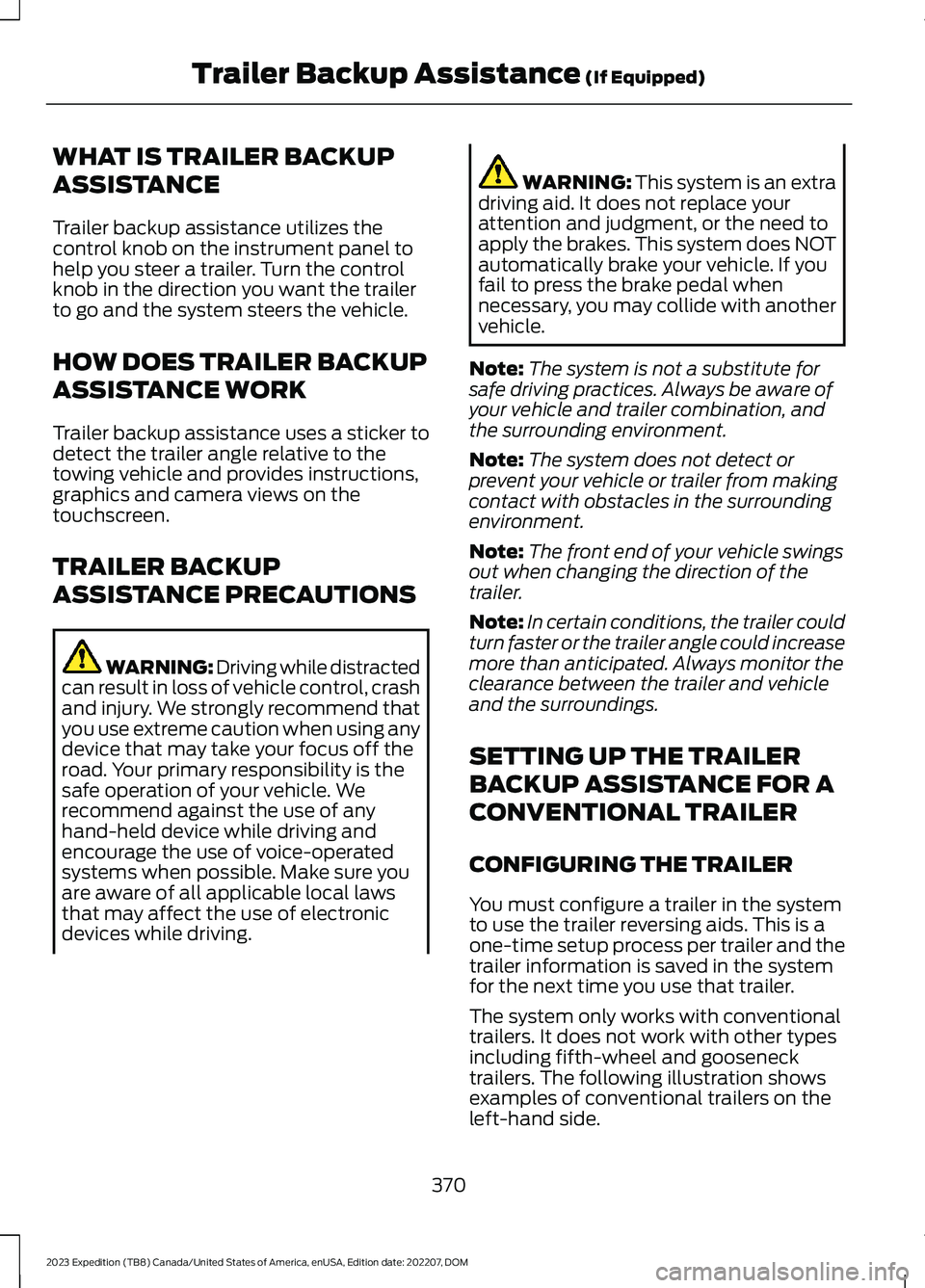
The system only works with conventionaltrailers. It does not work with other typesincluding fifth-wheel and goosenecktrailers. The following illustration showsexamples of conventional trailers on theleft-hand side.
370
2023 Expedition (TB8) Canada/United States of America, enUSA, Edition date: 202207, DOMTrailer Backup Assistance (If Equipped)
Page 398 of 658
Vehicles Sold in Canada: GettingRoadside Assistance
To fully assist you should you have avehicle concern, Ford Motor Company ofCanada, Limited offers a complimentaryroadside assistance program. Thisprogram is eligible within Canada or thecontinental United States.
The service is available 24 hours a day,seven days a week.
This program is separate from the NewVehicle Limited Warranty, but the coverageis concurrent with the powertrain coverageperiod of your vehicle. Canadian roadsidecoverage and benefits may differ from theU.S. coverage.
If you require more information, please callus in Canada at 1-800-665-2006, or visitour website at www.ford.ca.
SWITCHING THE HAZARD
FLASHERS ON AND OFF
The hazard flasher button is onthe instrument panel. Press thebutton to switch the hazardflashers on if your vehicle is creating asafety hazard for other road users.
When you switch the hazard flashers on,all front and rear direction indicators flash.
Note:The hazard flashers operate whenthe ignition is in any position, or if the key isnot in the ignition. The battery loses chargeand could have insufficient power to restartyour vehicle.
Press the button again to switch them off.
JUMP STARTING THE VEHICLE
JUMP STARTING PRECAUTIONS
WARNING: Batteries normallyproduce explosive gases which cancause personal injury. Therefore, do notallow flames, sparks or lightedsubstances to come near the battery.When working near the battery, alwaysshield your face and protect your eyes.Always provide correct ventilation.
WARNING: Keep batteries out ofreach of children. Batteries containsulfuric acid. Avoid contact with skin,eyes or clothing. Shield your eyes whenworking near the battery to protectagainst possible splashing of acidsolution. In case of acid contact with skinor eyes, flush immediately with water fora minimum of 15 minutes and get promptmedical attention. If acid is swallowed,call a physician immediately.
WARNING: Use only adequatelysized cables with insulated clamps.
WARNING: Make sure that thecables are clear of any moving parts andfuel delivery system parts.
WARNING: Connect batteries withonly the same nominal voltage.
WARNING: If the engine is runningwhile the hood is open, stay clear ofmoving engine components. Failure tofollow this warning could result in seriouspersonal injury or death.
Do not attempt to push-start an automatictransmission vehicle. This could causetransmission damage.
394
2023 Expedition (TB8) Canada/United States of America, enUSA, Edition date: 202207, DOMCrash and Breakdown InformationE75790
Page 416 of 658
MAINTENANCE PRECAUTIONS
Service your vehicle regularly to helpmaintain its roadworthiness and resalevalue. There is a large network ofauthorized dealers that are there to helpyou with their professional servicingexpertise. We believe that their speciallytrained technicians are best qualified toservice your vehicle properly and expertly.They are supported by a wide range ofhighly specialized tools developedspecifically for servicing your vehicle.
If your vehicle requires professional service,an authorized dealer can provide thenecessary parts and service. Check yourwarranty information to find out whichparts and services are covered.
Use only recommended fuels, lubricants,fluids and service parts conforming tospecifications. See Capacities andSpecifications (page 463).
•Do not work on a hot engine.
•Make sure that nothing gets caught inmoving parts.
•Do not work on a vehicle with theengine running in an enclosed space,unless you are sure you have enoughventilation.
•Keep all open flames and other burningmaterial, such as cigarettes, away fromthe battery and all fuel related parts.
•Set the parking brake, shift thetransmission to park (P) and block thewheels.
OPENING AND CLOSING THE
HOOD
WARNING: Make sure that you fullylatch the hood before driving. Failure tofollow this instruction could result inpersonal injury or death.
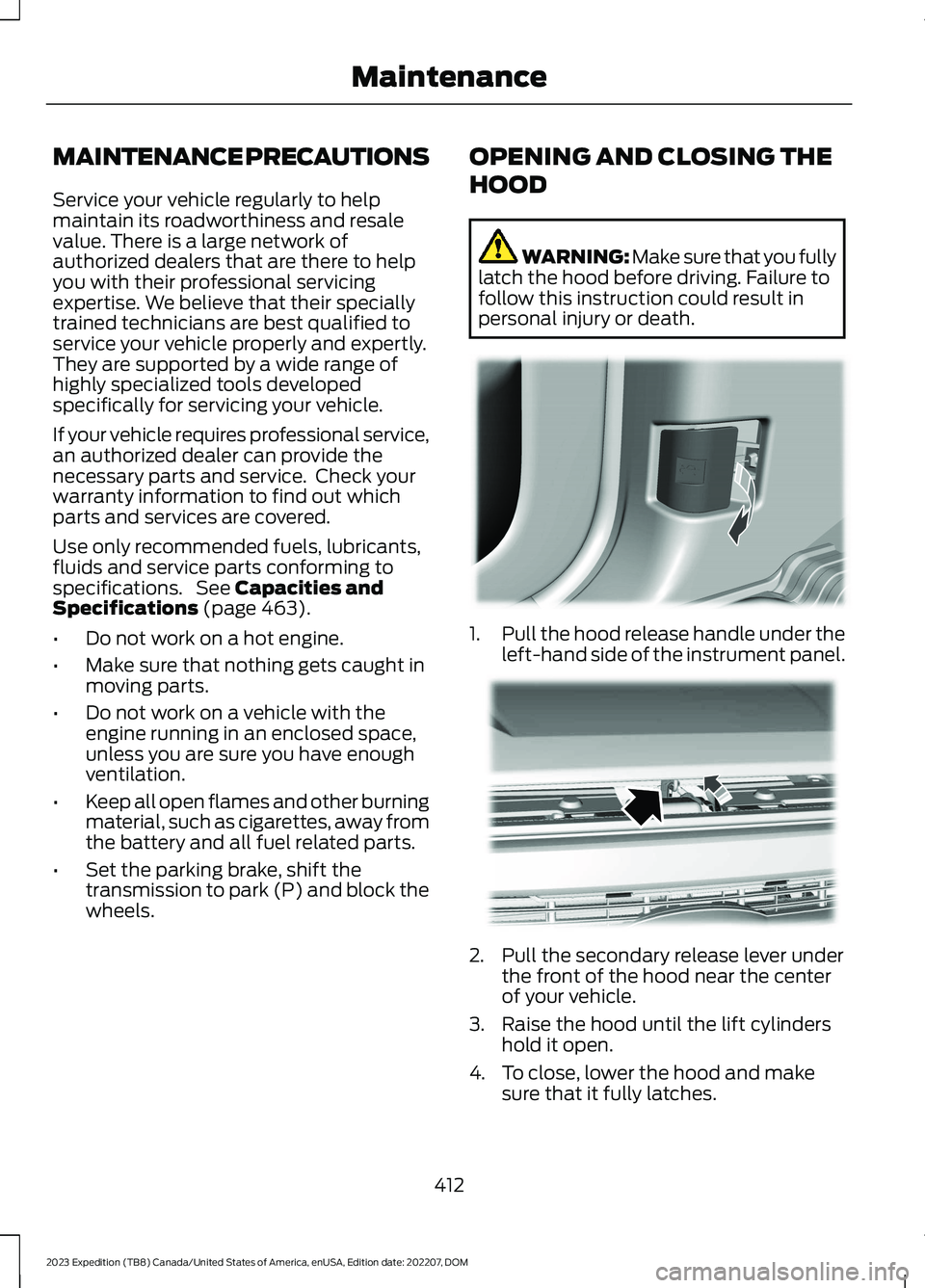
1.Pull the hood release handle under theleft-hand side of the instrument panel.
2.Pull the secondary release lever underthe front of the hood near the centerof your vehicle.
3.Raise the hood until the lift cylindershold it open.
4.To close, lower the hood and makesure that it fully latches.
412
2023 Expedition (TB8) Canada/United States of America, enUSA, Edition date: 202207, DOMMaintenanceE337831 E190266
Page 434 of 658
CLEANING THE EXTERIOR
CLEANING THE EXTERIORPRECAUTIONS
Immediately remove fuel spillages, additiveresiduals, bird droppings, insect depositsand road tar. These may cause damage toyour vehicle’s paintwork or trim over time.Remove any exterior accessories, forexample antennas, before entering a carwash.
CLEANING HEADLAMPS ANDREAR LAMPS
We recommend that you only use cold orlukewarm water containing car shampooto clean the headlamps and the rearlamps.
Do not scrape the lamps.
Do not wipe lamps when they are dry.
CLEANING WINDOWS AND WIPERBLADES
To clean the windshield and wiper blades:
•Clean the windshield with anon-abrasive glass cleaner.
Note:When cleaning the interior of thewindshield, avoid getting any glass cleaneron the instrument panel or door panels.Wipe any glass cleaner off these surfacesimmediately.
•Clean the wiper blades with washerfluid or water applied with a softsponge or cloth.
Note: Do not use razor blades or othersharp objects to clean or remove decalsfrom the inside of the heated rear window.This can cause damage not covered by thevehicle Warranty.
CLEANING CHROME, ALUMINIUMOR STAINLESS STEEL
We recommend that you only use a carshampoo, a soft cloth and water onbumpers and other chrome, aluminium orstainless steel parts.
Note:For additional information andassistance, we recommend that you contactan authorized dealer.
Note:Rinse the area well after cleaning.
Note:Do not use abrasive materials, forexample steel wool or plastic pads, as theycan scratch these surfaces.
Note:Do not use chrome cleaner, metalcleaner or polish on wheels or wheel covers.
CLEANING WHEELS
Only use a recommended wheel and tirecleaner to clean the wheels weekly. Foradditional information and assistance, werecommend that you contact anauthorized dealer.
1.Use a sponge to remove heavydeposits of dirt and brake dust.
2.Rinse well after cleaning.
Note:Do not apply a cleaning chemical towarm or hot wheel rims and covers.
If you intend on parking your vehicle for anextended period after cleaning the wheelswith a wheel cleaner, drive your vehicle fora few minutes before parking your vehicle.This reduces the risk of corrosion of thebrake discs, brake pads and linings.
Do not clean the wheels when they are hot.
Note: Some car washes could damagewheel rims and covers.
Note: Using non-recommended cleaners,harsh cleaning products, chrome wheelcleaners or abrasive materials coulddamage wheel rims and covers.
430
2023 Expedition (TB8) Canada/United States of America, enUSA, Edition date: 202207, DOMVehicle Care
Page 435 of 658
CLEANING THE ENGINECOMPARTMENT
Use a vacuum cleaner to remove debrisfrom the screen area below windshield.
Note:If you are not familiar with the partsaround the engine do not wash the enginecompartment. Avoid frequent enginewashes.
When washing the engine compartment:
•Never wash or rinse the engine while itis hot or running.
•Never wash or rinse any ignition coil,spark plug wire or spark plug well.
•Cover the battery, power distributionbox, and air filter assembly to preventwater damage.
Note:If your vehicle has an engine coverremove the cover before application ofshampoo and degreaser.
•Spray an approved engine shampooand degreaser on all parts that requirecleaning and rinse with water.
CLEANING STRIPES ORGRAPHICS
It is recommended to wash your vehicle byhand however, pressure washing may beused under the following conditions:
•Use a spray with a 40° wide sprayangle pattern.
•Keep the nozzle at a 12 in (305 mm)distance and 90° angle to yourvehicle's surface.
•Do not use water pressure higher than2,000 psi (14,000 kPa).
•Do not use water hotter than 179°F(82°C).
Note:Holding the pressure washer nozzleat an angle to the vehicle's surface maydamage graphics and cause the edges topeel away from the vehicle's surface.
CLEANING CAMERA LENSES ANDSENSORS
We recommend that you only uselukewarm or cold water and a soft clothto clean the camera lens and sensors.
Note:Do not pressure wash camera lensand sensors.
CLEANING THE UNDERBODY
Flush the complete underside of yourvehicle frequently. Keep body and doordrain holes free from packed dirt.
Rear suspension components may requireregular cleaning with a power washer or athorough rinse with a strong stream ofwater if the vehicle is operated in dusty ormuddy environments. Rear leaf springs orother suspension components may emitsqueaking or popping noises whileoperating the vehicle if particles, such asdirt, rocks, or other debris, are present inthe components.
CLEANING THE INTERIOR
CLEANING THE INSTRUMENTPANEL
WARNING: Do not use chemicalsolvents or strong detergents whencleaning the steering wheel orinstrument panel to avoid contaminationof the airbag system.
We recommend that you only clean theinstrument panel and cluster lens with adamp soft cloth. Dry the area with a clean,soft cloth.
For additional information and assistance,we recommend that you contact anauthorized dealer.
431
2023 Expedition (TB8) Canada/United States of America, enUSA, Edition date: 202207, DOMVehicle Care
Page 436 of 658
Note:Avoid cleaners or polishes thatincrease the gloss of the upper portion ofthe instrument panel. The dull finish in thisarea helps protect you from undesirablewindshield reflection.
CLEANING PLASTIC
We recommend that you only use a mildsoap and water solution on a soft cloth.Dry the area with a clean, soft cloth.
CLEANING DISPLAYS ANDSCREENS
We recommend that you only use amicrofiber cloth in a circular motion toclean off the fingerprint or dust.
If dirt or fingerprints are still on the screen,apply a small amount of alcohol to thecloth and try to clean it again.
Note:Do not pour or spray alcohol onto thetouchscreen.
Note: Do not use detergent or any type ofsolvent to clean the touchscreen.
CLEANING SEATS AND THEHEADLINER
WARNING: On vehicles equippedwith seat-mounted airbags, do not usechemical solvents or strong detergents.Such products could contaminate theside airbag system and affectperformance of the side airbag in a crash.
Cleaning Fabric Seats and theHeadliner
We recommend that you only clean thefabric seats and headliners in the followingway:
1.Remove dust and loose dirt with avacuum cleaner.
2.Wipe the surface with a soft, dampcloth and a mild soap and watersolution. Dry the area with a clean, softcloth.
3.For additional information andassistance, we recommend that youcontact an authorized dealer.
For heavy stains, spot clean the area. If aring forms on the fabric, immediately cleanthe entire area, but do not oversaturate orthe ring could set.
Cleaning Vinyl and Leather
We recommend that you only clean theleather and vinyl surfaces in the followingway:
1.Remove dust and loose dirt with avacuum cleaner.
2.Wipe the surface with a soft, dampcloth and a mild soap and watersolution. Dry the area with a clean, softcloth.
3.For additional information andassistance, we recommend that youcontact an authorized dealer.
With King Ranch Edition
Your vehicle has seating covered inpremium, top-grain leather that isextremely durable, but still requires specialcare and maintenance in order to preservelongevity and comfort.
Regular cleaning and conditioningmaintains the appearance of the leather.
Scratches
Because the leather in the seat comesfrom genuine steer hides, there may beevidence of naturally occurring markings,such as small scars. These markings givecharacter to the seating covers and areconsidered to be proof of a genuine leatherproduct.
432
2023 Expedition (TB8) Canada/United States of America, enUSA, Edition date: 202207, DOMVehicle Care