alarm FORD EXPLORER 2011 5.G User Guide
[x] Cancel search | Manufacturer: FORD, Model Year: 2011, Model line: EXPLORER, Model: FORD EXPLORER 2011 5.GPages: 449, PDF Size: 4.03 MB
Page 160 of 449
After locking the doors using any of the methods above, the turn signal
lamps will flash once indicating that the perimeter alarm is in the
pre-armed mode and will become fully armed in 20 seconds.
When fully armed (after the 20 second pre-arm mode), any IA keys (if
equipped) found inside the vehicle are disabled/inoperable and will not
start the engine. Press
button to re-enable them.
Disarming the system
To disarm the system, do any of the following:
•Pressing the power door unlock control within the 20-second,
pre-armed mode will disarm the system.
•Unlock the doors by pressing unlock
on the remote entry
transmitter.
•Unlock the doors by using your keyless entry pad.
•Enter the vehicle using intelligent access (if equipped).
•Turn the ignition on with a valid key (if equipped with IKT only).
•Press the panic control
on the remote entry transmitter. The alarm
system will still be armed, but this shuts off the horn and turn lamps
when the alarm is sounding.
•Unlock the doors using a key. If you use this method the system will
not disarm, but you will have an opportunity to disarm the vehicle
once entered. See the Note following.
Note:If the driver’s door is unlocked with a key, a chime will sound
when you open the door and the message center will displayTO STOP
ALARM START VEHICLE. When this occurs, you will have 12 seconds
to disarm the alarm using any of the actions above, otherwise the alarm
will trigger.
Perimeter alarm issues
If there seems to be a potential perimeter alarm system problem with
your vehicle, ensureALLkeys/remote entry transmitters are brought to
your authorized dealer to aid in troubleshooting.
Locks and Security
159
2011 Explorer(exp)
Owners Guide, 1st Printing
USA(fus)
Page 296 of 449
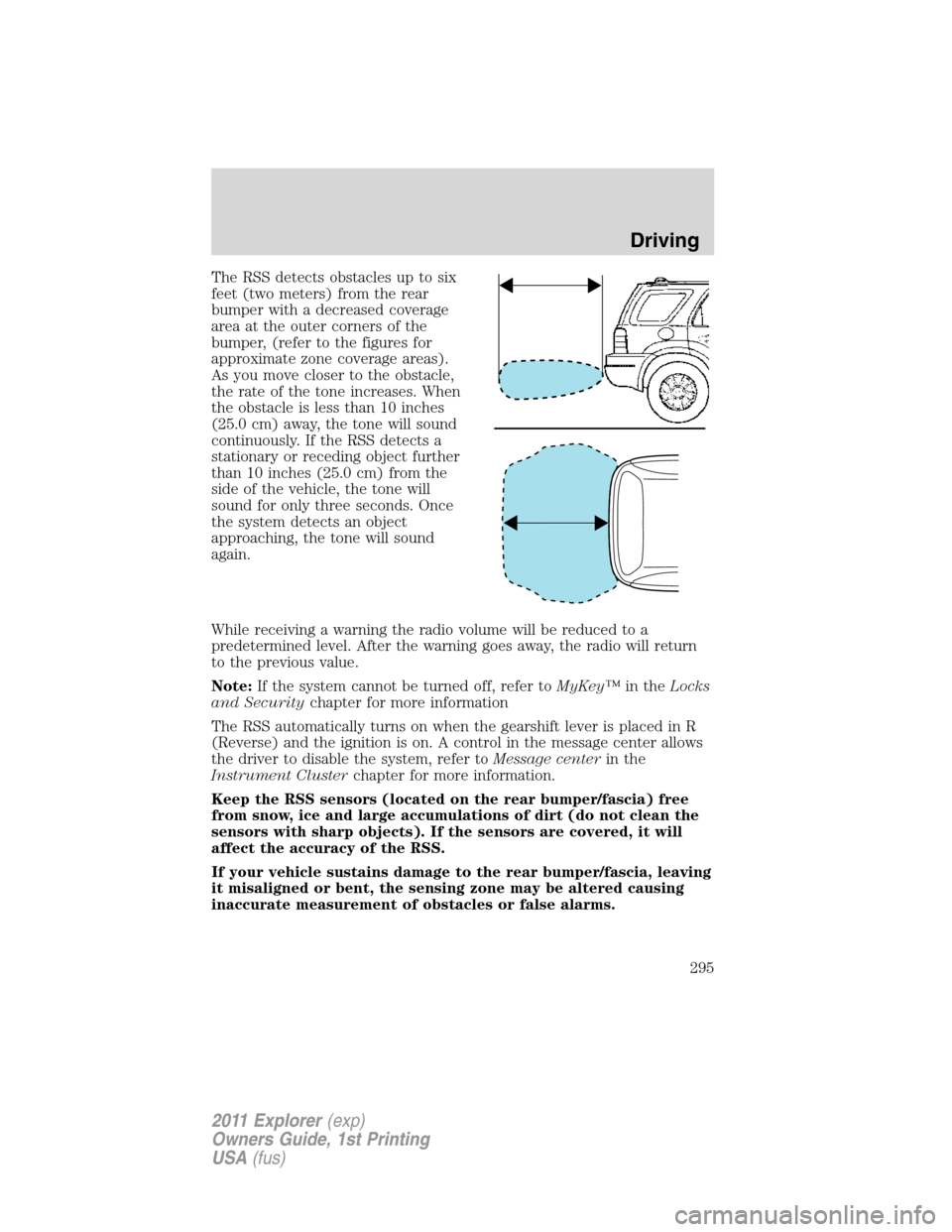
The RSS detects obstacles up to six
feet (two meters) from the rear
bumper with a decreased coverage
area at the outer corners of the
bumper, (refer to the figures for
approximate zone coverage areas).
As you move closer to the obstacle,
the rate of the tone increases. When
the obstacle is less than 10 inches
(25.0 cm) away, the tone will sound
continuously. If the RSS detects a
stationary or receding object further
than 10 inches (25.0 cm) from the
side of the vehicle, the tone will
sound for only three seconds. Once
the system detects an object
approaching, the tone will sound
again.
While receiving a warning the radio volume will be reduced to a
predetermined level. After the warning goes away, the radio will return
to the previous value.
Note:If the system cannot be turned off, refer toMyKey™in theLocks
and Securitychapter for more information
The RSS automatically turns on when the gearshift lever is placed in R
(Reverse) and the ignition is on. A control in the message center allows
the driver to disable the system, refer toMessage centerin the
Instrument Clusterchapter for more information.
Keep the RSS sensors (located on the rear bumper/fascia) free
from snow, ice and large accumulations of dirt (do not clean the
sensors with sharp objects). If the sensors are covered, it will
affect the accuracy of the RSS.
If your vehicle sustains damage to the rear bumper/fascia, leaving
it misaligned or bent, the sensing zone may be altered causing
inaccurate measurement of obstacles or false alarms.
Driving
295
2011 Explorer(exp)
Owners Guide, 1st Printing
USA(fus)
Page 419 of 449
Peace of mind
•Keyless entry keypad•Vehicle security systems
•Vehicle tracking and recovery*•Wheel locks
•Windshield wiper shaker*•Remote start
•Cargo shade•Cargo area protector
•Bumper and hitch mounted parking sensors*
•Locking gas plug for capless fuel system
*Ford Licensed Accessories (FLA) are warranted by the accessory
manufacturer’s warranty. Ford Licensed Accessories are fully designed
and developed by the accessory manufacturer and have not been
designed or tested to Ford Motor Company engineering requirements.
Contact your Ford dealer for details regarding the manufacturer’s limited
warranty and/or a copy of the FLA product limited warranty offered by
the accessory manufacturer.
For maximum vehicle performance, keep the following information in
mind when adding accessories or equipment to your vehicle:
•When adding accessories, equipment, passengers and luggage to your
vehicle, do not exceed the total weight capacity of the vehicle or of
the front or rear axle (GVWR or GAWR as indicated on the Safety
Compliance Certification label). Consult your authorized dealer for
specific weight information.
•
The Federal Communications Commission (FCC) and Canadian Radio
Telecommunications Commission (CRTC) regulate the use of mobile
communications systems — such as two-way radios, telephones and
theft alarms - that are equipped with radio transmitters. Any such
equipment installed in your vehicle should comply with FCC or CRTC
regulations and should be installed only by a qualified service technician.
•Mobile communications systems may harm the operation of your vehicle,
particularly if they are not properly designed for automotive use.
•To avoid interference with other vehicle functions, such as anti-lock
braking systems, amateur radio users who install radios and antennas
onto their vehicle should not locate the Amateur Radio Antennas in
the area of the driver’s side hood.
•Electrical or electronic accessories or components that are added to
the vehicle by the authorized dealer or the owner may adversely affect
battery performance and durability and may also adversely affect the
performance of other electrical systems in the vehicle.
Accessories
418
2011 Explorer(exp)
Owners Guide, 1st Printing
USA(fus)