lock FORD EXPLORER 2011 5.G Owner's Manual
[x] Cancel search | Manufacturer: FORD, Model Year: 2011, Model line: EXPLORER, Model: FORD EXPLORER 2011 5.GPages: 449, PDF Size: 4.03 MB
Page 75 of 449
•Rear Defrost On•Rear Defrost Off
•Recirc On•Recirc Off
•Panel On•Panel Floor On
•Floor On•Windshield Floor On
•Temperature High•Temperature Low
•Fan Increase•Fan Decrease
•Temperature•Temperature Increase
•Temperature Decrease•Temperature <15.5–29.5>
degrees
•Temperature <60–85> degrees•My Temp
•Help
*Note:If you have said “Temperature”, you can then say any of the
following commands:
•High•Low
•<15.5–29.5> degrees•<60–85> degrees
For more information on your touchscreen system, refer to theMyFord
Touch™ / MyLincoln Touch™ supplement.
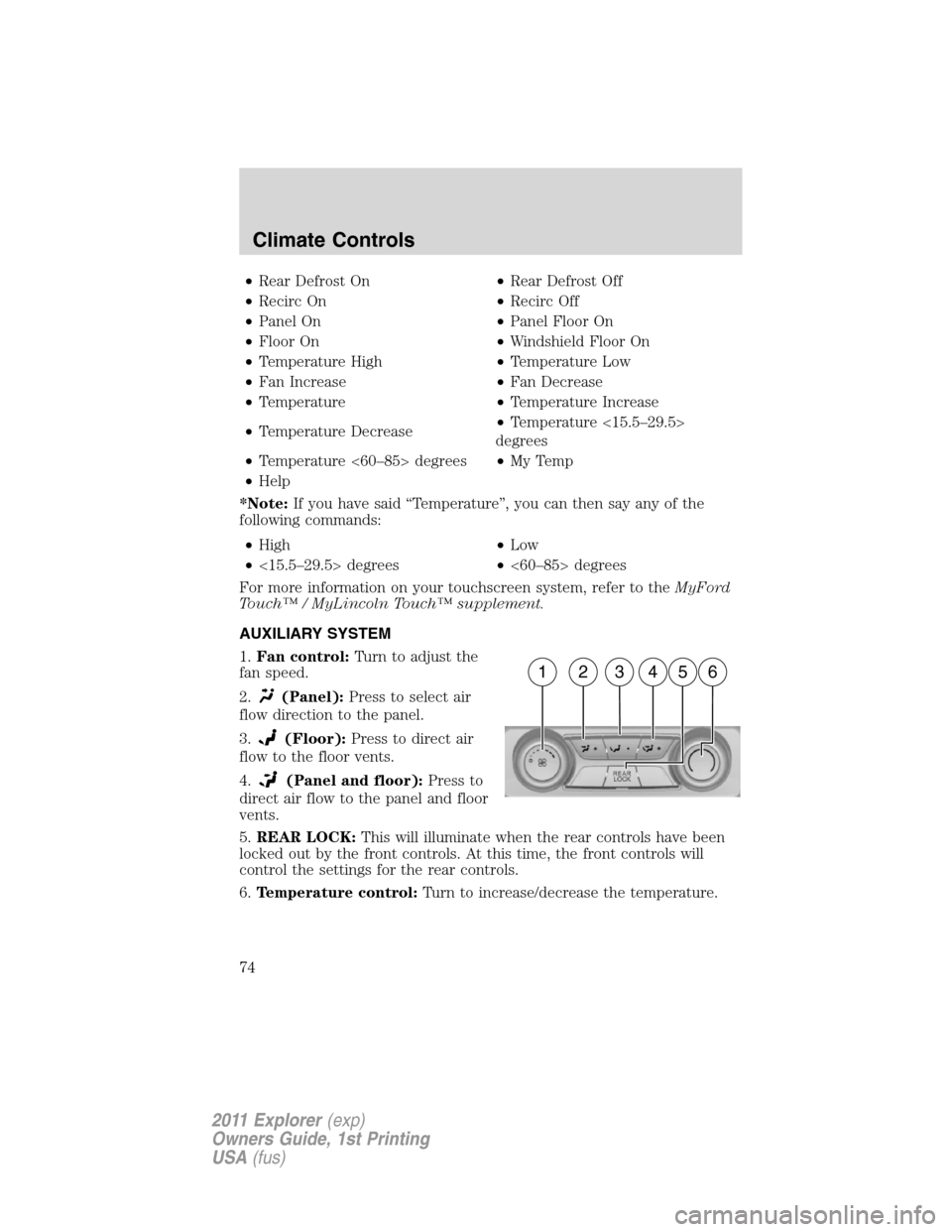
AUXILIARY SYSTEM
1.Fan control:Turn to adjust the
fan speed.
2.
(Panel):Press to select air
flow direction to the panel.
3.
(Floor):Press to direct air
flow to the floor vents.
4.
(Panel and floor):Press to
direct air flow to the panel and floor
vents.
5.REAR LOCK:This will illuminate when the rear controls have been
locked out by the front controls. At this time, the front controls will
control the settings for the rear controls.
6.Temperature control:Turn to increase/decrease the temperature.
162345
Climate Controls
74
2011 Explorer(exp)
Owners Guide, 1st Printing
USA(fus)
Page 82 of 449
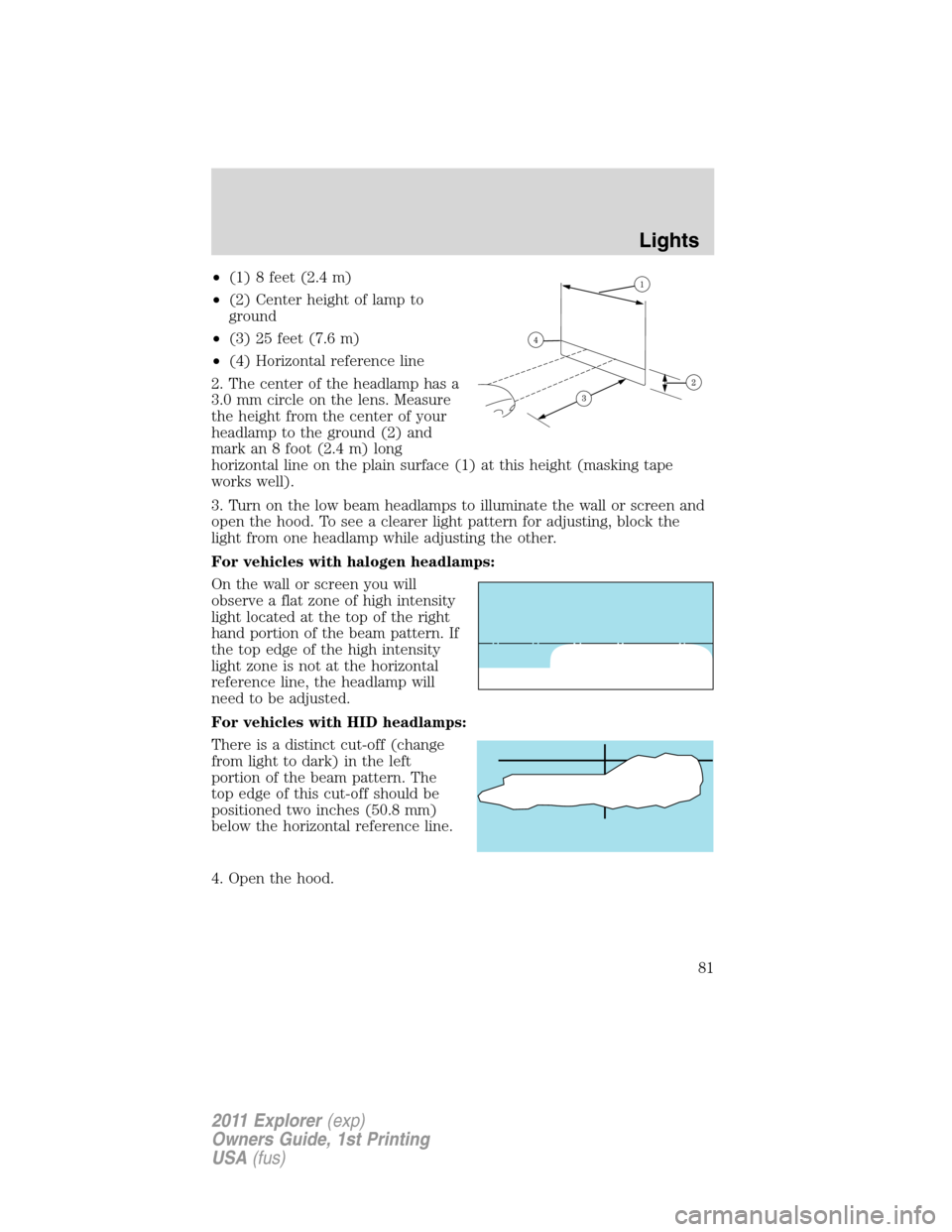
•(1) 8 feet (2.4 m)
•(2) Center height of lamp to
ground
•(3) 25 feet (7.6 m)
•(4) Horizontal reference line
2. The center of the headlamp has a
3.0 mm circle on the lens. Measure
the height from the center of your
headlamp to the ground (2) and
mark an 8 foot (2.4 m) long
horizontal line on the plain surface (1) at this height (masking tape
works well).
3. Turn on the low beam headlamps to illuminate the wall or screen and
open the hood. To see a clearer light pattern for adjusting, block the
light from one headlamp while adjusting the other.
For vehicles with halogen headlamps:
On the wall or screen you will
observe a flat zone of high intensity
light located at the top of the right
hand portion of the beam pattern. If
the top edge of the high intensity
light zone is not at the horizontal
reference line, the headlamp will
need to be adjusted.
For vehicles with HID headlamps:
There is a distinct cut-off (change
from light to dark) in the left
portion of the beam pattern. The
top edge of this cut-off should be
positioned two inches (50.8 mm)
below the horizontal reference line.
4. Open the hood.
Lights
81
2011 Explorer(exp)
Owners Guide, 1st Printing
USA(fus)
Page 83 of 449
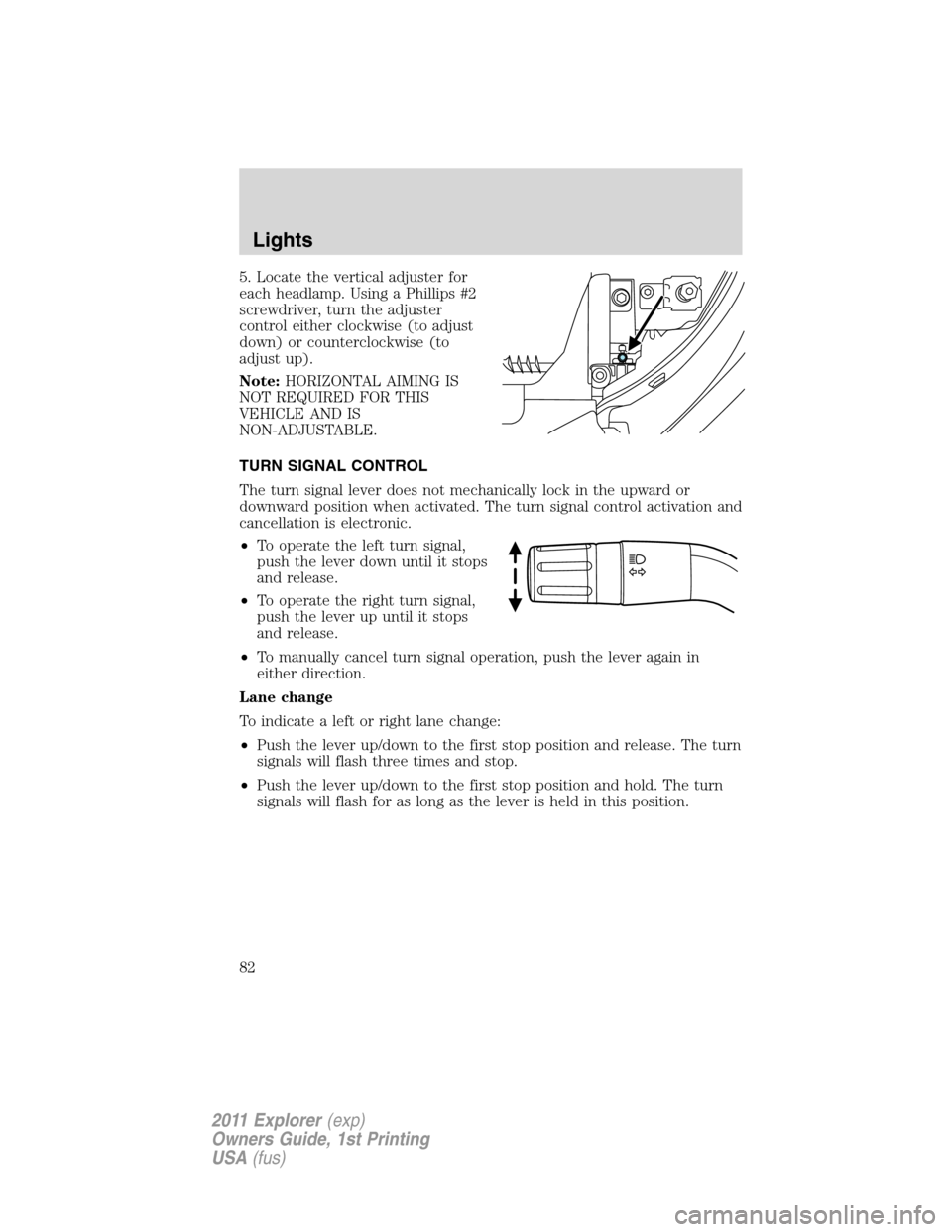
5. Locate the vertical adjuster for
each headlamp. Using a Phillips #2
screwdriver, turn the adjuster
control either clockwise (to adjust
down) or counterclockwise (to
adjust up).
Note:HORIZONTAL AIMING IS
NOT REQUIRED FOR THIS
VEHICLE AND IS
NON-ADJUSTABLE.
TURN SIGNAL CONTROL
The turn signal lever does not mechanically lock in the upward or
downward position when activated. The turn signal control activation and
cancellation is electronic.
•To operate the left turn signal,
push the lever down until it stops
and release.
•To operate the right turn signal,
push the lever up until it stops
and release.
•To manually cancel turn signal operation, push the lever again in
either direction.
Lane change
To indicate a left or right lane change:
•Push the lever up/down to the first stop position and release. The turn
signals will flash three times and stop.
•Push the lever up/down to the first stop position and hold. The turn
signals will flash for as long as the lever is held in this position.
Lights
82
2011 Explorer(exp)
Owners Guide, 1st Printing
USA(fus)
Page 87 of 449
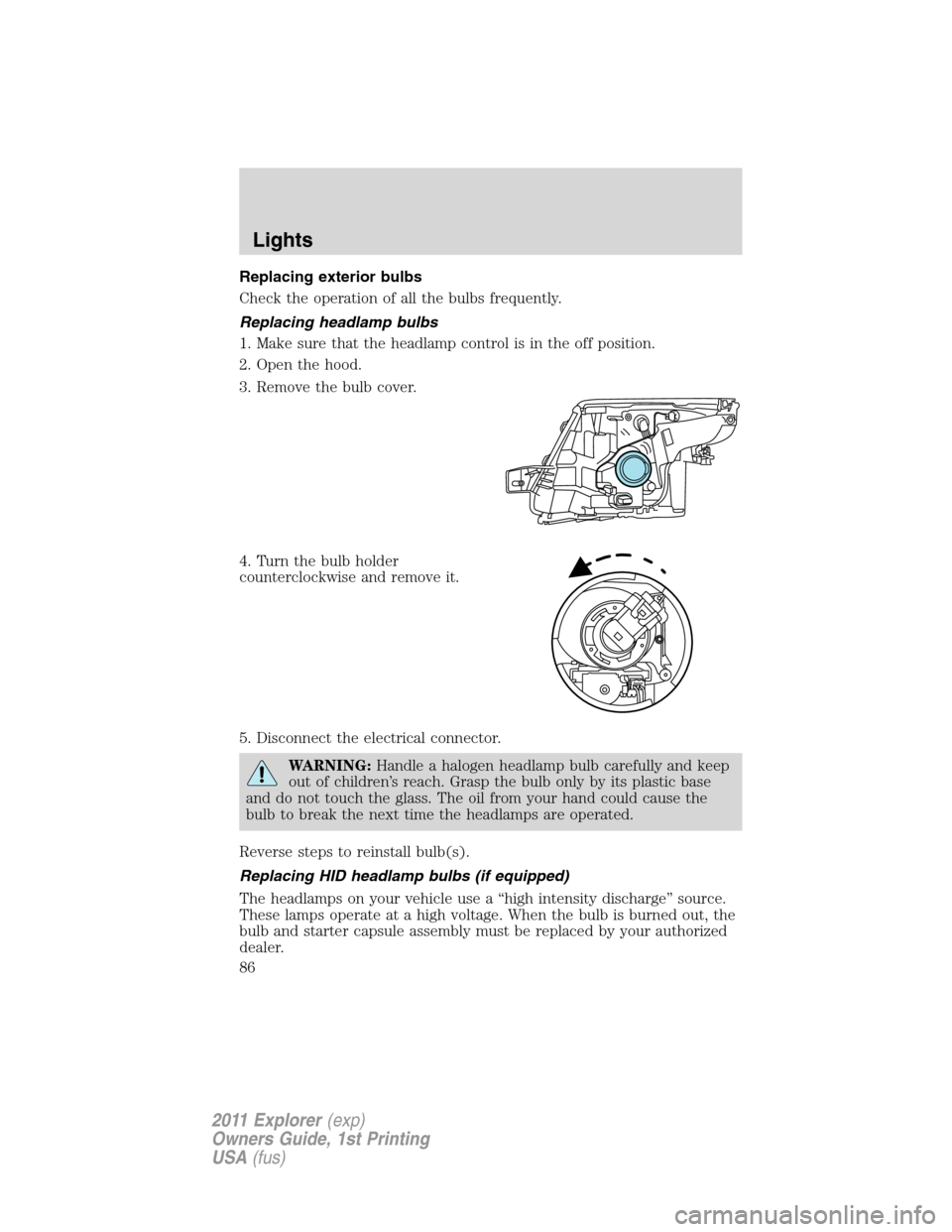
Replacing exterior bulbs
Check the operation of all the bulbs frequently.
Replacing headlamp bulbs
1. Make sure that the headlamp control is in the off position.
2. Open the hood.
3. Remove the bulb cover.
4. Turn the bulb holder
counterclockwise and remove it.
5. Disconnect the electrical connector.
WARNING:Handle a halogen headlamp bulb carefully and keep
out of children’s reach. Grasp the bulb only by its plastic base
and do not touch the glass. The oil from your hand could cause the
bulb to break the next time the headlamps are operated.
Reverse steps to reinstall bulb(s).
Replacing HID headlamp bulbs (if equipped)
The headlamps on your vehicle use a “high intensity discharge” source.
These lamps operate at a high voltage. When the bulb is burned out, the
bulb and starter capsule assembly must be replaced by your authorized
dealer.
Lights
86
2011 Explorer(exp)
Owners Guide, 1st Printing
USA(fus)
Page 88 of 449
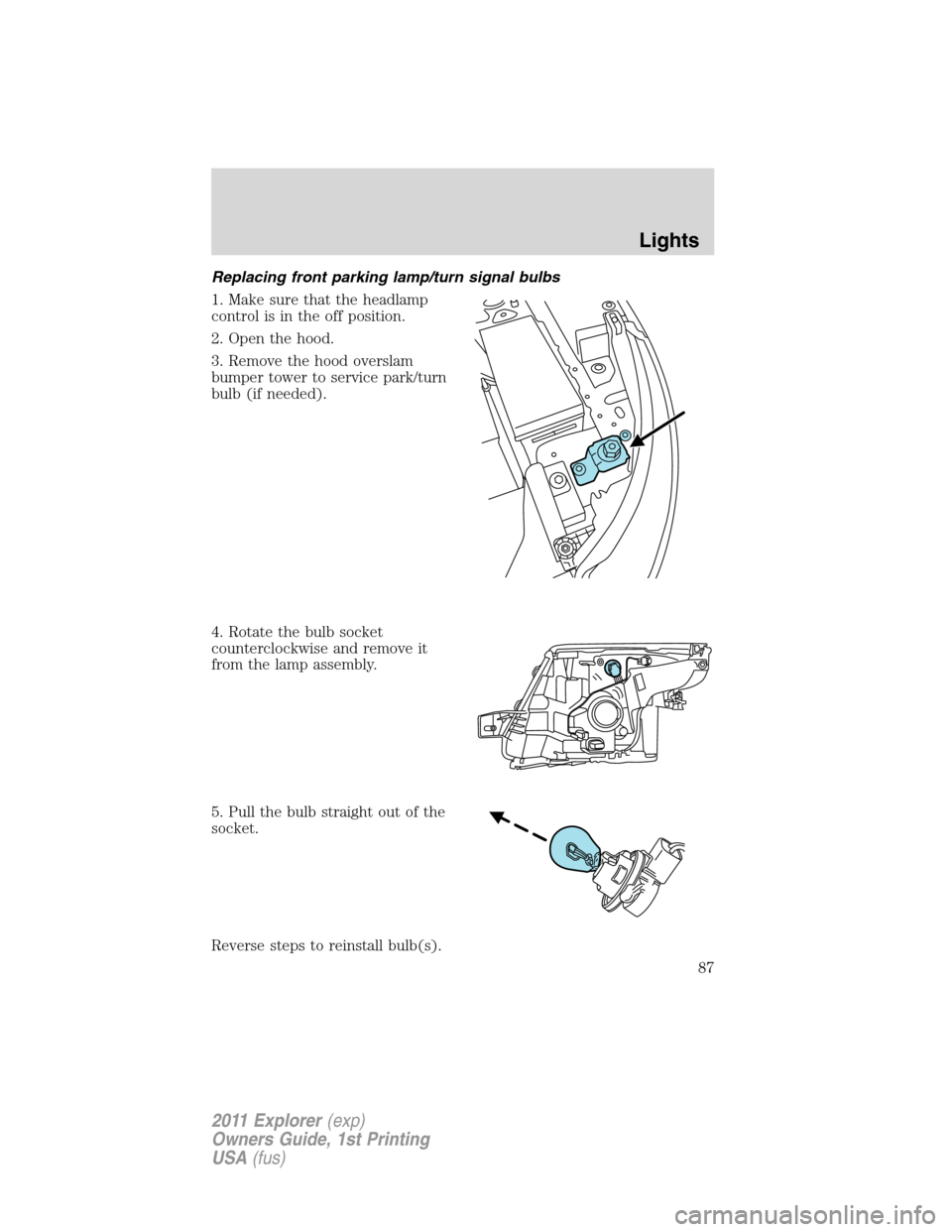
Replacing front parking lamp/turn signal bulbs
1. Make sure that the headlamp
control is in the off position.
2. Open the hood.
3. Remove the hood overslam
bumper tower to service park/turn
bulb (if needed).
4. Rotate the bulb socket
counterclockwise and remove it
from the lamp assembly.
5. Pull the bulb straight out of the
socket.
Reverse steps to reinstall bulb(s).
Lights
87
2011 Explorer(exp)
Owners Guide, 1st Printing
USA(fus)
Page 89 of 449
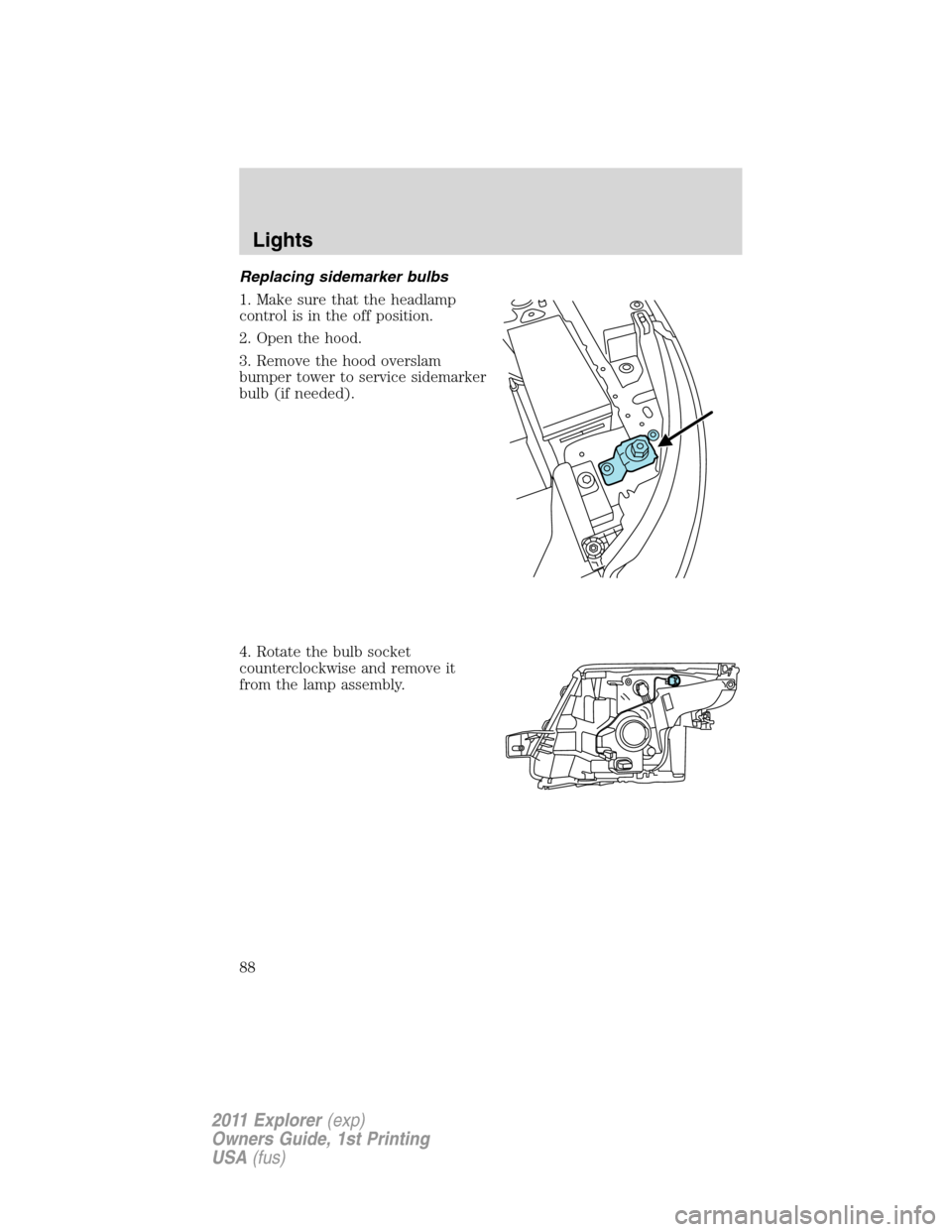
Replacing sidemarker bulbs
1. Make sure that the headlamp
control is in the off position.
2. Open the hood.
3. Remove the hood overslam
bumper tower to service sidemarker
bulb (if needed).
4. Rotate the bulb socket
counterclockwise and remove it
from the lamp assembly.
Lights
88
2011 Explorer(exp)
Owners Guide, 1st Printing
USA(fus)
Page 92 of 449
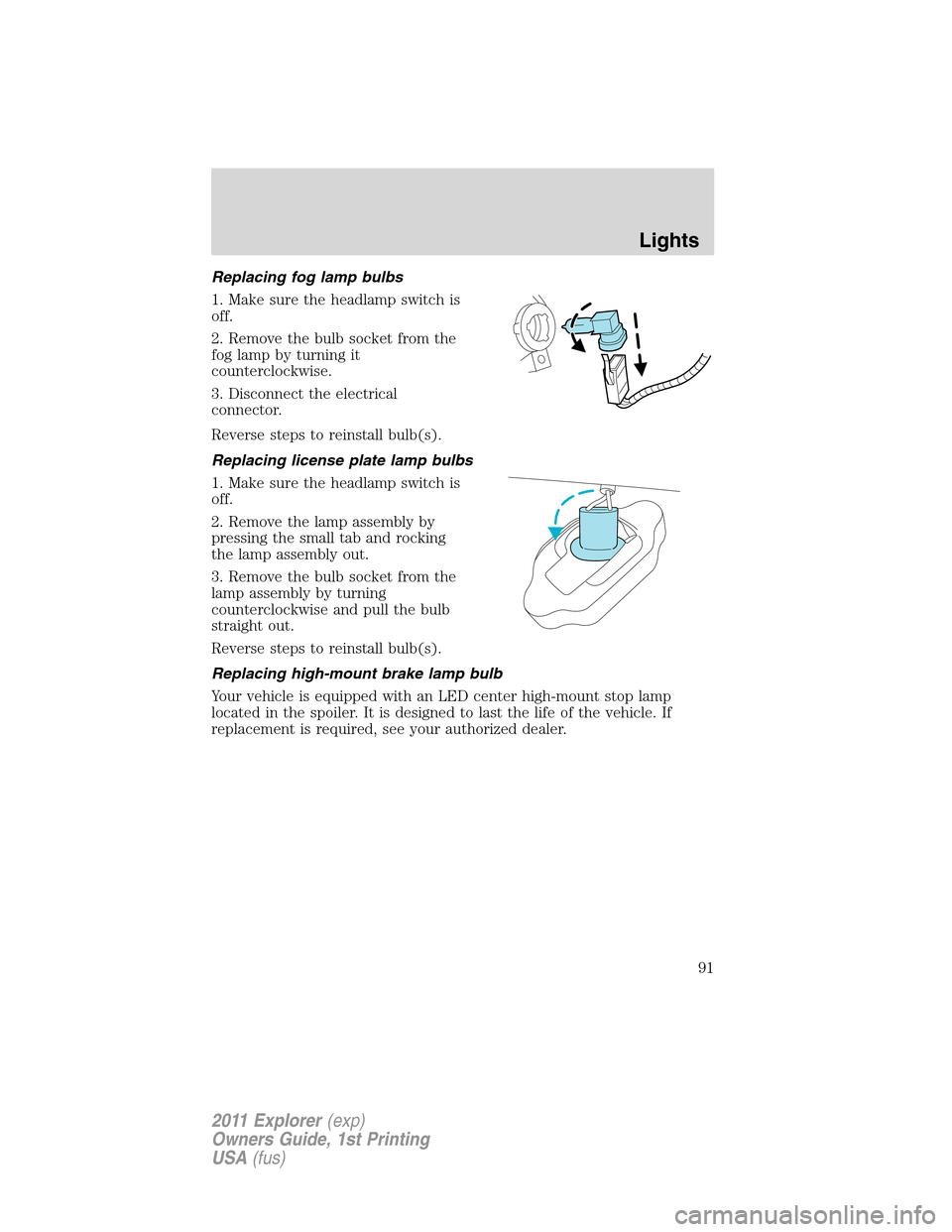
Replacing fog lamp bulbs
1. Make sure the headlamp switch is
off.
2. Remove the bulb socket from the
fog lamp by turning it
counterclockwise.
3. Disconnect the electrical
connector.
Reverse steps to reinstall bulb(s).
Replacing license plate lamp bulbs
1. Make sure the headlamp switch is
off.
2. Remove the lamp assembly by
pressing the small tab and rocking
the lamp assembly out.
3. Remove the bulb socket from the
lamp assembly by turning
counterclockwise and pull the bulb
straight out.
Reverse steps to reinstall bulb(s).
Replacing high-mount brake lamp bulb
Your vehicle is equipped with an LED center high-mount stop lamp
located in the spoiler. It is designed to last the life of the vehicle. If
replacement is required, see your authorized dealer.
Lights
91
2011 Explorer(exp)
Owners Guide, 1st Printing
USA(fus)
Page 95 of 449
Reverse wiper feature:The rear wiper will be automatically activated in
an intermittent setting when shifting into R (Reverse) if the front wipers
are activated. This feature may be enabled/disabled through the message
center. Refer toMessage centerin theInstrument Clusterchapter.
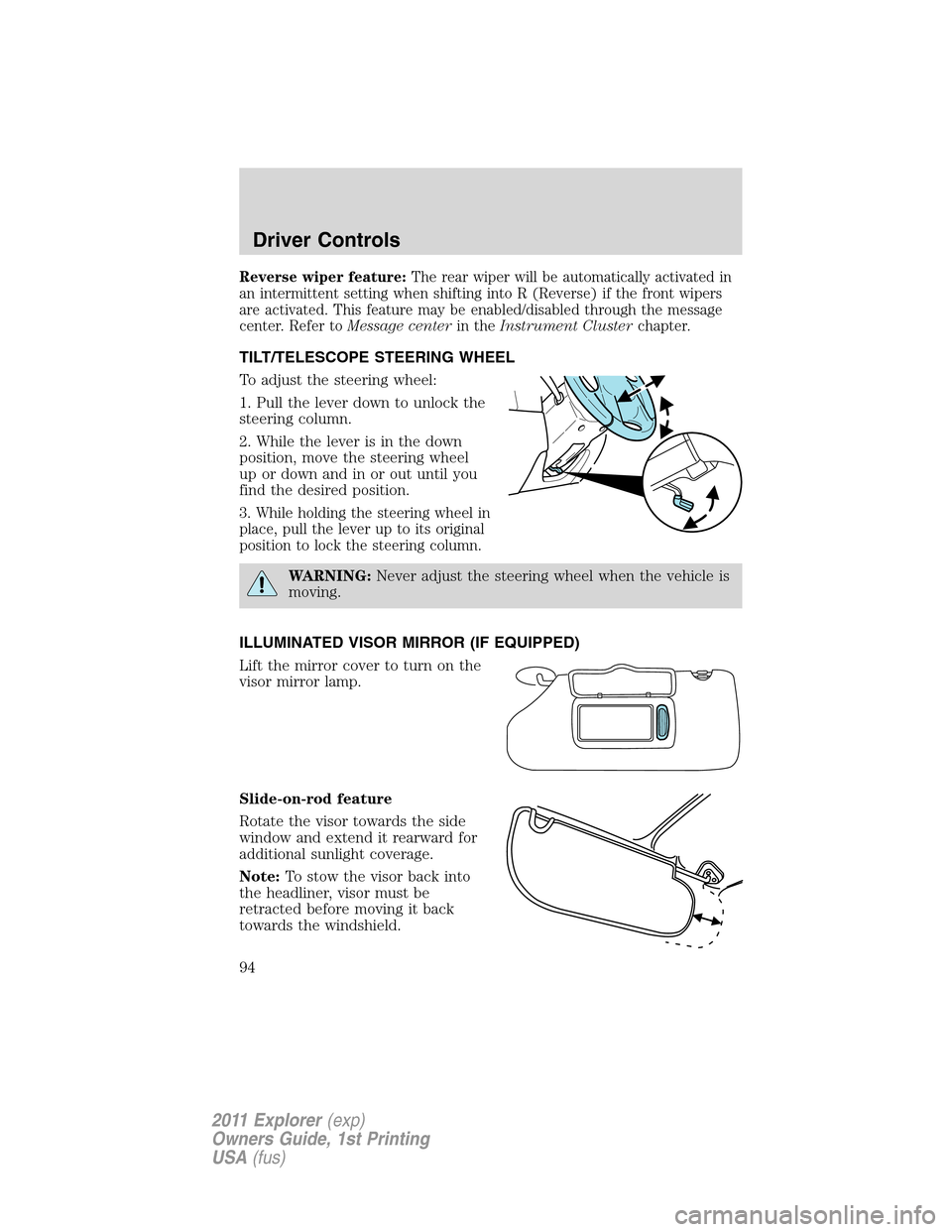
TILT/TELESCOPE STEERING WHEEL
To adjust the steering wheel:
1. Pull the lever down to unlock the
steering column.
2. While the lever is in the down
position, move the steering wheel
up or down and in or out until you
find the desired position.
3. While holding the steering wheel in
place, pull the lever up to its original
position to lock the steering column.
WARNING:Never adjust the steering wheel when the vehicle is
moving.
ILLUMINATED VISOR MIRROR (IF EQUIPPED)
Lift the mirror cover to turn on the
visor mirror lamp.
Slide-on-rod feature
Rotate the visor towards the side
window and extend it rearward for
additional sunlight coverage.
Note:To stow the visor back into
the headliner, visor must be
retracted before moving it back
towards the windshield.
Driver Controls
94
2011 Explorer(exp)
Owners Guide, 1st Printing
USA(fus)
Page 100 of 449
One-touch up or down
This feature allows the driver’s window (and passenger’s window, if equipped
with this feature) to open or close fully without holding the control down.
To operate one touch-down, press the switch completely down to the
second detent and release quickly. The window will open fully. Momentarily
press the switch to any position to stop the window operation.
To operate one-touch up, pull the switch completely up to the second
detent and release quickly. The window will close fully. Momentarily
press the switch to any position to stop the window operation.
Bounce-back
When the window is moving upward and an obstacle or a rough road
condition interferes with the window’s movement, the window will
automatically reverse direction and move down. This is known as
“bounce-back”. If the ignition is turned off (without accessory delay
being active) during bounce-back, the window will move down until the
bounce-back position is reached.
Security override
To override a bounce-back condition, within two seconds after the
window reaches the bounce-back position, pull and hold the switch up
andthe window will travel up with no bounce-back or pinch
protection.If the switch is released before the window is fully closed,
the window will stop. For example, this can be used to overcome the
resistance of ice on the window or seals.
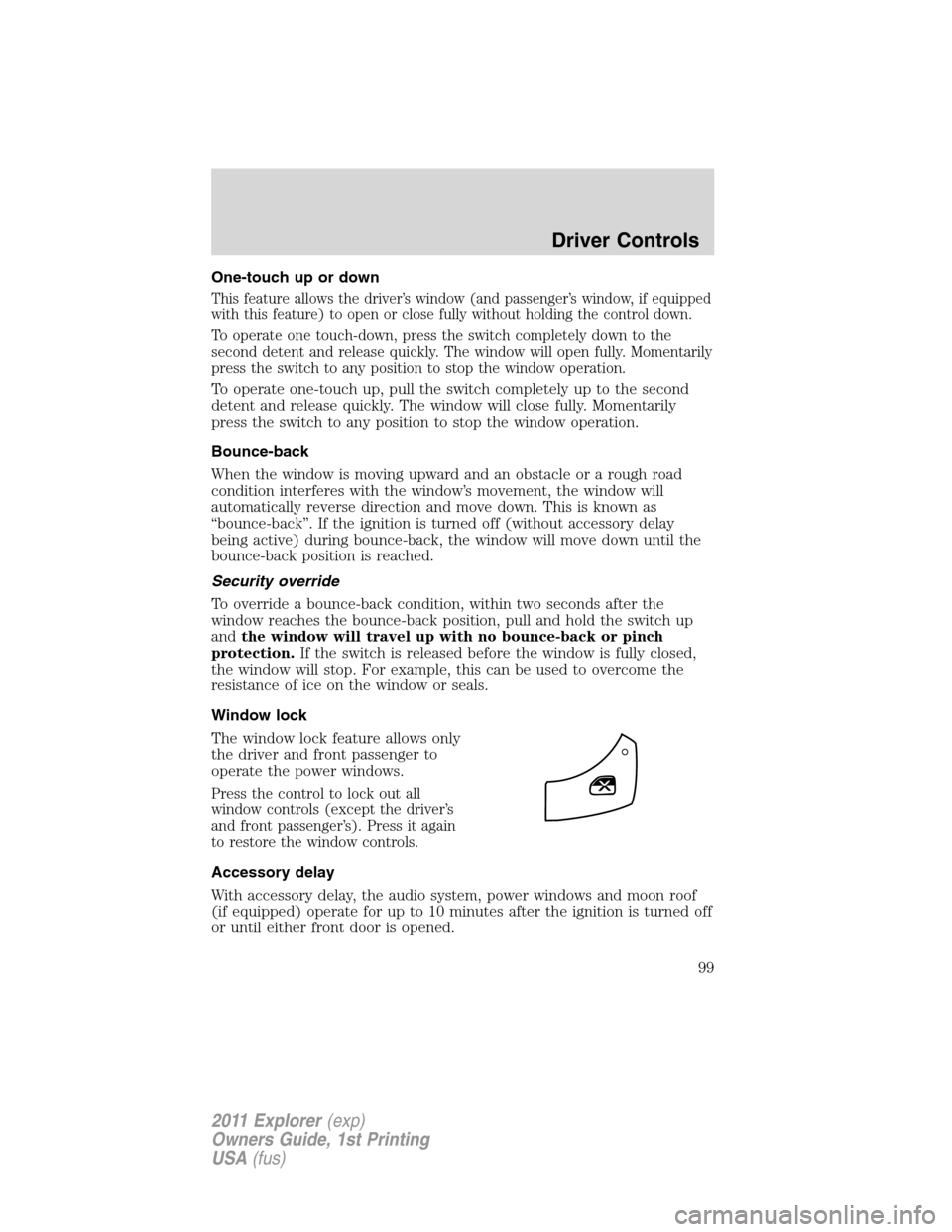
Window lock
The window lock feature allows only
the driver and front passenger to
operate the power windows.
Press the control to lock out all
window controls (except the driver’s
and front passenger’s). Press it again
to restore the window controls.
Accessory delay
With accessory delay, the audio system, power windows and moon roof
(if equipped) operate for up to 10 minutes after the ignition is turned off
or until either front door is opened.
Driver Controls
99
2011 Explorer(exp)
Owners Guide, 1st Printing
USA(fus)
Page 101 of 449
INTERIOR MIRROR
The interior rear view mirror has two pivot points on the support arm
which lets you adjust the mirror up or down and from side to side.
WARNING:Do not adjust the mirror while the vehicle is in
motion.
Automatic dimming interior rear view mirror (if equipped)
The interior rear view mirror has an auto-dimming function. The
electronic day/night mirror will change from the normal (high reflective)
state to the non-glare (darkened) state when bright lights (glare) reach
the mirror. When the mirror detects bright light from behind the vehicle,
it will automatically adjust (darken) to minimize glare.
The mirror will automatically return to the normal state whenever the
vehicle is placed in R (Reverse) to ensure a bright clear view when
backing up.
Do not block the sensors on the front and back of the interior rear
view mirror since this may impair proper mirror performance.
Note:A rear center passenger and/or raised rear center headrest (if
equipped) may also block the light from reaching the sensor.
Do not clean the housing or glass of any mirror with harsh
abrasives, fuel or other petroleum-based cleaning products.
Driver Controls
100
2011 Explorer(exp)
Owners Guide, 1st Printing
USA(fus)