ECO mode FORD EXPLORER 2020 Workshop Manual
[x] Cancel search | Manufacturer: FORD, Model Year: 2020, Model line: EXPLORER, Model: FORD EXPLORER 2020Pages: 555, PDF Size: 8.16 MB
Page 378 of 555
•
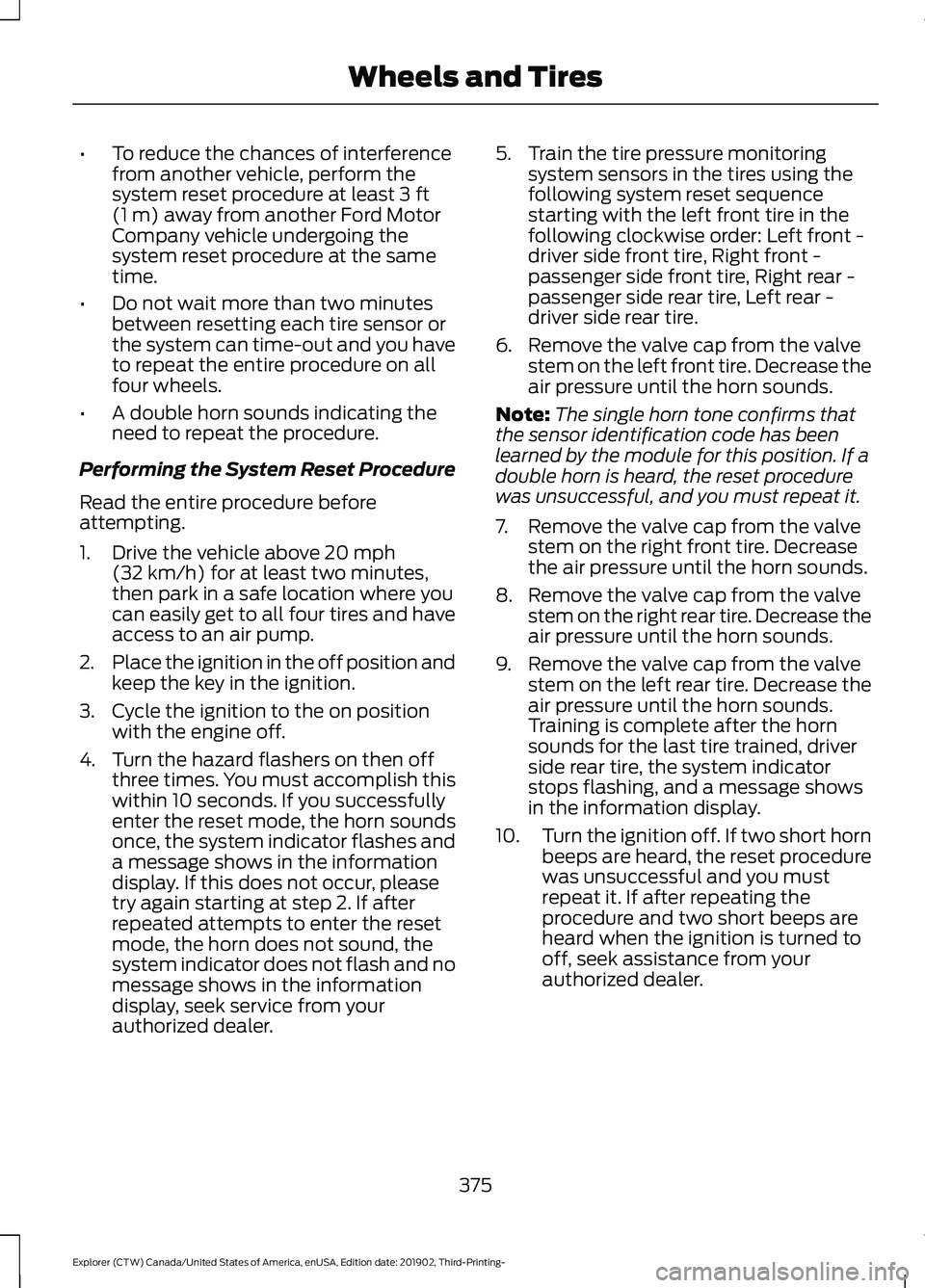
To reduce the chances of interference
from another vehicle, perform the
system reset procedure at least 3 ft
(1 m) away from another Ford Motor
Company vehicle undergoing the
system reset procedure at the same
time.
• Do not wait more than two minutes
between resetting each tire sensor or
the system can time-out and you have
to repeat the entire procedure on all
four wheels.
• A double horn sounds indicating the
need to repeat the procedure.
Performing the System Reset Procedure
Read the entire procedure before
attempting.
1. Drive the vehicle above
20 mph
(32 km/h) for at least two minutes,
then park in a safe location where you
can easily get to all four tires and have
access to an air pump.
2. Place the ignition in the off position and
keep the key in the ignition.
3. Cycle the ignition to the on position with the engine off.
4. Turn the hazard flashers on then off three times. You must accomplish this
within 10 seconds. If you successfully
enter the reset mode, the horn sounds
once, the system indicator flashes and
a message shows in the information
display. If this does not occur, please
try again starting at step 2. If after
repeated attempts to enter the reset
mode, the horn does not sound, the
system indicator does not flash and no
message shows in the information
display, seek service from your
authorized dealer. 5. Train the tire pressure monitoring
system sensors in the tires using the
following system reset sequence
starting with the left front tire in the
following clockwise order: Left front -
driver side front tire, Right front -
passenger side front tire, Right rear -
passenger side rear tire, Left rear -
driver side rear tire.
6. Remove the valve cap from the valve stem on the left front tire. Decrease the
air pressure until the horn sounds.
Note: The single horn tone confirms that
the sensor identification code has been
learned by the module for this position. If a
double horn is heard, the reset procedure
was unsuccessful, and you must repeat it.
7. Remove the valve cap from the valve stem on the right front tire. Decrease
the air pressure until the horn sounds.
8. Remove the valve cap from the valve stem on the right rear tire. Decrease the
air pressure until the horn sounds.
9. Remove the valve cap from the valve stem on the left rear tire. Decrease the
air pressure until the horn sounds.
Training is complete after the horn
sounds for the last tire trained, driver
side rear tire, the system indicator
stops flashing, and a message shows
in the information display.
10. Turn the ignition off. If two short horn
beeps are heard, the reset procedure
was unsuccessful and you must
repeat it. If after repeating the
procedure and two short beeps are
heard when the ignition is turned to
off, seek assistance from your
authorized dealer.
375
Explorer (CTW) Canada/United States of America, enUSA, Edition date: 201902, Third-Printing- Wheels and Tires
Page 457 of 555
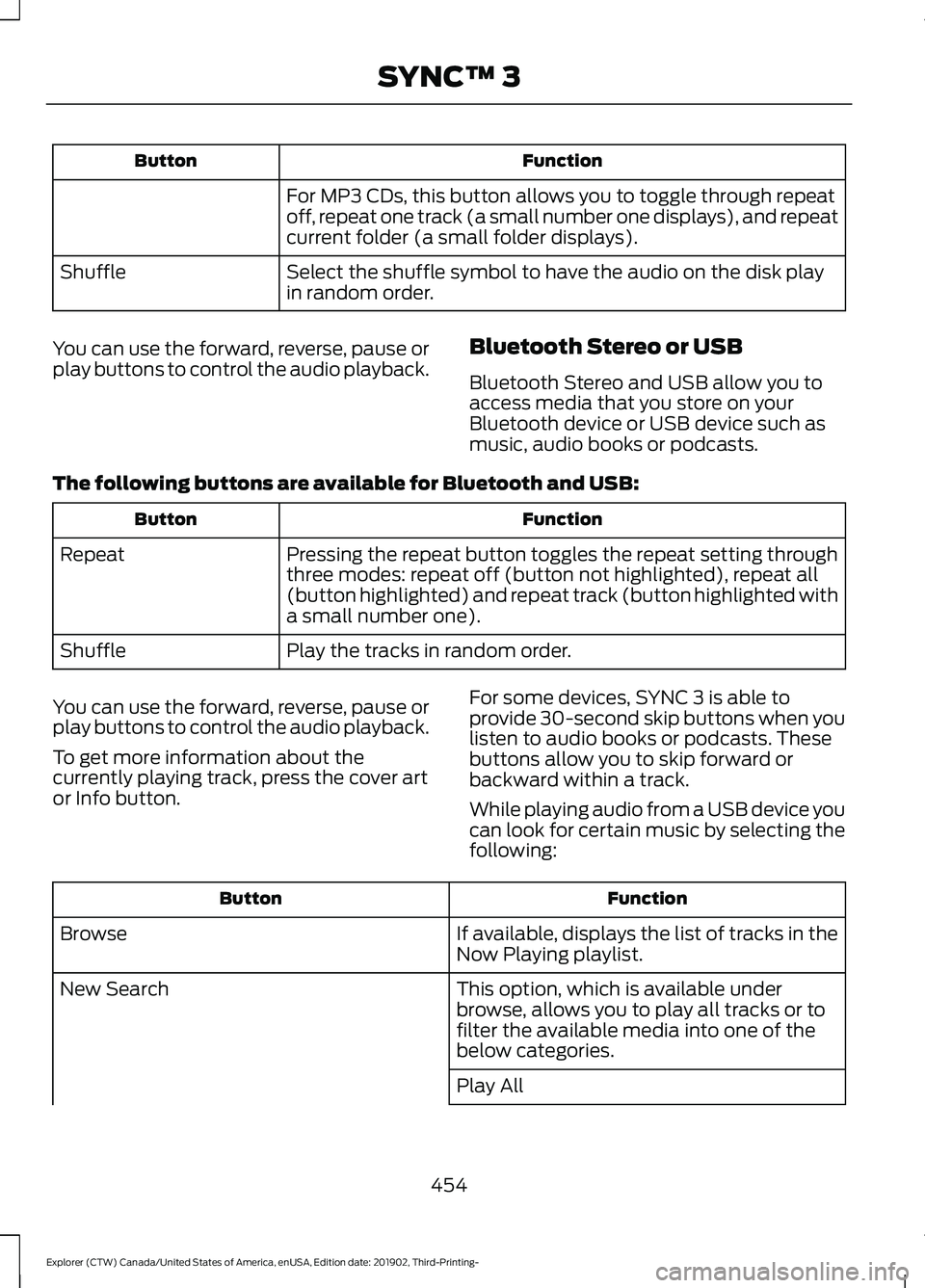
Function
Button
For MP3 CDs, this button allows you to toggle through repeat
off, repeat one track (a small number one displays), and repeat
current folder (a small folder displays).
Select the shuffle symbol to have the audio on the disk play
in random order.
Shuffle
You can use the forward, reverse, pause or
play buttons to control the audio playback. Bluetooth Stereo or USB
Bluetooth Stereo and USB allow you to
access media that you store on your
Bluetooth device or USB device such as
music, audio books or podcasts.
The following buttons are available for Bluetooth and USB: Function
Button
Pressing the repeat button toggles the repeat setting through
three modes: repeat off (button not highlighted), repeat all
(button highlighted) and repeat track (button highlighted with
a small number one).
Repeat
Play the tracks in random order.
Shuffle
You can use the forward, reverse, pause or
play buttons to control the audio playback.
To get more information about the
currently playing track, press the cover art
or Info button. For some devices, SYNC 3 is able to
provide 30-second skip buttons when you
listen to audio books or podcasts. These
buttons allow you to skip forward or
backward within a track.
While playing audio from a USB device you
can look for certain music by selecting the
following: Function
Button
If available, displays the list of tracks in the
Now Playing playlist.
Browse
This option, which is available under
browse, allows you to play all tracks or to
filter the available media into one of the
below categories.
New Search
Play All
454
Explorer (CTW) Canada/United States of America, enUSA, Edition date: 201902, Third-Printing- SYNC™ 3
Page 461 of 555
Note:
The heated rear window also turns
on when you select maximum defrost.
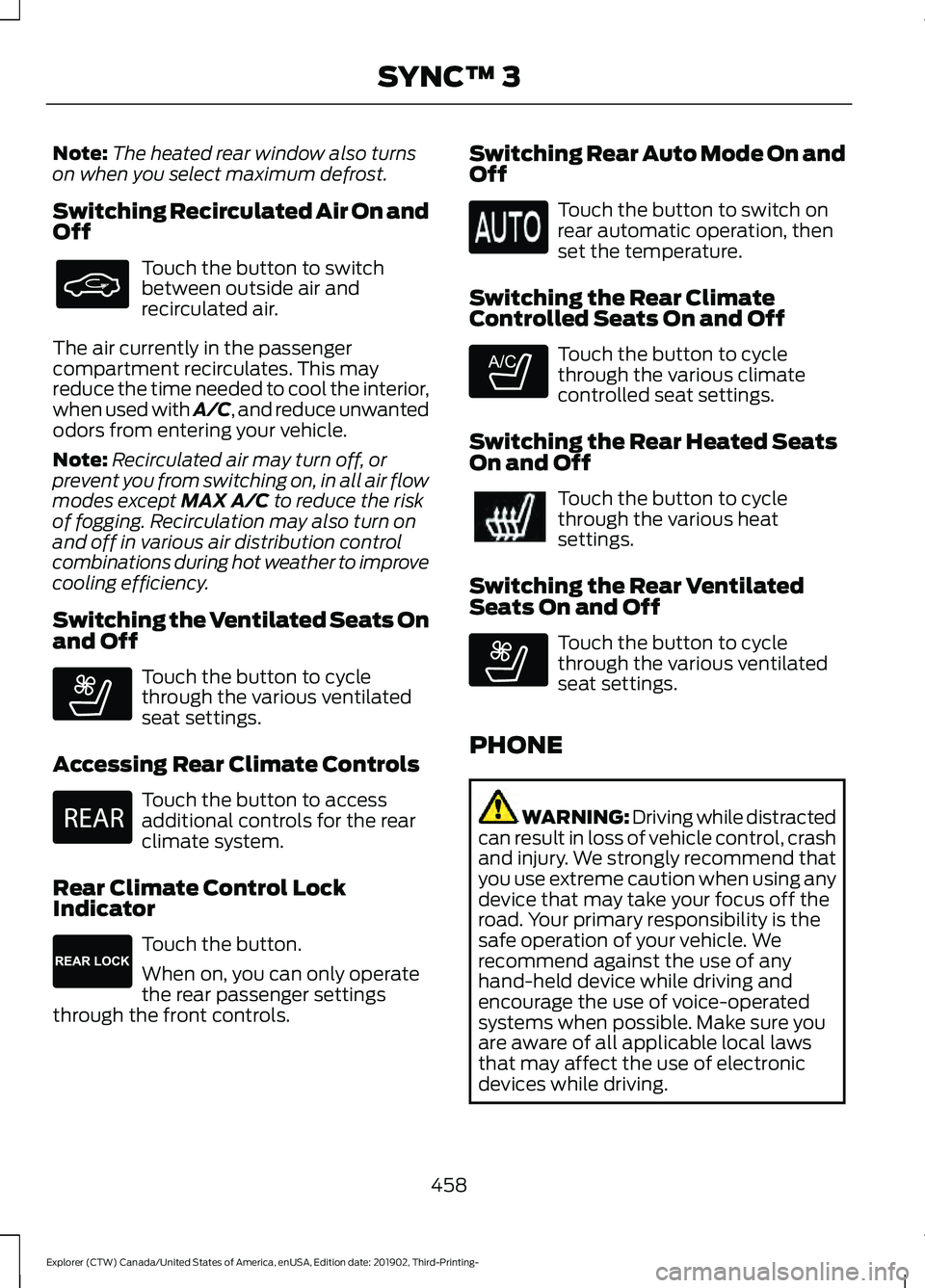
Switching Recirculated Air On and
Off Touch the button to switch
between outside air and
recirculated air.
The air currently in the passenger
compartment recirculates. This may
reduce the time needed to cool the interior,
when used with A/C, and reduce unwanted
odors from entering your vehicle.
Note: Recirculated air may turn off, or
prevent you from switching on, in all air flow
modes except MAX A/C to reduce the risk
of fogging. Recirculation may also turn on
and off in various air distribution control
combinations during hot weather to improve
cooling efficiency.
Switching the Ventilated Seats On
and Off Touch the button to cycle
through the various ventilated
seat settings.
Accessing Rear Climate Controls Touch the button to access
additional controls for the rear
climate system.
Rear Climate Control Lock
Indicator Touch the button.
When on, you can only operate
the rear passenger settings
through the front controls. Switching Rear Auto Mode On and
Off Touch the button to switch on
rear automatic operation, then
set the temperature.
Switching the Rear Climate
Controlled Seats On and Off Touch the button to cycle
through the various climate
controlled seat settings.
Switching the Rear Heated Seats
On and Off Touch the button to cycle
through the various heat
settings.
Switching the Rear Ventilated
Seats On and Off Touch the button to cycle
through the various ventilated
seat settings.
PHONE WARNING: Driving while distracted
can result in loss of vehicle control, crash
and injury. We strongly recommend that
you use extreme caution when using any
device that may take your focus off the
road. Your primary responsibility is the
safe operation of your vehicle. We
recommend against the use of any
hand-held device while driving and
encourage the use of voice-operated
systems when possible. Make sure you
are aware of all applicable local laws
that may affect the use of electronic
devices while driving.
458
Explorer (CTW) Canada/United States of America, enUSA, Edition date: 201902, Third-Printing- SYNC™ 3 E268558 E270447 E265289 E265282 E268558
Page 494 of 555
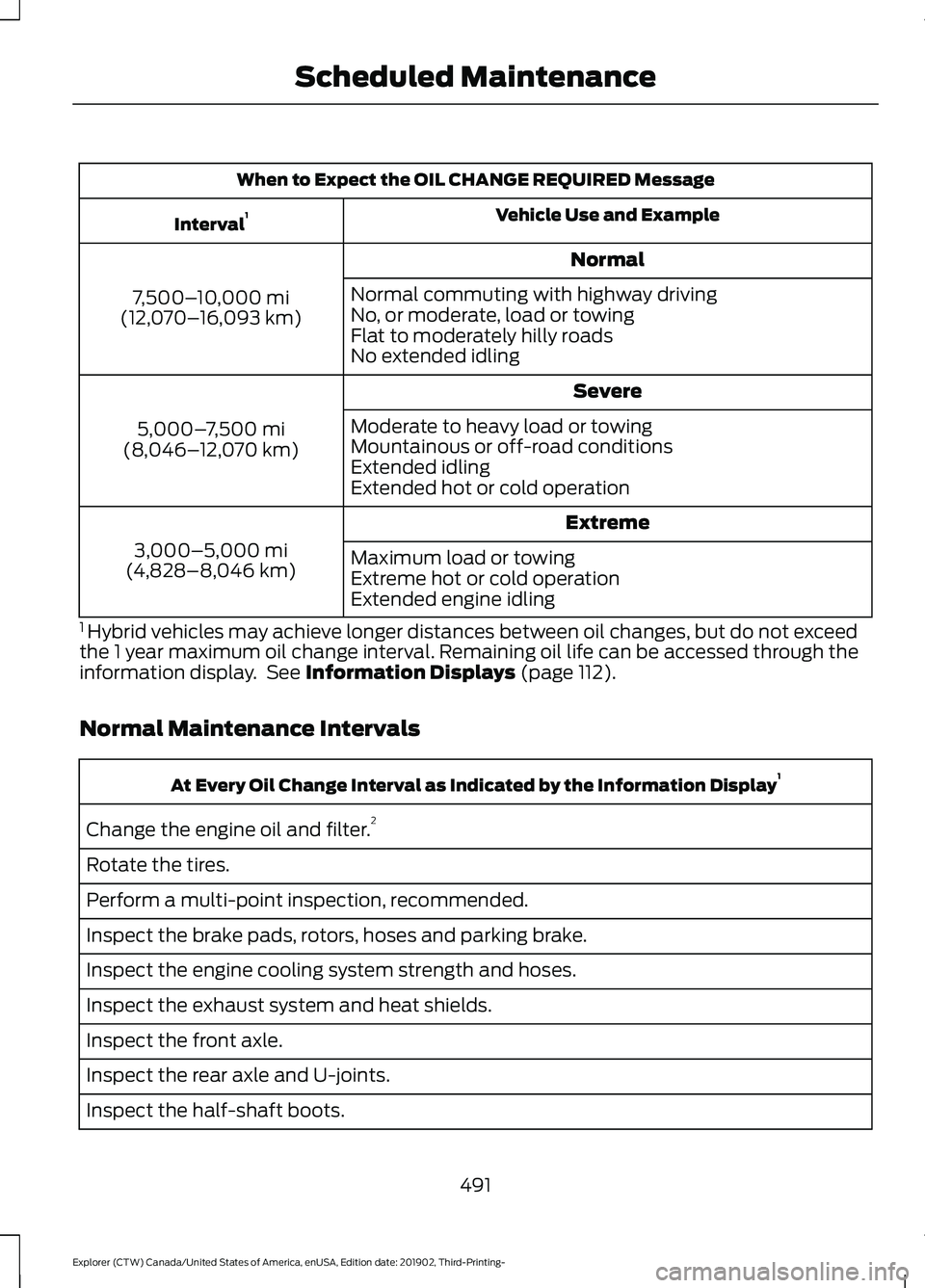
When to Expect the OIL CHANGE REQUIRED Message
Vehicle Use and Example
Interval 1
Normal
7,500– 10,000 mi
(12,070– 16,093 km) Normal commuting with highway driving
No, or moderate, load or towing
Flat to moderately hilly roads
No extended idling
Severe
5,000– 7,500 mi
(8,046– 12,070 km) Moderate to heavy load or towing
Mountainous or off-road conditions
Extended idling
Extended hot or cold operation
Extreme
3,000–5,000 mi
(4,828–8,046 km) Maximum load or towing
Extreme hot or cold operation
Extended engine idling
1 Hybrid vehicles may achieve longer distances between oil changes, but do not exceed
the 1 year maximum oil change interval. Remaining oil life can be accessed through the
information display. See Information Displays (page 112).
Normal Maintenance Intervals At Every Oil Change Interval as Indicated by the Information Display
1
Change the engine oil and filter. 2
Rotate the tires.
Perform a multi-point inspection, recommended.
Inspect the brake pads, rotors, hoses and parking brake.
Inspect the engine cooling system strength and hoses.
Inspect the exhaust system and heat shields.
Inspect the front axle.
Inspect the rear axle and U-joints.
Inspect the half-shaft boots.
491
Explorer (CTW) Canada/United States of America, enUSA, Edition date: 201902, Third-Printing- Scheduled Maintenance
Page 536 of 555
Taiwan Territory
Note: In accordance with the management
approach of low-power radio wave
radiation motors:
Article 12: For approved and certified
low-power radiation motor models,
companies, firms or users must not alter
the frequency, increase the power or
change the characteristics and functions
of the original design without authorization.
Article 14: The usage of low-power
radio-frequency motors must not affect
aviation safety and interfere with legal
telecommunications. Should interference
be detected, immediately stop using the
device and only resume usage after
ensuring that there is no longer any
interference. For the legal
telecommunication and wireless
telecommunication of the telco, the
low-power radio frequency motor must be
able to tolerate legal limits of interference
from telecommunication, industrial,
scientific and radio wave equipment.
SUNA TRAFFIC CHANNEL – TERMS
AND CONDITIONS
By activating, using and/or accessing the
SUNA Traffic Channel, SUNA Predictive or
other content or material provided by
Intelematics (together,
SUNA Products
and/or Services), you must accept
certain terms and conditions. The following
is a brief summary of the terms and
conditions that apply to you. To view the
full terms and conditions relevant to your
use of the SUNA Products and/or Services,
please consult: Website
www.sunatraffic.com.au/termsandcon- ditions/
1. Acceptance By using SUNA Products and/or Services,
you will be deemed to have accepted and
agreed to be bound by the terms and
conditions fully detailed at: Website
www.sunatraffic.com.au/termsandcon- ditions/
2. Intellectual Property
SUNA Products and/or Services are for
your personal use. You may not record, or
retransmit the content, nor use the content
in association with any other traffic
information or route guidance service or
device not approved by Intelematics. You
obtain no right of ownership in any
Intellectual Property Rights (including
copyright) in the data that is used to
provide SUNA Products and/or Services.
3. Appropriate Use
SUNA Products and/or Services are
intended as an aid to personal motoring
and travel planning, and do not provide
comprehensive or accurate information on
all occasions. On occasions, you may
experience additional delay as a result of
using SUNA Products and/or Services. You
acknowledge that it is not intended, or
suitable, for use in applications where time
of arrival or driving directions may impact
the safety of the public or yourself.
4. Use of SUNA Products and Services
while driving
You, and other authorised drivers of the
vehicle in which SUNA Products and/or
Services are available or installed and
active, remain at all times responsible for
observing all relevant laws and codes of
safe driving. In particular, you agree to only
actively operate SUNA Products and/or
Services when the Vehicle is at a complete
stop and it is safe to do so.
533
Explorer (CTW) Canada/United States of America, enUSA, Edition date: 201902, Third-Printing- Appendices
Page 543 of 555
Changing a Bulb...........................................343
LED Lamps........................................................... 343
License Plate Lamp.......................................... 344
Rear Direction Indicator and Reversing Lamp................................................................. 343
Changing a Fuse............................................321
Fuses........................................................................\
321
Changing a Road Wheel
............................376
Dissimilar Spare Wheel and Tire Assembly
Information...................................................... 376
Tire Change Procedure..................................... 377
Changing the 12V Battery.........................338 Battery Management System....................... 339
Remove and Reinstall the Battery..............339
Changing the Engine Air Filter - 2.3L EcoBoost™.................................................329
Changing the Engine Air Filter - 3.0L................................................................330
Changing the Engine Air Filter - 3.3L..................................................................331
Changing the Front Wiper Blades.........342
Changing the Rear Wiper Blades...........342
Changing the Vehicle Wi-Fi Hotspot Name or Password
..................................429
Checking MyKey System Status..............66 MyKey Distance.................................................... 66
Number of Admin Keys...................................... 67
Number of MyKeys............................................... 67
Checking the Wiper Blades......................342
Child Restraint and Seatbelt Maintenance.................................................43
Child Restraint Positioning.........................35
Child Safety......................................................23 General Information............................................ 23
Child Safety Locks.........................................36 Left-Hand Side...................................................... 37
Right-Hand Side................................................... 37
Cleaning Leather Seats
.............................349
Cleaning Products.......................................345 Materials............................................................... 345
Cleaning the Engine
....................................347
Cleaning the Exterior..................................346 Cleaning the Headlamps................................ 346
Exterior Chrome Parts..................................... 346
Exterior Plastic Parts........................................ 346
Stripes or Graphics........................................... 346
Underbody............................................................ 347
Under Hood.......................................................... 347Cleaning the Instrument Panel and
Instrument Cluster Lens........................348
Cleaning the Interior...................................348 Mirrors.................................................................... 348
Cleaning the Wheels..................................350
Cleaning the Windows and Wiper Blades............................................................347
Clearing All MyKeys.......................................66
Climate............................................................456 Accessing Rear Climate Controls................458
Accessing the Climate Control Menu........456
Directing the Airflow........................................ 456
Rear Climate Control Lock Indicator..........458
Setting the Blower Motor Speed.................456
Setting the Temperature................................ 456
Switching Auto Mode On and Off...............456
Switching Dual Zone Mode On and Off....................................................................... 457
Switching Maximum Air Conditioning On and Off.............................................................. 457
Switching Maximum Defrost On and Off....................................................................... 457
Switching Rear Auto Mode On and Off...................................................................... 458
Switching Recirculated Air On and Off...................................................................... 458
Switching the Air Conditioning On and Off...................................................................... 456
Switching the Climate Controlled Seats On and Off.............................................................. 457
Switching the Climate Control On and Off....................................................................... 457
Switching the Heated Exterior Mirrors On and Off.............................................................. 457
Switching the Heated Rear Window On and Off....................................................................... 457
Switching the Heated Seats On and Off....................................................................... 457
Switching the Heated Steering Wheel On and Off.............................................................. 457
Switching the Heated Windshield On and Off....................................................................... 457
Switching the Rear Climate Controlled Seats On and Off.......................................... 458
Switching the Rear Heated Seats On and Off...................................................................... 458
Switching the Rear Ventilated Seats On and Off............................................................. 458
540
Explorer (CTW) Canada/United States of America, enUSA, Edition date: 201902, Third-Printing- Index
Page 544 of 555
Switching the Ventilated Seats On and
Off...................................................................... 458
Climate Control..............................................137
Climate Controlled Seats..........................158
Automatic Climate Controlled Seats..........158
Heated Seats....................................................... 158
Ventilated Seats................................................. 158
Cold Weather Precautions.......................297
Collision, Damage or Fire Event.............303 Guidance for Ford Motor Company Electric
and Hybrid-Electric Vehicles Equipped
With High Voltage Batteries..................... 303
Connecting the Vehicle to a Mobile Network........................................................426
Enabling the Modem Using FordPass.......................................................... 426
Enabling the Modem Using the Touchscreen................................................... 426
What Is the Modem.......................................... 426
Coolant Check See: Engine Coolant Check............................ 332
Crash Sensors and Airbag Indicator
........52
Creating a MyKey...........................................65
Programming and Changing Configurable
Settings.............................................................. 66
Creating a Vehicle Wi-Fi Hotspot..........429 Connecting a Device to the Wi-Fi
Hotspot............................................................ 429
Finding the Wi-Fi Hotspot Name and Password......................................................... 429
Cross Traffic Alert........................................268 Cross Traffic Alert Behavior When Trailer
is Attached........................................................ 271
Cross Traffic Alert Indicator............................. 271
Cross Traffic Alert Information Messages........................................................... 271
Cross Traffic Alert System Limitations ....................................................... 270
Cross Traffic Alert System Sensors.............270
Switching the System On and Off................271
Using Cross Traffic Alert................................. 269
Cruise Control
...............................................244
Cruise Control Indicators..........................245
Cruise Control - Vehicles With: Adaptive Cruise Control With Lane
Centering........................................................82
Cruise Control - Vehicles With: Adaptive Cruise Control With Stop and Go.........83 Cruise Control - Vehicles With: Cruise
Control
............................................................83
Cup Holders......................................................171
Customer Assistance................................306
D
Data Recording
..................................................11
Comfort, Convenience and Entertainment
Data....................................................................... 13
Event Data................................................................ 13
Service Data............................................................ 12
Services That Third Parties Provide...............14
Services That We Provide.................................. 14
Vehicles With a Modem...................................... 14
Vehicles With an Emergency Call System.................................................................. 15
Vehicles With SYNC............................................. 14
Daytime Running Lamps - Vehicles With: Configurable Daytime Running
Lamps.............................................................90
Daytime Running Lamps - Vehicles With: Daytime Running Lamps (DRL)............90
Declaration of Conformity
.......................534
Declaration of Conformity - Vehicles With: SYNC 3..............................................534
Radio Frequency Statement......................... 534
Digital Radio...................................................431 HD Radio Reception and Station
Troubleshooting............................................ 432
Direction Indicators
........................................91
Direction Indicator................................................ 92
Switching the Direction Indicators On and Off........................................................................\
.. 91
Doors and Locks.............................................69
Drive Mode Control.....................................279 Drive Modes......................................................... 279
Drive Modes
...................................................279
Deep Snow/Sand.............................................. 279
Eco........................................................................\
.. 280
Normal.................................................................. 280
Slippery................................................................. 280
Sport...................................................................... 280
Tow/Haul.............................................................. 280
Trail........................................................................\
. 280
Driver Alert.....................................................259 PRINCIPLE OF OPERATION.......................... 259
USING DRIVER ALERT.................................... 259
541
Explorer (CTW) Canada/United States of America, enUSA, Edition date: 201902, Third-Printing- Index
Page 546 of 555
Safety Chains......................................................
293
Trailer Brakes....................................................... 293
Trailer Lamps....................................................... 293
When Towing a Trailer..................................... 294
Event Data Recording See: Data Recording.............................................. 11
Export Unique Options.................................18
Exterior Mirrors - Excluding: ST................98 360-Degree Camera.......................................... 99
Auto-dimming Feature...................................... 99
Auto-Folding Mirrors .......................................... 98
Blind Spot Information System...................... 99
Direction Indicator Mirrors ............................... 99
Fold-Away Exterior Mirrors............................... 98
Heated Exterior Mirrors ..................................... 99
Memory Mirrors .................................................... 99
Power Exterior Mirrors........................................ 98
Puddle Lamps....................................................... 99
Exterior Mirrors - ST......................................99 Auto-dimming Feature...................................... 101
Auto-Folding Mirrors......................................... 100
Blind Spot Information System..................... 101
Direction Indicator Mirrors................................ 101
Fold-Away Exterior Mirrors............................. 100
Heated Exterior Mirrors..................................... 101
Memory Mirrors.................................................... 101
Power Exterior Mirrors........................................ 99
Puddle Lamps...................................................... 101
F
Fastening the Seatbelts
..............................39
Seatbelt Locking Modes................................... 40
Using Seatbelts During Pregnancy................39
Flat Tire See: Changing a Road Wheel........................ 376
Floor Mats
......................................................298
Fog Lamps - Front See: Front Fog Lamps........................................ 90
Ford Credit
.........................................................15
US Only..................................................................... 15
Ford Protect..................................................485 Ford Protect Extended Service Plan
(CANADA ONLY).......................................... 486
Ford Protect Extended Service Plans (U.S. Only)................................................................. 485
Four-Wheel Drive
........................................208
Principle of Operation..................................... 208Front Fog Lamps............................................90
Front Fog Lamp Indicator.................................. 91
Switching the Front Fog Lamps On or Off........................................................................\
. 90
Front Parking Aid
..........................................232
Object Distance Indicator............................... 233
Front Passenger Sensing System
............48
Front Wiper Blades See: Changing the Front Wiper Blades......342
Fuel and Refueling.......................................186
Fuel Consumption.......................................195 Advertised Capacity.......................................... 195
Calculating Fuel Economy.............................. 196
Filling the Fuel Tank.......................................... 196
Fuel Filler Funnel Location
.......................188
Fuel Filter.........................................................341
Fuel Quality - E85........................................186 Choosing the Right Fuel - Flex Fuel
Vehicles............................................................. 186
Switching Between E85 and Gasoline............................................................. 187
Fuel Quality - Gasoline..............................188 Choosing the Right Fuel.................................. 188
Fuel Shutoff..................................................300
Fuses.................................................................313
Fuse Specification Chart
............................313
Engine Compartment Fuse Box.................... 313
Passenger Compartment Fuse Panel........318
G
Garage Door Opener...................................162
Garage Door Opener See: Universal Garage Door Opener............162
Gauges
.............................................................104
12 Inch Display..................................................... 106
4 Inch Display...................................................... 104
6 Inch Display...................................................... 105
Engine Coolant Temperature Gauge..........106
Fuel Gauge............................................................ 107
Gearbox See: Transmission............................................. 202
General Information on Radio Frequencies...................................................57
Intelligent Access.................................................. 57
General Maintenance Information........487 Multi-Point Inspection.................................... 489
Owner Checks and Services......................... 488
543
Explorer (CTW) Canada/United States of America, enUSA, Edition date: 201902, Third-Printing- Index
Page 551 of 555
Repairing Minor Paint Damage..............350
Replacement Parts
Recommendation........................................16
Collision Repairs.................................................... 16
Scheduled Maintenance and Mechanical Repairs................................................................. 16
Warranty on Replacement Parts.................... 16
Replacing a Lost Key or Remote Control............................................................63
Replacing the Cabin Air Filter...................143
Reporting Safety Defects (Canada Only)................................................................311
Reporting Safety Defects (U.S. Only)................................................................311
Resuming the Set Speed..........................245 Resuming the Set Speed from a Complete
Stop.................................................................... 252
Reverse Braking Assist Indicators
...........221
Reverse Braking Assist Precautions.................................................220
Reverse Braking Assist
..............................220
Reverse Braking Assist –
Troubleshooting............................................. 222
Reverse Braking Assist – Troubleshooting
........................................222
Reverse Braking Assist – Frequently Asked
Questions......................................................... 223
Reverse Braking Assist – Information Messages.......................................................... 222
Roadside Assistance
..................................299
Vehicles Sold in Canada: Getting Roadside
Assistance...................................................... 300
Vehicles Sold in the United States: Getting Roadside Assistance................................... 299
Vehicles Sold in the United States: Using Roadside Assistance................................... 299
Roadside Emergencies
.............................299
Roof Racks and Load Carriers................282 Adjusting the Crossbar.................................... 283
Maximum Recommended Load Amounts.......................................................... 283
Running-In See: Breaking-In................................................. 297
Running Out of Fuel....................................188 Adding Fuel From a Portable Fuel
Container.......................................................... 189
Filling a Portable Fuel Container.................. 189S
Safety Canopy
™
..............................................51
Safety Precautions......................................186
Satellite Radio..............................................434
Satellite Radio Electronic Serial Number
(ESN)................................................................ 435
Satellite Radio Reception Factors..............434
SiriusXM Satellite Radio Service.................434
Troubleshooting................................................. 435
Scheduled Maintenance Record...........495
Scheduled Maintenance
...........................487
Seatbelt Extensions......................................44
Seatbelt Height Adjustment.......................41
Seatbelt Reminder.........................................42 Seatbelt Status..................................................... 42
Seatbelts...........................................................38 Principle of Operation........................................ 38
Seatbelt Warning Lamp and Indicator Chime...............................................................41
Conditions of operation...................................... 41
Seats.................................................................144
Security..............................................................78
Selecting a Drive Mode..............................279
Settings...........................................................469 911 Assist.............................................................. 469
Ambient Lighting............................................... 470
Audio...................................................................... 469
Automatic Updates.......................................... 469
Bluetooth............................................................. 469
Charge Settings.................................................. 470
Clock...................................................................... 469
Display................................................................... 470
Driver Assist......................................................... 469
FordPass............................................................... 469
General.................................................................. 469
Message Center.................................................. 470
Mobile Apps........................................................ 469
Multi Contour Seats.......................................... 470
Navigation............................................................ 470
Personal Profiles................................................ 470
Phone
.................................................................... 469
Seats....................................................................... 470
Sound.................................................................... 469
Valet Mode........................................................... 470
Vehicle................................................................... 469
Voice Control....................................................... 470
548
Explorer (CTW) Canada/United States of America, enUSA, Edition date: 201902, Third-Printing- Index
Page 553 of 555
Switching Lane Centering On and
Off..................................................................254
Activating Lane Centering.............................. 254
System Alerts and Automatic Cancellation.................................................... 254
Switching Rear Occupant Alert System On and Off
...................................................160
Switching Reverse Braking Assist On and Off
....................................................................221
Symbols Glossary.............................................9
SYNC™ 3........................................................438
General Information......................................... 438
SYNC™ 3 Troubleshooting.......................471 Additional Information and
Assistance....................................................... 483
Apps........................................................................\
478
Navigation............................................................. 477
Personal Profiles................................................. 481
Phone..................................................................... 475
Resetting the System...................................... 483
USB and Bluetooth Audio............................... 472
Voice Recognition............................................... 471
Wi-Fi Connectivity............................................ 480
T
Technical Specifications See: Capacities and Specifications............384
The Better Business Bureau (BBB) Auto Line Program (U.S. Only)
......................308
Tire Care..........................................................355
Glossary of Tire Terminology........................ 356
Information About Uniform Tire Quality Grading............................................................. 355
Information Contained on the Tire Sidewall............................................................ 357
Temperature A B C............................................ 356
Traction AA A B C............................................... 355
Treadwear............................................................. 355
Tire Pressure Monitoring System
...........370
Changing Tires With a Tire Pressure
Monitoring System......................................... 371
Understanding Your Tire Pressure Monitoring System ....................................... 372
Tires See: Wheels and Tires..................................... 353
Towing a Trailer............................................289 Load Placement................................................ 289Towing the Vehicle on Four
Wheels..........................................................295
Emergency Towing............................................ 295
Recreational Towing - All-Wheel and Four-Wheel Drive Vehicles........................ 295
Recreational Towing - Front-Wheel Drive Vehicles............................................................ 295
Recreational Towing - Rear-Wheel Drive Vehicles............................................................ 295
Towing.............................................................289
Traction Control............................................224 Principle of Operation...................................... 224
Traffic Sign Recognition.............................272 Principle of Operation....................................... 272
Using Traffic Sign Recognition...................... 272
Trailer Sway Control...................................290
Transmission Code Designation............394
Transmission Specifications - ST.........388
Transmission.................................................202
Transporting the Vehicle
..........................304
U
Under Hood Overview - 2.3L EcoBoost™.................................................324
Under Hood Overview - 3.0L...................325
Under Hood Overview - 3.3L...................326
Unique Driving Characteristics...............180
Universal Garage Door Opener...............162 HomeLink Wireless Control System............162
USB Port.........................................................436 Locating the USB Ports................................... 437
Using Four-Wheel Drive...........................208 Driving in Special Conditions With
Four-Wheel drive (4WD)............................ 210
How Your Vehicle Differs from Other Vehicles............................................................ 209
Operating Four-Wheel drive (4WD) Vehicles with Mismatched Tires.............209
Operating Four-Wheel Drive (4WD) Vehicles With Spare Tires......................... 208
Using MyKey With Remote Start Systems...........................................................67
Using Snow Chains
....................................368
Using Stability Control...............................226 Electronic Stability Control - Base
Model................................................................ 226
550
Explorer (CTW) Canada/United States of America, enUSA, Edition date: 201902, Third-Printing- Index