display FORD EXPLORER 2023 User Guide
[x] Cancel search | Manufacturer: FORD, Model Year: 2023, Model line: EXPLORER, Model: FORD EXPLORER 2023Pages: 573, PDF Size: 16.1 MB
Page 70 of 573
You have successfully created a MyKey.Make sure you label it so you candistinguish it from the admin keys.
You can also program configurablesettings for the key.
Programming and ChangingConfigurable Settings
Use the touchscreen to access yourconfigurable MyKey settings.
1.Switch the ignition on using an adminkey or the remote control you want toprogram.
2.Press SETTINGS.
3.Press Vehicle.
4.Press MyKey.
5.Select a setting and configure it byfollowing the instructions on thetouchscreen.
The programmed restrictions apply whenyou switch the vehicle off, open and closethe driver door and restart your vehicle withthe programmed key or remote control.
Note: You can clear or change your MyKeysettings at any time during the same keycycle as you created the MyKey. Once youhave switched the vehicle off, you need anadmin key to change or clear your MyKeysettings. When you make any changes toyour MyKey settings, you change thesettings for every MyKey. You cannot makeindividual changes to apply to specificMyKeys.
CLEARING ALL MYKEYS
When you clear your MyKeys, you removeall restrictions and return all MyKeys totheir original admin key status at once. Toclear all MyKeys of all MyKey settings, usethe touchscreen.
1.Switch the ignition on using an adminkey.
2.Press SETTINGS.
3.Press Vehicle.
4.Press MyKey.
5.Press Clear All MyKeys.
6.Press Yes.
7.A confirmation message appears in thedisplay after you finish clearing yourMyKeys.
CHECKING MYKEY SYSTEM
STATUS
You can find information about yourprogrammed MyKeys by using thetouchscreen. See Settings (page 458).
MyKey Distance
Tracks the distance when drivers use aMyKey. The only way to delete theaccumulated distance is by using an adminkey to clear all MyKeys. If the distance doesnot accumulate as expected, then theintended user is not using the MyKey, or anadmin key user recently cleared and thenrecreated a MyKey.
Number of MyKeys
Indicates the number of MyKeys you haveprogrammed to your vehicle. Use thisfeature to detect how many MyKeys youhave for your vehicle and determine whenyou have deleted all MyKeys.
Number of Admin Keys
Indicates how many admin keys you haveprogrammed to your vehicle. Use thisfeature to determine how many adminkeys you have for your vehicle, and detectif an additional MyKey has beenprogrammed.
66
2023 Explorer (CTW) Canada/United States of America, enUSA, Edition date: 202209, First-PrintingMyKey™
Page 74 of 573

When you open one of the front doors andlock your vehicle with the power door lockcontrol, all the doors lock then unlock andthe horn sounds twice if the key is still inthe ignition.
You can still lock your vehicle with the keyin the ignition by either:
•Using the keyless entry keypad with thedriver door closed.
•Pressing the lock button on the remotecontrol even if you have not closed thedoors.
If both front doors close, you can lock yourvehicle by any method, regardless ofwhether the key is in the ignition or not.
Smart Unlocks for IntelligentAccess Keys (If Equipped)
This helps to prevent you from locking yourkey inside the passenger compartment orrear cargo area.
When you electronically lock your vehiclewith any door open, the transmission inpark (P) and the ignition off, the systemsearches for an intelligent access key inthe passenger compartment after youclose the last door.
If the system finds a key, all the doorsimmediately unlock and the horn soundstwice, indicating that a key is inside.
You can override the smart unlock featureand intentionally lock the intelligent accesskey inside your vehicle.
To override smart unlock, lock your vehicleafter you have closed all the doors by:
•Using the keyless entry keypad.
•Pressing the lock button on anotherintelligent access key.
•Touching the locking area on the frontof the door handle with anotherintelligent access key in your hand.
When you open one of the front doors andlock your vehicle using the power door lockcontrol, all doors lock, then unlock if:
•The ignition is on.
•The ignition is off and the transmissionis not in park (P).
Autolock (If Equipped)
Autolock locks all the doors when thefollowing occur:
•All doors close.
•The ignition is on.
•You shift into any gear putting yourvehicle in motion.
•Your vehicle reaches a speed greaterthan 12 mph (20 km/h).
Autolock repeats when:
•You open then close any door whenthe ignition is on and your vehicle speedis 9 mph (15 km/h) or lower.
•Your vehicle reaches a speed greaterthan 12 mph (20 km/h).
Autounlock
Autounlock unlocks all the doors when thefollowing occur:
•You stop your vehicle, place the gearselector in park (P), and switch theignition off or to accessory position.
•You open the driver door within 10minutes of switching the ignition off orto accessory position.
Note:The doors do not autounlock if youelectronically lock your vehicle after youswitch the ignition off and before you openthe driver door.
Enabling or Disabling Autounlock
You can enable or disable the autounlockin the information display or an authorizeddealer can do it for you. See GeneralInformation (page 115).
70
2023 Explorer (CTW) Canada/United States of America, enUSA, Edition date: 202209, First-PrintingDoors and Locks
Page 81 of 573

PASSIVE ANTI-THEFT
SYSTEM
Note: The system is not compatible withnon-Ford aftermarket remote start systems.Use of these systems could result in vehiclestarting problems and a loss of securityprotection.
Note:Metallic objects, electronic devicesor a second coded key on the same keychain could cause vehicle starting problemsif they are too close to the key when startingthe engine. Prevent these objects fromtouching the coded key while starting theengine. Switch the ignition off, move allobjects on the key chain away from thecoded key and restart the engine if aproblem occurs.
Note:Do not leave a duplicate coded keyin the vehicle. Always take your keys andlock all doors when leaving the vehicle.
SecuriLock®
The system is an engine immobilizationsystem. It helps to prevent anyone fromstarting the engine without using a codedkey programmed to your vehicle. Using thewrong key could prevent the engine fromstarting. A message may appear in theinformation display.
If you are unable to start the engine with acorrectly coded key, there is a problem withthe system and a message could appearin the information display.
Automatic Arming
The vehicle arms immediately after youswitch the ignition off.
Automatic Disarming
Switching the ignition on with a coded keydisarms the vehicle.
Replacement Keys
Note:Your vehicle comes with twointegrated keyhead transmitters or twointelligent access keys.
The integrated keyhead transmitterfunctions as a programmed ignition keythat operates all the locks and starts thevehicle, as well as a remote control.
The intelligent access key functions as aprogrammed key that operates the driverdoor lock and activates the intelligentaccess with push button start system, aswell as a remote control.
If your programmed transmitters orstandard SecuriLock coded keys(integrated keyhead transmitters only) arelost or stolen and you do not have an extracoded key, you will need to have yourvehicle towed to an authorized dealer. Youneed to erase the key codes from yourvehicle and program new coded keys.
Store an extra programmed key away fromthe vehicle in a safe place to help preventany inconveniences. See your authorizeddealer to purchase additional spare orreplacement keys.
Programming a Spare IntelligentAccess Key (If Equipped)
See your authorized dealer to haveadditional keys programmed to yourvehicle.
ANTI-THEFT ALARM
The system will warn you of anunauthorized entry to your vehicle. It willbe triggered if any door, the luggagecompartment or the hood is openedwithout using the key, remote control orkeyless entry keypad.
The direction indicators will flash and thehorn will sound if unauthorized entry isattempted while the alarm is armed.
77
2023 Explorer (CTW) Canada/United States of America, enUSA, Edition date: 202209, First-PrintingSecurity
Page 86 of 573

CRUISE CONTROL - VEHICLES
WITH: STOP AND GO
See How Does Adaptive Cruise ControlWith Stop and Go Work (page 241).
INFORMATION DISPLAY
CONTROL
See Information Displays (page 110).
HEATED STEERING WHEEL (IF
EQUIPPED)
The heated steering wheel button is on theclimate controls.
Press the button to switch theheated steering wheel on andoff.
Note:You can use the heated steeringwheel only when the engine is running.
Note:The system uses a sensor and isdesigned to control the temperature of thesteering wheel and to prevent it fromoverheating.
Note:In warm temperatures, the steeringwheel quickly reaches its maximumtemperature and the system reduces thecurrent to the heating element. This couldcause you to think that the system hasstopped working but it has not. This isnormal.
HORN
Press on the center of thesteering wheel near the horn iconto activate the horn.
82
2023 Explorer (CTW) Canada/United States of America, enUSA, Edition date: 202209, First-PrintingSteering WheelE289570 E280795 E256621 E270945
Page 88 of 573
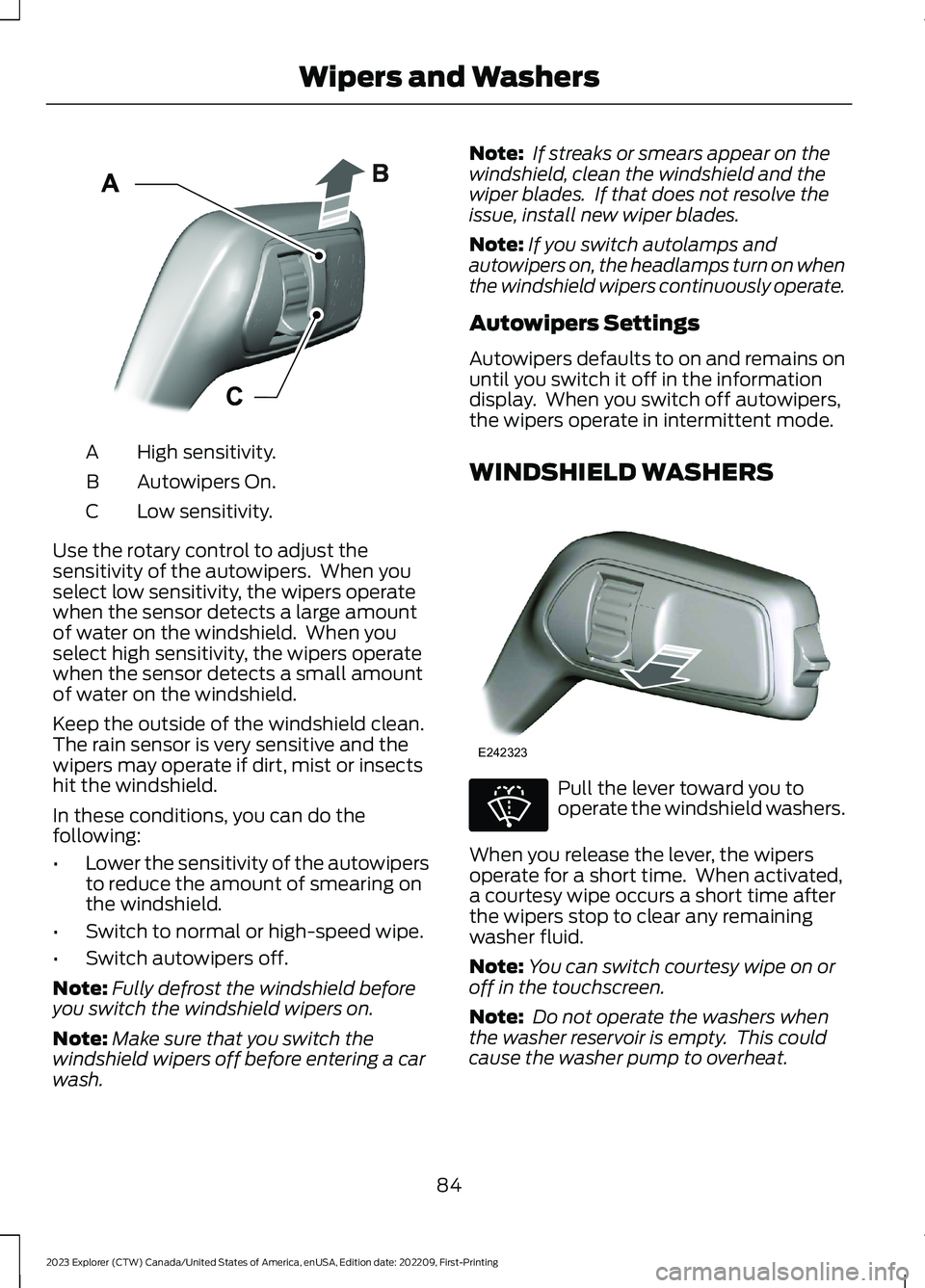
High sensitivity.A
Autowipers On.B
Low sensitivity.C
Use the rotary control to adjust thesensitivity of the autowipers. When youselect low sensitivity, the wipers operatewhen the sensor detects a large amountof water on the windshield. When youselect high sensitivity, the wipers operatewhen the sensor detects a small amountof water on the windshield.
Keep the outside of the windshield clean.The rain sensor is very sensitive and thewipers may operate if dirt, mist or insectshit the windshield.
In these conditions, you can do thefollowing:
•Lower the sensitivity of the autowipersto reduce the amount of smearing onthe windshield.
•Switch to normal or high-speed wipe.
•Switch autowipers off.
Note:Fully defrost the windshield beforeyou switch the windshield wipers on.
Note:Make sure that you switch thewindshield wipers off before entering a carwash.
Note: If streaks or smears appear on thewindshield, clean the windshield and thewiper blades. If that does not resolve theissue, install new wiper blades.
Note:If you switch autolamps andautowipers on, the headlamps turn on whenthe windshield wipers continuously operate.
Autowipers Settings
Autowipers defaults to on and remains onuntil you switch it off in the informationdisplay. When you switch off autowipers,the wipers operate in intermittent mode.
WINDSHIELD WASHERS
Pull the lever toward you tooperate the windshield washers.
When you release the lever, the wipersoperate for a short time. When activated,a courtesy wipe occurs a short time afterthe wipers stop to clear any remainingwasher fluid.
Note:You can switch courtesy wipe on oroff in the touchscreen.
Note: Do not operate the washers whenthe washer reservoir is empty. This couldcause the washer pump to overheat.
84
2023 Explorer (CTW) Canada/United States of America, enUSA, Edition date: 202209, First-PrintingWipers and WashersE295997 E242323 E270967
Page 92 of 573
DAYTIME RUNNING LAMPS -
VEHICLES WITH:
CONFIGURABLE DAYTIME
RUNNING LAMPS
WARNING: The daytime runninglamps system does not activate the rearlamps and may not provide adequatelighting during low visibility drivingconditions. Make sure you switch theheadlamps on, as appropriate, during alllow visibility conditions. Failure to do somay result in a crash.
Switch the daytime running lamps on oroff using the touchscreen:
1.Select Settings. See Settings (page458).
2.Select Vehicle.
3.Select Lighting.
The daytime running lamps turn on when:
1.The lamps are on in the informationdisplay.
2.You switch the ignition on.
3.The transmission is not in park (P) forvehicles with automatic transmissionsor you release the parking brake forvehicles with manual transmissions.
4.The lighting control is in the autolampsposition.
5.The headlamps are off.
The other lighting control switch positionsdo not turn on the daytime running lamps.
If the daytime running lamps are off in theinformation display, the lamps stay off inall switch positions.
DAYTIME RUNNING LAMPS -
VEHICLES WITH: DAYTIME
RUNNING LAMPS (DRL)
WARNING: The daytime runninglamps system does not activate the rearlamps and may not provide adequatelighting during low visibility drivingconditions. Make sure you switch theheadlamps on, as appropriate, during alllow visibility conditions. Failure to do somay result in a crash.
The system turns the lamps on in daylightconditions.
Daytime running lamps are always onunless the headlamps are on or yourvehicle is in park (P).
FRONT FOG LAMPS (IF EQUIPPED)
Using the Front Fog Lamps
To switch the lamps on or off:
1.Set the lighting control to the parkinglamps, headlamps or autolampsposition.
Note:When the lighting control is in theautolamps position, you cannot switch thefog lamps on unless the low beamheadlamps are on.
2.
Press the button on thelighting control to switch the front foglamps on or off.
Note:Only switch the front fog lamps onduring reduced visibility.
Note:The brightness of the daytime runninglamps may decrease when the front foglamps are on.
88
2023 Explorer (CTW) Canada/United States of America, enUSA, Edition date: 202209, First-PrintingLighting
Page 94 of 573
Direction Indicator
Flashes when you switch thedirection indicators on.
Note:An increase in the rate of flashingwarns of a failed indicator bulb.
INTERIOR LAMPS
The lamps turn on under the followingconditions:
•You open any door.
•You press a button on the remotecontrol.
•You press the all lamps on button onthe overhead console.
Front Interior Lamp
The front interior lamp switches are on theoverhead console.
Note:The position of each button on theoverhead console depends on your vehicle.
All Lamps On or Off
Press to switch all interior lampson or off.
Individual Map Lamps
Press to switch the left-handindividual dome lamp on and off.
Press to switch the right-handindividual dome lamp on and off.
Interior Lamp Function
Press to switch the interior lampfunction on and off.
When the interior lamp function is off andyou open a door, the courtesy and doorlamps stay off.
When the interior lamp function is on andyou open a door, the courtesy and doorlamps turn on.
Note:The indicator lamp lights amberwhen the door function is off.
Rear Interior Lamps
The rear interior lamps may be above therear seat or above the rear windows.
Press to switch the lamps on oroff.
Note:If you switch the rear lamps onthrough the overhead console, you cannotswitch them off with the rear lamp switch.
AMBIENT LIGHTING -
VEHICLES WITH: 8 INCH
CENTER DISPLAY SCREEN
Use the touchscreen to select thefollowing:
90
2023 Explorer (CTW) Canada/United States of America, enUSA, Edition date: 202209, First-PrintingLightingE67018 E281230 E259649 E262193 E281231 E259649
Page 95 of 573
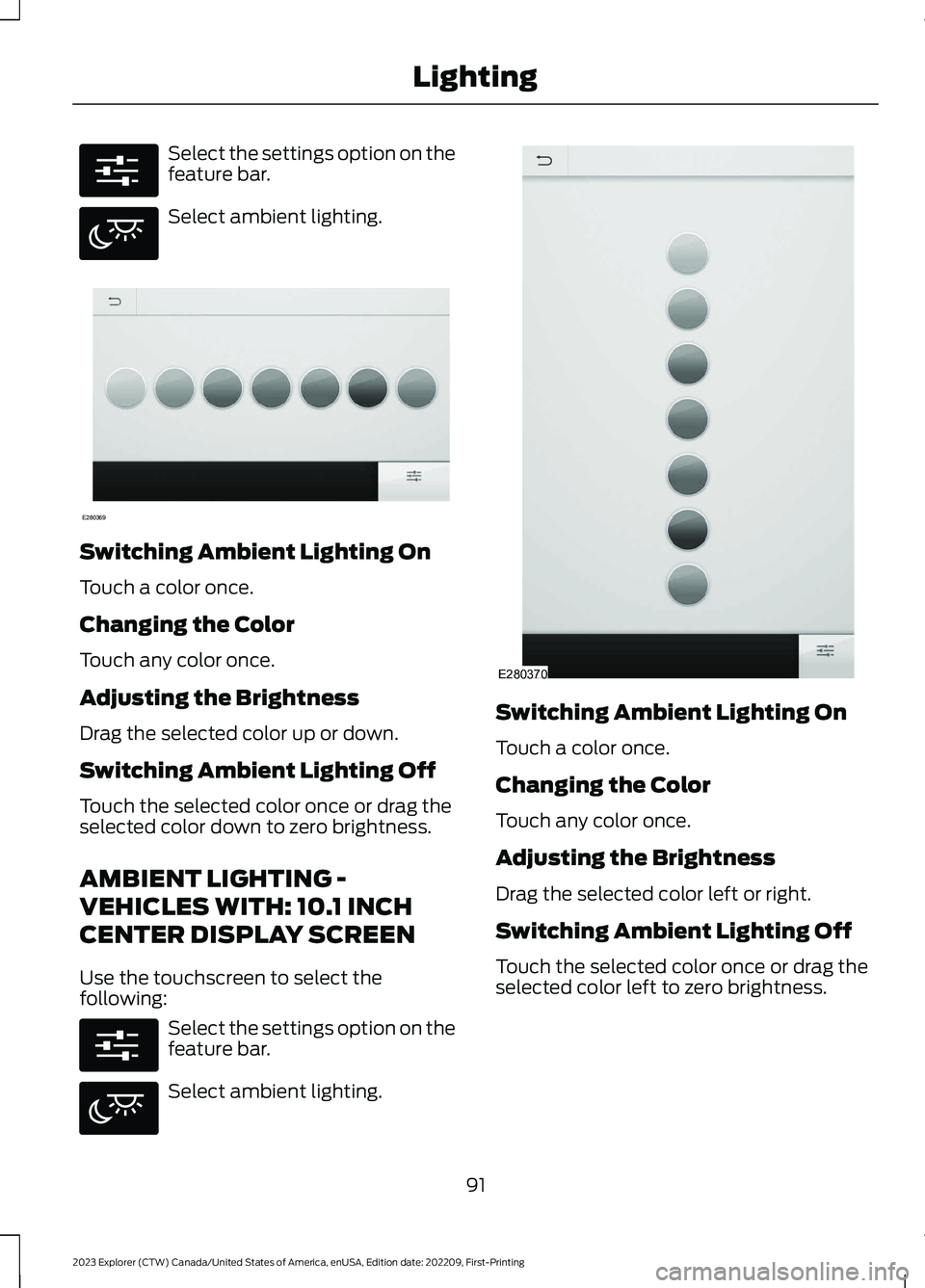
Select the settings option on thefeature bar.
Select ambient lighting.
Switching Ambient Lighting On
Touch a color once.
Changing the Color
Touch any color once.
Adjusting the Brightness
Drag the selected color up or down.
Switching Ambient Lighting Off
Touch the selected color once or drag theselected color down to zero brightness.
AMBIENT LIGHTING -
VEHICLES WITH: 10.1 INCH
CENTER DISPLAY SCREEN
Use the touchscreen to select thefollowing:
Select the settings option on thefeature bar.
Select ambient lighting.
Switching Ambient Lighting On
Touch a color once.
Changing the Color
Touch any color once.
Adjusting the Brightness
Drag the selected color left or right.
Switching Ambient Lighting Off
Touch the selected color once or drag theselected color left to zero brightness.
91
2023 Explorer (CTW) Canada/United States of America, enUSA, Edition date: 202209, First-PrintingLightingE280315 E280617 E280369 E280315 E280617 E280370
Page 96 of 573
WHAT IS AUTOMATIC HIGH
BEAM CONTROL
The system turns on high beams if it is darkenough and no other traffic is present. If itdetects an approaching vehicle’sheadlamps or tail lamps, or street lightingahead, the system turns the high beamsoff. Low beams remain on.
A camera sensor, centrally mountedbehind the windshield of your vehicle,continuously monitors conditions to turnthe high beams on and off.
SWITCHING AUTOMATIC HIGH
BEAM CONTROL ON AND OFF
WARNING: Do not use the systemin poor visibility, for example fog, heavyrain, spray or snow.
Use the touchscreen to select thefollowing:
1.Select Settings.
2.Select Vehicle.
3.Select Lighting.
Activating the Automatic HighBeam Control
Switch the lighting control to theautolamps position. SeeAutolamps (page 87).
Note:The lighting control defaults toautolamps each time you switch yourvehicle on.
When active, the high beams turn on if allthe following conditions occur:
•The ambient light level is low enough.
•There is no traffic in front of yourvehicle.
•The vehicle speed is greater thanapproximately 25 mph (40 km/h).
When active, the high beams turn off if atleast one of the following conditions occur:
•The ambient light level is high enoughthat you do not require high beams.
•The system detects an approachingvehicle's headlamps or tail lamps.
•The system detects severe rain, snowor fog.
•A blocked vehicle camera.
•The vehicle speed falls belowapproximately 19 mph (30 km/h).
Note:The deactivation speed is lower oncurves.
Note:Certain curvy road situations maydelay high beam reactivation.
Note:If you have a blocked sensor, thesystem may not operate properly. Keep thewindshield free from obstruction or damage.
Note:The system may not operate properlyin cold or inclement conditions. You canswitch on the high beams by overriding thesystem.
Note:If the system detects a blockage, forexample bird droppings, bug splatter, snowor ice, the system goes into low beam modeuntil you clear the blockage. If you have ablocked camera, a message may appear inthe information display.
Note:Using much larger tires or equippingvehicle accessories such as snowplows canmodify your vehicle's ride height anddegrade automatic high beam controlperformance.
92
2023 Explorer (CTW) Canada/United States of America, enUSA, Edition date: 202209, First-PrintingAutomatic High Beam ControlE281240
Page 99 of 573
Press the control to lock or unlock the rearwindow controls. It illuminates when youlock the rear window controls.
Accessory Delay
You can use the window switches forseveral minutes after you switch theignition off or until you open either frontdoor.
GLOBAL OPENING
You can use the remote control to openthe windows with the ignition off.
Note:You can enable or disable this featurein the information display, or see anauthorized dealer. See GeneralInformation (page 115).
Note:To operate this feature, accessorydelay must not be active.
Remote Control Front Windows
After you unlock your vehicle with theremote control, you can open the windowsfor a short period of time. Press and holdthe remote control unlock button to openthe windows. Release the button oncemovement starts. Press the lock or unlockbutton to stop movement.
EXTERIOR MIRRORS -
EXCLUDING: ST
Power Exterior Mirrors
WARNING: Do not adjust themirrors when your vehicle is moving. Thiscould result in the loss of control of yourvehicle, serious personal injury or death.
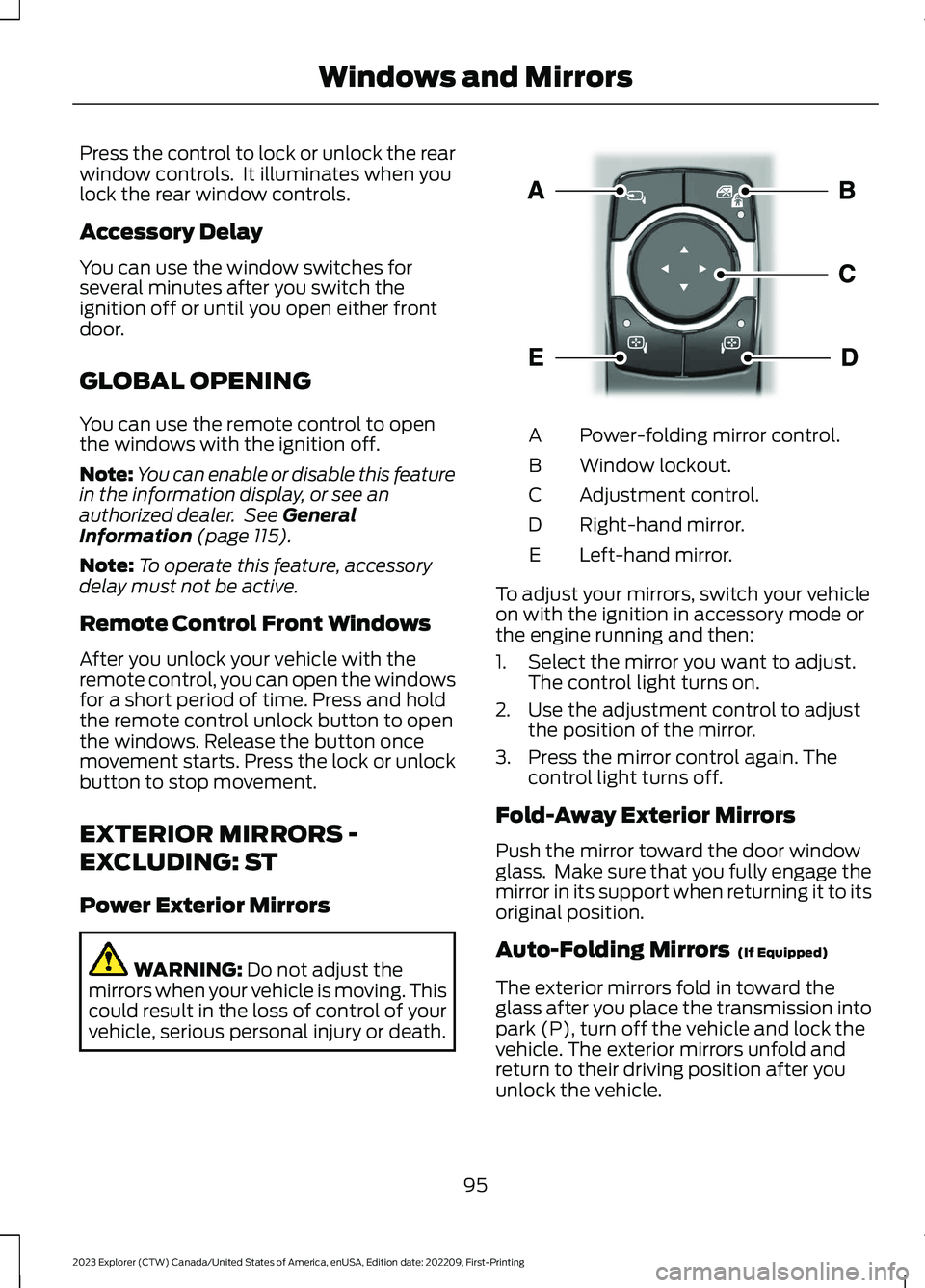
Power-folding mirror control.A
Window lockout.B
Adjustment control.C
Right-hand mirror.D
Left-hand mirror.E
To adjust your mirrors, switch your vehicleon with the ignition in accessory mode orthe engine running and then:
1.Select the mirror you want to adjust.The control light turns on.
2.Use the adjustment control to adjustthe position of the mirror.
3.Press the mirror control again. Thecontrol light turns off.
Fold-Away Exterior Mirrors
Push the mirror toward the door windowglass. Make sure that you fully engage themirror in its support when returning it to itsoriginal position.
Auto-Folding Mirrors (If Equipped)
The exterior mirrors fold in toward theglass after you place the transmission intopark (P), turn off the vehicle and lock thevehicle. The exterior mirrors unfold andreturn to their driving position after youunlock the vehicle.
95
2023 Explorer (CTW) Canada/United States of America, enUSA, Edition date: 202209, First-PrintingWindows and MirrorsE295322