door lock FORD EXPLORER 2023 User Guide
[x] Cancel search | Manufacturer: FORD, Model Year: 2023, Model line: EXPLORER, Model: FORD EXPLORER 2023Pages: 573, PDF Size: 16.1 MB
Page 76 of 573
2.Press 1·2 on the keypad within fiveseconds.
3.Enter your personal five-digit code. Youmust enter each number within fiveseconds of each other.
4.Press 1·2 on the keypad to savepersonal code 1.
The doors lock then unlock to confirm thatprogramming was successful.
To program additional personal entrycodes, repeat steps 1 through 3, then forstep 4:
•Press 3·4 to save personal code 2.
•Press 5·6 to save personal code 3.
•Press 7·8 to save personal code 4.
•Press 9·0 to save personal code 5.
Hints:
•Do not set a code that uses five of thesame number.
•Do not use five numbers in sequentialorder.
•The factory-set code works even if youhave set your own personal code.
Erasing a Personal Code
1.Enter the factory-set five-digit code.
2.Press and release 1·2 on the keypadwithin five seconds.
3.Press and hold 1·2 for two seconds.You must do this within five secondsof completing step 2.
All personal codes erase and only thefactory-set five-digit code works.
Anti-Scan Feature
The keypad goes into an anti-scan modeif you enter the wrong code seven times.This mode turns off the keypad for oneminute and the keypad lamp flashes.
The anti-scan feature turns off after anyof the following occur:
•One minute of keypad inactivity.
•You press the unlock button on theremote control.
•You switch your vehicle on.
•You unlock the vehicle using intelligentaccess.
Locking and Unlocking the Doors
Locking All Doors
Press and hold 7·8 and 9·0 on the keypadsimultaneously with the driver door closed.You do not need to enter a code first.
Unlocking All Doors
Enter the factory-set code or your personalcode, then press 3·4 on the keypad withinfive seconds.
Unlocking Only the Driver Door
Enter the factory-set or your personalfive-digit code. You must press eachnumber within five seconds of each other.The interior lamps illuminate.
Note:All doors unlock if the two-stageunlocking feature is turned off. See Lockingand Unlocking (page 68).
72
2023 Explorer (CTW) Canada/United States of America, enUSA, Edition date: 202209, First-PrintingDoors and Locks
Page 78 of 573

Opening from the Instrument Panel
With the transmission in park(P), press the button on theinstrument panel.
Opening with the Remote Control
Press the button twice withinthree seconds.
Opening with the Outside ControlButton
1.Unlock the liftgate with the remotecontrol or power door unlock control.If a passive key is within 3 ft (1 m) ofthe liftgate, the liftgate unlocks whenyou press the liftgate release button.
2.Press the control button to the right ofthe rear view camera.
Note:Allow the power system to open theliftgate. Manually pushing or pulling theliftgate may activate the system’s obstacledetection feature and stop the poweroperation or reverse its direction, replicatea strut failure, or damage mechanicalcomponents.
Closing the Liftgate
WARNING: Keep clear of theliftgate when using the rear switch.
Press and release the liftgate button.
Stopping the Liftgate Movement
Note: Do not apply sudden excessive forceto the liftgate while it is in motion. Thiscould damage the power liftgate and itscomponents.
You can stop the liftgate movement bydoing any of the following:
•Pressing the liftgate control button.
•Pressing the liftgate button on theremote control twice.
•Pressing the liftgate button on theinstrument panel.
•Moving your foot under and away fromthe center rear bumper in a single-kickmotion.*
74
2023 Explorer (CTW) Canada/United States of America, enUSA, Edition date: 202209, First-PrintingLiftgateE138633 E267940 E291352 E291351
Page 81 of 573

PASSIVE ANTI-THEFT
SYSTEM
Note: The system is not compatible withnon-Ford aftermarket remote start systems.Use of these systems could result in vehiclestarting problems and a loss of securityprotection.
Note:Metallic objects, electronic devicesor a second coded key on the same keychain could cause vehicle starting problemsif they are too close to the key when startingthe engine. Prevent these objects fromtouching the coded key while starting theengine. Switch the ignition off, move allobjects on the key chain away from thecoded key and restart the engine if aproblem occurs.
Note:Do not leave a duplicate coded keyin the vehicle. Always take your keys andlock all doors when leaving the vehicle.
SecuriLock®
The system is an engine immobilizationsystem. It helps to prevent anyone fromstarting the engine without using a codedkey programmed to your vehicle. Using thewrong key could prevent the engine fromstarting. A message may appear in theinformation display.
If you are unable to start the engine with acorrectly coded key, there is a problem withthe system and a message could appearin the information display.
Automatic Arming
The vehicle arms immediately after youswitch the ignition off.
Automatic Disarming
Switching the ignition on with a coded keydisarms the vehicle.
Replacement Keys
Note:Your vehicle comes with twointegrated keyhead transmitters or twointelligent access keys.
The integrated keyhead transmitterfunctions as a programmed ignition keythat operates all the locks and starts thevehicle, as well as a remote control.
The intelligent access key functions as aprogrammed key that operates the driverdoor lock and activates the intelligentaccess with push button start system, aswell as a remote control.
If your programmed transmitters orstandard SecuriLock coded keys(integrated keyhead transmitters only) arelost or stolen and you do not have an extracoded key, you will need to have yourvehicle towed to an authorized dealer. Youneed to erase the key codes from yourvehicle and program new coded keys.
Store an extra programmed key away fromthe vehicle in a safe place to help preventany inconveniences. See your authorizeddealer to purchase additional spare orreplacement keys.
Programming a Spare IntelligentAccess Key (If Equipped)
See your authorized dealer to haveadditional keys programmed to yourvehicle.
ANTI-THEFT ALARM
The system will warn you of anunauthorized entry to your vehicle. It willbe triggered if any door, the luggagecompartment or the hood is openedwithout using the key, remote control orkeyless entry keypad.
The direction indicators will flash and thehorn will sound if unauthorized entry isattempted while the alarm is armed.
77
2023 Explorer (CTW) Canada/United States of America, enUSA, Edition date: 202209, First-PrintingSecurity
Page 82 of 573

Take all remote controls to an authorizeddealer if there is any potential alarmproblem with your vehicle.
Arming the Alarm
The alarm is ready to arm when there isnot a key in your vehicle. Electronically lockyour vehicle to arm the alarm.
Disarming the Alarm
Disarm the alarm by any of the followingactions:
•Unlock the doors or luggagecompartment with the remote controlor keyless entry keypad.
•Switch your vehicle on or start yourvehicle.
•Use a key in the driver door to unlockyour vehicle, then switch your vehicleon within 12 seconds.
Note:Pressing the panic button on theremote control will stop the horn and signalindicators, but will not disarm the system.
78
2023 Explorer (CTW) Canada/United States of America, enUSA, Edition date: 202209, First-PrintingSecurity
Page 98 of 573
POWER WINDOWS
WARNING: Do not leave childrenunattended in your vehicle and do notlet them play with the power windows.Failure to follow this instruction couldresult in personal injury.
WARNING: When closing thepower windows, verify they are free ofobstruction and make sure that childrenand pets are not in the proximity of thewindow openings.
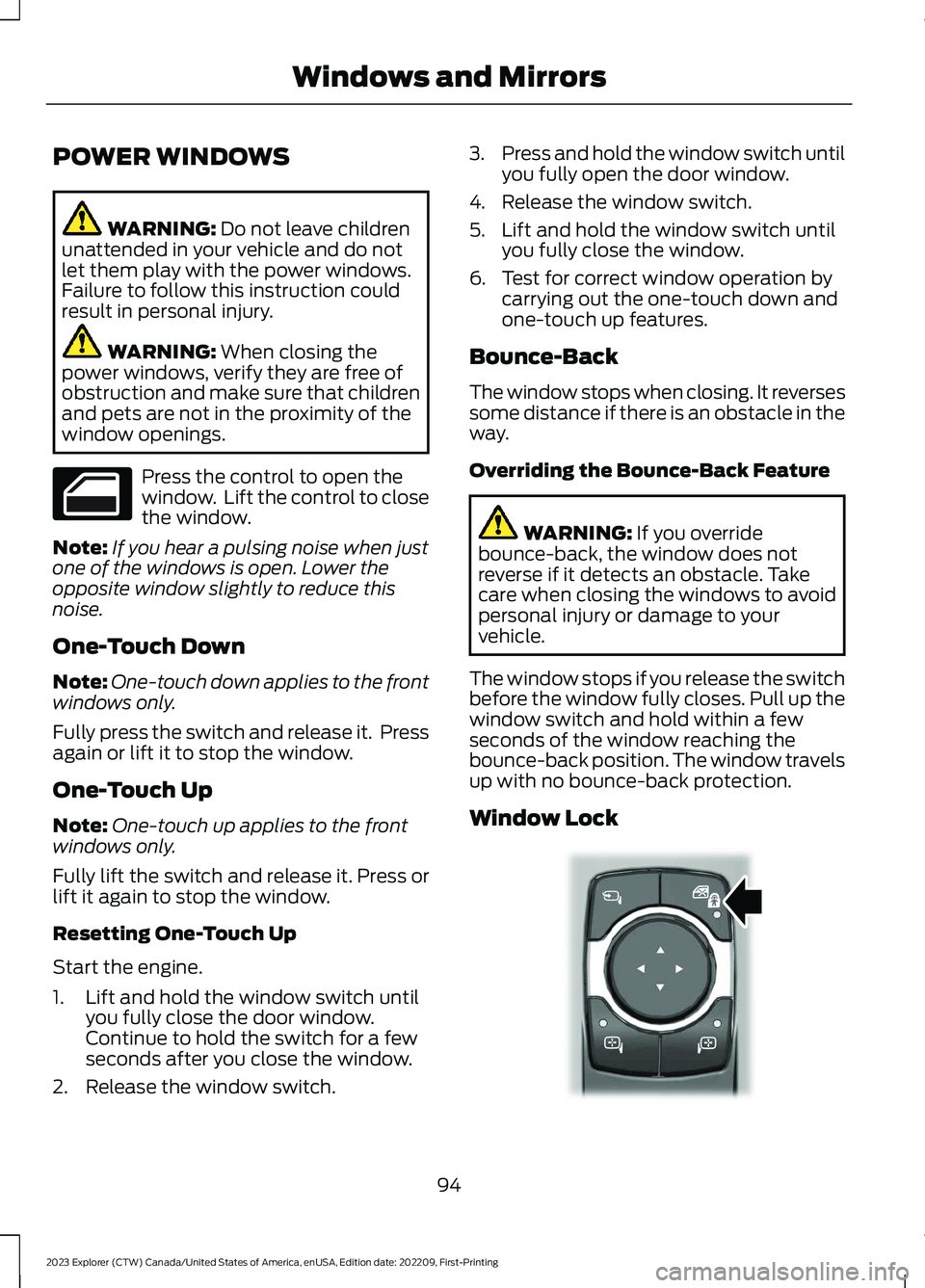
Press the control to open thewindow. Lift the control to closethe window.
Note:If you hear a pulsing noise when justone of the windows is open. Lower theopposite window slightly to reduce thisnoise.
One-Touch Down
Note:One-touch down applies to the frontwindows only.
Fully press the switch and release it. Pressagain or lift it to stop the window.
One-Touch Up
Note:One-touch up applies to the frontwindows only.
Fully lift the switch and release it. Press orlift it again to stop the window.
Resetting One-Touch Up
Start the engine.
1.Lift and hold the window switch untilyou fully close the door window.Continue to hold the switch for a fewseconds after you close the window.
2.Release the window switch.
3.Press and hold the window switch untilyou fully open the door window.
4.Release the window switch.
5.Lift and hold the window switch untilyou fully close the window.
6.Test for correct window operation bycarrying out the one-touch down andone-touch up features.
Bounce-Back
The window stops when closing. It reversessome distance if there is an obstacle in theway.
Overriding the Bounce-Back Feature
WARNING: If you overridebounce-back, the window does notreverse if it detects an obstacle. Takecare when closing the windows to avoidpersonal injury or damage to yourvehicle.
The window stops if you release the switchbefore the window fully closes. Pull up thewindow switch and hold within a fewseconds of the window reaching thebounce-back position. The window travelsup with no bounce-back protection.
Window Lock
94
2023 Explorer (CTW) Canada/United States of America, enUSA, Edition date: 202209, First-PrintingWindows and Mirrors E295318
Page 99 of 573
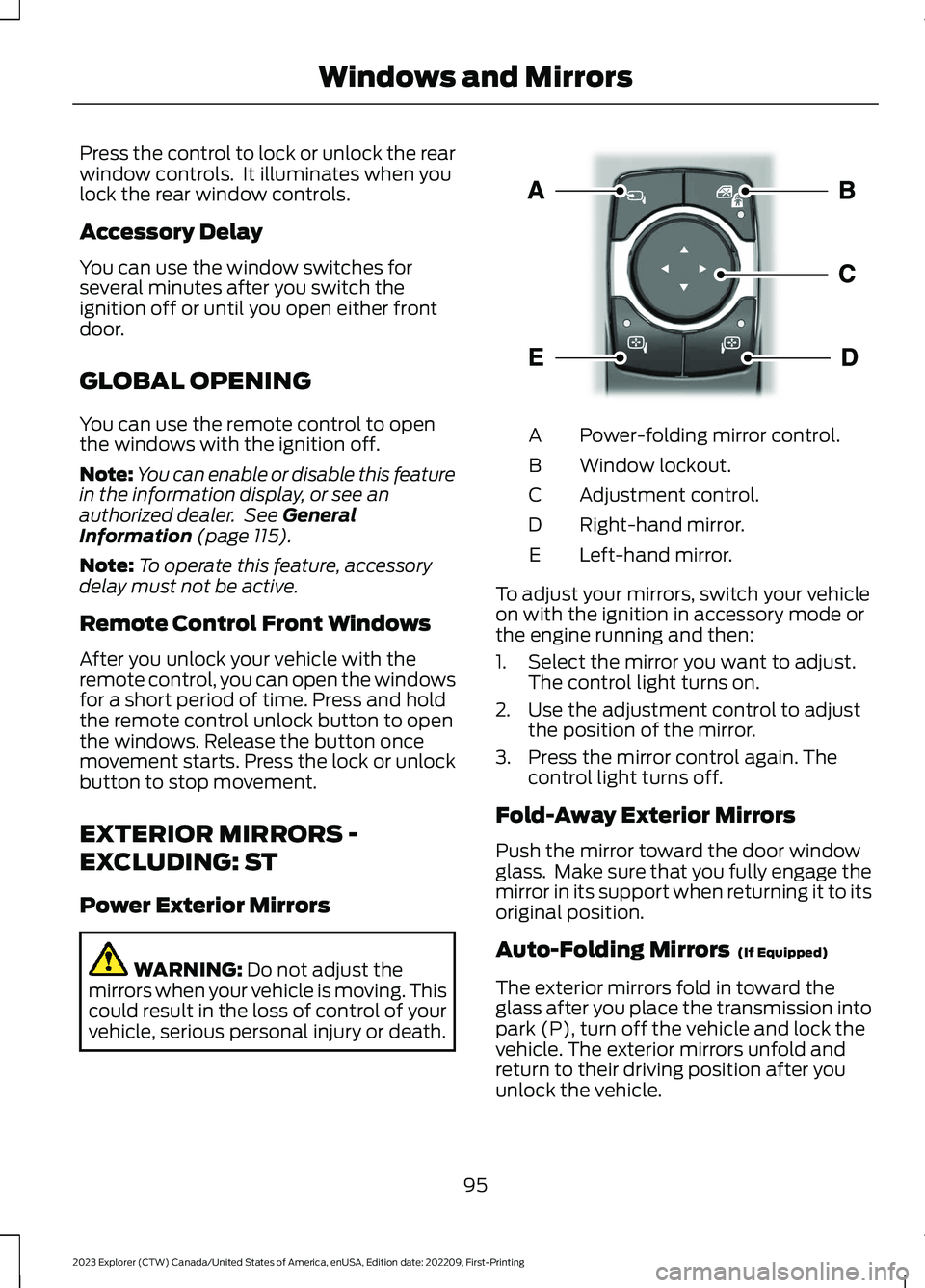
Press the control to lock or unlock the rearwindow controls. It illuminates when youlock the rear window controls.
Accessory Delay
You can use the window switches forseveral minutes after you switch theignition off or until you open either frontdoor.
GLOBAL OPENING
You can use the remote control to openthe windows with the ignition off.
Note:You can enable or disable this featurein the information display, or see anauthorized dealer. See GeneralInformation (page 115).
Note:To operate this feature, accessorydelay must not be active.
Remote Control Front Windows
After you unlock your vehicle with theremote control, you can open the windowsfor a short period of time. Press and holdthe remote control unlock button to openthe windows. Release the button oncemovement starts. Press the lock or unlockbutton to stop movement.
EXTERIOR MIRRORS -
EXCLUDING: ST
Power Exterior Mirrors
WARNING: Do not adjust themirrors when your vehicle is moving. Thiscould result in the loss of control of yourvehicle, serious personal injury or death.
Power-folding mirror control.A
Window lockout.B
Adjustment control.C
Right-hand mirror.D
Left-hand mirror.E
To adjust your mirrors, switch your vehicleon with the ignition in accessory mode orthe engine running and then:
1.Select the mirror you want to adjust.The control light turns on.
2.Use the adjustment control to adjustthe position of the mirror.
3.Press the mirror control again. Thecontrol light turns off.
Fold-Away Exterior Mirrors
Push the mirror toward the door windowglass. Make sure that you fully engage themirror in its support when returning it to itsoriginal position.
Auto-Folding Mirrors (If Equipped)
The exterior mirrors fold in toward theglass after you place the transmission intopark (P), turn off the vehicle and lock thevehicle. The exterior mirrors unfold andreturn to their driving position after youunlock the vehicle.
95
2023 Explorer (CTW) Canada/United States of America, enUSA, Edition date: 202209, First-PrintingWindows and MirrorsE295322
Page 100 of 573
You can switch this feature on and offthrough the information display. SeeGeneral Information (page 115).
You can fold the mirrors on demand bypressing the power-folding mirror controlon the door. The control lights and themirrors fold in toward the glass. Press thecontrol again to unfold the mirrors. Thecontrol light turns off.
Note:If you use the power-folding controlto fold the mirrors on demand with the autofold feature on, you must use the controlagain to unfold them.
Loose Mirror
If you manually fold your power-foldingmirrors, they may not work properly evenafter you re-position them. You need toreset them if:
•The mirrors vibrate when you drive.
•The mirrors feel loose.
•The mirrors do not stay in the folded orunfolded position.
•One of the mirrors is not in its normaldriving position.
To reset the power-fold feature, use thepower-folding mirror control to fold andunfold the mirrors. You may hear a loudnoise as you reset the power-foldingmirrors. This sound is normal. Repeat thisprocess as needed each time you manuallyfold the mirrors.
Heated Exterior Mirrors (If Equipped)
See Heated Exterior Mirrors (page 142).
Memory Mirrors (If Equipped)
You can save and recall the mirrorpositions through the memory function.See Memory Function (page 150).
Auto-dimming Feature (If Equipped)
The driver exterior mirror dims when theinterior auto-dimming mirror turns on.
Direction Indicator Mirrors (If Equipped)
When the vehicle is running, theforward-facing portion of the appropriatemirror housing blinks when you switch onthe direction indicator.
Puddle Lamps (If Equipped)
The lamps on the bottom part of the mirrorhousing light when you use yourtransmitter to unlock the doors or whenyou open a door.
360-Degree Camera (If Equipped)
See 360 Degree Camera (page 237).
Blind Spot Information System
See Blind Spot Information System(page 259).
EXTERIOR MIRRORS - ST
Power Exterior Mirrors
WARNING: Do not adjust themirrors when your vehicle is moving. Thiscould result in the loss of control of yourvehicle, serious personal injury or death.
96
2023 Explorer (CTW) Canada/United States of America, enUSA, Edition date: 202209, First-PrintingWindows and Mirrors
Page 101 of 573
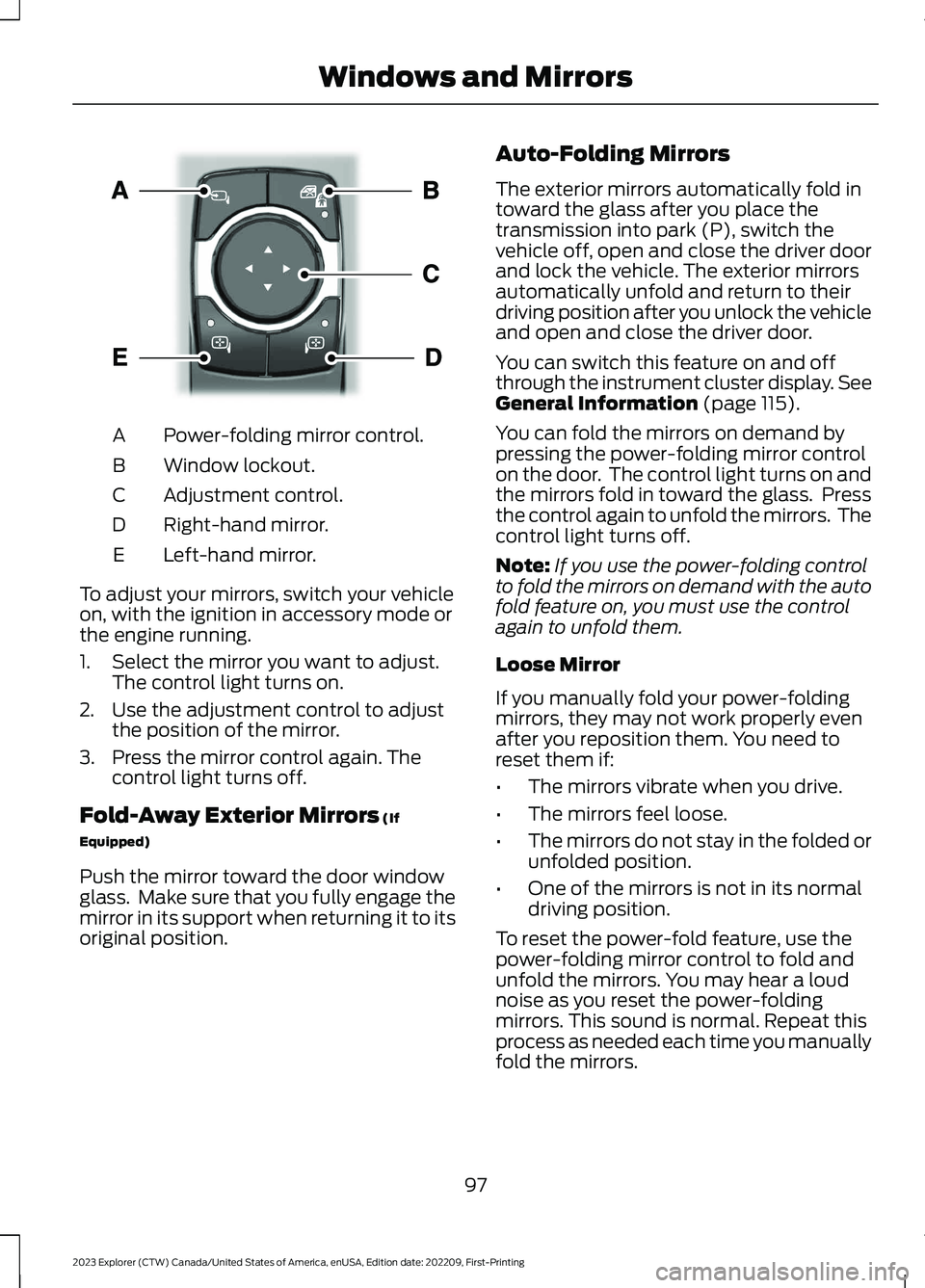
Power-folding mirror control.A
Window lockout.B
Adjustment control.C
Right-hand mirror.D
Left-hand mirror.E
To adjust your mirrors, switch your vehicleon, with the ignition in accessory mode orthe engine running.
1.Select the mirror you want to adjust.The control light turns on.
2.Use the adjustment control to adjustthe position of the mirror.
3.Press the mirror control again. Thecontrol light turns off.
Fold-Away Exterior Mirrors (If
Equipped)
Push the mirror toward the door windowglass. Make sure that you fully engage themirror in its support when returning it to itsoriginal position.
Auto-Folding Mirrors
The exterior mirrors automatically fold intoward the glass after you place thetransmission into park (P), switch thevehicle off, open and close the driver doorand lock the vehicle. The exterior mirrorsautomatically unfold and return to theirdriving position after you unlock the vehicleand open and close the driver door.
You can switch this feature on and offthrough the instrument cluster display. SeeGeneral Information (page 115).
You can fold the mirrors on demand bypressing the power-folding mirror controlon the door. The control light turns on andthe mirrors fold in toward the glass. Pressthe control again to unfold the mirrors. Thecontrol light turns off.
Note:If you use the power-folding controlto fold the mirrors on demand with the autofold feature on, you must use the controlagain to unfold them.
Loose Mirror
If you manually fold your power-foldingmirrors, they may not work properly evenafter you reposition them. You need toreset them if:
•The mirrors vibrate when you drive.
•The mirrors feel loose.
•The mirrors do not stay in the folded orunfolded position.
•One of the mirrors is not in its normaldriving position.
To reset the power-fold feature, use thepower-folding mirror control to fold andunfold the mirrors. You may hear a loudnoise as you reset the power-foldingmirrors. This sound is normal. Repeat thisprocess as needed each time you manuallyfold the mirrors.
97
2023 Explorer (CTW) Canada/United States of America, enUSA, Edition date: 202209, First-PrintingWindows and MirrorsE295322
Page 102 of 573
Heated Exterior Mirrors
See Heated Exterior Mirrors (page 142).
Memory Mirrors
You can save and recall the mirrorpositions through the memory function.See Memory Function (page 150).
Auto-dimming Feature (If Equipped)
The driver exterior mirror dims when theinterior auto-dimming mirror turns on.
Direction Indicator Mirrors (If Equipped)
When the vehicle is running, theforward-facing portion of the appropriatemirror housing blinks when you switch onthe direction indicator.
Puddle Lamps
The lamps on the bottom part of the mirrorhousing illuminate when you use yourremote control to unlock the doors or whenyou open a door.
360-Degree Camera (If Equipped)
See 360 Degree Camera (page 237).
Blind Spot Information System
See Blind Spot Information System(page 259).
INTERIOR MIRROR
WARNING: Do not adjust themirrors when your vehicle is moving. Thiscould result in the loss of control of yourvehicle, serious personal injury or death.
Note:Do not clean the mirror housing orglass with harsh abrasives, fuel or otherpetroleum-based cleaning products.
You can adjust the interior mirror to yourpreference. Some mirrors also have asecond pivot point. This lets you move themirror head up or down and from side toside.
Manual Dimming Mirror
Pull the tab below the mirror toward youto reduce the effect of bright light frombehind.
Automatic Dimming Mirror (If Equipped)
Note:Do not block the sensors on the frontand back of the mirror. A rear centerpassenger or raised rear center headrestraint may also block light from reachingthe sensor.
The mirror dims to reduce the effect ofbright light from behind. It returns tonormal when the bright light from behindis no longer present or if you shift intoreverse (R).
SUN VISORS
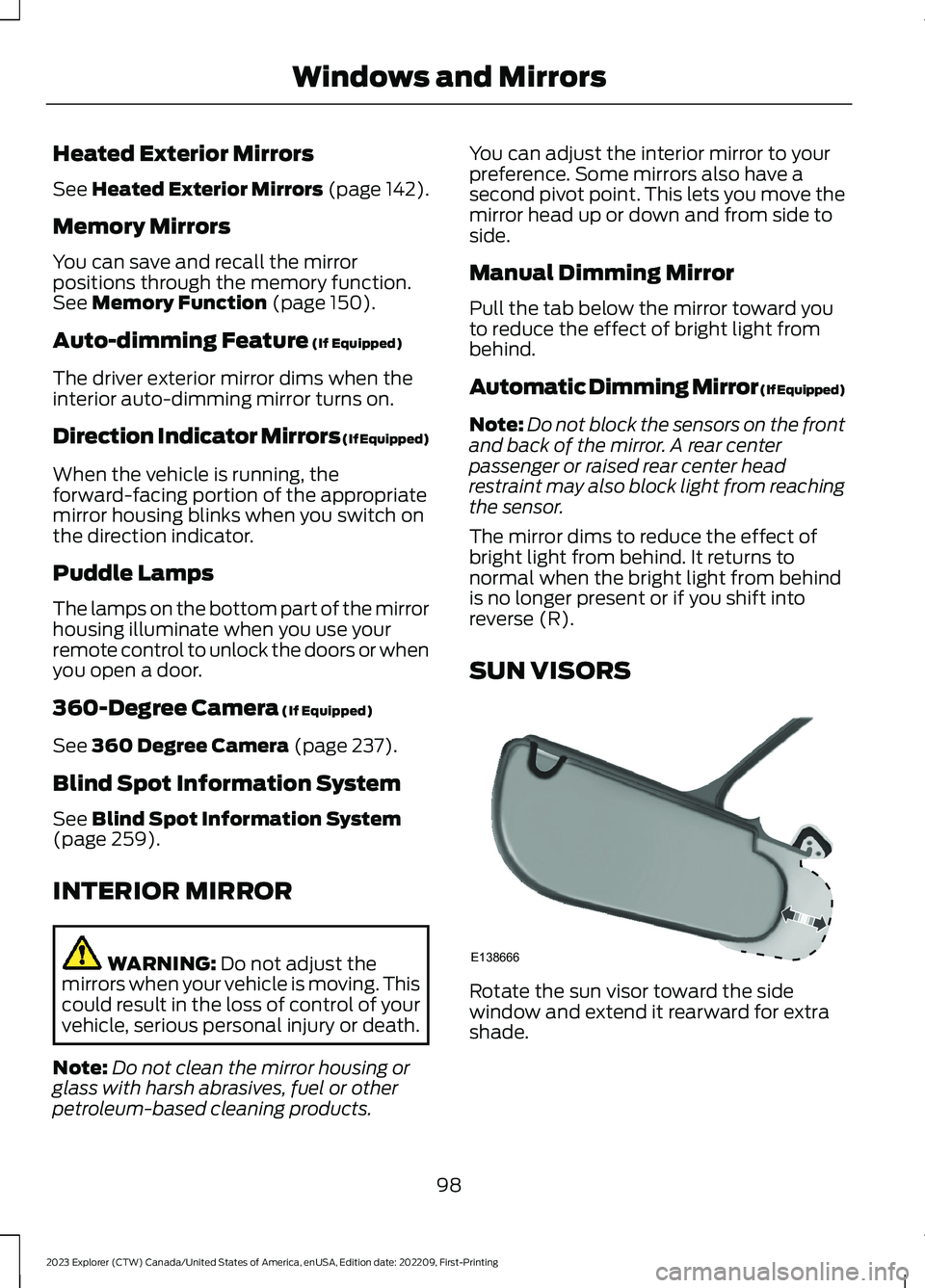
Rotate the sun visor toward the sidewindow and extend it rearward for extrashade.
98
2023 Explorer (CTW) Canada/United States of America, enUSA, Edition date: 202209, First-PrintingWindows and MirrorsE138666
Page 127 of 573
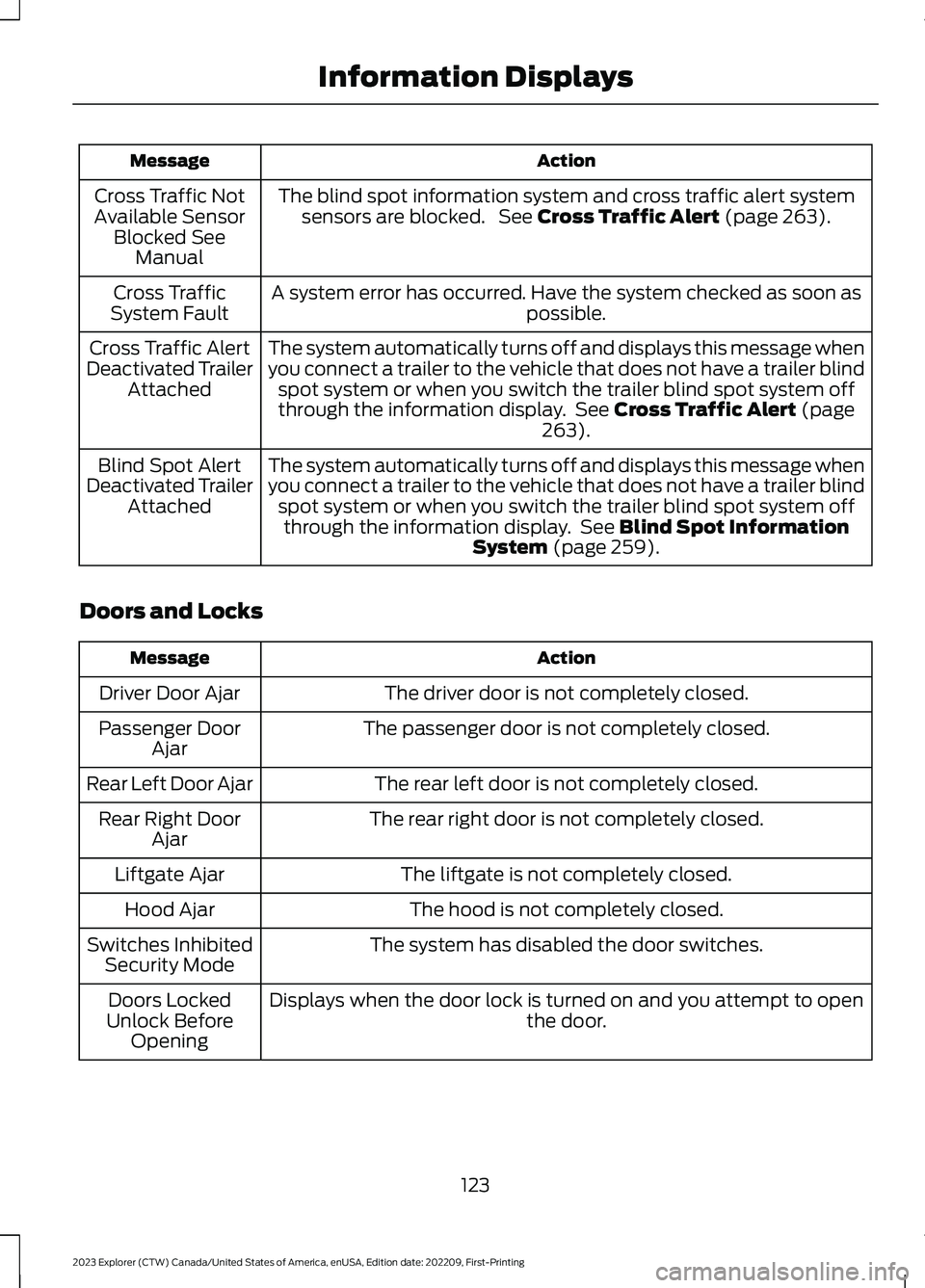
ActionMessage
The blind spot information system and cross traffic alert systemsensors are blocked. See Cross Traffic Alert (page 263).Cross Traffic NotAvailable SensorBlocked SeeManual
A system error has occurred. Have the system checked as soon aspossible.Cross TrafficSystem Fault
The system automatically turns off and displays this message whenyou connect a trailer to the vehicle that does not have a trailer blindspot system or when you switch the trailer blind spot system offthrough the information display. See Cross Traffic Alert (page263).
Cross Traffic AlertDeactivated TrailerAttached
The system automatically turns off and displays this message whenyou connect a trailer to the vehicle that does not have a trailer blindspot system or when you switch the trailer blind spot system offthrough the information display. See Blind Spot InformationSystem (page 259).
Blind Spot AlertDeactivated TrailerAttached
Doors and Locks
ActionMessage
The driver door is not completely closed.Driver Door Ajar
The passenger door is not completely closed.Passenger DoorAjar
The rear left door is not completely closed.Rear Left Door Ajar
The rear right door is not completely closed.Rear Right DoorAjar
The liftgate is not completely closed.Liftgate Ajar
The hood is not completely closed.Hood Ajar
The system has disabled the door switches.Switches InhibitedSecurity Mode
Displays when the door lock is turned on and you attempt to openthe door.Doors LockedUnlock BeforeOpening
123
2023 Explorer (CTW) Canada/United States of America, enUSA, Edition date: 202209, First-PrintingInformation Displays