door lock FORD EXPLORER 2023 Owner's Manual
[x] Cancel search | Manufacturer: FORD, Model Year: 2023, Model line: EXPLORER, Model: FORD EXPLORER 2023Pages: 573, PDF Size: 16.1 MB
Page 128 of 573
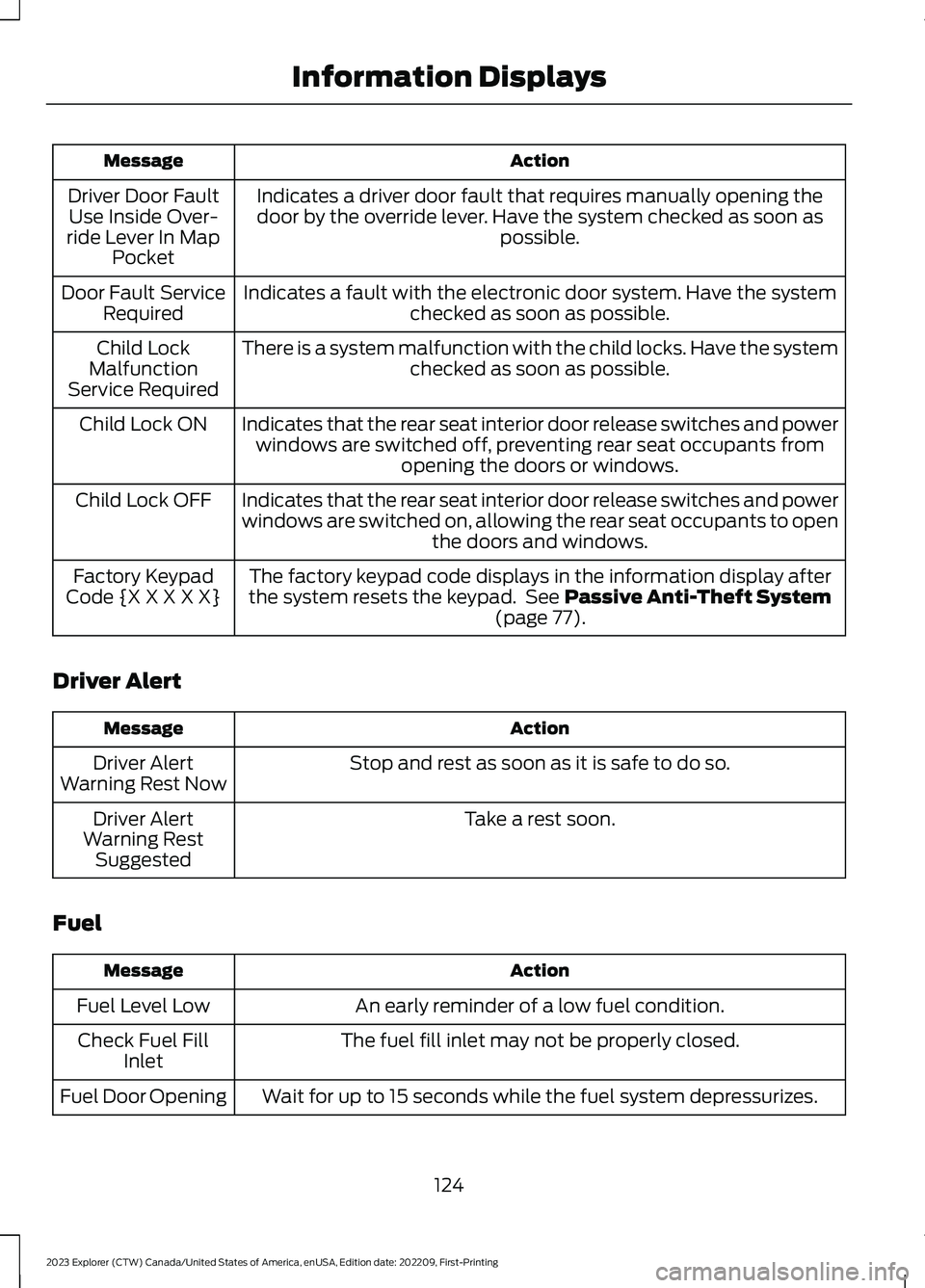
ActionMessage
Indicates a driver door fault that requires manually opening thedoor by the override lever. Have the system checked as soon aspossible.
Driver Door FaultUse Inside Over-ride Lever In MapPocket
Indicates a fault with the electronic door system. Have the systemchecked as soon as possible.Door Fault ServiceRequired
There is a system malfunction with the child locks. Have the systemchecked as soon as possible.Child LockMalfunctionService Required
Indicates that the rear seat interior door release switches and powerwindows are switched off, preventing rear seat occupants fromopening the doors or windows.
Child Lock ON
Indicates that the rear seat interior door release switches and powerwindows are switched on, allowing the rear seat occupants to openthe doors and windows.
Child Lock OFF
The factory keypad code displays in the information display afterthe system resets the keypad. See Passive Anti-Theft System(page 77).
Factory KeypadCode {X X X X X}
Driver Alert
ActionMessage
Stop and rest as soon as it is safe to do so.Driver AlertWarning Rest Now
Take a rest soon.Driver AlertWarning RestSuggested
Fuel
ActionMessage
An early reminder of a low fuel condition.Fuel Level Low
The fuel fill inlet may not be properly closed.Check Fuel FillInlet
Wait for up to 15 seconds while the fuel system depressurizes.Fuel Door Opening
124
2023 Explorer (CTW) Canada/United States of America, enUSA, Edition date: 202209, First-PrintingInformation Displays
Page 155 of 573
Recalling a PreSet Position
Press and release the preset buttonassociated with your preferred drivingposition. The memory features move tothe position stored for that preset.
Note:You can only recall a preset memoryposition when the ignition is off, or when thetransmission is in park (P) or neutral (N)and the vehicle is not moving if the ignitionis on.
You can also recall a preset memoryposition by:
•Pressing the unlock button on yourremote control if it is linked to a presetposition.
•Unlocking the driver door handle if alinked remote control is present.
Note:Using a linked remote control torecall your memory position when theignition is off moves the seat to the EasyEntry position.
Note:Pressing any active memory featureadjustment control, or any memory buttonduring a memory recall, cancels theoperation.
Linking a PreSet Position to yourRemote Control
Your vehicle can save the preset memorypositions for up to three remote controls.
1.With the ignition on, move the memoryfeatures to the preferred positions.
2.Press and hold the preferred presetbutton for about five seconds. A tonesounds after about two seconds.Continue holding until you hear asecond tone.
3.Within three seconds, press the lockbutton on the remote control you arelinking.
To unlink a remote control, follow thesame procedure – except in step 3, pressthe unlock button on the remote control.
Note:If more than one linked remotecontrol or intelligent access key is in range,the memory function moves to the settingsof the first key to recall a memory position.
Easy Entry and Exit Feature
If you enable the easy entry and exitfeature, it moves the driver seat positionrearward up to 2 in (5 cm) when you switchthe ignition off.
The driver seat returns to the previousposition when you switch the ignition on.
You can enable or disable this featurethrough the touchscreen. See Settings(page 458).
REAR SEATS
Adjusting the Second Row RearSeats
WARNING: Always drive and ridewith your seatback upright and the lapbelt snug and low across the hips.
WARNING: Do not recline the seatbackrest too far as this can cause theoccupant to slide under the seatbelt,resulting in personal injury in the eventof a crash.
151
2023 Explorer (CTW) Canada/United States of America, enUSA, Edition date: 202209, First-PrintingSeats
Page 160 of 573
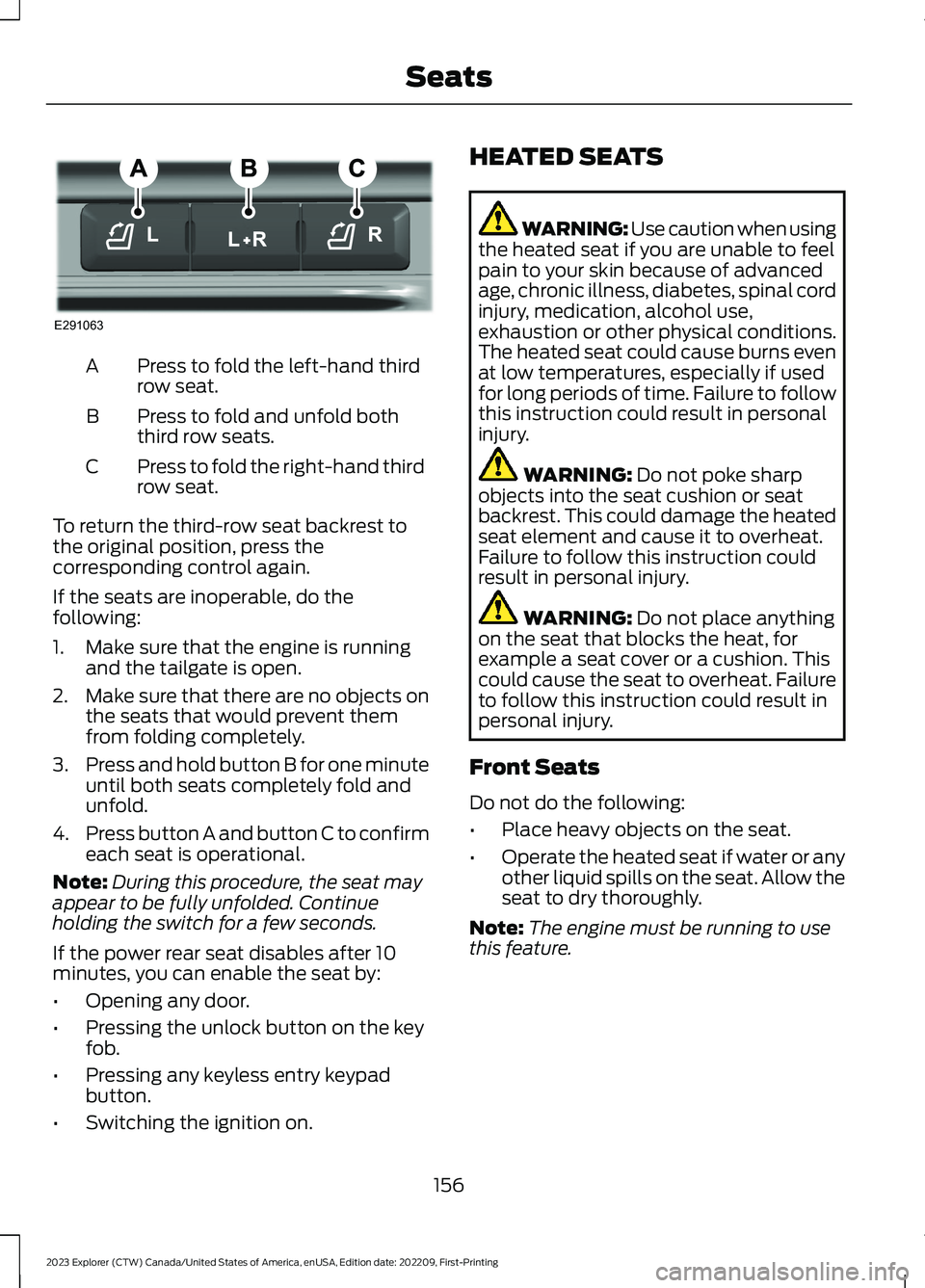
Press to fold the left-hand thirdrow seat.A
Press to fold and unfold boththird row seats.B
Press to fold the right-hand thirdrow seat.C
To return the third-row seat backrest tothe original position, press thecorresponding control again.
If the seats are inoperable, do thefollowing:
1.Make sure that the engine is runningand the tailgate is open.
2.Make sure that there are no objects onthe seats that would prevent themfrom folding completely.
3.Press and hold button B for one minuteuntil both seats completely fold andunfold.
4.Press button A and button C to confirmeach seat is operational.
Note:During this procedure, the seat mayappear to be fully unfolded. Continueholding the switch for a few seconds.
If the power rear seat disables after 10minutes, you can enable the seat by:
•Opening any door.
•Pressing the unlock button on the keyfob.
•Pressing any keyless entry keypadbutton.
•Switching the ignition on.
HEATED SEATS
WARNING: Use caution when usingthe heated seat if you are unable to feelpain to your skin because of advancedage, chronic illness, diabetes, spinal cordinjury, medication, alcohol use,exhaustion or other physical conditions.The heated seat could cause burns evenat low temperatures, especially if usedfor long periods of time. Failure to followthis instruction could result in personalinjury.
WARNING: Do not poke sharpobjects into the seat cushion or seatbackrest. This could damage the heatedseat element and cause it to overheat.Failure to follow this instruction couldresult in personal injury.
WARNING: Do not place anythingon the seat that blocks the heat, forexample a seat cover or a cushion. Thiscould cause the seat to overheat. Failureto follow this instruction could result inpersonal injury.
Front Seats
Do not do the following:
•Place heavy objects on the seat.
•Operate the heated seat if water or anyother liquid spills on the seat. Allow theseat to dry thoroughly.
Note:The engine must be running to usethis feature.
156
2023 Explorer (CTW) Canada/United States of America, enUSA, Edition date: 202209, First-PrintingSeatsE291063
Page 164 of 573
WHAT IS THE GARAGE DOOR
OPENER
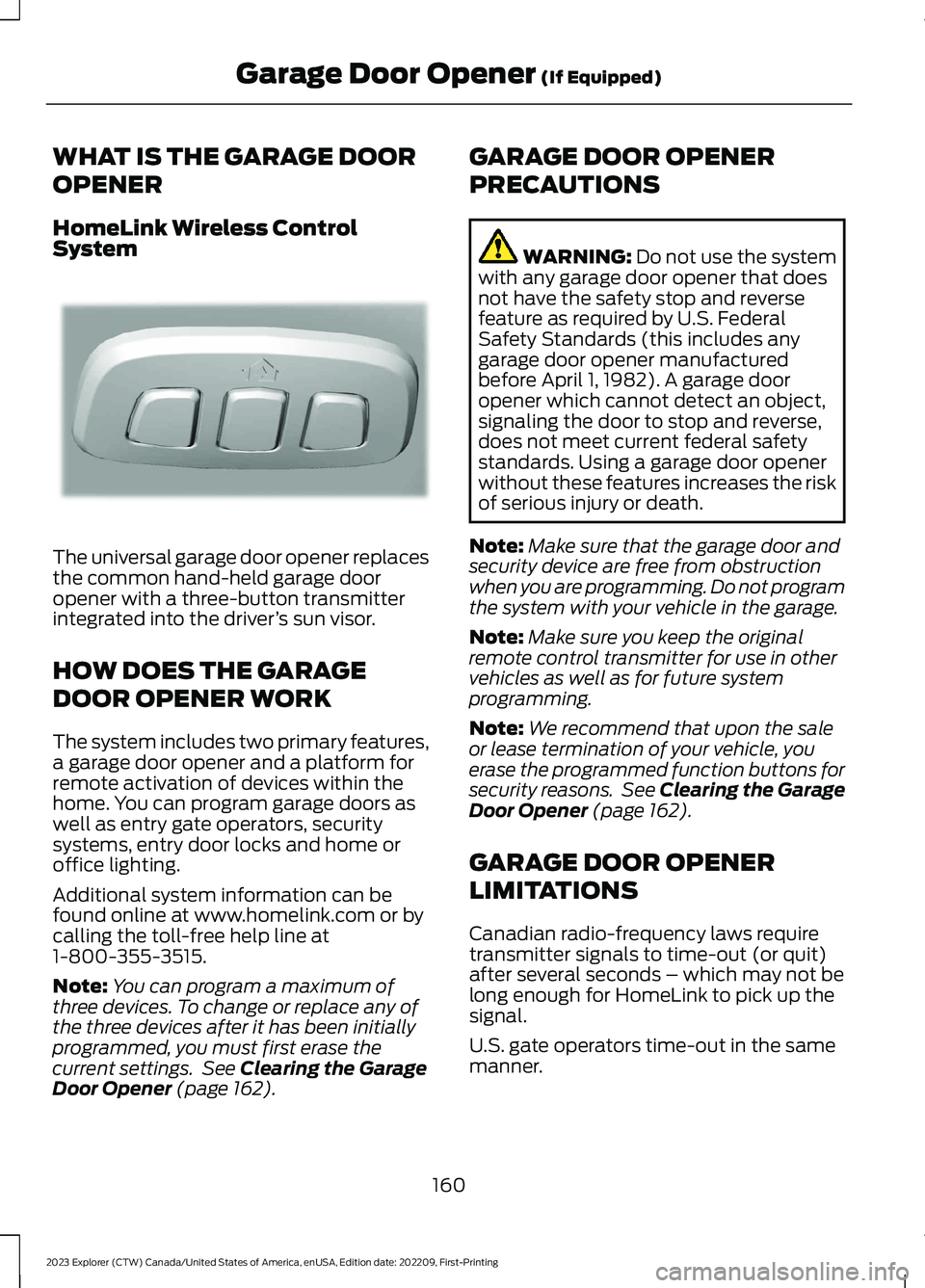
HomeLink Wireless ControlSystem
The universal garage door opener replacesthe common hand-held garage dooropener with a three-button transmitterintegrated into the driver’s sun visor.
HOW DOES THE GARAGE
DOOR OPENER WORK
The system includes two primary features,a garage door opener and a platform forremote activation of devices within thehome. You can program garage doors aswell as entry gate operators, securitysystems, entry door locks and home oroffice lighting.
Additional system information can befound online at www.homelink.com or bycalling the toll-free help line at1-800-355-3515.
Note:You can program a maximum ofthree devices. To change or replace any ofthe three devices after it has been initiallyprogrammed, you must first erase thecurrent settings. See Clearing the GarageDoor Opener (page 162).
GARAGE DOOR OPENER
PRECAUTIONS
WARNING: Do not use the systemwith any garage door opener that doesnot have the safety stop and reversefeature as required by U.S. FederalSafety Standards (this includes anygarage door opener manufacturedbefore April 1, 1982). A garage dooropener which cannot detect an object,signaling the door to stop and reverse,does not meet current federal safetystandards. Using a garage door openerwithout these features increases the riskof serious injury or death.
Note:Make sure that the garage door andsecurity device are free from obstructionwhen you are programming. Do not programthe system with your vehicle in the garage.
Note:Make sure you keep the originalremote control transmitter for use in othervehicles as well as for future systemprogramming.
Note:We recommend that upon the saleor lease termination of your vehicle, youerase the programmed function buttons forsecurity reasons. See Clearing the GarageDoor Opener (page 162).
GARAGE DOOR OPENER
LIMITATIONS
Canadian radio-frequency laws requiretransmitter signals to time-out (or quit)after several seconds – which may not belong enough for HomeLink to pick up thesignal.
U.S. gate operators time-out in the samemanner.
160
2023 Explorer (CTW) Canada/United States of America, enUSA, Edition date: 202209, First-PrintingGarage Door Opener (If Equipped)E188211
Page 178 of 573
could be required to steer your vehicle.When you switch the ignition off, someelectrical circuits, for example airbags,also turn off. If you unintentionally switchthe ignition off, shift into neutral (N) andrestart the engine.
1.Put the transmission into neutral (N)and use the brakes to bring your vehicleto a safe stop.
2.When your vehicle has stopped, putthe transmission in park (P).
3.Press and hold the push button ignitionswitch for one second, or press it threetimes within two seconds.
4.Apply the parking brake.
Guarding Against Exhaust Fumes
WARNING: Exhaust leaks mayresult in entry of harmful and potentiallylethal fumes into the passengercompartment. If you smell exhaustfumes inside your vehicle, have yourvehicle inspected immediately. Do notdrive if you smell exhaust fumes.
Important Ventilating Information
If you stop your vehicle and then leave theengine idling for long periods of time, werecommend that you do one of thefollowing:
•Open the windows at least 1 in (3 cm).
•Set your climate control to outside air.
ENGINE BLOCK HEATER (IF
EQUIPPED)
WARNING: Failure to follow engineblock heater instructions could result inproperty damage or serious personalinjury.
WARNING: Do not use your heaterwith ungrounded electrical systems ortwo-pronged adapters. There is a risk ofelectrical shock.
WARNING: Do not fully close thehood, or allow it to drop under its ownweight when using the engine blockheater. This could damage the powercable and may cause an electrical shortresulting in fire, injury and propertydamage.
Note:The heater is most effective whenoutdoor temperatures are below 0°F(-18°C).
The heater acts as a starting aid bywarming the engine coolant. This allowsthe climate control system to respondquickly. The equipment includes a heaterelement, installed in the engine block anda wire harness. You can connect thesystem to a grounded 120-volt ACelectrical source.
We recommend that you do the followingfor a safe and correct operation:
•Use a 16-gauge outdoor extension cordthat is product certified byUnderwriter’s Laboratory (UL) orCanadian Standards Association(CSA). This extension cord must besuitable for use outdoors, in cold
174
2023 Explorer (CTW) Canada/United States of America, enUSA, Edition date: 202209, First-PrintingStarting and Stopping the Engine
Page 179 of 573
temperatures, and be clearly markedSuitable for Use with OutdoorAppliances. Do not use an indoorextension cord outdoors. This couldresult in an electric shock or become afire hazard.
•Use as short an extension cord aspossible.
•Do not use multiple extension cords.
•Make sure that when in operation, theextension cord plug and heater cordplug connections are free and clear ofwater. This could cause an electricshock or fire.
•If the block heater cord is under thehood, Do Not remove the wiring fromits original location. Do Not close thehood on the extension wiring.
•Make sure your vehicle is parked in aclean area, clear of combustibles.
•Make sure the heater, heater cord andextension cord are firmly connected.
•Check for heat anywhere in theelectrical hookup once the system hasbeen operating for approximately 30minutes.
•Make sure the system is unplugged andproperly stowed before starting anddriving your vehicle. Make sure theprotective cover seals the prongs of theblock heater cord plug when not in use.
•Make sure the heater system ischecked for proper operation beforewinter.
Using the Engine Block Heater
Make sure the receptacle terminals areclean and dry prior to use. Clean them witha dry cloth if necessary.
The heater uses 0.4 to 1.0 kilowatt-hoursof energy per hour of use. The system doesnot have a thermostat. It achievesmaximum temperature afterapproximately three hours of operation.Using the heater longer than three hoursdoes not improve system performance andunnecessarily uses electricity.
175
2023 Explorer (CTW) Canada/United States of America, enUSA, Edition date: 202209, First-PrintingStarting and Stopping the Engine
Page 223 of 573
REVERSE BRAKING ASSIST –FREQUENTLY ASKED QUESTIONS
Why is reverse braking assist unavailable?
•Make sure you switch the system on.See Switching Reverse BrakingAssist On and Off (page 217).
•Make sure that the liftgate, hood andall doors are closed.
•Make sure the cross traffic alert systemis on. See Cross Traffic Alert (page263).
•Make sure the rear parking aid systemis on. See Rear Parking Aid (page 225).
•Make sure traction control is on. SeeUsing Traction Control (page 220).
•The vehicle has sustained a rear endimpact. Have the sensors checked forproper coverage and operation.
•An ABS, traction control or stabilitycontrol event may have occurred. Thesystem resumes operation when theevent is complete.
•Make sure the rear view camera and360 degree camera are not dirty orobstructed. If it is dirty, clean thecamera. See Rear View Camera(page 234). See 360 Degree Camera(page 237). If the message still appearsafter cleaning the camera, wait a shorttime and the message should clear. Ifthe message does not clear, have thesystem checked.
•Make sure the sensors are not blockedor faulted. See Cross Traffic Alert(page 263). See Rear Parking Aid(page 225).
•You recently had your vehicle serviced,or the battery disconnected. Drive yourvehicle a short distance to resumesystem operation.
•The system does not function whenyou connect a trailer. Operationresumes when you disconnect thetrailer.
Note:If the answers to why the system isunavailable do not assist in returning reversebraking assist to available, have the systemchecked as soon as possible.
219
2023 Explorer (CTW) Canada/United States of America, enUSA, Edition date: 202209, First-PrintingReverse Braking Assist (If Equipped)
Page 236 of 573
Leaving a Parking Space
The system assists leaving only parallelparking spaces.
1.Press the active park assist button.
2.Use the direction indicator lever tochoose the direction to leave.
3.Press and hold the brake pedal.
4.Release the steering wheel and shiftinto neutral (N).
5.Release the parking brake.
6.Press and hold the active park assistbutton.
7.Release the brake pedal to allow thevehicle to move.
Note: You can slow down your vehicle atany time by pressing the brake pedal.
Note:After the system drives your vehicleto a position where you can exit the parkingspace in a forward movement, a messageappears instructing you to take full controlof your vehicle.
Canceling Active Park Assist
To cancel parking assistance at any time,shift out of neutral (N).
Note:If you turn the steering wheel or openthe driver door the parking assistance alsocancels.
Pausing Active Park Assist
To pause parking assistance at any time,release the active park assist button.
The vehicle stops moving until you pressand hold the active park assist buttonagain.
Note:If you open the passenger or reardoors the parking assistance also pauses.
Active Park Assist Troubleshooting
Possible CauseSymptom
The system is unable to detect a vehicle, curb or objectto park next to, or in-between. This could occur becauseof sensors not operating correctly, not enough roomfor your vehicle, or the traction control is off.
The system does not correctlyoperate.
You may have switched traction control off.The system does not search fora parking space.The transmission is in reverse (R). Your vehicle mustbe moving forward to be able to detect a parking space.
There could be blockage on the sensors. For example,snow, ice or large accumulations of dirt. Blockedsensors can affect how the system functions.
The system does not offer aparking space.
The sensors in the front or rear bumper could bedamaged.
There is not enough room in the parking space for yourvehicle to safely park.
232
2023 Explorer (CTW) Canada/United States of America, enUSA, Edition date: 202209, First-PrintingParking Aids
Page 249 of 573
Optimal system performance requires aclear view of the road by thewindshield-mounted camera.
Optimal performance may not occur if:
•The camera is blocked.
•There is poor visibility or lightingconditions.
•There are bad weather conditions.
SWITCHING ADAPTIVE
CRUISE CONTROL ON AND OFF
The cruise controls are on the steeringwheel. See Cruise Control (page 82).
Switching Adaptive Cruise ControlOn
Press the button to set thesystem in standby mode.
The indicator, current gap setting and setspeed appear in the information display.
Switching Adaptive Cruise ControlOff
Press the button when thesystem is in standby mode, orswitch the ignition off.
Note:You erase the set speed when youswitch the system off.
Automatic Cancellation orDeactivation
The system may cancel if:
•The tires lose traction.
•You apply the parking brake.
The system may cancel and set the parkingbrake if:
•You unbuckle the seatbelt and openthe driver door after you stop yourvehicle.
•Your vehicle is at a stop continuouslyfor more than three minutes.
The system may turn off or preventactivating when requested if:
•The vehicle has a blocked sensor.
•The brake temperature is too high.
•There is a failure in the system or arelated system.
SETTING THE ADAPTIVE
CRUISE CONTROL SPEED
Drive to the speed you prefer.
Press the toggle button upwardor downward to set the currentspeed.
Take your foot off the accelerator pedal.
The indicator, current gap setting and setspeed appear in the information display.
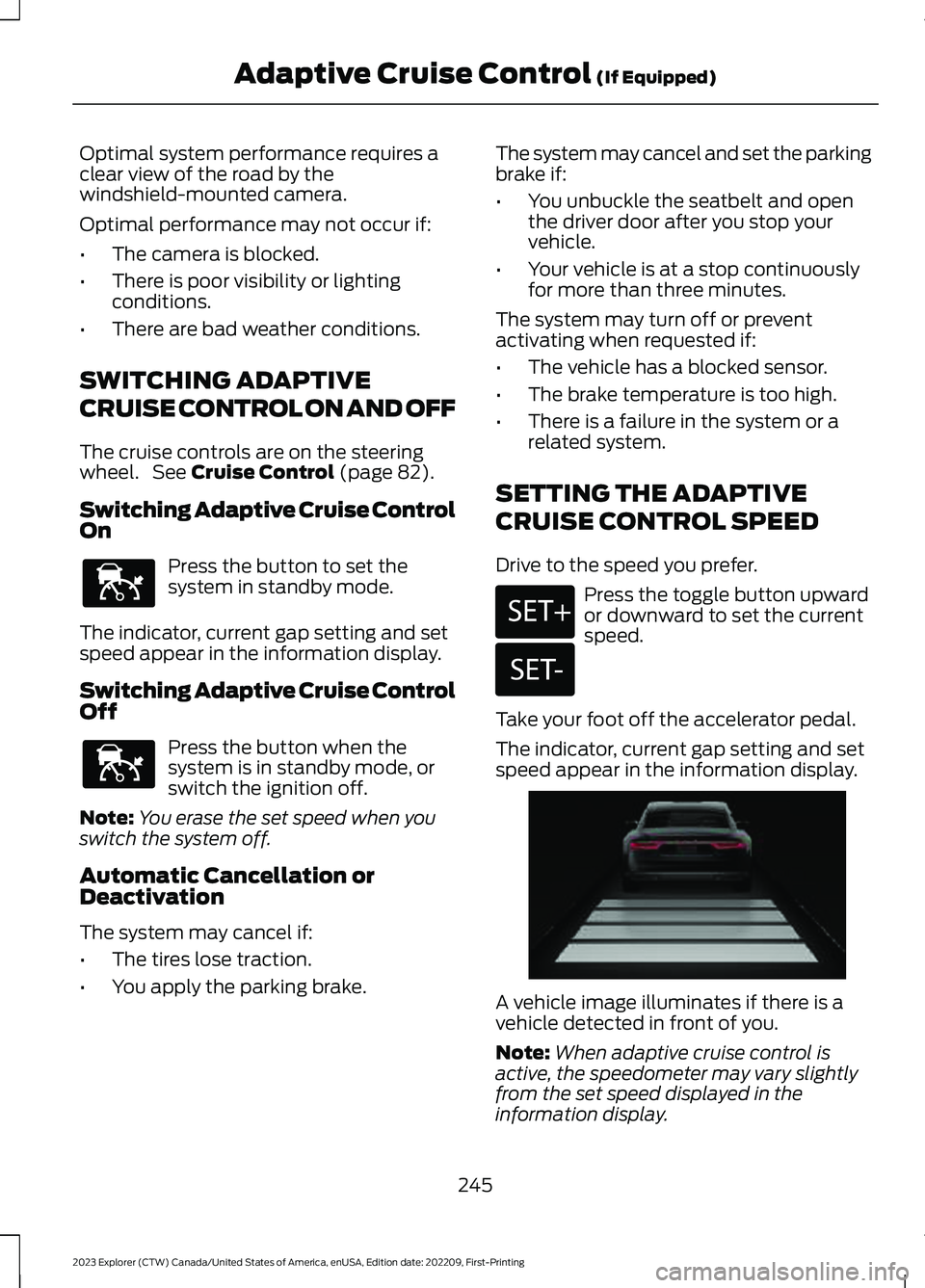
A vehicle image illuminates if there is avehicle detected in front of you.
Note:When adaptive cruise control isactive, the speedometer may vary slightlyfrom the set speed displayed in theinformation display.
245
2023 Explorer (CTW) Canada/United States of America, enUSA, Edition date: 202209, First-PrintingAdaptive Cruise Control (If Equipped)E144529 E144529 E246884 E246885 E255686
Page 259 of 573
Note:If you receive a warning you shouldconsider resting, even if the currentassessment is within the typical range.
The warning system has two stages. Atfirst, the system issues a temporarywarning that you need to take a rest. Thismessage only appears for a short time. Ifthe system detects further reduction indriving alertness, it may issue anotherwarning that remains in the informationdisplay for a longer time. You can press OKon the steering wheel control to clear thewarning.
Resetting the System
You can reset the system by either:
•Switching the ignition off and on.
•Stopping the vehicle and then openingand closing the driver’s door.
LANE KEEPING SYSTEM
WARNING: You are responsible forcontrolling your vehicle at all times. Thesystem is designed to be an aid and doesnot relieve you of your responsibility todrive with due care and attention. Failureto follow this instruction could result inthe loss of control of your vehicle,personal injury or death.
WARNING: Always drive with duecare and attention when using andoperating the controls and features onyour vehicle.
WARNING: In cold and severeweather conditions the system may notfunction. Rain, snow and spray can alllimit sensor performance.
WARNING: Large contrasts inoutside lighting can limit sensorperformance.
WARNING: The system will notoperate if the sensor cannot track theroad lane markings.
WARNING: The sensor mayincorrectly track lane markings as otherstructures or objects. This can result ina false or missed warning.
WARNING: The system may notoperate properly if the sensor is blocked.Keep the windshield free fromobstruction.
WARNING: If damage occurs in theimmediate area surrounding the sensor,have your vehicle checked as soon aspossible.
WARNING: The system may notcorrectly operate if your vehicle is fittedwith a suspension kit not approved byus.
Note:The system works above 40 mph(64 km/h).
Note:The system works as long as thecamera can detect one lane marking.
Note:When you select aid or alert and aidmode and the system detects no steeringactivity for a short period, the system alertsyou to put your hands on the steering wheel.The system may detect a light grip ortouch on the steering wheel as hands offdriving.
Note:The system may not function if thecamera is blocked, or if the windshield isdamaged or dirty.
255
2023 Explorer (CTW) Canada/United States of America, enUSA, Edition date: 202209, First-PrintingDriving Aids