USB FORD EXPLORER 2023 Owner's Manual
[x] Cancel search | Manufacturer: FORD, Model Year: 2023, Model line: EXPLORER, Model: FORD EXPLORER 2023Pages: 573, PDF Size: 16.1 MB
Page 467 of 573
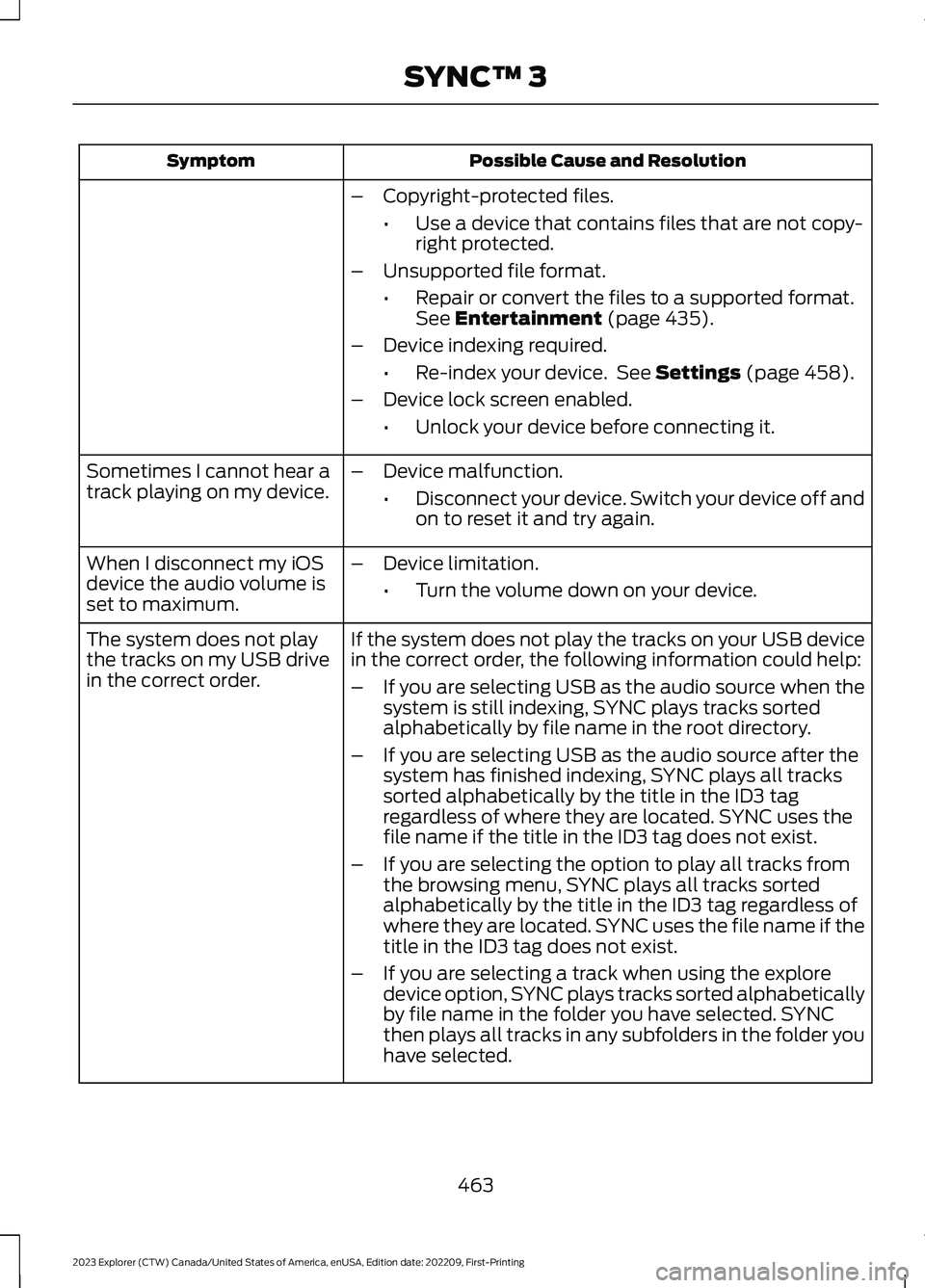
Possible Cause and ResolutionSymptom
–Copyright-protected files.
•Use a device that contains files that are not copy-right protected.
–Unsupported file format.
•Repair or convert the files to a supported format.See Entertainment (page 435).
–Device indexing required.
•Re-index your device. See Settings (page 458).
–Device lock screen enabled.
•Unlock your device before connecting it.
Sometimes I cannot hear atrack playing on my device.–Device malfunction.
•Disconnect your device. Switch your device off andon to reset it and try again.
When I disconnect my iOSdevice the audio volume isset to maximum.
–Device limitation.
•Turn the volume down on your device.
If the system does not play the tracks on your USB devicein the correct order, the following information could help:The system does not playthe tracks on my USB drivein the correct order.–If you are selecting USB as the audio source when thesystem is still indexing, SYNC plays tracks sortedalphabetically by file name in the root directory.
–If you are selecting USB as the audio source after thesystem has finished indexing, SYNC plays all trackssorted alphabetically by the title in the ID3 tagregardless of where they are located. SYNC uses thefile name if the title in the ID3 tag does not exist.
–If you are selecting the option to play all tracks fromthe browsing menu, SYNC plays all tracks sortedalphabetically by the title in the ID3 tag regardless ofwhere they are located. SYNC uses the file name if thetitle in the ID3 tag does not exist.
–If you are selecting a track when using the exploredevice option, SYNC plays tracks sorted alphabeticallyby file name in the folder you have selected. SYNCthen plays all tracks in any subfolders in the folder youhave selected.
463
2023 Explorer (CTW) Canada/United States of America, enUSA, Edition date: 202209, First-PrintingSYNC™ 3
Page 468 of 573
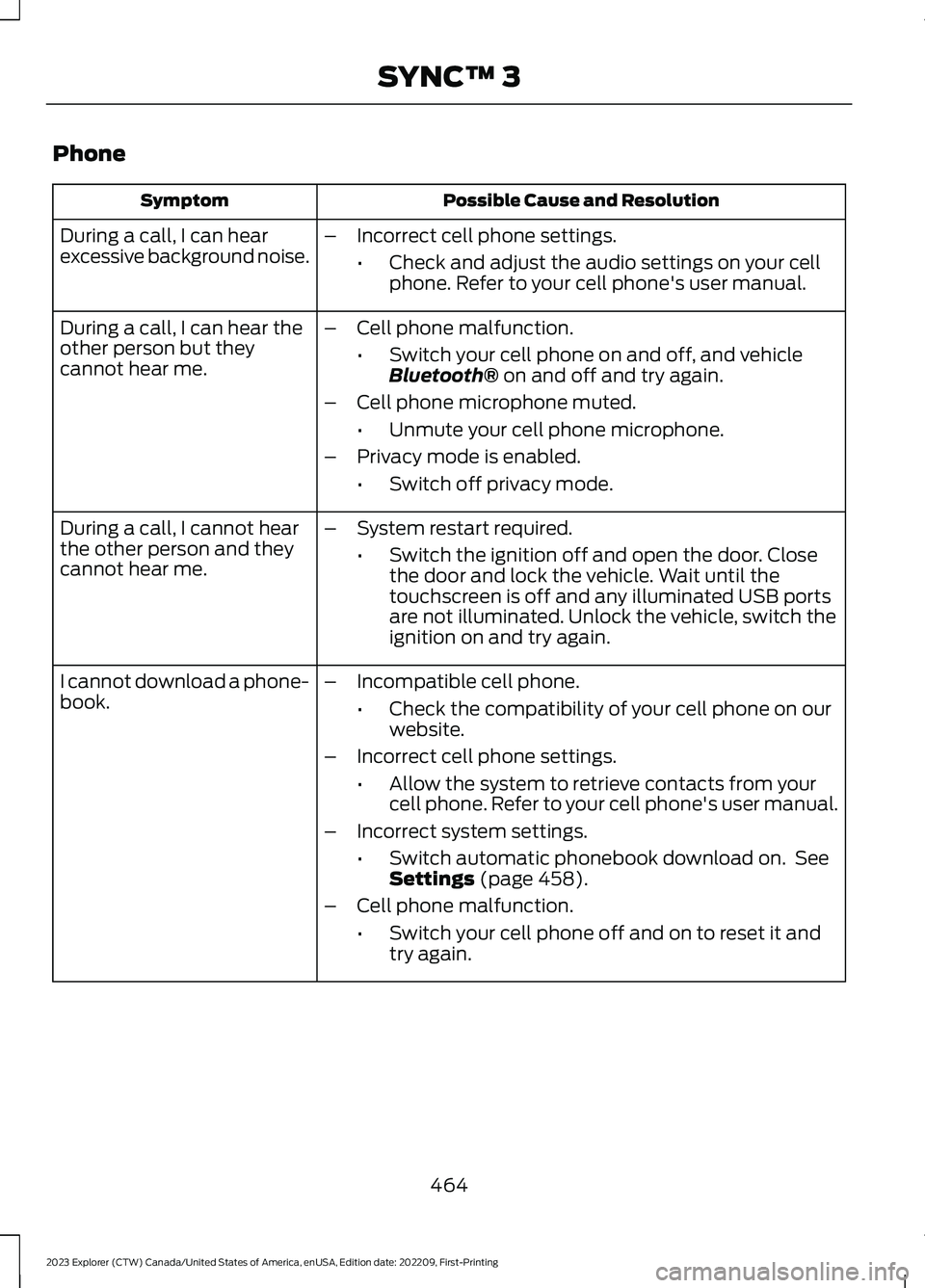
Phone
Possible Cause and ResolutionSymptom
During a call, I can hearexcessive background noise.–Incorrect cell phone settings.
•Check and adjust the audio settings on your cellphone. Refer to your cell phone's user manual.
During a call, I can hear theother person but theycannot hear me.
–Cell phone malfunction.
•Switch your cell phone on and off, and vehicleBluetooth® on and off and try again.
–Cell phone microphone muted.
•Unmute your cell phone microphone.
–Privacy mode is enabled.
•Switch off privacy mode.
During a call, I cannot hearthe other person and theycannot hear me.
–System restart required.
•Switch the ignition off and open the door. Closethe door and lock the vehicle. Wait until thetouchscreen is off and any illuminated USB portsare not illuminated. Unlock the vehicle, switch theignition on and try again.
I cannot download a phone-book.–Incompatible cell phone.
•Check the compatibility of your cell phone on ourwebsite.
–Incorrect cell phone settings.
•Allow the system to retrieve contacts from yourcell phone. Refer to your cell phone's user manual.
–Incorrect system settings.
•Switch automatic phonebook download on. SeeSettings (page 458).
–Cell phone malfunction.
•Switch your cell phone off and on to reset it andtry again.
464
2023 Explorer (CTW) Canada/United States of America, enUSA, Edition date: 202209, First-PrintingSYNC™ 3
Page 471 of 573
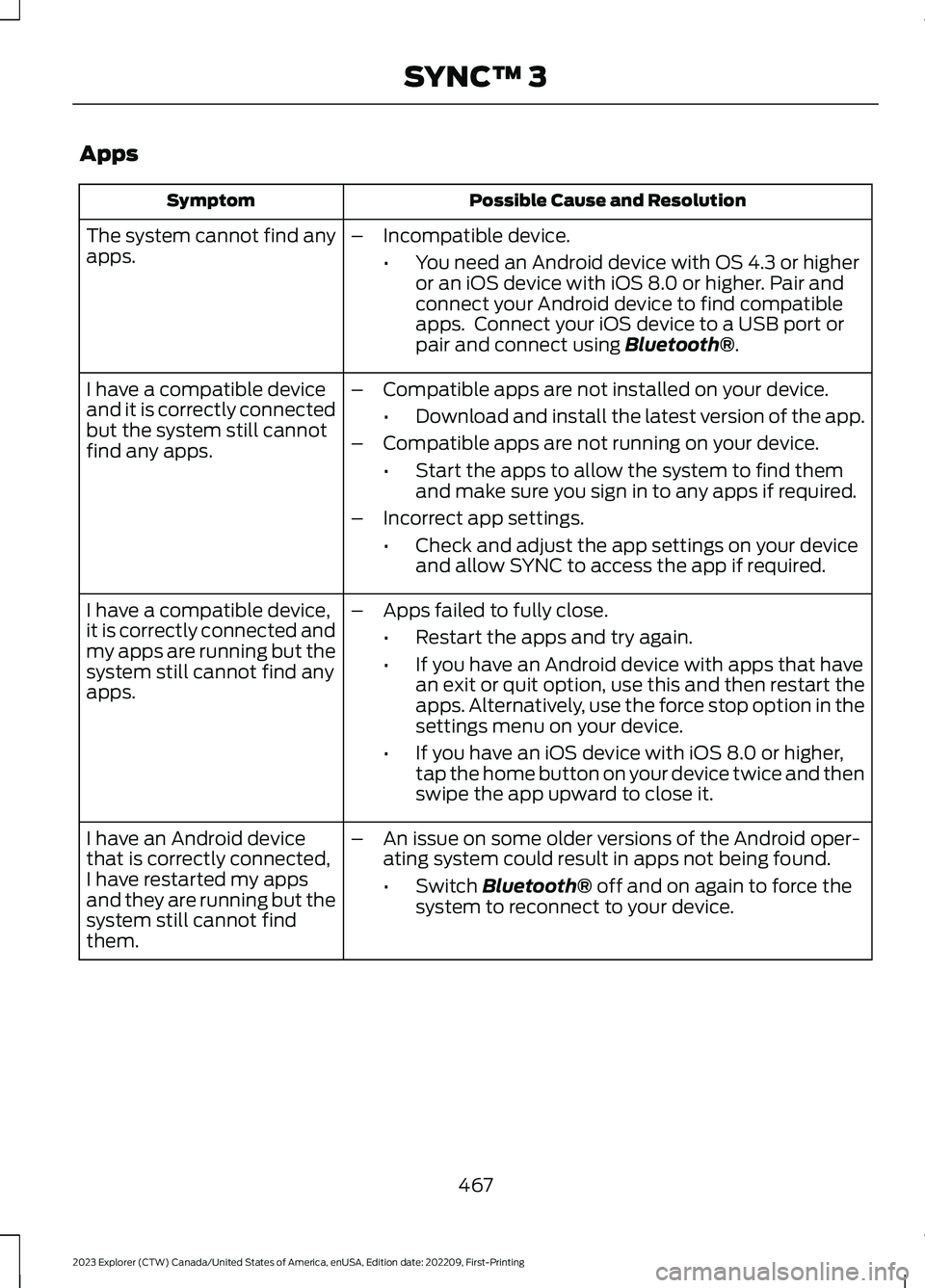
Apps
Possible Cause and ResolutionSymptom
The system cannot find anyapps.–Incompatible device.
•You need an Android device with OS 4.3 or higheror an iOS device with iOS 8.0 or higher. Pair andconnect your Android device to find compatibleapps. Connect your iOS device to a USB port orpair and connect using Bluetooth®.
I have a compatible deviceand it is correctly connectedbut the system still cannotfind any apps.
–Compatible apps are not installed on your device.
•Download and install the latest version of the app.
–Compatible apps are not running on your device.
•Start the apps to allow the system to find themand make sure you sign in to any apps if required.
–Incorrect app settings.
•Check and adjust the app settings on your deviceand allow SYNC to access the app if required.
I have a compatible device,it is correctly connected andmy apps are running but thesystem still cannot find anyapps.
–Apps failed to fully close.
•Restart the apps and try again.
•If you have an Android device with apps that havean exit or quit option, use this and then restart theapps. Alternatively, use the force stop option in thesettings menu on your device.
•If you have an iOS device with iOS 8.0 or higher,tap the home button on your device twice and thenswipe the app upward to close it.
I have an Android devicethat is correctly connected,I have restarted my appsand they are running but thesystem still cannot findthem.
–An issue on some older versions of the Android oper-ating system could result in apps not being found.
•Switch Bluetooth® off and on again to force thesystem to reconnect to your device.
467
2023 Explorer (CTW) Canada/United States of America, enUSA, Edition date: 202209, First-PrintingSYNC™ 3
Page 572 of 573
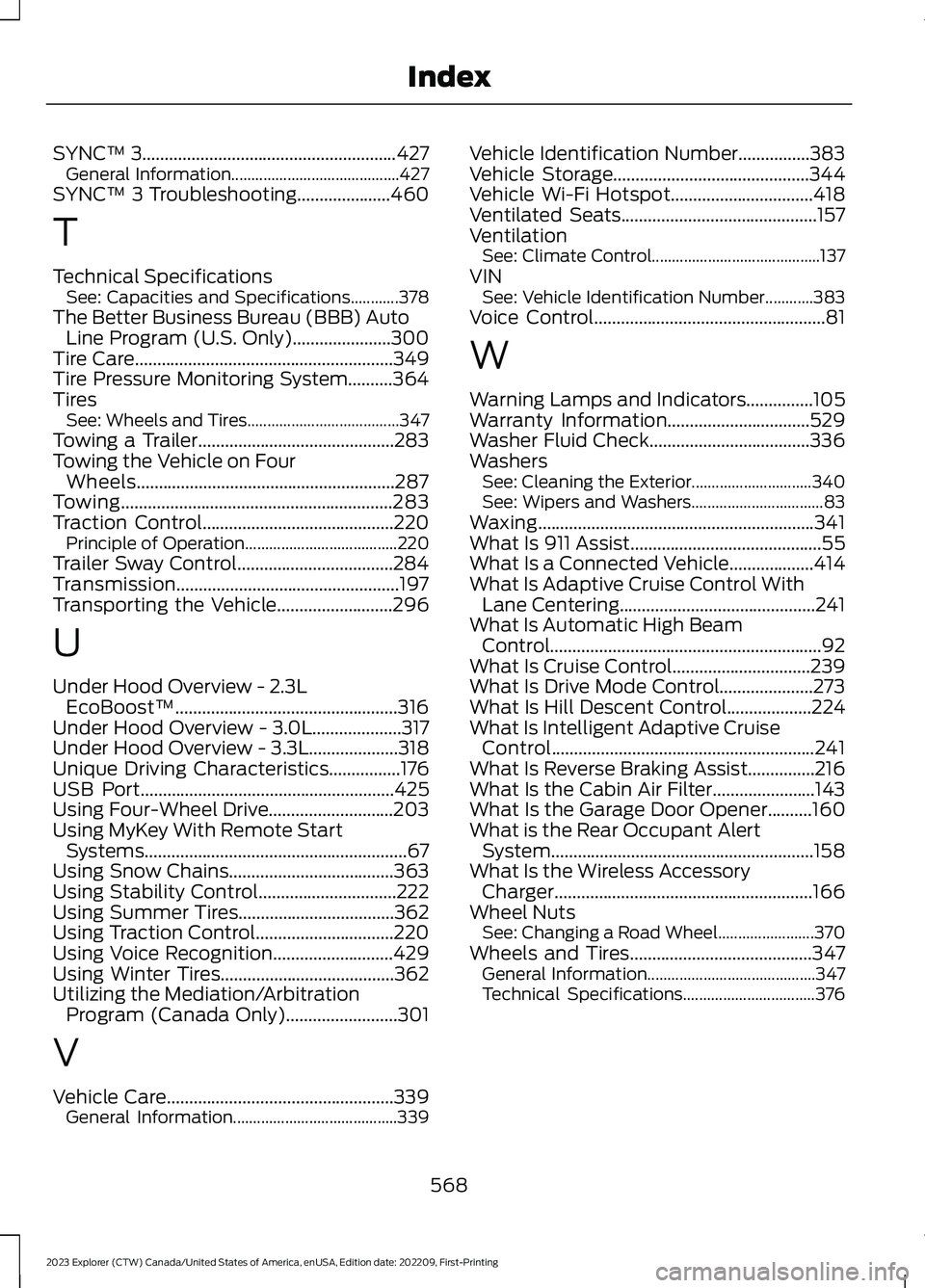
SYNC™ 3.........................................................427General Information..........................................427SYNC™ 3 Troubleshooting.....................460
T
Technical SpecificationsSee: Capacities and Specifications............378The Better Business Bureau (BBB) AutoLine Program (U.S. Only)......................300Tire Care..........................................................349Tire Pressure Monitoring System..........364TiresSee: Wheels and Tires......................................347Towing a Trailer............................................283Towing the Vehicle on FourWheels..........................................................287Towing.............................................................283Traction Control...........................................220Principle of Operation......................................220Trailer Sway Control...................................284Transmission..................................................197Transporting the Vehicle..........................296
U
Under Hood Overview - 2.3LEcoBoost™..................................................316Under Hood Overview - 3.0L....................317Under Hood Overview - 3.3L....................318Unique Driving Characteristics................176USB Port.........................................................425Using Four-Wheel Drive............................203Using MyKey With Remote StartSystems...........................................................67Using Snow Chains.....................................363Using Stability Control...............................222Using Summer Tires...................................362Using Traction Control...............................220Using Voice Recognition...........................429Using Winter Tires.......................................362Utilizing the Mediation/ArbitrationProgram (Canada Only).........................301
V
Vehicle Care...................................................339General Information.........................................339
Vehicle Identification Number................383Vehicle Storage............................................344Vehicle Wi-Fi Hotspot................................418Ventilated Seats............................................157VentilationSee: Climate Control..........................................137VINSee: Vehicle Identification Number............383Voice Control....................................................81
W
Warning Lamps and Indicators...............105Warranty Information................................529Washer Fluid Check....................................336WashersSee: Cleaning the Exterior..............................340See: Wipers and Washers.................................83Waxing..............................................................341What Is 911 Assist...........................................55What Is a Connected Vehicle...................414What Is Adaptive Cruise Control WithLane Centering............................................241What Is Automatic High BeamControl.............................................................92What Is Cruise Control...............................239What Is Drive Mode Control.....................273What Is Hill Descent Control...................224What Is Intelligent Adaptive CruiseControl...........................................................241What Is Reverse Braking Assist...............216What Is the Cabin Air Filter.......................143What Is the Garage Door Opener..........160What is the Rear Occupant AlertSystem...........................................................158What Is the Wireless AccessoryCharger..........................................................166Wheel NutsSee: Changing a Road Wheel........................370Wheels and Tires.........................................347General Information..........................................347Technical Specifications.................................376
568
2023 Explorer (CTW) Canada/United States of America, enUSA, Edition date: 202209, First-PrintingIndex