light FORD F-150 2022 Owners Manual
[x] Cancel search | Manufacturer: FORD, Model Year: 2022, Model line: F-150, Model: FORD F-150 2022Pages: 750, PDF Size: 12.96 MB
Page 547 of 750
CHANGING A FLAT TIRE
If you get a flat tire when driving, do not
apply the brake heavily. Instead, gradually
decrease your speed. Hold the steering
wheel firmly and slowly move to a safe
place on the side of the road.
Have a flat serviced by an authorized
dealer to prevent damage to the system
sensors. See Tire Pressure Monitoring
System Precautions (page 537). Replace
the spare tire with a road tire as soon as
possible. When repairing or replacing the
flat tire, have the authorized dealer inspect
the system sensor for damage.
Note: The use of tire sealant could damage
your tire pressure monitoring system. Only
use in roadside emergencies.
Note: The tire pressure monitoring system
indicator light illuminates when the spare
tire is in use. To restore the full function of
the monitoring system, you must mount all
road wheels that come with tire pressure
monitoring sensors on this vehicle.
Dissimilar Spare Wheel and Tire
Assembly Information WARNING:
Failure to follow these
guidelines could result in an increased
risk of loss of vehicle control, injury or
death.
If you have a dissimilar spare wheel and
tire, the intent of the spare wheel is for
temporary use only. This means that if you
need to use it, replace it as soon as
possible with a road wheel and tire
assembly that is the same size and type
as the road tires and wheels originally
provided by Ford. We define a dissimilar spare wheel and tire
assembly as a spare wheel and tire
assembly that is different in brand, size or
appearance from the road tires and
wheels.
Full-size dissimilar spare
When driving with the full-size dissimilar
spare wheel and tire assembly, do not:
•
Exceed
70 mph (113 km/h).
• Use more than one dissimilar spare
wheel and tire assembly at a time.
• Use snow chains on the end of the
vehicle with the dissimilar spare wheel
and tire assembly.
Engage any four-wheel drive mode. See
Four-Wheel Drive Limitations (page 270).
The usage of a full-size dissimilar spare
wheel and tire assembly can lead to
impairment of the following:
• Handling, stability and braking
performance.
• Comfort and noise.
• Ground clearance and parking at curbs.
• Winter weather driving capability.
• Wet weather driving capability.
• Four-wheel drive capability.
When driving with the full-size dissimilar
spare wheel and tire assembly, give
additional caution to:
• Towing a trailer.
• Driving vehicles that come with a
camper body.
• Driving vehicles with a load on the
cargo rack.
Drive cautiously when using a full-size
dissimilar spare wheel and tire assembly
and seek service as soon as possible.
543
2022 F-150 (TFD) Canada/United States of America, enUSA, Edition date: 202109, First-Printing Changing a Road Wheel
Page 550 of 750
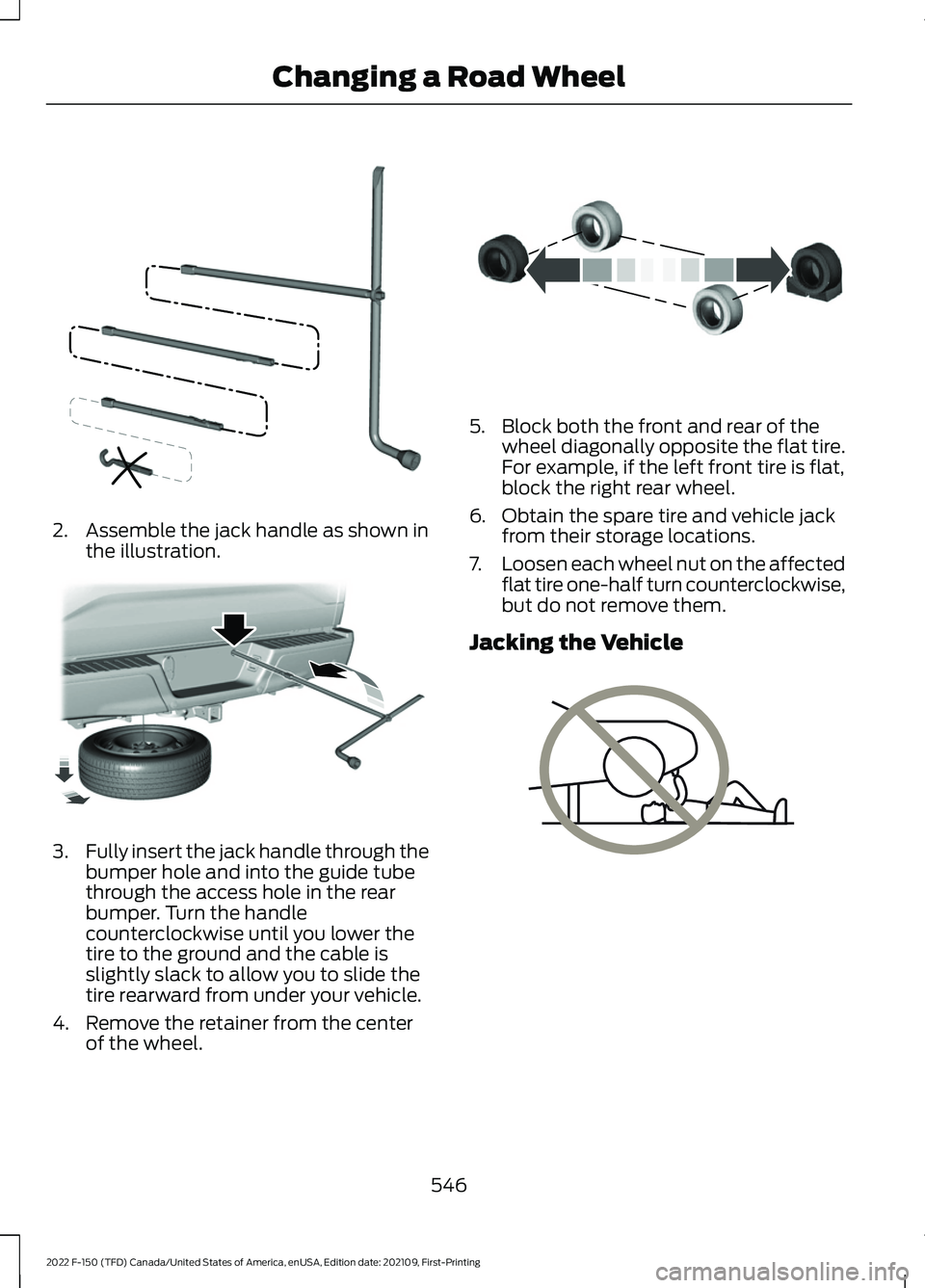
2. Assemble the jack handle as shown in
the illustration. 3.
Fully insert the jack handle through the
bumper hole and into the guide tube
through the access hole in the rear
bumper. Turn the handle
counterclockwise until you lower the
tire to the ground and the cable is
slightly slack to allow you to slide the
tire rearward from under your vehicle.
4. Remove the retainer from the center of the wheel. 5. Block both the front and rear of the
wheel diagonally opposite the flat tire.
For example, if the left front tire is flat,
block the right rear wheel.
6. Obtain the spare tire and vehicle jack from their storage locations.
7. Loosen each wheel nut on the affected
flat tire one-half turn counterclockwise,
but do not remove them.
Jacking the Vehicle 546
2022 F-150 (TFD) Canada/United States of America, enUSA, Edition date: 202109, First-Printing Changing a Road WheelE188735 E184020 E175447 E166722
Page 553 of 750
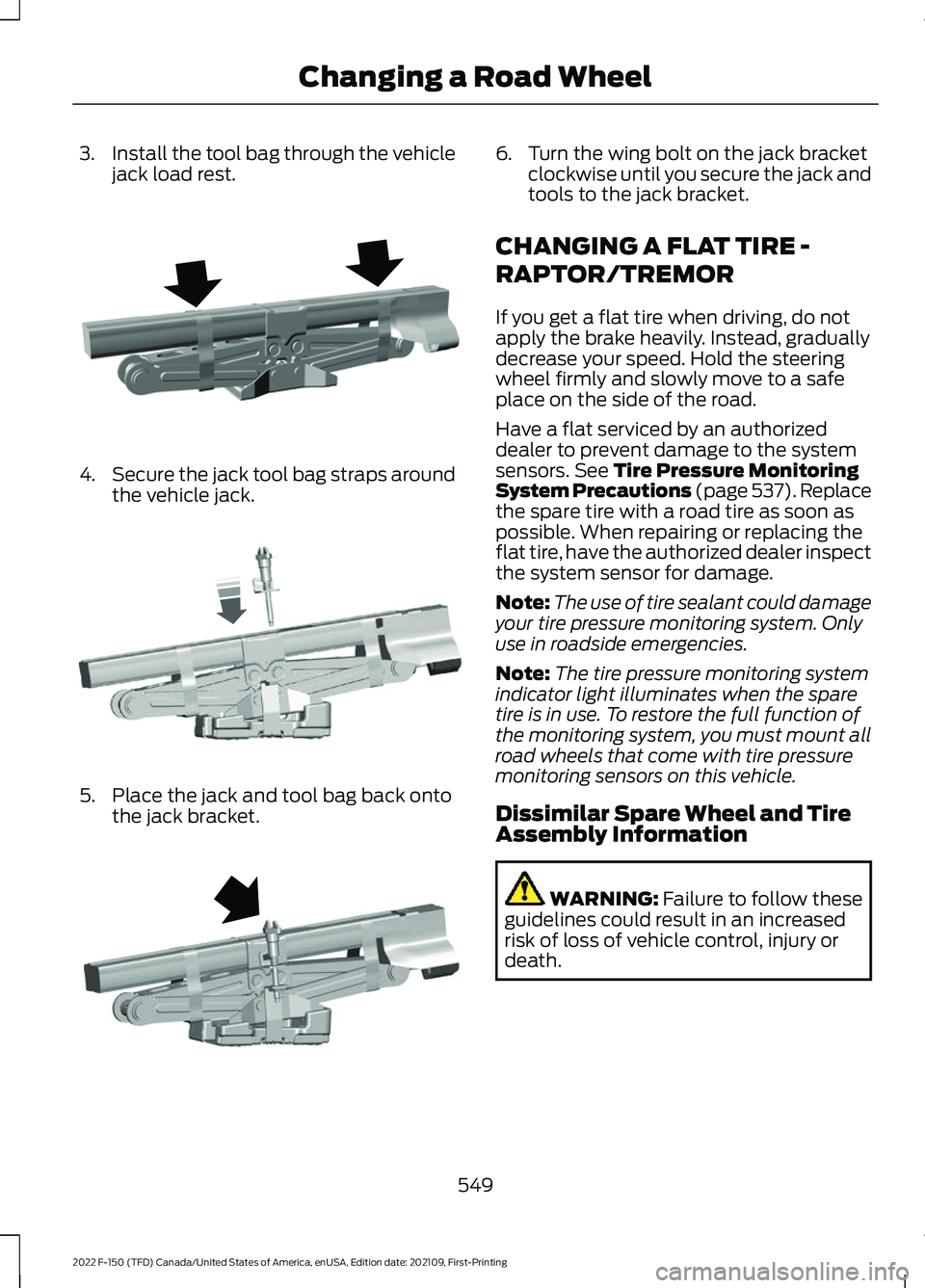
3.
Install the tool bag through the vehicle
jack load rest. 4.
Secure the jack tool bag straps around
the vehicle jack. 5. Place the jack and tool bag back onto
the jack bracket. 6. Turn the wing bolt on the jack bracket
clockwise until you secure the jack and
tools to the jack bracket.
CHANGING A FLAT TIRE -
RAPTOR/TREMOR
If you get a flat tire when driving, do not
apply the brake heavily. Instead, gradually
decrease your speed. Hold the steering
wheel firmly and slowly move to a safe
place on the side of the road.
Have a flat serviced by an authorized
dealer to prevent damage to the system
sensors. See Tire Pressure Monitoring
System Precautions (page 537). Replace
the spare tire with a road tire as soon as
possible. When repairing or replacing the
flat tire, have the authorized dealer inspect
the system sensor for damage.
Note: The use of tire sealant could damage
your tire pressure monitoring system. Only
use in roadside emergencies.
Note: The tire pressure monitoring system
indicator light illuminates when the spare
tire is in use. To restore the full function of
the monitoring system, you must mount all
road wheels that come with tire pressure
monitoring sensors on this vehicle.
Dissimilar Spare Wheel and Tire
Assembly Information WARNING:
Failure to follow these
guidelines could result in an increased
risk of loss of vehicle control, injury or
death.
549
2022 F-150 (TFD) Canada/United States of America, enUSA, Edition date: 202109, First-Printing Changing a Road WheelE323386 E327654 E323384
Page 556 of 750
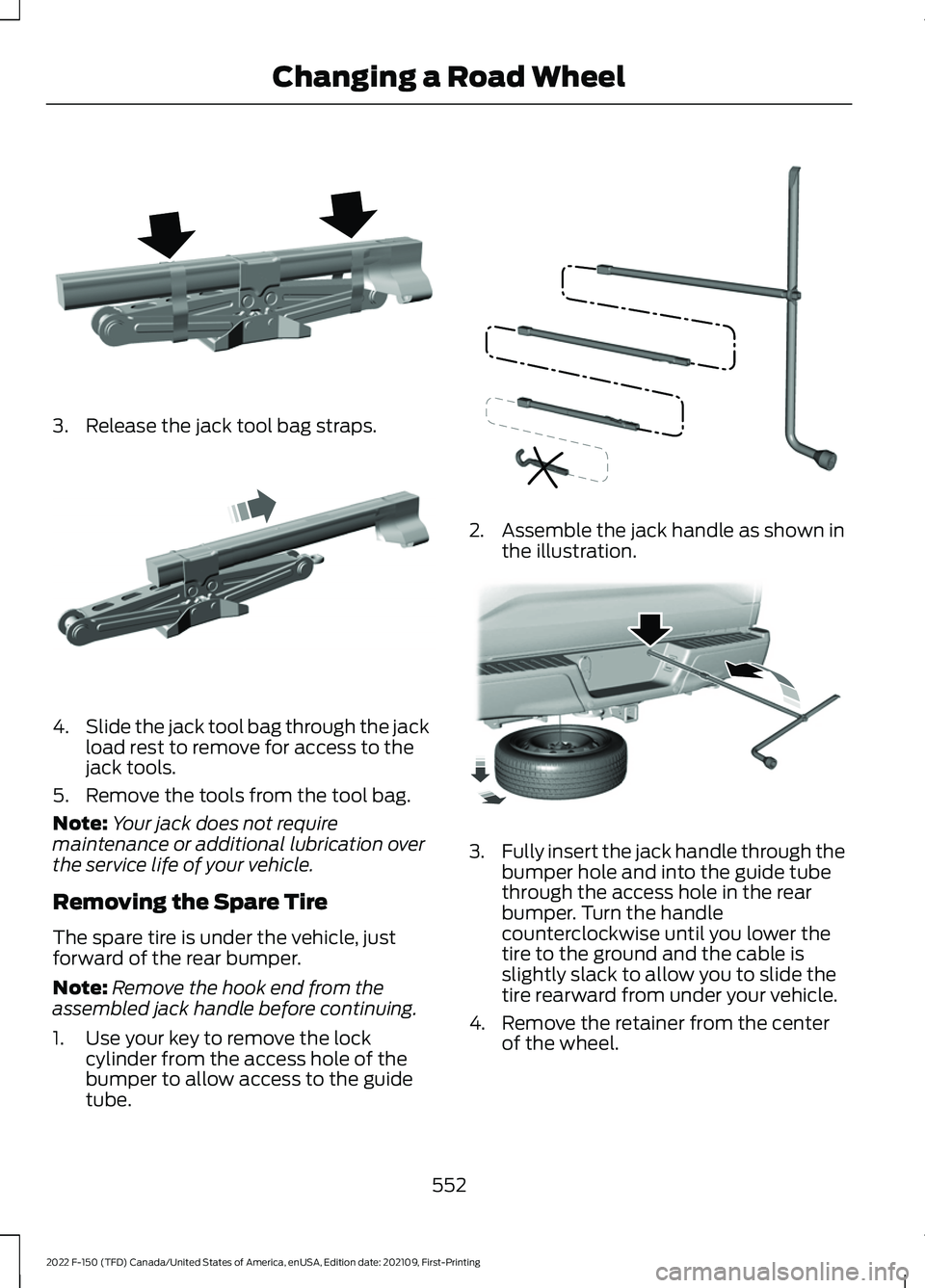
3. Release the jack tool bag straps.
4.
Slide the jack tool bag through the jack
load rest to remove for access to the
jack tools.
5. Remove the tools from the tool bag.
Note: Your jack does not require
maintenance or additional lubrication over
the service life of your vehicle.
Removing the Spare Tire
The spare tire is under the vehicle, just
forward of the rear bumper.
Note: Remove the hook end from the
assembled jack handle before continuing.
1. Use your key to remove the lock cylinder from the access hole of the
bumper to allow access to the guide
tube. 2. Assemble the jack handle as shown in
the illustration. 3.
Fully insert the jack handle through the
bumper hole and into the guide tube
through the access hole in the rear
bumper. Turn the handle
counterclockwise until you lower the
tire to the ground and the cable is
slightly slack to allow you to slide the
tire rearward from under your vehicle.
4. Remove the retainer from the center of the wheel.
552
2022 F-150 (TFD) Canada/United States of America, enUSA, Edition date: 202109, First-Printing Changing a Road WheelE323386 E327651 E188735 E184020
Page 611 of 750
Depending on the station quality, you could
hear a slight sound change when the
station changes between analog and
digital audio.
You cannot access a saved HD station if
your vehicle is outside the station
’s
reception area.
SWITCHING DIGITAL RADIO
RECEPTION ON AND OFF
1. Press Settings on the touchscreen.
2. Press
Radio Settings.
3. Switch
AM HD Radio or FM HD Radio
on or off.
DIGITAL RADIO INDICATORS
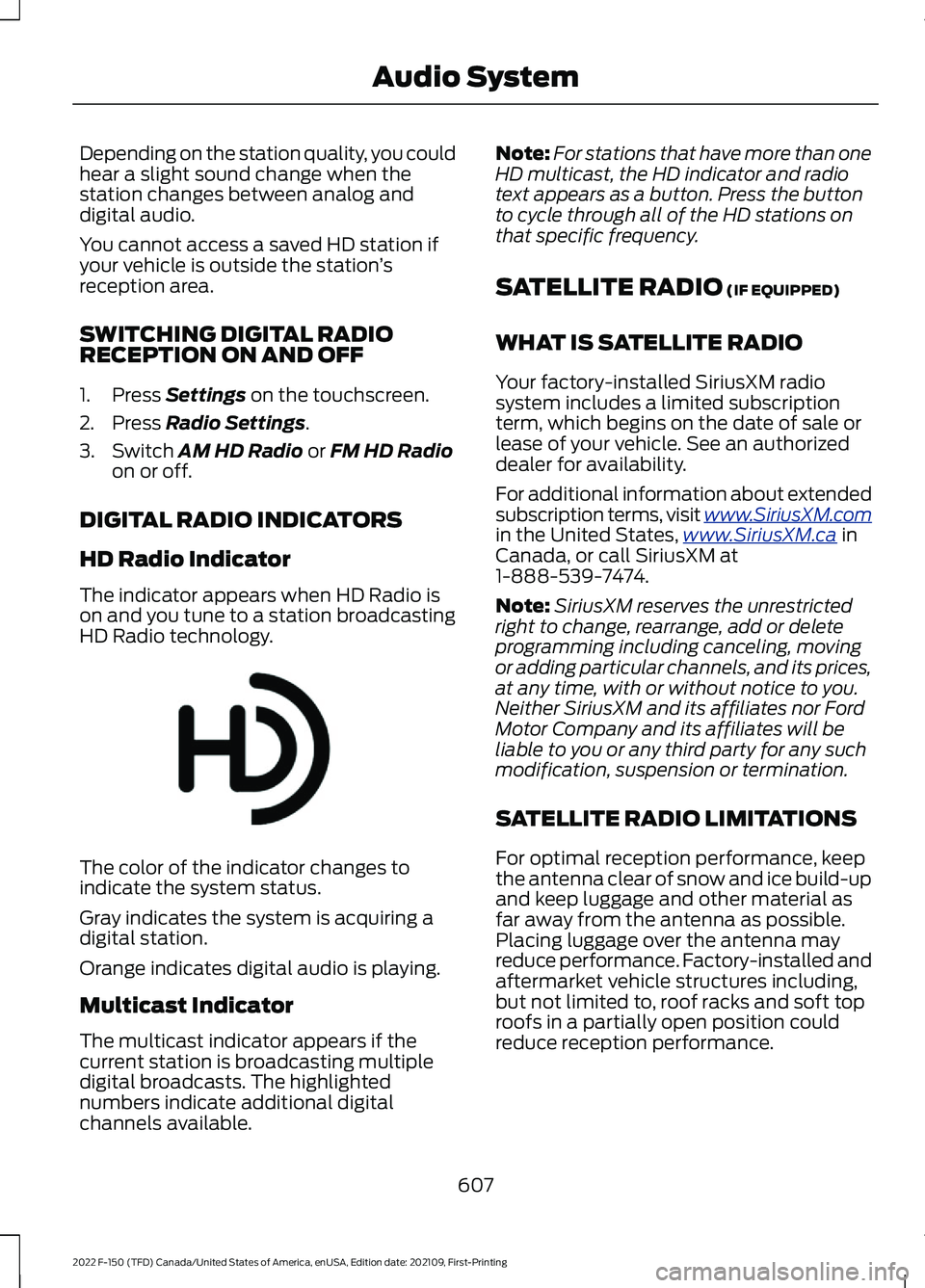
HD Radio Indicator
The indicator appears when HD Radio is
on and you tune to a station broadcasting
HD Radio technology. The color of the indicator changes to
indicate the system status.
Gray indicates the system is acquiring a
digital station.
Orange indicates digital audio is playing.
Multicast Indicator
The multicast indicator appears if the
current station is broadcasting multiple
digital broadcasts. The highlighted
numbers indicate additional digital
channels available. Note:
For stations that have more than one
HD multicast, the HD indicator and radio
text appears as a button. Press the button
to cycle through all of the HD stations on
that specific frequency.
SATELLITE RADIO
(IF EQUIPPED)
WHAT IS SATELLITE RADIO
Your factory-installed SiriusXM radio
system includes a limited subscription
term, which begins on the date of sale or
lease of your vehicle. See an authorized
dealer for availability.
For additional information about extended
subscription terms, visit www .SiriusXM. c om
in the United States,
www .SiriusXM. c a in
Canada, or call SiriusXM at
1-888-539-7474.
Note: SiriusXM reserves the unrestricted
right to change, rearrange, add or delete
programming including canceling, moving
or adding particular channels, and its prices,
at any time, with or without notice to you.
Neither SiriusXM and its affiliates nor Ford
Motor Company and its affiliates will be
liable to you or any third party for any such
modification, suspension or termination.
SATELLITE RADIO LIMITATIONS
For optimal reception performance, keep
the antenna clear of snow and ice build-up
and keep luggage and other material as
far away from the antenna as possible.
Placing luggage over the antenna may
reduce performance. Factory-installed and
aftermarket vehicle structures including,
but not limited to, roof racks and soft top
roofs in a partially open position could
reduce reception performance.
607
2022 F-150 (TFD) Canada/United States of America, enUSA, Edition date: 202109, First-Printing Audio SystemE142616
Page 623 of 750
Remote Vehicle Control Examples
Result
Command
The vehicle tells
you how much gas it has left.
How much gas is in
my tank?
Maintenance and Roadside Assistance
Examples Result
Command
Your vehicle calls
the roadside assist- ance phonenumber.
Call roadside
assistance.
Vehicle Information Examples Result
Command
Information about
the feature appears on the center
display or FordPass app.
How does cruise
control work?
Information aboutthe warning light appears on the
center display or FordPass app.
What does the
warning light mean?
Information aboutopen recalls
appears on the
center display or FordPass app.
Am I affected by
any recalls?
619
2022 F-150 (TFD) Canada/United States of America, enUSA, Edition date: 202109, First-Printing Voice Interaction
Page 637 of 750
UPDATING THE VEHICLE
SYSTEMS WIRELESSLY
Over the air system updates
allow you to update your vehicle
system software wirelessly. To
make sure you receive all updates, set a
recurring schedule and connect to Wi-Fi.
Updates may take longer if not connected
to Wi-Fi, or may not download at all. See
Connected Vehicle (page 597).
Over the Air System Update
Requirements
Before updating, reference this list to make
sure your vehicle is ready be updated. If
these requirements are not met during a
scheduled update, the update will be
canceled and you can reschedule.
• Your vehicle is not running.
• Your vehicle is stopped.
• Your vehicle is parked.
• The hazard indicators are switched off.
• The alarm is not sounding.
• The doors are closed.
• The parking lights are switched off.
• You are not pressing the brake pedal.
• An emergency call is not in progress.
• Your vehicle is not in limp mode.
Enabling Over the Air Updates
1. Press
Settings on the touchscreen.
2. Press
Software Update.
3. Switch
Automatic Updates on or off.
Note: Over the air updates are enabled by
default.
Note: If you do not want to receive over the
air updates you can turn them off. You will
not be notified of new updates. Scheduling an Update
Scheduling an update allows you to set a
convenient time for the update to
complete. We recommend updating
overnight when your vehicle is not in use.
Ensure Vehicle Connectivity and Automatic
Updates are enabled. Once you complete
these steps, your schedule will be saved
for future updates. As long as an update is
not in process you can adjust your
schedule.
Note:
Some updates may be applied
outside of your set schedule. Information
about the unscheduled update appears on
the touchscreen after it is applied.
Using the Settings Menu
1. Press
Settings on the touchscreen.
2. Press
Software Update.
3. Press
Schedule Updates.
4. Use the controls to set the time and day of the update.
5. Save the schedule.
Note: You can set the updates to occur at
any time.
Using the Status Bar Icon When an update is available, tap
the notification icon and follow
the prompts on the screen.
Applying an Over the Air Update
You can see the progress of the update on
the touchscreen. An update cannot be
canceled once it has been started.
633
2022 F-150 (TFD) Canada/United States of America, enUSA, Edition date: 202109, First-Printing Vehicle System UpdatesE327789 E327785
Page 640 of 750
WHAT ARE THE AUXILIARY
SWITCHES
The auxiliary switchboard on the overhead
console makes aftermarket customization
easier with six prewired switches
connected to the power distribution box.
Each circuit is individually fused for
connection of electrical accessories.
For maximum vehicle performance, keep
the following information in mind when
adding accessories or equipment to your
vehicle:
•
When adding accessories, equipment,
passengers and luggage to your
vehicle, do not exceed the total weight
capacity of the vehicle or of the front
or rear axle (GVWR or GAWR as
indicated on the safety compliance
certification label). Ask an authorized
dealer for specific weight information.
• It is your responsibility to ensure that
any equipment you have fitted
complies with applicable local
legislation.
• An authorized dealer needs to install
mobile communication systems.
Improper installation may harm the
operation of your vehicle, particularly
if the manufacturer did not design the
mobile communication system
specifically for automotive use.
• If you or an authorized dealer add any
electrical or electronic accessories or
components not produced by us to
your vehicle, you may adversely affect
battery performance and durability. In
addition, you may also adversely affect
the performance of the other electrical
systems in the vehicle. LOCATING THE AUXILIARY
SWITCHES
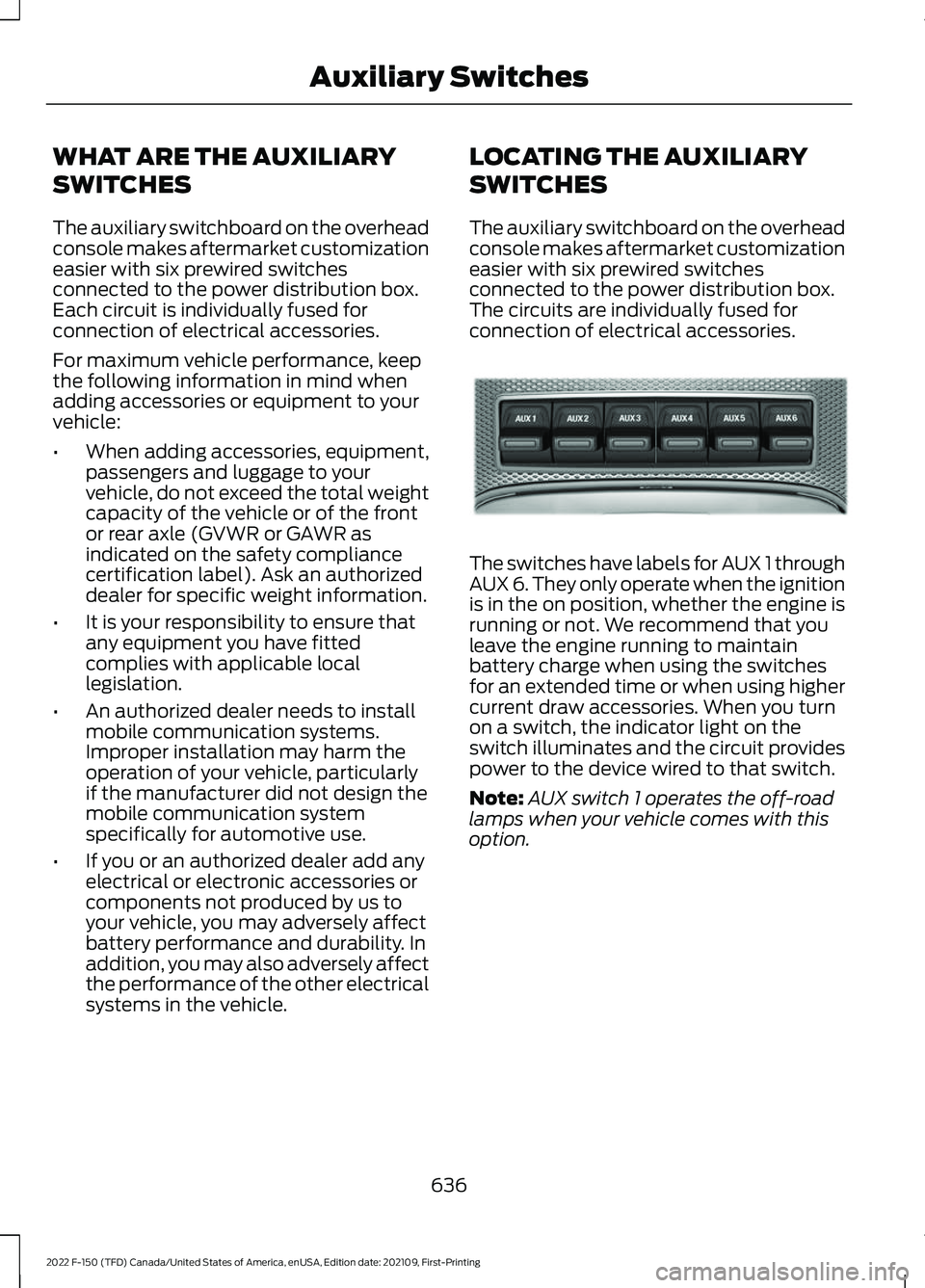
The auxiliary switchboard on the overhead
console makes aftermarket customization
easier with six prewired switches
connected to the power distribution box.
The circuits are individually fused for
connection of electrical accessories.
The switches have labels for AUX 1 through
AUX 6. They only operate when the ignition
is in the on position, whether the engine is
running or not. We recommend that you
leave the engine running to maintain
battery charge when using the switches
for an extended time or when using higher
current draw accessories. When you turn
on a switch, the indicator light on the
switch illuminates and the circuit provides
power to the device wired to that switch.
Note:
AUX switch 1 operates the off-road
lamps when your vehicle comes with this
option.
636
2022 F-150 (TFD) Canada/United States of America, enUSA, Edition date: 202109, First-Printing Auxiliary SwitchesE220728
Page 647 of 750
It is important to rely upon your dealership
to properly diagnose and repair your
vehicle.
We strongly recommend only using our
genuine or our authorized re-manufactured
replacement parts engineered for your
vehicle.
Additives and Chemicals
We do not recommend using chemicals or
additives not approved by us as part of
your vehicle
’s normal maintenance. Please
consult your warranty information.
Oils, Fluids and Flushing
In many cases, fluid discoloration is a
normal operating characteristic and, by
itself, does not necessarily indicate a
concern or that the fluid needs to be
changed. Have discolored fluids that also
show signs of overheating or foreign
material contamination checked
immediately. Make sure to change the vehicle
’s oils and
fluids at the specified intervals or in
conjunction with a repair. Flushing is a
viable way to change fluid for many vehicle
sub-systems during scheduled
maintenance. It is critical that systems are
flushed only with new fluid that is the same
as that required to fill and operate the
system or using our approved flushing
chemical.
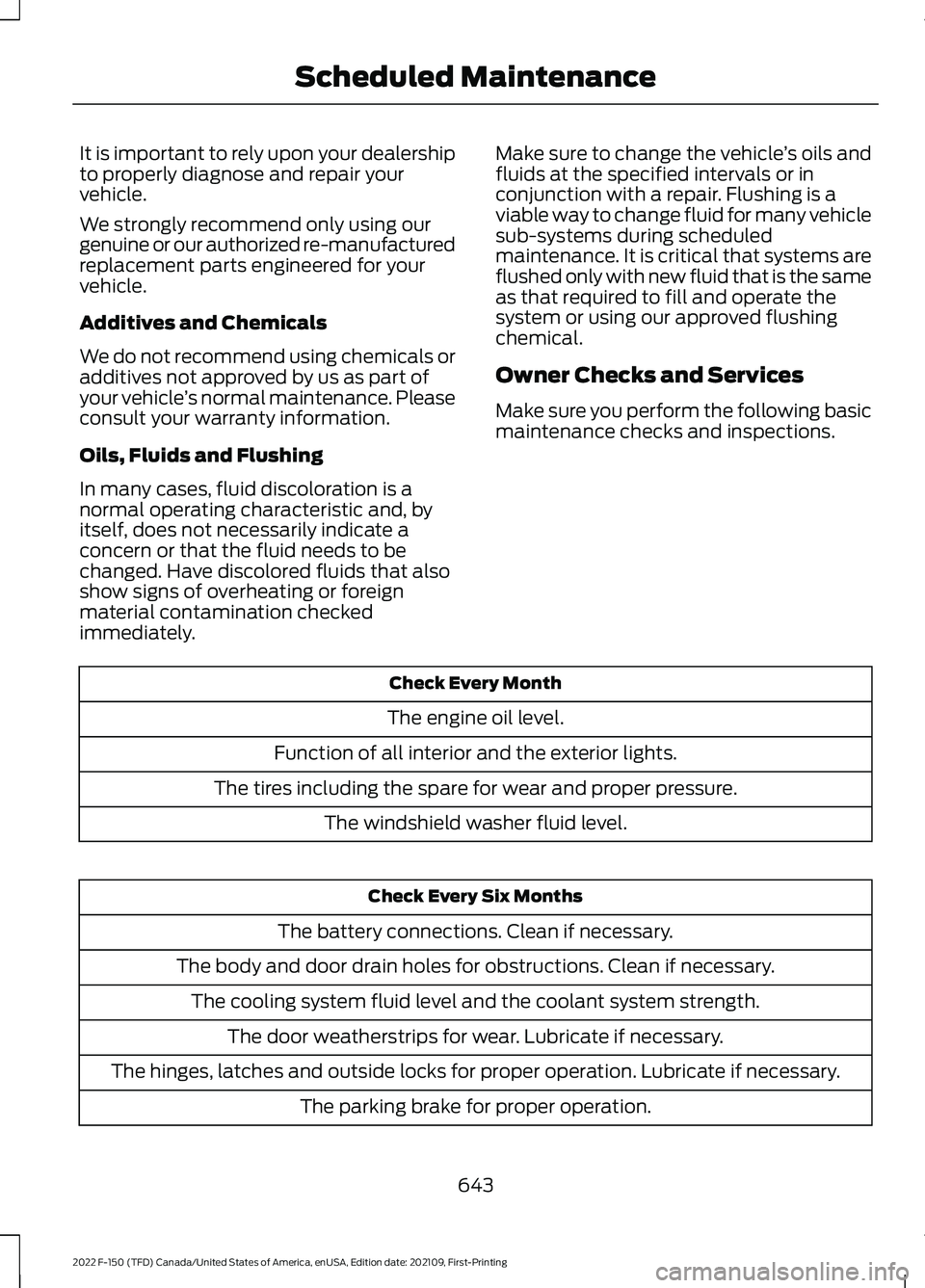
Owner Checks and Services
Make sure you perform the following basic
maintenance checks and inspections. Check Every Month
The engine oil level.
Function of all interior and the exterior lights.
The tires including the spare for wear and proper pressure. The windshield washer fluid level. Check Every Six Months
The battery connections. Clean if necessary.
The body and door drain holes for obstructions. Clean if necessary. The cooling system fluid level and the coolant system strength. The door weatherstrips for wear. Lubricate if necessary.
The hinges, latches and outside locks for proper operation. Lubricate if necessary. The parking brake for proper operation.
643
2022 F-150 (TFD) Canada/United States of America, enUSA, Edition date: 202109, First-Printing Scheduled Maintenance
Page 654 of 750
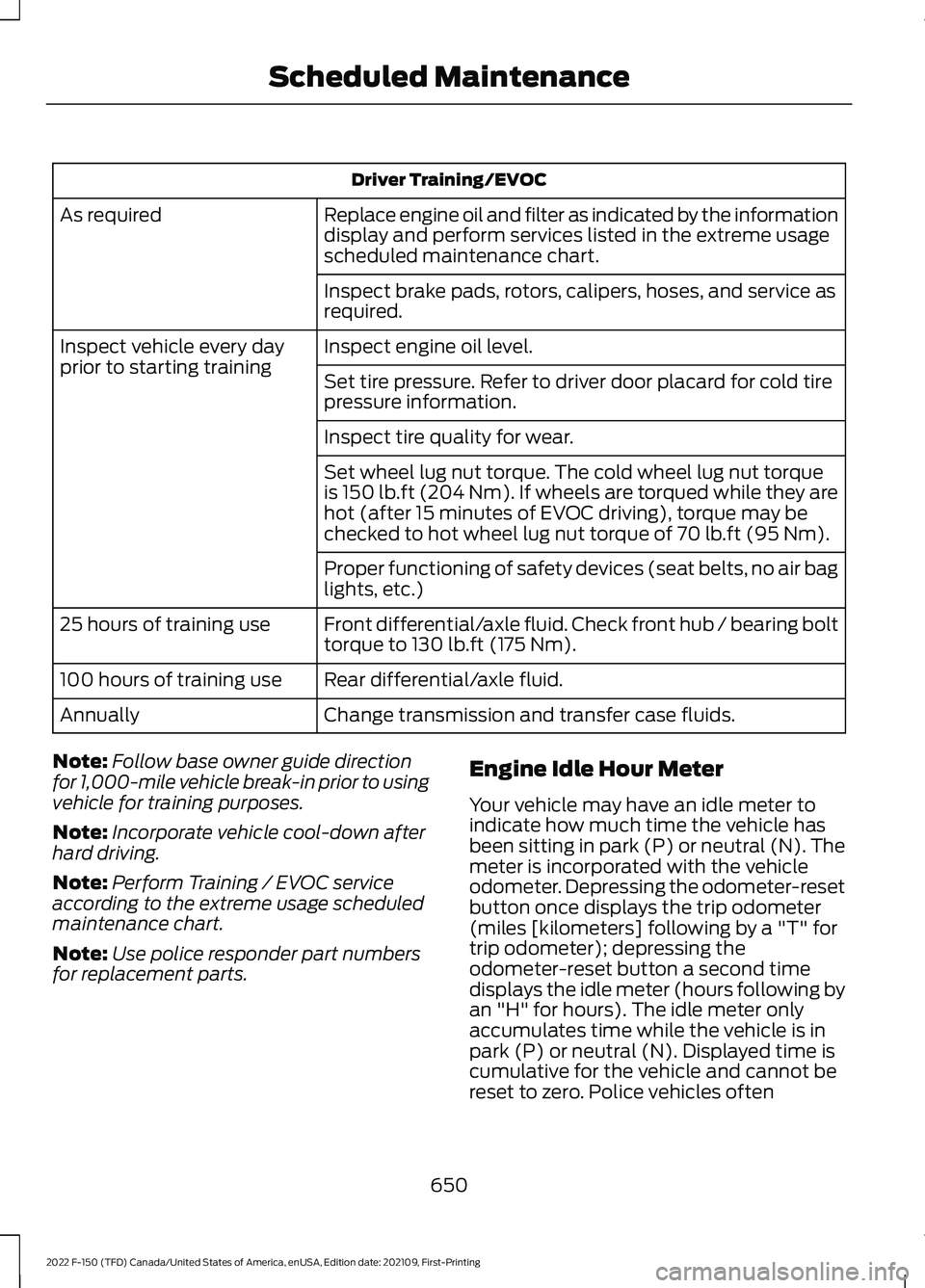
Driver Training/EVOC
Replace engine oil and filter as indicated by the information
display and perform services listed in the extreme usage
scheduled maintenance chart.
As required
Inspect brake pads, rotors, calipers, hoses, and service as
required.
Inspect engine oil level.
Inspect vehicle every day
prior to starting training
Set tire pressure. Refer to driver door placard for cold tire
pressure information.
Inspect tire quality for wear.
Set wheel lug nut torque. The cold wheel lug nut torque
is 150 lb.ft (204 Nm). If wheels are torqued while they are
hot (after 15 minutes of EVOC driving), torque may be
checked to hot wheel lug nut torque of
70 lb.ft (95 Nm).
Proper functioning of safety devices (seat belts, no air bag
lights, etc.)
Front differential/axle fluid. Check front hub / bearing bolt
torque to 130 lb.ft (175 Nm).
25 hours of training use
Rear differential/axle fluid.
100 hours of training use
Change transmission and transfer case fluids.
Annually
Note: Follow base owner guide direction
for 1,000-mile vehicle break-in prior to using
vehicle for training purposes.
Note: Incorporate vehicle cool-down after
hard driving.
Note: Perform Training / EVOC service
according to the extreme usage scheduled
maintenance chart.
Note: Use police responder part numbers
for replacement parts. Engine Idle Hour Meter
Your vehicle may have an idle meter to
indicate how much time the vehicle has
been sitting in park (P) or neutral (N). The
meter is incorporated with the vehicle
odometer. Depressing the odometer-reset
button once displays the trip odometer
(miles [kilometers] following by a "T" for
trip odometer); depressing the
odometer-reset button a second time
displays the idle meter (hours following by
an "H" for hours). The idle meter only
accumulates time while the vehicle is in
park (P) or neutral (N). Displayed time is
cumulative for the vehicle and cannot be
reset to zero. Police vehicles often
650
2022 F-150 (TFD) Canada/United States of America, enUSA, Edition date: 202109, First-Printing Scheduled Maintenance