light FORD F-150 2022 Owners Manual
[x] Cancel search | Manufacturer: FORD, Model Year: 2022, Model line: F-150, Model: FORD F-150 2022Pages: 750, PDF Size: 12.96 MB
Page 435 of 750
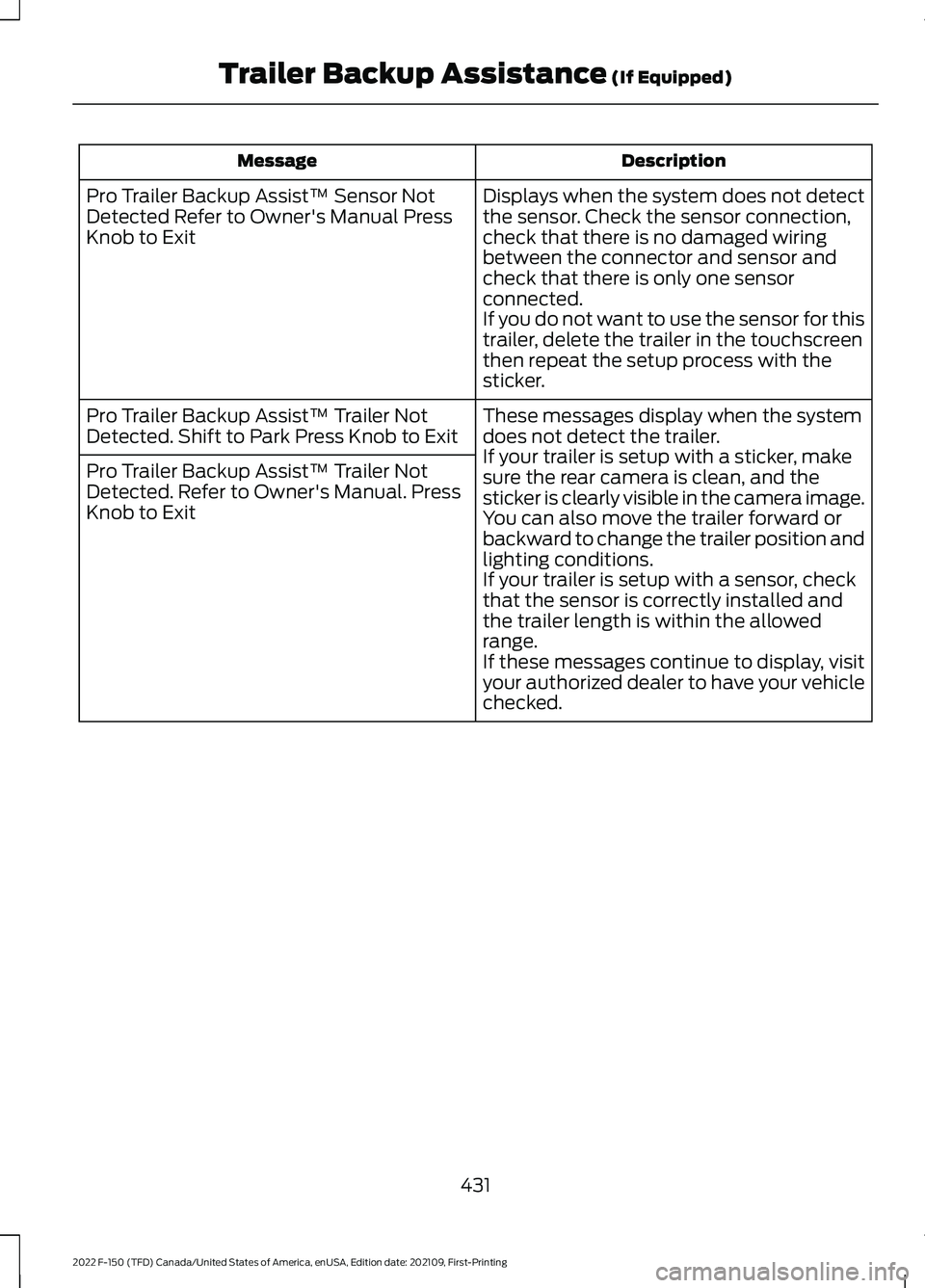
Description
Message
Displays when the system does not detect
the sensor. Check the sensor connection,
check that there is no damaged wiring
between the connector and sensor and
check that there is only one sensor
connected.
If you do not want to use the sensor for this
trailer, delete the trailer in the touchscreen
then repeat the setup process with the
sticker.
Pro Trailer Backup Assist™ Sensor Not
Detected Refer to Owner's Manual Press
Knob to Exit
These messages display when the system
does not detect the trailer.
If your trailer is setup with a sticker, make
sure the rear camera is clean, and the
sticker is clearly visible in the camera image.
You can also move the trailer forward or
backward to change the trailer position and
lighting conditions.
If your trailer is setup with a sensor, check
that the sensor is correctly installed and
the trailer length is within the allowed
range.
If these messages continue to display, visit
your authorized dealer to have your vehicle
checked.
Pro Trailer Backup Assist™ Trailer Not
Detected. Shift to Park Press Knob to Exit
Pro Trailer Backup Assist™ Trailer Not
Detected. Refer to Owner's Manual. Press
Knob to Exit
431
2022 F-150 (TFD) Canada/United States of America, enUSA, Edition date: 202109, First-Printing Trailer Backup Assistance (If Equipped)
Page 437 of 750
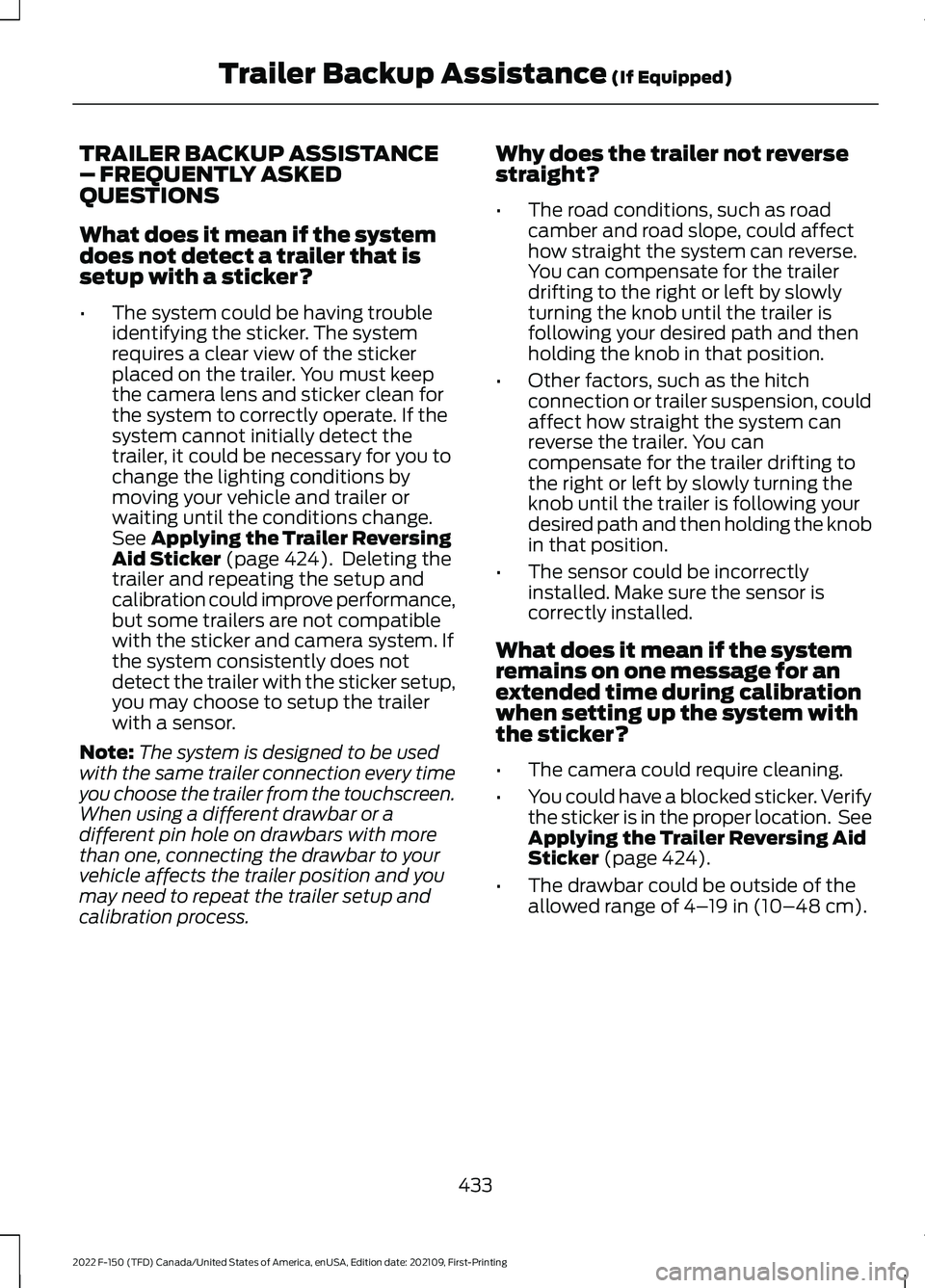
TRAILER BACKUP ASSISTANCE
– FREQUENTLY ASKED
QUESTIONS
What does it mean if the system
does not detect a trailer that is
setup with a sticker?
•
The system could be having trouble
identifying the sticker. The system
requires a clear view of the sticker
placed on the trailer. You must keep
the camera lens and sticker clean for
the system to correctly operate. If the
system cannot initially detect the
trailer, it could be necessary for you to
change the lighting conditions by
moving your vehicle and trailer or
waiting until the conditions change.
See Applying the Trailer Reversing
Aid Sticker (page 424). Deleting the
trailer and repeating the setup and
calibration could improve performance,
but some trailers are not compatible
with the sticker and camera system. If
the system consistently does not
detect the trailer with the sticker setup,
you may choose to setup the trailer
with a sensor.
Note: The system is designed to be used
with the same trailer connection every time
you choose the trailer from the touchscreen.
When using a different drawbar or a
different pin hole on drawbars with more
than one, connecting the drawbar to your
vehicle affects the trailer position and you
may need to repeat the trailer setup and
calibration process. Why does the trailer not reverse
straight?
•
The road conditions, such as road
camber and road slope, could affect
how straight the system can reverse.
You can compensate for the trailer
drifting to the right or left by slowly
turning the knob until the trailer is
following your desired path and then
holding the knob in that position.
• Other factors, such as the hitch
connection or trailer suspension, could
affect how straight the system can
reverse the trailer. You can
compensate for the trailer drifting to
the right or left by slowly turning the
knob until the trailer is following your
desired path and then holding the knob
in that position.
• The sensor could be incorrectly
installed. Make sure the sensor is
correctly installed.
What does it mean if the system
remains on one message for an
extended time during calibration
when setting up the system with
the sticker?
• The camera could require cleaning.
• You could have a blocked sticker. Verify
the sticker is in the proper location. See
Applying the Trailer Reversing Aid
Sticker
(page 424).
• The drawbar could be outside of the
allowed range of
4–19 in (10–48 cm).
433
2022 F-150 (TFD) Canada/United States of America, enUSA, Edition date: 202109, First-Printing Trailer Backup Assistance
(If Equipped)
Page 438 of 750
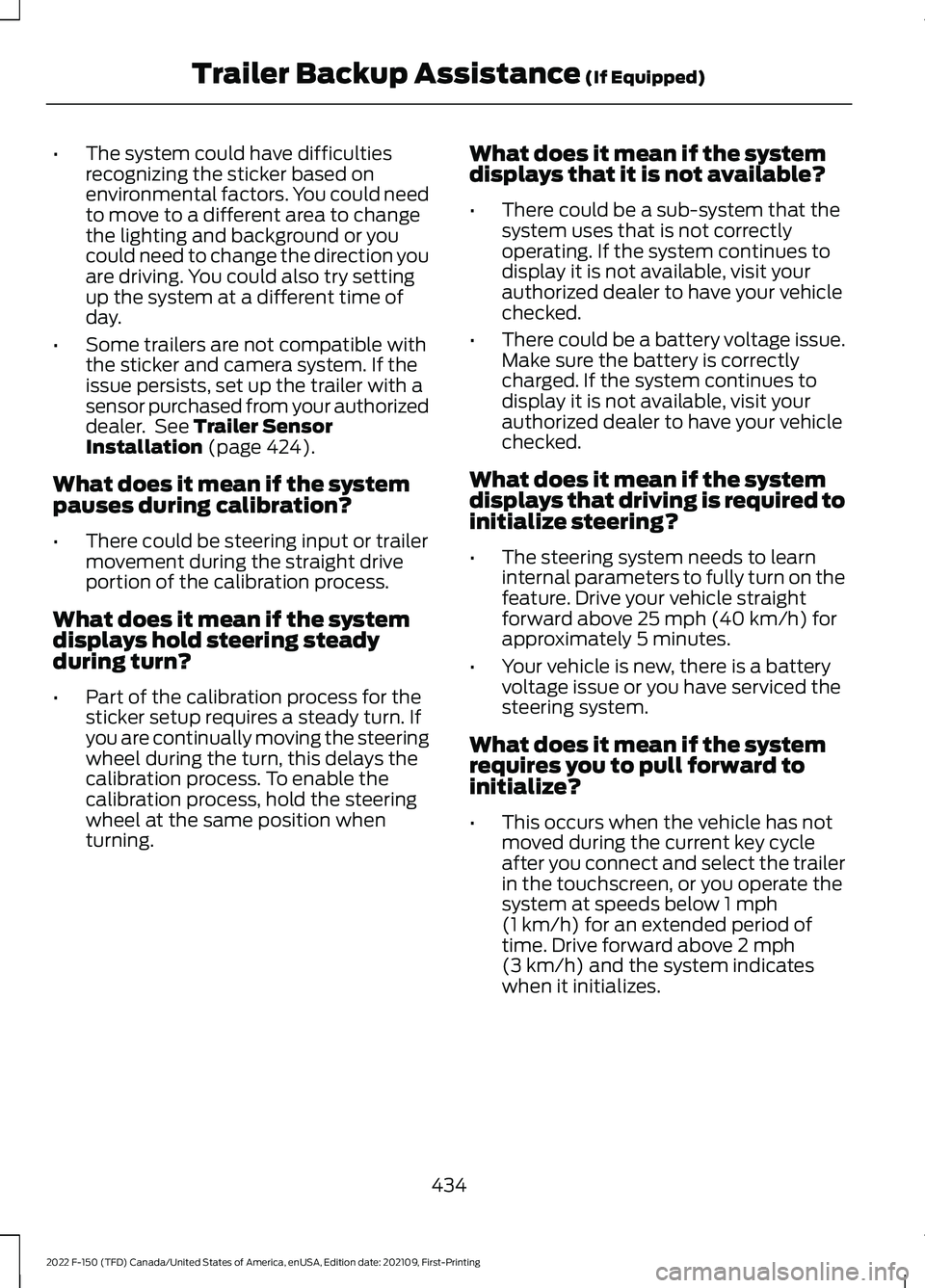
•
The system could have difficulties
recognizing the sticker based on
environmental factors. You could need
to move to a different area to change
the lighting and background or you
could need to change the direction you
are driving. You could also try setting
up the system at a different time of
day.
• Some trailers are not compatible with
the sticker and camera system. If the
issue persists, set up the trailer with a
sensor purchased from your authorized
dealer. See Trailer Sensor
Installation (page 424).
What does it mean if the system
pauses during calibration?
• There could be steering input or trailer
movement during the straight drive
portion of the calibration process.
What does it mean if the system
displays hold steering steady
during turn?
• Part of the calibration process for the
sticker setup requires a steady turn. If
you are continually moving the steering
wheel during the turn, this delays the
calibration process. To enable the
calibration process, hold the steering
wheel at the same position when
turning. What does it mean if the system
displays that it is not available?
•
There could be a sub-system that the
system uses that is not correctly
operating. If the system continues to
display it is not available, visit your
authorized dealer to have your vehicle
checked.
• There could be a battery voltage issue.
Make sure the battery is correctly
charged. If the system continues to
display it is not available, visit your
authorized dealer to have your vehicle
checked.
What does it mean if the system
displays that driving is required to
initialize steering?
• The steering system needs to learn
internal parameters to fully turn on the
feature. Drive your vehicle straight
forward above
25 mph (40 km/h) for
approximately 5 minutes.
• Your vehicle is new, there is a battery
voltage issue or you have serviced the
steering system.
What does it mean if the system
requires you to pull forward to
initialize?
• This occurs when the vehicle has not
moved during the current key cycle
after you connect and select the trailer
in the touchscreen, or you operate the
system at speeds below
1 mph
(1 km/h) for an extended period of
time. Drive forward above 2 mph
(3 km/h) and the system indicates
when it initializes.
434
2022 F-150 (TFD) Canada/United States of America, enUSA, Edition date: 202109, First-Printing Trailer Backup Assistance
(If Equipped)
Page 448 of 750
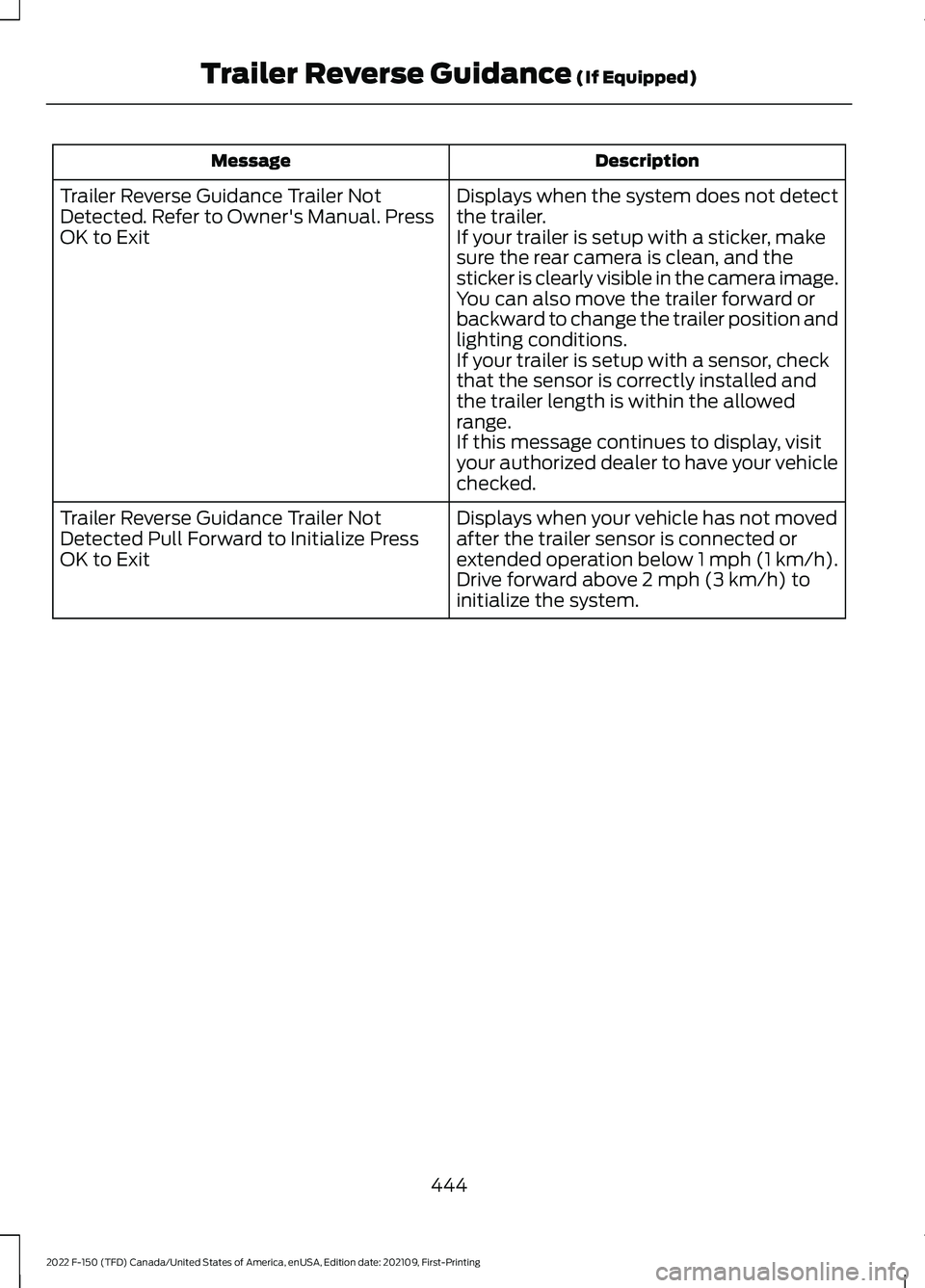
Description
Message
Displays when the system does not detect
the trailer.
If your trailer is setup with a sticker, make
sure the rear camera is clean, and the
sticker is clearly visible in the camera image.
You can also move the trailer forward or
backward to change the trailer position and
lighting conditions.
If your trailer is setup with a sensor, check
that the sensor is correctly installed and
the trailer length is within the allowed
range.
If this message continues to display, visit
your authorized dealer to have your vehicle
checked.
Trailer Reverse Guidance Trailer Not
Detected. Refer to Owner's Manual. Press
OK to Exit
Displays when your vehicle has not moved
after the trailer sensor is connected or
extended operation below 1 mph (1 km/h).
Drive forward above 2 mph (3 km/h) to
initialize the system.
Trailer Reverse Guidance Trailer Not
Detected Pull Forward to Initialize Press
OK to Exit
444
2022 F-150 (TFD) Canada/United States of America, enUSA, Edition date: 202109, First-Printing Trailer Reverse Guidance
(If Equipped)
Page 449 of 750
TRAILER REVERSE GUIDANCE –
FREQUENTLY ASKED QUESTIONS
What does it mean if the system
does not detect a trailer that is
setup with a sticker?
•
The system could be having trouble
identifying the sticker. The system
requires a clear view of the sticker
placed on the trailer. You must keep
the camera lens and sticker clean for
the system to correctly operate. If the
system cannot initially detect the
trailer, it could be necessary for you to
change the lighting conditions by
moving your vehicle and trailer or
waiting until the conditions change.
See Applying the Trailer Reverse
Aid Sticker (page 438). Deleting the
trailer and repeating the setup and
calibration could improve performance,
but some trailers are not compatible
with the sticker and camera system. If
the system consistently does not
detect the trailer with the sticker setup,
you may choose to setup the trailer
with a sensor.
Note: The system is designed to be used
with the same trailer connection every time
you choose the trailer from the touchscreen.
When using a different drawbar or a
different pin hole on drawbars with more
than one, connecting the drawbar to your
vehicle affects the trailer position and you
may need to repeat the trailer setup and
calibration process. Why does the trailer not reverse
straight?
•
The road conditions, such as road
camber and road slope, could affect
how straight the system can reverse.
You can compensate for the trailer
drifting to the right or left by slowly
turning the knob until the trailer is
following your desired path and then
holding the knob in that position.
• Other factors, such as the hitch
connection or trailer suspension, could
affect how straight the system can
reverse the trailer. You can
compensate for the trailer drifting to
the right or left by slowly turning the
knob until the trailer is following your
desired path and then holding the knob
in that position.
• The sensor could be incorrectly
installed. Make sure the sensor is
correctly installed.
What does it mean if the system
remains on one message for an
extended time during calibration
when setting up the system with
the sticker?
• The camera could require cleaning.
• You could have a blocked sticker. Verify
the sticker is in the proper location. See
Applying the Trailer Reverse Aid
Sticker
(page 438).
• The drawbar could be outside of the
allowed range of
4–19 in (10–48 cm).
445
2022 F-150 (TFD) Canada/United States of America, enUSA, Edition date: 202109, First-Printing Trailer Reverse Guidance
(If Equipped)
Page 450 of 750
•
The system could have difficulties
recognizing the sticker based on
environmental factors. You could need
to move to a different area to change
the lighting and background or you
could need to change the direction you
are driving. You could also try setting
up the system at a different time of
day.
• Some trailers are not compatible with
the sticker and camera system. If the
issue persists, set up the trailer with a
sensor purchased from your authorized
dealer. See Trailer Sensor
Installation (page 439).
What does it mean if the system
pauses during calibration?
• There could be steering input or trailer
movement during the straight drive
portion of the calibration process.
What does it mean if the system
displays hold steering steady
during turn?
• Part of the calibration process for the
sticker setup requires a steady turn. If
you are continually moving the steering
wheel during the turn, this delays the
calibration process. To enable the
calibration process, hold the steering
wheel at the same position when
turning. What does it mean if the system
displays that it is not available?
•
There could be a sub-system that the
system uses that is not correctly
operating. If the system continues to
display it is not available, visit your
authorized dealer to have your vehicle
checked.
• There could be a battery voltage issue.
Make sure the battery is correctly
charged. If the system continues to
display it is not available, visit your
authorized dealer to have your vehicle
checked.
What does it mean if the system
displays that driving is required to
initialize steering?
• The steering system needs to learn
internal parameters to fully turn on the
feature. Drive your vehicle straight
forward above
25 mph (40 km/h) for
approximately 5 minutes.
• Your vehicle is new, there is a battery
voltage issue or you have serviced the
steering system.
What does it mean if the system
requires you to pull forward to
initialize?
• This occurs when the vehicle has not
moved during the current key cycle
after you connect and select the trailer
in the touchscreen, or you operate the
system at speeds below
1 mph
(1 km/h) for an extended period of
time. Drive forward above 2 mph
(3 km/h) and the system indicates
when it initializes.
446
2022 F-150 (TFD) Canada/United States of America, enUSA, Edition date: 202109, First-Printing Trailer Reverse Guidance
(If Equipped)
Page 454 of 750
6. Always keep available ground
clearance in mind and pick a route that
minimizes the risk of catching the
underside of the vehicle on an obstacle.
7. When negotiating low speed obstacles,
applying light brake pressure in
conjunction with the throttle will help
prevent the vehicle from jerking and
will allow you to negotiate the obstacle
in a more controlled manner. Using 4L
will also help with this.
8. Off-roading requires a high degree of concentration. Even if your local law
does not prohibit alcohol use while
driving off-road, Ford strongly
recommends against drinking if you
plan to off-road.
Crossing Obstacles
• Review the path ahead before
attempting to cross any obstacle. It is
best if the obstacle is reviewed from
outside the vehicle so that there is a
good understanding of terrain condition
both in front of and behind the
obstacle.
• Approach obstacles slowly.
• If a large obstacle such as a rock
cannot be avoided, choose a path that
places the rock directly under the tire
rather than the undercarriage of the
vehicle. This will help prevent damage
to the vehicle.
• Ditches and washouts should be
crossed at a 45° angle, allowing each
wheel to independently cross the
obstacle.
Hill Climbing WARNING:
Extreme care should
be used when steering the vehicle in
reverse down a slope so as not to cause
the vehicle to swerve out of control. •
Always attempt to climb a steep hill
along the fall line of the slope and not
diagonally.
• If the vehicle is unable to make it up
the hill, DO NOT attempt to turn back
down the slope. Place the vehicle in
low range and slowly back down in
reverse.
• When descending a steep slope, select
low gear and engage hill descent
control. Use the throttle and brake
pedals to control your descent speed.
Note: Hill descent control is functional in
reverse and should be used in this situation.
BASIC OFF-ROAD DRIVING
TECHNIQUES - RAPTOR
Grip the steering wheel with your thumbs
on the outside of the rim. This reduces the
risk of injury due to abrupt steering wheel
motions that occur when negotiating rough
terrain.
If you are driving in a dusty area, be sure to
leave ample distance between your vehicle
and any other vehicles to allow for
adequate vision.
DRIVING OFF-ROAD - RAPTOR
Driving In Snow and Ice WARNING:
Do not become
overconfident in the ability of four-wheel
drive vehicles. Although a four-wheel
drive vehicle may accelerate better than
a two-wheel drive vehicle in low traction
situations, it won't stop any faster than
two-wheel drive vehicles. Always drive
at a safe speed.
Make sure you allow sufficient distance
between your vehicle and other vehicles
for stopping.
450
2022 F-150 (TFD) Canada/United States of America, enUSA, Edition date: 202109, First-Printing Driving Hints
Page 455 of 750
Driving In Sand
When driving over sand, try to keep all four
wheels on the most solid area of the trail.
Driving In Mud
Be cautious of sudden changes in vehicle
speed or direction when you are driving in
mud.
After driving through mud, clean your
vehicle. Excess mud stuck on the wheels
and tires and rotating components can
cause an imbalance and result in damage.
Note:
The vehicle brakes are less effective
when wet or muddy.
Driving Over Rocks and Gravel
Never attempt to straddle a rock that is
large enough to strike your axles or
undercarriage.
Leave a generous gap between your
vehicle and other vehicles to minimize the
risk of damage. Avoid dust clouds as they
reduce visibility.
Climbing A Hill WARNING: Extreme care should
be used when steering the vehicle in
reverse down a slope so as not to cause
the vehicle to swerve out of control.
Do not drive over the crest of a hill without
seeing what conditions are on the other
side. Do not drive in reverse over a hill
without the aid of an observer.
Note: Avoid turning on steep slopes or hills.
A danger lies in losing traction, slipping
sideways and possible vehicle roll over.
Note: Too much acceleration can cause
the tires to slip, spin or lose traction,
resulting in loss of vehicle control. Driving Through Water WARNING:
Do not attempt to
cross a deep, fast flowing body of water.
Failure to follow this instruction could
result in the loss of control of your
vehicle, personal injury or death.
The key to a safe crossing is the water
depth, current and bottom of the water's
condition. On soft bottoms, the vehicle
sinks in, effectively increasing the water
level on the vehicle. Make sure to consider
this when determining the depth of water.
Determine the depth and speed of the
current before attempting a water crossing.
Be aware that obstacles and debris could
be beneath the water ’s surface.
Note: Cross flowing water at an angle
heading slightly upstream.
Note: Tread lightly and avoid damage to
the environment.
Water can cause permanent damage that
may not be covered by your vehicle
warranty. See
Driving Through Water
Limitations (page 453).
Note: Failure to follow the recommended
speeds can result in vehicle damage.
Muddy waters can reduce the cooling
system effectiveness by depositing debris
into the radiator.
High currents even in shallow water can
wash the dirt out from around your tires or
push your vehicle across slippery rocks or
surfaces.
Do not cross any body of water that is fast
flowing and rising.
451
2022 F-150 (TFD) Canada/United States of America, enUSA, Edition date: 202109, First-Printing Driving Hints
Page 457 of 750
DRIVING THROUGH WATER
LIMITATIONS - RAPTOR
Maximum Wading
Depth
Model
32 in (810 mm)
All.
When you are driving though water do not
exceed 4 mph (7 km/h).
WATER WADING WARNING:
Do not attempt to
cross a deep, fast flowing body of water.
Failure to follow this instruction could
result in the loss of control of your
vehicle, personal injury or death.
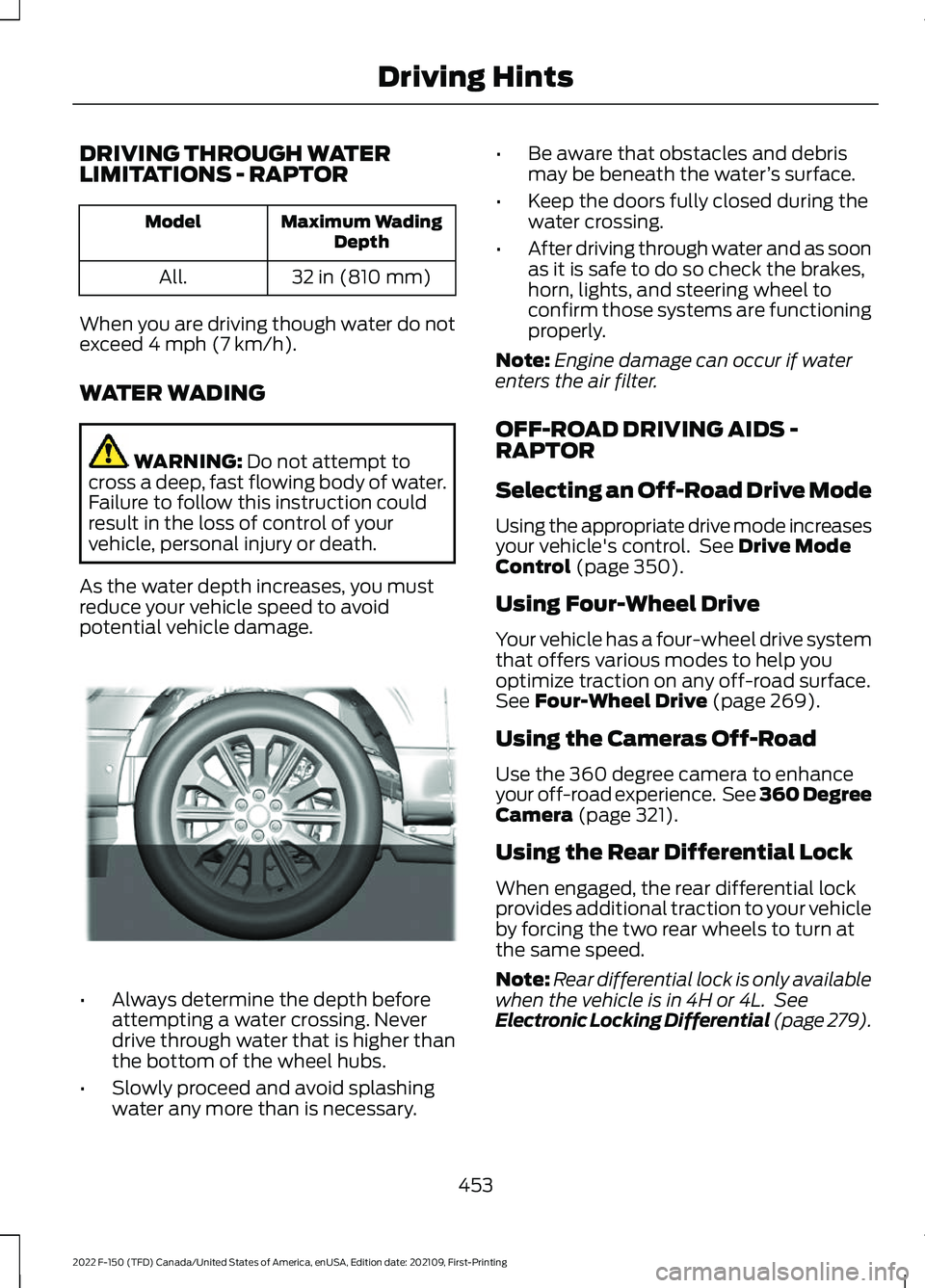
As the water depth increases, you must
reduce your vehicle speed to avoid
potential vehicle damage. •
Always determine the depth before
attempting a water crossing. Never
drive through water that is higher than
the bottom of the wheel hubs.
• Slowly proceed and avoid splashing
water any more than is necessary. •
Be aware that obstacles and debris
may be beneath the water ’s surface.
• Keep the doors fully closed during the
water crossing.
• After driving through water and as soon
as it is safe to do so check the brakes,
horn, lights, and steering wheel to
confirm those systems are functioning
properly.
Note: Engine damage can occur if water
enters the air filter.
OFF-ROAD DRIVING AIDS -
RAPTOR
Selecting an Off-Road Drive Mode
Using the appropriate drive mode increases
your vehicle's control. See
Drive Mode
Control (page 350).
Using Four-Wheel Drive
Your vehicle has a four-wheel drive system
that offers various modes to help you
optimize traction on any off-road surface.
See
Four-Wheel Drive (page 269).
Using the Cameras Off-Road
Use the 360 degree camera to enhance
your off-road experience. See 360 Degree
Camera
(page 321).
Using the Rear Differential Lock
When engaged, the rear differential lock
provides additional traction to your vehicle
by forcing the two rear wheels to turn at
the same speed.
Note: Rear differential lock is only available
when the vehicle is in 4H or 4L. See
Electronic Locking Differential (page 279).
453
2022 F-150 (TFD) Canada/United States of America, enUSA, Edition date: 202109, First-Printing Driving HintsE310941
Page 463 of 750
SNOW PLOWING
PRECAUTIONS
WARNING: Modifying or adding
equipment to the front of your vehicle
could affect the performance of the
airbag system, increasing the risk of
injury. This includes the hood, bumper
system, frame, front body structure, tow
hooks, hood pins, push bar and
snowplows. WARNING:
Do not attempt to
service, repair, or modify the
supplementary restraint system or
associated components. Failure to
follow this instruction could result in
personal injury or death. WARNING:
All occupants of your
vehicle, including the driver, should
always properly wear their seatbelts,
even when an airbag supplemental
restraint system is provided. Failure to
properly wear your seatbelt could
seriously increase the risk of injury or
death. WARNING:
Do not spin the wheels
at over 34 mph (55 km/h). The tires may
fail and injure a passenger or bystander.
Note: Look for an alterer ’s label on your
vehicle from the snowplow installer
certifying that the installation meets all
applicable Federal Motor Vehicle Safety
Standards (FMVSS).
Note: Federal and some local regulations
require additional exterior lamps for
snowplow-equipped vehicles. Contact an
authorized dealer for additional information. Note:
Do not remove or defeat the tripping
mechanisms designed into the snow
removal equipment by its manufacturer.
Doing so could cause damage to your
vehicle and the snow removal equipment
as well as possible airbag deployment.
OPERATING YOUR VEHICLE
WITH A SNOWPLOW
Weight limits and guidelines for selecting
and installing the snowplow are in the Ford
Truck Body Builders Layout Book. For
additional information, visit
www .f or dbb a s. c om .
A typical snowplow installation affects the
following:
• Front gross axle weight rating. See
What Is the Gross Axle Weight
Rating
(page 389).
• Gross vehicle weight rating. See
What
Is the Gross Vehicle Weight Rating
(page
389).
• Braking and steering.
• Front wheel toe. See the
Ford
Workshop Manual.
• Headlight aim. See
Adjusting the
Headlamps (page 497).
• Tire air pressure. See Information on
the Tire Sidewall
(page 520).
Note: Do not exceed the front gross axle
weight rating or gross vehicle weight rating.
Note: Your vehicle may require rear ballast
weight for proper braking and steering.
Your vehicle has a driver and passenger
airbag supplemental restraint system. The
supplemental restraint system activates
in certain frontal and offset frontal
collisions when the vehicle sustains
sufficient longitudinal deceleration.
459
2022 F-150 (TFD) Canada/United States of America, enUSA, Edition date: 202109, First-Printing Snow Plowing - Vehicles With: Snow Plow Mode