light FORD F-150 2022 Manual Online
[x] Cancel search | Manufacturer: FORD, Model Year: 2022, Model line: F-150, Model: FORD F-150 2022Pages: 750, PDF Size: 12.96 MB
Page 375 of 750
Note:
If the trailer is a bike rack or cargo
rack with electrical lighting, enter a length
of 3 ft (1 m). Cross traffic alert remains on
for trailers with a length of 3 ft (1 m) or less.
Note: The system requires proper
measurement and measure entry to function
properly.
SELECTING A TRAILER
When you connect a trailer to your vehicle,
the trailer set up menu appears in the
touchscreen. This menu allows you to set
up a new trailer or choose from a
previously set up trailer. A warning
message appears and the system turns off
if you do not choose or add a new trailer.
Note: The warning message may not
appear until your vehicle reaches
22 mph
(35 km/h). BLIND SPOT INFORMATION
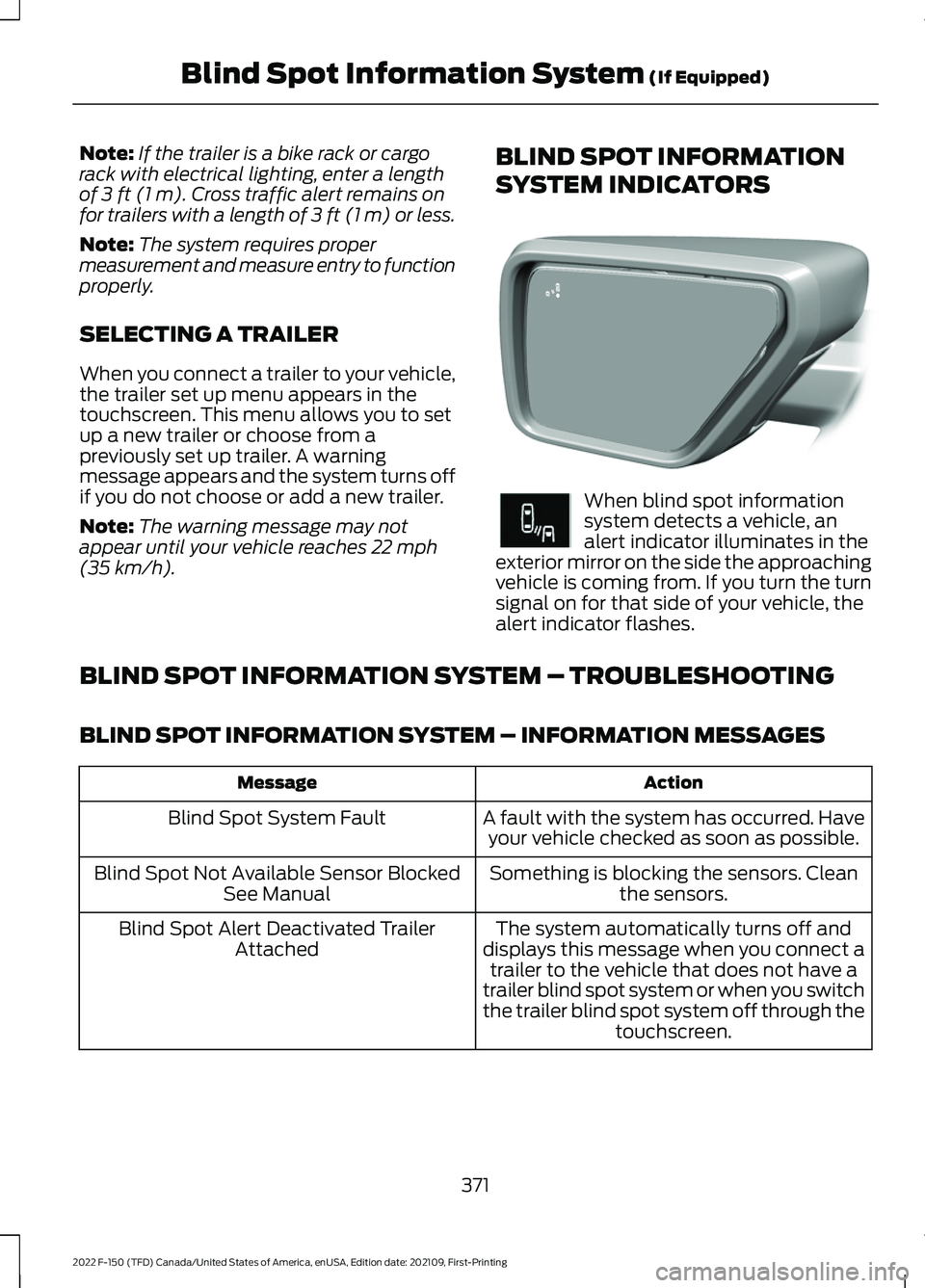
SYSTEM INDICATORS When blind spot information
system detects a vehicle, an
alert indicator illuminates in the
exterior mirror on the side the approaching
vehicle is coming from. If you turn the turn
signal on for that side of your vehicle, the
alert indicator flashes.
BLIND SPOT INFORMATION SYSTEM – TROUBLESHOOTING
BLIND SPOT INFORMATION SYSTEM – INFORMATION MESSAGES Action
Message
A fault with the system has occurred. Haveyour vehicle checked as soon as possible.
Blind Spot System Fault
Something is blocking the sensors. Cleanthe sensors.
Blind Spot Not Available Sensor Blocked
See Manual
The system automatically turns off and
displays this message when you connect a trailer to the vehicle that does not have a
trailer blind spot system or when you switch
the trailer blind spot system off through the touchscreen.
Blind Spot Alert Deactivated Trailer
Attached
371
2022 F-150 (TFD) Canada/United States of America, enUSA, Edition date: 202109, First-Printing Blind Spot Information System
(If Equipped)E309137 E249861E249861
Page 379 of 750
WHAT IS PRE-COLLISION
ASSIST
Pre-collision assist detects and warns of
approaching hazards in the roadway. The
system provides multiple levels of
assistance to help avoid a collision if your
vehicle is rapidly approaching another
stationary vehicle, a vehicle traveling in the
same direction as yours, or a pedestrian or
cyclist within your driving path.
HOW DOES PRE-COLLISION
ASSIST WORK
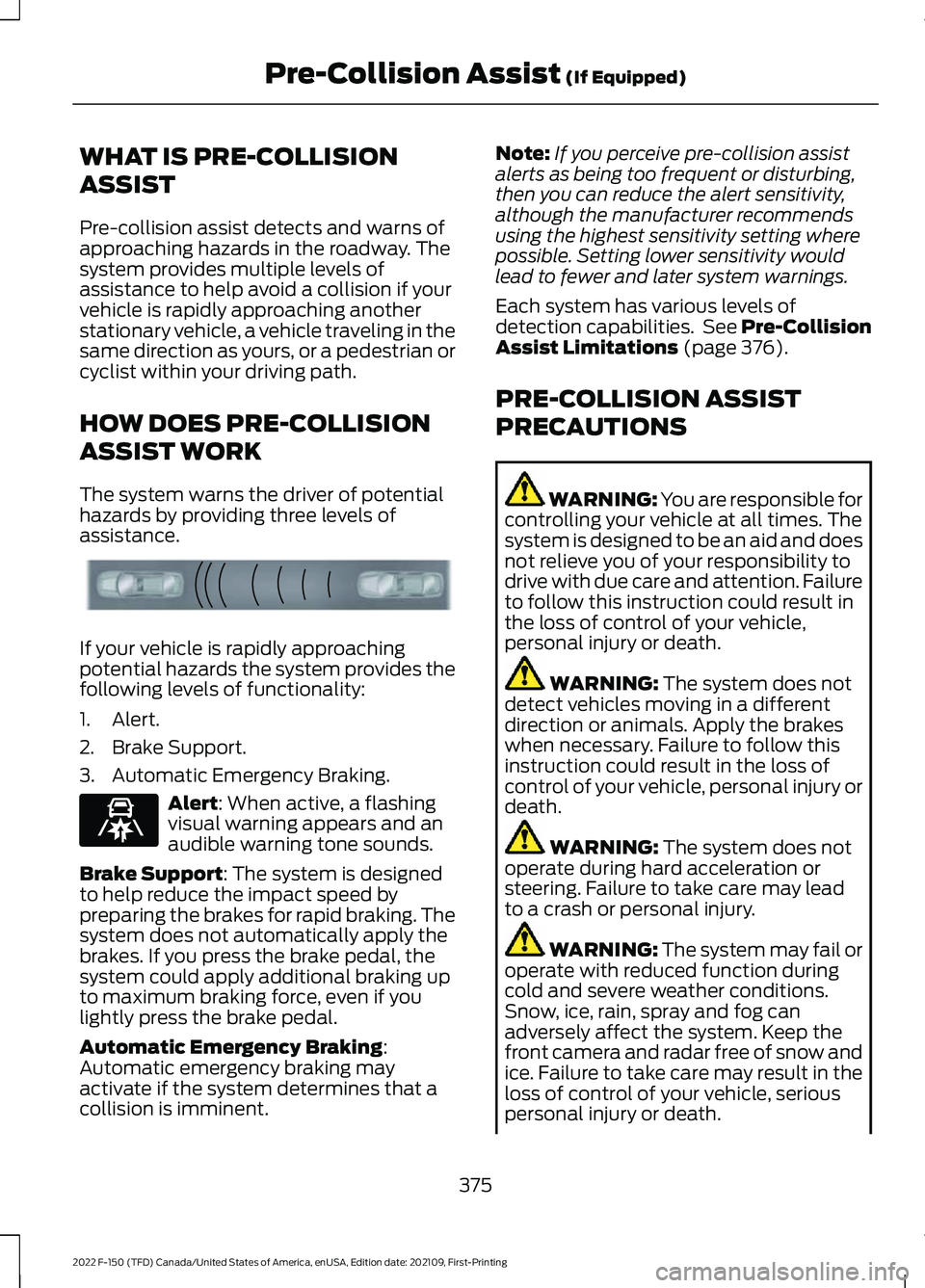
The system warns the driver of potential
hazards by providing three levels of
assistance.
If your vehicle is rapidly approaching
potential hazards the system provides the
following levels of functionality:
1. Alert.
2. Brake Support.
3. Automatic Emergency Braking.
Alert: When active, a flashing
visual warning appears and an
audible warning tone sounds.
Brake Support
: The system is designed
to help reduce the impact speed by
preparing the brakes for rapid braking. The
system does not automatically apply the
brakes. If you press the brake pedal, the
system could apply additional braking up
to maximum braking force, even if you
lightly press the brake pedal.
Automatic Emergency Braking
:
Automatic emergency braking may
activate if the system determines that a
collision is imminent. Note:
If you perceive pre-collision assist
alerts as being too frequent or disturbing,
then you can reduce the alert sensitivity,
although the manufacturer recommends
using the highest sensitivity setting where
possible. Setting lower sensitivity would
lead to fewer and later system warnings.
Each system has various levels of
detection capabilities. See Pre-Collision
Assist Limitations
(page 376).
PRE-COLLISION ASSIST
PRECAUTIONS WARNING: You are responsible for
controlling your vehicle at all times. The
system is designed to be an aid and does
not relieve you of your responsibility to
drive with due care and attention. Failure
to follow this instruction could result in
the loss of control of your vehicle,
personal injury or death. WARNING:
The system does not
detect vehicles moving in a different
direction or animals. Apply the brakes
when necessary. Failure to follow this
instruction could result in the loss of
control of your vehicle, personal injury or
death. WARNING:
The system does not
operate during hard acceleration or
steering. Failure to take care may lead
to a crash or personal injury. WARNING: The system may fail or
operate with reduced function during
cold and severe weather conditions.
Snow, ice, rain, spray and fog can
adversely affect the system. Keep the
front camera and radar free of snow and
ice. Failure to take care may result in the
loss of control of your vehicle, serious
personal injury or death.
375
2022 F-150 (TFD) Canada/United States of America, enUSA, Edition date: 202109, First-Printing Pre-Collision Assist
(If Equipped)E156130 E329466
Page 380 of 750
WARNING: Take additional care if
your vehicle is heavily loaded or you are
towing a trailer. These conditions could
result in reduced performance of this
system. Failure to follow this instruction
could result in the loss of control of your
vehicle, personal injury or death. WARNING:
The system cannot
help prevent all crashes. Do not rely on
this system to replace driver judgment
and the need to maintain a safe distance
and speed. WARNING:
In situations where the
vehicle camera has limited detection
capability, this may reduce system
performance. These situations include
but are not limited to direct or low
sunlight, vehicles at night without tail
lights, unconventional vehicle types,
pedestrians with complex backgrounds,
running pedestrians, partly obscured
pedestrians, or pedestrians that the
system cannot distinguish from a group.
Failure to take care may result in the loss
of control of your vehicle, serious
personal injury or death.
PRE-COLLISION ASSIST
LIMITATIONS
Pre-collision assist depends on the
detection ability of its camera and sensors.
Any obstructions or damage to these areas
can limit detection or prevent the system
from functioning. See
Locating the
Pre-Collision Assist Sensors (page 378).
The system is active at speeds above
3 mph (5 km/h)
. Note:
The pre-collision assist system
automatically disables when you select
four-wheel drive low, manually disable
AdvanceTrac ™, or select rock crawl mode,
if your vehicle comes with it.
Note: Brake support and automatic
emergency braking are active at speeds up
to 80 mph (130 km/h). If your vehicle has a
radar sensor included with adaptive cruise
control, then brake support and automatic
emergency braking are active up to the
maximum speed of your vehicle.
Pedestrian Detection Limitations
Pedestrian detection is active at speeds
up to
50 mph (80 km/h).
Pedestrian detection operates optimally
when detected hazards are clearly
identifiable. System performance may
reduce in situations where pedestrians are
running, partly obscured, have a complex
background, or when the system cannot
distinguish pedestrians from a group.
Cyclist Detection Limitations
Cyclist detection is active at speeds up to
50 mph (80 km/h)
.
Cyclist detection functions optimally when
detected hazards are clearly identifiable.
System performance may reduce in
situations where cyclists are fast-moving,
partly obscured, have a complex
background, or cannot be distinguished
from a group.
Intersection Assist
(If Equipped)
If your vehicle comes with a radar sensor
included in adaptive cruise control, the
pre-collision assist system may operate in
a scenario where you are turning across an
oncoming vehicle's path. Detection of
vehicles driving in an oncoming direction
is active if your vehicle is driving at speeds
up to
19 mph (30 km/h).
376
2022 F-150 (TFD) Canada/United States of America, enUSA, Edition date: 202109, First-Printing Pre-Collision Assist
(If Equipped)
Page 405 of 750
When the trailer disconnects in this state,
the vehicle alarm sounds and the system
sends an alert to your FordPass app.
Note:
For reliable trailer detection, the
trailer ’s lamps must be SAE certified for
each intended purpose.
Note: If the trailer is not compatible with
the feature, the turn signals flash twice.
Switching the Trailer Connection
Alarm On and Off
1. Press Features on the touchscreen.
2. Press
Towing.
3. Press
Manage trailers.
4. Press the currently active trailer's name.
5. Switch
Trailer Connection Alarm on
or off.
Note: The alarm disables by default. If the
system detects a trailer, it can be
configurable.
Note: Settings are applicable only for the
selected trailer profile.
Trailer Connector Battery Lead
The trailer receives power from the vehicle
trailer connector battery lead when the
following occurs:
• Your vehicle is in accessory mode or
switched on.
• The trailer wiring connector is free of
corrosion or other damage. •
The vehicle battery is not low.
• When the trailer has a battery:
•The trailer battery voltage is within
5 volts of the vehicle battery
voltage.
• When you have the trailer battery
properly connected.
TRAILER LIGHTING CHECK WARNING:
Never connect any
trailer lamp wiring to the vehicle's tail
lamp wiring; this may damage the
electrical system resulting in fire. Contact
your authorized dealer as soon as
possible for assistance in proper trailer
tow wiring installation. Additional
electrical equipment may be required.
Perform a trailer light illumination
sequence to confirm that all lights are
functioning by using the FordPass app or
the vehicle's touchscreen.
Performing the Trailer Lighting
Check Using the Touchscreen
1. Press
Features on the touchscreen.
2. Press
Towing.
3. Press
Trailer Light Check.
4. Press
Start.
401
2022 F-150 (TFD) Canada/United States of America, enUSA, Edition date: 202109, First-Printing Connecting a Trailer
Page 408 of 750
Certain states require functioning trailer
brakes for trailers over a specified weight.
Be sure to check state regulations for this
specified weight.
Ford Motor Company recommends
separate functioning brake systems for
trailers weighing more than 1,500 lb
(680 kg) when loaded.
TOWING A TRAILER
LIMITATIONS
The vehicle's load capacity
designation is by weight, not by
volume, so you cannot necessarily
use all available space when
loading a vehicle or trailer.
Note: Your vehicle could have
reduced performance when
operating at high altitudes and
when heavily loaded or towing a
trailer. When driving at elevation,
to match driving performance as
perceived at sea level, reduce gross
vehicle weight and gross
combination weight by 2% per
1,000 ft (300 m)
of elevation.
Note: Do not use four-wheel drive
when towing a trailer or when you
heavily load your vehicle for
extended periods of time. LOADING YOUR TRAILER
To help minimize how trailer
movement affects your vehicle
when driving:
•
Load the heaviest items closest
to the trailer floor.
• Load the heaviest items
centered between the left and
right side trailer tires.
• Load the heaviest items above
the trailer axles or just slightly
forward toward the trailer
tongue. Do not allow the final
trailer tongue weight to go
above or below 10-15% of the
loaded trailer weight. The
trailer tongue weight should
never exceed 10% of the
maximum towing capacity.
• Select a ball mount with the
correct rise or drop. When both
the loaded vehicle and trailer
are connected, the trailer frame
should be level, or slightly
angled down toward your
vehicle, when viewed from the
side.
TRAILER TOWING HINTS
Towing a trailer places an extra load on
your vehicle's engine, transmission, axle,
brakes, tires and suspension. Periodically
inspect these components during and after
any towing operation.
When driving with a trailer or payload, a
slight takeoff vibration or shudder may be
present due to the increased payload
weight.
404
2022 F-150 (TFD) Canada/United States of America, enUSA, Edition date: 202109, First-Printing Towing a Trailer
Page 412 of 750
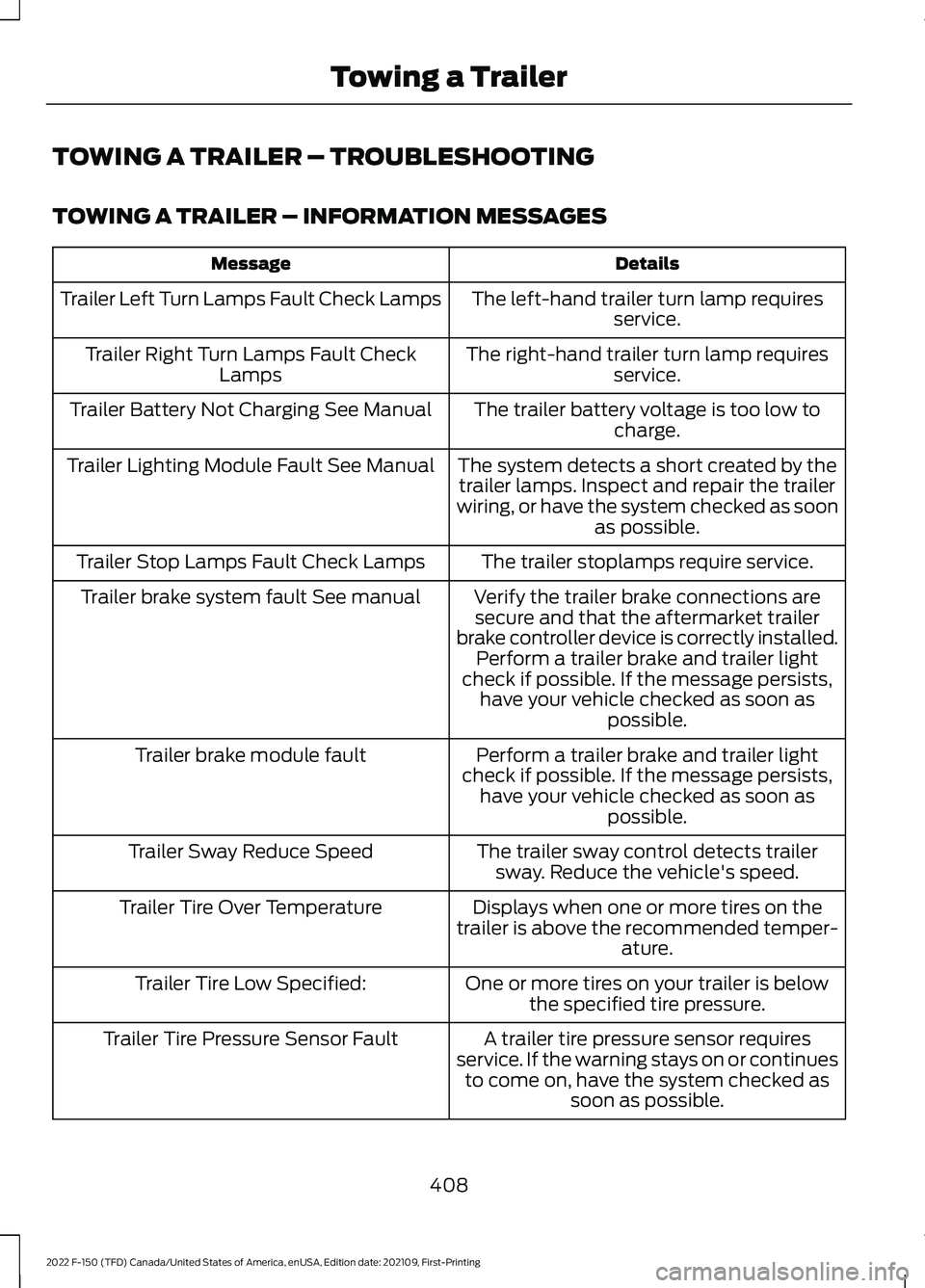
TOWING A TRAILER – TROUBLESHOOTING
TOWING A TRAILER – INFORMATION MESSAGES
Details
Message
The left-hand trailer turn lamp requiresservice.
Trailer Left Turn Lamps Fault Check Lamps
The right-hand trailer turn lamp requiresservice.
Trailer Right Turn Lamps Fault Check
Lamps
The trailer battery voltage is too low tocharge.
Trailer Battery Not Charging See Manual
The system detects a short created by thetrailer lamps. Inspect and repair the trailer
wiring, or have the system checked as soon as possible.
Trailer Lighting Module Fault See Manual
The trailer stoplamps require service.
Trailer Stop Lamps Fault Check Lamps
Verify the trailer brake connections aresecure and that the aftermarket trailer
brake controller device is correctly installed. Perform a trailer brake and trailer light
check if possible. If the message persists, have your vehicle checked as soon as possible.
Trailer brake system fault See manual
Perform a trailer brake and trailer light
check if possible. If the message persists, have your vehicle checked as soon as possible.
Trailer brake module fault
The trailer sway control detects trailersway. Reduce the vehicle's speed.
Trailer Sway Reduce Speed
Displays when one or more tires on the
trailer is above the recommended temper- ature.
Trailer Tire Over Temperature
One or more tires on your trailer is belowthe specified tire pressure.
Trailer Tire Low Specified:
A trailer tire pressure sensor requires
service. If the warning stays on or continues to come on, have the system checked as soon as possible.
Trailer Tire Pressure Sensor Fault
408
2022 F-150 (TFD) Canada/United States of America, enUSA, Edition date: 202109, First-Printing Towing a Trailer
Page 419 of 750
WHAT IS TRAILER HITCHING
ASSISTANCE
Trailer hitching assistance helps the driver
align the vehicle hitch ball to a trailer
coupler.
HOW DOES TRAILER HITCHING
ASSISTANCE WORK
Trailer hitching assistance uses the
following to detect your trailer:
•
Rear view camera.
• Radar.
• Parking aid sensors.
• External rear lighting.
This feature also controls the following to
align the hitch ball with the trailer coupler:
• Steering.
• Shifting.
• Braking and acceleration.
Note: Blocked sensors could affect system
performance. Do not cover the sensors with
bumper stickers, tape, repair compound or
other objects.
TRAILER HITCHING
ASSISTANCE PRECAUTIONS WARNING: You are responsible for
controlling your vehicle at all times. The
system is designed to be an aid and does
not relieve you of your responsibility to
drive with due care and attention. Failure
to follow this instruction could result in
the loss of control of your vehicle,
personal injury or death. WARNING: The system is not
designed to detect cyclists,
motorcyclists, pedestrians or animals.
Apply the brakes when necessary. Failure
to follow this instruction could result
personal injury or death. WARNING:
The system may not
operate properly during severe weather
conditions, for example snow, ice, heavy
rain and spray. Always drive with due
care and attention. Failure to take care
may result in a crash.
Note: Trailer hitching assistance only works
with conventional trailers, couplers and
hitch balls.
Note: The hitch ball must be properly
installed on the vehicle for the system to
function as intended. An improperly
installed hitch ball could result in damage
to your vehicle or trailer.
Note: Certain aftermarket modifications
such as oversized tires or lift kits could make
trailer hitching assistance fail or not work
as intended.
Note: Keep the sensors and camera free
from snow, ice and dirt.
Note: Clean the camera lens with a soft,
lint-free cloth and non-abrasive cleaner.
TRAILER HITCHING
ASSISTANCE LIMITATIONS
The system could not function or could
function with reduced performance during
the following:
• When using trailer hitching assistance
in tall grass and weeds.
• When safety chains, cables or wiring
are dangling near the coupler.
• When using trailer hitching assistance
on slippery surfaces.
415
2022 F-150 (TFD) Canada/United States of America, enUSA, Edition date: 202109, First-Printing Trailer Hitching Assistance
(If Equipped)
Page 420 of 750
•
When using hitches that raise the hitch
ball more than 4 in (10 cm), lower the
hitch ball by more than 6 in (16 cm) or
extend the hitch ball away from the
vehicle more than
12 in (30 cm).
• When using objects taller than
8 in
(20 cm), such as large blocks, under
the jack stand.
• When you park the trailer on surfaces
that are similar in color to the trailer
coupler and hitch ball.
•A black coupler or hitch ball over a
dark asphalt surface.
• A light color coupler or hitch ball
over a light concrete surface.
• When there are low or no light sources,
such as at night.
SWITCHING TRAILER
HITCHING ASSISTANCE ON
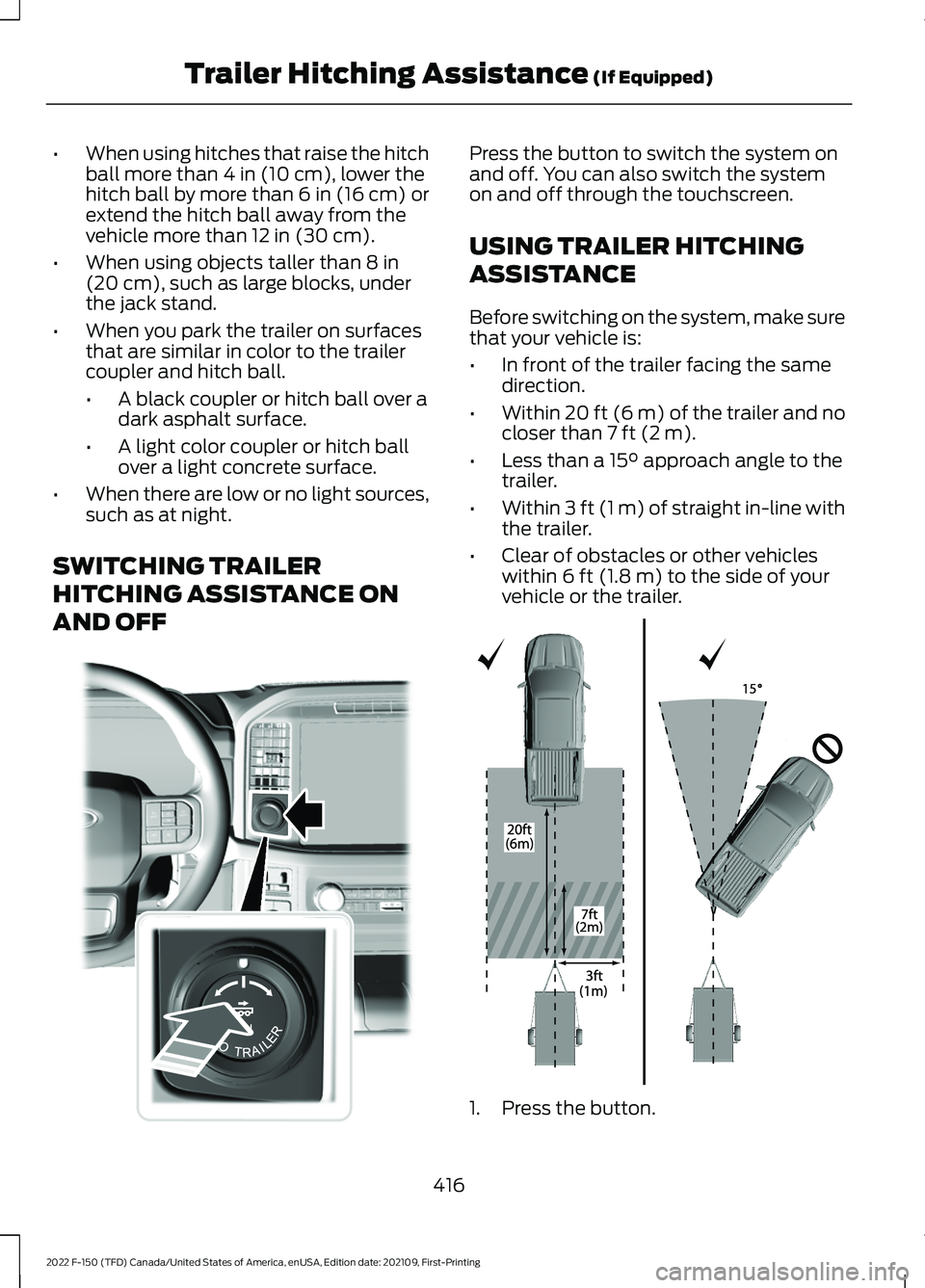
AND OFF Press the button to switch the system on
and off. You can also switch the system
on and off through the touchscreen.
USING TRAILER HITCHING
ASSISTANCE
Before switching on the system, make sure
that your vehicle is:
•
In front of the trailer facing the same
direction.
• Within
20 ft (6 m) of the trailer and no
closer than 7 ft (2 m).
• Less than a
15° approach angle to the
trailer.
• Within
3 ft (1 m) of straight in-line with
the trailer.
• Clear of obstacles or other vehicles
within
6 ft (1.8 m) to the side of your
vehicle or the trailer. 1. Press the button.
416
2022 F-150 (TFD) Canada/United States of America, enUSA, Edition date: 202109, First-Printing Trailer Hitching Assistance
(If Equipped)E310335 E348940
Page 423 of 750
Taillights
Press to see the hitch load balance on the
vehicle
’s tail lamp.
Connection Checklist
Press to go through the trailer setup guide
and adjust the load in the trailer to a
balanced range.
Reset Hitch Weight
Press to reset the weight on the hitch to
zero.
Loaded Trailer Weight
Press to set the total weight of the loaded
trailer.
Note: The vehicle's tongue weight is not
available until you attach a trailer.
Note: Make sure you include both the trailer
weight and the trailer cargo in your
calculation for total weight of the loaded
trailer.
Taillights
Press to see the hitch load balance on the
vehicle ’s tail lamp.
Smart Hitch Settings
Measurement Units
Press to change measurement units
between pounds and kilograms.
419
2022 F-150 (TFD) Canada/United States of America, enUSA, Edition date: 202109, First-Printing Smart Hitch (If Equipped)
Page 424 of 750
WHAT IS ON-BOARD SCALE
On-board scale provides the estimated
payload of your vehicle and warns when
your vehicle is overloaded.
HOW DOES ON-BOARD SCALE
WORK
On-board scale uses sensors mounted to
the suspension to calculate the vehicle's
payload.
ON-BOARD SCALE
LIMITATIONS
You cannot use the system if any of the
following occur:
•
The wheels are not pointed straight
ahead.
• Your vehicle is not in park (P).
• Your vehicle is not on a level surface.
• The tire pressures are below the
recommended levels.
• Your vehicle is off.
USING ON-BOARD SCALE
1. Press Features on the touchscreen.
2. Press
Onboard Scales.
Note: You can also access on-board scale
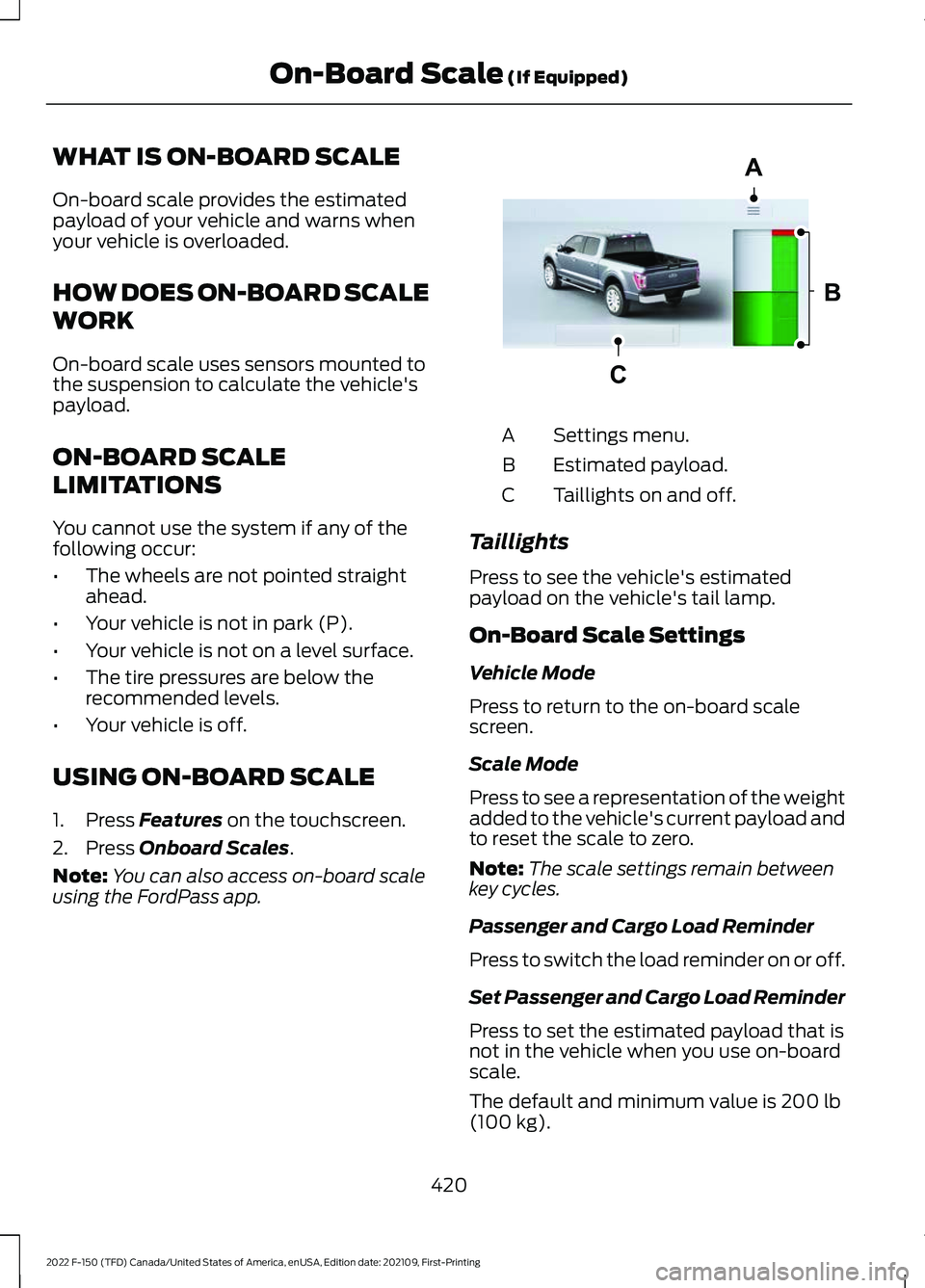
using the FordPass app. Settings menu.
A
Estimated payload.
B
Taillights on and off.
C
Taillights
Press to see the vehicle's estimated
payload on the vehicle's tail lamp.
On-Board Scale Settings
Vehicle Mode
Press to return to the on-board scale
screen.
Scale Mode
Press to see a representation of the weight
added to the vehicle's current payload and
to reset the scale to zero.
Note: The scale settings remain between
key cycles.
Passenger and Cargo Load Reminder
Press to switch the load reminder on or off.
Set Passenger and Cargo Load Reminder
Press to set the estimated payload that is
not in the vehicle when you use on-board
scale.
The default and minimum value is
200 lb
(100 kg).
420
2022 F-150 (TFD) Canada/United States of America, enUSA, Edition date: 202109, First-Printing On-Board Scale
(If Equipped)A
B
CE361332