ECO mode FORD F-150 2022 User Guide
[x] Cancel search | Manufacturer: FORD, Model Year: 2022, Model line: F-150, Model: FORD F-150 2022Pages: 750, PDF Size: 12.96 MB
Page 72 of 750
•
Shoulder belt height adjusters.
• Shoulder belt guide on seat backrest.
• Child restraint LATCH and tether
anchors.
• Attaching hardware.
Read the child restraint manufacturer's
instructions for additional inspection and
maintenance information specific to the
child restraint.
We recommend that all seatbelt
assemblies in use in vehicles involved in a
crash be replaced. However, if the crash
was minor and an authorized dealer finds
that the belts do not show damage and
continue to operate properly, they do not
need to be replaced. Seatbelt assemblies
not in use during a crash should also be
checked and replaced if either damage or
improper operation is noted.
Properly care for seatbelts. See Cleaning
Seatbelts (page 515).
SEATBELT EXTENSIONS WARNING:
Persons who fit into
the vehicle's seatbelt should not use an
extension. Unnecessary use could result
in serious personal injury in the event of
a crash. WARNING:
Only use extensions
provided free of charge by our dealers.
The dealer will provide an extension
designed specifically for this vehicle,
model year and seating position. The use
of an extension intended for another
vehicle, model year or seating position
may not offer you the full protection of
your vehicle's seatbelt restraint system. WARNING:
Never use seatbelt
extensions to install child restraints. WARNING:
Do not use extensions
to change the way the seatbelt fits
across the torso, over the lap or to make
the seatbelt buckle easier to reach.
If, because of body size or driving position,
it is not possible to properly fasten the
seatbelt over your lap and shoulder, an
extension that is compatible with the
seatbelts is available free of charge from
our dealers. Only use our seatbelt
extensions made by the original equipment
seatbelt manufacturer with our seatbelts.
Ask your authorized dealer if your extension
is compatible with your vehicle restraint
system.
68
2022 F-150 (TFD) Canada/United States of America, enUSA, Edition date: 202109, First-Printing Seatbelts
Page 113 of 750
All personal codes erase and only the
five-digit master code works.
Anti-Scan Feature
The keypad goes into an anti-scan mode
if you enter the wrong code seven times.
This mode turns off the keypad for one
minute and the keypad lamp flashes.
The anti-scan feature turns off after:
•
One minute of keypad inactivity.
• You press the unlock button on the
remote control.
• You switch the ignition on.
• You unlock your vehicle using keyless
entry.
USING THE KEYLESS ENTRY
KEYPAD
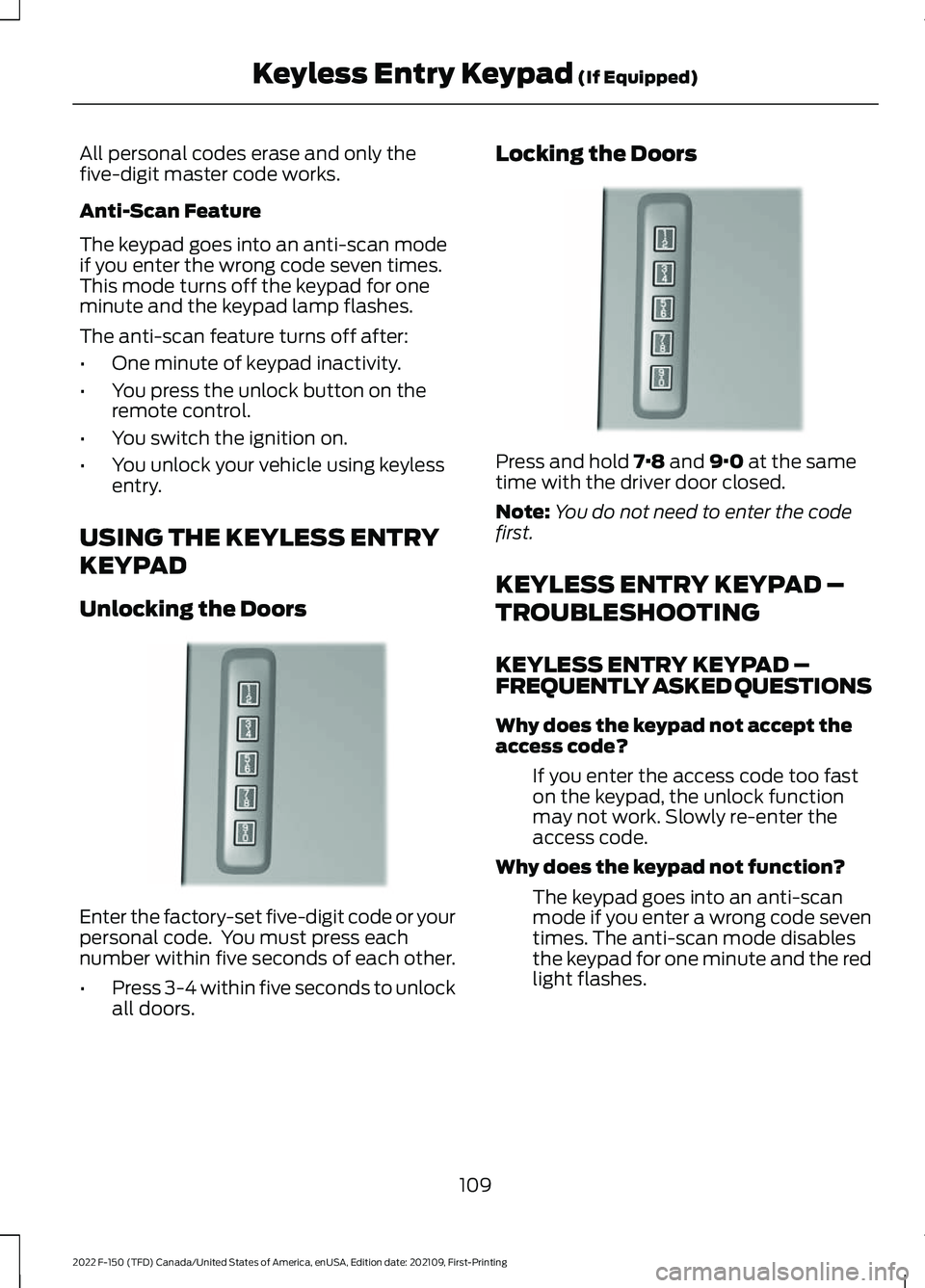
Unlocking the Doors Enter the factory-set five-digit code or your
personal code. You must press each
number within five seconds of each other.
•
Press 3-4 within five seconds to unlock
all doors. Locking the Doors
Press and hold 7·8 and 9·0 at the same
time with the driver door closed.
Note: You do not need to enter the code
first.
KEYLESS ENTRY KEYPAD –
TROUBLESHOOTING
KEYLESS ENTRY KEYPAD –
FREQUENTLY ASKED QUESTIONS
Why does the keypad not accept the
access code?
If you enter the access code too fast
on the keypad, the unlock function
may not work. Slowly re-enter the
access code.
Why does the keypad not function? The keypad goes into an anti-scan
mode if you enter a wrong code seven
times. The anti-scan mode disables
the keypad for one minute and the red
light flashes.
109
2022 F-150 (TFD) Canada/United States of America, enUSA, Edition date: 202109, First-Printing Keyless Entry Keypad
(If Equipped)E190936 E190936
Page 122 of 750
Note:
The tailgate stops and reverses if it
detects an obstruction when closing.
Lift-to-Close
To close the tailgate automatically using
lift-to-close, lift the tailgate approximately
4 in (10 cm) and hold it for a few seconds.
Note: If the tailgate position is more than
halfway between open and close, it may not
close automatically.
Manual Close
You can close the tailgate manually when
you lift the tailgate in a continuous motion.
If you stop the tailgate motion, the
lift-to-close feature can engage and power
close the tailgate.
Putting the Tailgate in Manual Mode
You can put the tailgate in manual mode
through the vehicle settings in your
touchscreen.
Note: In manual mode, the tailgate only
functions by the tailgate release button and
messaging is reduced.
CLOSING THE TAILGATE USING
THE REMOTE CONTROL Press the remote control button
twice within three seconds.
REMOVING AND INSTALLING
THE TAILGATE WARNING: Always properly secure
cargo to prevent shifting cargo or cargo
falling from the vehicle. Failure to do so
could result in compromised vehicle
stability and serious personal injury to
vehicle occupants or others. 1. Put the tailgate into manual mode by
accessing the vehicle settings using the
touchscreen.
2. Open the tailgate.
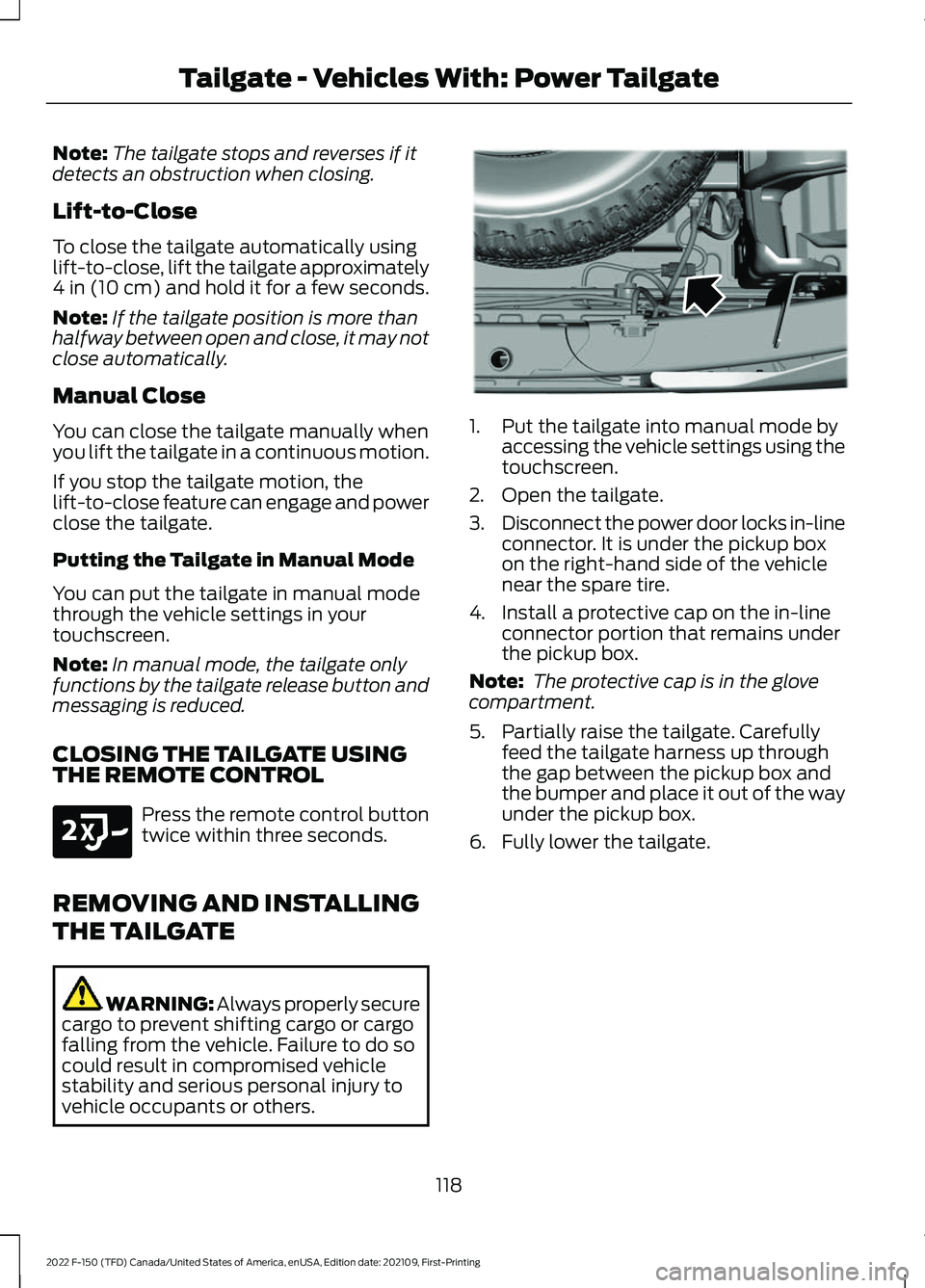
3. Disconnect the power door locks in-line
connector. It is under the pickup box
on the right-hand side of the vehicle
near the spare tire.
4. Install a protective cap on the in-line connector portion that remains under
the pickup box.
Note: The protective cap is in the glove
compartment.
5. Partially raise the tailgate. Carefully feed the tailgate harness up through
the gap between the pickup box and
the bumper and place it out of the way
under the pickup box.
6. Fully lower the tailgate.
118
2022 F-150 (TFD) Canada/United States of America, enUSA, Edition date: 202109, First-Printing Tailgate - Vehicles With: Power TailgateE191530 E189556
Page 140 of 750
POWER RUNNING BOARD
PRECAUTIONS
WARNING: In extreme climates,
excessive ice buildup may occur, causing
the running boards not to deploy. Make
sure that the running boards have
deployed, and have finished moving
before attempting to step on them. The
running boards will resume normal
function once the blockage is cleared. WARNING:
Switch off the running
boards before jacking or placing any
object under your vehicle. Never place
your hand between the extended running
board and your vehicle. A moving running
board may cause injury.
Do not use the running boards, front and
rear hinge assemblies, running board
motors, or the running board underbody
mounts to lift your vehicle when jacking.
Use proper jacking points.
The running boards could move slower in
cold temperatures.
POWER RUNNING BOARD
SETTINGS
1. Press
Features on the touchscreen.
2. Press
Running Boards.
3. Press a setting.
Running Boards (Modes)
Off
The power running boards remain stowed,
regardless of door position. Auto
The power running boards deploy when
you approach your vehicle with a remote
control, unlock the door or open the door.
The power running boards stow:
•
After a few seconds when you close
the doors.
• If you unlock the door but do not open
it.
• If you have switched
Approach
detection on and do not open a door
before the Auto Timer setting expires.
Note: When you select this mode, an option
displays that allows you to select how long
the running boards stay deployed without
opening the door.
Out
The power running boards remain
deployed, regardless of door position.
Approach detection
When you switch
Approach detection on
with Auto switched on, the running boards
deploy when you approach your vehicle
with a remote control.
POWER RUNNING BOARD
KICK SWITCH
You can use the power running board kick
switch to deploy and stow the running
board without opening or closing the door.
136
2022 F-150 (TFD) Canada/United States of America, enUSA, Edition date: 202109, First-Printing Power Running Boards
(If Equipped)
Page 141 of 750
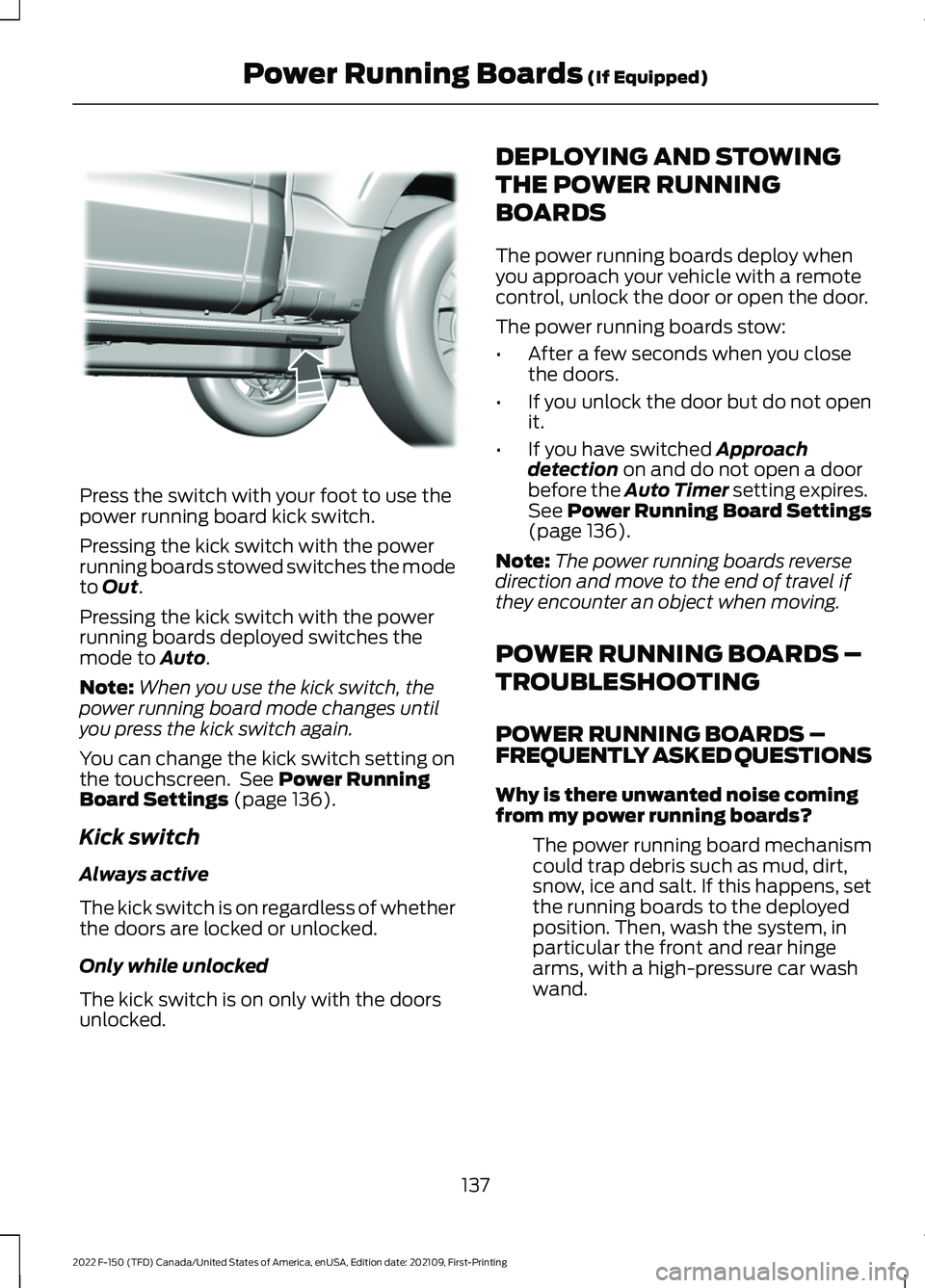
Press the switch with your foot to use the
power running board kick switch.
Pressing the kick switch with the power
running boards stowed switches the mode
to Out.
Pressing the kick switch with the power
running boards deployed switches the
mode to
Auto.
Note: When you use the kick switch, the
power running board mode changes until
you press the kick switch again.
You can change the kick switch setting on
the touchscreen. See
Power Running
Board Settings (page 136).
Kick switch
Always active
The kick switch is on regardless of whether
the doors are locked or unlocked.
Only while unlocked
The kick switch is on only with the doors
unlocked. DEPLOYING AND STOWING
THE POWER RUNNING
BOARDS
The power running boards deploy when
you approach your vehicle with a remote
control, unlock the door or open the door.
The power running boards stow:
•
After a few seconds when you close
the doors.
• If you unlock the door but do not open
it.
• If you have switched
Approach
detection on and do not open a door
before the Auto Timer setting expires.
See
Power Running Board Settings
(page 136).
Note: The power running boards reverse
direction and move to the end of travel if
they encounter an object when moving.
POWER RUNNING BOARDS –
TROUBLESHOOTING
POWER RUNNING BOARDS –
FREQUENTLY ASKED QUESTIONS
Why is there unwanted noise coming
from my power running boards?
The power running board mechanism
could trap debris such as mud, dirt,
snow, ice and salt. If this happens, set
the running boards to the deployed
position. Then, wash the system, in
particular the front and rear hinge
arms, with a high-pressure car wash
wand.
137
2022 F-150 (TFD) Canada/United States of America, enUSA, Edition date: 202109, First-Printing Power Running Boards
(If Equipped)E334917
Page 182 of 750
WHAT IS REMOTE START
The system allows you to remotely start
your vehicle and to adjust the interior
temperature according to the settings that
you chose.
REMOTE START
PRECAUTIONS
WARNING: Do not start the engine
in a closed garage or in other enclosed
areas. Exhaust fumes are toxic. Always
open the garage door before you start
the engine. Failure to follow this
instruction could result in personal injury
or death. WARNING: Do not keep electrical
devices plugged in the power point
whenever the device is not in use. Power
points power up during remote start. WARNING:
Do not keep electrical
devices plugged into the power outlet
whenever the device is not in use. The
outlet provides power when the vehicle
is on. Failure to follow this instruction
could result in personal injury.
REMOTE START LIMITATIONS
Remote start does not work under the
following conditions:
• The alarm horn is sounding.
• The hood is open.
• The transmission is not in park (P).
• The ignition is on.
• The battery voltage is below the
minimum operating voltage.
• Remote start is not enabled. Note:
Do not use remote start if the fuel
level is low.
Note: You can use remote start with
FordPass.
See Connecting the Vehicle to
a Wi-Fi Network (page 597).
ENABLING REMOTE START
1. Press
Settings on the touchscreen.
2. Press
Vehicle Settings.
3. Press
Remote Start Setup.
4. Switch
Remote Start on or off.
Note: To remote start with FordPass, make
sure that the modem is enabled.
See
Connecting FordPass to the Modem
(page
597).
REMOTELY STARTING AND
STOPPING THE VEHICLE
Remotely Starting the Vehicle Press the button on the remote
control.
Within three seconds, press the
button on the remote control.
Within three seconds, press the
button again.
Note: You can also use FordPass to start
the vehicle.
Note: The turn signal lamps flash twice.
Note: The parking lamps turn on when the
vehicle is running.
Note: The horn sounds if the system fails
to start.
Note: All other vehicle systems remain off
when you have remotely started the vehicle.
178
2022 F-150 (TFD) Canada/United States of America, enUSA, Edition date: 202109, First-Printing Remote Start
(If Equipped)E138623 E138625
Page 183 of 750
Note:
The vehicle remains secured when
you have remotely started the vehicle. A
valid key must be inside your vehicle to
switch the ignition on and drive your vehicle.
Remotely Stopping the Vehicle Within three seconds, press the
button on the remote control.
Within three seconds, press the
button again.
EXTENDING THE REMOTE
START DURATION
To extend the remote start duration during
remote start, do the following: Press the button on the remote
control.
Within three seconds, press the
button on the remote control.
Within three seconds, press the
button again.
If the duration is set to 15 minutes, the
duration extends by another 15 minutes.
This provides a total of 30 minutes.
Note: Remote start can only be extended
once.
Note: A maximum of two remote starts, or
one remote start with an extension, are
allowed. To reset the restart procedure
switch the vehicle to on, then to off.
REMOTE START REMOTE
CONTROL INDICATORS
Remote Control Feedback
An LED on the remote control provides
status feedback of remote start or stop
commands. Status
LED
Remote startsuccessful.
Solid green.
Remote stopsuccessful.
Solid red.
Request failed or
status not received.
Blinking red.
Status incomplete.
Blinking green.
REMOTE START SETTINGS
SWITCHING CLIMATE CONTROL
AUTO MODE ON AND OFF
1. Press Settings on the touchscreen.
2. Press
Remote Start Setup.
3. Press
Climate Control.
4. Select
Vehicle.
5. Switch
Auto on or off.
Note: If you switch the auto mode on, the
system attempts to heat or cool the interior
to
72°F (22°C).
Note: When you switch the ignition on, the
climate control system returns to the last
used settings.
SWITCHING CLIMATE CONTROL
LAST SETTINGS ON AND OFF
1. Press
Settings on the touchscreen.
2. Press
Vehicle Settings.
3. Press
Remote Start Setup.
4. Switch
Last settings on or off.
Note: If you switch the last settings on, the
system remembers the last used settings.
179
2022 F-150 (TFD) Canada/United States of America, enUSA, Edition date: 202109, First-Printing Remote Start
(If Equipped)E138625 E138623 E138625
Page 188 of 750
SWITCHING DUAL MODE ON AND
OFF
Press the button.
CLIMATE CONTROL HINTS
General Hints
• Prolonged use of recirculated air may
cause the windows to fog up.
• You may feel a small amount of air
from the footwell air vents regardless
of the air distribution setting.
• To reduce humidity build-up inside your
vehicle, do not drive with the system
switched off or with recirculated air
always switched on.
• Do not place objects under the front
seats as this may interfere with the
airflow to the rear seats.
• Remove any snow, ice or leaves from
the air intake area at the base of the
windshield.
• To improve the time to reach a
comfortable temperature in hot
weather, drive with the windows open
until you feel cold air through the air
vents.
Automatic Climate Control
• Adjusting the settings when your
vehicle interior is extremely hot or cold
is not necessary. Automatic mode is
best recommended to maintain set
temperature.
• The system adjusts to heat or cool the
interior to the temperature you select
as quickly as possible.
• For the system to function efficiently,
the instrument panel and side air vents
should be fully open. •
If you press AUTO during cold outside
temperatures, the system directs air
flow to the windshield and side window
air vents.In addition, the blower motor
may run at a slower speed until the
engine warms up.
• If you press
AUTO during hot
temperatures and the inside of the
vehicle is hot, the system uses
recirculated air to maximize interior
cooling. Blower motor speed may also
reduce until the air cools.
Quickly Heating the Interior
1. Press
AUTO.
2. Adjust the temperature function to the
setting you prefer.
Recommended Settings for
Heating
1. Press
AUTO.
2. Adjust the temperature function to the
setting you prefer. Use
72°F (22°C) as
a starting point, then adjust the setting
as necessary.
Quickly Cooling the Interior
1. Press
MAX A/C.
2. Drive with the windows open for a short
period of time.
Recommended Settings for
Cooling
1. Press
AUTO.
2. Adjust the temperature function to the
setting you prefer. Use
72°F (22°C) as
a starting point, then adjust the setting
as necessary.
Defogging the Side Windows in
Cold Weather
1. Press and release defrost or maximum
defrost.
184
2022 F-150 (TFD) Canada/United States of America, enUSA, Edition date: 202109, First-Printing Climate Control - Vehicles With: Automatic Temperature
ControlE265280
Page 200 of 750

ADJUSTING THE LUMBAR
SUPPORT
MASSAGE SEATS (IF EQUIPPED)
MASSAGE SEAT LIMITATIONS
The engine must be running or the vehicle
must be in accessory mode to activate the
seats.
The passenger side massage is available
if the occupant meets the seat sensor
weight requirements.
Allow a few seconds for any selection to
activate. Selecting a different adjustment
cancels the current one in progress. When
the seat backrest and cushion are both
active, the massage alternates between
zones. ADJUSTING THE MASSAGE SEAT
SETTINGS Select the previous massage
pattern or lumbar area.
A
Decrease the massage or lumbar
Intensity.
B
Select the next massage pattern
or lumbar area.
C
Increase the massage or lumbar
Intensity.
D
Select the massage or lumbar
mode.
E
You can also adjust this feature through
the touchscreen.
196
2022 F-150 (TFD) Canada/United States of America, enUSA, Edition date: 202109, First-Printing Front SeatsE327927 E156301
Page 215 of 750
WHAT IS THE POWER OUTLET
The vehicle functions as a portable
generator and can power devices that
require up to the rating listed on power
outlet label.
POWER OUTLET
PRECAUTIONS - VEHICLES
WITH: 2KW
WARNING: Do not start the engine
in a closed garage or in other enclosed
areas. Exhaust fumes are toxic. Always
open the garage door before you start
the engine. Failure to follow this
instruction could result in personal injury
or death. WARNING: Exhaust leaks may
result in entry of harmful and potentially
lethal fumes into the passenger
compartment. If you smell exhaust
fumes inside your vehicle, have your
vehicle inspected immediately. Do not
drive if you smell exhaust fumes. WARNING:
Do not connect any
vehicle power outlets to any premises.
This can create a backfeed to utility lines.
Failure to follow this instruction could
result in property damage, fire, electrical
shock or death. WARNING:
The vehicle's engine
runs while the generator is switched on.
Running engines emit carbon monoxide.
Only use the generator when the vehicle
is outdoors. Failure to follow this
instruction could result in personal injury
or death.
Note: Automatic engine stop is disabled
and the gasoline engine will continue to idle
when the outlet is switched on.
Note: We recommend using UL approved
devices for use with the power outlet.
Note: Unplug electrical devices from the
power outlet when they are not switched
on.
Note: Make sure there is no damage to the
outlets before driving your vehicle.
Note: Make sure that objects are not
blocking the inverter inlet and exhaust near
the rear underseat storage compartment.
Note: The climate control system may turn
on and power may be limited during extreme
hot or cold temperatures to optimize the
performance of the system.
Note: When the outlet is switched on and
the vehicle is in Park (P) the engine turns
off 30 minutes after the low fuel warning is
displayed. After the vehicle is turned off,
generator mode only operates while driving
or until the vehicle is refueled.
211
2022 F-150 (TFD) Canada/United States of America, enUSA, Edition date: 202109, First-Printing Power Outlet - Vehicles With: Pickup Bed Power Generator
Outlet