ECO mode FORD F-150 2022 Owner's Guide
[x] Cancel search | Manufacturer: FORD, Model Year: 2022, Model line: F-150, Model: FORD F-150 2022Pages: 750, PDF Size: 12.96 MB
Page 290 of 750
BRAKE PRECAUTIONS
WARNING: Driving your vehicle
with the warning lamp on is dangerous.
A significant decrease in braking
performance may occur. It may take you
longer to stop your vehicle. Have your
vehicle checked as soon as possible.
Driving extended distances with the
parking brake engaged can cause brake
failure and the risk of personal injury.
Wet brakes result in reduced braking
efficiency. Gently press the brake pedal a
few times when leaving a car wash or
driving from standing water to dry the
brakes.
Note: Depending on applicable laws and
regulations in the country for which your
vehicle was originally built, the stoplamps
could flash during heavy braking. Following
this the hazard warning flashers could also
turn on when your vehicle comes to a stop.
ANTI-LOCK BRAKING SYSTEM
ANTI-LOCK BRAKING SYSTEM
LIMITATIONS
The anti-lock braking system does not
eliminate the risk of crash when:
• You drive too closely to the vehicle in
front of you.
• Your vehicle is hydroplaning.
• You take corners too fast.
• The road surface is poor.
Note: If the system activates, the brake
pedal could pulse and travel further.
Maintain pressure on the brake pedal. BRAKE OVER ACCELERATOR
In the event the accelerator pedal
becomes stuck or entrapped, apply steady
and firm pressure to the brake pedal to
slow the vehicle and reduce engine power.
If you experience this condition, apply the
brakes and bring your vehicle to a safe
stop. Move the transmission to park (P),
switch the engine off and apply the parking
brake. Inspect the accelerator pedal for
any interference. If none are found and the
condition persists, have your vehicle towed
to the nearest authorized dealer.
BRAKE OVER ACCELERATOR
- RAPTOR
In the event the accelerator pedal
becomes stuck or entrapped, apply steady
and firm pressure to the brake pedal to
slow the vehicle and reduce engine power.
If you experience this condition, apply the
brakes and bring your vehicle to a safe
stop. Move the transmission to park (P),
switch the engine off and apply the parking
brake. Inspect the accelerator pedal for
any interference. If none are found and the
condition persists, have your vehicle towed
to the nearest authorized dealer.
Note:
Certain drive modes can disable
brake over accelerator for off-road driving.
LOCATING THE BRAKE FLUID
RESERVOIR
See
Under Hood Overview (page 483).
286
2022 F-150 (TFD) Canada/United States of America, enUSA, Edition date: 202109, First-Printing Brakes
Page 302 of 750
WHAT IS TRACTION CONTROL
The traction control system helps to avoid
drive wheel spin and loss of traction.
HOW DOES TRACTION
CONTROL WORK
If your wheels begin to spin, the loss of
traction can compromise steering control
and stability of the vehicle. The traction
control system applies the brakes to
individual wheels and when needed,
reduces engine power at the same time to
increase traction.
SWITCHING TRACTION
CONTROL ON AND OFF
WARNING: Operating your vehicle
with the traction control disabled could
lead to an increased risk of loss of vehicle
control, vehicle rollover, personal injury
and death. The traction control system turns on each
time you switch the ignition on.
The button for the stability and traction
control system is on the instrument panel. Press and release the button to switch
traction control off. The stability control
system remains fully active, to switch it off,
press and hold the button for a few
seconds, then release.
When you switch traction control off, a
message and an illuminated icon appear
on the instrument cluster.
Press the switch again to turn the traction
control system back on to normal
operation.
If your vehicle is stuck in mud or snow,
switching traction control off may be
beneficial as this allows the wheels to spin.
Your vehicle may have MyKey restrictions
regarding this feature. See
What Is
MyKey (page 96).
TRACTION CONTROL
INDICATOR
Stability and Traction Control
Indicator If the indicator does not
illuminate when you switch the
ignition on, or remains on when
the engine is running, this indicates a
malfunction. Have your vehicle checked
by an authorized dealer as soon as
possible. The traction control off indicator
illuminates when you switch the
traction control system off, or
when an alternative stability control mode
is selected that requires the traction
control off depending on the drive mode
selected.
298
2022 F-150 (TFD) Canada/United States of America, enUSA, Edition date: 202109, First-Printing Traction ControlE327252 E138639 E130458
Page 306 of 750
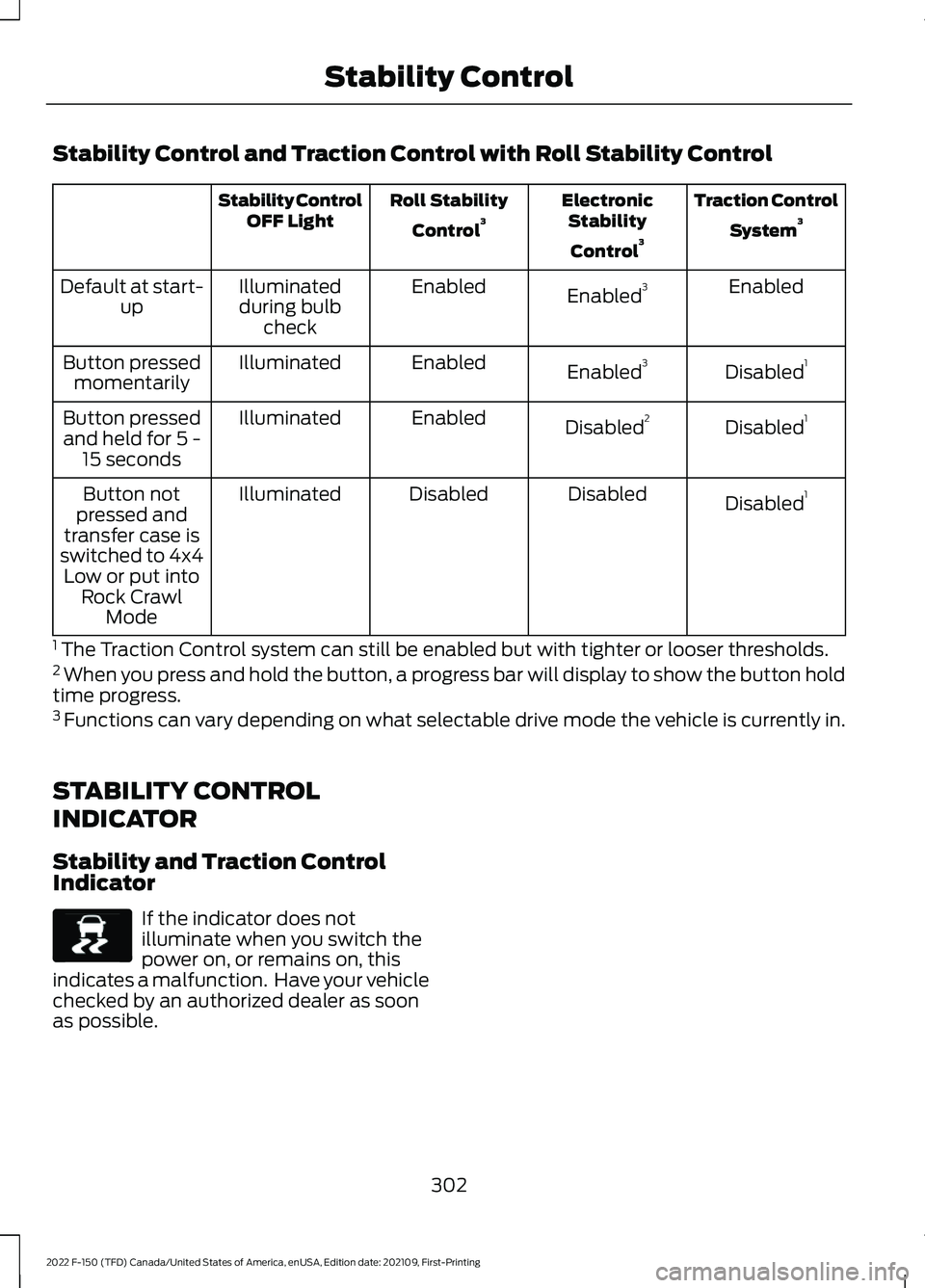
Stability Control and Traction Control with Roll Stability Control
Traction Control
System 3
Electronic
Stability
Control 3
Roll Stability
Control 3
Stability Control
OFF Light
Enabled
Enabled 3
Enabled
Illuminated
during bulb check
Default at start-
up
Disabled1
Enabled 3
Enabled
Illuminated
Button pressed
momentarily
Disabled1
Disabled 2
Enabled
Illuminated
Button pressed
and held for 5 - 15 seconds
Disabled1
Disabled
Disabled
Illuminated
Button not
pressed and
transfer case is
switched to 4x4 Low or put into Rock Crawl Mode
1 The Traction Control system can still be enabled but with tighter or looser thresholds.
2 When you press and hold the button, a progress bar will display to show the button hold
time progress.
3 Functions can vary depending on what selectable drive mode the vehicle is currently in.
STABILITY CONTROL
INDICATOR
Stability and Traction Control
Indicator If the indicator does not
illuminate when you switch the
power on, or remains on, this
indicates a malfunction. Have your vehicle
checked by an authorized dealer as soon
as possible.
302
2022 F-150 (TFD) Canada/United States of America, enUSA, Edition date: 202109, First-Printing Stability ControlE138639
Page 314 of 750
HILL DESCENT CONTROL – TROUBLESHOOTING
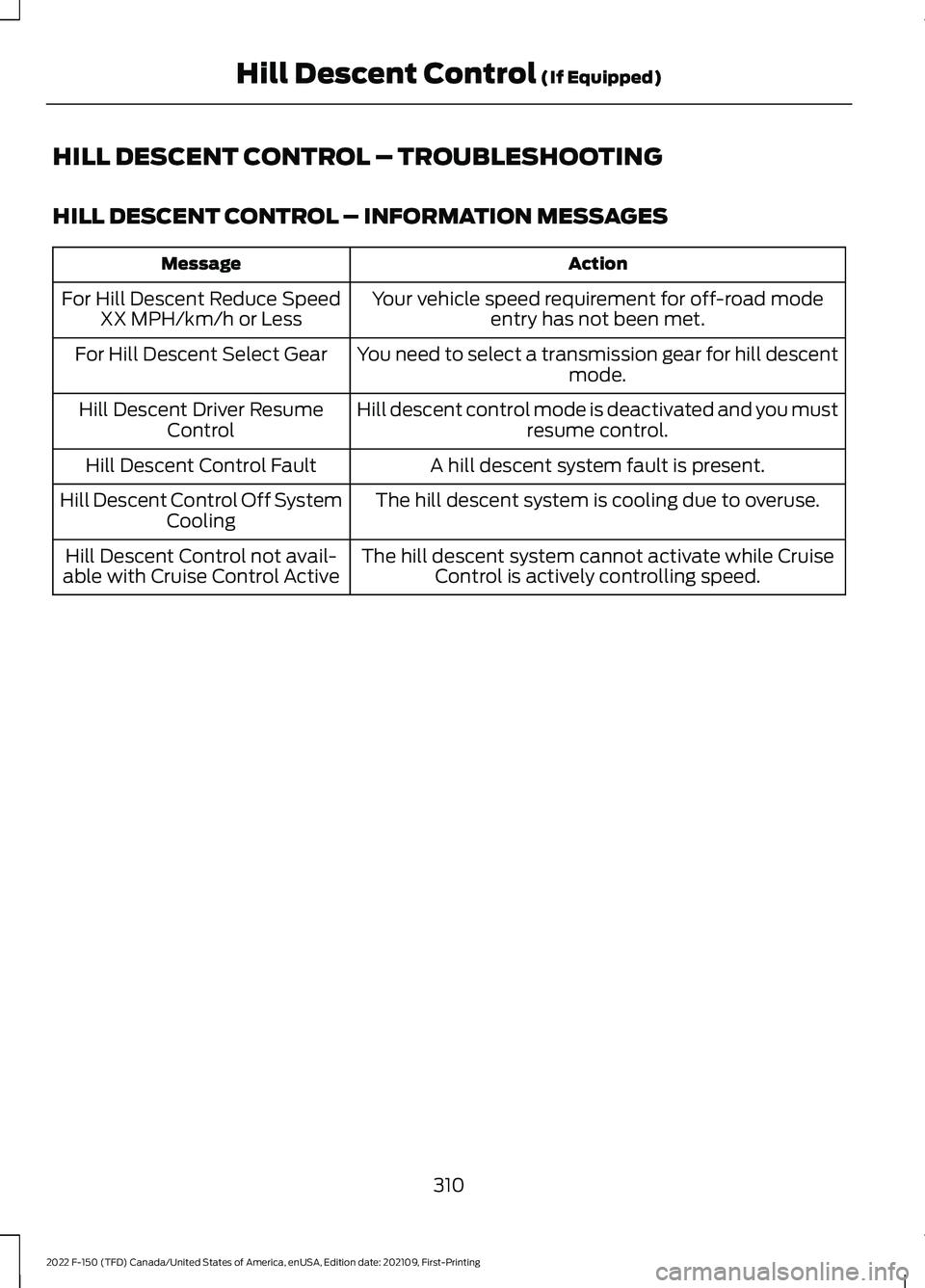
HILL DESCENT CONTROL – INFORMATION MESSAGES
Action
Message
Your vehicle speed requirement for off-road modeentry has not been met.
For Hill Descent Reduce Speed
XX MPH/km/h or Less
You need to select a transmission gear for hill descentmode.
For Hill Descent Select Gear
Hill descent control mode is deactivated and you mustresume control.
Hill Descent Driver Resume
Control
A hill descent system fault is present.
Hill Descent Control Fault
The hill descent system is cooling due to overuse.
Hill Descent Control Off System
Cooling
The hill descent system cannot activate while CruiseControl is actively controlling speed.
Hill Descent Control not avail-
able with Cruise Control Active
310
2022 F-150 (TFD) Canada/United States of America, enUSA, Edition date: 202109, First-Printing Hill Descent Control (If Equipped)
Page 341 of 750
Action
Message
Cruise control does not resume automatic-ally when this display is active.
Stopped
If the lead vehicle begins to move, you areprompted to press the resume button.
Press button to resume
Press and release the button or use the
accelerator pedal to resume following the lead vehicle.
Displays when on a limited access highway
after following a vehicle to a complete stop. In this situation, the vehicle resumes
following the lead vehicle without a button
press or pressing the accelerator pedal. The system can remain in auto-resume state
for approximately 30 seconds, after which it no longer automatically resumes.
Auto-Resume
OVERRIDING THE SET SPEED WARNING: If you override the
system by pressing the accelerator
pedal, it does not automatically apply
the brakes to maintain a gap from any
vehicle ahead.
When you press the accelerator pedal, you
override the set speed and gap distance.
Use the accelerator pedal to intentionally
exceed the set speed limit.
When you override the system, the green
indicator illuminates and the vehicle icon
does not appear in the instrument cluster
display.
The system resumes operation when you
release the accelerator pedal. The vehicle
speed decreases to the set speed, or a
lower speed if following a slower vehicle. ADAPTIVE CRUISE CONTROL
INDICATORS Illuminates when you switch
adaptive cruise control on. The
color of the indicator changes to
indicate the system status.
White indicates the system is on but
inactive.
Green indicates that you set the speed and
the system is active.
SWITCHING FROM ADAPTIVE
CRUISE CONTROL TO CRUISE
CONTROL WARNING:
Normal cruise control
will not brake when your vehicle is
approaching slower vehicles. Always be
aware of which mode you have selected
and apply the brakes when necessary.
337
2022 F-150 (TFD) Canada/United States of America, enUSA, Edition date: 202109, First-Printing Adaptive Cruise Control
(If Equipped)E144529
Page 345 of 750
INTELLIGENT ADAPTIVE CRUISE
CONTROL LIMITATIONS
The speed limit information provided by
the navigation map data could be
inaccurate or out of date.
The system may not detect and read
speed limit signs with conditional
information, for example, when a sign is
flashing, during specific time ranges, or
when children are present.
Note:
The system does not set the vehicle
speed to speed limits shown with a
supplementary traffic sign.
Under certain conditions, the system may
not adjust the vehicle speed until after your
vehicle passes the speed limit.
SWITCHING INTELLIGENT MODE
ON AND OFF
1. Press Features on the touchscreen.
2. Press
Driver Assistance.
3. Press
Cruise Control.
4. Press
Adaptive Cruise Control.
5. Press
Speed Sign Recognition.
ADJUSTING THE SET SPEED
TOLERANCE
1. Press
Features on the touchscreen.
2. Press
Driver Assistance.
3. Press
Cruise Control.
4. Press
Adaptive Cruise Control.
5. Press
Speed Sign Recognition.
6. Press
Tolerance.
7. Use
+ and - to set the tolerance.
Note: You cannot set the tolerance more
than
20 mph (30 km/h) above or below the
recognized speed. INTELLIGENT ADAPTIVE CRUISE
CONTROL ALERTS
If you increase the set speed beyond the
speed limit or speed limit plus a positive
tolerance value, the set speed indicator
flashes.
The warning does not occur if:
•
You override the set speed using the
accelerator pedal.
• The vehicle speed exceeds the set
speed due to being on a downhill slope.
INTELLIGENT ADAPTIVE CRUISE
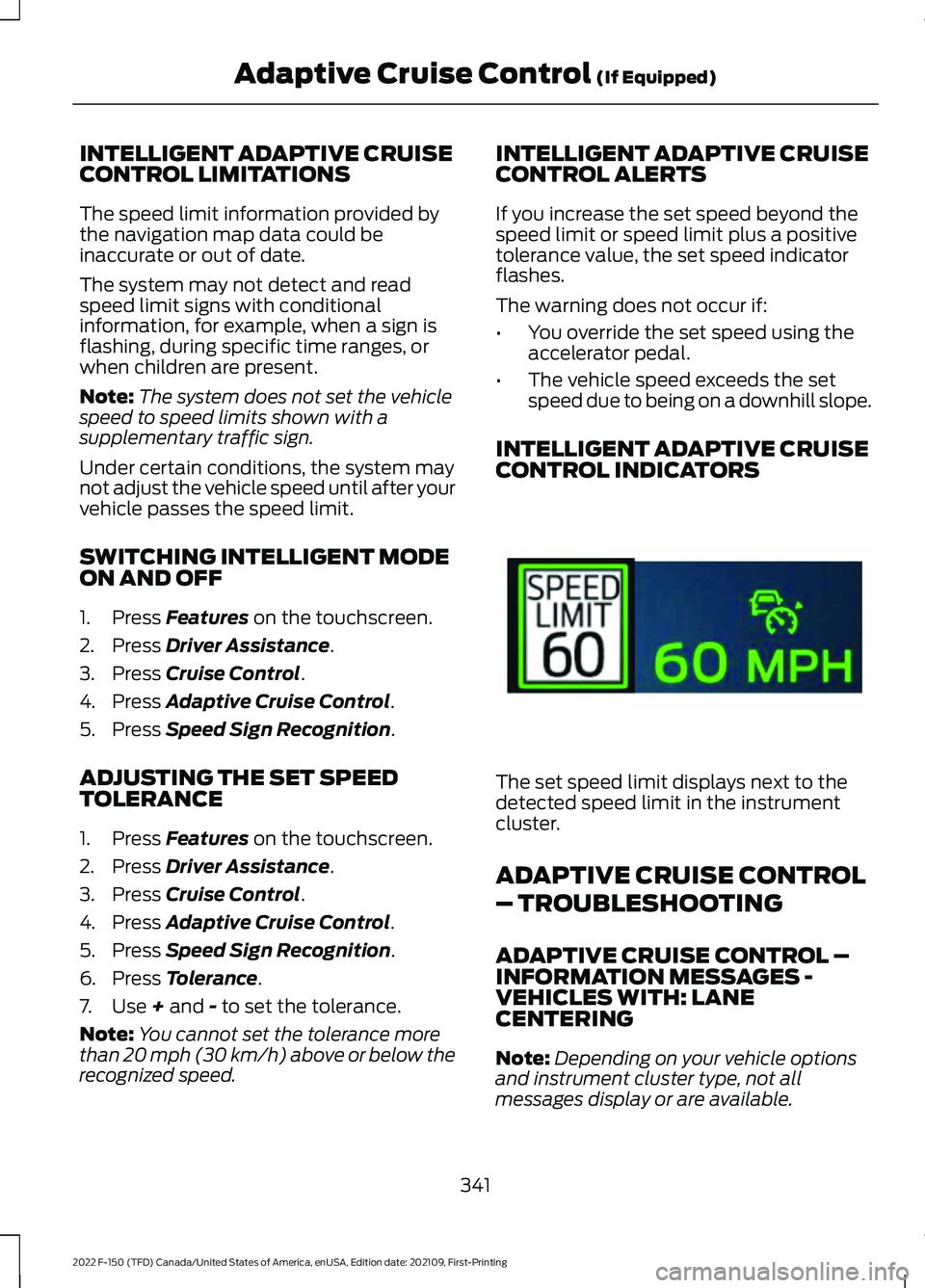
CONTROL INDICATORS The set speed limit displays next to the
detected speed limit in the instrument
cluster.
ADAPTIVE CRUISE CONTROL
– TROUBLESHOOTING
ADAPTIVE CRUISE CONTROL –
INFORMATION MESSAGES -
VEHICLES WITH: LANE
CENTERING
Note:
Depending on your vehicle options
and instrument cluster type, not all
messages display or are available.
341
2022 F-150 (TFD) Canada/United States of America, enUSA, Edition date: 202109, First-Printing Adaptive Cruise Control
(If Equipped)E337564
Page 348 of 750
WHAT IS BLUECRUISE
BlueCruise keeps your vehicle centered in
the lane and offers a hands-free driving
mode in certain situations when using
adaptive cruise control.
HOW DOES BLUECRUISE
WORK
BlueCruise uses cameras to monitor your
vehicle position within a lane and applies
steering support to keep your vehicle
centered in the lane.
Using the cameras and location
information, BlueCruise allows you to
remove your hands from the steering wheel
and offers a hands-free driving mode in
certain areas.
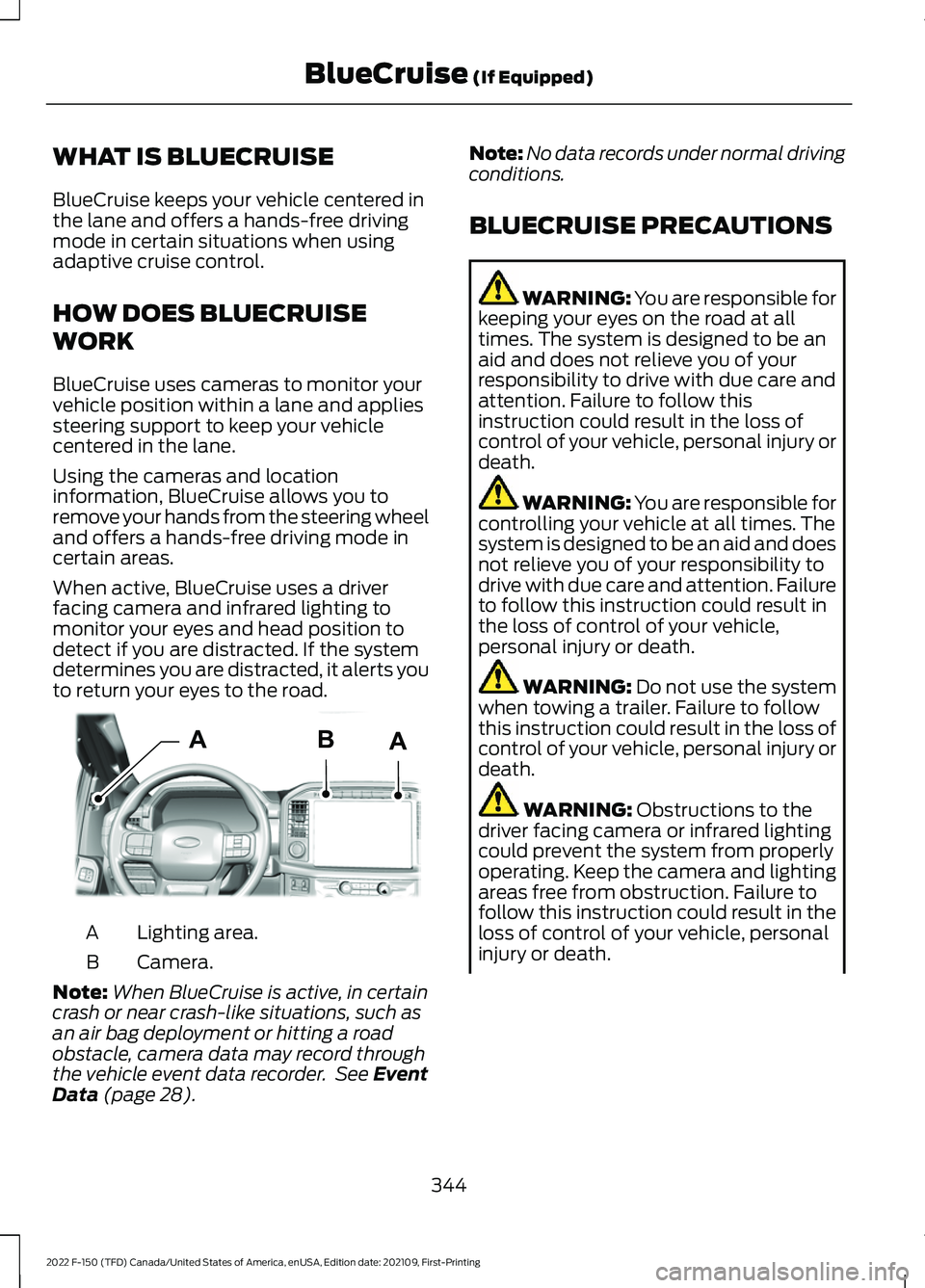
When active, BlueCruise uses a driver
facing camera and infrared lighting to
monitor your eyes and head position to
detect if you are distracted. If the system
determines you are distracted, it alerts you
to return your eyes to the road.
Lighting area.
A
Camera.
B
Note: When BlueCruise is active, in certain
crash or near crash-like situations, such as
an air bag deployment or hitting a road
obstacle, camera data may record through
the vehicle event data recorder. See Event
Data (page 28). Note:
No data records under normal driving
conditions.
BLUECRUISE PRECAUTIONS WARNING: You are responsible for
keeping your eyes on the road at all
times. The system is designed to be an
aid and does not relieve you of your
responsibility to drive with due care and
attention. Failure to follow this
instruction could result in the loss of
control of your vehicle, personal injury or
death. WARNING: You are responsible for
controlling your vehicle at all times. The
system is designed to be an aid and does
not relieve you of your responsibility to
drive with due care and attention. Failure
to follow this instruction could result in
the loss of control of your vehicle,
personal injury or death. WARNING:
Do not use the system
when towing a trailer. Failure to follow
this instruction could result in the loss of
control of your vehicle, personal injury or
death. WARNING:
Obstructions to the
driver facing camera or infrared lighting
could prevent the system from properly
operating. Keep the camera and lighting
areas free from obstruction. Failure to
follow this instruction could result in the
loss of control of your vehicle, personal
injury or death.
344
2022 F-150 (TFD) Canada/United States of America, enUSA, Edition date: 202109, First-Printing BlueCruise
(If Equipped)AABE319812
Page 351 of 750
BLUECRUISE ALERTS
When BlueCruise is providing hands-on
driving or transitioning to hands-on driving
from hands-free driving and detects no
steering activity for a certain period of time,
the system alerts you with a message in
the instrument cluster to put your hands
on the steering wheel. After the first alert,
the system alerts you with a message in
the instrument cluster and an audible
warning.
When BlueCruise is providing hands-on or
hands-free driving and detects you are not
looking at the road for a certain period of
time, the system alerts you to return your
eyes to the road. Depending on where you
are looking, the alert can be a message in
the instrument cluster and an audible
warning.
If you do not react to the warnings,
BlueCruise cancels, quickly activates and
releases the brakes, and slows your vehicle
down to low speeds while maintaining
steering control.
If your vehicle slows down and you resume
control, a message appears to prompt you
to press the accelerator pedal to allow the
system to resume.
Note:
If the system detects repeated
inactivity, it disables until the next key cycle.
BLUECRUISE AUTOMATIC
CANCELLATION
When an external condition cancels
BlueCruise, for example, no lane markings
available, a tone sounds and a message
appears in the instrument cluster. If your vehicle starts to slow
down, you must take control of
steering and press and release
the button to reactivate BlueCruise. System cancellation can also occur if:
•
The lane becomes too narrow.
• The system cannot detect valid lane
markings.
• Lane markings cross.
• Your eyes are not on the road or your
hands are not the steering wheel.
If you have your hands on the steering
wheel and your eyes are on the road when
the feature is active and a cancellation
occurs, the system sounds a tone and
displays a cancelled graphic in the
instrument cluster.
If you are not paying attention to the road
or your hands are not on the steering wheel
and a cancellation occurs, the system
displays a message and a tone sounds until
you resume control. If you do not resume
control in time, BlueCruise quickly activates
and releases the brakes, and slows your
vehicle down to low speeds while
maintaining steering control. If your vehicle
slows down and you resume control, a
message appears to prompt you to press
the accelerator pedal to allow the system
to resume.
Note: The system disables until the next
key cycle if it detects repeated inactivity.
BLUECRUISE INDICATORS When on, the color of the
indicator changes to indicate the
status.
Gray indicates BlueCruise is on but inactive.
Green indicates BlueCruise is active and
applying continuous steering support.
Blue indicates BlueCruise is active and
hands-free driving mode is available.
347
2022 F-150 (TFD) Canada/United States of America, enUSA, Edition date: 202109, First-Printing BlueCruise (If Equipped)E308130 E297977
Page 356 of 750
•
Baja – Loudest setting for off-road use
only. Maximum exhaust noise under all
driving conditions.
• Quiet – Quietest setting for maximum
comfort under all driving conditions.
MyMode You can use MyMode to create
one custom vehicle
configuration based on the
current state of your vehicle.
When you have your vehicle configured to
your desired settings, you can press and
hold the button for a few seconds to save
as MyMode.
Double-pressing the button activates your
saved MyMode.
You can check the saved MyMode settings
with a single press of the button.
You can save the following settings as
MyMode:
• Drive mode.
• Steering mode.
• Suspension mode.
• Exhaust mode.
• Four-wheel drive mode.
• Stop and start on or off.
• Rear electronic locking differential on
or off.
Note: MyMode can only be set with
configurations that are available for each
drive mode. See Drive Modes (page 352).
Note: You can save or view MyMode at any
time, regardless of your vehicle's speed or
transmission selection, as long as your
vehicle is running and it meets system
conditions. Note:
When activating MyMode, your
vehicle must meet all preconditions for the
drive mode and various settings before it
activates. A message appears if it does not
meet system conditions.
DRIVE MODES
BAJA - RAPTOR For high speed off-road driving.
Baja mode optimizes the throttle
control for better response and
torque delivery.
Four-wheel drive high is the default
four-wheel drive mode. Four-wheel drive
auto is not available in baja mode.
Off-road is the default steering and
suspension modes. All steering and
suspension modes are available.
Baja is the default exhaust mode. All
exhaust modes are available.
The system tunes the engine and
transmission controls to baja mode.
The system tunes the stability and traction
controls to baja mode.
The electronic locking differential is
available at all speeds in four-wheel drive.
See
Switching the Electronic Locking
Differential On and Off (page 280).
Note: Using baja mode on dry, hard
surfaces could produce some vibration,
driveline bind up, and potential excessive
tire and vehicle wear depending on the
four-wheel drive mode selection.
352
2022 F-150 (TFD) Canada/United States of America, enUSA, Edition date: 202109, First-Printing Drive Mode ControlE359278 E225314
Page 357 of 750
DEEP SNOW/SAND - 4X4
For off-road driving on soft, dry
sand or deep snow. This mode
optimizes accelerator pedal
response, traction and stability controls to
help maintain forward momentum. If your
vehicle becomes stuck in deep conditions,
use this mode to help get unstuck.
Four-wheel drive high is the default
four-wheel drive mode. Four-wheel drive
low is selectable in deep snow/sand mode.
The electronic locking differential engages
when you select this mode at any speed,
and you can disengage it at any time using
the button. See Switching the Electronic
Locking Differential On and Off (page
280).
Note: Do not use this mode when driving
on pavement or packed snow. This could
cause driveline bind up and damage the
system depending on the four-wheel drive
mode selection. See
Four-Wheel Drive
(page 269).
ECO - 4X4 For efficient driving. This mode
helps deliver maximum fuel
efficiency and helps to increase
driving range.
Two-wheel drive high is the default
four-wheel drive mode. Four-wheel drive
low is not available in eco mode.
The electronic locking differential is
available below
25 mph (40 km/h). See
Switching the Electronic Locking
Differential On and Off
(page 280).
ECO - 4X2 For efficient driving. This mode
helps deliver maximum fuel
efficiency and helps to increase
driving range. The electronic locking differential is
available below
25 mph (40 km/h). See
Switching the Electronic Locking
Differential On and Off
(page 280).
MUD/RUTS - 4X4 For off-road driving. This mode
enhances vehicle performance
to traverse muddy, rutted or
uneven terrains.
Four-wheel drive high is the default
four-wheel drive mode. Four-wheel drive
low is selectable in mud/rut mode.
The electronic locking differential engages
when you select this mode at any speed,
and you can disengage it at any time using
the button. See Switching the Electronic
Locking Differential On and Off
(page
280).
Note: Do not use this mode when driving
on pavement or packed snow. This could
cause driveline bind up and damage the
system depending on the four-wheel drive
mode selection. See
Four-Wheel Drive
(page 269).
NORMAL - RAPTOR For everyday driving. This mode
is the perfect balance of
excitement, comfort and
convenience. This is the default mode after
each ignition cycle.
Two-wheel drive high is the default
four-wheel drive mode. All four-wheel drive
modes are selectable when in normal
mode.
Normal is the default steering, suspension,
and exhaust modes. Off-road steering
mode is not available. All suspension and
exhaust modes are available.
The system tunes the engine and
transmission controls to normal mode.
353
2022 F-150 (TFD) Canada/United States of America, enUSA, Edition date: 202109, First-Printing Drive Mode ControlE295420 E295413 E295413 E296606 E347003