light FORD F-150 2022 Repair Manual
[x] Cancel search | Manufacturer: FORD, Model Year: 2022, Model line: F-150, Model: FORD F-150 2022Pages: 750, PDF Size: 12.96 MB
Page 253 of 750
SELECTING THE CORRECT FUEL -
GASOLINE
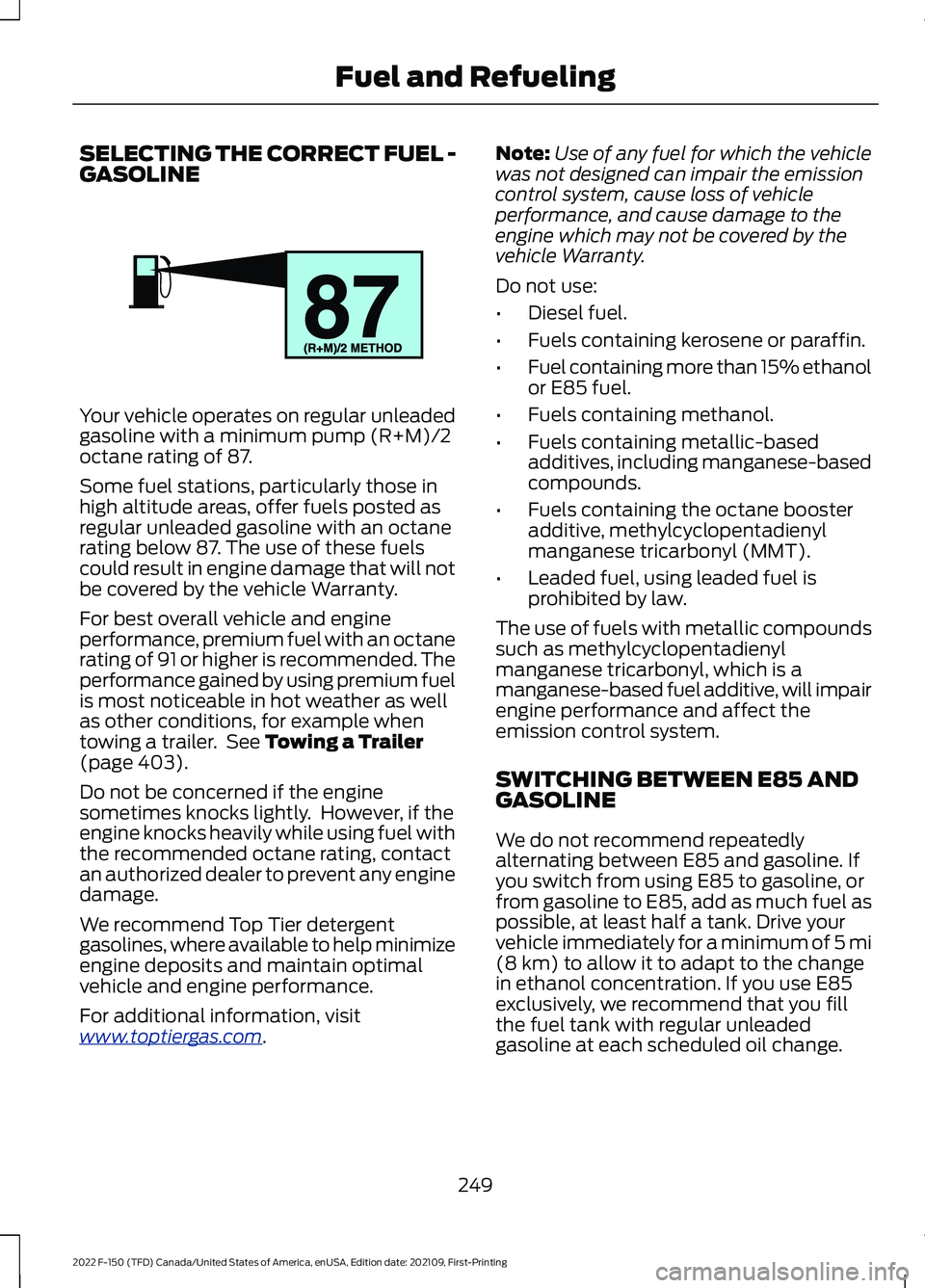
Your vehicle operates on regular unleaded
gasoline with a minimum pump (R+M)/2
octane rating of 87.
Some fuel stations, particularly those in
high altitude areas, offer fuels posted as
regular unleaded gasoline with an octane
rating below 87. The use of these fuels
could result in engine damage that will not
be covered by the vehicle Warranty.
For best overall vehicle and engine
performance, premium fuel with an octane
rating of 91 or higher is recommended. The
performance gained by using premium fuel
is most noticeable in hot weather as well
as other conditions, for example when
towing a trailer. See Towing a Trailer
(page 403).
Do not be concerned if the engine
sometimes knocks lightly. However, if the
engine knocks heavily while using fuel with
the recommended octane rating, contact
an authorized dealer to prevent any engine
damage.
We recommend Top Tier detergent
gasolines, where available to help minimize
engine deposits and maintain optimal
vehicle and engine performance.
For additional information, visit
www .t op tier g a s. c om .Note:
Use of any fuel for which the vehicle
was not designed can impair the emission
control system, cause loss of vehicle
performance, and cause damage to the
engine which may not be covered by the
vehicle Warranty.
Do not use:
• Diesel fuel.
• Fuels containing kerosene or paraffin.
• Fuel containing more than 15% ethanol
or E85 fuel.
• Fuels containing methanol.
• Fuels containing metallic-based
additives, including manganese-based
compounds.
• Fuels containing the octane booster
additive, methylcyclopentadienyl
manganese tricarbonyl (MMT).
• Leaded fuel, using leaded fuel is
prohibited by law.
The use of fuels with metallic compounds
such as methylcyclopentadienyl
manganese tricarbonyl, which is a
manganese-based fuel additive, will impair
engine performance and affect the
emission control system.
SWITCHING BETWEEN E85 AND
GASOLINE
We do not recommend repeatedly
alternating between E85 and gasoline. If
you switch from using E85 to gasoline, or
from gasoline to E85, add as much fuel as
possible, at least half a tank. Drive your
vehicle immediately for a minimum of 5 mi
(8 km)
to allow it to adapt to the change
in ethanol concentration. If you use E85
exclusively, we recommend that you fill
the fuel tank with regular unleaded
gasoline at each scheduled oil change.
249
2022 F-150 (TFD) Canada/United States of America, enUSA, Edition date: 202109, First-Printing Fuel and RefuelingE161513
Page 261 of 750
FUEL TANK CAPACITY -
HYBRID ELECTRIC VEHICLE
(HEV)
Advertised Capacity
The advertised capacity is the maximum
amount of fuel that you can add to the fuel
tank when the fuel gauge indicates empty.
In addition, the fuel tank contains an empty
reserve. The empty reserve is an
unspecified amount of fuel that remains
in the fuel tank when the fuel gauge
indicates empty.
Note:
The amount of fuel in the empty
reserve varies and should not be relied upon
to increase driving range.
FUEL AND REFUELING –
TROUBLESHOOTING
FUEL AND REFUELING –
WARNING LAMPS If it illuminates when you are
driving, refuel as soon as
possible.
FUEL AND REFUELING – INFORMATION MESSAGES Action
Message
An early reminder of a low fuel condition.
Fuel Level Low
The fuel fill inlet may not be properly closed.
Check Fuel Fill Inlet
The information message appears while the fuel system is
depressurizing with the fuel filler door closed. Wait for the fuel
system to depressurize and for the fuel filler door to unlatch.
Please wait for fuel door
to open
The information message appears when the fuel system has
depressurized and opened the fuel filler door. Fully open the
fuel filler door to refuel and fully close the fuel filler door when
refueling is complete.
Fuel Door Open
Your vehicle is equipped with a sealed fuel system that
requires the fuel filler door to be fully closed after refueling.
This warning message appears when the fuel filler door is ajar.
Please fully close the fuel filler door to avoid a "Check Engine"
Light.
Fuel door ajar Close fully
to avoid ""CheckEngine"" light
If you see this message and a "Check Engine" lamp illumin-
ates, please fully close the fuel filler door. The "Check Engine"
Light should clear within five seconds. If the "Check Engine"
light persists, please see your dealer.
The information message appears when the fuel system fails
to depressurize, or the fuel filler door fails to open. You could
have to use the fuel filler door manual override lever when
opening the fuel door.
Refuel Error See Manual
257
2022 F-150 (TFD) Canada/United States of America, enUSA, Edition date: 202109, First-Printing Fuel and Refueling
Page 276 of 750
To select a four-wheel drive mode, press
the four-wheel drive mode control button
of the desired mode. You can select
two-wheel drive high (2H), four-wheel
drive high (4H), or if your vehicle has
four-wheel drive auto (4A) at a stop or
while driving. Once the shift is complete,
the information display will then display
the selected four-wheel drive mode. While
shifts are in progress, the lights on the
four-wheel drive control switch can flash
and you could see messages in the
information display indicating that a shift
is in progress or to release the accelerator
pedal to improve shift performance.
Note:
Do not perform this operation if the
rear wheels are slipping or while applying
the accelerator pedal.
Note: You could hear some noise as the
system shifts or engages which is normal.
If the system detects a fault, a warning
message appears in the information
display. See Four-Wheel Drive –
Information Messages (page 275).
Shifting to or from Four-Wheel
Drive Low (4L)
To select or exit four-wheel drive low (4L):
1. Bring your vehicle to a speed of
3 mph
(5 km/h) or less.
2. Place the transmission in neutral (N)
3. Press the desired four-wheel drive button on the four-wheel drive mode
control switch.
The information display will display a
message indicating a four-wheel drive shift
is in progress. If any of the above shift
conditions are not present, the shift will
not occur and the information display will
display information guiding the driver
through the proper shifting procedures. If
there is a transfer case tooth blockage a
message will display in the information display. To alleviate this condition, place
the transmission in a forward gear, move
your vehicle forward approximately
5 ft
(1.5 m), and shift the transmission back to
neutral (N) to allow the transfer case to
complete the range shift.
Note: You could hear some noise as the
system shifts or engages which is normal.
If the system detects a fault, a warning
message appears in the information
display.
See Four-Wheel Drive –
Information Messages (page 275).
SELECTING A FOUR-WHEEL
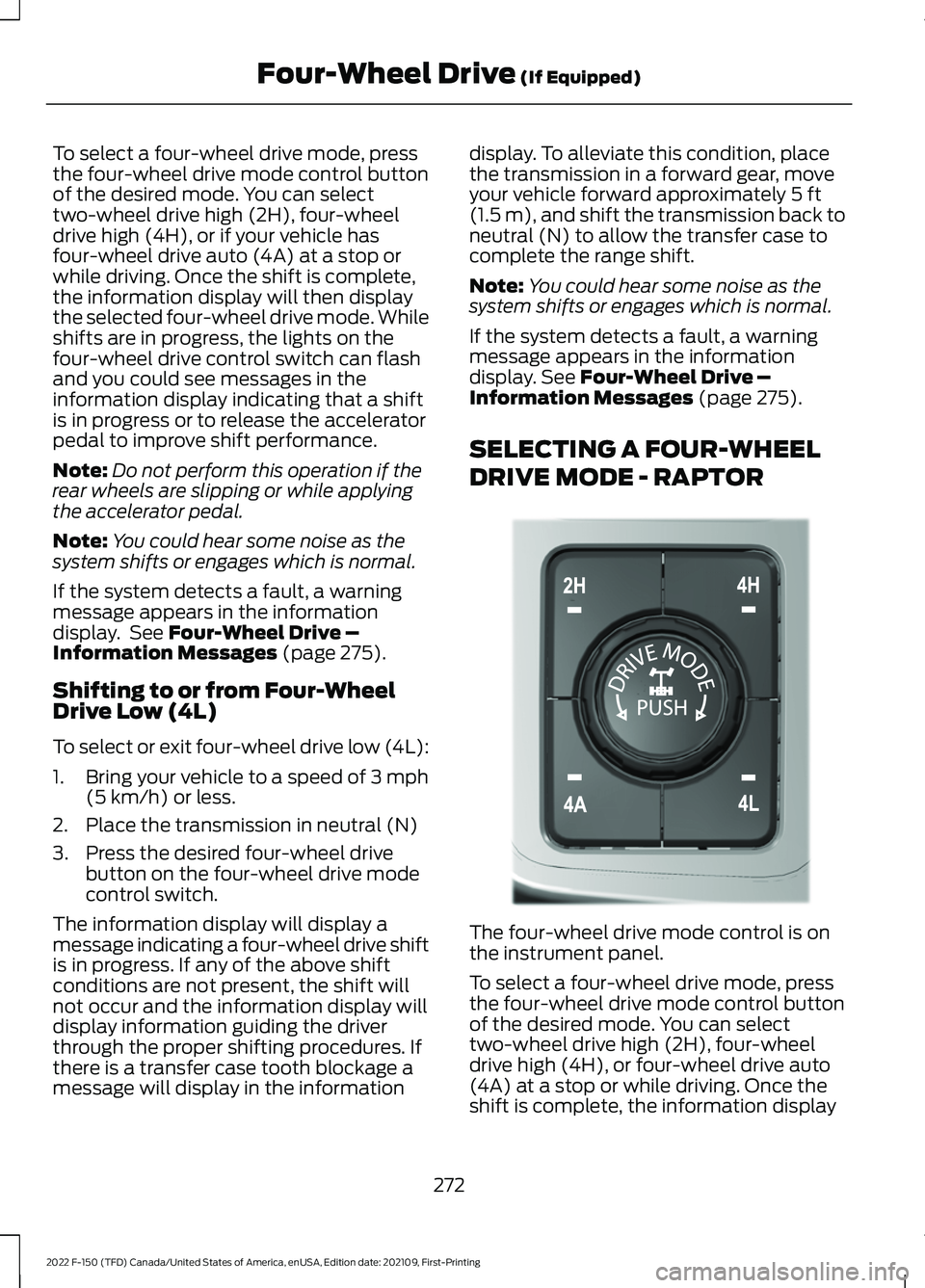
DRIVE MODE - RAPTOR The four-wheel drive mode control is on
the instrument panel.
To select a four-wheel drive mode, press
the four-wheel drive mode control button
of the desired mode. You can select
two-wheel drive high (2H), four-wheel
drive high (4H), or four-wheel drive auto
(4A) at a stop or while driving. Once the
shift is complete, the information display
272
2022 F-150 (TFD) Canada/United States of America, enUSA, Edition date: 202109, First-Printing Four-Wheel Drive
(If Equipped)E308146
Page 277 of 750
will then display the selected four-wheel
drive mode. While shifts are in progress,
the lights on the four-wheel drive control
switch can flash and you could see
messages in the information display
indicating that a shift is in progress or to
release the accelerator pedal to improve
shift performance.
Note:
Do not perform this operation if the
rear wheels are slipping or while applying
the accelerator pedal.
Note: You could hear some noise as the
system shifts or engages, which is normal.
If the system detects a fault, a warning
message appears in the information
display. See Four-Wheel Drive –
Information Messages (page 275).
Shifting to or from Four-Wheel
Drive Low (4L)
To select or exit four-wheel drive low (4L):
1. Bring your vehicle to a speed of
3 mph
(5 km/h) or less.
2. Place the transmission in neutral (N).
3. Press the desired four-wheel drive button on the four-wheel drive mode
control switch.
The information display will display a
message indicating a four-wheel drive shift
is in progress. If any of the above shift
conditions are not present, the shift does
not occur and the information display will
display information guiding the driver
through the proper shifting procedures. If
there is a transfer case tooth blockage, a
message displays in the information
display. To alleviate this condition, place
the transmission in a forward gear, move
your vehicle forward approximately
5 ft
(1.5 m), and shift the transmission back to
neutral (N) to allow the transfer case to
complete the range shift.
Note: You could hear some noise as the
system shifts or engages, which is normal. If the system detects a fault, a warning
message appears in the information
display.
See Four-Wheel Drive –
Information Messages (page 275).
FOUR-WHEEL DRIVE MODES
TWO-WHEEL DRIVE HIGH
Two-wheel drive high is for general
on-road driving. Power is sent to the rear
wheels only.
Note: Two-wheel drive high can turn on or
off based on Drive Mode selection See Drive
Mode Control
(page 350).
FOUR-WHEEL DRIVE AUTO
(If
Equipped)
Four-wheel drive auto provides
electronically controlled four-wheel drive
power to both the front and rear wheels,
as required, for increased traction in varying
on-road conditions. The four-wheel drive
auto tuning varies based on selected Drive
Mode.
See Selecting a Drive Mode (page
350).
Note: Four-wheel drive auto can turn on or
off automatically based on Drive Mode
selection.
See Selecting a Drive Mode
(page 350).
FOUR-WHEEL DRIVE HIGH
Four-wheel drive high provides
electronically or mechanically locked
four-wheel drive power to both the front
and rear wheels for use in off-road or
winter conditions such as deep snow, sand
or mud. This mode is not for use on dry
pavement.
Note: Four-wheel drive high can turn on or
off automatically based on Drive Mode
selection.
See Selecting a Drive Mode
(page 350).
273
2022 F-150 (TFD) Canada/United States of America, enUSA, Edition date: 202109, First-Printing Four-Wheel Drive
(If Equipped)
Page 296 of 750
WHAT IS REVERSE BRAKING
ASSIST
The system uses sensors on the rear of
your vehicle to detect a possible collision
and applies the brakes to either reduce the
damage from impact, or to assist in
avoiding the collision.
HOW DOES REVERSE
BRAKING ASSIST WORK
Reverse Braking Assist functions when in
reverse (R) and traveling at a speed of
1–
7 mph (1.5– 12 km/h).
If the system detects an obstacle behind
your vehicle, it provides a warning through
the rear parking aid or cross traffic alert
system.
REVERSE BRAKING ASSIST
PRECAUTIONS WARNING: You are responsible for
controlling your vehicle at all times. The
system is designed to be an aid and does
not relieve you of your responsibility to
drive with due care and attention. Failure
to follow this instruction could result in
the loss of control of your vehicle,
personal injury or death. WARNING:
To help avoid personal
injury, always use caution when in
reverse (R) and when using the sensing
system. WARNING:
The system may not
operate properly during severe weather
conditions, for example snow, ice, heavy
rain and spray. Always drive with due
care and attention. Failure to take care
may result in a crash. WARNING: Traffic control systems,
fluorescent lamps, inclement weather,
air brakes, external motors and fans may
affect the correct operation of the
sensing system. This may cause reduced
performance or false alerts. WARNING:
Some situations and
objects prevent hazard detection. For
example low or direct sunlight, inclement
weather, unconventional vehicle types,
and pedestrians. Apply the brakes when
necessary. Failure to follow this
instruction could result in the loss of
control of your vehicle, personal injury or
death. WARNING:
Do not use the system
with accessories that extend beyond the
front or rear of your vehicle, for example
a trailer hitch or bike rack. The system is
not able to make corrections for the
additional length of the accessories.
The system only applies the brakes for a
short period of time when an event occurs.
Act as soon as you notice the brakes apply
in order to remain in control of the vehicle.
If you do not intervene the vehicle may
start to move again.
Note: Certain add-on devices around the
bumper or fascia may create false alerts.
For example, large trailer hitches, bicycle or
surfboard racks, license plate brackets,
bumper covers or any other device that may
block the normal detection zone of the
system. Remove the add-on device to
prevent false alerts.
Note: The system does not react to small
or moving objects, particularly those close
to the ground.
Note: The system does not operate during
hard acceleration or steering.
292
2022 F-150 (TFD) Canada/United States of America, enUSA, Edition date: 202109, First-Printing Reverse Braking Assist
(If Equipped)
Page 304 of 750
HOW DOES STABILITY
CONTROL WORK
WARNING: Vehicle modifications
involving braking system, aftermarket
roof racks, suspension, steering system,
tire construction and wheel and tire size
may change the handling characteristics
of your vehicle and may adversely affect
the performance of the electronic
stability control system. In addition,
installing any stereo speakers may
interfere with and adversely affect the
electronic stability control system.
Reducing the effectiveness of the
electronic stability control system could
lead to an increased risk of loss of vehicle
control, vehicle rollover, personal injury
and death. WARNING:
Remember that even
advanced technology cannot defy the
laws of physics. It's always possible to
lose control of a vehicle due to
inappropriate driver input for the
conditions. Aggressive driving on any
road condition can cause you to lose
control of your vehicle increasing the risk
of personal injury or property damage.
Activation of the electronic stability
control system is an indication that at
least some of the tires have exceeded
their ability to grip the road; this could
reduce the operator's ability to control
the vehicle potentially resulting in a loss
of vehicle control, vehicle rollover,
personal injury and death. WARNING: You are responsible for
controlling your vehicle at all times. The
system is designed to be an aid and does
not relieve you of your responsibility to
drive with due care and attention. Failure
to follow this instruction could result in
the loss of control of your vehicle,
personal injury or death.
If a driving condition activates either the
stability control or traction control you may
experience the following conditions:
• The stability and traction control light
flashes.
• Your vehicle slows down.
• Reduced engine power.
The stability control system has several
features built into it to help you maintain
control of your vehicle:
Electronic Stability Control
Electronic stability control enhances your
vehicle ’s ability to prevent skids or lateral
slides by applying brakes to one or more
of the wheels individually and, if necessary,
reducing engine power.
Roll Stability Control
Roll stability control enhances your
vehicle ’s ability to prevent rollovers by
detecting your vehicle ’s roll motion and
the rate at which it changes by applying
the brakes to one or more wheels
individually.
Curve Control
Curve control enhances your vehicle ’s
ability to follow the road when cornering
severely or avoiding objects in the roadway.
Curve control operates by reducing engine
power and, if necessary, applying brakes
to one or more of the wheels individually.
300
2022 F-150 (TFD) Canada/United States of America, enUSA, Edition date: 202109, First-Printing Stability Control
Page 306 of 750
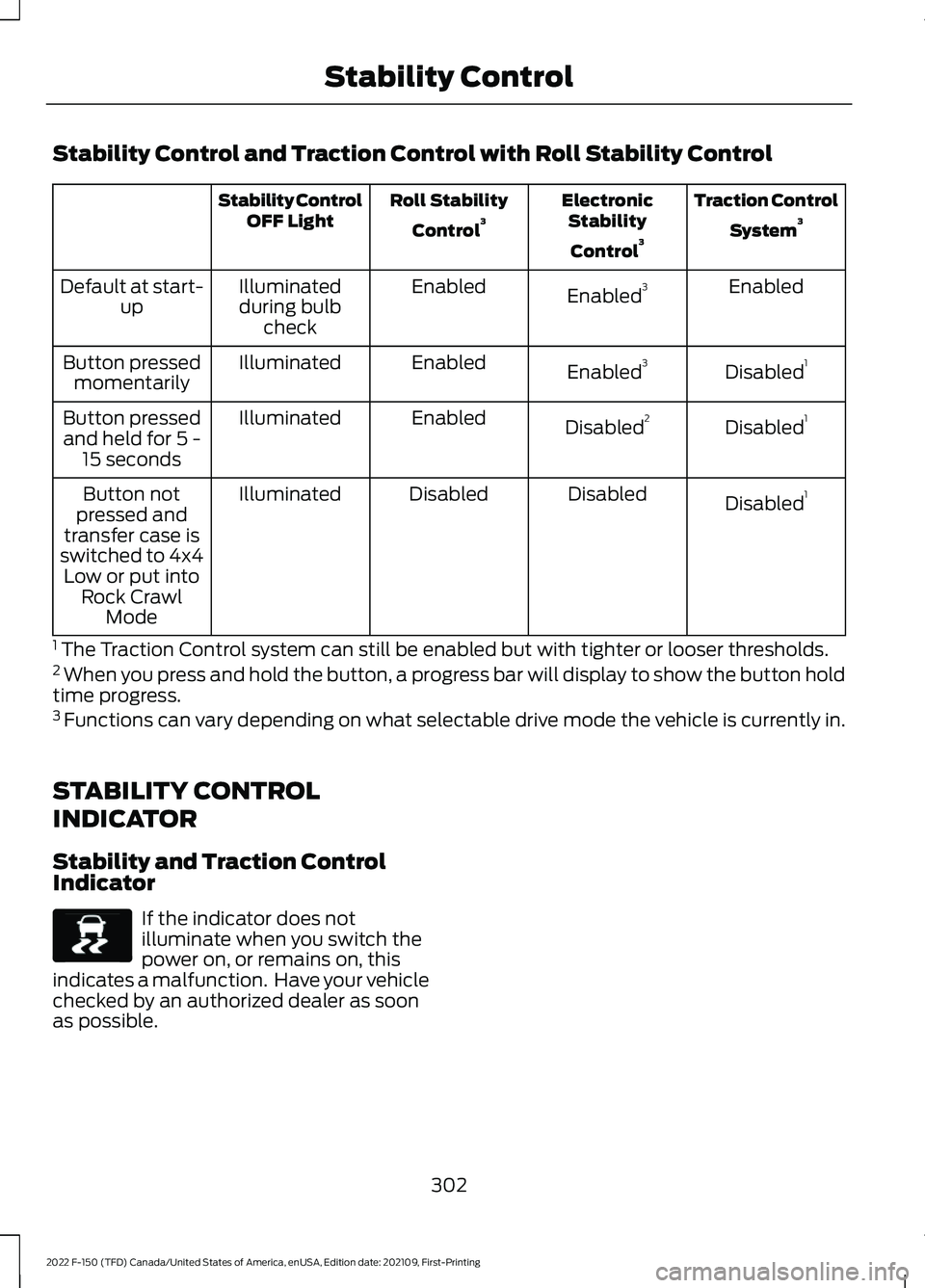
Stability Control and Traction Control with Roll Stability Control
Traction Control
System 3
Electronic
Stability
Control 3
Roll Stability
Control 3
Stability Control
OFF Light
Enabled
Enabled 3
Enabled
Illuminated
during bulb check
Default at start-
up
Disabled1
Enabled 3
Enabled
Illuminated
Button pressed
momentarily
Disabled1
Disabled 2
Enabled
Illuminated
Button pressed
and held for 5 - 15 seconds
Disabled1
Disabled
Disabled
Illuminated
Button not
pressed and
transfer case is
switched to 4x4 Low or put into Rock Crawl Mode
1 The Traction Control system can still be enabled but with tighter or looser thresholds.
2 When you press and hold the button, a progress bar will display to show the button hold
time progress.
3 Functions can vary depending on what selectable drive mode the vehicle is currently in.
STABILITY CONTROL
INDICATOR
Stability and Traction Control
Indicator If the indicator does not
illuminate when you switch the
power on, or remains on, this
indicates a malfunction. Have your vehicle
checked by an authorized dealer as soon
as possible.
302
2022 F-150 (TFD) Canada/United States of America, enUSA, Edition date: 202109, First-Printing Stability ControlE138639
Page 311 of 750
WHAT IS TRAIL TURN ASSIST
Trail turn assist can reduce the turning
radius of your vehicle by applying the
brakes to the inside rear wheel in
low-speed, high steering-angle maneuvers.
TRAIL TURN ASSIST
PRECAUTIONS
Note:
Do not use trail turn assist on dry,
hard surfaced roads. Doing so can produce
excessive noise, increase tire wear and may
damage drive line, or braking components.
Trail turn assist is only intended for slippery,
or loose surfaces.
You may hear noise from the anti-lock
brake system while trail turn assist is
active. This is normal operation.
TRAIL TURN ASSIST
LIMITATIONS
Trail turn assist can only be used when the
vehicle ’s four-wheel drive system is in the
four-wheel drive high (4H), or four-wheel
drive low (4L) modes.
Trail Turn Assist cannot be used when the
vehicle ’s rear differential is locked. If the
rear differential has recently been locked
prior to Trail Turn Assist being turned on,
Trail Turn Assist may not activate until it
can confirm that the rear differential is
unlocked.
SWITCHING TRAIL TURN
ASSIST ON AND OFF
You can switch the trail turn assist on or
off from the features section of the vehicle
on screen display.
1. Press Features on the touchscreen.
2. Press
Trail Turn Assist. 3. Switch
Trail Turn Assist on or off.
Switch trail turn assist on when your
vehicle is in four-wheel drive high (4H) or
four-wheel drive low (4L).
The system activates when the:
• Vehicle speed is less than
12 mph
(19.3 km/h).
• Rear differential is fully unlocked.
• Steering wheel is almost fully turned
to the left or right.
Switch trail turn assist off by performing
any of the following:
• Switch trail turn assist off from the
features section of the vehicle on
screen display.
• Select two-wheel drive high, or
four-wheel drive auto.
• Switch on the rear locking differential.
TRAIL TURN ASSIST
INDICATORS When trail turn assist is on, one
of these two indicators will be
displayed, depending on the
direction of the vehicle
’s last
turn. When the feature is on but
not in use, the indicator light will
be gray. When the feature is active the
indicator light will be green.
307
2022 F-150 (TFD) Canada/United States of America, enUSA, Edition date: 202109, First-Printing Trail Turn Assist
(If Equipped)E338899 E338900
Page 313 of 750
WHAT IS HILL DESCENT
CONTROL
Hill descent control allows the driver to set
and maintain vehicle speed while
descending steep slopes in various surface
conditions.
HOW DOES HILL DESCENT
CONTROL WORK
Hill descent control can maintain vehicle
speeds on downhill slopes between
2
– 20 mph (3– 32 km/h). Above 20 mph
(32 km/h), the system remains on but the
descent speed cannot be set or
maintained.
Note: The system does not function below
2 mph (3 km/h)
.
The system requires a cool down interval
after a period of sustained use. Hill descent
control provides a warning in the message
center and a tone sounds when the system
is about to disengage for cooling. At this
time, manually apply the brakes as needed
to maintain descent speed.
Note: The amount of time that the system
can remain active before cooling varies with
conditions.
HILL DESCENT CONTROL
PRECAUTIONS WARNING:
The system does not
control speed in low traction conditions
or extremely steep slopes. The system
is designed to be an aid and does not
relieve you of your responsibility to drive
with due care and attention. Failure to
follow this instruction could result in
personal injury. WARNING:
Hill descent control
cannot control descent in all surface
conditions and circumstances, such as
ice or extremely steep grades. Hill
descent control is a driver assist system
and cannot substitute for good judgment
by the driver. Failure to do so may result
in loss of vehicle control, crash or serious
injury. WARNING:
The system does not
replace the parking brake. When you
leave your vehicle, always apply the
parking brake and shift the transmission
into park (P) for automatic transmission
or first gear for manual transmission.
SWITCHING HILL DESCENT
CONTROL ON AND OFF Press the button on the
instrument panel. A light
illuminates and a tone sounds
when the system is active.
SETTING THE HILL DESCENT
SPEED
To increase or decrease the descent speed,
press the accelerator or brake pedal, or use
the SET
+ and SET - buttons on the
steering wheel. Once you reach the
preferred speed remove your feet from the
pedals.
HILL DESCENT CONTROL
INDICATOR Illuminates when you switch hill
descent control on.
309
2022 F-150 (TFD) Canada/United States of America, enUSA, Edition date: 202109, First-Printing Hill Descent Control
(If Equipped)E163171 E163171
Page 336 of 750
ADAPTIVE CRUISE CONTROL
LIMITATIONS
Sensor Limitations
WARNING: On rare occasions,
detection issues can occur due to the
road infrastructures, for example bridges,
tunnels and safety barriers. In these
cases, the system may brake late or
unexpectedly. At all times, you are
responsible for controlling your vehicle,
supervising the system and intervening,
if required. WARNING:
If the system
malfunctions, have your vehicle checked
as soon as possible. WARNING:
Large contrasts in
outside lighting can limit sensor
performance. WARNING:
The system only warns
of vehicles detected by the radar sensor.
In some cases there may be no warning
or a delayed warning. Apply the brakes
when necessary. Failure to follow this
instruction could result in personal injury
or death. WARNING:
The system may not
detect stationary or slow moving
vehicles below
6 mph (10 km/h). WARNING:
The system does not
detect pedestrians or objects in the road. WARNING:
The system does not
detect oncoming vehicles in the same
lane. WARNING:
The system may not
operate properly if the sensor is blocked.
Keep the windshield free from
obstruction. WARNING:
The sensor may
incorrectly track lane markings as other
structures or objects. This can result in
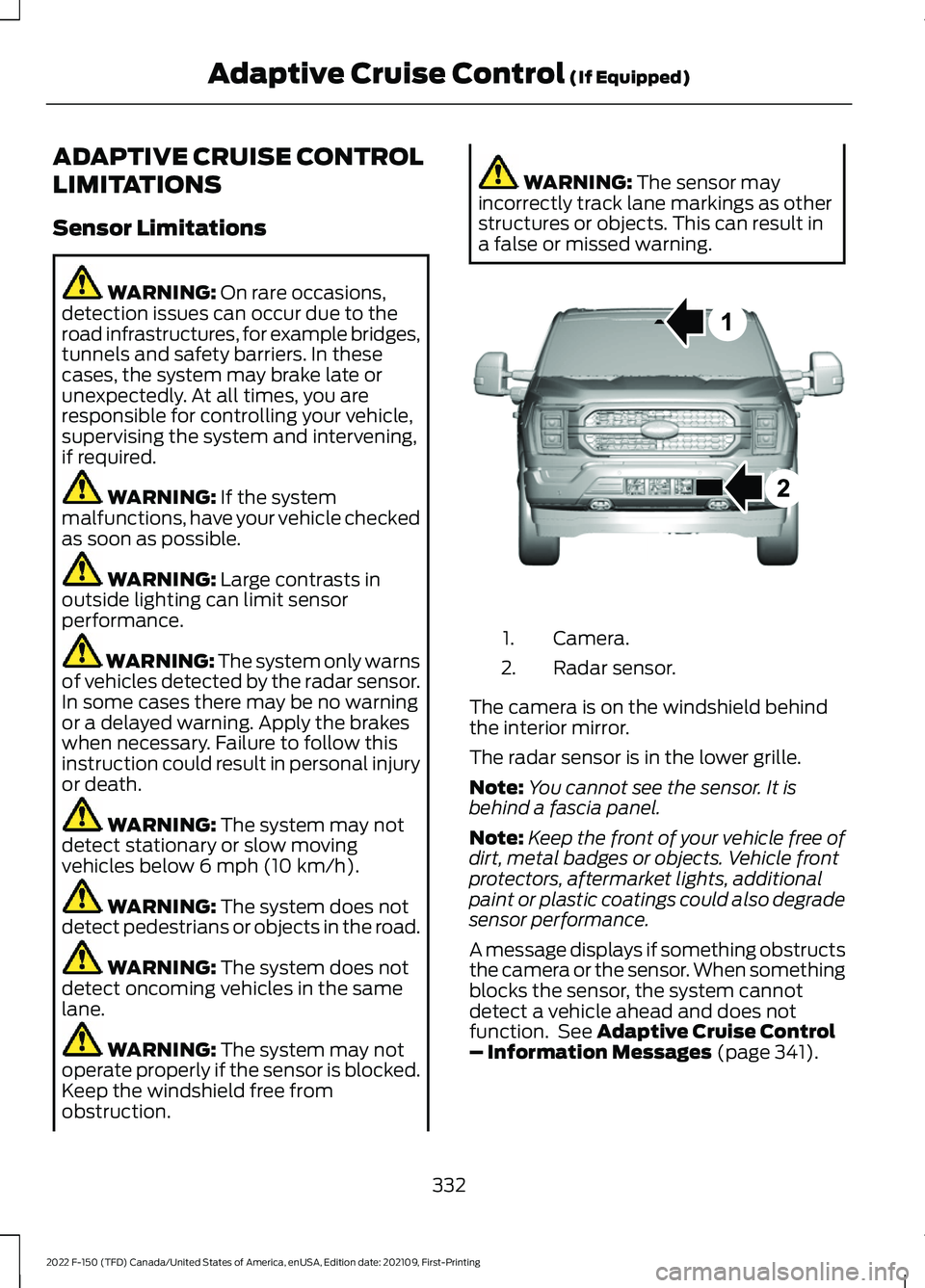
a false or missed warning. Camera.
1.
Radar sensor.
2.
The camera is on the windshield behind
the interior mirror.
The radar sensor is in the lower grille.
Note: You cannot see the sensor. It is
behind a fascia panel.
Note: Keep the front of your vehicle free of
dirt, metal badges or objects. Vehicle front
protectors, aftermarket lights, additional
paint or plastic coatings could also degrade
sensor performance.
A message displays if something obstructs
the camera or the sensor. When something
blocks the sensor, the system cannot
detect a vehicle ahead and does not
function. See
Adaptive Cruise Control
– Information Messages (page 341).
332
2022 F-150 (TFD) Canada/United States of America, enUSA, Edition date: 202109, First-Printing Adaptive Cruise Control
(If Equipped)E328125