light FORD F-150 2022 Manual PDF
[x] Cancel search | Manufacturer: FORD, Model Year: 2022, Model line: F-150, Model: FORD F-150 2022Pages: 750, PDF Size: 12.96 MB
Page 337 of 750
The radar sensor has a limited field of view.
It may not detect vehicles at all or detect
a vehicle later than expected in some
situations. The lead vehicle image does
not illuminate if the system does not
detect a vehicle in front of you.
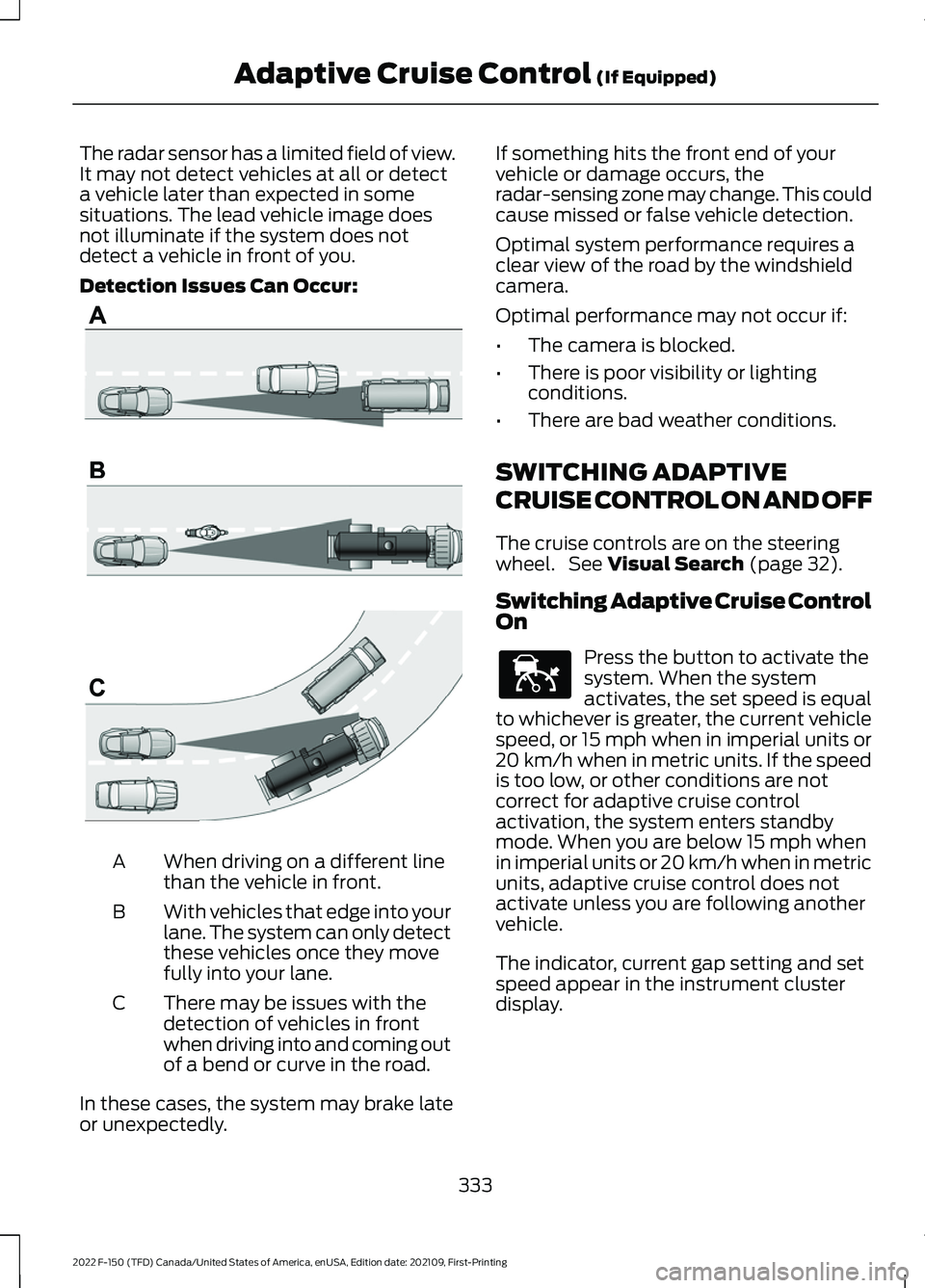
Detection Issues Can Occur:
When driving on a different line
than the vehicle in front.
A
With vehicles that edge into your
lane. The system can only detect
these vehicles once they move
fully into your lane.
B
There may be issues with the
detection of vehicles in front
when driving into and coming out
of a bend or curve in the road.
C
In these cases, the system may brake late
or unexpectedly. If something hits the front end of your
vehicle or damage occurs, the
radar-sensing zone may change. This could
cause missed or false vehicle detection.
Optimal system performance requires a
clear view of the road by the windshield
camera.
Optimal performance may not occur if:
•
The camera is blocked.
• There is poor visibility or lighting
conditions.
• There are bad weather conditions.
SWITCHING ADAPTIVE
CRUISE CONTROL ON AND OFF
The cruise controls are on the steering
wheel. See Visual Search (page 32).
Switching Adaptive Cruise Control
On Press the button to activate the
system. When the system
activates, the set speed is equal
to whichever is greater, the current vehicle
speed, or 15 mph when in imperial units or
20 km/h when in metric units. If the speed
is too low, or other conditions are not
correct for adaptive cruise control
activation, the system enters standby
mode. When you are below 15 mph when
in imperial units or 20 km/h when in metric
units, adaptive cruise control does not
activate unless you are following another
vehicle.
The indicator, current gap setting and set
speed appear in the instrument cluster
display.
333
2022 F-150 (TFD) Canada/United States of America, enUSA, Edition date: 202109, First-Printing Adaptive Cruise Control
(If Equipped)E71621 E144529
Page 338 of 750
Switching Adaptive Cruise Control
Off
Press the button when the
system is in standby mode or
switch the ignition off.
Note: When you switch the system off, the
set speed clears.
ADAPTIVE CRUISE CONTROL
AUTOMATIC CANCELLATION
The system may cancel if:
• The tires lose traction.
• You apply the parking brake.
The system may cancel and set the parking
brake if:
• You unbuckle the seatbelt and open
the driver door after you stop your
vehicle.
• Your vehicle is at a stop continuously
for more than three minutes.
The system may deactivate or prevent
activating when requested if:
• The vehicle has a blocked sensor.
• The brake temperature is too high.
• There is a failure in the system or a
related system.
SETTING THE ADAPTIVE
CRUISE CONTROL SPEED
Drive to the speed you prefer. Press the SET+ or SET- buttons
to set the current speed.
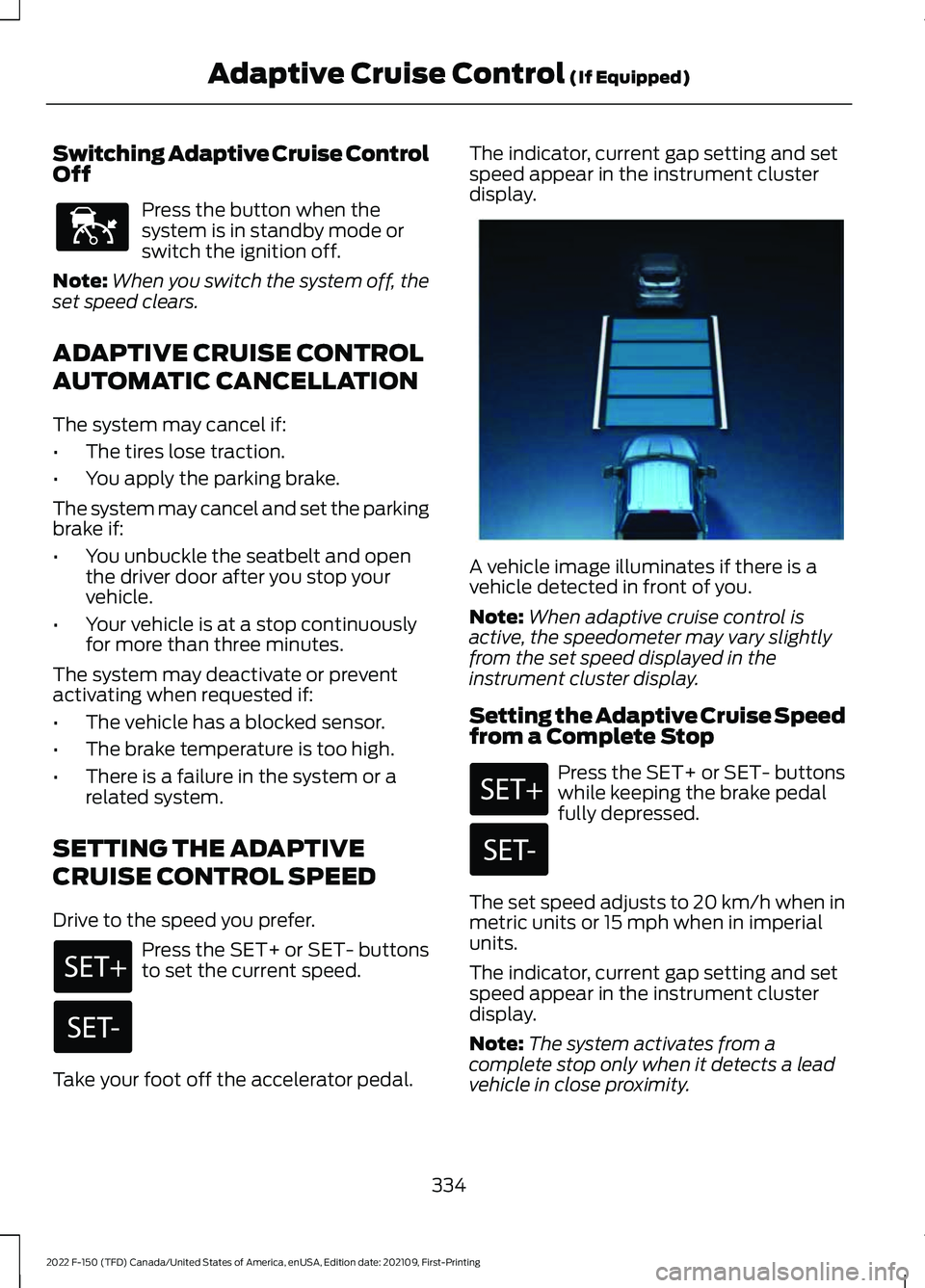
Take your foot off the accelerator pedal. The indicator, current gap setting and set
speed appear in the instrument cluster
display.
A vehicle image illuminates if there is a
vehicle detected in front of you.
Note:
When adaptive cruise control is
active, the speedometer may vary slightly
from the set speed displayed in the
instrument cluster display.
Setting the Adaptive Cruise Speed
from a Complete Stop Press the SET+ or SET- buttons
while keeping the brake pedal
fully depressed.
The set speed adjusts to 20 km/h when in
metric units or 15 mph when in imperial
units.
The indicator, current gap setting and set
speed appear in the instrument cluster
display.
Note: The system activates from a
complete stop only when it detects a lead
vehicle in close proximity.
334
2022 F-150 (TFD) Canada/United States of America, enUSA, Edition date: 202109, First-Printing Adaptive Cruise Control (If Equipped)E144529 E337576
Page 343 of 750
LANE CENTERING LIMITATIONS
Adaptive cruise control limitations apply
to lane centering unless stated otherwise
or contradicted by a lane centering
limitation. See Adaptive Cruise Control
Limitations (page 332).
Lane Centering may not correctly operate
in any of the following conditions:
• The lane is too narrow or wide.
• The system does not detect at least
one lane marking or when lanes merge
or split.
• Limited steering torque input is applied.
• Areas under construction or new
infrastructure.
• When modifications to the steering
system have been made.
• When using a spare tire.
• In high wind conditions.
Note: The driving assistance torque is
limited and may not be sufficient for all
driving situations such as driving through
tight curves or driving through curves at high
speeds.
Note: In exceptional conditions, such as
inclement weather or direct sunlight, the
system could deviate from the center line
or could cancel.
SWITCHING LANE CENTERING ON
AND OFF
You must keep your hands on the steering
wheel at all times.
The controls are on the steering wheel. Press the button.
The indicator appears in the information
display. When the system is on, the color
of the indicator changes to indicate the
system status. You can override the system at any time
by steering your vehicle.
Note:
The correct requirements must be
met before you can switch the system on.
See
Lane Centering Requirements (page
338).
Enabling and Disabling Lane
Centering
1. Press
Features on the touchscreen.
2. Press
Driver Assistance.
3. Press
Cruise Control.
4. Press
Lane Centering Assist.
LANE CENTERING ALERTS
You must keep your hands on the steering
wheel at all times.
When the system is active and detects no
steering activity for a period of time, the
system alerts you to put your hands on the
steering wheel. If you do not react to the
warnings the system cancels and slows
your vehicle down to idle speeds while
maintaining steering control.
See Lane
Centering Automatic Cancellation
(page
339).
The system also alerts you if your vehicle
crosses lane markings without detected
steering activity.
Note: The system could detect a light grip
or touch on the steering wheel as hands-off
driving.
LANE CENTERING AUTOMATIC
CANCELLATION
When an external condition cancels the
system, for example, no lane markings
available, a tone sounds and a message
appears in the instrument cluster display.
339
2022 F-150 (TFD) Canada/United States of America, enUSA, Edition date: 202109, First-Printing Adaptive Cruise Control
(If Equipped)E308131
Page 348 of 750
WHAT IS BLUECRUISE
BlueCruise keeps your vehicle centered in
the lane and offers a hands-free driving
mode in certain situations when using
adaptive cruise control.
HOW DOES BLUECRUISE
WORK
BlueCruise uses cameras to monitor your
vehicle position within a lane and applies
steering support to keep your vehicle
centered in the lane.
Using the cameras and location
information, BlueCruise allows you to
remove your hands from the steering wheel
and offers a hands-free driving mode in
certain areas.
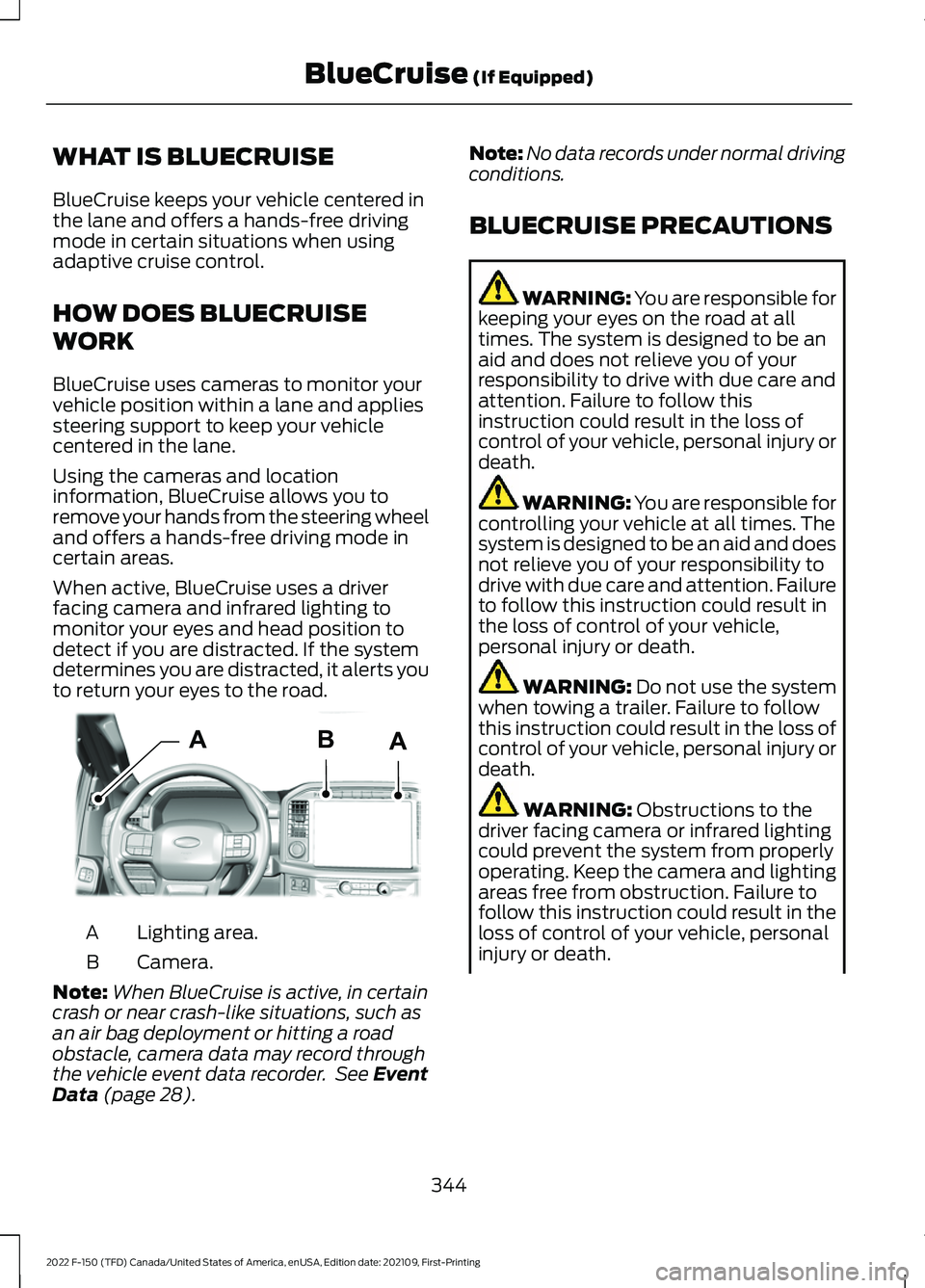
When active, BlueCruise uses a driver
facing camera and infrared lighting to
monitor your eyes and head position to
detect if you are distracted. If the system
determines you are distracted, it alerts you
to return your eyes to the road.
Lighting area.
A
Camera.
B
Note: When BlueCruise is active, in certain
crash or near crash-like situations, such as
an air bag deployment or hitting a road
obstacle, camera data may record through
the vehicle event data recorder. See Event
Data (page 28). Note:
No data records under normal driving
conditions.
BLUECRUISE PRECAUTIONS WARNING: You are responsible for
keeping your eyes on the road at all
times. The system is designed to be an
aid and does not relieve you of your
responsibility to drive with due care and
attention. Failure to follow this
instruction could result in the loss of
control of your vehicle, personal injury or
death. WARNING: You are responsible for
controlling your vehicle at all times. The
system is designed to be an aid and does
not relieve you of your responsibility to
drive with due care and attention. Failure
to follow this instruction could result in
the loss of control of your vehicle,
personal injury or death. WARNING:
Do not use the system
when towing a trailer. Failure to follow
this instruction could result in the loss of
control of your vehicle, personal injury or
death. WARNING:
Obstructions to the
driver facing camera or infrared lighting
could prevent the system from properly
operating. Keep the camera and lighting
areas free from obstruction. Failure to
follow this instruction could result in the
loss of control of your vehicle, personal
injury or death.
344
2022 F-150 (TFD) Canada/United States of America, enUSA, Edition date: 202109, First-Printing BlueCruise
(If Equipped)AABE319812
Page 349 of 750
WARNING: Do not use the system
if any changes or modifications to the
steering wheel have been made. Any
changes or modifications to the steering
wheel could affect the functionality or
performance of the system. Failure to
follow this instruction could result in the
loss of control of your vehicle, personal
injury or death. WARNING:
The system may not
function if the sensor is blocked. WARNING:
Pay close attention to
changing road conditions such as
entering or leaving a highway, on roads
with intersections or roundabouts, roads
without visible lanes of travel, roads that
are winding, slippery, unpaved, or steep
slopes. WARNING:
The system is not a
crash warning or avoidance system. WARNING:
Large contrasts in
outside lighting can limit sensor
performance. WARNING:
The system attempts
to keep your vehicle in the center of the
lane as well as maintain speed and gap
control. The system may not be able to
perform these tasks in all situations. Do
not use the system in complex or
uncertain driving conditions. Failure to
follow this instruction could result in the
loss of control of your vehicle, personal
injury or death. WARNING: Your vehicle could drift
out of the lane of travel. Always be
prepared to manually steer your vehicle.
Failure to follow this instruction could
result in the loss of control of your
vehicle, personal injury or death. WARNING:
The system will not
operate if the sensor cannot track the
road lane markings.
BLUECRUISE REQUIREMENTS
BlueCruise only activates when all of the
following occur:
• BlueCruise is enabled in your
information and entertainment screen.
See BlueCruise Settings (page 346).
• Adaptive cruise control is on.
• The system detects both lane
markings.
• Your hands are on the steering wheel.
• Your eyes are on the road.
Note: For hands-free mode to work, your
vehicle must be on certain limited access
divided freeways.
Note: The system may require updated
software for hands-free mode. See Vehicle
System Updates
(page 633).
BLUECRUISE LIMITATIONS
Any of the following conditions could result
in BlueCruise not correctly operating:
• You do not have your vehicle centered
in the lane.
• The lane is too narrow or too wide.
• The system does not detect at least
one lane marking or when lanes merge
or split.
• You are applying a low amount of
steering input.
• You are using the system in areas under
construction.
• If you make any aftermarket
modifications to the steering system.
• You are using a spare tire.
345
2022 F-150 (TFD) Canada/United States of America, enUSA, Edition date: 202109, First-Printing BlueCruise
(If Equipped)
Page 350 of 750
The driver-facing camera may not operate
correctly due to any of the following:
•
You have a pre-existing eye condition,
such as an eye misalignment, or have
had eye surgery.
• You cover your facial features by a
mask, hat or other items.
• The lighting conditions change
significantly.
• You are not in the field of view of the
camera.
• You position or tilt yourself to one side.
• You are moving around extensively.
• You are wearing glasses or sunglasses
that are too dark or reflective.
Note: The system has limited steering
assistance and may not be sufficient for all
driving situations.
Note: In exceptional conditions, such as
inclement weather or direct sunlight, the
system could deviate from the center line.
Note: The information provided by the
navigation map data could be inaccurate or
out of date.
BLUECRUISE SETTINGS
Enabling BlueCruise
1. Press Features on the touchscreen.
2. Press
Driver Assistance.
3. Press
Cruise Control.
4. Press
Lane Centering with
Hands-Free.
Enabling Activation Prompts
1. Press
Features on the touchscreen.
2. Press
Driver Assistance.
3. Press
Cruise Control.
4. Press
Activation Prompts. SWITCHING BLUECRUISE ON
AND OFF
Switching BlueCruise On
The controls are on the steering wheel.
Using Activation Prompts
When the prompt appears, press
the button to switch BlueCruise
on.
The indicator appears in the instrument
cluster. When the system is on, the color
of the indicator changes to indicate the
system status.
Note: You must enable activation prompts
in the touchscreen.
Using Steering Wheel Controls Using the adaptive cruise control
and lateral support buttons,
ensure both systems are active.
BlueCruise activates.
Switching BlueCruise Off Press either the lateral support
or adaptive cruise control button
when system is active or in
standby mode.
BlueCruise turns off through
each ignition cycle.
346
2022 F-150 (TFD) Canada/United States of America, enUSA, Edition date: 202109, First-Printing BlueCruise
(If Equipped)E144529 E308131 E144529 E308131 E144529
Page 355 of 750
SELECTING A DRIVE MODE -
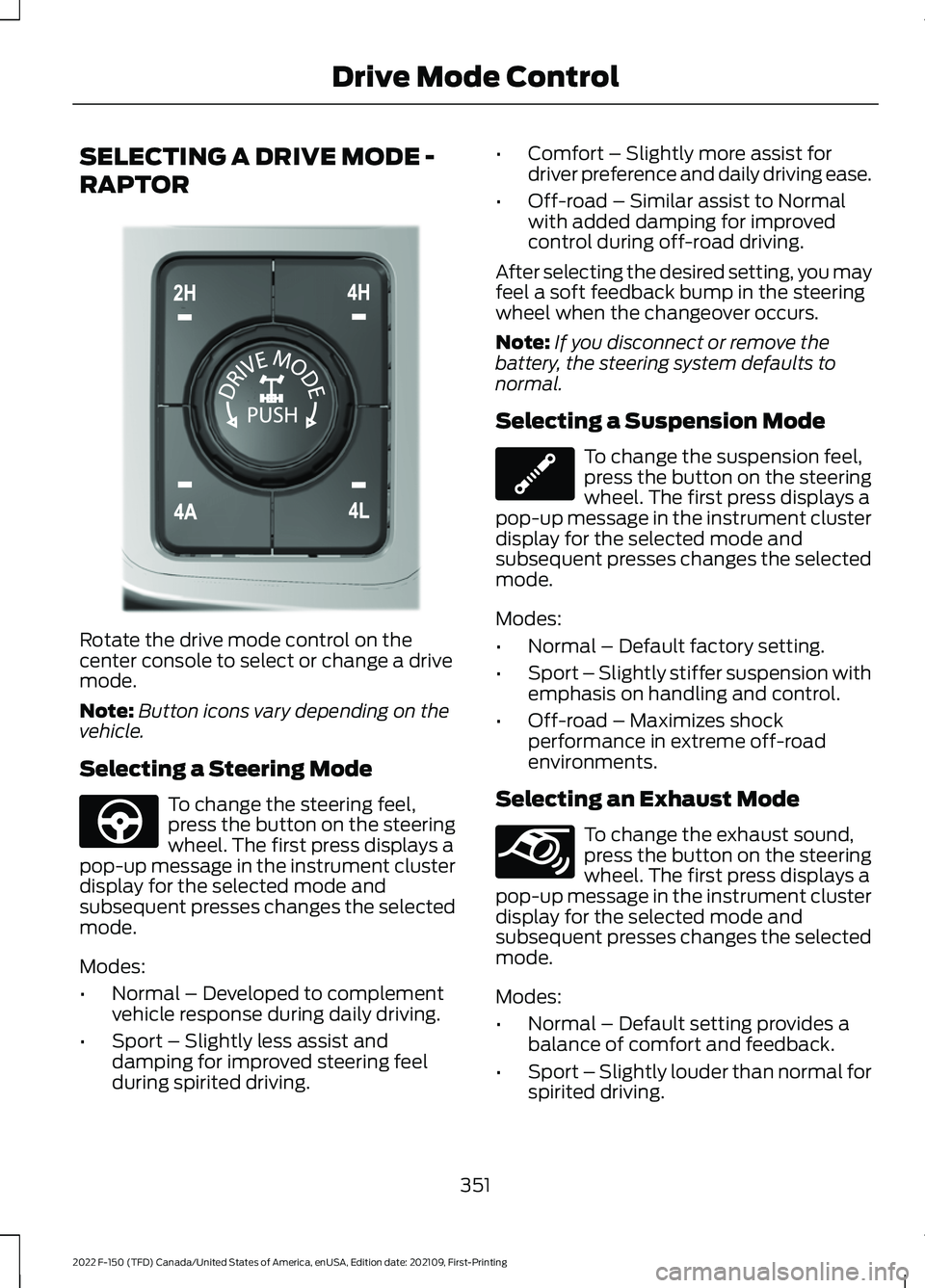
RAPTOR
Rotate the drive mode control on the
center console to select or change a drive
mode.
Note:
Button icons vary depending on the
vehicle.
Selecting a Steering Mode To change the steering feel,
press the button on the steering
wheel. The first press displays a
pop-up message in the instrument cluster
display for the selected mode and
subsequent presses changes the selected
mode.
Modes:
• Normal – Developed to complement
vehicle response during daily driving.
• Sport – Slightly less assist and
damping for improved steering feel
during spirited driving. •
Comfort – Slightly more assist for
driver preference and daily driving ease.
• Off-road – Similar assist to Normal
with added damping for improved
control during off-road driving.
After selecting the desired setting, you may
feel a soft feedback bump in the steering
wheel when the changeover occurs.
Note: If you disconnect or remove the
battery, the steering system defaults to
normal.
Selecting a Suspension Mode To change the suspension feel,
press the button on the steering
wheel. The first press displays a
pop-up message in the instrument cluster
display for the selected mode and
subsequent presses changes the selected
mode.
Modes:
• Normal – Default factory setting.
• Sport – Slightly stiffer suspension with
emphasis on handling and control.
• Off-road – Maximizes shock
performance in extreme off-road
environments.
Selecting an Exhaust Mode To change the exhaust sound,
press the button on the steering
wheel. The first press displays a
pop-up message in the instrument cluster
display for the selected mode and
subsequent presses changes the selected
mode.
Modes:
• Normal – Default setting provides a
balance of comfort and feedback.
• Sport – Slightly louder than normal for
spirited driving.
351
2022 F-150 (TFD) Canada/United States of America, enUSA, Edition date: 202109, First-Printing Drive Mode ControlE308146 E347142 E347107 E347131
Page 365 of 750
WHAT IS THE LANE KEEPING
SYSTEM
The lane keeping system alerts you by
providing temporary steering assistance
or steering wheel vibration when it detects
an unintended lane departure.
HOW DOES THE LANE
KEEPING SYSTEM WORK
The lane keeping system uses a forward
looking camera mounted on the windshield
to monitor vehicle movement within the
travel lane.
When the camera detects a drift out of the
travel lane, the lane keeping system alerts
the driver by vibrating the steering wheel,
or aids the driver by providing a small
steering input to move the vehicle back
into the travel lane.
The driver can select one of three modes:
•
Alert (If Equipped)
• Aid
• Alert + Aid
LANE KEEPING SYSTEM
PRECAUTIONS WARNING: You are responsible for
controlling your vehicle at all times. The
system is designed to be an aid and does
not relieve you of your responsibility to
drive with due care and attention. Failure
to follow this instruction could result in
the loss of control of your vehicle,
personal injury or death. WARNING: The system will not
operate if the sensor cannot track the
road lane markings. WARNING:
The sensor may
incorrectly track lane markings as other
structures or objects. This can result in
a false or missed warning. WARNING:
In cold and severe
weather conditions the system may not
function. Rain, snow and spray can all
limit sensor performance. WARNING:
The system may not
operate properly if the sensor is blocked.
Keep the windshield free from
obstruction. WARNING:
If damage occurs in the
immediate area surrounding the sensor,
have your vehicle checked as soon as
possible. WARNING:
The system may not
correctly operate if your vehicle is fitted
with a suspension kit not approved by
us. WARNING:
Large contrasts in
outside lighting can limit sensor
performance.
LANE KEEPING SYSTEM
LIMITATIONS
The lane keeping system only operates
when the vehicle speed is greater than
40 mph (64 km/h)
.
The system works when the camera can
detect at least one lane marking.
Note: When you select Aid or Alert and Aid
mode and the system detects no steering
activity for a short period of time, the system
alerts you to put your hands on the steering
wheel. The system may detect a light grip
or touch on the steering wheel as hands-off
driving.
361
2022 F-150 (TFD) Canada/United States of America, enUSA, Edition date: 202109, First-Printing Lane Keeping System
(If Equipped)
Page 370 of 750
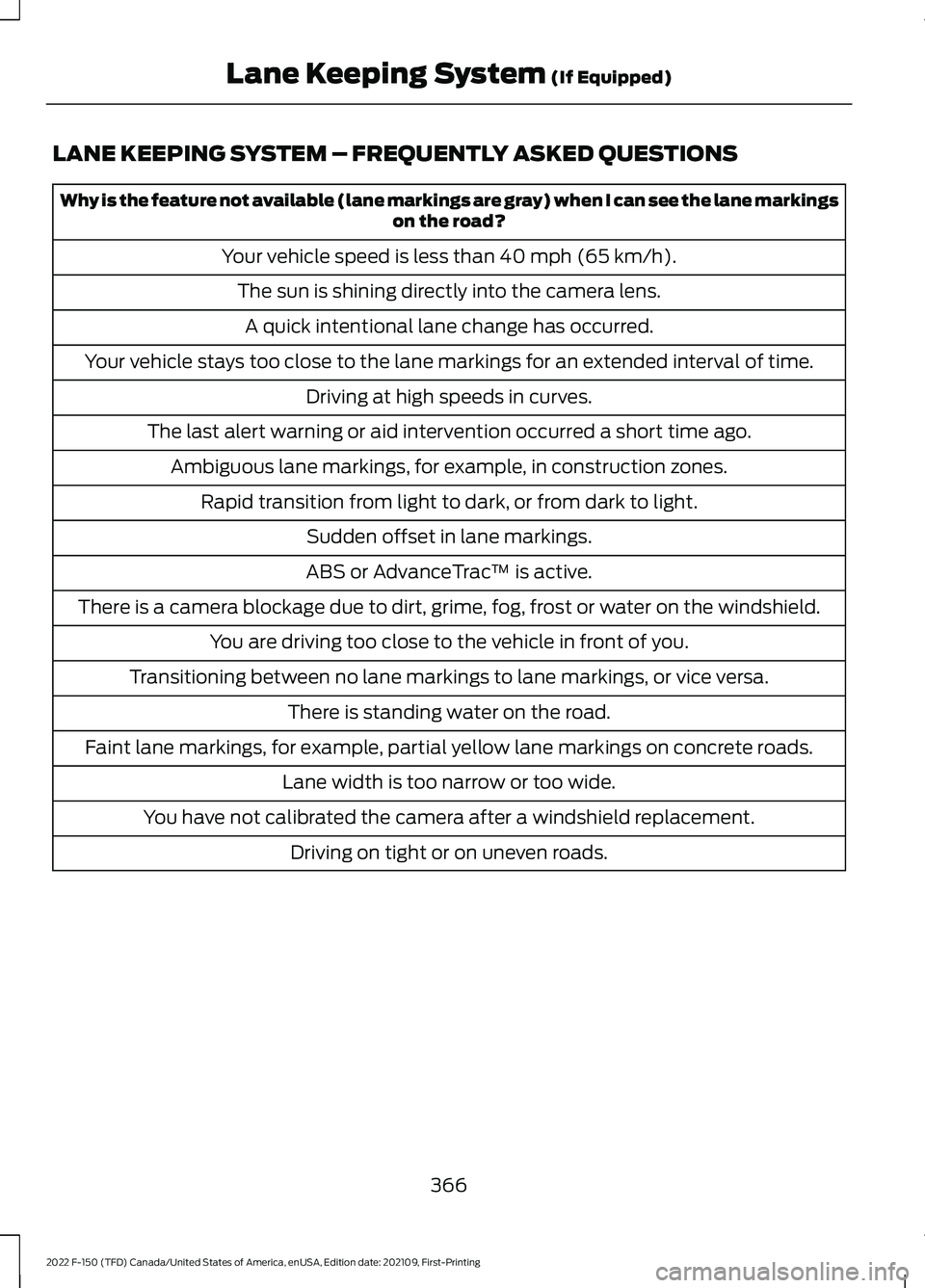
LANE KEEPING SYSTEM – FREQUENTLY ASKED QUESTIONS
Why is the feature not available (lane markings are gray) when I can see the lane markings
on the road?
Your vehicle speed is less than 40 mph (65 km/h).
The sun is shining directly into the camera lens. A quick intentional lane change has occurred.
Your vehicle stays too close to the lane markings for an extended interval of time. Driving at high speeds in curves.
The last alert warning or aid intervention occurred a short time ago. Ambiguous lane markings, for example, in construction zones. Rapid transition from light to dark, or from dark to light. Sudden offset in lane markings.
ABS or AdvanceTrac ™ is active.
There is a camera blockage due to dirt, grime, fog, frost or water on the windshield. You are driving too close to the vehicle in front of you.
Transitioning between no lane markings to lane markings, or vice versa. There is standing water on the road.
Faint lane markings, for example, partial yellow lane markings on concrete roads. Lane width is too narrow or too wide.
You have not calibrated the camera after a windshield replacement. Driving on tight or on uneven roads.
366
2022 F-150 (TFD) Canada/United States of America, enUSA, Edition date: 202109, First-Printing Lane Keeping System
(If Equipped)
Page 374 of 750
Make sure the trailer width is less than or
equal to 8.5 ft (2.6 m) and the length is
less than 33 ft (10.1 m). If you input values
higher, the system turns off.
Some trailers could cause a slight change
in system performance:
• Large box trailers could cause false
alerts to occur when driving next to
infrastructures or near parked cars. A
false alert could also occur while
making a 90-degree turn.
• Trailers that have a width greater than
8.5 ft (2.6 m)
at the front and have a
total length greater than 20 ft (6 m)
could cause delayed alerts when a
vehicle is passing at high speeds.
• Box trailers that have a width greater
than
8.5 ft (2.6 m) at the front could
cause early alerts when you pass a
vehicle.
• Clam shell or v-nose box trailers with
a width greater than
8.5 ft (2.6 m) at
the front could cause delayed alerts
when a vehicle traveling the same
speed as your vehicle merges lanes.
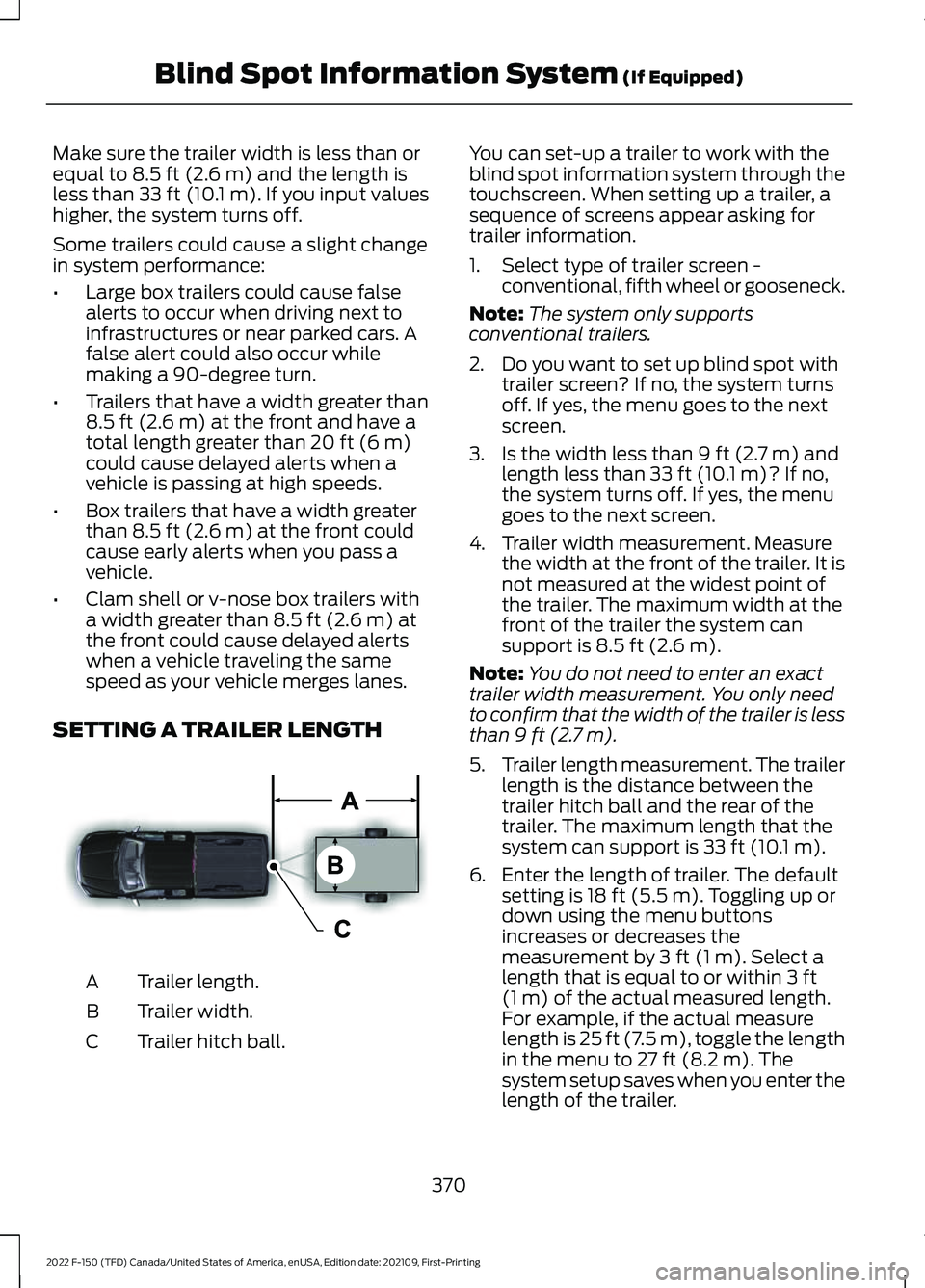
SETTING A TRAILER LENGTH Trailer length.
A
Trailer width.
B
Trailer hitch ball.
C You can set-up a trailer to work with the
blind spot information system through the
touchscreen. When setting up a trailer, a
sequence of screens appear asking for
trailer information.
1. Select type of trailer screen -
conventional, fifth wheel or gooseneck.
Note: The system only supports
conventional trailers.
2. Do you want to set up blind spot with trailer screen? If no, the system turns
off. If yes, the menu goes to the next
screen.
3. Is the width less than
9 ft (2.7 m) and
length less than 33 ft (10.1 m)? If no,
the system turns off. If yes, the menu
goes to the next screen.
4. Trailer width measurement. Measure the width at the front of the trailer. It is
not measured at the widest point of
the trailer. The maximum width at the
front of the trailer the system can
support is
8.5 ft (2.6 m).
Note: You do not need to enter an exact
trailer width measurement. You only need
to confirm that the width of the trailer is less
than
9 ft (2.7 m).
5. Trailer length measurement. The trailer
length is the distance between the
trailer hitch ball and the rear of the
trailer. The maximum length that the
system can support is
33 ft (10.1 m).
6. Enter the length of trailer. The default setting is
18 ft (5.5 m). Toggling up or
down using the menu buttons
increases or decreases the
measurement by
3 ft (1 m). Select a
length that is equal to or within 3 ft
(1 m) of the actual measured length.
For example, if the actual measure
length is
25 ft (7.5 m), toggle the length
in the menu to 27 ft (8.2 m). The
system setup saves when you enter the
length of the trailer.
370
2022 F-150 (TFD) Canada/United States of America, enUSA, Edition date: 202109, First-Printing Blind Spot Information System
(If Equipped)E225008