warning FORD F-650/750 2022 Service Manual
[x] Cancel search | Manufacturer: FORD, Model Year: 2022, Model line: F-650/750, Model: FORD F-650/750 2022Pages: 379, PDF Size: 5.29 MB
Page 72 of 379
WARNING: Do not use starting
fluid, for example ether, in the air intake
system. Such fluid could cause
immediate explosive damage to the
engine and possible personal injury.
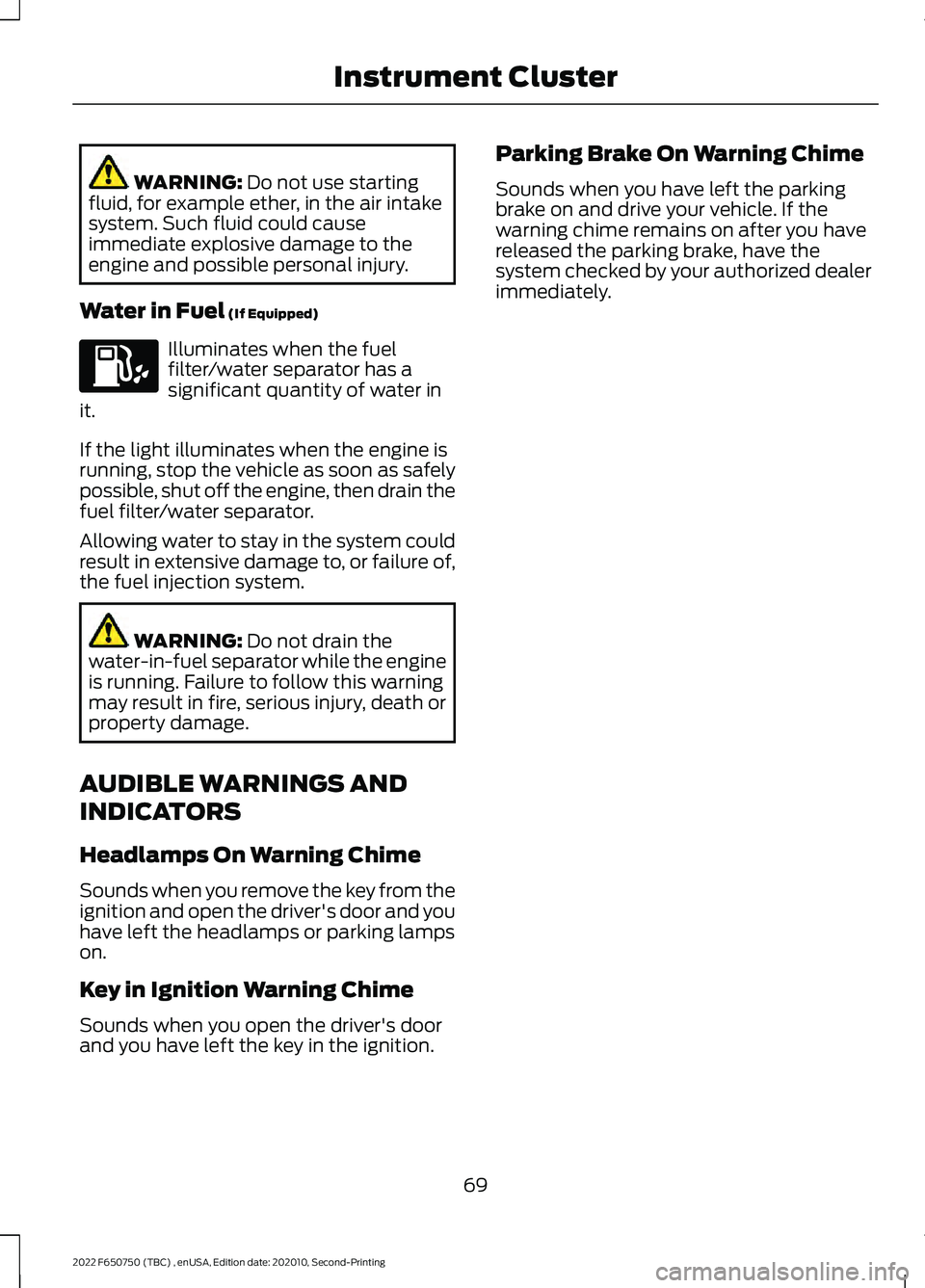
Water in Fuel
(If Equipped) Illuminates when the fuel
filter/water separator has a
significant quantity of water in
it.
If the light illuminates when the engine is
running, stop the vehicle as soon as safely
possible, shut off the engine, then drain the
fuel filter/water separator.
Allowing water to stay in the system could
result in extensive damage to, or failure of,
the fuel injection system. WARNING:
Do not drain the
water-in-fuel separator while the engine
is running. Failure to follow this warning
may result in fire, serious injury, death or
property damage.
AUDIBLE WARNINGS AND
INDICATORS
Headlamps On Warning Chime
Sounds when you remove the key from the
ignition and open the driver's door and you
have left the headlamps or parking lamps
on.
Key in Ignition Warning Chime
Sounds when you open the driver's door
and you have left the key in the ignition. Parking Brake On Warning Chime
Sounds when you have left the parking
brake on and drive your vehicle. If the
warning chime remains on after you have
released the parking brake, have the
system checked by your authorized dealer
immediately.
69
2022 F650750 (TBC) , enUSA, Edition date: 202010, Second-Printing Instrument Cluster
Page 73 of 379
GENERAL INFORMATION
WARNING: Driving while distracted
can result in loss of vehicle control, crash
and injury. We strongly recommend that
you use extreme caution when using any
device that may take your focus off the
road. Your primary responsibility is the
safe operation of your vehicle. We
recommend against the use of any
hand-held device while driving and
encourage the use of voice-operated
systems when possible. Make sure you
are aware of all applicable local laws
that may affect the use of electronic
devices while driving.
Note: Trailer options are not available if
your vehicle speed is greater than 3 mph
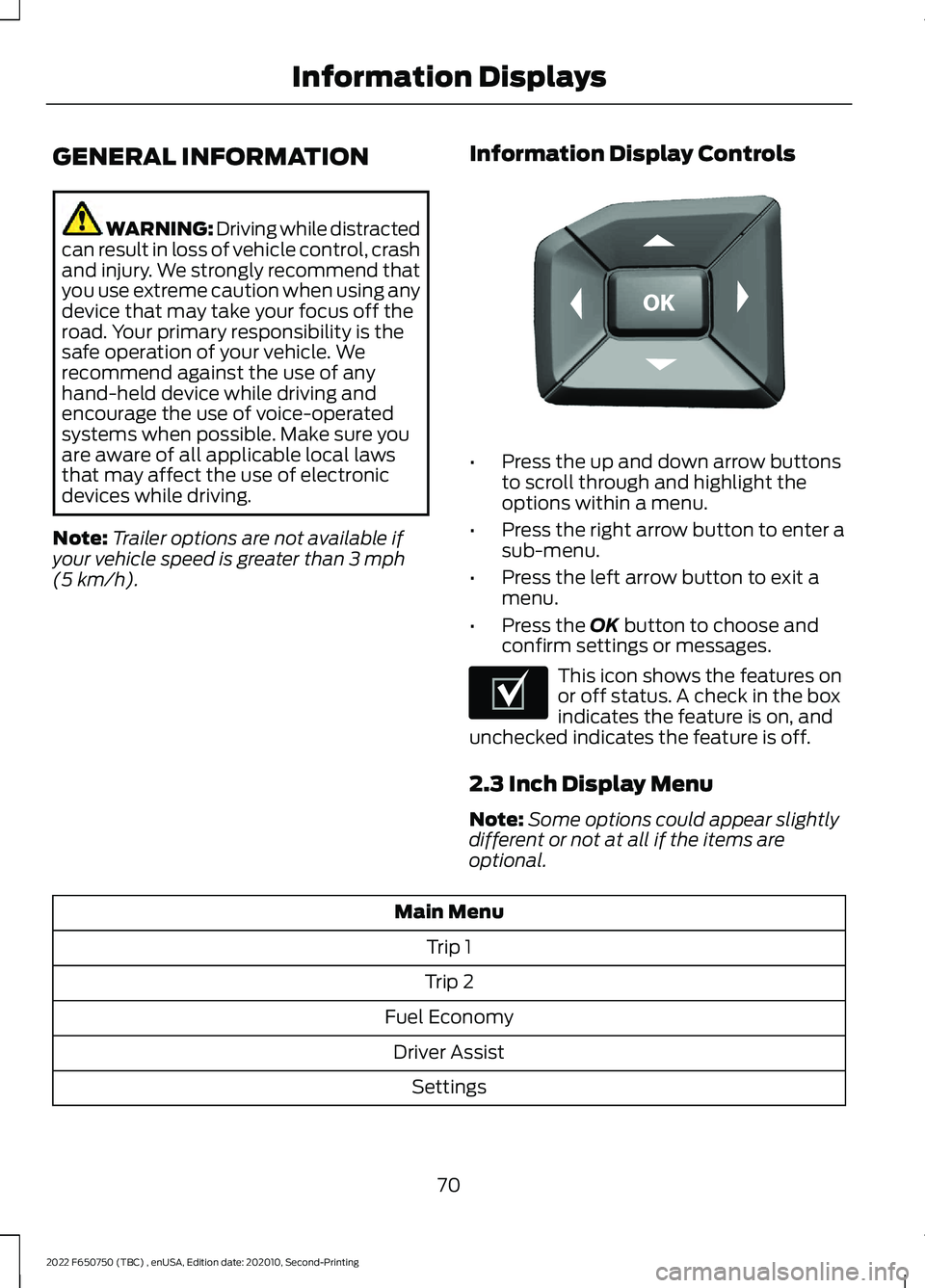
(5 km/h). Information Display Controls •
Press the up and down arrow buttons
to scroll through and highlight the
options within a menu.
• Press the right arrow button to enter a
sub-menu.
• Press the left arrow button to exit a
menu.
• Press the
OK button to choose and
confirm settings or messages. This icon shows the features on
or off status. A check in the box
indicates the feature is on, and
unchecked indicates the feature is off.
2.3 Inch Display Menu
Note: Some options could appear slightly
different or not at all if the items are
optional. Main Menu
Trip 1
Trip 2
Fuel Economy Driver Assist Settings
70
2022 F650750 (TBC) , enUSA, Edition date: 202010, Second-Printing Information DisplaysE184451 E204495
Page 79 of 379
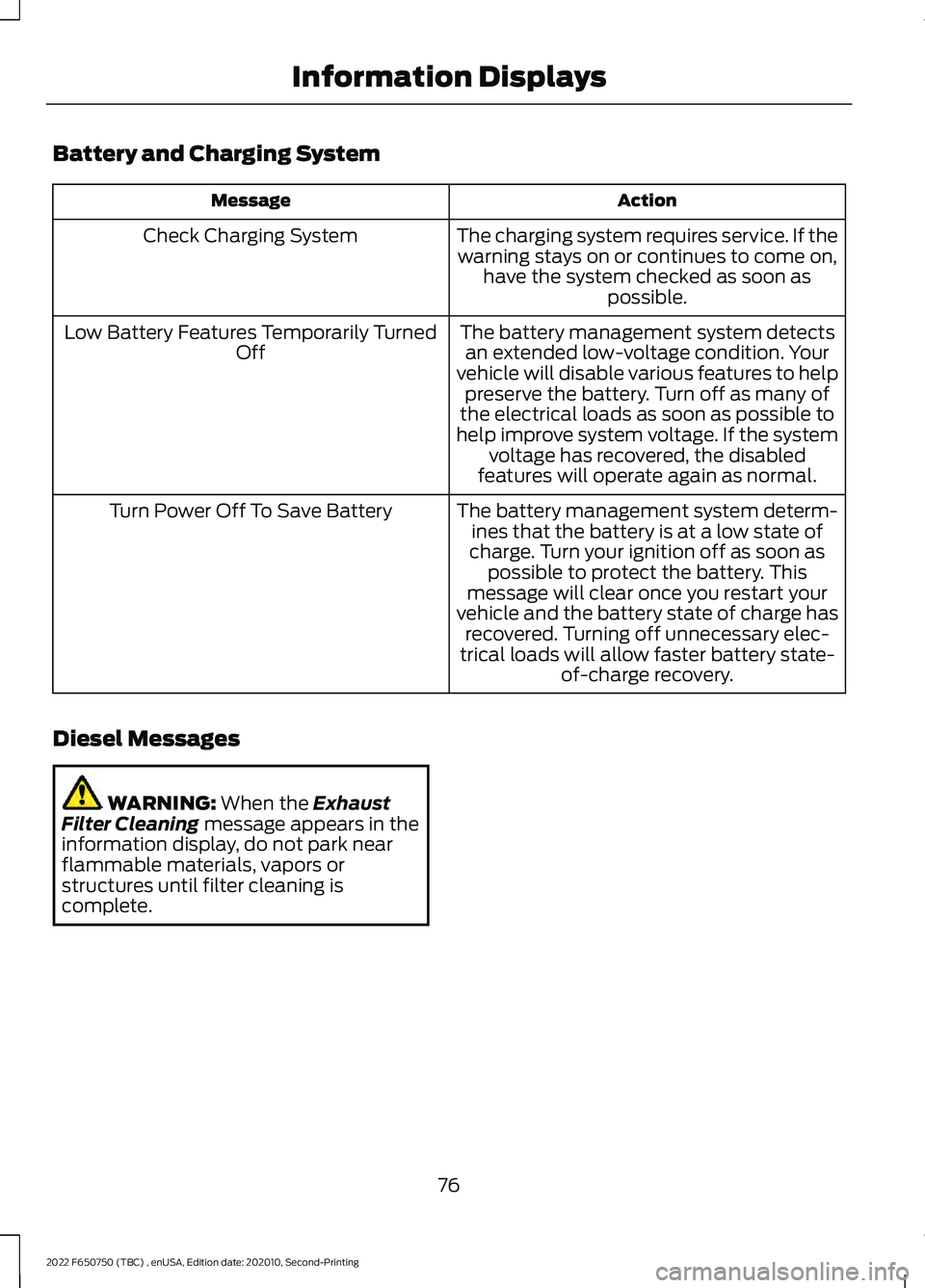
Battery and Charging System
Action
Message
The charging system requires service. If thewarning stays on or continues to come on, have the system checked as soon as possible.
Check Charging System
The battery management system detectsan extended low-voltage condition. Your
vehicle will disable various features to help preserve the battery. Turn off as many of
the electrical loads as soon as possible to
help improve system voltage. If the system voltage has recovered, the disabled
features will operate again as normal.
Low Battery Features Temporarily Turned
Off
The battery management system determ-ines that the battery is at a low state of
charge. Turn your ignition off as soon as possible to protect the battery. This
message will clear once you restart your
vehicle and the battery state of charge has recovered. Turning off unnecessary elec-
trical loads will allow faster battery state- of-charge recovery.
Turn Power Off To Save Battery
Diesel Messages WARNING: When the Exhaust
Filter Cleaning message appears in the
information display, do not park near
flammable materials, vapors or
structures until filter cleaning is
complete.
76
2022 F650750 (TBC) , enUSA, Edition date: 202010, Second-Printing Information Displays
Page 80 of 379
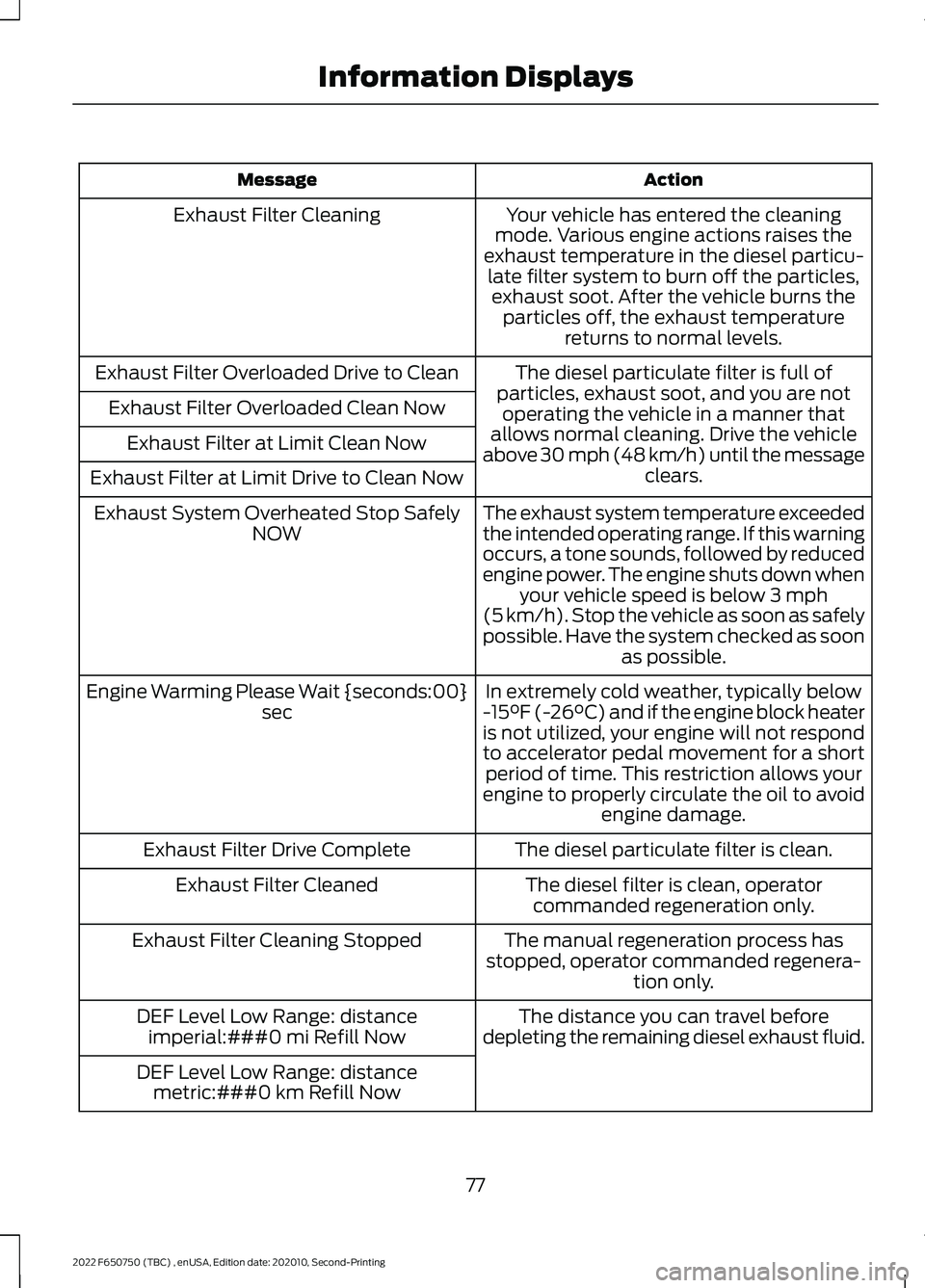
Action
Message
Your vehicle has entered the cleaning
mode. Various engine actions raises the
exhaust temperature in the diesel particu- late filter system to burn off the particles,exhaust soot. After the vehicle burns the particles off, the exhaust temperature returns to normal levels.
Exhaust Filter Cleaning
The diesel particulate filter is full of
particles, exhaust soot, and you are not operating the vehicle in a manner that
allows normal cleaning. Drive the vehicle
above 30 mph (48 km/h) until the message clears.
Exhaust Filter Overloaded Drive to Clean
Exhaust Filter Overloaded Clean Now Exhaust Filter at Limit Clean Now
Exhaust Filter at Limit Drive to Clean Now The exhaust system temperature exceeded
the intended operating range. If this warning
occurs, a tone sounds, followed by reduced
engine power. The engine shuts down whenyour vehicle speed is below 3 mph
(5 km/h). Stop the vehicle as soon as safely
possible. Have the system checked as soon as possible.
Exhaust System Overheated Stop Safely
NOW
In extremely cold weather, typically below
-15°F (-26°C) and if the engine block heater is not utilized, your engine will not respond
to accelerator pedal movement for a short period of time. This restriction allows your
engine to properly circulate the oil to avoid engine damage.
Engine Warming Please Wait {seconds:00}
sec
The diesel particulate filter is clean.
Exhaust Filter Drive Complete
The diesel filter is clean, operatorcommanded regeneration only.
Exhaust Filter Cleaned
The manual regeneration process has
stopped, operator commanded regenera- tion only.
Exhaust Filter Cleaning Stopped
The distance you can travel before
depleting the remaining diesel exhaust fluid.
DEF Level Low Range: distance
imperial:###0 mi Refill Now
DEF Level Low Range: distance metric:###0 km Refill Now
77
2022 F650750 (TBC) , enUSA, Edition date: 202010, Second-Printing Information Displays
Page 82 of 379
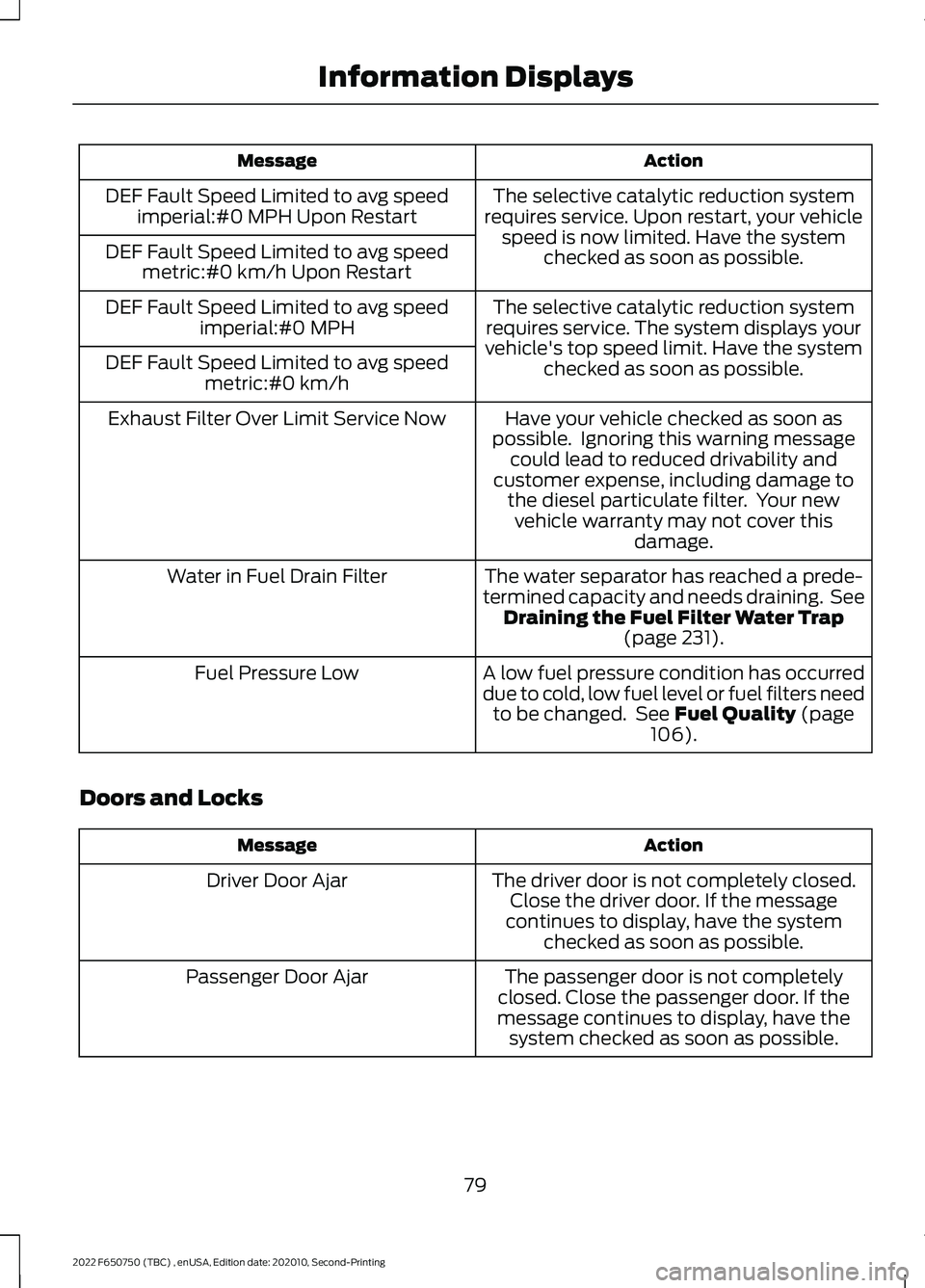
Action
Message
The selective catalytic reduction system
requires service. Upon restart, your vehicle speed is now limited. Have the system checked as soon as possible.
DEF Fault Speed Limited to avg speed
imperial:#0 MPH Upon Restart
DEF Fault Speed Limited to avg speed metric:#0 km/h Upon Restart
The selective catalytic reduction system
requires service. The system displays your
vehicle's top speed limit. Have the system checked as soon as possible.
DEF Fault Speed Limited to avg speed
imperial:#0 MPH
DEF Fault Speed Limited to avg speed metric:#0 km/h
Have your vehicle checked as soon as
possible. Ignoring this warning message could lead to reduced drivability and
customer expense, including damage to the diesel particulate filter. Your newvehicle warranty may not cover this damage.
Exhaust Filter Over Limit Service Now
The water separator has reached a prede-
termined capacity and needs draining. See Draining the Fuel Filter Water Trap (page 231).
Water in Fuel Drain Filter
A low fuel pressure condition has occurred
due to cold, low fuel level or fuel filters needto be changed. See
Fuel Quality (page
106).
Fuel Pressure Low
Doors and Locks Action
Message
The driver door is not completely closed.Close the driver door. If the message
continues to display, have the system checked as soon as possible.
Driver Door Ajar
The passenger door is not completely
closed. Close the passenger door. If the
message continues to display, have the system checked as soon as possible.
Passenger Door Ajar
79
2022 F650750 (TBC) , enUSA, Edition date: 202010, Second-Printing Information Displays
Page 83 of 379
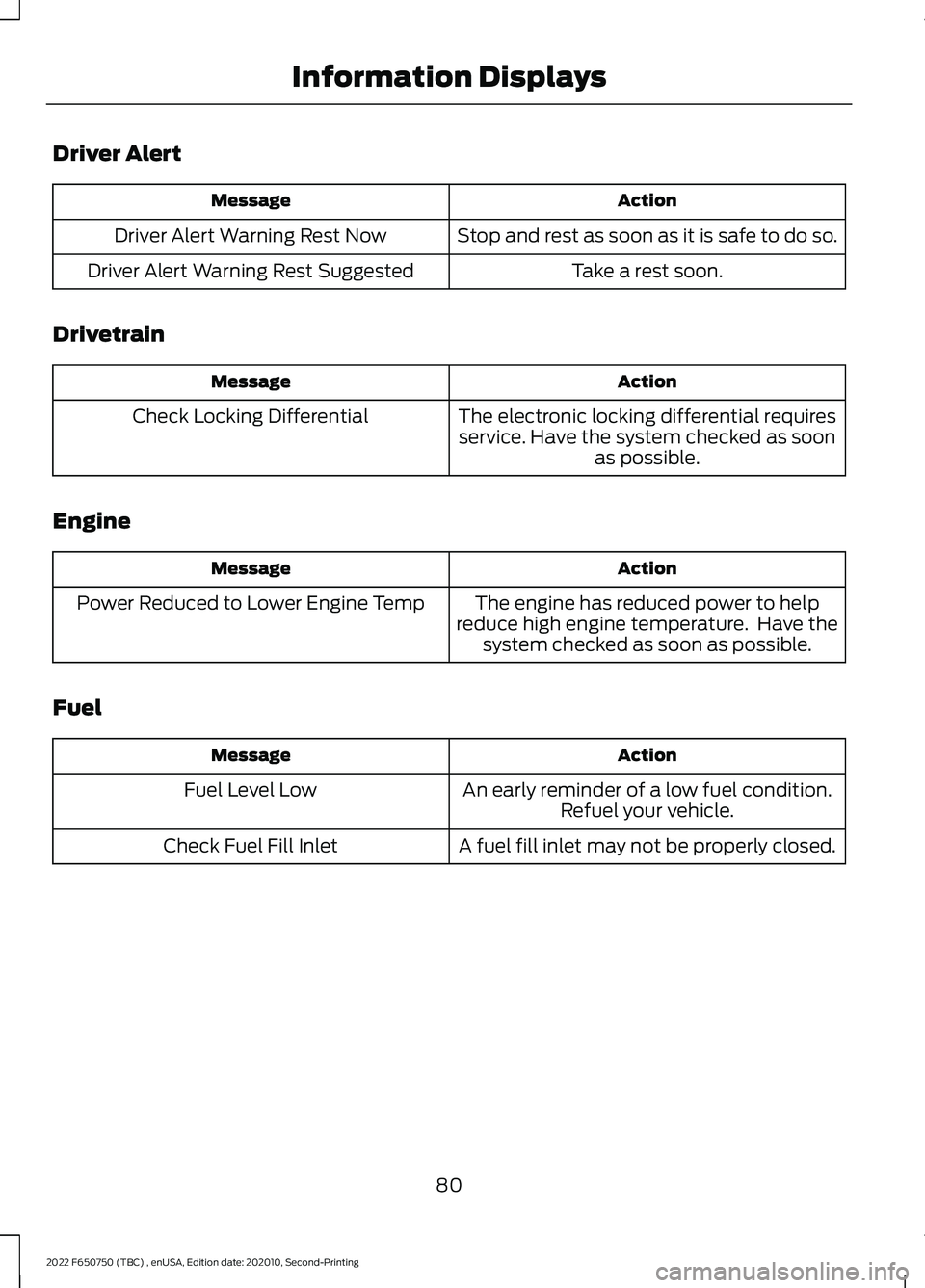
Driver Alert
Action
Message
Stop and rest as soon as it is safe to do so.
Driver Alert Warning Rest Now
Take a rest soon.
Driver Alert Warning Rest Suggested
Drivetrain Action
Message
The electronic locking differential requiresservice. Have the system checked as soon as possible.
Check Locking Differential
Engine Action
Message
The engine has reduced power to help
reduce high engine temperature. Have the system checked as soon as possible.
Power Reduced to Lower Engine Temp
Fuel Action
Message
An early reminder of a low fuel condition.Refuel your vehicle.
Fuel Level Low
A fuel fill inlet may not be properly closed.
Check Fuel Fill Inlet
80
2022 F650750 (TBC) , enUSA, Edition date: 202010, Second-Printing Information Displays
Page 84 of 379
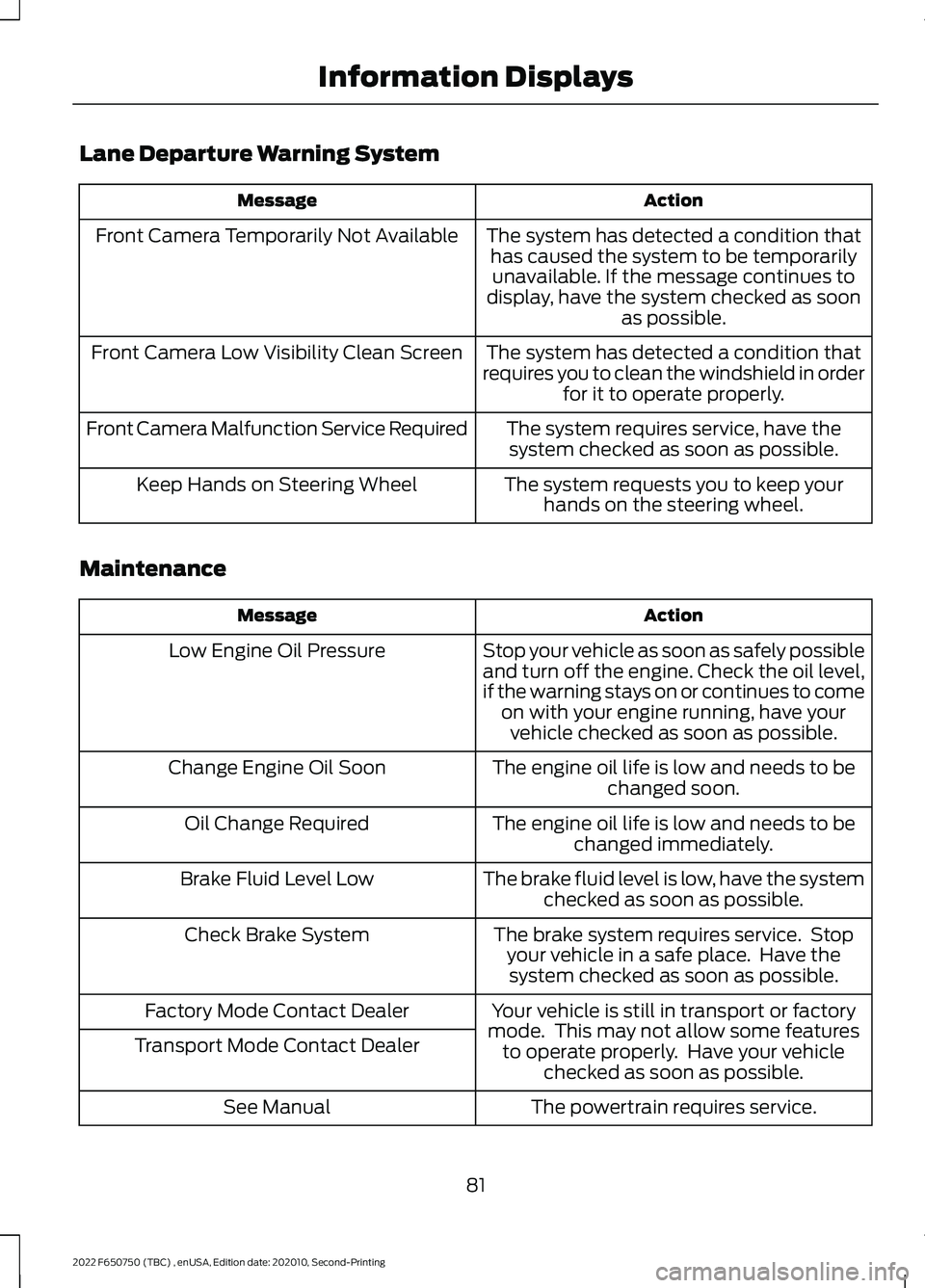
Lane Departure Warning System
Action
Message
The system has detected a condition thathas caused the system to be temporarilyunavailable. If the message continues to
display, have the system checked as soon as possible.
Front Camera Temporarily Not Available
The system has detected a condition that
requires you to clean the windshield in order for it to operate properly.
Front Camera Low Visibility Clean Screen
The system requires service, have thesystem checked as soon as possible.
Front Camera Malfunction Service Required
The system requests you to keep yourhands on the steering wheel.
Keep Hands on Steering Wheel
Maintenance Action
Message
Stop your vehicle as soon as safely possible
and turn off the engine. Check the oil level,
if the warning stays on or continues to comeon with your engine running, have yourvehicle checked as soon as possible.
Low Engine Oil Pressure
The engine oil life is low and needs to bechanged soon.
Change Engine Oil Soon
The engine oil life is low and needs to bechanged immediately.
Oil Change Required
The brake fluid level is low, have the systemchecked as soon as possible.
Brake Fluid Level Low
The brake system requires service. Stopyour vehicle in a safe place. Have thesystem checked as soon as possible.
Check Brake System
Your vehicle is still in transport or factory
mode. This may not allow some features to operate properly. Have your vehicle checked as soon as possible.
Factory Mode Contact Dealer
Transport Mode Contact Dealer
The powertrain requires service.
See Manual
81
2022 F650750 (TBC) , enUSA, Edition date: 202010, Second-Printing Information Displays
Page 91 of 379
SITTING IN THE CORRECT
POSITION
WARNING: Do not recline the
seatback as this can cause the occupant
to slide under the safety belt, resulting
in serious injury in the event of a crash. WARNING:
Do not place objects
higher than the seatback to reduce the
risk of serious injury in the event of a
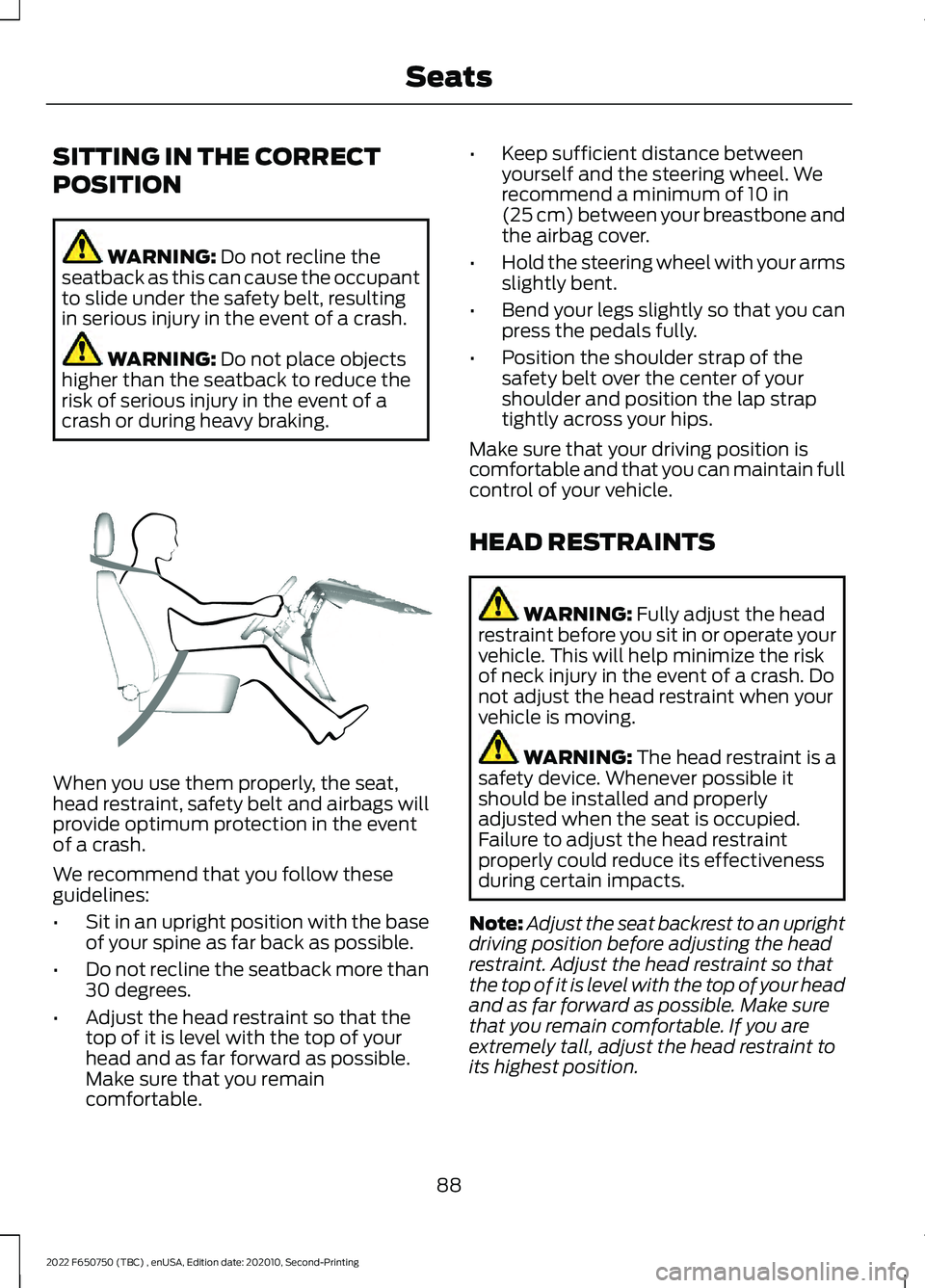
crash or during heavy braking. When you use them properly, the seat,
head restraint, safety belt and airbags will
provide optimum protection in the event
of a crash.
We recommend that you follow these
guidelines:
•
Sit in an upright position with the base
of your spine as far back as possible.
• Do not recline the seatback more than
30 degrees.
• Adjust the head restraint so that the
top of it is level with the top of your
head and as far forward as possible.
Make sure that you remain
comfortable. •
Keep sufficient distance between
yourself and the steering wheel. We
recommend a minimum of
10 in
(25 cm) between your breastbone and
the airbag cover.
• Hold the steering wheel with your arms
slightly bent.
• Bend your legs slightly so that you can
press the pedals fully.
• Position the shoulder strap of the
safety belt over the center of your
shoulder and position the lap strap
tightly across your hips.
Make sure that your driving position is
comfortable and that you can maintain full
control of your vehicle.
HEAD RESTRAINTS WARNING:
Fully adjust the head
restraint before you sit in or operate your
vehicle. This will help minimize the risk
of neck injury in the event of a crash. Do
not adjust the head restraint when your
vehicle is moving. WARNING:
The head restraint is a
safety device. Whenever possible it
should be installed and properly
adjusted when the seat is occupied.
Failure to adjust the head restraint
properly could reduce its effectiveness
during certain impacts.
Note: Adjust the seat backrest to an upright
driving position before adjusting the head
restraint. Adjust the head restraint so that
the top of it is level with the top of your head
and as far forward as possible. Make sure
that you remain comfortable. If you are
extremely tall, adjust the head restraint to
its highest position.
88
2022 F650750 (TBC) , enUSA, Edition date: 202010, Second-Printing SeatsE68595
Page 93 of 379
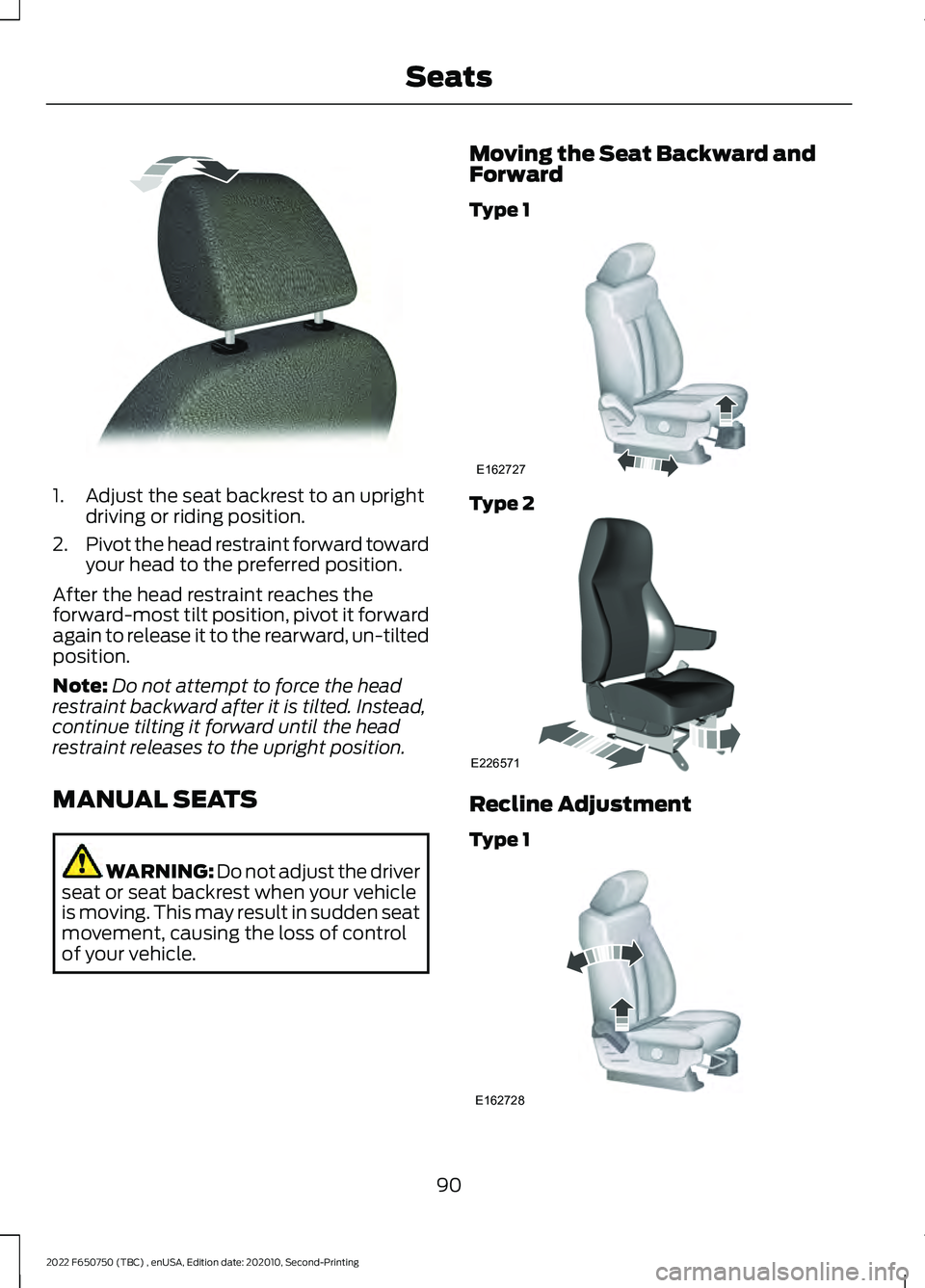
1. Adjust the seat backrest to an upright
driving or riding position.
2. Pivot the head restraint forward toward
your head to the preferred position.
After the head restraint reaches the
forward-most tilt position, pivot it forward
again to release it to the rearward, un-tilted
position.
Note: Do not attempt to force the head
restraint backward after it is tilted. Instead,
continue tilting it forward until the head
restraint releases to the upright position.
MANUAL SEATS WARNING: Do not adjust the driver
seat or seat backrest when your vehicle
is moving. This may result in sudden seat
movement, causing the loss of control
of your vehicle. Moving the Seat Backward and
Forward
Type 1
Type 2
Recline Adjustment
Type 1
90
2022 F650750 (TBC) , enUSA, Edition date: 202010, Second-Printing SeatsE144727 E162727 E226571 E162728
Page 94 of 379
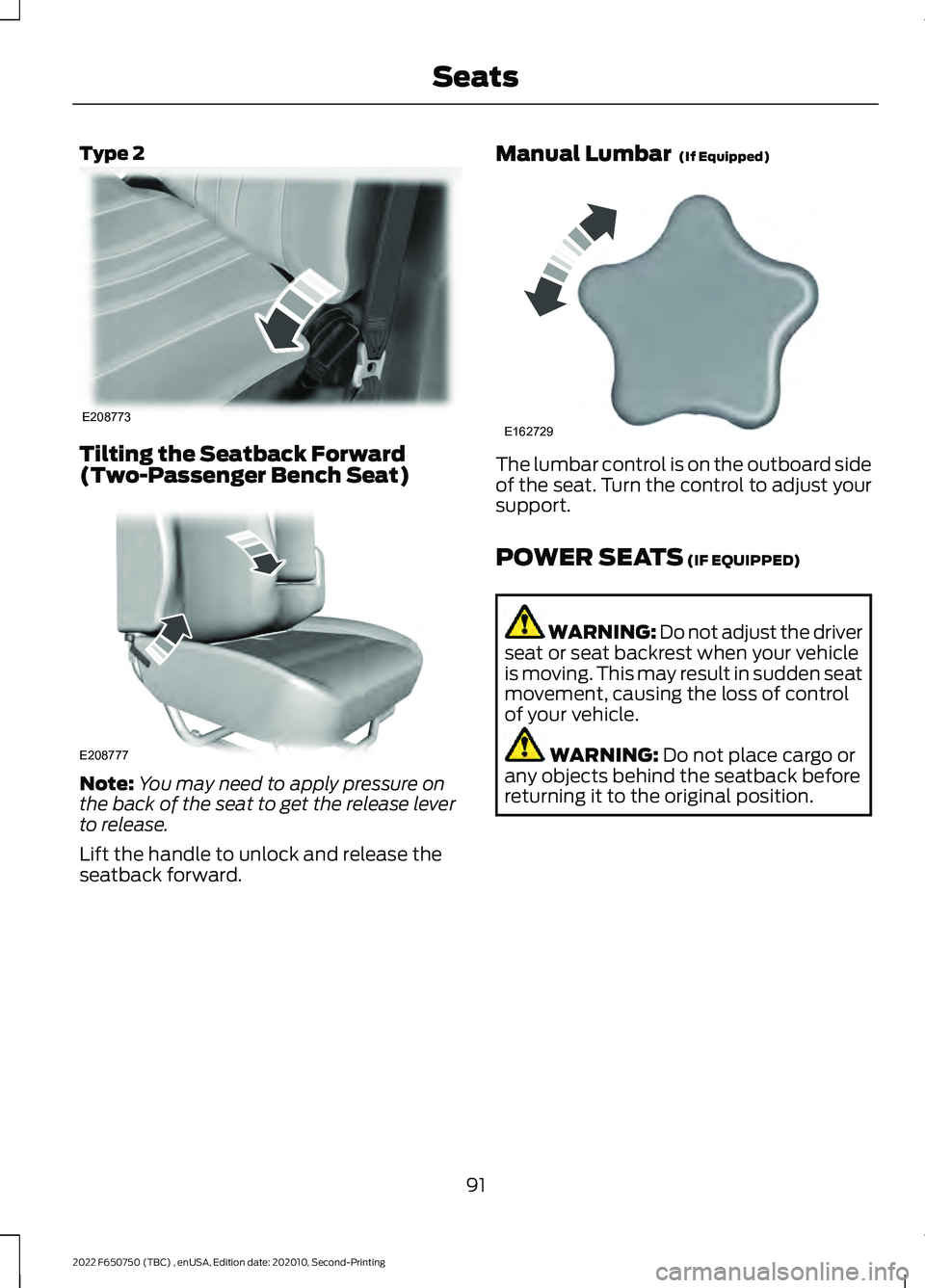
Type 2
Tilting the Seatback Forward
(Two-Passenger Bench Seat)
Note:
You may need to apply pressure on
the back of the seat to get the release lever
to release.
Lift the handle to unlock and release the
seatback forward. Manual Lumbar (If Equipped) The lumbar control is on the outboard side
of the seat. Turn the control to adjust your
support.
POWER SEATS
(IF EQUIPPED)
WARNING: Do not adjust the driver
seat or seat backrest when your vehicle
is moving. This may result in sudden seat
movement, causing the loss of control
of your vehicle. WARNING:
Do not place cargo or
any objects behind the seatback before
returning it to the original position.
91
2022 F650750 (TBC) , enUSA, Edition date: 202010, Second-Printing SeatsE208773 E208777 E162729