ignition FORD F150 2013 12.G Repair Manual
[x] Cancel search | Manufacturer: FORD, Model Year: 2013, Model line: F150, Model: FORD F150 2013 12.GPages: 570, PDF Size: 6.13 MB
Page 235 of 570
The sensing system warns the driver of obstacles within a certain range
of the bumper area. The system turns on automatically whenever the
ignition is switched on.
When receiving a detection warning, the radio volume is reduced to a
predetermined level. After the warning goes away, the radio volume
returns to the previous level.
Using the Rear Sensing System
The rear sensors are only active when the transmission is in R (Reverse).
As the vehicle moves closer to the obstacle, the rate of the audible
warning increases. When the obstacle is fewer than 10 inches (25
centimeters) away, the warning sounds continuously. If a stationary or
receding object is detected farther than 10 inches (25 centimeters) from
the side of the vehicle, the tone sounds for only three seconds. Once the
system detects an object approaching, the warning sounds again.
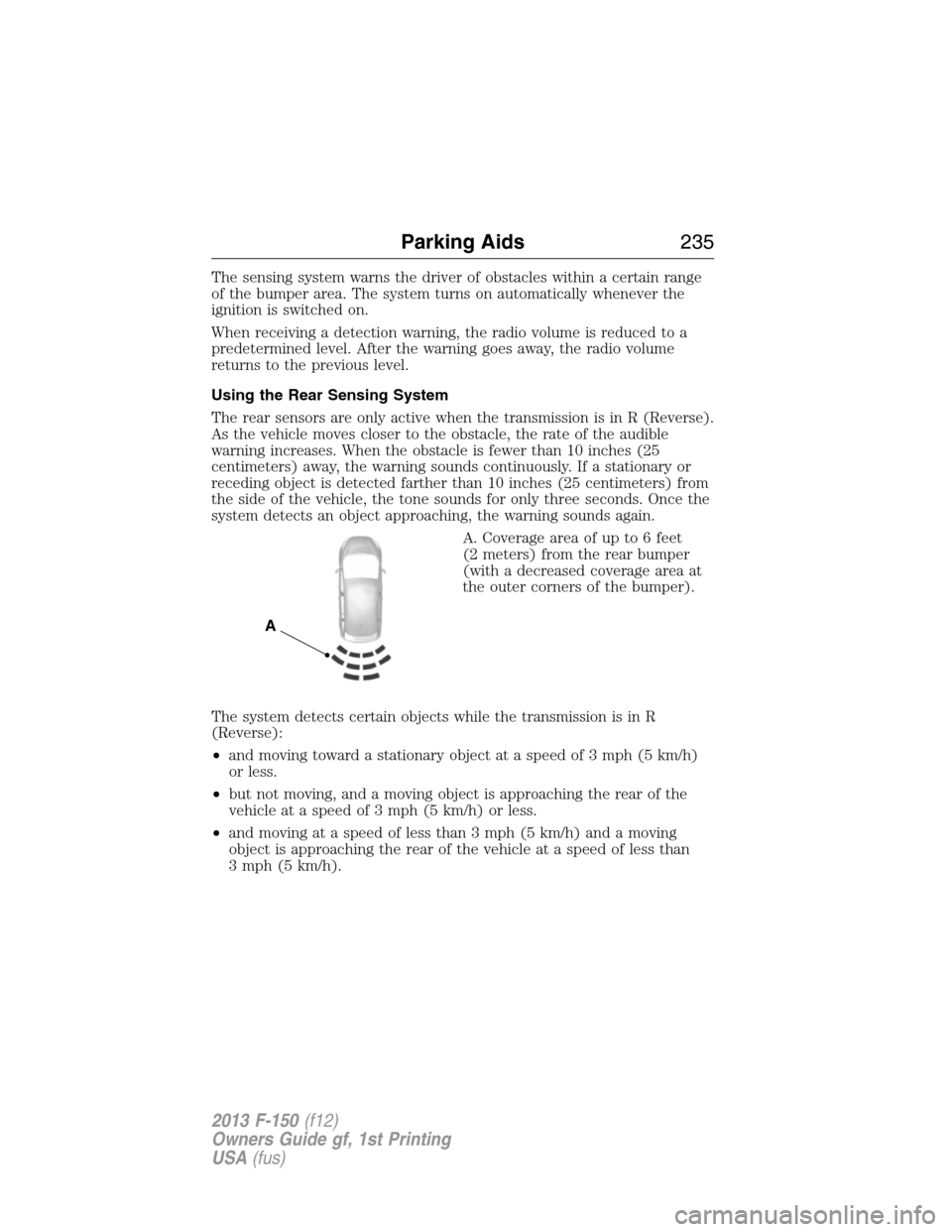
A. Coverage area of up to 6 feet
(2 meters) from the rear bumper
(with a decreased coverage area at
the outer corners of the bumper).
The system detects certain objects while the transmission is in R
(Reverse):
•and moving toward a stationary object at a speed of 3 mph (5 km/h)
or less.
•but not moving, and a moving object is approaching the rear of the
vehicle at a speed of 3 mph (5 km/h) or less.
•and moving at a speed of less than 3 mph (5 km/h) and a moving
object is approaching the rear of the vehicle at a speed of less than
3 mph (5 km/h).
A
Parking Aids235
2013 F-150(f12)
Owners Guide gf, 1st Printing
USA(fus)
Page 241 of 570
Changing the Set Speed
Note:If you accelerate by pressing the accelerator pedal, the set speed
will not change. When you release the accelerator pedal, you will return
to the speed that you previously set.
•Press and holdSET +orSET –. Release the control when you reach
the desired speed.
•Press and releaseSET +orSET –. The set speed will change in
approximately 1 mph (2 km/h) increments.
•Press the accelerator or brake pedal until you reach the desired
speed. Press and releaseSET +.
Canceling the Set Speed
PressCNCLor tap the brake pedal. You will not erase the set speed.
Resuming the Set Speed
Press and releaseRSM.
Switching Cruise Control Off
Note:You will erase the set speed if you switch the system off.
Press and releaseOFFor switch the ignition off.
Cruise Control241
2013 F-150(f12)
Owners Guide gf, 1st Printing
USA(fus)
Page 242 of 570
STEERING
Electric power steering (3.7L, 5.0L and 3.5L EcoBoost™ engines)
WARNING:The electric power steering system has diagnostic
checks that continuously monitor the system to ensure proper
operation. When a system error is detected the following message
Service Power Steering, Service Power Steering Now or Power Steering
Assist Fault may appear in the information display.
WARNING:The electric power steering system has diagnostics
checks that continuously monitor the system to ensure proper
operation of the electronic system. When an electronic error is detected,
Power Steering Assist Fault will be displayed in the information display. If
this happens, stop the vehicle in a safe place, and turn off the engine.
After at least 10 seconds, reset the system by restarting the engine, and
watch the information display for Power Steering Assist Fault. If the
message returns, or returns while driving, take the vehicle to your dealer
to have it checked. With the message displayed, the steering assist is
turned off, making the vehicle harder to steer.
WARNING:If Service Power Steering is displayed in the information
display, a problem with the system function has been detected. On
the next key cycle Service Power Steering Now will be displayed and
steering assist will be removed until the steering system is serviced. Have
your vehicle taken to the nearest dealer as soon as possible.
WARNING:Obtain immediate service if a system error is
detected. You may not notice any difference in the feel of your
steering, but a serious condition may exist. Failure to do so may result
in loss of steering control.
Your vehicle is equipped with an electric power-assisted steering system.
There is no fluid reservoir to check or fill.
If your vehicle loses electrical power while you are driving (or if the
ignition is turned off), you can steer the vehicle manually, but it takes
more effort. Extreme continuous steering may increase the effort it takes
for you to steer. This occurs to prevent internal overheating and
242Driving Aids
2013 F-150(f12)
Owners Guide gf, 1st Printing
USA(fus)
Page 251 of 570
TAILGATE
Tailgate Lock (If Equipped)
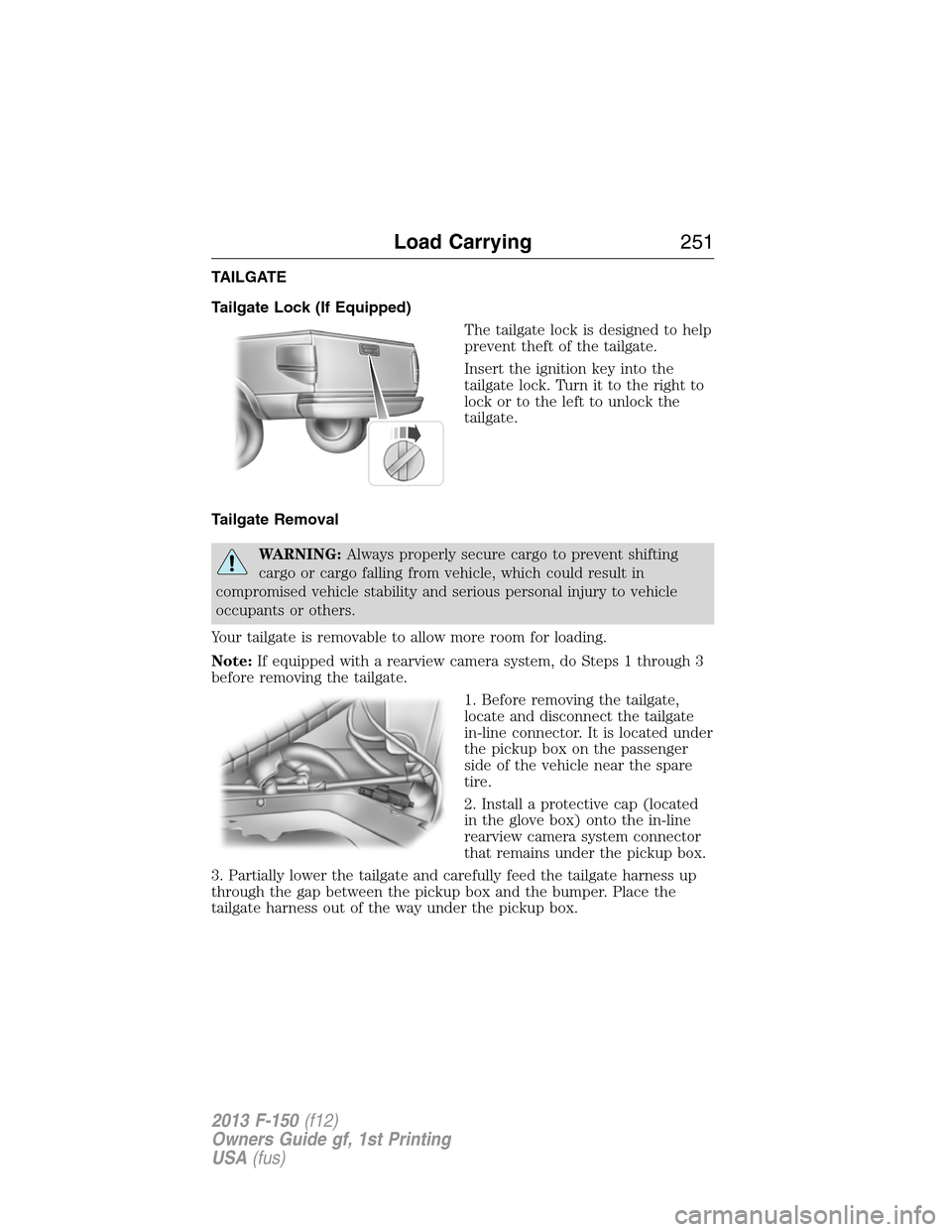
The tailgate lock is designed to help
prevent theft of the tailgate.
Insert the ignition key into the
tailgate lock. Turn it to the right to
lock or to the left to unlock the
tailgate.
Tailgate Removal
WARNING:Always properly secure cargo to prevent shifting
cargo or cargo falling from vehicle, which could result in
compromised vehicle stability and serious personal injury to vehicle
occupants or others.
Your tailgate is removable to allow more room for loading.
Note:If equipped with a rearview camera system, do Steps 1 through 3
before removing the tailgate.
1. Before removing the tailgate,
locate and disconnect the tailgate
in-line connector. It is located under
the pickup box on the passenger
side of the vehicle near the spare
tire.
2. Install a protective cap (located
in the glove box) onto the in-line
rearview camera system connector
that remains under the pickup box.
3. Partially lower the tailgate and carefully feed the tailgate harness up
through the gap between the pickup box and the bumper. Place the
tailgate harness out of the way under the pickup box.
Load Carrying251
2013 F-150(f12)
Owners Guide gf, 1st Printing
USA(fus)
Page 268 of 570
Integrated Trailer Brake Controller (If Equipped)
WARNING:The Ford TBC has only been verified to be
compatible with trailers having electric-actuated drum brakes
(one to four axles) and some electic-over-hydrualic (EOH) brakes. It
will not activate hydraulic surge-style trailer brakes. It is the
responsibility of the customer to ensure that the trailer brakes are
adjusted appropriately, functioning normally and all electric connections
are properly made. Failure to do so may result in loss of vehicle
control, crash or serious injury.
When used properly, the TBC assists in smooth and effective trailer
braking by powering the trailer’s electric or EOH brakes with a
proportional output based on the towing vehicle’s brake pressure.
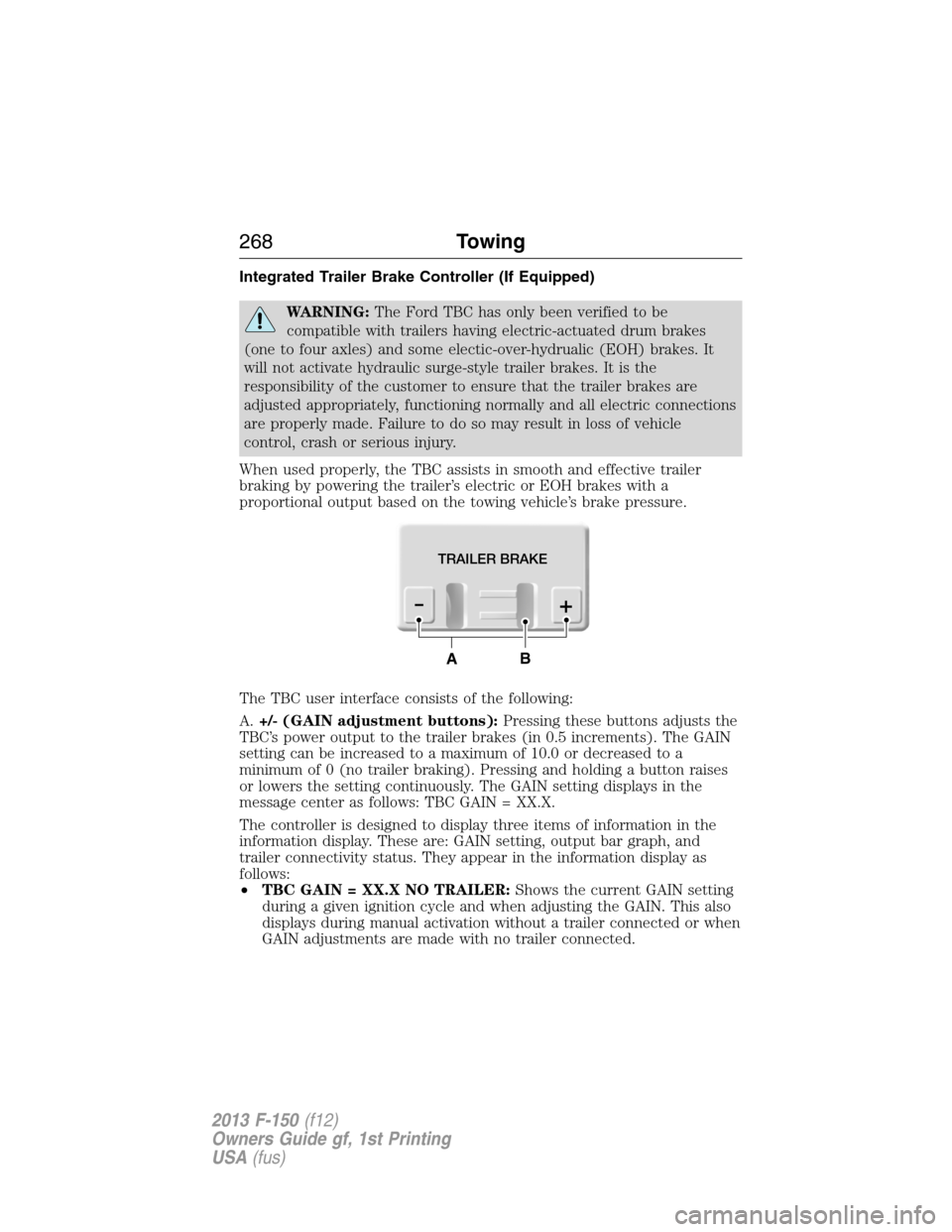
The TBC user interface consists of the following:
A.+/- (GAIN adjustment buttons):Pressing these buttons adjusts the
TBC’s power output to the trailer brakes (in 0.5 increments). The GAIN
setting can be increased to a maximum of 10.0 or decreased to a
minimum of 0 (no trailer braking). Pressing and holding a button raises
or lowers the setting continuously. The GAIN setting displays in the
message center as follows: TBC GAIN = XX.X.
The controller is designed to display three items of information in the
information display. These are: GAIN setting, output bar graph, and
trailer connectivity status. They appear in the information display as
follows:
•TBC GAIN = XX.X NO TRAILER:Shows the current GAIN setting
during a given ignition cycle and when adjusting the GAIN. This also
displays during manual activation without a trailer connected or when
GAIN adjustments are made with no trailer connected.
TRAILER BRAKE
AB
268Towing
2013 F-150(f12)
Owners Guide gf, 1st Printing
USA(fus)
Page 269 of 570
•TBC GAIN = XX.X OUTPUT=//////:Displays when the vehicle’s
brake pedal is pushed, or when the manual control is activated. Bar
indicators illuminate in the information display to indicate the amount
of power going to the trailer brakes relative to the brake pedal or
manual control input. One bar indicates the least amount of output;
six bars indicates maximum output.
•TRAILER CONNECTED:Displays when a correct trailer wiring
connection (a trailer with electric trailer brakes) has been sensed
during a given ignition cycle.
•TRAILER DISCONNECTED:Displays, accompanied by a single
audible chime, when a trailer connection was determined and then a
disconnection (either intentionally or unintentionally), has been
sensed during a given ignition cycle. It also displays if a truck or
trailer wiring fault occurs causing the trailer to appear disconnected.
This message can also display during manual activation without a
trailer connected.
B.Manual control lever:Slide the control lever to the left to activate
power to the trailer’s electric brakes independent of the tow vehicle’s
brakes (see the followingProcedure for adjusting GAINsection for
instructions on proper use of this feature). If the manual control is
activated while the brake is also applied, the greater of the two inputs
determines the power sent to the trailer brakes.
•Stop lamps:Activating the manual control lever illuminates both the
trailer brake lamps and the tow vehicle brake lamps except the
center high-mount stop lamp (if the proper electrical connection has
been made to the trailer). Pressing the vehicle brake pedal also
illuminates both trailer and vehicle brake lamps.
Procedure for Adjusting GAIN
Note:This should only be performed in a traffic-free environment at
speeds of approximately 20–25 mph (30–40 km/h).
The GAIN setting is used to set the TBC for the specific towing
condition and should be changed as towing conditions change. Changes
to towing conditions include trailer load, vehicle load, road conditions
and weather.
The GAIN should be set to provide the maximum trailer braking
assistance while making sure the trailer wheels do not lock when
braking. Locked trailer wheels may lead to trailer instability.
1. Make sure the trailer brakes are in good working condition,
functioning normally and properly adjusted. See your trailer dealer if
necessary.
Towing269
2013 F-150(f12)
Owners Guide gf, 1st Printing
USA(fus)
Page 271 of 570
Points to Remember
Note:Do not attempt removal of the TBC without consulting the
Workshop Manual.Damage to the unit may result.
•Adjust GAIN setting before using the TBC for the first time.
•Adjust GAIN setting (according to procedure above) whenever road,
weather and trailer or vehicle loading conditions change from when
the GAIN was initially set.
•The manual control lever should only be used for proper adjustment
of the GAIN during trailer setup. Misuse, such as application during
trailer sway, could cause instability of trailer or tow vehicle.
•Avoid towing in adverse weather conditions. The TBC does not
provide anti-lock control of the trailer wheels. Trailer wheels can lock
up on slippery surfaces, resulting in reduced stability of trailer and
tow vehicle.
•The TBC is equipped with a feature which reduces output at vehicle
speeds below 11 mph (18 km/h) so trailer and vehicle braking is not
jerky or harsh. This feature is only available when applying the brakes
using the vehicle’s brake pedal, not the TBC.
•The controller interacts with the brake control system and powertrain
control system of the vehicle to provide the best performance on
different road conditions.
•Your vehicle’s brake system and the trailer brake system work
independently of each other. Changing the GAIN setting on the TBC
does not affect the operation of your vehicle’s brakes whether a
trailer is attached or not.
•When the vehicle is turned off, the TBC output is disabled and the
display and module are shut down. The TBC module and display turn
on when the ignition is turned from the off position to the on
position.
•The TBC is only a factory-installed or dealer-installed item. Ford is
not responsible for warranty or performance of the TBC due to
misuse or customer installation.
Trailer Lamps
Trailer lamps are required on most towed vehicles. Make sure all running
lights, brake lights, turn signals and hazard lights are working. Contact
your authorized dealer or trailer rental agency for proper instructions
and equipment for hooking up the lamps.
Towing271
2013 F-150(f12)
Owners Guide gf, 1st Printing
USA(fus)
Page 275 of 570
TOWING THE VEHICLE ON FOUR WHEELS
Emergency Towing
In the event your vehicle becomes disabled (without access to wheel
dollies, car-hauling trailer, or flatbed transport vehicle), it can be
flat-towed (all wheels on the ground, regardless of the
powertrain/transmission configuration) under the following conditions:
•The vehicle is facing forward so that it is towed in a forward
direction.
•The transmission is placed in positionN.SeeAutomatic
transmissionin theTransmissionchapter if you cannot move the
transmission intoN.
•Maximum speed is 35 mph (56 km/h).
•Maximum distance is 50 miles (80 kilometers).
Recreational Towing
Note:Put your climate control system in recirculated air mode to
prevent exhaust fumes from entering the vehicle. Refer to theClimate
Controlschapter.
Follow these guidelines if you need to tow your vehicle behind another
vehicle, such as a motor home. The guidelines are designed to prevent
damage to your vehicle and its transmission after it is hooked-up to the
tow vehicle or tow dolly.
2WD vehiclescannot be towed with any wheels on the ground as
vehicle or transmission damage may occur. The vehicle must be towed
with all four wheels off the ground (i.e. with a car-hauling trailer).
4WD vehiclescan only be towed with all wheels on the ground by
placing the transfer case in its neutral position and engaging the
four-wheel-down towing feature. Perform the steps outlined in the
Four-wheel-down towingsection after positioning your vehicle behind
the tow vehicle and properly securing them together
Four-wheel-down Towing
1. Turn the ignition to the on position. Do not start the engine.
2. Press and hold the brake pedal.
3. Shift the 4WD switch to 2H.
4. Shift the transmission to positionN.
Towing275
2013 F-150(f12)
Owners Guide gf, 1st Printing
USA(fus)
Page 276 of 570
5. Rotate the 4WD switch from 2H to 4L and back to 2H five times
within seven seconds.
•If completed successfully, the information display shows
NEUTRAL TOW LEAVE IN NorNEUTRAL TOW ENABLED
LEAVE TRANSMISSION IN NEUTRAL, indicating that the
vehicle is safe to tow with all wheels on the ground.
•If the message is not shown in the display, the procedure must be
performed again from the beginning.
•An audible noise may be heard as the transfer case shifts into its
neutral position. This is normal.
6. Leave the transmission in positionNand turn the ignition as far as it
will go toward the off position (it will not turn fully off when the
transmission is in positionN.. The key must be left in the ignition
while towing. To lock and unlock your vehicle, use the keyless entry
keypad or extra set of keys.
7. Release the brake pedal.
WARNING:Do not disconnect the battery during recreational
towing. Doing so will prevent the transfer case from shifting
properly and may cause the vehicle to roll even if the transmission is in
P (Park).
WARNING:Shifting the transfer case to its neutral position for
recreational towing may cause the vehicle to be able to roll even
if the transmission is in P (Park). The driver or others could be injured.
Make sure the foot brake is depressed and the vehicle is in a secure
and safe position while the transfer case is being shifted to its neutral
position.
WARNING:Failing to put the transfer case in its neutral position
will damage vehicle components.
Note:Four-wheel-down towing status can be checked at any time by
opening the driver’s door or turning the ignition to the accessory or on
position and verifying the NEUTRAL TOW ENABLED message is
displayed in the cluster.
276Towing
2013 F-150(f12)
Owners Guide gf, 1st Printing
USA(fus)
Page 277 of 570
To exit four-wheel-down towing and return the transfer case to its 2H
position:
1. With the vehicle still properly secured to the tow vehicle, press and
hold the brake pedal.
2. Turn the ignition to the on position; do not start the engine.
3. Shift the transmission out ofNand into any gear.
4. Release the brake pedal.
•If completed successfully, the instrument cluster displays4X2,
andNEUTRAL TOW DISABLED.
•If the indicator light and message do not display, the procedure
must be performed again from the beginning.
•An audible noise may be heard as the transfer case shifts out of
its neutral position; this is normal.
5. Apply the parking brake, then disconnect the vehicle from the tow
vehicle.
6. Release the parking brake, start the engine, and shift the
transmission to positionDto make sure the transfer case is out of N
(Neutral).
7. If the transfer case will not successfully shift out of positionN,set
the parking brake until the vehicle can be serviced.
Towing277
2013 F-150(f12)
Owners Guide gf, 1st Printing
USA(fus)