brake light FORD F150 2014 12.G Raptor Supplement Manual
[x] Cancel search | Manufacturer: FORD, Model Year: 2014, Model line: F150, Model: FORD F150 2014 12.GPages: 41, PDF Size: 4.4 MB
Page 10 of 41
PRINCIPLE OF OPERATION
WARNINGS
Hill descent control cannot controldescent in all surface conditions andcircumstances, such as ice orextremely steep grades. Hill descentcontrol is a driver assist system and cannotsubstitute for good judgment by the driver.Failure to do so may result in loss of vehiclecontrol, crash or serious injury.
Hill descent control does not providehill hold at zero miles per hour (0kilometers per hour). When stopped,the parking brake must be applied or thevehicle must be placed in P (Park) or itmay roll away.
Hill descent control allows the driver to setand maintain vehicle speed whiledescending steep grades in various surfaceconditions.
Hill descent control can maintain vehiclespeeds on downhill grades between 2 mph(3 km/h) and 12 mph (20 km/h). Above 20mph (32 km/h), the system remainsarmed, but descent speed cannot be setor maintained.
Hill descent control requires a coolingdown interval after a period of sustaineduse. The amount of time that the featurecan remain active before cooling varieswith conditions. The system will provide awarning in the message center and a chimewill sound when the system is about todisengage for cooling. At this time,manually apply the brakes as needed tomaintain descent speed.
USING HILL DESCENT
CONTROL
1.Press and release the hill descentbutton located on the center console.Switching on this feature will light thebutton and sound a tone.
2.Press the accelerator pedal to increasedescent speed until you have reachedthe desired speed.
3.Press the brake pedal to decreasedescent speed until you have reachedthe desired speed.
Note:Once you have reached the desireddescent speed, remove your feet from thepedals to maintain the chosen vehiclespeed.
See the Information Displays chapter ofyour Owner’s Manual for hill descentmode messages.
Disabling Hill Descent Control
To switch off the hill descent control, pressthe button located on the center consolea second time. The light will turn off andthe information display will indicate thatyou have switched this off.
8F150 (TF6)Terrain ResponseE168102
Page 16 of 41
WARNINGS
Do not disconnect the battery duringrecreational towing. Doing so willprevent the transfer case fromshifting properly and may cause the vehicleto roll even if the transmission is in P(Park).
Shifting the transfer case to itsneutral position for recreationaltowing may cause the vehicle to beable to roll even if the transmission is in P(Park). The driver or others could beinjured. Make sure the foot brake isdepressed and the vehicle is in a secureand safe position while the transfer caseis being shifted to its neutral position.
Failing to put the transfer case in itsneutral position will damage vehiclecomponents.
Note:You can check four-wheel-downtowing status at any time by opening thedriver's door or turning the ignition to theaccessory or on position and verifying theNEUTRAL TOW ENABLED messagedisplays in the cluster.
To exit four-wheel-down towing and returnthe transfer case to its 2H position:
1.With your vehicle still properly securedto the tow vehicle, press and hold thebrake pedal.
2.Turn the ignition to the on position. Donot start the engine.
3.Shift the transmission out of N and intoany gear.
4.Release the brake pedal.
Note:If completed successfully, theinstrument cluster displays 4X2, andNEUTRAL TOW DISABLED.
Note:If the indicator light and message donot display, you must perform the procedureagain from the beginning.
Note:You may hear an audible noise as thetransfer case shifts out of its neutralposition. This is normal.
5.Apply the parking brake, and thendisconnect the vehicle from the towvehicle.
6.Release the parking brake, start theengine, and shift the transmission toposition D to make sure the transfercase is out of position N.
7.If the transfer case does notsuccessfully shift out of position N, setthe parking brake until you can haveyour vehicle serviced.
14F150 (TF6)Towing
Page 19 of 41
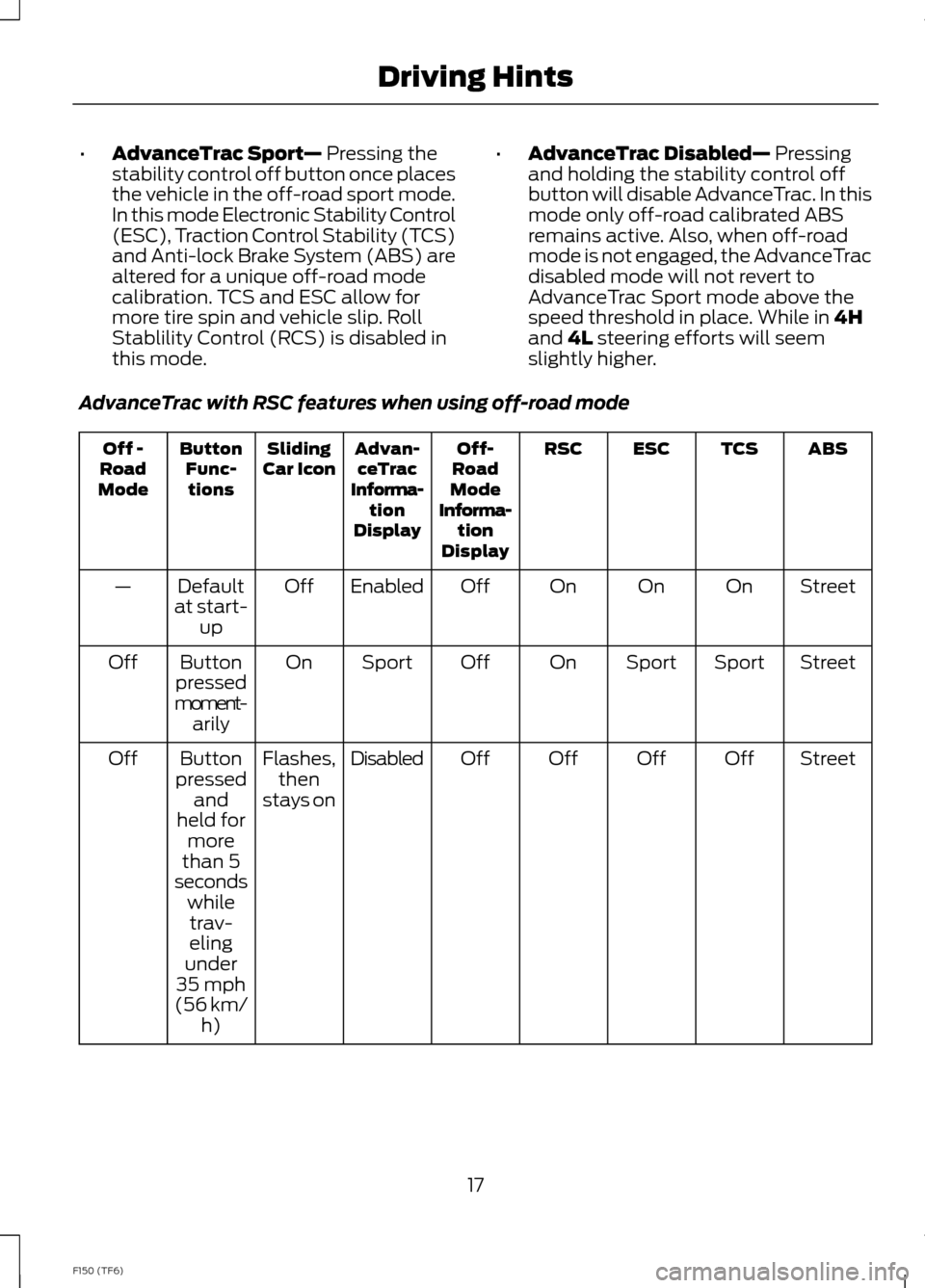
•AdvanceTrac Sport— Pressing thestability control off button once placesthe vehicle in the off-road sport mode.In this mode Electronic Stability Control(ESC), Traction Control Stability (TCS)and Anti-lock Brake System (ABS) arealtered for a unique off-road modecalibration. TCS and ESC allow formore tire spin and vehicle slip. RollStablility Control (RCS) is disabled inthis mode.
•AdvanceTrac Disabled— Pressingand holding the stability control offbutton will disable AdvanceTrac. In thismode only off-road calibrated ABSremains active. Also, when off-roadmode is not engaged, the AdvanceTracdisabled mode will not revert toAdvanceTrac Sport mode above thespeed threshold in place. While in 4Hand 4L steering efforts will seemslightly higher.
AdvanceTrac with RSC features when using off-road mode
ABSTCSESCRSCOff-RoadModeInforma-tionDisplay
Advan-ceTracInforma-tionDisplay
SlidingCar IconButtonFunc-tions
Off -RoadMode
StreetOnOnOnOffEnabledOffDefaultat start-up
—
StreetSportSportOnOffSportOnButtonpressedmoment-arily
Off
StreetOffOffOffOffDisabledFlashes,thenstays on
Buttonpressedandheld formorethan 5
Off
secondswhiletrav-elingunder35 mph(56 km/h)
17F150 (TF6)Driving Hints
Page 21 of 41
Off-road Screen
The real-time status of your vehiclesoff-road systems can be continuouslymonitored using the first off-road screenfound under the Truck Apps menu in theinformation displays screen. See theInformation Displays chapter of yourOwner’s Manual for more information.
Basic Off-road Driving Techniques
•
•Grip the steering wheel with thumbson the outside of the rim. This willreduce the risk of injury due to abruptsteering wheel motions that occurwhen negotiating rough terrain. Do notgrip the steering wheel with thumbsinside the rim.
•Throttle, brake and steering inputsshould be made in a smooth andcontrolled manner. Sudden inputs tothe controls can cause loss of tractionor upset the vehicle, especially whileon sloped terrain or while crossingobstacles such as rocks or logs.
•Look ahead on your route notingupcoming obstacles, surface textureor color changes or any other factorswhich may indicate a change inavailable traction, and adjust thevehicle speed and route accordingly.During pre-run, mark obstacles withGPS markers to make sure appropriatespeeds are used to avoid potentialvehicle damage.
•When driving off-road, if the front orrear suspension is bottoming-outand/or excessive contact with theskid-plates is encountered, reducevehicle speed to avoid potentialdamage to the vehicle.
•When running with other vehicles, it isrecommended that communication isused, and the lead vehicle notify othervehicles of obstacles that could causepotential vehicle damage.
•Always keep available groundclearance in mind and pick a route thatminimizes the risk of catching theunderside of the vehicle on an obstacle.
•When negotiating low speed obstacles,applying light brake pressure inconjunction with the throttle will helpprevent the vehicle from jerking andwill allow you to negotiate the obstaclein a more controlled manner. Using 4Lwill also help with this.
•Use and equip supplemental safetyequipment as discussed later in thischapter.
•Please consult your local off-roadgroup for other helpful tips.
•Off-roading requires a high degree ofconcentration. Even if your local lawdoes not prohibit alcohol use whiledriving off-road, Ford stronglyrecommends against drinking if youplan to off-road.
Operating a Performance Vehicleat Higher than Normal Speeds
Your vehicle is capable of operating athigher than normal off-road speeds and isequipped with tires rated for the vehicles’maximum speed. However, it is importantto remember to always drive safely, obeyall traffic laws and only operate yourvehicle at higher than normal speeds atlocations and under conditions where suchcan be done safely.
19F150 (TF6)Driving Hints
Page 25 of 41
Some points to consider:
•Build up speed slowly. Initially, drive ata pace which allows ample time to fullyassess the terrain around you and tounderstand how the vehicle isresponding to both the terrain anddriver inputs. Increase pace as comfortincreases while always being mindfulof how the vehicle is responding tovarious events at different speeds.
•Find a wide open place to experimentwith different functions on the truck.Try a given maneuver with differentvehicle settings (4H vs. 4L),(differential locked vs. unlocked),(AdvanceTrac in key-on vs. single pressvs. press and hold modes) and see howthe truck responds. Start slowly andbuild pace as comfort increases.
•Similarly, in a wide open space,experiment with different drivingtechniques. For example, if the vehicleis tending to push straight ahead whentrying to negotiate a turn(understeering or plowing), a lightapplication of the brake while turningmay help rotate the truck. A wider entryto the corner or entering the cornermore slowly may help the truck turnand allow you to apply the throttlesooner after negotiating the turn.
•Remember the phrase smooth is fast.This refers to your steering, throttle,and brake movements. Smoothdecisive movements will yieldimproved results while helping toincrease safety.
•As speed increases, it is wise to lookfarther ahead of the vehicle so thatthere is time to react to oncomingobstacles. Remember that in manyoff-road environments, obstacles willbe hard to see until they are relativelynear. A good strategy is to alternatebetween looking far ahead and upcloser to the front of the vehicle asyou’re driving.
•Also remember to drive what you cansee. This refers to not driving fasterthan you are able to negotiateunforeseen upcoming obstacles. Thiscould refer to obstacles over a brow, ina ravine, in brush, in dusty conditions,and in the darkness among others.
•If you are driving in a dusty area. Be sureto leave ample distance between youand any other vehicles to make sureadequate vision.
•Always remember that you may not bethe only one in a particular recreationalarea, always be cognizant of others inyour area. This is especially true ofmotorcycles and ATV’s which may bemore difficult to spot than a full-sizedvehicle.
•If driving in desert conditions, it isadvised that you always drive with yourheadlights on to help other driversmore easily see you.
•While driving in desert conditions, themidpoint of the day is the most difficulttime to see many of the small ridgesand dips due to flat shadows from thesun being at its highest point. Extremecare should be taken at these times tonot inadvertently run into theseobstacles.
23F150 (TF6)Driving Hints