engine FORD F150 2015 13.G Owner's Manual
[x] Cancel search | Manufacturer: FORD, Model Year: 2015, Model line: F150, Model: FORD F150 2015 13.GPages: 549, PDF Size: 5.97 MB
Page 106 of 549
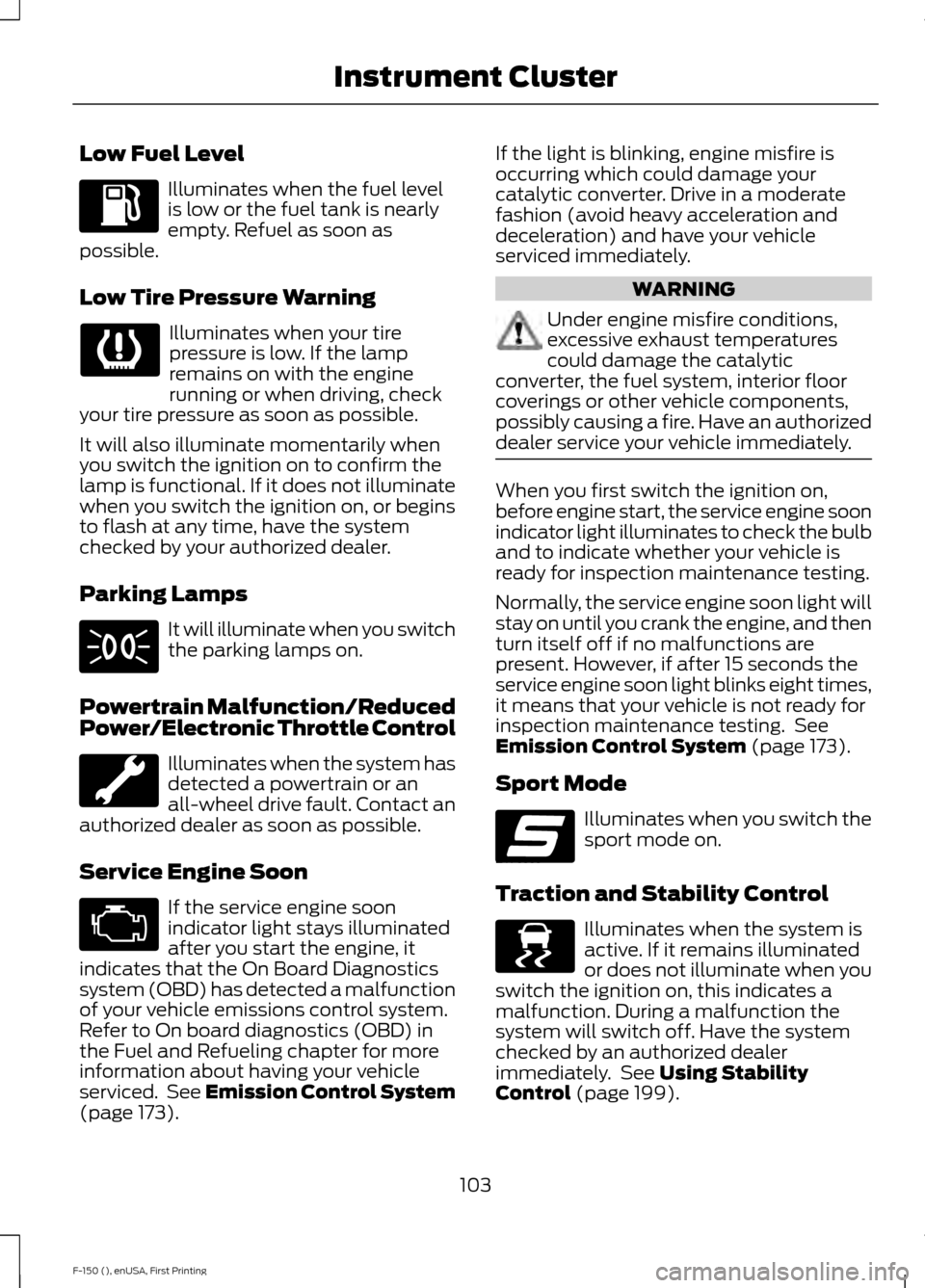
Low Fuel Level
Illuminates when the fuel level
is low or the fuel tank is nearly
empty. Refuel as soon as
possible.
Low Tire Pressure Warning Illuminates when your tire
pressure is low. If the lamp
remains on with the engine
running or when driving, check
your tire pressure as soon as possible.
It will also illuminate momentarily when
you switch the ignition on to confirm the
lamp is functional. If it does not illuminate
when you switch the ignition on, or begins
to flash at any time, have the system
checked by your authorized dealer.
Parking Lamps It will illuminate when you switch
the parking lamps on.
Powertrain Malfunction/Reduced
Power/Electronic Throttle Control Illuminates when the system has
detected a powertrain or an
all-wheel drive fault. Contact an
authorized dealer as soon as possible.
Service Engine Soon If the service engine soon
indicator light stays illuminated
after you start the engine, it
indicates that the On Board Diagnostics
system (OBD) has detected a malfunction
of your vehicle emissions control system.
Refer to On board diagnostics (OBD) in
the Fuel and Refueling chapter for more
information about having your vehicle
serviced. See Emission Control System
(page 173). If the light is blinking, engine misfire is
occurring which could damage your
catalytic converter. Drive in a moderate
fashion (avoid heavy acceleration and
deceleration) and have your vehicle
serviced immediately.
WARNING
Under engine misfire conditions,
excessive exhaust temperatures
could damage the catalytic
converter, the fuel system, interior floor
coverings or other vehicle components,
possibly causing a fire. Have an authorized
dealer service your vehicle immediately. When you first switch the ignition on,
before engine start, the service engine soon
indicator light illuminates to check the bulb
and to indicate whether your vehicle is
ready for inspection maintenance testing.
Normally, the service engine soon light will
stay on until you crank the engine, and then
turn itself off if no malfunctions are
present. However, if after 15 seconds the
service engine soon light blinks eight times,
it means that your vehicle is not ready for
inspection maintenance testing. See
Emission Control System
(page 173).
Sport Mode Illuminates when you switch the
sport mode on.
Traction and Stability Control Illuminates when the system is
active. If it remains illuminated
or does not illuminate when you
switch the ignition on, this indicates a
malfunction. During a malfunction the
system will switch off. Have the system
checked by an authorized dealer
immediately. See
Using Stability
Control (page 199).
103
F-150 (), enUSA, First Printing Instrument Cluster E176099 E138639
Page 110 of 549
Driver Assist
Note:
Use the arrow buttons to configure different driver setting choices. Driver Assist
Engine Hours XXXXXX
Engine Hour
Driver Assist
Engine Idle Hours XXXXXX
Vehicle graphic with tire pres-
sures
Tire Pressure
Rear Park Aid - check enabled or uncheck disabled
Electric
Trlr Brake
Elect.ov.Hydro.
Trailer Sway Control - check enabled or uncheck disabled
Note: Some items are optional and may not appear.
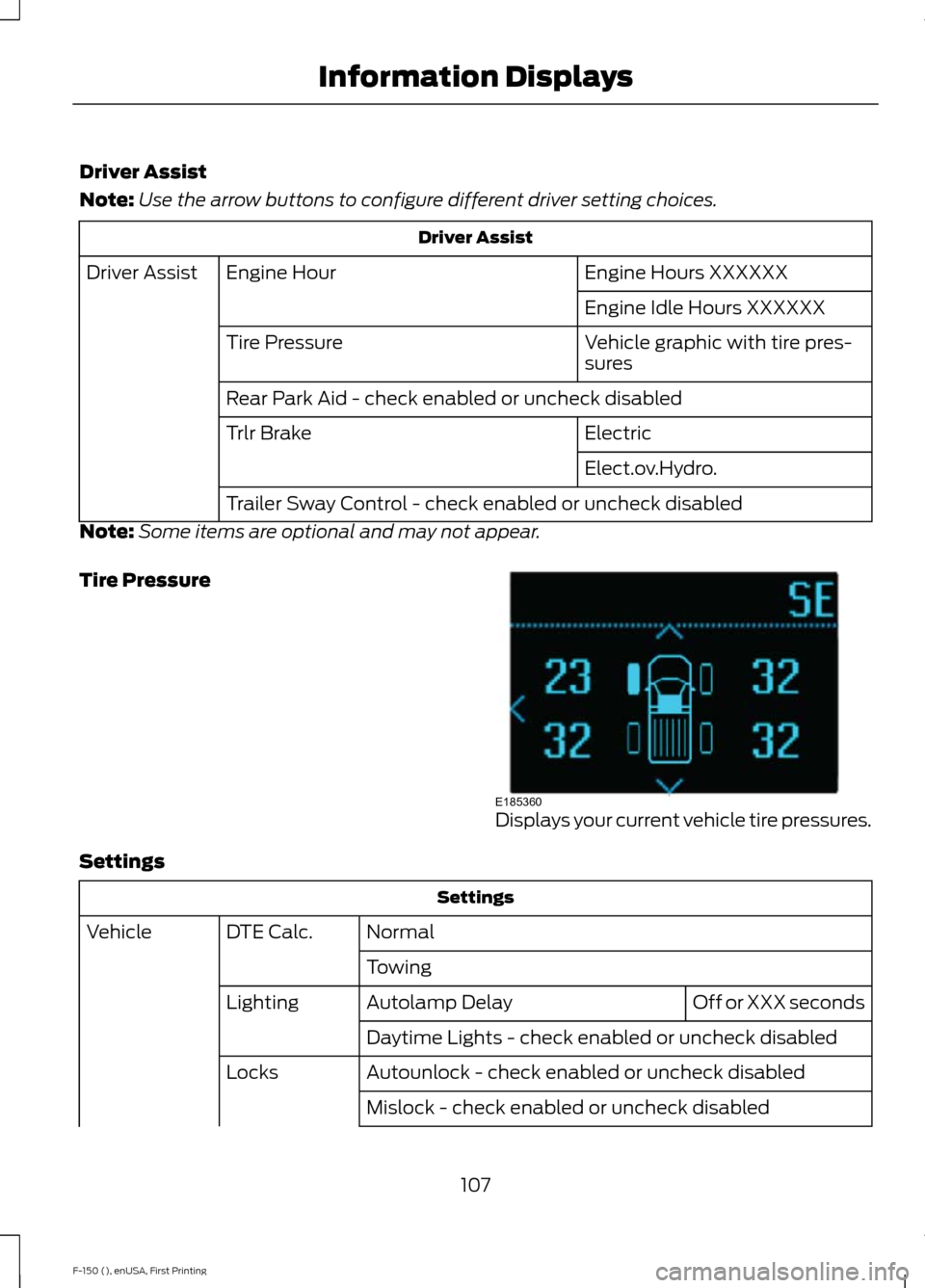
Tire Pressure Displays your current vehicle tire pressures.
Settings Settings
Normal
DTE Calc.
Vehicle
Towing Off or XXX seconds
Autolamp Delay
Lighting
Daytime Lights - check enabled or uncheck disabled
Autounlock - check enabled or uncheck disabled
Locks
Mislock - check enabled or uncheck disabled
107
F-150 (), enUSA, First Printing Information DisplaysE185360
Page 112 of 549
Display Mode
Note:
Use the arrow buttons to choose between the following display options. Display Mode
DTE
Transmission Temp
Tire Pressure
Digital Speedometer - Press OK for km/h
Engine Information - Oil Life, Engine Hours, Engine Idle Hours - Hold OK to Reset
MyKey Status - Admin Keys and MyKey Mileage
• DTE - Shows the approximate distance your vehicle can travel before running out of
fuel.
• Transmission Temp - Shows the trans temp value.
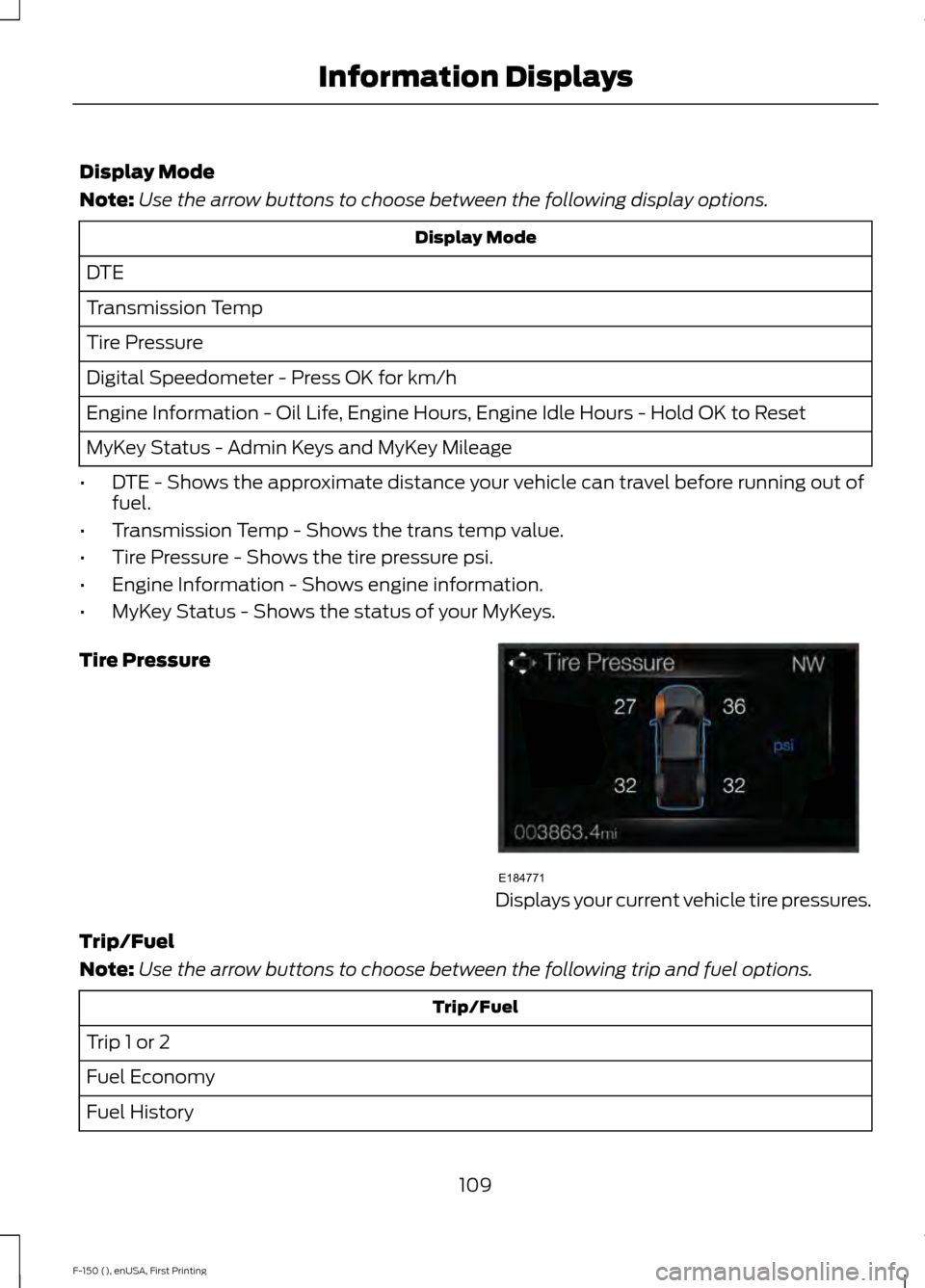
• Tire Pressure - Shows the tire pressure psi.
• Engine Information - Shows engine information.
• MyKey Status - Shows the status of your MyKeys.
Tire Pressure Displays your current vehicle tire pressures.
Trip/Fuel
Note: Use the arrow buttons to choose between the following trip and fuel options. Trip/Fuel
Trip 1 or 2
Fuel Economy
Fuel History
109
F-150 (), enUSA, First Printing Information DisplaysE184771
Page 117 of 549
Settings
My View Use the arrow buttons to choose
between the following My View
options.
My View
Trip 1
Trip/Fuel
Add/Remove
Screens
Configure My View
Trip 2
Fuel Economy
Fuel History
Navigation/Compass
Auto StartStop
Tire Pressure Monitor
Truck Info
Digital Speedometer
Engine Information
MyKey Status
Trailer Status
Towing
Trailer Information
Trailer Light Check
Off Road Status
Off Road
Power Distribution
Up/Down moves selec-
tion in the list
Screen Selection 1
- 7
Reorder Screens
Press OK to select
Trip/Fuel Use the arrow buttons to choose
between the following trip and
fuel options.
114
F-150 (), enUSA, First Printing Information DisplaysE176098 E176094 E176095
Page 119 of 549
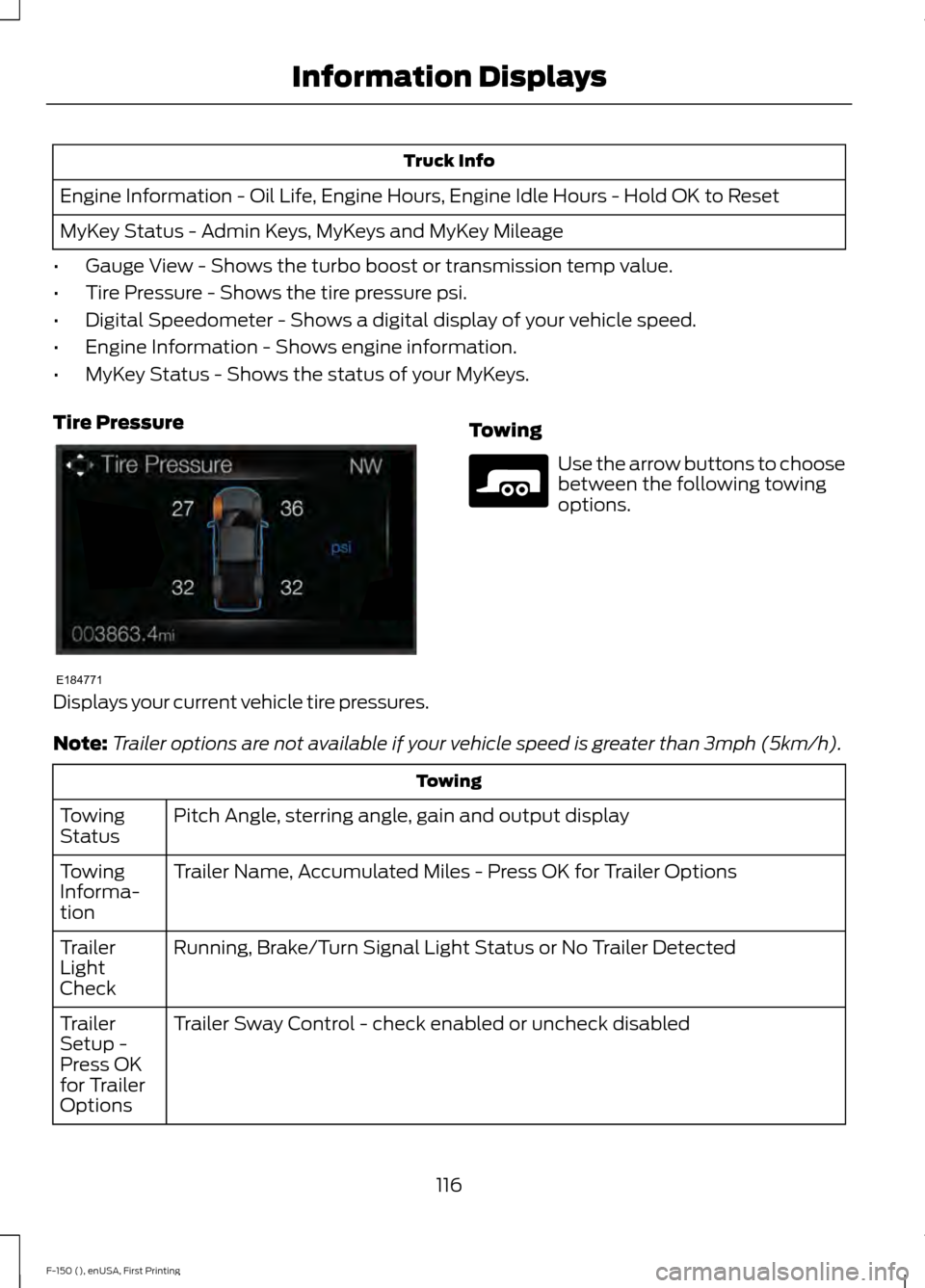
Truck Info
Engine Information - Oil Life, Engine Hours, Engine Idle Hours - Hold OK to Reset
MyKey Status - Admin Keys, MyKeys and MyKey Mileage
• Gauge View - Shows the turbo boost or transmission temp value.
• Tire Pressure - Shows the tire pressure psi.
• Digital Speedometer - Shows a digital display of your vehicle speed.
• Engine Information - Shows engine information.
• MyKey Status - Shows the status of your MyKeys.
Tire Pressure Displays your current vehicle tire pressures.
Towing Use the arrow buttons to choose
between the following towing
options.
Note: Trailer options are not available if your vehicle speed is greater than 3mph (5km/h). Towing
Pitch Angle, sterring angle, gain and output display
Towing
Status
Trailer Name, Accumulated Miles - Press OK for Trailer Options
Towing
Informa-
tion
Running, Brake/Turn Signal Light Status or No Trailer Detected
Trailer
Light
Check
Trailer Sway Control - check enabled or uncheck disabled
Trailer
Setup -
Press OK
for Trailer
Options
116
F-150 (), enUSA, First Printing Information DisplaysE184771 E176096
Page 121 of 549
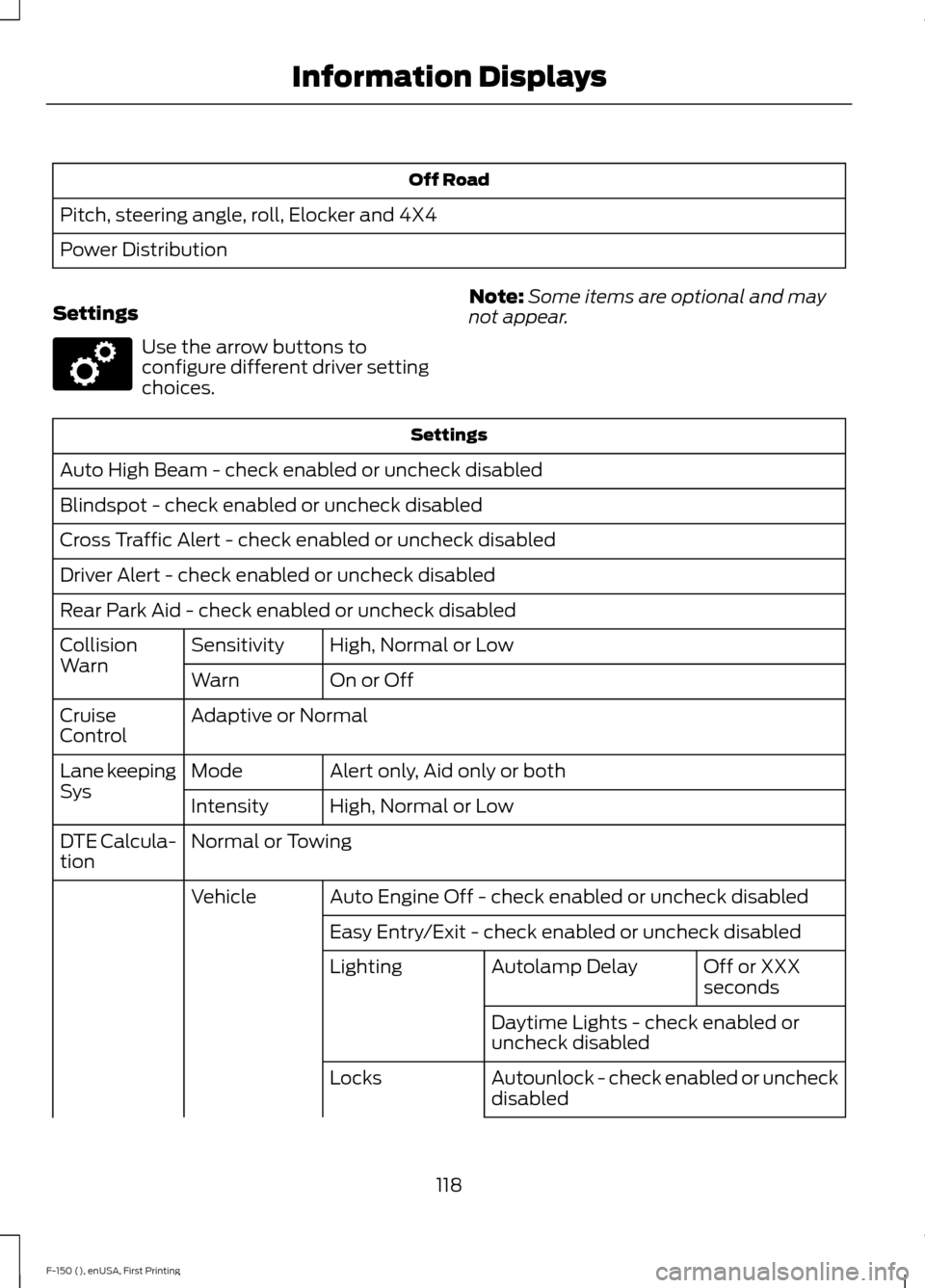
Off Road
Pitch, steering angle, roll, Elocker and 4X4
Power Distribution
Settings Use the arrow buttons to
configure different driver setting
choices.
Note:
Some items are optional and may
not appear. Settings
Auto High Beam - check enabled or uncheck disabled
Blindspot - check enabled or uncheck disabled
Cross Traffic Alert - check enabled or uncheck disabled
Driver Alert - check enabled or uncheck disabled
Rear Park Aid - check enabled or uncheck disabled High, Normal or Low
Sensitivity
Collision
Warn
On or Off
Warn
Adaptive or Normal
Cruise
Control
Alert only, Aid only or both
Mode
Lane keeping
Sys
High, Normal or Low
Intensity
Normal or Towing
DTE Calcula-
tion
Auto Engine Off - check enabled or uncheck disabled
Vehicle
Easy Entry/Exit - check enabled or uncheck disabled Off or XXX
seconds
Autolamp Delay
Lighting
Daytime Lights - check enabled or
uncheck disabled
Autounlock - check enabled or uncheck
disabled
Locks
118
F-150 (), enUSA, First Printing Information DisplaysE176098
Page 128 of 549
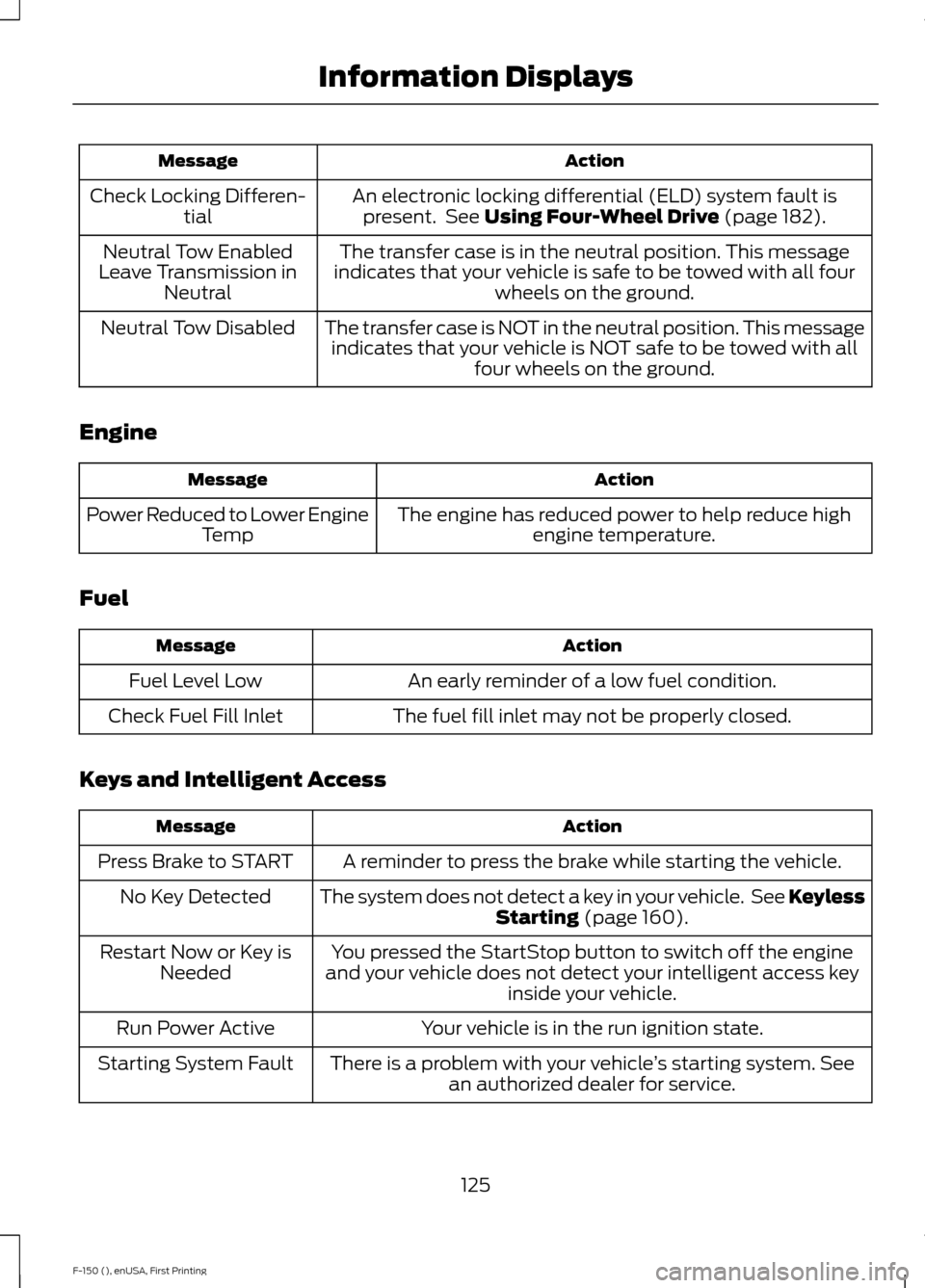
Action
Message
An electronic locking differential (ELD) system fault ispresent. See Using Four-Wheel Drive (page 182).
Check Locking Differen-
tial
The transfer case is in the neutral position. This message
indicates that your vehicle is safe to be towed with all four wheels on the ground.
Neutral Tow Enabled
Leave Transmission in Neutral
The transfer case is NOT in the neutral position. This messageindicates that your vehicle is NOT safe to be towed with all four wheels on the ground.
Neutral Tow Disabled
Engine Action
Message
The engine has reduced power to help reduce highengine temperature.
Power Reduced to Lower Engine
Temp
Fuel Action
Message
An early reminder of a low fuel condition.
Fuel Level Low
The fuel fill inlet may not be properly closed.
Check Fuel Fill Inlet
Keys and Intelligent Access Action
Message
A reminder to press the brake while starting the vehicle.
Press Brake to START
The system does not detect a key in your vehicle. See KeylessStarting
(page 160).
No Key Detected
You pressed the StartStop button to switch off the engine
and your vehicle does not detect your intelligent access key inside your vehicle.
Restart Now or Key is
Needed
Your vehicle is in the run ignition state.
Run Power Active
There is a problem with your vehicle ’s starting system. See
an authorized dealer for service.
Starting System Fault
125
F-150 (), enUSA, First Printing Information Displays
Page 129 of 549
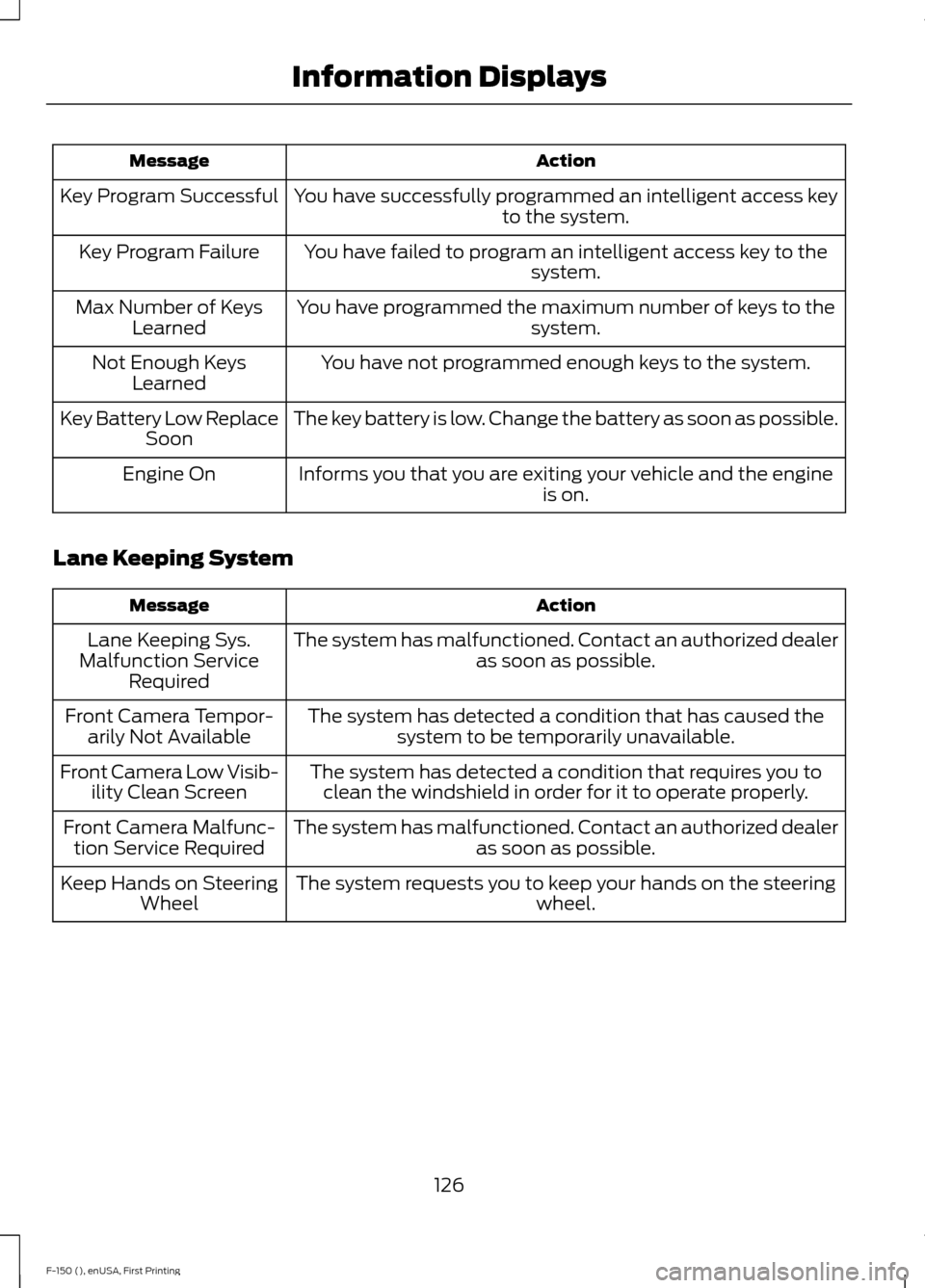
Action
Message
You have successfully programmed an intelligent access key to the system.
Key Program Successful
You have failed to program an intelligent access key to thesystem.
Key Program Failure
You have programmed the maximum number of keys to the system.
Max Number of Keys
Learned
You have not programmed enough keys to the system.
Not Enough Keys
Learned
The key battery is low. Change the battery as soon as possible.
Key Battery Low Replace
Soon
Informs you that you are exiting your vehicle and the engine is on.
Engine On
Lane Keeping System Action
Message
The system has malfunctioned. Contact an authorized dealer as soon as possible.
Lane Keeping Sys.
Malfunction Service Required
The system has detected a condition that has caused thesystem to be temporarily unavailable.
Front Camera Tempor-
arily Not Available
The system has detected a condition that requires you toclean the windshield in order for it to operate properly.
Front Camera Low Visib-
ility Clean Screen
The system has malfunctioned. Contact an authorized dealeras soon as possible.
Front Camera Malfunc-
tion Service Required
The system requests you to keep your hands on the steering wheel.
Keep Hands on Steering
Wheel
126
F-150 (), enUSA, First Printing Information Displays
Page 130 of 549
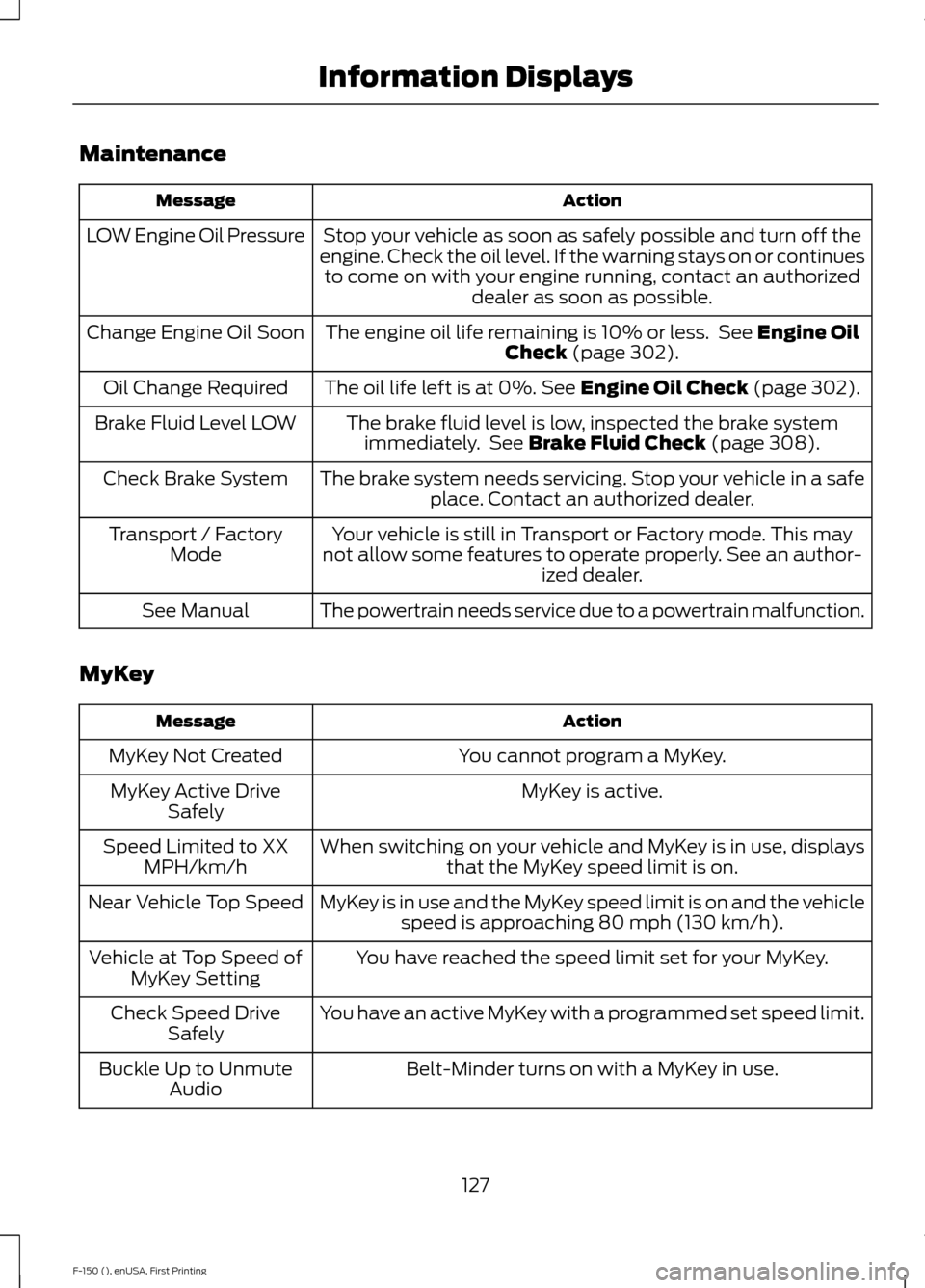
Maintenance
Action
Message
Stop your vehicle as soon as safely possible and turn off the
engine. Check the oil level. If the warning stays on or continues to come on with your engine running, contact an authorized dealer as soon as possible.
LOW Engine Oil Pressure
The engine oil life remaining is 10% or less. See Engine Oil
Check (page 302).
Change Engine Oil Soon
The oil life left is at 0%.
See Engine Oil Check (page 302).
Oil Change Required
The brake fluid level is low, inspected the brake systemimmediately. See
Brake Fluid Check (page 308).
Brake Fluid Level LOW
The brake system needs servicing. Stop your vehicle in a safeplace. Contact an authorized dealer.
Check Brake System
Your vehicle is still in Transport or Factory mode. This may
not allow some features to operate properly. See an author- ized dealer.
Transport / Factory
Mode
The powertrain needs service due to a powertrain malfunction.
See Manual
MyKey Action
Message
You cannot program a MyKey.
MyKey Not Created
MyKey is active.
MyKey Active Drive
Safely
When switching on your vehicle and MyKey is in use, displaysthat the MyKey speed limit is on.
Speed Limited to XX
MPH/km/h
MyKey is in use and the MyKey speed limit is on and the vehiclespeed is approaching 80 mph (130 km/h).
Near Vehicle Top Speed
You have reached the speed limit set for your MyKey.
Vehicle at Top Speed of
MyKey Setting
You have an active MyKey with a programmed set speed limit.
Check Speed Drive
Safely
Belt-Minder turns on with a MyKey in use.
Buckle Up to Unmute
Audio
127
F-150 (), enUSA, First Printing Information Displays
Page 133 of 549
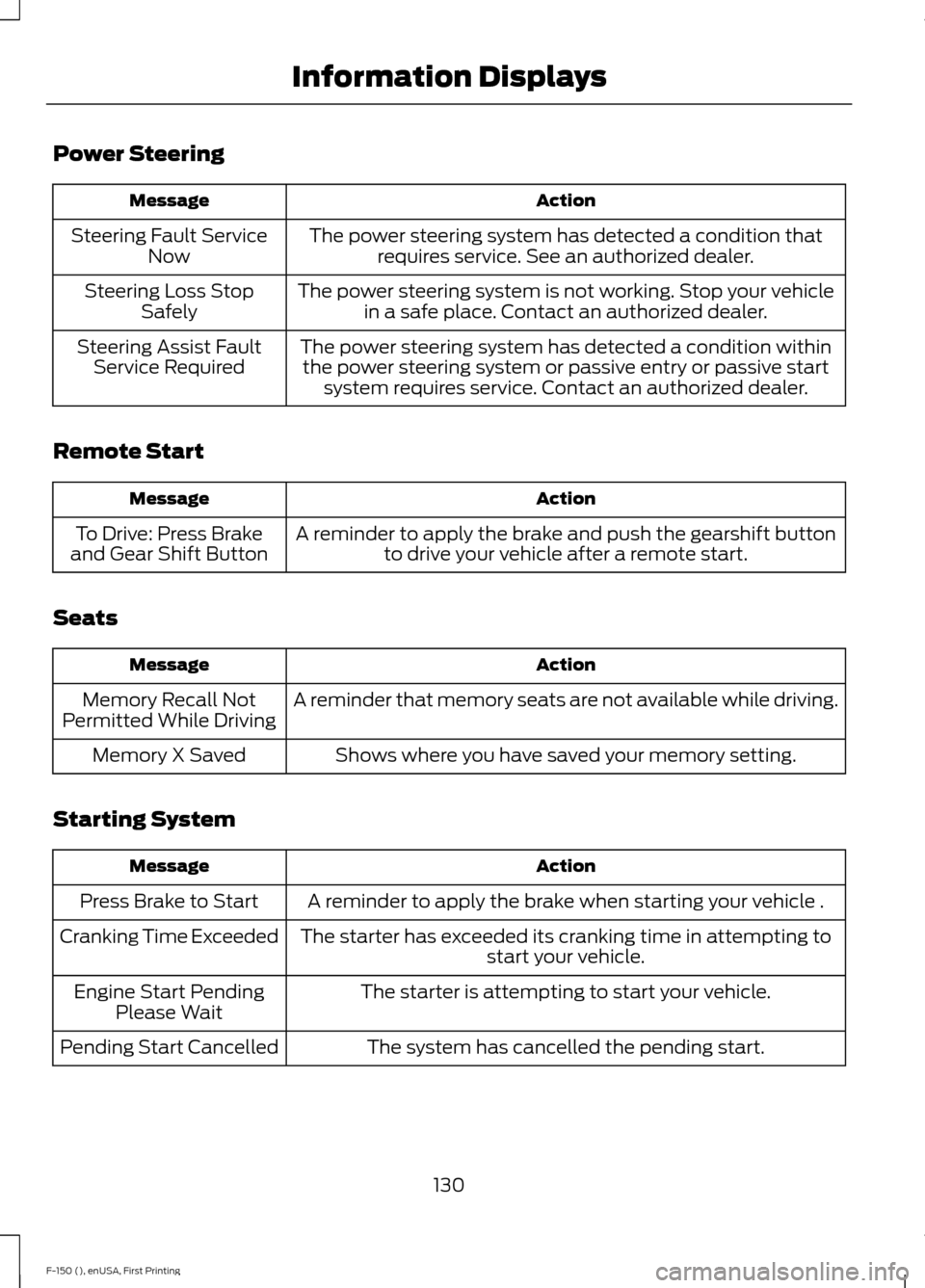
Power Steering
Action
Message
The power steering system has detected a condition thatrequires service. See an authorized dealer.
Steering Fault Service
Now
The power steering system is not working. Stop your vehiclein a safe place. Contact an authorized dealer.
Steering Loss Stop
Safely
The power steering system has detected a condition withinthe power steering system or passive entry or passive start system requires service. Contact an authorized dealer.
Steering Assist Fault
Service Required
Remote Start Action
Message
A reminder to apply the brake and push the gearshift buttonto drive your vehicle after a remote start.
To Drive: Press Brake
and Gear Shift Button
Seats Action
Message
A reminder that memory seats are not available while driving.
Memory Recall Not
Permitted While Driving
Shows where you have saved your memory setting.
Memory X Saved
Starting System Action
Message
A reminder to apply the brake when starting your vehicle .
Press Brake to Start
The starter has exceeded its cranking time in attempting tostart your vehicle.
Cranking Time Exceeded
The starter is attempting to start your vehicle.
Engine Start Pending
Please Wait
The system has cancelled the pending start.
Pending Start Cancelled
130
F-150 (), enUSA, First Printing Information Displays