lights FORD F150 2023 User Guide
[x] Cancel search | Manufacturer: FORD, Model Year: 2023, Model line: F150, Model: FORD F150 2023Pages: 786, PDF Size: 23.15 MB
Page 194 of 786
SWITCHING MAXIMUM
COOLING ON AND OFF
Turn the temperature controlcounterclockwise past thelowest setting to maximizecooling.
Note:The temperature control springs backto the lowest setting.
Note:When you switch maximum coolingoff, air conditioning remains on.
SWITCHING THE HEATED
REAR WINDOW ON AND OFF
Press the button to clear the rearwindow of thin ice and fog. Theheated rear window turns offafter a short period of time.
Note:Do not use harsh chemicals, razorblades or other sharp objects to clean orremove decals from the inside of the heatedrear window as this could cause damage tothe heated rear window grid lines notcovered by the vehicle Warranty.
SETTING THE BLOWER MOTOR
SPEED
Note:Lights on the control illuminate toindicate the blower motor speed.
Note: When you switch the blower motoroff, air conditioning turns off and thewindows could fog up.
SWITCHING THE HEATED
MIRRORS ON AND OFF
Heated Mirrors
Press the button.
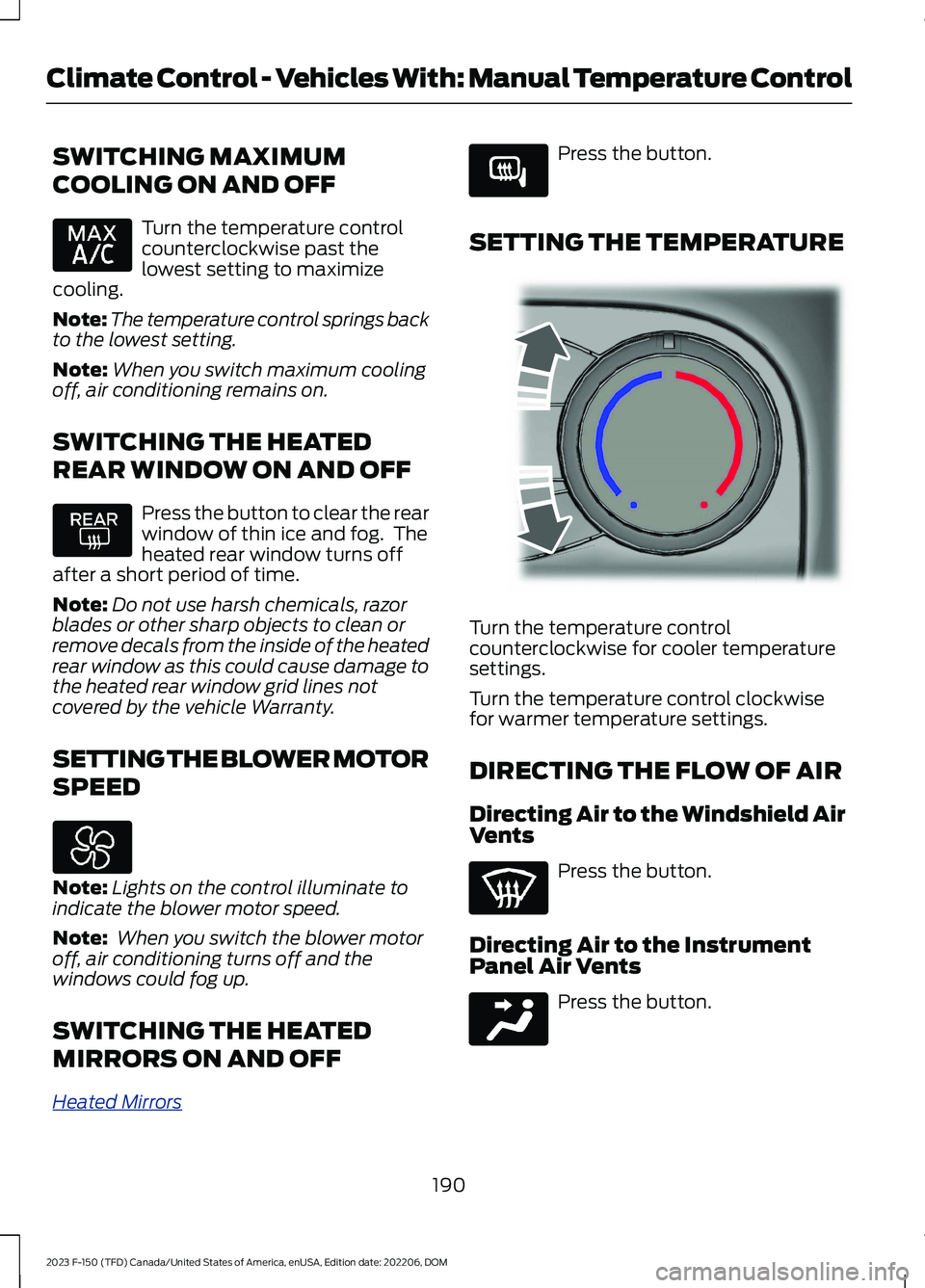
SETTING THE TEMPERATURE
Turn the temperature controlcounterclockwise for cooler temperaturesettings.
Turn the temperature control clockwisefor warmer temperature settings.
DIRECTING THE FLOW OF AIR
Directing Air to the Windshield AirVents
Press the button.
Directing Air to the InstrumentPanel Air Vents
Press the button.
190
2023 F-150 (TFD) Canada/United States of America, enUSA, Edition date: 202206, DOMClimate Control - Vehicles With: Manual Temperature Control E266189 E244106 E244097
Page 205 of 786
Press this symbol on the climate controlsor the touchscreen to cycle through thevarious ventilation settings and off. Moreindicator lights indicate higher fan speeds.
Note:When you switch the climate controlfan speed and the ventilated seats to theirmaximum settings, the ventilated seatsprovide increased cooling.
If the engine falls below 350 RPM whilethe ventilated seats are on, the featureturns itself off unless the vehicle is inAuto-Start-Stop mode. You may need toreactivate the ventilated seats.
Note:The ventilated seats may remain onafter you remote start your vehicle, basedon your remote start settings. The ventilatedseats may also turn on when you start yourvehicle if they were on when you switchedyour vehicle off.
201
2023 F-150 (TFD) Canada/United States of America, enUSA, Edition date: 202206, DOMFront Seats
Page 208 of 786
WARNING: Do not poke sharpobjects into the seat cushion or seatbackrest. This could damage the heatedseat element and cause it to overheat.Failure to follow this instruction couldresult in personal injury.
WARNING: Do not place anythingon the seat that blocks the heat, forexample a seat cover or a cushion. Thiscould cause the seat to overheat. Failureto follow this instruction could result inpersonal injury.
Do not:
•Place heavy objects on the seat.
•Operate the heated seat if water or anyother liquid spills on the seat. Allow theseat to dry.
SWITCHING THE HEATED SEATSON AND OFF
The vehicle must be running to use thisfeature.
The rear seat heat controls are on the rearof the center console.
Press the heated seat symbol to cyclethrough the various heat settings and off.More indicator lights indicate warmersettings.
The heated seats turn off when you switchoff the vehicle.
204
2023 F-150 (TFD) Canada/United States of America, enUSA, Edition date: 202206, DOMRear Seats - Crew Cab/SuperCabE146322
Page 252 of 786
WHAT IS AUTO-START-STOP
Auto Start-Stop
The system is designed to help reduce fuelconsumption and CO2 emissions bystopping the engine when it is idling, forexample at traffic lights.
AUTO-START-STOP
PRECAUTIONS
WARNING: Apply the parkingbrake, shift into park (P), switch theignition off and remove the key beforeyou leave your vehicle. Failure to followthis instruction could result in personalinjury or death.
WARNING: Apply the parkingbrake, shift into park (P), switch theignition off and remove the key beforeyou open the hood or have any serviceor repair work completed. If you do notswitch the ignition off, the engine couldrestart at any time. Failure to follow thisinstruction could result in personal injuryor death.
SWITCHING AUTO-START-
STOP ON AND OFF
The system turns on when you switch theignition on.
Press the button to switch thesystem off.
Note:OFF illuminates in the switch.
Note:Deactivating the system using thebutton lasts only one key cycle.
Press the button again to switch thesystem back on.
Note: The system turns off if it detects amalfunction. If the system malfunctions,have your vehicle checked as soon aspossible.
STOPPING THE ENGINE
Stop your vehicle, keep your foot on thebrake pedal and the transmission in drive(D).
RESTARTING THE ENGINE
Release the brake pedal or press theaccelerator pedal.
A message appears in the instrumentcluster display if the system requires youto take action.
AUTO-START-STOP
INDICATORS
WARNING: The system mayrequire the engine to automaticallyrestart when the auto-start-stopindicator illuminates green or flashesamber. Failure to follow this instructioncould result in personal injury.
The Auto-Start-Stop indicatorilluminates green when theengine stops. It flashes amberand a message appears when you need totake action.
The Auto-Start-Stop indicatorilluminates gray with astrikethrough when the systemis not available.
Note:You can display the reason why thesystem is not available in the informationdisplay.
248
2023 F-150 (TFD) Canada/United States of America, enUSA, Edition date: 202206, DOMAuto-Start-Stop (If Equipped)E121377 E121377 E146361
Page 281 of 786
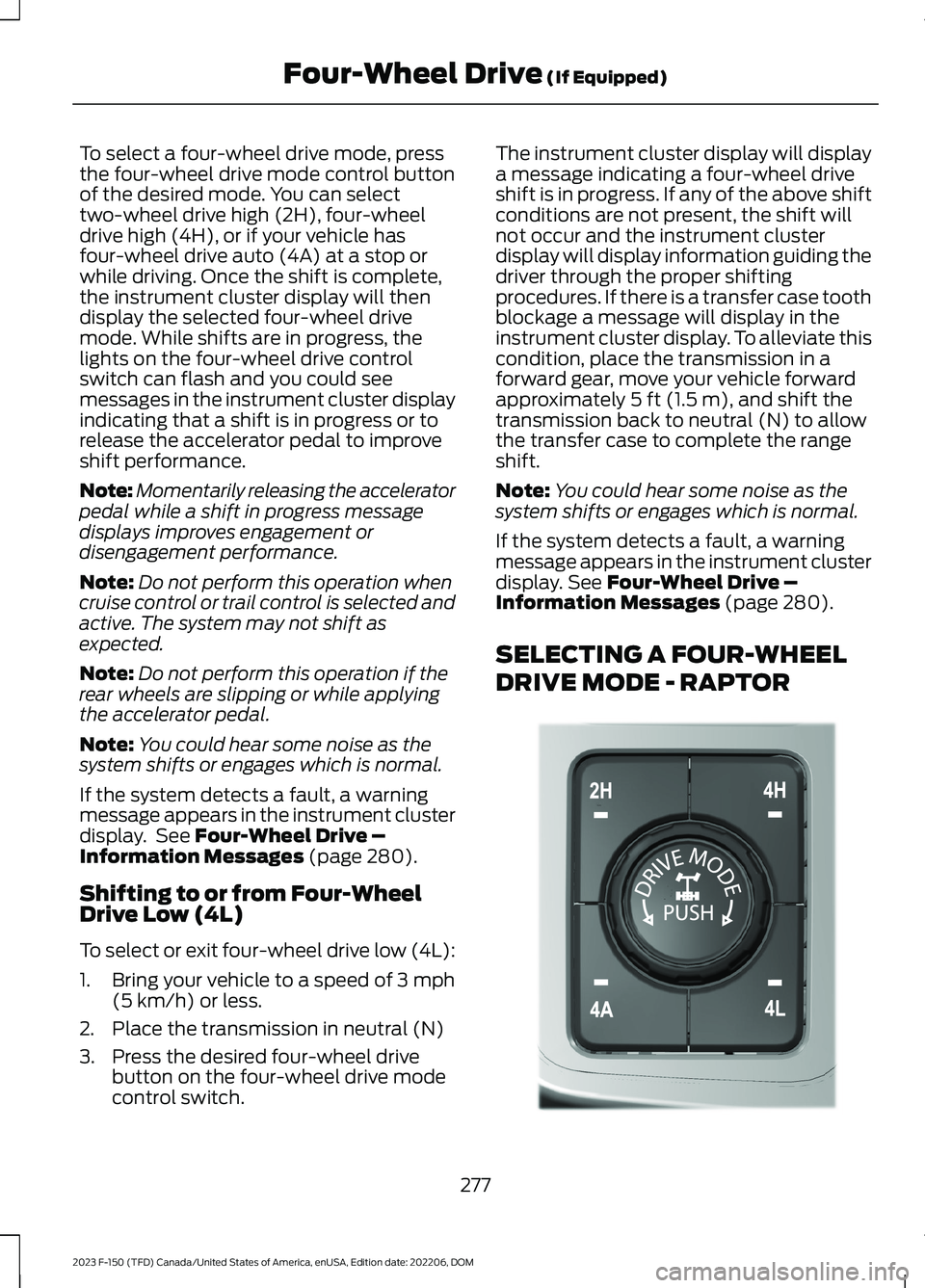
To select a four-wheel drive mode, pressthe four-wheel drive mode control buttonof the desired mode. You can selecttwo-wheel drive high (2H), four-wheeldrive high (4H), or if your vehicle hasfour-wheel drive auto (4A) at a stop orwhile driving. Once the shift is complete,the instrument cluster display will thendisplay the selected four-wheel drivemode. While shifts are in progress, thelights on the four-wheel drive controlswitch can flash and you could seemessages in the instrument cluster displayindicating that a shift is in progress or torelease the accelerator pedal to improveshift performance.
Note:Momentarily releasing the acceleratorpedal while a shift in progress messagedisplays improves engagement ordisengagement performance.
Note:Do not perform this operation whencruise control or trail control is selected andactive. The system may not shift asexpected.
Note:Do not perform this operation if therear wheels are slipping or while applyingthe accelerator pedal.
Note:You could hear some noise as thesystem shifts or engages which is normal.
If the system detects a fault, a warningmessage appears in the instrument clusterdisplay. See Four-Wheel Drive –Information Messages (page 280).
Shifting to or from Four-WheelDrive Low (4L)
To select or exit four-wheel drive low (4L):
1.Bring your vehicle to a speed of 3 mph(5 km/h) or less.
2.Place the transmission in neutral (N)
3.Press the desired four-wheel drivebutton on the four-wheel drive modecontrol switch.
The instrument cluster display will displaya message indicating a four-wheel driveshift is in progress. If any of the above shiftconditions are not present, the shift willnot occur and the instrument clusterdisplay will display information guiding thedriver through the proper shiftingprocedures. If there is a transfer case toothblockage a message will display in theinstrument cluster display. To alleviate thiscondition, place the transmission in aforward gear, move your vehicle forwardapproximately 5 ft (1.5 m), and shift thetransmission back to neutral (N) to allowthe transfer case to complete the rangeshift.
Note:You could hear some noise as thesystem shifts or engages which is normal.
If the system detects a fault, a warningmessage appears in the instrument clusterdisplay. See Four-Wheel Drive –Information Messages (page 280).
SELECTING A FOUR-WHEEL
DRIVE MODE - RAPTOR
277
2023 F-150 (TFD) Canada/United States of America, enUSA, Edition date: 202206, DOMFour-Wheel Drive (If Equipped)E308146
Page 282 of 786
The four-wheel drive mode control is onthe instrument panel.
To select a four-wheel drive mode, pressthe four-wheel drive mode control buttonof the desired mode. You can selecttwo-wheel drive high (2H), four-wheeldrive high (4H), or four-wheel drive auto(4A) at a stop or while driving. Once theshift is complete, the instrument clusterdisplay will then display the selectedfour-wheel drive mode. While shifts are inprogress, the lights on the four-wheel drivecontrol switch can flash and you could seemessages in the instrument cluster displayindicating that a shift is in progress or torelease the accelerator pedal to improveshift performance.
Note:Momentarily releasing the acceleratorpedal when a shift in progress messagedisplays improves engagement anddisengagement performance.
Note:Do not perform this operation whenyou have cruise control or trail controlselected and active. The system may notshift as expected.
Note:Do not perform this operation if therear wheels are slipping or while applyingthe accelerator pedal.
Note:You could hear some noise as thesystem shifts or engages, which is normal.
If the system detects a fault, a warningmessage appears in the instrument clusterdisplay. See Four-Wheel Drive –Information Messages (page 280).
Shifting to or from Four-WheelDrive Low (4L)
To select or exit four-wheel drive low (4L):
1.Bring your vehicle to a speed of 3 mph(5 km/h) or less.
2.Place the transmission in neutral (N).
3.Press the desired four-wheel drivebutton on the four-wheel drive modecontrol switch.
The instrument cluster display will displaya message indicating a four-wheel driveshift is in progress. If any of the above shiftconditions are not present, the shift doesnot occur and the instrument clusterdisplay will display information guiding thedriver through the proper shiftingprocedures. If there is a transfer case toothblockage, a message displays in theinstrument cluster display. To alleviate thiscondition, place the transmission in aforward gear, move your vehicle forwardapproximately 5 ft (1.5 m), and shift thetransmission back to neutral (N) to allowthe transfer case to complete the rangeshift.
Note:You could hear some noise as thesystem shifts or engages, which is normal.
If the system detects a fault, a warningmessage appears in the instrument clusterdisplay. See Four-Wheel Drive –Information Messages (page 280).
FOUR-WHEEL DRIVE MODES
TWO-WHEEL DRIVE HIGH
Two-wheel drive high is for generalon-road driving. Power is sent to the rearwheels only.
Note:Two-wheel drive high can turn on oroff based on Drive Mode selection See DriveMode Control (page 362).
278
2023 F-150 (TFD) Canada/United States of America, enUSA, Edition date: 202206, DOMFour-Wheel Drive (If Equipped)
Page 347 of 786
ADAPTIVE CRUISE CONTROL
LIMITATIONS
Sensor Limitations
WARNING: On rare occasions,detection issues can occur due to theroad infrastructures, for example bridges,tunnels and safety barriers. In thesecases, the system may brake late orunexpectedly. At all times, you areresponsible for controlling your vehicle,supervising the system and intervening,if required.
WARNING: If the systemmalfunctions, have your vehicle checkedas soon as possible.
WARNING: Large contrasts inoutside lighting can limit sensorperformance.
WARNING: The system only warnsof vehicles detected by the radar sensor.In some cases there may be no warningor a delayed warning. Apply the brakeswhen necessary. Failure to follow thisinstruction could result in personal injuryor death.
WARNING: The system may notdetect stationary or slow movingvehicles below 6 mph (10 km/h).
WARNING: The system does notdetect pedestrians or objects in the road.
WARNING: The system does notdetect oncoming vehicles in the samelane.
WARNING: The system may notoperate properly if the sensor is blocked.Keep the windshield free fromobstruction.
WARNING: The sensor mayincorrectly track lane markings as otherstructures or objects. This can result ina false or missed warning.
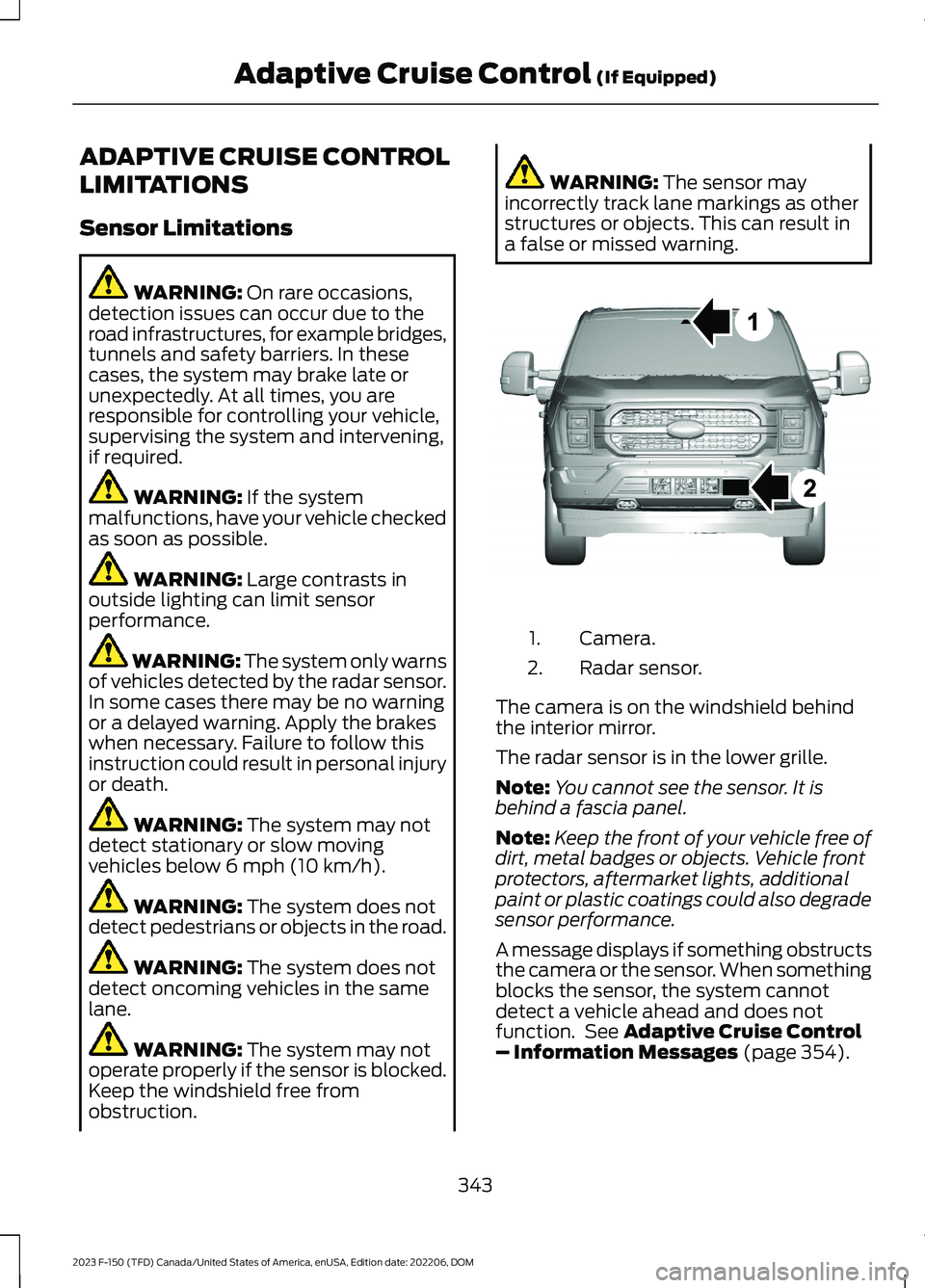
Camera.1.
Radar sensor.2.
The camera is on the windshield behindthe interior mirror.
The radar sensor is in the lower grille.
Note:You cannot see the sensor. It isbehind a fascia panel.
Note:Keep the front of your vehicle free ofdirt, metal badges or objects. Vehicle frontprotectors, aftermarket lights, additionalpaint or plastic coatings could also degradesensor performance.
A message displays if something obstructsthe camera or the sensor. When somethingblocks the sensor, the system cannotdetect a vehicle ahead and does notfunction. See Adaptive Cruise Control– Information Messages (page 354).
343
2023 F-150 (TFD) Canada/United States of America, enUSA, Edition date: 202206, DOMAdaptive Cruise Control (If Equipped)E328125
Page 356 of 786
WARNING: Pay close attention tochanging road conditions. You may needto override the system by pressing thebrake or accelerator pedal if the adjustedspeed becomes higher or lower thannecessary.
WARNING: The system onlyprovides limited braking. Your vehiclemay not always decelerate quicklyenough to avoid a crash without driverintervention. Apply the brakes whennecessary.
WARNING: The system does notactivate the turn signal.
Adaptive cruise control precautions applyto predictive speed assist unless statedotherwise or contradicted by a predictivespeed assist precaution. See AdaptiveCruise Control Precautions (page 342).
The system only applies limited braking.You can override the system with theaccelerator pedal or cancel the system byapplying the brakes.
The system may adapt to various factorssuch as time of day, lane width. This couldinfluence speed adjustments andaccelerations.
The system may adapt to various drivemodes. See Drive Mode Control (page362).This could influence speedadjustments and accelerations.
Note:The system does not activate theturn signal automatically.
PREDICTIVE SPEED ASSISTLIMITATIONS
WARNING: The system may notalways adjust vehicle speed in certainroad or weather conditions such ascrossing traffic, yield or stop signs, rightof way, traffic lights, speed bumps, rain,snow, fog. You must always apply thebrake or accelerator pedal whennecessary.
The road geometry and speed limitinformation provided by the navigationmap data could be inaccurate or out ofdate.
The system may not detect and readspeed limit signs with conditionalinformation, for example, when a sign isflashing, during specific time ranges, orwhen children are present.
Note:The system does not set the vehiclespeed to speed limits shown with asupplementary traffic sign.
Under certain conditions, the system maynot adjust the vehicle speed until after yourvehicle passes the speed limit.
Detection of road geometry operates onlywhere related information is available.Road geometry information may not beavailable in some areas.
SWITCHING PREDICTIVE SPEEDASSIST MODE ON AND OFF
1.Press Features on the touchscreen.
2.Press Driver Assistance.
3.Press Cruise Control.
4.Press Adaptive Cruise Control.
5.Switch Predictive Speed Assist on oroff.
352
2023 F-150 (TFD) Canada/United States of America, enUSA, Edition date: 202206, DOMAdaptive Cruise Control (If Equipped)
Page 395 of 786
WARNING: The system mayoperate with reduced function duringcold and inclement weather conditions.Snow, ice, rain, spray and fog canadversely affect the system. Keep thefront camera and radar free of snow andice. Failure to follow this instruction mayresult in the loss of control of yourvehicle, serious personal injury or death.
WARNING: Take additional care ifyour vehicle is heavily loaded or you aretowing a trailer. These conditions couldresult in reduced performance of thissystem. Failure to follow this instructioncould result in the loss of control of yourvehicle, personal injury or death.
WARNING: The system cannothelp prevent all crashes. Do not rely onthis system to replace driver judgmentand the need to maintain a safe distanceand speed.
WARNING: System performancecould be reduced in situations where thevehicle camera has limited detectioncapability. These situations include butare not limited to direct or low sunlight,vehicles at night without tail lights,unconventional vehicle types,pedestrians or cyclists with complexbackgrounds, running pedestrians or fastmoving cyclists, partly obscuredpedestrians or cyclists, pedestrians orcyclists that the system cannotdistinguish from a group. Failure to takecare may result in the loss of control ofyour vehicle, personal injury or death.
PRE-COLLISION ASSIST
LIMITATIONS
Pre-collision assist depends on thedetection ability of its camera and sensors.Any obstructions or damage to these areascan limit detection or prevent the systemfrom functioning. See Locating thePre-Collision Assist Sensors (page 393).
The system is active at 3 mph (5 km/h)and above.
Note:The pre-collision assist systemautomatically disables when you selectfour-wheel drive low, manually disableAdvanceTrac™, or select rock crawl mode,if your vehicle comes with it.
Note:Brake support and automaticemergency braking are active up to themaximum speed of the vehicle.
Pedestrian Detection Limitations
Pedestrian detection is active at speedsup to 50 mph (80 km/h).
Pedestrian detection operates optimallywhen detected hazards are clearlyidentifiable. System performance mayreduce in situations where pedestrians arerunning, partly obscured, have a complexbackground, or when the system cannotdistinguish pedestrians from a group.
Cyclist Detection Limitations
Cyclist detection is active at speeds up to50 mph (80 km/h).
Cyclist detection functions optimally whendetected hazards are clearly identifiable.The system’s detection level may be lessin situations where cyclists are moving fast,partly hidden, have a complex background,or the system cannot distinguish the cyclistfrom a group.
391
2023 F-150 (TFD) Canada/United States of America, enUSA, Edition date: 202206, DOMPre-Collision Assist (If Equipped)
Page 420 of 786
When the trailer disconnects in this state,the vehicle alarm sounds and the systemsends an alert to your FordPass app.
Note:For reliable trailer detection, thetrailer’s lamps must be SAE certified foreach intended purpose.
Note:If the trailer is not compatible withthe feature, the turn signals flash twice.
Switching the Trailer ConnectionAlarm On and Off
1.Press Features on the touchscreen.
2.Press Towing.
3.Press Manage trailers.
4.Press the currently active trailer'sname.
5.Switch Trailer Connection Alarm onor off.
Note:The alarm disables by default. If thesystem detects a trailer, it can beconfigurable.
Note:Settings are applicable only for theselected trailer profile.
Trailer Connector Battery Lead
The trailer receives power from the vehicletrailer connector battery lead when thefollowing occurs:
•Your vehicle is in accessory mode orswitched on.
•The trailer wiring connector is free ofcorrosion or other damage.
•The vehicle battery is not low.
•When the trailer has a battery:
•The trailer battery voltage is within5 volts of the vehicle batteryvoltage.
•When you have the trailer batteryproperly connected.
TRAILER LIGHTING CHECK
WARNING: Never connect anytrailer lamp wiring to the vehicle's taillamp wiring; this may damage theelectrical system resulting in fire. Contactyour authorized dealer as soon aspossible for assistance in proper trailertow wiring installation. Additionalelectrical equipment may be required.
Perform a trailer light illuminationsequence to confirm that all lights arefunctioning by using the FordPass app orthe vehicle's touchscreen.
Performing the Trailer LightingCheck Using the Touchscreen
1.Press Features on the touchscreen.
2.Press Towing.
3.Press Trailer Light Check.
4.Press Start.
416
2023 F-150 (TFD) Canada/United States of America, enUSA, Edition date: 202206, DOMConnecting a Trailer