Def FORD F150 2023 Manual Online
[x] Cancel search | Manufacturer: FORD, Model Year: 2023, Model line: F150, Model: FORD F150 2023Pages: 786, PDF Size: 23.15 MB
Page 618 of 786
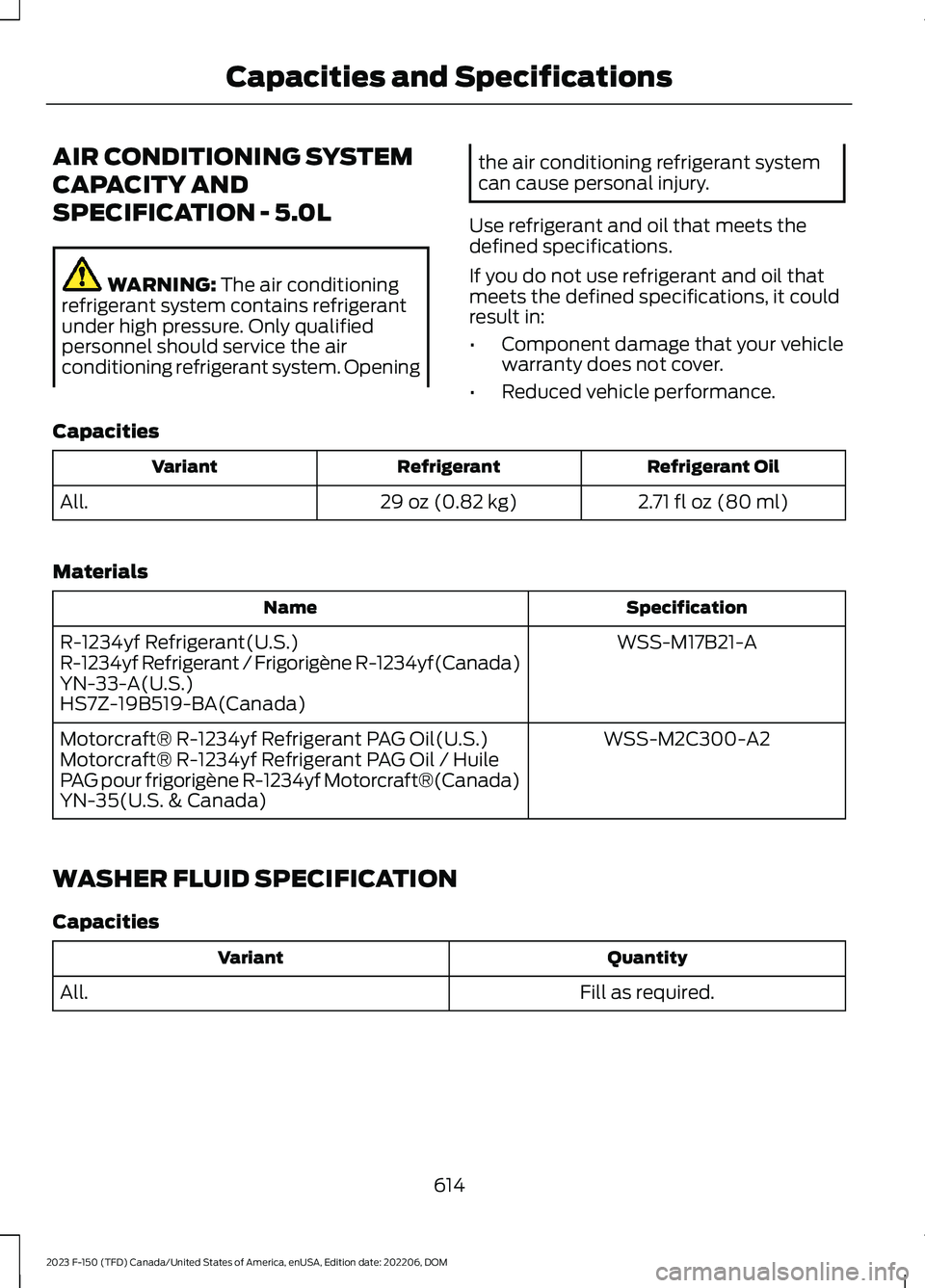
AIR CONDITIONING SYSTEM
CAPACITY AND
SPECIFICATION - 5.0L
WARNING: The air conditioningrefrigerant system contains refrigerantunder high pressure. Only qualifiedpersonnel should service the airconditioning refrigerant system. Opening
the air conditioning refrigerant systemcan cause personal injury.
Use refrigerant and oil that meets thedefined specifications.
If you do not use refrigerant and oil thatmeets the defined specifications, it couldresult in:
•Component damage that your vehiclewarranty does not cover.
•Reduced vehicle performance.
Capacities
Refrigerant OilRefrigerantVariant
2.71 fl oz (80 ml)29 oz (0.82 kg)All.
Materials
SpecificationName
WSS-M17B21-AR-1234yf Refrigerant(U.S.)R-1234yf Refrigerant / Frigorigène R-1234yf(Canada)YN-33-A(U.S.)HS7Z-19B519-BA(Canada)
WSS-M2C300-A2Motorcraft® R-1234yf Refrigerant PAG Oil(U.S.)Motorcraft® R-1234yf Refrigerant PAG Oil / HuilePAG pour frigorigène R-1234yf Motorcraft®(Canada)YN-35(U.S. & Canada)
WASHER FLUID SPECIFICATION
Capacities
QuantityVariant
Fill as required.All.
614
2023 F-150 (TFD) Canada/United States of America, enUSA, Edition date: 202206, DOMCapacities and Specifications
Page 619 of 786
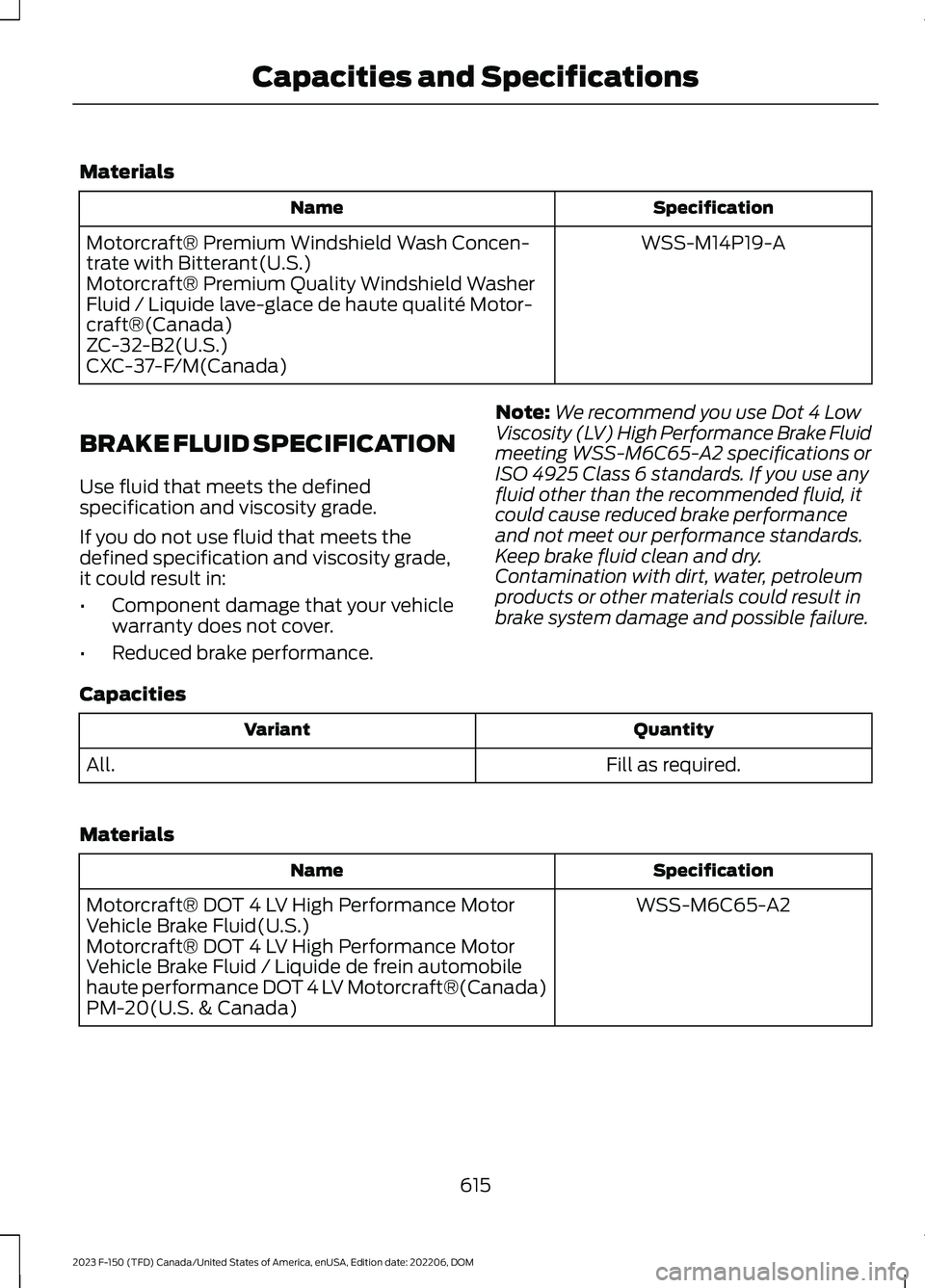
Materials
SpecificationName
WSS-M14P19-AMotorcraft® Premium Windshield Wash Concen-trate with Bitterant(U.S.)Motorcraft® Premium Quality Windshield WasherFluid / Liquide lave-glace de haute qualité Motor-craft®(Canada)ZC-32-B2(U.S.)CXC-37-F/M(Canada)
BRAKE FLUID SPECIFICATION
Use fluid that meets the definedspecification and viscosity grade.
If you do not use fluid that meets thedefined specification and viscosity grade,it could result in:
•Component damage that your vehiclewarranty does not cover.
•Reduced brake performance.
Note:We recommend you use Dot 4 LowViscosity (LV) High Performance Brake Fluidmeeting WSS-M6C65-A2 specifications orISO 4925 Class 6 standards. If you use anyfluid other than the recommended fluid, itcould cause reduced brake performanceand not meet our performance standards.Keep brake fluid clean and dry.Contamination with dirt, water, petroleumproducts or other materials could result inbrake system damage and possible failure.
Capacities
QuantityVariant
Fill as required.All.
Materials
SpecificationName
WSS-M6C65-A2Motorcraft® DOT 4 LV High Performance MotorVehicle Brake Fluid(U.S.)Motorcraft® DOT 4 LV High Performance MotorVehicle Brake Fluid / Liquide de frein automobilehaute performance DOT 4 LV Motorcraft®(Canada)PM-20(U.S. & Canada)
615
2023 F-150 (TFD) Canada/United States of America, enUSA, Edition date: 202206, DOMCapacities and Specifications
Page 620 of 786
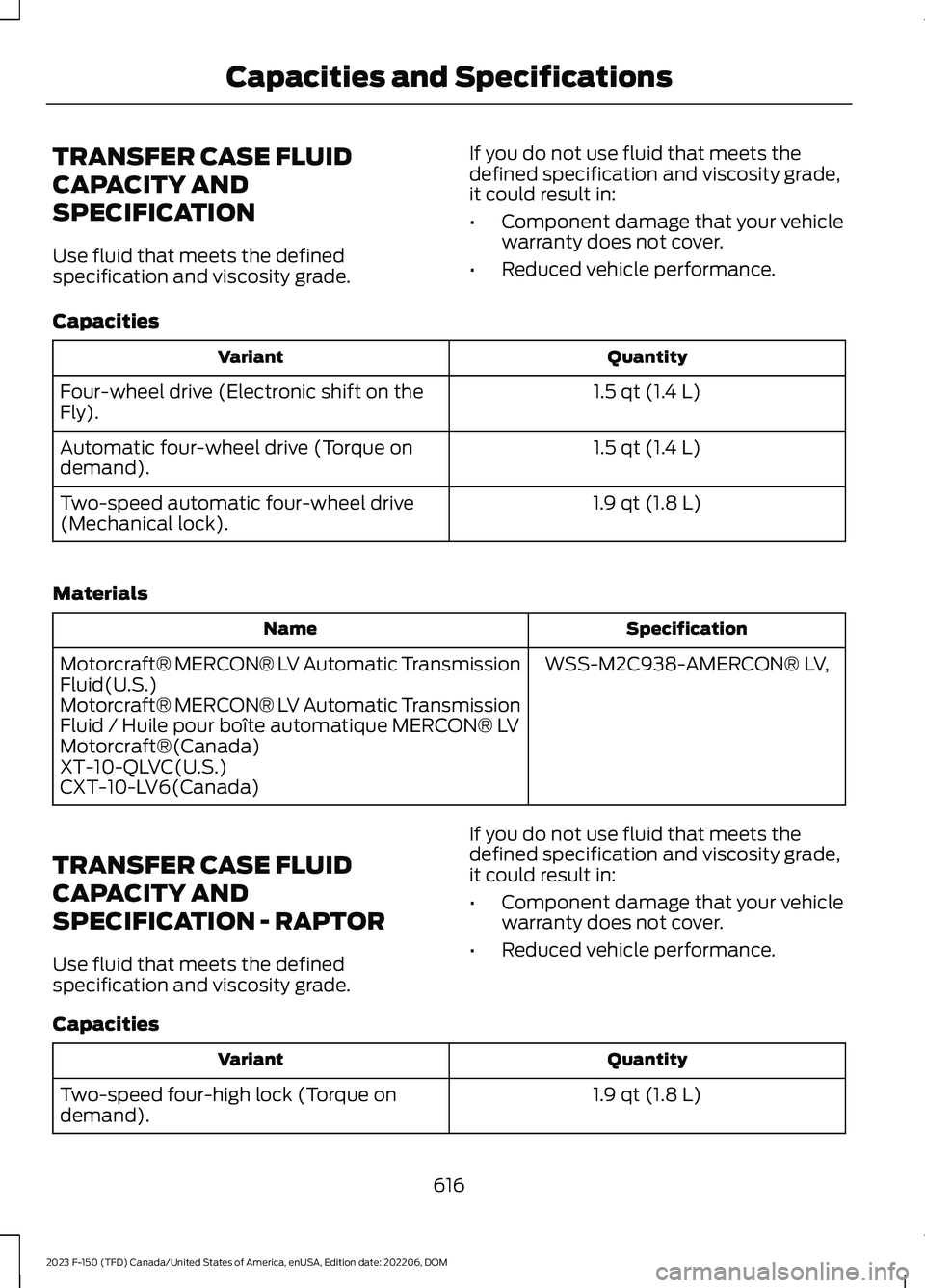
TRANSFER CASE FLUID
CAPACITY AND
SPECIFICATION
Use fluid that meets the definedspecification and viscosity grade.
If you do not use fluid that meets thedefined specification and viscosity grade,it could result in:
•Component damage that your vehiclewarranty does not cover.
•Reduced vehicle performance.
Capacities
QuantityVariant
1.5 qt (1.4 L)Four-wheel drive (Electronic shift on theFly).
1.5 qt (1.4 L)Automatic four-wheel drive (Torque ondemand).
1.9 qt (1.8 L)Two-speed automatic four-wheel drive(Mechanical lock).
Materials
SpecificationName
WSS-M2C938-AMERCON® LV,Motorcraft® MERCON® LV Automatic TransmissionFluid(U.S.)Motorcraft® MERCON® LV Automatic TransmissionFluid / Huile pour boîte automatique MERCON® LVMotorcraft®(Canada)XT-10-QLVC(U.S.)CXT-10-LV6(Canada)
TRANSFER CASE FLUID
CAPACITY AND
SPECIFICATION - RAPTOR
Use fluid that meets the definedspecification and viscosity grade.
If you do not use fluid that meets thedefined specification and viscosity grade,it could result in:
•Component damage that your vehiclewarranty does not cover.
•Reduced vehicle performance.
Capacities
QuantityVariant
1.9 qt (1.8 L)Two-speed four-high lock (Torque ondemand).
616
2023 F-150 (TFD) Canada/United States of America, enUSA, Edition date: 202206, DOMCapacities and Specifications
Page 621 of 786
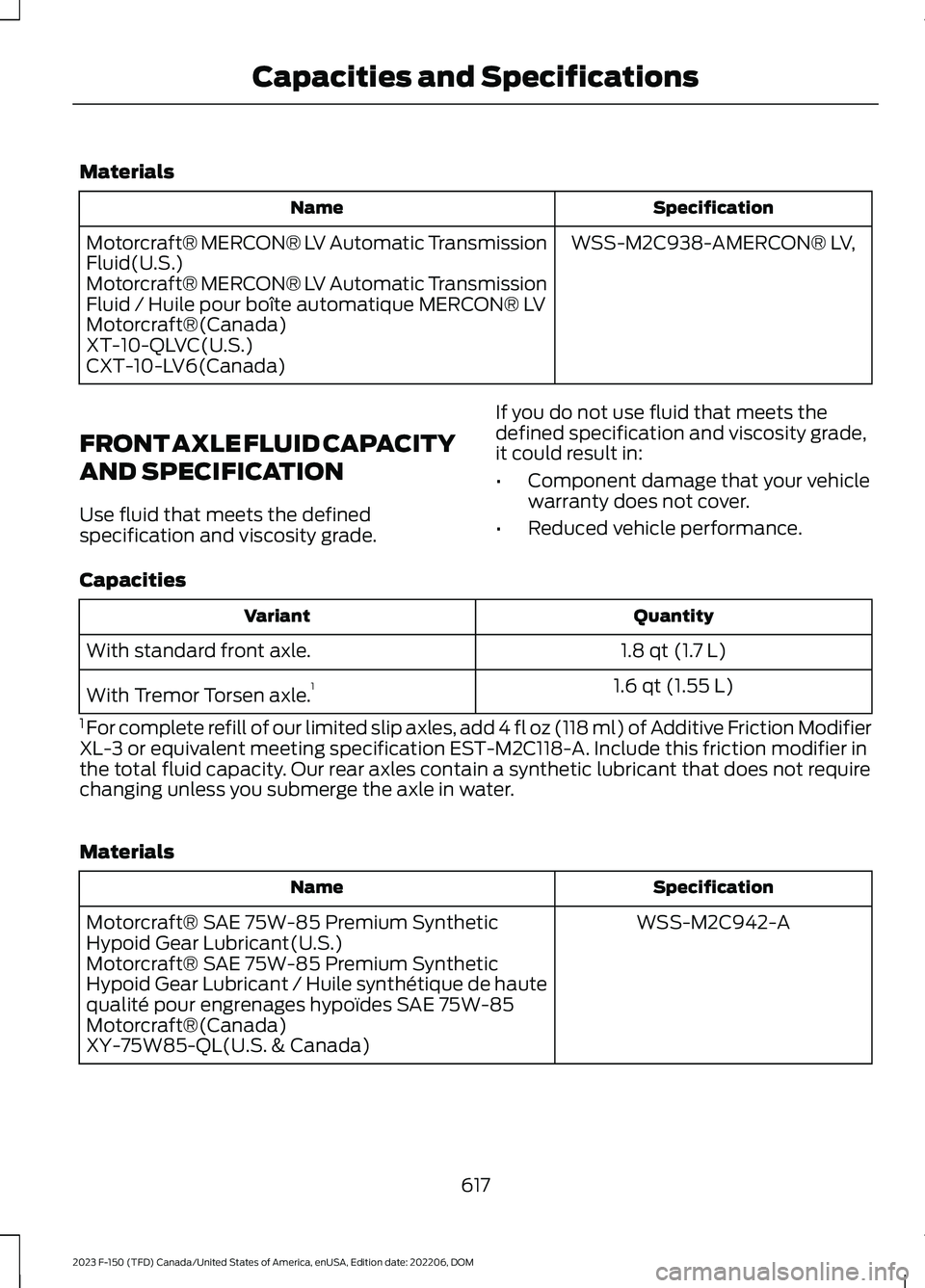
Materials
SpecificationName
WSS-M2C938-AMERCON® LV,Motorcraft® MERCON® LV Automatic TransmissionFluid(U.S.)Motorcraft® MERCON® LV Automatic TransmissionFluid / Huile pour boîte automatique MERCON® LVMotorcraft®(Canada)XT-10-QLVC(U.S.)CXT-10-LV6(Canada)
FRONT AXLE FLUID CAPACITY
AND SPECIFICATION
Use fluid that meets the definedspecification and viscosity grade.
If you do not use fluid that meets thedefined specification and viscosity grade,it could result in:
•Component damage that your vehiclewarranty does not cover.
•Reduced vehicle performance.
Capacities
QuantityVariant
1.8 qt (1.7 L)With standard front axle.
1.6 qt (1.55 L)With Tremor Torsen axle.1
1 For complete refill of our limited slip axles, add 4 fl oz (118 ml) of Additive Friction ModifierXL-3 or equivalent meeting specification EST-M2C118-A. Include this friction modifier inthe total fluid capacity. Our rear axles contain a synthetic lubricant that does not requirechanging unless you submerge the axle in water.
Materials
SpecificationName
WSS-M2C942-AMotorcraft® SAE 75W-85 Premium SyntheticHypoid Gear Lubricant(U.S.)Motorcraft® SAE 75W-85 Premium SyntheticHypoid Gear Lubricant / Huile synthétique de hautequalité pour engrenages hypoïdes SAE 75W-85Motorcraft®(Canada)XY-75W85-QL(U.S. & Canada)
617
2023 F-150 (TFD) Canada/United States of America, enUSA, Edition date: 202206, DOMCapacities and Specifications
Page 622 of 786
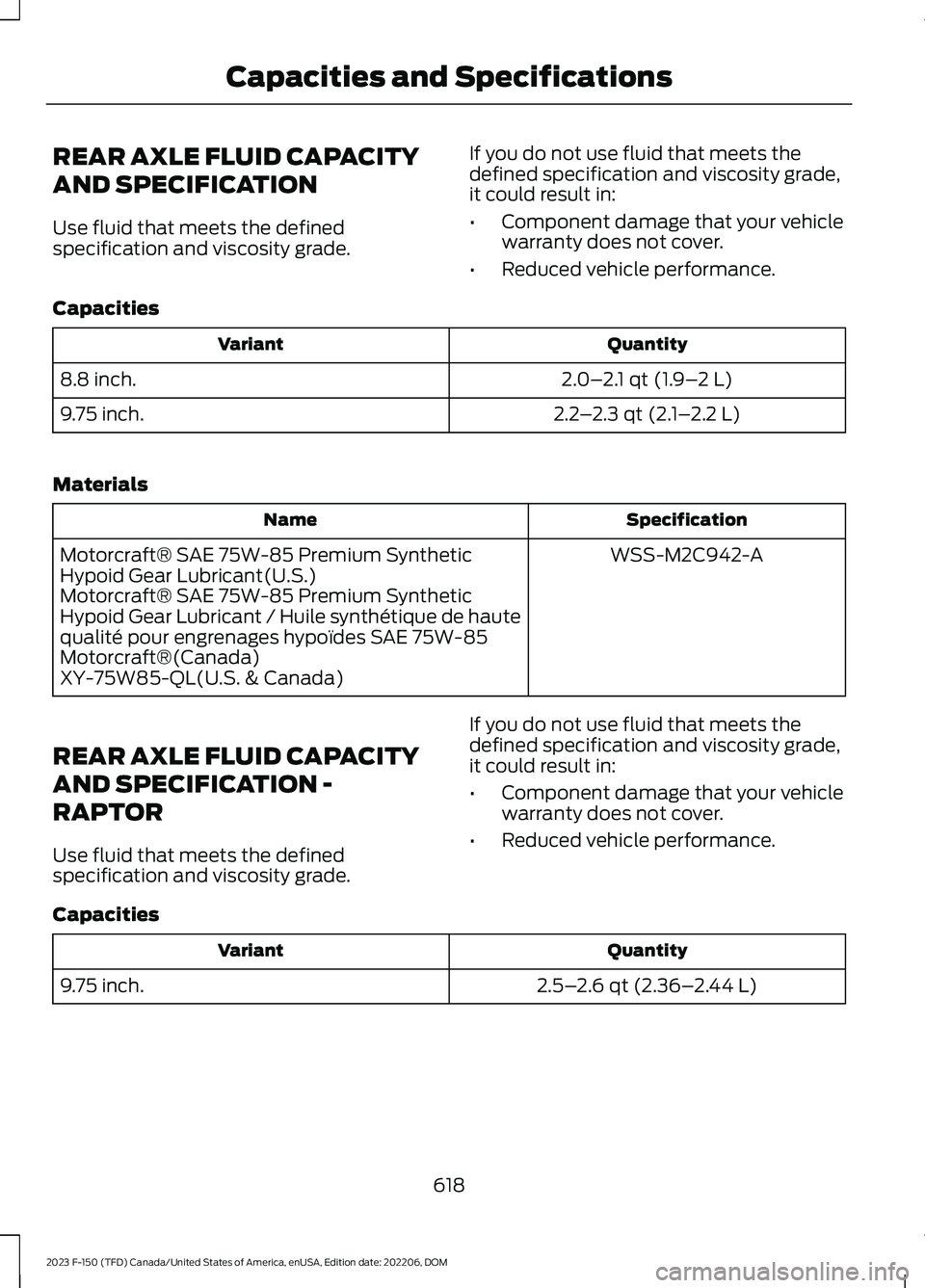
REAR AXLE FLUID CAPACITY
AND SPECIFICATION
Use fluid that meets the definedspecification and viscosity grade.
If you do not use fluid that meets thedefined specification and viscosity grade,it could result in:
•Component damage that your vehiclewarranty does not cover.
•Reduced vehicle performance.
Capacities
QuantityVariant
2.0–2.1 qt (1.9–2 L)8.8 inch.
2.2–2.3 qt (2.1–2.2 L)9.75 inch.
Materials
SpecificationName
WSS-M2C942-AMotorcraft® SAE 75W-85 Premium SyntheticHypoid Gear Lubricant(U.S.)Motorcraft® SAE 75W-85 Premium SyntheticHypoid Gear Lubricant / Huile synthétique de hautequalité pour engrenages hypoïdes SAE 75W-85Motorcraft®(Canada)XY-75W85-QL(U.S. & Canada)
REAR AXLE FLUID CAPACITY
AND SPECIFICATION -
RAPTOR
Use fluid that meets the definedspecification and viscosity grade.
If you do not use fluid that meets thedefined specification and viscosity grade,it could result in:
•Component damage that your vehiclewarranty does not cover.
•Reduced vehicle performance.
Capacities
QuantityVariant
2.5–2.6 qt (2.36–2.44 L)9.75 inch.
618
2023 F-150 (TFD) Canada/United States of America, enUSA, Edition date: 202206, DOMCapacities and Specifications
Page 623 of 786
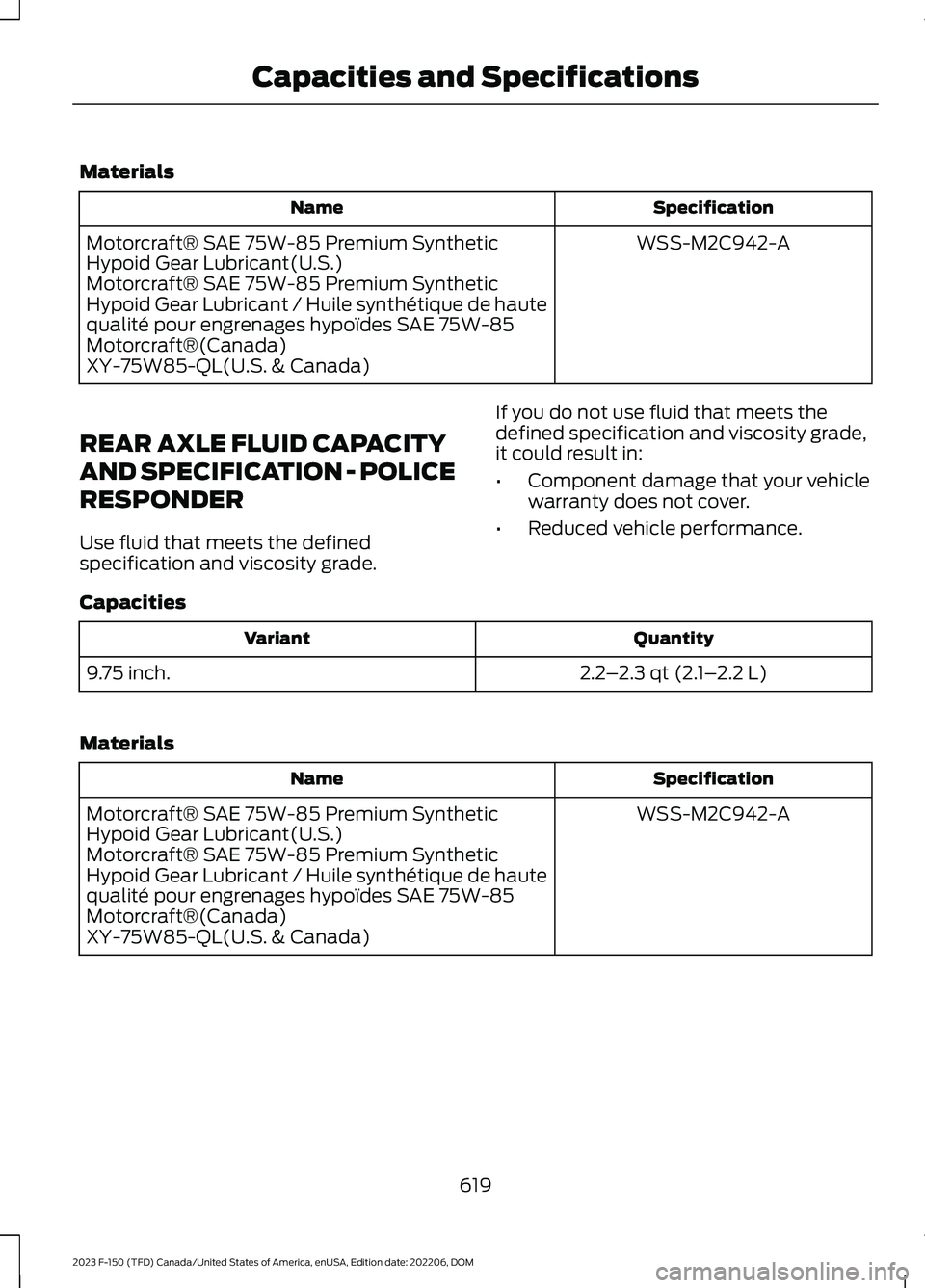
Materials
SpecificationName
WSS-M2C942-AMotorcraft® SAE 75W-85 Premium SyntheticHypoid Gear Lubricant(U.S.)Motorcraft® SAE 75W-85 Premium SyntheticHypoid Gear Lubricant / Huile synthétique de hautequalité pour engrenages hypoïdes SAE 75W-85Motorcraft®(Canada)XY-75W85-QL(U.S. & Canada)
REAR AXLE FLUID CAPACITY
AND SPECIFICATION - POLICE
RESPONDER
Use fluid that meets the definedspecification and viscosity grade.
If you do not use fluid that meets thedefined specification and viscosity grade,it could result in:
•Component damage that your vehiclewarranty does not cover.
•Reduced vehicle performance.
Capacities
QuantityVariant
2.2–2.3 qt (2.1–2.2 L)9.75 inch.
Materials
SpecificationName
WSS-M2C942-AMotorcraft® SAE 75W-85 Premium SyntheticHypoid Gear Lubricant(U.S.)Motorcraft® SAE 75W-85 Premium SyntheticHypoid Gear Lubricant / Huile synthétique de hautequalité pour engrenages hypoïdes SAE 75W-85Motorcraft®(Canada)XY-75W85-QL(U.S. & Canada)
619
2023 F-150 (TFD) Canada/United States of America, enUSA, Edition date: 202206, DOMCapacities and Specifications
Page 626 of 786
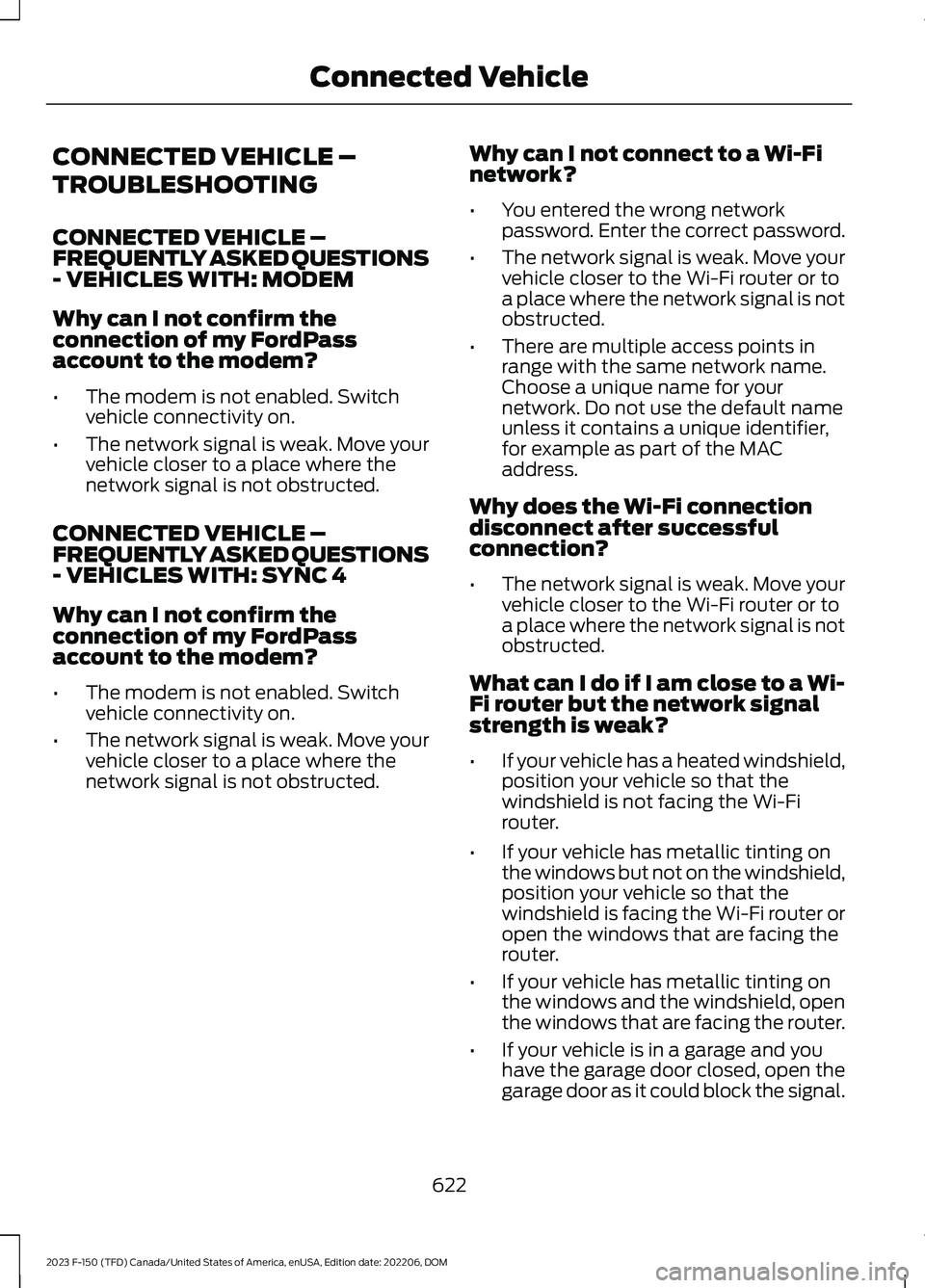
CONNECTED VEHICLE –
TROUBLESHOOTING
CONNECTED VEHICLE –FREQUENTLY ASKED QUESTIONS- VEHICLES WITH: MODEM
Why can I not confirm theconnection of my FordPassaccount to the modem?
•The modem is not enabled. Switchvehicle connectivity on.
•The network signal is weak. Move yourvehicle closer to a place where thenetwork signal is not obstructed.
CONNECTED VEHICLE –FREQUENTLY ASKED QUESTIONS- VEHICLES WITH: SYNC 4
Why can I not confirm theconnection of my FordPassaccount to the modem?
•The modem is not enabled. Switchvehicle connectivity on.
•The network signal is weak. Move yourvehicle closer to a place where thenetwork signal is not obstructed.
Why can I not connect to a Wi-Finetwork?
•You entered the wrong networkpassword. Enter the correct password.
•The network signal is weak. Move yourvehicle closer to the Wi-Fi router or toa place where the network signal is notobstructed.
•There are multiple access points inrange with the same network name.Choose a unique name for yournetwork. Do not use the default nameunless it contains a unique identifier,for example as part of the MACaddress.
Why does the Wi-Fi connectiondisconnect after successfulconnection?
•The network signal is weak. Move yourvehicle closer to the Wi-Fi router or toa place where the network signal is notobstructed.
What can I do if I am close to a Wi-Fi router but the network signalstrength is weak?
•If your vehicle has a heated windshield,position your vehicle so that thewindshield is not facing the Wi-Firouter.
•If your vehicle has metallic tinting onthe windows but not on the windshield,position your vehicle so that thewindshield is facing the Wi-Fi router oropen the windows that are facing therouter.
•If your vehicle has metallic tinting onthe windows and the windshield, openthe windows that are facing the router.
•If your vehicle is in a garage and youhave the garage door closed, open thegarage door as it could block the signal.
622
2023 F-150 (TFD) Canada/United States of America, enUSA, Edition date: 202206, DOMConnected Vehicle
Page 628 of 786
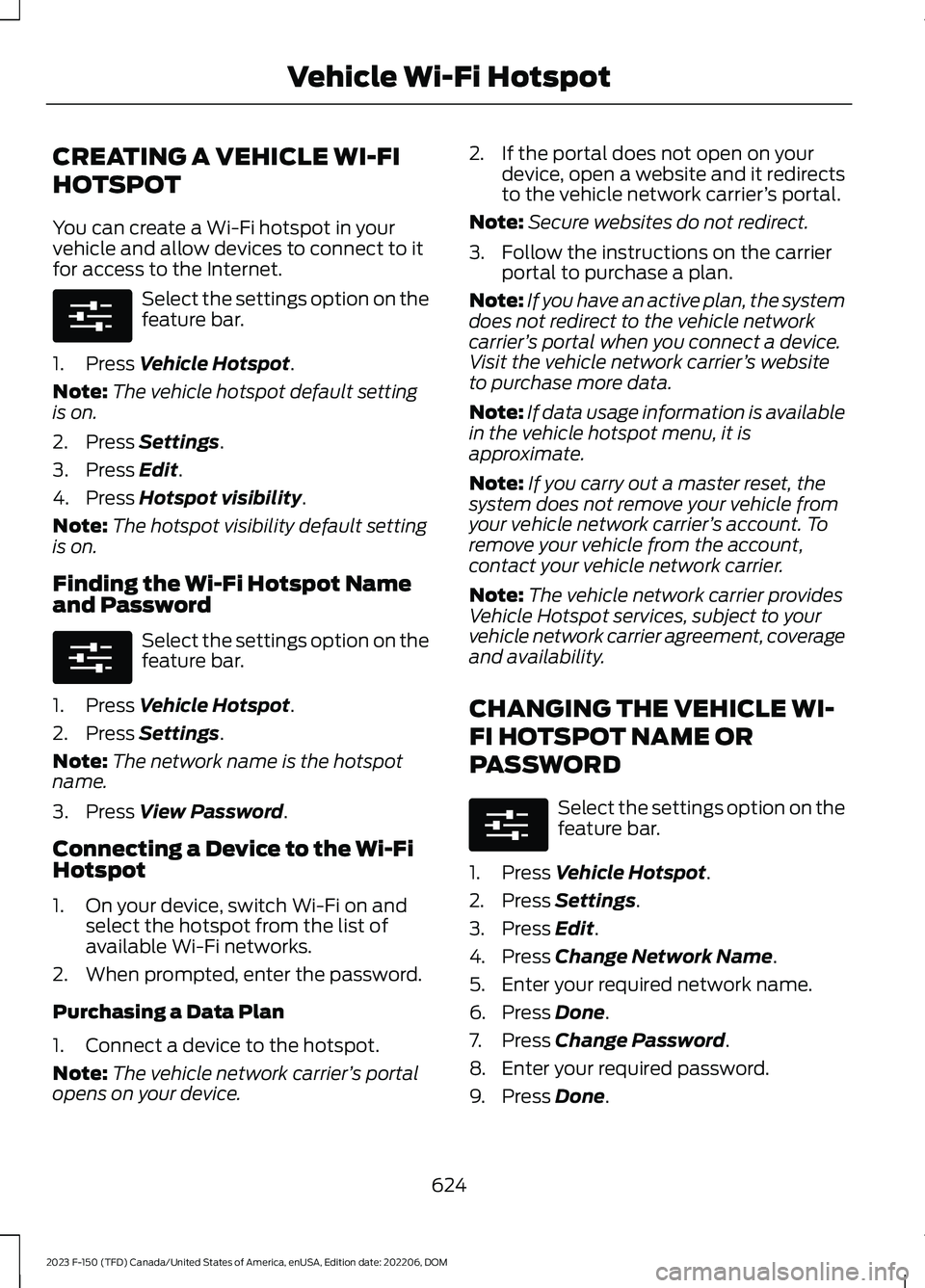
CREATING A VEHICLE WI-FI
HOTSPOT
You can create a Wi-Fi hotspot in yourvehicle and allow devices to connect to itfor access to the Internet.
Select the settings option on thefeature bar.
1.Press Vehicle Hotspot.
Note:The vehicle hotspot default settingis on.
2.Press Settings.
3.Press Edit.
4.Press Hotspot visibility.
Note:The hotspot visibility default settingis on.
Finding the Wi-Fi Hotspot Nameand Password
Select the settings option on thefeature bar.
1.Press Vehicle Hotspot.
2.Press Settings.
Note:The network name is the hotspotname.
3.Press View Password.
Connecting a Device to the Wi-FiHotspot
1.On your device, switch Wi-Fi on andselect the hotspot from the list ofavailable Wi-Fi networks.
2.When prompted, enter the password.
Purchasing a Data Plan
1.Connect a device to the hotspot.
Note:The vehicle network carrier’s portalopens on your device.
2.If the portal does not open on yourdevice, open a website and it redirectsto the vehicle network carrier’s portal.
Note:Secure websites do not redirect.
3.Follow the instructions on the carrierportal to purchase a plan.
Note:If you have an active plan, the systemdoes not redirect to the vehicle networkcarrier’s portal when you connect a device.Visit the vehicle network carrier’s websiteto purchase more data.
Note:If data usage information is availablein the vehicle hotspot menu, it isapproximate.
Note:If you carry out a master reset, thesystem does not remove your vehicle fromyour vehicle network carrier’s account. Toremove your vehicle from the account,contact your vehicle network carrier.
Note:The vehicle network carrier providesVehicle Hotspot services, subject to yourvehicle network carrier agreement, coverageand availability.
CHANGING THE VEHICLE WI-
FI HOTSPOT NAME OR
PASSWORD
Select the settings option on thefeature bar.
1.Press Vehicle Hotspot.
2.Press Settings.
3.Press Edit.
4.Press Change Network Name.
5.Enter your required network name.
6.Press Done.
7.Press Change Password.
8.Enter your required password.
9.Press Done.
624
2023 F-150 (TFD) Canada/United States of America, enUSA, Edition date: 202206, DOMVehicle Wi-Fi HotspotE280315 E280315 E280315
Page 633 of 786
Using the Station List
1.Press Browse.
Note:Available on FM radio only.
2.Press a station.
SWITCHING THE DISPLAY ON
AND OFF
Audio Unit
Press the button.
Touchscreen
To switch the display off:
1.Press Settings on the touchscreen.
2.Press Display Settings.
3.Press Display Off.
Note:The display defaults to on each timeyou switch your vehicle on.
To switch the display on, press anywhereon the touchscreen.
DIGITAL RADIO (IF EQUIPPED)
WHAT IS DIGITAL RADIO
HD Radio™ technology is the digitalevolution of analog AM/FM radio.
For additional information, visitwww.HDRadio.com.
HD Radio Technology is manufacturedunder license from iBiquity DigitalCorporation and foreign patents. HD Radioand the HD and HD Radio logos areproprietary trademarks of DTS. The vehiclemanufacturer and DTS are not responsiblefor the content sent using HD Radiotechnology. Content may be changed,added or deleted at any time at the stationowner's discretion.
HOW DOES DIGITAL RADIO WORK
Your system has a special receiver thatallows it to receive digital broadcasts inaddition to analog broadcasts.
HD1 signifies the main programming statusand is available in both analog and digitalbroadcasts. Other multicast stations areonly available digitally and could containnew or different content.
Note:When the system first receives anHD1 station, it plays the station in the analogversion until it verifies the station is an HDRadio station. Then it shifts to the digitalversion.
Note:There is an audio mute delay whenswitching to an HD2 or HD3 station becausethe system has to reacquire and decode thedigital signal.
DIGITAL RADIO LIMITATIONS
If you are outside the reception area, thesystem could not work.
If you are on the fringe of the receptionarea, the station could mute due to weaksignal strength.
Note:If you are listening to HD1, the systemchanges back to the analog broadcast untilthe digital broadcast is available again. Ifyou are listening to any other multicastchannels, the station mutes and staysmuted unless it is able to connect to thedigital signal again.
629
2023 F-150 (TFD) Canada/United States of America, enUSA, Edition date: 202206, DOMAudio SystemE272035
Page 635 of 786
Hills, mountains, tall buildings, bridges,tunnels, freeway overpasses, parkinggarages, dense tree foliage andthunderstorms can interfere with yourreception.
When you pass a ground-basedbroadcast-repeating tower, a strongersignal may overtake a weaker one andcould result in the audio system muting.Your display could show an error messageto indicate the interference.
LOCATING THE SATELLITE RADIOIDENTIFICATION NUMBER
1.Select SiriusXM as the audio source.
2.Tune to channel 0.
SELECTING A CHANNEL
Manually Selecting a Channel
Press the button to find theprevious or next available radiochannel.
Linear Tuner
The linear tuner is displayed whenmanually selecting a channel. You canswipe left or right on the linear tunercarousel to navigate through the channellist. Tap on a channel title to listen to it.
Using Direct Tune
1.Press the channel up or down buttonto open the linear tuner screen.
2.Press Direct Tune to open the numberpad.
3.Enter the channel you prefer.
Using Browse
1.Press Browse.
2.Select a channel.
SATELLITE RADIO SETTINGS
Subscription
Your subscription status is displayed. Youcan subscribe or manage your subscriptiondirectly from the touchscreen.
Listener Add/Switch
You can create up to five listener profilesper SiriusXM account. Each listener profilecan be personalized with a name andprofile image.
Note:Requires a trial or active subscriptionto use.
Note:A default profile is available when nolistener profiles are created.
SiriusXM Favorites
SiriusXM Favorites are shown for the activelistener profile. While you are listening toSiriusXM, you can save favorites by:
•Tapping the currently tuned channelor show logo on the SiriusXM audioscreen. A favorite icon appears next tothe logo when it is saved as a favorite.
•Tuning to a channel or show you wantto save as a favorite. Navigate to theSiriusXM Favorites screen and pressthe Add Current button. The currentlytuned channel or show is saved as afavorite.
•Saving a radio preset. This saves thecurrently tuned SiriusXM channel orshow as a favorite.
Note:Requires a trial or active subscriptionto use.
631
2023 F-150 (TFD) Canada/United States of America, enUSA, Edition date: 202206, DOMAudio SystemE328569 E328570