Def FORD F150 2023 Workshop Manual
[x] Cancel search | Manufacturer: FORD, Model Year: 2023, Model line: F150, Model: FORD F150 2023Pages: 786, PDF Size: 23.15 MB
Page 449 of 786
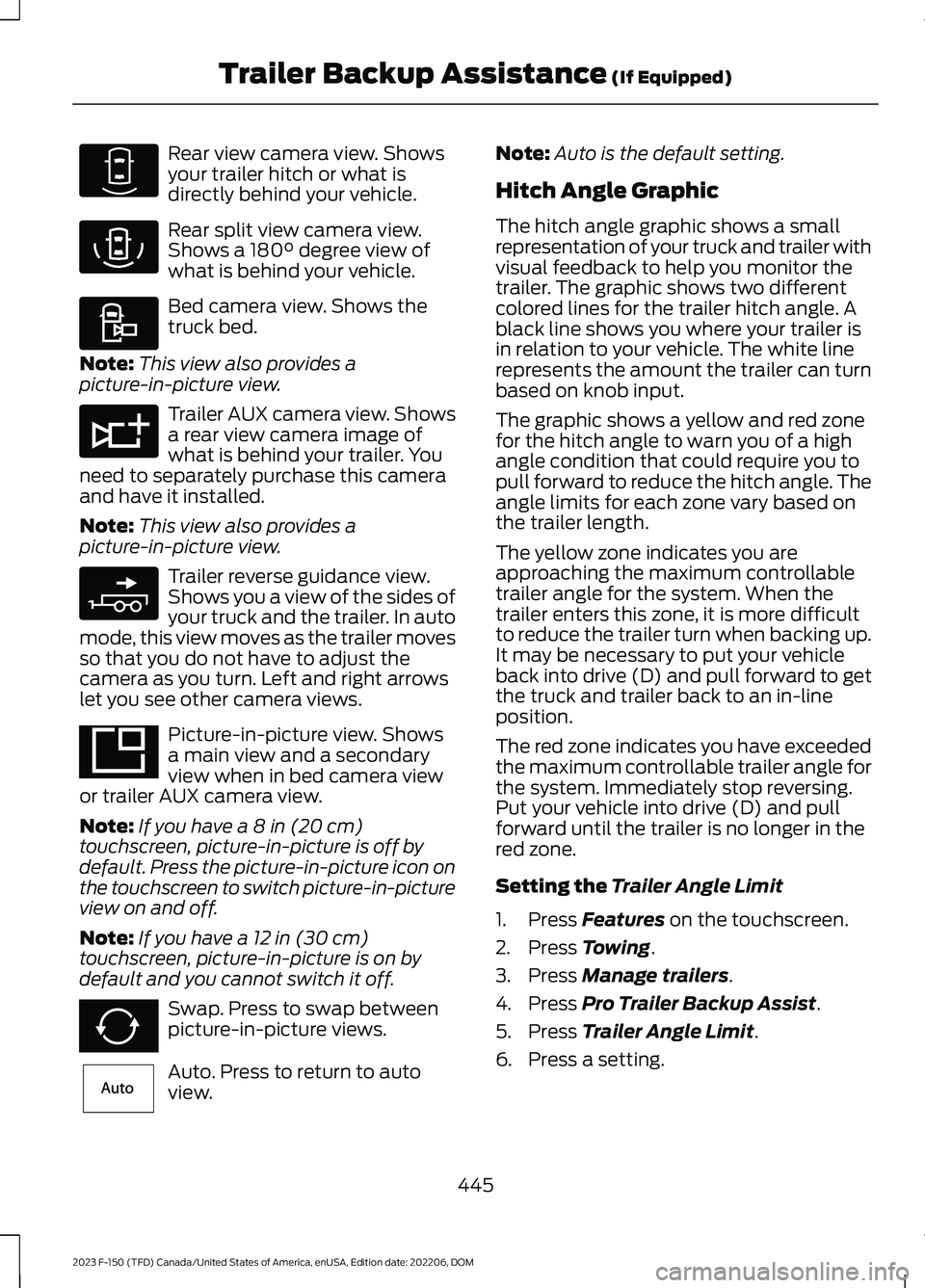
Rear view camera view. Showsyour trailer hitch or what isdirectly behind your vehicle.
Rear split view camera view.Shows a 180° degree view ofwhat is behind your vehicle.
Bed camera view. Shows thetruck bed.
Note:This view also provides apicture-in-picture view.
Trailer AUX camera view. Showsa rear view camera image ofwhat is behind your trailer. Youneed to separately purchase this cameraand have it installed.
Note:This view also provides apicture-in-picture view.
Trailer reverse guidance view.Shows you a view of the sides ofyour truck and the trailer. In automode, this view moves as the trailer movesso that you do not have to adjust thecamera as you turn. Left and right arrowslet you see other camera views.
Picture-in-picture view. Showsa main view and a secondaryview when in bed camera viewor trailer AUX camera view.
Note:If you have a 8 in (20 cm)touchscreen, picture-in-picture is off bydefault. Press the picture-in-picture icon onthe touchscreen to switch picture-in-pictureview on and off.
Note:If you have a 12 in (30 cm)touchscreen, picture-in-picture is on bydefault and you cannot switch it off.
Swap. Press to swap betweenpicture-in-picture views.
Auto. Press to return to autoview.
Note:Auto is the default setting.
Hitch Angle Graphic
The hitch angle graphic shows a smallrepresentation of your truck and trailer withvisual feedback to help you monitor thetrailer. The graphic shows two differentcolored lines for the trailer hitch angle. Ablack line shows you where your trailer isin relation to your vehicle. The white linerepresents the amount the trailer can turnbased on knob input.
The graphic shows a yellow and red zonefor the hitch angle to warn you of a highangle condition that could require you topull forward to reduce the hitch angle. Theangle limits for each zone vary based onthe trailer length.
The yellow zone indicates you areapproaching the maximum controllabletrailer angle for the system. When thetrailer enters this zone, it is more difficultto reduce the trailer turn when backing up.It may be necessary to put your vehicleback into drive (D) and pull forward to getthe truck and trailer back to an in-lineposition.
The red zone indicates you have exceededthe maximum controllable trailer angle forthe system. Immediately stop reversing.Put your vehicle into drive (D) and pullforward until the trailer is no longer in thered zone.
Setting the Trailer Angle Limit
1.Press Features on the touchscreen.
2.Press Towing.
3.Press Manage trailers.
4.Press Pro Trailer Backup Assist.
5.Press Trailer Angle Limit.
6.Press a setting.
445
2023 F-150 (TFD) Canada/United States of America, enUSA, Edition date: 202206, DOMTrailer Backup Assistance (If Equipped)E310967 E310974 E310995 E311776 E310965 E351663 E351662 E315644
Page 450 of 786
Normal Control Angle
Default setting. This provides a balancedlimit that returns from a turn to straightbacking with minimal change to the trailerdirection.
Max Control Angle
Increases the trailer angle limit close to themaximum controllable angle to allowsharper turns but also causes more changein the trailer direction when straighteningout from a turn.
446
2023 F-150 (TFD) Canada/United States of America, enUSA, Edition date: 202206, DOMTrailer Backup Assistance (If Equipped)
Page 459 of 786
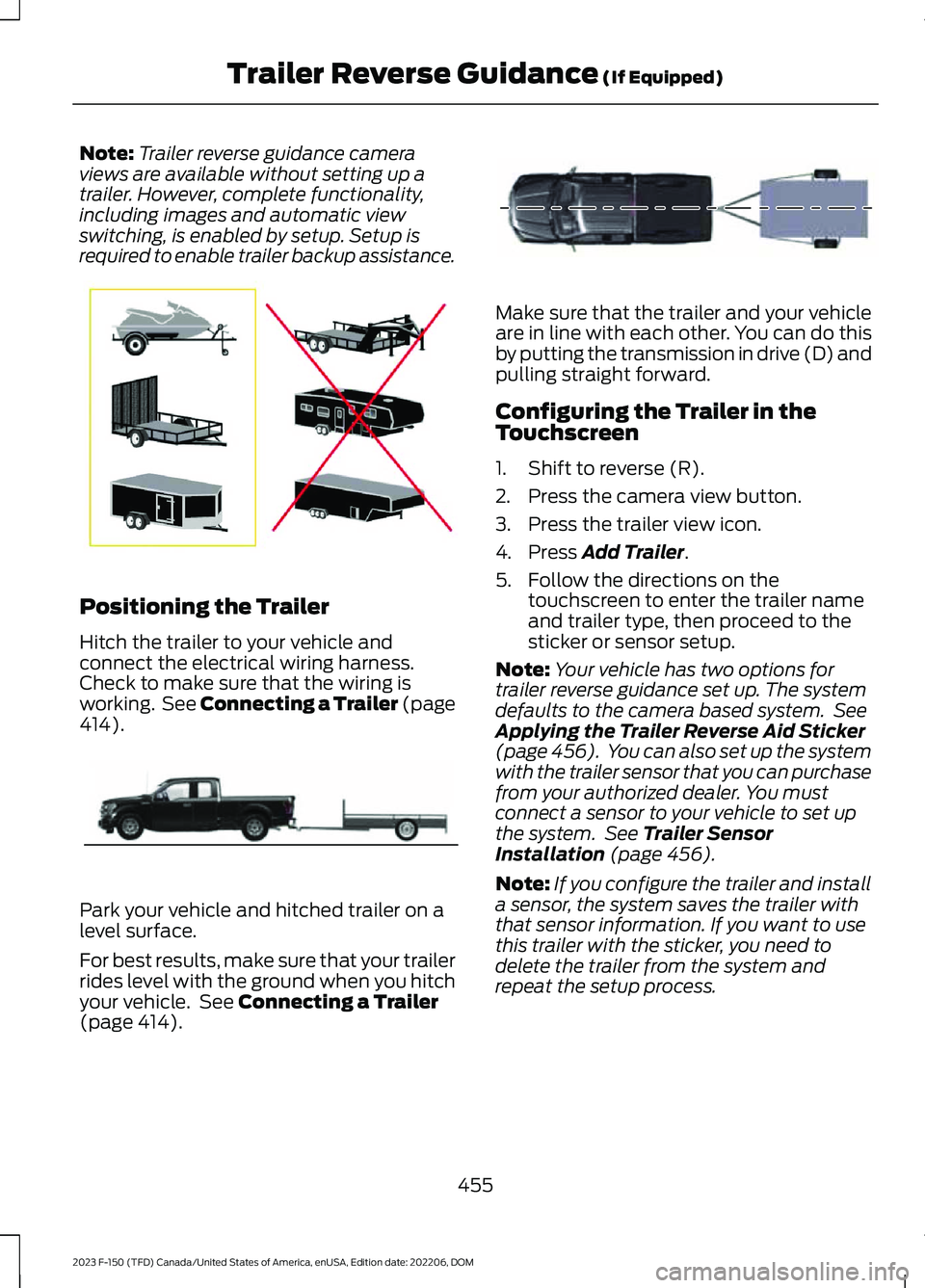
Note:Trailer reverse guidance cameraviews are available without setting up atrailer. However, complete functionality,including images and automatic viewswitching, is enabled by setup. Setup isrequired to enable trailer backup assistance.
Positioning the Trailer
Hitch the trailer to your vehicle andconnect the electrical wiring harness.Check to make sure that the wiring isworking. See Connecting a Trailer (page414).
Park your vehicle and hitched trailer on alevel surface.
For best results, make sure that your trailerrides level with the ground when you hitchyour vehicle. See Connecting a Trailer(page 414).
Make sure that the trailer and your vehicleare in line with each other. You can do thisby putting the transmission in drive (D) andpulling straight forward.
Configuring the Trailer in theTouchscreen
1.Shift to reverse (R).
2.Press the camera view button.
3.Press the trailer view icon.
4.Press Add Trailer.
5.Follow the directions on thetouchscreen to enter the trailer nameand trailer type, then proceed to thesticker or sensor setup.
Note:Your vehicle has two options fortrailer reverse guidance set up. The systemdefaults to the camera based system. SeeApplying the Trailer Reverse Aid Sticker(page 456). You can also set up the systemwith the trailer sensor that you can purchasefrom your authorized dealer. You mustconnect a sensor to your vehicle to set upthe system. See Trailer SensorInstallation (page 456).
Note:If you configure the trailer and installa sensor, the system saves the trailer withthat sensor information. If you want to usethis trailer with the sticker, you need todelete the trailer from the system andrepeat the setup process.
455
2023 F-150 (TFD) Canada/United States of America, enUSA, Edition date: 202206, DOMTrailer Reverse Guidance (If Equipped)E209766 E209759 E209760
Page 462 of 786
SWITCHING TRAILER
REVERSE GUIDANCE ON AND
OFF
Shift into reverse (R), press the rearcamera button to expand the menu, pressthe trailer icon and use the touchscreen toselect the connected trailer.
Note:If the trailer was connected just priorto turning the system on, you may need todrive forward to initialize the system. Followthe instructions on the touchscreen toactivate the system.
USING TRAILER REVERSE
GUIDANCE VIEWS
Up to seven camera views could beavailable when using trailer reverseguidance. Use the view that helps you themost when reversing your vehicle andtrailer.
360° camera view. Shows a360° view on the right-hand sideof the touchscreen with a rearcamera view on the left-hand side of thetouchscreen.
Rear view camera view. Showsyour trailer hitch or what isdirectly behind your vehicle.
Rear split view camera view.Shows a 180° degree view ofwhat is behind your vehicle.
Bed camera view. Shows thetruck bed.
Note:This view also provides apicture-in-picture view.
Trailer AUX camera view. Showsa rear view camera image ofwhat is behind your trailer. Youneed to separately purchase this cameraand have it installed.
Note:This view also provides apicture-in-picture view.
Trailer reverse guidance view.Shows you a view of the sides ofyour truck and the trailer. In automode, this view moves as the trailer movesso that you do not have to adjust thecamera as you turn. Left and right arrowslet you see other camera views.
Straight backup mode. Showswhich way to turn your steeringwheel to keep the trailer straight.Use this view when you want to keep yourtrailer completely in line with your truck.
Note:This view also provides apicture-in-picture view.
Note: It may be helpful to shift your vehicleinto drive (D), pull forward and straightenout the vehicle and trailer before engagingstraight backup mode.
Picture-in-picture view. Showsa main view and a secondaryview when in bed camera view,trailer AUX camera view or straight backupmode.
Note:If you have a 8 in (20 cm)touchscreen, picture-in-picture is off bydefault. Press the picture-in-picture icon onthe touchscreen to switch picture-in-pictureview on and off.
Note:If you have a 12 in (30 cm)touchscreen, picture-in-picture is on bydefault for bed camera view and trailer AUXcamera view and cannot be switched off.Press the picture-in-picture icon on thetouchscreen to switch picture-in-pictureview on and off in straight backup mode.
Swap. Press to swap betweenpicture-in-picture views.
This takes you back to the 360°camera system and out of thetrailer reverse guidance feature.
458
2023 F-150 (TFD) Canada/United States of America, enUSA, Edition date: 202206, DOMTrailer Reverse Guidance (If Equipped)E310996 E310967 E310974 E310995 E311776 E310965 E224484 E351663 E351662 E224486
Page 463 of 786
Auto. Press to return to autoview.
Note:Auto mode is the default setting.
Hitch Angle Graphic
The hitch angle graphic shows a smallrepresentation of your truck and trailer withvisual feedback to help you monitor thetrailer. The graphic shows two differentcolored lines for the trailer hitch angle. Ablack line shows you where your trailer isin relation to your vehicle. The white linerepresents the amount the trailer can turnbased on steering wheel position.
The graphic shows a yellow and red zonefor the hitch angle to warn you of a highangle condition that could require you topull forward to reduce the hitch angle. Theangle limits for each zone vary based onthe trailer length.
The yellow zone indicates you areapproaching the maximum controllabletrailer angle for the system. When thetrailer enters this zone, it is more difficultto reduce the trailer turn when backing up.It may be necessary to put your vehicleback into drive (D) and pull forward to getthe truck and trailer back to an in-lineposition.
The red zone indicates you have exceededthe maximum controllable trailer angle forthe system. Immediately stop reversing.Put your vehicle into drive (D) and pullforward until the trailer is no longer in thered zone.
459
2023 F-150 (TFD) Canada/United States of America, enUSA, Edition date: 202206, DOMTrailer Reverse Guidance (If Equipped)E315644
Page 480 of 786
SNOW PLOWING
PRECAUTIONS
WARNING: Modifying or addingequipment to the front of your vehiclecould affect the performance of theairbag system, increasing the risk ofinjury. This includes the hood, bumpersystem, frame, front body structure, towhooks, hood pins, push bar andsnowplows.
WARNING: Do not attempt toservice, repair, or modify thesupplementary restraint system orassociated components. Failure tofollow this instruction could result inpersonal injury or death.
WARNING: All occupants of yourvehicle, including the driver, shouldalways properly wear their seatbelts,even when an airbag supplementalrestraint system is provided. Failure toproperly wear your seatbelt couldseriously increase the risk of injury ordeath.
WARNING: Do not spin the wheelsat over 34 mph (55 km/h). The tires mayfail and injure a passenger or bystander.
Note:Look for an alterer’s label on yourvehicle from the snowplow installercertifying that the installation meets allapplicable Federal Motor Vehicle SafetyStandards (FMVSS).
Note:Federal and some local regulationsrequire additional exterior lamps forsnowplow-equipped vehicles. Contact anauthorized dealer for additional information.
Note:Do not remove or defeat the trippingmechanisms designed into the snowremoval equipment by its manufacturer.Doing so could cause damage to yourvehicle and the snow removal equipmentas well as possible airbag deployment.
OPERATING YOUR VEHICLE
WITH A SNOWPLOW
Weight limits and guidelines for selectingand installing the snowplow are in the FordTruck Body Builders Layout Book. Foradditional information, visitwww.fordbbas.com/home.
A typical snowplow installation affects thefollowing:
•Front gross axle weight rating. SeeWhat Is the Gross Axle WeightRating (page 405).
•Gross vehicle weight rating. See WhatIs the Gross Vehicle Weight Rating(page 405).
•Braking and steering.
•Front wheel toe. See the FordWorkshop Manual.
•Headlight aim. See Adjusting theHeadlamps (page 515).
•Tire air pressure. See Information onthe Tire Sidewall (page 538).
Note:Do not exceed the front gross axleweight rating or gross vehicle weight rating.
Note:Your vehicle may require rear ballastweight for proper braking and steering.
Your vehicle has a driver and passengerairbag supplemental restraint system. Thesupplemental restraint system activatesin certain frontal and offset frontalcollisions when the vehicle sustainssufficient longitudinal deceleration.
476
2023 F-150 (TFD) Canada/United States of America, enUSA, Edition date: 202206, DOMSnow Plowing - Vehicles With: Snow Plow Mode
Page 539 of 786
PREPARING YOUR VEHICLE
FOR STORAGE
If you plan on storing your vehicle for 30days or more, the following maintenancerecommendations ensures your vehiclestays in good operating condition.
Under various conditions, long-termstorage may lead to degraded engineperformance or failure unless you usespecific precautions to preserve yourvehicle.
General
•Store all vehicles in a dry, ventilatedplace.
•If vehicles are stored outside, theyrequire regular maintenance to protectagainst rust and weather damage.
•Make sure all linkages, cables, leversand pins under your vehicle are coveredwith grease to prevent rust.
•Move vehicles at least 25 ft (7.5 m)every 15 days to lubricate working partsand prevent corrosion.
•Fill the fuel tank with high-quality fueluntil the first automatic shutoff of thefuel pump nozzle.
Engine
•Change the engine oil and filter prior tostorage because used engine oilcontains contaminants which maycause engine damage.
•Start the engine every 15 days for aminimum of 15 minutes. Run at fastidle with the climate controls set todefrost until the engine reaches normaloperating temperature.
•With your foot on the brake, shiftthrough all the gears while the engineis running.
Body
•Wash your vehicle thoroughly toremove dirt, grease, oil, tar or mud fromexterior surfaces, rear wheel housingsand the underside of front fenders.
•Periodically wash your vehicle if it isstored in exposed locations.
•Touch-up exposed or primed metal toprevent rust.
•Cover chrome and stainless steel partswith a thick coat of auto wax to preventdiscoloration. Rewax as necessarywhen you wash your vehicle.
•Lubricate all hood, door and luggagecompartment hinges and latches witha light grade oil.
•Cover interior trim to prevent fading.
•Keep all rubber parts free from oil andsolvents.
12 Volt Battery
•When storing your vehicle for greaterthan 30 days the state of chargeshould be approximately 50%.Additionally, we recommenddisconnecting the 12v battery whichwill reduce system loads on thebattery.
•Check and recharge as necessary. Keepconnections clean.
Note:It is necessary to reset memoryfeatures if you disconnect the batterycables.
Brakes
Make sure the brakes and parking brakerelease fully.
Note:If you intend on parking your vehiclefor an extended period after cleaning thewheels with a wheel cleaner, drive yourvehicle for a few minutes before doing so toreduce the risk of increased corrosion of thebrake discs, brake pads and linings.
535
2023 F-150 (TFD) Canada/United States of America, enUSA, Edition date: 202206, DOMStoring Your Vehicle
Page 541 of 786
LOCATING THE TIRE LABEL
You will find a Tire Labelcontaining tire inflation pressureby tire size and other importantinformation located on the B-Pillaror the edge of the driver's door.See Locating the SafetyCompliance CertificationLabels (page 405).
DEPARTMENT OF
TRANSPORTATION UNIFORM
TIRE QUALITY GRADES
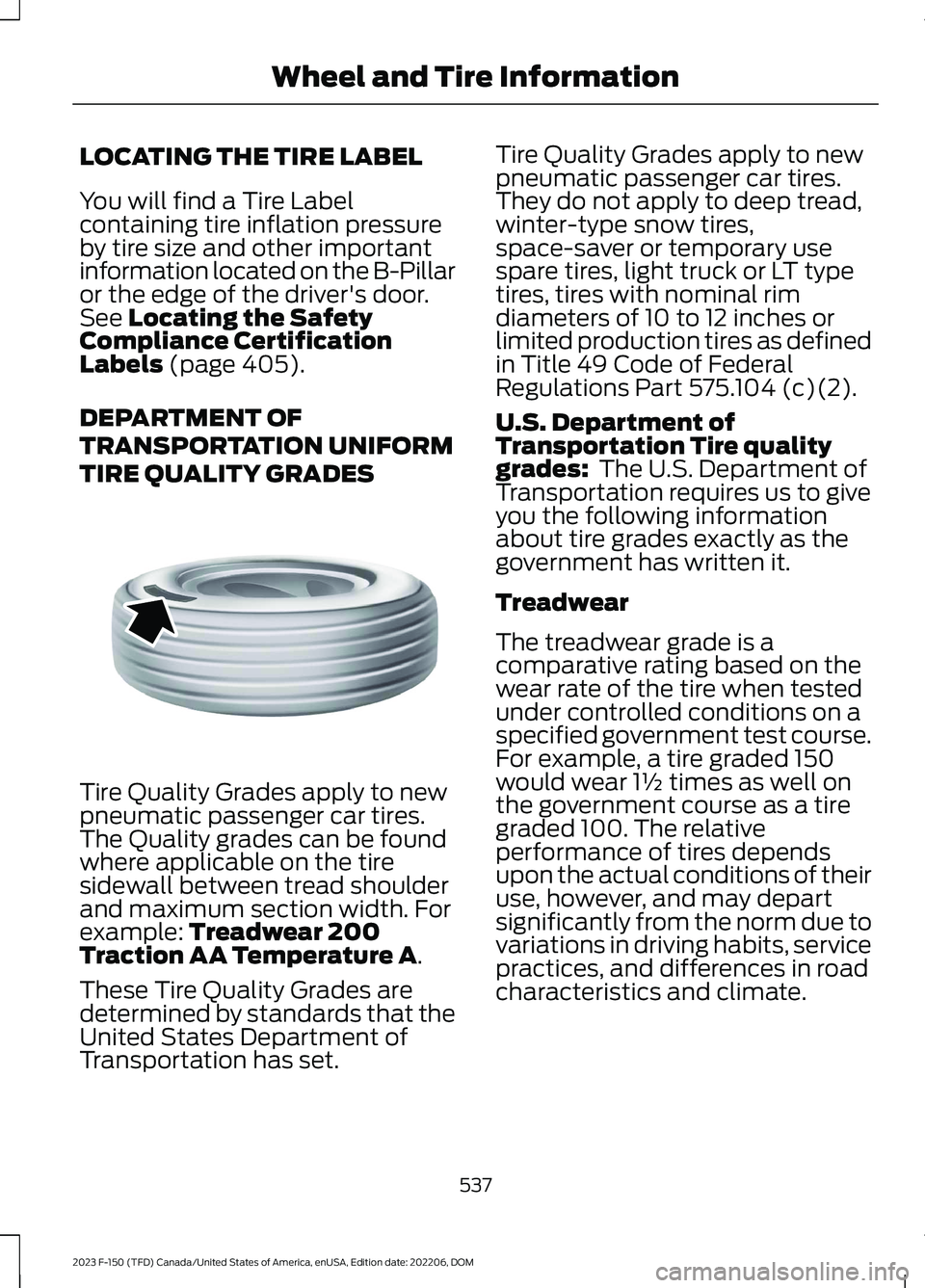
Tire Quality Grades apply to newpneumatic passenger car tires.The Quality grades can be foundwhere applicable on the tiresidewall between tread shoulderand maximum section width. Forexample: Treadwear 200Traction AA Temperature A.
These Tire Quality Grades aredetermined by standards that theUnited States Department ofTransportation has set.
Tire Quality Grades apply to newpneumatic passenger car tires.They do not apply to deep tread,winter-type snow tires,space-saver or temporary usespare tires, light truck or LT typetires, tires with nominal rimdiameters of 10 to 12 inches orlimited production tires as definedin Title 49 Code of FederalRegulations Part 575.104 (c)(2).
U.S. Department ofTransportation Tire qualitygrades: The U.S. Department ofTransportation requires us to giveyou the following informationabout tire grades exactly as thegovernment has written it.
Treadwear
The treadwear grade is acomparative rating based on thewear rate of the tire when testedunder controlled conditions on aspecified government test course.For example, a tire graded 150would wear 1½ times as well onthe government course as a tiregraded 100. The relativeperformance of tires dependsupon the actual conditions of theiruse, however, and may departsignificantly from the norm due tovariations in driving habits, servicepractices, and differences in roadcharacteristics and climate.
537
2023 F-150 (TFD) Canada/United States of America, enUSA, Edition date: 202206, DOMWheel and Tire InformationE142542
Page 543 of 786
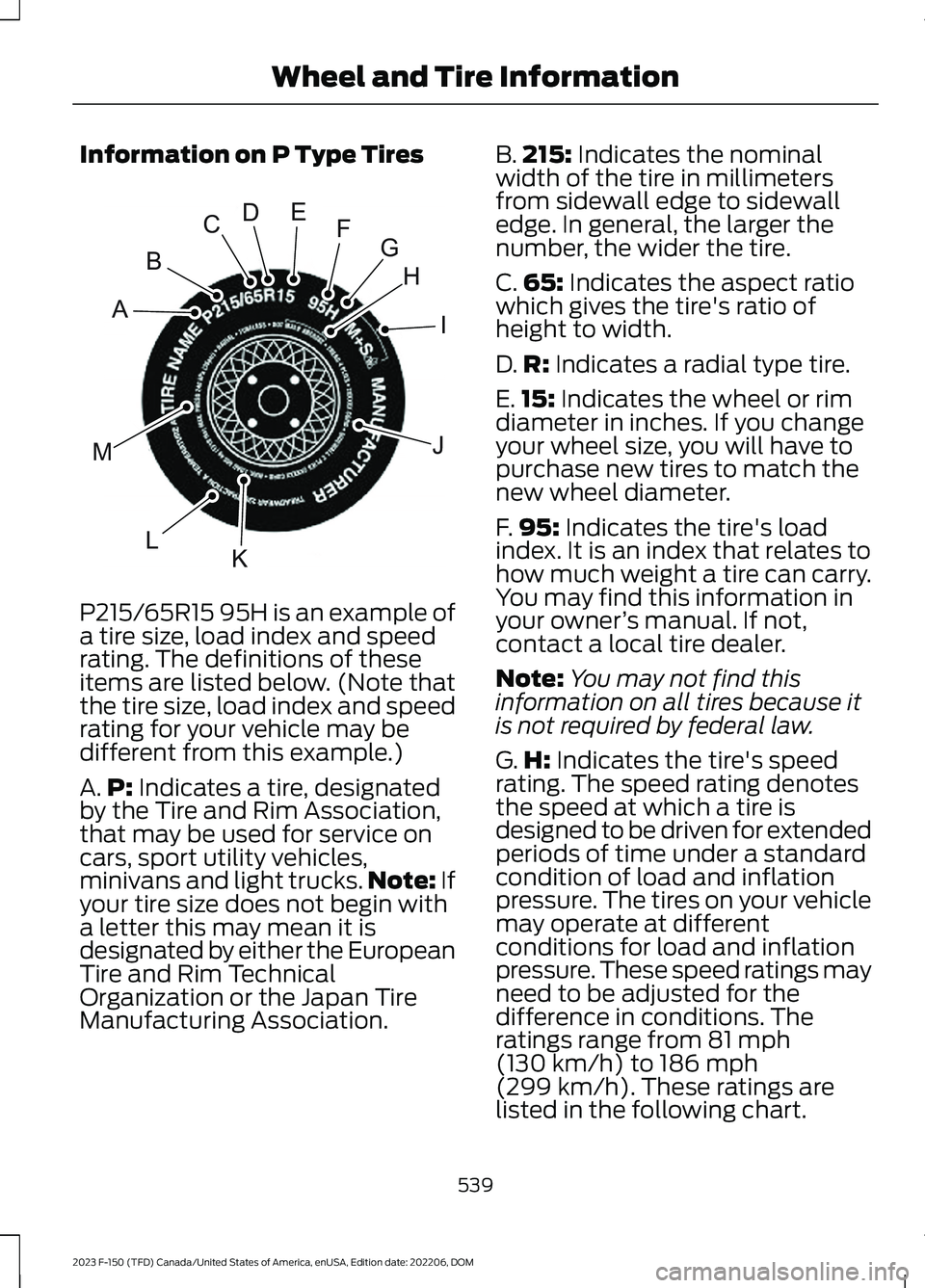
Information on P Type Tires
P215/65R15 95H is an example of
a tire size, load index and speedrating. The definitions of theseitems are listed below. (Note thatthe tire size, load index and speedrating for your vehicle may bedifferent from this example.)
A.P: Indicates a tire, designatedby the Tire and Rim Association,that may be used for service oncars, sport utility vehicles,minivans and light trucks.Note: Ifyour tire size does not begin witha letter this may mean it isdesignated by either the EuropeanTire and Rim TechnicalOrganization or the Japan TireManufacturing Association.
B.215: Indicates the nominalwidth of the tire in millimetersfrom sidewall edge to sidewalledge. In general, the larger thenumber, the wider the tire.
C.65: Indicates the aspect ratiowhich gives the tire's ratio ofheight to width.
D.R: Indicates a radial type tire.
E.15: Indicates the wheel or rimdiameter in inches. If you changeyour wheel size, you will have topurchase new tires to match thenew wheel diameter.
F.95: Indicates the tire's loadindex. It is an index that relates tohow much weight a tire can carry.You may find this information inyour owner’s manual. If not,contact a local tire dealer.
Note:You may not find thisinformation on all tires because itis not required by federal law.
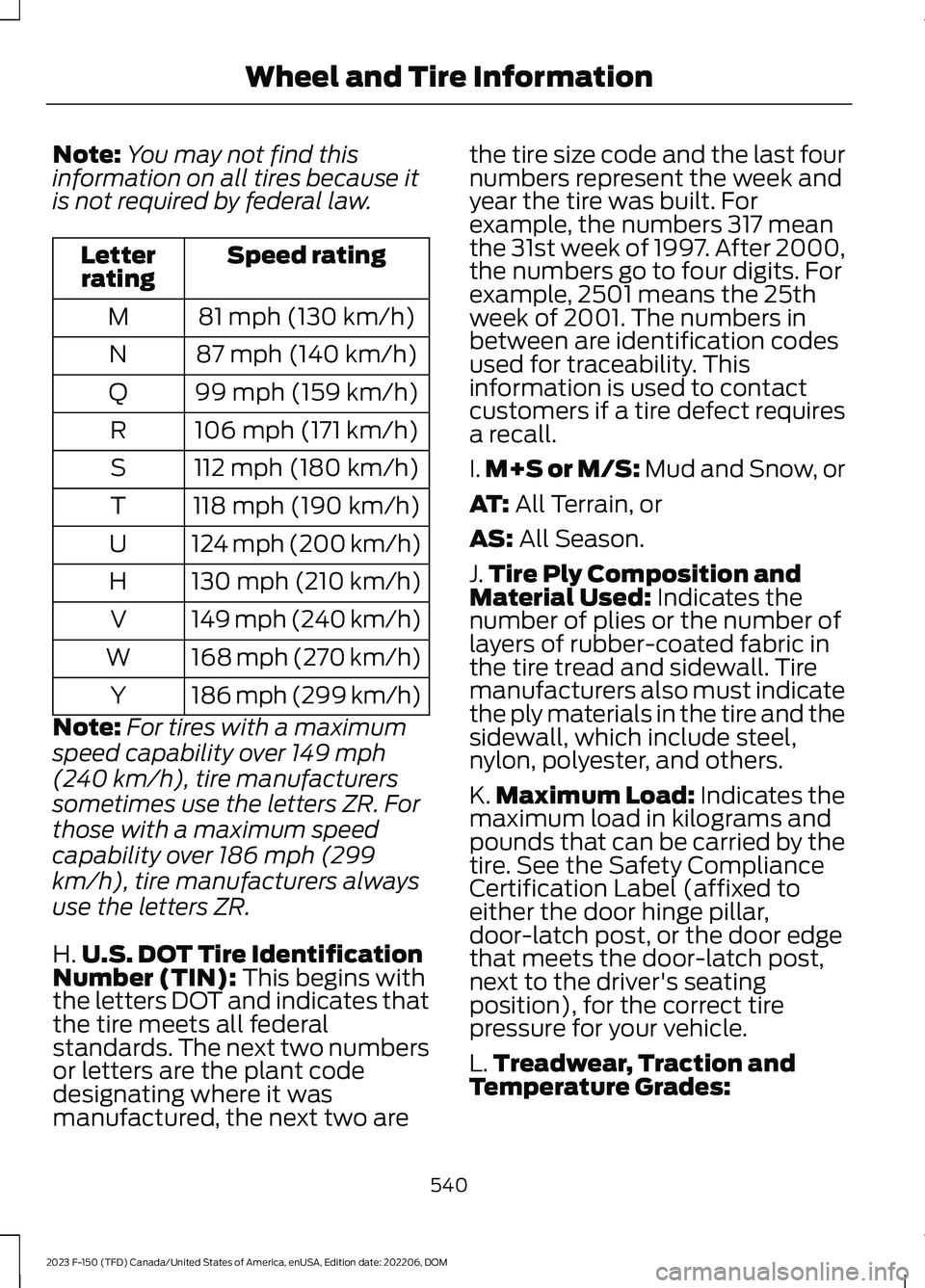
G.H: Indicates the tire's speedrating. The speed rating denotesthe speed at which a tire isdesigned to be driven for extendedperiods of time under a standardcondition of load and inflationpressure. The tires on your vehiclemay operate at differentconditions for load and inflationpressure. These speed ratings mayneed to be adjusted for thedifference in conditions. Theratings range from 81 mph(130 km/h) to 186 mph
(299 km/h). These ratings arelisted in the following chart.
539
2023 F-150 (TFD) Canada/United States of America, enUSA, Edition date: 202206, DOMWheel and Tire InformationHIJKLMABCDEFGE142543
Page 544 of 786
Note:You may not find thisinformation on all tires because itis not required by federal law.
Speed ratingLetterrating
81 mph (130 km/h)M
87 mph (140 km/h)N
99 mph (159 km/h)Q
106 mph (171 km/h)R
112 mph (180 km/h)S
118 mph (190 km/h)T
124 mph (200 km/h)U
130 mph (210 km/h)H
149 mph (240 km/h)V
168 mph (270 km/h)W
186 mph (299 km/h)Y
Note:For tires with a maximum
speed capability over 149 mph
(240 km/h), tire manufacturers
sometimes use the letters ZR. For
those with a maximum speed
capability over 186 mph (299
km/h), tire manufacturers always
use the letters ZR.
H.U.S. DOT Tire IdentificationNumber (TIN): This begins withthe letters DOT and indicates thatthe tire meets all federalstandards. The next two numbersor letters are the plant code
designating where it wasmanufactured, the next two are
the tire size code and the last fournumbers represent the week andyear the tire was built. Forexample, the numbers 317 meanthe 31st week of 1997. After 2000,the numbers go to four digits. Forexample, 2501 means the 25thweek of 2001. The numbers inbetween are identification codesused for traceability. Thisinformation is used to contactcustomers if a tire defect requiresa recall.
I.M+S or M/S: Mud and Snow, or
AT: All Terrain, or
AS: All Season.
J.Tire Ply Composition andMaterial Used: Indicates thenumber of plies or the number oflayers of rubber-coated fabric inthe tire tread and sidewall. Tiremanufacturers also must indicatethe ply materials in the tire and thesidewall, which include steel,nylon, polyester, and others.
K.Maximum Load: Indicates themaximum load in kilograms andpounds that can be carried by thetire. See the Safety ComplianceCertification Label (affixed toeither the door hinge pillar,door-latch post, or the door edgethat meets the door-latch post,next to the driver's seatingposition), for the correct tirepressure for your vehicle.
L.Treadwear, Traction and
Temperature Grades:
540
2023 F-150 (TFD) Canada/United States of America, enUSA, Edition date: 202206, DOMWheel and Tire Information