Def FORD F150 2023 Service Manual
[x] Cancel search | Manufacturer: FORD, Model Year: 2023, Model line: F150, Model: FORD F150 2023Pages: 786, PDF Size: 23.15 MB
Page 378 of 786
DRIVE MODE CONTROL –FREQUENTLY ASKED QUESTIONS
Why did the system default to normalmode?
If a mode is unavailable due to asystem fault, it defaults to normalmode and the driveline settings remainthe same as prior to the system fault.
374
2023 F-150 (TFD) Canada/United States of America, enUSA, Edition date: 202206, DOMDrive Mode Control
Page 380 of 786
The lane keeping system may not correctlyoperate in any of the following conditions:
•The lane keeping system does notdetect at least one lane marking.
•You switch the turn signal on.
•You apply direct steering, acceleratefast or brake hard.
•The vehicle speed is less than 40 mph(64 km/h).
•The anti-lock brake, stability control ortraction control system activates.
•The lane is too narrow.
•Something is obscuring the camera orit is unable to detect the lane markingsdue to environment, traffic or vehicleconditions.
•Entering or exiting a tight curve whendriving at high speeds.
The lane keeping system may not correctlane positioning in any of the followingconditions:
•High winds.
•Uneven road surfaces.
•Heavy or uneven loads.
•Incorrect tire pressure.
SWITCHING THE LANE
KEEPING SYSTEM ON AND
OFF
To activate the lane keepingsystem, press the button on thesteering wheel.
To deactivate the lane keeping system,press the button again.
Note:When switching the system on or offa message appears in the information andentertainment display to show the status.
Note:The system stores the on or offsetting until manually changed, unless itdetects a MyKey™. If the system detects aMyKey™, it defaults to the last setting forthat MyKey™.
Note: If the system detects a MyKey™,pressing the button does not affect the onor off status of the system. You can onlychange the mode and intensity settings.
SWITCHING THE LANE
KEEPING SYSTEM MODE
The lane keeping system has differentsettings that you can view or adjust usingthe information display.
The system stores the last known selectionfor each of these settings. You do not needto readjust your settings each time youswitch on the system.
To change the lane keeping system mode,use the touchscreen:
1.Press Features on the touchscreen.
2.Press Driver Assistance.
3.Press Lane-Keeping System.
4.Press Lane-Keeping Mode.
5.Select a mode.
Note:The system remembers the lastsetting when you start your vehicle. If thesystem detects a MyKey™, it defaults to thelast setting for that MyKey™.
ALERT MODE
WHAT IS ALERT MODE
Alert mode vibrates the steering wheelwhen it detects an unintended lanedeparture.
376
2023 F-150 (TFD) Canada/United States of America, enUSA, Edition date: 202206, DOMLane Keeping System (If Equipped)E334922
Page 389 of 786
5.Trailer length measurement. The trailerlength is the distance between thetrailer hitch ball and the rear of thetrailer. The maximum length that thesystem can support is 33 ft (10.1 m).
6.Enter the length of trailer. The defaultsetting is 18 ft (5.5 m). Toggling up ordown using the menu buttonsincreases or decreases themeasurement by 1 ft (0.3 m). Select alength that is equal to or within 1 ft(0.3 m) of the actual measured length.For example, if the actual measurelength is 23 ft (7 m), toggle the lengthin the menu to 24 ft (7.2 m). Thesystem setup saves when you enter thelength of the trailer.
Note:If the trailer is a bike rack or cargorack with electrical lighting, enter a lengthof around 3 ft (1 m). Cross traffic alertremains on for trailers with a length of 3 ft(1 m) or less.
Note:The system requires propermeasurement and measure entry to functionproperly.
SELECTING A TRAILER
When you connect a trailer to your vehicle,the trailer set up menu appears in thetouchscreen. This menu allows you to setup a new trailer or choose from apreviously set up trailer. A warningmessage appears and the system turns offif you do not choose or add a new trailer.
Note:The warning message may notappear until your vehicle reaches 22 mph(35 km/h).
BLIND SPOT INFORMATION
SYSTEM INDICATORS
When blind spot informationsystem detects a vehicle, analert indicator illuminates in theexterior mirror on the side the approachingvehicle is coming from. If you turn the turnsignal on for that side of your vehicle, thealert indicator flashes.
385
2023 F-150 (TFD) Canada/United States of America, enUSA, Edition date: 202206, DOMBlind Spot Information System (If Equipped)E309137 E249861E249861
Page 400 of 786
ADJUSTING THE SENSITIVITY OFDISTANCE ALERT
To adjust the sensitivity of the system, usethe touchscreen:
1.Press Features on the touchscreen.
2.Press Driver Assistance.
3.Press Pre-Collision Assist.
4.Press Alert Sensitivity.
5.Select a setting.
AUTOMATIC EMERGENCY
BRAKING
WHAT IS AUTOMATICEMERGENCY BRAKING
Automatic emergency braking mayactivate if the system determines that acollision is imminent. The system may helpreduce impact damage to avoid the crashcompletely.
Automatic emergency braking is onlyavailable up to certain speeds. SeePre-Collision Assist Limitations (page391).
SWITCHING AUTOMATICEMERGENCY BRAKING ON ANDOFF
To switch the system on or off, use thetouchscreen:
1.Press Features on the touchscreen.
2.Press Driver Assistance.
3.Press Pre-Collision Assist.
4.Press Auto Emergency Braking.
5.Switch the feature on or off.
EVASIVE STEERING ASSIST
WHAT IS EVASIVE STEERINGASSIST
If your vehicle is rapidly approaching a roaduser, defined as another stationary vehiclein your lane or a vehicle traveling in yourlane in the same direction as yours, evasivesteering assist helps you steer around theroad user.
After you turn the steering wheel in anattempt to avoid a crash with the roaduser, the system applies additional steeringtorque to help you steer around the roaduser. After you pass the road user, thesystem applies steering torque when youturn the steering wheel to steer back intothe lane. The system deactivates after youfully pass the road user. SeePre-Collision Assist Precautions (page390).
EVASIVE STEERING ASSISTLIMITATIONS
Evasive steering assist only activates whenall the following occur:
•Active braking and evasive steeringassist are on.
•The system detects a road user aheadand starts to apply the brakes.
•You significantly turn the steeringwheel to steer around a road user.
Note:Evasive steering assist does notautomatically steer around a road user. Ifyou do not turn the steering wheel, evasivesteering assist does not activate.
Note:Evasive steering assist does notactivate if the distance to the road userahead is too small and the system cannotavoid a crash.
Note:Evasive steering assist does notactivate with cyclists or pedestrians.
396
2023 F-150 (TFD) Canada/United States of America, enUSA, Edition date: 202206, DOMPre-Collision Assist (If Equipped)
Page 418 of 786
CONNECTING A TRAILER
PRECAUTIONS
Do not tow a trailer until you drive yourvehicle at least 1,000 mi (1,600 km).
Consult your local motor vehicle laws fortowing a trailer.
See the instructions included with towingaccessories for the proper installation andadjustment specifications.
Service your vehicle more frequently if youtow a trailer. See Normal ScheduledMaintenance (page 670).
If you use a rental trailer, follow theinstructions the rental agency gives you.
When attaching the trailer wiring connectorto your vehicle, only use a proper fittingconnector that works with the vehicle andtrailer functions.
Account for the trailer coupler weight aspart of your vehicle load when calculatingthe total vehicle weight.
Do not exceed the load limits. SeeCalculating the Load Limit (page 407).
HITCHES
HOOKING UP A TRAILER USING AWEIGHT-DISTRIBUTING HITCH
WARNING: Do not adjust the springbars so that your vehicle's rear bumperis higher than before attaching the trailer.Doing so will defeat the function of theweight-distributing hitch, which maycause unpredictable handling, and couldresult in serious personal injury.
A weight-distributing hitch helps distributetongue load to all towing vehicle and trailerwheels. For more information, visit the linksin the following table.
WebsiteMarket
https://www.fleet.ford.com/towing-guides/
United States ofAmerica
https://www.fleet.ford.ca/towing-guides/
Canada
CONNECTING A TRAILER
Recognizing a Trailer
1.Attach the trailer and wiring connectorto your vehicle.
2.Switch on your vehicle.
3.Set up a profile for the trailer using thetouchscreen.
Note:If your vehicle does not recognize thetrailer, press and hold the brake pedal for afew seconds.
Note:Trailer profiles store trailer types,dimensions, preferences, trailer specificmileage and fuel economy.
Note:Disabling the trailer detectionnotification makes the default trailer profileactive when the system detects aconnection.
414
2023 F-150 (TFD) Canada/United States of America, enUSA, Edition date: 202206, DOMConnecting a Trailer
Page 420 of 786
When the trailer disconnects in this state,the vehicle alarm sounds and the systemsends an alert to your FordPass app.
Note:For reliable trailer detection, thetrailer’s lamps must be SAE certified foreach intended purpose.
Note:If the trailer is not compatible withthe feature, the turn signals flash twice.
Switching the Trailer ConnectionAlarm On and Off
1.Press Features on the touchscreen.
2.Press Towing.
3.Press Manage trailers.
4.Press the currently active trailer'sname.
5.Switch Trailer Connection Alarm onor off.
Note:The alarm disables by default. If thesystem detects a trailer, it can beconfigurable.
Note:Settings are applicable only for theselected trailer profile.
Trailer Connector Battery Lead
The trailer receives power from the vehicletrailer connector battery lead when thefollowing occurs:
•Your vehicle is in accessory mode orswitched on.
•The trailer wiring connector is free ofcorrosion or other damage.
•The vehicle battery is not low.
•When the trailer has a battery:
•The trailer battery voltage is within5 volts of the vehicle batteryvoltage.
•When you have the trailer batteryproperly connected.
TRAILER LIGHTING CHECK
WARNING: Never connect anytrailer lamp wiring to the vehicle's taillamp wiring; this may damage theelectrical system resulting in fire. Contactyour authorized dealer as soon aspossible for assistance in proper trailertow wiring installation. Additionalelectrical equipment may be required.
Perform a trailer light illuminationsequence to confirm that all lights arefunctioning by using the FordPass app orthe vehicle's touchscreen.
Performing the Trailer LightingCheck Using the Touchscreen
1.Press Features on the touchscreen.
2.Press Towing.
3.Press Trailer Light Check.
4.Press Start.
416
2023 F-150 (TFD) Canada/United States of America, enUSA, Edition date: 202206, DOMConnecting a Trailer
Page 429 of 786
WHAT IS THE INTEGRATED
TRAILER BRAKE CONTROLLER
The trailer brake controller assists insmooth and effective trailer braking basedon the towing vehicle’s brake pressure.
INTEGRATED TRAILER BRAKE
CONTROLLER PRECAUTIONS
WARNING: Use the integratedtrailer brake controller to properly adjustthe trailer brakes and check allconnections before towing a trailer.Failure to follow this instruction couldresult in the loss of control of yourvehicle, personal injury or death.
•Only use the manual control lever forproper adjustment of the gain duringtrailer setup. Misuse, such asapplication during trailer sway, couldcause instability of trailer or towvehicle.
•Avoid towing in adverse weatherconditions. The trailer brake controllerdoes not provide anti-lock control ofthe trailer wheels. Trailer wheels canlock up on slippery surfaces, resultingin reduced stability of trailer and towvehicle.
•The trailer brake controller is only afactory-installed or dealer-installeditem. Ford is not responsible forwarranty or performance of thecontroller due to misuse or customerinstallation.
Note:Do not attempt removal of the trailerbrake controller without consulting theWorkshop Manual. Damage to the unit mayresult.
Note:Make sure to set the integrated trailerbrake controller gain to 0 if you are using anaftermarket trailer brake controller.
USING THE INTEGRATED
TRAILER BRAKE CONTROLLER
1.Make sure the trailer brakes are in goodworking condition, functioning normallyand properly adjusted. See your trailerdealer if necessary.
Note:An authorized dealer can diagnosethe trailer brake controller to determineexactly which trailer fault has occurred. Yourvehicle warranty does not cover issues withyour trailer.
2.Hook up the trailer and make theelectrical connections according to thetrailer manufacturer's instructions.
Note:Select default mode if the trailer hassurge brakes, or no brakes at all. The systemhas no effect on the braking performanceof the trailer in either of these cases.
Note:If a trailer is connected by a four-pinconnector, the trailer braking function willnot be supported.
3.When you plug in a trailer with electricor electric-over-hydraulic brakes, amessage confirming connectionappears in the information display.
4.Use the gain adjustment to find thedesired starting point. A gain setting of6.0 is a good starting point for heavierloads.
Note:Use the following steps to adjust thegain setting whenever road, weather andtrailer, or vehicle loading conditions, changefrom when you initially set the gain.
5.In a traffic-free environment, tow thetrailer on a dry, level surface andsqueeze the manual control levercompletely.
425
2023 F-150 (TFD) Canada/United States of America, enUSA, Edition date: 202206, DOMIntegrated Trailer Brake Controller (If Equipped)
Page 431 of 786
ADJUSTING THE INTEGRATED
TRAILER BRAKE CONTROLLER
MODE
Select the correct integrated trailer brakecontroller mode option using thetouchscreen.
Note:Trailer brake gain settings are savedto the active trailer profile.
Selecting the Trailer Brake Type
1.Press Default for trailers withelectromagnetic drum brake systemsor press Electric over Hydraulic fortrailers with electrically actuatedhydraulic brake systems.
2.Press Save.
Selecting the Trailer Brake Effort
1.Select a setting for your trailer.
Note:The default value is Low and is therecommended setting for most trailers.Select a different setting if your trailer'sbrakes require more initial voltage, or youprefer more aggressive trailer braking.
2.Press Save.
427
2023 F-150 (TFD) Canada/United States of America, enUSA, Edition date: 202206, DOMIntegrated Trailer Brake Controller (If Equipped)
Page 442 of 786
The default and minimum value is 200 lb(100 kg).
The maximum value is 1,400 lb (650 kg).
Press Set Current Load as Estimate tostore the current payload of the vehicle.
Measurement Units
Press to change measurement unitsbetween pounds and kilograms.
438
2023 F-150 (TFD) Canada/United States of America, enUSA, Edition date: 202206, DOMOnboard Scales (If Equipped)
Page 445 of 786
Note:Your vehicle has two options fortrailer backup assistance set up. The systemdefaults to the camera based system. SeeApplying the Trailer Reversing Aid Sticker(page 441). You can also set up the systemwith the trailer sensor that you can purchasefrom your authorized dealer. You mustconnect the sensor to your vehicle to set upthe system. See Trailer SensorInstallation (page 441).
Note:If you configure the trailer and installa sensor, the system saves the trailer withthat sensor information. If you want to usethis trailer with the sticker, you need todelete the trailer from the system andrepeat the setup process.
APPLYING THE TRAILERREVERSING AID STICKER
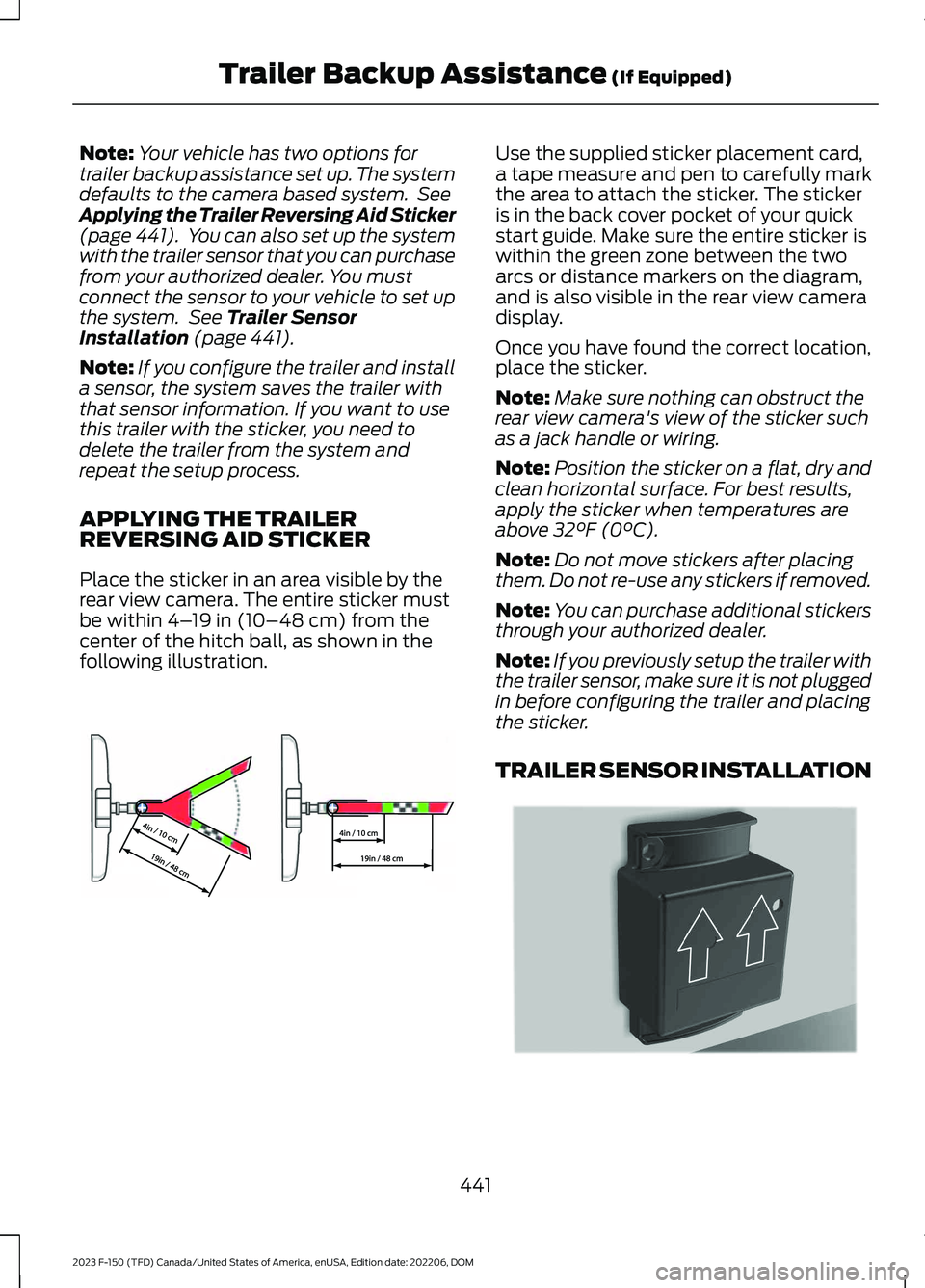
Place the sticker in an area visible by therear view camera. The entire sticker mustbe within 4–19 in (10–48 cm) from thecenter of the hitch ball, as shown in thefollowing illustration.
Use the supplied sticker placement card,a tape measure and pen to carefully markthe area to attach the sticker. The stickeris in the back cover pocket of your quickstart guide. Make sure the entire sticker iswithin the green zone between the twoarcs or distance markers on the diagram,and is also visible in the rear view cameradisplay.
Once you have found the correct location,place the sticker.
Note:Make sure nothing can obstruct therear view camera's view of the sticker suchas a jack handle or wiring.
Note:Position the sticker on a flat, dry andclean horizontal surface. For best results,apply the sticker when temperatures areabove 32°F (0°C).
Note:Do not move stickers after placingthem. Do not re-use any stickers if removed.
Note:You can purchase additional stickersthrough your authorized dealer.
Note:If you previously setup the trailer withthe trailer sensor, make sure it is not pluggedin before configuring the trailer and placingthe sticker.
TRAILER SENSOR INSTALLATION
441
2023 F-150 (TFD) Canada/United States of America, enUSA, Edition date: 202206, DOMTrailer Backup Assistance (If Equipped)E333148 E315959