steering wheel FORD F250 2013 Owners Manual
[x] Cancel search | Manufacturer: FORD, Model Year: 2013, Model line: F250, Model: FORD F250 2013Pages: 577, PDF Size: 7.74 MB
Page 3 of 577
Locks 72
Locking and unlocking..................................72
SecuriCode™ keyless entry keypad.........................75
Security 77
SecuriLock® passive anti-theft system.......................77
Anti-theft alarm.......................................79
Steering Wheel 80
Adjusting the steering wheel..............................80
Steering wheel controls.................................80
Pedals 83
Adjustable pedals......................................83
Wipers and Washers 84
Windshield wipers.....................................84
Windshield washers....................................84
Lighting 85
Lighting control.......................................85
Autolamps...........................................86
Instrument lighting dimmer...............................87
Daytime running lamps..................................87
Front fog lamps.......................................88
Directionindicators ....................................88
Interior lamps........................................89
Windows and Mirrors 90
Power windows.......................................90
Exteriormirrors.......................................92
Interiormirrors .......................................94
Sunvisors ...........................................95
Moonroof............................................96
2Table of Contents
2013 F-250/350/450/550(f23)
Owners Guide gf, 3rd Printing, December 2012
USA(fus)
Page 7 of 577
Maintenance 302
General information...................................302
Opening and closing the hood............................303
Under hood overview..................................304
Engine oil dipstick....................................306
Engine oil check......................................306
Engine coolant check..................................307
Automatic transmission fluid check........................313
Brake fluid check.....................................317
Power steering fluid check..............................317
Fuel filter...........................................317
Washer fluid check....................................318
Changing the vehicle battery.............................318
Checking the wiper blades..............................321
Air filter(s).........................................323
Adjusting the headlamps................................325
Changing a bulb......................................326
Bulb specification chart.................................331
Vehicle Care 332
Cleaning products.....................................332
Cleaning the exterior..................................332
Waxing.............................................334
Repairing minor paint damage............................334
Cleaning the engine...................................334
Cleaning the windows and wiper blades.....................335
Cleaning the interior...................................335
Cleaning the instrument panel and instrument cluster lens.......336
Cleaning the alloy wheels...............................340
Vehicle storage.......................................340
6Table of Contents
2013 F-250/350/450/550(f23)
Owners Guide gf, 3rd Printing, December 2012
USA(fus)
Page 13 of 577
DATA RECORDING
Service Data Recording
Service data recorders in your vehicle are capable of collecting and
storing diagnostic information about your vehicle. This potentially
includes information about the performance or status of various systems
and modules in the vehicle, such as engine, throttle, steering or brake
systems. In order to properly diagnose and service your vehicle, Ford
Motor Company, Ford of Canada, and service and repair facilities may
access or share among them vehicle diagnostic information received
through a direct connection to your vehicle when diagnosing or servicing
your vehicle. Additionally, when your vehicle is in for service or repair,
Ford Motor Company, Ford of Canada, and service and repair facilities
may access or share among them data for vehicle improvement purposes.
For U.S. only (if equipped), if you choose to use the SYNC® Vehicle
Health Report, you consent that certain diagnostic information may also
be accessed electronically by Ford Motor Company and Ford authorized
service facilities, and that the diagnostic information may be used for any
purpose. See theSYNC®chapter for more information.
Event Data Recording
This vehicle is equipped with an event data recorder (EDR).
The main purpose of an EDR is to record, in certain crash or near
crash-like situations, such as an airbag deployment or hitting a
road obstacle; this data will assist in understanding how a
vehicle’s systems performed. The EDR is designed to record data
related to vehicle dynamics and safety systems for a short period
of time, typically 30 seconds or less. The EDR in this vehicle is
designed to record such data as:
•How various systems in your vehicle were operating;
•Whether or not the driver and passenger safety belts were
buckled/fastened;
•How far (if at all) the driver was depressing the accelerator
and/or the brake pedal;
•How fast the vehicle was travelling;
•Where the driver was positioning the steering wheel.
This data can help provide a better understanding of the
circumstances in which crashes and injuries occur.
12Introduction
2013 F-250/350/450/550(f23)
Owners Guide gf, 3rd Printing, December 2012
USA(fus)
Page 81 of 577
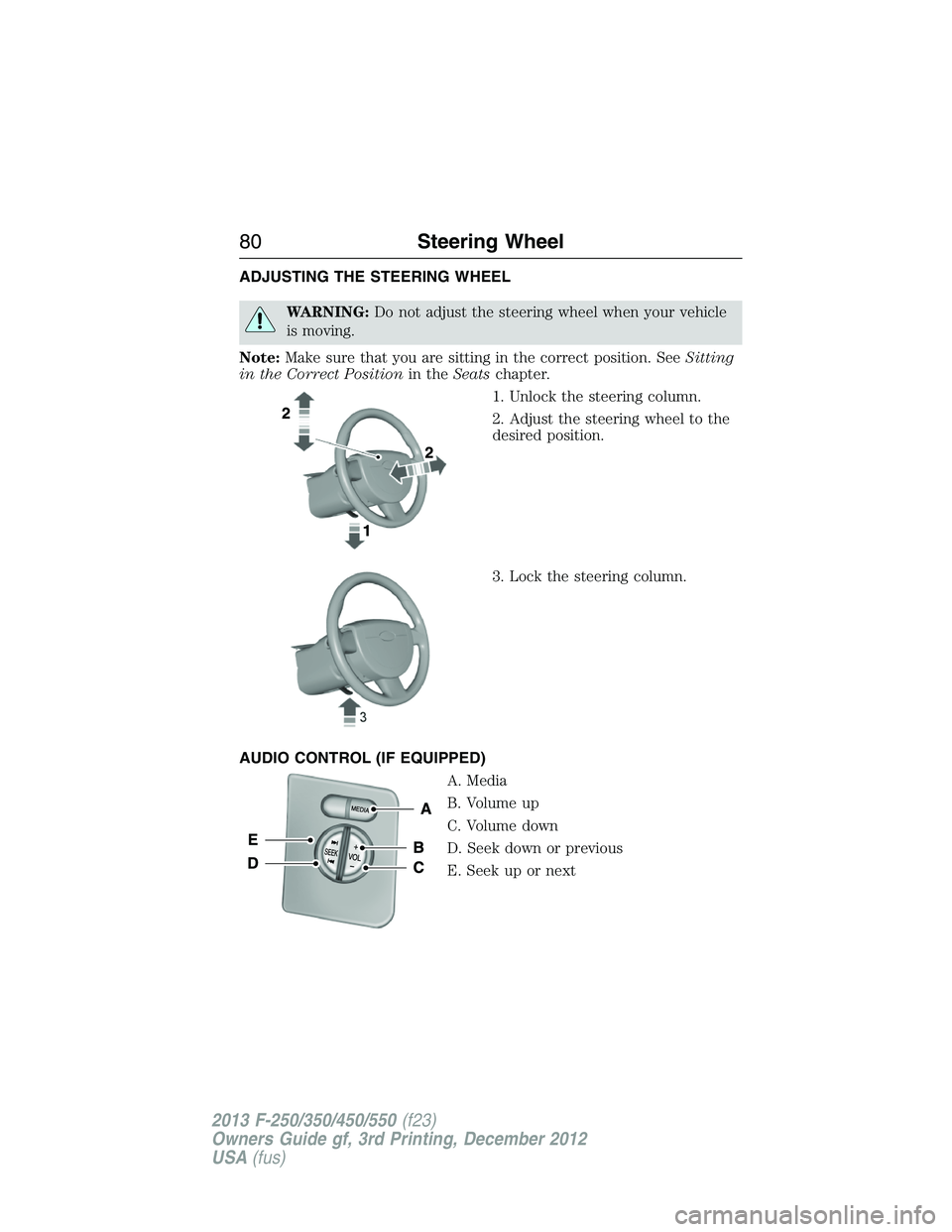
ADJUSTING THE STEERING WHEEL
WARNING:Do not adjust the steering wheel when your vehicle
is moving.
Note:Make sure that you are sitting in the correct position. SeeSitting
in the Correct Positionin theSeatschapter.
1. Unlock the steering column.
2. Adjust the steering wheel to the
desired position.
3. Lock the steering column.
AUDIO CONTROL (IF EQUIPPED)
A. Media
B. Volume up
C. Volume down
D. Seek down or previous
E. Seek up or next
80Steering Wheel
2013 F-250/350/450/550(f23)
Owners Guide gf, 3rd Printing, December 2012
USA(fus)
Page 82 of 577
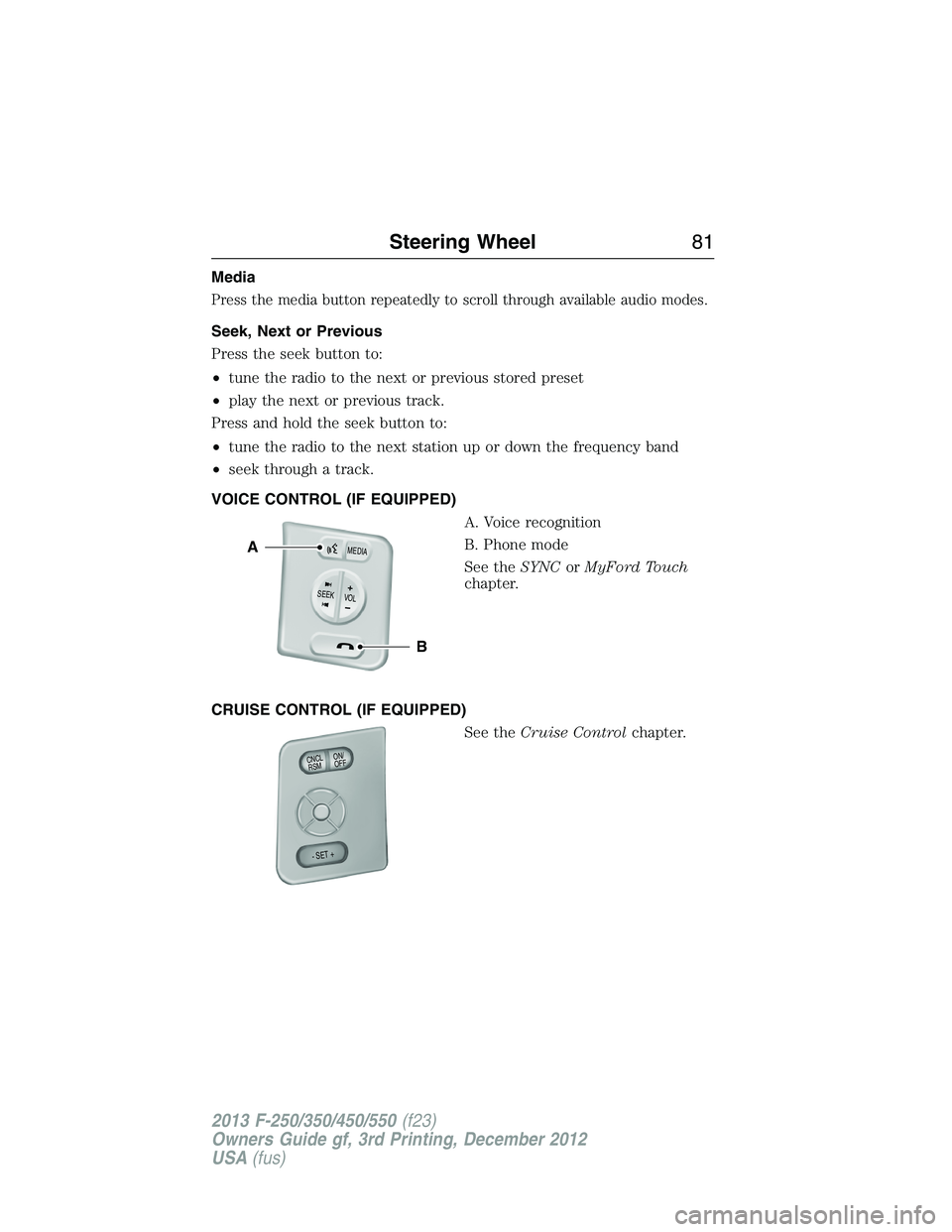
Media
Press the media button repeatedly to scroll through available audio modes.
Seek, Next or Previous
Press the seek button to:
•tune the radio to the next or previous stored preset
•play the next or previous track.
Press and hold the seek button to:
•tune the radio to the next station up or down the frequency band
•seek through a track.
VOICE CONTROL (IF EQUIPPED)
A. Voice recognition
B. Phone mode
See theSYNCorMyFord Touch
chapter.
CRUISE CONTROL (IF EQUIPPED)
See theCruise Controlchapter.
B
A
VOLSEE
K+
M
E
D
IA
ON/
OFF CNCLR
S
M
- SET +
Steering Wheel81
2013 F-250/350/450/550(f23)
Owners Guide gf, 3rd Printing, December 2012
USA(fus)
Page 83 of 577
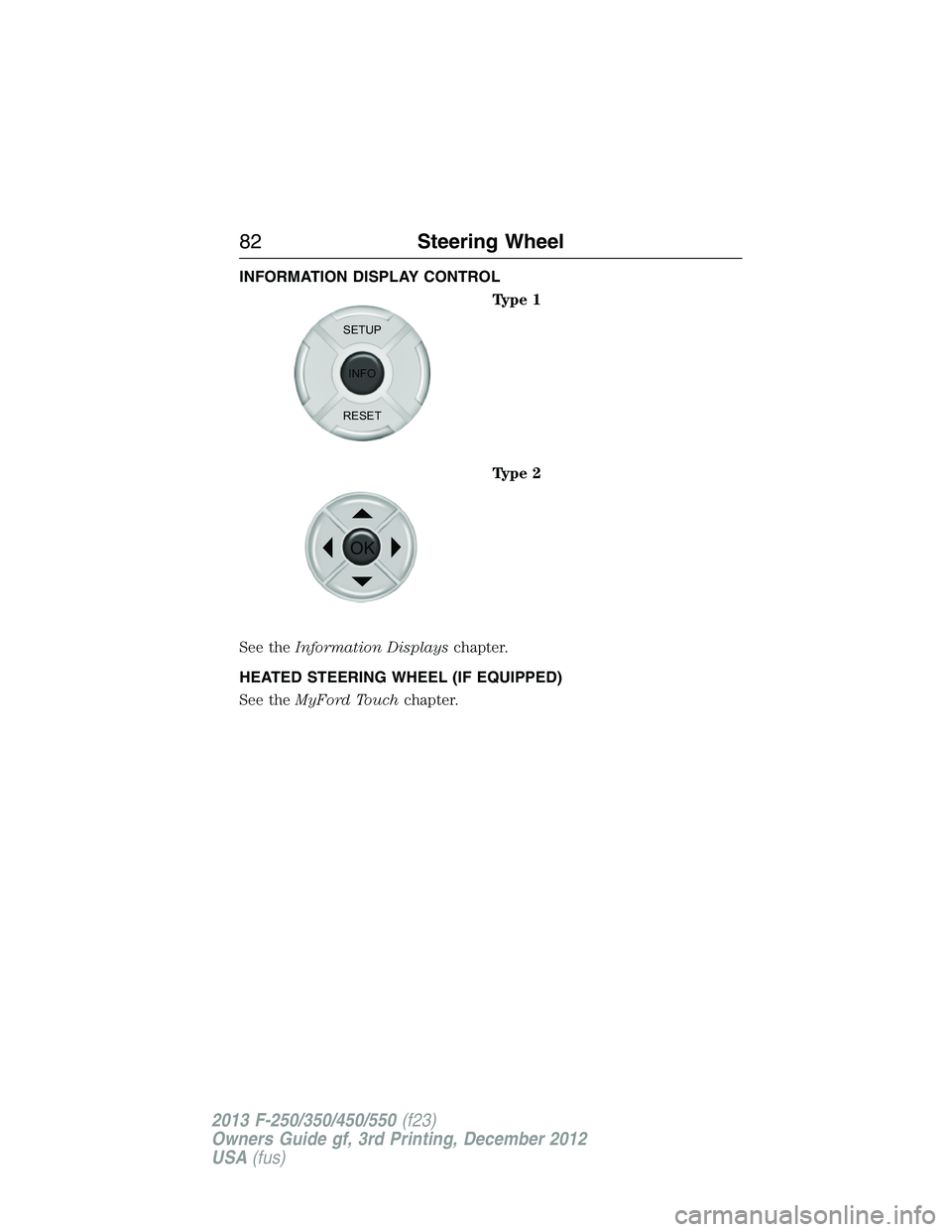
INFORMATION DISPLAY CONTROL
Type 1
Type 2
See theInformation Displayschapter.
HEATED STEERING WHEEL (IF EQUIPPED)
See theMyFord Touchchapter.
SETUP
INFO
RESET
OK
82Steering Wheel
2013 F-250/350/450/550(f23)
Owners Guide gf, 3rd Printing, December 2012
USA(fus)
Page 105 of 577
GENERAL INFORMATION
WARNING:Driving while distracted can result in loss of vehicle
control, accident and injury. Ford strongly recommends that drivers
use extreme caution when using any device or feature that may take their
focus off the road. Your primary responsibility is the safe operation of the
vehicle. We recommend against the use of any handheld device while
driving and that you comply with all applicable laws.
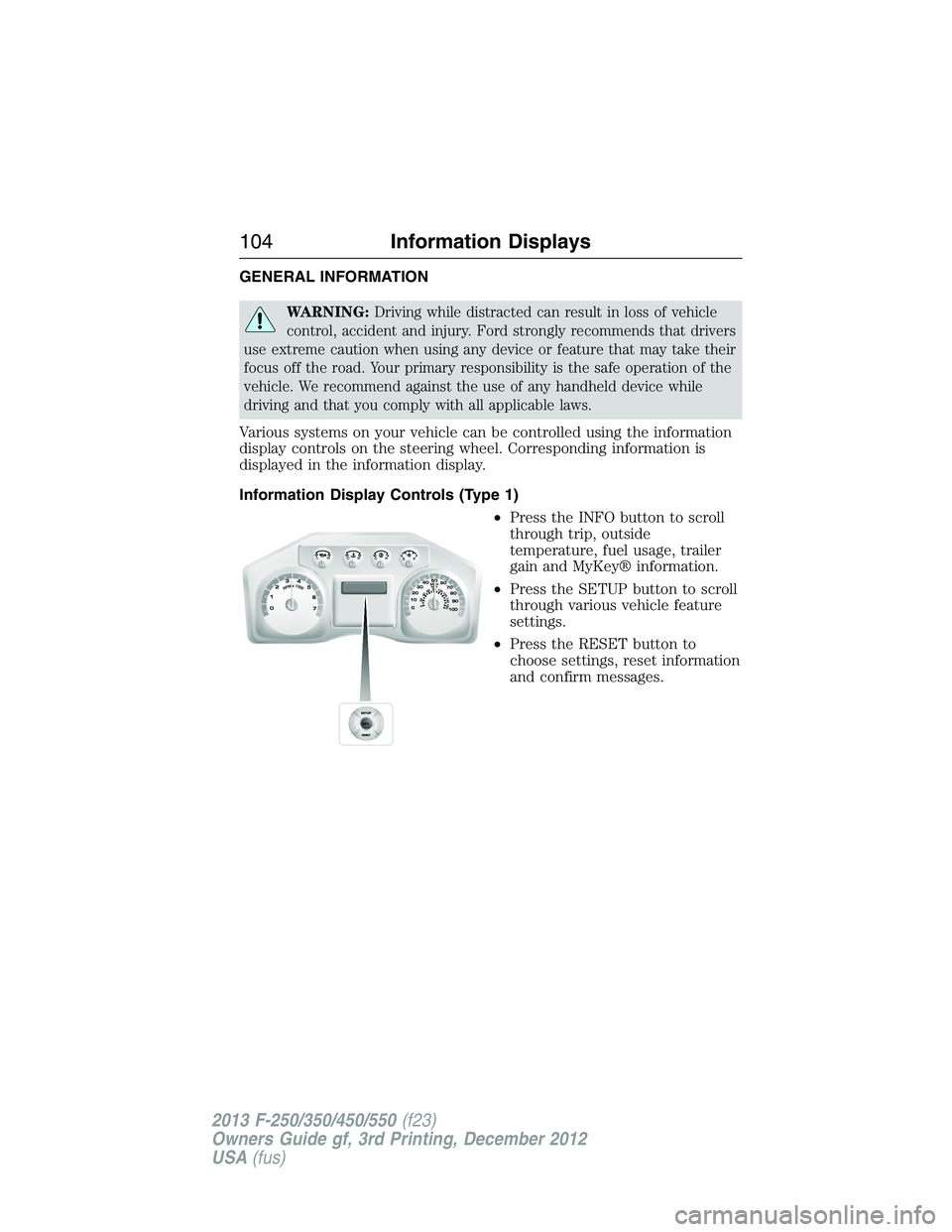
Various systems on your vehicle can be controlled using the information
display controls on the steering wheel. Corresponding information is
displayed in the information display.
Information Display Controls (Type 1)
•Press the INFO button to scroll
through trip, outside
temperature, fuel usage, trailer
gain and MyKey® information.
•Press the SETUP button to scroll
through various vehicle feature
settings.
•Press the RESET button to
choose settings, reset information
and confirm messages.
104Information Displays
2013 F-250/350/450/550(f23)
Owners Guide gf, 3rd Printing, December 2012
USA(fus)
Page 114 of 577
•Instant MPG: shows instantaneous fuel usage.
•Miles to empty: shows the approximate distance the vehicle can travel
before running out of fuel.
•Average MPG: shows the average fuel usage based on time. See Fuel
Hist. to change the time interval. Press and hold OK to reset this
value.
Truck Apps
In this mode, off-road information depicted with graphics and
trailer towing application options are available.
Note:Some items are optional and may not appear.
Truck Apps
Off Road Pitch and bank angle (in degrees): Displays the pitch angle
(front to rear) and bank angle (side to side) of the road
surface.
Steering angle (in degrees): Displays the steering angle of
the front wheels after the vehicle has been driven for a
period of time.
Differential lock/unlock: Displays the state (locked or
unlocked) of the electronic locking differential.
Energy flow: Displays the operating mode of the transfer
case: 4X2, 4X4 High or 4X4 Low.
Press OK for
InfoELD (Electronic Locking Differential)
Hill Descent Control
4X4 System
Traction Control
AdvanceTrac® + RSC
Information Displays11 3
2013 F-250/350/450/550(f23)
Owners Guide gf, 3rd Printing, December 2012
USA(fus)
Page 153 of 577
5. Direct the outer instrument panel vents toward the side windows.
6. To increase airflow to the outer instrument panel vents, close the
vents located in the middle of the instrument panel.
HEATED WINDOWS AND MIRRORS (IF EQUIPPED)
Heated Rear Window
Note:The engine must be running to use this feature.
Note:If your vehicle is equipped with a sliding rear window, the feature
still operates when the window is opened.
Press the button to clear the rear window of thin ice and fog. Press
the button again within 10 minutes to switch it off. It switches off
automatically after 10 minutes, or when you switch the ignition off.
Do not use razor blades or other sharp objects to clean the inside
of the rear window or to remove decals from the inside of the
rear window. This may cause damage to the heated grid lines.
Your warranty does not cover this damage.
Heated Exterior Mirror (If Equipped)
Note:Do not remove ice from the mirrors with a scraper or attempt to
readjust the mirror glass that has frozen in place. These actions could
cause damage to the glass and mirrors.
Note:Do not clean the housing or glass of any mirror with harsh
abrasives, fuel or other petroleum-based cleaning products.
Both mirrors heat to remove ice, mist and fog when you turn the rear
window defroster on.
REMOTE START CLIMATE OPERATION (IF EQUIPPED)
The climate control system adjusts the cabin temperature during remote
start.
You cannot adjust the system during remote start operation. Turn the
ignition on to return the system to its previous settings. You can now
make adjustments. You will need to turn certain vehicle-dependent
features back on, such as:
•heated seats
•cooled seats
•heated steering wheel
•heated mirrors
•heated rear window.
152Climate Control
2013 F-250/350/450/550(f23)
Owners Guide gf, 3rd Printing, December 2012
USA(fus)
Page 154 of 577
Manual Climate Systems
In hot weather, the climate control system is set to MAX A/C.
In moderate weather, the system either heats or cools (based on
previous settings). The rear defroster and heated mirrors are not
automatically turned on.
In cold weather, maximum heat is provided in floor/defrost mode. The
rear defroster and heated mirrors are automatically turned on. If your
vehicle is equipped with a diesel engine and a supplemental heater, the
supplemental heater also turns on.
Automatic Climate Systems
Automatic Settings
The climate control system automatically sets the interior temperature to
72°F (22°C).
In hot weather, the system is set to 72°F (22°C). Cooled seats are set to
high (if available, and selected to AUTO in the information display).
In moderate weather, the system either heats or cools (based on
previous settings). The rear defroster, heated mirrors and heated/cooled
seats are not automatically turned on.
In cold weather, the system is set to 72°F (22°C). The heated seats and
heated steering wheel (if equipped) are set to high. The rear defroster
and heated mirrors are automatically turned on.
Heated and Cooled Devices
The climate control system controls other heated and cooled devices
inside the vehicle. These devices (if equipped) may also be switched
on during remote start. Heated devices are typically switched on during
cold weather, and cooled devices during hot weather. If your vehicle
is equipped with a diesel engine and a supplemental heater, the
supplemental heater also turns on.
Climate Control153
2013 F-250/350/450/550(f23)
Owners Guide gf, 3rd Printing, December 2012
USA(fus)