light FORD F250 SUPER DUTY 2017 Service Manual
[x] Cancel search | Manufacturer: FORD, Model Year: 2017, Model line: F250 SUPER DUTY, Model: FORD F250 SUPER DUTY 2017Pages: 642, PDF Size: 12.35 MB
Page 124 of 642
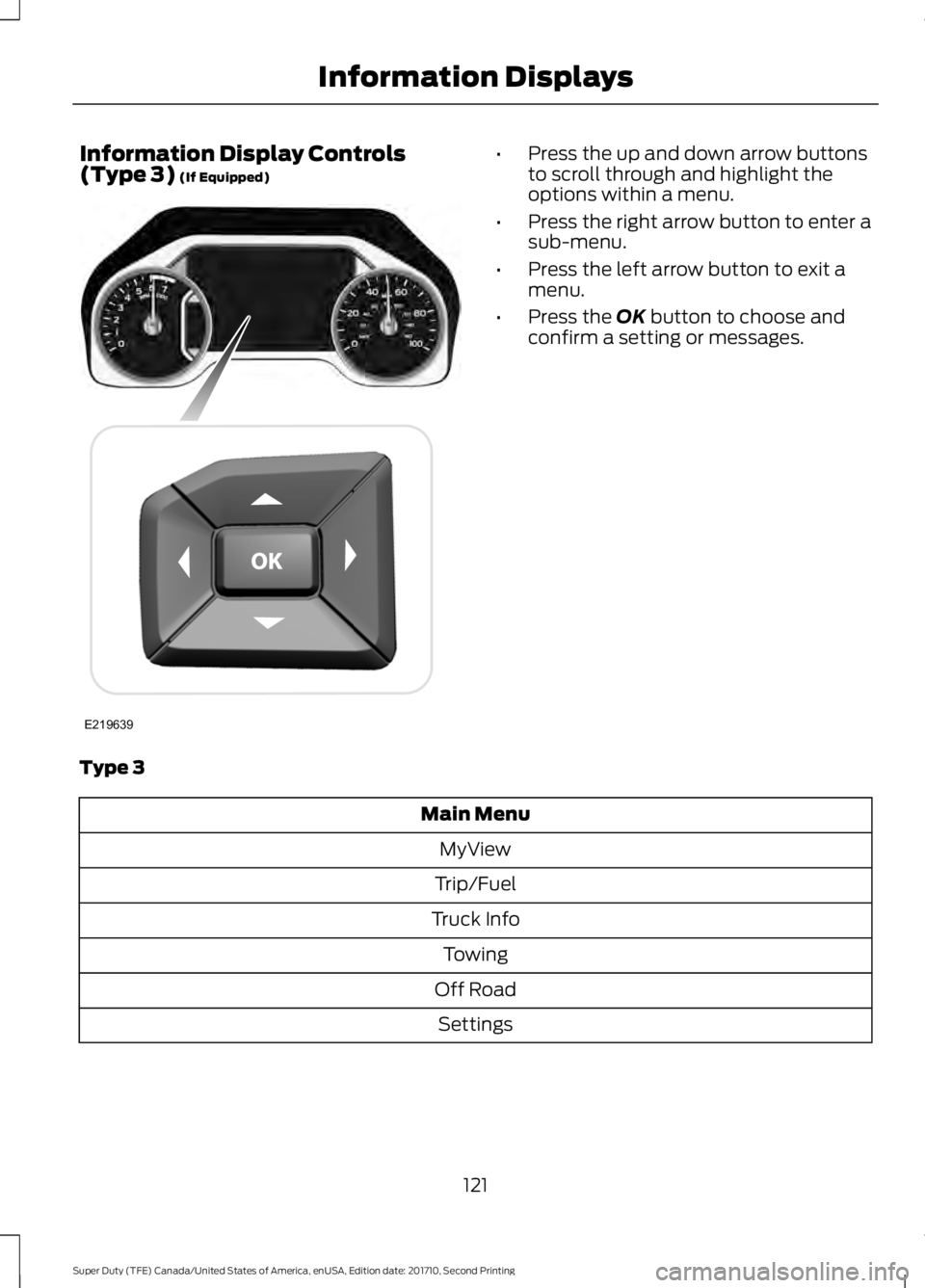
Information Display Controls(Type 3) (If Equipped)•Press the up and down arrow buttonsto scroll through and highlight theoptions within a menu.
•Press the right arrow button to enter asub-menu.
•Press the left arrow button to exit amenu.
•Press the OK button to choose andconfirm a setting or messages.
Type 3
Main Menu
MyView
Trip/Fuel
Truck Info
Towing
Off Road
Settings
121
Super Duty (TFE) Canada/United States of America, enUSA, Edition date: 201710, Second Printing
Information DisplaysE219639
Page 125 of 642
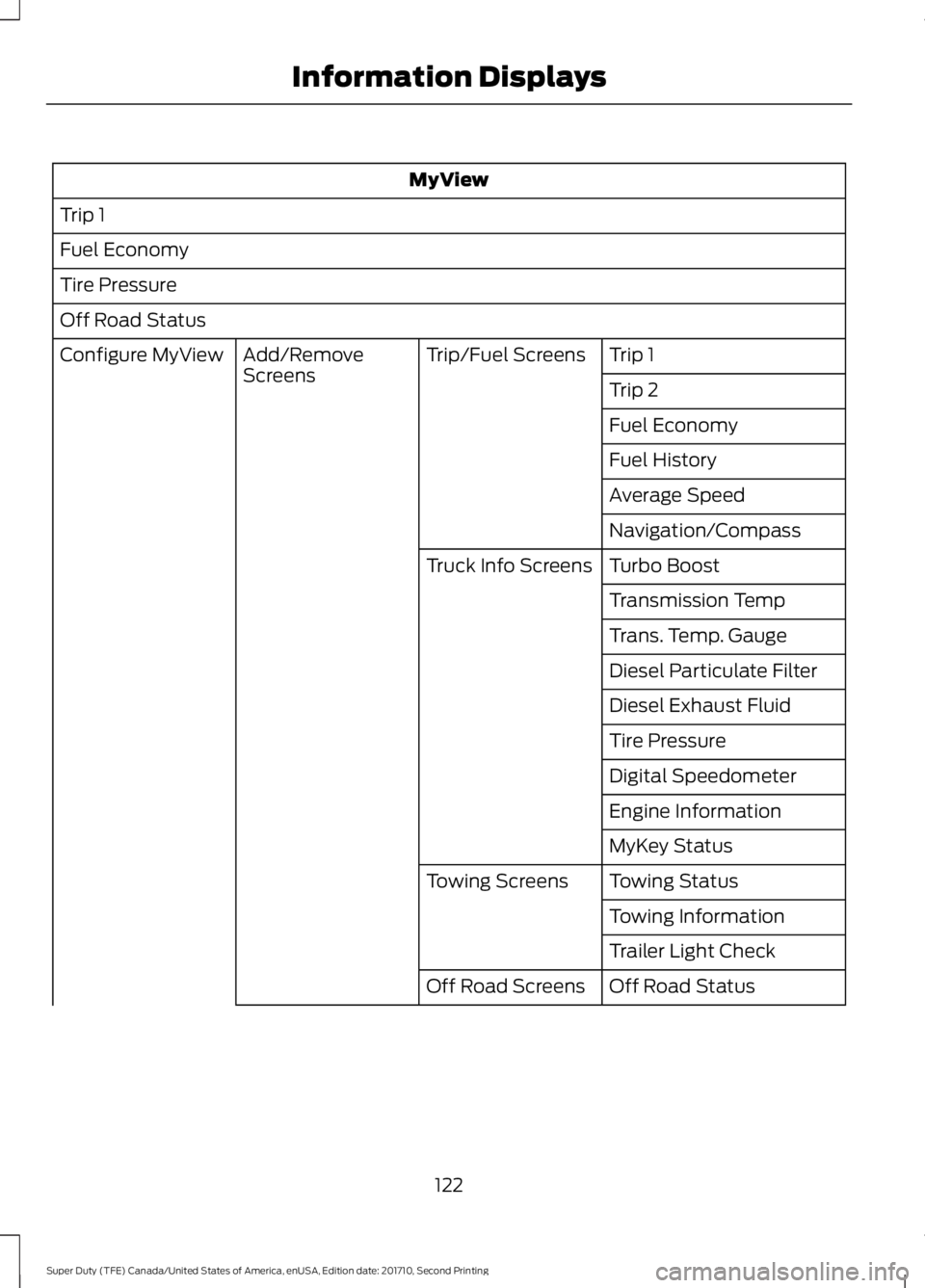
MyView
Trip 1
Fuel Economy
Tire Pressure
Off Road Status
Trip 1Trip/Fuel ScreensAdd/RemoveScreensConfigure MyView
Trip 2
Fuel Economy
Fuel History
Average Speed
Navigation/Compass
Turbo BoostTruck Info Screens
Transmission Temp
Trans. Temp. Gauge
Diesel Particulate Filter
Diesel Exhaust Fluid
Tire Pressure
Digital Speedometer
Engine Information
MyKey Status
Towing StatusTowing Screens
Towing Information
Trailer Light Check
Off Road StatusOff Road Screens
122
Super Duty (TFE) Canada/United States of America, enUSA, Edition date: 201710, Second Printing
Information Displays
Page 128 of 642
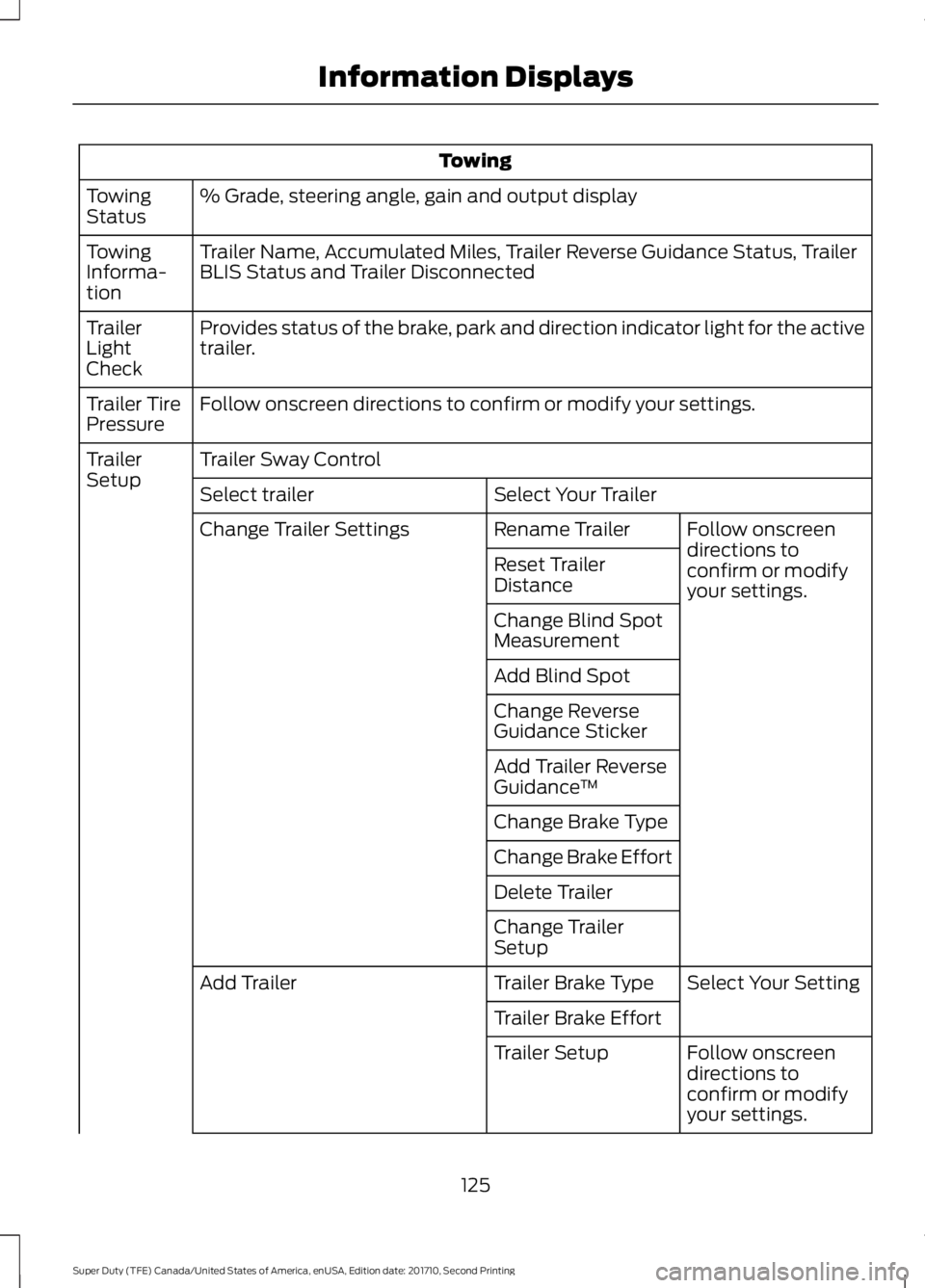
Towing
% Grade, steering angle, gain and output displayTowingStatus
Trailer Name, Accumulated Miles, Trailer Reverse Guidance Status, TrailerBLIS Status and Trailer DisconnectedTowingInforma-tion
Provides status of the brake, park and direction indicator light for the activetrailer.TrailerLightCheck
Follow onscreen directions to confirm or modify your settings.Trailer TirePressure
Trailer Sway ControlTrailerSetupSelect Your TrailerSelect trailer
Follow onscreendirections toconfirm or modifyyour settings.
Rename TrailerChange Trailer Settings
Reset TrailerDistance
Change Blind SpotMeasurement
Add Blind Spot
Change ReverseGuidance Sticker
Add Trailer ReverseGuidance™
Change Brake Type
Change Brake Effort
Delete Trailer
Change TrailerSetup
Select Your SettingTrailer Brake TypeAdd Trailer
Trailer Brake Effort
Follow onscreendirections toconfirm or modifyyour settings.
Trailer Setup
125
Super Duty (TFE) Canada/United States of America, enUSA, Edition date: 201710, Second Printing
Information Displays
Page 130 of 642
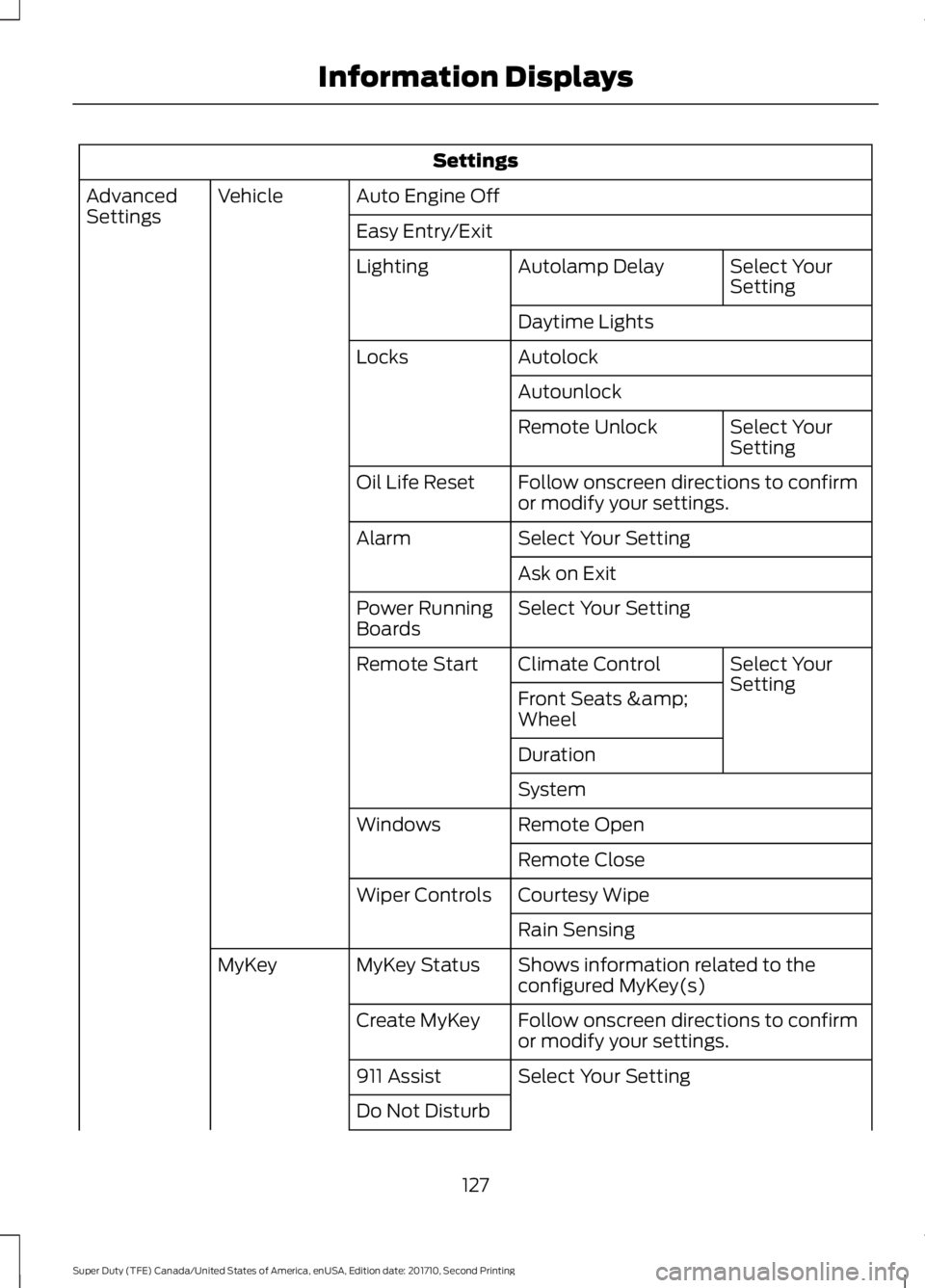
Settings
Auto Engine OffVehicleAdvancedSettingsEasy Entry/Exit
Select YourSettingAutolamp DelayLighting
Daytime Lights
AutolockLocks
Autounlock
Select YourSettingRemote Unlock
Follow onscreen directions to confirmor modify your settings.Oil Life Reset
Select Your SettingAlarm
Ask on Exit
Select Your SettingPower RunningBoards
Select YourSettingClimate ControlRemote Start
Front Seats &Wheel
Duration
System
Remote OpenWindows
Remote Close
Courtesy WipeWiper Controls
Rain Sensing
Shows information related to theconfigured MyKey(s)MyKey StatusMyKey
Follow onscreen directions to confirmor modify your settings.Create MyKey
Select Your Setting911 Assist
Do Not Disturb
127
Super Duty (TFE) Canada/United States of America, enUSA, Edition date: 201710, Second Printing
Information Displays
Page 146 of 642
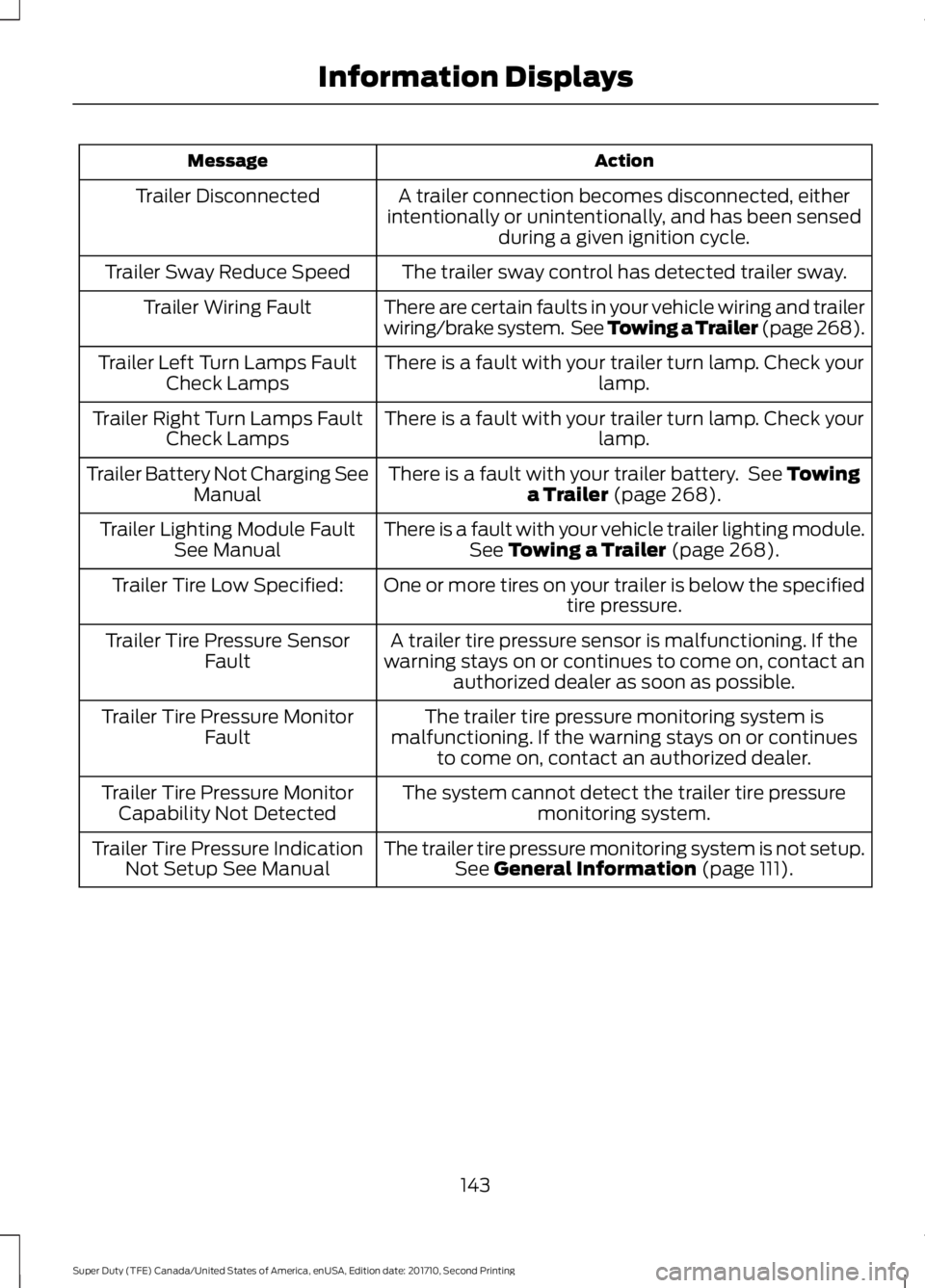
ActionMessage
A trailer connection becomes disconnected, eitherintentionally or unintentionally, and has been sensedduring a given ignition cycle.
Trailer Disconnected
The trailer sway control has detected trailer sway.Trailer Sway Reduce Speed
There are certain faults in your vehicle wiring and trailerwiring/brake system. See Towing a Trailer (page 268).Trailer Wiring Fault
There is a fault with your trailer turn lamp. Check yourlamp.Trailer Left Turn Lamps FaultCheck Lamps
There is a fault with your trailer turn lamp. Check yourlamp.Trailer Right Turn Lamps FaultCheck Lamps
There is a fault with your trailer battery. See Towinga Trailer (page 268).Trailer Battery Not Charging SeeManual
There is a fault with your vehicle trailer lighting module.See Towing a Trailer (page 268).Trailer Lighting Module FaultSee Manual
One or more tires on your trailer is below the specifiedtire pressure.Trailer Tire Low Specified:
A trailer tire pressure sensor is malfunctioning. If thewarning stays on or continues to come on, contact anauthorized dealer as soon as possible.
Trailer Tire Pressure SensorFault
The trailer tire pressure monitoring system ismalfunctioning. If the warning stays on or continuesto come on, contact an authorized dealer.
Trailer Tire Pressure MonitorFault
The system cannot detect the trailer tire pressuremonitoring system.Trailer Tire Pressure MonitorCapability Not Detected
The trailer tire pressure monitoring system is not setup.See General Information (page 111).Trailer Tire Pressure IndicationNot Setup See Manual
143
Super Duty (TFE) Canada/United States of America, enUSA, Edition date: 201710, Second Printing
Information Displays
Page 155 of 642
SITTING IN THE CORRECT
POSITION
WARNINGS
Sitting improperly, out of position orwith the seatback reclined too farcan take weight off the seat cushionand affect the decision of the passengersensing system, resulting in serious injuryor death in the event of a crash. Always situpright against your seat back, with yourfeet on the floor.
Do not recline the seatback as thiscan cause the occupant to slideunder the safety belt, resulting inserious injury in the event of a crash.
Do not place objects higher than theseatback to reduce the risk of seriousinjury in the event of a crash or duringheavy braking.
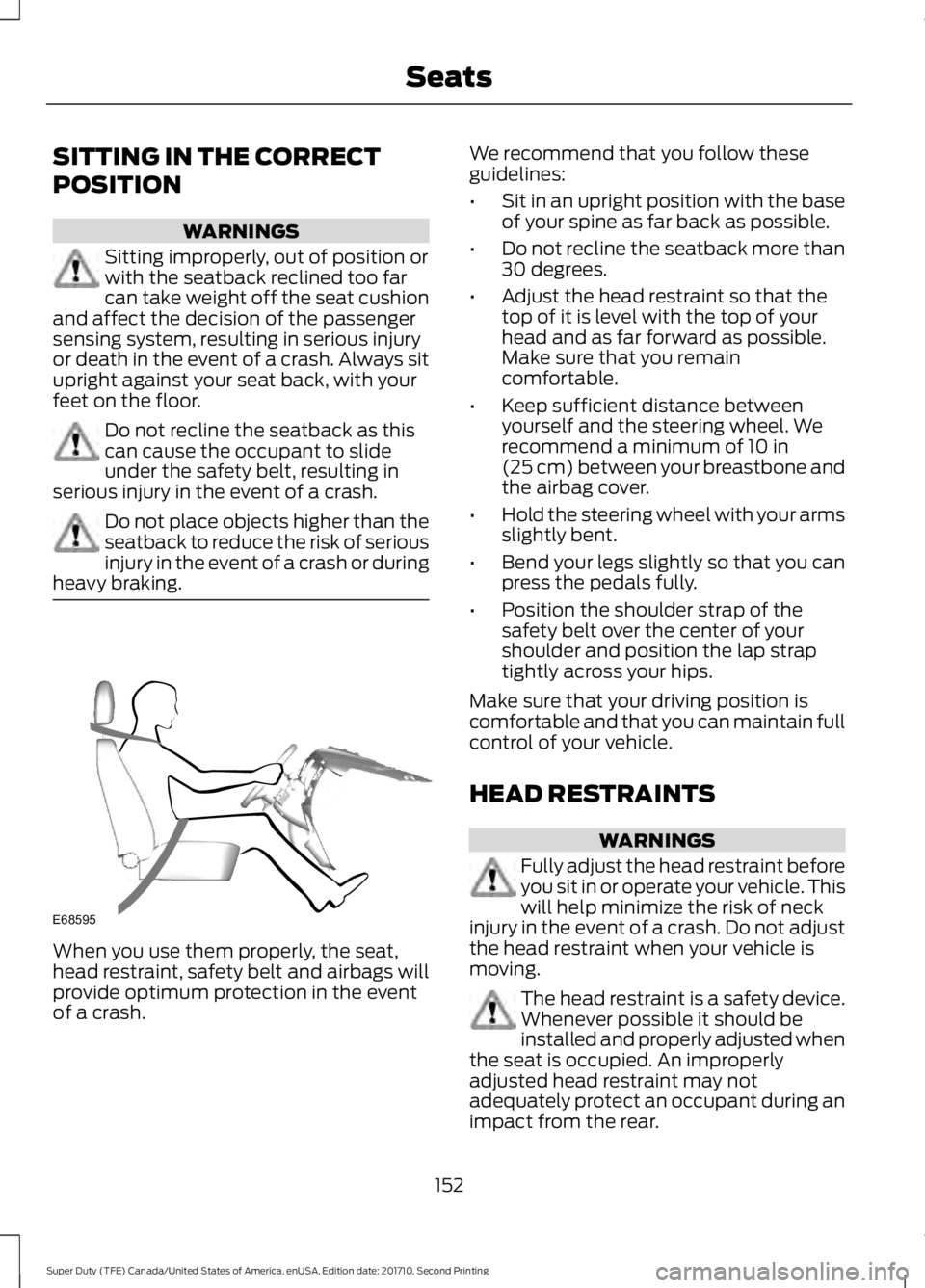
When you use them properly, the seat,head restraint, safety belt and airbags willprovide optimum protection in the eventof a crash.
We recommend that you follow theseguidelines:
•Sit in an upright position with the baseof your spine as far back as possible.
•Do not recline the seatback more than30 degrees.
•Adjust the head restraint so that thetop of it is level with the top of yourhead and as far forward as possible.Make sure that you remaincomfortable.
•Keep sufficient distance betweenyourself and the steering wheel. Werecommend a minimum of 10 in(25 cm) between your breastbone andthe airbag cover.
•Hold the steering wheel with your armsslightly bent.
•Bend your legs slightly so that you canpress the pedals fully.
•Position the shoulder strap of thesafety belt over the center of yourshoulder and position the lap straptightly across your hips.
Make sure that your driving position iscomfortable and that you can maintain fullcontrol of your vehicle.
HEAD RESTRAINTS
WARNINGS
Fully adjust the head restraint beforeyou sit in or operate your vehicle. Thiswill help minimize the risk of neckinjury in the event of a crash. Do not adjustthe head restraint when your vehicle ismoving.
The head restraint is a safety device.Whenever possible it should beinstalled and properly adjusted whenthe seat is occupied. An improperlyadjusted head restraint may notadequately protect an occupant during animpact from the rear.
152
Super Duty (TFE) Canada/United States of America, enUSA, Edition date: 201710, Second Printing
SeatsE68595
Page 163 of 642
HEATED SEATS (If Equipped)
WARNING
People who are unable to feel painto their skin because of advancedage, chronic illness, diabetes, spinalcord injury, medication, alcohol use,exhaustion or other physical conditions,must exercise care when using the heatedseat. The heated seat may cause burnseven at low temperatures, especially ifused for long periods of time. Do not placeanything on the seat that insulates againstheat, such as a blanket or cushion. Thismay cause the heated seat to overheat.Do not puncture the seat with pins, needlesor other pointed objects. This may damagethe heating element which may cause theheated seat to overheat. An overheatedseat may cause serious personal injury.
Do not do the following:
•Place heavy objects on the seat.
•Operate the heated seat if water or anyother liquid spills on the seat. Allow theseat to dry thoroughly.
Note:The engine must be running to usethis feature.
Press the heated seat symbol to cyclethrough the various heat settings and off.More indicator lights indicate warmersettings.
Note:The heated seats may remain onafter you remote start your vehicle, basedon your remote start settings. The heatedseats may also turn on when you start yourvehicle if they were on when you switchedyour vehicle off.
Rear Heated Seats (If Equipped)
WARNING
People who are unable to feel painto their skin because of advancedage, chronic illness, diabetes, spinalcord injury, medication, alcohol use,exhaustion or other physical conditions,must exercise care when using the heatedseat. The heated seat may cause burnseven at low temperatures, especially ifused for long periods of time. Do not placeanything on the seat that insulates againstheat, such as a blanket or cushion. Thismay cause the heated seat to overheat.Do not puncture the seat with pins, needlesor other pointed objects. This may damagethe heating element which may cause theheated seat to overheat. An overheatedseat may cause serious personal injury.
Do not do the following:
•Place heavy objects on the seat.
•Operate the heated seat if water or anyother liquid spills on the seat. Allow theseat to dry thoroughly.
Note:The engine must be running to usethis feature.
The rear seat heat controls are on the rearof the center console.
160
Super Duty (TFE) Canada/United States of America, enUSA, Edition date: 201710, Second Printing
SeatsE146322
Page 164 of 642
Press the heated seat symbol to cyclethrough the various heat settings and off.More indicator lights indicate warmersettings.
The heated seat module resets at everyignition run cycle. While the ignition is inthe on position, press the heated seatswitch to enable heating mode. Whenactivated, they turn off automatically whenyou switch off the engine.
CLIMATE CONTROLLED SEATS
(If Equipped)
Heated Seats
WARNING
People who are unable to feel painto their skin because of advancedage, chronic illness, diabetes, spinalcord injury, medication, alcohol use,exhaustion or other physical conditions,must exercise care when using the heatedseat. The heated seat may cause burnseven at low temperatures, especially ifused for long periods of time. Do not placeanything on the seat that insulates againstheat, such as a blanket or cushion. Thismay cause the heated seat to overheat.Do not puncture the seat with pins, needlesor other pointed objects. This may damagethe heating element which may cause theheated seat to overheat. An overheatedseat may cause serious personal injury.
Do not do the following:
•Place heavy objects on the seat.
•Operate the heated seat if water or anyother liquid spills on the seat. Allow theseat to dry thoroughly.
Note:The engine must be running to usethis feature.
Press the heated seat symbol to cyclethrough the various heat settings and off.More indicator lights indicate warmersettings.
Note:The heated seats may remain onafter you remote start your vehicle, basedon your remote start settings. The heatedseats may also turn on when you start yourvehicle if they were on when you switchedyour vehicle off.
Note:After 60 minutes of operation, theheated seats switch off. Press the heatedseat symbol to switch the heated seats on.
Cooled Seats
Note:The engine must be running to usethis feature.
161
Super Duty (TFE) Canada/United States of America, enUSA, Edition date: 201710, Second Printing
SeatsE146322 E146322 E146309
Page 165 of 642
Press the cooled seat symbol to cyclethrough the various cool settings and off.More indicator lights indicate coolersettings.
Note:The cooled seats may remain on afteryou remote start your vehicle, based on yourremote start settings. The heated seats mayalso turn on when you start your vehicle ifthey were on when you switched yourvehicle off.
Note:After 60 minutes of operation, thecooled seats switch off. Press the cooledseat symbol to switch the cooled seats on.
Climate Controlled Seat Air FilterReplacement
The climate controlled seat systemincludes air filters. You must replace themperiodically.
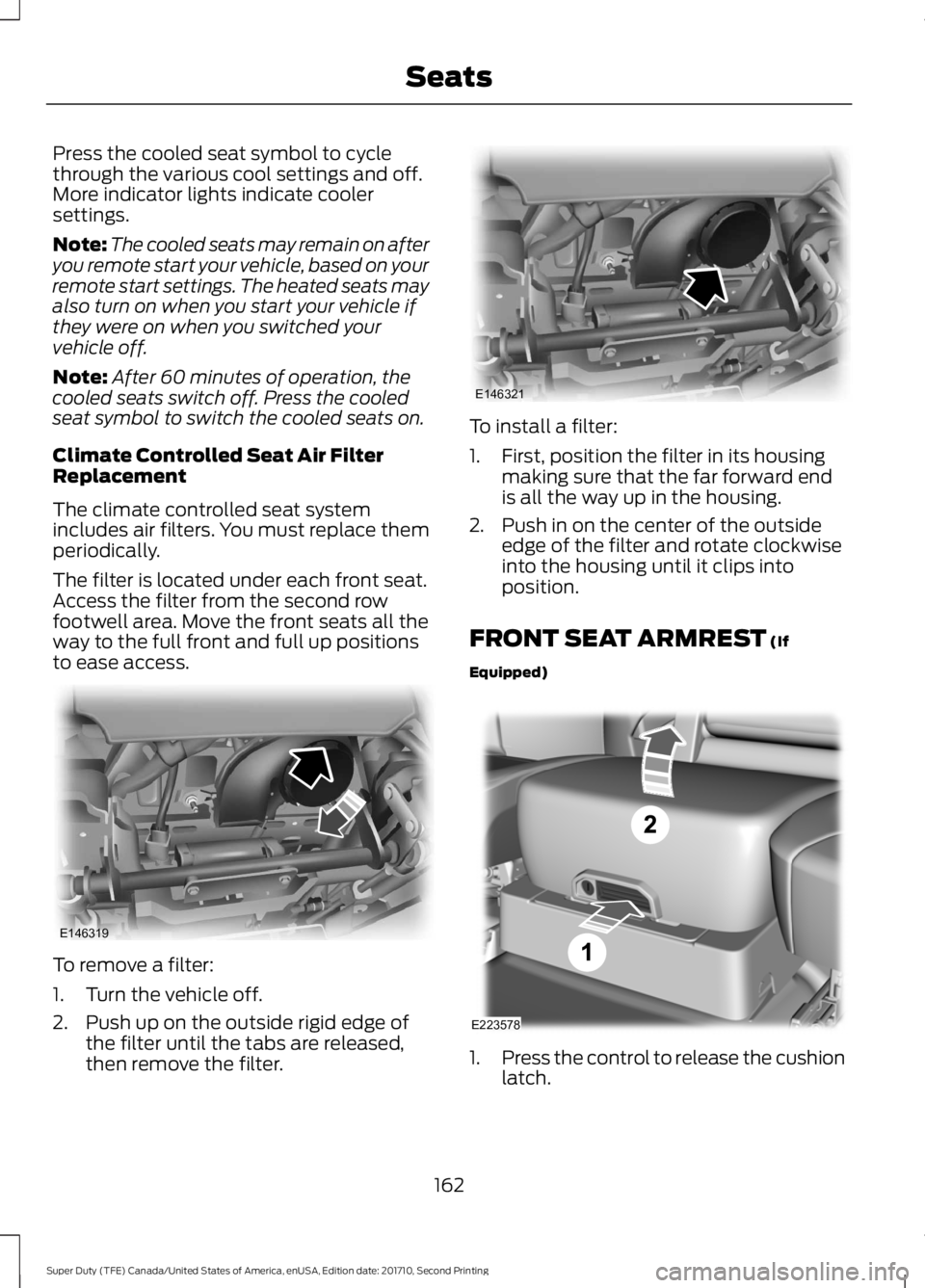
The filter is located under each front seat.Access the filter from the second rowfootwell area. Move the front seats all theway to the full front and full up positionsto ease access.
To remove a filter:
1. Turn the vehicle off.
2. Push up on the outside rigid edge ofthe filter until the tabs are released,then remove the filter.
To install a filter:
1. First, position the filter in its housingmaking sure that the far forward endis all the way up in the housing.
2. Push in on the center of the outsideedge of the filter and rotate clockwiseinto the housing until it clips intoposition.
FRONT SEAT ARMREST (If
Equipped)
1.Press the control to release the cushionlatch.
162
Super Duty (TFE) Canada/United States of America, enUSA, Edition date: 201710, Second Printing
SeatsE146319 E146321 E223578
Page 167 of 642
HomeLink Wireless ControlSystem
WARNINGS
Make sure that the garage door andsecurity device are free fromobstruction when you areprogramming. Do not program the systemwith the vehicle in the garage.
Do not use the system with anygarage door opener that does nothave the safety stop and reversefeature as required by U.S. Federal SafetyStandards (this includes any garage dooropener manufactured before April 1, 1982).A garage door opener which cannot detectan object, signaling the door to stop andreverse, does not meet current federalsafety standards. Using a garage dooropener without these features increasesthe risk of serious injury or death.
Note:Make sure you keep the originalremote control transmitter for use in othervehicles as well as for future systemprogramming.
Note:We recommend that upon the saleor lease termination of your vehicle, youerase the programmed function buttons forsecurity reasons. See Erasing the FunctionButton Codes later in this section.
Note:You can program a maximum ofthree devices. To change or replace any ofthe three devices after it has been initiallyprogrammed, you must first erase thecurrent settings. See Erasing the FunctionButton Codes.
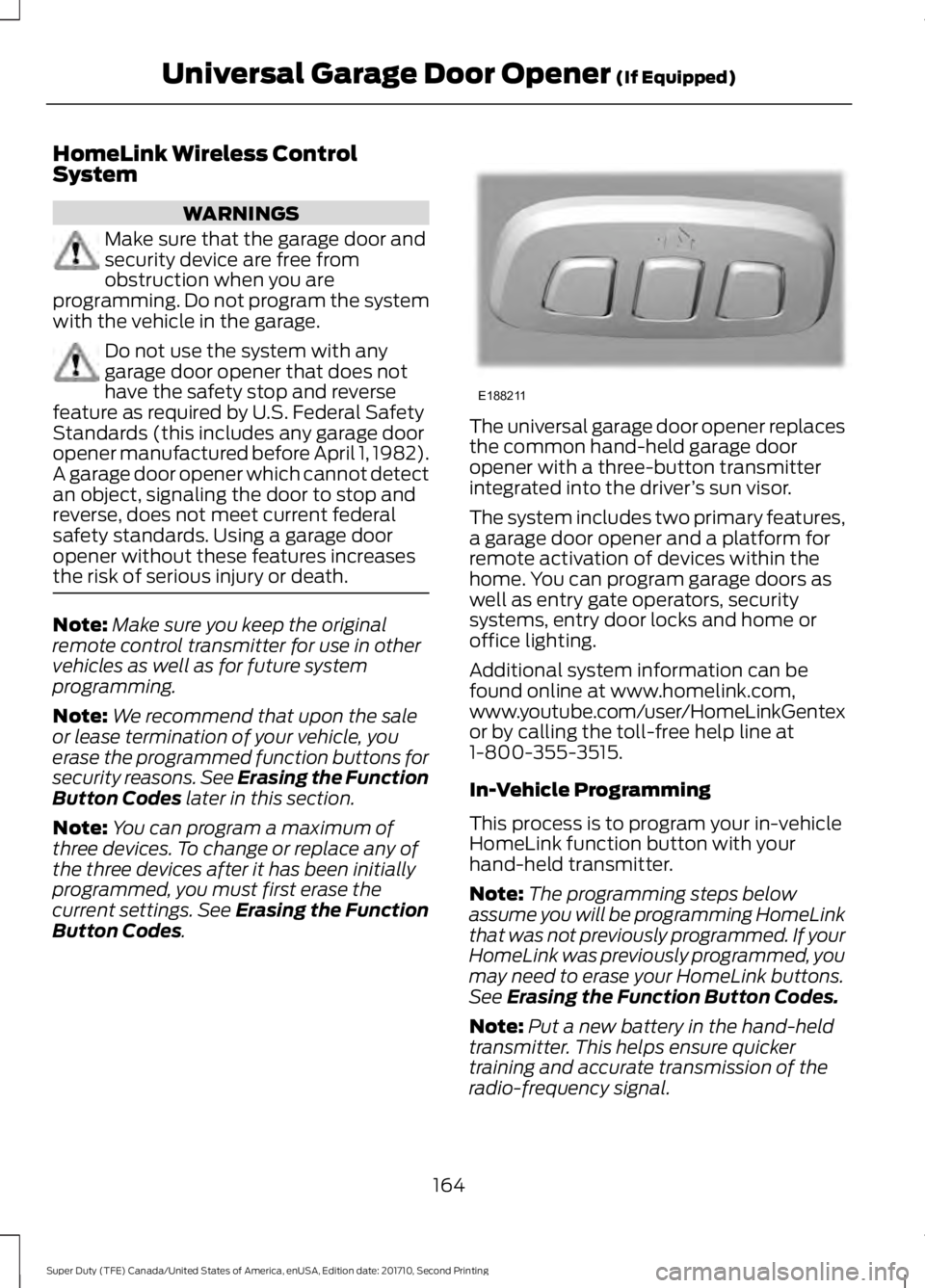
The universal garage door opener replacesthe common hand-held garage dooropener with a three-button transmitterintegrated into the driver’s sun visor.
The system includes two primary features,a garage door opener and a platform forremote activation of devices within thehome. You can program garage doors aswell as entry gate operators, securitysystems, entry door locks and home oroffice lighting.
Additional system information can befound online at www.homelink.com,www.youtube.com/user/HomeLinkGentexor by calling the toll-free help line at1-800-355-3515.
In-Vehicle Programming
This process is to program your in-vehicleHomeLink function button with yourhand-held transmitter.
Note:The programming steps belowassume you will be programming HomeLinkthat was not previously programmed. If yourHomeLink was previously programmed, youmay need to erase your HomeLink buttons.See Erasing the Function Button Codes.
Note:Put a new battery in the hand-heldtransmitter. This helps ensure quickertraining and accurate transmission of theradio-frequency signal.
164
Super Duty (TFE) Canada/United States of America, enUSA, Edition date: 201710, Second Printing
Universal Garage Door Opener (If Equipped)E188211