reset FORD F450 SUPER DUTY 2016 User Guide
[x] Cancel search | Manufacturer: FORD, Model Year: 2016, Model line: F450 SUPER DUTY, Model: FORD F450 SUPER DUTY 2016Pages: 507, PDF Size: 8.13 MB
Page 94 of 507
EXHAUST FILTER
For more information, refer to the Dieselsupplement.
System check and vehicle featurecustomization
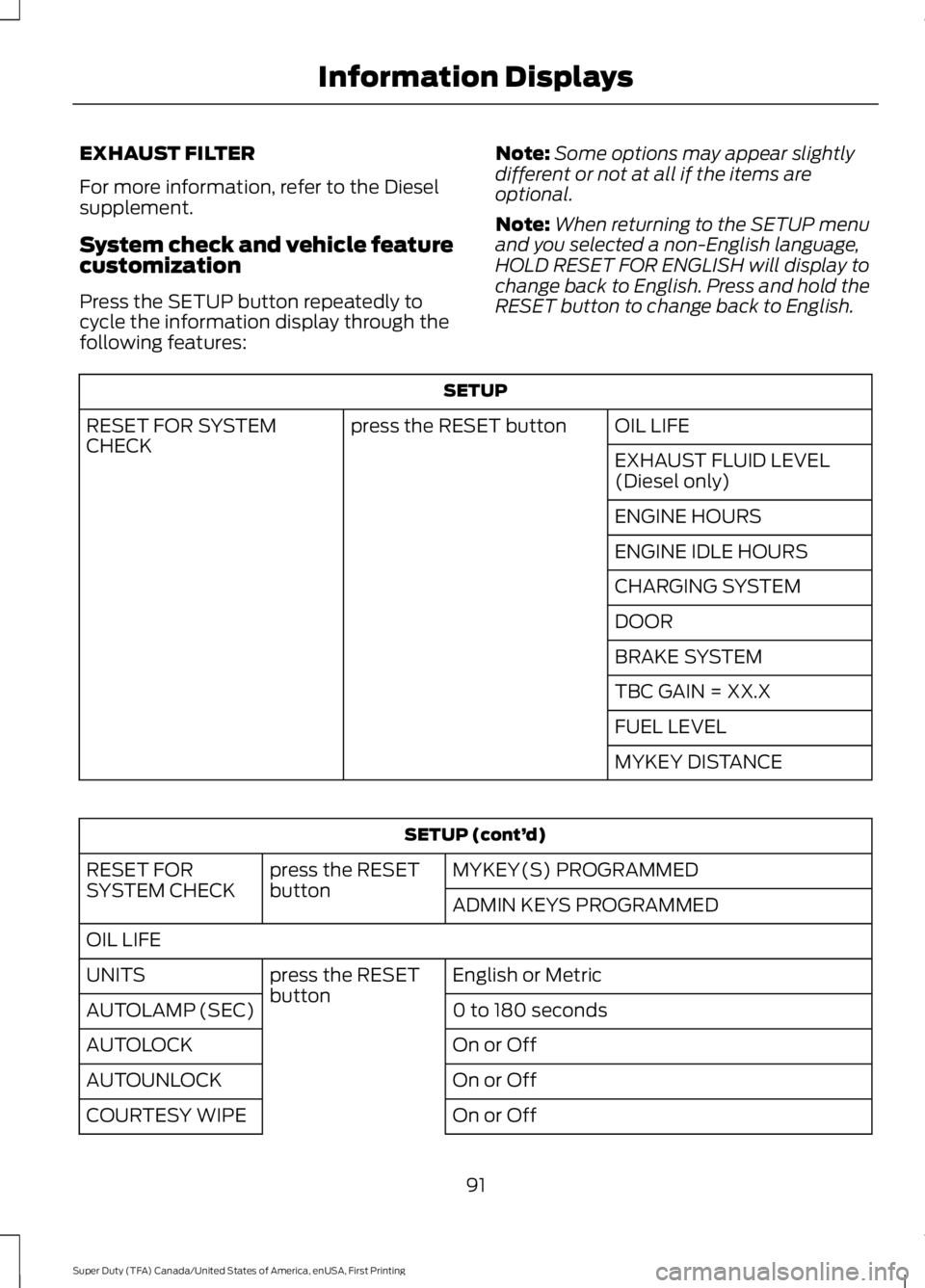
Press the SETUP button repeatedly tocycle the information display through thefollowing features:
Note:Some options may appear slightlydifferent or not at all if the items areoptional.
Note:When returning to the SETUP menuand you selected a non-English language,HOLD RESET FOR ENGLISH will display tochange back to English. Press and hold theRESET button to change back to English.
SETUP
OIL LIFEpress the RESET buttonRESET FOR SYSTEMCHECKEXHAUST FLUID LEVEL(Diesel only)
ENGINE HOURS
ENGINE IDLE HOURS
CHARGING SYSTEM
DOOR
BRAKE SYSTEM
TBC GAIN = XX.X
FUEL LEVEL
MYKEY DISTANCE
SETUP (cont’d)
MYKEY(S) PROGRAMMEDpress the RESETbuttonRESET FORSYSTEM CHECKADMIN KEYS PROGRAMMED
OIL LIFE
English or Metricpress the RESETbuttonUNITS
0 to 180 secondsAUTOLAMP (SEC)
On or OffAUTOLOCK
On or OffAUTOUNLOCK
On or OffCOURTESY WIPE
91
Super Duty (TFA) Canada/United States of America, enUSA, First Printing
Information Displays
Page 95 of 507

SETUP (cont’d)
On or OffREAR PARK AID
On or OffREMOTE WINDOWOPEN
CREATE MYKEY / MYKEY SETUP / CLEAR MYKEY
On or Offpress the RESETbuttonRESET FOR REMOTE START
5, 10, 15 minutes
Electric or EOHTBC MODE
LOW, MED or HIGHTBC EFFORT
On or OffTRAILER SWAY
English / Spanish / FrenchLANGUAGE = ENGLISH / SPANISH /FRENCH
PRESS RESET FOR SYSTEM CHECK
The information display will begin to cyclethrough the vehicle systems and providea status of the item if needed.
Note:Some systems show a message onlyif a condition is present
OIL LIFE
Displays the remaining oil life. An oilchange is required whenever indicated bythe information display and according tothe recommended maintenance schedule.USE ONLY RECOMMENDED ENGINE OILS.
To reset the oil monitoring system to 100%after each oil change, perform thefollowing:
1. Press and release the SETUP buttonto display OIL LIFE XXX% HOLD RESET= NEW.
2. Press and hold the RESET button fortwo seconds and release to reset theoil life to 100%.
Note:To change oil life 100% value (ifequipped with this feature) to another value,proceed to Step 3.
3. Once OIL LIFE SET TO XXX% isdisplayed, release and press the RESETbutton to change the Oil Life StartValue. Each release and press willreduce the value by 10%.
UNITS
Displays the current units English or Metric
AUTOLAMP (SEC)
This feature keeps your headlights on forup to three minutes after the ignition isswitched off.
AUTOLOCK
This feature automatically locks all vehicledoors when the vehicle is shifted into anygear, putting the vehicle in motion.
92
Super Duty (TFA) Canada/United States of America, enUSA, First Printing
Information Displays
Page 96 of 507
AUTOUNLOCK
This feature automatically unlocks allvehicle doors when the driver’s door isopened within 10 minutes of the ignitionbeing turned off.
COURTESY WIPE
This feature allows for an extra swipe ofthe wipers after a wipe/wash cycle.
CREATE MYKEY / MYKEY SETUP /CLEAR MYKEY
For more information, See Creating aMyKey (page 52).
RESET FOR REMOTE START (ifequipped)
REAR PARK AID
This feature sounds a warning tone to warnthe driver of obstacles near the rearbumper, and functions only when R(Reverse) gear is selected.
TBC MODE (if equipped)
Allows you to choose the trailer brakemode.
TBC EFFORT (if equipped)
Allows you to choose the level of initialbraking.
TRAILER SWAY (if equipped)
This feature uses the electronic stabilitycontrol to mitigate trailer sway.
LANGUAGE = ENGLISH / SPANISH /FRENCH
Allows you to choose which language themessage center will display in.
Waiting four seconds or pressing theRESET button cycles the message centerthrough each of the language choices.
Press the RESET button to set thelanguage choice.
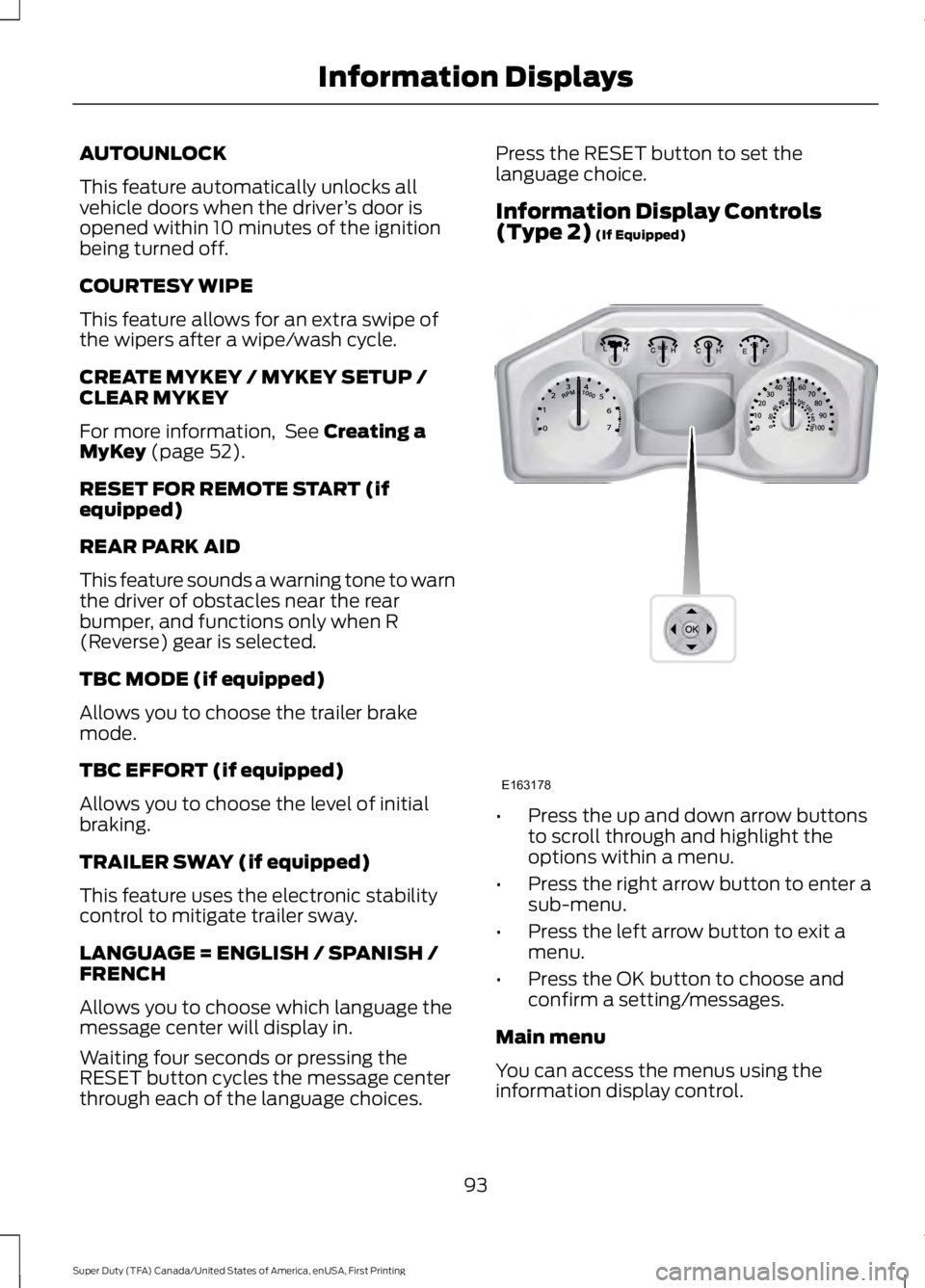
Information Display Controls(Type 2) (If Equipped)
•Press the up and down arrow buttonsto scroll through and highlight theoptions within a menu.
•Press the right arrow button to enter asub-menu.
•Press the left arrow button to exit amenu.
•Press the OK button to choose andconfirm a setting/messages.
Main menu
You can access the menus using theinformation display control.
93
Super Duty (TFA) Canada/United States of America, enUSA, First Printing
Information DisplaysE163178
Page 98 of 507
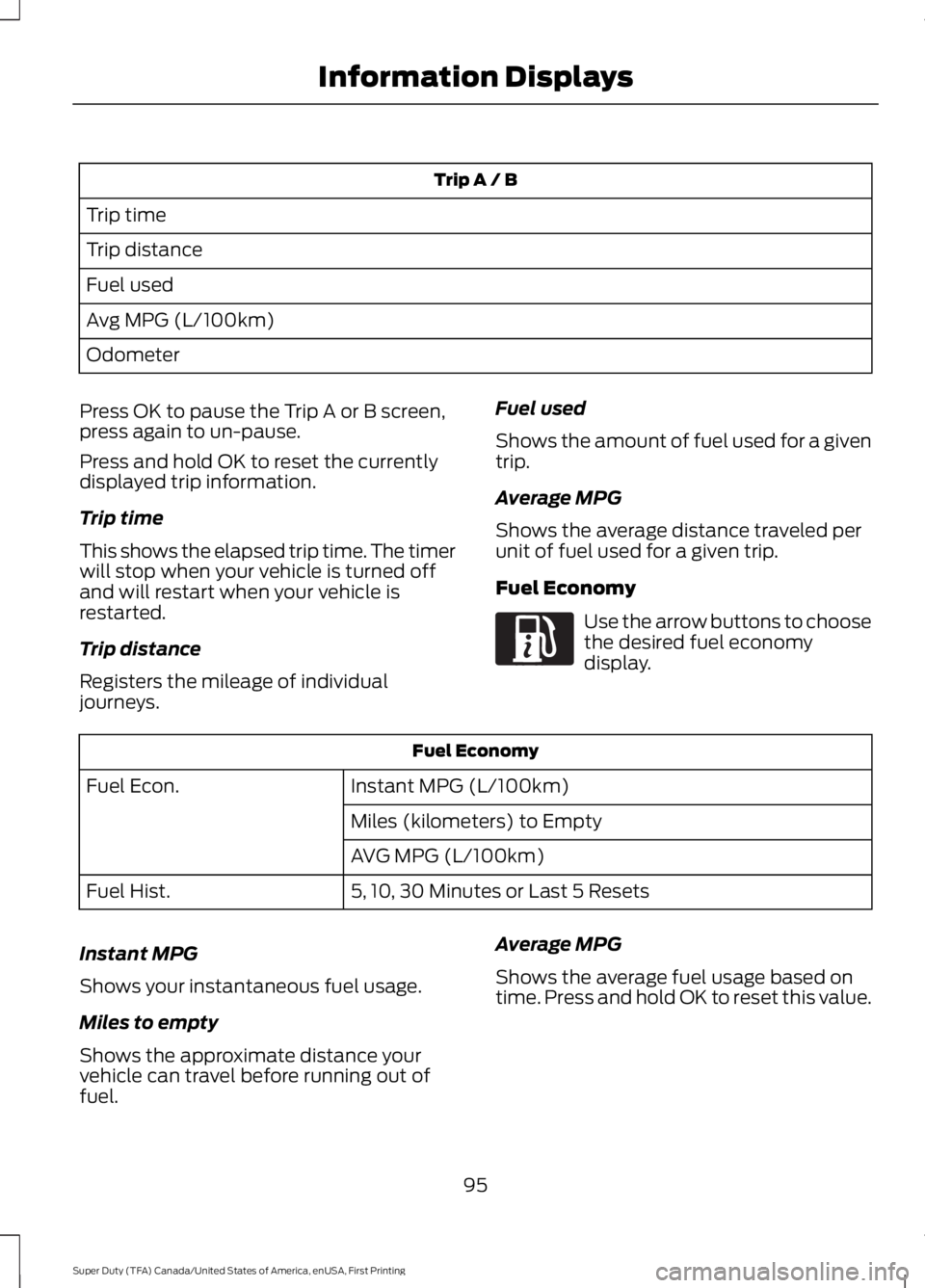
Trip A / B
Trip time
Trip distance
Fuel used
Avg MPG (L/100km)
Odometer
Press OK to pause the Trip A or B screen,press again to un-pause.
Press and hold OK to reset the currentlydisplayed trip information.
Trip time
This shows the elapsed trip time. The timerwill stop when your vehicle is turned offand will restart when your vehicle isrestarted.
Trip distance
Registers the mileage of individualjourneys.
Fuel used
Shows the amount of fuel used for a giventrip.
Average MPG
Shows the average distance traveled perunit of fuel used for a given trip.
Fuel Economy
Use the arrow buttons to choosethe desired fuel economydisplay.
Fuel Economy
Instant MPG (L/100km)Fuel Econ.
Miles (kilometers) to Empty
AVG MPG (L/100km)
5, 10, 30 Minutes or Last 5 ResetsFuel Hist.
Instant MPG
Shows your instantaneous fuel usage.
Miles to empty
Shows the approximate distance yourvehicle can travel before running out offuel.
Average MPG
Shows the average fuel usage based ontime. Press and hold OK to reset this value.
95
Super Duty (TFA) Canada/United States of America, enUSA, First Printing
Information DisplaysE163180
Page 100 of 507

Truck Apps (cont’d)
Rename TrailerPress OK for optionsTrailer (cont’d)
Reset Trailer Mileage / Kilometers(if equipped)
Trailer disconnected
Disregard this status if your vehicle is notequipped with a factory installed trailerbrake controller. This message may appearwhen an aftermarket TBC is used evenwhen the trailer is connected.
Change Active Trailer
When this is highlighted, press the rightarrow key to change the currently selectedtrailer. Use the up and down arrows toselect a trailer and press the OK button tochoose the highlighted trailer.
Adding a new trailer
Use the up/down arrows to highlight NewTrailer and press the right arrow key toenter the New Trailer input screen. Use theup/down arrow keys to choose alpha,numeric and symbol characters and thenpress the right arrow to move the characterspace over. Continue adding characters asneeded. Press the left arrow to go backand change a previously selectedcharacter. When finished with the newtrailer name, press OK to accept the newtrailer name.
Connection Checklist
Use the up/down arrows to highlight oneof these choices and press OK to displaythe connection checklist. Follow theon-screen instructions to go through theconnections list.
Delete Trailer
Use the up/down arrows to highlight thetrailer you want to delete and press OK todelete. Follow the on-screen prompts toexit or confirm delete.
Rename Trailer
Use the up/down buttons to highlight atrailer and press OK to select it. Use theup/down arrow buttons to change thecharacters as needed. When done, pressOK to accept the change.
Reset Trailer Mileage / Kilometers
Use the up/down buttons to select atrailer, then press and hold OK to reset thetrailer mileage (kilometers).
Settings
Use the arrow buttons toconfigure different driver settingchoices.
Note:Some items are optional and maynot appear.
97
Super Duty (TFA) Canada/United States of America, enUSA, First Printing
Information DisplaysE144641
Page 101 of 507
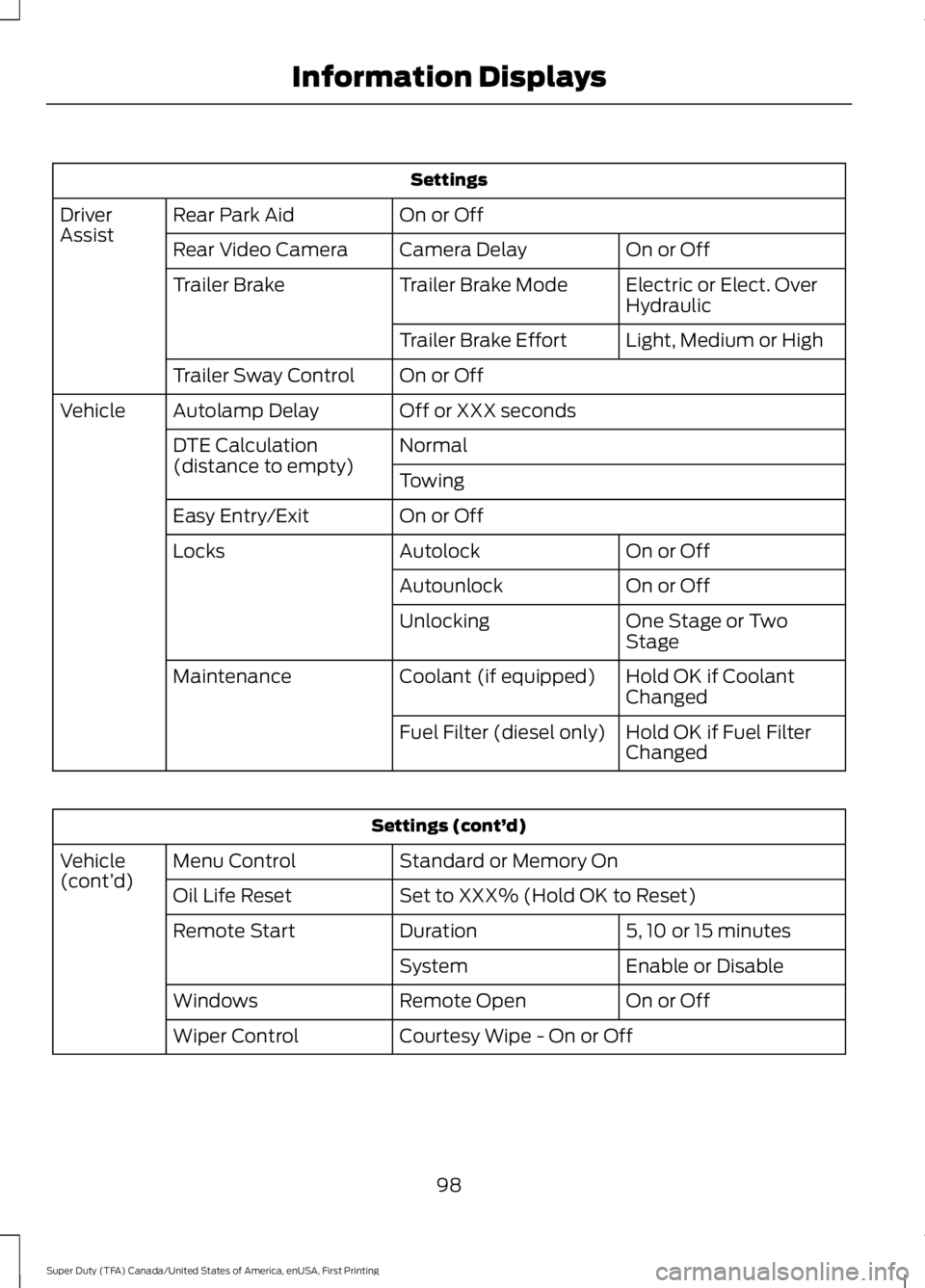
Settings
On or OffRear Park AidDriverAssistOn or OffCamera DelayRear Video Camera
Electric or Elect. OverHydraulicTrailer Brake ModeTrailer Brake
Light, Medium or HighTrailer Brake Effort
On or OffTrailer Sway Control
Off or XXX secondsAutolamp DelayVehicle
NormalDTE Calculation(distance to empty)Towing
On or OffEasy Entry/Exit
On or OffAutolockLocks
On or OffAutounlock
One Stage or TwoStageUnlocking
Hold OK if CoolantChangedCoolant (if equipped)Maintenance
Hold OK if Fuel FilterChangedFuel Filter (diesel only)
Settings (cont’d)
Standard or Memory OnMenu ControlVehicle(cont’d)Set to XXX% (Hold OK to Reset)Oil Life Reset
5, 10 or 15 minutesDurationRemote Start
Enable or DisableSystem
On or OffRemote OpenWindows
Courtesy Wipe - On or OffWiper Control
98
Super Duty (TFA) Canada/United States of America, enUSA, First Printing
Information Displays
Page 103 of 507
Compass/Transmission indicatordisplay (if equipped)
The compass heading will display in theupper right corner of the informationdisplay; the transmission gear indicatordisplays in the right side of the informationdisplay when using the SelectShiftAutomatic™ transmission feature. Thesedisplays will not be shown in all screenmodes. For example: when programmingcertain vehicle features or in certaininformation menus.
INFORMATION MESSAGES
Note:Depending on your vehicle optionsand instrument cluster type, not all of themessages will display or be available.Additionally, the information display mayabbreviate or shorten certain messages.
Press the RESET button for Type 1 displaysor the OK button for Type 2 displays toacknowledge and remove some messagesfrom the information display. Theinformation display automatically removesother messages after a short time.
You need to confirm certain messagesbefore you can access the menus.
AdvanceTrac™
ActionMessage
The system detects a condition that requires service. Havethe system checked by an authorized dealer.SERVICE ADVAN-CETRAC
The driver has disabled the stability control system. SeeUsing Stability Control (page 174).ADVANCETRAC OFF
The driver has disabled the traction control system. See UsingTraction Control (page 172).TRACTION CONTROLOFF
Alarm
ActionMessage
An unauthorized entry has triggered the alarm. See Anti-TheftAlarm (page 65).TO STOP ALARMSTART VEHICLE
The security system has detected a fault. Have the systemchecked by an authorized dealer.SECURITY SYSTEMFAULT
100
Super Duty (TFA) Canada/United States of America, enUSA, First Printing
Information Displays
Page 124 of 507
WARNINGS
Do not use the memory functionwhen your vehicle is moving.
This feature automatically recalls theposition of the following:
•Driver seat.
•Power mirrors.
•Optional adjustable pedals.
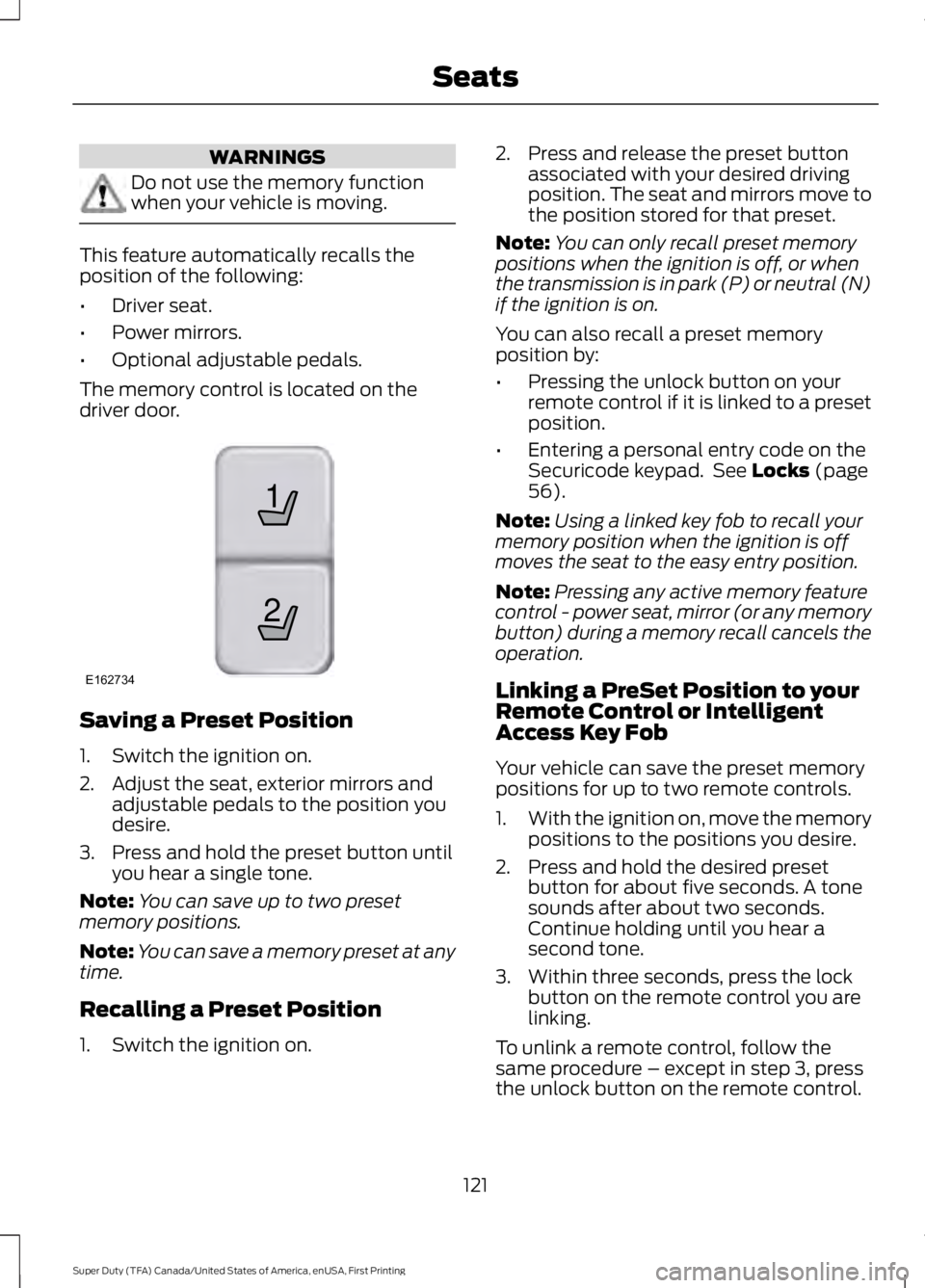
The memory control is located on thedriver door.
Saving a Preset Position
1. Switch the ignition on.
2. Adjust the seat, exterior mirrors andadjustable pedals to the position youdesire.
3. Press and hold the preset button untilyou hear a single tone.
Note:You can save up to two presetmemory positions.
Note:You can save a memory preset at anytime.
Recalling a Preset Position
1. Switch the ignition on.
2. Press and release the preset buttonassociated with your desired drivingposition. The seat and mirrors move tothe position stored for that preset.
Note:You can only recall preset memorypositions when the ignition is off, or whenthe transmission is in park (P) or neutral (N)if the ignition is on.
You can also recall a preset memoryposition by:
•Pressing the unlock button on yourremote control if it is linked to a presetposition.
•Entering a personal entry code on theSecuricode keypad. See Locks (page56).
Note:Using a linked key fob to recall yourmemory position when the ignition is offmoves the seat to the easy entry position.
Note:Pressing any active memory featurecontrol - power seat, mirror (or any memorybutton) during a memory recall cancels theoperation.
Linking a PreSet Position to yourRemote Control or IntelligentAccess Key Fob
Your vehicle can save the preset memorypositions for up to two remote controls.
1.With the ignition on, move the memorypositions to the positions you desire.
2. Press and hold the desired presetbutton for about five seconds. A tonesounds after about two seconds.Continue holding until you hear asecond tone.
3. Within three seconds, press the lockbutton on the remote control you arelinking.
To unlink a remote control, follow thesame procedure – except in step 3, pressthe unlock button on the remote control.
121
Super Duty (TFA) Canada/United States of America, enUSA, First Printing
Seats21
E162734
Page 128 of 507
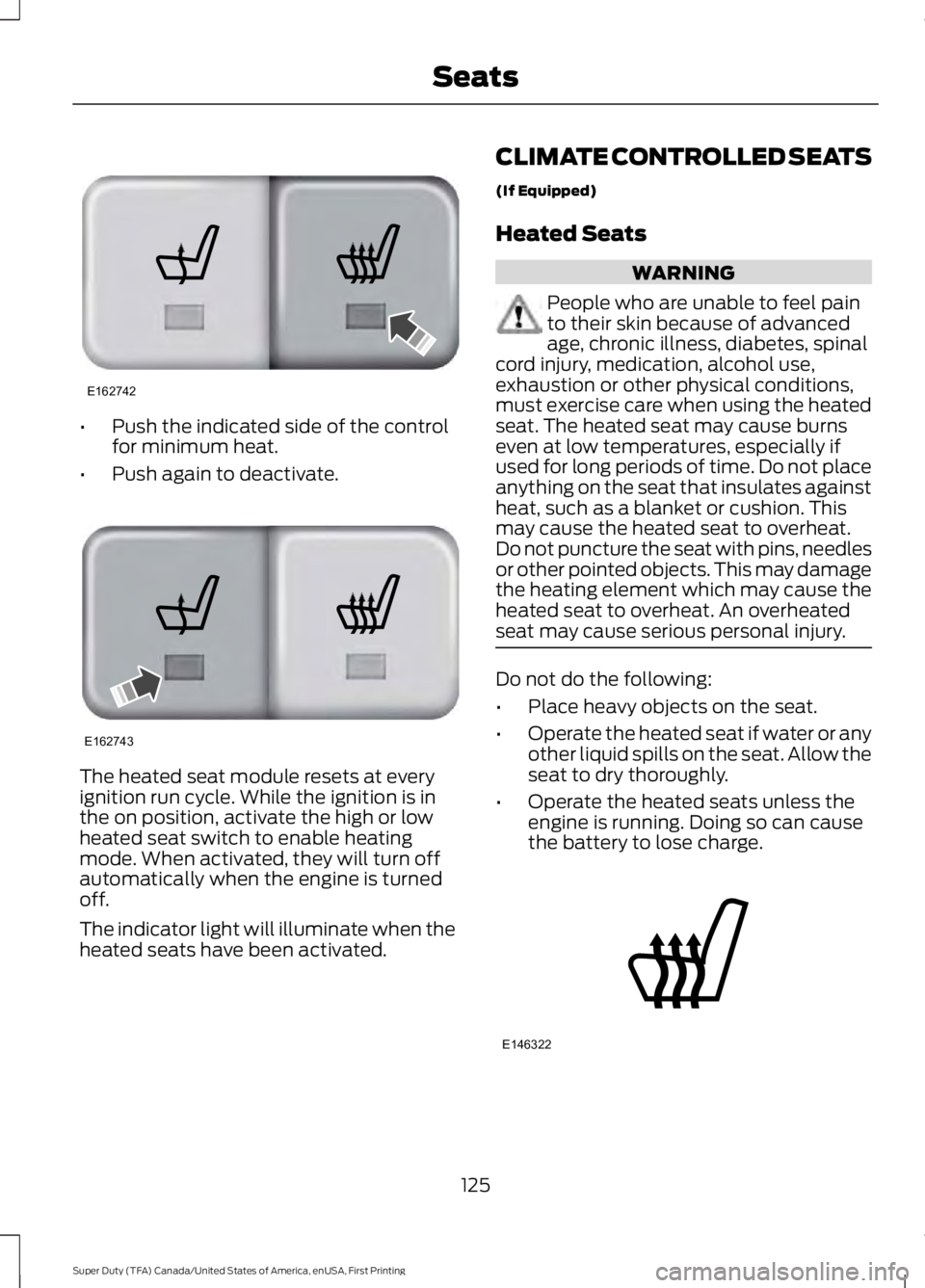
•Push the indicated side of the controlfor minimum heat.
•Push again to deactivate.
The heated seat module resets at everyignition run cycle. While the ignition is inthe on position, activate the high or lowheated seat switch to enable heatingmode. When activated, they will turn offautomatically when the engine is turnedoff.
The indicator light will illuminate when theheated seats have been activated.
CLIMATE CONTROLLED SEATS
(If Equipped)
Heated Seats
WARNING
People who are unable to feel painto their skin because of advancedage, chronic illness, diabetes, spinalcord injury, medication, alcohol use,exhaustion or other physical conditions,must exercise care when using the heatedseat. The heated seat may cause burnseven at low temperatures, especially ifused for long periods of time. Do not placeanything on the seat that insulates againstheat, such as a blanket or cushion. Thismay cause the heated seat to overheat.Do not puncture the seat with pins, needlesor other pointed objects. This may damagethe heating element which may cause theheated seat to overheat. An overheatedseat may cause serious personal injury.
Do not do the following:
•Place heavy objects on the seat.
•Operate the heated seat if water or anyother liquid spills on the seat. Allow theseat to dry thoroughly.
•Operate the heated seats unless theengine is running. Doing so can causethe battery to lose charge.
125
Super Duty (TFA) Canada/United States of America, enUSA, First Printing
SeatsE162742 E162743 E146322
Page 132 of 507

The appearance of your vehicle’s universalgarage door opener varies according toyour option package. Before programming,make sure you identify which transmitteryou have by comparing it to the graphicsbelow:
Car2U Home Automation System
HomeLink
Note:Programming these two types ofuniversal garage door openers are different,and they have different instructions. Identifyyour package and refer to the instructionslisted in this chapter.
CAR2U® Home AutomationSystem (If Equipped)
WARNINGS
Make sure that the garage door andsecurity device are free fromobstruction when you areprogramming. Do not program the systemwith the vehicle in the garage.
WARNINGS
Do not use the system with anygarage door opener that does nothave the safety stop and reversefeature as required by U.S. Federal SafetyStandards (this includes any garage dooropener manufactured before April 1, 1982).
Note:Before you begin the programmingprocess, park your vehicle in front of thegarage door opener motor or other deviceyou want to program.
Note:Make sure you keep the originalremote control transmitter for use in othervehicles as well as for future systemprogramming.
Note:We recommend that, upon the saleor lease termination of your vehicle, youerase the programmed function buttons forsecurity reasons. See Erasing the FunctionButton Codes later in this section.
Note:Programming the system to acommunity gate will require a unique set ofinstructions depending on the gate systemmodel. Contact the help line at1-866-572-2728 for further information.
Note:If you accidently enter the programmode by pressing and releasing the outertwo buttons or all three buttonssimultaneously, do not press any buttonuntil the module times out after a fewseconds and resets to normal mode. Whenthe module has timed out, all three LEDlamps will flash rapidly for a few secondsthen turn off. Any settings should remain aspreviously set.
The universal garage door opener replacesthe common hand-held garage dooropener with a three-button transmitter,integrated into the driver’s sun visor.
129
Super Duty (TFA) Canada/United States of America, enUSA, First Printing
Universal Garage Door Opener (If Equipped)E164776 E142657