mirror FORD F450 SUPER DUTY 2017 Owner's Manual
[x] Cancel search | Manufacturer: FORD, Model Year: 2017, Model line: F450 SUPER DUTY, Model: FORD F450 SUPER DUTY 2017Pages: 642, PDF Size: 12.35 MB
Page 239 of 642
The following camera views can beaccessed in park (P), neutral (N) or drive(D) when you press the camera button:
•Front 360 + Normal: Contains thenormal front camera view next to a360 degree camera view.
•Front Normal View: Provides animage of what is directly in front of yourvehicle.
•Front Split View: Provides anextended view of what is in front ofyour vehicle by using the front and sidecameras.
The following camera views can beaccessed when you shift into reverse (R):
•Rear 360 + Normal: Contains thenormal rear camera view next to a 360degree camera view. Press the zoom(+) button to quickly access RearNormal View from this screen.
•Rear Normal View: Provides an imageof what is directly behind your vehicle.
•Rear Split View: Provides anextended view of what is behind yourvehicle by using the rear and sidecameras.
•Rear High View: Provides an imageof your truck bed and can be used toassist you when backing up to align andhitch a fifth wheel or gooseneck trailer.
•Auxiliary View: Provides a rear viewimage from the back of your trailerwhile reversing.
•Trailer Reverse Guidance View:Provides an image of the rear of yourvehicle using the side cameras, usefulwhen reversing with a trailer. Use thearrows at the bottom of the screen toadjust the side camera position.
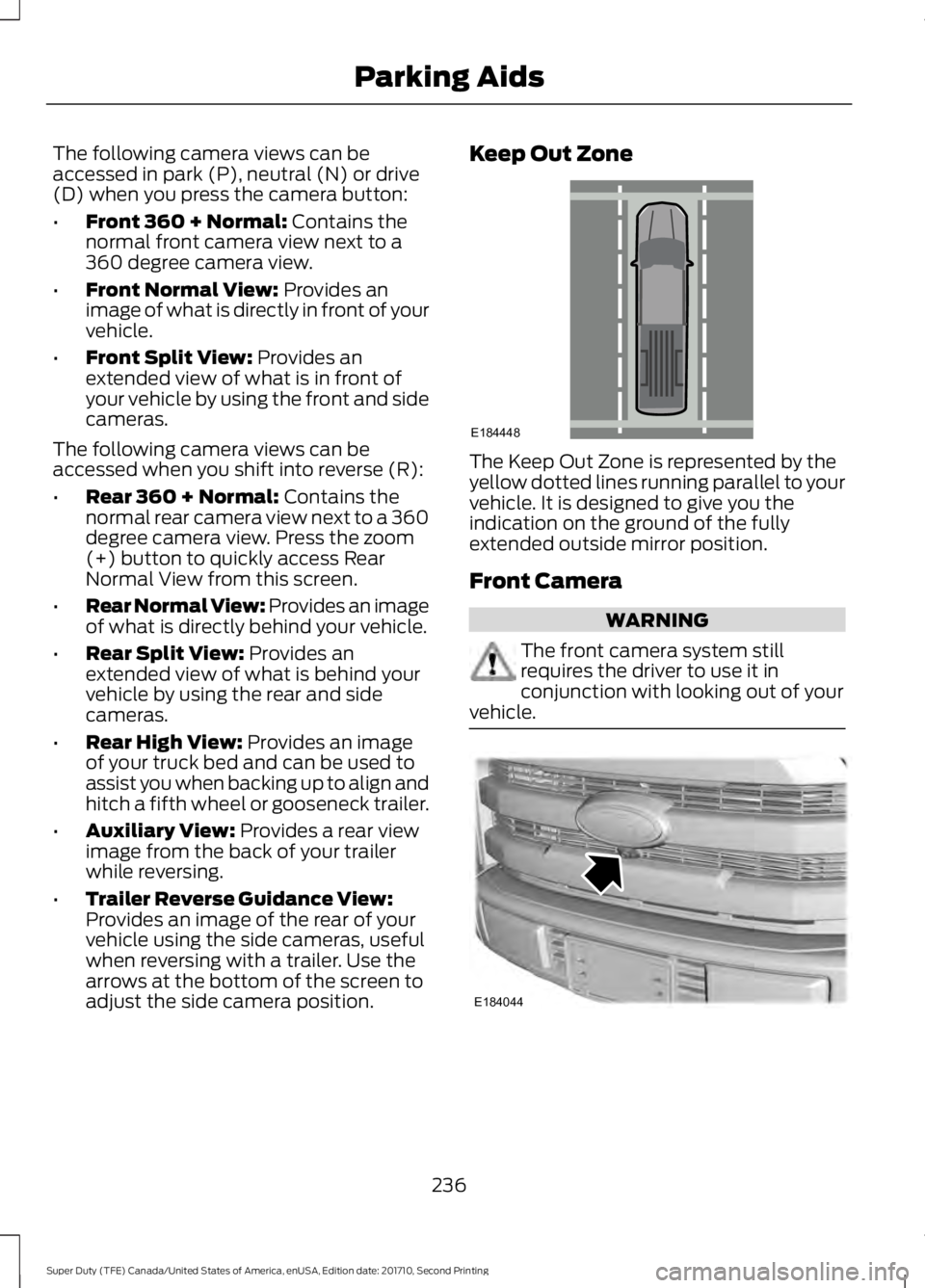
Keep Out Zone
The Keep Out Zone is represented by theyellow dotted lines running parallel to yourvehicle. It is designed to give you theindication on the ground of the fullyextended outside mirror position.
Front Camera
WARNING
The front camera system stillrequires the driver to use it inconjunction with looking out of yourvehicle.
236
Super Duty (TFE) Canada/United States of America, enUSA, Edition date: 201710, Second Printing
Parking AidsE184448 E184044
Page 240 of 642
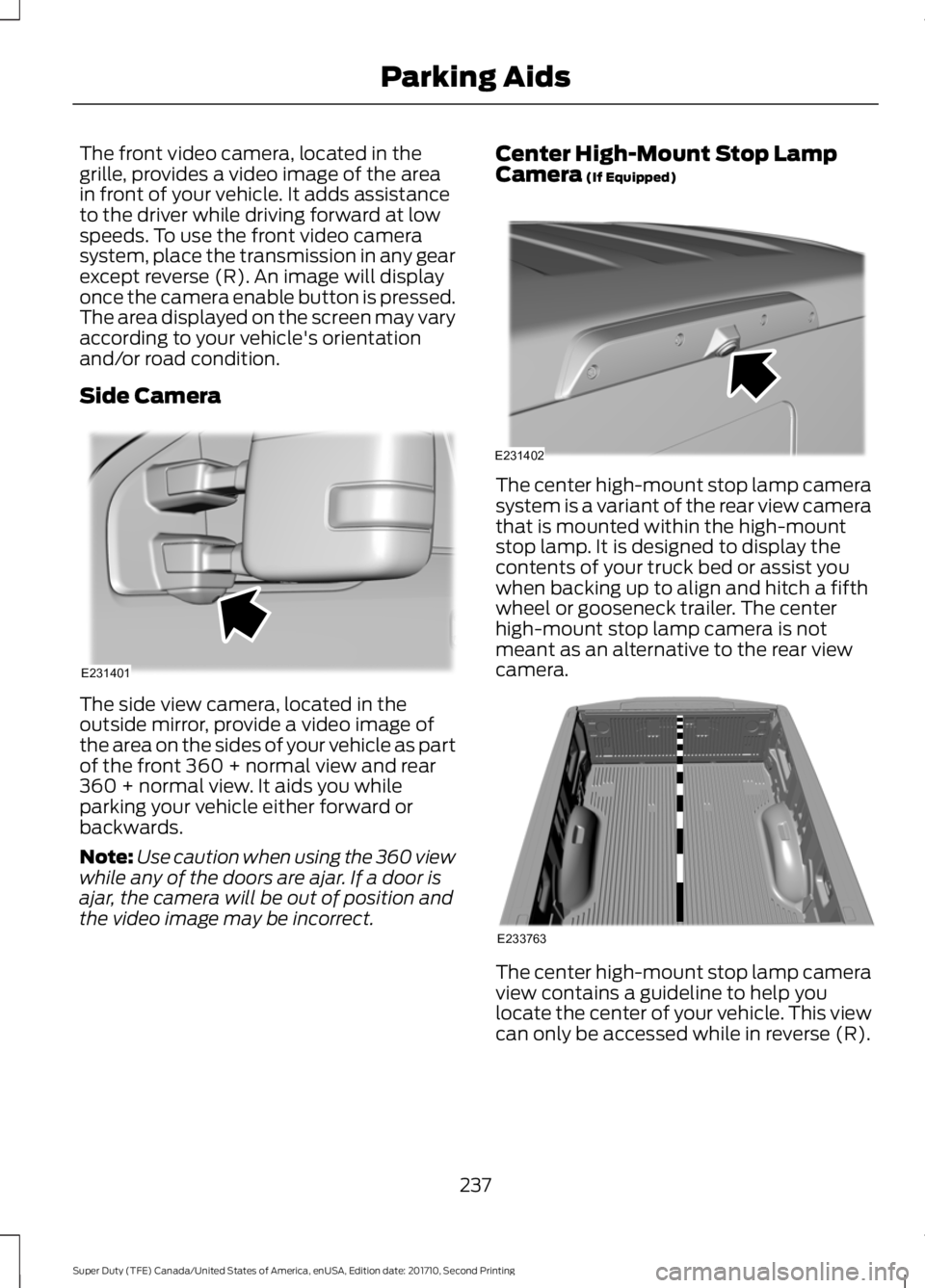
The front video camera, located in thegrille, provides a video image of the areain front of your vehicle. It adds assistanceto the driver while driving forward at lowspeeds. To use the front video camerasystem, place the transmission in any gearexcept reverse (R). An image will displayonce the camera enable button is pressed.The area displayed on the screen may varyaccording to your vehicle's orientationand/or road condition.
Side Camera
The side view camera, located in theoutside mirror, provide a video image ofthe area on the sides of your vehicle as partof the front 360 + normal view and rear360 + normal view. It aids you whileparking your vehicle either forward orbackwards.
Note:Use caution when using the 360 viewwhile any of the doors are ajar. If a door isajar, the camera will be out of position andthe video image may be incorrect.
Center High-Mount Stop LampCamera (If Equipped)
The center high-mount stop lamp camerasystem is a variant of the rear view camerathat is mounted within the high-mountstop lamp. It is designed to display thecontents of your truck bed or assist youwhen backing up to align and hitch a fifthwheel or gooseneck trailer. The centerhigh-mount stop lamp camera is notmeant as an alternative to the rear viewcamera.
The center high-mount stop lamp cameraview contains a guideline to help youlocate the center of your vehicle. This viewcan only be accessed while in reverse (R).
237
Super Duty (TFE) Canada/United States of America, enUSA, Edition date: 201710, Second Printing
Parking AidsE231401 E231402 E233763
Page 250 of 642
LANE KEEPING SYSTEM (If
Equipped)
WARNING
The system is designed to aid thedriver. It is not intended to replaceyour attention and judgment. You arestill responsible to drive with due care andattention.
Note:The system works as long as thecamera can detect one lane marking at aspeed above 40 mph (64 km/h).
Note:The system may not function if thecamera is blocked or there is damage to thewindshield.
The Lane Keeping System automaticallydetects and tracks the road lane markingsusing a camera mounted behind theinterior review view mirror. The systemnotifies you to stay in your lane when thefront camera detects an unintentional lanechange is likely to occur.
Switching the System On and Off
Note:The system on or off setting is storeduntil it is manually changed, unless a MyKeyis detected. If the system detects a MyKey,it defaults to on and the mode is set to alert.
Note:If a MyKey is detected, pressing thebutton will not affect the on or off status ofthe system. You can only change the modeand intensity settings.
Press the button located on thecenter console to switch thesystem on or off.
System Settings
The system sensitivity and intensity canbe adjusted through the display screen.See General Information (page 111). Thesystem remembers the last selection. Youdo not need to readjust the setting eachtime you turn on your vehicle.
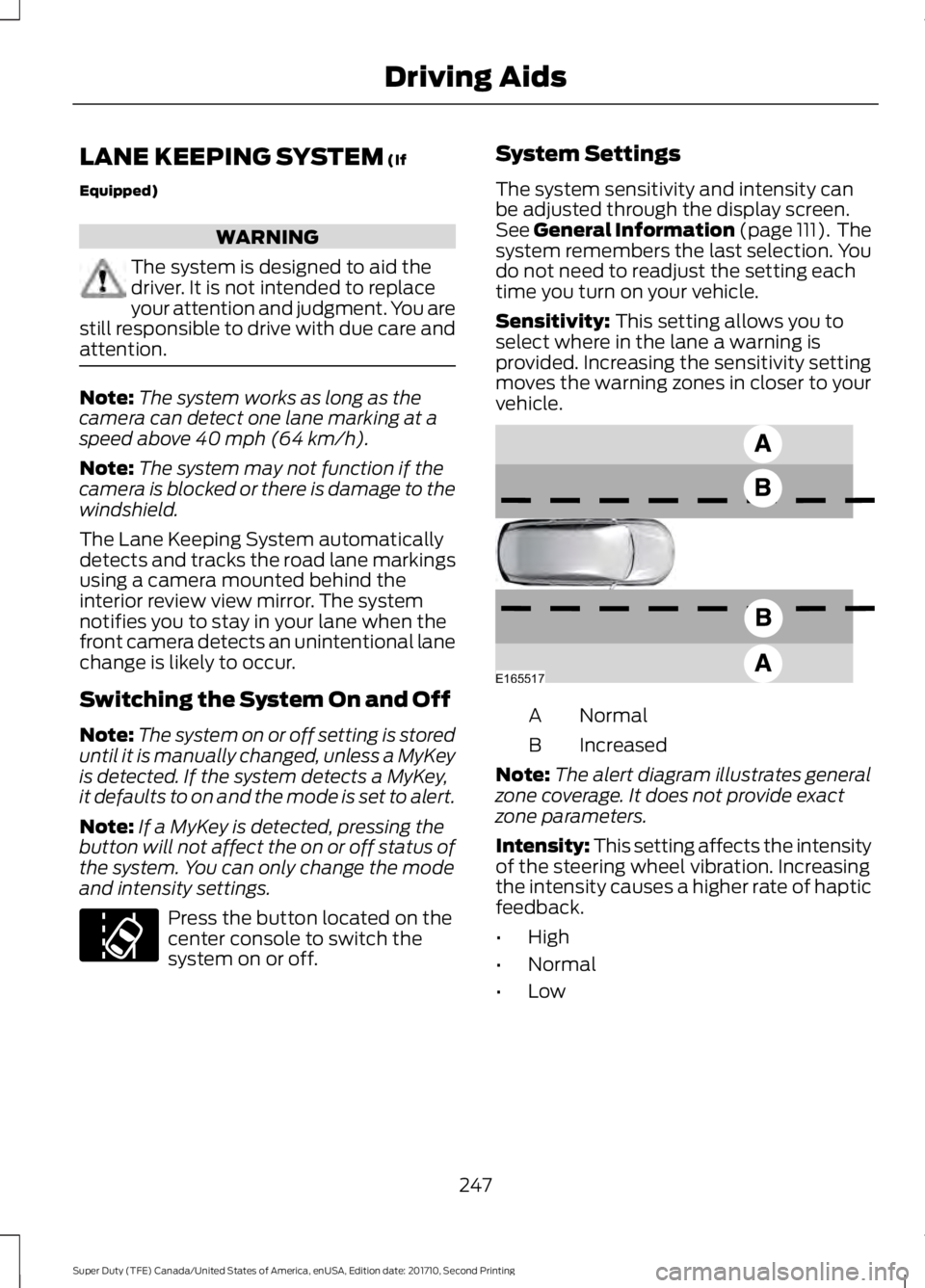
Sensitivity: This setting allows you toselect where in the lane a warning isprovided. Increasing the sensitivity settingmoves the warning zones in closer to yourvehicle.
NormalA
IncreasedB
Note:The alert diagram illustrates generalzone coverage. It does not provide exactzone parameters.
Intensity: This setting affects the intensityof the steering wheel vibration. Increasingthe intensity causes a higher rate of hapticfeedback.
•High
•Normal
•Low
247
Super Duty (TFE) Canada/United States of America, enUSA, Edition date: 201710, Second Printing
Driving AidsE173233 E165517
Page 252 of 642
Why is the feature not available (line markings are gray) when I can see the lane markingson the road?
Previous feature activation happened within the last one second
Ambiguous lane markings (mainly in construction zones)
Rapid transition from light to dark or vice versa
Sudden offset in lane markings
ABS or AdvanceTrac activation
Camera blockage due to dirt, grime, fog, frost or water on the windshield
Driving too close to the vehicle in front of you
Transitioning between no lane markings to lane markings or vice versa
Standing water on the road
Faint lane markings (partial yellow lane markings on concrete roads)
Lane width too narrow or too wide
Camera not calibrated after a windshield replacement
Driving on tight roads or on uneven roads
Vehicle accessories such as snow plows
BLIND SPOT INFORMATION
SYSTEM (If Equipped)
WARNING
Never use the Blind SpotInformation System as areplacement for using the interiorand exterior mirrors or looking over yourshoulder before changing lanes. The BlindSpot Information System is not areplacement for careful driving.
Note:The Blind Spot Information Systemdoes not prevent contact with other vehiclesor objects; nor detect parked vehicles,people, animals or infrastructure (fences,guardrails, trees). It is only designed to alertyou to moving vehicles in the blind spotzones.
Note:When a vehicle passes quicklythrough the blind spot zone, typically fewerthan two seconds, the system does nottrigger.
249
Super Duty (TFE) Canada/United States of America, enUSA, Edition date: 201710, Second Printing
Driving Aids
Page 253 of 642
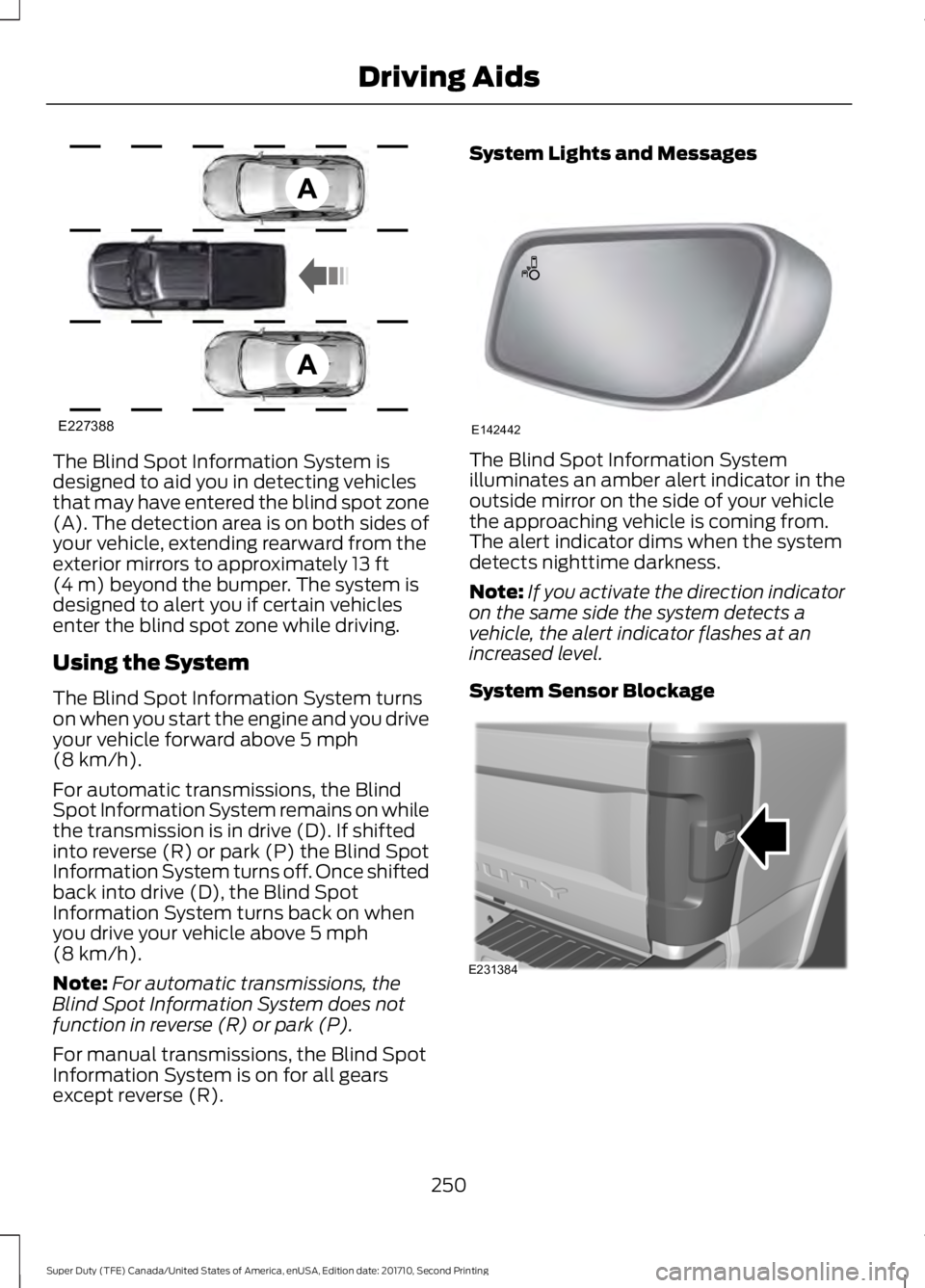
The Blind Spot Information System isdesigned to aid you in detecting vehiclesthat may have entered the blind spot zone(A). The detection area is on both sides ofyour vehicle, extending rearward from theexterior mirrors to approximately 13 ft(4 m) beyond the bumper. The system isdesigned to alert you if certain vehiclesenter the blind spot zone while driving.
Using the System
The Blind Spot Information System turnson when you start the engine and you driveyour vehicle forward above 5 mph(8 km/h).
For automatic transmissions, the BlindSpot Information System remains on whilethe transmission is in drive (D). If shiftedinto reverse (R) or park (P) the Blind SpotInformation System turns off. Once shiftedback into drive (D), the Blind SpotInformation System turns back on whenyou drive your vehicle above 5 mph(8 km/h).
Note:For automatic transmissions, theBlind Spot Information System does notfunction in reverse (R) or park (P).
For manual transmissions, the Blind SpotInformation System is on for all gearsexcept reverse (R).
System Lights and Messages
The Blind Spot Information Systemilluminates an amber alert indicator in theoutside mirror on the side of your vehiclethe approaching vehicle is coming from.The alert indicator dims when the systemdetects nighttime darkness.
Note:If you activate the direction indicatoron the same side the system detects avehicle, the alert indicator flashes at anincreased level.
System Sensor Blockage
250
Super Duty (TFE) Canada/United States of America, enUSA, Edition date: 201710, Second Printing
Driving AidsE227388 E142442 E231384
Page 254 of 642
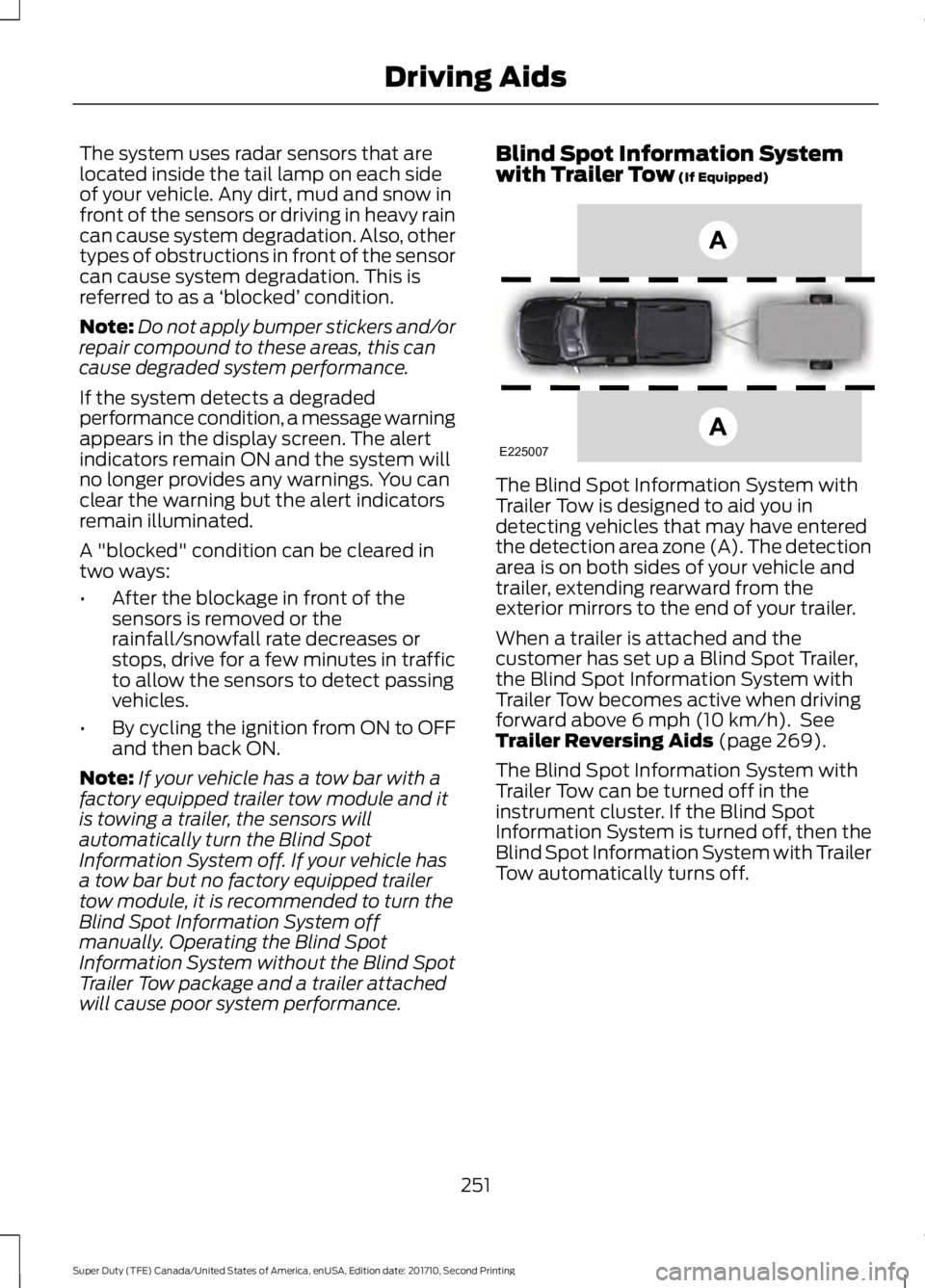
The system uses radar sensors that arelocated inside the tail lamp on each sideof your vehicle. Any dirt, mud and snow infront of the sensors or driving in heavy raincan cause system degradation. Also, othertypes of obstructions in front of the sensorcan cause system degradation. This isreferred to as a ‘blocked’ condition.
Note:Do not apply bumper stickers and/orrepair compound to these areas, this cancause degraded system performance.
If the system detects a degradedperformance condition, a message warningappears in the display screen. The alertindicators remain ON and the system willno longer provides any warnings. You canclear the warning but the alert indicatorsremain illuminated.
A "blocked" condition can be cleared intwo ways:
•After the blockage in front of thesensors is removed or therainfall/snowfall rate decreases orstops, drive for a few minutes in trafficto allow the sensors to detect passingvehicles.
•By cycling the ignition from ON to OFFand then back ON.
Note:If your vehicle has a tow bar with afactory equipped trailer tow module and itis towing a trailer, the sensors willautomatically turn the Blind SpotInformation System off. If your vehicle hasa tow bar but no factory equipped trailertow module, it is recommended to turn theBlind Spot Information System offmanually. Operating the Blind SpotInformation System without the Blind SpotTrailer Tow package and a trailer attachedwill cause poor system performance.
Blind Spot Information Systemwith Trailer Tow (If Equipped)
The Blind Spot Information System withTrailer Tow is designed to aid you indetecting vehicles that may have enteredthe detection area zone (A). The detectionarea is on both sides of your vehicle andtrailer, extending rearward from theexterior mirrors to the end of your trailer.
When a trailer is attached and thecustomer has set up a Blind Spot Trailer,the Blind Spot Information System withTrailer Tow becomes active when drivingforward above 6 mph (10 km/h). SeeTrailer Reversing Aids (page 269).
The Blind Spot Information System withTrailer Tow can be turned off in theinstrument cluster. If the Blind SpotInformation System is turned off, then theBlind Spot Information System with TrailerTow automatically turns off.
251
Super Duty (TFE) Canada/United States of America, enUSA, Edition date: 201710, Second Printing
Driving AidsE225007
Page 257 of 642
CROSS TRAFFIC ALERT (If
Equipped)
WARNING
Never use the Cross Traffic Alertsystem as a replacement for usingthe interior and exterior mirrors andlooking over your shoulder before backingout of a parking space. Cross Traffic Alertis not a replacement for careful driving.
Note:When a trailer is detected, CrossTraffic Alert automatically turns off.
Cross Traffic Alert is designed to warn youof vehicles approaching from the sideswhen the transmission is in reverse (R).
Using the System
Cross Traffic Alert turns on when you startthe engine and you shift into reverse (R).Once shifted out of reverse (R), CrossTraffic Alert turns off.
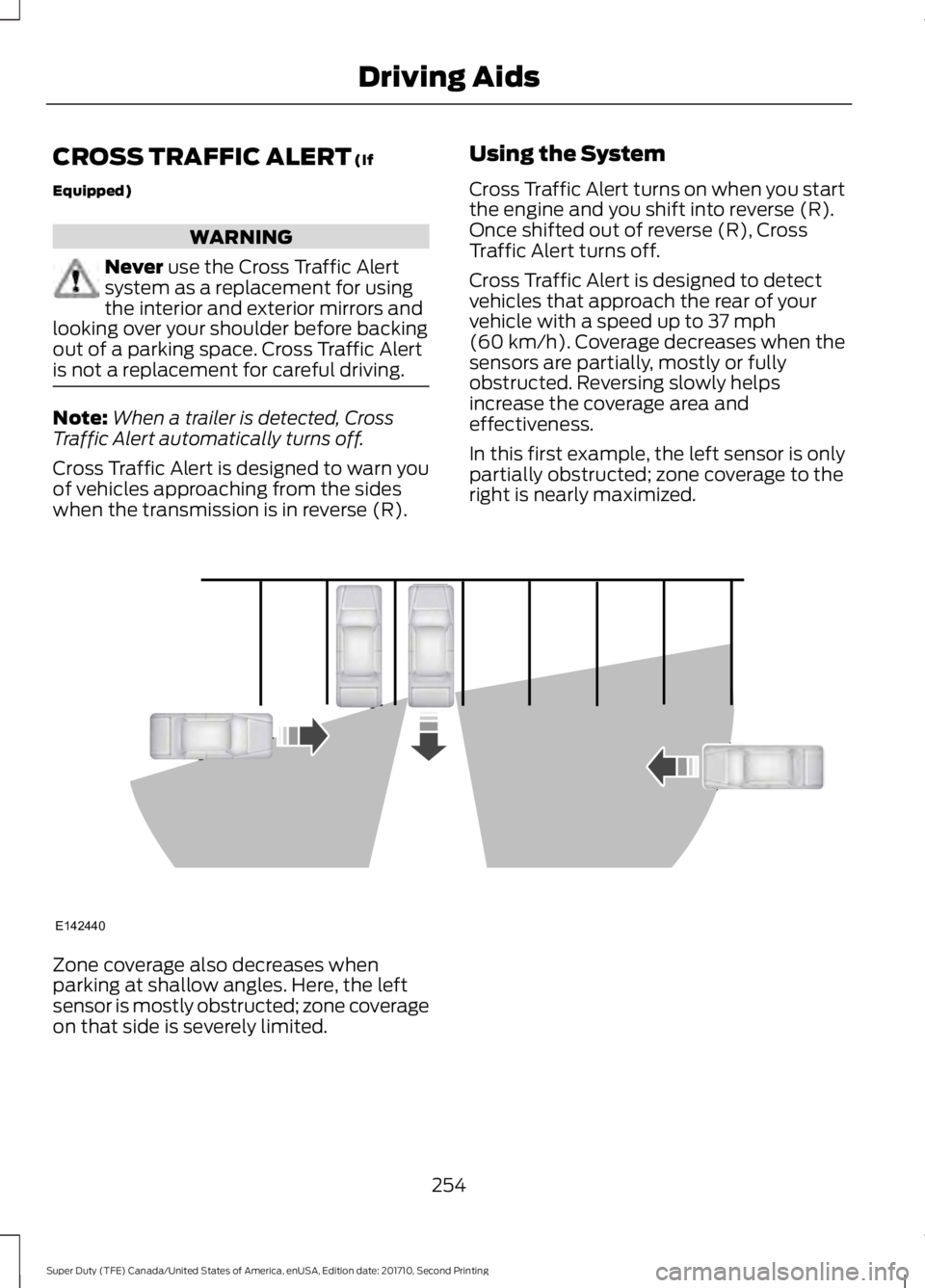
Cross Traffic Alert is designed to detectvehicles that approach the rear of yourvehicle with a speed up to 37 mph(60 km/h). Coverage decreases when thesensors are partially, mostly or fullyobstructed. Reversing slowly helpsincrease the coverage area andeffectiveness.
In this first example, the left sensor is onlypartially obstructed; zone coverage to theright is nearly maximized.
Zone coverage also decreases whenparking at shallow angles. Here, the leftsensor is mostly obstructed; zone coverageon that side is severely limited.
254
Super Duty (TFE) Canada/United States of America, enUSA, Edition date: 201710, Second Printing
Driving AidsE142440
Page 258 of 642
System Lights, Messages andAudible Alerts
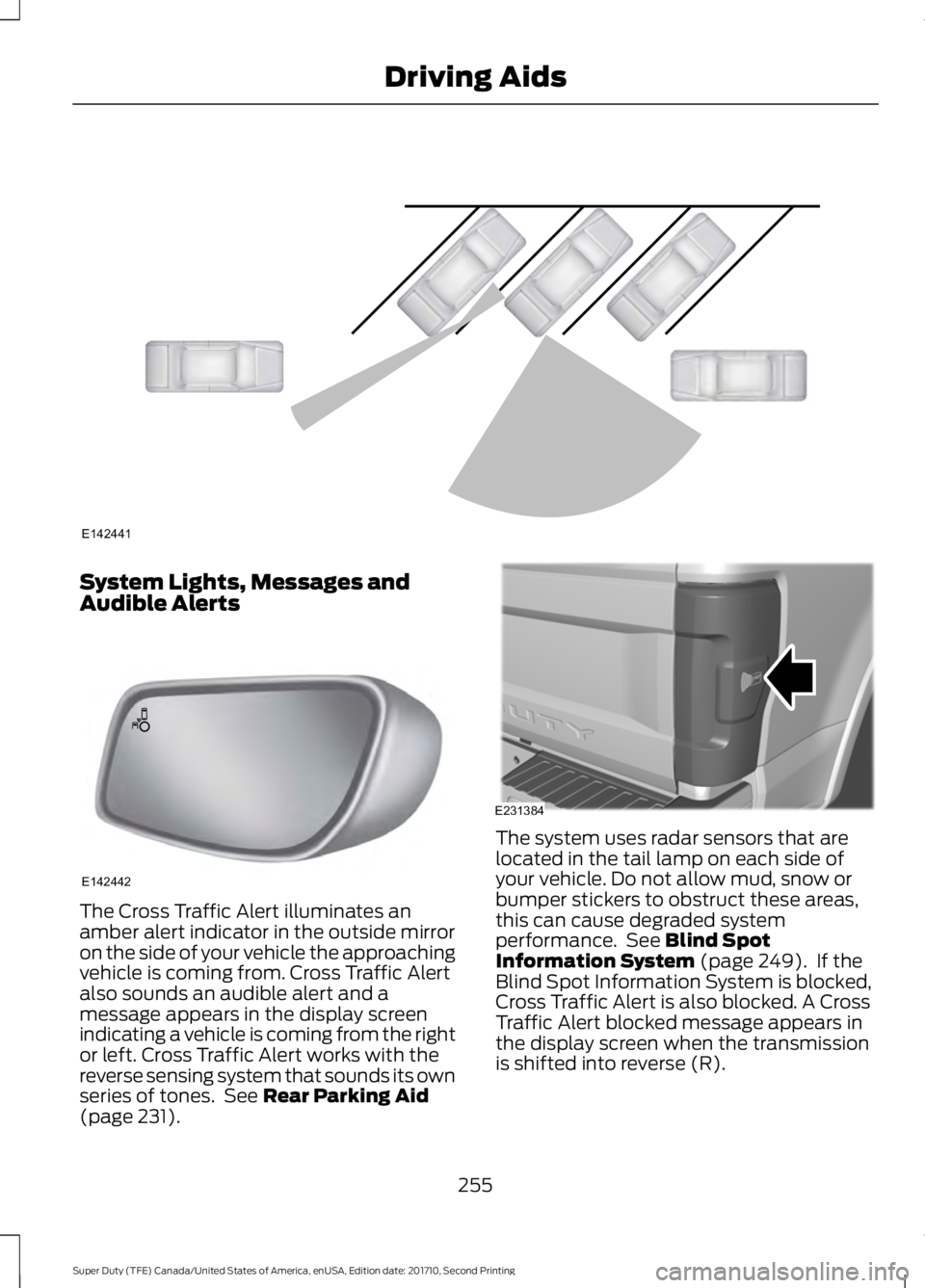
The Cross Traffic Alert illuminates anamber alert indicator in the outside mirroron the side of your vehicle the approachingvehicle is coming from. Cross Traffic Alertalso sounds an audible alert and amessage appears in the display screenindicating a vehicle is coming from the rightor left. Cross Traffic Alert works with thereverse sensing system that sounds its ownseries of tones. See Rear Parking Aid(page 231).
The system uses radar sensors that arelocated in the tail lamp on each side ofyour vehicle. Do not allow mud, snow orbumper stickers to obstruct these areas,this can cause degraded systemperformance. See Blind SpotInformation System (page 249). If theBlind Spot Information System is blocked,Cross Traffic Alert is also blocked. A CrossTraffic Alert blocked message appears inthe display screen when the transmissionis shifted into reverse (R).
255
Super Duty (TFE) Canada/United States of America, enUSA, Edition date: 201710, Second Printing
Driving AidsE142441 E142442 E231384
Page 286 of 642
The active guidelines fade in and outdepending on the steering wheel position.The active guidelines are not shown whenthe steering wheel position is straight.
Always use caution while reversing.Objects in the red zone are closest to yourvehicle and objects in the green zone arefarther away. Objects are getting closer toyour vehicle as they move from the greenzone to the yellow or red zones. Use theside view mirrors and rear view mirror toget better coverage on both sides and rearof your vehicle.
Refer to the Rear View Camera section foradditional information. See Rear ViewCamera (page 232).
Hitches
Note:On pick-up trucks, the trailer hitchprovided on this vehicle enhances crashprotection for the fuel system. Do notremove!
Note:Do not cut, drill, weld or modify trailerhitches. Modifying trailer hitches can reducehitch rating.
Do not use a hitch that either clamps ontothe bumper or attaches to the axle. Youmust distribute the load in your trailer sothat 10-15% for conventional towing or15-25% for fifth wheel towing of the totalweight of the trailer is on the tongue.
Hitch components (If Equipped)
The following components will be includedin certain vehicles.
•A 5/8 inch hitch pin rated to tow up to21,000 lbs.
•A 3 inch drawbar.
•A hitch pin sleeve to be used whenmounting the 3 inch drawbar.
•A clevis pin to help keep the hitch pinin place.
Weight-distributing Hitches
WARNING
Do not adjust the spring bars so thatyour vehicle's rear bumper is higherthan before attaching the trailer.Doing so will defeat the function of theweight-distributing hitch, which may causeunpredictable handling, and could resultin serious personal injury.
When hooking-up a trailer using aweight-distributing hitch, always use thefollowing procedure:
1. Park the loaded vehicle, without thetrailer, on a level surface.
2. Measure the height to the top of yourvehicle's front wheel opening on thefender. This is H1.
3.Attach the loaded trailer to your vehiclewithout the weight-distributing barsconnected.
4. Measure the height to the top of yourvehicle's front wheel opening on thefender a second time. This is H2.
5. Install and adjust the tension in theweight-distributing bars so that theheight of your vehicle's front wheelopening on the fender is approximatelyhalfway between H1 and H2.
6.Check that the trailer is level or slightlynose down toward your vehicle. If not,adjust the ball height accordingly andrepeat Steps 2-6.
283
Super Duty (TFE) Canada/United States of America, enUSA, Edition date: 201710, Second Printing
Towing
Page 316 of 642
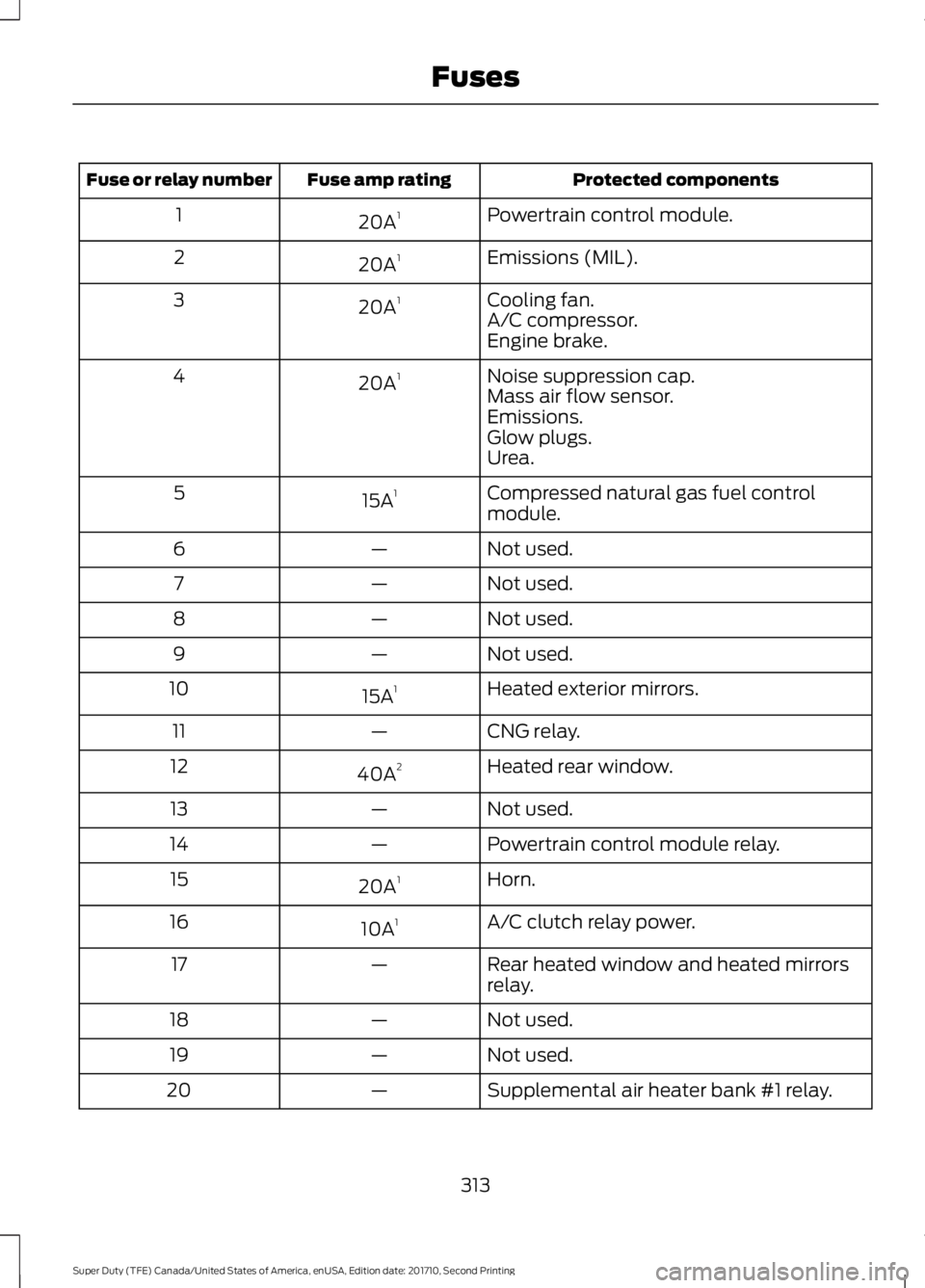
Protected componentsFuse amp ratingFuse or relay number
Powertrain control module.20A11
Emissions (MIL).20A12
Cooling fan.20A13A/C compressor.Engine brake.
Noise suppression cap.20A14Mass air flow sensor.Emissions.Glow plugs.Urea.
Compressed natural gas fuel controlmodule.15A15
Not used.—6
Not used.—7
Not used.—8
Not used.—9
Heated exterior mirrors.15A110
CNG relay.—11
Heated rear window.40A212
Not used.—13
Powertrain control module relay.—14
Horn.20A115
A/C clutch relay power.10A116
Rear heated window and heated mirrorsrelay.—17
Not used.—18
Not used.—19
Supplemental air heater bank #1 relay.—20
313
Super Duty (TFE) Canada/United States of America, enUSA, Edition date: 201710, Second Printing
Fuses