clock FORD FIESTA 2013 User Guide
[x] Cancel search | Manufacturer: FORD, Model Year: 2013, Model line: FIESTA, Model: FORD FIESTA 2013Pages: 346, PDF Size: 5.27 MB
Page 217 of 346
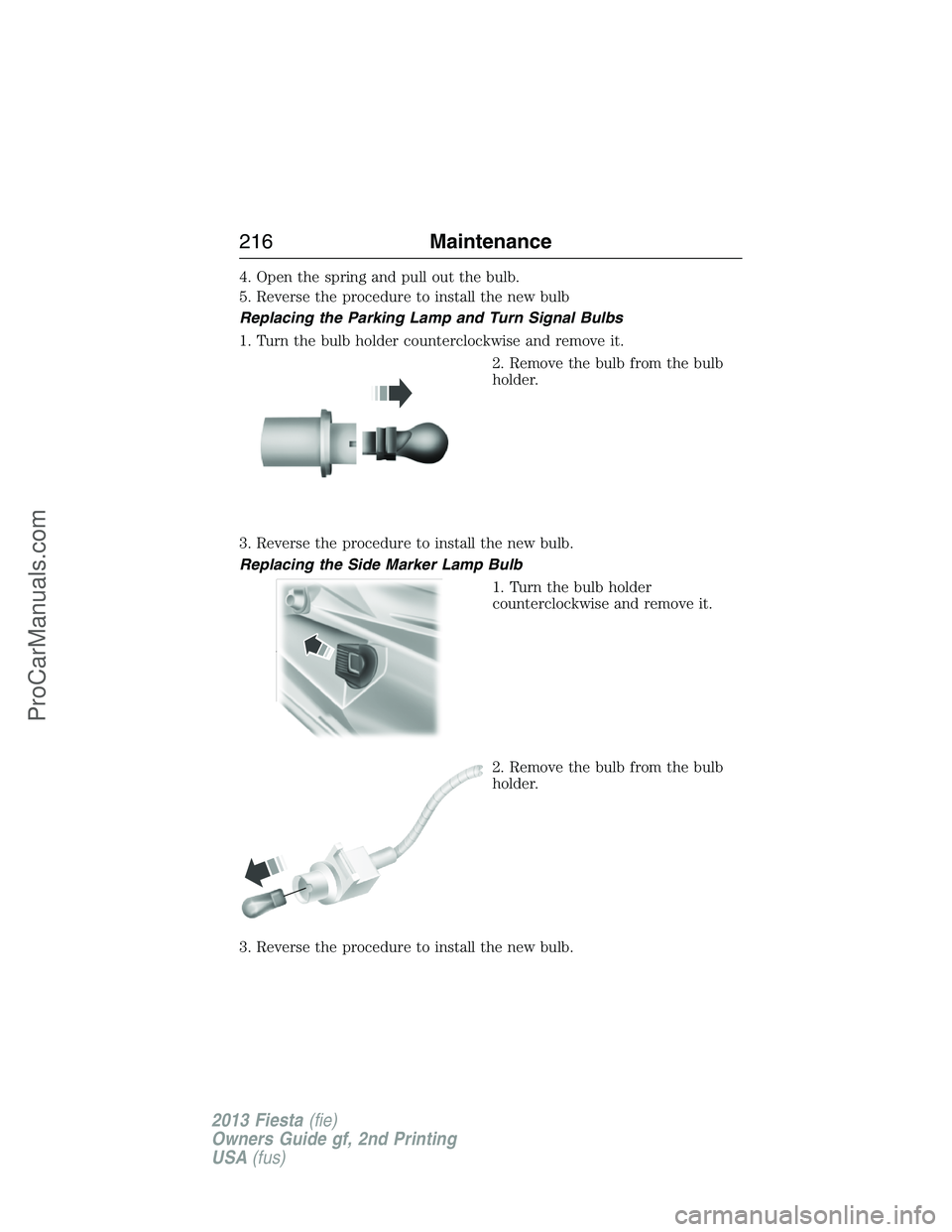
4. Open the spring and pull out the bulb.
5. Reverse the procedure to install the new bulb
Replacing the Parking Lamp and Turn Signal Bulbs
1. Turn the bulb holder counterclockwise and remove it.
2. Remove the bulb from the bulb
holder.
3. Reverse the procedure to install the new bulb.
Replacing the Side Marker Lamp Bulb
1. Turn the bulb holder
counterclockwise and remove it.
2. Remove the bulb from the bulb
holder.
3. Reverse the procedure to install the new bulb.
216Maintenance
2013 Fiesta(fie)
Owners Guide gf, 2nd Printing
USA(fus)
ProCarManuals.com
Page 218 of 346
Replacing the Signal Indicator Mirror Bulbs (If Equipped)
For bulb replacement, see your authorized dealer.
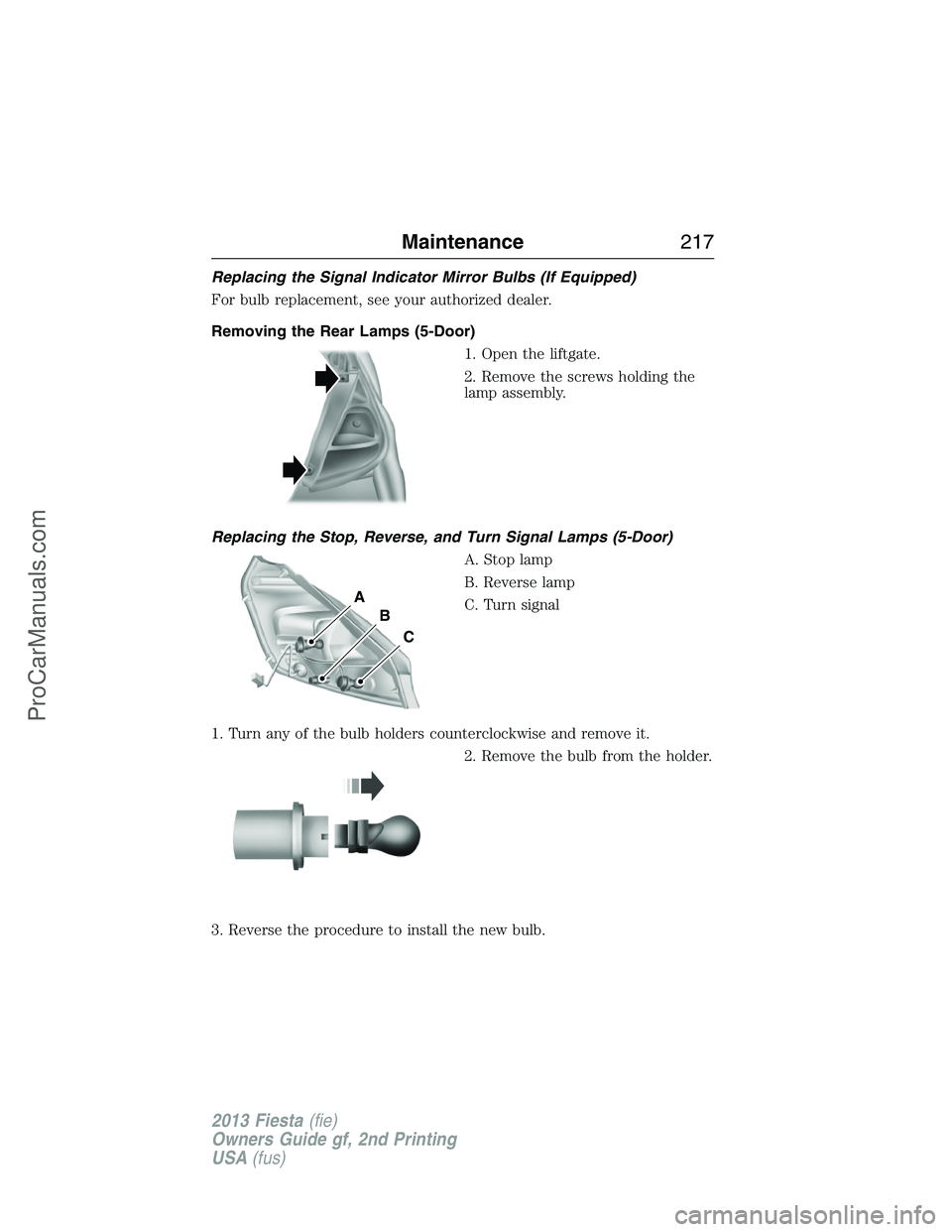
Removing the Rear Lamps (5-Door)
1. Open the liftgate.
2. Remove the screws holding the
lamp assembly.
Replacing the Stop, Reverse, and Turn Signal Lamps (5-Door)
A. Stop lamp
B. Reverse lamp
C. Turn signal
1. Turn any of the bulb holders counterclockwise and remove it.
2. Remove the bulb from the holder.
3. Reverse the procedure to install the new bulb.
A
B
C
Maintenance217
2013 Fiesta(fie)
Owners Guide gf, 2nd Printing
USA(fus)
ProCarManuals.com
Page 219 of 346
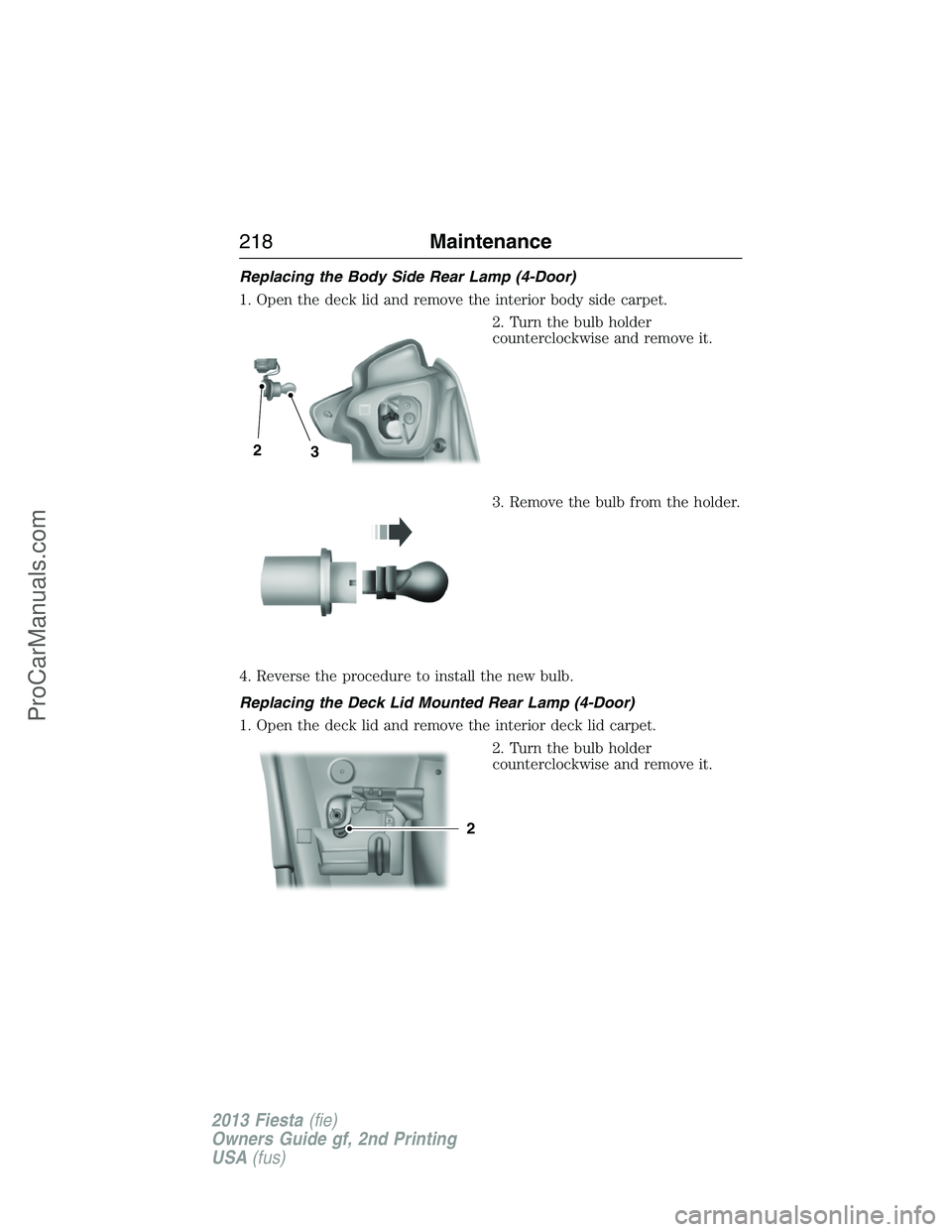
Replacing the Body Side Rear Lamp (4-Door)
1. Open the deck lid and remove the interior body side carpet.
2. Turn the bulb holder
counterclockwise and remove it.
3. Remove the bulb from the holder.
4. Reverse the procedure to install the new bulb.
Replacing the Deck Lid Mounted Rear Lamp (4-Door)
1. Open the deck lid and remove the interior deck lid carpet.
2. Turn the bulb holder
counterclockwise and remove it.
32
2
218Maintenance
2013 Fiesta(fie)
Owners Guide gf, 2nd Printing
USA(fus)
ProCarManuals.com
Page 221 of 346
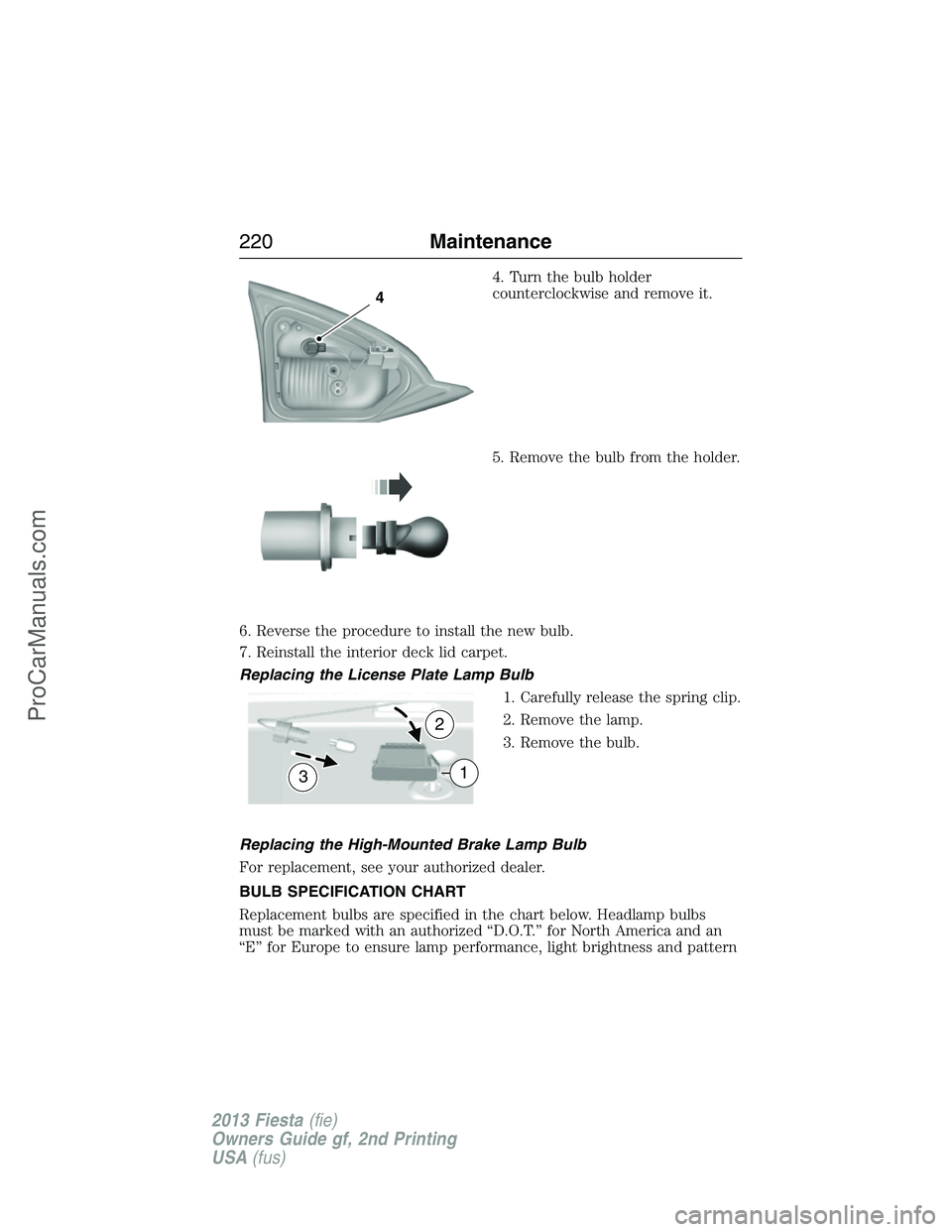
4. Turn the bulb holder
counterclockwise and remove it.
5. Remove the bulb from the holder.
6. Reverse the procedure to install the new bulb.
7. Reinstall the interior deck lid carpet.
Replacing the License Plate Lamp Bulb
1. Carefully release the spring clip.
2. Remove the lamp.
3. Remove the bulb.
Replacing the High-Mounted Brake Lamp Bulb
For replacement, see your authorized dealer.
BULB SPECIFICATION CHART
Replacement bulbs are specified in the chart below. Headlamp bulbs
must be marked with an authorized “D.O.T.” for North America and an
“E” for Europe to ensure lamp performance, light brightness and pattern
4
3
2
1
220Maintenance
2013 Fiesta(fie)
Owners Guide gf, 2nd Printing
USA(fus)
ProCarManuals.com
Page 256 of 346
WARNING:Always use the jack provided as original equipment
with your vehicle. If using a jack other than the one provided as
original equipment with your vehicle, make sure the jack capacity is
adequate for the vehicle weight, including any vehicle cargo or
modifications.
Note:Passengers should not remain in the vehicle when the vehicle is
being jacked.
1. Park on a level surface, set the parking brake and activate the hazard
flashers.
2. Place the transmission selector lever in positionPorRand turn the
engine off.
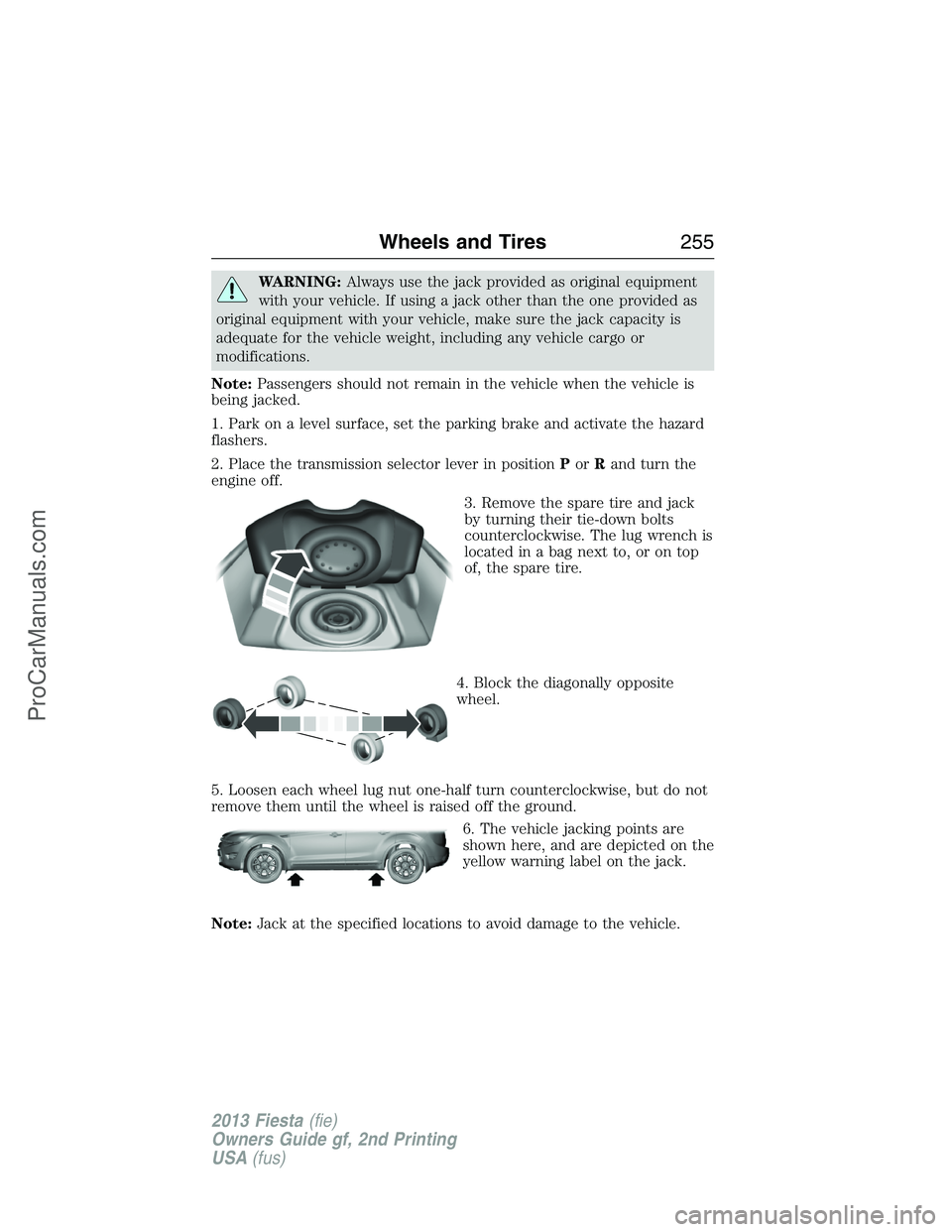
3. Remove the spare tire and jack
by turning their tie-down bolts
counterclockwise. The lug wrench is
located in a bag next to, or on top
of, the spare tire.
4. Block the diagonally opposite
wheel.
5. Loosen each wheel lug nut one-half turn counterclockwise, but do not
remove them until the wheel is raised off the ground.
6. The vehicle jacking points are
shown here, and are depicted on the
yellow warning label on the jack.
Note:Jack at the specified locations to avoid damage to the vehicle.
Wheels and Tires255
2013 Fiesta(fie)
Owners Guide gf, 2nd Printing
USA(fus)
ProCarManuals.com
Page 257 of 346
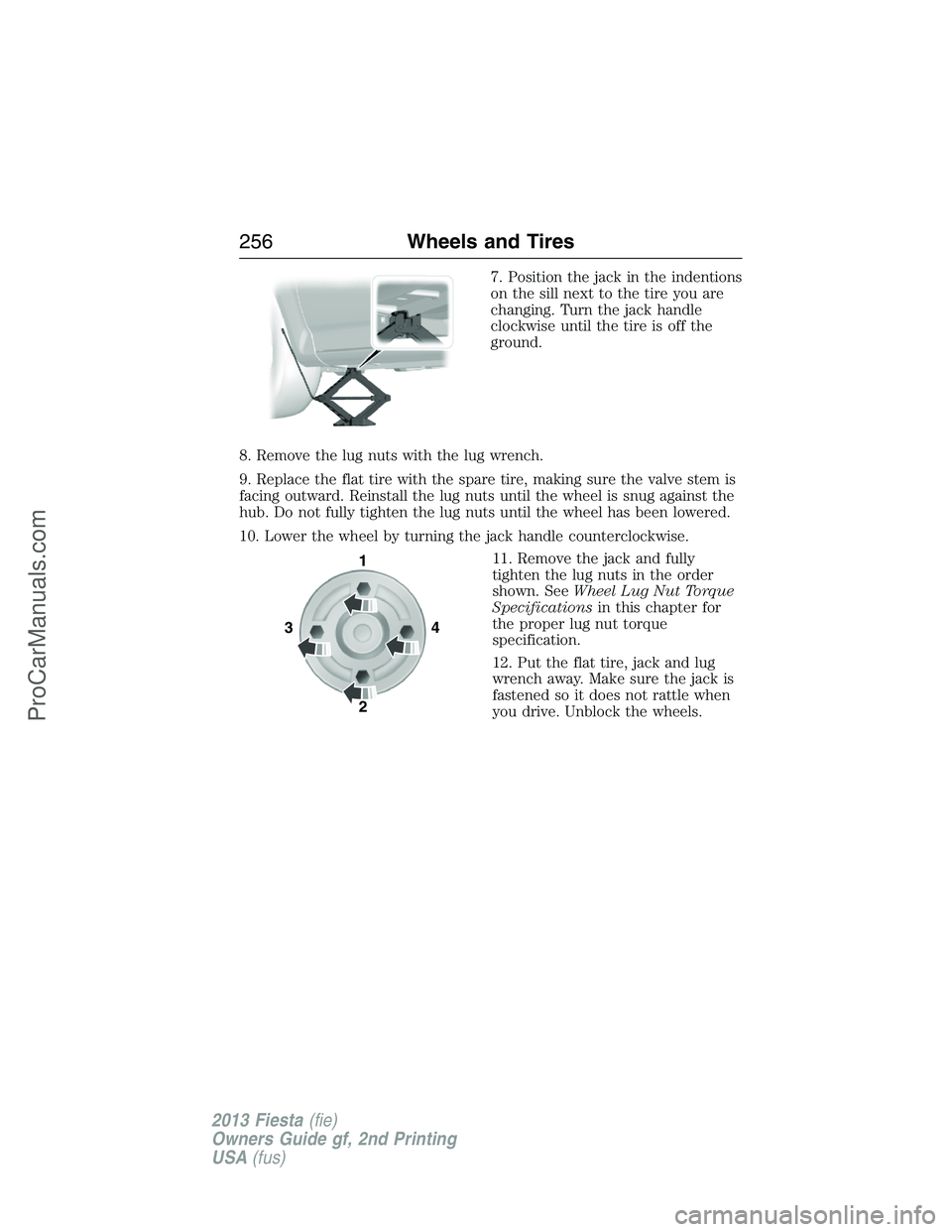
7. Position the jack in the indentions
on the sill next to the tire you are
changing. Turn the jack handle
clockwise until the tire is off the
ground.
8. Remove the lug nuts with the lug wrench.
9. Replace the flat tire with the spare tire, making sure the valve stem is
facing outward. Reinstall the lug nuts until the wheel is snug against the
hub. Do not fully tighten the lug nuts until the wheel has been lowered.
10. Lower the wheel by turning the jack handle counterclockwise.
11. Remove the jack and fully
tighten the lug nuts in the order
shown. SeeWheel Lug Nut Torque
Specificationsin this chapter for
the proper lug nut torque
specification.
12. Put the flat tire, jack and lug
wrench away. Make sure the jack is
fastened so it does not rattle when
you drive. Unblock the wheels.
341
2
256Wheels and Tires
2013 Fiesta(fie)
Owners Guide gf, 2nd Printing
USA(fus)
ProCarManuals.com
Page 342 of 346
CD player ..................................100
Cell phone use ............................15
Changing a tire .........................252
Child safety restraints ................27
Child safety seats
attaching with tether straps ....29
automatic locking mode
(retractor) .................................36
LATCH .......................................27
Child safety seats - booster
seats .............................................21
Cleaning your vehicle ...............222
engine compartment ..............224
instrument panel ....................226
interior .....................................225
plastic parts ............................223
washing ....................................222
waxing .....................................224
wheels ......................................227
wiper blades ............................225
Climate control (see Air
conditioning or Heating) ..........114
Clock ............................95, 102, 104
Clutch
fluid ..........................................206
fluid reservoir .........................202
operation while driving ..........151
recommended shift speeds ....151
Console ......................................129
Coolant ......................................203
checking and adding ..............203
recovery reservoir ..................202
refill capacities ........................259
specifications ..........................259
Customer Assistance ................178
Ford Extended
Service Plan ....................266, 268
Getting roadside assistance ...178Getting the service
you need .................................183
Ordering additional owner’s
literature .................................189
Utilizing the
Mediation/Arbitration
Program ...................................187
D
Defrost .......................................114
rear window ............................117
Dipstick
automatic transmission
fluid ..........................................205
engine oil .................................202
Doors
central unlocking ................62, 65
Driving under special
conditions ..................................150
through water .........................175
E
Electronic message center .........94
Electronic stability control ......159
Emergencies, roadside
jump-starting ..........................180
running out of fuel .................138
Emission control system ..........142
End user license agreement ....332
Engine ........................................258
cleaning ...................................224
coolant .....................................203
idle speed control ...................207
lubrication specifications .......259
refill capacities ........................259
service points ..........................202
Engine block heater .................134
Index341
2013 Fiesta(fie)
Owners Guide gf, 2nd Printing
USA(fus)
ProCarManuals.com
Page 345 of 346
Receiving a text message .........297
Recommendations for
attaching safety restraints for
children ........................................23
Relays ................................191–192
Remote entry system
illuminated entry ......................67
locking/unlocking doors ...........63
opening the trunk .....................64
replacing the batteries .......58–59
Roadside assistance ..................178
S
Safety Belt Maintenance ............41
Safety belts (see Safety
restraints) ..............................35, 38
Safety defects,
reporting ............................189–190
Safety information ....................286
Safety restraints ..............35–36, 38
Belt-Minder® ............................38
extension assembly ..................37
for adults .............................35–36
for children .........................18, 23
safety belt maintenance ...........41
seat belt maintenance ..............41
warning light and chime ..........38
Safety restraints - LATCH
anchors ........................................27
Safety seats for children ......18, 23
Safety Compliance
Certification Label ....................262
Satellite Radio ...........................104
Scheduled Maintenance Guide
Normal Scheduled
Maintenance and Log .............274Seat belts
(see Safety restraints) ...............35
Seats ..........................................126
child safety seats ................18, 23
front seats ...............................122
heated ......................................126
second row seats ....................126
SecuriLock passive anti-theft
system ..........................................70
Selecting your media source
(USB, Line in, BT audio) .........317
Setting the clock .........95, 102, 104
Side air curtain ...........................52
Side-curtain airbags system .......52
SIRIUS® satellite radio ............104
SOS Post Crash Alert .................44
Spark plugs,
specifications .....................258, 261
Specification chart,
lubricants ...................................259
Stability system .........................159
Starting your vehicle ................133
jump starting ..........................180
push button start system .......131
Steering wheel ............................73
controls ......................................74
tilting .........................................73
Supplemental Restraint System
(SRS) (see airbags) ....................44
SYNC® AppLink™ ...................312
SYNC® customer support ........286
SYNC® Services ........................309
344Index
2013 Fiesta(fie)
Owners Guide gf, 2nd Printing
USA(fus)
ProCarManuals.com