ignition FORD FIESTA 2013 Workshop Manual
[x] Cancel search | Manufacturer: FORD, Model Year: 2013, Model line: FIESTA, Model: FORD FIESTA 2013Pages: 346, PDF Size: 5.27 MB
Page 197 of 346
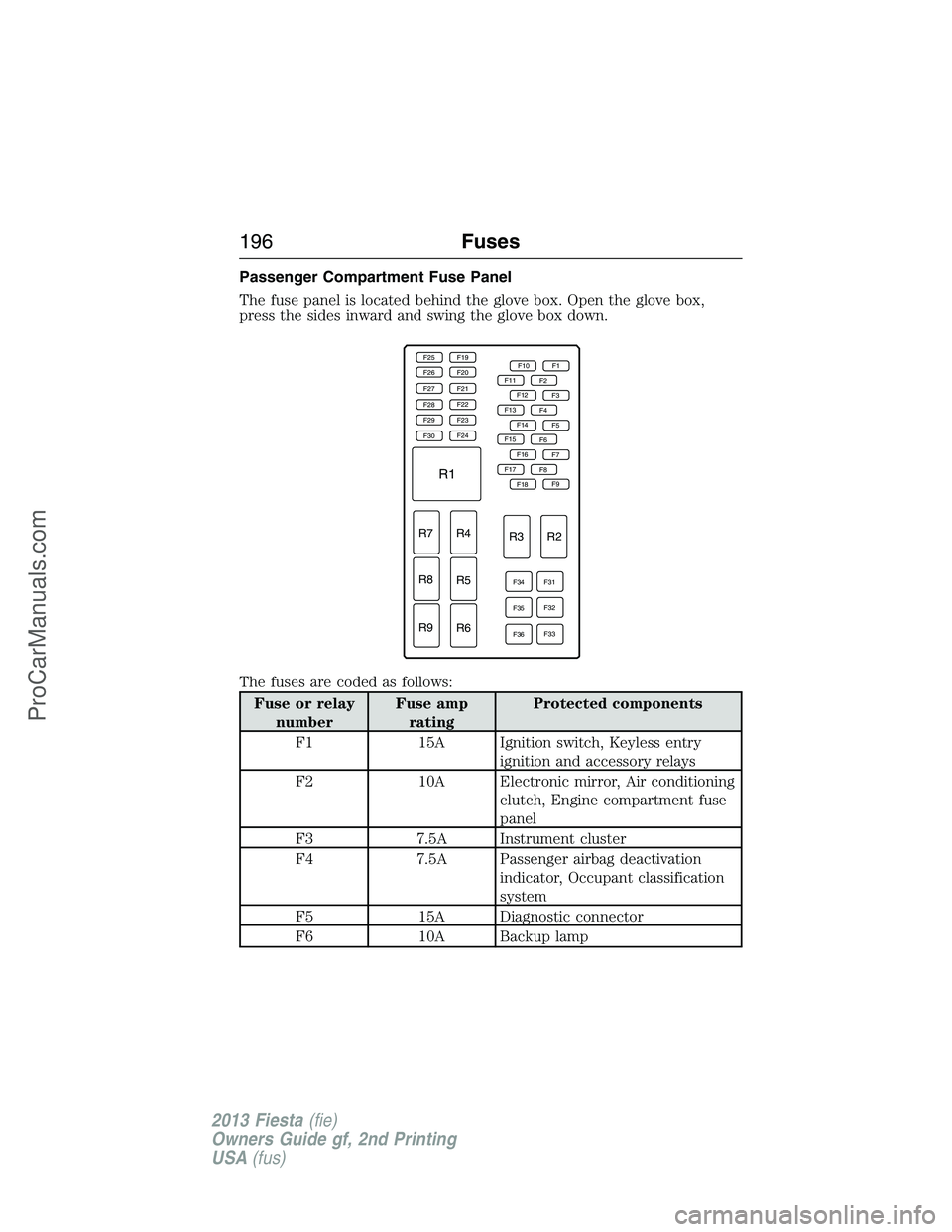
Passenger Compartment Fuse Panel
The fuse panel is located behind the glove box. Open the glove box,
press the sides inward and swing the glove box down.
The fuses are coded as follows:
Fuse or relay
numberFuse amp
ratingProtected components
F1 15A Ignition switch, Keyless entry
ignition and accessory relays
F2 10A Electronic mirror, Air conditioning
clutch, Engine compartment fuse
panel
F3 7.5A Instrument cluster
F4 7.5A Passenger airbag deactivation
indicator, Occupant classification
system
F5 15A Diagnostic connector
F6 10A Backup lamp
F25 F19
F10 F1
F11
F13
F15
F17F2
F4
F6
F8 F12
F14
F16
F18
F34
F35
F36F31
F32
F33F3
F5
F7
F9 F20
F21
F22
F23
F24 F26
F27
F28
F29
F30
R1
R7 R4
R3 R2
R5
R6 R8
R9
196Fuses
2013 Fiesta(fie)
Owners Guide gf, 2nd Printing
USA(fus)
ProCarManuals.com
Page 198 of 346
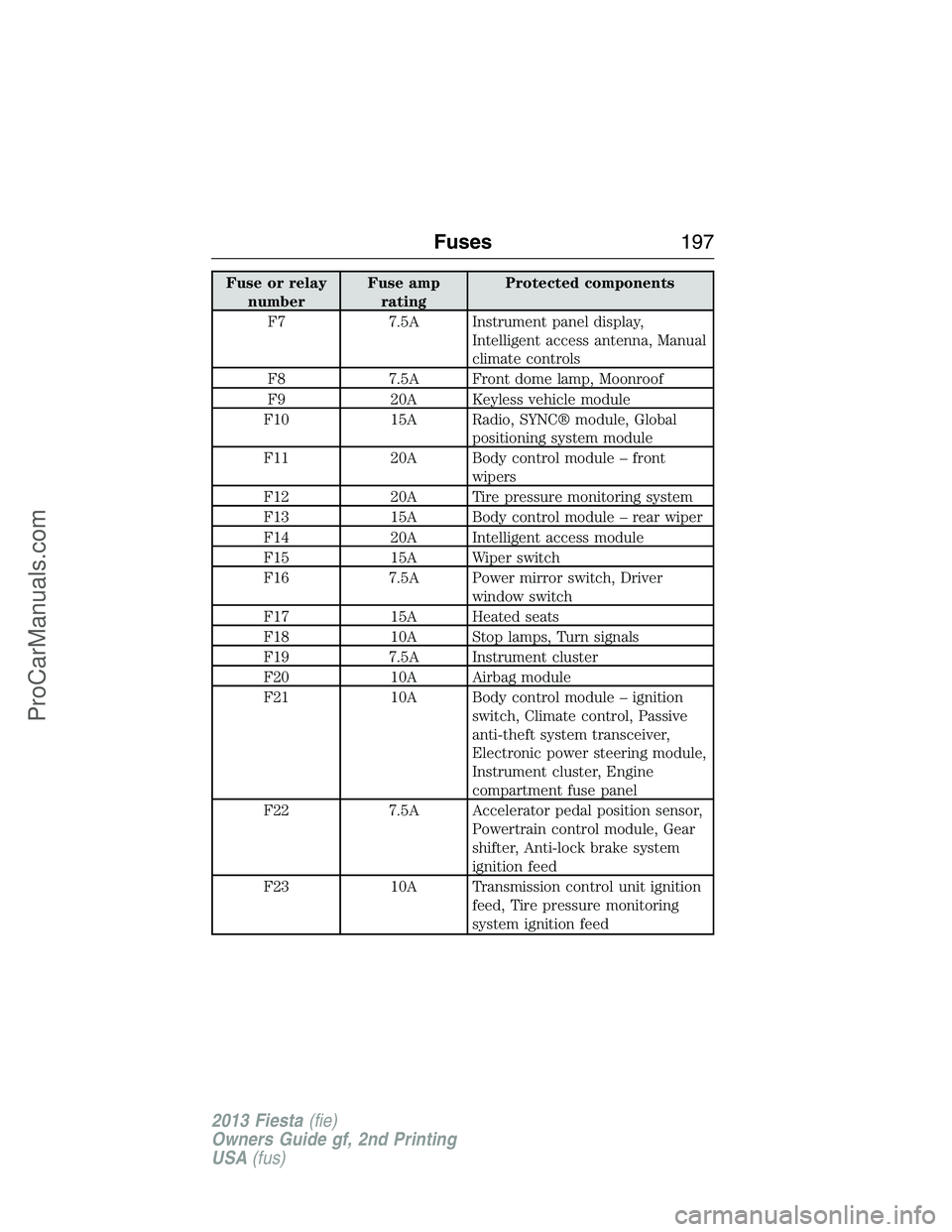
Fuse or relay
numberFuse amp
ratingProtected components
F7 7.5A Instrument panel display,
Intelligent access antenna, Manual
climate controls
F8 7.5A Front dome lamp, Moonroof
F9 20A Keyless vehicle module
F10 15A Radio, SYNC® module, Global
positioning system module
F11 20A Body control module – front
wipers
F12 20A Tire pressure monitoring system
F13 15A Body control module – rear wiper
F14 20A Intelligent access module
F15 15A Wiper switch
F16 7.5A Power mirror switch, Driver
window switch
F17 15A Heated seats
F18 10A Stop lamps, Turn signals
F19 7.5A Instrument cluster
F20 10A Airbag module
F21 10A Body control module – ignition
switch, Climate control, Passive
anti-theft system transceiver,
Electronic power steering module,
Instrument cluster, Engine
compartment fuse panel
F22 7.5A Accelerator pedal position sensor,
Powertrain control module, Gear
shifter, Anti-lock brake system
ignition feed
F23 10A Transmission control unit ignition
feed, Tire pressure monitoring
system ignition feed
Fuses197
2013 Fiesta(fie)
Owners Guide gf, 2nd Printing
USA(fus)
ProCarManuals.com
Page 199 of 346
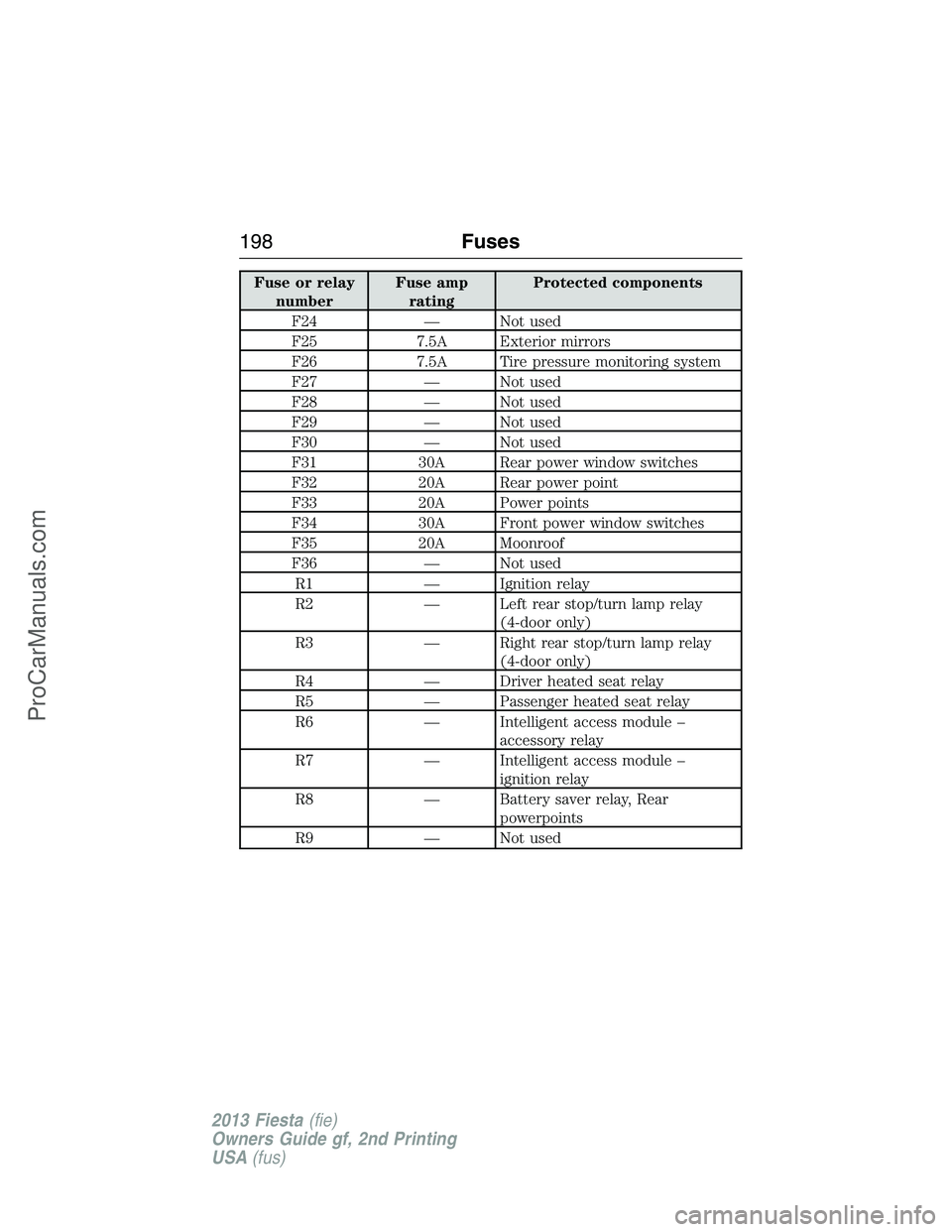
Fuse or relay
numberFuse amp
ratingProtected components
F24 — Not used
F25 7.5A Exterior mirrors
F26 7.5A Tire pressure monitoring system
F27 — Not used
F28 — Not used
F29 — Not used
F30 — Not used
F31 30A Rear power window switches
F32 20A Rear power point
F33 20A Power points
F34 30A Front power window switches
F35 20A Moonroof
F36 — Not used
R1 — Ignition relay
R2 — Left rear stop/turn lamp relay
(4-door only)
R3 — Right rear stop/turn lamp relay
(4-door only)
R4 — Driver heated seat relay
R5 — Passenger heated seat relay
R6 — Intelligent access module –
accessory relay
R7 — Intelligent access module –
ignition relay
R8 — Battery saver relay, Rear
powerpoints
R9 — Not used
198Fuses
2013 Fiesta(fie)
Owners Guide gf, 2nd Printing
USA(fus)
ProCarManuals.com
Page 225 of 346
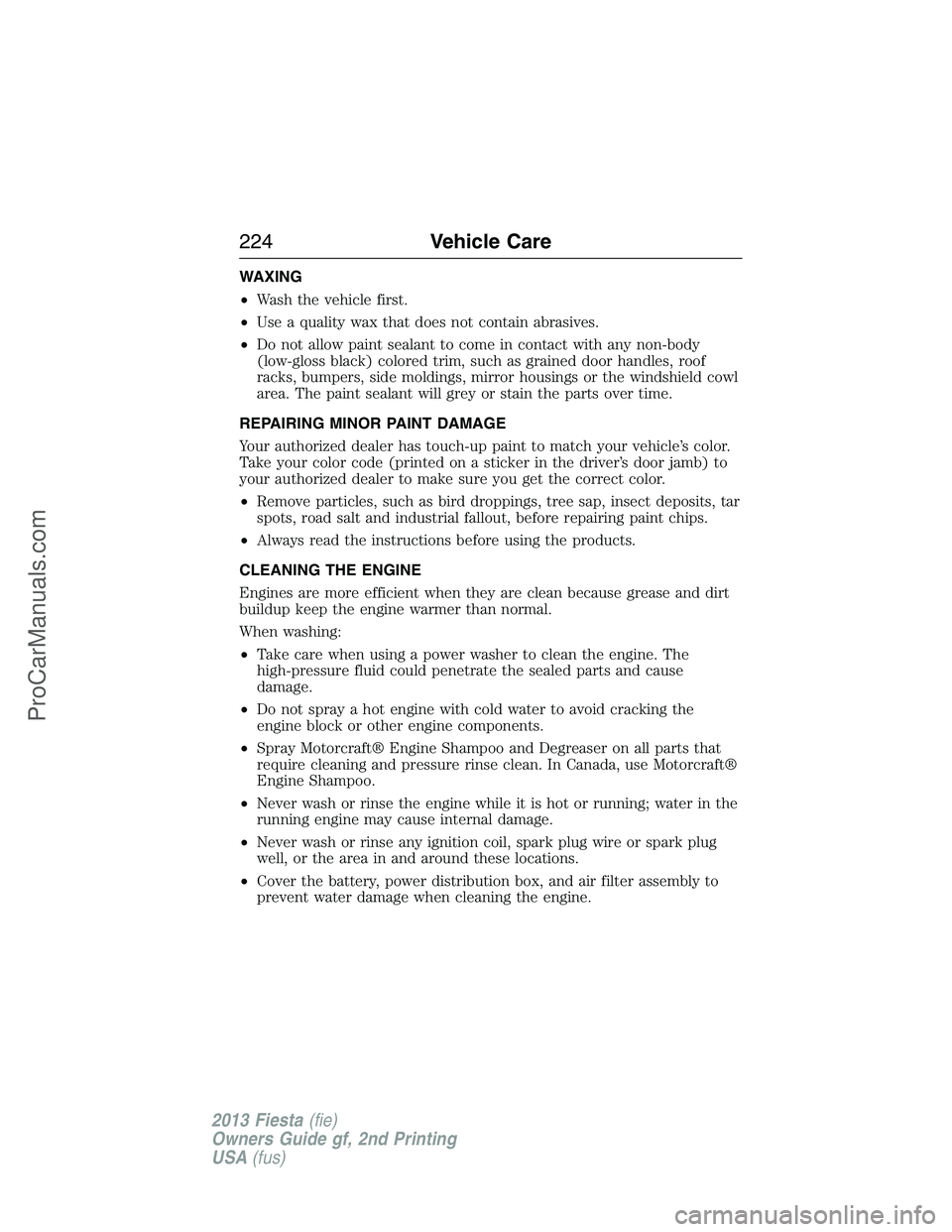
WAXING
•Wash the vehicle first.
•Use a quality wax that does not contain abrasives.
•Do not allow paint sealant to come in contact with any non-body
(low-gloss black) colored trim, such as grained door handles, roof
racks, bumpers, side moldings, mirror housings or the windshield cowl
area. The paint sealant will grey or stain the parts over time.
REPAIRING MINOR PAINT DAMAGE
Your authorized dealer has touch-up paint to match your vehicle’s color.
Take your color code (printed on a sticker in the driver’s door jamb) to
your authorized dealer to make sure you get the correct color.
•Remove particles, such as bird droppings, tree sap, insect deposits, tar
spots, road salt and industrial fallout, before repairing paint chips.
•Always read the instructions before using the products.
CLEANING THE ENGINE
Engines are more efficient when they are clean because grease and dirt
buildup keep the engine warmer than normal.
When washing:
•Take care when using a power washer to clean the engine. The
high-pressure fluid could penetrate the sealed parts and cause
damage.
•Do not spray a hot engine with cold water to avoid cracking the
engine block or other engine components.
•Spray Motorcraft® Engine Shampoo and Degreaser on all parts that
require cleaning and pressure rinse clean. In Canada, use Motorcraft®
Engine Shampoo.
•Never wash or rinse the engine while it is hot or running; water in the
running engine may cause internal damage.
•Never wash or rinse any ignition coil, spark plug wire or spark plug
well, or the area in and around these locations.
•Cover the battery, power distribution box, and air filter assembly to
prevent water damage when cleaning the engine.
224Vehicle Care
2013 Fiesta(fie)
Owners Guide gf, 2nd Printing
USA(fus)
ProCarManuals.com
Page 259 of 346
ENGINE SPECIFICATIONS
Engine 1.6L engine
Cubic inches 97
Required fuel Minimum 87 octane
Firing order 1–3–4–2
Ignition system Distributorless Ignition System
(D.I.S.)
Compression ratio 11:1
Spark plug gap 0.028 - 0.031 inch
(0.70 - 0.80 mm)
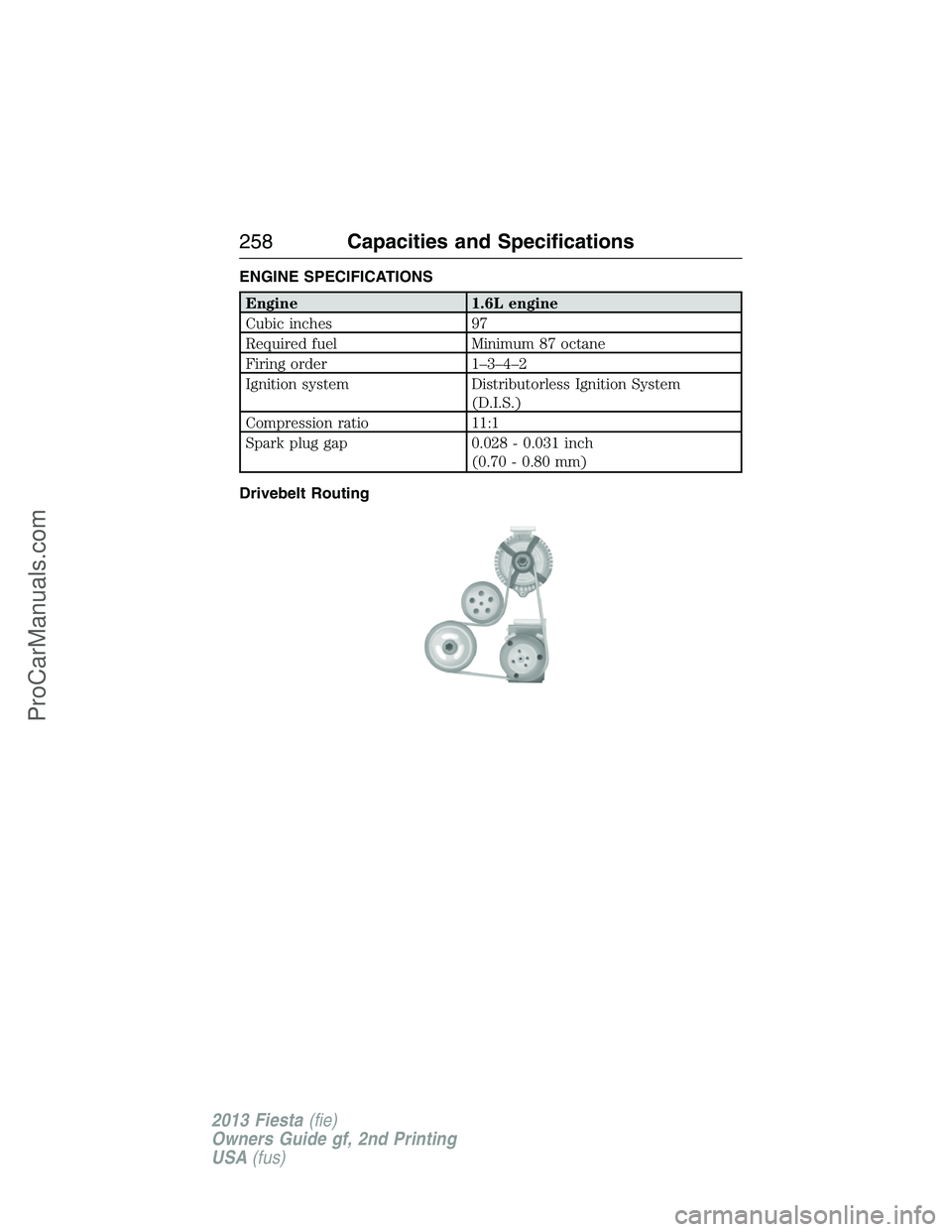
Drivebelt Routing
258Capacities and Specifications
2013 Fiesta(fie)
Owners Guide gf, 2nd Printing
USA(fus)
ProCarManuals.com
Page 291 of 346
•Speak naturally, without long pauses between words.
•At any time you can interrupt the system while it is speaking by
pressing the voice icon.
USING SYNC WITH YOUR PHONE
Hands-free calling is one of the main features of SYNC. While the system
supports a variety of features, many are dependent on your cellular
phone’s functionality. At a minimum, most cellular phones with Bluetooth
wireless technology support the following functions:
•Answering an incoming call.
•Ending a call.
•Using privacy mode.
•Dialing a number.
•Redialing.
•Call waiting notification.
•Caller ID.
Other features, such as text messaging using Bluetooth and automatic
phonebook download, are phone-dependent features. To check your
phone’s compatibility, see your phone’s user manual and visit
www.SYNCMyRide.com, www.SYNCMyRide.ca or www.syncmaroute.ca.
Pairing a Phone for the First Time
Note:SYNC can support downloading up to approximately 2000 entries
per Bluetooth-enabled cellular phone.
Note:Make sure the vehicle ignition and radio are turned on and the
transmission is in positionP.
Note:To scroll through the menus, press the up and down arrows on
your audio system.
Wirelessly pairing your phone with SYNC allows you to make and receive
hands-free calls.
1. Press the phone button; when the display indicates no phone is
paired, press OK.
2. When Add Bluetooth Device appears, press OK.
3. When Find SYNC appears in the display, press OK.
4. Put your phone into Bluetooth discovery mode. See your phone’s
user guide if necessary.
5. When prompted on your phone’s display, enter the six-digit PIN
provided by SYNC in the radio display.
290SYNC®
2013 Fiesta(fie)
Owners Guide gf, 2nd Printing
USA(fus)
ProCarManuals.com
Page 292 of 346
6. The display indicates when the pairing is successful.
7. Depending on your phone’s capability and your market, the system
may prompt you with questions such as setting the current phone as
the primary phone (the phone SYNC automatically tries to connect
with first upon vehicle start-up), downloading your phone book, etc.
Pairing Subsequent Phones
Note:To scroll through the menus, press the up and down arrows on
your audio system.
Note:Make sure the vehicle ignition and radio are turned on and that
the transmission is in positionP.
1. Press the phone button and scroll until System Settings is selected.
2. Press OK and scroll until Bluetooth Devices is selected and press OK.
3. Scroll until Add Bluetooth Device is selected and press OK.
4. When Find SYNC appears in the display, press OK.
5. Put your phone into Bluetooth discovery mode. See your phone’s
user guide if necessary.
6. When prompted on your phone’s display, enter the six-digit PIN
provided by SYNC in the radio display. The display indicates when
the pairing is successful.
7. The system then prompts with questions such as if you would like to
set the current phone as the primary phone (the phone SYNC
automatically tries to connect with first upon vehicle start-up),
download your phone book, etc.
Phone Voice Commands
Press the voice icon and say “Phone”. Say any of the following:
“PHONE”
“Call
“Call
“Call
“Phone book
“Phone book
“Call history outgoing”2
“Phone book
“Call history missed”2
“Menu”2,3
SYNC®291
2013 Fiesta(fie)
Owners Guide gf, 2nd Printing
USA(fus)
ProCarManuals.com
Page 299 of 346
display indicates your messages are being downloaded. When complete,
SYNC takes you to your inbox.
Delete All Messages?allows you to delete current text messages from
SYNC (not your phone). To delete the messages, press OK to select. The
display indicates when all your text messages have been deleted and
SYNC returns you to the text message menu.
Note:SYNC does not automatically download all of your unread text
messages at every ignition cycle (as it does with call history and
phonebook if automatic download is set to on).
Returnexits the current menu when you press OK.
If you selectSend Text Message?:
1. Press OK to select. If the system detects your phone does not
support this feature, Unsupported appears in the display and SYNC
returns to the main menu.
2. Scroll to cycle through the message options in the following chart.
3. Press OK when the desired selection is in the display. The system
now needs to know who to send the message to.
4. Scroll to cycle through Phonebook or Call History entries. You can
also select Enter Number to audibly enter a desired number.
5. Press OK to enter the desired menu and scroll to select the specific
contact.
6. Press OK when the contact appears and press OK again to confirm
when the system asks if you would like to send the message. Each
text message is sent with the following signature: “This message was
sent from my
Pre-defined text message options
Can’t talk right now
Call me
Call you later
Be there in 10 minutes
Be there in 20 minutes
Ye s
No
Why?
Thanks
Where R you?
I need more directions
I love you
298SYNC®
2013 Fiesta(fie)
Owners Guide gf, 2nd Printing
USA(fus)
ProCarManuals.com
Page 302 of 346
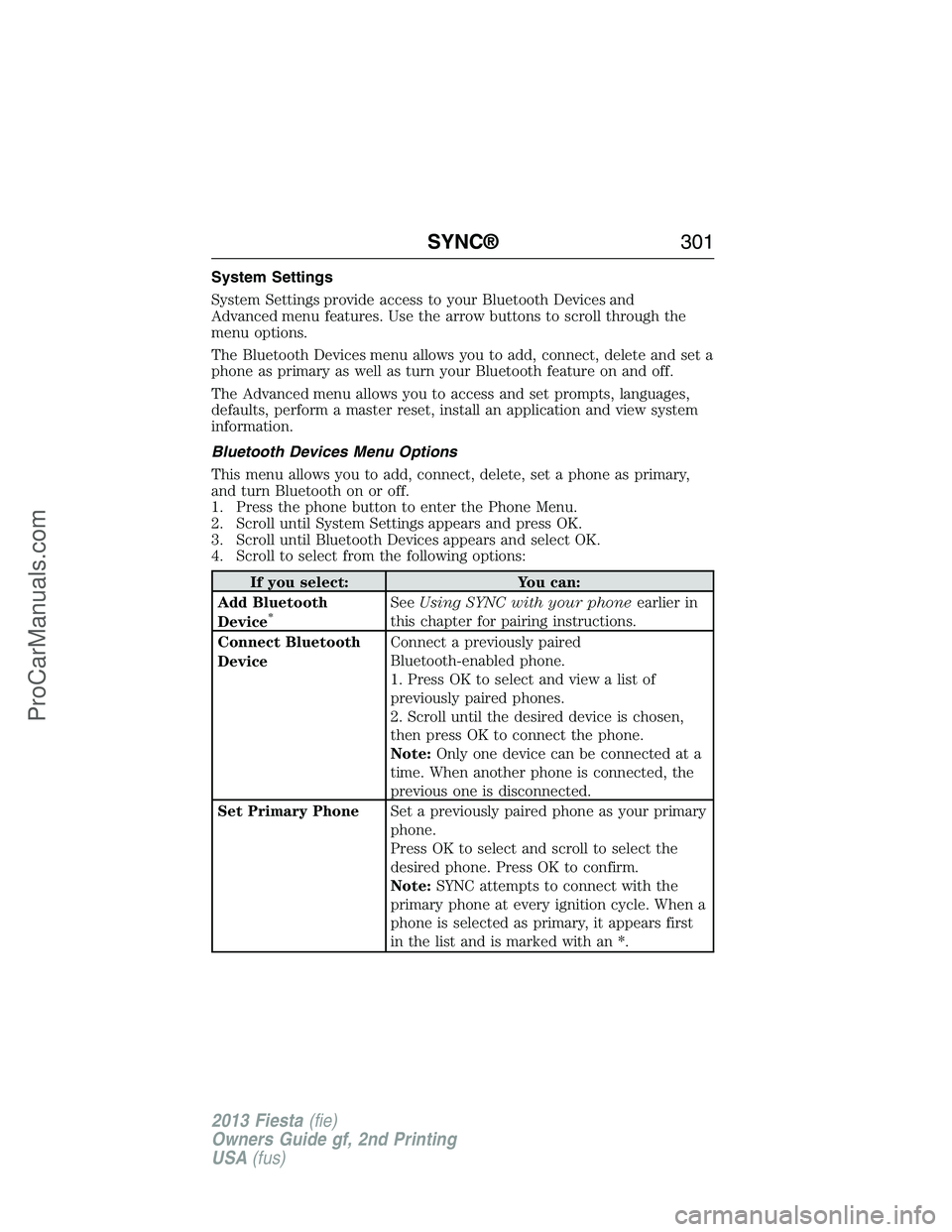
System Settings
System Settings provide access to your Bluetooth Devices and
Advanced menu features. Use the arrow buttons to scroll through the
menu options.
The Bluetooth Devices menu allows you to add, connect, delete and set a
phone as primary as well as turn your Bluetooth feature on and off.
The Advanced menu allows you to access and set prompts, languages,
defaults, perform a master reset, install an application and view system
information.
Bluetooth Devices Menu Options
This menu allows you to add, connect, delete, set a phone as primary,
and turn Bluetooth on or off.
1. Press the phone button to enter the Phone Menu.
2. Scroll until System Settings appears and press OK.
3. Scroll until Bluetooth Devices appears and select OK.
4. Scroll to select from the following options:
If you select: You can:
Add Bluetooth
Device
*SeeUsing SYNC with your phoneearlier in
this chapter for pairing instructions.
Connect Bluetooth
DeviceConnect a previously paired
Bluetooth-enabled phone.
1. Press OK to select and view a list of
previously paired phones.
2. Scroll until the desired device is chosen,
then press OK to connect the phone.
Note:Only one device can be connected at a
time. When another phone is connected, the
previous one is disconnected.
Set Primary PhoneSet a previously paired phone as your primary
phone.
Press OK to select and scroll to select the
desired phone. Press OK to confirm.
Note:SYNC attempts to connect with the
primary phone at every ignition cycle. When a
phone is selected as primary, it appears first
in the list and is marked with an *.
SYNC®301
2013 Fiesta(fie)
Owners Guide gf, 2nd Printing
USA(fus)
ProCarManuals.com
Page 343 of 346
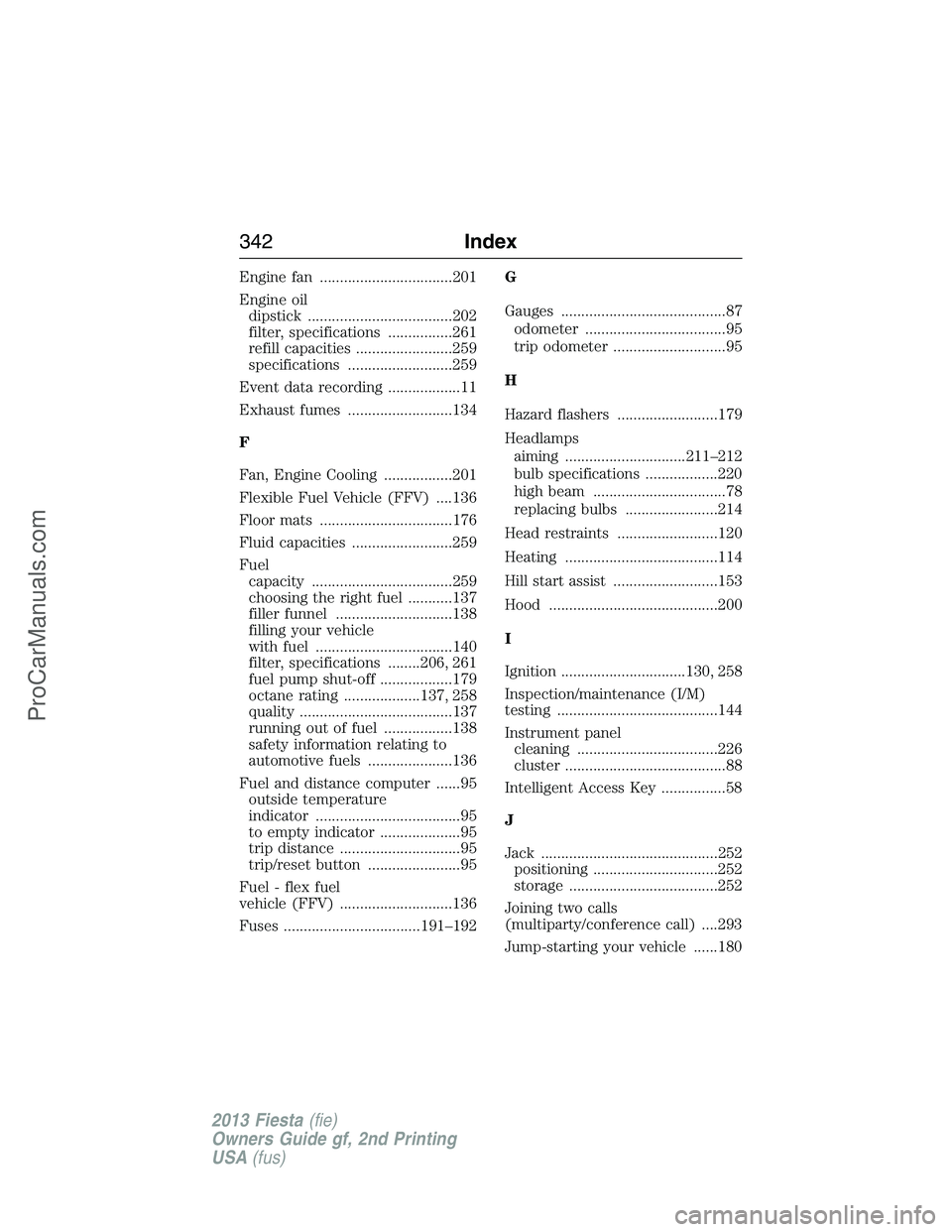
Engine fan .................................201
Engine oil
dipstick ....................................202
filter, specifications ................261
refill capacities ........................259
specifications ..........................259
Event data recording ..................11
Exhaust fumes ..........................134
F
Fan, Engine Cooling .................201
Flexible Fuel Vehicle (FFV) ....136
Floor mats .................................176
Fluid capacities .........................259
Fuel
capacity ...................................259
choosing the right fuel ...........137
filler funnel .............................138
filling your vehicle
with fuel ..................................140
filter, specifications ........206, 261
fuel pump shut-off ..................179
octane rating ...................137, 258
quality ......................................137
running out of fuel .................138
safety information relating to
automotive fuels .....................136
Fuel and distance computer ......95
outside temperature
indicator ....................................95
to empty indicator ....................95
trip distance ..............................95
trip/reset button .......................95
Fuel - flex fuel
vehicle (FFV) ............................136
Fuses ..................................191–192G
Gauges .........................................87
odometer ...................................95
trip odometer ............................95
H
Hazard flashers .........................179
Headlamps
aiming ..............................211–212
bulb specifications ..................220
high beam .................................78
replacing bulbs .......................214
Head restraints .........................120
Heating ......................................114
Hill start assist ..........................153
Hood ..........................................200
I
Ignition ...............................130, 258
Inspection/maintenance (I/M)
testing ........................................144
Instrument panel
cleaning ...................................226
cluster ........................................88
Intelligent Access Key ................58
J
Jack ............................................252
positioning ...............................252
storage .....................................252
Joining two calls
(multiparty/conference call) ....293
Jump-starting your vehicle ......180
342Index
2013 Fiesta(fie)
Owners Guide gf, 2nd Printing
USA(fus)
ProCarManuals.com