battery FORD FLEX 2015 1.G User Guide
[x] Cancel search | Manufacturer: FORD, Model Year: 2015, Model line: FLEX, Model: FORD FLEX 2015 1.GPages: 571, PDF Size: 5.52 MB
Page 133 of 571
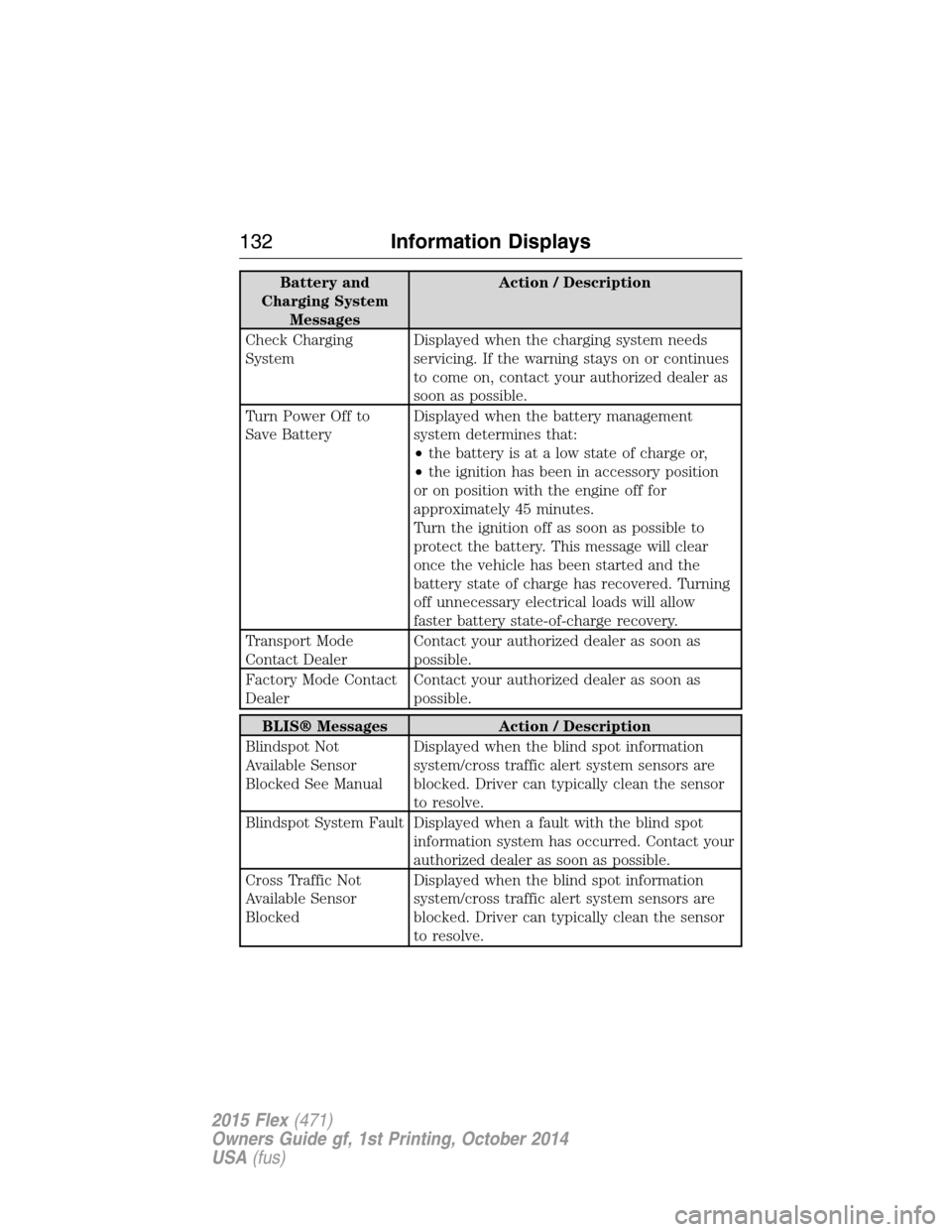
Battery and
Charging System
MessagesAction / Description
Check Charging
SystemDisplayed when the charging system needs
servicing. If the warning stays on or continues
to come on, contact your authorized dealer as
soon as possible.
Turn Power Off to
Save BatteryDisplayed when the battery management
system determines that:
•the battery is at a low state of charge or,
•the ignition has been in accessory position
or on position with the engine off for
approximately 45 minutes.
Turn the ignition off as soon as possible to
protect the battery. This message will clear
once the vehicle has been started and the
battery state of charge has recovered. Turning
off unnecessary electrical loads will allow
faster battery state-of-charge recovery.
Transport Mode
Contact DealerContact your authorized dealer as soon as
possible.
Factory Mode Contact
DealerContact your authorized dealer as soon as
possible.
BLIS® Messages Action / Description
Blindspot Not
Available Sensor
Blocked See ManualDisplayed when the blind spot information
system/cross traffic alert system sensors are
blocked. Driver can typically clean the sensor
to resolve.
Blindspot System Fault Displayed when a fault with the blind spot
information system has occurred. Contact your
authorized dealer as soon as possible.
Cross Traffic Not
Available Sensor
BlockedDisplayed when the blind spot information
system/cross traffic alert system sensors are
blocked. Driver can typically clean the sensor
to resolve.
132Information Displays
2015 Flex(471)
Owners Guide gf, 1st Printing, October 2014
USA(fus)
Page 163 of 571
Power Fold and Tumble Seat
WARNING:Make sure that the seat is unoccupied when folding
it down. Folding the seat while occupied could result in occupant
injury or damage to the seat.
This feature is available for the right-hand seat on seven-passenger
vehicles and on both sides for six-passenger vehicles.
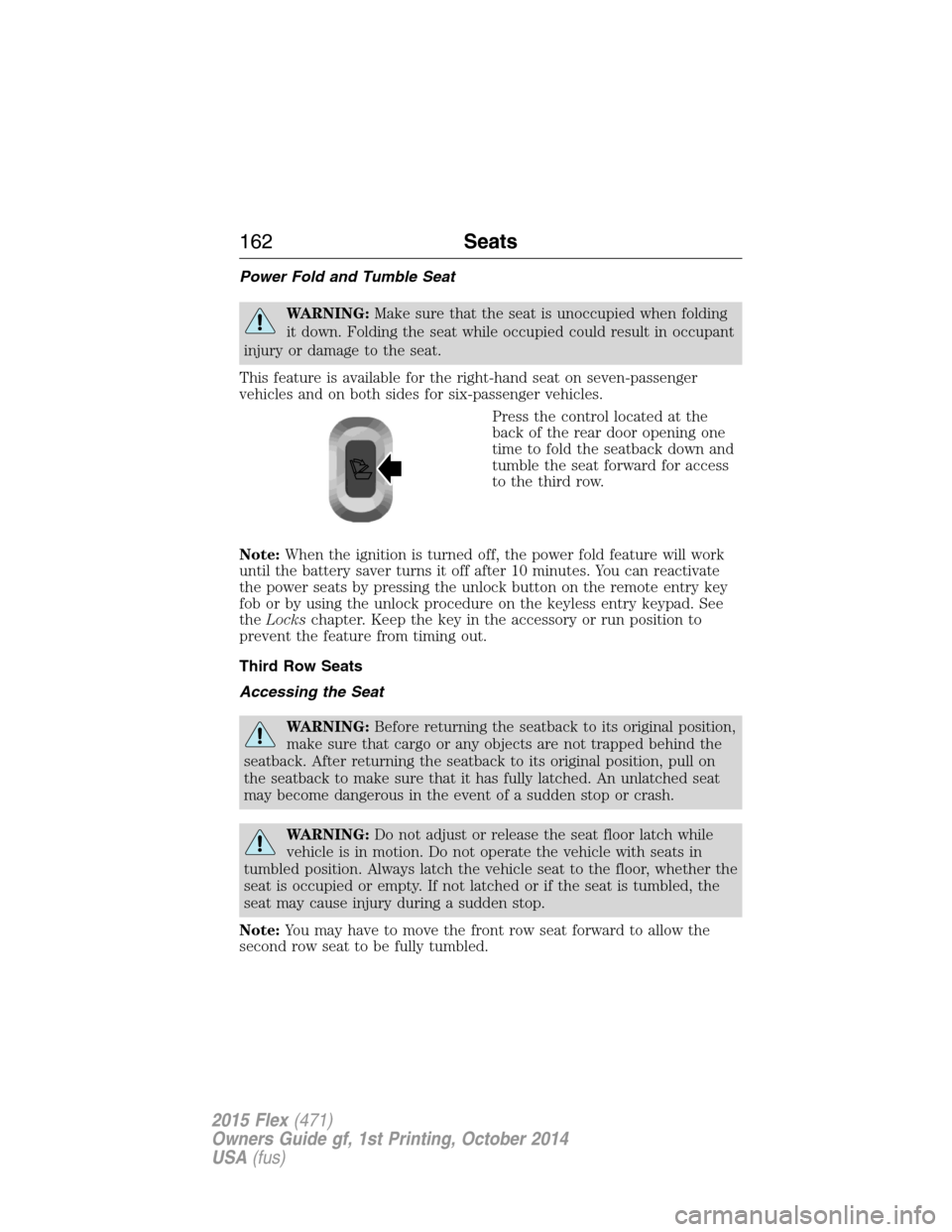
Press the control located at the
back of the rear door opening one
time to fold the seatback down and
tumble the seat forward for access
to the third row.
Note:When the ignition is turned off, the power fold feature will work
until the battery saver turns it off after 10 minutes. You can reactivate
the power seats by pressing the unlock button on the remote entry key
fob or by using the unlock procedure on the keyless entry keypad. See
theLockschapter. Keep the key in the accessory or run position to
prevent the feature from timing out.
Third Row Seats
Accessing the Seat
WARNING:Before returning the seatback to its original position,
make sure that cargo or any objects are not trapped behind the
seatback. After returning the seatback to its original position, pull on
the seatback to make sure that it has fully latched. An unlatched seat
may become dangerous in the event of a sudden stop or crash.
WARNING:Do not adjust or release the seat floor latch while
vehicle is in motion. Do not operate the vehicle with seats in
tumbled position. Always latch the vehicle seat to the floor, whether the
seat is occupied or empty. If not latched or if the seat is tumbled, the
seat may cause injury during a sudden stop.
Note:You may have to move the front row seat forward to allow the
second row seat to be fully tumbled.
162Seats
2015 Flex(471)
Owners Guide gf, 1st Printing, October 2014
USA(fus)
Page 169 of 571
Note:The power fold seats work only when the transmission is in park
(P) and the tailgate is open. If the ignition is off and the feature is still
running, the battery saver will turn it off after 10 minutes. You can
reactivate the power seats by pressing the unlock button on the remote
entry key fob or by using the unlock procedure on the keyless entry
keypad. SeeSecuriCode keyless keypadin theLockschapter. Keep the
key in the accessory or run position to prevent the feature from timing
out.
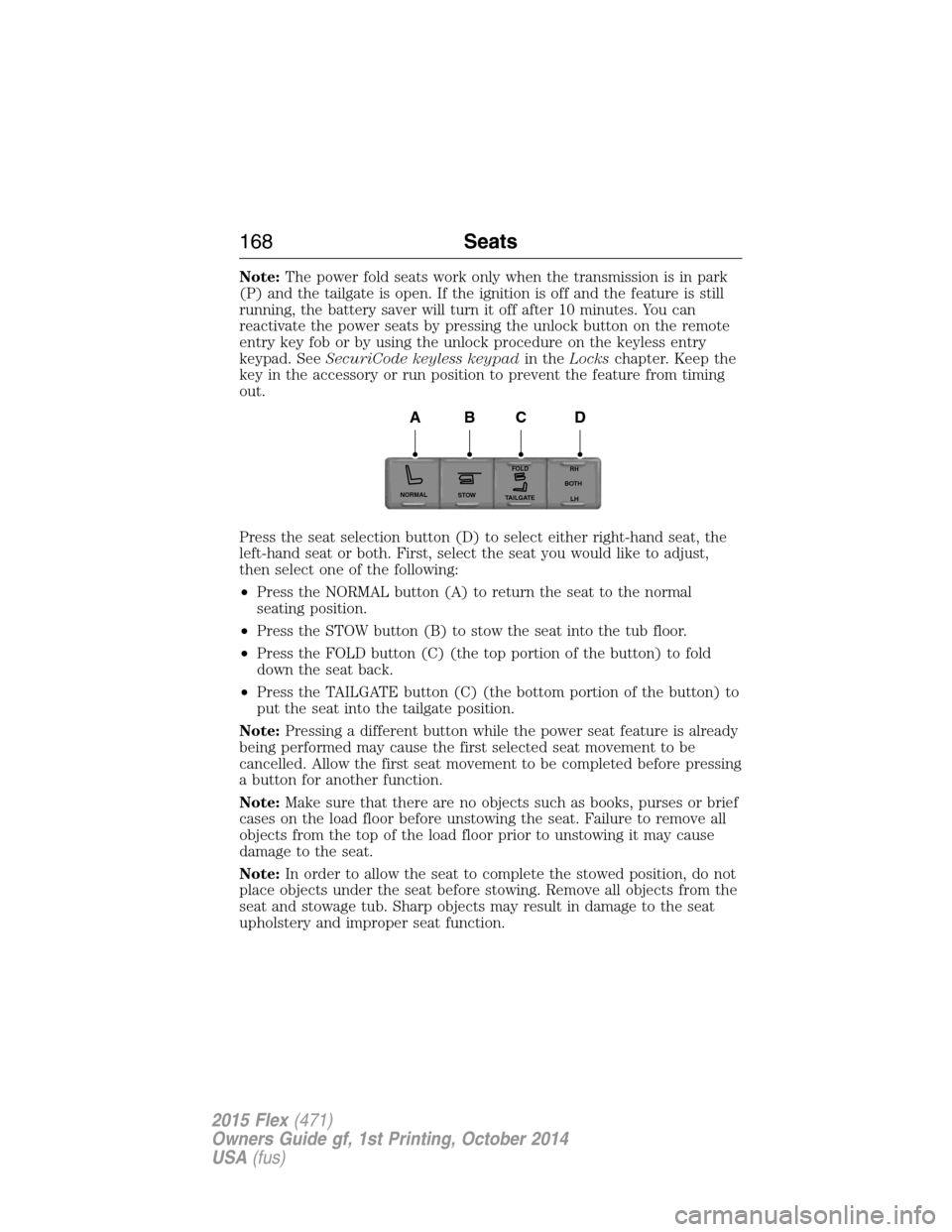
Press the seat selection button (D) to select either right-hand seat, the
left-hand seat or both. First, select the seat you would like to adjust,
then select one of the following:
•Press the NORMAL button (A) to return the seat to the normal
seating position.
•Press the STOW button (B) to stow the seat into the tub floor.
•Press the FOLD button (C) (the top portion of the button) to fold
down the seat back.
•Press the TAILGATE button (C) (the bottom portion of the button) to
put the seat into the tailgate position.
Note:Pressing a different button while the power seat feature is already
being performed may cause the first selected seat movement to be
cancelled. Allow the first seat movement to be completed before pressing
a button for another function.
Note:Make sure that there are no objects such as books, purses or brief
cases on the load floor before unstowing the seat. Failure to remove all
objects from the top of the load floor prior to unstowing it may cause
damage to the seat.
Note:In order to allow the seat to complete the stowed position, do not
place objects under the seat before stowing. Remove all objects from the
seat and stowage tub. Sharp objects may result in damage to the seat
upholstery and improper seat function.
NORMAL
STOWRH
BOTH
LH
FOLD
TA I L G AT E
ABCD
168Seats
2015 Flex(471)
Owners Guide gf, 1st Printing, October 2014
USA(fus)
Page 172 of 571
Programming
Note:Put a new battery in the hand-held transmitter. This will ensure
quicker training and accurate transmission of the radio-frequency signal.
1. With your vehicle parked outside of the garage and your key in the
ignition, turn the key so that the ignition is in the on position.
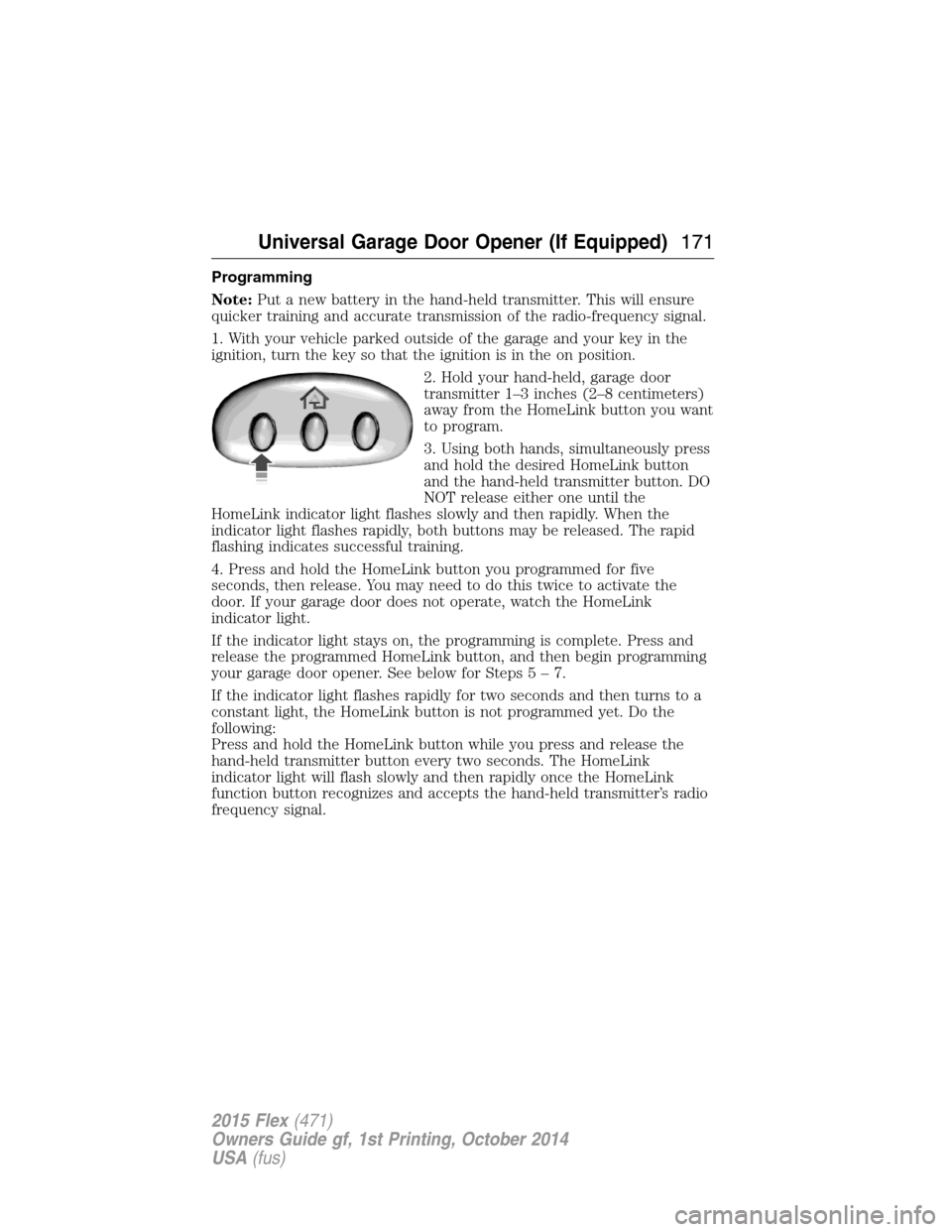
2. Hold your hand-held, garage door
transmitter 1–3 inches (2–8 centimeters)
away from the HomeLink button you want
to program.
3. Using both hands, simultaneously press
and hold the desired HomeLink button
and the hand-held transmitter button. DO
NOT release either one until the
HomeLink indicator light flashes slowly and then rapidly. When the
indicator light flashes rapidly, both buttons may be released. The rapid
flashing indicates successful training.
4. Press and hold the HomeLink button you programmed for five
seconds, then release. You may need to do this twice to activate the
door. If your garage door does not operate, watch the HomeLink
indicator light.
If the indicator light stays on, the programming is complete. Press and
release the programmed HomeLink button, and then begin programming
your garage door opener. See below for Steps5–7.
If the indicator light flashes rapidly for two seconds and then turns to a
constant light, the HomeLink button is not programmed yet. Do the
following:
Press and hold the HomeLink button while you press and release the
hand-held transmitter button every two seconds. The HomeLink
indicator light will flash slowly and then rapidly once the HomeLink
function button recognizes and accepts the hand-held transmitter’s radio
frequency signal.
Universal Garage Door Opener (If Equipped)171
2015 Flex(471)
Owners Guide gf, 1st Printing, October 2014
USA(fus)
Page 176 of 571
AUXILIARY POWER POINTS
WARNING:Do not plug optional electrical accessories into the
cigarette lighter socket (if equipped). Improper use of the lighter
can cause damage not covered by your warranty, and can result in fire
or serious injury.
Note:If used when the engine is not running, the battery will discharge.
There may be insufficient power to restart your engine.
Note:Do not insert objects other than an accessory plug into the power
point. This will damage the outlet and blow the fuse.
Note:Do not hang any type of accessory or accessory bracket from the
plug.
Note:Do not use the power point over the vehicle capacity of 12 volts
DC 180 watts or a fuse may blow.
Note:Do not use the power point for operating a cigarette lighter
element.
Note:Improper use of the power point can cause damage not covered
by your warranty.
Note:Always keep the power point caps closed when not in use.
Run the engine for full capacity use of the power point. To prevent the
battery from being discharged:
•Do not use the power point longer than necessary when the engine is
not running.
•Do not leave devices plugged in overnight or when the vehicle is
parked for extended periods.
Locations
Power points may be found:
•near the floor in the front console bin on the passenger’s side
•in the center console storage compartment
•on the rear of the center console
•in the rear cargo area on the left rear trim panel.
Auxiliary Power Points175
2015 Flex(471)
Owners Guide gf, 1st Printing, October 2014
USA(fus)
Page 180 of 571
Console Refrigerator and Freezer (If Equipped)
This feature will operate when the vehicle is on or in accessory mode.
Limit the time of use when the vehicle is in accessory mode to avoid
draining the vehicle’s battery. Ford recommends only using this feature
when the engine is running.
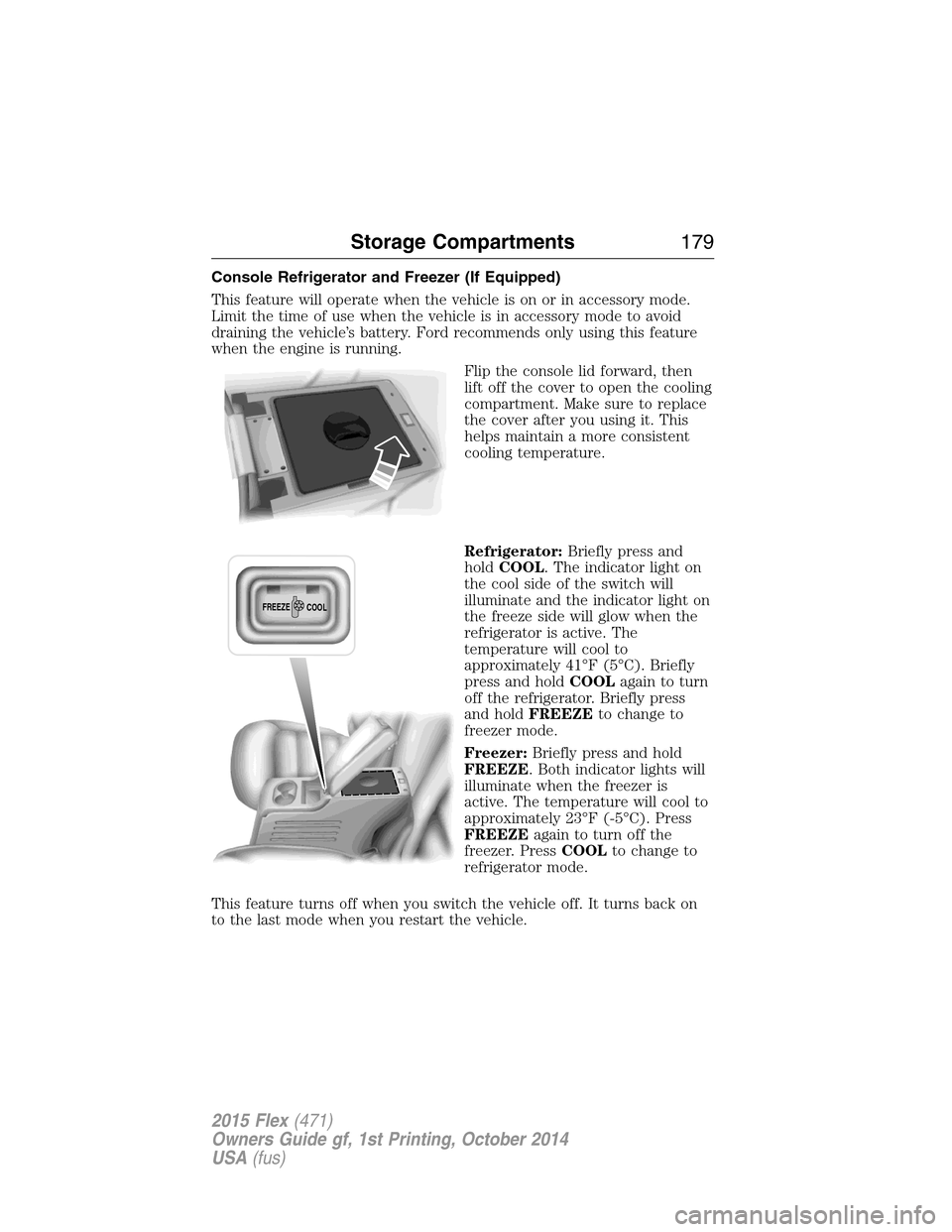
Flip the console lid forward, then
lift off the cover to open the cooling
compartment. Make sure to replace
the cover after you using it. This
helps maintain a more consistent
cooling temperature.
Refrigerator:Briefly press and
holdCOOL. The indicator light on
the cool side of the switch will
illuminate and the indicator light on
the freeze side will glow when the
refrigerator is active. The
temperature will cool to
approximately 41°F (5°C). Briefly
press and holdCOOLagain to turn
off the refrigerator. Briefly press
and holdFREEZEto change to
freezer mode.
Freezer:Briefly press and hold
FREEZE. Both indicator lights will
illuminate when the freezer is
active. The temperature will cool to
approximately 23°F (-5°C). Press
FREEZEagain to turn off the
freezer. PressCOOLto change to
refrigerator mode.
This feature turns off when you switch the vehicle off. It turns back on
to the last mode when you restart the vehicle.
FREEZE
COOL
Storage Compartments179
2015 Flex(471)
Owners Guide gf, 1st Printing, October 2014
USA(fus)
Page 182 of 571
GENERAL INFORMATION
WARNING:Extended idling at high engine speeds can produce
very high temperatures in the engine and exhaust system,
creating the risk of fire or other damage.
WARNING:Do not park, idle, or drive your vehicle on dry grass
or other dry ground cover. The emission system heats up the
engine compartment and exhaust system, which can start a fire.
WARNING:Do not start your vehicle in a closed garage or in
other enclosed areas. Exhaust fumes can be toxic. Always open
the garage door before you start the engine.
WARNING:If you smell exhaust fumes inside your vehicle, have
your vehicle checked by an authorized dealer immediately. Do
not drive if you smell exhaust fumes.
If you disconnect the battery, your vehicle may exhibit some unusual
driving characteristics for approximately 5 miles (8 kilometers) after you
connect it. This is because the engine management system must realign
itself with the engine. You may disregard any unusual driving
characteristics during this period.
The powertrain control system meets all Canadian interference-causing
equipment standard requirements regulating the impulse electrical field
or radio noise.
Do not press the accelerator pedal while starting the engine. If you have
difficulty starting the engine, seeFailure to startlater in this section.
Starting and Stopping the Engine181
2015 Flex(471)
Owners Guide gf, 1st Printing, October 2014
USA(fus)
Page 183 of 571
IGNITION SWITCH (IF EQUIPPED)
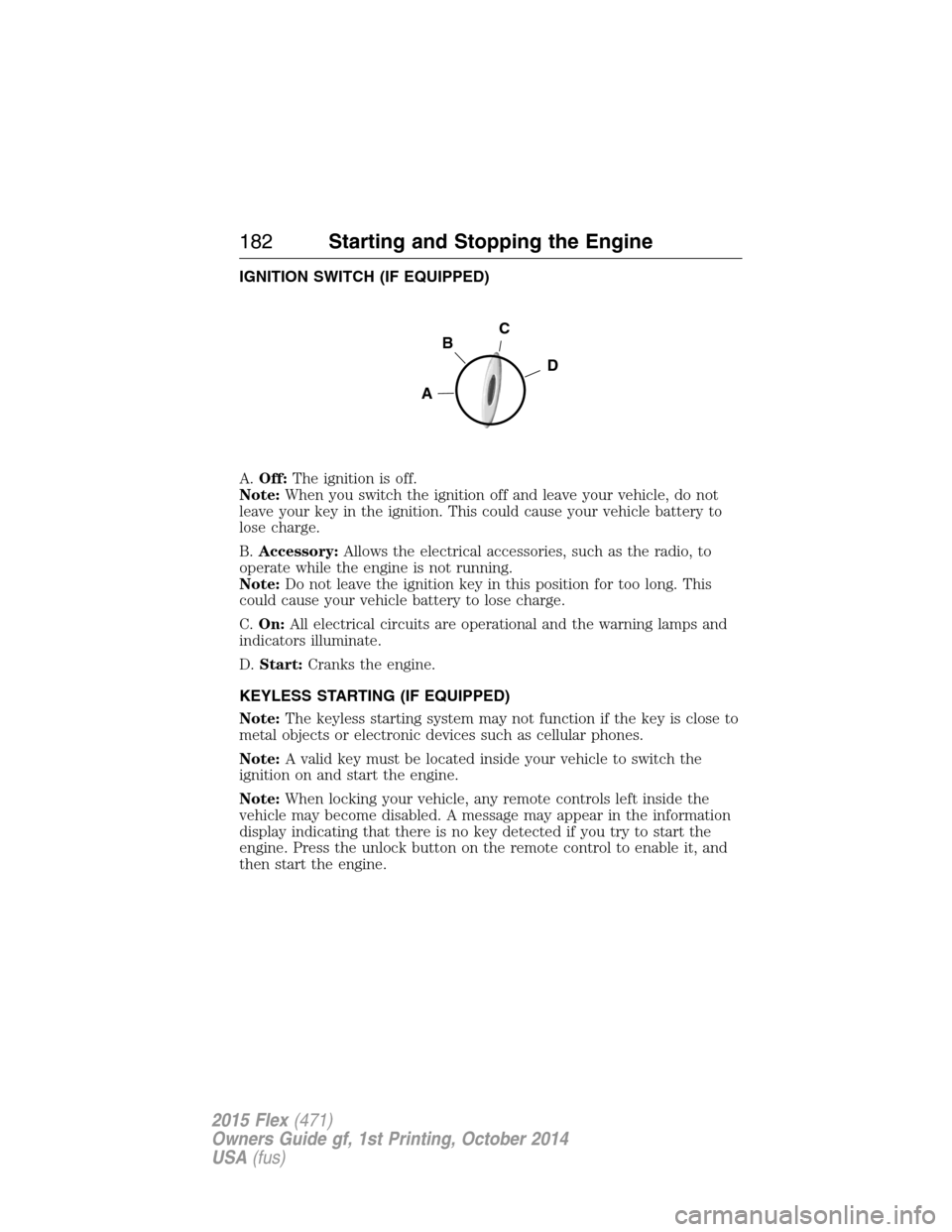
A.Off:The ignition is off.
Note:When you switch the ignition off and leave your vehicle, do not
leave your key in the ignition. This could cause your vehicle battery to
lose charge.
B.Accessory:Allows the electrical accessories, such as the radio, to
operate while the engine is not running.
Note:Do not leave the ignition key in this position for too long. This
could cause your vehicle battery to lose charge.
C.On:All electrical circuits are operational and the warning lamps and
indicators illuminate.
D.Start:Cranks the engine.
KEYLESS STARTING (IF EQUIPPED)
Note:The keyless starting system may not function if the key is close to
metal objects or electronic devices such as cellular phones.
Note:A valid key must be located inside your vehicle to switch the
ignition on and start the engine.
Note:When locking your vehicle, any remote controls left inside the
vehicle may become disabled. A message may appear in the information
display indicating that there is no key detected if you try to start the
engine. Press the unlock button on the remote control to enable it, and
then start the engine.
C
D
B
A
182Starting and Stopping the Engine
2015 Flex(471)
Owners Guide gf, 1st Printing, October 2014
USA(fus)
Page 185 of 571
Before starting the engine check the following:
•Make sure all occupants have fastened their safety belts.
•Make sure the headlamps and electrical accessories are off.
•Make sure the parking brake is on.
•Make sure the gearshift is in positionP.
•Turn the ignition key to the on position. If your vehicle is equipped
with a keyless ignition, see the following instructions.
Vehicles with an Ignition Key
Note:Do not touch the accelerator pedal.
1. Fully press the brake pedal.
2. Turn the key to the start position. Release the key when the engine
starts.
Note:The engine may continue cranking for up to 15 seconds or until it
starts.
Note:If you cannot start the engine on the first try, wait for a short
period and try again.
Vehicles with Keyless Start
Note:Do not touch the accelerator pedal.
1. Fully press the brake pedal.
2. Press the button.
The system does not function if:
•The key frequencies are jammed.
•The key battery has no charge.
If you are unable to start your vehicle, do the following:
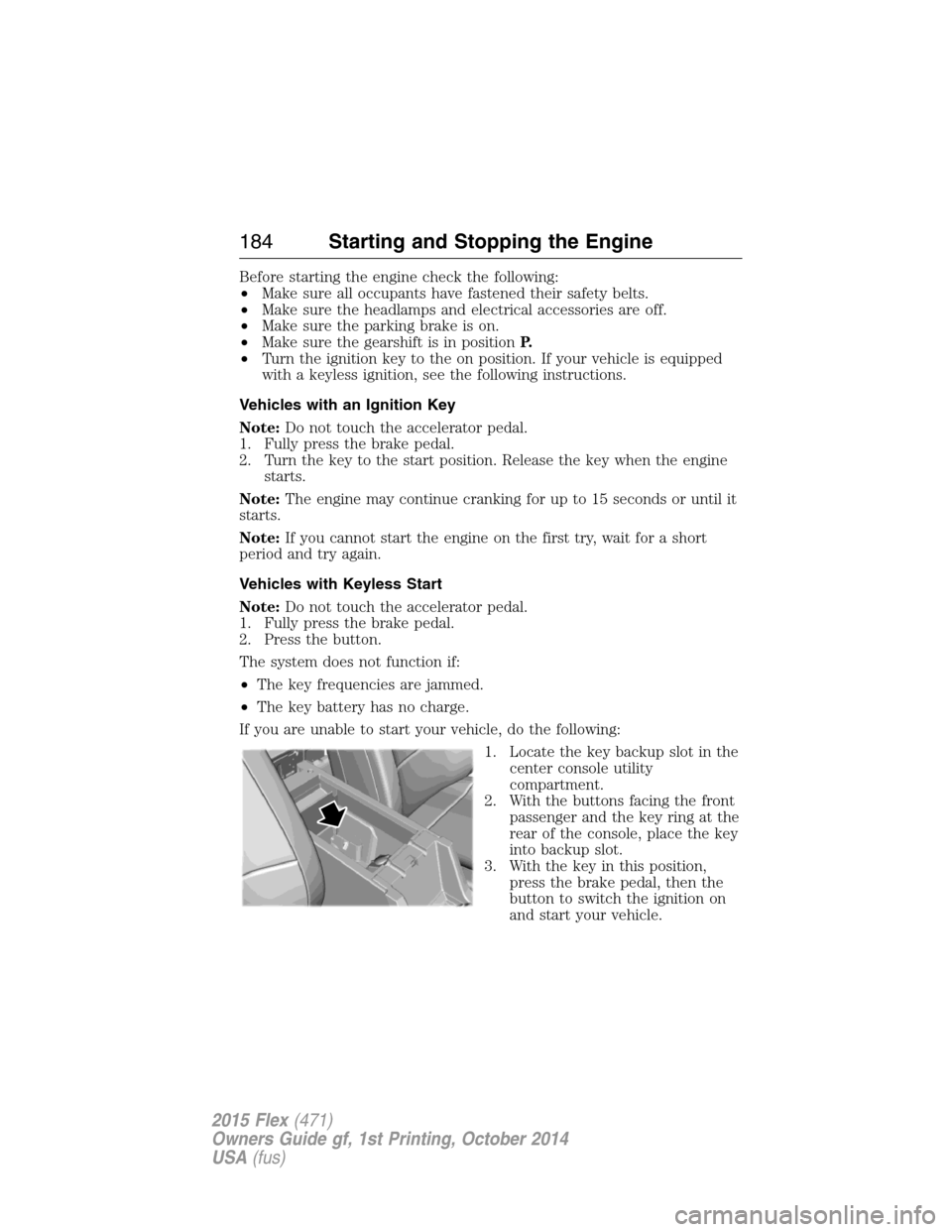
1. Locate the key backup slot in the
center console utility
compartment.
2. With the buttons facing the front
passenger and the key ring at the
rear of the console, place the key
into backup slot.
3. With the key in this position,
press the brake pedal, then the
button to switch the ignition on
and start your vehicle.
184Starting and Stopping the Engine
2015 Flex(471)
Owners Guide gf, 1st Printing, October 2014
USA(fus)
Page 186 of 571
Fast Restart (Vehicles with Keyless Start)
The fast restart feature allows you to restart the engine within
20 seconds of switching it off, even if a valid key is not present.
Within 20 seconds of switching the engine off, press the brake pedal and
press the button. After 20 seconds have expired, you can no longer start
the engine without the key present inside your vehicle.
Once the engine has started, it remains running until you press the button,
even if the system does not detect a valid key. If you open and close a door
while the engine is running, the system searches for a valid key. You cannot
start the engine if the system does not detect a valid key within 20 seconds.
Failure to Start
If you cannot start the engine after three attempts, wait 10 seconds and
follow this procedure:
1. Fully press the brake pedal.
2. Fully press the accelerator pedal and hold it there.
3. Start the engine.
Automatic Engine Shutdown
If your vehicle is equipped with a keyless ignition, it has a feature that
automatically shuts down the engine if it has been idling for an extended
period. The ignition also turns off in order to save battery power. Before
the engine shuts down, a message appears in the information display
showing a timer counting down from 30 seconds. If you do not intervene
within 30 seconds, the engine shuts down. Another message appears in
the information display to inform you that the engine has shut down in
order to save fuel. Start your vehicle as you normally do.
Automatic Engine Shutdown Override
Note:You cannot permanently switch off the automatic engine shutdown
feature. When you switch it off temporarily, it turns on at the next
ignition cycle.
You can stop the engine shutdown, or reset the timer, at any point before
the 30-second countdown has expired by doing any of the following:
•You can reset the timer by interacting with your vehicle (such as
pressing the brake pedal or accelerator pedal).
•You can temporarily switch off the shutdown feature any time the
ignition is on (for the current ignition cycle only). Use the information
display to do so.
•
During the countdown before engine shutdown, you are prompted to
pressOKorRESET(depending on your type of information display) to
temporarily switch the feature off (for the current ignition cycle only).
Starting and Stopping the Engine185
2015 Flex(471)
Owners Guide gf, 1st Printing, October 2014
USA(fus)