climate settings FORD FLEX 2015 1.G User Guide
[x] Cancel search | Manufacturer: FORD, Model Year: 2015, Model line: FLEX, Model: FORD FLEX 2015 1.GPages: 571, PDF Size: 5.52 MB
Page 444 of 571
Note:Some features are not available while your vehicle is moving.
Note:Your system is equipped with a feature that allows you to access
and control audio features for 30 minutes after you switch the ignition
off (and no doors open).
PHONE
Press to select any of the following:
•Making Calls
•Quick Dial
•Phonebook
•Call History
•Text Messaging
•Settings
NAVIGATION
Press to select any of the following:
•My Home
•Favorites
•Previous Destinations
•Point of Interest
•Emergency
•Street Address
•Intersection
•City Center
•Map
•Edit Route
•Cancel Route
CLIMATE
Press to select any of the following:
•Driver Settings
•Recirculated Air
•Auto
•Dual
•Passenger Settings
•A/C
•Defrost
MyFord Touch® (If Equipped)443
2015 Flex(471)
Owners Guide gf, 1st Printing, October 2014
USA(fus)
Page 446 of 571
Using the Touch-sensitive Controls on Your System
To turn a feature on and off, just touch the graphic with your finger. To
get the best performance from the touch-sensitive controls:
•Do not press hard on the controls. They are sensitive to light touch.
•Use your bare finger to touch the center of a touch-control graphic.
Touching off-center of the graphic may affect operation of a nearby
control.
•Make sure your hands are clean and dry.
•Keep metal and other conductive material away from the surface of
the touchscreen as this may cause electronic interference (for
example, inadvertently turning on a feature other than the one you
meant to turn on).
Depending on your vehicle and option package, you may also have these
controls on your bezel:
•Power:Switch the media or climate features off and on.
•VOL:Control the volume of playing media.
•Fan: Control the speed of the climate system fan.
•Climate:Control the temperature and settings of the climate control
system
•SeekandTune: Use as you normally would in media modes.
•Eject: Eject a CD from the entertainment system.
•SOURCE:Touch the word repeatedly to see all available media
modes.
•SOUND:Touch the word to access the Sound menu where you can
adjust settings such as: Bass, Treble, Midrange, Balance and Fade,
THX Deep Note Demo, DSP (Digital Signal Processing), Occupancy
Mode and Speed Compensated Volume. (Your vehicle may not have
all of these sound options.)
•Hazard flasher: Switch the hazard flashers off and on.
Cleaning the Touchscreen Display
Use a clean, soft cloth such as one used for cleaning glasses. If dirt or
fingerprints are still visible, apply a small amount of alcohol to the cloth.
Do not pour or spray alcohol onto the display. Do not use detergent or
any type of solvent to clean the display.
MyFord Touch® (If Equipped)445
2015 Flex(471)
Owners Guide gf, 1st Printing, October 2014
USA(fus)
Page 453 of 571
Accessing a List of Available Commands
•If you use the touchscreen, press the Settings icon >Help>Voice
Command List.
•If you use the steering wheel control, press the voice icon. After the
tone, speak your command clearly.
Voice command list
“Audio list of commands”
“Bluetooth audio list of commands”
“Browse list of commands”
“CD list of commands”
“Climate control list of commands”
“List of commands”
“Navigation list of commands”
*
“Phone list of commands”
“Radio list of commands”
“SD card list of commands”
“Sirius satellite list of commands”
**
“Travel link list of commands”*
“USB list of commands”
“Voice instructions list of commands”
“Voice settings list of commands”
“Help”
*This command is only available when your vehicle is equipped with the
navigation system, and the navigation system SD card is in the card slot.
**This command is only available when you have an active Sirius satellite
radio subscription.
Voice Settings
Voice settings allow you to customize the level of system interaction,
help and feedback. The system defaults to standard interaction that uses
candidate lists and confirmation prompts as these provide the highest
level of guidance and feedback.
Interaction Mode:Novice mode provides detailed interaction and
guidance while the advanced mode has less audible interaction and more
tone prompts.
452MyFord Touch® (If Equipped)
2015 Flex(471)
Owners Guide gf, 1st Printing, October 2014
USA(fus)
Page 499 of 571
Camera Settings
This menu allows you to access settings for your rear view camera.
Press the Settings icon >Vehicle>Camera Settings,then select from
the following settings:
•Enhanced Park Aids
•Rear Camera Delay
Enable Valet Mode
Valet mode allows you to lock the system. No information is accessible
until the system is unlocked with the correct PIN.
1. Press the Settings icon >Vehicle>Enable Valet Mode.
2. Enter a four-digit pin twice, as prompted.
After you press Continue, the system locks until you enter the PIN again.
Note:If the system locks, and you need to reset the PIN, enter 3681 and
the system unlocks.
Settings
Access and adjust system settings, voice features, as well as phone,
navigation and wireless settings.
System
Press the Settings icon >Settings>System,then select from
the following:
System
LanguageSelect to have the touchscreen display in
English, Spanish or French.
DistanceSelect to display units in kilometers or miles.
TemperatureSelect to display units in Celsius or
Fahrenheit.
System Prompt
VolumeAdjust the volume of voice prompts from the
system.
Touch Screen Button
BeepSelect to have the system beep to confirm
choices made through the touchscreen.
Touch Panel Button
BeepSelect to have the system beep to confirm
button choices made through the climate or
audio system.
Keyboard LayoutHave the touchscreen keyboard display in
QWERTY or ABC format.
498MyFord Touch® (If Equipped)
2015 Flex(471)
Owners Guide gf, 1st Printing, October 2014
USA(fus)
Page 508 of 571
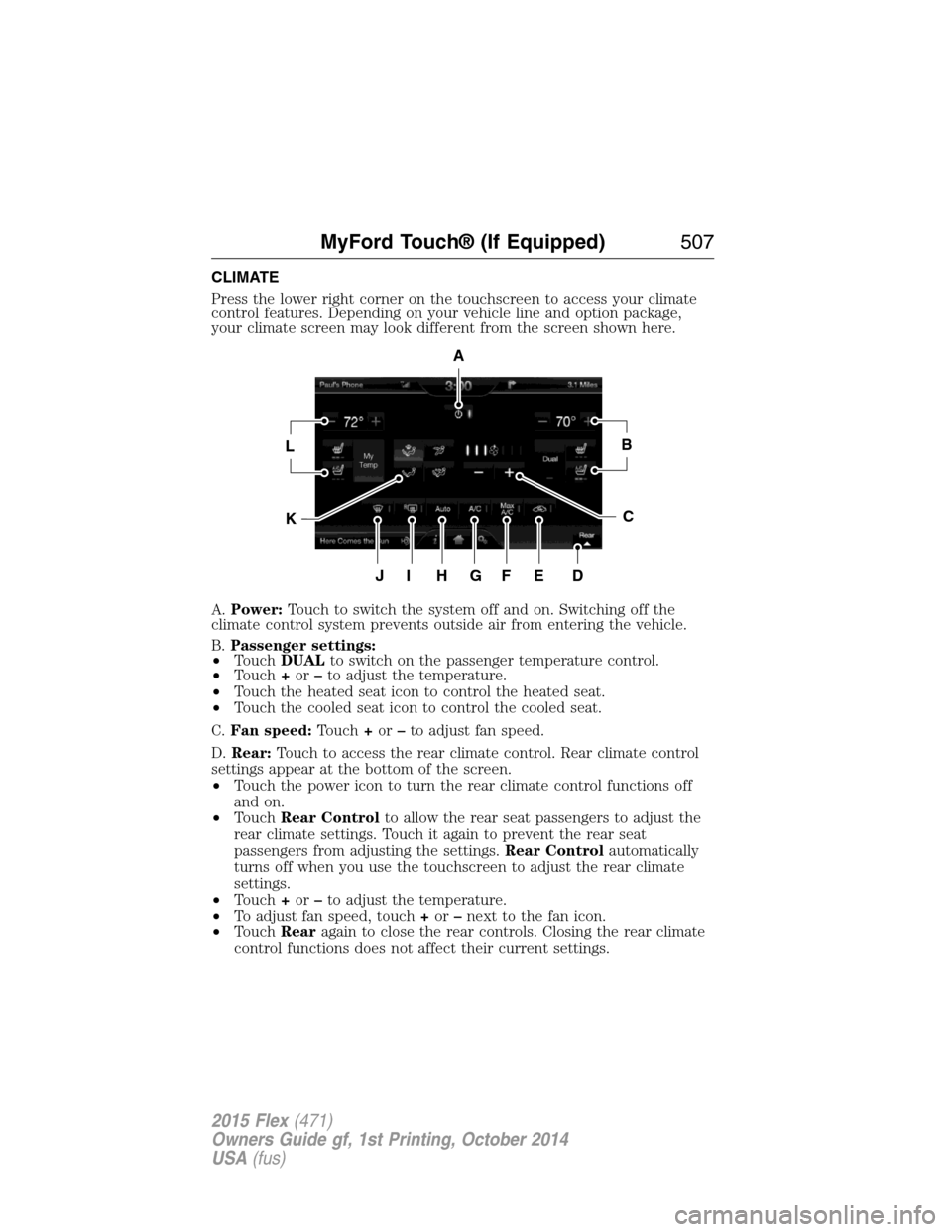
CLIMATE
Press the lower right corner on the touchscreen to access your climate
control features. Depending on your vehicle line and option package,
your climate screen may look different from the screen shown here.
A.Power:Touch to switch the system off and on. Switching off the
climate control system prevents outside air from entering the vehicle.
B.Passenger settings:
•TouchDUALto switch on the passenger temperature control.
•Touch+or–to adjust the temperature.
•Touch the heated seat icon to control the heated seat.
•Touch the cooled seat icon to control the cooled seat.
C.Fan speed:Touch+or–to adjust fan speed.
D.Rear:Touch to access the rear climate control. Rear climate control
settings appear at the bottom of the screen.
•Touch the power icon to turn the rear climate control functions off
and on.
•TouchRear Controlto allow the rear seat passengers to adjust the
rear climate settings. Touch it again to prevent the rear seat
passengers from adjusting the settings.Rear Controlautomatically
turns off when you use the touchscreen to adjust the rear climate
settings.
•Touch+or–to adjust the temperature.
•To adjust fan speed, touch+or–next to the fan icon.
•TouchRearagain to close the rear controls. Closing the rear climate
control functions does not affect their current settings.
A
LB
KC
JIHGFED
MyFord Touch® (If Equipped)507
2015 Flex(471)
Owners Guide gf, 1st Printing, October 2014
USA(fus)
Page 510 of 571
L.Driver settings:Depending on your vehicle and option package, you
may have the following features:
•Touch+or–to adjust the temperature.
•If your vehicle is equipped with heated seats, touch the heated seat
icon to control the heated seat. See theSeatschapter.
•If your vehicle is equipped with cooled seats, touch the cooled seat
icon to control the cooled seat. See theSeatschapter.
•Touch and holdMyTempto select a temperature you would like your
vehicle to remember and maintain for you.
•If your vehicle is equipped with a heated steering wheel, touch the
heated steering wheel icon to warm the steering wheel.
If your vehicle is equipped with a wood-trimmed steering wheel, it does
not heat between the 10 o’clock and 2 o’clock positions.
Climate Control Voice Commands
The following voice commands are available at the main menu
level of a voice session. For example, press the voice button
and after the prompt, “Say a command”; say any of the
following commands:
Climate control voice commands
“Climate automatic”
“Climate my temperature”
“Climate off”
“Climate on”
“Climate temperature <15.5–29.5> degrees”
“Climate temperature <60–85> degrees”
“Help”
There are additional climate control commands but in order to access
them, you have to say “Climate” first, then when the system is ready to
listen, you may say any of the following commands:
Additional climate control voice commands
“Automatic” “Panel on”
“A/C off” “Rear defrost off”
“A/C on” “Rear defrost on”
“Defrost off” “Recirc off”
“Defrost on” “Recirc on”
“Dual off” “Temperature”
*
MyFord Touch® (If Equipped)509
2015 Flex(471)
Owners Guide gf, 1st Printing, October 2014
USA(fus)
Page 570 of 571
SecuriCode keyless entry
system ..........................................82
SecuriLock passive anti-theft
system ..........................................85
Selecting your media source
(USB, Line in, BT audio) .........423
Sending new text messages .....479
Setting a destination ................510
Setting a destination by
voice ...........................................511
Settings ......................................495
Setting the clock ...............376, 495
Side air curtain ...........................59
Side-curtain airbags system .......59
SIRIUS® satellite radio ....376, 462
SIRIUS satellite radio voice
commands .................................464
SIRIUS Travel Link ...................487
SIRIUS Travel Link voice
commands .................................488
SOS Post Crash Alert .................51
Spare tire
(see Changing the Tire) ...........355
Spark plugs,
specifications .....................361, 366
Specification chart,
lubricants ...................................362
Stability system .........................215
Starting your vehicle ................183
jump starting ..........................273
push button start system .......182
Steering wheel ............................90
controls ......................................92
tilting ...................................90–91
Sun visor ....................................110Supplemental Restraint System
(SRS) (see airbags) ....................52
Supported media file types ......472
Supported player, media
formats and metadata
information ................................472
SYNC® customer support ........393
SYNC® Services ................417, 483
System settings .........................498
T
Temperature control
(see Climate control) ..............138,
140, 142, 507
Text messaging .................404, 479
Text messaging (sending,
downloading, deleting) .....405, 407
Third-row power fold seat .......167
Tilt steering wheel ................90–91
Tires ...........................332–333, 353
alignment ................................346
care ..........................................332
changing ..........................353, 355
checking the pressure ............342
inflating ...................................340
label .........................................339
replacing ..................................344
rotating ....................................347
safety practices .......................346
sidewall information ...............335
snow tires and chains ............347
spare tire .................................353
terminology .............................333
tire grades ...............................333
treadwear ........................332, 342
Touchscreen features
(climate) ....................................507
Index569
2015 Flex(471)
Owners Guide gf, 1st Printing, October 2014
USA(fus)