brake light FORD FLEX 2019 Owner's Manual
[x] Cancel search | Manufacturer: FORD, Model Year: 2019, Model line: FLEX, Model: FORD FLEX 2019Pages: 513, PDF Size: 39.3 MB
Page 224 of 513
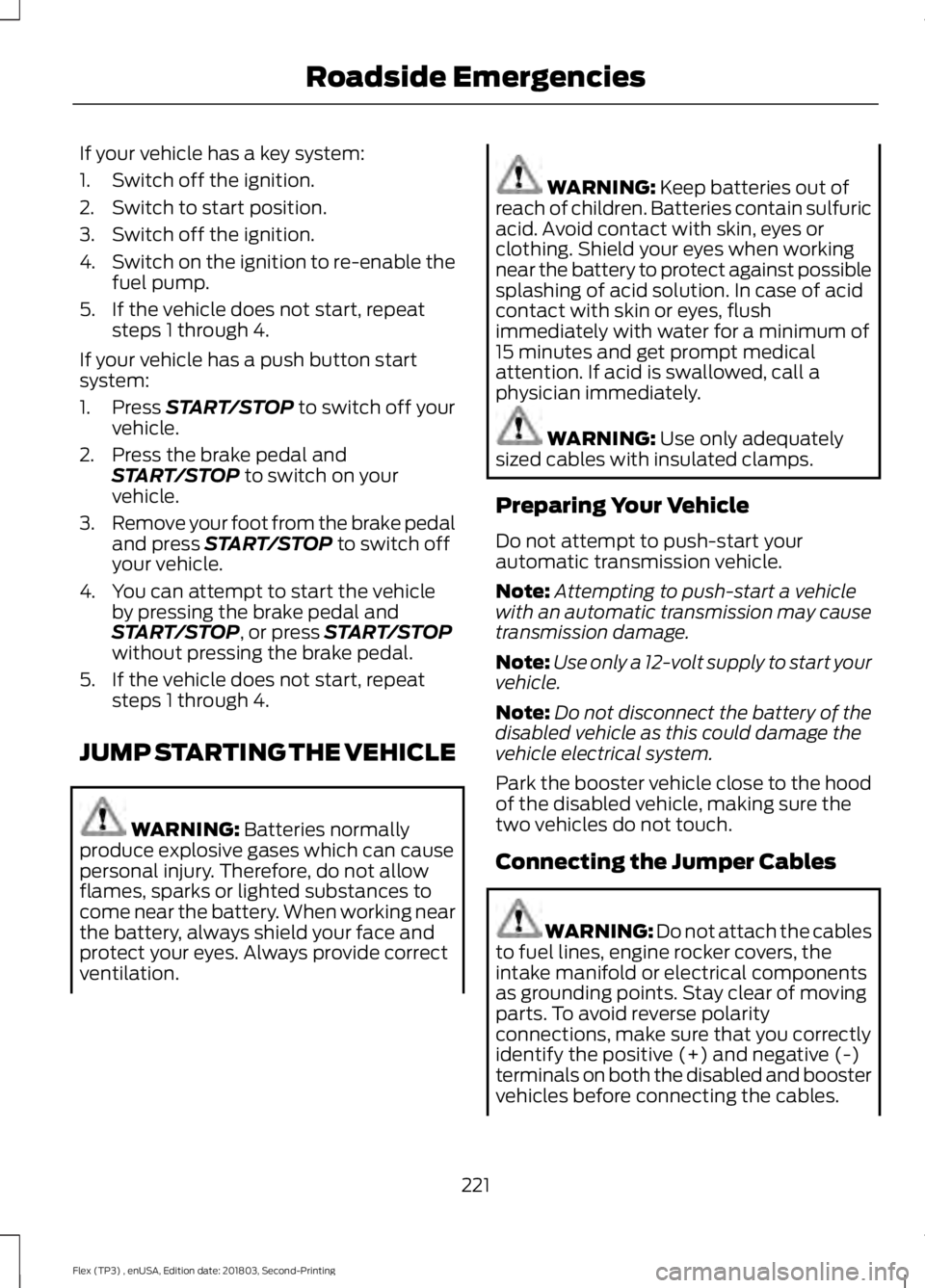
If your vehicle has a key system:
1. Switch off the ignition.
2. Switch to start position.
3. Switch off the ignition.
4.
Switch on the ignition to re-enable the
fuel pump.
5. If the vehicle does not start, repeat steps 1 through 4.
If your vehicle has a push button start
system:
1. Press START/STOP to switch off your
vehicle.
2. Press the brake pedal and START/STOP
to switch on your
vehicle.
3. Remove your foot from the brake pedal
and press
START/STOP to switch off
your vehicle.
4. You can attempt to start the vehicle by pressing the brake pedal and
START/STOP
, or press START/STOP
without pressing the brake pedal.
5. If the vehicle does not start, repeat steps 1 through 4.
JUMP STARTING THE VEHICLE WARNING:
Batteries normally
produce explosive gases which can cause
personal injury. Therefore, do not allow
flames, sparks or lighted substances to
come near the battery. When working near
the battery, always shield your face and
protect your eyes. Always provide correct
ventilation. WARNING:
Keep batteries out of
reach of children. Batteries contain sulfuric
acid. Avoid contact with skin, eyes or
clothing. Shield your eyes when working
near the battery to protect against possible
splashing of acid solution. In case of acid
contact with skin or eyes, flush
immediately with water for a minimum of
15 minutes and get prompt medical
attention. If acid is swallowed, call a
physician immediately. WARNING:
Use only adequately
sized cables with insulated clamps.
Preparing Your Vehicle
Do not attempt to push-start your
automatic transmission vehicle.
Note: Attempting to push-start a vehicle
with an automatic transmission may cause
transmission damage.
Note: Use only a 12-volt supply to start your
vehicle.
Note: Do not disconnect the battery of the
disabled vehicle as this could damage the
vehicle electrical system.
Park the booster vehicle close to the hood
of the disabled vehicle, making sure the
two vehicles do not touch.
Connecting the Jumper Cables WARNING: Do not attach the cables
to fuel lines, engine rocker covers, the
intake manifold or electrical components
as grounding points. Stay clear of moving
parts. To avoid reverse polarity
connections, make sure that you correctly
identify the positive (+) and negative (-)
terminals on both the disabled and booster
vehicles before connecting the cables.
221
Flex (TP3) , enUSA, Edition date: 201803, Second-Printing Roadside Emergencies
Page 236 of 513
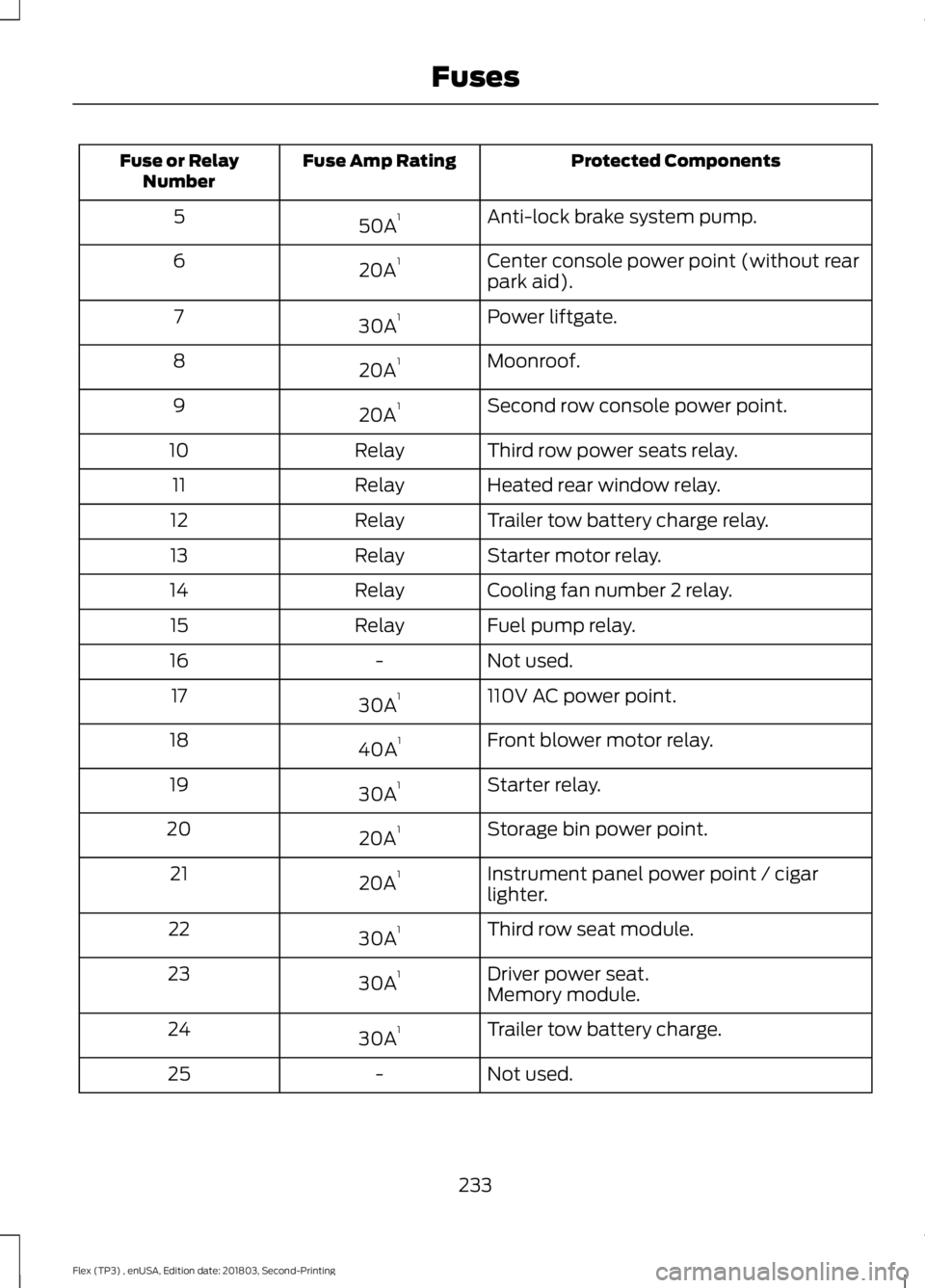
Protected Components
Fuse Amp Rating
Fuse or Relay
Number
Anti-lock brake system pump.
50A 1
5
Center console power point (without rear
park aid).
20A 1
6
Power liftgate.
30A 1
7
Moonroof.
20A 1
8
Second row console power point.
20A 1
9
Third row power seats relay.
Relay
10
Heated rear window relay.
Relay
11
Trailer tow battery charge relay.
Relay
12
Starter motor relay.
Relay
13
Cooling fan number 2 relay.
Relay
14
Fuel pump relay.
Relay
15
Not used.
-
16
110V AC power point.
30A 1
17
Front blower motor relay.
40A 1
18
Starter relay.
30A 1
19
Storage bin power point.
20A 1
20
Instrument panel power point / cigar
lighter.
20A 1
21
Third row seat module.
30A 1
22
Driver power seat.
30A 1
23
Memory module.
Trailer tow battery charge.
30A 1
24
Not used.
-
25
233
Flex (TP3) , enUSA, Edition date: 201803, Second-Printing Fuses
Page 242 of 513
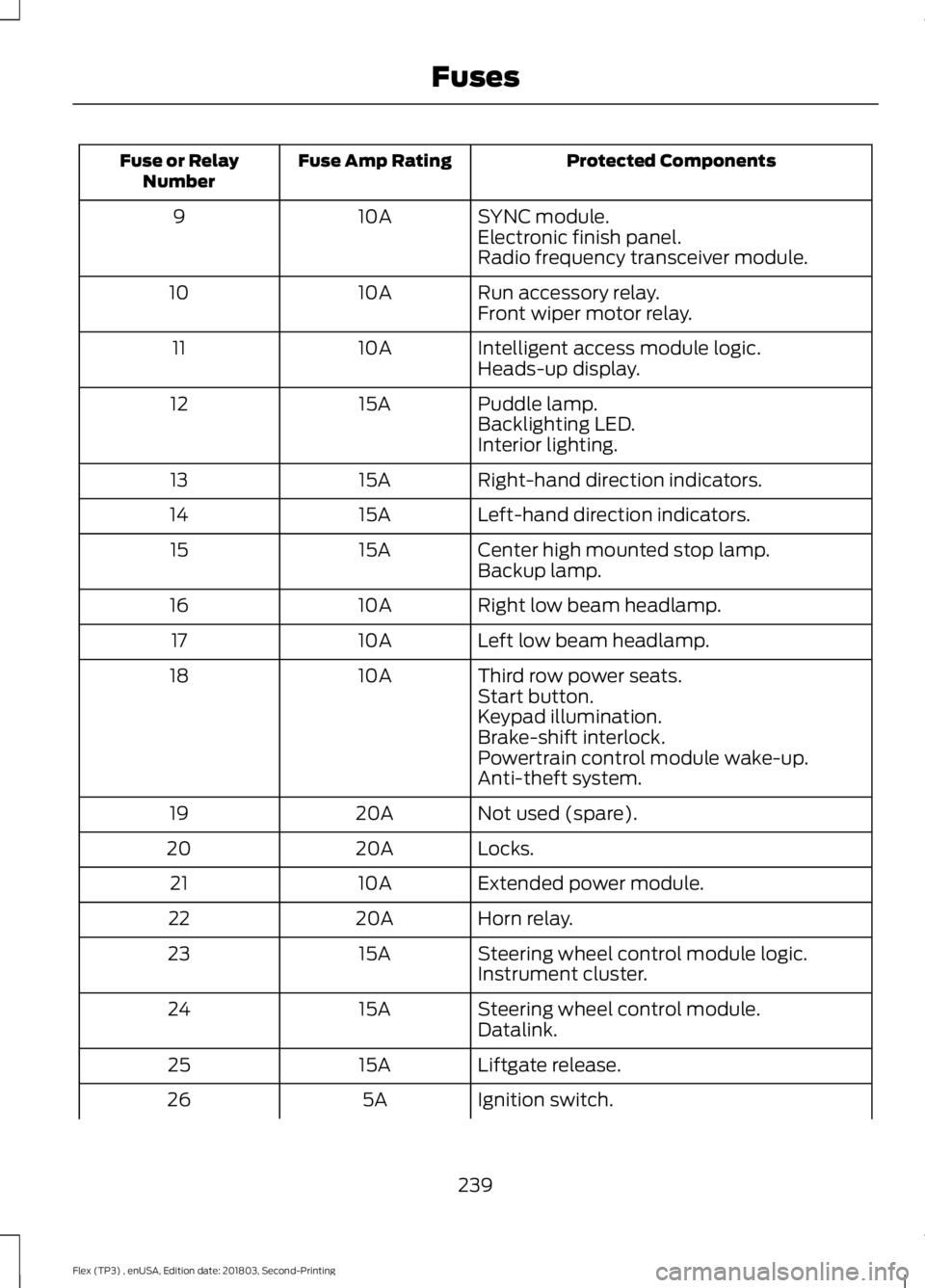
Protected Components
Fuse Amp Rating
Fuse or Relay
Number
SYNC module.
10A
9
Electronic finish panel.
Radio frequency transceiver module.
Run accessory relay.
10A
10
Front wiper motor relay.
Intelligent access module logic.
10A
11
Heads-up display.
Puddle lamp.
15A
12
Backlighting LED.
Interior lighting.
Right-hand direction indicators.
15A
13
Left-hand direction indicators.
15A
14
Center high mounted stop lamp.
15A
15
Backup lamp.
Right low beam headlamp.
10A
16
Left low beam headlamp.
10A
17
Third row power seats.
10A
18
Start button.
Keypad illumination.
Brake-shift interlock.
Powertrain control module wake-up.
Anti-theft system.
Not used (spare).
20A
19
Locks.
20A
20
Extended power module.
10A
21
Horn relay.
20A
22
Steering wheel control module logic.
15A
23
Instrument cluster.
Steering wheel control module.
15A
24
Datalink.
Liftgate release.
15A
25
Ignition switch.
5A
26
239
Flex (TP3) , enUSA, Edition date: 201803, Second-Printing Fuses
Page 246 of 513
GENERAL INFORMATION
Have your vehicle serviced regularly to help
maintain its roadworthiness and resale
value. There is a large network of
authorized dealers that are there to help
you with their professional servicing
expertise. We believe that their specially
trained technicians are best qualified to
service your vehicle properly and expertly.
They are supported by a wide range of
highly specialized tools developed
specifically for servicing your vehicle.
If your vehicle requires professional service,
an authorized dealer can provide the
necessary parts and service. Check your
warranty information to find out which
parts and services are covered.
Use only recommended fuels, lubricants,
fluids and service parts conforming to
specifications. Motorcraft® parts are
designed and built to provide the best
performance in your vehicle.
Precautions
•
Do not work on a hot engine.
• Make sure that nothing gets caught in
moving parts.
• Do not work on a vehicle with the
engine running in an enclosed space,
unless you are sure you have enough
ventilation.
• Keep all open flames and other burning
material (such as cigarettes) away
from the battery and all fuel related
parts.
Working with the Engine Off
1. Set the parking brake and shift the transmission to park (P).
2. Switch off the engine.
3. Block the wheels. Working with the Engine On WARNING: To reduce the risk of
vehicle damage and personal burn injuries,
do not start your engine with the air cleaner
removed and do not remove it while the
engine is running.
1. Set the parking brake and shift the transmission to park (P).
2. Block the wheels.
OPENING AND CLOSING THE
HOOD
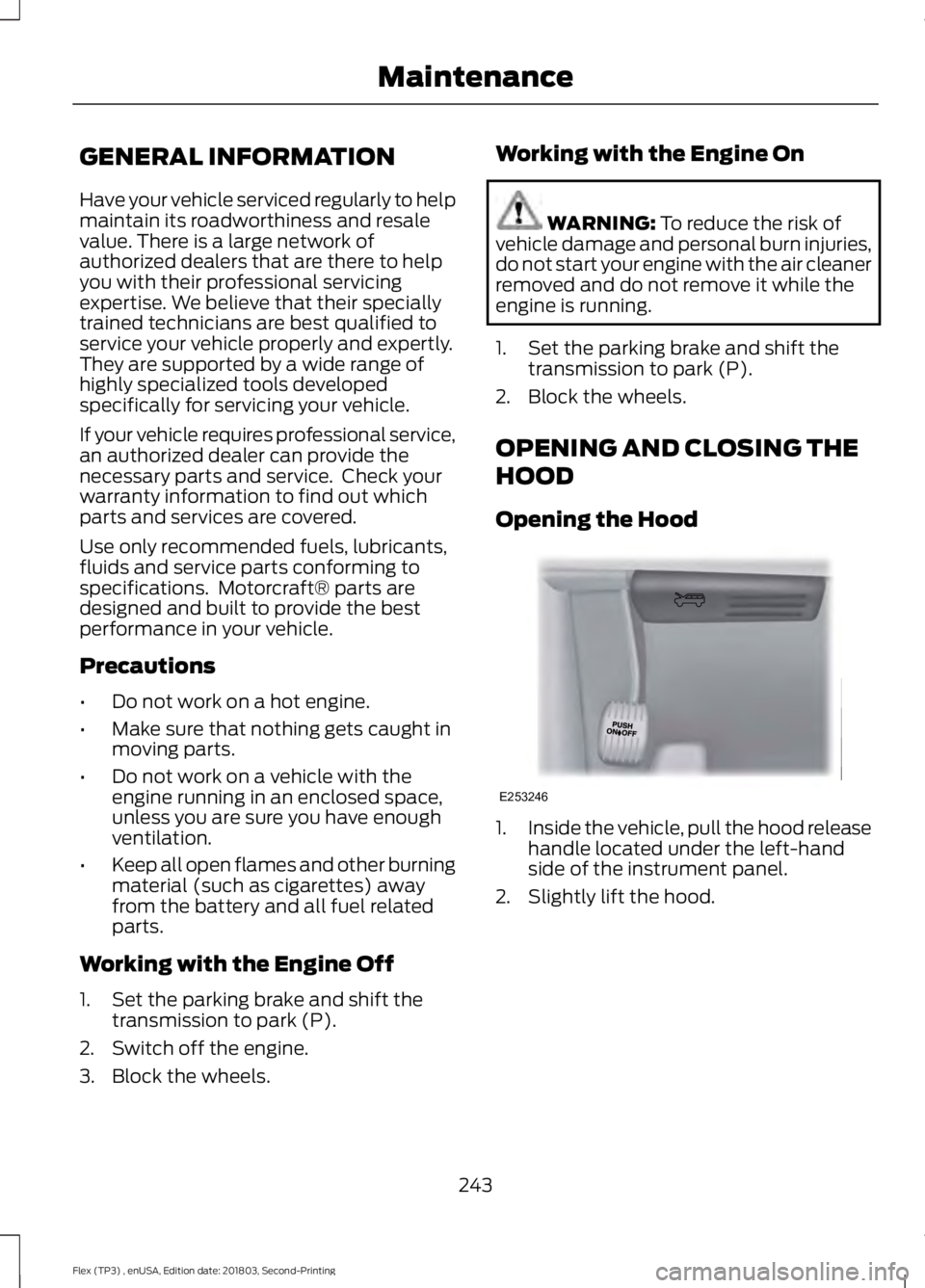
Opening the Hood 1.
Inside the vehicle, pull the hood release
handle located under the left-hand
side of the instrument panel.
2. Slightly lift the hood.
243
Flex (TP3) , enUSA, Edition date: 201803, Second-Printing MaintenanceE253246
Page 273 of 513
REPAIRING MINOR PAINT
DAMAGE
Authorized dealers have touch-up paint to
match your vehicle
’s color. Your vehicle
color code is printed on a sticker on the
front, left-hand side door jamb. Take your
color code to your authorized dealer to
make sure you get the correct color.
Before repairing minor paint damage, use
a cleaner such as Motorcraft Bug and Tar
Remover to remove particles such as bird
droppings, tree sap, insect deposits, tar
spots, road salt and industrial fallout.
Always read the instructions before using
cleaning products.
CLEANING THE WHEELS (If
Equipped)
1. Regularly clean them with a wheel cleaner. We recommend that you use
Ford approved wheel cleaner if
available.
2. Remove dirt and brake dust with a sponge.
3. Remove tar and grease with a bug and
tar remover. We recommend that you
use Ford approved bug and tar remover
if available.
4. Thoroughly rinse the wheels with water
after cleaning.
If you intend on parking your vehicle for an
extended period after cleaning the wheels
with a wheel cleaner, drive your vehicle for
a few minutes before doing so. This
reduces the risk of corrosion of the brake
discs, brake pads and linings.
Do not clean the wheels when they are hot.
Note: Some car washes could damage
wheel rims and covers. Note:
Using non-recommended cleaners,
harsh cleaning products, chrome wheel
cleaners or abrasive materials could
damage wheel rims and covers.
VEHICLE STORAGE
If you plan on storing your vehicle for 30
days or more, read the following
maintenance recommendations to make
sure your vehicle stays in good operating
condition.
We engineer and test all motor vehicles
and their components for reliable, regular
driving. Under various conditions,
long-term storage may lead to degraded
engine performance or failure unless you
use specific precautions to preserve engine
components.
General
• Store all vehicles in a dry, ventilated
place.
• Protect from sunlight, if possible.
• If vehicles are stored outside, they
require regular maintenance to protect
against rust and damage.
Body
• Wash your vehicle thoroughly to
remove dirt, grease, oil, tar or mud from
exterior surfaces, rear-wheel housing
and the underside of front fenders.
• Periodically wash your vehicle if it is
stored in exposed locations.
• Touch-up exposed or primed metal to
prevent rust.
• Cover chrome and stainless steel parts
with a thick coat of auto wax to prevent
discoloration. Re-wax as necessary
when you wash your vehicle.
• Lubricate all hood, door and luggage
compartment hinges and latches with
a light grade oil.
270
Flex (TP3) , enUSA, Edition date: 201803, Second-Printing Vehicle Care
Page 296 of 513
How Temperature Affects Your Tire
Pressure
The tire pressure monitoring system
monitors tire pressure in each pneumatic
tire. While driving in a normal manner, a
typical passenger tire inflation pressure
may increase about 2
–4 psi (14– 28 kPa)
from a cold start situation. If the vehicle is
stationary overnight with the outside
temperature significantly lower than the
daytime temperature, the tire pressure may
decrease about 3 psi (21 kPa) for a drop of
30°F (17°C) in ambient temperature. This
lower pressure value may be detected by
the tire pressure monitoring system as
being significantly lower than the
recommended inflation pressure and
activate the system warning light for low
tire pressure. If the low tire pressure
warning light is on, visually check each tire
to verify that no tire is flat. If one or more
tires are flat, repair as necessary. Check
the air pressure in the road tires. If any tire
is under-inflated, carefully drive the vehicle
to the nearest location where air can be
added to the tires. Inflate all the tires to
the recommended inflation pressure.
CHANGING A ROAD WHEEL WARNING:
The use of tire sealant
may damage your tire pressure monitoring
system and should only be used in
roadside emergencies. If you must use a
sealant, the Ford Tire Mobility Kit sealant
should be used. The tire pressure
monitoring system sensor and valve stem
on the wheel must be replaced by an
authorized dealer after use of the sealant. WARNING:
See
Tire Pressure
Monitoring System (page 289). If the tire
pressure monitor sensor becomes
damaged, it will no longer function. Note:
The tire pressure monitoring system
indicator light will illuminate when the spare
tire is in use. To restore the full function of
the monitoring system, all road wheels
equipped with tire pressure monitoring
sensors must be mounted on the vehicle.
If you get a flat tire while driving, do not
apply the brake heavily. Instead, gradually
decrease your speed. Hold the steering
wheel firmly and slowly move to a safe
place on the side of the road.
Have a flat serviced by an authorized
dealer in order to prevent damage to the
tire pressure monitoring system sensors.
See
Tire Pressure Monitoring System
(page 289). Replace the spare tire with a
road tire as soon as possible. During
repairing or replacing of the flat tire, have
the authorized dealer inspect the tire
pressure monitoring system sensor for
damage.
Dissimilar Spare Wheel and Tire
Assembly Information WARNING:
Failure to follow these
guidelines could result in an increased risk
of loss of vehicle control, injury or death.
If you have a dissimilar spare wheel and
tire, then it is intended for temporary use
only. This means that if you need to use it,
you should replace it as soon as possible
with a road wheel and tire assembly that
is the same size and type as the road tires
and wheels that were originally provided
by Ford. If the dissimilar spare tire or wheel
is damaged, it should be replaced rather
than repaired.
A dissimilar spare wheel and tire assembly
is defined as a spare wheel and tire
assembly that is different in brand, size or
appearance from the road tires and wheels
and can be one of three types:
293
Flex (TP3) , enUSA, Edition date: 201803, Second-Printing Wheels and Tires
Page 447 of 513
Check Every Month
Engine oil level.
Function of all interior and exterior lights.
Tires (including spare) for wear and proper pressure. Windshield washer fluid level.
Fuel and water separator. Drain if necessary (or if indicated by the information display). Holes and slots in the tail pipe to make sure they are functional and clear of debris. Check Every Six Months
Battery connections. Clean if necessary.
Body and door drain holes for obstructions. Clean if necessary. Cooling system fluid level and coolant strength.
Door weatherstrips for wear. Lubricate if necessary.
Hinges, latches and outside locks for proper operation. Lubricate if necessary. Parking brake for proper operation.
Safety belts and seat latches for wear and function.
Safety warning lamps (brake, ABS, airbag and safety belt) for operation.
Washer spray and wiper operation. Clean or replace blades as necessary.
Multi-Point Inspection
In order to keep your vehicle running right,
it is important to have the systems on your
vehicle checked regularly. This can help
identify potential issues and prevent major
problems. We recommend having the
following multi-point inspection performed
at every scheduled maintenance interval
to help make sure your vehicle keeps
running great.
444
Flex (TP3) , enUSA, Edition date: 201803, Second-Printing Scheduled Maintenance
Page 502 of 513
A
A/C
See: Climate Control........................................... 112
About This Manual...........................................7
ABS See: Brakes............................................................ 173
ABS driving hints See: Hints on Driving With Anti-Lock
Brakes................................................................. 174
Accessories....................................................438 Exterior Style....................................................... 438
Interior Style........................................................ 438
Lifestyle................................................................. 438
Peace of Mind..................................................... 438
Accessories See: Replacement Parts
Recommendation............................................ 12
ACC See: Using Adaptive Cruise Control............188
Active Park Assist.........................................179 Automatic Steering into Parking
Space.................................................................. 181
Deactivating the Park Assist Feature..........182
Troubleshooting the System.......................... 182
Using Active Park Assist.................................. 180
Adjusting the Headlamps
........................259
Horizontal Aim Adjustment.......................... 260
Vertical Aim......................................................... 259
Adjusting the Pedals......................................77
Adjusting the Steering Wheel - Vehicles With: Manual Adjustable Steering
Column............................................................74
Adjusting the Steering Wheel - Vehicles With: Power Adjustable Steering
Column............................................................73
End of Travel Position......................................... 73
Memory Feature.................................................... 73
Airbag Disposal................................................51
Air Conditioning See: Climate Control........................................... 112
Air Filter See: Changing the Engine Air Filter.............263
Alarm See: Anti-Theft Alarm......................................... 72
All-Wheel Drive.............................................166
Ambient Lighting...........................................84 Adjusting the Brightness................................... 84Changing the Color.............................................
84
Switching Ambient Lighting Off..................... 84
Switching Ambient Lighting On..................... 84
Anti-Theft Alarm
.............................................72
Arming the Alarm................................................. 72
Disarming the Alarm............................................ 72
Appendices...................................................460
Apps.................................................................408 ........................................................................\
......... 408
SiriusXM Traffic and Travel Link................... 410
At a Glance........................................................15
Audible Warnings and Indicators
.............94
Headlamps On Warning Chime..................... 94
Key in Ignition Warning Chime........................ 94
Keyless Warning Alert........................................ 94
Parking Brake On Warning Chime.................94
Audio Control
...................................................74
Seek, Next or Previous........................................ 74
Audio System
.................................................315
General Information.......................................... 315
Audio Unit - Vehicles With: AM/FM/CD/ SYNC/Satellite Radio
..............................316
Accessing the Auxiliary Media
Sources.............................................................. 316
Accessing the Clock Settings......................... 316
Accessing the Menu........................................... 317
Accessing the Phone Features....................... 317
Accessing the Sound Settings....................... 317
Adjusting the Volume........................................ 317
Changing Radio Stations.................................. 317
Ejecting the CD..................................................... 317
Listening to a CD................................................. 317
Listening to Satellite Radio............................. 317
Listening to the Radio........................................ 317
Menu Structure................................................... 318
Muting the Audio................................................ 318
Playing or Pausing Media................................ 318
Switching the Audio Unit On and Off.........318
Using Seek, Fast Forward and Reverse.............................................................. 318
Using the Display Control................................ 318
Using the Number Block.................................. 318
Audio Unit - Vehicles With: Premium AM/FM/CD...................................................321
Adjusting the Volume........................................ 321
Changing Radio Stations................................. 321
Ejecting the CD.................................................... 321
Inserting a CD....................................................... 321
499
Flex (TP3) , enUSA, Edition date: 201803, Second-Printing Index
Page 504 of 513
Capacities and Specifications - 3.5L
Duratec.........................................................305
Alternative Engine Oil for Extremely Cold Climates........................................................... 308
Specifications..................................................... 306
Capacities and Specifications - 3.5L Ecoboost™.................................................309
Alternative Engine Oil for Extremely Cold Climates............................................................ 312
Specifications...................................................... 310
Capacities and Specifications................299
Cargo Nets.....................................................202
Car Wash See: Cleaning the Exterior.............................. 265
Catalytic Converter
......................................159
On-Board Diagnostics (OBD-II)................... 160
Readiness for Inspection and Maintenance (I/M) Testing................................................... 160
Center Console
..............................................143
Console Refrigerator and Freezer.................143
Second Row Center Console.......................... 143
Changing a Bulb..........................................260 Brake and Rear Lamps, Rear Direction
Indicator and Reversing Lamp.................262
Front Direction Indicator and Front Parking Lamp.................................................................. 261
Front Fog Lamp.................................................. 262
Headlamp.............................................................. 261
Headlamp Low Beam and Headlamp High Beam.................................................................. 261
LED Lamps........................................................... 263
License Plate Lamp.......................................... 263
Changing a Fuse............................................241 Fuses....................................................................... 241
Changing a Road Wheel
...........................293
Dissimilar Spare Wheel and Tire Assembly
Information..................................................... 293
Tire Change Procedure.................................... 294
Changing the 12V Battery.........................256
Changing the Engine Air Filter................263
Changing the Wiper Blades
.....................258
Front Wiper Blades........................................... 258
Rear Window Wiper Blade............................. 258
Checking MyKey System Status...............59 MyKey Distance.................................................... 59
Number of Admin Keys...................................... 59
Number of MyKeys.............................................. 59
Checking the Wiper Blades......................257 Child Restraint and Seatbelt
Maintenance..................................................41
Child Restraint Positioning
.........................30
Child Safety........................................................17
General Information............................................. 17
Child Safety Locks..........................................32 Left-Hand Side...................................................... 33
Right-Hand Side................................................... 33
Cleaning Leather Seats
.............................269
Cleaning Products.......................................265 Materials............................................................... 265
Cleaning the Engine....................................267
Cleaning the Exterior..................................265 Cleaning the Headlamps................................ 266
Exterior Chrome Parts..................................... 266
Exterior Plastic Parts........................................ 266
Stripes or Graphics........................................... 266
Underbody........................................................... 266
Under Hood......................................................... 266
Cleaning the Instrument Panel and Instrument Cluster Lens........................268
Cleaning the Interior...................................268 Mirrors.................................................................... 268
Cleaning the Wheels
..................................270
Cleaning the Windows and Wiper Blades............................................................267
Clearing All MyKeys
.......................................58
Climate............................................................392
Climate Control
..............................................112
Climate Controlled Seats..........................135
Cooled Seats........................................................ 135
Heated Seats........................................................ 135
Collision Warning System.........................199 PRINCIPLE OF OPERATION........................... 199
Coolant Check See: Engine Coolant Check............................ 249
Crash Sensors and Airbag Indicator
.......50
Creating a MyKey...........................................58
Programming and Changing Configurable
Settings............................................................... 58
Cross Traffic Alert.........................................196 False Alerts........................................................... 198
Switching the System Off and On...............198
System Errors....................................................... 198
System Lights, Messages and Audible Alerts................................................................... 197
System Limitations............................................ 198
Using the System............................................... 196
501
Flex (TP3) , enUSA, Edition date: 201803, Second-Printing Index
Page 507 of 513
Hints on Driving With Anti-Lock
Brakes.............................................................174
Home Screen.................................................374
Hood Lock See: Opening and Closing the Hood..........243
I
Ignition Switch
...............................................145
In California (U.S. Only).............................226
Information Display Control.......................75
Information Displays.....................................95
General Information............................................ 95
Information Messages
................................103
Adaptive Cruise Control................................... 104
AdvanceTrac ™.................................................... 104
Alarm...................................................................... 104
Automatic Engine Shutdown........................ 104
AWD
........................................................................\
105
Battery and Charging System........................ 105
Blind Spot Information and Cross Traffic Alert System.................................................... 106
Brake System....................................................... 106
Collision Warning System................................ 107
Doors and Locks.................................................. 107
Fuel........................................................................\
... 107
Keys and Intelligent Access............................ 108
Maintenance........................................................ 108
MyKey..................................................................... 109
Park Aid.................................................................. 109
Power Steering..................................................... 110
Seats........................................................................\
110
Tire Pressure Monitoring System.................. 110
Towing....................................................................... 111
Traction Control..................................................... 111
Transmission.......................................................... 111
Installing Child Restraints
............................18
Child Restraints...................................................... 18
Using Lap and Shoulder Belts.......................... 19
Using Lower Anchors and Tethers for CHildren (LATCH)........................................... 24
Using Tether Straps............................................. 26
Instrument Cluster
........................................90
Instrument Lighting Dimmer.....................82
Instrument Panel Overview
.........................15
Interior Lamps.................................................83
Second Row Reading Lamps.......................... 83
Third Row Dome Lamps................................... 84Interior Mirror...................................................88
Auto-Dimming Mirror......................................... 88
Introduction.........................................................7
J
Jump Starting the Vehicle..........................221 Connecting the Jumper Cables..................... 221
Jump Starting...................................................... 222
Preparing Your Vehicle...................................... 221
Removing the Jumper Cables....................... 222
K
Keyless Entry
...................................................64
SECURICODE™ Keyless Entry
Keypad................................................................ 64
Keyless Starting............................................146 Ignition Modes..................................................... 146
Keys and Remote Controls.........................52
L
Liftgate...............................................................67
Lighting Control
..............................................80
Flashing the Headlamp High Beam...............81
Headlamp High Beam....................................... 80
Lighting
..............................................................80
General Information........................................... 80
Load Carriers See: Roof Racks and Load Carriers.............202
Load Carrying
................................................202
Load Limit.......................................................202
Special Loading Instructions for Owners of
Pick-up Trucks and Utility-type
Vehicles............................................................. 207
Vehicle Loading - with and without a Trailer................................................................. 202
Locking and Unlocking..................................61 Activating Intelligent Access............................ 62
Autolock................................................................... 63
Autounlock ............................................................ 63
Battery Saver......................................................... 64
Enabling or Disabling Autounlock.................63
Illuminated Entry.................................................. 64
Illuminated Exit..................................................... 64
Locking and Unlocking the Doors with the Key Blade............................................................. 61
504
Flex (TP3) , enUSA, Edition date: 201803, Second-Printing Index