locks FORD FOCUS 2008 2.G User Guide
[x] Cancel search | Manufacturer: FORD, Model Year: 2008, Model line: FOCUS, Model: FORD FOCUS 2008 2.GPages: 256, PDF Size: 2.13 MB
Page 70 of 256
4. Insert the new battery. Refer to the diagram inside the remote entry
transmitter for the correct orientation of the battery. Press the battery
down to ensure that the battery is fully seated in the battery housing
cavity.
5. Snap the two halves back together.
Note:Replacement of the battery willnotcause the remote transmitter
to become deprogrammed from your vehicle. The remote transmitter
should operate normally after battery replacement.
Replacing lost remote entry transmitters
If you would like to have your remote entry transmitter reprogrammed
because you lost one, or would like to buy additional remote entry
transmitters, you can either reprogram them yourself, or takeall
remote entry transmittersto your authorized dealer for
reprogramming.
How to reprogram your remote entry transmitters
You must haveall remote entry transmitters(maximum of four)
available before beginning this procedure.
Note:Ensure the brake pedal is not
depressed during this sequence.
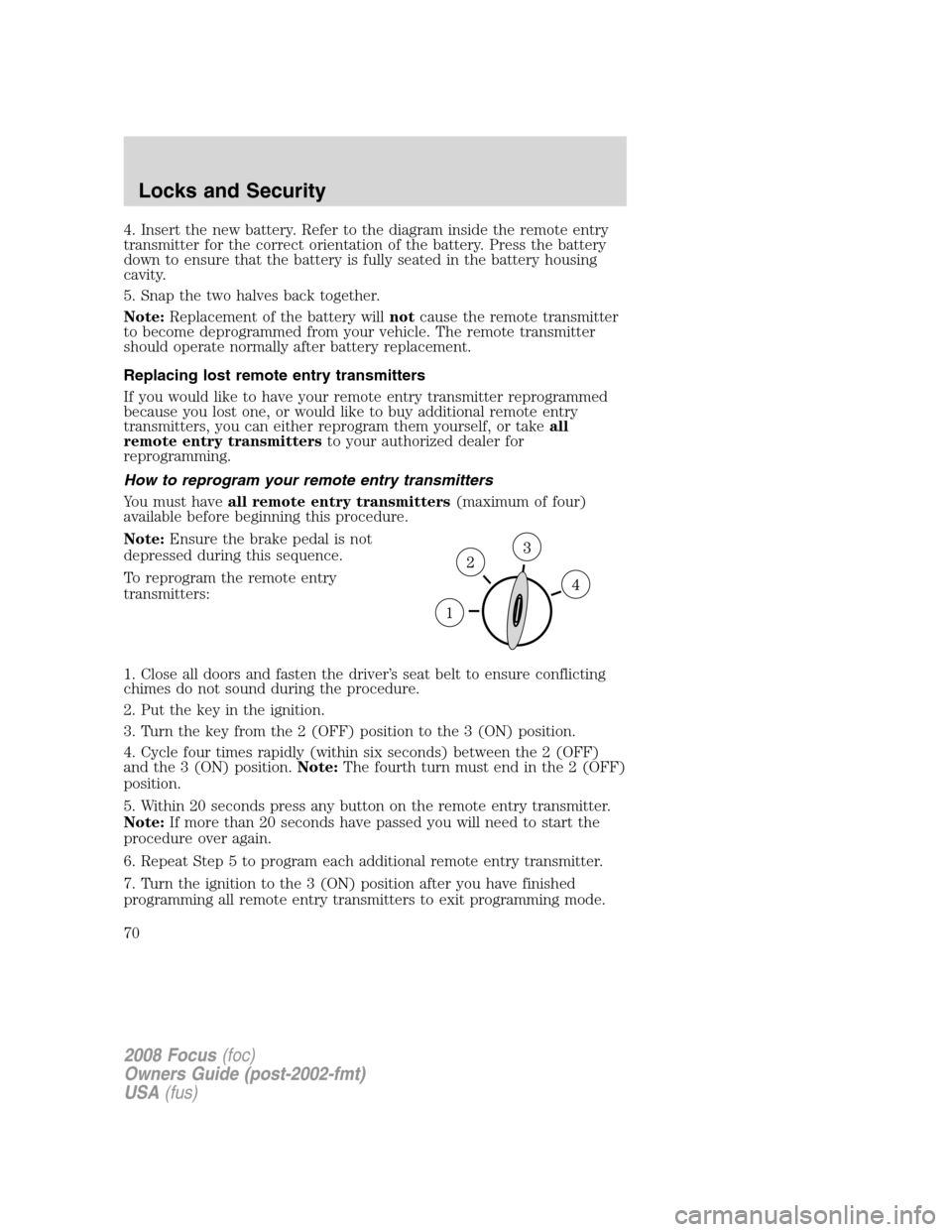
To reprogram the remote entry
transmitters:
1. Close all doors and fasten the driver’s seat belt to ensure conflicting
chimes do not sound during the procedure.
2. Put the key in the ignition.
3. Turn the key from the 2 (OFF) position to the 3 (ON) position.
4. Cycle four times rapidly (within six seconds) between the 2 (OFF)
and the 3 (ON) position.Note:The fourth turn must end in the 2 (OFF)
position.
5. Within 20 seconds press any button on the remote entry transmitter.
Note:If more than 20 seconds have passed you will need to start the
procedure over again.
6. Repeat Step 5 to program each additional remote entry transmitter.
7. Turn the ignition to the 3 (ON) position after you have finished
programming all remote entry transmitters to exit programming mode.
2008 Focus(foc)
Owners Guide (post-2002-fmt)
USA(fus)
Locks and Security
70
Page 71 of 256
SECURILOCK™ PASSIVE ANTI-THEFT SYSTEM
SecuriLock™ passive anti-theft system is an engine immobilization
system. This system is designed to help prevent the engine from being
started unless acoded key programmed to your vehicleis used. The
use of the wrong type of coded key may lead to a “no-start” condition.
Your vehicle comes with two coded keys; additional coded keys may be
purchased from your authorized dealer. The authorized dealer can
program your spare keys to your vehicle or you can program the keys
yourself. Refer toProgramming spare keysfor instructions on how to
program the coded key.
Note:The SecuriLock™ passive anti-theft system is not compatible with
non-Ford aftermarket remote start systems. Use of these systems may
result in vehicle starting problems and a loss of security protection.
Note:Large metallic objects, electronic devices that are used to
purchase gasoline or similar items, or a second coded key on the same
key chain may cause vehicle starting issues. You need to prevent these
objects from touching the coded key while starting the engine. These
objects will not cause damage to the coded key, but may cause a
momentary issue if they are too close to the key when starting the
engine. If a problem occurs, turn the ignition off, remove all objects on
the key chain away from the coded key and restart the engine.
Anti-theft indicator
The anti-theft indicator is located in the instrument cluster.
•When the ignition is in the 2 (OFF) position, the indicator will flash
once every 2 seconds to indicate the SecuriLock™ system is
functioning as a theft deterrent.Note:On vehicles equipped with a
manual transmission, the indicator will flash when the ignition is in the
1 (LOCK) position.
•When the ignition is in the 3 (ON) position, the indicator will glow for
3 seconds, then turn off, to indicate normal system functionality.
If a problem occurs with the SecuriLock™ system, the indicator will flash
rapidly or glow steadily when the ignition is in the 3 (ON) position. If
this occurs, the vehicle should be taken to an authorized dealer for
service.
2008 Focus(foc)
Owners Guide (post-2002-fmt)
USA(fus)
Locks and Security
71
Page 72 of 256
Replacement keys
If your keys are lost or stolen and you don’t have an extra coded key,
you will need to have your vehicle towed to an authorized dealer. The
key codes need to be erased from your vehicle and new coded keys will
need to be programmed.
Replacing coded keys can be very costly. Store an extra programmed key
away from the vehicle in a safe place to help prevent any
inconveniences. Please visit an authorized dealer to purchase additional
spare or replacement keys.
Programming spare keys
You can program your own coded keys to your vehicle. Please read and
understand the entire procedure before you begin.
Tips:
•A maximum of eight keys can be coded to your vehicle.
•Only use SecuriLock™ keys.
•You must have two previously programmed coded keys (keys that
already operate your vehicle’s engine) and the new unprogrammed
key(s) readily accessible.
•If two previously programmed coded keys are not available, you must
take your vehicle to your authorized dealer to have the spare key(s)
programmed.
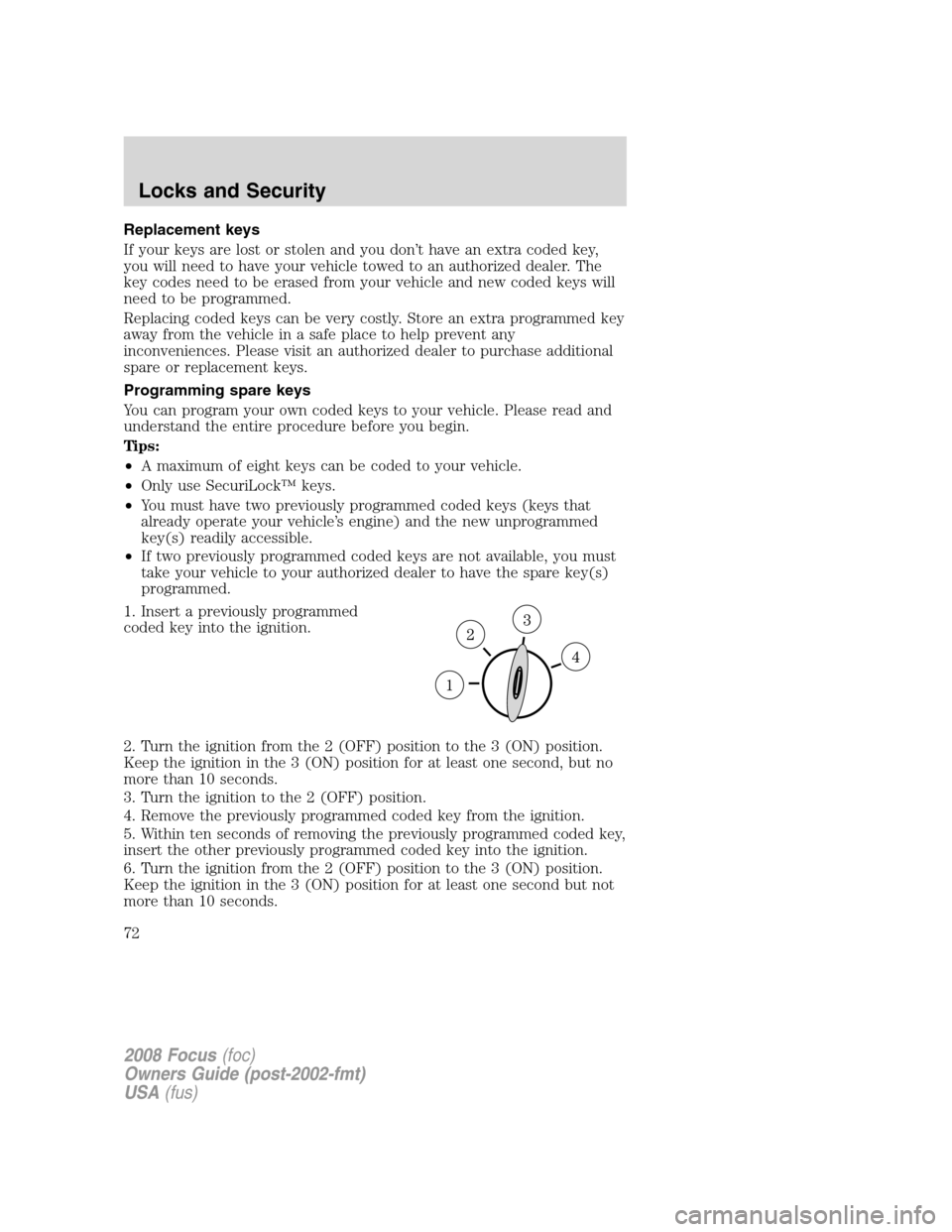
1. Insert a previously programmed
coded key into the ignition.
2. Turn the ignition from the 2 (OFF) position to the 3 (ON) position.
Keep the ignition in the 3 (ON) position for at least one second, but no
more than 10 seconds.
3. Turn the ignition to the 2 (OFF) position.
4. Remove the previously programmed coded key from the ignition.
5. Within ten seconds of removing the previously programmed coded key,
insert the other previously programmed coded key into the ignition.
6. Turn the ignition from the 2 (OFF) position to the 3 (ON) position.
Keep the ignition in the 3 (ON) position for at least one second but not
more than 10 seconds.
2008 Focus(foc)
Owners Guide (post-2002-fmt)
USA(fus)
Locks and Security
72
Page 73 of 256
7. Turn the ignition to the 2 (OFF) position.
8. Remove the previously programmed coded key from the ignition.
9. Within twenty seconds of removing the previously programmed coded
key, insert the unprogrammed key (new/valet key) into the ignition.
10. Turn the ignition from the 2 (OFF) position to the 3 (ON) position.
Keep the ignition in the 3 (ON) position for at least one second, but no
more than 10 seconds.
11. Your new, unprogrammed key is now programmed.
If the key has been successfully programmed it will start the vehicle’s
engine and the theft indicator light will illuminate for three seconds and
then go out.
If the key was not successfully programmed, it will not start your
vehicle’s engine and the theft indicator light will flash on and off, or stay
on for more than three seconds. If failure repeats, bring your vehicle to
your authorized dealer to have the new key(s) programmed.
To program additional new unprogrammed key(s), repeat this procedure
from Step 1 for each additional key.
PERIMETER ALARM SYSTEM (IF EQUIPPED)
The perimeter anti-theft system will warn you in the event of an
unauthorized entry to your vehicle.
If there is any potential perimeter anti-theft problem with your vehicle,
ensureALL remote entry transmittersare taken to the authorized
dealer to aid in troubleshooting.
Arming the system
When armed, this system will respond if unauthorized entry is
attempted. When unauthorized entry occurs, the system will flash the
park/turn lamps and will sound the horn.
The system is ready to arm whenever the key is removed from the
ignition. Either of the following actions will prearm the alarm system:
•Press the
control on the remote entry transmitter.
•Open a door and press the power door lock control to lock all the
doors, and then close the door.
2008 Focus(foc)
Owners Guide (post-2002-fmt)
USA(fus)
Locks and Security
73
Page 74 of 256
Disarming the system
You can disarm the system by any of the following actions:
•Unlock the doors by pressing the
control on your remote entry
transmitter.
•Unlock the doors with a key. Turn the key full travel (toward the front
of the vehicle) to ensure the alarm disarms.
•Turn the ignition to the 3 (ON) position with a programmed coded
ignition key.
Triggering the anti-theft system
The armed system will be triggered if any door, trunk or the hood is
opened without using the key or the remote entry transmitter.
2008 Focus(foc)
Owners Guide (post-2002-fmt)
USA(fus)
Locks and Security
74
Page 77 of 256
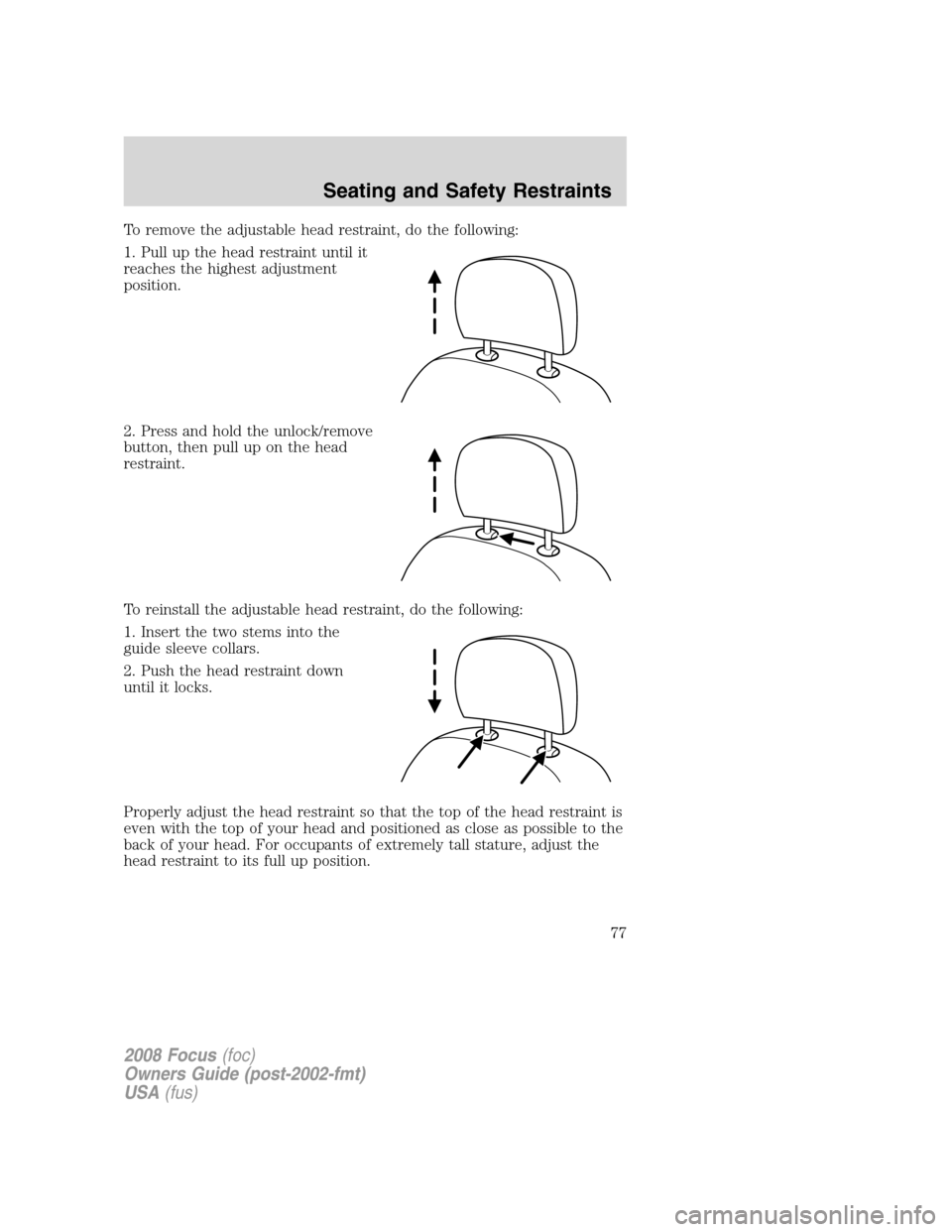
To remove the adjustable head restraint, do the following:
1. Pull up the head restraint until it
reaches the highest adjustment
position.
2. Press and hold the unlock/remove
button, then pull up on the head
restraint.
To reinstall the adjustable head restraint, do the following:
1. Insert the two stems into the
guide sleeve collars.
2. Push the head restraint down
until it locks.
Properly adjust the head restraint so that the top of the head restraint is
even with the top of your head and positioned as close as possible to the
back of your head. For occupants of extremely tall stature, adjust the
head restraint to its full up position.
2008 Focus(foc)
Owners Guide (post-2002-fmt)
USA(fus)
Seating and Safety Restraints
77
Page 81 of 256
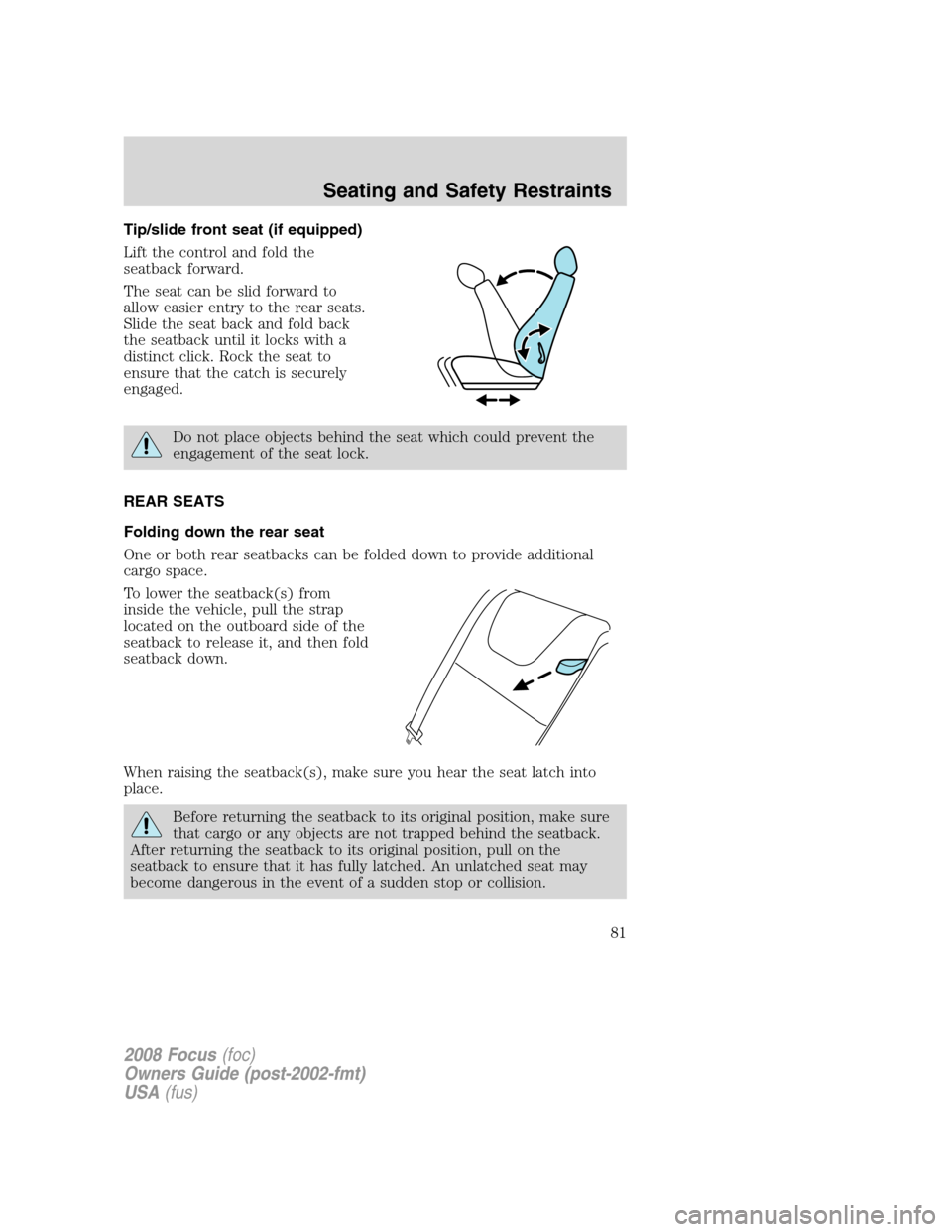
Tip/slide front seat (if equipped)
Lift the control and fold the
seatback forward.
The seat can be slid forward to
allow easier entry to the rear seats.
Slide the seat back and fold back
the seatback until it locks with a
distinct click. Rock the seat to
ensure that the catch is securely
engaged.
Do not place objects behind the seat which could prevent the
engagement of the seat lock.
REAR SEATS
Folding down the rear seat
One or both rear seatbacks can be folded down to provide additional
cargo space.
To lower the seatback(s) from
inside the vehicle, pull the strap
located on the outboard side of the
seatback to release it, and then fold
seatback down.
When raising the seatback(s), make sure you hear the seat latch into
place.
Before returning the seatback to its original position, make sure
that cargo or any objects are not trapped behind the seatback.
After returning the seatback to its original position, pull on the
seatback to ensure that it has fully latched. An unlatched seat may
become dangerous in the event of a sudden stop or collision.
2008 Focus(foc)
Owners Guide (post-2002-fmt)
USA(fus)
Seating and Safety Restraints
81
Page 89 of 256
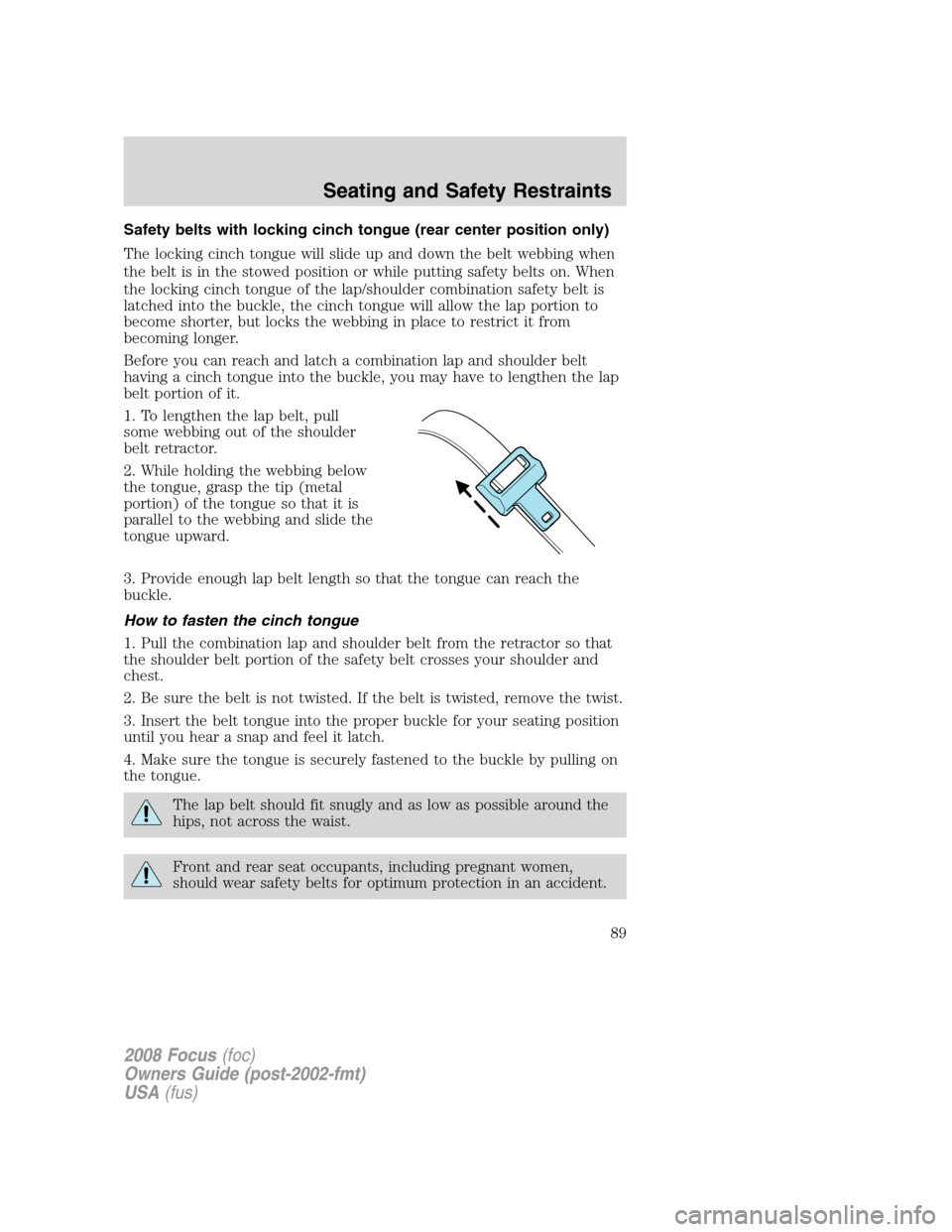
Safety belts with locking cinch tongue (rear center position only)
The locking cinch tongue will slide up and down the belt webbing when
the belt is in the stowed position or while putting safety belts on. When
the locking cinch tongue of the lap/shoulder combination safety belt is
latched into the buckle, the cinch tongue will allow the lap portion to
become shorter, but locks the webbing in place to restrict it from
becoming longer.
Before you can reach and latch a combination lap and shoulder belt
having a cinch tongue into the buckle, you may have to lengthen the lap
belt portion of it.
1. To lengthen the lap belt, pull
some webbing out of the shoulder
belt retractor.
2. While holding the webbing below
the tongue, grasp the tip (metal
portion) of the tongue so that it is
parallel to the webbing and slide the
tongue upward.
3. Provide enough lap belt length so that the tongue can reach the
buckle.
How to fasten the cinch tongue
1. Pull the combination lap and shoulder belt from the retractor so that
the shoulder belt portion of the safety belt crosses your shoulder and
chest.
2. Be sure the belt is not twisted. If the belt is twisted, remove the twist.
3. Insert the belt tongue into the proper buckle for your seating position
until you hear a snap and feel it latch.
4. Make sure the tongue is securely fastened to the buckle by pulling on
the tongue.
The lap belt should fit snugly and as low as possible around the
hips, not across the waist.
Front and rear seat occupants, including pregnant women,
should wear safety belts for optimum protection in an accident.
2008 Focus(foc)
Owners Guide (post-2002-fmt)
USA(fus)
Seating and Safety Restraints
89
Page 150 of 256
STARTING
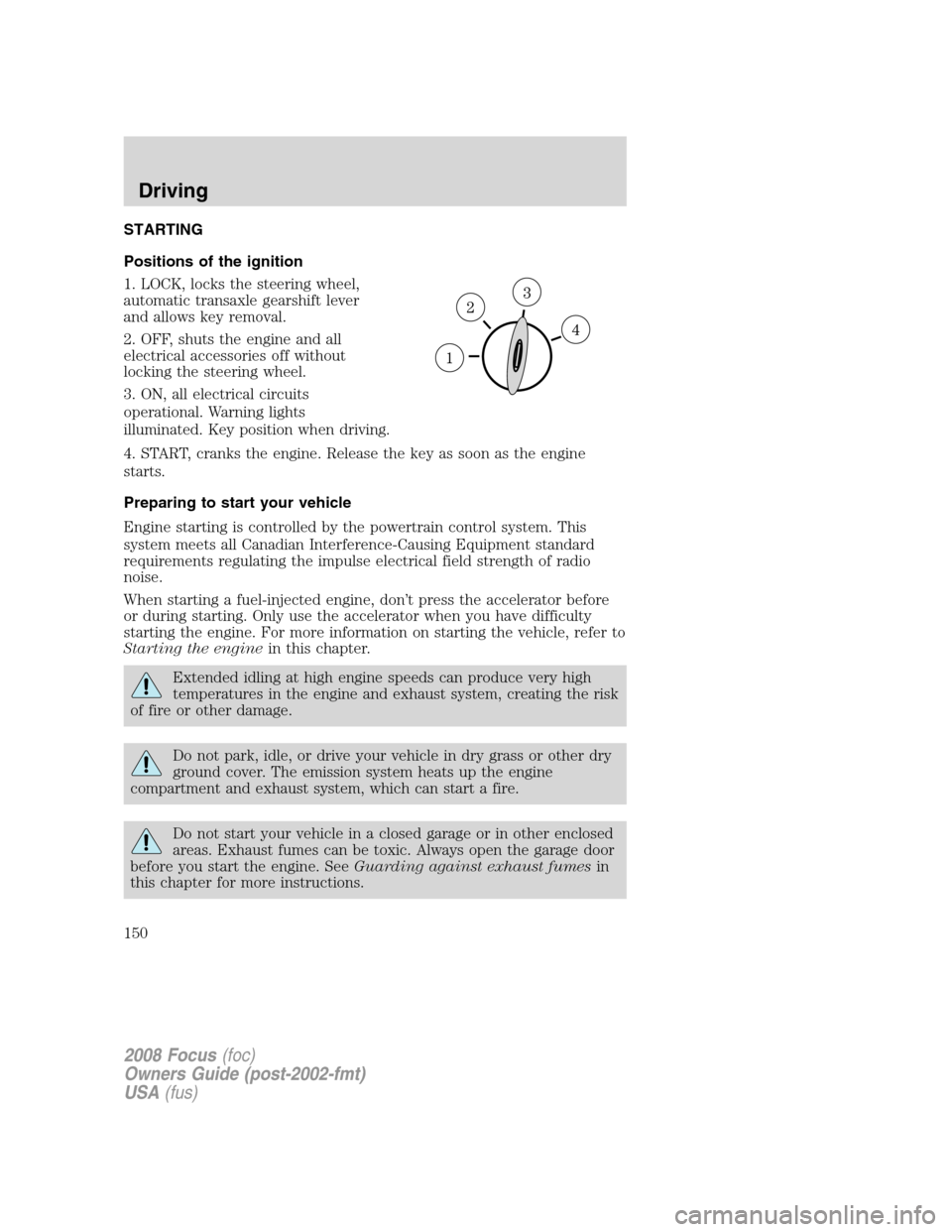
Positions of the ignition
1. LOCK, locks the steering wheel,
automatic transaxle gearshift lever
and allows key removal.
2. OFF, shuts the engine and all
electrical accessories off without
locking the steering wheel.
3. ON, all electrical circuits
operational. Warning lights
illuminated. Key position when driving.
4. START, cranks the engine. Release the key as soon as the engine
starts.
Preparing to start your vehicle
Engine starting is controlled by the powertrain control system. This
system meets all Canadian Interference-Causing Equipment standard
requirements regulating the impulse electrical field strength of radio
noise.
When starting a fuel-injected engine, don’t press the accelerator before
or during starting. Only use the accelerator when you have difficulty
starting the engine. For more information on starting the vehicle, refer to
Starting the enginein this chapter.
Extended idling at high engine speeds can produce very high
temperatures in the engine and exhaust system, creating the risk
of fire or other damage.
Do not park, idle, or drive your vehicle in dry grass or other dry
ground cover. The emission system heats up the engine
compartment and exhaust system, which can start a fire.
Do not start your vehicle in a closed garage or in other enclosed
areas. Exhaust fumes can be toxic. Always open the garage door
before you start the engine. SeeGuarding against exhaust fumesin
this chapter for more instructions.
2008 Focus(foc)
Owners Guide (post-2002-fmt)
USA(fus)
Driving
150
Page 160 of 256
Always set the parking brake fully and make sure the gearshift is
latched in P (Park). Turn the ignition to the LOCK position and
remove the key whenever you leave your vehicle.
If the parking brake is fully released, but the brake warning lamp
remains illuminated, the brakes may not be working properly.
See your authorized dealer.
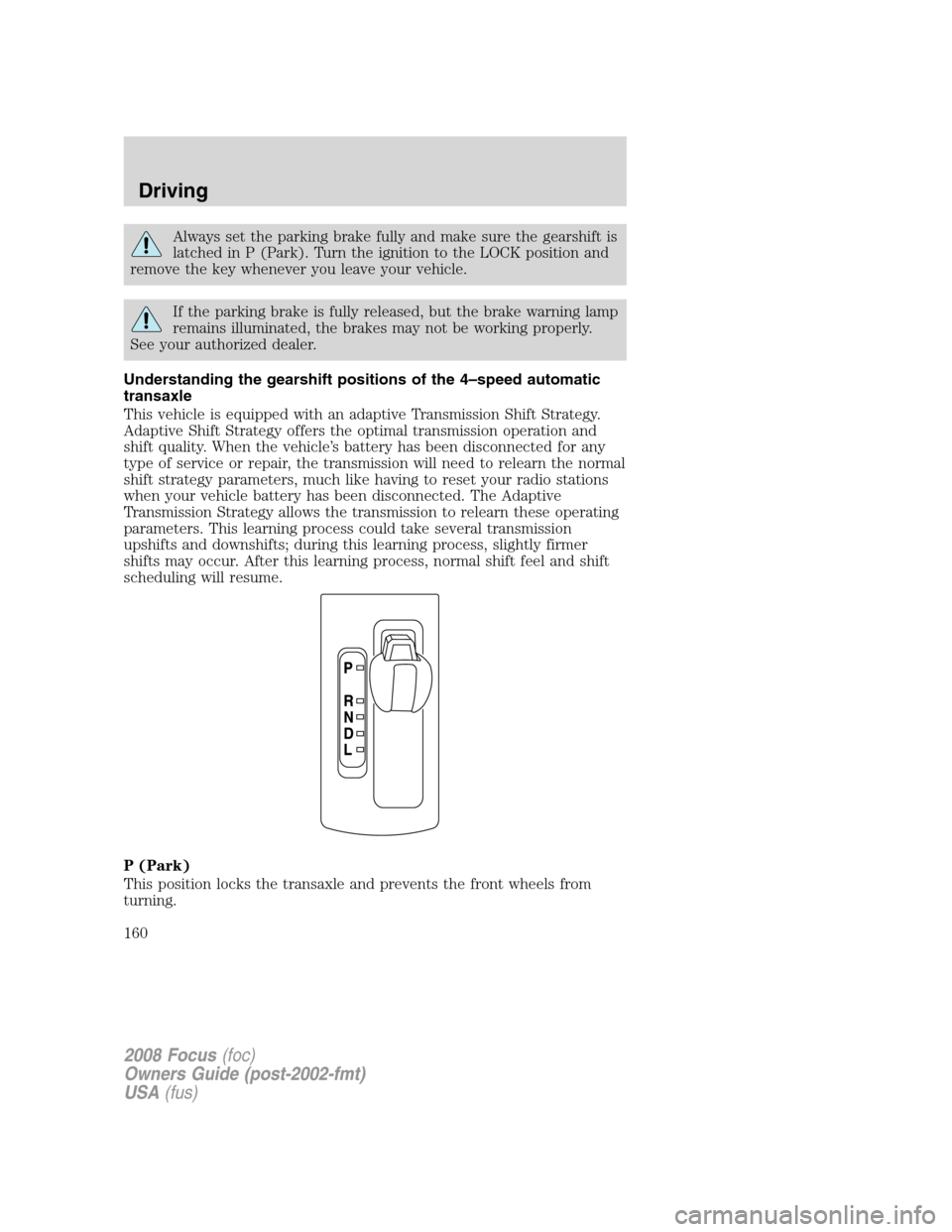
Understanding the gearshift positions of the 4–speed automatic
transaxle
This vehicle is equipped with an adaptive Transmission Shift Strategy.
Adaptive Shift Strategy offers the optimal transmission operation and
shift quality. When the vehicle’s battery has been disconnected for any
type of service or repair, the transmission will need to relearn the normal
shift strategy parameters, much like having to reset your radio stations
when your vehicle battery has been disconnected. The Adaptive
Transmission Strategy allows the transmission to relearn these operating
parameters. This learning process could take several transmission
upshifts and downshifts; during this learning process, slightly firmer
shifts may occur. After this learning process, normal shift feel and shift
scheduling will resume.
P (Park)
This position locks the transaxle and prevents the front wheels from
turning.
2008 Focus(foc)
Owners Guide (post-2002-fmt)
USA(fus)
Driving
160