warning light FORD FOCUS 2012 3.G User Guide
[x] Cancel search | Manufacturer: FORD, Model Year: 2012, Model line: FOCUS, Model: FORD FOCUS 2012 3.GPages: 406, PDF Size: 2.68 MB
Page 20 of 406
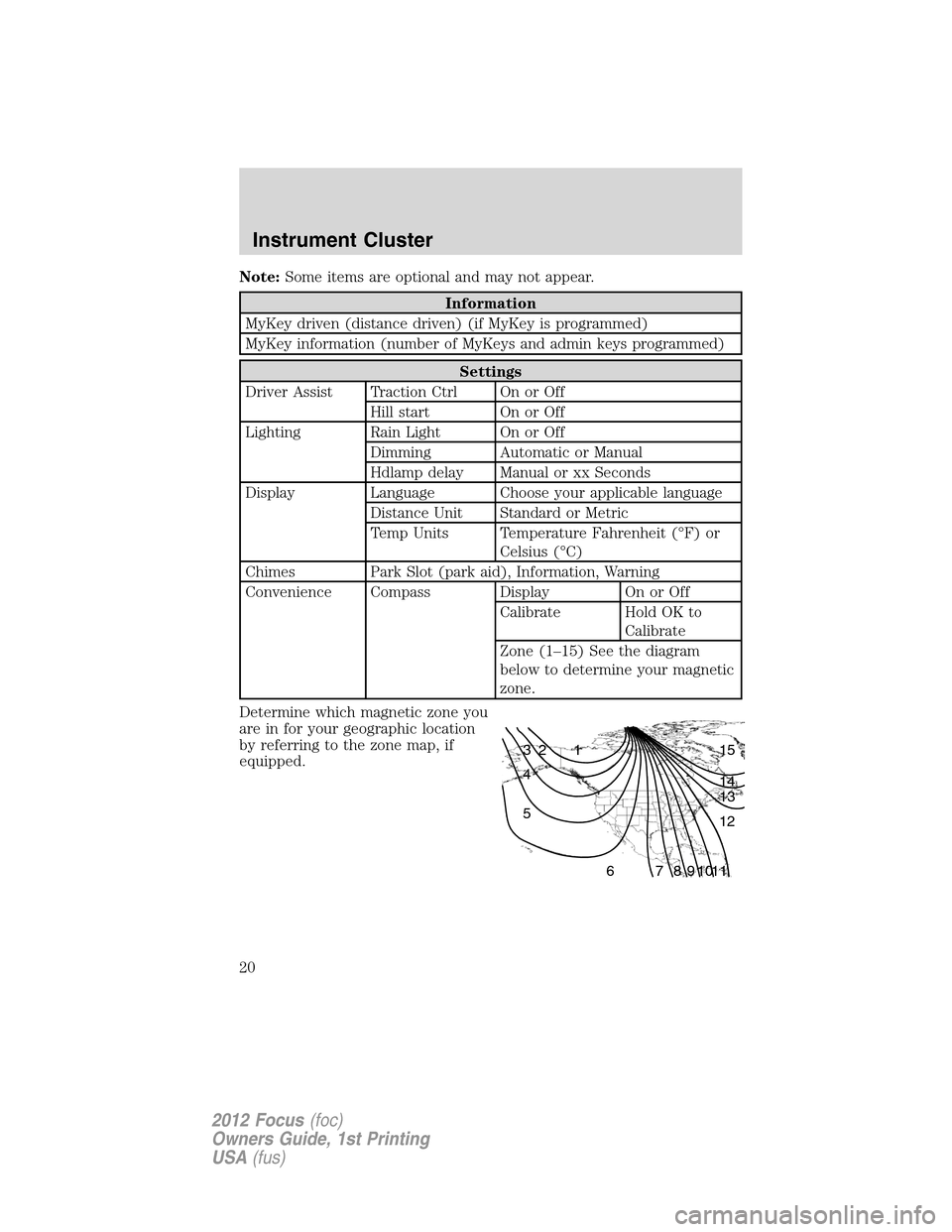
Note:Some items are optional and may not appear.
Information
MyKey driven (distance driven) (if MyKey is programmed)
MyKey information (number of MyKeys and admin keys programmed)
Settings
Driver Assist Traction Ctrl On or Off
Hill start On or Off
Lighting Rain Light On or Off
Dimming Automatic or Manual
Hdlamp delay Manual or xx Seconds
Display Language Choose your applicable language
Distance Unit Standard or Metric
Temp Units Temperature Fahrenheit (°F) or
Celsius (°C)
Chimes Park Slot (park aid), Information, Warning
Convenience Compass Display On or Off
Calibrate Hold OK to
Calibrate
Zone (1–15) See the diagram
below to determine your magnetic
zone.
Determine which magnetic zone you
are in for your geographic location
by referring to the zone map, if
equipped.
1 2 3
4
5
6 7 8 9 101112 13 14 15
Instrument Cluster
20
2012 Focus(foc)
Owners Guide, 1st Printing
USA(fus)
Page 21 of 406
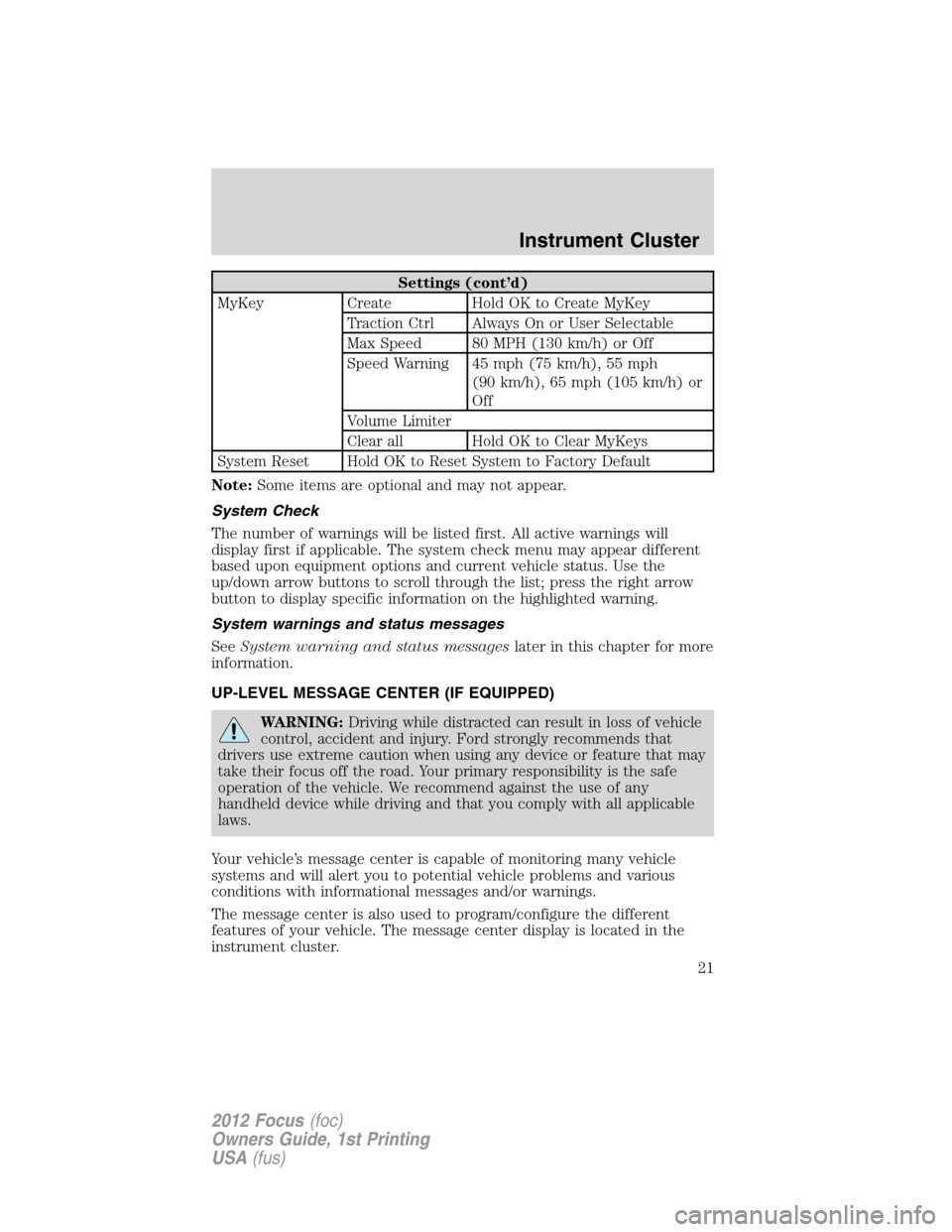
Settings (cont’d)
MyKey Create Hold OK to Create MyKey
Traction Ctrl Always On or User Selectable
Max Speed 80 MPH (130 km/h) or Off
Speed Warning 45 mph (75 km/h), 55 mph
(90 km/h), 65 mph (105 km/h) or
Off
Volume Limiter
Clear all Hold OK to Clear MyKeys
System Reset Hold OK to Reset System to Factory Default
Note:Some items are optional and may not appear.
System Check
The number of warnings will be listed first. All active warnings will
display first if applicable. The system check menu may appear different
based upon equipment options and current vehicle status. Use the
up/down arrow buttons to scroll through the list; press the right arrow
button to display specific information on the highlighted warning.
System warnings and status messages
SeeSystem warning and status messageslater in this chapter for more
information.
UP-LEVEL MESSAGE CENTER (IF EQUIPPED)
WARNING:Driving while distracted can result in loss of vehicle
control, accident and injury. Ford strongly recommends that
drivers use extreme caution when using any device or feature that may
take their focus off the road. Your primary responsibility is the safe
operation of the vehicle. We recommend against the use of any
handheld device while driving and that you comply with all applicable
laws.
Your vehicle’s message center is capable of monitoring many vehicle
systems and will alert you to potential vehicle problems and various
conditions with informational messages and/or warnings.
The message center is also used to program/configure the different
features of your vehicle. The message center display is located in the
instrument cluster.
Instrument Cluster
21
2012 Focus(foc)
Owners Guide, 1st Printing
USA(fus)
Page 24 of 406
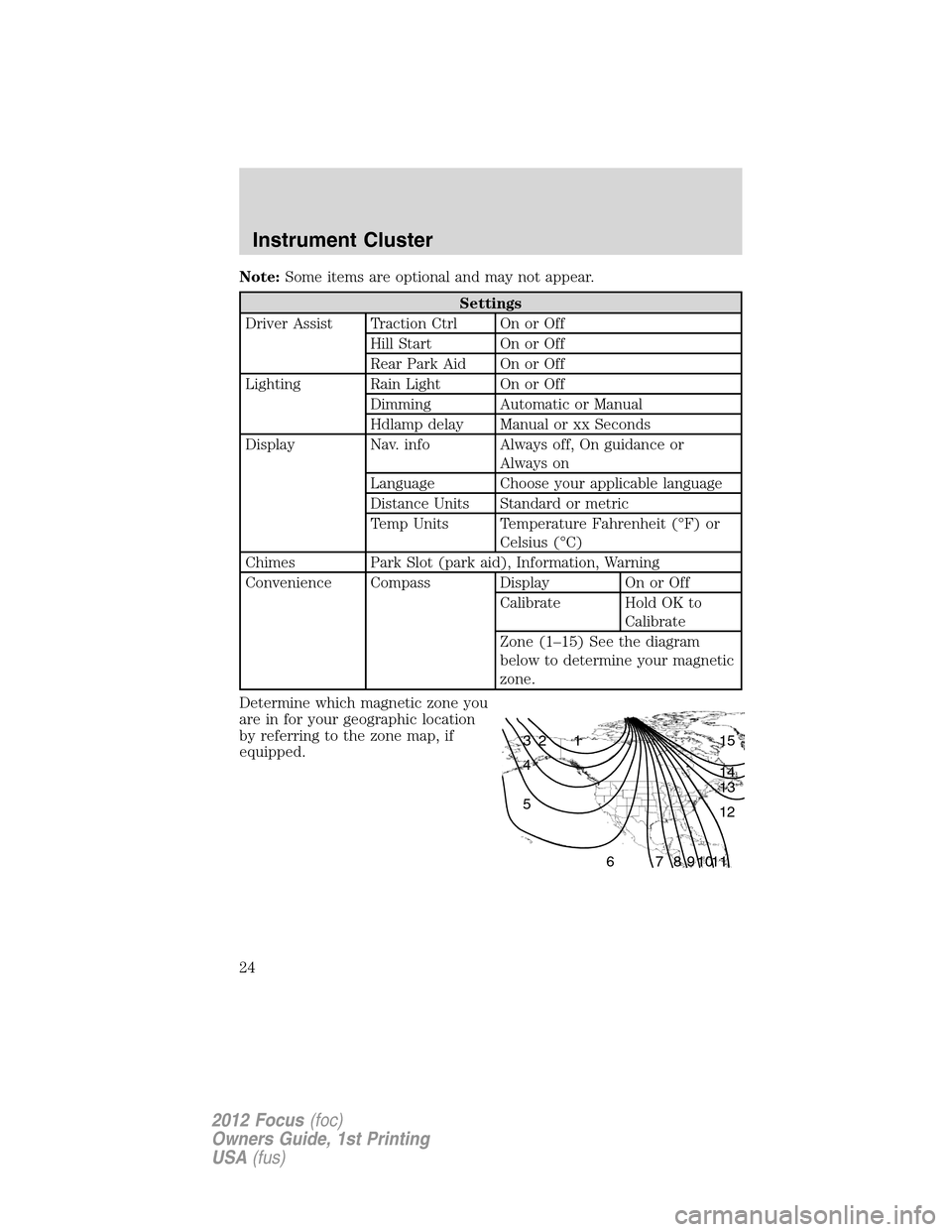
Note:Some items are optional and may not appear.
Settings
Driver Assist Traction Ctrl On or Off
Hill Start On or Off
Rear Park Aid On or Off
Lighting Rain Light On or Off
Dimming Automatic or Manual
Hdlamp delay Manual or xx Seconds
Display Nav. info Always off, On guidance or
Always on
Language Choose your applicable language
Distance Units Standard or metric
Temp Units Temperature Fahrenheit (°F) or
Celsius (°C)
Chimes Park Slot (park aid), Information, Warning
Convenience Compass Display On or Off
Calibrate Hold OK to
Calibrate
Zone (1–15) See the diagram
below to determine your magnetic
zone.
Determine which magnetic zone you
are in for your geographic location
by referring to the zone map, if
equipped.
1 2 3
4
5
6 7 8 9 101112 13 14 15
Instrument Cluster
24
2012 Focus(foc)
Owners Guide, 1st Printing
USA(fus)
Page 25 of 406
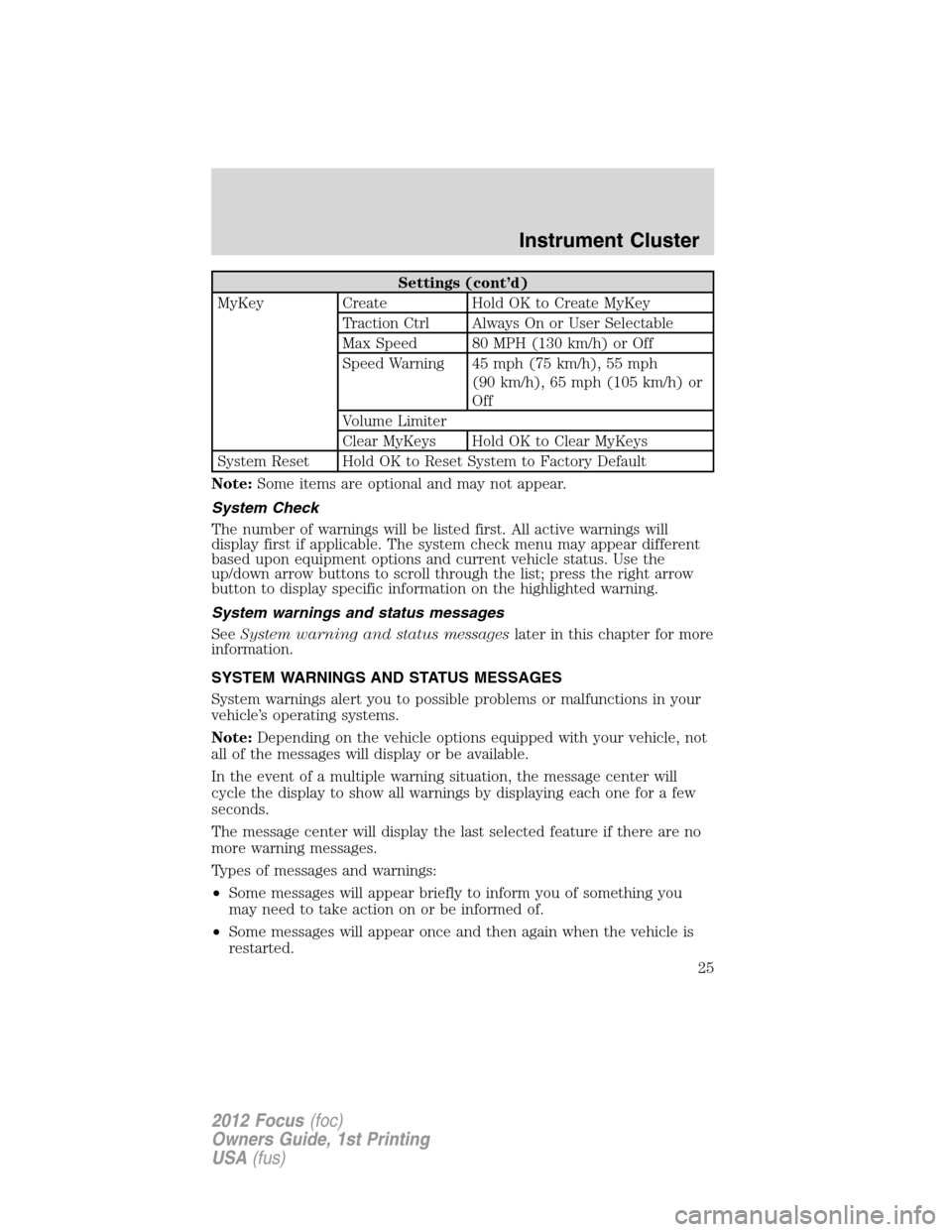
Settings (cont’d)
MyKey Create Hold OK to Create MyKey
Traction Ctrl Always On or User Selectable
Max Speed 80 MPH (130 km/h) or Off
Speed Warning 45 mph (75 km/h), 55 mph
(90 km/h), 65 mph (105 km/h) or
Off
Volume Limiter
Clear MyKeys Hold OK to Clear MyKeys
System Reset Hold OK to Reset System to Factory Default
Note:Some items are optional and may not appear.
System Check
The number of warnings will be listed first. All active warnings will
display first if applicable. The system check menu may appear different
based upon equipment options and current vehicle status. Use the
up/down arrow buttons to scroll through the list; press the right arrow
button to display specific information on the highlighted warning.
System warnings and status messages
SeeSystem warning and status messageslater in this chapter for more
information.
SYSTEM WARNINGS AND STATUS MESSAGES
System warnings alert you to possible problems or malfunctions in your
vehicle’s operating systems.
Note:Depending on the vehicle options equipped with your vehicle, not
all of the messages will display or be available.
In the event of a multiple warning situation, the message center will
cycle the display to show all warnings by displaying each one for a few
seconds.
The message center will display the last selected feature if there are no
more warning messages.
Types of messages and warnings:
•Some messages will appear briefly to inform you of something you
may need to take action on or be informed of.
•Some messages will appear once and then again when the vehicle is
restarted.
Instrument Cluster
25
2012 Focus(foc)
Owners Guide, 1st Printing
USA(fus)
Page 124 of 406
WARNING:Always remember to turn on your headlamps at
dusk or during inclement weather. The Daytime Running Lamp
(DRL) system does not activate the tail lamps and generally may not
provide adequate lighting during these conditions. Failure to activate
your headlamps under these conditions may result in a collision.
PANEL DIMMER CONTROL
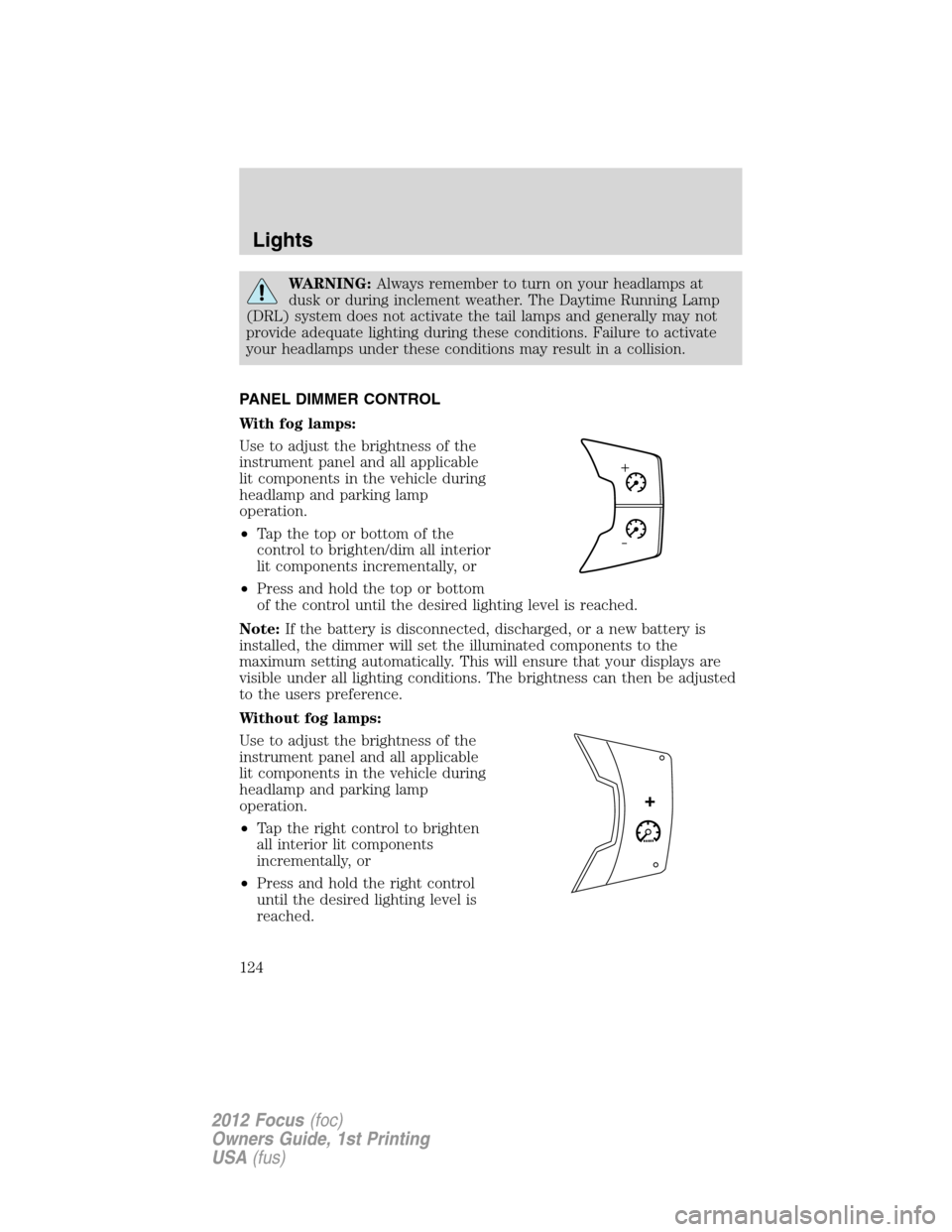
With fog lamps:
Use to adjust the brightness of the
instrument panel and all applicable
lit components in the vehicle during
headlamp and parking lamp
operation.
•Tapthetoporbottomofthe
control to brighten/dim all interior
lit components incrementally, or
•Press and hold the top or bottom
of the control until the desired lighting level is reached.
Note:If the battery is disconnected, discharged, or a new battery is
installed, the dimmer will set the illuminated components to the
maximum setting automatically. This will ensure that your displays are
visible under all lighting conditions. The brightness can then be adjusted
to the users preference.
Without fog lamps:
Use to adjust the brightness of the
instrument panel and all applicable
lit components in the vehicle during
headlamp and parking lamp
operation.
•Tap the right control to brighten
all interior lit components
incrementally, or
•Press and hold the right control
until the desired lighting level is
reached.
Lights
124
2012 Focus(foc)
Owners Guide, 1st Printing
USA(fus)
Page 131 of 406
WARNING:Handle a halogen headlamp bulb carefully and keep
out of children’s reach. Grasp the bulb by only its plastic base
and do not touch the glass. The oil from your hand could cause the
bulb to break the next time the headlamps are operated.
Note:If the bulb is accidentally touched, it should be cleaned with
rubbing alcohol before being used.
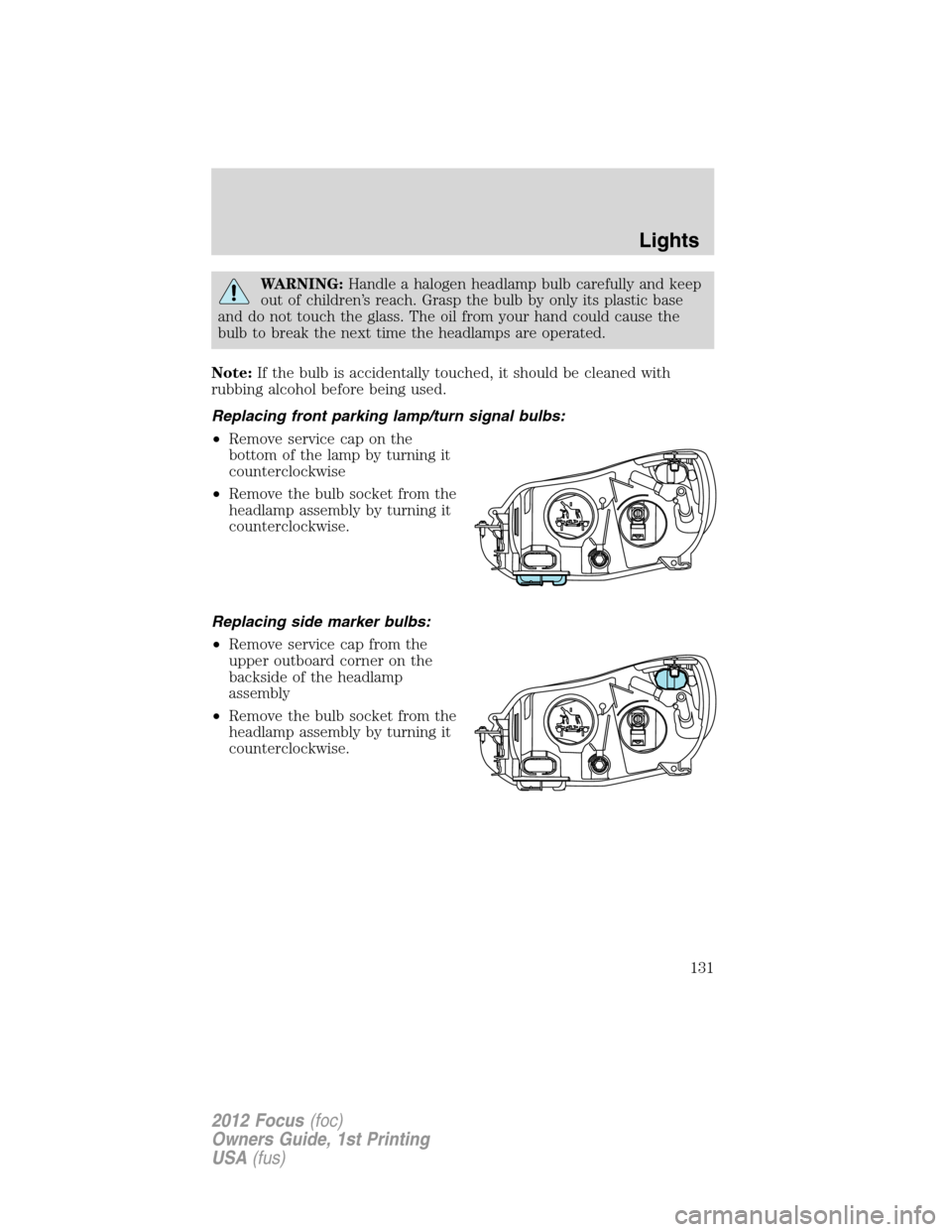
Replacing front parking lamp/turn signal bulbs:
•Remove service cap on the
bottom of the lamp by turning it
counterclockwise
•Remove the bulb socket from the
headlamp assembly by turning it
counterclockwise.
Replacing side marker bulbs:
•Remove service cap from the
upper outboard corner on the
backside of the headlamp
assembly
•Remove the bulb socket from the
headlamp assembly by turning it
counterclockwise.
Lights
131
2012 Focus(foc)
Owners Guide, 1st Printing
USA(fus)
Page 136 of 406
WARNING:Never adjust the steering wheel when the vehicle is
moving.
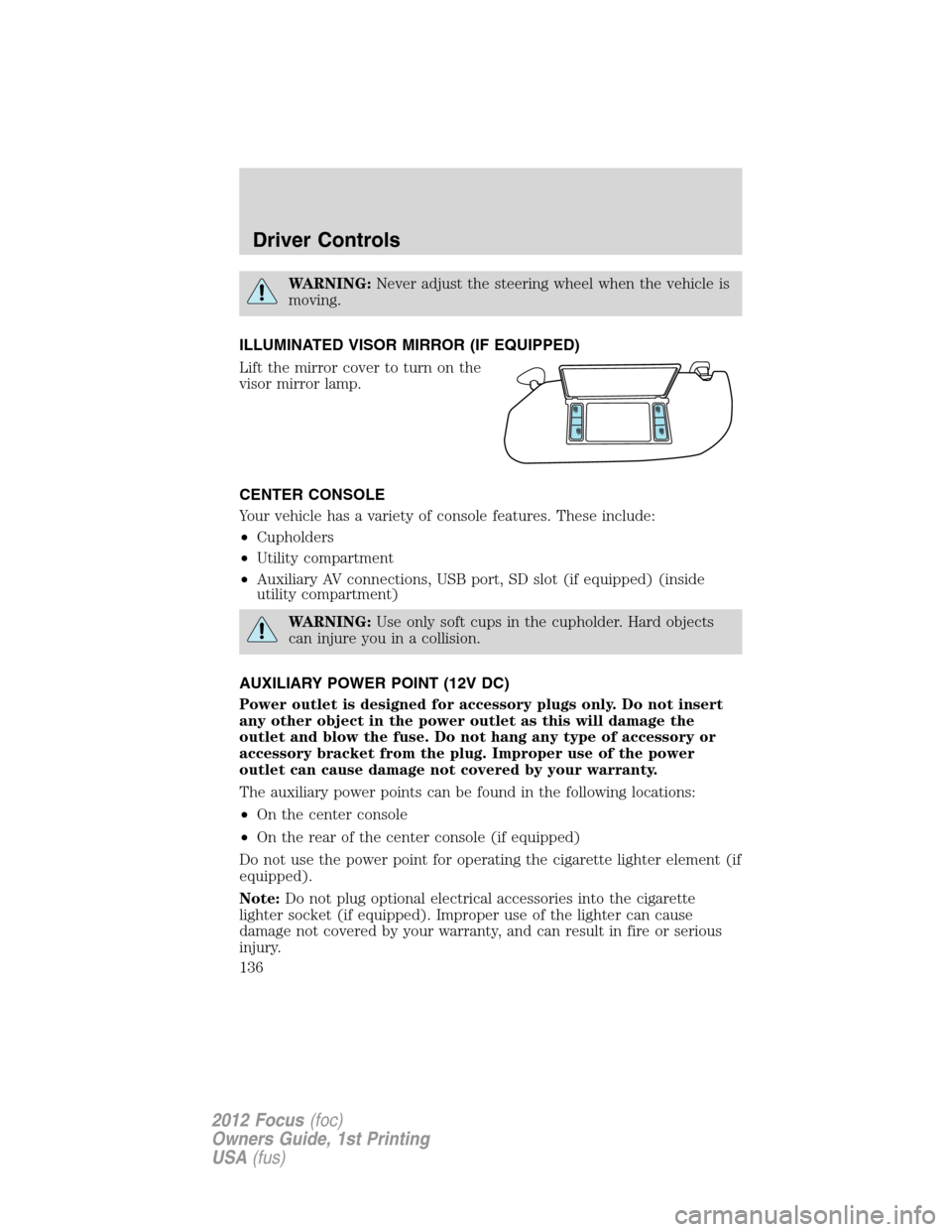
ILLUMINATED VISOR MIRROR (IF EQUIPPED)
Lift the mirror cover to turn on the
visor mirror lamp.
CENTER CONSOLE
Your vehicle has a variety of console features. These include:
•Cupholders
•Utility compartment
•Auxiliary AV connections, USB port, SD slot (if equipped) (inside
utility compartment)
WARNING:Use only soft cups in the cupholder. Hard objects
can injure you in a collision.
AUXILIARY POWER POINT (12V DC)
Power outlet is designed for accessory plugs only. Do not insert
any other object in the power outlet as this will damage the
outlet and blow the fuse. Do not hang any type of accessory or
accessory bracket from the plug. Improper use of the power
outlet can cause damage not covered by your warranty.
The auxiliary power points can be found in the following locations:
•On the center console
•On the rear of the center console (if equipped)
Do not use the power point for operating the cigarette lighter element (if
equipped).
Note:Do not plug optional electrical accessories into the cigarette
lighter socket (if equipped). Improper use of the lighter can cause
damage not covered by your warranty, and can result in fire or serious
injury.
Driver Controls
136
2012 Focus(foc)
Owners Guide, 1st Printing
USA(fus)
Page 137 of 406
To prevent the fuse from being blown, do not use the power point(s)
over the vehicle capacity of 12V DC/180W. If the power point or cigar
lighter socket is not working, a fuse may have blown. Refer toFuses and
relaysin theRoadside Emergencieschapter for information on
checking and replacing fuses.
To have full capacity usage of your power point, the engine is required to
be running to avoid unintentional discharge of the battery. To prevent
the battery from being discharged:
•do not use the power point longer than necessary when the engine is
not running,
•do not leave battery chargers, video game adapters, computers and
other devices plugged in overnight or when the vehicle is parked for
extended periods.
Always keep the power point caps closed when not being used.
POWER WINDOWS
WARNING:Do not leave children unattended in the vehicle and
do not let children play with the power windows. They may
seriously injure themselves.
WARNING:When closing the power windows, you should verify
they are free of obstructions and ensure that children and/or
pets are not in the proximity of the window openings.
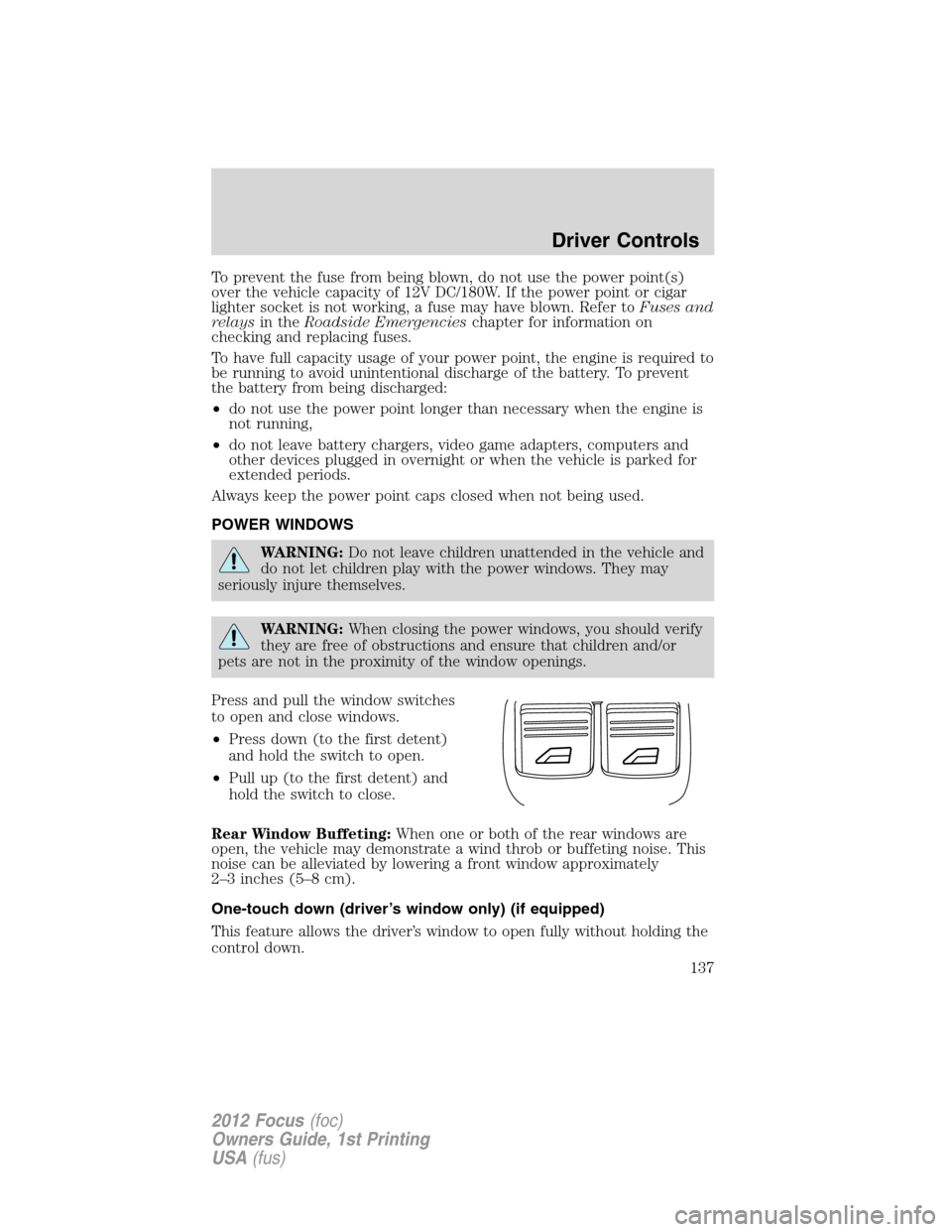
Press and pull the window switches
to open and close windows.
•Press down (to the first detent)
and hold the switch to open.
•Pull up (to the first detent) and
hold the switch to close.
Rear Window Buffeting:When one or both of the rear windows are
open, the vehicle may demonstrate a wind throb or buffeting noise. This
noise can be alleviated by lowering a front window approximately
2–3 inches (5–8 cm).
One-touch down (driver’s window only) (if equipped)
This feature allows the driver’s window to open fully without holding the
control down.
Driver Controls
137
2012 Focus(foc)
Owners Guide, 1st Printing
USA(fus)
Page 139 of 406
2. Lift the switch again for one more second.
3. Press and hold the switch until the window is fully open, then release
the switch.
4. Lift and hold the switch until the window is fully closed.
5. Open the window and try to close it automatically.
6. Reset and repeat procedure if the window does not close
automatically.
Window lock
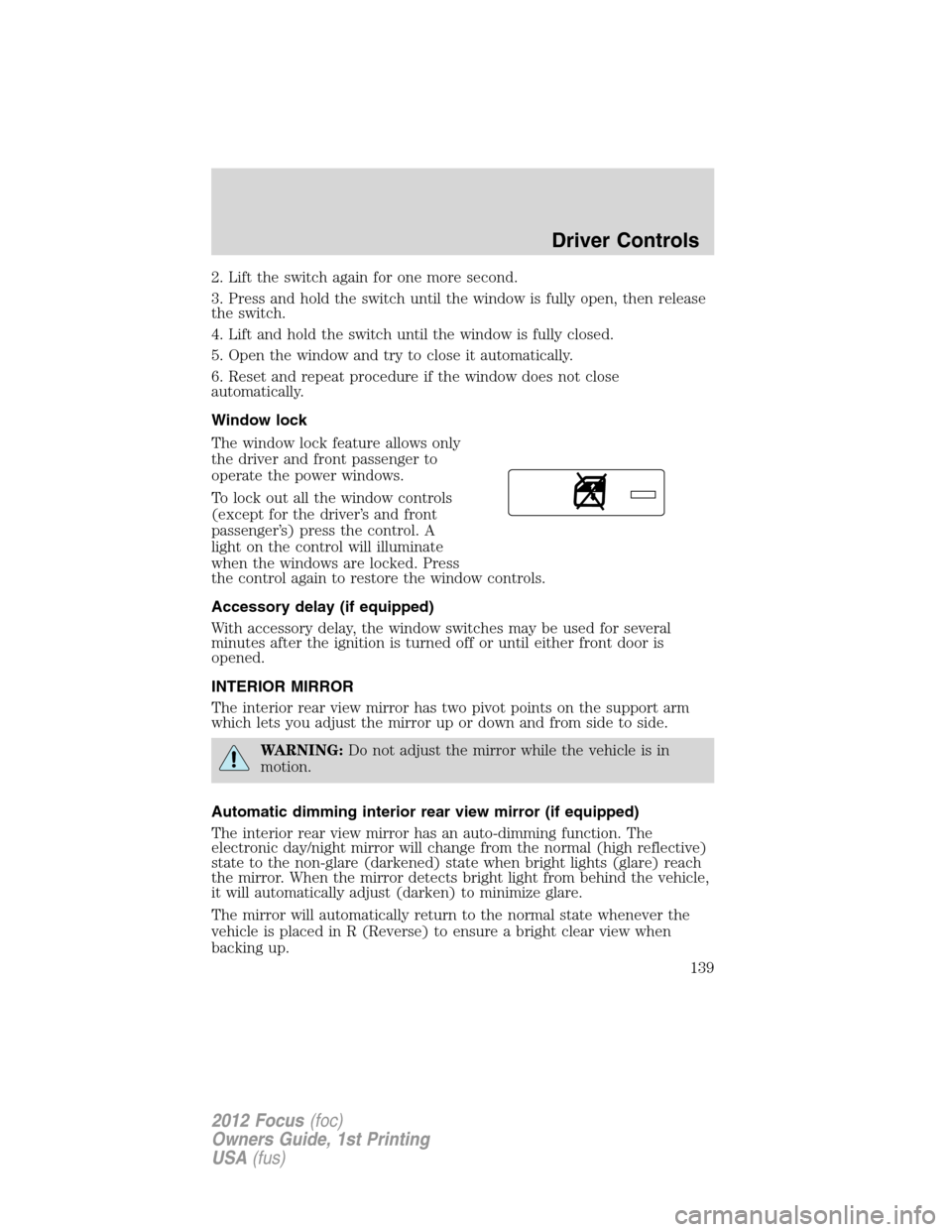
The window lock feature allows only
the driver and front passenger to
operate the power windows.
To lock out all the window controls
(except for the driver’s and front
passenger’s) press the control. A
light on the control will illuminate
when the windows are locked. Press
the control again to restore the window controls.
Accessory delay (if equipped)
With accessory delay, the window switches may be used for several
minutes after the ignition is turned off or until either front door is
opened.
INTERIOR MIRROR
The interior rear view mirror has two pivot points on the support arm
which lets you adjust the mirror up or down and from side to side.
WARNING:Do not adjust the mirror while the vehicle is in
motion.
Automatic dimming interior rear view mirror (if equipped)
The interior rear view mirror has an auto-dimming function. The
electronic day/night mirror will change from the normal (high reflective)
state to the non-glare (darkened) state when bright lights (glare) reach
the mirror. When the mirror detects bright light from behind the vehicle,
it will automatically adjust (darken) to minimize glare.
The mirror will automatically return to the normal state whenever the
vehicle is placed in R (Reverse) to ensure a bright clear view when
backing up.
Driver Controls
139
2012 Focus(foc)
Owners Guide, 1st Printing
USA(fus)
Page 140 of 406
Do not block the sensors on the front and back of the interior
rear view mirror since this may impair proper mirror
performance.
Note:A rear center passenger and/or raised rear center headrest (if
equipped) may also block the light from reaching the sensor.
Do not clean the housing or glass of any mirror with harsh
abrasives, fuel or other petroleum-based cleaning products.
EXTERIOR MIRRORS
Power side view mirrors
WARNING:Do not adjust the mirror while the vehicle is in
motion.
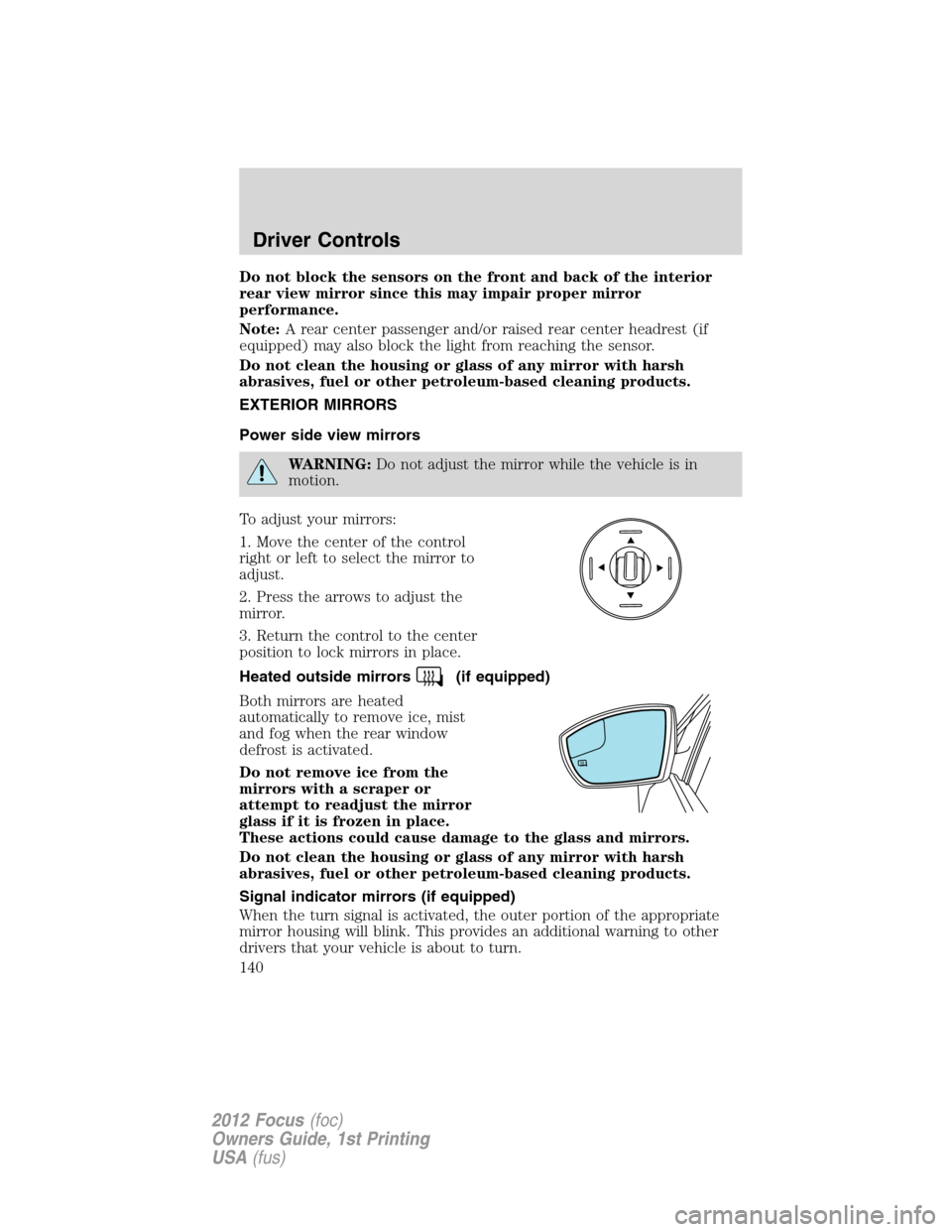
To adjust your mirrors:
1. Move the center of the control
right or left to select the mirror to
adjust.
2. Press the arrows to adjust the
mirror.
3. Return the control to the center
position to lock mirrors in place.
Heated outside mirrors
(if equipped)
Both mirrors are heated
automatically to remove ice, mist
and fog when the rear window
defrost is activated.
Do not remove ice from the
mirrors with a scraper or
attempt to readjust the mirror
glass if it is frozen in place.
These actions could cause damage to the glass and mirrors.
Do not clean the housing or glass of any mirror with harsh
abrasives, fuel or other petroleum-based cleaning products.
Signal indicator mirrors (if equipped)
When the turn signal is activated, the outer portion of the appropriate
mirror housing will blink. This provides an additional warning to other
drivers that your vehicle is about to turn.
Driver Controls
140
2012 Focus(foc)
Owners Guide, 1st Printing
USA(fus)